Over the last week or so, we’ve been promoting Firefox services on support.mozilla.org.
In this experiment, which we’re running for the next two weeks, we are promoting the free services Sync, Send and Monitor. These services fit perfectly into our mission: to help people create take control of their online lives.
- Firefox Sync allows Firefox users to instantly share preferences, bookmarks, history, passwords, open tabs and add-ons to other devices.
- Firefox Send is a free encrypted file transfer service that allows people to safely share files from any browser.
- Firefox Monitor allows you to check your email address against known data breaches across the globe. Optionally you can sign up to receive a full report of past breaches and new breach alerts.
The promotions are minimal and intended to not distract people from getting help with Firefox. So why promote anything at all on a support website when people are there to get help? People visit the support site when they have a problem, sure. But just as many are there to learn. Of the top articles that brought Firefox users to support.mozilla.org in the past month, half were about setting up Firefox and understanding its features.
This experiment is about understanding whether Firefox users on the support site can discover our connected services and find value in them. We are also monitoring whether the promotions are too distracting or interfere with the mission of support.mozilla.org. This experiment is about understanding whether Firefox users on the support site can discover our connected services and find value in them. We are also monitoring whether the promotions are too distracting or interfere with the mission of support.mozilla.org. In the meantime, if you find issues with the content please report it.
The test will run for the next two weeks and we will report back here and in our weekly SUMO meeting on the results and next steps.
https://blog.mozilla.org/sumo/2019/03/29/firefox-services-experiments-on-sumo/

This is an update on the LPCNet project, an efficient neural speech synthesizer from Mozilla’s Emerging Technologies group. In an an earlier demo from late last year, we showed how LPCNet combines signal processing and deep learning to improve the efficiency of neural speech synthesis.
This time, we turn LPCNet into a very low-bitrate neural speech codec that’s actually usable on current hardware and even on phones (as described in this paper). It’s the first time a neural vocoder is able to run in real-time using just one CPU core on a phone (as opposed to a high-end GPU)! The resulting bitrate — just 1.6 kb/s — is about 10 times less than what wideband codecs typically use. The quality is much better than existing very low bitrate vocoders. In fact, it’s comparable to that of more traditional codecs using higher bitrates.

Screenshot of a demo player that demonstrates the quality of LPCNet-coded speech
This new codec can be used to improve voice quality in countries with poor network connectivity. It can also be used as redundancy to improve robustness to packet loss for everyone. In storage applications, it can compress an hour-long podcast to just 720 kB (so you’ll still have room left on your floppy disk). With some further work, the technology behind LPCNet could help improve existing codecs at very low bitrates.
Learn more about our ongoing work and check out the playable demo in this article.
https://hacks.mozilla.org/2019/03/a-real-time-wideband-neural-vocoder-at-1-6-kb-s-using-lpcnet/
From The Reckoning, by David Halberstam:
Shaiken’s studies showed that the Japanese had made their great surge in the sixties and seventies, by which time the financial men had climbed to eminence within America’s industrial companies and had successfully subordinated the power of the manufacturing men. When the Japanese advantage in quality became obvious in the early eighties, it was fashionable among American managers to attribute it to the Japanese lead in robots, and it was true that Japanese were somewhat more robotized than the Americans. But in Shaiken’s opinion the Japanese success had come not from technology but from manufacturing skills. The Japanese had moved ahead of America when they were at a distinct disadvantage in technology. They had done it by slowly and systematically improving the process of the manufacturing in a thousand tiny increments. They had done it by being there, on the factory floor, as the Americans were not.
In that opinion Shaiken was joined by Don Lennox, the former Ford manufacturing man who had ended up at Harvester. Lennox had gone to Japan in the mid-seventies and been dazzled by what the Japanese had achieved in modernizing their factories. He was amazed not by the brilliance and originality of what they had done but by the practicality of it. Lennox’s visit had been an epiphany: He had suddenly envisioned the past twenty years in Japan, two decades of Japanese manufacturing engineers coming to work every day, busy, serious, being taken seriously by their superiors, being filled with the importance of the mission, improving the manufacturing in countless small ways. It was not that they had made one giant breakthrough, Lennox realized; they had made a thousand and one quite modest ones.
https://blog.mozilla.org/nfroyd/2019/03/28/a-thousand-and-one-quite-modest-ones/
Firefox 66 was released on March 19th with a feature called scroll anchoring.
It’s based on a new CSS specification that was first implemented by Chrome, and is now available in Firefox.
Have you ever had this experience before?
You were reading headlines, but then an ad loads and moves what you were reading off the screen.
Or how about this?!
You rotate your phone, but now you can’t find the paragraph that you were just reading.
There’s a common cause for both of these issues.
Browsers scroll by tracking the distance you are from the top of the page. As you scroll around, the browser increases or decreases your distance from the top.
But what happens if an ad loads on a page above where you are reading?
The browser keeps you at the same distance from the top of the page, but now there is more content between what you’re reading and the top. In effect, this moves the visible part of the page up away from what you’re reading (and oftentimes into the ad that’s just loaded).
Or, what if you rotate your phone to portrait mode?
Now there’s much less horizontal space on the screen, and a paragraph that was 100px tall may now be 200px tall. If the paragraph you were reading was 1000px from the top of the page before rotating, it may now be 2000px from the top of the page after rotating. If the browser is still scrolled to 1000px, you’ll be looking at content far above where you were before.
The key insight to fixing these issues is that users don’t care what distance they are from the top of the page. They care about their position relative to the content they’re looking at!
Scroll anchoring works to anchor the user to the content that they’re looking at. As this content is moved by ads, screen rotations, screen resizes, or other causes, the page now scrolls to keep you at the same relative position to it.
Demos
Let’s take a look at some examples of scroll anchoring in action.
Here’s a page with a slider that changes the height of an element at the top of the page. Scroll anchoring prevents the element above the viewport from changing what you’re looking at.
Here’s a page using CSS animations and transforms to change the height of elements on the page. Scroll anchoring keeps you looking at the same paragraph even though it’s been moved by animations.
And finally, here’s the original video of screen rotation with scroll anchoring disabled, in contrast to the view with scroll anchoring enabled.
Notice how we jump to an unrelated section when scroll anchoring is disabled?
How it works
Scroll anchoring works by first selecting an element of the DOM to be the anchor node and then attempting to keep that node in the same relative position on the screen.
To choose an anchor node, scroll anchoring uses the anchor selection algorithm. The algorithm attempts to pick content that is small and near the top of the page. The exact steps are slightly complicated, but roughly it works by iterating over the elements in the DOM and choosing the first one that is visible on the screen.
When a new element is added to the page, or the screen is rotated/resized, the page’s layout needs to be recalculated. During this process, we check to see if the anchor node has been moved to a new location. If so, we scroll to keep the page in the same relative position to the anchor node.
The end result is that changes to the layout of a page above the anchor node are not able to change the relative position of the anchor node on the screen.
Web compatibility
New features are great, but do they break websites for users?
This feature is an intervention. It breaks established behavior of the web to fix an annoyance for users.
It’s similar to how browsers worked to prevent popup-ads in the past, and the ongoing work to prevent autoplaying audio and video.
This type of workaround comes with some risk,
The 180th public curl release is a patch release: 7.64.1. There’s been 49 days since 7.64.0 shipped. The first release since our 21st birthday last week. (Full changelog.)
Numbers
the 180th release
2 changes
49 days (total: 7,677)
116 bug fixes (total: 5,029)
184 commits (total: 24,111)
0 new public libcurl functions (total: 80)
2 new curl_easy_setopt() options (total: 267)
1 new curl command line option (total: 221)
49 contributors, 25 new (total: 1,929)
25 authors, 10 new (total: 669)
0 security fixes (total: 87)
News!
This is a patch release but we still managed to introduce some fun news in this version. We ship brand new alt-svc support which we encourage keen and curious users to enable in their builds and test out. We strongly discourage anyone from using that feature in production as we reserve ourselves the right to change it before removing the EXPERIMENTAL label. As mentioned in the blog post linked above, alt-svc is the official way to bootstrap into HTTP/3 so this is a fundamental stepping stone for supporting that protocol version in a future curl.
We also introduced brand new support for the Amiga-specific TLS backend AmiSSL, which is a port of OpenSSL to that platform.
Bug-fixes

With over a hundred bug-fixes landed in this period there are a lot to choose from, but some of the most most fun and important ones from my point of view include the following.
connection check crash
This was a rather bad regression that occasionally caused crashes when libcurl would scan its connection cache for a live connection to reuse. Most likely to trigger with the Schannel backend.
connection sharing crash
The example source code that uses a shared connection cache among many threads was another crash regression. It turned out a thread could accidentally get hold of a connection already in private use by another thread…
“Expire in…” logs removed
Having the harmless but annoying text there was a mistake to begin with. It was a debug-only line that accidentally was pushed and not discovered in time. It’s history now.
curl -M manual removed
The tutorial-like manual piece that was previously included in the -M (or –manual) built-in command documentation, is no longer included. The output shown is now just the curl.1 man page. The reason for this is that the tutorial has gone a bit stale and there is now better updated and better explained documentation elsewhere. Primarily perhaps in everything curl. The online version of that document will eventually also be removed.
TLS terminology cleanups
We now refer to the Windows TLS backend as “Schannel” and the Apple macOS one as “Secure Transport” in all curl code and documentation. Those are the official names and those are the names people in general know them as. No more use of the former names that sometimes made people confused.
Shaving off bytes and mallocs
We rearranged the layout of a few structs and changed to using bitfields instead of booleans and more. This way, we managed to shrink two of the primary internal structs by 5% and 11% with no functionality change or loss.
Similarly, we removed a few mallocs, even in the common code path, so now the number of allocs for my regular test download of 4GB data over a localhost HTTP server claims fewer allocs than ever before.
Next?
We estimate that there will be a 7.65.0 release to ship 56 days from now. Then we will remove some deprecated features, perhaps add something new and quite surely fix a whole bunch of more bugs. Who know what fun we will come up with at curl up this coming weekend?
Keep reporting. Keep posting pull-requests. We love them and you!
There are a couple of major changes coming to Firefox. One is in the current Beta 67 release, while the other in the Nightly 68 release, but is covered here as an early preview for extension developers.
Respecting User Privacy
The biggest change in release 67 is Firefox now offers controls to determine which extensions run in private browsing windows. Prior to this release, all extensions ran in all windows, normal and private, which wasn’t in line with Mozilla’s commitment to user privacy. Starting with release 67, though, both developers and users have ways to specify which extensions are allowed to run in private windows.
Going Incognito
For extension developers, Firefox now fully supports the value not_allowed for the manifest `incognito` key. As with Chrome, specifying not_allowed in the manifest will prevent the extension from running or receiving events from private windows.
The Mozilla Add-on Policies require that extensions not store browsing data or leak identity information to private windows. Depending on what features your extension provides, using not_allowed might be an easy way to guarantee that your extension adheres to the policy.
Note that Chrome’s split value for incognito is not supported in Firefox at this time.
Raising User Awareness
There are significant changes in Firefox’s behavior and user interface so that users can better see and control which extensions run in private windows. Starting with release 67, any extension that is installed will be, by default, disallowed from running in private windows. The post-install door hanger, shown after an extension has been installed, now includes a checkbox asking the user if the extension should be allowed to run in private windows.
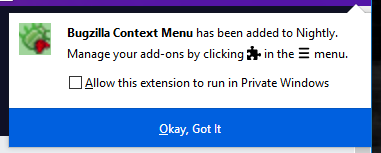
To avoid potentially breaking existing user workflows, extensions that are already installed when a user upgrades from a previous version of Firefox to version 67 will automatically be granted permission to run in private windows. Only newly installed extensions will be excluded from private windows by default and subject to the installation flow described above.
There are significant changes to the Add-ons Manager page (about:addons), too. First, a banner at the top of the page describes the new behavior in Firefox.
 This banner will remain in Firefox for at least two releases to make sure all users have a chance to understand and get used to the new policy.
In addition, for each extension that is allowed to run in private windows, the Add-ons Manager will add a badge to the extension’s card indicating that it has this permission, as shown below.
 The lack of a badge indicates that the extension is not allowed to run in private windows and will, therefore, only run in normal windows. To change the behavior and either grant or revoke permission to run in private windows, the user can click on an extension’s card to bring up its details.
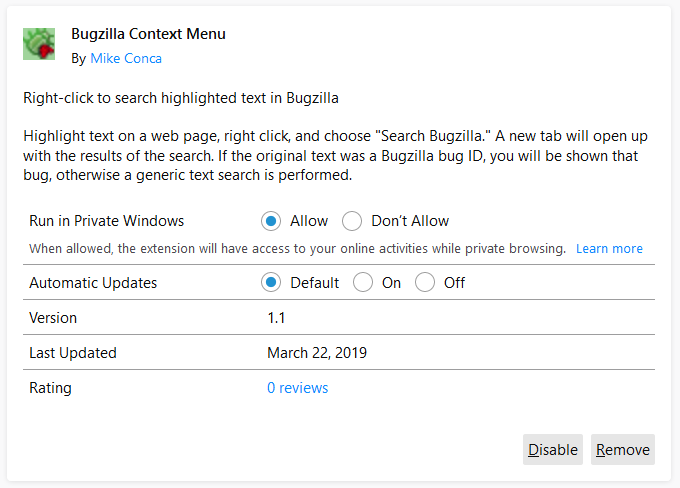 On the detail page, the user can choose to either allow or disallow the extension to run in private windows.
Finally, to make sure that users of private windows are fully aware of the new extension behavior, Firefox will display a message the first time a user opens a new private window.
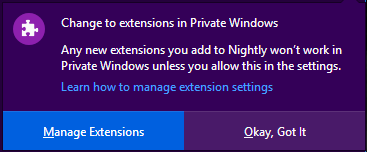
Proper Private Behavior
As a developer, you should take steps to ensure that, when the user has not granted your extension permission to run in private windows, it continues to work normally. If your extension depends on access to private windows, it is important to communicate this to your users, including the reasons why access is needed. You can use the extension.isAllowedIncognitoAccess API to determine whether users have granted your extension permission to run in private windows.
Note that some WebExtension API may still affect private windows, even if the user has not granted
 I was working for the Department of National Defence in Canada (specifically Defence Research and Development Canada) in early 2005 when I first plugged in my new xplio CM998 monitor. It was amazing.
Not only was it one of those new lightweight LCD monitors (I have since owned desks that weigh less), it supported resolutions up to 1280x1024 pixels natively and had both DVI and VGA ports!
It also generated enough heat in my basement apartment that I could notice it from across the room, but that was a plus in that cold Scarborough winter.
From there I moved it to an apartment. Another apartment. A home. And then another home. And then, finally, when I had stopped using it at home I started using it at work for Mozilla.
I liked its comfortable 5:4 aspect ratio, and the fact it wouldn’t wobble when I got up to get coffee.
On Friday it wouldn’t turn on. Well, it did turn on. Linux was assigning it desktop space, knew who it was and how big it was… but it wouldn’t display anything.
I would have liked to turn it off and on again, but the power switch hasn’t worked reliably since my daughter was born. So I did the next best thing and unplugged it and plugged it back in. It would display my Firefox wallpaper for just long enough for some capacitor to warm up or something, and then it would black out.
Nothing I could do would resuscitate it. No cable swaps, no buttons I could press, no whining or cajoling.
Here ends the 13-year service life of my venerable SXGA display.
Your service did not go unnoticed. Enjoy your recycling.
:chutten
https://chuttenblog.wordpress.com/2019/03/26/eulogy-for-a-13-year-old-display/
https://blog.mozilla.org/blog/2019/03/26/firefox-lockbox-now-on-android-keeping-your-passwords-safe/
Today, EU lawmakers voted to adopt new copyright rules, on which we had been engaged for over three years.
Here’s a statement from Raegan MacDonald, Mozilla’s Head of EU Public Policy reacting to the outcome –
There is nothing to celebrate today. With a chance to bring copyright rules into the 21st century the EU institutions have squandered the progress made by innovators and creators to imagine new content and share it with people across the world, and have instead handed the power back to large US owned record labels, film studios and big tech.
People online everywhere will feel the impact of this disastrous vote and we fully expect copyright to return to the political stage. Until then we will do our best to minimise the negative impact of this law on Europeans’ internet experience and the ability of European companies to compete in the digital marketplace.
The post Mozilla statement on the adoption of the EU Copyright directive appeared first on Open Policy & Advocacy.
https://blog.mozilla.org/netpolicy/2019/03/26/copyright_outcome/
After almost three years of debate and activism, EU lawmakers are expected to give their final approval to new EU copyright rules this week. Ahead of that vote, it’s timely to take a look back at how we got here, why we think this law is not the answer to EU lawmakers’ legitimate concerns, and what happens next if, as expected, Parliament votes through the new rules.
How did we get here?
We’ve been engaged in the discussions around the EU Copyright directive since the very beginning. During that time, we deployed various tools, campaigns, and policy assessments to highlight to European lawmakers the importance of an ambitious copyright reform that puts the interests of European internet users and creators at the centre of the process. Sadly, despite our best efforts – as well as the efforts of academics, creator and digital rights organisations, internet luminaries, and over five million citizens – our chances of reversing the EU’s march towards a bad legislative outcome diminished dramatically last September, after the draft law passed a crucial procedural milestone in the European Parliament.
Over the last several months, we have worked hard to minimise the damage that these proposals would do to the internet in Europe and to Europeans’ rights. Although the draft law is still deeply flawed, we are grateful to those progressive lawmakers who worked with us to improve the text.
Why this law won’t solve lawmakers’ legitimate concerns
The new rules that MEPs are set to adopt will compel online services to implement blanket upload filters, with an overly complex and limited SME carve out that will be unworkable in practice. At the same time, lawmakers have forced through a new ancillary copyright for press publishers, a regressive and disproven measure that will undermine access to knowledge and the sharing of information online.
The legal uncertainty and potential variances in implementations across the EU that will be generated by these complex rules means that only the largest, most established platforms will be able to fully comply and thrive in such a restricted online environment. Moreover, despite our best efforts, the interests of European internet users have been largely ignored in this debate, and the law’s restrictions on user generated content and link sharing will hit users hardest. And worse, the controversial new rules will not contribute to addressing the core problems they were designed to tackle, namely the fair remuneration of European creators and the sustainability of the press sector.
A missed opportunity
Like many others, we had originally hoped that the EU Copyright directive would provide an opportunity to bring European copyright law in line with the realities of the 21st century. Sadly, suggestions that were made by us for real and positive reforms of EU copyright law, such as an ambitious new exemption for user-generated content, have been swept aside. We are glad to see that the final text includes a new copyright exemption for text & data
TenFourFox Feature Parity Release 13 Security Parity Release 1 ("FPR13.1") is now available and live (downloads, hashes, release notes). The Pwn2Own vulnerabilities do not work on TenFourFox in their present form (not only because we're PowerPC but also because of our hybrid-endian typed arrays and other differences), but I have determined that TenFourFox-specific variant attacks could be exploitable, so we are patched as well. This should also reduce the risk of crashes from attempts to exploit mainline x86 Firefox.
Meanwhile, H.264 support for TenFourFox FPR14 appears to be sticking. Yes, folks: for the first time you can now play Vimeo and other H.264-only videos from within TenFourFox using sidecar ffmpeg libraries, and it actually works pretty well! Kudos to Olga for the integration code! That said, however, it comes with a couple significant caveats. The first is that while WebM video tends not to occur in large numbers on a given page, H.264 videos nowadays are studded everywhere (Vimeo's front page, Twitter threads, Imgur galleries, etc.) and sometimes try to autoplay simultaneously. In its first iteration this would cause the browser to run out of memory if a large number of higher resolution videos tried to play at once, and sometimes crash when an infallible memory allocation fallibled. Right now there is a lockout in the browser to immediately halt all H.264 decoding if any instance runs out of memory so that the browser can save itself, but this needs a lot more testing to make sure it's solid, and is clearly a suboptimal solution. Remember that we are under unusual memory constraints because of the large amount of stack required for our JIT.
The second caveat with H.264 support is that while the additional AltiVec support in ffmpeg (TenFourFox is compatible with 2.8 and 3.4) makes H.264 decoding faster than WebM, it is not dramatically so, and you should not expect a major jump in video performance. (In fact, quite the opposite on pages like the above.) Because of that, and because I have to build and support ffmpeg library installers now, I am only officially supporting H.264 on G4/7450 and G5 based on the existing 1.25GHz minimum CPU requirement for web video (and you should really have 2GB or more of memory). There will not be an official TenFourFox ffmpeg build for G4/7400 and G3 (or, for that matter, Intel); while you can build it yourself mostly out of the box with Xcode 2.5 and I won't have any block in TenFourFox for user-created libraries, I will provide neither support nor ffmpeg builds for these architectures. Olga's current FFmpeg Enabler does work on 10.4 now and does support 7400 and my future 7450 version will run on a 7400, so early G4 users have a couple options, but either way you would be on your own. Sorry, there are enough complaints about TenFourFox performance already without me making promises of additional functionality I know those systems can't meet.
Back on the good news side, the AppleScript-JavaScript bridge is also complete and working. As a example, consider this script, which actually works in the internal test build:
tell application "TenFourFoxG5"
tell front browser window
set URL of current tab to "https://www.google.com/"
repeat while (current tab is busy)
delay 1
end repeat
tell current tab
run JavaScript "let f = document.getElementById('tsf');f.q.value='tenfourfox';f.submit();"
end tell
repeat while (current tab is busy)
delay 1
end repeat
tell current tab
run JavaScript "return document.getElementsByTagName('h3')[0].innerText + ' ' + document.getElementsByTagName('cite')[0].innerText"
end tell
end tell
end tell
I'll let you ponder what it does until the FPR14 beta comes out, but it should be obvious that this would be great for automating certain tasks in the browser now that you don't have to rely on figuring out how to send the exact UI event anymore: you can just manipulate the DOM of any web page directly from AppleScript. Firefox still can't do that! (Mozilla can port over my code; I'd be flattered.)
The last things to do are a couple security and performance tweaks, and then one more desperate attempt to get Github working. I'm still not sure how
Pwn2Own came and went and Firefox fell with it. The __proto__ vulnerability seems exploitable in TenFourFox, though it would require a PowerPC-specific attack to be fully weaponized, and I'm currently evaluating the other bug. Builds ("FPR13 SPR1") including fixes for either or both depending on my conclusions will be issued within the next couple days.
http://tenfourfox.blogspot.com/2019/03/stand-by-for-urgent-security-update.html
Last week, Brendan Colloran announced Iodide, a new take on scientific collaboration and reporting that I’ve been really happy to contribute to over the past year-and-a-bit. I’ve been describing it to people I meet as kind of "glitch meets jupyter " but that doesn’t quite do it justice. I’d recommend reading Brendan’s blog post (and taking a look at our demonstration site) to get the full picture.
One question that I’ve heard asked (including on Brendan’s post) is why we chose a rather conventional and old technology (Django) for the server backend. Certainly, Iodide has not been shy about building with relatively new or experimental technologies for other parts (e.g. Python on WebAssembly for the notebooks, React/Redux for the frontend). Why not complete the cycle by using a new-fangled JavaScript web server like, I don’t know, NestJS? And while we’re at it, what’s with iodide’s ridiculous REST API? Don’t you know GraphQL is the only legitimate way to expose your backend to the world in 2019?
The great urban theorist of the twentieth century, Jane Jacobs has a quote I love:
“Old ideas can sometimes use new buildings. New ideas must use old buildings.”
Laura Thompson (an engineering director at Mozilla) has restated this wisdom in a software development context as “Build exciting things with boring technologies”.
It so happened that the server was not an area Iodide was focusing on for innovation (at least initially), so it made much, much more sense to use something proven and battle-tested for the server side deployment. I’d used Django for a number of projects at Mozilla before this one (Treeherder/Perfherder and Mission Control) and have been wildly impressed by the project’s excellent documentation, database access layer, and support for building a standardized API via the Django REST Framework add-on. Not to mention the fact that so much of Mozilla’s in-house ops and web development expertise is based around this framework (I could name off probably 5 or 6 internal business systems based around the Django stack, in addition to Treeherder), so deploying Iodide and getting help building it would be something of a known quantity.
Only slightly more than half a year since I began work on the iodide server, we now have both a publicly accessible site for others to experiment with and an internal one for Mozilla’s business needs. It’s hard to say what would have happened had I chosen something more experimental to build Iodide’s server piece, but at the very least there would have been a substantial learning curve involved — in addition to engineering effort to fill in the gaps where the new technology is not yet complete — which would have meant less time to innovate where it really mattered. Django’s database migration system, for example, took years to come to fruition and I’m not aware of anything comparable in the world of JavaScript web frameworks.
As we move ahead, we may find places where applying new backend server technologies makes sense. Heck, maybe we’ll chose to rewrite the whole thing at some point. But to get to launch, chosing a bunch of boring, tested software for this portion of Iodide was (in my view) absolutely the right decision and I make no apologies for it.
https://wlach.github.io/blog/2019/03/new-ideas-old-buildings?utm_source=Mozilla&utm_medium=RSS
We know that iPads aren’t just bigger versions of iPhones. You use them differently, you need them for different things. So rather than just make a bigger version of our … Read more
The post Get the tablet experience you deserve with Firefox for iPad appeared first on The Firefox Frontier.
This year the SUMO team is focused on learning what to improve on our site. As part of that, we spent January setting support.mozilla.org up for A/B testing and last week we ran our first test!
The goal of the test was to run a series of experiments on individual Knowledge Base articles to:
- Improve navigation from KB article to KB article (in-article suggestions)
- Improve design of KB articles to ensure users better understand content and can engage with content faster
The two tests we are running are trying a bunch of different things, such as screengrabs, video clips, highlights, better feedback options on articles, and better navigation.
Version A: Breadcrumbs
- Screengrabs
- Ratings at different parts of the page
- Highlights
- On both experiments we have a section of related articles at the bottom.
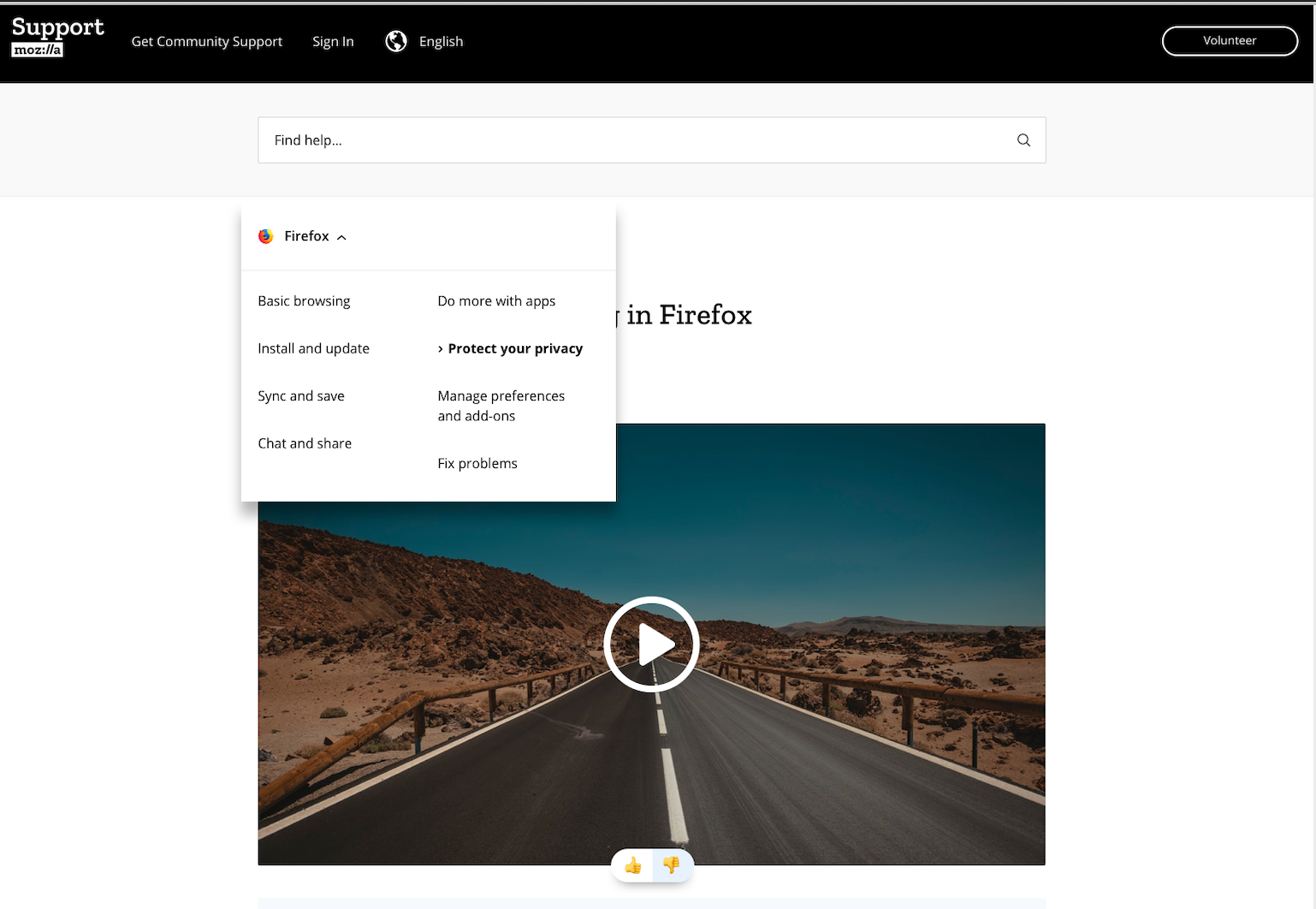
A breadcrumb menu should make it clearer to users where they are.
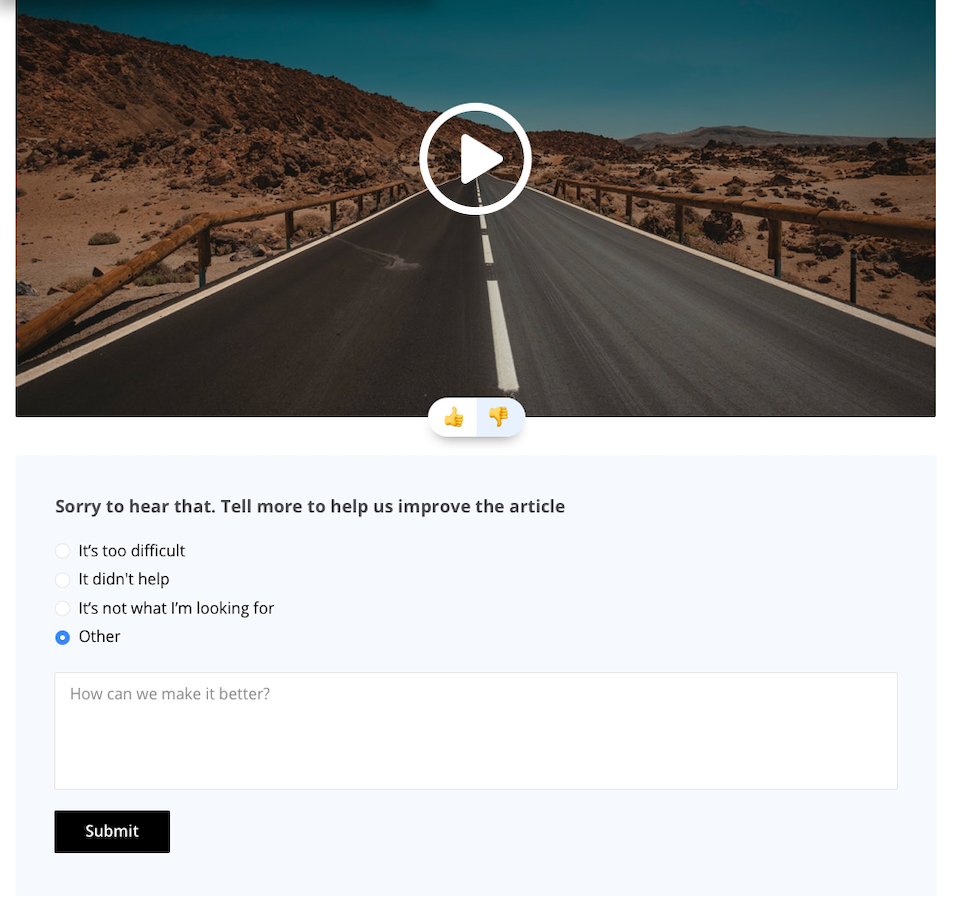
Feedback points through up/down icons with a follow up question to understand to allow for more feedback.

Highlights in the text to help the user see the important areas.
Version B: Hamburger menu – Categories
- One rating at the end of the page
- No highlights in text
- On both experiments we have a section of related articles at the bottom.
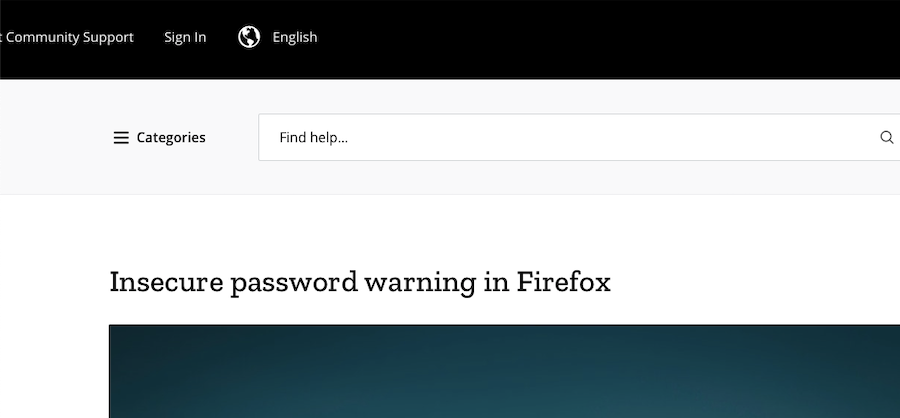
Hamburger menu to allow for users to focus on the content not the menu.
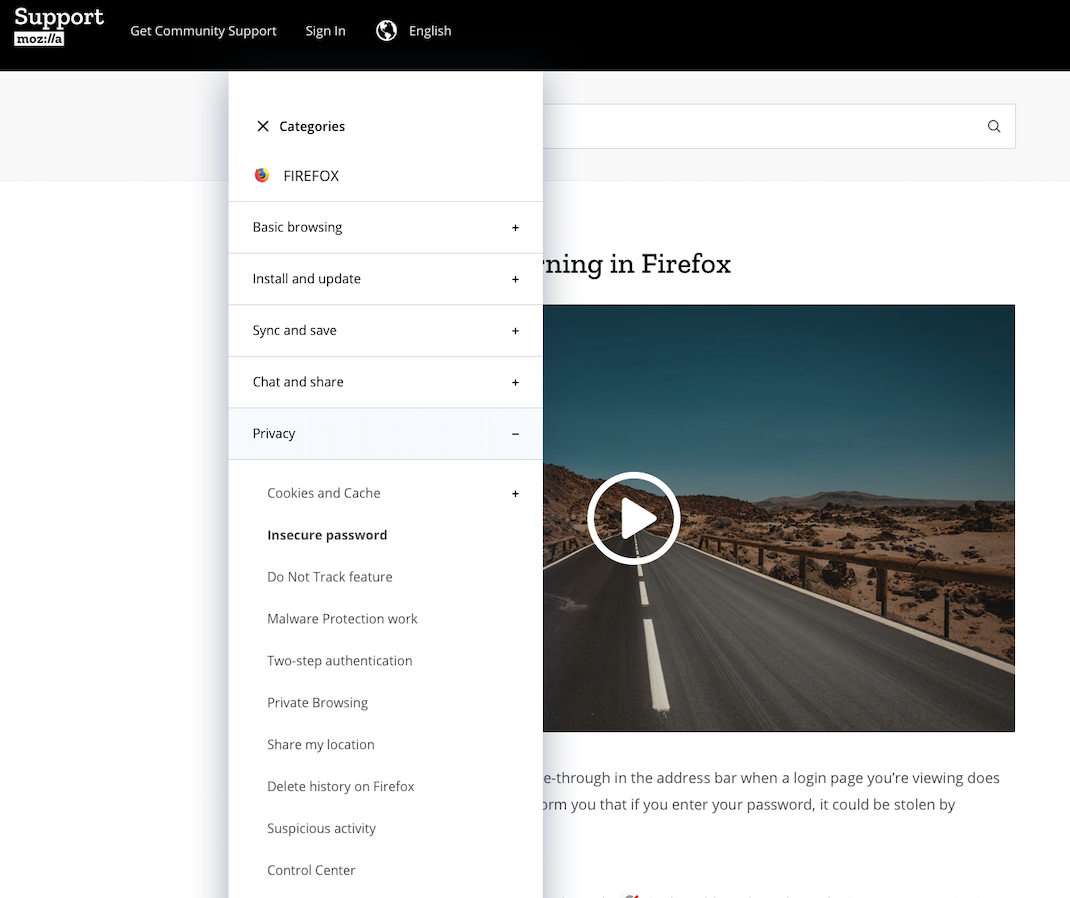
Drop down to see wider menu.
The test will run for the next 2-3 weeks and we will report back on here and our weekly SUMO meeting on the results and next steps.
The test is currently serving for 50% of visitors and you can ‘maybe’ see the tests by going here or here.
SUMO staff team
https://blog.mozilla.org/sumo/2019/03/22/sumo-a-b-experiments/
New content and projects
What’s new or coming up in Firefox desktop
Schedule and important dates
Firefox 66 has been released on March 19, which means:
- Firefox 68 is currently in Nightly.
- Firefox 67 is in Beta.
The deadline to ship updates for Beta will be on April 30. Also don’t forget that Firefox 68 is going to be the next ESR version: ideally you should be localizing it early in Nightly, in order to have a good amount of time for testing before it reaches the release channel.
Removing unmaintained locales
This is not an action that we take lightly, because it’s demoralizing for the Community and potentially confusing for users, but in some cases we have to remove locales from Firefox builds. As outlined in the document, we try our best to revive the localization effort, and only act when it’s clear that we can’t solve the problem in other ways.
In Firefox 68 we’re going to remove the following locales: Assamese (as), South-African English (en-ZA), Maithili (mai), Malayalam (ml), Odia (or).
We’re also working with the Bengali community to unify two locales – Bengali India (bn-IN) and Bengali Banglashed (bn-BD) – under a single locale (bn), to optimize the Community resources we have.
Firefox Monitor
The add-on for Firefox Monitor is now localized as part of the main Firefox projects. If you want to test it:
- Open about:config and create a new boolean setting, extensions.fxmonitor.enabled, and set it to true.
- Navigate to a breached site. You can pick a website from this list, just make sure that the “AddedDate” is within the last 12 months.
What’s new or coming up in mobile
Just like for Firefox Desktop, the deadline to ship updates for Fennec Beta will be on April 30. Read the previous section of this report for more details surrounding that.
A notable Android update this month (that we’ve just announced on the dev-l10n mailing list – please consider following if it’s not yet the case) is that we’ve exposed on Pontoon the new Android-Components strings as part of the new Android-l10n project, to a small subset of locales.
Fenix browser strings are right around the corner as well, and will be exposed very soon in that same project, so stay tuned. Read up here for more details on all this.
On Firefox iOS side, we’re still working hard on shipping the upcoming version, which will be v16. Deadline for localization was today (March 21st), and with this new version we are adding one new locale: Vietnamese! Congrats to the team for shipping their first localized version of Firefox iOS!
What’s new or coming up in web projects
AMO and Facebook Container extension
Mozilla is partnering with the European Union to promote its Facebook Container extension in advance of the upcoming EU elections. We have translated the listing for the extension on addons.mozilla.org into 24 languages primarily used within the EU, and we could use your help localizing the user interface for addons.mozilla.org so people can have a more complete experience when downloading the extension. AMO frontend and server are two huge projects. If your locale has a lot to catch up, you can focus on these top priority strings the team has identified (note there are two tabs). You can search for them in the AMO Frontend project in Pontoon.
In order to promote the extension in 24 languages, we need to enable AMO server and AMO Frontend in all the languages, including Maltese, of which we don’t have a community. We also added a few languages out of product requirement without communities’ agreement. These languages are on the “read-only” locale list. They are Croatian, Estonian, Latvian, and Lithuanian for AMO