In Firefox 98, we’re shipping a new version of the existing Performance panel. This panel is now based on the Firefox profiler tool that can be used to capture a performance profile for a web page, inspect visualized performance data and analyze it to identify slow areas.
The icing on the cake of this already extremely powerful tool is that you can upload collected profile data with a single click and share the resulting link with your teammates (or anyone really). This makes it easier to collaborate on performance issues, especially in a distributed work environment.
The new Performance panel is available in Firefox DevTools Toolbox by default and can be opened by Shift+F5 key shortcut.
Usage
The only thing the user needs to do to start profiling is clicking on the big blue button – Start recording. Check out the screenshot below.
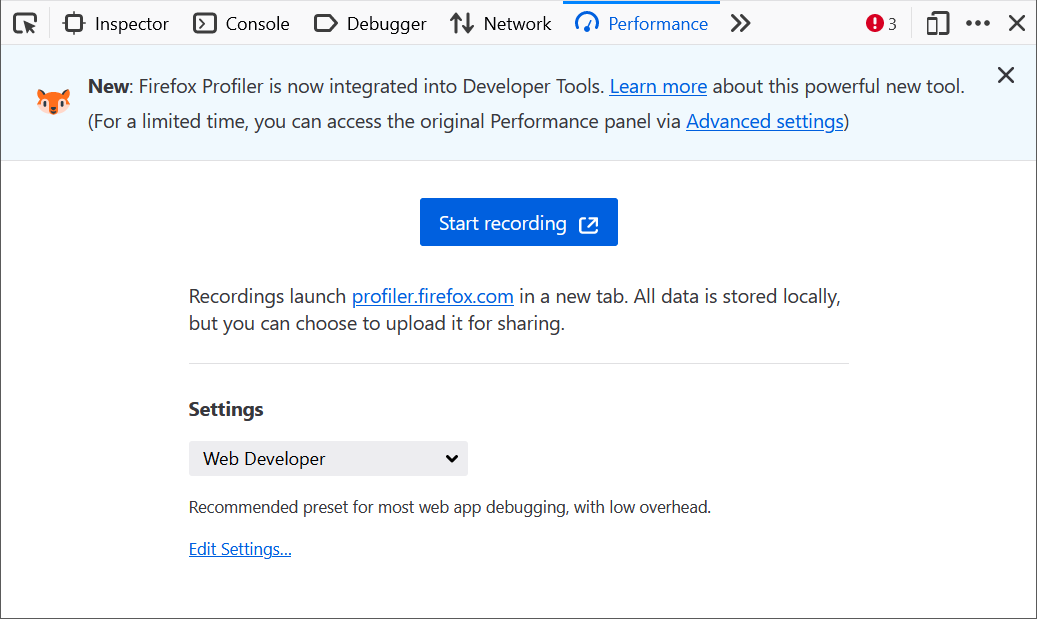
As indicated by the onboarding message at the top of the new panel the previous profiler will be available for some time and eventually removed entirely.
When profiling is started (i.e. the profiler is gathering performance data) the user can see two more buttons:

- Capture recording – Stop recording, get what’s been collected so far and visualize it
- Cancel recording – Stop recording and throw away all collected data
When the user clicks on Capture recording all collected data are visualized in a new tab. You should see something like the following:
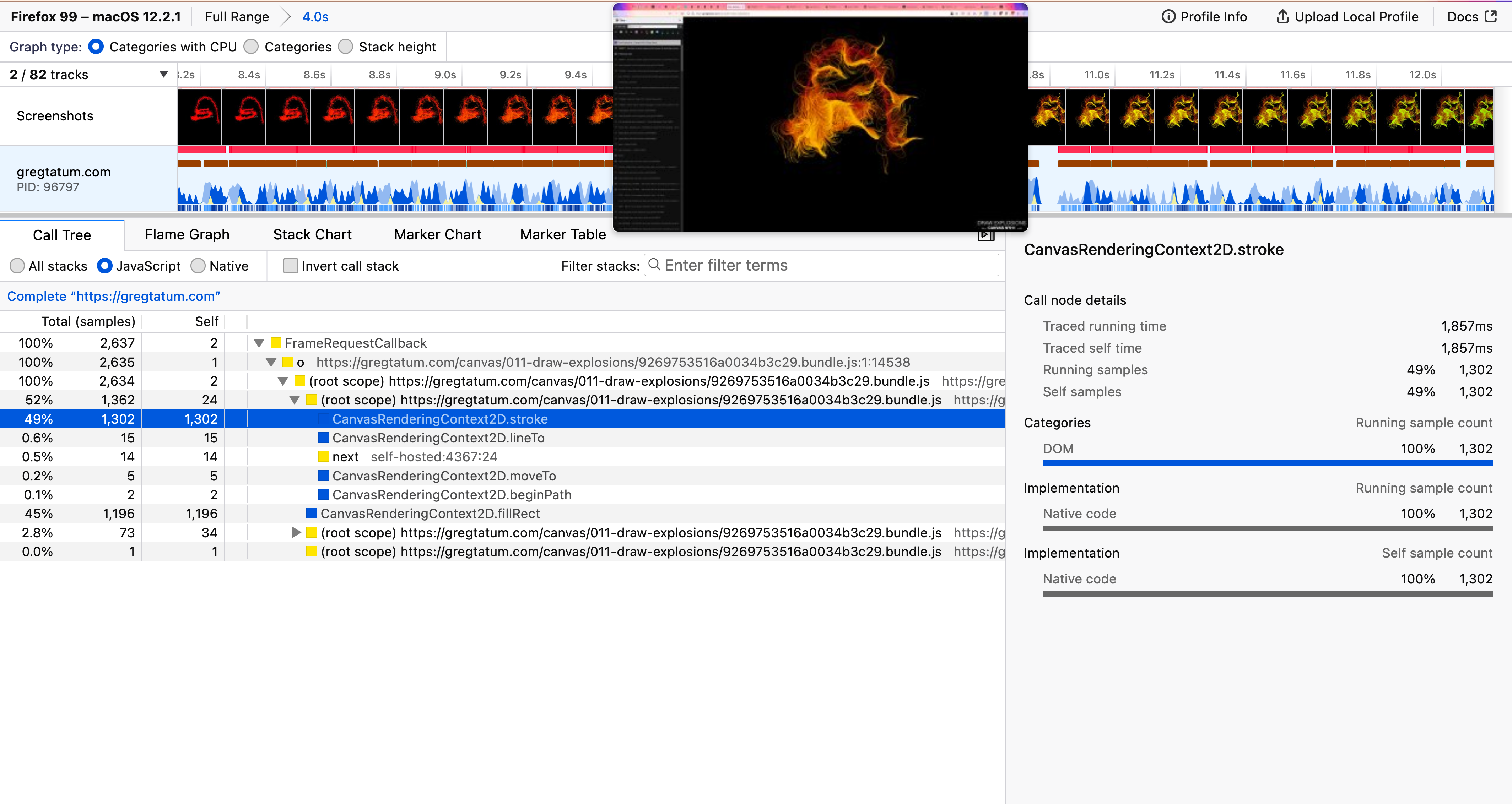
The inspection capabilities of the UI are powerful and let the user inspect every bit of the performance data. You might want to follow this detailed UI Tour presentation created by the Performance team at Mozilla to learn more about all available features.
Customization
There are many options that can be used to customize how and what performance data should be collected to optimize specific use cases (see also the Edit Settings… link at the bottom of the panel).
To make customization easier some presets are available and the Web Developer preset is selected by default. The profiler can be also used for profiling Firefox itself and Mozilla is extensively using it to make Firefox fast for millions of its users. The WebDeveloper preset is intended for profiling standard web pages and the rest is for profiling Firefox.
The Profiler can be also used directly from the Firefox toolbar without the DevTools Toolbox being opened. The Profiler button isn’t visible in the toolbar by default, but you can enable it by loading https://profiler.firefox.com/ and clicking on the “Enable Firefox Profiler Menu Button” on the page.
This is what the button looks like in the Firefox toolbar.

As you can see from the screenshot above the UI is almost exactly the same (compared to the DevTools Performance panel).
Sharing Data
Collected performance data can be shared publicly. This is one of the most powerful features of the profiler since it allows the user to upload data to the Firefox Profiler online storage. Before uploading a profile, you can select the data that you want to include, and what you don’t want to include to avoid leaking personal data. The profile link can then be shared in online chats, emails, and bug reports so other people can see and investigate a specific case.
This is great for team collaboration and that’s something Firefox developers have been doing for years to work on performance. The profile can also be saved as a file on a local machine and imported later from https://profiler.firefox.com/

There are many more powerful features available and you can learn more about them in the extensive documentation. And of course, just like Firefox itself, the profiler tool is an open source project and you might want to contribute to it.
MDN is one of the most trusted resources for information about web standards, code samples, tools, and everything you need as a developer to create websites. In 2015, we explored how we could expand beyond documentation to provide a structured learning experience. Our first foray was the Learning Area, with the goal of providing a useful addition to the regular MDN reference and guide material. In 2020, we added the first Front-end developer learning pathway. We saw a lot of interest and engagement from users, and the learning area contributed to about 10% of MDN’s monthly web traffic. These two initiatives were the start of our exploration into how we could offer more learning resources to our community. Today, we are launching MDN Plus, our first step to providing a personalized and more powerful experience while continuing to invest in our always free and open webdocs.
Build your own MDN Experience with MDN Plus
In 2020 and 2021 we surveyed over 60,000 MDN users and learned that many of the respondents wanted a customized MDN experience. They wanted to organize MDN’s vast library in a way that worked for them. For today’s premium subscription service, MDN Plus, we are releasing three new features that begin to address this need: Notifications, Collections and MDN Offline. More details about the features are listed below:
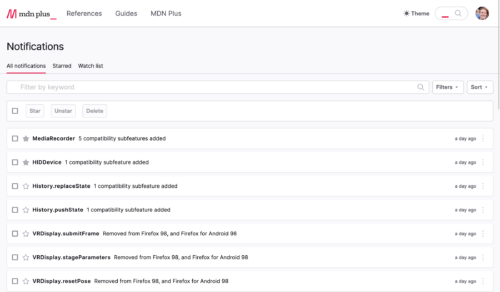
- Notifications: Technology is ever changing, and we know how important it is to stay on top of the latest updates and developments. From tutorial pages to API references, you can now get notifications for the latest developments on MDN. When you follow a page, you’ll get notified when the documentation changes, CSS features launch, and APIs ship. Now, you can get a notification for significant events relating to the pages you want to follow. Read more about it here.
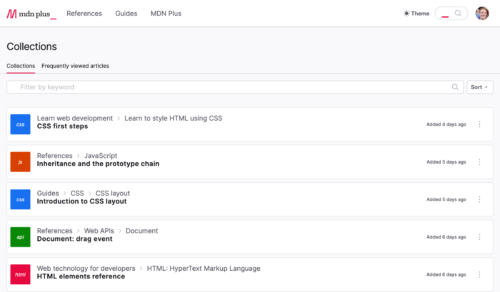
- Collections: Find what you need fast with our new collections feature. Not only can you pick the MDN articles you want to save, we also automatically save the pages you visit frequently. Collections help you quickly access the articles that matter the most to you and your work. Read more about it here.
- MDN offline: Sometimes you need to access MDN but don’t have an internet connection. MDN offline leverages a Progressive Web Application (PWA) to give you access to MDN Web Docs even when you lack internet access so you can continue your work without any interruptions. Plus, with MDN offline you can have a faster experience while saving data. Read more about it here.
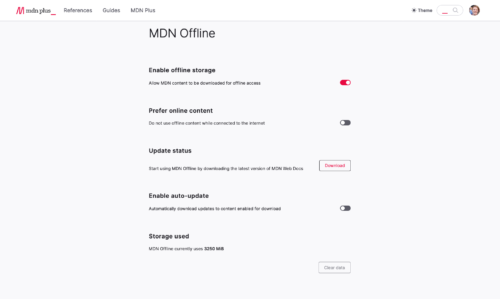
Today, MDN Plus is available in the US and Canada. In the coming months, we will expand to other countries including France, Germany, Italy, Spain, Belgium, Austria, the Netherlands, Ireland, United Kingdom, Switzerland, Malaysia, New Zealand and Singapore.
Find the right MDN Plus plan for you
MDN is part of the daily life of millions of web developers. For many of us MDN helped with getting that first job or helped land a promotion. During our research we found many of these users, users who felt so much value from MDN that they wanted to contribute financially. We were both delighted and humbled by this feedback. To provide folks with a few options, we are launching MDN Plus with three plans including a supporter plan for those that want to spend a little extra. Here are the details of those plans:
- MDN Core: For those who want to do a test drive before purchasing a plan, we created an option that lets you try a limited version for free.
- MDN Plus 5: Offers unlimited access to notifications, collections, and MDN offline with new features added all the time. $5 a month or an annual subscription of $50.
- MDN Supporter 10: For MDN’s loyal supporters the supporter plan gives you everything under MDN Plus 5 plus early access to new features and a direct feedback channel to the MDN team. It’s $10 a month
Over the last two decades, the web has woven itself into the fabric of our lives. What began as a research project has become the world’s most important communication platform and an essential tool for billions of people.
But despite its success — and sometimes because of it — the web has real problems. People are routinely spied on by advertisers and oppressive governments, often at the moments when the open web is most necessary. They find themselves disempowered by hostile sites, sluggish experiences, and overly-complex technologies. And much of the web remains out of reach for non-native English speakers and people with disabilities.
Mozilla believes the web should be for everyone — open, empowering, and safe. In its best moments, the web exemplifies these values today. But too often the web today does not deliver on this promise. To that end, we’ve mapped out a detailed vision of the changes we want to see in the web in the years ahead, and the work we believe is necessary to achieve them. This includes efforts on a number of fronts — deploying ubiquitous encryption, ending tracking, simpler and faster technologies, next-generation internationalization support and much more.
We believe to make the web a better place we need to focus our work on these nine areas:
- Protect user privacy: Essentially all user behavior on the web is subject to tracking and surveillance. A truly open and safe web requires that what people do remains private; this requires gradually shifting the ecosystem towards a new equilibrium without breaking the web in the process.
- Protect users from malicious code: Users must be able to browse without fear that their devices will be compromised, and yet every web browser routinely has major security vulnerabilities. The technologies finally exist to significantly reduce this kind of security issue; we are increasing our use of them in Firefox and look forward to others doing the same.
- Encrypt everything: All user communications should be encrypted. We are near the end of a long process to secure all HTTP traffic, and encryption needs to be retrofitted into existing legacy protocols such as DNS and built into all new protocols by default.
- Extend the web… Safely: New capabilities make the web more powerful but also create new risks. The value added by new capabilities needs to be weighed against these risks; some applications may ultimately not be well suited for the web and that’s OK.
- Make the web fast enough for any use: While web browsers are much faster now than they were five years ago, we still see major performance issues. Fixing these requires making both browsers and infrastructure faster, and also making it easier and more attractive for people to build fast sites.
- Make it easy for anyone to publish on the web: While early websites were relatively simple and easy to build, the demands of performance and high production values have made the web increasingly daunting to work with. Our strategy is to categorize development techniques into increasing tiers of complexity, and then work to eliminate the usability gaps that push people up the ladder towards more complex approaches.
- Give users the power to experience the web on their own terms: The web is for users. In order to fulfill that promise we need to ensure that they, not sites, control their experience, whether that means blocking ads or viewing content in accessible form. This requires building a browser that displays the web the way the user wants it — rather than just following instructions from the site — as well as strengthening the technical properties of web standards that enable this kind of reinterpretation.
- Provide a first-class experience for non-English-speakers: The technical architecture and content ecosystem of the web both work best for North-American English speakers, who are a fraction of the world. We want the web to work well for everyone regardless of where they live and what languages they speak.
- Improve accessibility for people with disabilities: As web experiences have grown richer, they’ve also become more difficult to use with assistive technology like screen readers. We want to reverse this trend.
You can read much more about each of these objectives in the full document. We’ve been using this roadmap to guide our work on Firefox and other Mozilla products. We also recognize that it’s a big web and fixing it is a team effort. We’re looking forward to working
Over the last two decades, the web has woven itself into the fabric of our lives. What began as a research project has become the world’s most important communication platform and an essential tool for billions of people.
But despite its success — and sometimes because of it — the web has real problems. People are routinely spied on by advertisers and oppressive governments, often at the moments when the open web is most necessary. They find themselves disempowered by hostile sites, sluggish experiences, and overly-complex technologies. And much of the web remains out of reach for non-native English speakers and people with disabilities.
Mozilla believes the web should be for everyone — open, empowering, and safe. In its best moments, the web exemplifies these values today. But too often the web today does not deliver on this promise. To that end, we’ve mapped out a detailed vision of the changes we want to see in the web over the next five years, and the work we believe is necessary to achieve them. This includes efforts on a number of fronts — deploying ubiquitous encryption, ending tracking, simpler and faster technologies, next-generation internationalization support and much more.
We believe to make the web a better place we need to focus our work on these nine areas:
- Protect user privacy: Essentially all user behavior on the web is subject to tracking and surveillance. A truly open and safe web requires that what people do remains private; this requires gradually shifting the ecosystem towards a new equilibrium without breaking the web in the process.
- Protect users from malicious code: Users must be able to browse without fear that their devices will be compromised, and yet every web browser routinely has major security vulnerabilities. The technologies finally exist to significantly reduce this kind of security issue; we are increasing our use of them in Firefox and look forward to others doing the same.
- Encrypt everything: All user communications should be encrypted. We are near the end of a long process to secure all HTTP traffic, and encryption needs to be retrofitted into existing legacy protocols such as DNS and built into all new protocols by default.
- Extend the web… Safely: New capabilities make the web more powerful but also create new risks. The value added by new capabilities needs to be weighed against these risks; some applications may ultimately not be well suited for the web and that’s OK.
- Make the web fast enough for any use: While web browsers are much faster now than they were five years ago, we still see major performance issues. Fixing these requires making both browsers and infrastructure faster, and also making it easier and more attractive for people to build fast sites.
- Make it easy for anyone to publish on the web: While early websites were relatively simple and easy to build, the demands of performance and high production values have made the web increasingly daunting to work with. Our strategy is to categorize development techniques into increasing tiers of complexity, and then work to eliminate the usability gaps that push people up the ladder towards more complex approaches.
- Give users the power to experience the web on their own terms: The web is for users. In order to fulfill that promise we need to ensure that they, not sites, control their experience, whether that means blocking ads or viewing content in accessible form. This requires building a browser that displays the web the way the user wants it — rather than just following instructions from the site — as well as strengthening the technical properties of web standards that enable this kind of reinterpretation.
- Provide a first-class experience for non-English-speakers: The technical architecture and content ecosystem of the web both work best for North-American English speakers, who are a fraction of the world. We want the web to work well for everyone regardless of where they live and what languages they speak.
- Improve accessibility for people with disabilities: As web experiences have grown richer, they’ve also become more difficult to use with assistive technology like screen readers. We want to reverse this trend.
You can read much more about each of these objectives in the full document. We’ve been using this roadmap to guide our work on Firefox and other Mozilla products. We also recognize that it’s a big web and fixing it is a team effort. We’re looking forward to
From designers to writers, multi-media producers and more—if you perform creative work on a computer there’s a good chance you can find a browser extension to improve your process. Here’s a mix of practical Firefox extensions for a wide spectrum of creative uses…
Extensions for visual artists, animators & designers
Extended Color Management
Built in partnership between Mozilla and Industrial Light & Magic, this niche extension performs an invaluable function for animation teams working remotely. Extended Color Management calibrates colors on Firefox so animators working from different home computer systems (which might display colors differently based on their operating systems) can trust the whole team is looking at the same exact shades of color through Firefox.
Like other browsers, Firefox by default utilizes color management (i.e. the optimization of color and brightness) from the distinct operating systems of the computers it runs on. The problem here for professional animators working remotely is they’re likely collaborating from different operating systems—and seeing slight but critically different variations in color rendering. Extended Color Management simply disables the default color management tools so animators with different operating systems are guaranteed to see the same versions of all colors, as rendered by Firefox.
Measure-it
What a handy tool for designers and developers—Measure-it lets you draw a ruler across any web page to get precise dimensions in pixels.
Access the ruler from a toolbar icon or keyboard shortcut. Other customization features include setting overlay colors, background opacity, and pop-up characteristics.
Font Finder
Every designer has seen a beautiful font in the wild and thought—I need that font for my next project! But how to track it down?Try Font Finder.
Investigating your latest favorite font doesn’t require a major research project anymore. Font Finder gives you quick point-and-click access to:
- Typography analysis. Font Finder reveals all relevant typographical characteristics like color, spacing, alignment, and of course font name
- Copy information. Any portion of the font analysis can be copied to a clipboard for easy pasting anywhere
- Inline editing. All font characteristics (e.g. color, size, type) on an active element can be changed right there on the page
Search by Image
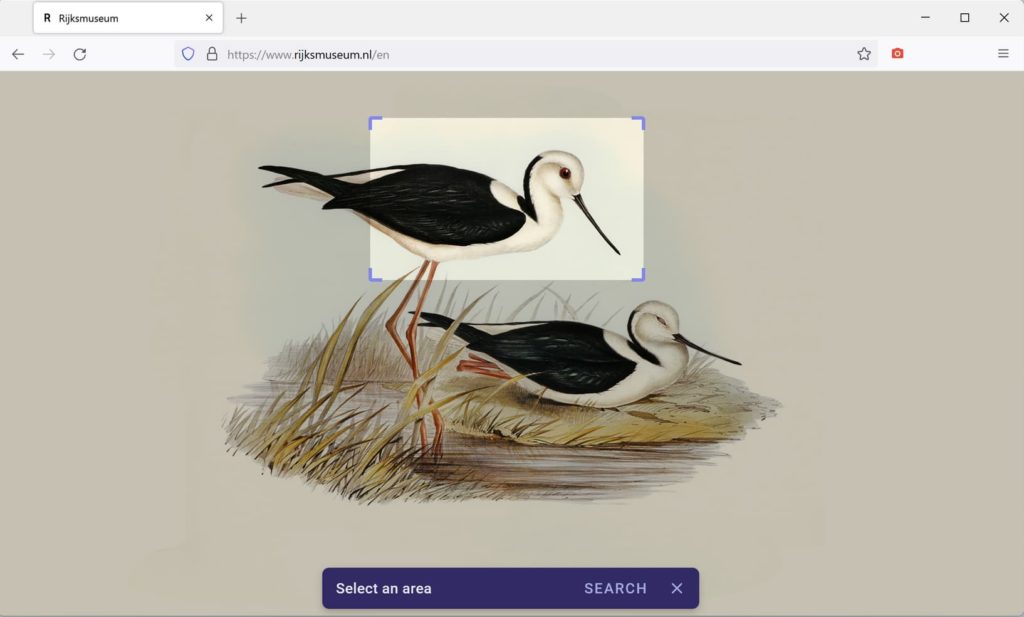
If you’re a designer who scours the web looking for images to use in your work, but gets bogged down researching aspects like intellectual property ownership or subject matter context, you might consider an image search extension like Search by Image.
If you’re unfamiliar with the concept of image search, it works like text-based search, except your search starts with an image instead of a word or phrase. The Search by Image extension leverages the power of 30+ image search engines from the likes of Tineye, Google, Bing, Yandex, Getty Images, Pinterest, and others. This tool can be an incredible time saver when you can’t leave any guesswork to images you want to repurpose.
Extensions for writers
LanguageTool
It’s like having a copy editor with you wherever you write on the web. Language Tool – Grammar and Spell Checker will make you a better writer in 25+ languages.
More than just a spell checker, LanguageTool also…
- Recognizes common misuses of similar sounding words (e.g. there/their, your/you’re)
- Works on social media sites and email
- Offers alternate phrasing and
Firefox is about to let you in on a little known industry secret…did you know some of the leading visual effects studios including Industrial Light & Magic (ILM), utilize Firefox to help make movie magic?
Color calibration — the process of adjusting colors in order to display images consistently in color and brightness across monitors — is a critical component of visual effects. As visual effects studios and their vendors transitioned to remote work due to the coronavirus pandemic, this process that was easy to manage in-office suddenly became difficult to achieve. Over the past year, Firefox worked with Industrial Light & Magic to build a game-changing solution and developed the Extended Color Management Add-On.
Firefox by default uses color management from the operating system to optimize and render colors and images to enhance the browsing experience of its users. With the extension, creators and their vendors can now disable color management, then simply restart the Firefox browser so that the colors of graphics or videos are consistent, even across different operating units. This allows media engineers to make consistent and reliable assumptions about the color pipeline between the content shown in a browser and the actual pixel values sent to the computer’s display.
With this extension, Firefox offers creators a turnkey solution to simply turn off in-browser color management when sharing content between color-calibrated and matched displays, so that both Lucasfilm and remote partners can see the intended colors and view ‘dailies’ more easily than before. This extension puts Firefox in a unique position to contribute to the movie-making magic by improving remote collaboration amongst studios, as well as independent creatives.
“At ILM we want to ensure that all content is as color accurate as possible no matter where we view it. The updates to Firefox have allowed us to increase the color accuracy of content viewed in a browser further than any other browser.” said J. Schulte, Global Imaging Supervisor | Imaging and Color Science at Industrial Light & Magic “When we identified a new use case for Firefox, their team was responsive and updated their browser to fill the need.”
How it works
Most people don’t know that different monitors, operating systems and browsers vary in color output. To ensure each individual and remote workstation is able to see consistent color across images and video, you must calibrate color management applications to the same specifications. This can be quite tedious, especially for vendors who may not be familiar with the process.
It’s possible to disable color management for most applications that aren’t browsers, like Photoshop, for example, but the Extended Color Management extension on Firefox is extremely useful if you have material that can only be reviewed by another party through a browser on a well-calibrated display, which requires zero interference from the browser itself.
“Mozilla has an advantage as a smaller, collaborative technology leader and open source project to have the flexibility to make necessary changes to meet unique customer needs,” said Mike Kaply, Lead, Enterprise and Partner Distributions at Mozilla. “We wanted to create a simple and easy way to disable color management for both Lucasfilm and their vendor partners.”
Other recommended Add-Ons for creatives
Whether you’re a creative or studio coordinator — here are several additional, and particularly useful recommended Add-ons to add to your arsenal that can save valuable time, effort and money.
- Reverse Image Search extensions – several image search hacks for the creative who may need additional background or source information for the images they find across the web and wish to use in their own content.
- Have to find that font? This list of extensions includes recommended font discovery tools to help speed up your design workflow.
- Visual designers rejoice! The Imagus extension is a useful tool that allows you to preview full-size images when you hover your mouse on a thumbnail or link.
- And if you work with
If you somehow found this blog post because you googled or binged “site not working Chrome 100”, well, congrats my SEO trap worked successfully.
Also, don’t panic.
The quickest way to test if your site is broken due to a 3-digit version parsing bug is to temporarily enable the chrome://flags/#force-major-version-to-minor flag and restart the browser. This will change the version that Chrome reports in the User-Agent string and header from 100.0.4896.45 (or whatever the real version number will be) to 99.100.4896.45. If the site works again, you know you have a UA string parsing bug. Congrats again!
(Also, test your site in Firefox Nightly - not all three digit parsing bugs will affect both Chromium browsers and Firefox, but it’s good to verify in case you need to fix your bugs in multiple places.)
At this point, please file a bug at crbug.com/new. That will automatically cc me. Or just feel free to tweet at me or email me. Swing by the house if you want, but we have dinner around 6pm. After dinner is better.
Or, best yet, just fix your site bugs without me being in the loop and I will be so proud of you.

https://miketaylr.com/posts/2022/03/chrome-100-breakage-playbook.html
The addons.mozilla.org (AMO) external API has offered add-on developers the ability to submit new add-on versions for signing for a number of years, in addition to being available to get data about published add-ons directly or internally inside Firefox.
Current “signing” API
Currently, the signing api offers some functionality, but it’s limited – you can’t submit the first listed version of an add-on (extra metadata is needed to be collected via developer hub); you can’t edit existing submissions; you can’t submit/edit extra metadata about the add-on/version; and you can’t share the source code for an add-on when it’s needed to comply with our policies. For all of those tasks you need to use the forms on the appropriate developer hub web pages.
New Add-on “submission” API
The new add-on submission api aims to overcome these limitations and (eventually) allow developers to submit and manage all parts of their add-on via the API. It’s available now in our v5 api, and should be seen as beta quality for now.
Submission Workflow
The submission workflow is split by the process of uploading the file for validation, and attaching the validated file to a new add-on, or as a new version to an existing add-on.
- The add-on file to be distributed is uploaded via the upload create endpoint, along with the channel, returning an upload uuid.
- The upload detail endpoint can be polled for validation status.
- Once the response has
"valid": true, it can be used to create either a new add-on, or a new version of an existing add-on. Sources may be attached if required.
Uploading the add-on file
Regardless of if you are creating a new add-on or adding a new version to an existing add-on, you will need to upload the file for validation first. Here you will decide if the file will be associated with a public listing (listed), or will be self-hosted (unlisted). See our guide on signing and distribution for further details.
# Send a POST request to the upload create endpoint # Pass addon.xpi as a file using multipart/form-data, along with the # distribution channel. curl -XPOST "https://addons.mozilla.org/api/v5/addons/upload/" \ -H "Authorization:" \ -F "source=@addon.xpi" -F "channel=listed"
The response will provide information on successful validation, if valid is set to true you will be able to use the uuid in the next submission steps. The recommended polling interval is 5-10 seconds, making sure your code times out after a maximum of 10 minutes.
Creating a new add-on
When creating a new add-on, we require some initial metadata to describe what the add-on does, as well as some optional fields that will allow you to create an appealing listing. Make a request to the add-ons create endpoint to attach the uploaded file to a new add-on:
# Send a POST request to the add-ons create endpoint # Include the add-on metadata as JSON. curl -XPOST "https://addons.mozilla.org/api/v5/addons/addon/" \ -H "Authorization:" \ -H "Content-Type: application/json" -d @- < ", "license": "MPL-2.0" } } EOF
When submitting to the self-hosted channel, you can omit extra metadata such as categories, summary or license.
Adding a version to an existing add-on
If instead you are adding a version to an existing add-on, the metadata has already been provided in the initial submission. The
For both MDN and Open Web Docs (OWD), transparency is paramount to our missions. With the upcoming launch of MDN Plus, we believe it’s a good time to talk about how our two organizations work together and if there is a financial relationship between us. Here is an overview of how our missions overlap, how they differ, and how a premium subscription service fits all this.
History of our collaboration
MDN and Open Web Docs began working together after the creation of Open Web Docs in 2021. Our organizations were born out of the same ethos, and we constantly collaborate on MDN content, contributing to different parts of MDN and even teaming up for shared projects like the conversion to Markdown. We meet on a weekly basis to discuss content strategies and maintain an open dialogue on our respective roadmaps.
MDN and Open Web Docs are different organizations; while our missions and goals frequently overlap, our work is not identical. Open Web Docs is an open collective, with a mission to contribute content to open source projects that are considered important for the future of the Web. MDN is currently the most significant project that Open Web Docs contributes to.
Separate funding streams, division of labor
Mozilla and Open Web Docs collaborate closely on sustaining the Web Docs part of MDN. The Web Docs part is and will remain free and accessible to all. Each organization shoulders part of the costs of this labor, from our distinct budgets and revenue sources.
- Mozilla covers the cost of infrastructure, development and maintenance of the MDN platform including a team of engineers and its own team of dedicated writers.
- Open Web Docs receives donations from companies like Google, Microsoft, Meta, Coil and others, and from private individuals. These donations pay for Technical Writing staff and help finance Open Web Docs projects. None of the donations that Open Web Docs receive go to MDN or Mozilla; rather they pay for a team of writers to contribute to MDN.
Transparency and dialogue but independent decision-making
Mozilla and OWD have an open dialogue on content related to MDN. Mozilla sits on the Open Web Docs’ Steering Committee, sharing expertise and experience but does not currently sit on the Open Web Docs’ Governing Committee. Mozilla does not provide direct financial support to Open Web Docs and does not participate in making decisions about Open Web Docs’ overall direction, objectives, hiring and budgeting.
MDN Plus: How does it fit into the big picture?
MDN Plus is a new premium subscription service by Mozilla that allows users to customize their MDN experience.
As with so much of our work, our organizations engaged in a transparent dialogue regarding MDN Plus. When requested, Open Web Docs has provided Mozilla with feedback, but it has not been a part of the development of MDN Plus. The resources Open Web Docs has are used only to improve the free offering of MDN.
The existence of a new subscription model will not detract from MDN’s current free Web Docs offering in any way. The current experience of accessing web documentation will not change for users who do not wish to sign up for a premium subscription.
Mozilla’s goal with MDN Plus is to help ensure that MDN’s open source content continues to be supported into the future. While Mozilla has incorporated its partners’ feedback into their vision for the product, MDN Plus has been built only with Mozilla resources. Any revenue generated by MDN Plus will stay within Mozilla. Mozilla is looking into ways to reinvest some of these additional funds into open source projects contributing to MDN but it is still in early stages.
A subscription to MDN Plus gives paying subscribers extra MDN features provided by Mozilla while a donation to Open Web Docs goes to funding writers creating content on MDN Web Docs, and potentially elsewhere. Work produced via OWD will always be publicly available and accessible to all.
Open Web Docs and Mozilla will continue to work closely together on MDN for the best possible web platform documentation for everyone!
Thanks for your continuing feedback and support.
Teleparty, formerly called Netflix Party, is a wildly popular browser extension with at least 10 million users on Google Chrome (likely much more as with Chrome Web Store anything beyond 10 million is displayed as “10,000,000+”) and 1 million users on Microsoft Edge. It lets people from different location join a video viewing session, watching a movie together and also chatting while at it. A really nifty extension actually, particularly in times of a pandemic.
While this extension’s functionality shouldn’t normally be prone to security vulnerabilities, I realized that websites could inject arbitrary code into its content scripts, largely thanks to using an outdated version of the jQuery library. Luckily, the internal messaging of this extension didn’t allow for much mischief. I found some additional minor security issues in the extension as well.
Contents
The thing with jQuery
My expectation with an extension like Teleparty would be: worst-case scenario is opening up vulnerabilities in websites that the extension interacts with, exposing these websites to attacks. That changed when I realized that the extension used jQuery 2.1.4 to render its user interface. This turned all of the extension into potentially accessible attack surface.
When jQuery processes HTML code, it goes beyond what Element.innerHTML does. The latter essentially ignores
https://palant.info/2022/03/14/party-time-injecting-code-into-teleparty-extension/
Firefox 98 is released, with a new faster downloads flow (very welcome), better event debugging, and several pre-release HTML features that are now official. One thing that hasn't gotten a lot of airplay is navigator.registerProtocolHandler() now allows registration for the FTP family of protocols. I already use this for OverbiteWX and OverbiteNX to restore Gopher support in Firefox; I look forward to someone bolting back on FTP support in the future. It builds out of the box on OpenPOWER using the .mozconfigs and LTO-PGO patch from Firefox 95.
On the JIT front the Ion-enabled (third stage compiler) OpenPOWER JIT gets about 2/3rds of the way through the JIT conformance test suite. Right now I'm investigating a Ion crash in the FASTA portion of SunSpider which I can't yet determine is either an i-cache problem or a bad jump (the OpenPOWER Baseline Compiler naturally runs it fine). We need to make Firefox 102 before it merges to beta on May 26 to ride the trains and get the JIT into the next Extended Support Release; this is also important for Thunderbird, which, speaking as a heavy user of it, probably needs JIT acceleration even more than Firefox. This timeframe is not impossible and it'll get finished "sometime" but making 102 is going to be a little tight with what needs doing. The biggest need is for people to help smoke out those last failures and find fixes. You can help.