Web Authentication (WebAuthn), a recent web standard blending public-key cryptography into website logins, is our best technical response to credential phishing. That’s why we’ve championed it as a technology. The FIDO U2F API is the spiritual ancestor of WebAuthn; to-date, it’s still much more commonly used. Firefox has had experimental support for the Javascript FIDO U2F API since version 57, as it was used to validate our Web Authentication implementation that then shipped in Firefox 60. Both technologies can help secure the logins of millions of users already in possession of FIDO U2F USB tokens.
We encourage the adoption of Web Authentication rather than the FIDO U2F API. However, some large web properties are encountering difficulty migrating: WebAuthn works with security credentials produced by the FIDO U2F API. However, WebAuthn-produced credentials cannot be used with the FIDO U2F API. For the entities affected, this could lead to poor user experiences and inhibit overall adoption of this critical technology.
To smooth out this migration, after discussion on the mozilla.dev.platform mailing list, we have decided to enable our support for the FIDO U2F API by default for all Firefox users. It’s enabled now in Firefox Nightly 68, and we plan for it to be uplifted into Firefox Beta 67 in the coming week.
Enabling FIDO U2F API in Firefox

A FIDO U2F API demo website being activated
Firefox’s implementation of the FIDO U2F API accommodates only the common cases of the specification; for details, see the mailing list discussion. For those who are interested in using FIDO U2F API before they update to version 68, Firefox power users have successfully utilized the FIDO U2F API by enabling the “security.webauth.u2f” preference in about:config since Quantum shipped in 2017.
Currently, the places where Firefox’s implementation is incomplete are expected to remain so. With the increase of using biometric mechanisms such as face recognition or fingerprints in devices, we are focusing our support on WebAuthn. It provides a sophisticated level of authentication and cryptography that will protect Firefox users.
The future of anti-phishing is Web Authentication
It’s important that the Web move to Web Authentication rather than building new capabilities with the deprecated, legacy FIDO U2F API. Now a published Recommendation at the W3C, Web Authentication has support for many more use cases than the legacy technology, and a much more robustly-examined browser security story.
Ultimately, it’s most important that Firefox users be able to protect their accounts with the strongest protections possible. We believe the strongest to be Web Authentication, as it has improved usability via platform authenticators, capabilities for “passwordless” logins, and more advanced security keys and tokens.
The post Backward-Compatibility FIDO U2F support shipping soon in Firefox appeared first on Mozilla Security Blog.
https://blog.mozilla.org/security/2019/04/04/shipping-fido-u2f-api-support-in-firefox/
The 2019 HTTP Workshop ended today. In total over the years, we have now done 12 workshop days up to now. This day was not a full day and we spent it on only two major topics that both triggered long discussions involving large parts of the room.
Cookies

Mike West kicked off the morning with his cookies are bad presentation.
One out of every thousand cookie header values is 10K or larger in size and even at the 50% percentile, the size is 480 bytes. They’re a disaster on so many levels. The additional features that have been added during the last decade are still mostly unused. Mike suggests that maybe the only way forward is to introduce a replacement that avoids the issues, and over longer remove cookies from the web: HTTP state tokens.
A lot of people in the room had opinions and thoughts on this. I don’t think people in general have a strong love for cookies and the way they currently work, but the how-to-replace-them question still triggered lots of concerns about issues from routing performance on the server side to the changed nature of the mechanisms that won’t encourage web developers to move over. Just adding a new mechanism without seeing the old one actually getting removed might not be a win.
We should possibly “worsen” the cookie experience over time to encourage switch over. To cap allowed sizes, limit use to only over HTTPS, reduce lifetimes etc, but even just that will take effort and require that the primary cookie consumers (browsers) have a strong will to hurt some amount of existing users/sites.
(Related: Mike is also one of the authors of the RFC6265bis draft in progress – a future refreshed cookie spec.)
HTTP/3
Mike Bishop did an excellent presentation of HTTP/3 for HTTP people that possibly haven’t kept up fully with the developments in the QUIC working group. From a plain HTTP view, HTTP/3 is very similar feature-wise to HTTP/2 but of course sent over a completely different transport layer. (The HTTP/3 draft.)
Most of the questions and discussions that followed were rather related to the transport, to QUIC. Its encryption, it being UDP, DOS prevention, it being “CPU hungry” etc. Deploying HTTP/3 might be a challenge for successful client side implementation, but that’s just nothing compared the totally new thing that will be necessary server-side. Web developers should largely not even have to care…
One tidbit that was mentioned is that in current Firefox telemetry, it shows about 0.84% of all requests negotiates TLS 1.3 early data (with about 12.9% using TLS 1.3)
Thought-worthy quote of the day comes from Willy: “everything is a buffer”
Future Workshops
There’s no next workshop planned but there might still very well be another one arranged in the future. The most suitable interval for this series isn’t really determined and there might be reasons to try tweaking the format to maybe change who will attend etc.
The fact that almost half the attendees this time were newcomers was certainly good for the community but that not a single attendee traveled here from Asia was less good.
Thanks
Thanks to the organizers, the program committee who set this up so nicely and the awesome sponsors!
https://daniel.haxx.se/blog/2019/04/04/workshop-season-4-finale/
It’s tax season in North America. What? No cheers? We get it. April 15 in the United States and April 30 in Canada is the deadline to submit our tax … Read more
The post Prep for tax season safely with Firefox Send appeared first on The Firefox Frontier.
https://blog.mozilla.org/firefox/do-taxes-with-firefox-send/
Window Recording
As of bug 1536174, I've added a mechanism for Firefox that uses an internal mechanism that can record content frames during composition. Note that this currently only works when on Windows using D3D11 composition. This is still in very early stages and will likely be getting some improvements over the longer term, but right now, basically this is how it works:
- Make sure you're on nightly, the keyboard shortcut we'll be using only works there.
- Before initiating the action you want to record, press 'Ctrl+Shift+4', this will begin recording
- Execute an action in the browser (for example load a page)
- Wait for whatever operation you wish to capture to finish
- Press 'Ctrl+Shift+4' again, this will end recording and generate output
You will now find a new directory in your working directory called windowrecording-
frame-
You will notice only the frames where actual content changes occurred (no scrolling, asynchronous animation, parent process changes, etc.), this will likely become more flexible in the future. The directory where the output is delivered can optionally be selected using the layers.windowrecording.path preference. Use a trailing slash for expected behavior.
There's a couple of caveats when using recording:
- In order to minimize overhead during recording frames are stored uncompressed in memory, recordings more than a few seconds will consume very large amounts of memory
- Lossless compression is used for the output, this means the recordings can be relatively large
Pageload Analysis
Recently I've been working on a script that can use the generated recordings to perform pageload analysis. The scripts can be found here and in this post I will attempt to describe the right way to use them. The scripts, as well as this entire description are meant to be used on windows, so these instructions will not be accurate on other platforms (and in any case, recording doesn't work there yet either, nor will most people have an open source PowerShell implementation installed). This is also in very early stages and not particularly user friendly, you probably shouldn't be using it yet and just skip to the demo video :-).
Prerequisites
- ImageMagick
- FFmpeg
- mp4fpsmod
- visualmetrics.py prerequisites, Pillow and pyssim as supplied through pip
Note that visualmetrics.py also expects ffmpeg and the imagemagick binary locations to be included in the path.
The next step is to modify the SetPaths.ps1 script to point to the correct binaries for your system, these are the binaries that the AnalyzeWindowRecording script will use.
Recording Pageload
The next step is recording a pageload. The first step would be to go to 'about:blank' to ensure a solid white reference frame to start from. A current weakness is that the timestamp of the video (and therefore the point in time the analysis will consider the 'beginning' of pageload) is the time when the recording begins, rather than navigation start. Therefore, it is best to navigate immediately after beginning the recording, this could be improved by scripting the recording and navigation start to occur at the same time, but for now we'll assume that a small offset may be considered acceptable.
First start the recording and immediately navigate to the desired page, wait for pageload to finish visually and then end the recording.
Analysis
The final step is to run the analysis script, this is done by executing the script as follows:
.\AnalyzeWindowRecording.ps1
Note that the script may take a while to execute, particularly on a slower machine. The script will output the recorded FirstVisualChange, LastVisualChange and SpeedIndex to stdout, as well as generate an annotated video that will display information at the stop about
Privacy is on the tip of everyone’s tongue. Lawmakers are discussing how to legislate it, big tech is desperate to show they care about it, and everyday people are looking for tools and tips to help them reclaim it.
That’s why today, we are publishing our blueprint for strong federal privacy legislation in the United States. Our goals are straightforward: put people back in control of their data; establish clear, effective, and enforceable rules for those using that data; and move towards greater global alignment on governing data and the role of the internet in our lives.
For Mozilla, privacy is not optional. It’s fundamental to who we are and the work we do. It’s also fundamental to the health of the internet. Without privacy protections, we cannot trust the internet as a safe place to explore, transact, connect, and create. But thanks to a rising tide of abusive privacy practices and data breaches, trust in the internet is at an all time low.
We’ve reached this point because data practices and public policies have failed. Data has helped spur remarkable innovation and new products, but the long-standing ‘notice-and-consent’ approach to privacy has served people poorly. And the lack of truly meaningful safeguards and user protections have led to our social, financial and even political information being misused and manipulated without our understanding.
What’s needed to combat this is strong privacy legislation in the U.S. that codifies real protections for consumers and ensures more accountability from companies.
While we have seen positive movements on privacy and data protection around the globe, the United States has fallen behind. But this conversation about the problematic data practices of some companies has sparked promising interest in Congress.
Our framework spells out specifically what that law needs to accomplish. It must establish strong rights for people, rights that provide meaningful protection; it must provide clear rules for companies to limit how data is collected and used; and it must empower enforcement with clear authority and effective processes and remedies.
Clear rules for companies
- Purposeful and limited collection and use – end the era of blanket collection and use, including collecting data for one purpose and then using it for another, by adopting clear rules for purposeful and limited collection and use of personal data.
- Security – ensure that our data is carefully maintained and secured, and provide clear expectations around inactive accounts.
Strong rights for people
- Access – we must be able to view the information that has been collected or generated about us, and know how it’s being used.
- Delete – we should be able to delete our data when reasonable, and we should understand the policies and practices around our data if our accounts and services become inactive.
- Granular, revocable consent – stop the practice of generic consent to data collection and use; limit consents to apply to specific collection and use practices, and allow them to be revoked.
Empowered enforcement
- Clear mandate – empower the Federal Trade Commission with a strong authority and resources to keep up with advances in technology and evolving threats to privacy.
- Civil penalties – streamline and strengthen the FTC’s enforcement through direct civil investigation and penalty authority, without the need for time- and resource-intensive litigation.
- Rulemaking authority – empower the FTC to set proactive obligations to secure personal information and limits on the use of personal data in ways that may harm users.
We need real action to pass smart, strong privacy legislation that codifies real protections for consumers while preserving innovation. And we need it now, more than ever.
Mozilla U.S. Consumer Privacy Bill Blueprint 4.4.19
Photo by Louis Velazquez on Unsplash
The post A Path Forward: Rights and Rules to Protect Privacy in the United States appeared first on Open Policy & Advocacy.
Yesterday we plowed through a large and varied selection of HTTP topics in the Workshop. Today we continued. At 9:30 we were all in that room again. Day two.
Martin Thomson talked about his “hx” proposal and how to refer to future responses in HTTP APIs. He ended up basically concluding that “This is too complicated, I think I’m going to abandon this” and instead threw in a follow-up proposal he called “Reverse Javascript” that would be a way for a client to pass on a script for the server to execute! The room exploded in questions, objections and “improvements” to this idea. There are also apparently a pile of prior art in similar vein to draw inspiration from.
With the audience warmed up like this, Anne van Kasteren took us back to reality with an old favorite topic in the HTTP Workshop: websockets. Not a lot of love for websockets in the room… but this was the first of several discussions during the day where a desire or quest for bidirectional HTTP streams was made obvious.
Woo Xie did a presentation with help from Alan Frindell about Extending h2 for Bidirectional Messaging and how they propose a HTTP/2 extension that adds a new frame to create a bidirectional stream that lets them do messaging over HTTP/2 fine. The following discussion was slightly positive but also contained alternative suggestions and references to some of the many similar drafts for bidirectional and p2p connections over http2 that have been done in the past.

Lucas Pardue and Nick Jones did a presentation about HTTP/2 Priorities, based a lot of research previously done and reported by Pat Meenan. Lucas took us through the history of how the priorities ended up like this, their current state and numbers and also the chaos and something about a possible future, the h3 way of doing prio and mr Meenan’s proposed HTTP/3 prio.
Nick’s second half of the presentation then took us through Cloudflare’s Edge Driven HTTP/2 Prioritisation work/experiments and he showed how they could really improve how prioritization works in nginx by making sure the data is written to the socket as late as possible. This was backed up by audience references to the TAPS guidelines on the topic and a general recollection that reducing the number connections is still a good idea and should be a goal! Server buffering is hard.
Asbjorn Ulsberg presented his case for a new request header: prefer-push. When used, the server can respond to the request with a series of pushed resources and thus save several round-rips. This triggered sympathy in the room but also suggestions of alternative approaches.
Alan Frindell presented Partial POST Replay. It’s a rather elaborate scheme that makes their loadbalancers detect when a POST to one of their servers can’t be fulfilled and they instead replay that POST to another backend server. While Alan promised to deliver a draft for this, the general discussion was brought up again about POST and its “replayability”.
Willy Tarreau followed up with a very similar topic: Retrying failed POSTs. In this this context RFC 2310 – The Safe Response Header Field was mentioned and that perhaps something like this could be considered for requests? The discussion certainly had similarities and overlaps with the SEARCH/POST discussion of yesterday.
Mike West talked about Fetch Metadata Request Headers which is a set of request headers explaining for servers where and what for what purpose requests are made by browsers. He also took us through a brief explained of Origin Policy, meant to become a central “resource” for a manifest that describes properties of the origin.
Mark Nottingham presented
Dear Mozilla, of course I learned about your new file sharing project from the news. But it seems that you wanted to be really certain, so today I got this email:
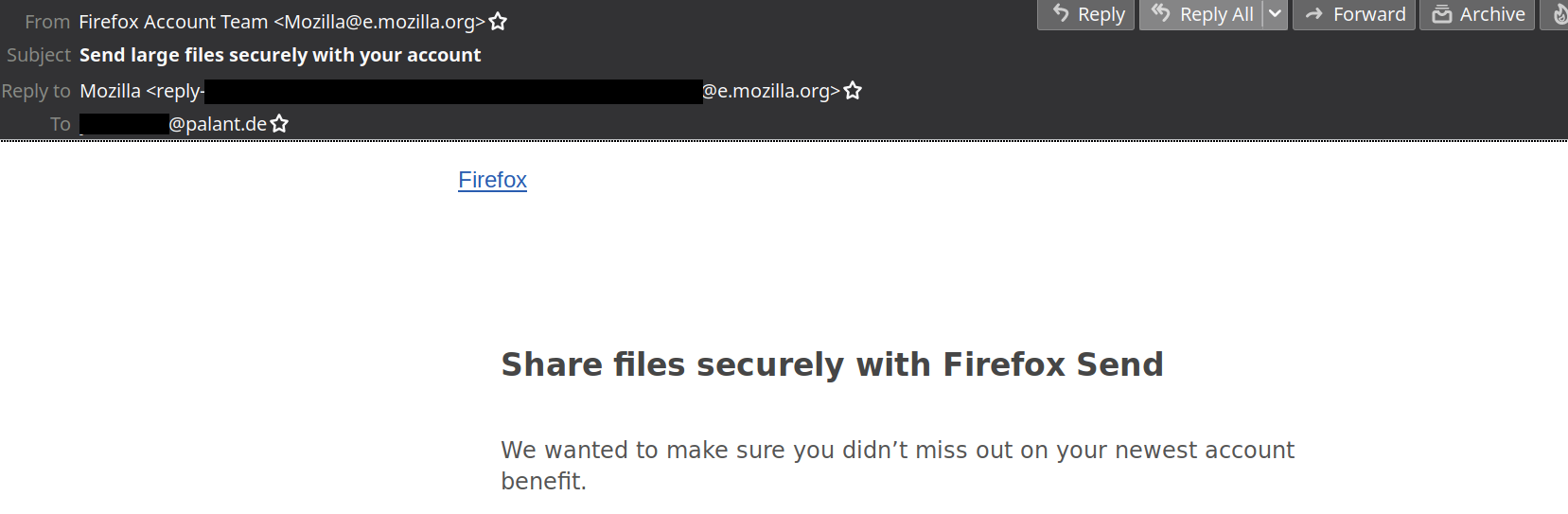
Do you still remember how I opted out of all your emails last year? Luckily, I know that email preferences of all your users are managed via Mozilla Basket and I also know how to retrieve raw data. So here it is:
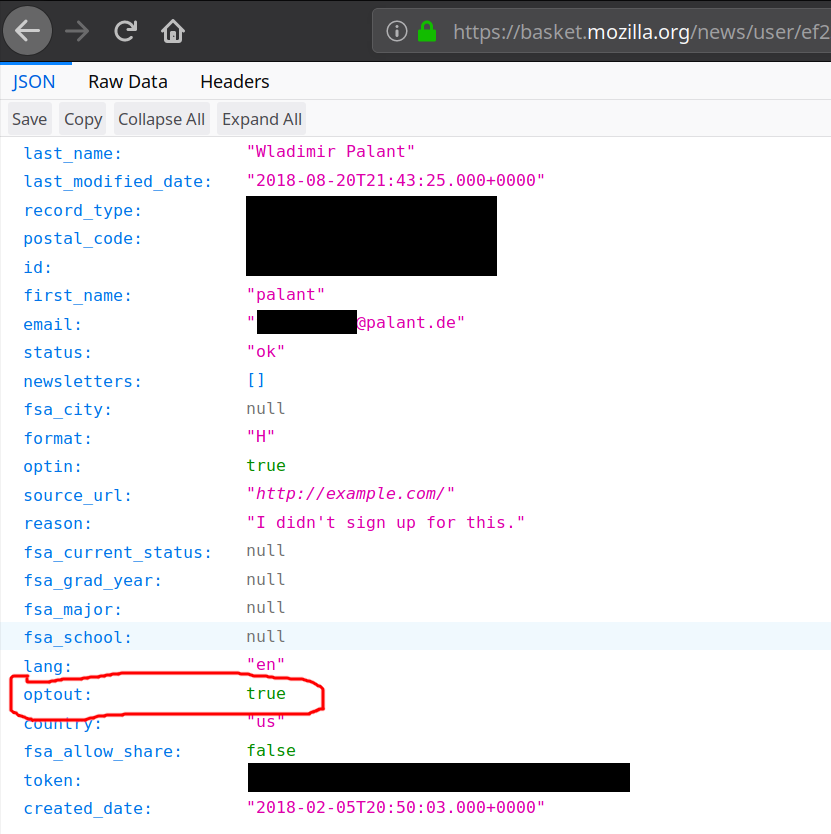
It clearly says that I’ve opted out, so you didn’t forget. So why do you keep sending me promotional messages? Edit (2019-04-05): Yes, that optin value is thoroughly confusing but it doesn’t mean what it seems to mean. Basket only uses it to indicate a “verified email,” somebody who either went through double opt-in once or registered with Firefox Accounts.
This isn’t your only issue however. A year ago I reported a security issue in Mozilla Basket (not publicly accessible). The essence is that subscribing anybody to Mozilla’s newsletters is trivial even if that person opted out previously. The consensus in this bug seems to be that this is “working as expected.” This cannot seriously be it, right?
Now there is some legislation that is IMHO being violated here, e.g. the CAN-SPAM Act and GDPR. And your privacy policy ends with the email address one can contact to report compliance issues. So I did.
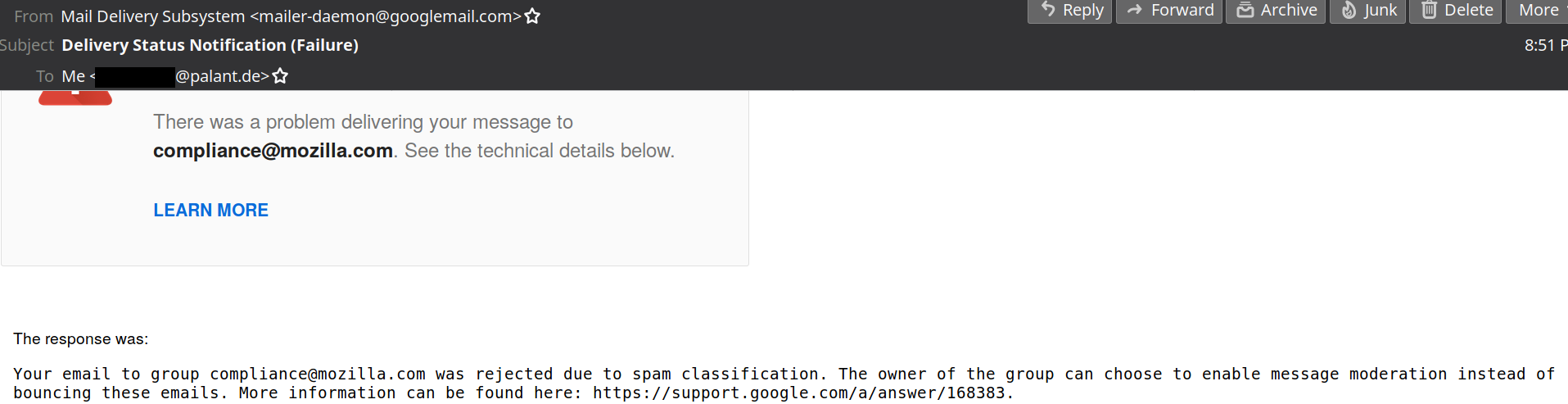
Oh well…
https://palant.de/2019/04/03/dear-mozilla-please-stop-spamming/
We are giving several updates on our testing with DNS-over-HTTPS (DoH), a new protocol that uses encryption to protect DNS requests and responses. This post shares the latest results, what we’ve learned, and how we’re fine-tuning our next step in testing.
tl;dr: The results of our last performance test showed improvement or minimal impact when DoH is enabled. Our next experiment continues to test performance with Akamai and Cloudflare, and adds a performance test that takes advantage of a secure protocol for DNS resolvers set up between Cloudflare and Facebook.
What we learned
Back in November 2018, we rolled out a test of DoH in the United States to look at possible impacts to Content Delivery Networks (CDNs). Our goal was to closely examine performance again, specifically the case when users get less localized DNS responses that could slow the browsing experience, even if the DNS resolver itself is accurate and fast. We worked with Akamai to help us understand more about the possible impact.
The results were strong! Like our previous studies, DoH had minimal impact or clearly improved the total time it takes to get a response from the resolver and fetch a web page.
Here’s a sample result for our “time to first byte” measurement:
 In this case, the absolute difference across the experiment was less than 10ms regression for 50th percentile and lower. For 75th percentile or higher, we saw no regression or even a performance win, particularly on the long tail of slower connections. We saw very similarly shaped results for the rest of our measurements.
While exploring the data in the last experiment, we discovered a few things we’d like to know more about and will run three additional tests described below.
Additional testing on performance and privacy
First, we saw a higher error rate during DNS queries than expected, with and without DoH. We’d like to know more about those errors — are they something that the browser could handle better? This is something we’re still researching, and this next experiment adds better error capturing for analysis.
And while the performance was good with DoH, we’re curious if we could improve it even more. CDNs and other distributed websites provide localized DNS responses depending on where you are in the network. The goal is to send you to a host near you on the network and therefore give you the best performance, but if your DNS goes through Cloudflare, this might not happen. The EDNS Client Subnet extension allows a centralized resolver like Cloudflare to give the authoritative resolver for the site you are going to some information about your location, which they can use to tune their responses. Ordinarily this isn’t safe for two reasons: first, the query to the authoritative resolver isn’t encrypted and so it leaks your query; and second, the authoritative resolver might be operated by a third party who would then learn about your browsing activity. This was something we needed to test further.
Since our last experiment, Facebook has partnered with Cloudflare to offer DNS-over-TLS (DoT) as a pilot project, which plugs the privacy leak caused by EDNS Client Subnet (ECS) use. There are two key reasons this work improves your privacy when connecting to Facebook. First, Facebook operates their own authoritative resolvers, so third parties don’t get your query. Second, DoT encrypts your query so snoopers on the network can’t see it.
With DoT in place, we want to see if Cloudflare sending ECS to Facebook’s resolver results in our users getting better response times. To figure this out, we added tests for resolver response and web page fetch for test URLs from Facebook systems.
The experiment will check locally if the browser has a Facebook login cookie. If it does, it will attempt to collect data once per day — about the speed of queries to test URLs. This means that if you have never logged into Facebook, the experiment will not fetch anything from Facebook systems.
As with our last test, we aren’t passing any cookies, these domains aren’t ones that the user would automatically retrieve and just contain dummy content, so we aren’t disclosing anything to the resolver or Facebook about users’ browsing behavior.
We’re also re-running the Akamai tests to get to the bottom of the
The forth season of my favorite HTTP series is back! The HTTP Workshop skipped over last year but is back now with a three day event organized by the very best: Mark, Martin, Julian and Roy. This time we’re in Amsterdam, the Netherlands.
35 persons from all over the world walked in the room and sat down around the O-shaped table setup. Lots of known faces and representatives from a large variety of HTTP implementations, client-side or server-side – but happily enough also a few new friends that attend their first HTTP Workshop here. The companies with the most employees present in the room include Apple, Facebook, Mozilla, Fastly, Cloudflare and Google – having three or four each in the room.
Patrick Mcmanus started off the morning with his presentation on HTTP conventional wisdoms trying to identify what have turned out as successes or not in HTTP land in recent times. It triggered a few discussions on the specific points and how to judge them. I believe the general consensus ended up mostly agreeing with the slides. The topic of unshipping HTTP/0.9 support came up but is said to not be possible due to its existing use. As a bonus, Anne van Kesteren posted a new bug on Firefox to remove it.
Mark Nottingham continued and did a brief presentation about the recent discussions in HTTPbis sessions during the IETF meetings in Prague last week.
Martin Thomson did a presentation about HTTP authority. Basically how a client decides where and who to ask for a resource identified by a URI. This triggered an intense discussion that involved a lot of UI and UX but also trust, certificates and subjectAltNames, DNS and various secure DNS efforts, connection coalescing, DNSSEC, DANE, ORIGIN frame, alternative certificates and more.
Mike West explained for the room about the concept for Signed Exchanges that Chrome now supports. A way for server A to host contents for server B and yet have the client able to verify that it is fine.
Tommy Pauly then talked to his slides with the title of Website Fingerprinting. He covered different areas of a browser’s activities that are current possible to monitor and use for fingerprinting and what counter-measures that exist to work against furthering that development. By looking at the full activity, including TCP flows and IP addresses even lots of our encrypted connections still allow for pretty accurate and extensive “Page Load Fingerprinting”. We need to be aware and the discussion went on discussing what can or should be done to help out.

Lucas Pardue discussed and showed how we can do TLS interception with Wireshark (since the release of version 3) of Firefox, Chrome or curl and in the end make sure that the resulting PCAP file can get the necessary key bundled in the same file. This is really convenient when you want to send that PCAP over to your protocol debugging friends.
Roberto Peon presented his new idea for “Generic overlay networks”, a suggested way for clients to get resources from one out of several alternatives. A neighboring idea to Signed Exchanges, but still different. There was an interested to further and deepen this discussion and Roberto ended up saying he’d at write up a draft for it.
Max Hils talked about Intercepting QUIC and how the ability to do this kind of thing is very useful in many situations. During development, for debugging and for checking what potentially bad stuff applications are actually doing on your own devices. Intercepting QUIC and HTTP/3 can thus also be valuable but at least for now presents some challenges. (Max also happened to mention that the project he works on, mitmproxy,
Authors: Jennifer Davidson, Emanuela Damiani, Meridel Walkington, and Philip Walmsley
Sometimes, when you’re doing user research, things just don’t quite go as planned. MozFest was one of those times for us.
MozFest, the Mozilla Festival, is a vibrant conference and week-long “celebration for, by, and about people who love the internet.” Held at a Ravensbourne university in London, the festival features nine floors of simultaneous sessions. The Add-ons UX team had the opportunity to host a workshop at MozFest about co-designing a new submission flow for browser extensions and themes. The workshop was a version of the Add-ons community workshop we held the previous day.
On the morning of our workshop, we showed up bright-eyed, bushy-tailed, and fully caffeinated. Materials in place, slides loaded…we were ready. And then, no one showed up.
Perhaps because 1) there was too much awesome stuff going on at the same time as our workshop, 2) we were in a back corner, and 3) we didn’t proactively advertise our talk enough.
After processing our initial heartache and disappointment, Emanuela, a designer on the team, suggested we try something we don’t do often at Mozilla, if at all: guerrilla research. Guerrilla user research usually means getting research participants from “the street.” For example, a researcher could stand in front of a grocery store with a tablet computer and ask people to use a new app. This type of research method is different than “normal” user research methods (e.g. field research in a person’s home, interviewing someone remotely over video call, conducting a usability study in a conference room at an office) because there is much less control in screening participants, and all the research is conducted in the public eye [1].
Guerrilla research is a polarizing topic in the broader user research field, and with good reason: while there are many reasons one might employ this method, it can and is used as a means of getting research done on the cheap. The same thing that makes guerrilla research cheaper — convenient, easy data collection in one location — can also mean compromised research quality. Because we don’t have the same level of care and control with this method, the results of the work can be less effective compared to a study conducted with careful recruitment and facilitation.
For these reasons, we intentionally don’t use guerrilla research as a core part of the Firefox UX practice. However, on that brisk London day, with no participants in sight and our dreams of a facilitated session dashed, guerrilla research presented itself as a last-resort option, as a way we could salvage some of our time investment AND still get some valuable feedback from people on the ground. We were already there, we had the materials, and we had a potential pool of participants — people who, given their conference attendance, were more informed about our particular topic than those you would find in a random coffee shop. It was time to make the best of a tough situation and learn what we could.
And that’s just what we did.
Thankfully, we had four workshop facilitators, which meant we could evolve our roles to the new reality. Emanuela and Jennifer were traveling workshop facilitators. Phil, another designer on the team, took photos. Meridel, our content strategist, stationed herself at our original workshop location in case anyone showed up there, taking advantage of that time to work through content-related submission issues with our engineers.

We boldly went into the halls at MozFest and introduced ourselves and our project. We had printouts and pens to capture ideas and get some sketching done with our participants.
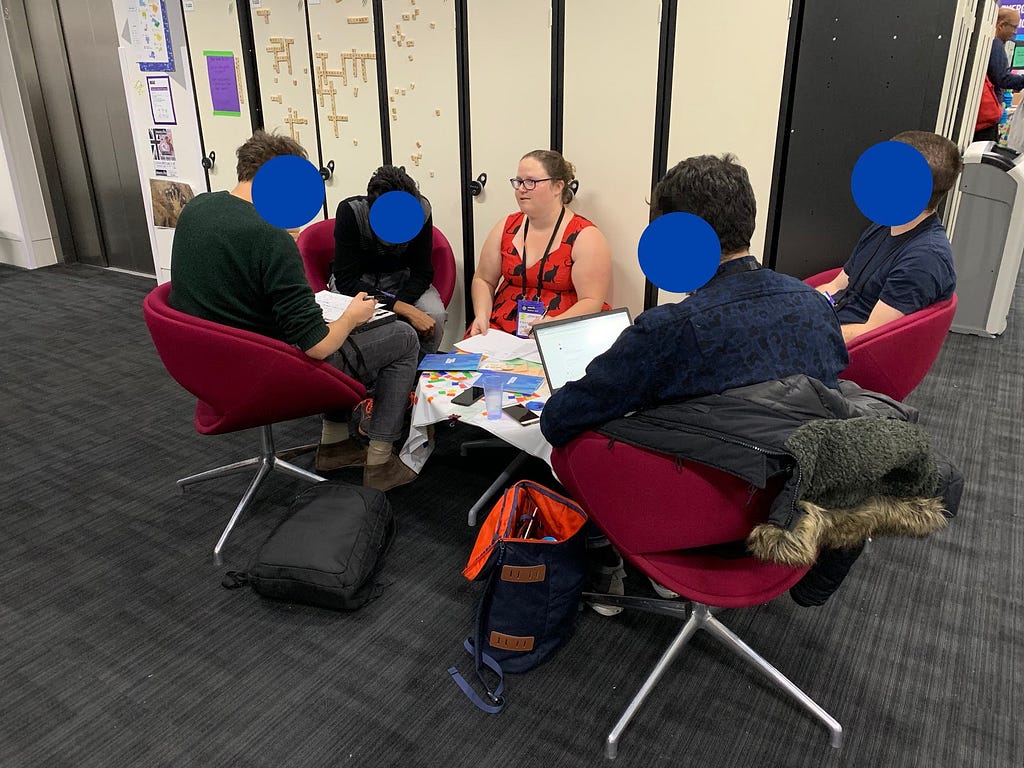
In the end, seven people participated in our on-the-road co-design workshop. Because MozFest tends to attract a diverse group of attendees from journalists to developers to academics, some of these participants had experience creating and submitting browser extensions and themes. For each participant we:
- Approached them and introduced
Permission prompts are a common sight on the web today. They allow websites to prompt for access to powerful features when needed, giving users granular and contextual choice about what to allow. The permission model has allowed browsers to ship features that would have presented risks to privacy and security otherwise.
However, over the last few years the ecosystem has seen a rise in unsolicited, out-of-context permission prompts being put in front of users, particularly ones that ask for permission to send push notifications.
In the interest of protecting our users and the web platform from this, we plan to experiment with restricting how and when websites can ask for notification permissions.
Rationalizing Push Notification Permission Spam
Push notifications are a powerful capability that enables new kinds of interactions with sites. It is hard to imagine a modern chat or social networking app that doesn’t send notifications. Since notifications can be sent after you leave a site, it is only natural that a site would need to ask for permission to show them.
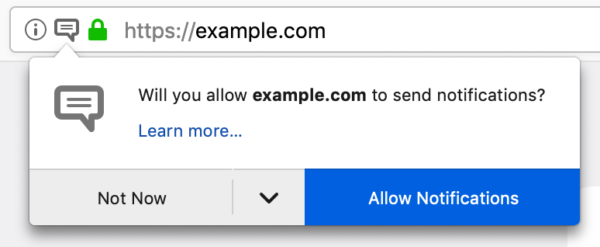
Looks familiar?
But anecdotal evidence tells us that there is an issue with notification permission prompts among our user base. As we browse the web, we regularly encounter these prompts and more often than not we become annoyed at them or don’t understand the intent of the website requesting the permission.
According to our telemetry data, the notifications prompt is by far the most frequently shown permission prompt, with about 18 million prompts shown on Firefox Beta in the month from Dec 25 2018 to Jan 24 2019. Not even 3% of these prompts got accepted by users. Most prompts are dismissed, while almost 19% of prompts caused users to leave the site immediately after being confronted with them. This is in stark contrast to the camera/microphone prompt, which has an acceptance rate of about 85%!
This leads us to believe that
- There are websites that show the notification prompt without the intent of using it to enhance the user experience, or that fail to convey this UX enhancement when prompting.
- There are websites that prompt for notification permission “too early”, without giving users enough context or time to decide if they want them, even if push notifications would significantly enhance the user experience on that site.
Last year Firefox introduced a new setting that allows users to entirely opt out of receiving new push notification permission prompts. This feature was well received, among users that discovered it and understood the implications. But we still fail to protect the large part of our users that do not explore their notification settings or don’t want to enforce such drastic measures. Thus, we are starting to explore other methods of preventing “permission spam” with two new experiments.
Experiment 1: Requiring User Interaction for Notification Permission Prompts in Nightly 68
A frequently discussed mitigation for this problem is requiring a user gesture, like a click or a keystroke, to trigger the code that requests permission. User interaction is a popular measure because it is often seen as a proxy for user consent and engagement with the website.
Firefox Telemetry from pre-release channels shows that very few websites request push notifications from a user gesture, indicating that this may be too drastic of a measure.
We suspect that these numbers might not paint a full picture of the resulting user experience, and we would like to get a real world impression of how requiring user interaction for notification permission prompts affects sites in the wild.
Hence, we will temporarily deny requests for permission to use Notifications unless they follow a click or keystroke in Firefox Nightly from April 1st to April 29th.
In the first two weeks of this experiment, Firefox will not show any user-facing notifications when the restriction is applied to
Today one of my first year web students emailed me a question:
Today when I was searching some questions on StackOverflow, I found their website turns to a really interesting display and can be changed to the regular one back and forth by a button on the top. I guess it's some April Fool's day joke...how did they make the mouse pointer thing? There are stars dropping and tracking the pointer when you move it, I was thinking of inspecting it to get a sense, but then I realized I usually use the pointer to click on an element for inspecting, but I can't click the mouse itself, so I'm lost...Here's a website to explain what I'm saying: https://stackoverflow.com/questions/1098040/checking-if-a-key-exists-in-a-javascript-object?rq=1 Could you tell me how does that work, is this till done by CSS? or JS?
I went to look, and here is an animation of what I found. Notice the trail of stars behind my mouse pointer as it moves:
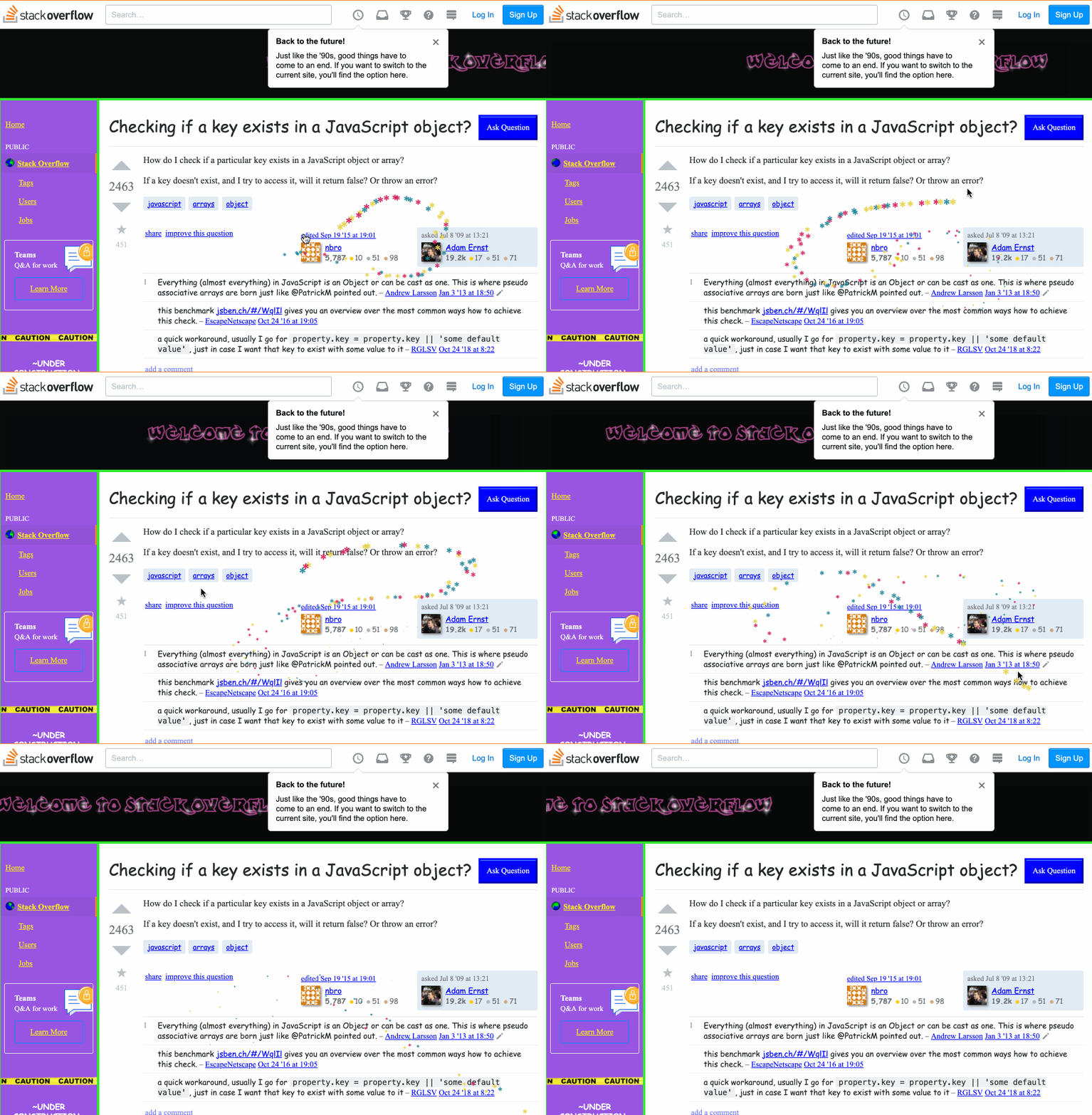
My first thought is that they must have a mousemove handler on the body. I opened the dev tools and looked through the registered event listeners for mousemove. Sure enough, there was one one registered on the document, and the code looked like this:
function onMouseMove(e) {
    cursor.x = e.clientX;
    cursor.y = e.clientY;

    addParticle(
           cursor.x,
           cursor.y,
           possibleColors[Math.floor(Math.random()*possibleColors.length)]
    );
}
Reading a bit further into the file revealed this comment:
/*!
 * Fairy Dust Cursor.js
 * - 90's cursors collection
 * -- https://github.com/tholman/90s-cursor-effects
 * -- https://codepen.io/tholman/full/jWmZxZ/
 */
This is using tholman's cursor-effects JS library, and specifically the fairyDustCursor.
This code is really fun to read, especially for my early web students. It's short, readable, not unnecessarily clever, and uses really common things in interesting ways. Almost everything it does, my students have seen before--they just might not have thought to put it all together into one package like this.
Essentially how it works is that Partcle objects are stored in an array, and each one gets added to the DOM as a * with a different colour, and CSS is used to move (translate) each away from an origin (the mouse pointer's x and y position). Over time (iterations of the requestAnimationFrame loop), each of these particles ages, and eventually dies, getting removed from the array and DOM.
As I read the code, something else struck me. Both Stack Overflow and the cursor-effects library talk about this style of web site being from the 90s. It's true, we didn't have the kind of refined and "delightful experiences" we take for granted today. It was a lot of flashing, banner adds, high contrast colours, and people inventing (often badly) as they went.
Yet reading the code for how this effect was done, I couldn't help but pause to reflect on how modern it is at the same time. Consider some of the browser APIs necessary to make this "90s" effect possible, and when they were first shipped (all dates are from caniuse.com):
querySelectorc. 2008 WebKittranslate3dc. 2009 WebKittouchstartevent c. 2009 GooglerequestAnimationFramec. 2010 Mozillapointer-events,touch-actionc. 2012 Microsoftwill-changec. 2014 Google
The progress that's been made
Summary
Socorro is the crash ingestion pipeline for Mozilla's products like Firefox. When Firefox crashes, the crash reporter collects data about the crash, generates a crash report, and submits that report to Socorro. Socorro saves the crash report, processes it, and provides an interface for aggregating, searching, and looking at crash reports.
This blog post summarizes Socorro activities in March.
Read more… (6 mins to read)
https://bluesock.org/~willkg/blog/mozilla/socorro_2019_03.html
(I will update this blog post with more links to videos and PDFs to presentations as they get published, so come back later in case your favorite isn’t linked already.)
The third curl developers conference, curl up 2019, is how history. We gathered in the lovely Charles University in central Prague where we sat down in an excellent class room. After the HTTP symposium on the Friday, we spent the weekend to dive in deeper in protocols and curl details.
I started off the Saturday by The state of the curl project (youtube). An overview of how we’re doing right now in terms of stats, graphs and numbers from different aspects and then something about what we’ve done the last year and a quick look at what’s not do good and what we could work on going forward.
James Fuller took the next session and his Newbie guide to contributing to libcurl presentation. Things to consider and general best practices to that could make your first steps into the project more likely to be pleasant!
Long term curl hacker Dan Fandrich (also known as “Daniel two” out of the three Daniels we have among our top committers) followed up with Writing an effective curl test where the detailed what different tests we have in curl, what they’re for and a little about how to write such tests.
After that I was back behind the desk in the classroom that we used for this event and I talked The Deprecation of legacy crap (Youtube). How and why we are removing things, some things we are removing and will soon remove and finally a little explainer on our new concept and handling of “experimental” features.
Igor Chubin then explained his new protect for us: curlator: a framework for console services (Youtube). It’s a way and tooling that makes it easier to provide access to shell and console oriented services over the web, using curl.
Me again. Governance, money in the curl project and someone offering commercial support (Youtube) was a presentation about how we intend for the project to join a legal entity SFC, and a little about money we have, what to spend it on and how I feel it is good to keep the project separate from any commercial support ventures any of us might do!
While the list above might seems like more than enough, the day wasn’t over. Christian Schmitz also did his presentation on Using SSL root certificate from Mac/Windows.
Our local hero organizer James Fuller then spoiled us completely when we got around to have dinner at a monastery with beer brewing monks and excellent food. Good food, good company and curl related dinner subjects. That’s almost heaven defined!
Sunday
Daylight saving time morning and you could tell. I’m sure it was not at all related to the beers from the night before…
James Fuller fired off the day by talking to us about Curlpipe (github), a DSL for building http execution pipelines.

Robin Marx then put in the next gear and entertained us another hour with a protocol deep dive titled HTTP/3 (QUIC): the details (slides). For me personally this was a exactly what I needed as Robin clearly
April Fools!
We still have open bugs, but we’d like your help to close them!
We are grateful to have a very active set of users who generate a lot of bug reports and we are requesting your help in sorting them, an activity called bug triage. We’re holding “Bug Days” on April 8th (all day, EU and US timezones) and April 13th (EU and US timezones until 4pm EDT). During these bug days we will log on and work as a community to triage as many bugs as possible. All you’ll need is a Bugzilla account, Thunderbird Daily, and we’ll teach you the rest! With several of us working at the same time we can help each other in real time – answering questions, sharing ideas ideas, and enjoying being with like-minded people.
No coding or special skills are required, and you don’t need to be an expert or long term user of Thunderbird.
Some things you’ll be doing if you participate:
- Help other users by checking their bug reports to see if you can reproduce the behavior of their reported problem.
- Get advice about your own bug report(s).
- Learn the basics about Thunderbird troubleshooting and how to contribute.
We’re calling this the “Game of Bugs”, named after the popular show Game of Thrones – where we will try to “slay” all the bugs. Those who participate fully in the event will get a Thunderbird Game of Bugs t-shirt for their participation (with the design below).

Thunderbird: Game of Bugs
Sorry for the joke! But we hope you’ll join us on the 8th or the 13th via #tb-qa on Mozilla’s IRC so that we can put these bugs in their place which helps make Thunderbird even better. If you have any questions feel free to email ryan@thunderbird.net.
P.S. If you are unable to participate in bug day you can still help by checking out our Get Involved page on the website and contributing in the way you’d like!
https://blog.mozilla.org/thunderbird/2019/04/all-bugs-fixed/
TenFourFox Feature Parity Release 14 beta 1 is now available (downloads, hashes, release notes).
I had originally plotted three main features for this release, but getting the urgent FPR13 SPR1 set me back a few days with confidence testing and rebuilds and I have business trips and some vacation time coming up, so I jettisoned the riskiest of the three features (a set of JavaScript updates and a ugly hack to get Github and other sites working fully again) and concentrated on the other two. I'll be looking at that again for FPR15, so more on that later.
Before we get to the marquee features, though, there are two changes which you may not immediately notice. The first is a mitigation for a long-standing issue where some malicious sites keep popping up authentication modals using HTTP Auth. Essentially you can't do anything with the window until the modal is dealt with, so the site just asks for your credentials over and over, ultimately making the browser useless (as a means to make you call their "support line" where they can then social engineer their way into your computer). The ultimate solution is to make such things tab-modal rather than window-modal, but that's involved and sort of out of scope, so we now implement a similar change to what current Firefox does where there is a cap of three Cancels. If you cancel three times, the malicious site is not allowed to issue any more requests until you reload it. No actual data is leaked, assuming you don't type anything in, but it can be a nasty denial of service and it would have succeeded in ruining your day on TenFourFox just as easily as any other Firefox derivative. That said, just avoid iffy sites, yes?
The second change is more fundamental. For Firefox 66 Mozilla briefly experimented with setting a frame rate cap on low-end devices. Surprise, surprise: all of our systems are low-end devices! In FPR13 and prior, TenFourFox would try to push as many frames to the compositor as possible, no matter what it was trying to do, to achieve a 60fps target or better. However, probably none of our computers with the possible exception of high-end G5s were probably achieving 60fps consistently on most modern websites, and the browser would flail trying to desperately keep up. Instead, by setting a cap and enforcing it with software v-sync, frames aren't pushed as often and the browser can do more layout and rendering work per frame. Mozilla selected a 30fps cap, so that's what I selected as an arbitrary first cut. Some sites are less smooth, but many sites now render faster to first paint, particularly pages that do a lot of DOM transforms because now the resulting visual changes are batched. This might seem like an obvious change to make but the numbers had never been proven until then.
Mozilla ultimately abandoned this change in lieu of a more flexible approach with the idle queue, but our older codebase doesn't support that, and we don't have the other issues they encountered anyway because we don't support Electrolysis or APZ. There are two things to look at: we shouldn't have the same scrolling issues because we scroll synchronously, but do report any regressions in default scrolling or obvious changes in scroll rate (include what you're doing the scrolling with, such as the scroll bar, a mouse scroll wheel or your laptop trackpad). The second thing to look at is whether the 30fps frame rate is the right setting for all systems. In particular, should 7400 or G3 be even lower, maybe 15fps? You can change this with layout.frame_rate to some other target frame rate value and restarting the browser. What setting seems to do best on your machine? Include RAM, OS and CPU speed. One other possibility is to look at reducing the target frame rate dynamically based on battery state, but this requires additional plumbing we don't support just yet.
So now the main event: H.264 video support. Olga gets the credit here for the original code, which successfully loads our separately-distributed build of ffmpeg so that we don't run afoul of any licenses including it with the core browser. My first cut of this had issues where the browser ran out of memory on sites that ran lots of H.264 video as images (and believe me, this is not at all uncommon these days), but I got our build of ffmpeg trimmed down enough that it can now load the Vimeo front page and other sites generally without issue. Download

fischertechnik launched the smart home kit last year. A very good move on a conceptual level. Smart home and IoT (internet of things) are rapidly growing technology sectors. The unique placement of the TXT allows it to be a perfect introductory platform to this world. However, the smart home platform from fischertechnik relies on a …
Continue reading "Sustainable smart home with the TXT"
The post Sustainable smart home with the TXT appeared first on Humanoids beLog.

This year’s version of curl up started a little differently: With an afternoon of HTTP presentations. The event took place the same week the IETF meeting has just ended here in Prague so we got the opportunity to invite people who possibly otherwise wouldn’t have been here… Of course this was only possible thanks to our awesome sponsors, visible in the image above!
Luk'as Linhart from Apiary started out with “Web APIs: The Past, The Present and The Future”. A journey trough XML-RPC, SOAP and more. One final conclusion might be that we’re not quite done yet…
James Fuller from MarkLogic talked about “The Defenestration of Hypermedia in HTTP”. How HTTP web technologies have changed over time while the HTTP paradigms have survived since a very long time.
I talked about DNS-over-HTTPS. A presentation similar to the one I did before at FOSDEM, but in a shorter time so I had to talk a little faster!
Mike Bishop from Akamai (editor of the HTTP/3 spec and a long time participant in the HTTPbis work) talked about “The evolution of HTTP (from HTTP/1 to HTTP/3)” from HTTP/0.9 to HTTP/3 and beyond.
Robin Marx then rounded off the series of presentations with his tongue in cheek “HTTP/3 (QUIC): too big to fail?!” where we provided a long list of challenges for QUIC and HTTP/3 to get deployed and become successful.
We ended this afternoon session with a casual Q&A session with all the presenters discussing various aspects of HTTP, the web, REST, APIs and the benefits and deployment challenges of QUIC.
I think most of us learned things this afternoon and we could leave the very elegant Charles University room enriched and with more food for thoughts about these technologies.
We ended the evening with snacks and drinks kindly provided by Apiary.
(This event was not streamed and not recorded on video, you had to be there in person to enjoy it.)
https://daniel.haxx.se/blog/2019/03/30/the-future-of-http-symposium/
CODE_OF_CONDUCT.md
This week, Mozilla added PRs to all the repositories that Mozilla has on GitHub that aren't forks, Servo, or Rust. The PRs add a CODE_OF_CONDUCT.md file and also include some instructions on what projects can do with it. This standardizes inclusion of the code of conduct text in all projects.
I'm a proponent of codes of conduct. I think they're really important. When I was working on Bleach with Greg, we added code of conduct text in September of 2017. We spent a bunch of time thinking about how to do that effectively and all the places that users might encounter Bleach.
I spent some time this week trying to figure out how to do what we did with Bleach in the context of the Mozilla standard. This blog post covers those thoughts.
This blog post covers Python-centric projects. Hopefully, some of this applies to other project types, too.
What we did in Bleach in 2017 and why
In September of 2017, Greg and I spent some time thinking about all the places the code of conduct text needs to show up and how to implement the text to cover as many of those as possible for Bleach.
PR #314 added two things:
- a CODE_OF_CONDUCT.rst file
- a copy of the text to the README
In doing this, the code of conduct shows up in the following places:
- the contents of the repository at https://github.com/mozilla/bleach
- the rendered README text also at https://github.com/mozilla/bleach
- the docs at https://bleach.readthedocs.io/
- the PyPI page at https://pypi.org/project/bleach
- in the source tarball of all releases
- on the "new issue" page in GitHub [1]
In this way, users could discover Bleach in a variety of different ways and it's very likely they'll see the code of conduct text before they interact with the Bleach community.
| [1] | It no longer shows up on the "new issue" page in GitHub. I don't know when that changed. |
The Mozilla standard
The Mozilla standard applies to all repositories in Mozilla spaces on GitHub and is covered in the Repository Requirements wiki page.
It explicitly requires that you add a CODE_OF_CONDUCT.md file with the specified text in it to the root of the repository.
This makes sure that all repositories for Mozilla things have a code of conduct specified and also simplifies the work they need to do to enforce the requirement and update the text over time.
This week, a bot added PRs to all repositories that didn't have this file. Going forward, the bot will continue to notify repositories that are missing the file and will update the file's text if it ever gets updated.
How to work with the Mozilla standard
Let's go back and talk about Bleach. We added a file and a blurb to the README and that covered the following places:
- the contents of the repository at https://github.com/mozilla/bleach
- the rendered README text also at https://github.com/mozilla/bleach
- the docs at https://bleach.readthedocs.io/
- the PyPI page at https://pypi.org/project/bleach
- in the source tarball of all releases
With the new standard, we only get this:
- the contents of the repository at https://github.com/mozilla/bleach
- (maybe) in the source tarball of all releases
In order to make sure the file is in the source tarball, you have to make sure it gets added. The bot doesn't make any changes to fix this. You can use