Whether it’s checking the weather forecast or movie times, you can always count on the web to give you the information you’re seeking. Your choice of operating system and computer shouldn’t change your online experience. As part of Mozilla’s mission, we built Firefox as a trusted user agent for people on the web and it’s one of the reasons why we’re always looking to work with companies to optimize Firefox Quantum for their devices.
Last December, we announced our collaboration with Qualcomm, to create an ARM64-native build of Firefox for Snapdragon-powered Windows 10 Always Connected PCs. Today, we’re excited to report its availability in our beta release channel, a channel aimed at developers or early tech adopters to test upcoming features before they’re released to consumers.
Today’s release builds on the performance work done for Firefox Quantum, which uses multiple processes as efficiently as possible. Working with Qualcomm’s Snapdragon compute platform, we’re able to push the multi-core paradigm one step further, offering octa-core CPUs. We’re also taking advantage of Rust’s fearless concurrency to intelligently divide browsing tasks across those cores to deliver a fast, personal, and convenient experience.
Snapdragon powered Always Connected PCs are ideal for the road warrior because they are thin, fanless, lightweight with a long battery life and lightening fast cellular connectivity, and built to seamlessly perform daily work tasks on-the-go. We’re no stranger to optimizing the Firefox browser for any device. From Fire TV to the new iPad, we’ve custom tailored Firefox browsers for a number of different devices, because it shouldn’t matter what device you use.
Test Drive Firefox’s ARM64 for Windows 10 on Snapdragon
Your feedback is valuable for us to fine-tune this experience for a future release. If you have an ARM64 device running Windows 10, you can help by reporting bugs or submitting crash reports or simply sharing feedback. If you have any questions about your experience you can visit here for assistance.
To try the ARM64-native build of Firefox on Windows beta version, you can download it here.
The post Firefox Beta for Windows 10 on Qualcomm Snapdragon Always Connected PCs Now Available appeared first on Future Releases.
Nowadays it is common for locally installed applications to also offer installing browser extensions that will take care of browser integration. Securing the communication between extensions and the application is not entirely trivial, something that Logitech had to discover recently for example. I’ve also found a bunch of applications with security issues in this area. In this context, one has to appreciate RememBear password manager going to great lengths to secure this communication channel. Unfortunately, while their approach isn’t strictly wrong, it seems to be based on a wrong threat assessment and ends up investing far more effort into this than necessary.
The approach
It is pretty typical for browser extensions and applications to communicate via WebSockets. In case of RememBear the application listens on port 8734, so the extension creates a connection to ws://localhost:8734. After that, messages can be exchanged in both directions. So far it’s all pretty typical. The untypical part is RememBear using TLS to communicate on top of an unencrypted connection.
So the browser extension contains a complete TLS client implemented in JavaScript. It generates a client key, and on first connection the user has to confirm that this client key is allowed to connect to the application. It also remembers the server’s public key and will reject connecting to another server.
Why use an own TLS implementation instead of letting the browser establish an encrypted connection? The browser would verify TLS certificates, whereas the scheme here is based on self-signed certificates. Also, browsers never managed to solve authentication via client keys without degrading user experience.
The supposed threat
Now I could maybe find flaws in the forge TLS client they are using. Or criticize them for using 1024 bit RSA keys which are deprecated. But that would be pointless, because the whole construct addresses the wrong threat.
According to RememBear, the threat here is a malicious application disguising as RememBear app towards the extension. So they encrypt the communication in order to protect the extension, making sure that it only talks to the real application.
Now the sad reality of password managers is: once there is a malicious application on the computer, you’ve lost already. Malware does things like logging keyboard input and should be able to steal your master password this way. Even if malware is “merely” running with user’s privileges, it can go as far as letting a trojanized version of RememBear run instead of the original.
But hey, isn’t all this setting the bar higher? Like, messing with local communication would have been easier than installing a modified application? One could accept this line argumentation of course. The trouble is: messing with that WebSocket connection is still trivial. If you check your Firefox profile directory, there will be a file called browser-extension-data/ff@remembear.com/storage.js. Part of this file: the extension’s client key and RememBear application’s public key, in plain text. A malware can easily read out (if it wants to connect to the application) or modify these (if to wants to fake the application towards the extension). With Chrome the data format is somewhat more complicated but equally unprotected.

Image by Joybot
The actual threat
It’s weird how the focus is on protecting the browser extension. Yet the browser extension has no data that a malicious application could steal. If anything, malware might be able to trick the extension into compromising websites. Usually however, malware applications manage to do this on their own, without help.
In fact, the by far more interesting target is the RememBear application, the one with the passwords data. Yet protecting it against malware is a lost cause, whatever a browser extension running in the browser sandbox can do – malware can easily do the same.
The realistic threat here are actually regular websites. You see, same-origin policy isn’t enforced for WebSockets. Any website can
A photo of a small, fiery circular shape floating in blackness will go down in history as the first photo of a black hole. It might not look like much, … Read more
The post First photo of a black hole or cosmic cousin of the Firefox logo? appeared first on The Firefox Frontier.
WebRender is a GPU based 2D rendering engine for the web written in Rust, currently powering Mozilla’s research web browser servo and on its way to becoming Firefox‘s rendering engine.
A week in Toronto
The gfx team got together in Mozilla’s Toronto office last week. These gatherings are very valuable since the team is spread over many timezones (in no particular order, there are graphics folks in Canada, Japan, France, various parts of the US, Germany, England, Australia and New Zealand).
It was an intense week, filled with technical discussions and planning. I’ll go over some of them below:
New render task graph
Nical continues investigating a more powerful and expressive render task graph for WebRender. The work is happening in the toy render-graph repository and during the week a lot task scheduling and texture memory allocation strategies were discussed. It’s an interesting and open problem space where various trade-offs will play out differently on different platforms.
One of the things that came out of these discussions is the need for tools to understand the effects of the different graph scheduling and allocation strategies, and help debugging their effects and bugs once we get to integrating a new system into WebRender. As a result, Nical started building a standalone command-line interface for the experimental task graph and generate SVG visualizations.

Battery life
So far our experimentation has showed that energy consumption in WebRender (as well as Firefox’s painting and compositing architecture) is strongly correlated with the amount of pixels that are manipulated. In other word, it is dominated by memory bandwidth which is stressed by high screen resolutions. This is perhaps no surprise for someone having worked with graphics rendering systems, but what’s nice with this observation is that it gives us a very simple metric to measure and build optimizations and heuristics around.
Avenues for improvements in power consumption therefore include Doug’s work with document splitting and Markus’s work on better integration with MacOS’s compositing window manager with the Core Animation API. No need to tell the window manager to redraw the whole window when only the upper part changed (the document containing the browser’s UI for example).
The browser can break the window up into several surfaces and let the window manager composite them together which saves some work and potentially substantial amounts of memory bandwidth.
On Windows the same can be achieved with the Direct Composition API. On Linux with Wayland we could use sub-surfaces although in our preliminary investigation we couldn’t find a reliable/portable way to obtain the composited content for the whole browser window which is important for our testing infrastructure and other browser functionalities. Only recently did Android introduce similar functionalities with the SurfaceControl API.
We made some short and long term plans around the theme of better integration with the various window manager APIs. This is an area where I hope to see WebRender improve a lot this year.
Fission
Ryan gave us an overview of the architecture and progress of project Fission, which he has been involved with for some time. The goal of the project is to further isolate content from different origins by dramatically increasing the amount of content processes. There are several challenging aspects to this. Reducing the per-process memory overhead is an important one as we really want to remain better than Chrome overall memory usage. WebRender actually helps in this area as it moves most of the rendering out of content processes. There are also fun (with some notion of “fun”) edge cases to deal with such as page from domain A nested into iframe of domain B nested into iframe of domain A, and what this type of sandwichery implies in terms of processes, communication and what should happen when a CSS filter is applied to that kind of stack.
Fun stuff.
WebRender and software rendering
There will always be hardware and driver configurations that are too old, too buggy, or both, for us to support with WebRender using the GPU. For some time Firefox will fall back to the pre-WebRender architecture, but we’ll eventually want to get to a point where we phase out this legacy code while still work for all of our users. So WebRender needs some way to work when GPU doesn’t.
We discussed
Today, the House took a firm stand on behalf of internet users across the country. By passing the Save the Internet Act, members have made it clear that Americans have a fundamental right to access the open internet. Without these protections in place, big corporations like Comcast, Verizon, and AT&T could block, slow, or levy tolls on content at the expense of users and small businesses. We hope that the Senate will recognize the need for strong net neutrality protections and pass this legislation into law. In the meantime, we will continue to fight in the courts as the DC Circuit considers Mozilla v. FCC, our effort to restore essential net neutrality protections for consumers through litigation.
The post US House Votes to Save the Internet appeared first on Open Policy & Advocacy.
https://blog.mozilla.org/netpolicy/2019/04/10/us-house-votes-to-save-the-internet/
The UK government has just outlined its plans for sweeping new laws aimed at tackling illegal and harmful content and activity online, described by the government as ‘the toughest internet laws in the world’. While the UK proposal has some promising ideas for what the next generation of content regulation should look like, there are several aspects that would have a worrying impact on individuals’ rights and the competitive ecosystem. Here we provide our preliminary assessment of the proposal, and offer some guidance on how it could be improved.
According to the UK white paper, companies of all sizes would be under a ‘duty of care’ to protect their users from a broad class of so-called ‘online harms’, and a new independent regulator would be established to police them. The proposal responds to legitimate public policy concerns around how platforms deal with illegal and harmful content online, as well as the general public demand for tech companies to ‘do more’. We understand that in many respects the current regulatory paradigm is not fit for purpose, and we support an exploration of what codified content ‘responsibility’ might look like.
The UK government’s proposed regulatory architecture (a duty of care overseen by an independent regulator) has some promising potential. It could shift focus to regulating systems and instilling procedural accountability, rather than a focus on individual pieces of content and the liability/no liability binary. If implemented properly, its principles-based approach could allow for scalability, fine tailoring, and future-proofing; features that are presently lacking in the European content regulation paradigm (see for instance the EU Copyright directive and the EU Terrorist Content regulation).
Yet while the high-level architecture has promise, the UK government’s vision for how this new regulatory model could be realised in practice contains serious flaws. These must be addressed if this proposal is to reduce rather than encourage online harms.
- Scope issues: The duty of care would apply to an extremely broad class of online companies. While this is not necessarily problematic if the approach is a principles-based one, there is a risk that smaller companies will be disproportionately burdened if the Codes of Practice are developed with only the tech incumbents in mind. In addition, the scope would include both hosting services and messaging services, despite the fact that they have radically different technical structures.
- A conflation of terms: The duty of care would apply not only to a range of types of content – from illegal content like child abuse material to legal but harmful material like disinformation – but also harmful activities – from cyber bullying, to immigration crime, to ‘intimidation’. This conflation of content/activities and legal/harmful is concerning, given that many content-related ‘activities’ are almost impossible to proactively identify, and there is rarely a shared understanding of what ‘harmful’ means in different contexts.
- The role of the independent regulator: Given that this regulator will have unprecedented power to determine how online content control works, it is worrying that the proposal doesn’t spell out safeguards that will be put in place to ensure its Codes of Practice are rights-protective and workable for different types of companies. In addition, it doesn’t give any clarity as to how the development of the codes will be truly co-regulatory.
Yet as we noted earlier, the UK government’s approach holds some promise, and many of the above issues could be addressed if the government is willing. There’s some crucial changes that we’ll be encouraging the UK government to adopt when it brings forward the relevant legislation. These relate to:
- The legal status: There is a whole corpus of jurisprudence around duties of care and negligence law that has developed over centuries, therefore it is essential that the UK government clarifies how this proposal would interact with and relate to existing duties of care
- The
Many bugs, not enough triage
Mozilla receives hundreds of bug reports and feature requests from Firefox users every day. Getting bugs to the right eyes as soon as possible is essential in order to fix them quickly. This is where bug triage comes in: until a developer knows a bug exists, they won’t be able to fix it.
Given the large number of bugs filed, it is unworkable to make each developer look at every bug (at the time of writing, we’d reached bug number 1536796!). This is why, on Bugzilla, we group bugs by product (e.g. Firefox, Firefox for Android, Thunderbird, etc.) and component (a subset of a product, e.g. Firefox::PDF Viewer).
Historically, the product/component assignment has been mostly done manually by volunteers and some developers. Unfortunately, this process fails to scale, and it is effort that would be better spent elsewhere.
Introducing BugBug
To help get bugs in front of the right Firefox engineers quickly, we developed BugBug, a machine learning tool that automatically assigns a product and component for each new untriaged bug. By presenting new bugs quickly to triage owners, we hope to decrease the turnaround time to fix new issues. The tool is based on another technique that we have implemented recently, to differentiate between bug reports and feature requests. (You can read more about this at https://marco-c.github.io/2019/01/18/bugbug.html).

High-level architecture of BugBug training and operation
Training a model
We have a large training set of data for this model: two decades worth of bugs which have been reviewed by Mozillians and assigned to products and components.
Clearly we can’t use the bug data as-is: any change to the bug after triage has been completed would be inaccessible to the tool during real operation. So, we “roll back” the bug to the time it was originally filed. (This sounds easy in practice, but there are a lot of corner cases to take into account!).
Also, although we have thousands of components, we only really care about a subset of these. In the past ~2 years, out of 396 components, only 225 components had more than 49 bugs filed. Thus, we restrict the tool to only look at components with a number of bugs that is at least 1% of the number of bugs of the largest component.
We use features collected from the title, the first comment, and the keywords/flags associated with each bug to train an XGBoost model.

High-level overview of the BugBug model
During operation, we only perform the assignment when the model is confident enough of its decision: at the moment, we are using a 60% confidence threshold. With this threshold, we are able to assign the right component with a very low false positive ratio (> 80% precision, measured using a validation set of bugs that were triaged between December 2018 and March 2019).
BugBug’s results
Training the model on 2+ years of data (around 100,000 bugs) takes ~40 minutes on a 6-core machine with 32 GB of RAM. The evaluation time is in the order of milliseconds. Given that the tool does not pause and is always ready to act, the tool’s assignment speed is much faster than manual assignment (which, on average, takes around a week).
Since we deployed BugBug in production at the end of February 2019, we’ve triaged around 350 bugs. The median time for a developer to act on triaged bugs is 2 days. (9 days is the average time to act, but it’s only 4 days when we remove outliers.)

BugBug in action
Plans for the future
We have plans to use machine
Over the past few months, we’ve been experimenting with DNS-over-HTTPS (DoH), a protocol which uses encryption to protect DNS requests and responses, with the goal of deploying DoH by default for our users. Our plan is to select a set of Trusted Recursive Resolvers (TRRs) that we will use for DoH resolution in Firefox. Those resolvers will be required to conform to a specific set of policies that put privacy first.
To that end, today we are releasing a list of DOH requirements, available on the Mozilla wiki, that we will use to vet potential resolvers for Firefox. The requirements focus on three areas: 1) limiting data collection and retention from the resolver, 2) ensuring transparency for any data retention that does occur, and 3) limiting any potential use of the resolver to block access or modify content. This is intended to cover resolvers that Firefox will offer by default and resolvers that Firefox might discover in the local network.
In publishing this policy, our goal is to encourage adherence to practices for DNS that respect modern standards for privacy and security. Not just for our potential DoH partners, but for all DNS resolvers.
The post DNS-over-HTTPS Policy Requirements for Resolvers appeared first on Mozilla Security Blog.
https://blog.mozilla.org/security/2019/04/09/dns-over-https-policy-requirements-for-resolvers/
At Mozilla, we have been working hard to protect you from threats and annoyances on the web, so you can live your online life with less to worry about. Last year, we told you about adapting our approach to anti-tracking given the added importance of keeping people’s information on the web private in today’s climate. We talked about blocking tracking while also offering a clear set of controls to give our users more choice over what information they share with sites. One of the three key initiatives we listed was mitigating harmful practices like fingerprinting and cryptomining. We have added a feature to block fingerprinting and cryptomining in Firefox Nightly as an option for users to turn on.
What are fingerprinting and cryptomining scripts?
A variety of popular “fingerprinting” scripts are invisibly embedded on many web pages, harvesting a snapshot of your computer’s configuration to build a digital fingerprint that can be used to track you across the web, even if you clear your cookies. Fingerprinting violates Firefox’s anti-tracking policy.
Another category of scripts called “cryptominers” run costly operations on your web browser without your knowledge or consent, using the power of your computer’s CPU to generate cryptocurrency for someone else’s benefit. These scripts slow down your computer, drain your battery and rack up your electric bill.
How will Firefox block these harmful scripts?
To combat these threats, we are pleased to announce new protections against fingerprinters and cryptominers. In collaboration with Disconnect, we have compiled lists of domains that serve fingerprinting and cryptomining scripts. Now in the latest Firefox Nightly and Beta versions, we give users the option to block both kinds of scripts as part of our Content Blocking suite of protections.
In Firefox Nightly 68 and Beta 67, these new protections against fingerprinting and cryptomining are currently disabled by default. You can enable them with the following steps:
- Click the Firefox main menu:

- Choose “Preferences”:

- Click on the “Privacy and Security” tab at left:
- Under “Content Blocking”, click on “Custom”:

- Finally, check “Cryptominers” and “Fingerprinters” so that they are both blocked:
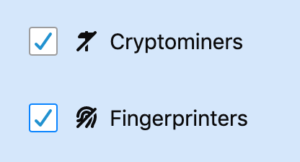


Once enabled, Firefox will block any scripts that have been identified by Disconnect to participate in cryptomining or fingerprinting. (These protections will be turned on by default in Nightly in the coming weeks.)
Testing these protections by default
In the coming months, we will start testing these protections with small groups of users and will continue to work with Disconnect to improve and expand the set of domains blocked by Firefox. We plan to enable these protections by default for all Firefox users in a future release.
As always, we welcome your reports of any broken websites you may encounter. Just click on the Tracking Protection “shield” in the address bar and click “Report a Problem”:

If today feels a little extra magical, that’s because it’s Unicorn Day! That’s right, a whole day devoted to these enchanting fairytale creatures. Unicorn Day is a new holiday created … Read more
The post 10 unicorn themes for Firefox to make Unicorn Day extra magical. appeared first on The Firefox Frontier.
https://blog.mozilla.org/firefox/unicorn-themes-for-firefox/
With Firefox 67 only a few short weeks away, I thought it might be interesting to take a step back and talk about some of the work that the Firefox Front-end Performance team is shipping to users in that particular release.
To be clear, this is not an exhaustive list of the great performance work that’s gone into Firefox 67 – but I picked a few things that the front-end team has been focused on to talk about.
Stop loading things we don’t need right away
The fastest code is the code that doesn’t run at all. Sometimes, as the browser evolves, we realize that there are components that don’t need to be loaded right away during start-up, and can instead of deferred until sometime after start-up. Sometimes, that means we can wait until the very last moment to initialize some component – that’s called loading something lazily.
Here’s a list of things that either got deferred until sometime after start-up, or made lazy:
FormAutofillContent and FormValidationChild
These are modules that support, you guessed it, Form Autofill – that part of the browser that helps you fill in web forms, and makes sure forms are passing validation. We were loading these modules too early, and now we load them only when there are forms to auto-fill or validate on a page.
The hidden window
The Hidden Window is a mysterious chunk of code that manages the state of the global menu bar on macOS when there are no open windows. The Hidden Window is also sometimes used as a singleton DOM window where various operations can take place. On Linux and Windows, it turns out we were creating this Hidden Window far early than needs be, and now it’s quite a bit lazier.
Page style
Page Style is a menu you can find under View in the main menu bar, and it’s used to switch between alternative style sheets on a page. It’s a pretty rarely used feature from what we can tell, but we were scanning pages for their alternative stylesheets far earlier than we needed to. We were also scanning pages that we know don’t have alternative stylesheets, like the about:home / about:newtab page. Now we only scan normal web pages, and we do so only after we service the idle event queue.
Cache invalidation
The Startup Cache is an important part of Firefox startup performance. It’s primary job is to cache computations that occur during each startup so that they only have to happen every once in a while. For example, the mark-up of the browser UI often doesn’t change from startup to startup, so we can cache a version of the mark-up that’s faster to read from disk, and only invalidate that during upgrades.
We were invalidating the whole startup cache every time a WebExtension was installed or uninstalled. This used to be necessary for old-style XUL add-ons (since those could cause changes to the UI that would need to go into the cache), but with those add-ons no longer available, we were able to remove the invalidation. This means faster startups more often.
Don’t touch the disk
The disk is almost always the slowest part of the system. Reading and writing to the disk can take a long time, especially on spinning magnetic drives. The less we can read and write, the better. And if we’re going to read, best to do it off of the main thread so that the UI remains responsive.
Old XUL icons code
We were reading from the disk on the main thread to search for window-specific icons to display in the window titlebar.
Firefox doesn’t use window-specific icons, so we made it so that we skip these checks. This means less disk activity, which is great for responsiveness and start-up!
Hitting every directory on the way down
We noticed that when we were checking that a directory exists on Windows (to write a file to it), we were using the CreateDirectoryW Windows API. This API checks each folder on the way down to the last one to see if they exist. That’s a lot of disk IO! We can avoid this if we assume that the parent directories exist, and only fall into the slow path if we fail to write our file. This means that we hit the faster path with less IO more often, which is good for responsiveness and start-up time.
Enjoy your Faster Fox!
Firefox 67 is slated to ship with these improvements on May 14th – just a little over a month
Security messages are very hard to get right, but it’s very important that you do. The world of internet security is increasingly complex and scary for the layperson. While in-house security experts play a key role in identifying the threats, it’s up to UX designers and writers to communicate those threats in ways that enlighten and empower users to make more informed decisions.
We’re still learning what works and what doesn’t in the world of security messages, but there are some key insights from recent studies from the field at large. We had a chance to implement some of those recommendations, as well as learnings from our own in-house research, in a recent project to overhaul Firefox’s most common security certificate warning messages.
Background
Websites prove their identity via security certificates (i.e., www.example.com is in fact www.example.com, and here’s the documentation to show it). When you try to visit any website, your browser will review the certificate’s authenticity. If everything checks out, you can safely proceed to the site.
If something doesn’t check out, you’ll see a security warning. 3% of Firefox users encounter a security certificate message on a daily basis. Nearly all users who see a security message see one of five different message types. So, it’s important that these messages are clear, accurate, and effective in educating and empowering users to make the informed (ideally, safer) choice.
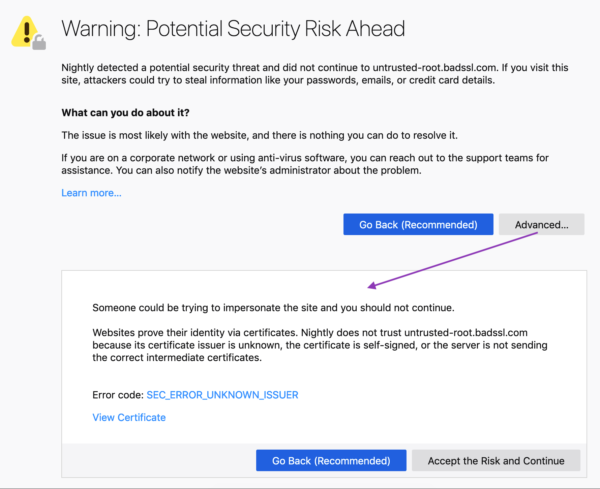
These error messages previously included some vague, technical jargon nestled within a dated design. Given their prevalence, and Firefox’s commitment to user agency and safety, the UX and security team partnered up to make improvements. Using findings from external and in-house research, UX Designer Bram Pitoyo and I collaborated on new copy and design.
Old vs. New Designs

Goals
Business goals:
- User safety: Prevent users from visiting potentially unsafe sites.
- User retention: Keep Firefox users who encounter these errors from switching to another browser.
User experience goals:
- Comprehension: The user understands the situation and can make an informed decision.
- Adherence: The user makes the informed, pro-safety choice. In the case of security warnings, this means the user does not proceed to a potentially unsafe site, especially if the user does not fully understand the situation and implications at hand.(1)
Results
We met our goals, as illustrated by three different studies:
1. A qualitative usability study (remote, unmoderated on usertesting.com) of a first draft of redesigned and re-written error pages. The study evaluated the comprehensibility, utility, and tone of the new pages. Our internal user researcher, Francis Djabri, tested those messages with eight participants and we made adjustments based on the results.
2. A quantitative survey comparing Firefox’s new error pages, Firefox’s current error pages, and Chrome’s current comparative pages. This was a paid panel study that asked users about the source of message, how they felt about the message, and what actions they would take as a result of the message. Here’s a snapshot of the results:
When presented with the redesigned error message, we saw a 22–50% decrease in users stating they would attempt to ignore the warning message.
When presented with the redesigned error message, we saw a 29–60% decrease in users stating they would attempt to access the website via another browser. (Only 4.7–8.5 % of users who saw the new Firefox message said they would try another browser, in contrast to 10–11.3% of users who saw a Chrome message).
(Source: Firefox Strategy & Insights, Tyler Downer, November 2018 Survey Highlights)
3. A live study comparing the new and old security messages with Firefox users confirmed that the new messages did not significantly impact usage or retention in a negative way. This gave us the green light to go-live with the redesigned pages for all users.
How we did it:

If you’ve ever played Minecraft then you have used a voxel engine. My 7 year old son is a huge fan of Minecraft and asked me to make a Minecraft for VR. After some searching I found VoxelJS, a great open source library created by Max Ogden (@maxogden) and James Halliday (@substack). Unfortunately it hasn’t been updated for about five years and doesn't work with newer libraries.
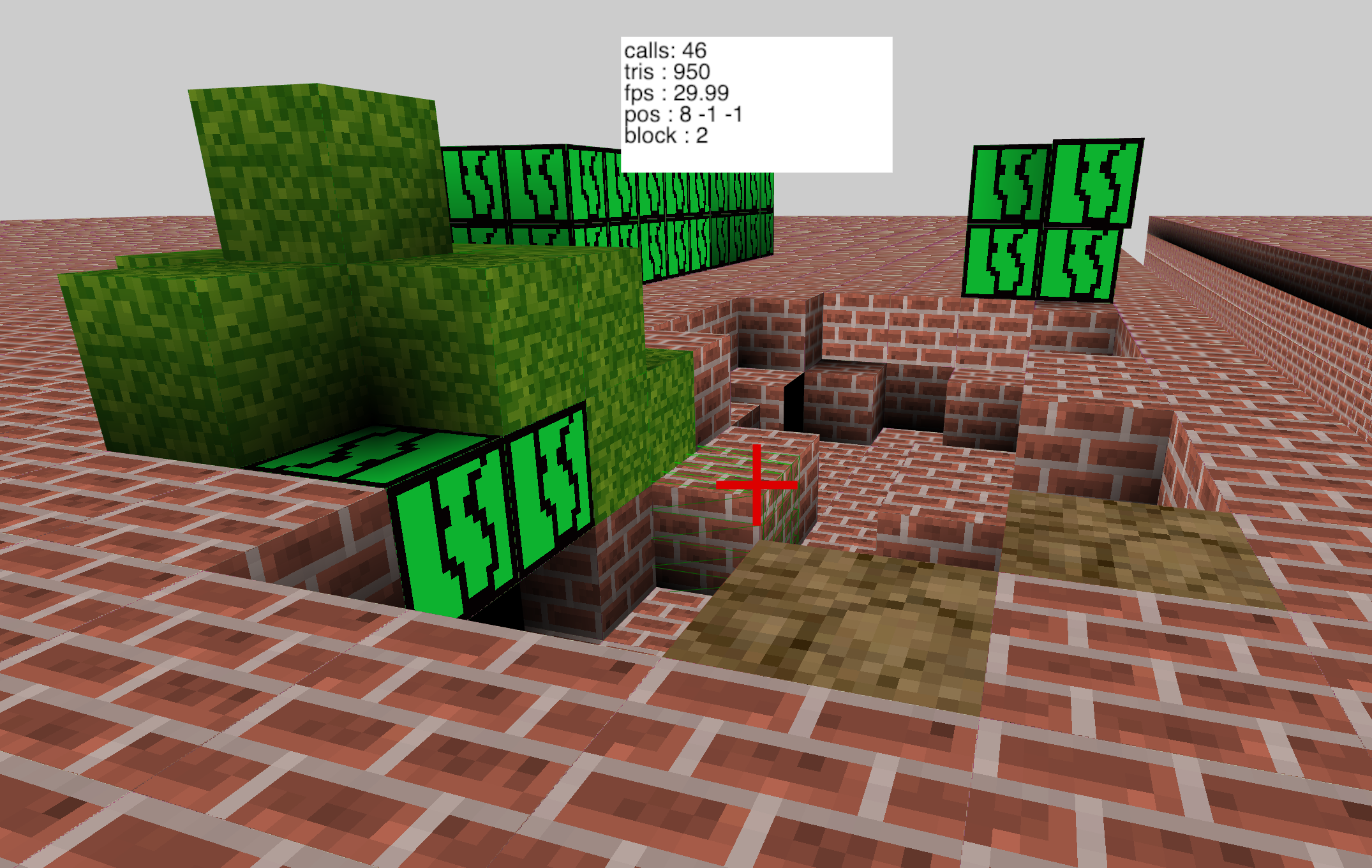
So what to do? Simple: I dusted it off, ported it to modern ThreeJS & Javascript, then added WebXR support. I call it VoxelJS Next.
What is it?
VoxelJS Next is a graphics engine, not a game. I think of Minecraft as a category of game, not a particular instance. I’d like to see Minecraft style voxels used for all sorts of experiences. Chemistry, water simulation, infinite runners, and many other fun experiences.
VoxelJS lets you build your own Minecraft-like game easily on the web. It can run in desktop mode, on a touch screen, full screen, and even in VR thanks to WebXR support. VoxelJS is built on top of ThreeJS.
How Does it Work:
I’ll talk about how data is stored and drawn on screen in a future blog, but the short answer is this:
The world is divided into chunks. Each chunk contains a grid of blocks and is created on demand. These chunks are turned into ThreeJS meshes which are then added to the scene. The chunks come and go as the player moves around the world. So even if you have an infinitely large world only a small number of chunks need to be loaded at a time.
VoxelJS is built as ES6 modules with a simple entity system. This lets you load only the parts you want. There is a module each for desktop controls, touch controls, VR, and more. Thanks to modern browser module support you don’t need to use a build tool like Webpack. Everything works just by importing modules.
How Do I get it?
Check out a live demo and get the code.
Next steps:
I don’t want to over sell VoxelJS Next. This is a super alpha release. The code is incredibly buggy, performance isn’t even half of what it should be, only a few textures, and tons of features are missing. VoxelJS Next is just a start. However, it’s better to get early feedback than to build features no one wants, so please try it out.
You can find the full list of feature and issues here. And here are a good set of issues for beginners to start with.
I also created a #voxels channel in the ThreeJS slack group. You can join it here.
I find voxels really fun to play with, as they give you great freedom to experiment. I hope you'll enjoy building web creations with VoxelJS Next.

Join us for a week of Web VR experiments.
Earlier this year, we partnered with Glitch.com to produce a WebVR starter kit. In case you missed it, the kit includes a free, 5-part video course with interactive code examples that teach the fundamentals of WebVR using A-Frame. The kit is intended to help anyone get started – no coding experience required.
Today, we are kicking off a week of WebVR experiments. These experiments build on the basic fundamentals laid out in the starter kit. Each experiment is unique and is meant to teach and inspire as you craft your own WebVR experiences.
To build these, we once again partnered with the awesome team at Glitch.com as well as Glitch creator Andr'es Cuervo. Andr'es has put together seven experiments that range from incorporating motion capture to animating torus knots in 3D.
Today we are releasing the first 3 WebVR experiments, and we’ll continue to release a new one every day. If you want to follow along, you can click here and bookmark this page. The first three are shared below:
Dancing VR Scene
This example takes free motion capture data and adds it to a VR scene.
Noisy Sphere
The Noisy Sphere will teach you how to incorporate 3D models and textures into your project.
Winding Knots
In this example, you get a deeper dive on the torus knot shape and the animation component that is included in A-Frame.
If you are enjoying these experiments, we invite you to visit this page throughout the week as we’ll add a new experiment every day. We will post the final experiment this Friday.
Visit a week of WebVR Experiments.
The post Sharpen your WebVR skills with experiments from Glitch and Mozilla appeared first on Mozilla Hacks - the Web developer blog.
https://hacks.mozilla.org/2019/04/sharpen-your-webvr-skills-with-experiments/
In February, we blogged about the challenge of helping extension users maintain their safety and security while preserving their ability to choose their browsing experience. The blog post outlined changes to the ecosystem to better protect users, such as making them more aware of the risks associated with extensions, reducing the visibility of extensions that haven’t been vetted, and putting more emphasis on curated extensions.
One of the ways we’re helping users discover vetted extensions will be through the Recommended Extensions program, which we’ll roll out in phases later this summer. This program will foster a curated list of extensions that meet our highest standards of security, utility, and user experience. Recommended extensions will receive enhanced visibility across Mozilla websites and products, including addons.mozilla.org (AMO).
We anticipate the eventual formation of this list to number in the hundreds, but we’ll start smaller and build the program carefully. We’re currently in the process of identifying candidates and will begin reaching out to selected developers later this month. You can expect to see changes on AMO by the end of June.
How will Recommended extensions be promoted?
On AMO, Recommended extensions will be visually identifiable by distinct badging. Furthermore, AMO search results and filtering will be weighted higher toward Recommended extensions
Recommended extensions will also supply the personalized recommendations on the “Get Add-ons” page in the Firefox Add-ons Manager (about:addons), as well as any extensions we may include in Firefox’s Contextual Feature Recommender.
How are extensions selected to be part of the program?
Editorial staff will select the initial batch of extensions for the Recommended list. In time, we’ll provide ways for people to nominate extensions for inclusion.
When evaluating extensions, curators are primarily concerned with the following:
- Is the extension really good at what it does? All Recommended extensions should not only do what they promise, but be very good at it. For instance, there are many ad blockers out there, but not all ad blockers are equally effective.
- Does the extension offer an exceptional user experience? Recommended extensions should be delightful to use. Curators look for content that’s intuitive to manage and well-designed. Common areas of concern include the post-install experience (i.e. once the user installs the extension, is it clear how to use it?), settings management, user interface copy, etc.
- Is the extension relevant to a general audience? The tightly curated nature of Recommended extensions means we will be selective, and will only recommend extensions that are appealing to a general Firefox audience.
- Is the extension safe? We’re committed to helping protect users against third-party software that may—intentionally or otherwise—compromise user security. Before an extension receives Recommended status, it undergoes a security review by staff reviewers. (Once on the list, each new version of a Recommended extension must also pass a full review.)
Participation in the program will require commitment from developers in the form of active development and a willingness to make improvements.
How will the list be maintained?
It’s our intent to develop a Recommended list that can remain relevant over time, which is to say we don’t anticipate frequent turnover in the program. The objective is to promote Recommended extensions that users can trust to be useful and safe for the lifespan of the software they install.
We recognize the need to keep the list current, and will make room for new, emerging extensions. Firefox users want the latest, greatest extensions. Talented developers all over the world continue to find creative ways to leverage the powerful capabilities of extensions and deliver fantastic new features and experiences. Once the program launches later this summer, we’ll provide ways for people to suggest extensions for inclusion in the program.
Will the community be involved?
We believe it’s important to maintain community involvement in the curatorial process. The Community Advisory Board—which for years has contributed to helping
HTTP/1.1 Pipelining is the protocol feature where the client sends off a second HTTP/1.1 request already before the answer to the previous request has arrived (completely) from the server. It is defined in the original HTTP/1.1 spec and is a way to avoid waiting times. To reduce latency.
HTTP/1.1 Pipelining was badly supported by curl for a long time in the sense that we had a series of known bugs and it was a fragile feature without enough tests. Also, pipelining is fairly tricky to debug due to the timing sensitivity so very often enabling debug outputs or similar completely changes the nature of the behavior and things are not reproducing anymore!
HTTP pipelining was never enabled by default by the large desktop browsers due to all the issues with it, like broken server implementations and the likes. Both Firefox and Chrome dropped pipelining support entirely since a long time back now. curl did in fact over time become more and more lonely in supporting pipelining.
The bad state of HTTP pipelining was a primary driving factor behind HTTP/2 and its multiplexing feature. HTTP/2 multiplexing is truly and really “pipelining done right”. It is way more solid, practical and solves the use case in a better way with better performance and fewer downsides and problems. (curl enables multiplexing by default since 7.62.0.)
In 2019, pipelining should be abandoned and HTTP/2 should be used instead.
Starting with this commit, to be shipped in release 7.65.0, curl no longer has any code that supports HTTP/1.1 pipelining. It has been disabled in the code since 7.62.0 already so applications and users that use a recent version already should not notice any difference.
Pipelining was always offered on a best-effort basis and there was never any guarantee that requests would actually be pipelined, so we can remove this feature entirely without breaking API or ABI promises. Applications that ask libcurl to use pipelining can still do that, it just won’t have any effect.
https://daniel.haxx.se/blog/2019/04/06/curl-says-bye-bye-to-pipelining/
Rustacean Hat Pattern
Based on feedback from the crab plushie pattern, I took more pictures this time.
There are 40 pictures of the process below the fold.
Materials required

- About 1/4 yard or 1/4 meter of orange fabric. Maybe more if it’s particularly narrow. Polar fleece is good because it stretches a little and does not fray near seams.
- A measuring device. You can just use a piece of string and mark it.
- Scissors, a sewing machine, pins, orange thread
- Scraps of black and white cloth to make the face
- The measurements of the hat wearer’s head. I’m using a hat to guess the measurements from.
- A pen or something to mark the fabric with is handy.
Constructing the pattern pieces
If you’re using polar fleece, you don’t have to pre-wash it. Fold it in half. In these pictures, I have the fold on the left and the selvedges on the right.
The first step is to chop off a piece from the bottom of the fleece. We’ll use it to make the legs and spines later. Basically like this:
Next, measure the circumference you want the hat to be. I’ve measured on a hat to show you.
Find 1/4 of that circumference. If you measured with a string, you can just fold it, like I folded the tape measure. Or you could use maths.
That quarter-of-the-circumference is the distance that you fold over the left side of the big piece of fabric. Like so:
Leave it folded over, we’ll get right back to it. Guesstimate the height that a hat piece might need to be, so that we can sketch a piece of the hat on it. I do this by measuring front to back on a hat and folding the string, I mean tape measure, in half:
Back on the piece we folded over, put down the measurement so we make sure not to cut the hat too short. That measurement tells you roughly where to draw a curvy triangle on the folded fabric, just like this:
Now cut it out. Make sure not to cut off that folded edge. Like this:
Congratulations, you just cut out the lining of the hat! It should be all one piece. If we unfold the bit we just cut and the bit we cut it from, it’ll look like this:
Now we’re going to use that lining piece as a template to cut the outside pieces. Set it down on the fabric like so:
And cut around it. Afterwards you have 1 lining piece and 2 outer pieces:
Now grab that black and white scrap fabric and cut a couple eye sized black circles, and a couple bits of white for the light glints on the eyes. Also cut a black D shape to be the mouth if you want your hat to have a happy little mouth as well as just eyes.
Construction
Put the black and white together, and sew an eye glint kind of shape in the same spot on both, like so:
Pull the top threads to the back so the stitching looks all tidy. Then cut off the excess white fabric so it looks all pretty:
Now the fun part: Grab one of those outside pieces we cut before. Doesn’t matter which. Sew the eyes andmouth onto it like so:
Now it’s time to give the hat some shape. On both outside pieces – the one with the face and also the one without – sew that little V shaped gap shut. Like so:
Hello Mozillians,
We are happy to let you know that Friday, April 12th, we are organizing Firefox 67 Beta 10 Testday. We’ll be focusing our testing on: Graphics compatibility & support and Session Restore.
Check out the detailed instructions via this etherpad.
No previous testing experience is required, so feel free to join us on #qa IRC channel where our moderators will offer you guidance and answer your questions.
Join us and help us make Firefox better!
See you on Friday!
https://quality.mozilla.org/2019/04/firefox-67-beta-10-testday-april-12th/