The Common CA Database (CCADB) is helping us protect individuals’ security and privacy on the internet and deliver on our commitment to use transparent community-based processes to promote participation, accountability and trust. It is a repository of information about Certificate Authorities (CAs) and their root and subordinate certificates that are used in the web PKI, the publicly-trusted system which underpins secure connections on the web. The Common CA Database (CCADB) paves the way for more efficient and cost-effective management of root stores and helps make the internet safer for everyone. For example, the CCADB automatically detects and alerts root store operators when a root CA has outdated audit statements or a gap between audit periods. This is important, because audit statements provide assurance that a CA is following required procedures so that they do not issue fraudulent certificates.
Through the CCADB we are extending the checks and balances on root CAs to subordinate CAs to provide similar assurance that the subordinate CAs are not issuing fraudulent certificates. Root CAs, who are directly included in Mozilla’s program, can have subordinate CAs who also issue SSL/TLS certificates that are trusted by Firefox. There are currently about 150 root certificates in Mozilla’s root store, which leads to over 3,100 subordinate CA certificates that are trusted by Firefox. In our efforts to ensure that all subordinate CAs follow the rules, we require that they be disclosed in the CCADB along with their audit statements.
Additionally, the CCADB is making it possible for Mozilla to implement Intermediate CA Preloading in Firefox, with the goal of improving performance and privacy. Intermediate CA Preloading is a new way to hande websites that are not properly configured to serve up the intermediate certificate along with its SSL/TLS certificate. When other browsers encounter such websites they use a mechanism to connect to the CA and download the certificate just-in-time. Preloading the intermediate certificate data (aka subordinate CA data) from the CCADB avoids the just-in-time network fetch, which delays the connection. Avoiding the network fetch improves privacy, because it prevents disclosing user browsing patterns to the CA that issued the certificate for the misconfigured website.
Mozilla created and runs the CCADB, which is also used and contributed to by Microsoft, Google, Cisco, and Apple. Even though the common CA data is shared, each root store operator has a customized experience in the CCADB, allowing each root store operator to see the data sets that are important for managing root certificates included in their program.
The CCADB:
- Makes root stores more transparent through public-facing reports, encouraging community involvement to help ensure that CAs and subordinate CAs are correctly issuing certificates.
- For example the crt.sh website combines information from the CCADB and Certificate Transparency (CT) logs to identify problematic certificates.
- Adds automation to improve the level and accuracy of management and rule enforcement. For example the CCADB automates:
- Notification to CAs when audit statements are due at both the root and subordinate CA level
- Audit Letter Validation (ALV) via a tool provided by Microsoft
- Sending of communications to CAs and publishing their responses
- Enables CAs to provide their annual updates in one centralized system, rather than communicating those updates to each root store separately; and in the future will enable CAs to apply to multiple root stores with a single application process.
Apple’s latest marketing campaign — “Privacy. That’s iPhone” — made us raise our eyebrows.
It’s true that Apple has an impressive track record of protecting users’ privacy, from end-to-end encryption on iMessage to anti-tracking in Safari.
But a key feature in iPhones has us worried, and makes their latest slogan ring a bit hollow.
Each iPhone that Apple sells comes with a unique ID (called an “identifier for advertisers” or IDFA), which lets advertisers track the actions users take when they use apps. It’s like a salesperson following you from store to store while you shop and recording each thing you look at. Not very private at all.
The good news: You can turn this feature off. The bad news: Most people don’t know that feature even exists, let alone that they should turn it off. And we think that they shouldn’t have to.
That’s why we’re asking Apple to change the unique IDs for each iPhone every month. You would still get relevant ads — but it would be harder for companies to build a profile about you over time.
If you agree with us, will you add your name to Mozilla’s petition?
If Apple makes this change, it won’t just improve the privacy of iPhones — it will send Silicon Valley the message that users want companies to safeguard their privacy by default.
At Mozilla, we’re always fighting for technology that puts users’ privacy first: We publish our annual *Privacy Not Included shopping guide. We urge major retailers not to stock insecure connected devices. And our Mozilla Fellows highlight the consequences of technology that makes publicity, and not privacy, the default.
The post The Bug in Apple’s Latest Marketing Campaign appeared first on The Mozilla Blog.
https://blog.mozilla.org/blog/2019/04/15/the-bug-in-apples-latest-marketing-campaign/
Picture this. You arrive at a website you’ve never been to before and the site is full of ads for things you’ve already looked at online. It’s not a difficult … Read more
The post How you can take control against online tracking appeared first on The Firefox Frontier.
https://blog.mozilla.org/firefox/take-control-against-online-tracking/
Lately, the compiler team has been changing up the way that we work. Our goal is to make it easier for people to track what we are doing and – hopefully – get involved. This is an ongoing effort, but one thing that has become clear immediately is this: the compiler team needs more than coders.
Traditionally, when we’ve thought about how to “get involved” in the compiler team, we’ve thought about it in terms of writing PRs. But more and more I’m thinking about all the other jobs that go into maintaining the compiler. “What kinds of jobs are these?”, you’re asking. I think there are quite a few, but let me give a few examples:
- Running a meeting – pinging folks, walking through the agenda.
- Design documents and other documentation – describing how the code works, even if you didn’t write it yourself.
- Publicity – talking about what’s going on, tweeting about exciting progress, or helping to circulate calls for help. Think steveklabnik, but for rustc.
- …and more! These are just the tip of the iceberg, in my opinion.
I think we need to surface these jobs more prominently and try to actively recruit people to help us with them. Hence, this blog post.
“We need an open source whenever”
In my keynote at Rust LATAM, I quoted quite liberally from an excellent blog post by Jessica Lord, “Privilege, Community, and Open Source”. There’s one passage that keeps coming back to me:
We also need an open source whenever. Not enough people can or should be able to spare all of their time for open source work, and appearing this way really hurts us.
This passage resonates with me, but I also know it is not as simple as she makes it sound. Creating a structure where people can meaningfully contribute to a project with only small amounts of time takes a lot of work. But it seems clear that the benefits could be huge.
I think looking to tasks beyond coding can be a big benefit here. Every sort of task is different in terms of what it requires to do it well – and I think the more ways we can create for people to contribute, the more people will be able to contribute.
The context: working groups
Let me back up and give a bit of context. Earlier, I mentioned that the compiler has been changing up the way that we work, with the goal of making it much easier to get involved in developing rustc. A big part of that work has been introducing the idea of a working group.
A working group is basically an (open-ended, dynamic) set of people working towards a particular goal. These days, whenever the compiler team kicks off a new project, we create an associated working group, and we list that group (and its associated Zulip stream) on the compiler-team repository. There is also a central calendar that lists all the group meetings and so forth. This makes it pretty easy to quickly see what’s going on.
Working groups as a way into the compiler
Working groups provide an ideal vector to get involved with the compiler. For one thing, they give people a more approachable target – you’re not working on “the entire compiler”, you’re working towards a particular goal. Each of your PRs can then be building on a common part of the code, making it easier to get started. Moreover, you’re working with a smaller group of people, many of whom are also just starting out. This allows people to help one another and form a community.
Running a working group is a big job
The thing is, running a working group can be quite a big job – particularly a working group that aims to incorporate a lot of contributors. Traditionally, we’ve thought of a working group as having a lead – maybe, at best, two leads – and a bunch of participants, most of whom are being mentored:
           +-------------+
           | Lead(s)     |
           |             |
           +-------------+

  +--+  +--+  +--+  +--+  +--+  +--+
  |  |  |  |  |  |  |  |  |  |  |  |
  |  |  |  |  |  |  |  |  |  |  |  |
  |  |  |  |  |  |  |  |  |  |  |  |
  +--+  +--+  +--+  +--+  +--+  +--+

  |                                |
  +--------------------------------+
   (participants)
Now, if all these participants are all being mentored to write code, that means that the set of jobs that fall on the leads is something like

This week marks my sixth year working at Mozilla! I’ll be honest, this year’s mozillaversary came by so fast I nearly forgot all about writing this blog post. It feels hard to believe that I’ve been working here for a full six years. I’ve guess grown and learned a lot in that time, but it still doesn’t feel like all that long ago when I first joined full time. Years start to blur together. So, what’s happened in this past 12 months?
Building a design system
Mozilla’s website design system, named Protocol, is now a real product. You can install it via NPM and build on-brand Mozilla web pages using its compenents. Protocol builds on a system of atoms, molecules, and organiams, following the concepts first made popular in Atomic Web Design. Many of the new design system components can be seen in use on the recently redesigned www.mozilla.org pages.

It was fun to help get this project off the ground, and to see it finally in action on a live website. Making a flexible, intuitive design system is not easy, and we learned a lot in the first year of the project that can help us to improve Protocol over the coming months. By the end of the year, our hope is to have fully ported all mozilla.org content to use Protocol. This is not an easy task for a small team and a large website that’s been around for over a decade. It’ll be an interesting challenge!
Measuring clicks to installs
Supporting the needs of experimentation on Firefox download pages is something that our team has been helping to manage and facilitate for several years now. The breadth of data now required in order to fully understand the effectiveness of experiments is a lot more complex today compared to when we first started. Product retention (i.e. how often people actively use Firefox) is now the key metric of success. Measuring how many clicks a download button on a web page receives is relatively straight forward, but understanding how many of those people go on to actually run the installer, and then how often they end up actively using the product for requires a multi-step funnel of measurement. Our team has continued to help build custom tools to facilitate this kind of data in experimentation, so that we can make better informed product decisions.
Publishing systems
One of our team’s main objectives is to enable people at Mozilla to publish quality content to the web quickly and easily, whether that be on mozilla.org, a microsite, or on a official blog. We’re a small team however, and the marketing organisation has a great appetite for wanting new content at a fast pace. This was one of the (many) reasons why we invested in building a design system, so that we can create on-brand web pages at a faster pace with less repetitive manual work. We also invested in building more custom publishing systems, so that other teams can work more independently. We’ve long had publishing systems in place for things like Firefox release notes, and now we also have some initial systems in place for publishing marketing content, such as the what can currently be seen on the mozilla.org homepage.
Individual contributions
- I made over 167 commits to bedrock this past year.
- I made over 78 commits to protocol this past year.
- We moved to GitHub issues for most of our projects over the past year, so my
We’re running a short poll asking people about where and how we should organize curl up 2020 – our annual curl developers conference. I’m not making any promises, but getting people’s opinions will help us when preparing for next year.
I’ll leave the poll open for a couple of days so please respond asap.
Several months ago I took on a new role at Mozilla, product manager for Firefox browser accessibility. I couldn’t be more excited about this. It’s an area I’ve been interested in for nearly my entire career at Mozilla.
It was way back in 2000, after talking with Aaron Leventhal at a Netscape/Mozilla developer event, that I first started thinking about accessibility in Mozilla products and how well the idea of inclusivity fit with some my personal reasons for working on the Mozilla project. If I remember correctly, Aaron was working on a braille reader or similar assistive technologies and he was concerned that the new Mozilla browser, which used a custom UI framework, wasn’t accessible to that assistive technology. Aaron persisted and Mozilla browser technologies became some of the most accessible available.
Thanks in big part to Aaron’s advocacy, hacking, and other efforts over many years, accessibility became “table stakes” for Mozilla applications. The browsers we shipped over the years were always designed for everyone and “accessible to all” came to the Mozilla Mission.
Our mission is to ensure the Internet is a global public resource, open and accessible to all. An Internet that truly puts people first, where individuals can shape their own experience and are empowered, safe and independent.
I’m excited to be working on something so directly tied to Mozilla’s core values. I’m also super-excited to be working with so many great Firefox teams, and in particular the Firefox Accessibility Engineering team, who have been doing amazing work on Firefox’s accessibility features for many years.
I’m still just getting my feet wet, and I’ve got a lot more to learn. Stay tuned to this space for the occasional post around my new role with a focus on our efforts to ensure that Firefox is the best experience possible for people with disabilities. I expect to write at least monthly updates as we prioritize, fix, test and ship improvements to our core accessibility features like keyboard navigation, screen reader support, high contrast mode, narration, and the accessibility inspector and auditors, etc.
ssh-agent was in the news recently due to the matrix.org
compromise. The main
takeaway from that incident was that one should avoid the ForwardAgent
(or -A) functionality when ProxyCommand can
do
and consider multi-factor authentication on the server-side, for example
using
libpam-google-authenticator
or libpam-yubico.
That said, there are also two options to ssh-add that can help reduce the
risk of someone else with elevated privileges hijacking your agent to make
use of your ssh credentials.
Prompt before each use of a key
The first option is -c which will require you to confirm each use of your
ssh key by pressing Enter when a graphical prompt shows up.
Simply install an ssh-askpass frontend like
ssh-askpass-gnome:
apt install ssh-askpass-gnome
and then use this to when adding your key to the agent:
ssh-add -c ~/.ssh/key
Automatically removing keys after a timeout
ssh-add -D will remove all identities (i.e. keys) from your ssh agent, but
requires that you remember to run it manually once you're done.
That's where the second option comes in. Specifying -t when adding a key
will automatically remove that key from the agent after a while.
For example, I have found that this setting works well at work:
ssh-add -t 10h ~/.ssh/key
where I don't want to have to type my ssh password everytime I push a git branch.
At home on the other hand, my use of ssh is more sporadic and so I don't mind a shorter timeout:
ssh-add -t 4h ~/.ssh/key
Making these options the default
I couldn't find a configuration file to make these settings the default and
so I ended up putting the following line in my ~/.bash_aliases:
alias ssh-add='ssh-add -c -t 4h'
so that I can continue to use ssh-add as normal and have not remember
to include these extra options.
curl supports some twenty-three protocols (depending on exactly how you count).
In order to properly test and verify curl’s implementations of each of these protocols, we have a test suite. In the test suite we have a set of handcrafted servers that speak the server-side of these protocols. The more used a protocol is, the more important it is to have it thoroughly tested.
We believe in having test servers that are “stupid” and that offer buttons, levers and thresholds for us to control and manipulate how they act and how they respond for testing purposes. The control of what to send should be dictated as much as possible by the test case description file. If we want a server to send back a slightly broken protocol sequence to check how curl supports that, the server must be open for this.
In order to do this with a large degree of freedom and without restrictions, we’ve found that using “real” server software for this purpose is usually not good enough. Testing the broken and bad cases are typically not easily done then. Actual server software tries hard to do the right thing and obey standards and protocols, while we rather don’t want the server to make any decisions by itself at all but just send exactly the bytes we ask it to. Simply put.
Of course we don’t always get what we want and some of these protocols are fairly complicated which offer challenges in sticking to this policy all the way. Then we need to be pragmatic and go with what’s available and what we can make work. Having test cases run against a real server is still better than no test cases at all.
Now SOCKS
“SOCKS is an Internet protocol that exchanges network packets between a client and server through a proxy server. Practically, a SOCKS server proxies TCP connections to an arbitrary IP address, and provides a means for UDP packets to be forwarded.
(according to Wikipedia)
Recently we fixed a bug in how curl sends credentials to a SOCKS5 proxy as it turned out the protocol itself only supports user name and password length of 255 bytes each, while curl normally has no such limits and could pass on credentials with virtually infinite lengths. OK, that was silly and we fixed the bug. Now curl will properly return an error if you try such long credentials with your SOCKS5 proxy.
As a general rule, fixing a bug should mean adding at least one new test case, right? Up to this time we had been testing the curl SOCKS support by firing up an ssh client and having that setup a SOCKS proxy that connects to the other test servers.
curl -> ssh with SOCKS proxy -> test server
Since this setup doesn’t support SOCKS5 authentication, it turned out complicated to add a test case to verify that this bug was actually fixed.
This test problem was fixed by the introduction of a newly written SOCKS proxy server dedicated for the curl test suite (which I simply named socksd). It does the basic SOCKS4 and SOCKS5 protocol logic and also supports a range of commands to control how it behaves and what it allows so that we can now write test cases against this server and ask the server to misbehave or otherwise require fun things so that we can make really sure curl supports those cases as well.
It also has the additional bonus that it works without ssh being present so it will be able to run on more systems and thus the SOCKS code in curl will now be tested more widely than before.
curl -> socksd -> test server
Going forward, we should also be able to create even more SOCKS tests with this and make sure to get even better SOCKS test coverage.
https://daniel.haxx.se/blog/2019/04/13/test-servers-for-curl/
Paying Down Enterprise Content Debt
Part 3: Implementation & governance
Summary: This series outlines the process to diagnose, treat, and manage enterprise content debt, using Firefox add-ons as a case study. Part 1 frames the Firefox add-ons space in terms of enterprise content debt. Part 2 lists the eight steps to develop a new content model. This final piece describes the deliverables we created to support that new model.

Content guidelines for the “author experience”
“Just as basic UX principles tell us to help users achieve tasks without frustration or confusion, author experience design focuses on the tasks and goals that CMS users need to meet — and seeks to make it efficient, intuitive, and even pleasurable for them to do so.” — Sara Wachter-Boettcher, Content Everywhere
A content model is a useful tool for organizations to structure, future-proof, and clean up their content. But that content model is only brought to life when content authors populate the fields you have designed with actual content. And the quality of that content is dependent in part on how the content system supports those authors in their endeavor.
We had discovered through user research that developers create extensions for a great variety of reasons — including as a side hobby or for personal enjoyment. They may not have the time, incentive, or expertise to produce high-quality, discoverable content to market their extensions, and they shouldn’t be expected to. But, we can make it easier for them to do so with more actionable guidelines, tools, and governance.
An initial review of the content submission flow revealed that the guidelines for developers needed to evolve. Specifically, we needed to give developers clearer requirements, explain why each content field mattered and where that content showed up, and provide them with examples. On top of that, we needed to give them writing exercises and tips when they hit a dead end.
So, to support our developer authors in creating our ideal content state, I drafted detailed content guidelines that walked extension developers through the process of creating each content element.
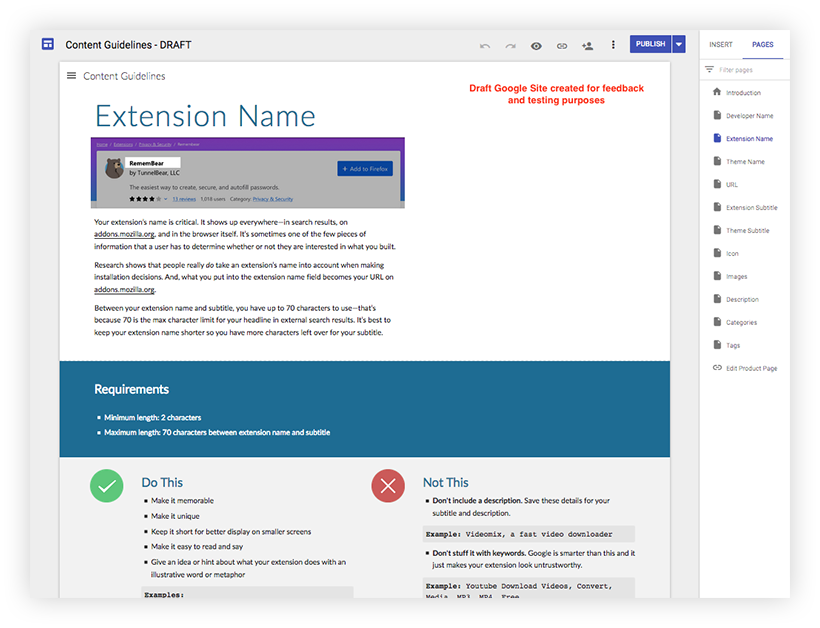
Once a draft was created, we tested it with Mozilla extension developer, Dietrich Ayala. Dietrich appreciated the new guidelines, and more importantly, they helped him create better content.

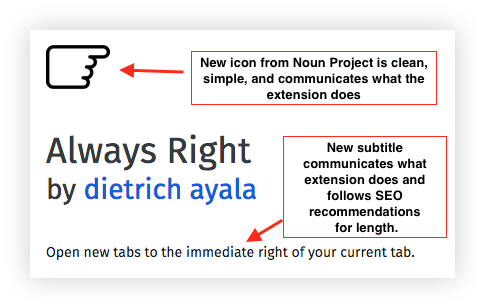
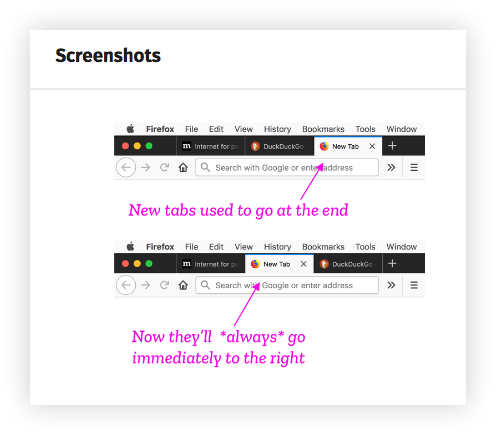
We also conducted interviews with a cohort of developers in a related project to redesign the extensions submission flow (i.e., the place in which developers create or upload their content). As part of that process, we solicited feedback from 13 developers about the new guidelines:
- Developers found the guidelines to be helpful and motivating for improving the marketing and SEO of their extensions, thereby better engaging users.
- The clear “do this/not that” section was very popular.
- They had some suggestions for improvement, which were incorporated into the next version.
Excerpts from developer interviews:
“If all documentation was like this, the world would be a better place…It feels very considered. The examples of what to do, what not do is great. This extra
Paying Down Enterprise Content Debt
Part 2: Developing Solutions
Summary: This series outlines the process to diagnose, treat, and manage enterprise content debt, using Firefox add-ons as a case study. In Part 1 , I framed the Firefox add-ons space in terms of an enterprise content debt problem. In this piece, I walk through the eight steps we took to develop solutions, culminating in a new content model. See Part 3 for the deliverables we created to support that new model.

- Step 1: Stakeholder interviews
- Step 2: Documenting content elements
- Step 3: Data analysis — content quality
- Step 4: Domain expert review
- Step 5: Competitor compare
- Step 6: User research — What content matters?
- Step 7: Creating a content model
- Step 8: Refine and align
Step 1: Stakeholder interviews
To determine a payment plan for our content debt, we needed to first get a better understanding of the product landscape. Over the course of a couple of weeks, the team’s UX researcher and I conducted stakeholder interviews:
Who: Subject matter experts, decision-makers, and collaborators. May include product, engineering, design, and other content folks.
What: Schedule an hour with each participant. Develop a spreadsheet with questions that get at the heart of what you are trying to understand. Ask the same set of core questions to establish trends and patterns, as well as a smaller set specific to each interviewee’s domain expertise.
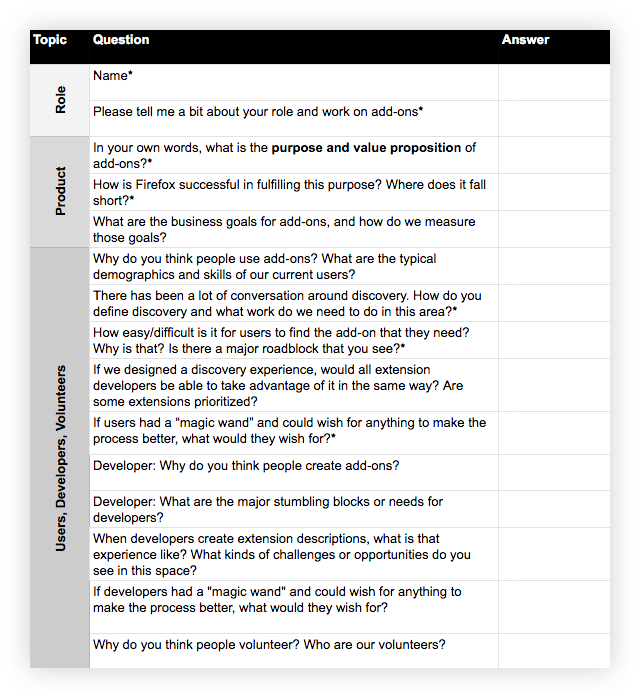
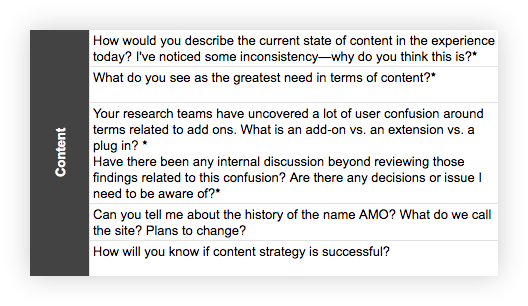
After completing the interviews, we summarized the findings and walked the team through them. This helped build alignment with our stakeholders around the issues and prime them for the potential UX and content solutions ahead.
Stakeholder interviews also allowed us to clarify our goals. To focus our work and make ourselves accountable to it, we broke down our overarching goal — improve Firefox users’ ability to discover, trust, install, and enjoy extensions — into detailed objectives and measurements using an objectives and measurements template. Our main objectives fell into three buckets: improved user experience, improved developer experience, and improved content structure. Once the work was done, we could measure our progress against those objectives using the measurements we identified.
Step 2: Documenting content elements
Product environment surveyed, we dug into the content that shaped that landscape.
Extensions are recommended and accessed not only through AMO, but in a variety of places, including the Firefox browser itself, in contextual recommendations, and in external content. To improve content across this large ecosystem, we needed to start small…at the cellular content level. We needed to assess, evolve, and improve our core content elements.
By “content elements,” I mean all of the types of content or data that are attached to an extension — either by developers in the extension submission process, by Mozilla on the back-end, or by users. So, very specifically, these are things like description, categories, tags, ratings, etc. For example, the following image contains three content elements: icon, extension name, summary:

Using Excel, I documented existing content elements. I also documented which elements showed up where in the ecosystem (i.e., “content touchpoints”):


The content documentation Excel served as the foundational
Paying Down Enterprise Content Debt
Part 1: Framing the problem
Summary: This series outlines the process to diagnose, treat, and manage enterprise content debt, using Firefox add-ons as a case study. This first part frames the enterprise content debt issue. Part 2 lists the eight steps to develop a new content model. Part 3 describes the deliverables we created to support that new model.

Background
If you want to block annoying ads or populate your new tab with sassy cats, you can do it…with browser extensions and themes. Users can download thousands of these “add-ons” from Firefox’s host site, addons.mozilla.org (“AMO”), to customize their browsing experience with new functionality or a dash of whimsy.

Add-ons can be a useful and delightful way for people to improve their web experience — if they can discover, understand, trust, and appreciate their offerings. Over the last year, the add-ons UX pod at Firefox, in partnership with the larger add-ons team, worked on ways to do just that.
One of the ways we did this was by looking at these interconnected issues through the lens of content structure and quality. In this series, I’ll walk you through the steps we took to develop a new content model for the add-ons ecosystem.
Understanding the problem
Add-ons are largely created by third-party developers, who also create the content that describes the add-ons for users. That content includes things like extension name, icon, summary, long, description, screenshots, etcetera:

With 10,000+ extensions and 400,000+ themes, we are talking about a lot of content. And while the add-ons team completely appreciated the value of the add-ons themselves, we didn’t really understand how valuable the content was, and we didn’t use it to its fullest potential.
The first shift we made was recognizing that what we had was enterprise content — structured content and metadata stored in a formal repository, reviewed, sometimes localized, and published in different forms in multiple places.
Then, when we assessed the value of it to the enterprise, we uncovered something called content debt.

Content debt is the hidden cost of not managing the creation, maintenance, utility, and usability of digital content. It accumulates when we don’t treat content like an asset with financial value, when we value expediency over the big picture, and when we fail to prioritize content management. You can think of content debt like home maintenance. If you don’t clean your gutters now, you’ll pay in the long term with costly water damage.
AMO’s content debt included issues of quality (missed opportunities to communicate value and respond to user questions), governance (varying content quality with limited organizational oversight), and structure (the need for new content types to evolve site design and improve social shares and search descriptions).
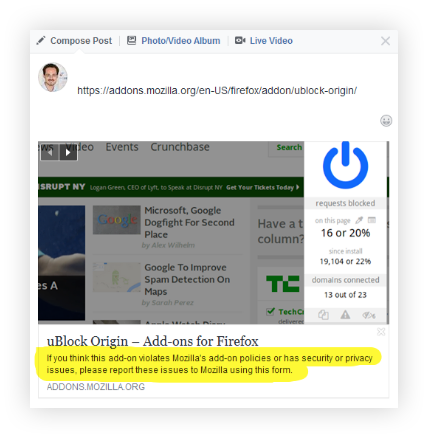
A few examples of content debt in action:


Firefox Reality 1.1.3 will soon be available for all users in the Viveport, Oculus, and Daydream app stores.
This release includes some major new features including support for 6DoF controllers, new environments, a curved browser window option and some bug fixes.
Highlights:
- Improved support for 6DoF Oculus controllers and user height.
- Added support for 6DoF VIVE Focus (WaveVR) controllers.
- Updated the Meadow environment and added new Offworld, Underwater, and Winter environments (Settings > Environments).
- Added new option for curved browser window (Settings > Display).
Improvements/Bug Fixes:
- Fixed User-Agent override to fix Delight-VR video playback.
- Changed the layout of the Settings window so it's easier and faster to find the option you need to change.
- Performance improvements, including dynamic clock levels and Fixed Foveated Rendering on Oculus.
- Improved resolution of text rendering in UI widgets.
- Plus a myriad of web content handling improvements from Geckoview 68.
- ... and numerous other fixes
Full release notes can be found in our GitHub repo here.
Looking ahead, we are exploring content sharing and syncing across browsers (including bookmarks), multiple windows, as well as continuing to invest in baseline features like performance. We appreciate your ongoing feedback and suggestions — please keep it coming!
Firefox Reality is available right now.
Download for Oculus
(supports Oculus Go)
Download for Daydream
(supports all-in-one devices)
Download for Viveport (Search for “Firefox Reality” in Viveport store)
(supports all-in-one devices running VIVE Wave)
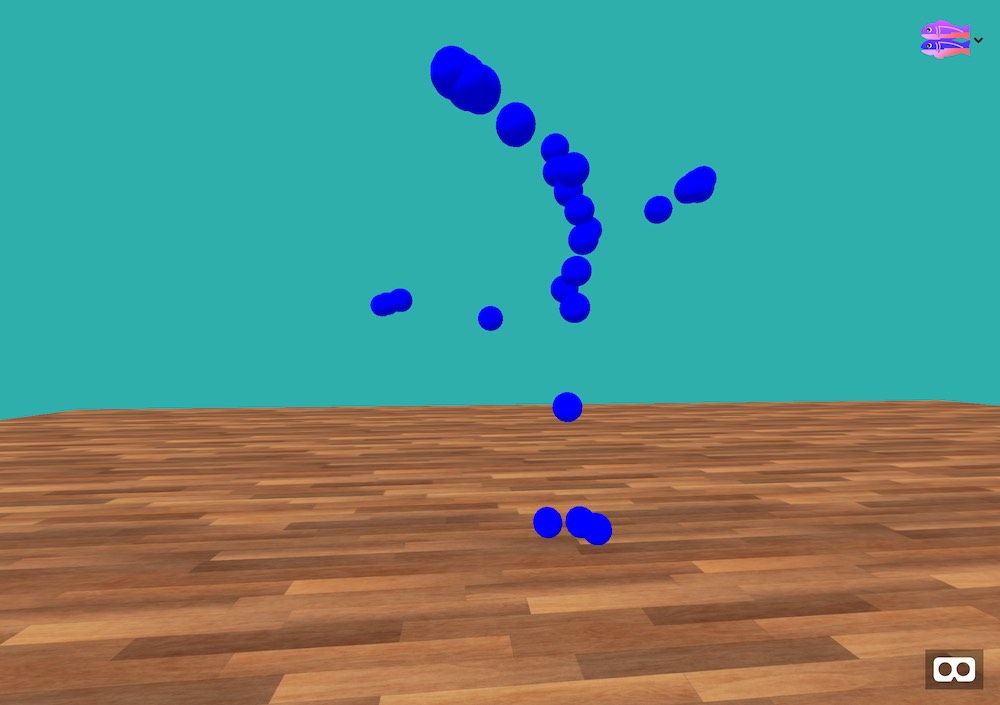
Earlier this week, we kicked off a week of WebVR experiments with our friends at Glitch.com. Glitch creator and WebVR expert Andr'es Cuervo put together seven projects that are fun, unique, and will challenge you to learn advanced techniques for building Virtual Reality experiences on the web.
If you are just getting started with WebVR, we recommend you check out this WebVR starter kit which will walk you through creating your very first WebVR experience.
Today, we launched the final experiment. If you haven't been following along, you can catch up on all of them below:
Motion Capture Dancing in VR
Learn how to use free motion capture data to animate a character running, dancing, or cartwheeling across a floor.
Adding Models and Shaders
Learn about how to load common file types into your VR scene.
Using 3D Shapes like Winding Knots
Learn how to work with the torus knot shape and the animation component that is included with A-frame.
Animated Torus Knot Rings
Learn about template and layout components while you continue to build on the previous Winding Knots example.
Generated Patterns
Create some beautiful patterns using some flat geometry in A-Frame with clever tilting.
Creating Optical Illusions
This is a simple optical optical illusion that is made possible with virtual reality.
Including Dynamic Content
Learn how to use an API to serve random images that are used as textures in this VR scene.
We hope you enjoyed learning and remixing these experiments (We really enjoyed putting them together). Follow Andr'es Cuervo on Glitch for even more WebVR experiments.
Vacations are a great time to unwind, sip a fruity drink with a tiny umbrella in it and expose your personal information to hackers if you’re traveling with a laptop, … Read more
The post How to stay safe online while on vacation appeared first on The Firefox Frontier.
https://blog.mozilla.org/firefox/how-to-stay-safe-online-while-on-vacation/
I'm pleased to announce that, some hours ago, the first public beta of cross-browser NoScript (10.6.1) passed Google's review process and has been published on the chrome web store.
This is a major milestone in NoScript history, started on May the 13th 2005 (next year we will celenbrate our 15th birthday!). 
Over all these years NoScript has undergone many transformations, porting and migrations:
- three distinct Android portings (one for Fennec "classic", one for Firefox Mobile, the last as a WebExtension);
- one partial rewrite, to make it multi-process compatible;
- one full, long and quite dramatic rewrite, to migrate it to the WebExtensions API (in whose design and implementation Mozilla involved me as a contributor, in order to make this possible).
And finally today we've got an unified code-base compatible both with Firefox and Chromium, and in possibly in future with other browsers supporting the WebExtensions API to a sufficient extent.
One difference Chromium users need to be aware of: on their browser NoScript's XSS filter is currently disabled: at least for the time being they'll have to rely on the browser's built-in "XSS Auditor", which unfortunately over time proved not to be as effective as NoScript's "Injection Checker". The latter could not be ported yet, though, because it requires asynchronous processing of web requests: one of the several capabilities provided to extensions by Firefox only. To be honest, during the "big switch" to the WebExtensions API, which was largely inspired by Chrome, Mozilla involved me in its design and implementation with the explicit goal to ensure that it supported NoScript's use cases as much as possible. Regrettably, the additions and enhancements which resulted from this work have not picked up by Google.
Let me repeat: this is a beta, and I urge early adopters to report issues in the "Support" section of the NoScript Forum, and more development-oriented ones to file technical bug reports and/or contribute patches at the official source code repository. With your help as beta testers, I plan to bless NoScript 11 as a "stable Chromium-compatible release" by the end of June.
I couldn't thank enough the awesome Open Technology Fund folks or the huge support they gave to this project, and to NoScript in general. I'm really excited at the idea that, under the same umbrella, next week Simply Secure will start working on improving NoScript's usability and accessibility. At the same time, integration with the Tor Browser is getting smoother and smoother.
The future of NoScript has never been brigther :)
https://hackademix.net/2019/04/12/cross-browser-noscript-hits-the-chrome-store/
In January 2002, we added support for a global DNS cache in libcurl. All transfers set to use it would share and use the same global cache.
We rather quickly realized that having a global cache without locking was error-prone and not really advisable, so already in March 2004 we added comments in the header file suggesting that users should not use this option.
It remained in the code and time passed.
In the autumn of 2018, another fourteen years later, we finally addressed the issue when we announced a plan for this options deprecation. We announced a date for when it would become deprecated and disabled in code (7.62.0), and then six months later if no major incidents or outcries would occur, we said we would delete the code completely.
That time has now arrived. All code supporting a global DNS cache in curl has been removed. Any libcurl-using program that sets this option from now on will simply not get a global cache and instead proceed with the default handle-oriented cache, and the documentation is updated to clearly indicate that this is the case. This change will ship in curl 7.65.0 due to be released in May 2019 (merged in this commit).
If a program still uses this option, the only really noticeable effect should be a slightly worse name resolving performance, assuming the global cache had any point previously.
Programs that want to continue to have a DNS cache shared between multiple handles should use the share interface, which allows shared DNS cache and more – with locking. This API has been offered by libcurl since 2003.
https://daniel.haxx.se/blog/2019/04/11/no-more-global-dns-cache-in-curl/
Mozilla Developer Roadshow is a meetup-style, Mozilla-focused event series for people who build the web. In 2017, the Roadshow reached more than 50 cities around the world. We shared highlights of the latest and greatest Mozilla and Firefox technologies. Now, we’re back to tell the story of how the web continues to democratize opportunities for developers and digital creators.
New events in New York and Los Angeles
To open our 2019 series, Mozilla presents two events with VR visionary Nonny de la Pe~na and the Emblematic Group in Los Angeles (April 23) and in New York (May 20-23). de la Pe~na’s pioneering work in virtual reality, widely credited with helping create the genre of immersive journalism, has been featured in Wired, Inc., The New York Times, and on the cover of The Wall Street Journal. Emblematic will present their latest project, REACH in WebVR. Their presentation will include a short demo of their product. During the social hour, the team will be available to answer questions and share their learnings and challenges of developing for the web.
Funding and resource scarcity continue to be key obstacles in helping the creative community turn their ideas into viable products. Within the realm of cutting edge emerging technologies, such as mixed reality, it’s especially challenging for women. Because women receive less than 2% of total venture funding, the open distribution model of the web becomes a viable and affordable option to build, test, and deploy their projects.
Upcoming DevRoadshow events
The DevRoadshow continues on the road with eight more upcoming sessions in Europe and the Asia Pacific regions throughout 2019. Locations and dates will be announced soon. We’re eager to invite coders and creators around the world to join us this year. The Mozilla Dev Roadshow is a great way to make new friends and stay up to date on new products. Come learn about services and opportunities that extend the power of the web as the most accessible and inclusive platform for immersive experiences.
Check back to this post for updates, visit our DevRoadshow site for up to date registration opportunities, and follow along our journey on @mozhacks or sign up for the weekly Mozilla Developer Newsletter. We’ll keep you posted!
The post Developer Roadshow 2019 returns with VR, IoT and all things web appeared first on Mozilla Hacks - the Web developer blog.
https://hacks.mozilla.org/2019/04/mozilla-developer-roadshow/