

 |
| https://en.wikipedia.org/wiki/Beowulf |
Twenty years ago I resigned from my former job at a financial news wire to pursue a career in San Francisco. We were transitioning our news service (Jiji Press, a Japanese wire service similar to Reuters) to being a web-based news site. I had followed the rise and fall of Netscape and the Department of Justice anti-trust case on Microsoft's bundling of IE with Windows. But what clinched it for me was a Congressional testimony of the Federal Reserve Chairman (the US central bank) about his inability to forecast the potential growth of the Internet.
Working in the Japanese press at the time gave me a keen interest in international trade. Prime Minister Hashimoto negotiated with United States Trade Representative Mickey Cantor to enhance trade relations and reduce protectionist tariffs that the countries used to artificially subsidize domestic industries. Japan was the second largest global economy at the time. I realized that if I was going to play a role in international trade it was probably going to be in Japan or on the west coast of the US.
I decided that because Silicon Valley was the location where much of the industry growth in internet technology was happening, that I had to relocate there if I wanted to engage in this industry. So I packed up all my belongings and moved to San Francisco to start my new career.
At the time, there were hundreds of small agencies that would build websites for companies seeking to establish or expand their internet presence. I worked with one of these agencies to build Japanese versions of clients' English websites. My goal was to focus my work on businesses seeking international expansion.
At the time, I met a search engine called LookSmart, which aspired to offer business-to-business search engines to major portals. (Business-to-Business is often abbreviated B2B and is a tactic of supporting companies that have their own direct consumers, called business-to-consumer, which is abbreviated B2C.) Their model was similar to Yahoo.com, but instead of trying to get everyone to visit one website directly, they wanted to distribute the search infrastructure to other companies, combining the aggregate resources needed to support hundreds of companies into one single platform that was customized on demand for those other portals.
At the time LookSmart had only English language web search. So I proposed launching their first foreign language search engine and entering the Japanese market to compete with Yahoo!'s largest established user base outside the US. Looksmart's President had strong confidence in my proposal and expanded her team to include a Japanese division to invest in the Japanese market launch. After we delivered our first version of the search engine, Microsoft's MSN licensed it to power their Japanese portal and Looksmart expanded their offerings to include B2B search services for Latin America and Europe.
I moved to Tokyo, where I networked with the other major portals of Japan to power their web search as well. Because at the time Yahoo! Japan wasn't offering such a service, a dozen companies signed up to use our search engine. Once the combined reach of Looksmart Japan rivaled that of the destination website of Yahoo! Japan, our management brokered a deal for LookSmart Japan to join Yahoo! Japan. (I didn't negotiate that deal by the way. Corporate mergers and acquisitions tend to happen at the board level.)
By this time Google was freshly independent of Yahoo! exclusive contract to provide what they called "algorithmic backfill" for the Yahoo! Directory service that Jerry Yang and David Filo had pioneered at Stanford University. Google started a B2C portal and started offering of their own B2B publishing service by acquiring Yahoo! partner Applied Semantics, giving them the ability to put Google ads into every webpage on the internet without needing users to conduct searches anymore. Yahoo!, fearing competition from Google in B2B search, acquired Inktomi, Altavista, Overture, and Fast search engines, three of which were leading B2B search companies. At this point Yahoo!'s Overture division hired me to work on market launches across Asia Pacific beyond Japan.
With Yahoo! I had excellent experiences negotiating search contracts with companies in Japan, Korea, China, Australia, India and Brazil before moving into their Corporate Partnerships team to focus on the US search distribution partners.
Then in 2007 Apple launched their first iPhone. Yahoo! had been operating a lightweight mobile search engine for html that was optimized for being shown on mobile phones. One of my projects in Japan had been to introduce Yahoo!'s mobile search platform as an expansion to the Overture platform. However, with the ability for the iPhone to actually show full web pages, the market was obviously going to shift.
I and several of my
Please note some of the information provided in this report may be subject to change as we are sometimes sharing information about projects that are still in early stages and are not final yet.
Welcome!
New localizers
- Anushka, Jasmine, and Sanjna of Punjabi
- Abdulrahman and Rufai of Hausa
Are you a locale leader and want us to include new members in our upcoming reports? Contact us!
New content and projects
What’s new or coming up in Firefox desktop
The deadline to ship localization updates in Firefox 67 is quickly approaching (April 30). Firefox 68 is going to be an ESR version, so it’s particularly important to ship the best localization possible. The deadline for that will be June 25.
The migration to Fluent is progressing steadily, and we are approaching two important milestones:
- 3 thousand FTL messages.
- Less than 2 thousand DTD strings.
What’s new or coming up in mobile
Lot’s of things have been happening on the mobile front, and much more is going to follow shortly.
One of the first things we’d like to call out if that Fenix browser strings have arrived for localization! While work has been opened up to only a small subset of locales, you can expect us to add more progressively, quite soon. More details around this can be found here and here.
We’ve also exposed strings for Firefox Reality, Mozilla’s mixed-reality browser! Also open to only a subset of locales, we expect to be able to add more locales once the in-app locale switcher is in place. Read more about this here.
There are more new and exciting projects coming up in the next few weeks, so as usual, stay tuned to the Dev.l10n mailing list for more announcements!
Concerning existing projects: Firefox iOS v17 l10n cycle is going to start within the next days, so keep an eye out on your Pontoon folder.
And concerning Fennec, just like for Firefox desktop, the deadline to ship localization updates in Firefox 67 is quickly approaching (April 30). Please read the section above for more details.
What’s new or coming up in web projects
Mozilla.org
- firefox/whatsnew_67.lang: The page must be fully localized by 3 May to be included in the Firefox 67 product release.
- navigation.lang: The file has been available on Pontoon for more than 2 months. This newly designed navigation menu will be switched on whether it is localized or not. This means every page you browse on mozilla.org will show the new layout. If the file is not fully localized, you will see the menu mixed with English text.
- Three new pages will be opened up for localization in select locales: adblocker, browser history and what is a browser. Be on the lookout on Pontoon.
What’s new or coming up in SuMo
- Firefox 16 for iOS new articles.
- Firefox Monitor: New articles ready.
- Firefox 66 new and updated articles.
- Subscribe to SUMO l10n tag
Today, Google announced a new browser choice screen in Europe. We love an opportunity to show more people our products, like Firefox for Android. Independent browsers that put privacy and security first (like Firefox) are great for consumers and an important part of the Android ecosystem.
There are open questions, though, about how well this implementation of a choice screen will enable people to easily adopt options other than Chrome as their default browser. The details matter, and the true measure will be the impact on competition and ultimately consumers. As we assess the results of this launch on Mozilla’s Firefox for Android, we’ll share our impressions and the impact we see.
The post Android Browser Choice Screen in Europe appeared first on The Mozilla Blog.
https://blog.mozilla.org/blog/2019/04/18/android-browser-choice-screen-in-europe/
As I wrote a few weeks back, Mozilla is increasingly coming to the conclusion that making sure AI serves humanity rather than harms it is a key internet health issue. Our internet health movement building efforts will be focused in this area in the coming years.
In 2019, this means focusing a big part of our investment in fellowships, awards, campaigns and the Internet Health Report on AI topics. It also means taking the time to get crisper on what we mean by ‘better’ and defining a specific set of things we’d like to see happen around the politics, technology and use of AI. Thinking this through now will tee up work in the years to come.
We started this thinking in an ‘issue brief’ that looks at AI issues through the lens of internet health and the Mozilla Manifesto. It builds from the idea that intelligent systems are ultimately designed and shaped by humans — and then looks at areas where we need to collectively figure out how we want these systems used, who should control them and how we should mitigate their risks. The purpose of this brief is to spark discussions in and around Mozilla that will help us come up with more specific goals and plans of action.
As we dig into this thinking, one thing is starting to become clear: the most likely way for Mozilla to to push the future of AI in a good direction is to focus on the how automated decision making is being used in consumer products and services. The big tech companies in the US and China that provide the bulk of the internet products we use everyday are also the biggest creators and users of AI technology. The ways they deploy AI — from home assistants to ad targeting to navigation and delivery to content recommendation– also impact a growing majority of people on the planet. They are also major vendors of AI tools — like facial recognition software — used by governments and other companies. As we look around, it feels like not enough people are investigating how AI is playing out in big tech companies — and in the products and services they create. Also, consumer tech has always been the place where Mozilla has focused. It makes sense to stay focused here as we look at AI.
Beyond this constraint, the universe of possible goals for this work is quite broad. Some of the options that we are batting around include:
- Should we focus on user empowerment, ensuring people can shape, question or opt out from automated decisions?
- Should Mozilla serve as a watchdog, ensuring companies are held accountable for the decisions made by the systems they create?
- Could Mozilla play a role in democratizing AI by encouraging researchers and industry to make their software and training data open source?
- Is there a particular region we could focus on, like Europe, where the chance that AI which respects privacy and rights takes hold is greater than elsewhere.
- Or, should Mozilla focus more broadly on ensuring that automated systems respect rights like privacy, freedom of expression and protection from discrimination?
These are the sorts of questions we’re starting to debate — and will invite you to debate with us — over the coming months.
It’s worth noting that of these possible goals are focused on outcomes for users and society, and not on core AI technology. Mozilla is doing important and interesting technology work with things like Deep Speech and Common Voice, showing that collaborative, inclusionary, open source AI approaches are possible. However, Mozilla’s work on AI technology is modest at this point. This is one of the reasons that we decided to make ‘better machine decision making’ a focus of our movement building work right now. AI represents the next wave of computing and will shape what the internet looks like — how things work out with AI will have a huge impact on whether we live in a healthy digital environment, or not. It is critical that Mozilla weigh in on this early and strongly, and this includes going beyond what we’re able to do directly through writing code. The internet health movement building work we’ve been doing over the last few years gives us a way to do this, working with allies around the world who are also trying to nudge the future of AI in a good direction.
If you have thoughts on where this work is going — or should go — I’d love to hear them. You can comment on this blog, tweet or send me an email. There is also
Note that I’ve missed the last two push announcements, you’ll want to check https://wiki.mozilla.org/BMO/Recent_Changes#Recent_Changes to be fully up-to date. That said, we’ve been very busy. In the past 30 days.
6 authors have pushed 76 commits to master and 81 commits to all branches.
On master, 213 files have changed and there have been 2,852 additions
and 850 deletions.Below the fold are all…
(( Not quite 500 mile email-level of nonsense, but might be the closest I get. ))
A test was failing.
Not really unusual, that. Tests fail all the time. It’s how we know they’re good tests: protecting us developers from ourselves.
But this one was failing unusually. Y’see, it was failing on my machine.
(Yes, har har, it is a common-enough occurrence given my obvious lack of quality as a developer how did you guess.)
The unusual part was that it was failing only for me… and I hadn’t even touched anything yet. It wasn’t failing on our test infrastructure “try”, and it wasn’t failing on the machine of :raphael, the fellow responsible for the integration test harness itself. We were building Firefox the same way, running telemetry-tests-client the same way… but I was getting different results.
I fairly quickly locked down the problem to be an extra “main” ping with reason “environment-change” being sent during the initial phases of the test. By dumping some logging into Firefox, rebuilding it, and then routing its logs to console with --gecko-log "-" I learned that we were sending a ping because a monitored user preference had been changed: browser.search.region.
When Firefox starts up the first time, it doesn’t know where it is. And it needs to know where it is to properly make a first guess at what language you want and what search engines would work best. Google’s results are pretty bad in Canada unless you use “google.ca”, after all.
But while Firefox doesn’t know where it is, it does know is what timezone it’s in from the settings in your OS’s clock. On top of that it knows what language your OS is set to. So we make a first guess at which search region we’re in based on whether or not the timezone overlaps a US timezone and if your OS’ locale is `en-US` (United States English).
What this fails to take into account is that United States English is the “default” locale reported by many OSes even if you aren’t in the US. And how even if you are in a timezone that overlaps with the US, you might not be there.
So to account for that, Mozilla operates a location service to double-check that the search region is appropriately set. This takes a little time to get back with the correct information, if it gets back to us at all. So if you happen to be in a US-overlapping timezone with an English-language OS Firefox assumes you’re in the US. Then if the location service request gets back with something that isn’t “US”, browser.search.region has to be updated.
And when it updates, it changes the Telemetry Environment.
And when the Environment changes, we send a “main” ping.
And when we send a “main” ping, the test breaks.
…all because my timezone overlaps the OS and my language is “Default” English.
I feel a bit persecuted, but this shows another strength of Distributed Teams. No one else on my team would be able to find this failure. They’re in Germany, Italy, and the US. None of them have that combination of “Not in the US, but in a US timezone” needed to manifest the bug.
So on one hand this sucks. I’m going to have to find a way around this.
But on the other hand… I feel like my Canadianness is a bit of a bug-finding superpower. I’m no Brok Windsor or Captain Canuck, but I can get the job done in a way no one else on my team can.
Not too bad, eh?
:chutten
This evening lawmakers in the European Parliament voted to adopt the institution’s negotiating position on the EU Terrorist Content regulation.
Here is a statement from Owen Bennett, Internet Policy Manager, reacting to the vote –
As the recent atrocities in Christchurch underscored, terrorism remains a serious threat to citizens and society, and it is essential that we implement effective strategies to combat it. But the Terrorist Content regulation passed today in the European Parliament is not that. This legislation does little but chip away at the rights of European citizens and further entrench the same companies the legislation was aimed at regulating. By demanding that companies of all sizes take down ‘terrorist content’ within one hour the EU has set a compliance bar that only the most powerful can meet.
Our calls for targeted, proportionate and evidence-driven policy responses to combat the evolving threat, were not accepted by the majority, but we will continue to push for a more effective regulation in the next phase of this legislative process. The issue is simply too important to get wrong, and the present shortfalls in the proposal are too serious to let stand.
The post Mozilla reacts to European Parliament plenary vote on EU Terrorist Content regulation appeared first on Open Policy & Advocacy.
DHAT is a heap profiler that comes with Valgrind. (The name is short for “Dynamic Heap Analysis Tool”.) It tells your where all your heap allocations come from, and can help you find the following: places that cause excessive numbers of allocations; leaks; unused and under-used allocations; short-lived allocations; and allocations with inefficient data layouts. This old blog post goes into some detail.
In the new Valgrind 3.15 release I have given DHAT a thorough overhaul.
The old DHAT was very useful and I have used it a lot while profiling the Rust compiler. But it had some rather annoying limitations, which the new DHAT overcomes.
First, the old DHAT dumped its data as text at program termination. The new DHAT collects its data in a file which is read by a graphical viewer that runs in a web browser. This gives several advantages.
- The separation of data collection and data presentation means you can run a program once under DHAT and then sort and filter the data in various ways, instead of having to choose a particular sort order in advance. Also, full data is in the output file, and the graphical viewer chooses what to omit.
- The data can be sorted in more ways than previously. Some of these sorts involve useful filters such as “short-lived” and “zero reads or zero writes”.
- The graphical viewer allows parts of the data to be hidden and unhidden as necessary.
Second, the old DHAT divided its output into records, where each record consisted of all the heap allocations that have the same allocation stack trace. The choice of stack trace depth could greatly affect the output.
In contrast, the new DHAT is based around trees of stack traces that avoid the need to choose stack trace depth. This avoids both the problem of not enough depth (when records that should be distinct are combined, and may not contain enough information to be actionable) and the problem of too much depth (when records that should be combined are separated, making them seem less important than they really are).
Third, the new DHAT also collects and/or shows data that the old DHAT did not.
- Byte and block measurements are shown with a percentage relative to the global measurements, which helps gauge relative significance of different parts of the profile.
- Byte and block measurements are also shown with an allocation rate (bytes and blocks per million instructions), which enables comparisons across multiple profiles, even if those profiles represent different workloads.
- Both global and per-node measurements are taken at the global heap peak, which gives Massif-like insight into the point of peak memory use.
- The final/lifetimes stats are a bit more useful than the old deaths stats. (E.g. the old deaths stats didn’t take into account lifetimes of unfreed blocks.)
Finally, the new DHAT has a better handling of realloc. The sequence p = malloc(100); realloc(p, 200); now increases the total block count by 2 and the total byte count by 300. In the old DHAT it increased them by 1 and 200. The new handling is a more operational view that better reflects the effect of allocations on performance. It makes a significant difference in the results, giving paths involving reallocation (e.g. repeated pushing to a growing vector) more prominence.
Overall these changes make DHAT more powerful and easier to use.
The following screenshot gives an idea of what the new graphical viewer looks like.
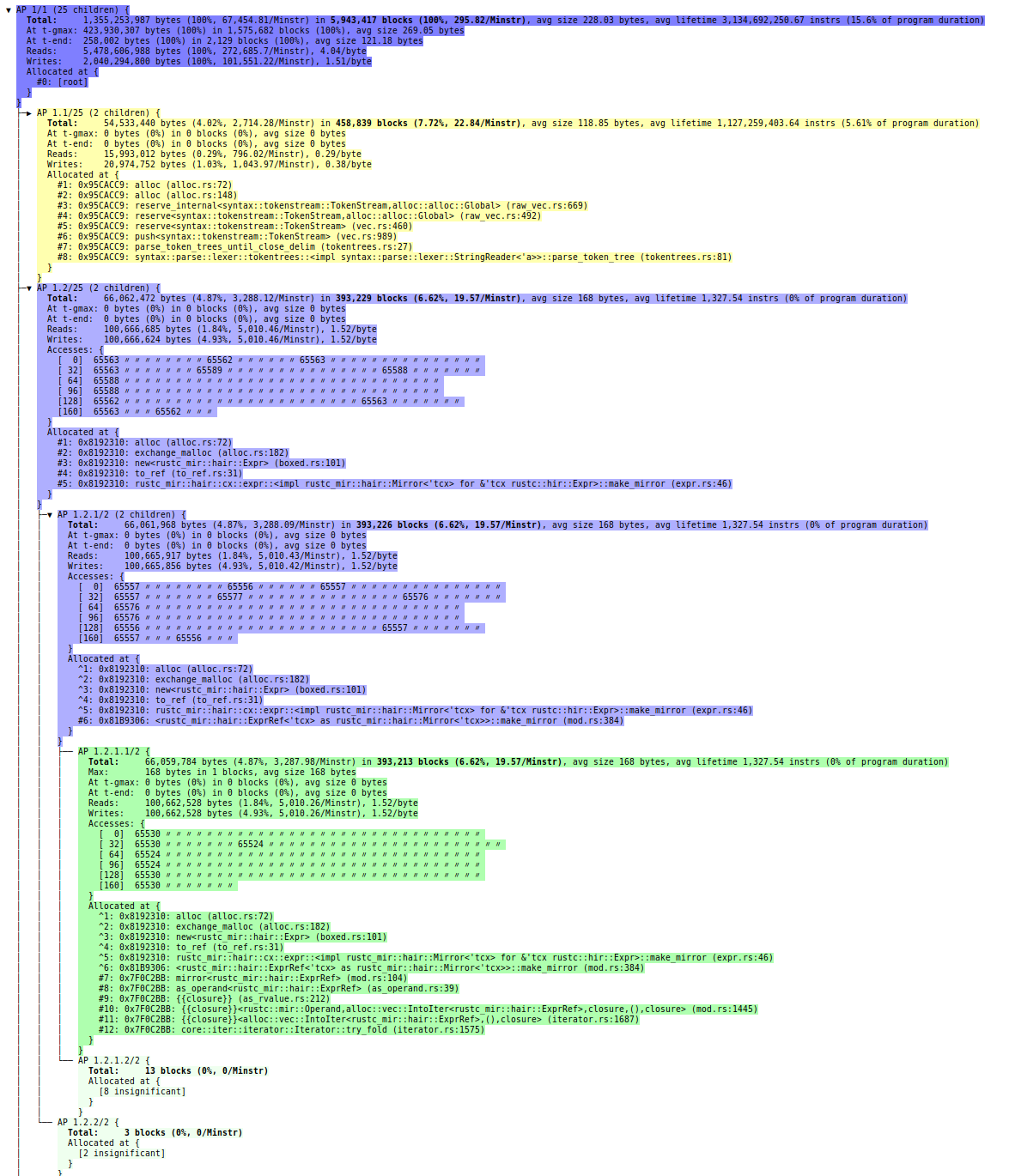
The new DHAT can be run using the --tool=dhat flag, in contrast with the old DHAT, which was an “experimental” tool and so used the --tool=exp-dhat flag. For more details see the documentation.
Fluent is a family of localization specifications, implementations and good practices developed by Mozilla. It is currently used in Firefox. With Fluent, translators can create expressive translations that sound great in their language. Today we’re announcing version 1.0 of the Fluent file format specification. We’re inviting translation tool authors to try it out and provide feedback.
The Problem Fluent Solves
With almost 100 supported languages, Firefox faces many localization challenges. Using traditional localization solutions, these are difficult to overcome. Software localization has been dominated by an outdated paradigm: translations that map one-to-one to the source language. The grammar of the source language, which at Mozilla is English, imposes limits on the expressiveness of the translation.
Consider the following message which appears in Firefox when the user tries to close a window with more than one tab.
tabs-close-warning-multiple =
    You are about to close {$count} tabs.
    Are you sure you want to continue?
The message is only displayed when the tab count is 2 or more. In English, the word tab will always appear as plural tabs. An English-speaking developer may be content with this message. It sounds great for all possible values of $count.
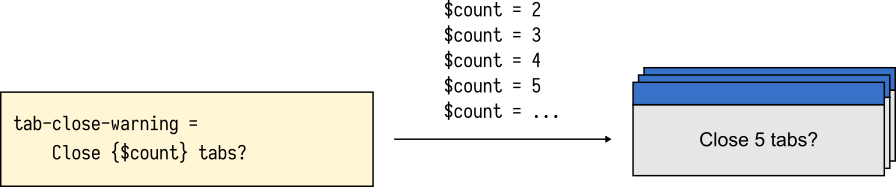
$count.Many translators, however, will quickly point out that the word tab will take different forms depending on the exact value of the $count variable.
In traditional localization solutions, the onus of fixing this message is on developers. They need to account for the fact that other languages distinguish between more than one plural form, even if English doesn’t. As the number of languages supported in the application grows, this problem scales up quickly—and not well.
- In some languages, nouns have genders which require different forms of adjectives and past participles. In French, connect'e, connect'ee, connect'es and connect'ees all mean connected.
- Style guides may require that different terms be used depending on the platform the software runs on. In English Firefox, we use Settings on Windows and Preferences on other systems, to match the wording of the user’s operating system. In Japanese, the difference is starker: some computer-related terms are spelled with a different writing system depending on the user’s OS.
- The context and the target audience of the application may require adjustments to the copy. In English, software used in accounting may format numbers differently than a social media website. Yet in other languages such a distinction may not be necessary.
There are many grammatical and stylistic variations that don’t map one-to-one between languages. Supporting all of them using traditional localization solutions isn’t straightforward. Some language features require trade-offs in order to support them, or aren’t possible at all.
Asymmetric Localization
Fluent turns the localization landscape on its head. Rather than require developers to predict all possible permutations of complexity in all supported languages, Fluent keeps the source language as simple as it can be.
We make it possible to cater to the grammar and style of other languages, independently of the source language. All of this happens in isolation; the fact that one language benefits from more advanced logic doesn’t require any other localization to apply it. Each localization is in control of how complex the translation becomes.
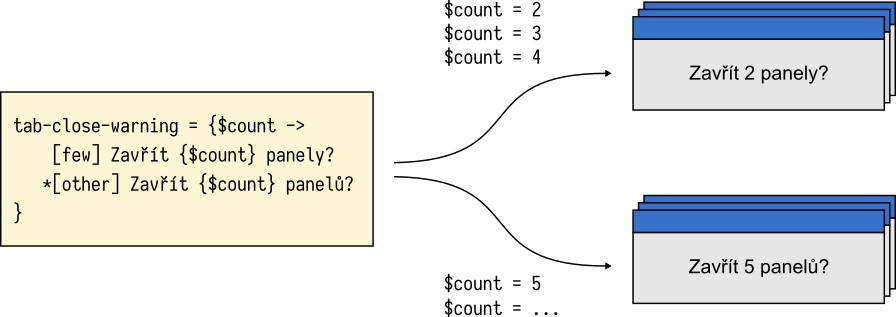
Consider the Czech translation of the “tab close” message discussed above. The word panel (tab) must take one of two plural forms: panely for counts of 2, 3, and 4, and panelu for all other numbers.
tabs-close-warning-multiple = {$count ->
    [few] Chyst'ate se zavr'it {$count} panely. Opravdu chcete pokracovat?
   *[other] Chyst'ate se zavr'it {$count} panelu. Opravdu chcete pokracovat?
}
Fluent empowers translators to create grammatically correct translations and leverage the expressive power of their language. With Fluent, the Czech translation can now benefit from correct plural forms for all possible values of the $count variable.
$count values of 2, 3, and 4 require a special plural form of the One year ago today. On the sunny Tuesday of April 17th 2018 I visited the US embassy in Stockholm Sweden and applied for a visa. I’m still waiting for them to respond.
My days-since-my-visa-application counter page is still counting. Technically speaking, I had already applied but that was the day of the actual physical in-person interview that served as the last formal step in the application process. Most people are then getting their visa application confirmed within weeks.
Initially I emailed them a few times after that interview since the process took so long (little did I know back then), but now I haven’t done it for many months. Their last response assured me that they are “working on it”.
Lots of things have happened in my life since last April. I quit my job at Mozilla and started a new job at wolfSSL, again working for a US based company. One that I cannot go visit.
During this year I missed out on a Mozilla all-hands, I’ve been invited to the US several times to talk at conferences that I had to decline and a friend is getting married there this summer and I can’t go. And more.
Going forward I will miss more interesting meetings and speaking opportunities and I have many friends whom I cannot visit. This is a mild blocker to things I would want to do and it is an obstacle to my profession and career.
I guess I might get my rejection notice before my counter reaches two full years, based on stories I’ve heard from other people in similar situations such as mine. I don’t know yet what I’ll do when it eventually happens. I don’t think there are any rules that prevent me from reapplying, other than the fact that I need to pay more money and I can’t think of any particular reason why they would change their minds just by me trying again. I will probably give it a rest a while first.
I’m lucky and fortunate that people and organizations have adopted to my situation – a situation I of course I share with many others so it’s not uniquely mine – so lots of meetings and events have been held outside of the US at least partially to accommodate me. I’m most grateful for this and I understand that at times it won’t work and I then can’t attend. These days most things are at least partly accessible via video streams etc, repairing the harm a little. (And yes, this is a first-world problem and I’m fortunate that I can still travel to most other parts of the world without much trouble.)
Finally: no, I still have no clue as to why they act like this and I don’t have any hope of ever finding out.

https://daniel.haxx.se/blog/2019/04/17/one-year-in-still-no-visa/
Today’s Firefox for iPhone and iPad users offers enhancements that will make it easier to get you to what you want faster, from new links within your library and managing your logins and passwords, plus deleting your history as recent as the last hour.
Leave no trace with your web history
With today’s release, we made it easier to clear your web history with one tap on the history page. In the menu or on the Firefox Home page, tap ‘Your Library’, then ‘History’, and ‘Clear Recent History’. You’ll be able to quickly delete browsing data from the last hour, that day, or that day and the day before.
Because we all make wrong turns on the web from time to time, you can now choose to delete your history from only the last hour, that specific day, the day and the one before or, as it has always been, your full browsing history.
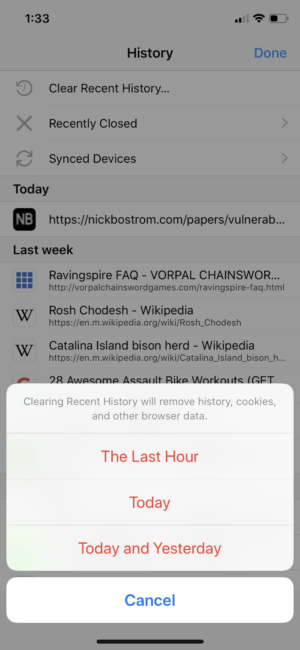
Clear your web history with one tap
Shortcuts in your library
Everyone likes a shortcut that gets you quickly to the place you need to go. We created links in your library to get you to your bookmarks, history, reading list and downloads all from the Firefox Home screen.
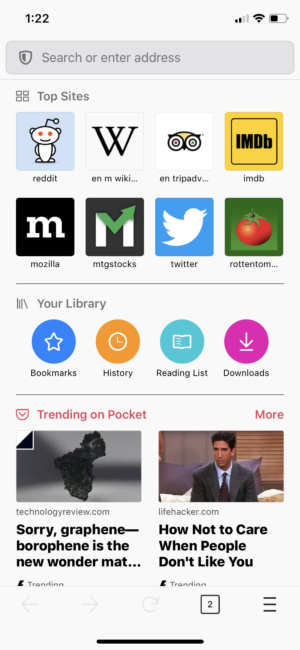
Get you to your bookmarks, history, reading list and downloads all from the Firefox Home screen
Get to your logins and passwords faster
We simplified the place where you can find your logins and passwords in the menu. Go to the menu and tap ‘Logins & Passwords’. Also, from there you can enable Face ID or password authentication in Settings to keep your passwords even more secure. It’s located under in the Face ID & Passcode option.
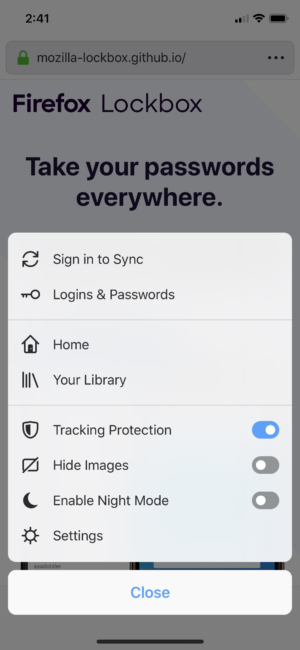
Find your logins and passwords easily
To get the latest version of Firefox for iOS, visit the App Store.
The post Latest Firefox for iOS Now Available appeared first on The Mozilla Blog.
https://blog.mozilla.org/blog/2019/04/16/latest-firefox-for-ios-now-available/
Over the past few months the Firefox Accounts team have been working on making users more aware of Firefox Account and the benefits of having an account. This phase had an emphasis on our desktop users because we believe that would have the highest impact.
The problem
Based on user testing and feedback, most of our users did not clearly understand all of the advantages of having a Firefox Account. Most users failed to understand the value proposition of an account and why they should create one. Additionally, if they had an account, users were not always aware of the current signed in status in the browser. This meant that users could be syncing their private data and not fully aware they were doing that.
The benefits of an account we wanted to highlight were:
- Sync bookmarks, passwords, tabs, add-ons and history among all your Firefox Browsers
- Send tabs between Firefox Browsers
- Stores your data encrypted
- Use one account to log in to supported Firefox services (Ex. Monitor, Lockbox, Send)
Previously, users that downloaded Firefox would only see the outlined benefits at a couple touch points in the browser. Specifically these points below

First run page (New installation)

What’s New page (Firefox installation upgraded)

Browsing to preferences and clicking Firefox Account menu
If a user failed to create an account and login during the first two points, it was very unlikely that they would organically discover Firefox Accounts at point three. Having only these touch points meant that users could not always set-up a Firefox Account at their own pace.
Our solution
Our team decided that we needed to make this easier and solicited input from our Growth and Marketing teams, particularly on how to best showcase and highlight our features. From these discussions, we decided to experiment with putting a top level account menu item next to the Firefox application menu. Our hypothesis was that having a top level menu would drive engagement and reinforce the benefits of Firefox Accounts.
We believed that having an account menu item at this location would give users more visibility into their account status and allow them to quickly manage it.
While most browsers have some form of a top level account menu, we decided to experiment with the feature because Firefox users are more privacy focused and might not behave as other browser users.

New Firefox Account Toolbar menu
Our designs
The initial designs for this experiment had a toolbar menu left of the Firefox application menu. This menu could not be removed and was always fixed. After consulting with engineering teams, having a fixed menu could more easily be achieved as a native browser feature. However, because of the development cycle of Firefox browser (new releases every 6 weeks), we would have to wait 6 weeks to test our experiment as a native feature.

Initial toolbar design
If the requirement that the menu was not fixed was lifted then we could ship a Shield web extension experiment and get results much more quickly (2-3 weeks). Shield experiments are not tied to a specific Firefox release schedule and users can opt in and out of them. This means that Firefox can install shield experiments, run them and then
On 14 May, Mozilla will host the next installment of our Mozilla Mornings series – regular breakfast meetings where we bring together policy experts, policymakers and practitioners for insight and discussion on the latest EU digital policy developments.
This event will coincide with the launch of the 2019 Mozilla Foundation Internet Health Report. We’re bringing together an expert panel to discuss some of the report’s highlights, and their vision for how the next EU political mandate can enhance internet health in Europe.
Prabhat Agarwal
Deputy Head of Unit, E-Commerce & Platforms
European Commission, DG CNECT
Claudine Vliegen
Telecoms & Digital Affairs attach'e
Permanent Representation of the Netherlands to the EU
Mark Surman
Executive Director, Mozilla Foundation
Introductory remarks by Solana Larsen
Editor in Chief, Internet Health Report
Moderated by Jennifer Baker, EU tech journalist
14 May, 2019
08:00-10:00
Radisson Red, Rue d’Idalie 35, 1050 Brussels
The post Brussels Mozilla Mornings: A policy blueprint for internet health appeared first on Open Policy & Advocacy.
Pyodide is an experimental project from Mozilla to create a full Python data science stack that runs entirely in the browser.

The impetus for Pyodide came from working on another Mozilla project, Iodide, which we presented in an earlier post. Iodide is a tool for data science experimentation and communication based on state-of-the-art web technologies. Notably, it’s designed to perform data science computation within the browser rather than on a remote kernel.
Unfortunately, the “language we all have” in the browser, JavaScript, doesn’t have a mature suite of data science libraries, and it’s missing a number of features that are useful for numerical computing, such as operator overloading. We still think it’s worthwhile to work on changing that and moving the JavaScript data science ecosystem forward. In the meantime, we’re also taking a shortcut: we’re meeting data scientists where they are by bringing the popular and mature Python scientific stack to the browser.
It’s also been argued more generally that Python not running in the browser represents an existential threat to the language—with so much user interaction happening on the web or on mobile devices, it needs to work there or be left behind. Therefore, while Pyodide tries to meet the needs of Iodide first, it is engineered to be useful on its own as well.
Pyodide gives you a full, standard Python interpreter that runs entirely in the browser, with full access to the browser’s Web APIs. In the example above (50 MB download), the density of calls to the City of Oakland, California’s “311” local information service is plotted in 3D. The data loading and processing is performed in Python, and then it hands off to Javascript and WebGL for the plotting.
For another quick example, here’s a simple doodling script that lets you draw in the browser window:
from js import document, iodide

canvas = iodide.output.element('canvas')
canvas.setAttribute('width', 450)
canvas.setAttribute('height', 300)
context = canvas.getContext("2d")
context.strokeStyle = "#df4b26"
context.lineJoin = "round"
context.lineWidth = 5

pen = False
lastPoint = (0, 0)

def onmousemove(e):
    global lastPoint

    if pen:
        newPoint = (e.offsetX, e.offsetY)
        context.beginPath()
        context.moveTo(lastPoint[0], lastPoint[1])
        context.lineTo(newPoint[0], newPoint[1])
        context.closePath()
        context.stroke()
        lastPoint = newPoint

def onmousedown(e):
    global pen, lastPoint
    pen = True
    lastPoint = (e.offsetX, e.offsetY)

def onmouseup(e):
    global pen
    pen = False

canvas.addEventListener('mousemove', onmousemove)
canvas.addEventListener('mousedown', onmousedown)
canvas.addEventListener('mouseup', onmouseup)
And this is what it looks like:
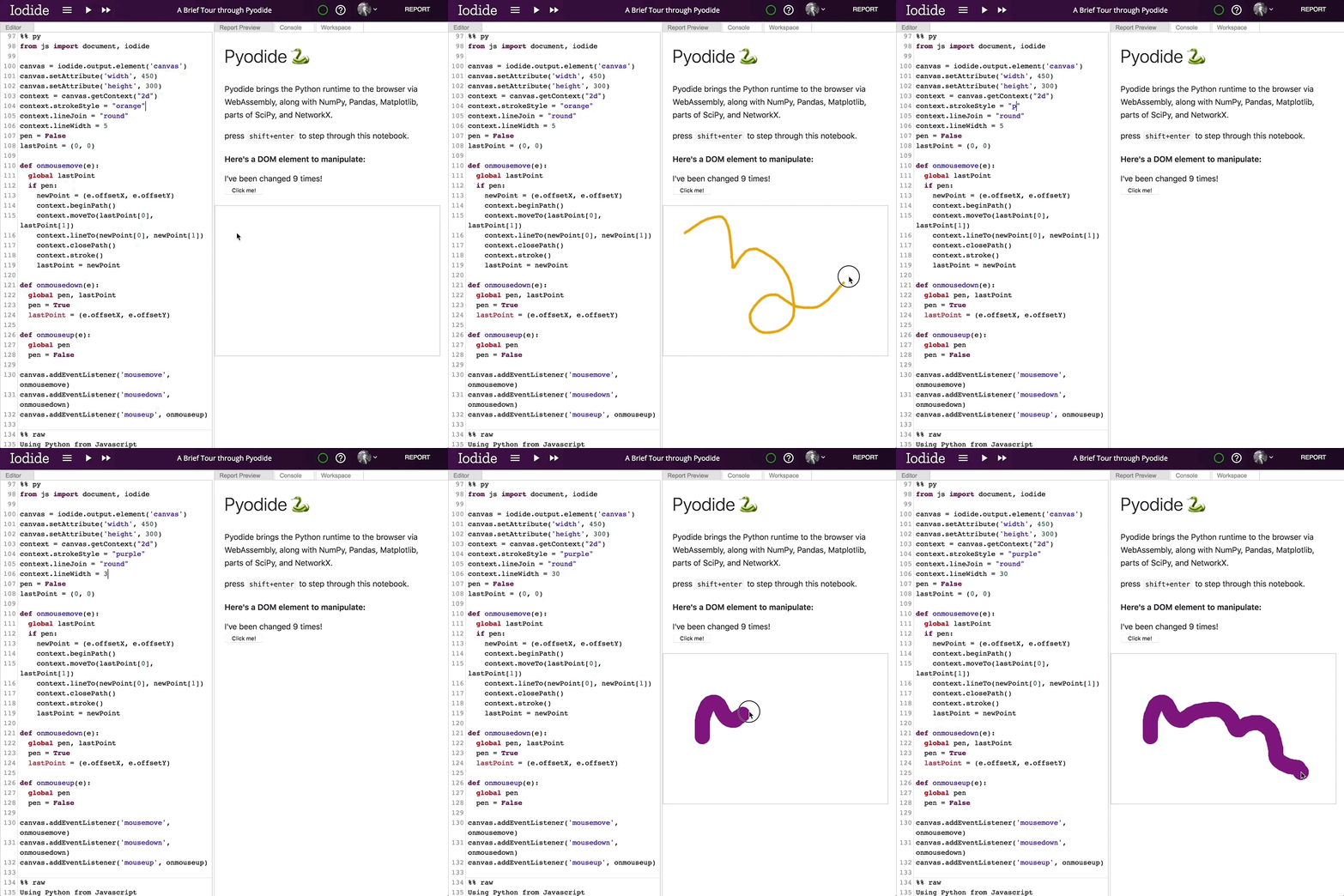
The best way to learn more about what Pyodide can do is to just go and try it! There is a demo notebook (50MB download) that walks through the high-level features. The rest of this post will be more of a technical deep-dive into how it works.
Prior art
There were already a number of impressive projects bringing Python to the browser when we started Pyodide. Unfortunately, none addressed our specific goal of supporting a full-featured mainstream data science stack, including NumPy,

We’re excited to announce an official Hubs integration with Discord, a platform that provides text and voice chat for communities. In today's digital world, the ways we stay connected with our friends, family, and co-workers is evolving. Our established social networks span across different platforms, and we believe that shared virtual reality should build on those relationships and that they enhance the way we communicate with the people we care about. Being co-present as avatars in a shared 3D space is a natural progression for the tools we use today, and we’re building on that idea with Hubs to allow you to create private spaces where your conversations, content, and data is protected.
In recent years, Discord has grown in popularity for communities organized around games and technology, and is the platform we use internally on the Hubs development team for product development discussions. Using Discord as a persistent platform that is open to the public gives us the ability to be open about our ongoing work and initiatives on the Hubs team and integrate the community’s feedback into our product planning and development. If you’re a member of the Discord server for Hubs, you may have already seen the bot in action during our internal testing this month!
The Hubs Discord integration allows members to use their Discord identity to connect to rooms and connects a Discord channel with a specific Hubs room in order to capture the text chat, photos taken, and media shared between users in each space. With the ability to add web content to rooms in Hubs, users who are co-present together are able to collaborate and entertain one another, watch videos, chat, share their screen / webcam feed, and pull in 3D objects from Sketchfab and Google Poly. Users will be able to chat in the linked Discord channel to send messages, see the media added to the connected Hubs room, and easily get updates on who has joined or left at any given time.
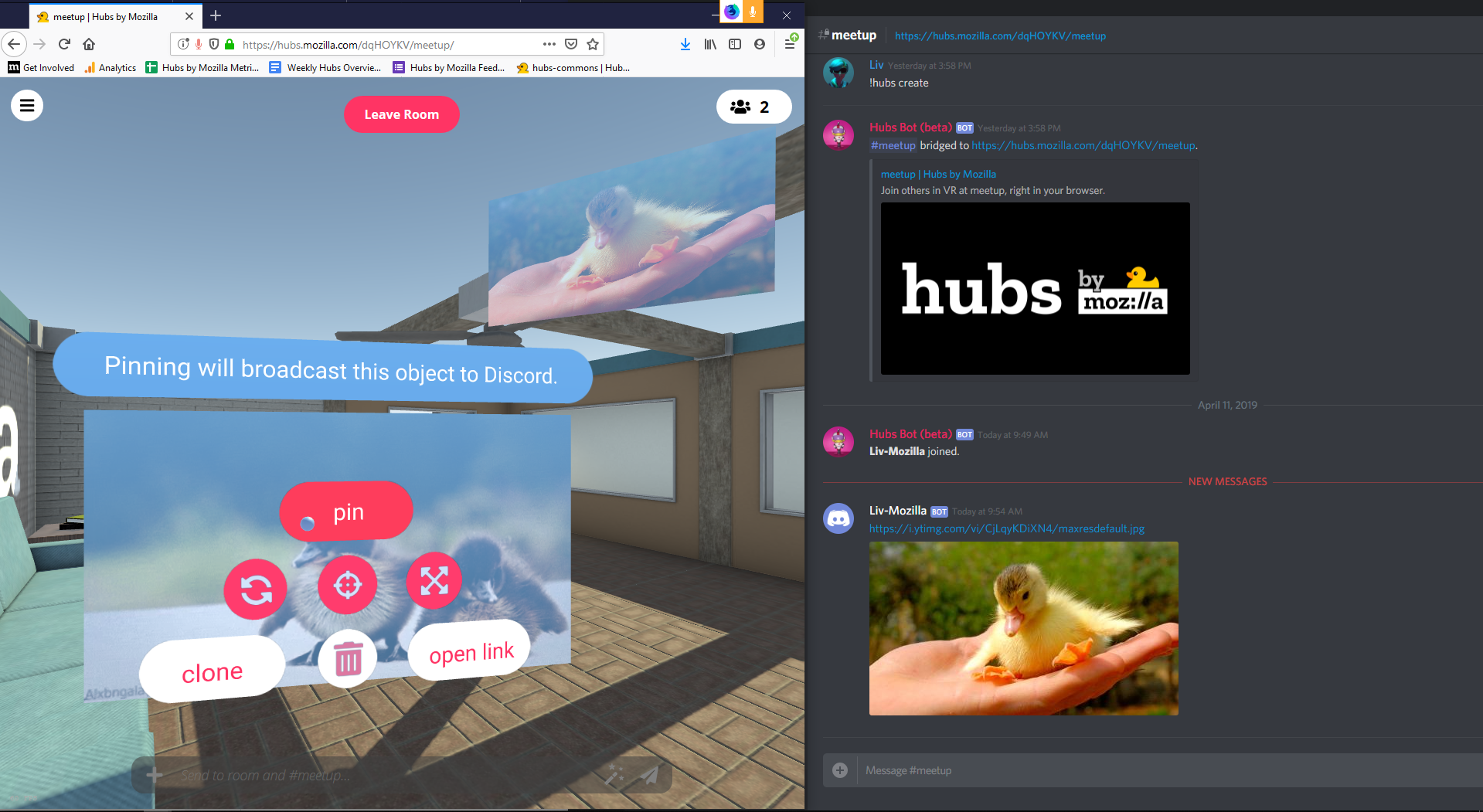
We believe that embodied avatar presence will empower communities to be more creative, communicative, and collaborative - and that all of that should be doable without replacing or excluding your existing networks. Your rooms belong to you and the people you choose to share them with, and we feel strongly that everyone should be able to meet in secure spaces where their privacy is protected.
In the coming months, we plan to introduce additional platform integrations and new tools related to room management, authentication, and identity. While you will be able to continue to use Hubs without a persistent identity or login, having an account for the Hubs platform or using your existing identity on a platform such as Discord grants you additional permissions and abilities for the rooms you create. We plan to work closely with communities who are interested in joining the closed beta to help us understand how embodied communication works for them in order to focus our product planning on what meets their needs.
You can see the Hubs Discord integration in action live on the public Hubs Community Discord server for our weekly meetings. If you run a Discord server and are interested in participating in the closed beta for the Hubs Discord bot, you can learn more on the Hubs website.