Glean is a new library for collecting data in Mozilla products. It’s been shipping in Firefox Preview for a little while and I’d like to take a minute to talk about how I validated that it sends what we think it’s sending.
Validating new data collections in an existing system like Firefox Desktop Telemetry is a game of comparing against things we already know. We know that some percentage of data we receive is just garbage: bad dates, malformed records, attempts at buffer overflows and SQL injection. If the amount of garbage in the new collection is within the same overall amount of garbage we see normally, we count it as “good enough” and move on.
With new data collection from a new system like Glean coming from new endpoints like the reference browser and Firefox Preview, we’re given an opportunity to compare against the ideal. Maybe the correct number of failures is 0?
But what is a failure? What is acceptable behaviour?
We have an “events” ping in Glean: can the amount of time covered by the events’ timestamps ever exceed the amount of time covered by the ping? I didn’t think so, but apparently it’s an expected outcome when the events were restored from a previous session.
So how do you validate something that has unknown error states?
I started with a list of things any client-based network-transmitted data collection system had to have:
- How many pings (data transmissions) are there?
- How many measurements are in those pings?
- How many clients are sending these pings?
- How often?
- How long do they take to get to our servers?
- How many poorly-structured pings are sent? By how many clients? How often?
- How many pings with bad values are sent? By how many clients? How often?
From there we can dive into validating specifics about the data collections:
- Do the events in the “events” ping have timestamps with reasonable separations? (What does reasonable mean here? Well, it could be anything, but if the span between two timestamps is measured in years, and the app has only been available for some number of weeks, it’s probably broken.)
- Are the GUIDs in the pings actually globally unique? Are we seeing duplicates? (We are, but not many)
- Are there other ping fields that should be unique, but aren’t? (For Glean no client should ever send the same ping type with the same sequence number. But that kind of duplicate appears, too)
Once we can establish confidence in the overall health of the data reporting mechanism we can start using it to report errors about itself:
- Ping transmission should be quick (because they’re small). Assuming the ping transmission time is 0, how far away are the clients’ clocks from the server’s clock? (AKA “Clock skew”. Turns out that mobile clients’ clocks are more reliable than desktop clients’ clocks (at least in the prerelease population. We’ll see what happens when we start measuring non-beta users))
- How many errors are reported by internal error-reporting metrics? How many send failures? How many times did the app try to record a string that was too long?
- What measurements are in the ping? Are they only the ones we expect to see? Are they showing in reasonable proportions relative to each other and the number of clients and pings reporting them?
All these attempts to determine what is reasonable and what is correct depend on a strong foundation of documentation. I can read the code that collects the data and sends the pings… but that tells me what is correct relative to what is implemented, not what is correct relative to what is intended.
By validating to the documentation, to what is intended, we can not only find bugs in the code, we can find bugs in the docs. And a data collection system lives and dies on its documentation: it is in many ways a more important part of the “product” than the code.
At this point, aside from the “metrics” ping which is awaiting validation after some fixes reach saturation in the population, Glean has passed all of these criteria acceptably. It still has a bit of a duplicate ping problem, but its clock skew and latency are much lower than Firefox Desktop’s. There are some outrageous clients sending dozens of pings over a period that they
Our support platform went through numerous changes and transitions during the last couple of years. With the SUMO team joining efforts with the Open Innovation group last year, we have started thinking about different approaches to our support platform strategy. Our support platform is complex and there are a lot of legacy items that need to be taken care of. Besides this we need to get ready for all the new things that are coming our way.
We want to ensure we’re providing a stable platform that will support Mozilla in the years to come as well as manage all the new products and changes expected in the following years.
During this first half of the year we have worked on setting up a roadmap that prioritizes the work and helps us be more intentional about the changes we want to make in order to provide the best support platform for our users. With this we have also worked on new processes that will hopefully simplify the way we work with the platform as well as the overall development process.
What’s new
Our current efforts are focused almost 100% on the integration of Firefox Accounts. In parallel we’ve also been working with the IT team to complete a migration of the infrastructure to a new instance of AWS (this has been completed on June 5th). Firefox Accounts implementation will follow shortly. After these major pieces of work are done our next big priorities are: Elastic search upgrades, ongoing UX experiments and a Responsive Design implementation that has become even more important as Google now indexes our site as mobile-first..
There will be more discussions about H2 and how we’re going to manage platform priorities in the second half of the year in July.
You can consult the current platform roadmap here.
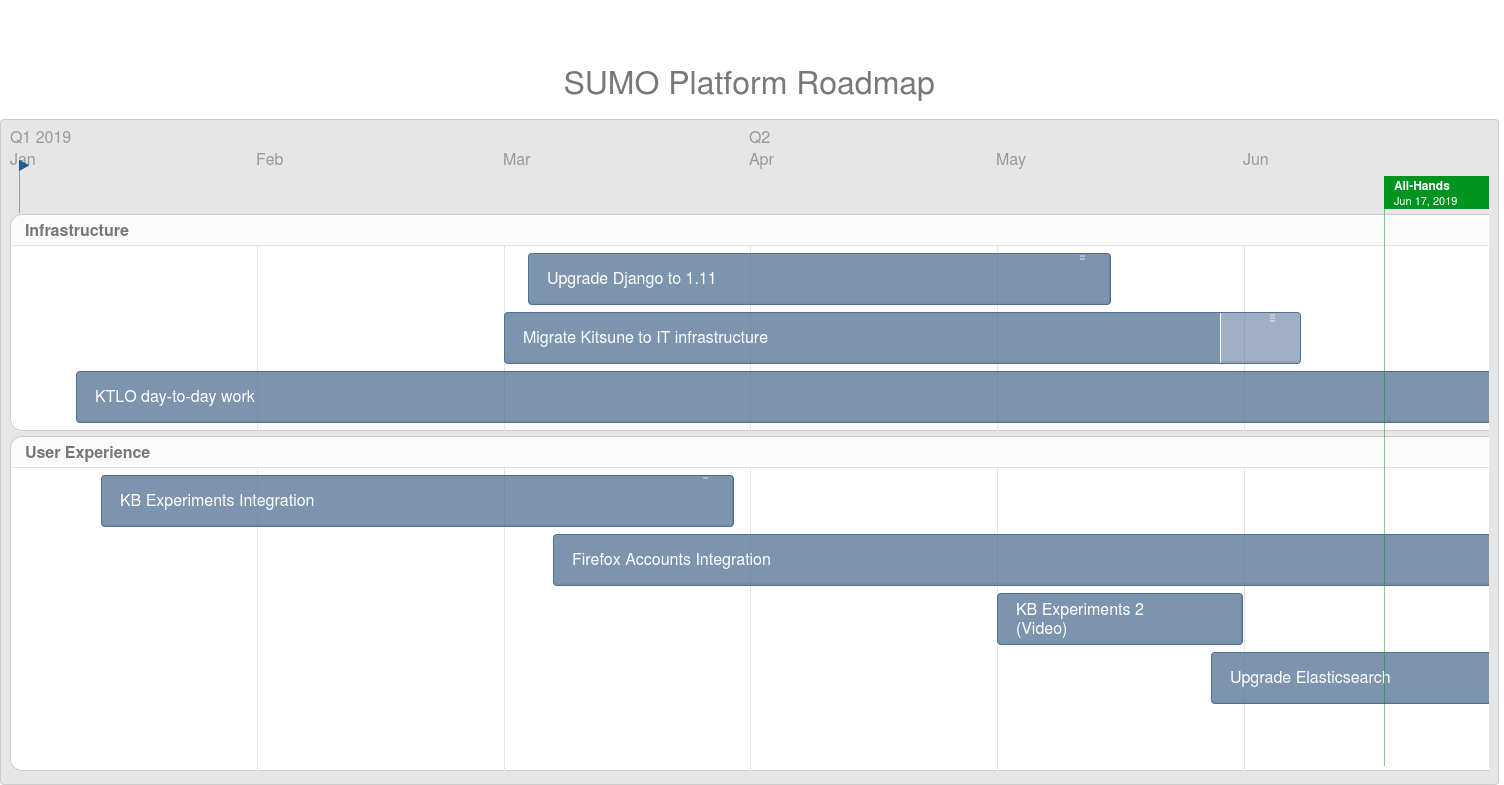
This is a high-level overview on each project we’re working on and the expected timeline for completion. We’re going to review the roadmap items at the beginning of each month.
All the development work is being tracked in sprints and you can follow our current sprint here.
As mentioned before, the SUMO platform is a large complex platform with a lot of legacy issues that need to be dealt with. Currently we have around 700 bugs filed, many of them being more than 5 years old. As we don’t have enough resources to deal with this huge backlog we’ll need to change a few processes. We have designed a new triage and roadmap review process that you can read about here . Bugs that are not critical to the stability of the platform and are older than 6 months will be closed – this is a one time only event and we expect this to take care of most outdated bugs that will never be fixed. Feel free to open a new bug if you feel the issue is urgent or should be prioritized nonetheless.
Please note
We’re currently focusing on: Firefox Accounts implementation, the IT migration as well as any critical issues that break the site or block releases. Any other items are currently on hold. We can prioritize other issues as needed as per the process described in the document shared above.
SUMO staff team
https://blog.mozilla.org/sumo/2019/06/07/sumo-platform-roadmap/
We’re excited to share that Hubs is now available on Quest, the new standalone VR headset from Oculus. Because Hubs is web-based, there are no applications to install or limits on cross-platform compatibility. Simply invite people to join your rooms in VR, on a desktop, or with a phone at any time. Launch a browser on the Quest and go to hubs.mozilla.com to create a room, then invite people to join you by sending them the invite link or room code!
Standalone headsets like the Oculus Quest represent exciting new advancements in the systems that we have available for consumer VR technology. Untethered devices with tracking capabilities built into the headset allow for more freedom of movement around a space and more natural interactions within an environment.
At Mozilla, we're committed to supporting a rich, open ecosystem of online content that can be accessed by any device. This is one of the reasons that the immersive web is so powerful - like traditional websites, applications like Hubs can be accessed through browsers with a single URL on new devices without being limited to store requirements. By developing Hubs for the web, we’re able to iterate and deploy changes quickly, which allows us to get new features and bug fixes out quickly and often. It also means our users can be together in the same room on the Quest, PC, and smartphones as well.
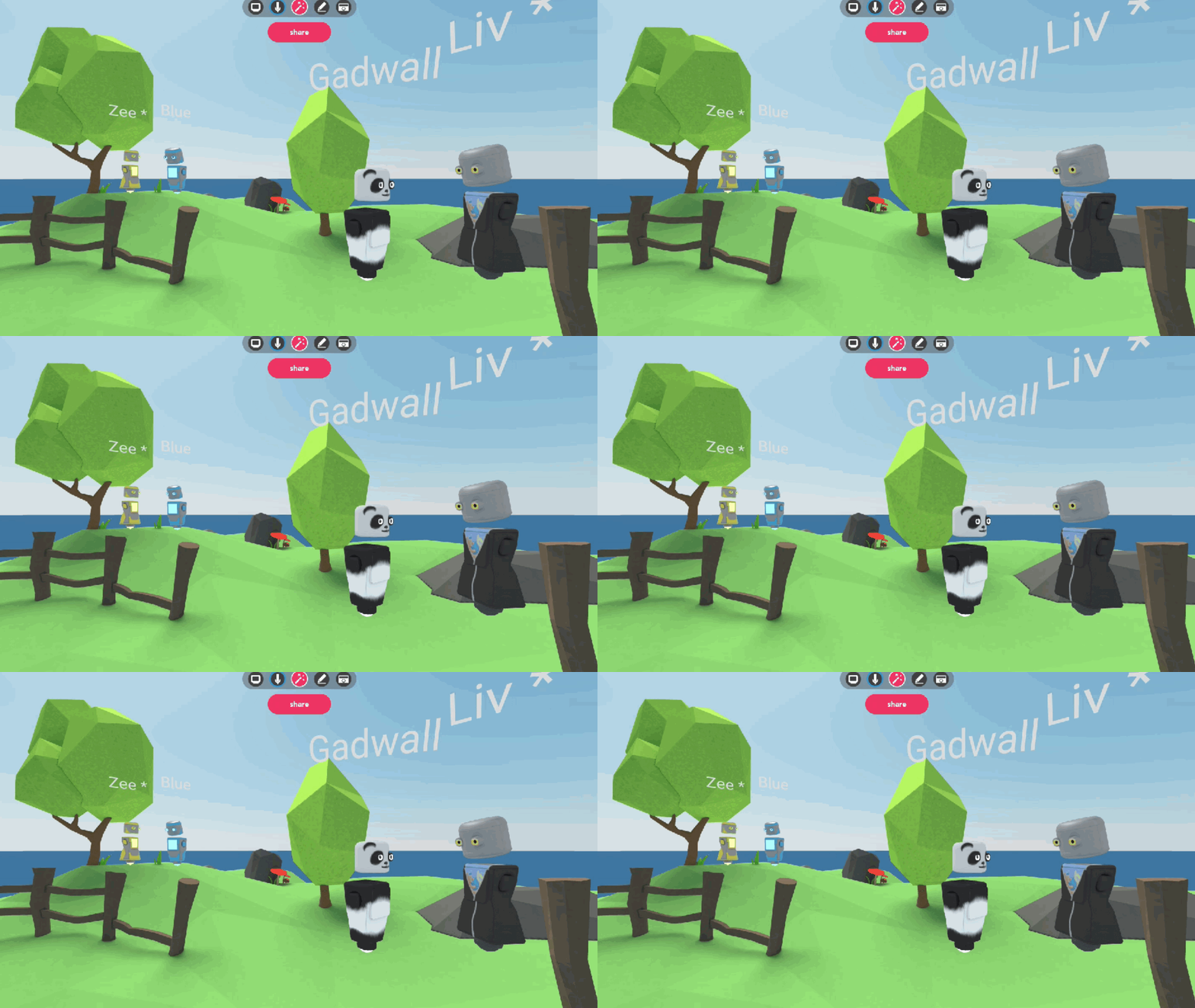
We're excited by the opportunities that are enabled by an immersive, creative web where anyone can launch mixed reality experiences. For virtual reality to succeed, applications and experiences need to be designed for everyone in mind, and not separate communities based on their hardware preferences. We think it’s important that Hubs exists as a social VR platform that works across the different device families that you use to communicate, regardless of the platform.
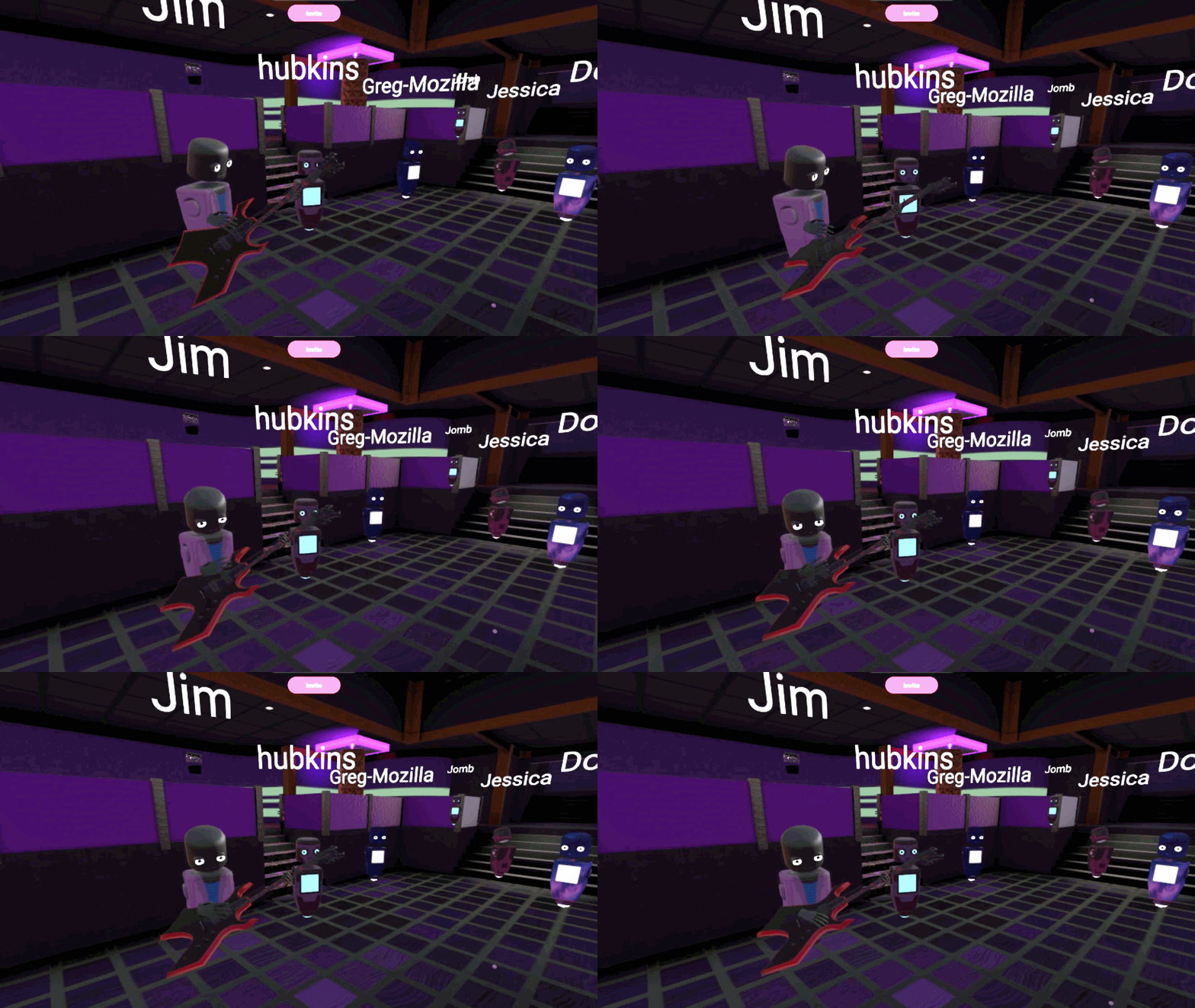
There are a lot of misconceptions about what the immersive web is capable of, but it does a lot of important things really well. It keeps control of the experiences in the users’ hands and prioritizes accessibility over platform-exclusive features. It gives developers the ability to deliver their experiences across devices without the restrictions that come from publishing to app stores, and it’s born from a decades old community built around standards and openness, which we think is critical to the success of mixed reality.
If you’re a creator or developer interested in learning more about how we’re building virtual reality experiences for the web, join the Hubs Community meetup on Fridays at 11:30am PDT (UTC -7) to hear more from the team about the foundations of how (and why) we’re committed to bringing social VR to the browser. Jump into our Hubs discord server and keep an eye on the #meetup channel to participate!
Hubs is an open-source project by Mozilla to explore how social virtual worlds can be used for collaboration and communication. You can explore Hubs today at hubs.mozilla.com or view the source code at github.com/mozilla/hubs.
See also, the official GeckoView documentation.
First, ensure you run ./mach boostrap, and select "4. GeckoView/Firefox for Android".
Here's the mozconfig I'm using (Ubuntu 18.04):
ac_add_options --enable-optimize
ac_add_options --disable-debug
ac_add_options --enable-release
ac_add_options --disable-tests
mk_add_options AUTOCLOBBER=1
ac_add_options --enable-debug-symbols
# With the following compiler toolchain:
CC="/home/chris/.mozbuild/clang/bin/clang"
CXX="/home/chris/.mozbuild/clang/bin/clang++"
export CC="/home/chris/.mozbuild/clang/bin/clang -fcolor-diagnostics"
export CXX="/home/chris/.mozbuild/clang/bin/clang++ -fcolor-diagnostics"
ac_add_options --with-ccache=/usr/bin/ccache
mk_add_options 'export RUSTC_WRAPPER=sccache'
# Build GeckoView/Firefox for Android:
ac_add_options --enable-application=mobile/android
# Work around issues with mozbuild not finding the exact JDK that works.
# See also https://bugzilla.mozilla.org/show_bug.cgi?id=1451447#c7
ac_add_options --with-java-bin-path=/usr/lib/jvm/java-8-openjdk-amd64/bin
# With the following Android NDK:
ac_add_options --with-android-ndk="/home/chris/.mozbuild/android-ndk-r17b"
ac_add_options --with-android-min-sdk=16
ac_add_options --target=arm-linux-androideabi
./mach build && ./mach package && ./mach install
./mach run --url https://www.youtube.com/watch?v=dQw4w9WgXcQ
./mach build && ./mach package && ./mach android build-geckoview_example && ./mach android install-geckoview_example
adb shell am start -a android.intent.action.MAIN -c android.intent.category.LAUNCHER -n org.mozilla.geckoview_example/org.mozilla.geckoview_example.GeckoViewActivity -d 'https://www.youtube.com/watch?v=dQw4w9WgXcQ'
adb shell am start -a android.intent.action.MAIN -c android.intent.category.LAUNCHER -n org.mozilla.geckoview_example/org.mozilla.geckoview_example.GeckoViewActivity -d 'https://www.youtube.com/watch?v=dQw4w9WgXcQ' --es env0 MOZ_LOG=MediaSource:5
adb logcat | grep MediaSource
adb logcat -d > log_file.txt
adb logcat --clear
adb shell am force-stop
In late 2018 Mozilla conducted an experiment to collect browser Telemetry data with Prio, a privacy-preserving data collection system developed by Stanford Professor Dan Boneh and PhD candidate Henry Corrigan-Gibbs. That experiment was a success: it allowed us to validate that our Prio data collections were correct, efficient, and integrated well with our analysis pipeline. Today, we want to let you know about our next steps in testing data collection with Prio.
As part of Content Blocking, Firefox will soon include default protections against tracking. Our protections are built on top of a blocklist of known trackers. We expect trackers to react to our protections, and in some cases attempt to work around them. We can monitor how our blocklists are applied in Firefox to detect these workarounds.
However, directly monitoring how our blocklists are applied would require data that we feel is too sensitive to collect from release versions of Firefox. That’s why Prio is so important: it allows us to understand how our blocklists are applied across a large number of users, without giving us the ability to determine how they are applied in any individual user’s browser or on any individual page visit.
To support this we’ve developed Firefox Origin Telemetry, which is built on top of Prio. We will use Firefox Origin Telemetry to collect counts of the number of sites on which each blocklist rule was active, as well as counts of the number of sites on which the rules were inactive due to one of our compatibility exemptions. By monitoring these statistics over time, we can determine how trackers react to our new protections and discover abuse.
In the next phase of testing we need validate that Firefox Origin Telemetry works at scale. To provide effective privacy, Prio requires that two independent parties each process a separate portion of the data — a requirement that we will not satisfy during this test. As in our initial test, we will run both data collection servers ourselves to complete end-to-end testing prior to involving a second party. That’s why we are running this test only in our pre-release channels, which we know are used by a smaller audience that has chosen to help us test development versions of Firefox. We’ve ensured that the data we’re collecting falls within our data collection policies for pre-release versions of Firefox, and we’ve chosen to limit the collection to 1% of Firefox Nightly users, as this is all that’s necessary to validate the API.
We expect to start this test during our Nightly 69 development cycle. Collecting this data in a production environment will require an independent third party to run one of the servers. We will provide further updates once we have such a partner in place.
The post Next steps in privacy-preserving Telemetry with Prio appeared first on Mozilla Security Blog.
https://blog.mozilla.org/security/2019/06/06/next-steps-in-privacy-preserving-telemetry-with-prio/
The subgrid feature which is part of Level 2 of the CSS Grid Specification is not yet shipping in any browser, but is now available for testing in Firefox Nightly. This is a feature that, if you have used CSS Grid for a layout of any complexity, you are likely to be pretty excited about. In this article I’m going to introduce the feature and some of the use cases it solves.
So what is subgrid exactly? In terms of syntax, it is a new keyword value for the grid-template-columns and grid-template-rows properties. These properties normally accept a track listing, a listing of sizes of the tracks you want in your grid. For example, the following CSS would create a three column track grid with a 200px column, a column sized as max-content, and a final 1fr column.
grid-template-columns: 200px max-content 1fr;You can find out more about track sizing in general, and the basics of grid layout via the MDN Guide Basic concepts of Grid Layout.
If we define a track as a subgrid, however, we replace the track listing with the keyword subgrid.
grid-template-columns: subgrid;This instructs the grid-template-columns property to use the tracks defined on the parent, as the track sizing and number used by this nested grid.
In the example below I have an element which is a grid container. It contains three child elements – two div elements and a ul.
A
B
- List item 1
- List item 2
- List item 3
I create a grid on .wrapper, and the direct children lay out on the grid I have created, but the list items go back to displaying as list items.
.wrapper {
  display: grid;
  grid-template-columns: 2.5fr 1fr 0.5fr;
  gap: 20px;
}

.box1 {
  grid-column: 1;
  grid-row: 1;
}

.box2 {
  grid-column: 2 / 4;
  grid-row: 1;
}

.box3 {
  grid-column: 1 / -1;
  grid-row: 2;
}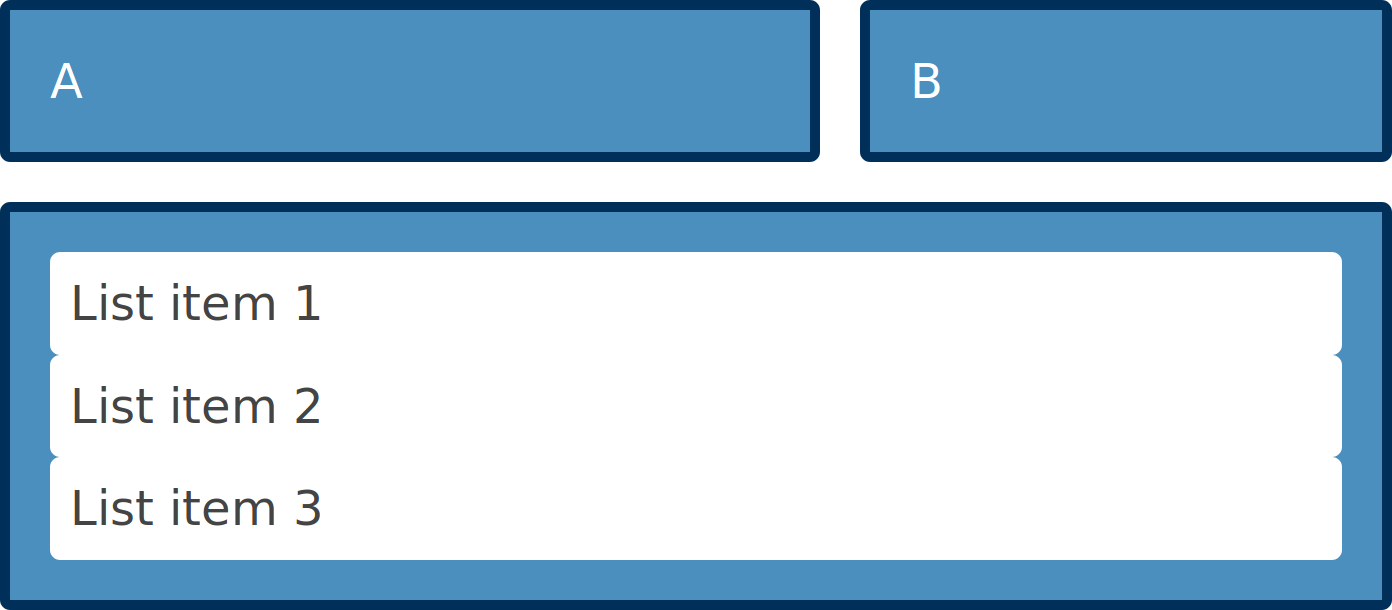
The list items do not participate in grid layout.
If we make the ul with a class of box3 a grid, and set grid-template-columns to subgrid, the ul is now a three column track grid. The list items laying out using the tracks of the parent.
.box3 {
  grid-column: 1 / -1;
  grid-row: 2;
  display: grid;
  grid-template-columns: subgrid;
}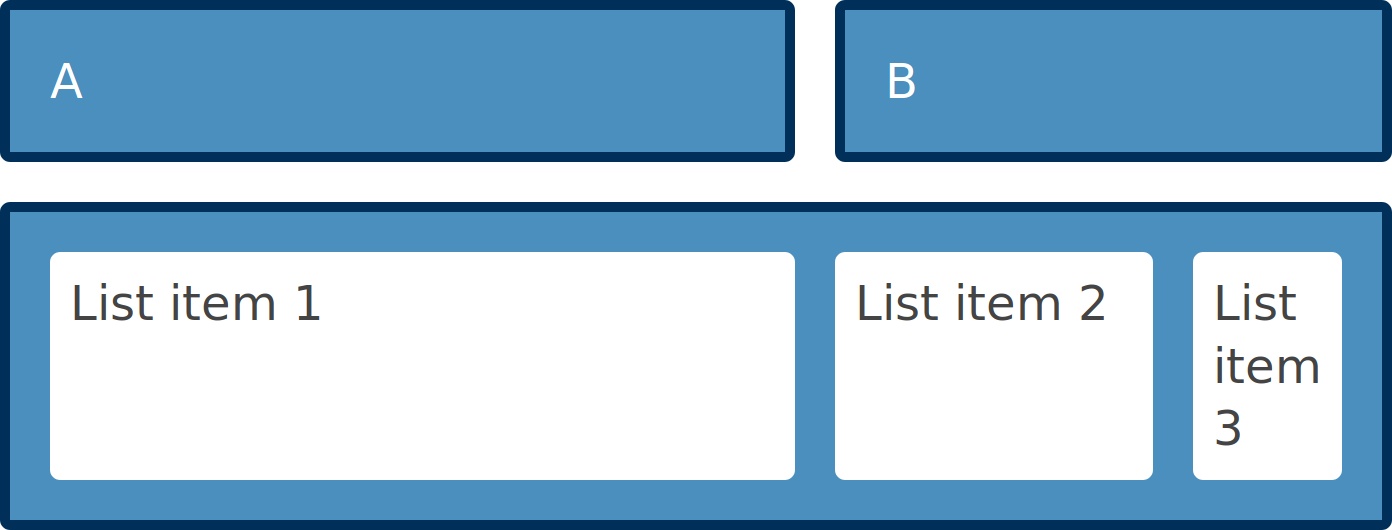
The list items use the grid of the parent of the list.
CodePen (needs Firefox Nightly)
There are some additional nice features which make subgrid useful for patterns you might need to build. The gap properties are inherited by default into subgrids – however you can override that with a gap, row-gap, or column-gap property on the subgrid itself.
The lines in your subgrid will inherit the line names set on the parent grid. This means that you can position items in the subgrid with the line names on your main grid. You can however add line names just for the subgrid and these will be added to any inherited names.
Take a look at the guide to subgrid on MDN to read about all of these features and see example code.
What will subgrid be useful for?
In terms of new syntax, and new things to learn, this is a very small change for web developers who have learned grid layout. A grid defined as a subgrid is pretty much the same as a regular nested grid with its own track listings. However it makes a number of previous difficult patterns possible.
For example, if you have a card layout, and the cards have headers and footers with uneven amounts of content, you might want the card headers and footers to align across the rows. However, with a standard nested grid this isn’t possible. The grid on each card is independent, therefore the track sizing in card A
(download it from curl.haxx.se of course!)
Whatever we do and whatever we try, no matter how hard we try to test, debug, review and do CI builds it does not change the eternal truth:
Nothing gets tested properly until released.
We worked hard on fixing bugs in the weeks before we shipped curl 7.65.0. We really did. Yet, several annoying glitches managed to creep in, remain unnoticed and cause problems to users when they first eagerly tried out the new release. Those were glitches that none in the development team had experienced or discovered but only took a few hours for users to detect and report.
The initial bad sign was that it didn’t even take a full hour from the release announcement until the first bug on 7.65.0 was reported. And it didn’t stop with that issue. We obviously had a whole handful of small bugs that caused friction to users who just wanted to get the latest curl to play with. The bugs were significant and notable enough that I quickly decided we should patch them up and release an update that has them fixed: 7.65.1. So here it is!
This patch release even got delayed. Just the day before the release we started seeing weird crashes in one of the CI builds on macOS and they still remained on the morning of the release. That made me take the unusual call to postpone the release until we better understood what was going on. That’s the reason why this comes 14 days after 7.65.0 instead of a mere 7 days.
Numbers
the 182nd release
0 changes
14 days (total: 7,747)
35 bug fixes (total: 5,183)
61 commits (total: 24,387)
0 new public libcurl function (total: 80)
0 new curl_easy_setopt() option (total: 267)
0 new curl command line option (total: 221)
27 contributors, 12 new (total: 1,965)
16 authors, 6 new (total: 687)
0 security fixes (total: 89)
0 USD paid in Bug Bounties
Bug-fixes
Let me highlight some of the fixes that went this during this very brief release cycle.
build correctly with OpenSSL without MD4
This was the initial bug report, reported within an hour from the release announcement of 7.65.0. If you built and installed OpenSSL with MD4 support disabled, building curl with that library failed. This was a regression since curl already supported this and due to us not having this build combination in our CI builds we missed it… Now it should work again!
CURLOPT_LOW_SPEED_* repaired
In my work that introduces more ways to disable specific features in curl so that tiny-curl would be as small as possible, I accidentally broke this feature (two libcurl options that allow a user to stop a transfer that goes below a certain transfer speed threshold during a given time). I had added a way to disable the internal progress meter functionality, but obviously not done a good enough job!
The breakage proved we don’t have proper tests for this functionality. I reverted the commit immediately to bring back the feature, and when now I go back to fix this and land a better fix soon, I now also know that I need to add tests to verify.
multi: track users of a socket better
Not too long ago I found and fixed a pretty serious flaw in curl’s HTTP/2 code which made it deal with multiplexed transfers over the same single connection in a manner that was far from ideal. When fixed, it made curl do HTTP/2 better in some circumstances.
This improvement ended up proving itself to have a few flaws. Especially when the connection is closed when multiple streams are done over it. This bug-fix now makes curl closing down such transfers in a better and cleaner way with fewer “loose ends”.
parse_proxy: use the IPv6 zone id if given
One more zone id fix that I didn’t get around to land in 7.65.0 has now landed: specifying a proxy with a URL that includes an IPv6 numerical address and a zone id – now works.
connection “bundles” on same host but different ports
Internally, libcurl collects connections to a host + port combination in a “bundle” (that’s just a term used for this concept internally). It does this to count number of connections to this combination and enforce limits etc. It is only used a bit for controlling when multiplexing can be done or not on this host.
Due to a regression, probably added already back in
We are very happy to announce that our 5 new Council members are are fully on-boarded and already working moving the Mozilla Reps program forward.

In more detail here are the subjects that they will work on:
- Mayur Patil: Campaigns engagement and Newsletter work
- Yuliana Jimenez: improving the onboarding experience
- Prathamesh Chavan: Reaching out to external entities
- Shahid Farooqui: Reps value proposition
- Irvin Chen: will continue his work on bridging the local communities with the program
Of course we would like to thank our outgoing Reps council members Daniele, Manel and Oarabile for all their contributions during their last year in the program.
The Mozilla Reps Council is the governing body of the Mozilla Reps Program. It provides the general vision of the program and oversees day-to-day operations globally. Currently, 7 volunteers and 2 paid staff sit on the council. Find out more on the Reps wiki.
https://blog.mozilla.org/mozillareps/2019/06/04/new-council-members-2019-spring-elections/
The annual curl user survey 2019 ran for 14 days and ended a while ago. I’ve spent a good deal of time summing up the data, making graphs, tables and creating a document out of what I’ve learned.
Some quick insights:
- HTTPS is now the most used protocol
- Linux is the most used platform
- Most of the users (who answered) are in Europe
- Windows 10 grows as the dominant Windows version used for curl
- 55% of users use HTTP/2 while 4.1% of users use HTTP/0.9
For all this and much much more. See the full report.

https://daniel.haxx.se/blog/2019/06/04/curl-user-survey-2019-analysis/
It’s a common, but fairly easy-to-fix accessibility issue: lack of indicating focus. In this post I will explain what we mean by focus and show you how focus outlines make your site easier to use.
What is focus?
Focus indicators make the difference between day and night for people who rely on them. Let’s first look at what they are, and which people find them useful.
Focus is something that happens between the interactive elements on a page. That’s the first thing you should know. (See the focusable elements compatibility table for a more detailed and nuanced definition.) Interactive elements are elements like links, buttons and form fields: things that users can interact with.

On a page, at any given time, there is one element that has focus. If you’ve just loaded a page, it is probably the document, but once you start to click or tab, it will be one of the aforementioned interactive elements. The currently focused element can be found with document.activeElement.
By default, browsers convey which element currently has focus by drawing an outline around that element. The defaults vary between browsers and platform. With CSS, you can override these defaults, which we’ll get to in a bit.
Who benefits
Focus outlines help users figure out where they are on a page. They show which form field is currently filled in, or which button is about to be pressed. People who use a mouse, might use their cursor for this, but not everyone uses a mouse. For instance, there are many keyboard users: a person with a baby on one arm, people with chronic diseases that prevent the use of a mouse, and of course… developers and other power users. Beyond keyboards, there are other tools and input devices that rely on clearly indicated focus, like switches.
It is not just keyboard users that benefit, though. Focus indication also helps people who have limited attention spans or issues with short term memory, for example if they are filling out a lengthy form.
If the idea of indicating the current element in a website seems weird, consider TV interfaces. Most people use them with a remote control or game controller, and therefore rely on the interface to convey what’s currently selected.
Never remove them
Not everyone likes how focus outlines look, some find them ugly. But then that’s the case with street lights, too. They are unlikely to win design awards, but if you have to walk home in the dark, you are glad they help you see where you are.
Removing focus styles, as some websites do, is as detrimental for keyboard users as removing the mouse cursor would be for mouse users.
Nobody would override the browser’s default cursor, effectively removing the cursor altogether:
body {
cursor: none; /* you wouldn't do this */
}
So we shouldn’t do this either, which removes the browser’s default outline:
:focus {
outline: none; /* so, please don't do this */
}
Or, as Laura Carvajal put it at Fronteers 2018:

Laura Carvajal with slide: You wouldn’t steal their cursor
Even if you provide an alternative with something like box-shadow, best set outline to solid transparent, because box-shadow does not play well with high contrast modes.
Good focus indicators
One way to indicate focus is to rely on browser defaults. It works, but I would recommend designing your own focus outlines. This gives you maximum control over how easy they are to see, and lets you integrate them with brand colours or the style of your site. Usually, thicker outlines (from 2px onwards) are better, as they are simply easier to see.
The :focus pseudo class takes CSS rules like any other selector, so you could style it however you like. In some cases a background color or underline could indicate that something is active.
Examples
Below are focus outlines as seen on Schiphol.nl and the City of The Hague websites. They make it easy to distinguish in a list of links
People everywhere are demanding basic consumer protections. We want our food to be healthy to eat, our water to be clean to drink, and our air to be safe to breathe.
This year people have started to demand more of the internet as well, however, there persists an expectation that on the internet people are responsible for protecting themselves.
You should not have to worry about trading privacy and control in order to enjoy the technology you love. Tech companies have put the onus on people to read through their opaque terms and conditions tied to your data and privacy to use their services. The average privacy policy from a tech company is thousands of words and written at a level that often requires legal training to interpret. As such the vast majority of people don’t bother to read, and just click through these agreements trusting that the companies have their interests at heart.
This isn’t right, and it’s not where we stand. We aspire to put people back in control of their connected lives. To better equip people to navigate the internet today, we’ve built the latest version of our flagship Firefox browser with Enhanced Tracking Protection on by default. These protections work in the background, blocking third-parties from tracking your online activity while increasing the speed of the browser.
We’re offering privacy protections by default as you navigate the web because the business model of the web is broken, with more and more intrusive personal surveillance becoming the norm. While we hope that people’s digital rights and freedoms will ultimately be guaranteed, we’re here to help in the interim.
In a world where tech companies expect you to cobble together different tools to protect your privacy putting the burden on you, we are providing an easy-to-use solution with just one Firefox login to get the full benefit of all of the protections and capabilities we’ve built into our products and services.
By creating a Firefox account you can increase convenience while decreasing your exposure to some harmful parts of the web. An account unlocks the full potential of tools like Lockwise, which securely manages passwords, and Monitor, a service that notifies you when your email has been part of a known data breach.
We’re deepening our relationship with you because we know you can’t go it alone anymore. With Firefox you have a partner who knows the ins and outs of the tech industry, but who is beholden to serving you, not shareholders. We’re optimistic that together we can take back power over our online lives.
We choose to lead, not follow. Join us.
You know what we stand for and what we’ve been about for over a decade thanks to our Manifesto and our Data Privacy Principles. Today we’re making it even more clear what you get when you sign up with us by announcing the Firefox Personal Data Promise — our commitment to handle your personal information with integrity and decency — and best practices for others to follow when it comes to protecting consumers privacy and rights online.
We’re taking these steps and we’re offering new tools to increase your protection and control, but it’s only the first step in our new relationship with you. We will continue to push back against collect-it-all business models that are set up to monetize people in seemingly every possible way. In addition to the tools and services we offer, we champion efforts like the fight for net neutrality, combat surveillance tactics and push for standards and practices that promote privacy and competition.
I hope you can see we’re different, and that we work hard every day to earn your trust. I believe that the internet can be a tool to make the world a better place where everyone is welcome. And safe. And respected. It can be a place that enables a free exchange of ideas. I know it can be because it once was.
The web the world needs can be ours again, if we want it. Please join me and millions of Firefox users in choosing a safer, more connected world.
What if I told you that on nearly every single website you visit, data about you was transmitted to dozens or even hundreds of companies, all so that the website could earn an additional $0.00008 per ad! This is a key finding from a new study on behaviorally targeted advertisements from Carnegie Mellon University and it should be a wake-up call to all of us. The status quo of pervasive data collection in service of ad targeting is untenable. That is why we’re announcing some key changes to Firefox.
Today marks an important milestone in the history of Firefox and the web. As of today, for new users who download and install Firefox for the first time, Enhanced Tracking Protection will automatically be set on by default, protecting our users from the pervasive tracking and collection of personal data by ad networks and tech companies.
It seems that each week a new tech company decides to decree that privacy is a human right. They tout how their products provide people with “choices” to change the settings if they wish to opt into a greater level of privacy protection to exemplify how they are putting privacy first. That begs the question — do people really want more complex settings to understand and fiddle with or do they simply want products that respect their privacy and align with their expectations to begin with?
Privacy shouldn’t be relegated to optional settings
When thinking about consumer privacy online, I’m reminded of the behavioral economics studies which led to 401K plans (US retirement savings plans) moving from voluntary enrollment to auto-enrollment. Not too long ago most defined contribution retirement savings plans in the US required employees to sign-up and volunteer to start participating. Participation rates were very low. Why was that? Was it because people didn’t care about saving for retirement? Not at all! There were simply too many barriers to aligning with people’s expectations and desires and the benefits of saving for retirement aren’t felt immediately.
We are in a similar position with respect to software privacy settings. Pervasive tracking is too opaque and potential privacy harms are never felt immediately. The general argument from tech companies is that consumers can always decide to dive into their browser settings and modify the defaults. The reality is that most people will never do that. Yet, we know that people are broadly opposed to the status quo of pervasive cross-site tracking and data collection, particularly when they learn the details on how tracking actually works.
We also know that traditional privacy features such as Chrome’s Incognito mode are failing to live up to consumer expectations. The feature might keep your spouse from knowing what you’re thinking about getting them for your anniversary by erasing your history, but it does not prevent third-party tracking. Our research shows that Firefox users are seeking out privacy protection, particularly through the use of Firefox’s Private Browsing mode. In fact, nearly 25% of web page loads in Firefox take place in a Private Browsing window. The good news for these users is that Firefox’s Private Browsing mode has long put users first by blocking tracking. The bad news is that this generally isn’t true for many popular browsers, which allow tracking even in private browsing/incognito mode. A recent study found that users don’t understand this and think their data is being protected, when it is actually not.
As was the case with retirement savings plans, what this shows us is that the burden needs to shift from the consumers to the companies whereby the complexity of privacy settings shouldn’t be placed on users to figure out. The product defaults should simply align with consumer expectations. That is the approach we are taking in Firefox.
Enhanced Tracking Protection by Default
As stated above, new Firefox users will have strong privacy protection from the moment they install. We also expect to deliver the same functionality to existing users over the coming months. Because we are modifying the fundamental way in which cookies and browser storage operate, we’ve been very
The word “privacy” gets thrown around a lot these days, but every tech company defines privacy differently. Respecting your privacy has been at our core from day one, with the … Read more
The post Five ways joining Firefox can keep you safer and smarter online appeared first on The Firefox Frontier.
It’s been several weeks since I was promoted to Senior Vice President of Firefox, responsible for overall Firefox product and web platform development. As a long-time employee with 10+ years, I’ve seen a lot of things within the tech industry from data breaches, net neutrality and the rise and fall of tech companies. I believe that Firefox has and will continue to make a big impact in building the necessary protections to keep people safe online.
This past year, we’ve seen tech companies talk a big game about privacy as they’re realizing that, after several global scandals, people feel increasingly vulnerable. It’s unfortunate that this shift had to happen in order for tech companies to take notice. At Firefox, we’re doing more than that. We believe that in order to truly protect people, we need to establish a new standard that puts people’s privacy first. At Firefox, we have been working on setting this standard by offering privacy-related features, like Tracking Protection in Private Browsing, long before these issues were brought to light. With this new, increased awareness for privacy, we feel that the time is right for the next step in stronger online protections for everyone.
Last year, we announced our new approach to anti-tracking, and our commitment to help people stay safe whenever they used Firefox. One of those initiatives outlined was to block cookies from known third party trackers in Firefox. Today, Firefox will be rolling out this feature, Enhanced Tracking Protection, to all new users on by default, to make it harder for over a thousand companies to track their every move. Additionally, we’re updating our privacy-focused features including an upgraded Facebook Container extension, a Firefox desktop extension for Lockwise, a way to keep their passwords safe across all platforms, and Firefox Monitor’s new dashboard to manage multiple email addresses.
Enhanced Tracking Protection blocks sites from tracking you
For new users who install and download Firefox for the first time, Enhanced Tracking Protection will automatically be set on by default as part of the ‘Standard’ setting in the browser and will block known “third-party tracking cookies” according to the Disconnect list. We talk more about tracking cookies here. Enhanced Tracking Protection will be practically invisible to you and you’ll only notice that it’s operating when you visit a site and see a shield icon in the address bar next to the URL address and the small “i” icon. When you see the shield icon, you should feel safe that Firefox is blocking thousands of companies from your online activity.
For those who want to see which companies we block, you can click on the shield icon, go to the Content Blocking section, then Cookies. It should read Blocking Tracking Cookies. Then, click on the arrow on the right hand side, and you’ll see the companies listed as third party cookies and trackers that Firefox has blocked. If you want to turn off blocking for a specific site, click on the Turn off Blocking for this Site button.
For existing users, we’ll be rolling out Enhanced Tracking Protection by default in the coming months without you having to change a thing. If you can’t wait, you can turn this feature on by clicking on the menu icon marked by three horizontal lines at the top right of your browser, then under Content Blocking. Go to your privacy preferences and click on the Custom gear on the right side. Mark the Cookies checkbox and make sure that “Third-party trackers” is selected. To learn more about our privacy and security settings and get more detail on what each section – Standard, Strict, and Custom – includes, visit here.
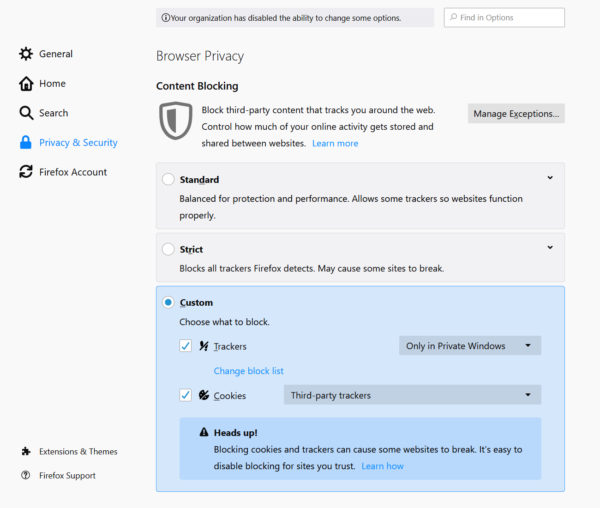
For existing users, go to your privacy preferences, click on the Custom gear and mark the Cookies checkbox
Latest Facebook Container blocks tracking from other sites
Earlier this year, Mozilla was honored as one of the World’s Most Innovative Companies by
Tech companies are using the word “privacy” a lot these days. What do they mean when they say it? To one company, privacy means keeping your information between you and … Read more
The post Technology with respect and honesty. Here’s how we do it. appeared first on The Firefox Frontier.
https://blog.mozilla.org/firefox/firefox-data-privacy-promise/
The Mac Pro, like New Coke, is back. In a miniature cheese grater you could make a mean quesadilla with. A million Power Mac G5s and O.G. Mac Pros are singing out, "we told you so! We told you so!"
But if you're going to buy one of these things (starting at $6000), you don't get to complain how much a Talos II costs.
http://tenfourfox.blogspot.com/2019/06/make-cheese-grating-great-again.html

Second only to watching video, most of the time people spend on computing devices today involves reading text and looking at vector graphics in the toolbars and user interfaces of programs. Over the last 20 years, a great deal of focus has gone into improving the quality of those fonts and graphics: subpixel anti-aliasing, cached font maps, etc.
Unfortunately, as you can see in the left image below, that work results in grainy and jagged text in modern AR headsets. Ideally, we would render text smoothly at all angles, as shown in the image on the right.
 Document in built-in browser
 Document in Pathfinder
The key limitation today is that most vector graphics or font rendering libraries assume that the images are viewed head on at a fixed resolution, rather than having a user walk around the content viewing it from many different angles and distances. Fortunately, Pathfinder fundamentally reimagines this rasterization process, and can render complex images and documents in real time.
The following movie provides a demonstration of both Pathfinder's font and vector graphics rendering.
Pathfinder running on the Magic Leap augmented reality headsetThe main innovation in Pathfinder is to move rendering of curved shapes from the CPU to the GPU, and to support the transforms required for viewing from any angle. Since many modern devices have very powerful GPUs compared to their CPU, this results in a massive performance gain in 3D rendering, allowing graphics and text to be rendered on every frame, rather than rendered once at a fixed resolution. This is done by breaking down complex images into much smaller tiles, many of which are just flat colour, and writing GPU shader code to handle the tiles that are more complicated. (For more details, see A Look at Pathfinder by Nicolas Silva.)


How Pathfinder renders the GhostScript Tiger (from A Look at Pathfinder)
Today, we are providing demos of the technology, available for daydream VR and Magic Leap here! These are provided to give an early glimpse of what Pathfinder is capable of, and not for deploying in production yet! We are working to enable Pathfinder inside of WebRender, which will allow it to be used directly in our new browsers for AR headsets based on Servo and potentially in all Firefox Gecko-based browsers in the future. And we'd like to make it available for use in Unity projects and as a WASM package, which will not have full integration with the operating system but still provide a dramatic improvement in rasterization quality. Please drop by the Github repository to check it out for your own projects and contribute to ensure that our new computing platforms have the best possible readability.
In the past month, we merged 208 PRs in the Servo organization’s repositories.
Windows nightlies are temporarily broken.
Planning and Status
Our roadmap is available online, including the team’s plans for 2019.
This week’s status updates are here.
Exciting works in progress
- ferjm is adding media controls to video elements.
- ceyusa is implementing hardware accelerated video playback for Linux.
- jdm is adding Windows arm64 support.
- georgeroman is enabling automated tests for WebDriver.
- paul is embedding Servo inside a HoloLens app.

Notable Additions
- Manish added foundations of automated testing of WebXR.
- Eijebong implemented type-safe DOM APIs that interact with JS Promises.
- jdm and paulrouget upgraded glutin to 0.21.
- maharsh312 implemented most of the missing OffscreenCanvas APIs.
- ferjm added support for simultaneous playback of audio and video streams.
- Darkspirit updated various network security data files (HSTS, PSL, CAs).
- jdm added support for running Servo on Windows via ANGLE.
- Manishearth made receiving streams through WebRTC possible.
- pylbrecht implemented resource timing for synchronous network requests.
- jdm fixed a problem preventing transitioning into Daydream VR.
- jdm improved the ergonomics of testing Magic Leap builds.
- codehag implemented support for using a remote web console from Firefox with Servo’s content.
- PurpleHairEngineer implemented the StereoPannerNode WebAudio API.
- jdm upgraded the JavaScript engine.
- tdelacour improved the type-safety of text input code that switches between UTF-8 and UTF-16 strings.
- ceyusa created an API for providing hardware-accelerated GL video playback.
- mmatyas implemented support for compressed textures in WebGL.
- jdm upgraded the NDK in use for Android builds.