The web is accessible by default. It was designed with features to make accessibility possible, and these have been part of the platform pretty much from the beginning. In recent times, inspectable accessibility trees have made it easier to see how things work in practice. In this post we’ll look at how “good” client-side code (HTML, CSS and JavaScript) improves the experience of users of assistive technologies, and how we can use accessibility trees to help verify our work on the user experience.
People browse differently
Assistive Technology (AT) is the umbrella term for tools that help people operate a computer in the way that suits them. Braille displays, for instance, let blind users understand what’s on their screen by conveying that information in braille format in real time. VoiceOver, a utility for Mac and iOS, converts text into speech, so that people can listen to an interface. Dragon NaturallySpeaking is a tool that lets people operate an interface by talking into a microphone.
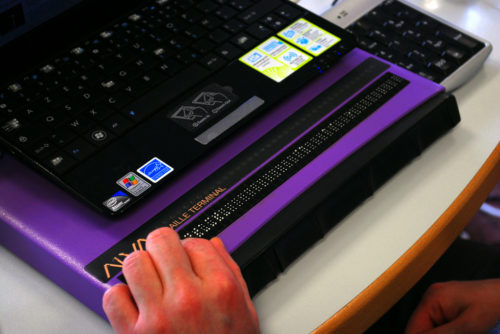 A refreshable Braille display (Photo: Sebastien.delorme)
The idea that people can use the web in the way that works best for them is a fundamental design principle of the platform. When the web was invented to let scientists exchange documents, those scientists already had a wide variety of systems. Now, in 2019, systems vary even more. We use browsers on everything from watches to phones, tablets to TVs. There is a perennial need for web pages that are resilient and allow for user choice. These values of resilience and flexibility have always been core to our work.
AT draws on these fundamentals. Most assistive technologies need to know what happens on a user’s screen. They all must understand the user interface, so that they can convey it to the user in a way that makes sense. Many years ago, assistive technologies relied on OCR (optical character recognition) techniques to figure what was on the screen. Later they consumed markup directly from the browser. On modern operating systems the software is more advanced: accessibility APIs that are built into the platform provide guidance.
How front-end code helps
Platform-specific Accessibility APIs are slightly different depending on the platform. Generally, they know about the things that are platform-specific: the Start Menu in Windows, the Dock on the Mac, the Favorites menu in Firefox… even the address bar in Firefox. But when we use the address bar to access a website, the screen displays information that it probably has never displayed before, let alone for AT users. How can Accessibility APIs tell AT about information on websites? Well, this is where the right client-side HTML, CSS and JavaScript can help.
Whether we write plain HTML, JSX or Jinja, when someone accesses our site, the browser ultimately receives markup as the start for any interface. It turns that markup into an internal representation, called the DOM tree. The DOM tree contains objects for everything we had in our markup. In some cases, browsers also create an accessibility tree, based on the DOM tree, as a tool to better understand the needs and experiences of assistive technology users. The accessibility tree informs platform-specific Accessibility APIs, which then inform Assistive Technologies. So ultimately, our client-side code impacts the experience of assistive technology users.
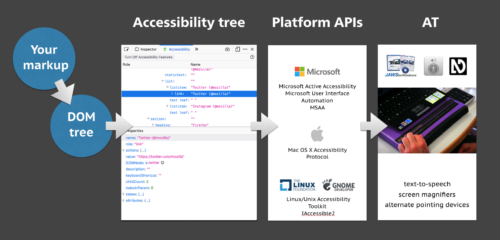
A flow chart: your markup results in a DOM tree, which impacts the accessibility tree, which informs the Platform APIs, which ultimately impact AT users.
HTML
With HTML, we can be specific about what things are in the page. We can define what’s what, or, in technical terms, provide semantics. For example, we can define
If it feels like the ads chasing you across the internet know you a little too well, it’s because they do (unless you’re an avid user of ad blockers, in … Read more
The post Hey advertisers, track THIS appeared first on The Firefox Frontier.
https://blog.mozilla.org/firefox/hey-advertisers-track-this/
More on Mentorship
Last year, I wrote about some of the aspirations which motivated my move from Mozilla Research to the CloudOps team. At the recent Mozilla All Hands in Whistler, I had the “how’s the new team going?” conversation with many old and new friends, and that repetition helped me reify some ideas about what I really meant by “I’d like better mentorship”.
To generalize about how mentors’ careers affect what they can mentor me on, I’ve sketched up a quick figure in order to name some possible situations that people can be in relative to one another:

The first couple cases of mentorship are easy to describe, because I’ve experienced and thought about them for many years already:
Mentorship across industries
Mentors from outside my own industry are valuable for high level perspectives, and for advice on general life and human topics that aren’t specialized to a single field. Additionally, specialists in other industries often represent the consumers of my own industry’s products. Wise and thoughtful people who share little to none of my domain knowledge can provide constructive feedback on why my industry’s work gets particular reactions from the people it affects – just as someone who’s never read a particular book before is likely to catch more spelling errors than its own author, who’s been poring over the same manuscript for many hours a day for several years.
However, for more concrete problems within my particular career (“this program is running slower than expected”, or even “how should I describe that role on my resume?”), observers from outside of it can rarely offer a well tested recommendation of a path forward.
Mentorship across companies within an industry
Similarly, mentors from other companies within my own industry are my go-to source of insight on general trends and technologies. A colleague in a distant corner of my field can tell me about the frustrations they encountered when using a piece of technology that I’m considering, and I can use that advice to make better-informed choices in my daily work.
But advice on a particular company’s peculiarities rarely translates well across organizations. A certain frequency of reorganization might be perfectly ordinary at my company, but a re-org might indicate major problems at another. This type of education, while difficult to get from someone at a different company, is perfectly feasible to pick up from anyone on another team within one’s own organization.
Mentorship across teams within a company
When I switched roles, I had trial-and-errored my way into the observation that there’s a large class of problems with which mentors from different teams within the same company cannot effectively help. I’d tentatively call these “junior engineer problems”, as having overcome their general cases seems to correlate strongly to seniority. In my own expeience, honing the improvement of code-adjacent skills such as the intuition for what problems should be effectively solvable from the docs versus when and whom to ask for help, how deeply to explore a prospective course of action before committing to it, and when to write off an experiment as “effectively impossible”, are all questions whose answers one derives from experience and observing expert peers rather than from just asking them with words.
Mentorship across projects or specialties within a team
I had assumed that simply being on the same team as people capable of imparting that highly specialized variant of common sense would suffice to expose me to it. However, my first few projects on my new team have clearly shown, in both the positive and the negative cases, that working on the same project as an expert is far more useful to my own growth than simply chancing to be bureaucracied into the same group.
The negative case was my first pair of projects: The migration of 2 small, simple services from my team’s AWS infrastructure to GCP. Although I was on the same team as experts in this process, the particular projects were essentially mine alone, and it was up to me to determine how far to proceed on each problem by myself before escalating it to interrupt a busy senior engineer. My heuristics for that process weren’t great, and I knew that at the outset, but my bias toward asking for help later than was optimal slowed the process of improving my ability to draw that line – how can one enhance one’s discrimination
This flaw is known as CVE-2019-5443.
If you downloaded and installed a curl executable for Windows from the curl project before June 21st 2019, go get an updated one. Now.
On Windows, using OpenSSL
The official curl builds for Windows – that the curl project offers – are built cross-compiled on Linux. They’re made to use OpenSSL by default as the TLS backend, the by far most popular TLS backend by curl users.
The curl project has provided official curl builds for Windows on and off through history, but most recently this has been going on since August 2018.
OpenSSL engines
These builds use OpenSSL. OpenSSL has a feature called “engines”. Described by the project itself like this:
“a component to support alternative cryptography implementations, most commonly for interfacing with external crypto devices (eg. accelerator cards). This component is called ENGINE”
More simply put, an “engine” is a plugin for OpenSSL that can be loaded and run dynamically. The particular engine is activated either built-in or by loading a config file that specifies what to do.
curl and OpenSSL engines

When using curl built with OpenSSL, you can specify an “engine” to use, which in turn allows users to use their dedicated hardware when doing TLS related communications with curl.
By default, the curl tool allows OpenSSL to load a config file and figure out what engines to load at run-time but it also provides a build option to make it possible to build curl/libcurl without the ability to load that config file at run time – which some users want, primarily for security reasons.
The mistakes
The primary mistake in the curl build for Windows that we offered, was that the disabling of the config file loading had a typo which actually made it not disable it (because the commit message had it wrong). The feature was therefore still present and would load the config file if present when curl was invoked, contrary to the intention.
The second mistake comes a little more from the OpenSSL side: by default if you build OpenSSL cross-compiled like we do, the default paths where it looks for the above mentioned config file is under the c:\usr\local tree. It is in fact even complicated and impossible to fix this path in the build without a patch.
What the mistakes enable
A non-privileged user or program (the attacker) with access to the host to put a config file in the directory where curl would look for a config file (and create the directory first as it probably didn’t already exist) and the suitable associated engine code.
Then, when an privileged user subsequently executes curl, it will run with more power and run the code, the engine, the attacker had put there. An engine is a piece of compiled code, it can do virtually anything on the machine.
The fix
Already three days ago, on June 21st, a fixed version of the curl executable for Windows was uploaded to the curl web site (“curl 7.65.1_2”). All older versions that had been provided in the past were removed to reduce the risk of someone still using an old lingering download link.
The fix now makes the curl build switch off the loading of the config file, as was already intended. But also, the OpenSSL build that is used for the build is now modified to only load the config file from a privileged path that isn’t world writable (C:/Windows/System32/OpenSSL/).
Widespread mistake
This problem is very widespread among projects on Windows that use OpenSSL. The curl project coordinated this publication with the postgres project and have worked with OpenSSL to make them improve their default paths. We have also found a few other openssl-using projects that already have fixed their builds for this flaw (like stunnel) but I think we have reason to suspect that there are more vulnerable projects out there still not fixed.
If you know of a project that uses OpenSSL and ships binaries for Windows, give them a closer look and make sure they’re not vulnerable to this.
The cat is already out of
TenFourFox Feature Parity Release 15 beta 1 is now available (downloads, hashes, release notes).

In honour of New Coke's temporary return to the market (by the way, I say it tastes like Pepsi and my father says it tastes like RC), I failed again with this release to get some sort of async/await support off the ground, and we are still plagued by issue 533. The second should be possible to fix, but I don't know exactly what's wrong. The first is not possible to fix without major changes because it reaches up into the browser event loop, but should be still able to get parsing and thus enable at least partial functionality from the sites that depend on it. That part didn't work either. A smaller hack, though, did make it into this release with test changes. Its semantics aren't quite right, but they're good enough for what requires it and does fix some parts of Github and other sites.
However, there are some other feature improvements, including expanded blocking of cryptominers when basic adblock is enabled (from the same list Mozilla uses for enhanced privacy in mainstream Firefox), and updated internationalization support with upgraded timezones and locales such as the new Japanese Reiwa era (for fun, look at Is it Reiwa yet? in FPR14.1 before you download FPR15b1). The usual maintenance and security fixes are (will be) also included (in final). In the meantime, I'm going to take a different pass at the async/await problem for FPR16. If even that doesn't work, we'll have to see where we're at then for parity purposes, since while the majority of websites still work well in TenFourFox's heavily patched-up engine there are an increasing number of major ones that don't. It's hard to maintain a browser engine on your own. :(
Meanwhile, if you'd like the next generation of PowerPC but couldn't afford a Talos II, maybe you can afford a Blackbird. Here's what I thought of it. (See also the followup.)
http://tenfourfox.blogspot.com/2019/06/tenfourfox-fpr15b1-available.html
Whistler 2019 Quick Notes
(taken as it comes, without a specific logic, just thoughts here and there. Emotions. To take with a pinch of salt.)
- Plane trip without a hitch from Japan.
- Back in Vancouver after 5 years, from the bus windows, I noticed the new high rise condos and I wonder who can afford them when they are so many of them. People living with credits and loans?
- All the Vietnamese restaurants just make me want to stop to have a Bun Bo Hue.
- Bus didn’t get a flat tire
- Two very chatty persons beside me during the full bus trip never stopped talking. A flow of words very difficult to cope with when you are tired with jet lag.
- Noisy Welcome reception.
- Happy to see new people, happy to see old friends.
- Beautiful view, I just want to hop in shoes and hike the trails.
- Huge North American hotel room with cold Air con and all lights on is a waste.
- Cafe latte. Wonderful.
- Uneasy with the Native American dance. Culture out of context.
- I like Roxy Wen for her direct talk about things.
- Stan Leong very positive vibe for Mozilla and Taipei office.
- Less people who seemed to read a script at the Plenary. This is a good thing.
- Overall good impression of the Plenary on Tuesday.
- Does Pocket surface blogs which are edited by simple people. What’s happening in there? The promoted content seems to be mainstream editors.
- Noisy environments do not help to have soft, relaxed discussions.
- Finding a bug and being in admiration by the explanation of Boris Zbarsky
- The wonderfully intoxicating smell of cypress in the mornings
- Early morning and refreshing cold makes me happy.
- Thanks Brianna for the cafe latte station at the breakfast area.
- I guess I do not have a very good relationship with marketing. I need to dive into that. Plenary Wednesday.
- Our perception of privacy is not equally distributed. People have different expectations and habits. People working at Mozilla are privileged compared to the rest of the population.
- That said, there were comments during the panel by Lindsey Shepard, VP Product Marketing which resonated with me. So maybe, I need to break down my own silos.
- Performance Workshop. We, the developers, techies are a bourgeoisie (by/through devices) which makes us blind to the reality of common users performances. This tied to the Plenary this morning about knowing the normal people using services online.
- Congratulations to people who made possible to have a dot release during the All Hands.
- Little discussions here and there which help you to unpack a of lot of unknown contexts, specifically when you are working remotely. Invaluable.
- Working. Together.
- Released a long due version of the code for the webcompat metrics dashboard. Found more bugs. Fixed more bugs. Filed new issues.
- The demos session made discovered cool projects that I had no idea about. This is useful and cool.
- Chatting about movies from childhood to now with friends we do not have the opportunities to see each other enough.
- Laptop… shutting off automatically when the battery reaches 50%, keys 2 and m repeating time to time, and
shiftkey not working 20% of time. This last one is probably the most frustrating. 2 years and this MacBook Pro is not giving good signs of health. - Spotted two bears from the gondola on our way to the top of the mountain.
- Very good feeling about the webcompat metrics discussions after the talk by Mike Taylor. Closer work in between Web Platform Tests and Web Compat sounds like a very good thing. We need to explore and define the small loosely joined hooks that will make it really cool.
- Firefox Devtools team, you are a bunch of awesome people.
- Plenaries, for this Whistler All Hands, felt more sincere, more in touch with people with clearer goals for Mozilla (than the last 6 years since I started at Mozilla). So that was cool.
- Loved the cross-cultural/cross-team vibes.
- Thanks to the people who are contributing to the projects and give one week of their precious time with their family to work on the projects they care about.
- Whistler is a very expensive place.
- Slept through all the ride back from Whistler to Vancouver, avoiding being motion sick.
- Staying in Vancouver for a couple of days
- Then heading back to Japan on Wednesday.
Otsukare!
For people who like this sort of thing...
I became interested in how much CPU memory write traffic corresponds to "stack writes". For x86-64 this roughly corresponds to writes that use RSP or RBP as a base register (including implicitly via PUSH/CALL). I thought I had pretty good intuitions about x86 machine code, but the results surprised me.
In a Firefox debug build running a (non-media) DOM test (including browser startup/rendering/shutdown), Linux x86-64, non-optimized (in an rr recording, though that shouldn't matter):
| Base register | Fraction of written bytes |
| RAX | 0.40% |
| RCX | 0.32% |
| RDX | 0.31% |
| RBX | 0.01% |
| RSP | 53.48% |
| RBP | 44.12% |
| RSI | 0.50% |
| RDI | 0.58% |
| R8 | 0.01% |
| R9 | 0.00% |
| R10 | 0.00% |
| R11 | 0.00% |
| R12 | 0.00% |
| R13 | 0.00% |
| R14 | 0.00% |
| R15 | 0.00% |
| RIP | 0.00% |
| RDI (MOVS/STOS) | 0.25% |
| Other | 0.00% |
| RSP/RBP | 97.59% |
Ooof! I expected stack writes to dominate, since non-opt Firefox builds have lots of trivial function calls and local variables live on the stack, but 97.6% is a lot more dominant than I expected.
You would expect optimized builds to be much less stack-dominated because trivial functions have been inlined and local variables should mostly be in registers. So here's a Firefox optimized build:
| Base register | Fraction of written bytes |
| RAX | 1.23% |
| RCX | 0.78% |
| RDX | 0.36% |
| RBX | 2.75% |
| RSP | 75.30% |
| RBP | 8.34% |
| RSI | 0.98% |
| RDI | 4.07% |
| R8 | 0.19% |
| R9 | 0.06% |
| R10 | 0.04% |
| R11 | 0.03% |
| R12 | 0.40% |
| R13 | 0.30% |
| R14 | 1.13% |
| R15 | 0.36% |
| RIP | 0.14% |
| RDI (MOVS/STOS) | 3.51% |
| Other | 0.03% |
| RSP/RBP | 83.64% |
Definitely less stack-dominated than for non-opt builds — but still very stack-dominated! And of course this is not counting indirect writes to the stack, e.g. to out-parameters via pointers held in general-purpose registers. (Note that opt builds could use RBP for non-stack purposes, but Firefox builds with -fno-omit-frame-pointer so only in leaf functions, and even then, probably not.)
It would be interesting to compare the absolute number of written bytes between opt and non-opt builds but I don't have traces running the same test immediately at hand. Non-opt builds certainly do a lot more writes.
http://robert.ocallahan.org/2019/06/some-statistics-about-write-traffic-in.html
Mozilla’s View Source Conference is back for a fifth year, this time in Amsterdam, September 30 – October 1, 2019. Tickets are available now.
What’s new for 2019
This year, we’re trying something new. We’ve shifted our focus to take a deeper look at the web platform and how it is evolving. We’ve planned more interactive sessions, and we’ve partnered with a variety of groups to bring you even more opportunities to engage, learn and participate.
Our goal in 2019 is to offer a unique, two-day, single track conference. With this in mind, we’ll provide ways to engage with engineering and thought leaders from Mozilla, Google, Microsoft, and a variety of individuals and organizations that shape the web today and for the future. These experts will share a perspective on how browser makers, standards bodies, and allies work together to create, support, and implement web standards. Together, we’ll explore what that means for the web platform and the developers and designers who rely on it.
We’ll hear from Google’s Paul Irish and Elizabeth Sweeny on performance, Mozilla’s Selena Deckelman on security and Mike Taylor on web compatibility, along with talks from friends and allies like Henri Helvetica, Hui Jing Chen, Ali Spittel, and Tejas Kumar. Jeremy Keith will close out the event with a new talk, and more speakers will be announced in the coming days and weeks.
Beyond the main stage, we are bringing back “conversation corners.” These breakout sessions create opportunities for attendees to learn from and talk with the people across the industry who are contributing to web standards and building browsers and other tools and technologies.
Come for View Source, stay for Fronteers
To provide a full week’s worth of events, we’ve partnered with Fronteers—Amsterdam’s noted single-track community-driven conference on front-end web development that’s taking place Oct 3-4—to offer combination tickets and shared social events. There’s also a Hack on MDN Web Docs event on Oct 2, where we’ll work on web standards documentation together.
Making sure View Source is representative, inclusive, and accessible is a core goal of the conference. To that end, we’ve set aside 20% of the conference tickets for diversity scholarships. In addition, we will provide live captioning, reserved seating, a lounge for attendees from underrepresented groups, a quiet space, and a focus on a friendly and inclusive environment. We not only have a code of conduct but a strong response and communication plan to ensure that all are welcome, safe, and well-treated.
Tickets & updates
Stay tuned for upcoming announcements. We will put out a CFP for lightning talks and a call for volunteers, as well as information on how to apply for a scholarship in the coming weeks. To keep up with the latest news, including newly announced speakers, please follow @viewsourceconf on Twitter.
View Source 2019 Amsterdam tickets are on sale now. Join us in Amsterdam for a week of amazing events. Want to check out last year’s View Source talks? Our 2018 speaker lineup was spectacular, and we’ll rise to this stellar level again this year.
The post View Source 5 comes to Amsterdam appeared first on Mozilla Hacks - the Web developer blog.
https://hacks.mozilla.org/2019/06/view-source-5-comes-to-amsterdam/
Not the entire thing, just “a subset”. It’s not stated very clearly exactly what that subset is but the easy interface is mentioned in the Chrome bug about this project.
What?
The Chromium bug states that they will create a library of their own (named libcrurl) that will offer (parts of) the libcurl API and be implemented using Cronet.

Cronet is the networking stack of Chromium put into a library for use on mobile. The same networking stack that is used in the Chrome browser.
There’s also a mentioned possibility that “if this works”, they might also create “crurl” tool which is then their own version of the curl tool but using their own library. In itself is a pretty strong indication that their API will not be fully compatible, as if it was they could just use the existing curl tool…
Why?
“Implementing libcurl using Cronet would allow developers to take advantage of the utility of the Chrome Network Stack, without having to learn a new interface and its corresponding workflow. This would ideally increase ease of accessibility of Cronet, and overall improve adoption of Cronet by first-party or third-party applications.”
Logically, I suppose they then also hope that 3rd party applications can switch to this library (without having to change to another API or adapt much) and gain something and that new applications can use this library without having to learn a new API. Stick to the old established libcurl API.
How?
By throwing a lot of man power on it. As the primary author and developer of the libcurl API and the libcurl code, I assume that Cronet works quite differently than libcurl so there’s going to be quite a lot of wrestling of data and code flow to make this API work on that code.
The libcurl API is also very versatile and is an API that has developed over a period of almost 20 years so there’s a lot of functionality, a lot of options and a lot of subtle behavior that may or may not be easy or straight forward to mimic.
The initial commit imported the headers and examples from the curl 7.65.1 release.
Will it work?
Getting basic functionality for a small set of use cases should be simple and straight forward. But even if they limit the subset to number of functions and libcurl options, making them work exactly as we have them documented will be hard and time consuming.
I don’t think applications will be able to arbitrarily use either library for a very long time, if ever. libcurl has 80 public functions and curl_easy_setopt alone takes 268 different options!
Given enough time and effort they can certainly make this work to some degree.
Releases?
There’s no word on API/ABI stability or how they intend to ship or version their library. It is all very early still. I suppose we will learn more details as and if this progresses.
Flattered?
I think this move underscores that libcurl has succeeded in becoming an almost defacto standard for network transfers.

There’s this saying about imitation and flattery but getting competition from a giant like Google is a little intimidating. If they just put two paid engineers on their project they already have more dedicated man power than the original libcurl project does…
How will it affect curl?
First off: this doesn’t seem to actually exist for real yet so it is still very early.
Ideally the team working on this from Google’s end finds and fixes issues in our code and API so curl improves. Ideally this move makes more users aware of libcurl and its API and we make it even easier for users and applications in the world to do safe and solid Internet transfers. If the engineers are magically good, they offer a library that can do things better than libcurl can, using the same API so application authors can just pick the library they find work the best. Let the best library win!
Unfortunately I think introducing half-baked implementations of the API will cause users grief since it will be hard for users to understand what API it is and how they differ.
Since I don’t think
Mozilla has shipped a fix for MFSA2019-18 in Firefox 67.0.3 and 60.7.1. This exploit has been detected in the wild, and while my analysis indicates it would require a PowerPC-specific attack to be exploitable in official TenFourFox builds (the Intel versions may be directly exploited, however), it could probably cause drive-by crashes and we should therefore ship an urgent fix as well. The chemspill is currently undergoing confidence tests and I'm shooting to release builds before the weekend. For builders, the only change in FPR14 SPR1 is the patch for bug 1544386, which I will be pushing to the repo just as soon as I have confirmed the fix causes no regressions.
This chemspill also holds up the FPR15 beta which was actually scheduled for today. Unfortunately, the big JavaScript update I've been trying to make for the last couple cycles also ran aground and will not be in FPR15 either. There is a smaller one and some other improvements, so this is not an empty release, but I'll talk more about that in a few days.
http://tenfourfox.blogspot.com/2019/06/stand-by-for-fpr14-spr1-chemspill.html
When Firefox 68 goes to general release next month, it will ship with an updated CSS Scroll Snap specification. This means that Firefox will support the same version of the specification as Chrome and Safari. Scroll snapping will work in the same way across all browsers that implement it.
In this post, I’ll give you a quick rundown of what scroll snapping is. I will also explain why we had a situation where browsers had different versions of the specification for a time.
What is CSS Scroll Snap?
The CSS Scroll Snap specification gives us a way in CSS to snap between different elements in a page or scrolling component, in a very similar fashion to how native apps work on phones and tablets.
Scroll snapping can happen on the x or y axis. This means that you can swipe in both the inline and the block direction depending on your requirements. In the example below I demonstrate a very simple use of scroll snapping. I have a scrolling box, which has a vertical scrollbar due to overflow-y being specified, and the box being given a height. I have then added the property scroll-snap-type: x mandatory, which gives us mandatory scrolling on the x axis. You can see this example in the CodePen.
.scroller {
  height: 300px;
  overflow-y: scroll;
  scroll-snap-type: x mandatory;
}Mandatory scrolling means that the browser has to snap to a scroll point, no matter where in the content the user is. The other available keyword is proximity. Proximity causes the browser to only snap to the scroll point when the scroll is near that point. This prevents situations where the user is unable to scroll to a certain point because that point is outside the visible area.
In addition to the scroll-snap-type property on the scroll container, I need to add the scroll-snap-align property to define the point that the scroll will snap to. This property takes a value of start, center, or end, which defines where in the child container the scroll should snap to:
.scroller section {
  scroll-snap-align: start;
}
For many use cases, these key properties will be all that you need to get your scroll snapping to work. However, the specification defines a way to add padding and/or margins to the scroll point. This can help in certain cases where you don’t want the scroll to snap right to the edge of the scrollable area.
For example, below I have used the scroll-padding-top property to leave a gap. This makes space for the fixed element at the top of the container. If I didn’t do this, I would risk content ending up underneath that bar.
h1 {
  position: sticky;
  top: 0;
}

.scroller {
  height: 300px;
  overflow-y: scroll;
  scroll-snap-type: y mandatory;
  scroll-padding-top: 40px;
}

.scroller section {
  scroll-snap-align: start;
}On MDN we have pages for the various Scroll Snap properties. A guide to using Scroll Snap offers lots of additional examples. The property pages all show the status of browser support for these properties.
What has changed in Firefox 68?
Firefox 68 implements the version of scroll snap as described above, according to the current version of the specification. This matchs the Chrome implementation. If you have implemented scroll snap to work in Chrome, then you don’t need to do anything — your scroll snapping will now work in Firefox.
If you used the old version of the specification as it was implemented in Firefox in version 39, you should update that code to use the new version. In addition to implementing the new spec, Firefox 68 will remove support for properties from the old version of the spec.
If you have used scroll-snap-type-x and scroll-snap-type-y, then you are using the old spec. These properties are removed in Firefox 68. scroll-snap-type is now used to set the x or y direction along with the type of scroll snapping.
Why were there two versions of scroll
So, so tired of the "hot take" that having a single browser engine implementation is good, and there is no value to having multiple implementations of a standard. I have a little story to tell about this.
In the late 90s, I worked for a company called Vectiv. There isn't much info on the web (the name has been used by other companies in the meantime), this old press release is one of the few I can find.
Vectiv was a web-based service for commercial real estate departments doing site selection. This was pretty revolutionary at the time, as the state-of-the-art for most of these was to buy a bunch of paper maps and put them up on the walls, using push-pins to keep track of current and possible store locations.
The story of Vectiv is interesting on its own, but the relevant bit to this story is that it was written for and tested exclusively in IE 5.5 for Windows, as was the style at the time. The once-dominant Netscape browser had plummeted to negligible market share, and was struggling to rewrite Netscape 6 to be based on the open-source Mozilla Suite.
Around this time, Apple was starting to have a resurgence. Steve Jobs had returned, and the candy-colored iMac was proving to be successful. Apple was planning to launch official stores, and the head of their real estate department was a board member of Vectiv, so we managed to land our first deal - a pilot project with Apple's nascent real estate department.
We picked up a few iMacs around the office for testing, and immediately hit a snag - Steve had ordered that everyone in the company, real estate dept included, has to use the new Mac OS X. The iMacs that the dept used (and that we tested on) were pretty slow, but serviceable. The real snag was that our product didn't really work on IE for Mac. Like, at all. Pages wouldn't load, and the browser would consistently crash on certain pages.
This was before Safari and its Webkit engine, We started debugging and rewriting bits of the product, and simultaneously talking to Microsoft about our problems. They were responsive, and hopeful the upcoming update would fix some of our problems. Sadly, there were to be no further updates for IE 5 for Mac.
I was something on a Unix fanboy at the time, and had been using early releases of Mozilla Suite on my Solaris workstation, so I knew that our product basically worked with some rough edges (mostly minor things like CSS, with a few less trivial problems around divergent web standards.)
Long story short, our QA manager and myself visited Apple's real estate and test folks, and we settled on using Mozilla 0.6 for the pilot, and corresponding Netscape 6 when it was released (I think we ended up using Netscape 7.1, which I recall being a lot more usable, being based on Mozilla 1.4)
Vectiv had other clients like Dollartree and Quiznos, but getting over that initial pilot hurdle was key to proving that our product worked and had backing from a known brand. Vectiv was VC backed and like many startups caught up in the dot-com crash ran out of runway, although the product was sold and did live on. I did a few consulting gigs setting up local installs for the remaining clients.
Most people reading this probably know the rest of the story - IE stagnated, AOL pulled the plug on Netscape, and Mozilla Suite was reborn as the Firefox browser. With MS moving to Google Chrome's Blink browser engine, Mozilla Firefox's Gecko engine along with Apple Safari's Webkit are the only independent implementations of the various web standards.
(Blink is technically a fork of Webkit, but IE and Netscape were ultimately forks of NCSA Mosaic, I think it's fair to call it independent at this point.)
To be clear: having multiple browser engines didn't ultimately save Vectiv, but Firefox did open the door for Safari and Chrome, as Firefox's Firebug (the predecessor of today's integrated devtools) enticed web developers enough that they made their sites more standards-compliant just so they could have access to nice devtools.
It's easy for me to write a nice narrative of the past, complete with the moral of the story. The future isn't totally certain, but it's clear that the web will continue to play a large role in the world. Let's not (again) back ourselves into a corner and cede all meaningful control over that future.
The GPG key used to sign the Firefox release manifests is expiring soon, and so we’re going to be switching over to new key shortly.
The new GPG subkey’s fingerprint is 097B 3130 77AE 62A0 2F84 DA4D F1A6 668F BB7D 572E, and it expires 2021-05-29.
The public key can be fetched from KEY files from Firefox 68 beta releases, or from below. This can be used to validate existing releases signed with the current key, or future releases signed with the new key.
-----BEGIN PGP PUBLIC KEY The GPG key used to sign the Firefox release manifests is expiring soon, and so we're going to be switching over to new key shortly.
The new GPG subkey's fingerprint is 097B 3130 77AE 62A0 2F84 DA4D F1A6 668F BB7D 572E, and it expires 2021-05-29.
The public key can be fetched from KEY files from Firefox 68 beta releases, or from below. This can be used to validate existing releases signed with the current key, or future releases signed with the new key.
-----BEGIN PGP PUBLIC KEY In Firefox 68, we are introducing a new API and some enhancements to webRequest and private browsing. We’ve also fixed a few issues in order to improve compatibility and resolve issues developers were having with Firefox.
Captivating Add-ons
At airports and caf'es you may have seen Firefox asking you to log in to the network before you can access the internet. In Firefox 68, you can make use of this information in an extension. The new captive portal API will assist you in making sure your add-on works gracefully when locked behind a captive portal.
For example, you could hold off your requests until network access is available again. If you have been using other techniques for detecting captive portals, we encourage you to switch to this API so your extension uses the same logic as Firefox.
Here is an example of how to use this API:
(async function() {
  // The current portal state, one of `unknown`, `not_captive`, `unlocked_portal`, `locked_portal`.
  let state = await browser.captivePortal.getState();

  // Get the duration since the captive portal state was last checked
  let lastChecked = await browser.captivePortal.getLastChecked();

  console.log(`The captive portal has been ${state} since at least ${lastChecked} milliseconds`);

  browser.captivePortal.onStateChanged.addListener((details) => {
    console.log("Captive portal state is: " + details.state);
  });

  browser.captivePortal.onConnectivityAvailable.addListener((status) => {
    // status can be "captive" in an (unlocked) captive portal, or "clear" if we are in the open
    console.log("Internet connectivity is available: " + status);
  });
})()
Summary
Socorro is the crash ingestion pipeline for Mozilla's products like Firefox. When Firefox crashes, the crash reporter collects data about the crash, generates a crash report, and submits that report to Socorro. Socorro saves the crash report, processes it, and provides an interface for aggregating, searching, and looking at crash reports.
This blog post summarizes Socorro activities in May.
Read more… (5 min remaining to read)
https://bluesock.org/~willkg/blog/mozilla/socorro_2019_05.html
We are excited to announce the launch of the “What’s your idea for a Firefox extension for promoting credible content?”, a competition sponsored by Mozilla and posted to MindSumo, the world’s largest crowdsourcing community of Millennial and GenZ solvers. The goal of the competition is to create an extension (or other browser technology solution) to help internet users identify credible voices and credible sources of information online.

The Problems Plaguing the Internet of Today
Imagine the internet that is a place where meaningful and credible content is easily found. A place where everyone feels safe, empowered, and accurately informed.
Is this the internet we’re having today? Unfortunately, not. Today’s internet is unsavory mix of intrusive advertising, misinformation, and toxic social media full of offensive language, harassment, and harmful content. The problems plaguing the web are magnified by the economy that benefits from engagement of the most extreme and attention-grabbing material. Instead of improving a civil, informed online discourse, the internet of today is degrading it.
Solutions to the internet problems exist. Interestingly enough, they are owned by the large tech companies that allowed the problems grow and fester. However, the tech giants are reluctant to implement these solutions because doing so may negatively affect their bottom lines.
Mozilla is a recognized leader in the field of online Privacy & Security. Our commitment to the open and human internet anchored in the Mozilla Manifesto is solidified by our unwavering desire to put people before profits. This commitment was on display again recently with Mozilla’s launch of Enhanced Tracking Protection that blocks third-party tracking cookies by default.
Removing “Bad” Content or Promoting a Quality One?
Ensuring safe internet browsing is only part of Mozilla’s efforts to protect its users; equally important is fighting online harassment. Two general approaches can be considered here. The first is to design online tools to remove or filter “bad” content. However, serious doubts have been expressed whether this approach is technically feasible at all. Besides, this approach is also threatening free expression and the open internet ecosystem.
Instead of asking how we can filter hateful and misleading content, we’re asking: How can browser technology amplify credible and quality content and conversations?
As part of this new paradigm, we’ve launched a crowdsourcing challenge to identify approaches to using Firefox extensions or other browser technology solutions to find and promote credible sources of information online. (For a primer to technological approaches to access credibility online, see this report.)
How to Participate
The challenge was posted to the MindSumo platform, the world’s largest crowdsourcing community of Millennial and GenZ solvers. The competition will run until July 7 and the submitted proposals will be evaluated by the members of Mozilla’s Privacy & Security and Product Management teams. Up to $1,600 in prizes will be awarded to the best proposals.
The challenge is open to everyone (except for Mozilla employees and their families), and we especially encourage members of Mozilla’s communities to take part in it.
A Firefox browser extension promoting quality online content? was originally published in Mozilla Open Innovation on Medium, where
Consider the fox. It’s known for being quick, clever, and untamed — attributes easily applied to its mythical cousin, the “Firefox” of browser fame. Well, Firefox has another trait not found in earthly foxes: stretchiness. (Just look how it circumnavigates the globe.) That fabled flexibility now enables Firefox to adapt once again to a changing environment.
The “Firefox” you’ve always known as a browser is stretching to cover a family of products and services united by putting you and your privacy first. Firefox is a browser AND an encrypted service to send huge files. It’s an easy way to protect your passwords on every device AND an early warning if your email has been part of a data breach. Safe, private, eye-opening. That’s just the beginning of the new Firefox family.
Now Firefox has a new look to support its evolving product line. Today we’re introducing the Firefox parent brand — an icon representing the entire family of products. When you see it, it’s your invitation to join Firefox and gain access to everything we have to offer. That includes the famous Firefox Browser icon for desktop and mobile, and even that icon is getting an update to be rolled out this fall.
Here’s a peek behind the curtain of how the new brand look was born:
Design beyond identity.
This update is about more than logos. The Firefox design system includes everything we need to make product and web experiences today and long into the future.
- A new color palette that expands the range of possibilities and makes distinctive gradients possible.
- A new shape system derived from the geometry of the product logos that makes beautiful background patterns, spot illustrations, motion graphics and pictograms.
- A modern typeface for product marks with a rounded feel that echoes our icons.
- An emphasis on accessible color and type standards to make the brand open to everyone. Button colors signal common actions within products and web experiences.
Meaning beyond design.
Privacy is woven into every Firefox brand experience. With each release, our products will continue to add features that protect you and alert you to risks. Unlike Big Tech companies that claim to offer privacy but still use you and your data, with us you know where you stand. Everything Firefox is backed by our Personal Data Promise: Take Less, Keep It Safe, No Secrets.
The brand system is built on four pillars, present in everything we make and do:
Radical. It’s a radical act to be optimistic about the future of the internet. It’s a radical act to serve others before ourselves. We disrupt the status quo because it’s the right thing to do.
Kind. We want what’s best for the internet and for the world. So we lead by example. Build better products. Start conversations, Partner, collaborate, educate and inform. Our empathy extends to everybody.
Open. Open-minded. Open-hearted. Open source. An open book. We make transparency and a global perspective integral to our brand, speaking many languages and striving to reflect all vantage points.
Opinionated. Our products prove that we are driven by strong convictions. Now we’re giving voice to our point of view. While others can speak only to settings, we ground everything in our ethos.
The end of the beginning
The Firefox brand exploration began more than 18 months ago, and along the way we tapped into many talents. Michael Johnson of Johnson