
When you were in school, you may have taken a trip to a museum or a local park, but you probably never got to see an active volcano or watch great whites hunt. As Virtual Reality grows, this could be the way your kids will learn — using headsets the way we use computers.
When you were in school, you may have gone on a trip to the museum, but you probably never stood next to an erupting volcano, watching molten lava pouring down its sides. As Virtual Reality (VR) grows, learning by going into the educational experience could be the way children will learn — using VR headsets the way we use computers.
This kind of technology holds huge potential in shaping young minds, but like with most technology, not all public schools get the same access. For those who come from underserved communities, the high costs to technology could widen an already existing gap in learning, and future incomes.
Kai Frazier, Founder of the education startup Curated x Kai, has seen this first-hand. As a history teacher who was once a homeless teen, she’s seen how access to technology can change lives. Her experiences on both ends of the spectrum are one of the reasons why she founded Curated x Kai.
As a teacher trying to make a difference, she began to experiment with VR and was inspired by the responses from her students. Now, she is hard at work building a company that stands for opening up opportunities for all children.
We recently sat down with Frazier to talk about the challenges of launching a startup with no engineering experience, and the life-changing impact of VR in the classroom.
How did the idea to use VR to help address inequality come up?
I was teaching close to Washington D.C., and my school couldn’t afford a field trip to the Martin Luther King Memorial or any of the free museums. Even though it was a short distance from their school, they couldn’t go. Being a teacher, I know how those things correlate to classroom performance.

As a teacher, it must have been difficult for you to see kids unable to tour museums and monuments, especially when most are free in D.C. Was it a similar situation similar when it came to accessing technology?
When I was teaching, it was really rough because I didn’t have much. We had so few laptops, that we had a laptop cart to share between classrooms. You’d sign up for a laptop for your class, and get a laptop cart once every other week. It got so bad that we went to a ‘bring your own device’ policy. So, if they had a cellphone, they could just use a cellphone because that’s a tiny computer.
And computers are considered essential in today’s schools. We know that most kids like to play with computers, but what about VR? How do educational VR experiences impact kids, especially those from challenging backgrounds or kids that aren’t the strongest students?
The kids that are hardest to reach had such strong responses to Virtual Reality. It awakened something in them that the teachers didn’t know was there. I have teachers in Georgia who work with emotionally-troubled children, and they say they’ve never seen them behave so well. A lot of my students were doing bad in science, and now they’re excited to watch science VR experiences.
Let’s back up a bit and talk about how it all started. How did you came up with the idea for Curated x Kai?
On Christmas day, I went to the MLK Memorial with my camera. I took a few 360-videos, and my students loved it. From there, I would take a camera with me and film in other places. I would think, ‘What could happen if I could show these kids everything from history museums, to the world, to colleges to jobs?’
And is that when you decided to launch?
While chaperoning kids on a college tour to Silicon Valley, I was exposed to Bay Area insights that showed me I wasn’t thinking big enough. That was October 2017, so by November 2017, I decided to launch my company.
When I launched, I didn’t think I was going to have a VR company. I have no technical background. My degrees are in history and secondary education. I sold my house. I sold my car. I sold everything I owned. I bootstrapped everything,
Six weeks after our previous bug-fix release, we ship a second release in a row with nothing but bug-fixes. We call it 7.65.2. We decided to go through this full release cycle with a focus on fixing bugs (and not merge any new features) since even after 7.65.1 shipped as a bug-fix only release we still seemed to get reports indicating problems we wanted fixed once and for all.
Download curl from curl.haxx.se as always!
Also, I personally had a vacation already planned to happen during this period (and I did) so it worked out pretty good to take this cycle as a slightly calmer one.
Of the numbers below, we can especially celebrate that we’ve now received code commits by more than 700 persons!
Numbers
the 183rd release
0 changes
42 days (total: 7,789)
76 bug fixes (total: 5,259)
113 commits (total: 24,500)
0 new public libcurl function (total: 80)
0 new curl_easy_setopt() option (total: 267)
0 new curl command line option (total: 221)
46 contributors, 25 new (total: 1,990)
30 authors, 19 new (total: 706)
1 security fix (total: 90)
200 USD paid in Bug Bounties
Security
Since the previous release we’ve shipped a security fix. It was special in the way that it wasn’t actually a bug in the curl source code, but in the build procedure for how we made curl builds for Windows. For this report, we paid out a 200 USD bug bounty!
Bug-fixes of interest
As usual I’ve carved out a list with some of the bugs since the previous release that I find interesting and that could warrant a little extra highlighting. Check the full changelog on the curl site.
bindlocal: detect and avoid IP version mismatches in bind
It turned out you could ask curl to connect to a IPv4 site and if you then asked it to bind to an interface in the local end, it could actually bind to an ipv6 address (or vice versa) and then cause havok and fail. Now we make sure to stick to the same IP version for both!
configure: more –disable switches to toggle off individual features
As part of the recent tiny-curl effort, more parts of curl can be disabled in the build and now all of them can be controlled by options to the configure script. We also now have a test that verifies that all the disabled-defines are indeed possible to set with configure!
(A future version could certainly get a better UI/way to configure which parts to enable/disable!)
http2: call done_sending on end of upload
Turned out a very small upload over HTTP/2 could sometimes end up not getting the “upload done” flag set and it would then just linger around or eventually cause a time-out…
libcurl: Restrict redirect schemes to HTTP(S), and FTP(S)
As a stronger safety-precaution, we’ve now made the default set of protocols that are accepted to redirect to much smaller than before. The set of protocols are still settable by applications using the CURLOPT_REDIR_PROTOCOLS option.
multi: enable multiplexing by default (again)
Embarrassingly enough this default was accidentally switched off in 7.65.0 but now we’re back to enabling multiplexing by default for multi interface uses.
multi: fix the transfer hashes in the socket hash entries
The handling of multiple transfers on the same socket was flawed and previous attempts to fix them were incorrect or simply partial. Now we have an improved system and in fact we now store a separate connection hash table for each internal separate socket object.
openssl: fix pubkey/signature algorithm detection in certinfo
The CURLINFO_CERTINFO option broke with OpenSSL 1.1.0+, but now we have finally caught up with the necessary API changes and it should now work again just as well independent of which version you build curl to use!
runtests: keep logfiles around by default
Previously, when you run curl’s test suite, it automatically deleted the log files on success and you had to use runtests.pl -k to prevent it from doing this. Starting now, it will erase the log
I have written previously about my efforts to speed up the Rust compiler in 2016 (part 1, part 2) and 2018 (part 1, part 2, NLL edition). It’s time for an update on the first half of 2019.
Faster globals
libsyntax has three tables in a global data structure, called Globals, storing information about spans (code locations), symbols, and hygiene data (which relates to macro expansion). Accessing these tables is moderately expensive, so I found various ways to improve things.
#59693: Every element in the AST has a span, which describes its position in the original source code. Each span consists of an offset, a length, and a third value that is related to macro expansion. The three fields are 12 bytes in total, which is a lot to attach to every AST element, and much of the time the three fields can fit in much less space. So the compiler used a 4 byte compressed form with a fallback to a hash table stored in Globals for spans that didn’t fit in 4 bytes. This PR changed that to 8 bytes. This increased memory usage and traffic slightly, but reduced the fallback rate from roughly 10-20% to less than 1%, speeding up many workloads, the best by an amazing 14%.
#61253: There are numerous operations that accessed the hygiene data, and often these were called in pairs or trios, thus repeating the hygiene data lookup. This PR introduced compound operations that avoid the repeated lookups. This won 10% on packed-simd, up to 3% on numerous other workloads.
#61484: Similar to #61253, this won up to 2% on many benchmarks.
#60630: The compiler has an interned string type, called symbol. It used this inconsistently. As a result, lots of comparisons were made between symbols and ordinary strings, which required a lookup of the string in the symbols table and then a char-by-char comparison. A symbol-to-symbol comparison is much cheaper, requiring just an integer comparison. This PR removed the symbol-to-string comparison operations, forcing more widespread use of the symbol type. (Fortunately, most of the introduced symbol uses involved statically-known, pre-interned strings, so there weren’t additional interning costs.) This won up to 1% on various benchmarks, and made the use of symbols more consistent.
#60815: Similar to #60630, this also won up to 1% on various benchmarks.
#60467, #60910, #61035, #60973: These PRs avoiding some more unnecessary symbol interning, for sub-1% wins.
Miscellaneous
The following improvements didn’t have any common theme.
#57719: This PR inlined a very hot function, for a 4% win on one workload.
#58210: This PR changed a hot assertion to run only in debug builds, for a 20%(!) win on one workload.
#58207: I mentioned string interning earlier. The Rust compiler also uses interning for a variety of other types where duplicate values are common, including a type called LazyConst. However, the intern_lazy_const function was buggy and didn’t actually do any interning — it just allocated a new LazyConst without first checking if it had been seen before! This PR fixed that problem, reducing peak memory usage and page faults by 59% on one benchmark.
Many times each week I see a ping on IRC or Slack asking “why are my jobs not starting on my try push?” I want to talk about why we have backlogs and some things to consider in regards to fixing the problem.
It a frustrating experience when you have code that you are working on or ready to land and some test jobs have been waiting for hours to run. I personally experienced this the last 2 weeks while trying to uplift some test only changes to esr68 and I would get results the next day. In fact many of us on our team joke that we work weekends and less during the week in order to get try results in a reasonable time.
It would be a good time to cover briefly what we run and where we run it, to understand some of the variables.
In general we run on 4 primary platforms:
- Linux: Ubuntu 16.04
- OSX: 10.14.5
- Windows: 7 (32 bit) + 10 (v1803) + 10 (aarch64)
- Android: Emulator v7.0, hardware 7.0/8.0
In addition to the platforms, we often run tests in a variety of configs:
- PGO / Opt / Debug
- Asan / ccov (code coverage)
- Runtime prefs: qr (webrender) / spi (socket process) / fission (upcoming)
In some cases a single test can run >90 times for a given change when iterated through all the different platforms and configurations. Every week we are adding many new tests to the system and it seems that every month we are changing configurations somehow.
In total for January 1st to June 30th (first half of this year) Mozilla ran >25M test jobs. In order to do that, we need a lot of machines, here is what we have:
- linux
- unittests are in AWS – basically unlimited
- perf tests in data center with 200 machines – 1M jobs this year
- Windows
- unittests are in AWS – some require instances with a dedicated GPU and that is a limited pool)
- perf tests in data center with 600 machines – 1.5M jobs this year
- Windows 10 aarch64 – 35 laptops (at Bitbar) that run all unittests and perftests, a new platform in 2019 and 20K jobs this year
- Windows 10 perf reference (low end) laptop – 16 laptops (at Bitbar) that run select perf tests, 30K jobs this year
- OSX
- unittests and perf tests run in data center with 450 mac minis – 380K jobs this year
- Android
- Emulators (packet.net fixed pool of 50 hosts w/4 instances/host) 493K jobs this year – run most unittests on here
- will have much larger pool in the near future
- real devices – we have 100 real devices (at Bitbar) – 40 Motorola – G5’s, 60 Google Pixel2’s running all perf tests and some unittests- 288K jobs this year
- Emulators (packet.net fixed pool of 50 hosts w/4 instances/host) 493K jobs this year – run most unittests on here
You will notice that OSX, some windows laptops, and android phones are a limited resource and we need to be careful for what we run on them and ensure our machines and devices are running at full capacity.
These limited resource machines are where we see jobs scheduled and not starting for a long time. We call this backlog, it could also be referred to as lag. While it would be great to point to a public graph showing our backlog, we don’t have great resources that are uniform between all machine types. Here is a view of what we have internally for the Android devices: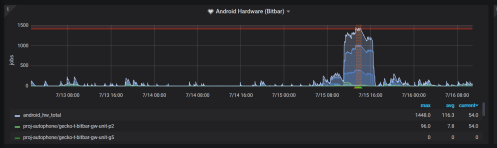
What typically happens when a developer pushes their code to a try server to run all the tests, many jobs finish in a reasonable amount of time, but jobs scheduled on resource constrained hardware (such as android phones) typically have a larger lag which then results in frustration.
How do we manage the load:
- reduce the number of jobs
- ensure tooling and infrastructure is efficient and fully operational
I would like to talk about how to reduce the number of jobs. This is really important when dealing with limited resources, but we shouldn’t ignore this on all platforms. The things to tweak are:
- what tests are run and on what branches
- what frequency we run the tests at
- what gets scheduled on try server pushes
I find that for 1, we want to run everything everywhere if possible, this isn’t possible, so one of our tricks is to run things on mozilla-central (the branch we ship nightlies off of)
Today we are launching the first edition of the MDN Developer & Designer Needs Survey. Web developers and designers, we need to hear from you! This is your opportunity to tell us about your needs and frustrations with the web. In fact, your participation will influence how browser vendors like Mozilla, Google, Microsoft, and Samsung prioritize feature development.
Goals of the MDN Developer Needs Survey
With the insights we gather from your input, we aim to:
- Understand and prioritize the needs of web developers and designers around the world. If you create sites or services using HTML, CSS and/or JavaScript, we want to hear from you.
- Understand how browser vendors should prioritize feature development to address your needs and challenges.
- Set a baseline to evaluate how your needs change year over year.
The survey results will be published on MDN Web Docs (MDN) as an annual report. In addition, we’ll include a prioritized list of needs, with an analysis of priorities by geographic region.
It’s easy to take part. The MDN survey has been designed in collaboration with the major browser vendors mentioned above, and the W3C. We expect it will take approximately 20 minutes to complete. This is your chance to make yourself heard. Results and learnings will be shared publicly on MDN later this year.
Please participate
You’re invited to take the survey here. Your participation can help move the web forward, and make it a better experience for everyone. Thank you for your time and attention!

The post MDN’s First Annual Web Developer & Designer Survey appeared first on Mozilla Hacks - the Web developer blog.
https://hacks.mozilla.org/2019/07/mdn-web-developer-designer-survey/
Editor’s Note: July 12, 1:52pm pt – Updated Balrog update frequency and added some more background.
As I mentioned in my previous post, we’ve been conducting a post-mortem on the add-ons outage. Sorry this took so long to get out; we’d hoped to have this out within a week, but obviously that didn’t happen. There was just a lot more digging to do than we expected. In any case, we’re now ready to share the results. This post provides a high level overview of our findings, with more detail available in Sheila Mooney’s incident report and Matt Miller & Peter Saint-Andre’s technical report.
Root Cause Analysis
The first question that everyone asks is “how did you let this happen?” At a high level, the story seems simple: we let the certificate expire. This seems like a simple failure of planning, but upon further investigation it turns out to be more complicated: the team responsible for the system which generated the signatures knew that the certificate was expiring but thought (incorrectly) that Firefox ignored the expiration dates. Part of the reason for this misunderstanding was that in a previous incident we had disabled end-entity certificate checking, and this led to confusion about the status of intermediate certificate checking. Moreover, the Firefox QA plan didn’t incorporate testing for certificate expiration (or generalized testing of how the browser will behave at future dates) and therefore the problem wasn’t detected. This seems to have been a fundamental oversight in our test plan.
The lesson here is that: (1) we need better communication and documentation of these parts of the system and (2) this information needs to get fed back into our engineering and QA work to make sure we’re not missing things. The technical report provides more details.
Code Delivery
As I mentioned previously, once we had a fix, we decided to deliver it via the Studies system (this is one part of a system we internally call “Normandy”). The Studies system isn’t an obvious choice for this kind of deployment because it was intended for deploying experiments, not code fixes. Moreover, because Studies permission is coupled to Telemetry, this meant that some users needed to enable Telemetry in order to get the fix, leading to Mozilla temporarily over-collecting data that we didn’t actually want, which we then had to clean up.
This leads to the natural question: “isn’t there some other way you could have deployed the fix?” to which the answer is “sort of.” Our other main mechanisms for deploying new code to users are dot releases and a system called “Balrog”. Unfortunately, both of these are slower than Normandy: Balrog checks for updates every 12 hours (though there turns out to have been some confusion about whether this number was 12 or 24), whereas Normandy checks every 6. Because we had a lot of users who were affected, getting them fixed was a very high priority, which made Studies the best technical choice.
The lesson here is that we need a mechanism that allows fast updates that isn’t coupled to Telemetry and Studies. The property we want is the ability to quickly deploy updates to any user who has automatic updates enabled. This is something our engineers are already working on.
Incomplete Fixes
Over the weeks following the incident, we released a large number of fixes, including eight versions of the system add-on and six dot releases. In some cases this was necessary because older deployment targets needed a separate fix. In other cases it was a result of defects in an earlier fix, which we then had to patch up in subsequent work. Of course, defects in software cannot be completely eliminated, but the technical report found that at least in some cases a high level of urgency combined with a lack of available QA resources (or at least coordination issues around QA) led to testing that was less thorough than we would have liked.
The lesson here is that during incidents of this kind we need to make sure that we not only recruit management, engineering, and operations personnel (which we did) but also to ensure that we have QA available to test the inevitable fixes.
Where to Learn More
If you want to learn more about our findings, I would invite you to read the more detailed reports we produced. And as always, if those don’t answer your questions, feel free to email me at ekr-blog@mozilla.com.
The post
Hello Mozillians,
We are happy to let you know that Friday, July 19th, we are organizing Firefox Nightly 70 Testday. We’ll be focusing our testing on: Fission.
Check out the detailed instructions via this etherpad.
No previous testing experience is required, so feel free to join us on #qa IRC channel where our moderators will offer you guidance and answer your questions.
Join us and help us make Firefox better!
See you on Friday!
https://quality.mozilla.org/2019/07/firefox-nightly-70-testday-july-19th/
Starting with Firefox 68, the Linux builds shipped by Mozilla should be reproducible (it is not currently automatically validated that it definitely is, but 68.0 is). These builds are optimized with Profile Guided Optimization, and the profile data was not kept and published until recently, which is why they weren’t reproducible until now.
The following instructions require running Docker on a Linux host (this may or may not work on a non-Linux host, I don’t know what e.g. Docker for Mac does, and if the docker support in the mach command works with it). I’ll try to make them generic enough that they may apply to any subsequent release of Firefox.
- Clone either the mozilla-unified or mozilla-release repository. You can use Mercurial or Git (with git-cinnabar), it doesn’t matter.
- Checkout the
FIREFOX_68_0_RELEASEtag and find out what its Mercurial changeset id is (it is 353628fec415324ca6aa333ab6c47d447ecc128e). - Open the Taskcluster index tool in a browser tab.
- In the input field type or copy/paste
gecko.v2.mozilla-release.shippable.revision.353628fec415324ca6aa333ab6c47d447ecc128e.firefox.linux64-optand press the Enter key. (replace 353628fec415324ca6aa333ab6c47d447ecc128e with the right revision if you’re trying for another release) - This will fill the “Indexed Task” pane, where you will find a TaskId. Follow the link there, it will bring you to the corresponding Task Run Logs
- Switch to the Task Details
- Scroll down to the “Dependencies” list, and check the task name that begins with “build-docker-image”. For the Firefox 68 build task, it is
build-docker-image-debian7-amd64-build. - Take that name, remove the “build-docker-image-” prefix, and run the following command, from inside the repository, to download the corresponding docker image:
$ ./mach taskcluster-load-image debian7-amd64-buildObviously, replace
debian7-amd64-buildwith whatever you found in the task dependencies. The image can also be built from the source tree, but this is out of scope for this post. - The command output will give you a
docker run -ti ...command to try. Run it. It will open a shell in the docker image. - From the docker shell, run the following commands:
$ echo no-api-key > /builds/mozilla-desktop-geoloc-api.key
$ echo no-api-key > /builds/sb-gapi.data
$ echo no-api-key > /builds/gls-gapi.data
Or replace
no-api-keywith the actual keys if you have them. - Back to the Task Details, check the
envpart of the “Payload”. You’ll need to export all these variables with the corresponding values. e.g.$ export EXTRA_MOZHARNESS_CONFIG='{"update_channel": "release", "mozconfig_variant": "release"}' $ export GECKO_BASE_REPOSITORY='https://hg.mozilla.org/mozilla-unified' $ export GECKO_HEAD_REPOSITORY='https://hg.mozilla.org/releases/mozilla-release' ... - Set the missing
TASKCLUSTER_ROOT_URLenvironment variable:$ export TASKCLUSTER_ROOT_URL='https://taskcluster.net' - Change the value of
MOZHARNESS_ACTIONSto:$ export MOZHARNESS_ACTIONS='build'The original value contains
get-secrets, which will try to download fromhttp://taskcluster/, which will fail with a DNS error, andcheck-test, which runsmake check, which is not necessary to get a working Firefox. - Take
commandpart of the “Payload”, and run that in the docker shell:$ /builds/worker/bin/run-task --gecko-checkout /builds/worker/workspace/build/src -- /builds/worker/workspace/build/src/taskcluster/scripts/builder/build-linux.sh - Once the build is finished, in another terminal, check what the container id of your running docker container is, and extract the build artifact from there:
$ docker ps
CONTAINER ID        IMAGE                                                                                  COMMAND             CREATED             STATUS              PORTS               NAMES
d234383ba9c7
At Mozilla, we rely heavily on automation to increase our ability to fuzz Firefox and the components from which it is built. Our fuzzing team is constantly developing tools to help integrate new and existing capabilities into our workflow with a heavy emphasis on scaling. Today we would like to share Grizzly – a browser fuzzing framework that has enabled us to quickly and effectively deploy fuzzers at scale.
Grizzly was designed to allow fuzzer developers to focus solely on writing fuzzers and not worry about the overhead of creating tools and scripts to run them. It was created as a platform for our team to run internal and external fuzzers in a common way using shared tools. It is cross-platform and supports running multiple instances in parallel.
Grizzly is responsible for:
- managing the browser (via Target)
- launching
- terminating
- monitoring logs
- monitoring resource usage of the browser
- handling crashes, OOMs, hangs… etc
- managing the fuzzer/test case generator tool (via Adapter)
- setup and teardown of tool
- providing input for the tool (if necessary)
- creating test cases
- serving test cases
- reporting results
- basic crash deduplication is performed by default
- FuzzManager support is available (with advanced crash deduplication)
Grizzly is extensible by extending the “Target” or “Adapter” interface. Targets are used to add support for specific browsers. This is where the quirks and complexities of each browser are handled. See puppet_target.py for an example which uses FFPuppet to add support for Firefox. Adapters are used to add support for fuzzers. A basic functional example can be found here. See here for a slightly more advanced example that can be modified to support existing fuzzers.
Grizzly is primarily intended to support blackbox fuzzers. For a feedback driven fuzzing interface please see the libfuzzer fuzzing interface. Grizzly also has a test case reduction mode that can be used on crashes it finds.
For more information please checkout the README.md in the repository and the wiki. Feel free to ask questions on IRC in #fuzzing.
The post Grizzly Browser Fuzzing Framework appeared first on Mozilla Security Blog.
Editor’s Note: We updated this post on July 11, 2019 to mention that the Picture-in-Picture feature is currently only enabled Firefox 69 Beta and Developer Edition on Windows. We apologize for getting your hopes up if you’re on macOS or Linux, and we hope to have this feature enabled on those platforms once it reaches our quality standards.
Have you ever needed to scan a recipe while also watching a cooking video? Or perhaps you wanted to watch a recording of a lecture while also looking at the course slides. Or maybe you wanted to watch somebody stream themselves playing video games while you work.
We’ve recently shipped a version of Firefox for Windows on our Beta and Developer Edition release channels with an experimental feature that aims to make this easier for you to do!
Picture-in-Picture allows you to pop a video out from where it’s being played into a special kind of window that’s always on top. Then you can move that window around or resize it however you need!
There are two ways to pop out a video into a Picture-in-Picture window:
Via the context menu
If you open the context menu on a element, you’ll sometimes see the media context menu that looks like this:
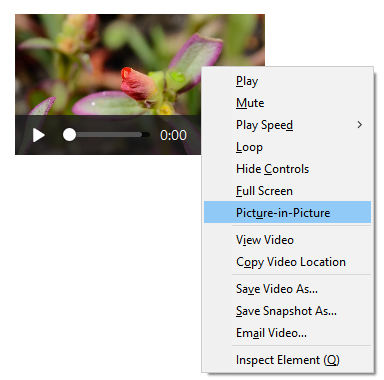
There’s a Picture-in-Picture menu item in that context menu that you can use to toggle the feature.
Many sites, however, make it difficult to access the context menu for elements. YouTube, for example, overrides the default context menu with their own.
You can get to the default native context menu by either holding Shift while right-clicking, or double right-clicking. We feel, however, that this is not the most obvious gesture for accessing the feature, so that leads us to the other toggling mechanism – the Picture-in-Picture video toggle.
Via the new Picture-in-Picture video toggle
The Picture-in-Picture toggle appears when you hover over videos with the mouse cursor. It is a small blue rectangle that slides out when you hover over it. Clicking on the blue rectangle will open the underlying video in the Picture-in-Picture player window.
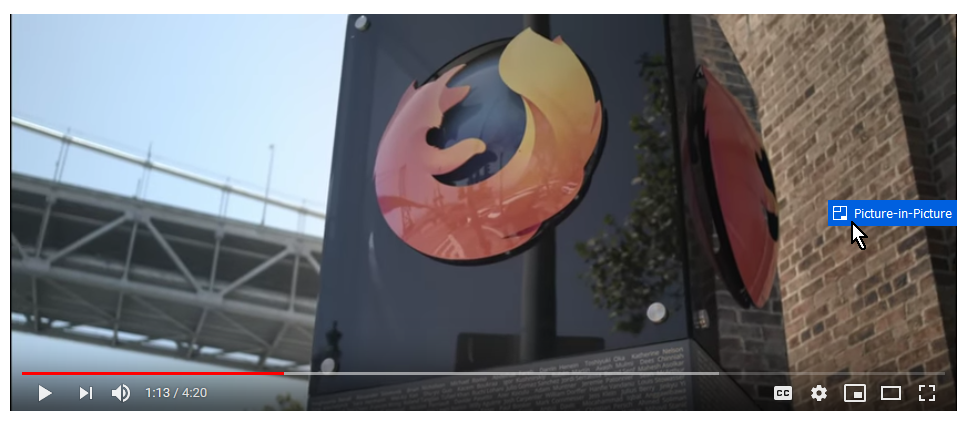
Note that the toggle doesn’t appear when hovering all videos. We only show it for videos that include an audio track that are also of sufficient size and play length.
The advantage of the toggle is that we think we can make this work for most sites out of the box, without making the site authors do anything special!
Using the Picture-in-Picture player window
The Picture-in-Picture window also gives you the ability to quickly play or pause the video — hovering the video with your mouse will expose that control, as well as a control for closing the window, and closing the window while returning you to the tab that the video came from.
Asking for your feedback
We’re still working on hammering out keyboard accessibility, as well as some issues on how the video is displayed at extreme window sizes. We wanted to give Firefox Beta and Developer Edition users on Windows the chance to try the feature out and let us know how it feels. We’ll use the information that we gather to determine whether or not we’ve got the UI right for most users, or need to go back to the drawing board. We’re also hoping to bring this same Picture-in-Picture support to macOS and Linux in the near future.
We’re particularly interested in feedback on the video toggle — there’s a fine balance between discoverability and obtrusiveness, and we want to get a clearer sense of where the blue toggle falls for users on sites out in the wild.
So grab yourself an up-to-date copy of Firefox 69 Beta or Developer Edition for Windows, and give Picture-in-Picture a shot! If you’ve got constructive feedback to share, here’s a form you can use to submit it.
Happy testing!
The post Testing Picture-in-Picture for videos in Firefox 69 Beta and Developer Edition appeared first on Mozilla Hacks - the Web developer blog.
Firefox 68 is coming out today, and we wanted to highlight a few of the changes coming to add-ons. We’ve updated addons.mozilla.org (AMO) and the Add-ons Manager (about:addons) in Firefox to help people find high-quality, secure extensions more easily. We’re also making it easier to manage installed add-ons and report potentially harmful extensions and themes directly from the Add-ons Manager.
Recommended Extensions
In April, we previewed the Recommended Extensions program as one of the ways we plan to make add-ons safer. This program will make it easier for users to discover extensions that have been reviewed for security, functionality, and user experience.
In Firefox 68, you may begin to notice the first small batch of these recommendations in the Add-ons Manager. Recommendations will include star ratings and the number of users that currently have the extension installed. All extensions recommended in the Add-ons Manager are vetted through the Recommended Extensions program.
As the first iteration of a new design, you can expect some clean-up in upcoming releases as we refine it and incorporate feedback.

On AMO starting July 15, Recommended extensions will receive special badging to indicate its inclusion in the program. Additionally, the AMO homepage will be updated to only display Recommended content, and AMO search results will place more emphasis on Recommended extensions.
Note: We previously stated that modifications to AMO would occur on July 11. This has been changed to July 15.

As the Recommended Extensions program continues to evolve, more extensions will be added to the curated list.
Add-ons management and abuse reporting
In alignment with design changes in Firefox, we’ve refreshed the Add-ons Manager to deliver a cleaner user experience. As a result, an ellipsis (3-dot) icon has been introduced to keep options organized and easy to find. You can find all the available controls, including the option to report an extension or theme to Mozilla—in one place.

The new reporting feature allows users to provide us with a better understanding of the issue they’re experiencing. This new process can be used to report any installed extension, whether they were installed from AMO or somewhere else.


Users can also report an extension or theme when they uninstall an add-on. More information about the new abuse reporting process is available here.
Permissions
It’s easy to forget about the permissions that were previously granted to an extension. While most extensions are created by trustworthy third-party developers, we recommend periodically checking what you have installed, what permissions you’ve granted, and making sure you only keep the ones you really
Firefox 68 is available today, featuring support for big integers, whole-page contrast checks, and a completely new implementation of a core Firefox feature: the URL bar.
These are just the highlights. For complete information, see:
BigInts for JavaScript
Firefox 68 now supports JavaScript’s new BigInt numeric type.

Since its introduction, JavaScript has only had a single numeric type: Number. By definition, Numbers in JavaScript are floating point numbers, which means they can represent both integers (like 22 or 451) and decimal fractions (like 6.28 or 0.30000000000000004). However, this flexibility comes at a cost: 64-bit floats cannot reliably represent integers larger than 2 ** 53.
» 2 ** 53
9007199254740992

» (2 ** 53) + 1
9007199254740992  // <- Shouldn't that end in 3?

» (2 ** 53) + 2
9007199254740994
This limitation makes it difficult to work with very large numbers. For example, it’s why Twitter’s JSON API returns Tweet IDs as strings instead of literal numbers.
BigInt makes it possible to represent arbitrarily large integers.
» 2n ** 53n  // <-- the "n" means BigInt
9007199254740992n

» (2n ** 53n) + 1n
9007199254740993n  // <- It ends in 3!

» (2n ** 53n) + 2n
9007199254740994n
JavaScript does not automatically convert between BigInts and Numbers, so you can’t mix and match them in the same expression, nor can you serialize them to JSON.
» 1n + 2
TypeError: can't convert BigInt to number

» JSON.stringify(2n)
TypeError: BigInt value can't be serialized in JSON
You can, however, losslessly convert BigInt values to and from strings:
» BigInt("994633657141813248")
994633657141813248n

» String(994633657141813248n)
"994633657141813248"  // <-- The "n" goes away
The same is not true for Numbers — they can lose precision when being parsed from a string:
» Number("994633657141813248")
994633657141813200  // <-- Off by 48!
MDN has much more information on BigInt.
Accessibility Checks in DevTools
Each release of Firefox brings improved DevTools, but Firefox 68 marks the debut of a brand new capability: checking for basic accessibility issues.

Since our last Firefox release, we’ve been working on features to make the Firefox Quantum browser work better for you. We added by default Enhanced Tracking Protection which blocks known “third-party tracking cookies” from following your every move. With this latest Firefox release we’ve added new features so you can browse the web the way you want — unfettered and free. We’ve also made improvements for IT managers who want more flexibility when using Firefox in the workplace.
Key highlights for today’s update includes:
- Blackout shades come to Firefox Reader View: One of the most popular ways that people use our Reader View is by changing the contrast from light to dark. Initially, this only covered the text area. Now, when a user moves the contrast to dark all the sections of the site — including the sidebars and toolbars will be completely in dark mode.

All sections of the site will be completely in dark mode
- Firefox Recommended Extensions and more: We curated a list of recommended extensions that have been thoroughly reviewed for security, usability and usefulness. You can find the list on the “Get Add-ons” page in the Firefox Add-ons Manager (about:addons). Plus we are making it even easier to report any bad extensions you come across. You can do this directly through your Firefox Add-ons Manager to ensure others’ safety. This new feature is part of the larger effort to make the add-ons ecosystem safer.
- Popular User Requested Features added to Firefox for iOS: Users are at the center of everything we do, and most of the features we’ve added to Firefox for iOS in the past have been requests straight from our community. Today, we’re adding two new features which have been asked for the most. They include:
-
-
-
- Bookmark editing – We added a new ‘Recently Bookmarked’ section to bookmarks and also added support for editing all bookmarks. Now users can reorder, rename, or update the URL for bookmarks.
- Set sites to always open with Desktop Version – We know that some sites aren’t optimized for mobile, and for users the desktop version of a site is the better and preferred experience. Today, users can set sites to always open in desktop mode, and we’re also introducing a badge to help you identify when a site is being displayed in desktop mode.
-
-
-
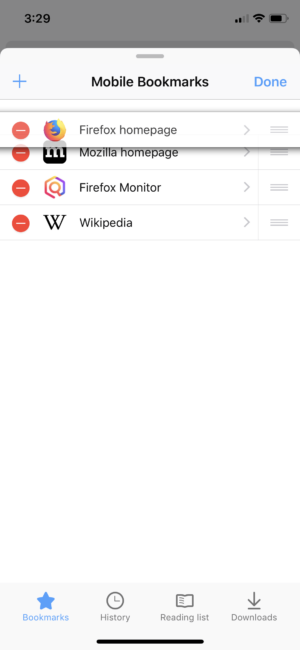
Reorder, rename, or update the URL for bookmarks
More customization for IT Pros
Since the launch of Firefox Quantum for Enterprise last year, we’ve received feedback from IT (information technology) professionals who wanted to make Firefox Quantum more flexible and easier to use so they can meet their workplace needs. Today we’re adding a number of new enterprise policies for IT leads who want to customize Firefox for their employees.
The new policies for today’s Firefox Quantum for Enterprise will help IT managers configure their company’s infrastructure in the best way to meet their own personalized needs. This includes adding a support menu so enterprise users can easily contact their internal support teams and configuring or removing the new tab page so companies can bring their intranet or other sites front and center for employees. For shared machines and protecting employees’ privacy, IT managers can turn off search suggestions. You can look here to see a complete list of policies supported by Firefox.
We are always looking for ways to improve Firefox Quantum for Enterprise, our Extended Support Release. For organizations that need access to specific preferences, we’ve already started a list in our GitHub repository, and we will continue to add based on the requests we receive. Feel free to submit at
We recently closed the first half of 2019 and with that it is time to look back and do a quick summary of what the media team has achieved during this 6 months period.
Looking at some stats, we merged 87 Pull Requests, we opened 56 issues, we closed 42 issues and we welcomed 13 new amazing contributors to the media stack.
A/V playback
These are some of the selected A/V playback related H1 acomplishments
Media cache and improved seeking
We significally improved the seeking experience of audio and video files by implementing preloading and buffering support and a media cache.
Basic media controls
After a few months of work we got partial support for the Shadow DOM API, which gave us the opportunity to implement our first basic set of media controls.

The UI is not perfect, among other things, because we still have no way to render a progress or volume bar properly, as that depends on the input type="range"> layout, which so far is rendered as a simple text box instead of the usual slider with a thumb.
GStreamer backend for MagicLeap
Another great achievement by Xavier Claessens from Collabora has been the GStreamer backend for Magic Leap. The work is not completely done yet, but as you can see on the animation below, he already managed to paint a full screen video on the Magic Leap device.

Hardware accelerated decoding
One of the most wanted features that we have been working on for almost a year and that has recently landed is hardware accelerated decoding.
Thanks to the excellent and constant work from the Igalian V'ictor J'aquez, Servo recently gained support for hardware-accelerated media playback, which means lower CPU usage, better battery life and better thermal behaviour, among other goodies.
We only have support on Linux and Android (EGL and Wayland) so far. Support for other platforms is on the roadmap.
The numbers we are getting are already pretty nice. You might not be able to see it clearly on the video, but the renderer CPU time for the non hardware accelerated playback is ~8ms, compared to the ~1ms of CPU time that we get with the accelerated version.
Improved web compatibility of our media elements implementation
We also got a bunch of other smaller features that significantly improved the web compatibility of our media elements.
- ferjm added support for the HTMLMediaElement
posterframe attribute - swarnimarun implemented support for the HTMLMediaElement
loopattribute - jackxbritton implemented the HTMLMediaElement
crossoriginattribute logic. - Servo got the ability to mute and unmute as well as controlling the volume of audio and video playback thanks to stevesweetney and lucasfantacuci.
- sreeise implemented the AudioTrack, VideoTrack, AudioTrackList and VideoTrackList interfaces.
- georgeroman coded the required changes to allow
Whenever I write about security issues in some password manager, people will ask what I’m thinking about their tool of choice. And occasionally I’ll take a closer look at the tool, which is what I did with the RememBear password manager in April. Technically, it is very similar to its competitor 1Password, to the point that the developers are being accused of plagiarism. Security-wise the tool doesn’t appear to be as advanced however, and I quickly found six issues (severity varies) which have all been fixed since. I also couldn’t fail noticing a bogus security mechanism, something that I already wrote about.
Stealing remembear.com login tokens
Password managers will often give special powers to “their” website. This is generally an issue, because compromising this website (e.g. via an all too common XSS vulnerability) will give attackers access to this functionality. In case of RememBear, things turned out to be easier however. The following function was responsible for recognizing privileged websites:
isRememBearWebsite() {
    let remembearSites = this.getRememBearWebsites();
    let url = window.getOriginUrl();
    let foundSite = remembearSites.firstOrDefault(allowed => url.indexOf(allowed) === 0, undefined);
    if (foundSite) {
        return true;
    }
    return false;
}
We’ll get back to window.getOriginUrl() later, it not actually producing the expected result. But the important detail here: the resulting URL is being compared against some whitelisted origins by checking whether it starts with an origin like https://remembear.com. No, I didn’t forget the slash at the end here, there really is none. So this code will accept https://remembear.com.malicious.info/ as a trusted website!
Luckily, the consequences aren’t as severe as with similar LastPass issues for example. This would only give attacker’s website access to the RememBear login token. That token will automatically log you into the user’s RememBear account, which cannot be used to access passwords data however. It will “merely” allow the attacker to manage user’s subscription, with the most drastic available action being deleting the account along with all passwords data.
Messing with AutoFill functionality
AutoFill functionality of password managers is another typical area where security issues are found. RememBear requires a user action to activate AutoFill which is an important preventive measure. Also, AutoFill user interface will be displayed by the native RememBear application, so websites won’t have any way of messing with it. I found multiple other aspects of this functionality to be exploitable however.
Most importantly, RememBear would not verify that it filled in credentials on the right website (a recent regression according to the developers). Given that considerable time can pass between the user clicking the bear icon to display AutoFill user interface and the user actually selecting a password to be filled in, one cannot really expect that the browser tab is still displaying the same website. RememBear will happily continue filling in the password however, not recognizing that it doesn’t belong to the current website.
Worse yet, RememBear will try to fill out passwords in all frames of a tab. So if https://malicious.com embeds a frame from https://mybank.com and the user triggers AutoFill on the latter, https://malicious.com will potentially receive the password as well (e.g. via a hidden form). Or even less obvious: if you go to https://shop.com and that site has third-party frames e.g. for advertising, these frames will be able to intercept any of your filled in passwords.
Public Suffix List implementation issues
One point on my list of common AutoFill
TenFourFox Feature Parity Release 15 final is now available for testing (downloads, hashes, release notes). There are no changes from the beta other than outstanding security fixes. Assuming all goes well, it will go live Monday evening Pacific as usual.
Also, we now have Korean and Turkish language packs available for testing. If you want to give these a spin, download them here; the plan is to have them go-live at the same time as FPR15. Thanks again to new contributor Tae-Woong Se and, of course, to Chris Trusch as always for organizing localizations and doing the grunt work of turning them into installers.
Not much work will occur on the browser for the next week or so due to family commitments and a couple out-of-town trips, but I'll be looking at a few new things for FPR16, including some minor potential performance improvements and a font subsystem upgrade. There's still the issue of our outstanding JavaScript deficiencies as well, of course. More about that later.
http://tenfourfox.blogspot.com/2019/07/tenfourfox-fpr15-available.html