All of you certainly know already that Google is guarding its Chrome Web Store vigilantly and making sure that no bad apples get in. So when you hit “Report abuse” your report will certainly be read carefully by another human being and acted upon ASAP. Well, eventually… maybe… when it hits the news. If it doesn’t, then it probably wasn’t important anyway and these extensions might stay up despite being taken down by Mozilla three months ago.

Image by Sheba_Also
As to your legitimate extensions, these will be occasionally taken down as collateral damage in this fierce fight. Like my extension which was taken down due to missing a screenshot because of not having any user interface whatsoever. It’s not possible to give an advance warning either, like asking the developer to upload a screenshot within a week. This kind of lax policies would only encourage the bad guys to upload more malicious extensions without screenshots of course.
And the short downtime of a few weeks and a few hours of developer time spent trying to find anybody capable of fixing the problem are surely a small price to pay for a legitimate extension in order to defend the privilege of staying in the exclusive club of Chrome extension developers. So I am actually proud that this time my other browser extension, PfP: Pain-free Passwords, was taken down by Google in its relentless fight against the bad actors.
Here is the email I’ve got:
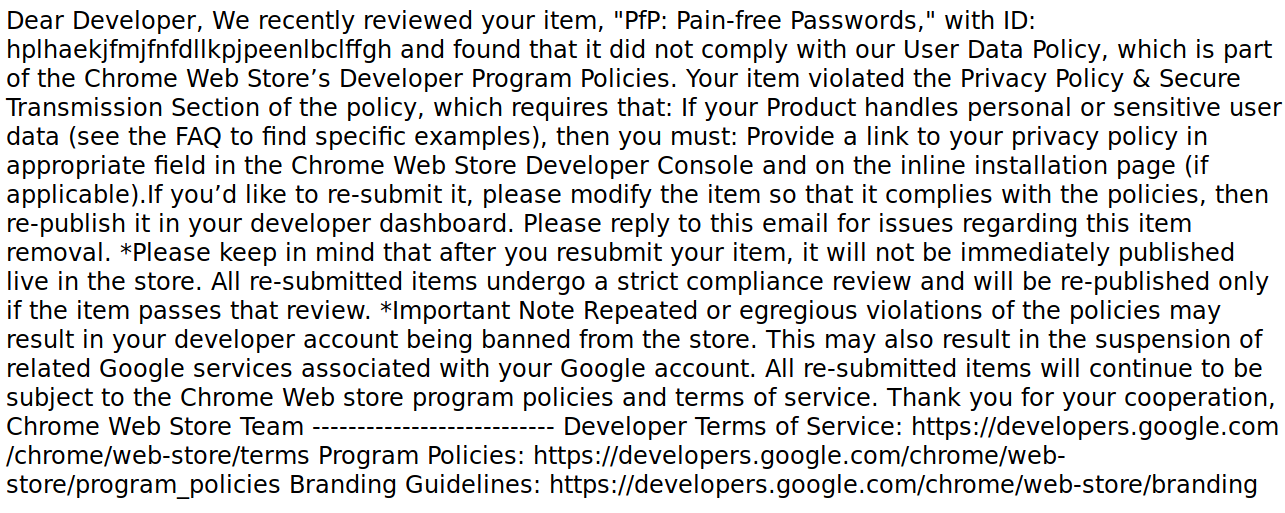
Hard to read? That might be due to the fact that this plain text email was sent as text/html. A completely understandable mistake given how busy all Google employees are. We only need to copy the link to the policy here and we’ll get this in a nicely formatted document.
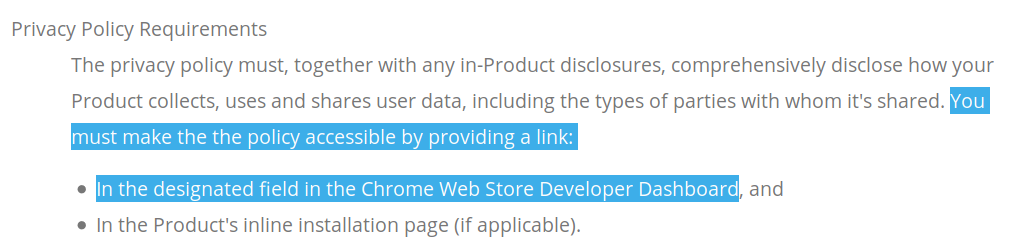
So there we go. All I need to do is to write a privacy policy document for the extension which isn’t collecting any data whatsoever, then link it from the appropriate field. Could it be so easy? Of course not, the bad guys would be able to figure it out as well otherwise. Very clever of Google not to specify which one the “designated field” is. I mean, if you publish extensions on Mozilla Add-ons, there is literally a field saying “Privacy Policy” there. But in Chrome Web Store you only get Title, Summary, Detailed Description, Category, Official Url, Homepage Url, Support Url, Google Analytics ID.
See what Google is doing here? There is really only one place where the bad guys could add their privacy policy, namely that crappy unformatted “Detailed Description” field. Since it’s so unreadable, users ignore it anyway, so they will just assume that the extension has no privacy policy and won’t trust it with any data. And as an additional bonus, “Detailed Description” isn’t the designated field for privacy policy, which gives Google a good reason to take bad guys’ extensions down at any time. Brilliant, isn’t it?
In the meantime, PfP takes a vacation from Chrome Web Store. I’ll let you know how this situation develops.
Update (2019-09-10): As commenter drawdrove points out, the field for the privacy policy actually exists. Instead of placing it under extension settings, Google put it in the overall developer settings. So all of the developer’s extensions share the same privacy policy, no matter how different. Genius!
PfP is now back in Chrome Web Store. But will the bad guys also manage to figure it out?
https://palant.de/2019/09/09/state-of-the-art-protection-in-chrome-web-store/
Every day, our data hits the market when we sign online. It’s for sale, and we’re left to wonder if tech companies will ever choose to protect our privacy rather than reap large profits with our information. But, is the choice — profit or privacy — a false dilemma? Meet the people who have built profitable tech businesses while also respecting your privacy. Fact check if Facebook and Google have really found religion in privacy. And, imagine a world where you could actually get paid to share your data.
In this episode, Oli Frost recalls what happened when he auctioned his personal data on eBay. Jeremy Tillman from Ghostery reveals the scope of how much ad-tracking is really taking place online. Patrick Jackson at Disconnect.me breaks down Big Tech’s privacy pivot. DuckDuckGo’s Gabriel Weinberg explains why his private search engine has been profitable. And Dana Budzyn walks us through how her company, UBDI, hopes to give consumers the ability to sell their data for cash.
IRL is an original podcast from Firefox. For more on the series, go to irlpodcast.org.
The IRL production team would love your feedback. Take this short 2-minute survey.
Read about Patrick Jackson and Geoffrey Fowler's privacy experiment.
Learn more about DuckDuckGo, an alternative to Google search, at duckduckgo.com.
And, we're pleased to add a little more about Firefox's business here as well — one that puts user privacy first and is also profitable. Mozilla was founded as a community open source project in 1998, and currently consists of two organizations: the 501(c)3 Mozilla Foundation, which backs emerging leaders and mobilizes citizens to create a global movement for the health of the internet; and its wholly owned subsidiary, the Mozilla Corporation, which creates Firefox products, advances public policy in support of internet user rights and explores new technologies that give people more control and privacy in their lives online. Firefox products have never — and never will never — buy or sell user data. Because of its unique structure, Mozilla stands apart from its peers in the technology field as one of the most impactful and successful social enterprises in the world. Learn more about Mozilla and Firefox at mozilla.org.
From time to time, someone shows that in JavaScript the
.length of a string containing an emoji resulting in a number greater than 1 (typically 2) and then proceeds to the conclusion that haha JavaScript is so broken. In this post, I will try to convince you that ridiculing JavaScript for this is less insightful than it first appears.

This has been a while coming; thank you for your patience. I’m very happy to be able to share the final four candidates for Mozilla’s new community-facing synchronous messaging system.
These candidates were assessed on a variety of axes, most importantly Community Participation Guideline enforcement and accessibility, but also including team requirements from engineering, organizational-values alignment, usability, utility and cost. To close out, I’ll talk about the options we haven’t chosen and why, but for the moment let’s lead with the punchline.
Our candidates are:
- Mattermost,
- Matrix/Riot.IM,
- Rocket.Chat, and
- Slack
We’ve been spoiled for choice here – there were a bunch of good-looking options that didn’t make it to the final four – but these are the choices that generally seem to meet our current institutional needs and organizational goals.
We haven’t stood up a test instance for Slack, on the theory that Mozilla already has a surprising number of volunteer-focused Slack instances running already – Common Voice, Devtools and A-Frame, for example, among many others – but we’re standing up official test instances of each of the other candidates shortly, and they’ll be available for open testing soon.
The trial period for these will last about a month. Once they’re spun up, we’ll be taking feedback in dedicated channels on each of those servers, as well as in #synchronicity on IRC.mozilla.org, and we’ll be creating a forum on Mozilla’s community Discourse instance as well. We’ll have the specifics for you at the same time as those servers will be opened up and, of course you can always email me.
I hope that if you’re interested in this stuff you can find some time to try out each of these options and see how well they fit your needs. Our timeline for this transition is:
- From September 12th through October 9th, we’ll be running the proof of concept trials and taking feedback.
- From October 9th through the 30th, we’re going discuss that feedback, draft a proposed post-IRC plan and muster stakeholder approval.
- On December 1st, assuming we can gather that support, we will stand up the new service.
- And finally – allowing transition time for support tooling and developers – no later than March 1st 2020, IRC.m.o will be shut down.
In implementation terms, there are a few practical things I’d like to mention:
- At the end of the trial period, all of these instances will be turned off and all the information in them will be deleted. The only way to win the temporary-permanent game is not to play; they’re all getting decommed and our eventual selection will get stood up properly afterwards.
- The first-touch experiences here can be a bit rough; we’re learning how these things work at the same time as you’re trying to use them, so the experience might not be seamless. We definitely want to hear about it when setup or connection problems happen to you, but don’t be too surprised if they do.
- Some of these instances have EULAs you’ll need to click through to get started. Those are there for the test instances, and you shouldn’t expect that in the final products.
- We’ll be testing out administration and moderation tools during this process, so you can expect to see the occasional bot, or somebody getting bounced arbitrarily. The CPG will be in effect on these test instances, and as always if you see something, say something.
- You’re welcome to connect with mobile or alternative clients where those are available; we expect results there to be uneven, and we’d be glad for feedback there as well. There will be links in the feedback document we’ll be sending out when the servers are opened up to collections of those clients.
- Regardless of our choice of public-facing synchronous communications platform, our internal Slack instance will continue to be the “you are inside a Mozilla office” confidential forum. Internal Slack is not going away; that has never been on the table. Whatever the outcome of this process, if you work at Mozilla your manager will still need to be able to find you on Slack, and that is where internal discussions and critical incident management will take place.
… and a few words on
In 2017, Mozilla began working on the DNS-over-HTTPS (DoH) protocol, and since June 2018 we’ve been running experiments in Firefox to ensure the performance and user experience are great. We’ve also been surprised and excited by the more than 70,000 users who have already chosen on their own to explicitly enable DoH in Firefox Release edition. We are close to releasing DoH in the USA, and we have a few updates to share.
After many experiments, we’ve demonstrated that we have a reliable service whose performance is good, that we can detect and mitigate key deployment problems, and that most of our users will benefit from the greater protections of encrypted DNS traffic. We feel confident that enabling DoH by default is the right next step. When DoH is enabled, users will be notified and given the opportunity to opt out.
This post includes results of our latest experiment, configuration recommendations for systems administrators and parental controls providers, and our plans for enabling DoH for some users in the USA.
Results of our Latest Experiment
Our latest DoH experiment was designed to help us determine how we could deploy DoH, honor enterprise configuration and respect user choice about parental controls.
We had a few key learnings from the experiment.
- We found that OpenDNS’ parental controls and Google’s safe-search feature were rarely configured by Firefox users in the USA. In total, 4.3% of users in the study used OpenDNS’ parental controls or safe-search. Surprisingly, there was little overlap between users of safe-search and OpenDNS’ parental controls. As a result, we’re reaching out to parental controls operators to find out more about why this might be happening.
- We found 9.2% of users triggered one of our split-horizon heuristics. The heuristics were triggered in two situations: when websites were accessed whose domains had non-public suffixes, and when domain lookups returned both public and private (RFC 1918) IP addresses. There was also little overlap between users of our split-horizon heuristics, with only 1% of clients triggering both heuristics.
Moving Forward
Now that we have these results, we want to tell you about the approach we have settled on to address managed networks and parental controls. At a high level, our plan is to:
- Respect user choice for opt-in parental controls and disable DoH if we detect them;
- Respect enterprise configuration and disable DoH unless explicitly enabled by enterprise configuration; and
- Fall back to operating system defaults for DNS when split horizon configuration or other DNS issues cause lookup failures.
We’re planning to deploy DoH in “fallback” mode; that is, if domain name lookups using DoH fail or if our heuristics are triggered, Firefox will fall back and use the default operating system DNS. This means that for the minority of users whose DNS lookups might fail because of split horizon configuration, Firefox will attempt to find the correct address through the operating system DNS.
In addition, Firefox already detects that parental controls are enabled in the operating system, and if they are in effect, Firefox will disable DoH. Similarly, Firefox will detect whether enterprise policies have been set on the device and will disable DoH in those circumstances. If an enterprise policy explicitly enables DoH, which we think would be awesome, we will also respect that. If you’re a system administrator interested in how to configure enterprise policies, please find documentation here. If you find any bugs, please report them here.
Options for Providers of Parental Controls
We’re also working with providers of parental controls, including ISPs, to add a canary domain to their blocklists. This helps us in situations where the parental controls operate on the network rather than an individual computer. If Firefox determines that our canary domain is blocked, this will indicate that opt-in parental controls are in effect on the network, and Firefox will disable DoH automatically. If you are a provider of parental controls, details are available here. Please reach out to us for more information at
Mozilla Developer Network (now MDN Web Docs) is great, probably the best Web development reference site from them all. And therefor even Microsoft defaults to us now in Visual Studio Code.
Snippet from they Release Notes for 1.38.0:
Languages
MDN Reference for HTML and CSS
VS Code now displays a URL pointing to the relevant MDN Reference in completion and hover of HTML & CSS entities:

We thank the MDN documentation team for their effort in curating mdn-data / mdn-browser-compat-data and making MDN resources easily accessible by VS Code.
The post Visual Studio Code auto-complete displays MDN reference for CSS and HTML tags appeared first on mayhemer's blog.

In this article we’re going to take a brief look at how we may want to think about placement of objects in Augmented Reality. We're going to use our recently released lightweight AR editing tool MrEd to make this easy to demonstrate.
Designers often express ideas in a domain appropriate language. For example a designer may say “place that chair on the floor” or “hang that photo at eye level on the wall”.
However when we finalize a virtual scene in 3d we often keep only the literal or absolute XYZ position of elements and throw out the original intent - the deeper reason why an object ended up in a certain position.
It turns out that it’s worth keeping the intention - so that when AR scenes are re-created for new participants or in new physical locations that the scenes still “work” - that they still are satisfying experiences - even if some aspects change.
In a sense this recognizes the Japanese term 'Wabi-Sabi'; that aesthetic placement is always imperfect and contends between fickle forces. Describing placement in terms of semantic intent is also similar to responsive design on the web or the idea of design patterns as described by Christopher Alexander.
Let’s look at two simple examples of semantic placement in practice.
1. Relative to the Ground
When you’re placing objects in augmented reality you often want to specify that those objects should be relationally placed in a position relative to other objects. A typical, in fact ubiquitous, example of placement is that often you want an object to be positioned relative to “the ground”.
Sometimes the designer's intent is to select the highest relative surface underneath the object in question (such as placing a lamp on a table) or at other times to select the lowest relative surface underneath an object (such as say placing a kitten on the floor under a table). Often, as well, we may want to express a placement in the air - such as say a mailbox, or a bird.
In this very small example I’ve attached a ground detection script to a duck, and then sprinkled a few other passive objects around the scene. As the ground is detected the duck will pop down from a default position to be offset relative to the ground (although still in the air). See the GIF above for an example of the effect.
To try this scene out yourself you will need WebXR for iOS which is a preview of emerging WebXR standards using iOS ARKit to expose augmented reality features in a browser environment. This is the url for the scene above in play mode (on a WebXR capable device):
https://painted-traffic.glitch.me/.mred/build/?mode=play&doc=doc_103575453
Here is what it should look like in edit mode:
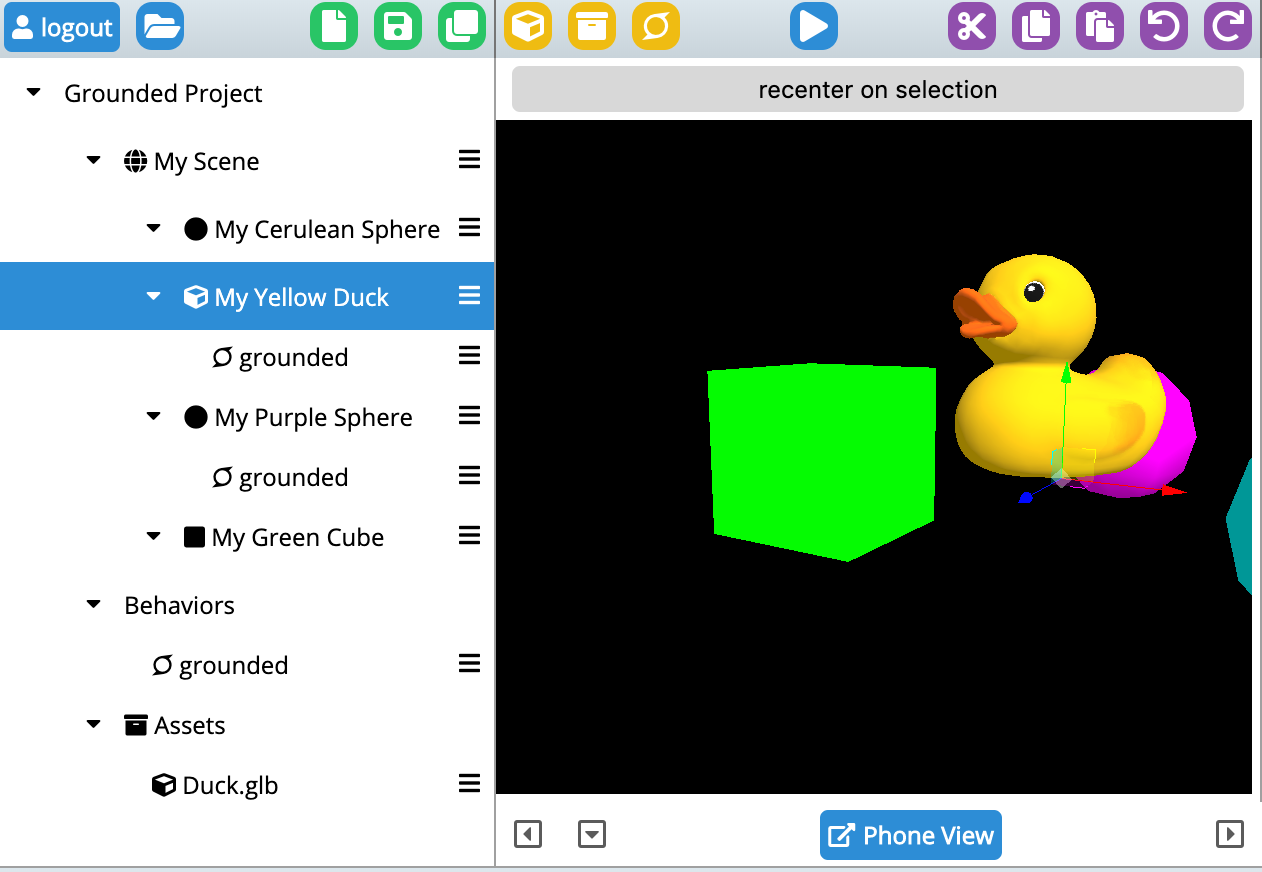
You can also clone the glitch and edit the scene yourself (you’ll want to remember to set a password in the .env file and then login from inside MrEd). See:
https://glitch.com/edit/#!/painted-traffic
Here’s my script itself:
/// #title grounded
/// #description Stick to Floor/Ground - dynamically and constantly searching for low areas nearby
({
    start: function(evt) {
        this.sgp.startWorldInfo()
    },
    tick: function(e) {
        let floor = this.sgp.getFloorNear({point:e.target.position})
        if(floor) {
            e.target.position.y = floor.y
        }
    }
})
This is relying on code baked into MrEd (specifically inside of findFloorNear() in XRWorldInfo.js if you really want to get detailed).
In the above example I begin by calling startWorldInfo() to start painting the ground planes (so that I can see them since it’s nice to have visual feedback). And, every tick, I call a floor finder subroutine which simply returns the best guess as to the floor in that area. The floor finder logic in this case is pre-defined but one could easily imagine other kinds of floor finding strategies that were more flexible.
2. Follow the player
Another common designer intent is to make sure that some content is always visible to the player. As
Firefox Debugger has evolved into a fast and reliable tool chain over the past several months and it’s now supporting many cool features. Though primarily used to debug JavaScript, did you know that you can also use Firefox to debug your TypeScript applications?
Before we jump into real world examples, note that today’s browsers can’t run TypeScript code directly. It’s important to understand that TypeScript needs to be compiled into Javascript before it’s included in an HTML page.
Also, debugging TypeScript is done through a source-map, and so we need to instruct the compiler to produce a source-map for us as well.
You’ll learn the following in this post:
- Compiling TypeScript to JavaScript
- Generating source-map
- Debugging TypeScript
Let’s get started with a simple TypeScript example.
TypeScript Example
The following code snippet shows a simple TypeScript hello world page.
// hello.ts

interface Person {
  firstName: string;
  lastName: string;
}

function hello(person: Person) {
  return "Hello, " + person.firstName + " " + person.lastName;
}

function sayHello() {
  let user = { firstName: "John", lastName: "Doe" };
  document.getElementById("output").innerText = hello(user);
}
TypeScript (TS) is very similar to JavaScript and the example should be understandable even for JS developers unfamiliar with TypeScript.
The corresponding HTML page looks like this:
// hello.html
Note that we are including the hello.js not the hello.ts file in the HTML file. Today’s browser can’t run TS directly, and so we need to compile our hello.ts file into regular JavaScript.
The rest of the HTML file should be clear. There is one button that executes the sayHello() function and
Next step is to compile our TypeScript into JavaScript.
Compiling TypeScript To JavaScript
To compile TypeScript into JavaScript you need to have a TypeScript compiler installed. This can be done through NPM (Node Package Manager).
npm install -g typescriptUsing the following command, we can compile our hello.ts file. It should produce a JavaScript version of the file with the *.js extension.
tsc hello.tsIn order to produce a source-map that describes the relationship between the original code (TypeScript) and the generated code (JavaScript), you need to use an additional --sourceMap argument. It generates a corresponding *.map file.
tsc hello.ts --sourceMapYes, it’s that simple.
You can read more about other compiler options if you are interested.
The generated JS file should look like this:
function greeter(person) {
  return "Hello, " + person.firstName + " " + person.lastName;
}
var user = {
  firstName: "John",
  lastName: "Doe"
};
function sayHello() {
  document.getElementById("output").innerText = greeter(user);
}
//# sourceMappingURL=hello.js.map
The most interesting thing is probably the comment at the end of the generated file. The syntax comes from old Firebug times and refers to a source map file containing all information about the original source.
Are you curious what the source map file looks like? Here it is.
{
   "version":3,
   "file":"hello.js",
   "sourceRoot":"",
   "sources":["hello.ts"],
   "names":[],
   "mappings":
"AAKA,SAAS,OAAO,CAAC,MAAc;IAC7B,OAAO,SAAS,GAAG,MAAM,CAAC,SAAS,GAAG,GAAG,GAAG,MAAM,CAAC,QAAQ,CAAC;AAC9D,CAAC;AAED,IAAI,IAAI,GAAG;IACT,SAAS,EAAE,MAAM;IACjB,QAAQ,EAAE,KAAK;CAChB,CAAC;AAEF,SAAS,QAAQ;IACf,QAAQ,CAAC,cAAc,CAAC,QAAQ,CAAC,CAAC,SAAS,GAAG,OAAO,CAAC,IAAI,CAAC,CAAC;AAC9D,CAAC"
}
It contains information (including location) about the generated file (hello.js), the original file (hello.ts), and, most importantly, mappings between those two. With this information, the debugger knows how to interpret the TypeScript code even if it doesn’t know anything about TypeScript.
The original language could be anything (RUST, C++, etc.) and with a proper source-map, the debugger knows what to do. Isn’t that
Introducing Glean — Telemetry for humans

When Firefox Preview shipped, it was also the official launch of Glean, our new mobile product analytics & telemetry solution true to Mozillas values. This post goes into how we got there and what it’s design principles are.
Background
In the last few years, Firefox development has become increasingly data-driven. Mozilla’s larger data engineering team builds & maintains most of the technical infrastructure that makes this possible; from the Firefox telemetry code to the Firefox data platform and hosting analysis tools. While data about our products is crucial, Mozilla has a rare approach to data collection, following our privacy principles. This includes requiring data review for every new piece of data collection to ensure we are upholding our principles — even when it makes our jobs harder.
One great success story for us is having the Firefox telemetry data described in machine-readable and clearly structured form. This encourages best practices like mandatory documentation, steering towards lean data practices and enables automatic data processing — from generating tables to powering tools like our measurement dashboard or the Firefox probe dictionary.
However, we also learned lessons about what didn’t work so well. While the data types we used were flexible, they were hard to interpret. For example, we use plain numbers to store counts, generic histograms to store multiple timespan measures and allow for custom JSON submissions for uncovered use-cases. The flexibility of these data types means it takes work to understand how to use them for different use-cases & leaves room for accidental error on the instrumentation side. Furthermore, it requires manual effort in interpreting & analysing these data points. We noticed that we could benefit from introducing higher-level data types that are closer to what we want to measure — like data types for “counters” and “timing distributions”.
What about our mobile telemetry?
Another factor was that our mobile product infrastructure that was not ideally integrated yet with the Firefox telemetry infrastructure above. Different products used different analytics solutions & different versions of our own mobile telemetry code, across Android & iOS. Also, our own mobile telemetry code did not describe its metrics in machine-readable form. This meant analysis was potentially different for each product & new instrumentations were higher effort. Integrating new products into the Firefox telemetry infrastructure meant substantial manual effort.
From reviewing the situation, one main question came up: What if we could provide one consistent telemetry SDK for our mobile products, bringing the benefits of our Firefox telemetry infrastructure but without the above mentioned drawbacks?
Introducing Glean
In 2018, we looked at how we could integrate Mozilla’s mobile products better. Putting together what we learned from our existing Firefox Telemetry system, feedback from various user interviews and what we found mattered for our mobile teams, we decided to reboot our telemetry and product analytics solution for mobile. We took input from a cross-functional set of people, data science, engineering, product management, QA and others to form a complete picture of what was required.
From that, we set out to build an end-to-end solution called Glean, consisting of different pieces:
- Product-side tools — The data enters our system here through the Glean SDK, which is what products integrate and
In my open source courses, I spend a lot of time working with new developers who are trying to make sense of issues on GitHub and figure out how to begin. When it comes to how people write their issues, I see all kinds of styles. Some people write for themselves, using issues like a TODO list: "I need to fix X and Y." Other people log notes from a call or meeting, relying on the collective memory of those who attended: "We agreed that so-and-so is going to do such-and-such." Still others write issues that come from outside the project, recording a bug or some other problem: "Here is what is happening to me..."
Because I'm getting ready to take another cohort of students into the wilds of GitHub, I've been thinking once more about ways to make this process better. Recently I spent a number of days assembling furniture from IKEA with my wife. Spending that much time with Allen keys got me thinking about what we could learn from IKEA's work to enable contribution from customers.

I am not a furniture maker. Not even close. While I own some power tools, most were gifts from my father, who actually knows how to wield them. I'm fearless when it comes to altering bits in a computer; but anything that puts holes in wood, metal, or concrete terrifies me. And yet, like so many other people around the world, I've "built" all kinds of furniture in our house--at least I've assembled it.
In case you haven't bought furniture from IKEA, they are famous for designing not only the furniture itself, but also the materials, packaging, and saving cost by offloading most of the assmbly to the customer. Each piece comes with instructions, showing the parts manifest, tools you'll need (often simple ones are included), and pictorial, step-wise instructions for assembling the piece.
IKEA's model is amazing: amazing that people will do it, amazing that it's doable at all by the general public! You're asking people to do a task that they a) probably have never done before; b) probably won't do again. Sometimes you'll buy 4 of some piece, a chair, and through repeated trial and error, get to the point where you can assemble it intuitively. But this isn't the normal use case. For the most part, we buy something we don't have, assemble it, and then we have it. This means that the process has to work during the initial attempt, without training. IKEA is keen that it work because they don't want you to return it, or worse, never come back again.
Last week I assembled all kinds of things for a few rooms in our basement: chairs, a couch, tables, etc. I spent hours looking at, and working my way through IKEA instructions. Take another look at the Billy instructions I included above. Here's some of what I notice:
- It starts with the end-goal: here is how things should look when you're done
- It tells you what tools you'll need in order to make this happen and, importantly, imposes strict limits on the sorts of tools that might be required. An expert could probably make use of more advanced tools; but this isn't for experts.
- It gives you a few GOTCHAs to avoid up front. "Be careful to do it this way, not that way." This repeats throughout the rest of the steps. Like this, not that.
- It itemizes and names (via part number) all the various pieces you'll need. There should be 16 of these, 18 of these, etc.
- It takes you step-by-step through maniplating the parts on the floor into the product you saw in the store, all without words.
- Now look at how short this thing is. The information density is high even though the complexity is low.
It got me thinking about lessons we could learn when filing issues in open source projects. I realize that there isn't a perfect analogy between assmbling furniture and fixing a bug. IKEA mass produces the same bookshelf, chairs, and tables, and these instructions work on all of them. Meanwhile, a bug (hopefully) vanishes as soon as it's fixed. We can't put the same effort into our instructions for a one-off experience as we can for a mass produced one. However, in both cases, I would stress that the experience is similar for the person working through the "assembly," it's often their first time following these steps.
When filing a GitHub issue, what could we learn from IKEA instructions?
- Show the end goal of the work. "This issue is about moving this button to the right. Currently it looks like this and we want it to look like this." A lot of people do this, especially with visual, UI related bugs. However, we could do a version of it on lots of non-visual bugs too. Here is what you're trying to acheive with this work. When we file bugs, we assume this is always clear. But imagine it needs to be clear based
You know that thing where you go to a website and a video starts playing automatically? Sometimes it’s a video created by the site, and sometimes it’s an ad. That … Read more
The post Stop video autoplay with Firefox appeared first on The Firefox Frontier.
WebAssembly has begun to establish itself outside of the browser via dedicated runtimes like Mozilla’s Wasmtime and Fastly’s Lucet. While the promise of a new, universal format for programs is appealing, it also comes with new challenges. For instance, how do you debug .wasm binaries?
At Mozilla, we’ve been prototyping ways to enable source-level debugging of .wasm files using traditional tools like GDB and LLDB.
The screencast below shows an example debugging session. Specifically, it demonstrates using Wasmtime and LLDB to inspect a program originally written in Rust, but compiled to WebAssembly.
This type of source-level debugging was previously impossible. And while the implementation details are subject to change, the developer experience—attaching a normal debugger to Wasmtime—will remain the same.
By allowing developers to examine programs in the same execution environment as a production WebAssembly program, Wasmtime’s debugging support makes it easier to catch and diagnose bugs that may not arise in a native build of the same code. For example, the WebAssembly System Interface (WASI) treats filesystem access more strictly than traditional Unix-style permissions. This could create issues that only manifest in WebAssembly runtimes.
Mozilla is proactively working to ensure that WebAssembly’s development tools are capable, complete, and ready to go as WebAssembly expands beyond the browser.
Please try it out and let us know what you think.
Note: Debugging using Wasmtime and LLDB should work out of the box on Linux with Rust programs, or with C/C++ projects built via the WASI SDK.
Debugging on macOS currently requires building and signing a more recent version of LLDB.
Unfortunately, LLDB for Windows does not yet support JIT debugging.
Thanks to Lin Clark, Till Schneidereit, and Yury Delendik for their assistance on this post, and for their work on WebAssembly debugging.
The post Debugging WebAssembly Outside of the Browser appeared first on Mozilla Hacks - the Web developer blog.
https://hacks.mozilla.org/2019/09/debugging-webassembly-outside-of-the-browser/
Download wolfSSL fips ready (in my case I got wolfssl-4.1.0-gplv3-fips-ready.zip)
Unzip the source code somewhere suitable
$ cd $HOME/src
$ unzip wolfssl-4.1.0-gplv3-fips-ready.zip
$ cd wolfssl-4.1.0-gplv3-fips-ready
Build the fips-ready wolfSSL and install it somewhere suitable
$ ./configure --prefix=$HOME/wolfssl-fips --enable-harden --enable-all
$ make -sj
$ make install
Download curl, the normal curl package. (in my case I got curl 7.65.3)
Unzip the source code somewhere suitable
$ cd $HOME/src
$ unzip curl-7.65.3.zip
$ cd curl-7.65.3
Build curl with the just recently built and installed fips ready wolfSSL version.
$ LD_LIBRARY_PATH=$HOME/wolfssl-fips/lib ./configure --with-wolfssl=$HOME/wolfssl-fips --without-ssl
$ make -sj
Now, verify that your new build matches your expectations by:
$ ./src/curl -V
It should show that it uses wolfSSL and that all the protocols and features you want are enabled and present. If not, iterate until it does!
“FIPS Ready means that you have included the FIPS code into your build and that you are operating according to the FIPS enforced best practices of default entry point, and Power On Self Test (POST).”
https://daniel.haxx.se/blog/2019/09/04/fips-ready-with-curl/
Coverage-guided fuzzing and generation-based fuzzing are two powerful approaches to fuzzing. It can be tempting to think that you must either use one approach or the other at a time, and that they can’t be combined. However, this is not the case. In this blog post I’ll describe a method for combining coverage-guided fuzzing with structure-aware generators that I’ve found to be both effective and practical.
What is Generation-Based Fuzzing?
Generation-based fuzzing leverages a generator to create random instances of
the fuzz target’s input type. The csmith program, which generates
random C source text, is one example generator. Another example is any
implementation of the Arbitrary trait from the quickcheck
property-testing framework. The fuzzing engine repeatedly uses the generator to
create new inputs and feeds them into the fuzz target.
// Generation-based fuzzing algorithm.

fn generate_input(rng: &mut impl Rng) -> MyInputType {
    // Generator provided by the user...
}

loop {
    let input = generate_input(rng);
    let result = run_fuzz_target(input);

    // If the fuzz target crashed/panicked/etc report
    // that.
    if result.is_interesting() {
        report_interesting(new_input);
    }
}
The generator can be made structure aware, leveraging knowledge about the fuzz target to generate inputs that are more likely to be interesting. They can generate valid C programs for fuzzing a C compiler. They can make inputs with the correct checksums and length prefixes. They can create instances of typed structures in memory, not just byte buffers or strings. But na"ive generation-based fuzzing can’t learn from the fuzz target’s execution to evolve its inputs. The generator starts from square one each time it is invoked.
What is Coverage-Guided Fuzzing?
Rather than throwing purely random inputs at the fuzz target, coverage-guided fuzzers instrument the fuzz target to collect code coverage. The fuzzer then leverages this coverage information as feedback to mutate existing inputs into new ones, and tries to maximize the amount of code covered by the total input corpus. Two popular coverage-guided fuzzers are libFuzzer and AFL.
// Coverage-guided fuzzing algorithm.

let corpus = initial_set_of_inputs();
loop {
    let old_input = choose_one(&corpus);
    let new_input = mutate(old_input);
    let result = run_fuzz_target(new_input);

    // If the fuzz target crashed/panicked/etc report
    // that.
    if result.is_interesting() {
        report_interesting(new_input);
    }

    // If executing the input hit new code paths, add
    // it to our corpus.
    if result.executed_new_code_paths() {
        corpus.insert(new_input);
    }
}
The coverage-guided approach is great at improving a fuzzer’s efficiency at creating new inputs that poke at new parts of the program, rather than testing the same code paths repeatedly. However, in its na"ive form, it is easily tripped up by the presence of things like checksums in the input format: mutating a byte here means that a checksum elsewhere must be updated as well, or else execution will never
Extensions can add powerful customization features to Firefox—everything from ad blockers and tab organizers to enhanced privacy tools, password managers, and more. With thousands of extensions to choose from—either those … Read more
The post Recommended Extensions program—where to find the safest, highest quality extensions for Firefox appeared first on The Firefox Frontier.
https://blog.mozilla.org/firefox/firefox-recommended-extensions/
What is Manifest v3?
Chrome versions the APIs they provide to extensions, and the current format is version 2. The Firefox WebExtensions API is nearly 100% compatible with version 2, allowing extension developers to easily target both browsers.
In November 2018, Google proposed an update to their API, which they called Manifest v3. This update includes a number of changes that are not backwards-compatible and will require extension developers to take action to remain compatible.
A number of extension developers have reached out to ask how Mozilla plans to respond to the changes proposed in v3. Following are answers to some of the frequently asked questions.
Why do these changes negatively affect content blocking extensions?
One of the proposed changes in v3 is to deprecate a very powerful API called blocking webRequest. This API gives extensions the ability to intercept all inbound and outbound traffic from the browser, and then block, redirect or modify that traffic.
In its place, Google has proposed an API called declarativeNetRequest. This API impacts the capabilities of content blocking extensions by limiting the number of rules, as well as available filters and actions. These limitations negatively impact content blockers because modern content blockers are very sophisticated and employ layers of algorithms to not only detect and block ads, but to hide from the ad networks themselves. Extensions would still be able to use webRequest but only to observe requests, not to modify or block them.
As a result, some content blocking extension developers have stated they can no longer maintain their add-on if Google decides to follow through with their plans. Those who do continue development may not be able to provide the same level of capability for their users.
Will Mozilla follow Google with these changes?
In the absence of a true standard for browser extensions, maintaining compatibility with Chrome is important for Firefox developers and users. Firefox is not, however, obligated to implement every part of v3, and our WebExtensions API already departs in several areas under v2 where we think it makes sense.
Content blocking: We have no immediate plans to remove blocking webRequest and are working with add-on developers to gain a better understanding of how they use the APIs in question to help determine how to best support them.
Background service workers: Manifest v3 proposes the implementation of service workers for background processes to improve performance. We are currently investigating the impact of this change, what it would mean for developers, and whether there is a benefit in continuing to maintain background pages.
Runtime host permissions: We are evaluating the proposal in Manifest v3 to give users more granular control over the sites they give permissions to, and investigating ways to do so without too much interruption and confusion.
Cross-origin communication: In Manifest v3, content scripts will have the same permissions as the page they are injected in. We are planning to implement this change.
Remotely hosted code: Firefox already does not allow remote code as a policy. Manifest v3 includes a proposal for additional technical enforcement measures, which we are currently evaluating and intend to also enforce.
Will my extensions continue to work in Manifest v3?
Google’s proposed changes, such as the use of service workers in the background process, are not backwards-compatible. Developers will have to adapt their add-ons to accommodate these changes.
That said, the changes Google has proposed are not yet stabilized. Therefore, it is too early to provide specific guidance on what to change and how to do so. Mozilla is waiting for more clarity and has begun investigating the effort needed to adapt.
We will provide ongoing updates about changes necessary on the add-ons blog.
What is the timeline for these changes?
Given Manifest v3 is still in the draft and design phase, it is too early to provide a specific timeline. We are currently investigating what level of effort is required to make the changes Google is proposing, and identifying where we may depart from their plans.
Later this year we will begin experimenting with the changes we feel have a high chance of being part of the final version of Manifest v3, and that we think make sense for our users. Early adopters will have a chance to test our changes in the Firefox Nightly and Beta channels.
Once Google has finalized their v3 changes and Firefox has implemented the parts that make sense for our developers and users, we will provide ample time and documentation for extension developers to adapt. We do not intend to deprecate
For our latest excellent adventure, we’ve gone and cooked up a new Firefox release. Version 69 features a number of nice new additions including JavaScript public instance fields, the Resize Observer and Microtask APIs, CSS logical overflow properties (e.g. overflow-block), and @supports for selectors.
We will also look at highlights from the raft of new debugging features in the Firefox 69 DevTools, including console message grouping, event listener breakpoints, and text label checks.
This blog post provides merely a set of highlights; for all the details, check out the following:
The new CSS
Firefox 69 supports a number of new CSS features; the most interesting are as follows.
New logical properties for overflow
69 sees support for some new logical properties — overflow-block and overflow-inline — which control the overflow of an element’s content in the block or inline dimension respectively.
These properties map to overflow-x or overflow-y, depending on the content’s writing-mode. Using these new logical properties instead of overflow-x and overflow-y makes your content easier to localize, especially when adapting it to languages using a different writing direction. They can also take the same values — visible, hidden, scroll, auto, etc.
Note: Look at Handling different text directions if you want to read up on these concepts.
@supports for selectors
The @supports at-rule has long been very useful for selectively applying CSS only when a browser supports a particular property, or doesn’t support it.
Recently this functionality has been extended so that you can apply CSS only if a particular selector is or isn’t supported. The syntax looks like this:
@supports selector(selector-to-test) {
  /* insert rules here */
}
We are supporting this functionality by default in Firefox 69 onwards. Find some usage examples here.
JavaScript gets public instance fields
The most interesting addition we’ve had to the JavaScript language in Firefox 69 is support for public instance fields in JavaScript classes. This allows you to specify properties you want the class to have up front, making the code more logical and self-documenting, and the constructor cleaner. For example:
class Product {
  name;
  tax = 0.2;
  basePrice = 0;
  price;

  constructor(name, basePrice) {
    this.name = name;
    this.basePrice = basePrice;
    this.price = (basePrice * (1 + this.tax)).toFixed(2);
  }
}
Notice that you can include default values if wished. The class can then be used as you’d expect:
let bakedBeans = new Product('Baked Beans', 0.59);
console.log(`${bakedBeans.name} cost $${bakedBeans.price}.`);
Private instance fields (which can’t be set or referenced outside the class definition) are
Recently a coworker came across a C++ compiler error message that seemed baffling, as they sometimes tend to be.
We figured it out together, and in the hope of perhaps saving some others form being stuck on it too long, I thought I’d describe it.
The code pattern that triggers the error can be distilled down into the following:
#include// for std::move // A type that's move-only. struct MoveOnly { MoveOnly() = default; // copy constructor deleted MoveOnly(const MoveOnly&) = delete; // move constructor defaulted or defined MoveOnly(MoveOnly&&) = default; }; // A class with a MoveOnly field. struct S { MoveOnly field; }; // A function that tries to move objects of type S // in a few contexts. void foo() { S obj; // move it into a lambda [obj = std::move(obj)]() { // move it again inside the lambda S moved = std::move(obj); }(); }
The error is:
test.cpp: In lambda function:
test.cpp:19:28: error: use of deleted function ‘S::S(const S&)’
   19 |     S moved = std::move(obj);
      |                            ^
test.cpp:11:8: note: ‘S::S(const S&)’ is implicitly deleted because the default definition would be ill-formed:
   11 | struct S {
      |        ^
test.cpp:11:8: error: use of deleted function ‘MoveOnly::MoveOnly(const MoveOnly&)’
test.cpp:6:3: note: declared here
    6 |   MoveOnly(const MoveOnly&) = delete;
      |   ^~~~~~~~
The reason the error is baffling is that we’re trying to move an object, but getting an error about a copy constructor being deleted. The natural reaction is: “Silly compiler. Of course the copy constructor is deleted; that’s by design. Why aren’t you using the move constructor?”
The first thing to remember here is that deleting a function using = delete does not affect overload resolution. Deleted functions are candidates in overload resolution just like non-deleted functions, and if a deleted function is chosen by overload resolution, you get a hard error.
Any time you see an error of the form “use of deleted function F“, it means overload resolution has already determined that F is the best candidate.
In this case, the error suggests S’s copy constructor is a better candidate than S’s move constructor, for the initialization S moved = std::move(obj);. Why might that be?
To reason about the overload resolution process, we need to know the type of the argument, std::move(obj). In turn, to reason about that, we need to know the type of obj.
That’s easy, right? The type of obj is S. It’s right there: S obj;.
Not quite! There are actually two variables named obj here. S obj; declares one in the local scope of foo(), and the capture obj = std::move(obj) declares a second one, which becomes a field of the closure type the compiler generates for the lambda expression. Let’s rename this second variable to make things clearer and avoid the shadowing:
// A function that tries to move objects of type S in a few contexts.
void foo() {
  S obj;
  // move it into a lambda
  [capturedObj = std::move(obj)]() {
    // move it again inside the lambda
    S moved = std::move(capturedObj);
  }();
}
We can see more clearly now, that in std::move(capturedObj) we are referring to the captured variable, not the original.
So what is the type of capturedObj? Surely, it’s the same as the type of obj, i.e. S?
The type of the closure type’s field is indeed S, but there’s an important subtlety here: by default, the closure type’s call operator is const. The lambda’s body becomes the body of the closure’s call operator, so inside it, since we’re in a const method, the type of capturedObj is const S!
At this point, people usually ask, “If the type of capturedObj is const S, why didn’t I get a different compiler error about trying to std::move() a const object?”
The answer to this is that std::move() is somewhat unfortunately named. It doesn’t actually move the object, it just casts it to a type that will match the move constructor.
Indeed, if we look at the standard library’s implementation of std::move(), it’s something like this:
templatetypename std::remove_reference ::type&& move(T&& t) { return static_cast ::type&&>(t); }
As you can see, all it does is cast its argument to an rvalue reference type.
So what happens if we call std::move() on a
Today, Firefox on desktop and Android will — by default — empower and protect all our users by blocking third-party tracking cookies and cryptominers. This milestone marks a major step in our multi-year effort to bring stronger, usable privacy protections to everyone using Firefox.
Firefox’s Enhanced Tracking Protection gives users more control
For today’s release, Enhanced Tracking Protection will automatically be turned on by default for all users worldwide as part of the ‘Standard’ setting in the Firefox browser and will block known “third-party tracking cookies” according to the Disconnect list. We first enabled this default feature for new users in June 2019. As part of this journey we rigorously tested, refined, and ultimately landed on a new approach to anti-tracking that is core to delivering on our promise of privacy and security as central aspects of your Firefox experience.
Currently over 20% of Firefox users have Enhanced Tracking Protection on. With today’s release, we expect to provide protection for 100% of ours users by default. Enhanced Tracking Protection works behind-the-scenes to keep a company from forming a profile of you based on their tracking of your browsing behavior across websites — often without your knowledge or consent. Those profiles and the information they contain may then be sold and used for purposes you never knew or intended. Enhanced Tracking Protection helps to mitigate this threat and puts you back in control of your online experience.
You’ll know when Enhanced Tracking Protection is working when you visit a site and see a shield icon in the address bar:

When you see the shield icon, you should feel safe that Firefox is blocking thousands of companies from your online activity.
For those who want to see which companies we block, you can click on the shield icon, go to the Content Blocking section, then Cookies. It should read Blocking Tracking Cookies. Then, click on the arrow on the right hand side, and you’ll see the companies listed as third party cookies that Firefox has blocked:
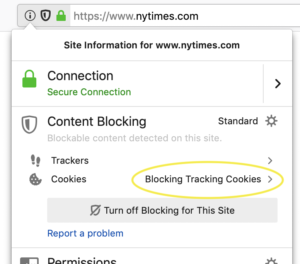
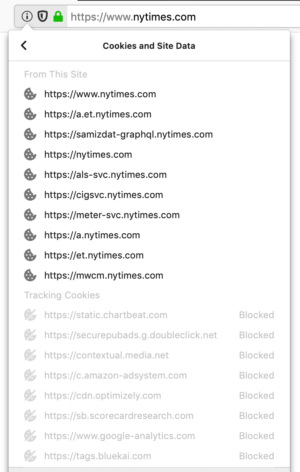
If you want to turn off blocking for a specific site, click on the Turn off Blocking for this Site button.
Protecting users’ privacy beyond tracking cookies
Cookies are not the only entities that follow you around on the web, trying to use what’s yours without your knowledge or consent. Cryptominers, for example, access your computer’s CPU, ultimately slowing it down and draining your battery, in order to generate cryptocurrency — not for yours but someone else’s benefit. We introduced the option to block cryptominers in previous versions of Firefox Nightly and Beta and are including it in the ‘Standard Mode‘ of your Content Blocking preferences as of today.
Another type of script that you may not want to run in your browser are Fingerprinting scripts. They harvest a snapshot of your computer’s configuration when you visit a website. The snapshot can then also be used to track you across the web, an issue that has been present for years. To get
Ah, AppleScript. I can't be the only person who's thinking Apple plans to replace AppleScript with Swift because it's not new and sexy anymore. And it certainly has its many rough edges and Apple really hasn't done much to improve this, which are clear signs it's headed for a room-temperature feet-first exit.
But, hey! If you're using TenFourFox, you're immune to Apple's latest self-stimulatory bright ideas. And while I'm trying to make progress on TenFourFox's various deficiencies, you still have the power to make sites work the way you want thanks to TenFourFox's AppleScript-to-JavaScript "bridge." The bridge lets you run JavaScript within the page and sample or expose data back to AppleScript. With AppleScript's other great powers, like even running arbitrary shell scripts, you can connect TenFourFox to anything else on the other end with AppleScript.
Here's a trivial example. Go to any Github wiki page, like, I dunno, the one for TenFourFox's AppleScript support. If there's a link there for more wiki entries, go ahead and click on it. It doesn't work (because of issue 521). Let's fix that!
You can either cut and paste the below examples directly into Script Editor and click the Run button to run them, or you can cut and paste them into a text file and run them from the command line with osascript filename, or you can be a totally lazy git and just download them from SourceForge. Unzip them and double click the file to open them in Script Editor.
In the below examples, change TenFourFoxWhatever to the name of your TenFourFox executable (TenFourFoxG5, etc.). Every line highlighted in the same colour is a continuous line. Don't forget the double quotes!
Here's the script for Github's wiki.
Now, have the current tab on any Github wiki page. Run the script. Poof! More links! (If you run it on a page that isn't Github, it will give you an error box.)
Most of you didn't care about that. Some of you use your Power Macs for extremely serious business like YouTube videos. I ain't judging. Let me help you get rid of the crap, starting with Weird Al's anthem to alumin(i)um foil.

With comments in the five figures from every egoist fruitbat on the interwebs with an opinion on Weird Al, that's gonna take your poor Power Mac a while to process. Plus all those suggested videos! Let's make those go away!