After welcoming more than 30,000 visitors in Berlin, New York, and London, The Glass Room is coming to San Francisco on October 16, 2019.
From the tech boom to techlash, our favorite technologies have become intertwined with our daily lives. As technology is embedded in everything from dating to driving and from the environment to elections, our desire for convenience has given way to trade-offs for our privacy, security, and wellbeing.
The Glass Room, curated by Tactical Tech and produced by Firefox, is a place to explore how technology and data are shaping our perceptions, experiences, and understanding of the world. The most connected generation in history is also the most exposed, as people’s privacy becomes the fuel for technology’s incredible growth. What’s gained and lost — and who decides — are explored at the Glass Room.
The Glass Room is in a 28,000 square-foot former retail store, located at 838 Market Street, across from Westfield San Francisco Centre, in the heart of the Union Square Retail District. It will be open to the public from October 16th through November 3rd. The location is intentional, meant to entice shoppers into the store and help them leave better equipped to make informed choices about technology and how it impacts their personal data, privacy, and security.
The Glass Room is a pop-up store with a twist, presenting more than 50 provocative tech products in an unexpected environment. This installment arrives in San Francisco to turn a mirror on Silicon Valley, to the people who make our technologies and those who are affected by its impact on society. “The biggest change since we launched The Glass Room in New York in 2016 and in London in 2017 is that the overall mood of tech users and consumers has shifted,” says Stephanie Hankey, of Tactical Tech. “People are starting to question how things work, how it affects them and what they can do about it. The Glass Room is a great way for users of technology to engage on a deeper level and make more informed choices. Each piece in The Glass Room tells a different story about data and technology, so there is something for everyone to connect with.”

This interactive public exhibit also includes a Data Detox Bar, where a team of in-house experts called Ingeniuses will dispense practical tips, tricks, and advice. There will also be a program of talks and workshops to foster debate, discussion, and solution-finding.
“We build the family of Firefox products to help people take charge of their data online, and give them control with features and tools that put privacy first,” says Mary Ellen Muckerman, Vice President of Brand Engagement. “We know it’s our job to help people understand what’s happening behind the scenes of the technology they love and we hope that events like The Glass Room help inform people about how to protect themselves online.”
At this turning point in the age of wider technological advancement, The Glass Room marks a moment to reflect on what our next steps should be. How do we want to shape our relationship with technology in the future?
More Details
October 16th – November 3rd 2019
838 Market Street, San Francisco
12pm–8pm daily
Free and open to the public
theglassroom.org
The post Firefox and Tactical Tech Bring The Glass Room to San Francisco appeared first on The Mozilla Blog.
This is a guest post by Jane Doe, a security professional who was asked to do a security review of PfP: Pain-free Passwords. While publishing the results under her real name would have been preferable, Jane has good reasons to avoid producing content under her own name.
I reviewed the code of the Pain-free Passwords extension. It’s a stateless password manager that generates new passwords based on your master password, meaning that you don’t have to back your password database up (although, you also can import your old passwords, which do need backing up). For this kind of password managers, the most sensitive part is the password generation algorithm. Other possibly vulnerable components include those common for all password managers: autofill, storage and cloud sync.
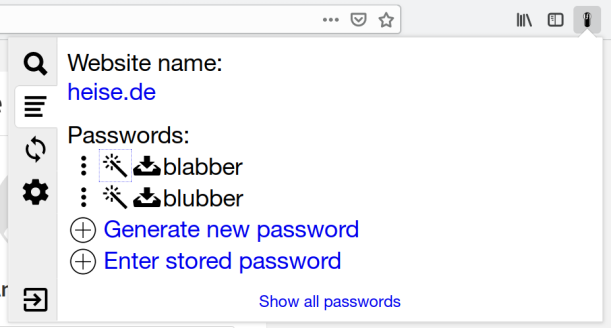
Password generation
Passwords generated by a password manager have to be unpredictable. For a stateless password manager, there’s another important requirement: it should be impossible to derive the master password back from one of the generated passwords.
PfP satisfies both requirements. Its password derivation algorithm is basically scrypt(N=32768, r=8, p=1), which is an industry standard for key derivation. It generates a binary key based on your master password, website address you’ll use that password for and your login there. (You can also specify revision, in case your password has been stolen and you need a new one.) PfP then translates the binary key to text, using characters from sets you choose. The translation algorithm is designed in a way to include symbols from each of character sets you choose.
The resulting password is completely random for a person who doesn’t know your master password, so they cannot predict what passwords you will use for other websites. Your master password cannot be computed either, as scrypt is a one-way hash function.
scrypt parameters (here we’re talking about N=32768, r=8, p=1) are explained well in this article. It is recommended to use such parameters that key derivation time on the author’s computer will be around 100ms (for cases where the key is used immediately, like in PfP). I run the test on my computer and found out that my computer derives a key in 158ms (average) with the parameters PfP uses, which means it is secure enough.
With this setup, the only attack possible would be brute-forcing the master password, i. e. trying to reverse the one-way hash function, which is prohibitively expensive and time-consuming (we’re talking about tens of years running very expensive computers here). So it’s highly unlikely someone would even try, a much more efficient method would be to install a keylogger on the victim’s computer.
AutoFill
PfP does a good job making sure a password for a specific website can only be filled on that website. I wasn’t able to trick it into autofilling password for one website on another.
But I have discovered a couple of non-security bugs. One of them caused autofill to fail in iframes in Chrome, the other one caused PfP to wait for the submit to appear forever, running code in an endless loop.
Storage
PfP uses the API browsers provide to extensions to store passwords (localStorage for the online version). It encrypts everything using AES256-GCM, using a 256-bit encryption key being derived from your master password and salt. Salt is a random 16-byte value stored together with the encrypted data. It is needed to protect you from rainbow table attacks.
Another thing important for encryption is using random initialization vectors. PfP generates 12 random bytes and stores them concatenated with the ciphertexts.
PfP uses HMAC-SHA256 digests for database keys. It needs the keys for retrieving encrypted data to be deterministic, so it cannot use random values. Just SHA256 hashes can be broken (the passwords could be computed based on them in that case), while using scrypt for each action involving storage is expensive performance-wise. With a random HMAC secret being stored encrypted (with a preset database key), it is completely impossible to calculate the password info only having a HMAC digest.
As wih password generation, there’s one way to break such encryption: brute force, which isn’t viable.
Cloud sync
PfP allows storing data in Dropbox, Google Drive or remoteStorage. It uses the same encryption model as in local storage with clouds. (Salt value has to be the same across all synced instances, so when a new PfP instance connects to a non-empty cloud storage, it re-encrypts local data to
As the internet has become more and more centralized, more opportunity for anticompetitive gatekeeping behavior has arisen. Yet competition and antitrust law have struggled to keep up, and all around the world, governments are reviewing their legal frameworks to consider what they can do.
Today, Mozilla released a working paper discussing the unique characteristics of digital platforms in the context of competition and offer a new framework to approach future-proof competition policy for the internet. Charting a course focused on a set of proposals distinct from both the status quo and pure structural reform, this paper proposes stronger single-firm conduct enforcement to capture a modern set of harmful gatekeeping behaviors by powerful firms; tougher merger review, particularly for vertical mergers, to weigh the full spectrum of potential competitive harm; and faster agency processes that can be responsive within the rapid market cycles of tech. And across all competition policy making and enforcement, this paper proposes that standards and interoperability be at the center.
The internet’s unique formula for innovation and productive disruption depends on market entry and growth, put at risk as centralized access to data and networks become more and more of an insurmountable advantage. But we can see a light at the end of the silo, if legislators and competition authorities embrace their duty to internet users and modernize their legal and policy frameworks to respond to today’s challenges and to protect the core of what has made the internet such a powerful engine for socioeconomic benefit.
The post Charting a new course for tech competition appeared first on Open Policy & Advocacy.
https://blog.mozilla.org/netpolicy/2019/09/26/charting-a-new-course-for-tech-competition/
The Rust team is happy to announce a new version of Rust, 1.38.0. Rust is a programming language that is empowering everyone to build reliable and efficient software.
If you have a previous version of Rust installed via rustup, getting Rust 1.38.0 is as easy as:
rustup update stable
If you don't have it already, you can get rustup from the appropriate page on our website.
What's in 1.38.0 stable
The highlight of this release is pipelined compilation.
Pipelined compilation
To compile a crate, the compiler doesn't need the dependencies to be fully built. Instead, it just needs their "metadata" (i.e. the list of types, dependencies, exports...). This metadata is produced early in the compilation process. Starting with Rust 1.38.0, Cargo will take advantage of this by automatically starting to build dependent crates as soon as metadata is ready.
While the change doesn't have any effect on builds for a single crate, during testing we got reports of 10-20% compilation speed increases for optimized, clean builds of some crate graphs. Other ones did not improve much, and the speedup depends on the hardware running the build, so your mileage might vary. No code changes are needed to benefit from this.
Linting some incorrect uses of mem::{uninitialized, zeroed}
As previously announced, std::mem::uninitialized is essentially impossible to use safely. Instead, MaybeUninit should be used.
We have not yet deprecated mem::uninitialized; this will be done in a future release. Starting in 1.38.0, however, rustc will provide a lint for a narrow class of incorrect initializations using mem::uninitialized or mem::zeroed.
It is undefined behavior for some types, such as &T and Box, to ever contain an all-0 bit pattern, because they represent pointer-like objects that cannot be null. It is therefore an error to use mem::uninitialized or mem::zeroed to initialize one of these types, so the new lint will attempt to warn whenever one of those functions is used to initialize one of them, either directly or as a member of a larger struct. The check is recursive, so the following code will emit a warning:
struct Wrap(T);
struct Outer(Wrap>>>);
struct CannotBeZero {
    outer: Outer,
    foo: i32,
    bar: f32
}

...

let bad_value: CannotBeZero = unsafe { std::mem::uninitialized() };
Astute readers may note that Rust has more types that cannot be zero, notably NonNull and NonZero. For now, initialization of these structs with mem::uninitialized or mem::zeroed is not linted against.
These checks do not cover all cases of unsound use of mem::uninitialized or mem::zeroed, they merely help identify code that is definitely wrong. All code should still be moved to use MaybeUninit instead.
#[deprecated] macros
The #[deprecated] attribute, first introduced in Rust 1.9.0, allows crate authors to notify their users an item of their crate is deprecated and will be removed in a future release. Rust 1.38.0 extends the attribute, allowing it to be applied to macros as well.
std::any::type_name
For debugging, it is sometimes useful to get the name of a type. For instance, in generic code, you may want to see, at run-time, what concrete types a function's type parameters has been instantiated with. This can now be done using std::any::type_name:
fn gen_value() -> T {
    println!("Initializing an instance of {}", std::any::type_name::());
Hello Mozillians,
We are happy to let you know that Friday, September 27th, we are organizing Firefox 70 Beta 10 Testday. We’ll be focusing our testing on: Password Manager.
Check out the detailed instructions via this gdoc.
*Note that this events are no longer held on etherpad docs since public.etherpad-mozilla.org was disabled.
No previous testing experience is required, so feel free to join us on #qa IRC channel where our moderators will offer you guidance and answer your questions.
Join us and help us make Firefox better!
See you on Friday!
https://quality.mozilla.org/2019/09/firefox-70-beta-10-testday-september-27th/
 In July we launched the Recommended Extensions program, which entailed a complete reboot of our editorial process on addons.mozilla.org (AMO). Previously we placed a priority on regularly featuring new extensions to explore. With the Recommended program, we’ve shifted our focus to editorially vetting and monitoring a fairly fixed collection of high-quality extensions.
For years community contributors on the Featured Extensions Board played a big role in selecting AMO’s monthly curated content. We intend to maintain a community project aligned with the new Recommended program. We’re in the process now of reshaping the project to be known as the Recommended Extensions Community Board. As before, the board will be comprised of contributors who possess a keen passion for, and expertise of, browser extensions. Board membership will rotate every six months.
The add-ons team is currently assembling the first Recommended Extensions Community Board. To help shape the foundation of this project, we’re aiming to fill the debut board with some of our most prolific past editorial contributors. In general, the Recommended Extensions Community Board will focus on:
- Ongoing evaluation of current Recommended extensions. All Recommended extensions are under active development. As such, contributors will participate in ongoing re-evaluations to ensure the curated list maintains a high overall quality standard.
- Evaluating new submissions. As mentioned above, we do not anticipate significant amounts of churn on the Recommended list. That said, Firefox users want the latest and greatest extensions available, so the board will also play a role in evaluating new candidate submissions.
- Special projects. Each board will also focus on a special project or two. For instance, we may closely examine a specific type of content within the Recommended list (e.g. let’s look at all of the Recommended bookmark managers; is this the strongest collection of bookmark managers we can compile?)
Future boards (rotating every six months) will have an open enrollment process. When the time arrives to form the next board, we’ll post information on the application process here on this blog and our other communication channels.
If you are interested in exploring the current curated list, here are all Recommended extensions.
The post Community Involvement in Recommended Extensions appeared first on Mozilla Add-ons Blog.
https://blog.mozilla.org/addons/2019/09/25/recommended-extensions-community-involvement/
Your password is your first line of defense against hackers and unauthorized access to your accounts. The strength of your passwords directly impacts your online security. Combine unrelated words to … Read more
The post How to create strong passwords appeared first on The Firefox Frontier.
https://blog.mozilla.org/firefox/how-to-create-strong-passwords/
In April last year, Mozilla introduced Hubs, an immersive social experience that brings users together in shared 3D spaces. Hubs runs in the browser on mobile, desktop, and virtual reality devices. Since its initial release, the platform has undergone extensive development work to better enable communities and creators to embrace the opportunities that online collaborative environments have to offer. As a result, we’ve seen increased adoption of Hubs and new use cases have emerged.
The ability to connect to anyone around the world is a powerful tool available to us through the internet. As we look at advancements in mixed reality like the WebXR API, we are able to explore ways to feel more present with others through technology. One area where virtual reality shows considerable promise is in supporting distributed teams.
Mozilla is no stranger to remote collaboration. 46% of our employees work from home and the ten company offices span seven countries across six time zones. Because of this, we’re excited about finding opportunities to improve the ways we connect with our community of contributors and volunteers. Remote work and collaboration is a core part of how we connect to each other through the web.

Communication and Identity
Hubs is built on top of WebRTC and supports real-time conversations between users in a shared environment. Users embody 3D models in the glTF format called avatars, which they can control via WASD keys or through the application’s teleportation controls. Because these avatars ground users in a shared space, people can interact naturally. Spatial audio means that you can break off into small groups and have conversations that broadcast your voice based on your position near others in the room. Similarly, supporting both spoken and text chat between users allows for multiple forms of communication. This can provide more equitable participation compared to other online conferencing platforms.
Video conversations can be powerful forms of communication between trusted parties, but there are some times that you don’t want to share a video stream to a group of people. Establishing trust with other people online takes time. With Hubs, preserving privacy is integral to the platform’s shared 3D spaces. This applies to how you look in Hubs, too. Over the past few months, the Hubs team has released a set of customization capabilities for avatars. These allow creators and users to find more ways to represent themselves within the rooms they participate in. Avatars can be easily modified and customized by users on the Hubs website or with 3D modeling tools. Offering flexible options for a user’s identity within an online social platform is a core component of online safety, which you can read more about in the Mozilla Reality blog post here.
Customization and Collaboration
In addition to new avatar features, we also launched an online 3D editor called Spoke. Spoke can be used to create scenes for Hubs rooms. This allows users to compose spaces using 3D models and traditional web content like videos, images, gifs, and PDFs. Spoke environments can truly transform a space and make it a unique place for communities and organizations to meet. Scenes can also be listed as remixable. Other Hubs users can then use these scenes as templates for their own content. In the coming weeks, we’ll also add the ability to create themed kits for
‘Stealing Ur Feelings‘ uses dark humor to expose how Snapchat, Instagram, and Facebook can use AI to profit off users’ faces and emotions
An augmented reality film revealing how the most popular apps can use facial emotion recognition technology to make decisions about your life, promote inequalities, and even destabilize democracy makes its worldwide debut on the web today. Using the same AI technology described in corporate patents, “Stealing Ur Feelings,” by Noah Levenson, learns the viewers’ deepest secrets just by analyzing their faces as they watch the film in real-time.
Watch https://stealingurfeelin.gs/

Viewer scorecard from ‘Stealing Ur Feelings’
The six-minute documentary explains the science of facial emotion recognition technology and demystifies how the software picks out features like your eyes and mouth to understand if you’re happy, sad, angry, or disgusted. While it is not confirmed whether big tech companies have started using this AI, “Stealing Ur Feelings” explores its potential applications, including a Snapchat patent titled “Determining a mood for a group.” The diagrams from the patent show Snapchat using smartphone cameras to analyze and rate users’ expressions and emotions at concerts, debates, and even a parade.
The documentary was made possible through a $50,000 Creative Media Award from Mozilla. The Creative Media Awards reflect Mozilla’s commitment to partner with artists to engage the public in exploring and understanding complex technical issues, such as the potential pitfalls of AI in dating apps (Monster Match) and the hiring process (Survival of the Best Fit).
“Stealing Ur Feelings” is debuting online alongside a petition from Mozilla to Snapchat. Viewers are asked to smile at the camera at the end of the film if they would like to sign a petition demanding Snapchat to publicly disclose whether or not it is already using facial emotion recognition technology in its app. Once the camera detects a smile, the viewer is taken to a Mozilla petition, which they can read and sign.
The documentary also generates a downloadable scorecard featuring a photo of the viewer with Snapchat-like filters and lenses. The unique image reveals some tongue-in-cheek assumptions that the AI makes about the viewer while watching the film. These include the viewer’s IQ, annual income, and how much they like pizza and Kanye West.
“Stealing Ur Feelings” has screened at several distinguished film festivals and exhibits in recent months, including the Tribeca Film Festival, Open City Documentary Festival, Camden International Film Festival, and the Tate Modern. Later this year, the film will screen at Tactical Tech’s Glass Room installation in San Francisco. The film has already been inducted into MIT’s prestigious docubase and praised by the Museum of the Moving Image.
“Facial recognition is the perfect tool to extract even more data from us, all the time, everywhere — even when we’re not scrolling, typing, or clicking,” said Noah Levenson, the New York-based artist and engineer who created “Stealing Ur Feelings. “Set against the backdrop of
If you build Firefox on 64-bit Linux, *BSD, etc. for your G5, you may want to check out this Talospace article for an upcoming low-level fix especially as we need to ensure big-endian systems work fine with it. The problem never affected OS X Firefox for Power Macs because those builds were only ever 32-bit, and even TenFourFox is 32-bit through and through even on the G5 largely for reasons of Carbon compatibility which we need for some pieces of the widget code. Since this is syndicated on Planet Mozilla let me give a big thanks to Ted Campbell for figuring out the root cause, which turned out to be a long-standing problem I don't think anyone ever noticed before.
I have not decided what to land on TenFourFox FPR17 mostly because this fix took up a fair bit of time; it's possible FPR17 may be a security-only stopgap release. In a related vein, the recent shift to a 4-week cadence for future Firefox releases starting in January will unfortunately increase my workload and may change how I choose to roll out additional features generally. Build day on the G5 is, in fact, literally a day or sometimes close to two (with the G5 in Reduced performance to cut down on fan noise and power consumption it takes about 20 hours to generate all four CPU-optimized releases, plus another 6 hours to regenerate the debug build for development testing; if there are JavaScript changes, I usually kick off a round each on the debug, G4/7450 and G5 builds through the 20,000+ item test suite and this adds another ten hours). Although the build and test process is about 2/3rds automated, it still needs intervention if it goes awry; plus, uploading to SourceForge is currently a manual process, and of course the documentation doesn't write itself. I don't have any easy means of cross-building TenFourFox on the Talos II (which, by the way, with dual 4-core CPUs for 32 threads builds Firefox in about half an hour), so I need to figure out how to balance this additional time requirement with the time I personally have available. While I do intend to continue supporting TenFourFox for those occasions I need to use a Power Mac, this Talos II is undeniably my daily driver, and fixing bugs in the mainline Firefox build I use every day is unavoidably a higher priority.
http://tenfourfox.blogspot.com/2019/09/a-quick-note-for-64-bit-powerpc-firefox.html
Adding third-party embedded widgets on a website is a common but potentially dangerous practice. Thankfully, the web platform offers a few controls that can help mitigate the risks. While this post uses the example of an embedded SurveyMonkey survey, the principles can be used for all kinds of other widgets.
Note that this is by no means an endorsement of SurveyMonkey's proprietary service. If you are looking for a survey product, you should consider a free and open source alternative like LimeSurvey.
SurveyMonkey's snippet
In order to embed a survey on your website, the SurveyMonkey interface will tell you to install the following website collector script:
 Create your own user feedback
survey
which can be rewritten in a more understandable form as:
(
function (s) {
  var scripts, last_script, new_script;
  window.SMCX = window.SMCX || [],
  document.getElementById("smcx-sdk") ||
    (
      scripts = document.getElementsByTagName("script"),
      last_script = scripts[scripts.length - 1],
      new_script = document.createElement("script"),
      new_script.type = "text/javascript",
      new_script.async = true,
      new_script.id = "smcx-sdk",
      new_script.src =
        [
          "https:" === location.protocol ? "https://" : "http://",
          "widget.surveymonkey.com/collect/website/js/tRaiETqnLgj758hTBazgd9NxKf_2BhnTfDFrN34n_2BjT1Kk0sqrObugJL8ZXdb_2BaREa.js"
        ].join(""),
      last_script.parentNode.insertBefore(new_script, last_script)
    )
  }
)();
The fact that this adds a third-party script dependency to your website is problematic because it means that a security vulnerability in their infrastructure could lead to a complete compromise of your site, thanks to third-party scripts having full control over your website. Security issues aside though, this could also enable this third-party to violate your users' privacy expectations and extract any information displayed on your site for marketing purposes.
However, if you embed the snippet on a test page and inspect it with the developer tools, you will find that it actually creates an iframe:
and you can use that directly on your site without having to load their script.
Mixed content anti-pattern
As an aside, the script snippet they propose makes use of a common front-end anti-pattern:
"https:"===location.protocol?"https://":"http://"
This is presumably meant to avoid inserting an HTTP script element into an HTTPS page, since that would be considered mixed content and get blocked by browsers, however this is entirely unnecessary. One should only ever use the HTTPS version of such scripts anyways since an HTTP page never prohibits embedding HTTPS content.
In other words, the above code snippet can be simplified to:
"https://"
Restricting iframes
Thanks to defenses which have been added to the web platform recently, there are a few things that can be done to constrain iframes.
Firstly, you can choose to hide your full page URL from SurveyMonkey using the referrer policy:
referrerpolicy="strict-origin"
This mean seem harmless, but page URLs sometimes include sensitive
information in the URL path or query string, for example, search terms that
a user might have typed. The strict-origin policy will limit the referrer
to your site's hostname, port and protocol.
Secondly, you can prevent the iframe from being able to access anything about its embedding page or to trigger popups and unwanted downloads using the sandbox attribute:
sandbox="allow-scripts allow-forms"
Ideally, the contents of this attribute would be empty so that all restrictions would be active, but SurveyMonkey is a JavaScript application and it of course needs to submit a form since that's the purpose of
Please note some of the information provided in this report may be subject to change as we are sometimes sharing information about projects that are still in early stages and are not final yet.
Welcome!
New localizers
- MD. Shayanul Haq Sadi of Bengali
- Maharaj Brahma, Sanjawrang Ramchiary, Bigrai Basumatary from Bodo locale
Are you a locale leader and want us to include new members in our upcoming reports? Contact us!
New community/locales added
- Bodo locale was recently enabled on Pontoon. Welcome new l10n team!
- Bengali locales merged in September (bn-IN and bn-BD).
New content and projects
What’s new or coming up in Firefox desktop
As anticipated in the previous edition of the L10N Report, Firefox 70 is going to be a large release, introducing new features and several improvements around Tracking Protection, privacy and security. The deadline to ship any updates in Firefox 70 is October 8. Make sure to test your localization before the deadline, focusing on:
- about:protections
- about:logins
- Privacy preferences and protection panel (the panel displayed when you click on the shield icon in the address bar)
Be also mindful of a few last-minute changes that were introduced in Beta to allow for better localization.
If your localization is missing several strings and you don’t know where to start from, don’t forget that you can use Tags in Pontoon to focus on high priority content first (example).
Upcoming changes to the release cycle
The current version of the rapid release cycle allows for cycles of different length, ranging from 6 to 8 weeks. Over two years ago we moved to localize Nightly by default. Assuming an average 6-weeks cycle for the sake of simplicity:
- New strings are available for localization a few days after landing in mozilla-central and showing up in Nightly (they spend some time in a quarantine repository, to avoid exposing localizers to unclear content).
- Depending on when a string lands within the cycle, you’d have up to 6 weeks to localize before it moves to Beta. In the worst case scenario, a string could land at the very end of the cycle, and will need to be translated after that version of Firefox moves to Beta.
- Once it moves to Beta, you still have almost the full cycle (4.5 weeks) to localize. Ideally, this time should be spent to fine tune and test the localization, more than catching up with missing strings.
A few days ago it was announced that Firefox is progressively moving to a 4-weeks release cycle. If you’re focusing your localization on Nightly, this should have a relatively small impact on your work:
- In Nightly, you’d have up to 4 weeks to localize content before i moves to Beta.
- In Beta, you’d have up to 2.5 weeks to localize.
The cycles will shorten progressively, stabilizing to 4 weeks around April 2020. Firefox 75 will be the first one with a 4-weeks cycle in both Nightly and Beta.

While this shortens the time available for localization, it also means that the schedule becomes predictable and, more importantly, localization updates can ship faster: if you fix something in Beta today, it could take up to 8 weeks
What is it?
Markus is a Python library for generating metrics.
Markus makes it easier to generate metrics in your program by:
- providing multiple backends (Datadog statsd, statsd, logging, logging roll-up, and so on) for sending metrics data to different places
- sending metrics to multiple backends at the same time
- providing a testing framework for easy metrics generation testing
- providing a decoupled architecture making it easier to write code to generate metrics without having to worry about making sure creating and configuring a metrics client has been done--similar to the Python logging module in this way
We use it at Mozilla on many projects.
v2.0.0 released!
I released v2.0.0 just now. Changes:
Features
- Use time.perf_counter() if available. Thank you, Mike! (#34)
- Support Python 3.7 officially.
- Add filters for adjusting and dropping metrics getting emitted. See documentation for more details. (#40)
Backwards incompatible changes
tags now defaults to [] instead of None which may affect some expected test output.
Adjust internals to run .emit() on backends. If you wrote your own backend, you may need to adjust it.
Drop support for Python 3.4. (#39)
Drop support for Python 2.7.
If you're still using Python 2.7, you'll need to pin to <2.0.0. (#42)
Bug fixes
- Document feature support in backends. (#47)
- Fix MetricsMock.has_record() example. Thank you, John!
Where to go for more
Changes for this release: https://markus.readthedocs.io/en/latest/history.html#september-19th-2019
Documentation and quickstart here: https://markus.readthedocs.io/en/latest/index.html
Source code and issue tracker here: https://github.com/willkg/markus
Let me know whether this helps you!
On September 30th breaking changes will be deployed to the docs.rs build environment. docs.rs is a free service building and hosting documentation for all the crates published on crates.io. It's open source, maintained by the Rustdoc team and operated by the Infrastructure team.
What will change
Builds will be executed inside the rustops/crates-build-env Docker image. That image contains a lot of system dependencies installed to ensure we can build as many crates as possible. It's already used by Crater, and we added all the dependencies previously installed in the legacy build environment.
To ensure we can continue operating the service in the future and to increase its reliability we also improved the sandbox the builds are executed in, adding new limits:
- Each platform will now have 15 minutes to build its dependencies and documentation.
- 3 GB of RAM will be available for the build.
- Network access will be disabled (crates.io dependencies will still be fetched).
- Only the
target/directory will be writable, and it will be purged after each build.
Finally, docs.rs will now use the latest nightly available when building crates, instead of using a manually updated pinned version of nightly.
How to prepare for the changes
To test if your crate builds inside the new environment you can download the Docker image locally and execute a shell inside it:
docker pull rustops/crates-build-env
docker run --rm --memory 3221225472 -it rustops/crates-build-env bash
Once you're in a shell you can install rustup (it's not installed by default in the image), install Rust nightly, clone your crate's repository and then build the documentation:
cargo fetch
time cargo doc --no-deps
To aid your testing these commands will limit the available RAM to 3 GB and
show the total execution time of cargo doc, but network access will not be
blocked as you'll need to fetch dependencies.
If your project needs a system dependency missing in the build environment, please open an issue on the Docker image's repository and we'll consider adding it.
If your crate fails to build because it took more than 15 minutes to generate its docs or it uses more than 3 GB of RAM please open an issue and we will consider reasonable limit increases for your crate. We will not enable network access for your crate though: you'll need to change your crate not to require any external resource at build time.
We recommend using Cargo features to remove the parts of the code causing build failures, enabling those features with docs.rs metadata.
Acknowledgements
The new build environment is based on Rustwide, the library powering Crater. It was extracted from the Crater codebase, and created both by the Crater contributors and the Rustwide contributors.
The implementation work on the docs.rs side was done by Pietro Albini and Onur Aslan, with
This article is cross-posted from Mozilla Hacks
Overview
We typically ship a major Firefox browser (Desktop and Android) release every 6 to 8 weeks. Building and releasing a browser is complicated and involves many players. To optimize the process, and make it more reliable for all users, over the years we’ve developed a phased release strategy that includes ‘pre-release’ channels: Firefox Nightly, Beta, and Developer Edition. With this approach, we can test and stabilize new features before delivering them to the majority of Firefox users via general release.
Today’s announcement
And today we’re excited to announce that we’re moving to a four-week release cycle! We’re adjusting our cadence to increase our agility, and bring you new features more quickly. In recent quarters, we’ve had many requests to take features to market sooner. Feature teams are increasingly working in sprints that align better with shorter release cycles. Considering these factors, it is time we changed our release cadence.
Starting Q1 2020, we plan to ship a major Firefox release every 4 weeks. Firefox ESR release cadence (Extended Support Release for the enterprise) will remain the same. In the years to come, we anticipate a major ESR release every 12 months with 3 months support overlap between new ESR and end-of-life of previous ESR. The next two major ESR releases will be ~June 2020 and ~June 2021.
Shorter release cycles provide greater flexibility to support product planning and priority changes due to business or market requirements. With four-week cycles, we can be more agile and ship features faster, while applying the same rigor and due diligence needed for a high-quality and stable release. Also, we put new features and implementation of new Web APIs into the hands of developers more quickly. (This is what we’ve been doing recently with CSS spec implementations and updates, for instance.)
In order to maintain quality and minimize risk in a shortened cycle, we must:
- Ensure Firefox engineering productivity is not negatively impacted.
- Speed up the regression feedback loop from rollout to detection to resolution.
- Be able to control feature rollout based on release readiness.
- Ensure adequate testing of larger features that span multiple release cycles.
- Have clear, consistent mitigation and decision processes.
Firefox rollouts and feature experiments
Given a shorter Beta cycle, support for our pre-release channel users is essential, including developers using Firefox Beta or Developer Edition. We intend to roll out fixes to them as quickly as possible. Today, we produce two Beta builds per week. Going forward, we will move to more frequent Beta builds, similar to what we have today in Firefox Nightly.
Staged rollouts of features will be a continued best practice. This approach helps minimize unexpected (quality, stability or performance) disruptions to our release end-users. For instance, if a feature is deemed high-risk, we will plan for slow rollout to end-users and turn the feature off dynamically if needed.
We will continue to foster a culture of feature experimentation and A/B testing before rollout to release. Currently, the duration of experiments is not tied to a release cycle length and therefore not impacted by this change. In fact, experiment length is predominantly a factor of time needed for user enrollment, time to trigger the study or experiment and collect the necessary data, followed by data analysis needed to make a go/no-go decision.
Despite the shorter release cycles, we will do our best to localize all new strings in all locales supported by Firefox. We value our end-users from all across the globe. And we will continue to delight you with localized versions of Firefox.
Firefox release schedule 2019 – 2020
Firefox engineering will deploy this change gradually, starting with Firefox 71. We aim to achieve 4-week release cadence by Q1 2020. The table below lists Firefox versions and planned launch dates. Note: These are subject to change due to business reasons.
You saw the news alert. You got an email, either from Firefox Monitor or a company where you have an account. There’s been a security incident — a data breach. … Read more
The post What to do after a data breach appeared first on The Firefox Frontier.
https://blog.mozilla.org/firefox/what-to-do-after-a-data-breach/
Editor’s Note: Wednesday, 10:40am PT. We’ve updated this post with the following correction: The SeaMonkey Project consumes Firefox releases, not SpiderMonkey, which is Firefox’s JavaScript engine. Thanks to an astute reader for noticing.
Overview
We typically ship a major Firefox browser (Desktop and Android) release every 6 to 8 weeks. Building and releasing a browser is complicated and involves many players. To optimize the process, and make it more reliable for all users, over the years we’ve developed a phased release strategy that includes ‘pre-release’ channels: Firefox Nightly, Beta, and Developer Edition. With this approach, we can test and stabilize new features before delivering them to the majority of Firefox users via general release.
Today’s announcement
And today we’re excited to announce that we’re moving to a four-week release cycle! We’re adjusting our cadence to increase our agility, and bring you new features more quickly. In recent quarters, we’ve had many requests to take features to market sooner. Feature teams are increasingly working in sprints that align better with shorter release cycles. Considering these factors, it is time we changed our release cadence.
Starting Q1 2020, we plan to ship a major Firefox release every 4 weeks. Firefox ESR release cadence (Extended Support Release for the enterprise) will remain the same. In the years to come, we anticipate a major ESR release every 12 months with 3 months support overlap between new ESR and end-of-life of previous ESR. The next two major ESR releases will be ~June 2020 and ~June 2021.
Shorter release cycles provide greater flexibility to support product planning and priority changes due to business or market requirements. With four-week cycles, we can be more agile and ship features faster, while applying the same rigor and due diligence needed for a high-quality and stable release. Also, we put new features and implementation of new Web APIs into the hands of developers more quickly. (This is what we’ve been doing recently with CSS spec implementations and updates, for instance.)
In order to maintain quality and minimize risk in a shortened cycle, we must:
- Ensure Firefox engineering productivity is not negatively impacted.
- Speed up the regression feedback loop from rollout to detection to resolution.
- Be able to control feature rollout based on release readiness.
- Ensure adequate testing of larger features that span multiple release cycles.
- Have clear, consistent mitigation and decision processes.
Firefox rollouts and feature experiments
Given a shorter Beta cycle, support for our pre-release channel users is essential, including developers using Firefox Beta or Developer Edition. We intend to roll out fixes to them as quickly as possible. Today, we produce two Beta builds per week. Going forward, we will move to more frequent Beta builds, similar to what we have today in Firefox Nightly.
Staged rollouts of features will be a continued best practice. This approach helps minimize unexpected (quality, stability or performance) disruptions to our release end-users. For instance, if a feature is deemed high-risk, we will plan for slow rollout to end-users and turn the feature off dynamically if needed.
We will continue to foster a culture of feature experimentation and A/B testing before rollout to release. Currently, the duration of experiments is not tied to a release cycle length and therefore not impacted by this change. In fact, experiment length is predominantly a factor of time needed for user enrollment, time to trigger the study or experiment and collect the necessary data, followed by data analysis needed to make a go/no-go decision.
Despite the shorter release cycles, we will do our best to localize all new strings in all locales supported by Firefox. We value our end-users from all across the globe. And we will continue to delight you with localized versions of Firefox.
Firefox release schedule 2019 – 2020
Firefox engineering will deploy this change gradually, starting with Firefox 71. We aim to achieve 4-week release cadence by Q1 2020. The table below lists Firefox versions and planned launch dates. Note: These are