Every now and then, my brain clamps on to obscure trivia like this. It takes so much time. “Because the paper beds of banknote presses in 1860 were 14.5 inches by 16.5 inches, a movie industry cartel set a standard for theater projectors based on silent film, and two kilobytes is two kilobytes” is as far back as I have been able to push this, but let’s get started.
In August of 1861, by order of the U.S. Congress and in order to fund the Union’s ongoing war efforts against the treasonous secessionists of the South, the American Banknote Company started printing what were then called “Demand Notes”, but soon widely known as “greenbacks”.
It’s difficult to research anything about the early days of American currency on Wikipedia these days; that space has been thoroughly colonized by the goldbug/sovcit cranks. You wouldn’t notice it from a casual examination, which is of course the plan; that festering rathole is tucked away down in the references, where articles will fold a seemingly innocuous line somewhere into the middle, tagged with an exceptionally dodgy reference. You’ll learn that “the shift from demand notes to treasury notes meant they could no longer be redeemed for gold coins[1]” – which is strictly true! – but if you chase down that footnote you wind up somewhere with a name like “Lincoln’s Treason – Fiat Currency, Maritime Law And The U.S. Treasury’s Conspiracy To Enslave America”, which I promise I am only barely exaggerating about.
It’s not entirely clear if this is a deliberate exercise in coordinated crank-wank or just years of accumulated flotsam from the usual debate-club dead-enders hanging off the starboard side of the Overton window. There’s plenty of idiots out there that aren’t quite useful enough to work the k-cups at the Heritage Institute, and I guess they’re doing something with their time, but the whole thing has a certain sinister elegance to it that the Randroid crowd can’t usually muster. I’ve got my doubts either way, and I honestly don’t care to dive deep enough into that sewer to settle them. Either way, it’s always good to be reminded that the goldbug/randroid/sovcit crank spectrum shares a common ideological klancestor.
Mercifully that is not what I’m here for. I am here because these first Demand Notes, and the Treasury Notes that came afterwards, were – on average, these were imprecise times – 7-3/8” wide by 3-1/4” tall.
I haven’t been able to precisely answer the “why” of that – I believe, but do not know, that that this is because of the size of the specific dimensions of the presses they were printed on. Despite my best efforts I haven’t been able to find the exact model and specifications of that device. I’ve asked the U.S. Congressional Research Service for some help with this, but between them and the Bureau of Engraving and Printing, we haven’t been able to pin it down. From my last correspondence with them:
Unfortunately, we don’t have any materials in the collection identifying the specific presses and their dimension for early currency production. The best we can say is that the presses used to print currency in the 1860s varied in size and model. These presses went by a number of names, including hand presses, flat-bed presses, and spider presses. They also were capable of printing sheets of paper in various sizes. However, the standard size for printing securities and banknotes appears to have been 14.5 inches by 16.5 inches. We hope this bit of information helps.
… which is unfortunate, but it does give us some clarity. A 16.5'' by 14.5'' printing sheet lets you print eight 7-3/8” by 3-1/4'' sheets to size, with a fraction of an inch on either side for trimming.
The answer to that question starts to matter about twenty years later on the heels of the 1880 American Census. Mandated to be performed once a decade, the United States population had grown some 30% since the previous census, and even with enormous effort the final tabulations weren’t finished until 1888, an unacceptable delay.
One of the 1880 Census’ early employees was a man named Herman Hollerith, a recent graduate of the Columbia School of Mines who’d been invited to join the Census efforts early on by one of his professors. The Census was one of the most important social and professional networking exercises of the day, and Hollerith correctly jumped at the opportunity:
The absence of a permanent institution meant the network of individuals with
In Firefox 70 we changed how pixels get to the screen on macOS. This allows us to do less work per frame when only small parts of the screen change. As a result, Firefox 70 drastically reduces the power usage during browsing.
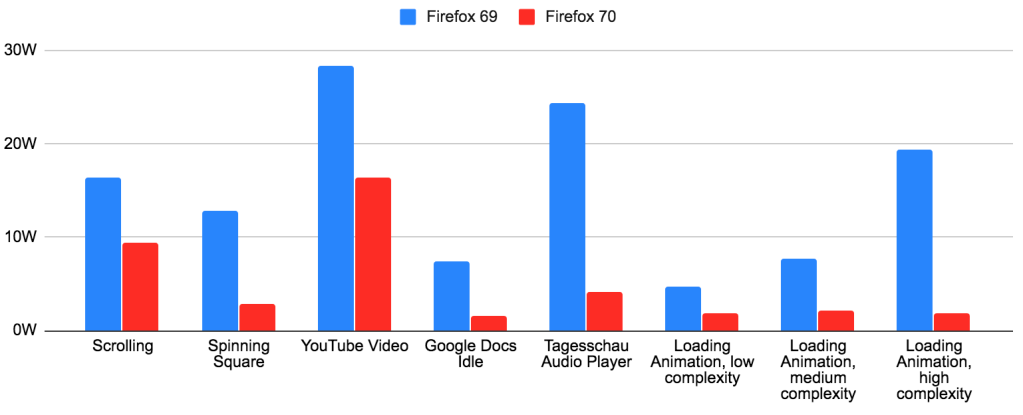
In short, Firefox 70 improves power usage by 3x or more for many use cases. The larger the Firefox window and the smaller the animation, the bigger the difference. Users have reported much longer battery life, cooler machines and less fan spinning.
I’m seeing a huge improvement over here too (2015 13'' MacBook Pro with scaled resolutions on internal display as well as external 4K display). Prior to this update I literally couldn’t use Firefox because it would spin my fans way up and slow down my whole computer. Thank you, I’m very happy to finally see Core Animation being implemented.
Charlie Siegel
After so many years, I have been able to use Firefox on my Mac – I used to test every Firefox release, and nothing had worked in the past.
Vivek Kapoor
I usually try nightly builds every few weeks but end up going back to Edge Chromium or Chrome for speed and lack of heat. This makes my 2015 mbp without a dedicated dGPU become a power sipper compared to earlier builds.
atiensivu
Read on for the technical details behind these changes.
Technical Details
Let’s take a brief look at how the Firefox compositing pipeline works. There are three major steps to getting pixels on the screen:
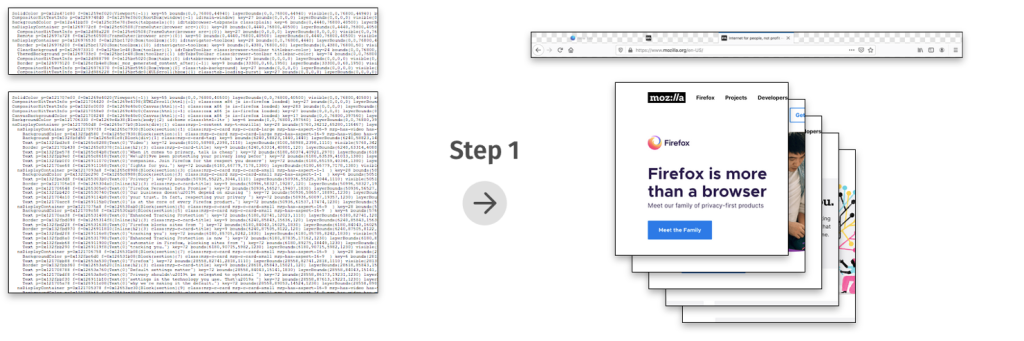

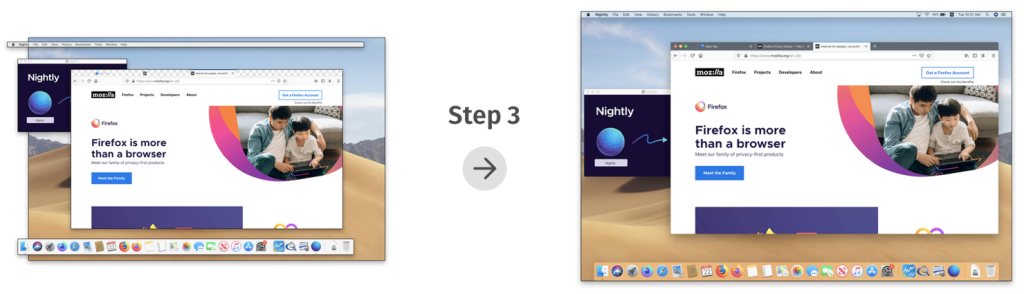
The improvements in Firefox 70 were the result of reducing the work in steps 2 and 3: In both steps, we were doing work for the entire window, even if only a small part of the window was updating.
Why was our compositor always redrawing the entire window? The main reason was the lack of convenient APIs on macOS for partial compositing.
The Firefox compositor on macOS makes use of hardware acceleration via OpenGL. Apple’s OpenGL documentation recommends the following method of getting OpenGL content to the screen: You create an NSOpenGLContext, you attach it to an NSView (using -[NSOpenGLContext setView:]), and then you render to the context’s default framebuffer, filling the entire framebuffer with fresh content. At the end of each frame, you call -[NSOpenGLContext flushBuffer]. This updates the screen with
With the release of Firefox 70, we are pleased to welcome the 45 developers who contributed their first code change to Firefox in this release, 32 of whom were brand new volunteers! Please join us in thanking each of these diligent and enthusiastic individuals, and take a look at their contributions:
- bugtastico: 1567658
- graham.mcknight2: 1289821
- msirringhaus: 1564900, 1573381
- robert.mader: 1563035
- u644803: 1557222
- Anurag Aggarwal: 1556840, 1573319
- Apratim: 1562229
- Arun Kumar Mohan: 1530282, 1554872, 1554873, 1554875, 1554882, 1554883, 1554884, 1554901, 1554924, 1566469
- Asif Youssuff: 1577124
- Benjamin Eriksson: 1566149, 1566453, 1569889
- Blito: 1541861
- Caroline Cullen: 1570489
- Chris Fallin: 1492920, 1571911
- Chris Muldoon: 1563446
- Dennis van der Schagt: 1556151, 1569420
- Elliot Stirling:estirling: 1521094
- Emma Malysz: 1576677
- Francois Freitag: 1479708
- George Roman: 1568327, 1568657, 1569466
- Greyson Gilbert: 1535809, 1560771, 1564293
- James Lemon: 1549609
- Jan Andre Ikenmeyer: 1560699, 1563854, 1563859, 1565365,
Since July 2019, Firefox’s Enhanced Tracking Protection has blocked over 450 Billion third-party tracking requests from exploiting user data for profit. This shocking number reveals the sheer scale of online tracking and it highlights why the current advertising industry push on transparency, choice and “consent” as a solution to online privacy simply won’t work. The solutions put forth by other tech companies and the ad industry provide the illusion of choice. Let’s step through the reasons why that is and why we ultimately felt it necessary to enable Enhanced Tracking Protection by default.
A few months ago, we began to enable Enhanced Tracking Protection, which protects Firefox users from cookie-based tracking by default. We did this for a few reasons:
1. People do not expect their data to be sent to, and collected by, third-party companies as they browse the web. For example, 72% of people do not expect that Facebook uses “Like” buttons to collect data about a person’s online activity on websites outside of Facebook (when the buttons are not actually clicked). Many in the ad industry will point to conversion rates for behaviorally targeted ads as evidence for consumers being okay with the privacy tradeoff, but people don’t know they are actually making such a tradeoff. And even if they were aware, we shouldn’t expect them to have the information necessary to evaluate the tradeoff. When people are asked explicitly about it, they are generally opposed. 68% of people believe that using online tracking to tailor advertisements is unethical.
2. The scale of the problem is immense. We currently see about 175 tracking domains being blocked per Firefox client per day. This has very quickly resulted in over 450B trackers being blocked in total since July. You can see the numbers accelerate in the beginning of September after we enabled Enhanced Tracking Protection for all users.
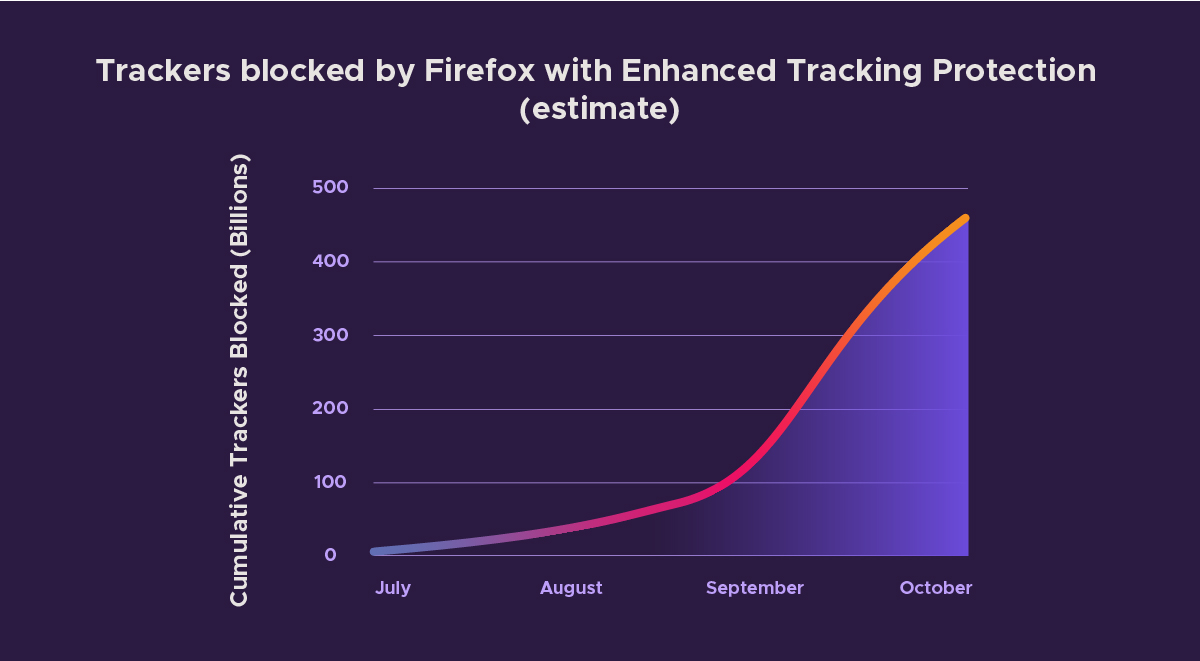
Estimate of Tracking Requests Blocked by Firefox with Enhanced Tracking Protection
It should be clear from these numbers that users would be quickly overwhelmed if they were required to make individual choices about data sharing to this many companies.
3. The industry uses dark patterns to push people to “consent” via cookie/consent banners.
We’ve all had to click through consent banners every time we visit a new site. Let’s walk through the dark patterns in one large tech company’s consent management flow as an example, keeping in mind that this experience is not unique — you can find plenty of other examples just like this one. This particular consent management flow shows how these interfaces are often designed counterintuitively so that users likely don’t think they are agreeing to be tracked. We’ve redacted the company name in the example to focus on the content of the experience.
To start off, we’re presented with a fairly standard consent prompt, which is meant to allow the site visitor to make an informed choice about how their data can be collected and used. However note that clicking anywhere on the page provides “consent”. It only gets worse from here…
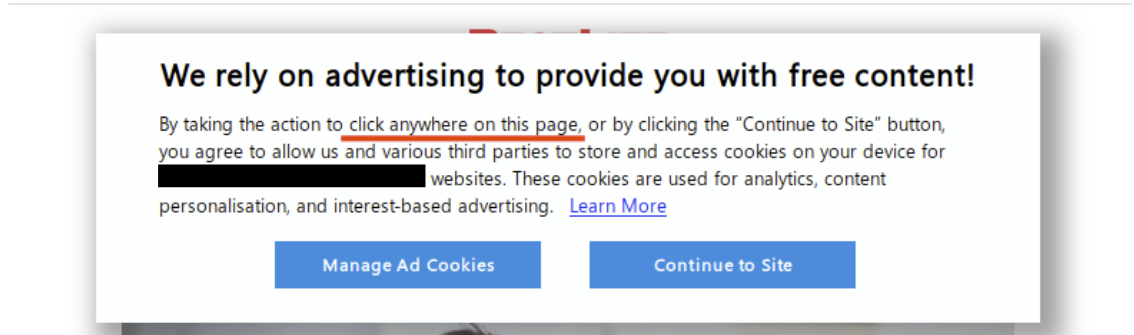
Consent prompt on large tech company website
If the user manages to click “Manage Ad Cookies” before clicking elsewhere on the page, they are given the options to “Save Settings” or “Allow All”. According to the highlighted text, clicking either of these buttons at this point provides consent to all partners to collect user data. Users are not given the option to “Disable All”.
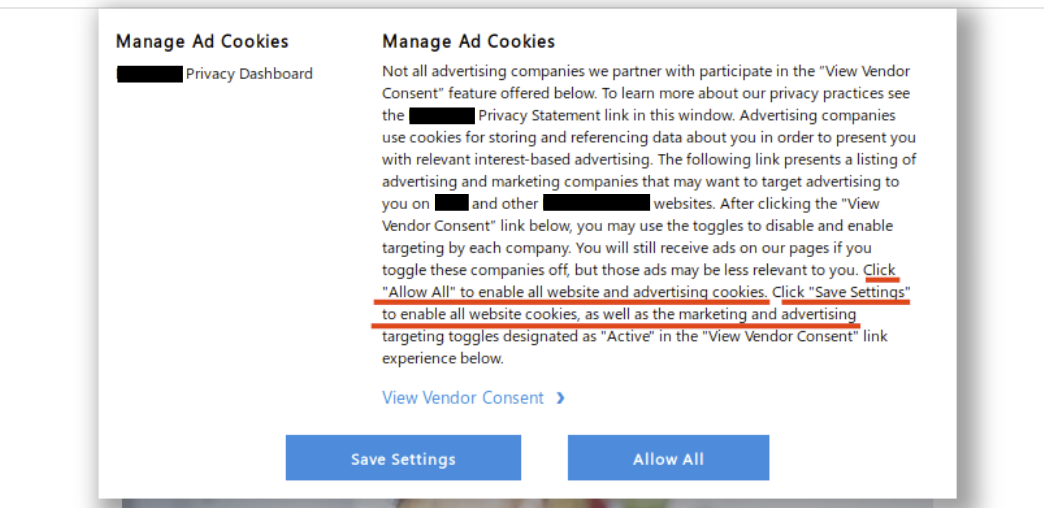
Confusing consent dialog
Instead, if a user wants to manage consent they have to click the link labeled view vendor consent. Wording matters here! If a person is skimming through that dialog they’ll assume that link is informational. This consent
You could say that a web browser is kind of like a car. The engine drives you where you want to go, and a dashboard tells you what’s happening under … Read more
The post Firefox privacy protections reveal who’s trying to track you appeared first on The Firefox Frontier.
https://blog.mozilla.org/firefox/firefox-privacy-protections/
Remembering unique, strong passwords for all your accounts and apps is a challenge, but it’s also essential for good digital security. We’re making that easier by helping you generate and … Read more
The post New password security features come to Firefox with Lockwise appeared first on The Firefox Frontier.
https://blog.mozilla.org/firefox/password-security-features/
Let’s say you’re on an outdoor pizza oven website dreaming about someday owning one. Mmm pizza. Next you switch gears and visit a fitness site; low and behold an ad … Read more
The post No Judgment Digital Definitions: What is a web tracker? appeared first on The Firefox Frontier.
Let’s be honest. We’re usually pretty particular about what we post on social media, right? When we’re on vacation, we’ll post photos on Facebook of a beautiful sunset… and crop … Read more
The post No-judgment digital definitions: What are social media trackers? appeared first on The Firefox Frontier.
https://blog.mozilla.org/firefox/what-are-social-media-trackers/
Nate Weiner, founder and CEO of Pocket, has been promoted to SVP of a new product organization, New Markets, at Mozilla. The New Markets organization will be working to expand and scale Mozilla’s product portfolio alongside the Firefox and Emerging Technologies teams. The Pocket and Emerging Markets teams will live within the New Markets organization.
As part of this change, Pocket Chief Technology Officer and Head of Operations Matt Koidin will step into a new role taking over day-to-day leadership as VP and General Manager of Pocket, continuing to report to Nate. Acquired by Mozilla in 2017, Pocket is a platform used by millions of people worldwide to discover, capture, and spend time with the stories that fascinate and fuel them.
The post Nate Weiner, formerly CEO of Pocket, to take expanded role at Mozilla focused on New Markets appeared first on The Mozilla Blog.
Fonts and typography are at the heart of design on the web. We now have powerful tools to inspect, understand, and design our typography in the browser. For instance, have you ever landed on a web page and wondered what fonts are being used? Then, have you asked yourself where those fonts come from or why a particular font isn’t loading?
The font editor in Firefox provides answers and insights. You gain the ability to make font changes directly, with a live preview. As for me, I use the editor for understanding variable fonts, how they work, and the options they expose.
Get started with a quick overview by Jen Simmons:
I’ve been using Firefox font tools since they were first released. And yet, I wasn’t aware of all the things the editor can do. Start using the built-in unit-conversion feature, which quickly exposes relative units like em, rem, as well as percents along with computed px values. Interested in more detail? Check out the follow-up video:
Enjoy styling type on the web!
The post Quickly Alter Typography with Firefox Font Editor appeared first on Mozilla Hacks - the Web developer blog.
https://hacks.mozilla.org/2019/10/quickly-alter-typography-with-firefox-font-editor/
Wowee what a year that was. And I’m pretty sure the year to come will be even more so.
We gained two new team members, Travis and Beatriz. And with Georg taking a short break, we’ve all had more to do that usual. Glean‘s really been working out well, though I’ve only had the pleasure of working on it a little bit.
Instead I’ve been adding fun new features to Firefox Desktop like Origin Telemetry. I also gave a talk at a conference about Data and Responsibility. Last December’s All Hands returned us to Orlando, and June brought me to Whistler for the first time. We held a Virtual Work Week (or “vorkweek”) a couple of weeks ago when we couldn’t find a time and the budget to meet in person, and spent it planning out how we’ll bring Glean to Firefox Desktop with Project FOG. First with a Prototype (FOGotype) by end of year. And then 2020 will be the year of Glean on the Desktop.
Blogging-wise I’ve slowed down quite a lot. 12 posts so far this calendar year is much lower than previous years’ 25+. The velocity I’d kept up by keeping tabs on the Ontario Provincial Legislature and pontificating about video games I’d played died in the face of mounting work pressures. Instead of spending my off time writing non-mozilla things I spent a lot of it reading instead (as my goodreads account can attest).
But now that I’ve written this one, maybe I’ll write more here.
Resolution for the coming year? More blogging. Continued improvement. Put Glean on Firefox. That is all.
https://chuttenblog.wordpress.com/2019/10/19/four-year-moziversary/
TenFourFox Feature Parity Release "16.1" (SPR 1) is now available for testing (downloads, hashes, release notes). As noted, this is a pure security update and there are no user-facing changes; the big under-the-hood change of those is that we are now pulling entirely from 68ESR, including locale data, certificate roots and so forth. There is also a small update to the ATSUI font blacklist. Assuming no issues, it will go live Monday evening Pacific time as usual.
http://tenfourfox.blogspot.com/2019/10/tenfourfox-fpr16-spr1-available.html
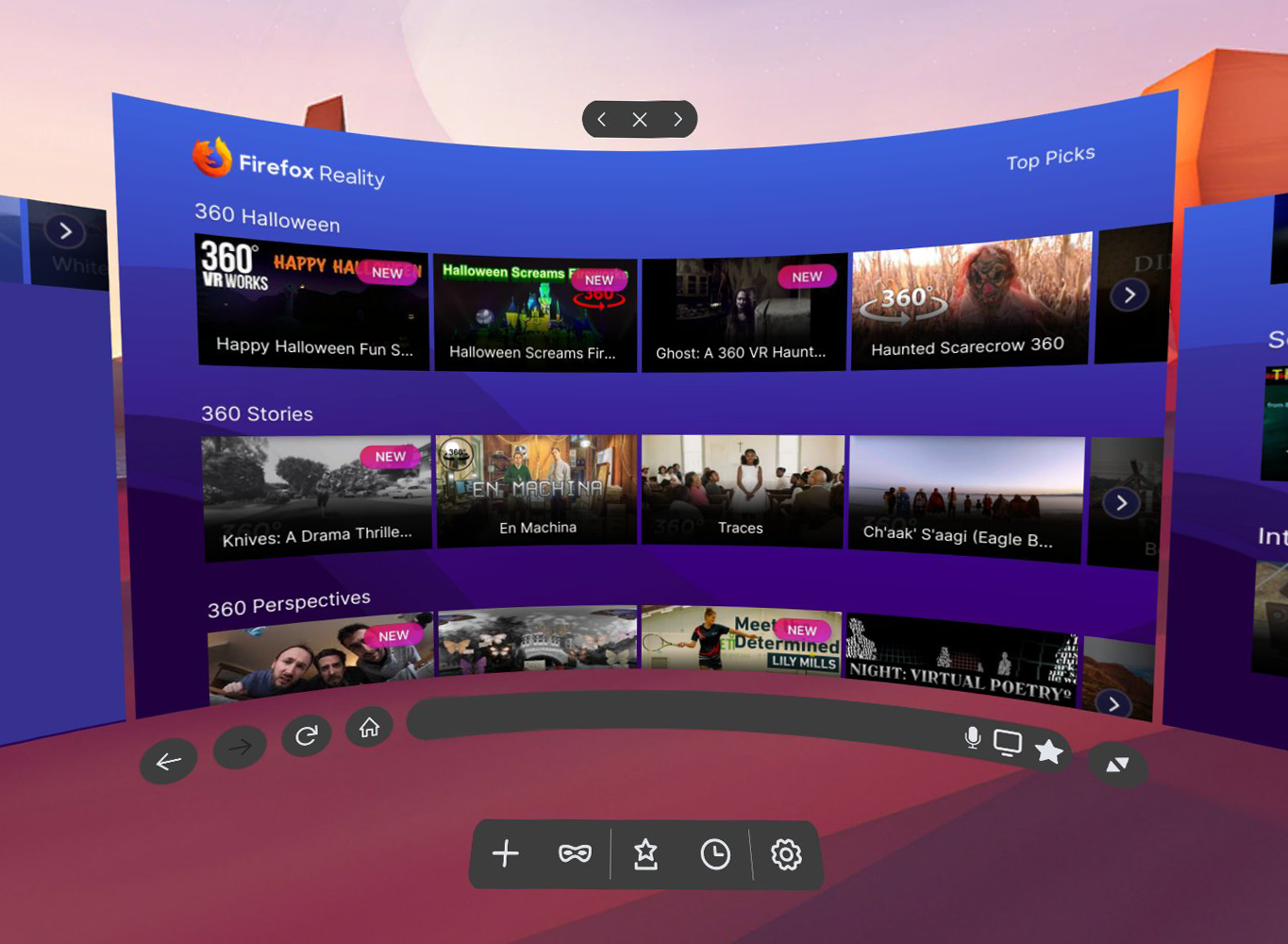
So you bought yourself a fancy VR headset, you’ve played all the zombie-dragon-laser-kitten-battle games (we have too!) and now you’re wondering… what else is there? Where can I find other cool stuff to explore while I have this headset strapped to my face? We felt the same way, so we built Firefox Reality to help you in your quest for the most interesting, groundbreaking and entertaining virtual reality content on the Web.
The real promise of VR is the ability to immerse yourself into countless other places and perspectives - both real and imaginary - and to experience things you’ve never done before. Our Top Picks page is a great place to start exploring, with fresh recommendations coming weekly so you always have new content to check out. Of course, if you want to explore on your own, you can use Firefox Reality for that too.
Firefox Reality Top Picks is the start of what we hope will evolve into a thriving and sustainable ecosystem connecting creators, VR content, and audience.
How Do We Pick Our “Top Picks”?
Unlike browsers that recommend content by mining your data and using AI, the content featured in the Firefox Reality Top Picks menu is curated by real humans. We build relationships with creator communities and scour the Web seeking the best experiences we can find from around the world. We keep our finger firmly on the pulse of what’s hottest, freshest and most engaging in the rapidly changing world of emerging tech content.
We seek out creators where they tend to congregate: at conferences, festivals, meetups and hackathons, on LinkedIn and in creator / developer Facebook and Reddit groups, and through artist networks. We also dig around the vast reaches of the Web and spend countless hours in headset watching and evaluating virtual reality videos and interacting with experiences, discovering first-hand what we need to have warnings for (like motion sickness, phobias, strong language or potentially triggering subject matter), so that you know before you dive in what you’re going into.
There are certain things we’re looking for, such as the quality of the video, editing, use of animation or special effects, the presence or absence of major technical flaws, and whether “best practices” for shooting and editing 360 video or building an interactive experience have been followed. If best practices aren’t followed, we like to see they’re being broken for a reason. We’re excited by new ways of storytelling, interesting ways to explore familiar places and concepts, simple-but-effective interactive games and experiences that can be played by anyone right over the Web.
Along with technical quality, we’re interested in the creative aspects of the work - the concept, the story, the theme, the characters and so on. But when evaluating immersive content, there’s another layer - how the creator has made use of immersivity and/or interactivity. Does this feel like a story or experience that was specifically created for 360 space? Are the creators using traditional aspects of storytelling/journalism/art/music to do something new or different? Did the concept have to be told in 360 space or require interactivity to be effective?
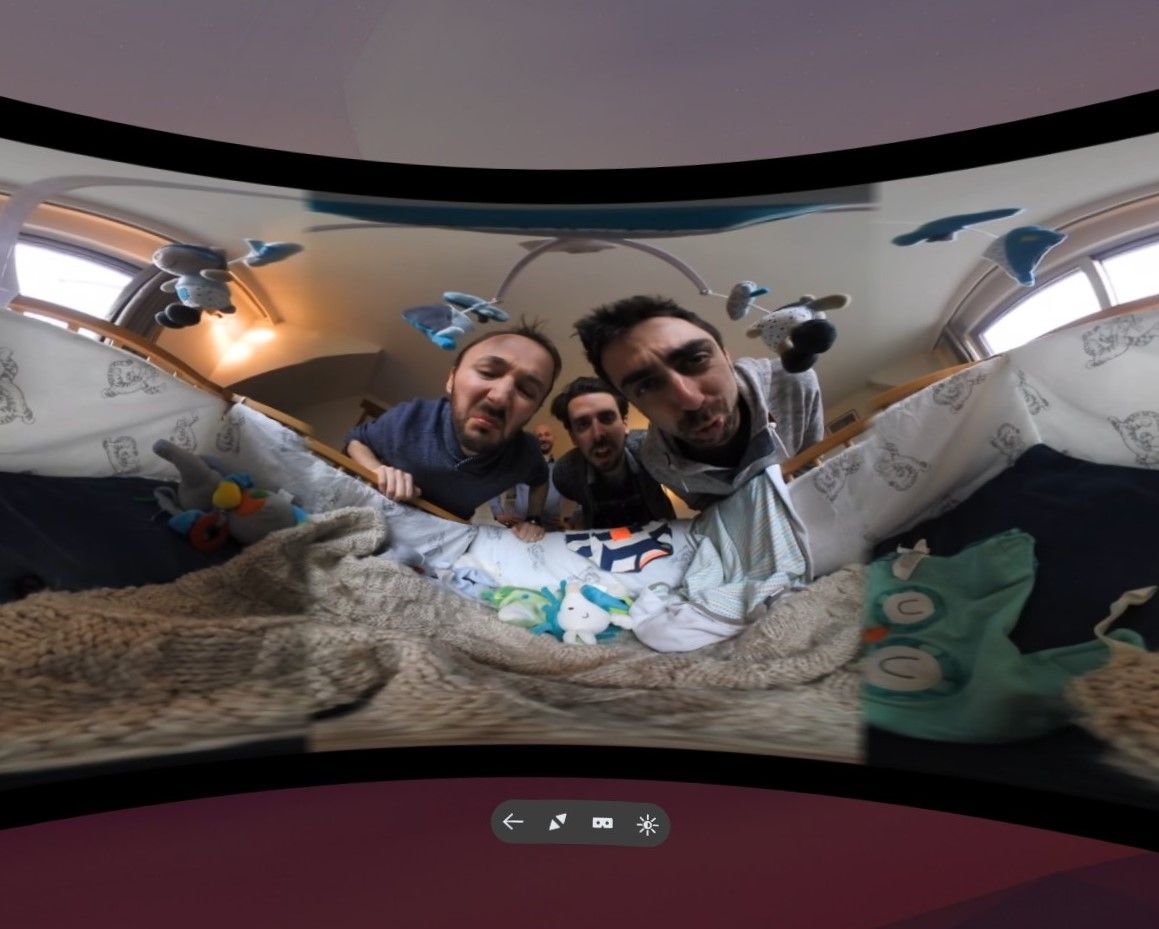
For example: The French piece Bebe Moche, featured currently in 360 Perspectives, tackles traditional physical slapstick comedy in 360 space. The French comedy troupe behind Bebe Moche have a whole series of short comedic “sketch” videos like this, and we’ll be showcasing them in Top Picks menu. Featuring the same cast and exploring physical comedy, they are a simple, effective experiments in physical storytelling that transcends verbal language. Perhaps equally important, it’s the kind of 360 video project that anyone could tackle with a decent 360 camera and video editing software.
Both content creators and audience are a key part of our journey as we work to make Firefox Reality a must-have tool for discovering, experiencing and sharing virtual reality content. If you are a creator interested in making a 360 video or interactive experience, or you want to know if the work you’re already making is WebXR-compatible, make sure to check out our Immersive Media Content Guide; it’s a great starting point for understanding more about how to make and share your own work.
If you have or know of an amazing 360 video or interactive experience you’d like our team to consider featuring on Firefox Reality Top Picks, please submit it to us
CSS Grid has been available in most major browsers since early 2017, and it makes web layout more powerful than ever before. But complex-looking new syntax (line-names! grid-areas! minmax! fit-content! fr units!) and missing IE11 support can make it scary to many developers.
Don’t let that stop you: CSS Grid has made my layout process faster and simpler, with more flexibility. We can get started with a few basics, and the fallbacks don’t have to be overwhelming:
With Subgrid, we can also start to lay out nested elements on a shared grid, great for card layouts:
as well as common form patterns:
The post Faster Layouts with CSS Grid (and Subgrid!) appeared first on Mozilla Hacks - the Web developer blog.
https://hacks.mozilla.org/2019/10/faster-layouts-with-css-grid-and-subgrid/
Please note some of the information provided in this report may be subject to change as we are sometimes sharing information about projects that are still in early stages and are not final yet.
Welcome!
New localizers
- Kwmta Narzary, Mwnthai Narzary, Gwmsrang Muchahary of Bodo
- Dag of Norwegian Bokmal
- Kevin of Swahili
- Teemu of Finnish
Are you a locale leader and want us to include new members in our upcoming reports? Contact us!
New content and projects
What’s new or coming up in Firefox desktop
As explained in detail in the previous l10n report, cycles are starting to shorten towards the goal of 4 weeks. While Firefox 70 is going to be released in a few days, on October 22, the deadline to ship any update in Firefox 71 will be on November 19.
Talking about Firefox 71, congratulations to Catalan (Valencian) (ca-valencia), Tagalog (tl), and Triqui (trs) for reaching an important milestone: with this version, they will move to Beta, and then will be officially released on December 3. Thanks to them, Firefox 71 will be shipping with 96 localizations.
We have also added two new locales to Nightly in 71: Bodo (brx) and Tibetan (bo). If you speak one of these languages and want to help, head to Pontoon!
Talking about new content to localize, there are two main focus areas in 71:
- Separation of Sync and Firefox Accounts. So far, “Signed in” was often used to indicate that you are connected to a Firefox Account, and that Sync is enabled. Now it will be possible to be signed in to an account, but not have Sync enabled. This needs to be reflected in all preferences, dialogs, notifications, etc. and it’s likely going to take more than one release to complete. The reason for this change is that Firefox Account is going to be used for more services in the future – it’s already used to monitor logins for websites with known data breaches, for example.
- It’s now possible to use a different search engine in private windows. This new feature includes preferences, as well as new items for the context menu, and a banner to explain this new functionality to users.
What’s new or coming up in web projects
Firefox Accounts
A lot of content is made available for localization. The last code push to production is on October 21 which will include localized content for the October launch.
Mozilla.org
A few pages were made available for localization in the last two weeks.
- footer.lang and navigation.lang are available to all locales. Though the deadline is set to mid November, we have enough locales completed which make up 90%+ user base. Both files will be activated on production in the coming days.
- firefox/home-master.lang is open to all locales and will be on production as soon as the page is completed. P1 markets (de, en-CA, en-GB, es-ES, and fr) must be completed by October 20th.
- firefox/welcome/page2.lang is available in languages supported by Pocket and will be activated on production as soon as the page is fully localized. P1 markets (de, en-CA, en-GB, es-ES, and fr) must be complete by October 20th.
What’s new or coming up in Foundation projects
The new donate website is available in Pontoon, with the most critical strings (UI and payment flow). As a reminder, the old project is still available on Pontoon as read-only, in case you need to find a previous translation not captured by translation memory. The FAQ and Ways to give pages will be added in the next few days.
(“This Week in Glean” is a series of blog posts that the Glean Team at Mozilla is using to try to communicate better about our work. They could be release notes, documentation, hopes, dreams, or whatever: so long as it is inspired by Glean.)
The Glean SDK is doing well on mobile. It’s shipping in Firefox Preview and Firefox for Fire TV on Android, and our iOS port for Lockwise is shaping up wonderfully well. Data is flowing in, letting us know how the products are being used.
It’s time to set our sights on Desktop.
It’s going to be tricky, but to realize one of the core benefits of the Glean SDK (the one about not having to maintain more than one data collection client library across Mozilla’s products) we have to do this. Also, we’re seeing more than a little interest from our coworkers to get going with it already : )
One of the reasons it’s going to be tricky is that Desktop isn’t like Mobile. As an example, the Glean SDK “baseline” ping is sent whenever the product is sent to the background. This is predicated on the idea that the user isn’t using the application when it’s in the background. But on Desktop, there’s no similar application lifecycle paradigm we can use in that way. We could try sending a ping whenever focus leaves the browser (onblur), but that can happen very often and doesn’t have the same connotation of “user isn’t using it”. And what if the focus leaves one browser window to attach to another browser window? We need to have conversations with Data Science and Firefox Peers to figure out what lifecycle events most closely respect our desire to measure engagement.
And that’s just one reason. One reason that needs investigation, exploration, discussion, design, proposal, approval, implementation, validation, and documentation.
And this reason’s one that we actually know something about. Who knows what swarm of unknown quirks and possible failures lies in wait?
That’s why step one in this adventure is a prototype. We’ll integrate the Glean SDK into Firefox Desktop and turn some things on. We’ll try some things out. We’ll make mistakes, and write it all down.
And then we’ll tear it out and, using what we’ve learned, do it over again. For real.
This prototype won’t have an answer for the behaviour of the “baseline” ping… so it won’t have a “baseline” ping. It won’t know the most efficient way to build a JavaScript metrics API (webidl? JSM? JSContext?), so it won’t have one. It won’t know how best to collect data from the many different processes of many different types that Firefox now boasts, so it will live in just one.
This investigative work will be done by the end of the year with the ultimate purpose of answering all the questions we need in order to proceed next year with the full implementation.
That’s right. You heard it here first:
2020 will be the year of Glean on the Desktop.
:chutten
https://chuttenblog.wordpress.com/2019/10/17/this-week-in-glean-glean-on-desktop-project-fog/
Please join us in congratulating our Reps of the Month for September 2019, Jyotsna Gupta and David Gonzalez Blanchard
Jyotsna is a Mozilla Rep and a Tech Speaker from Bangalore, India. The majority of her contributions goes to Add-ons, from building PrivateX to being an Add-ons Content Reviewer and a judge in the Firefox Quantum Extensions Challenge. She was also highlighted as a Friend of Add-ons in the last quarter of 2018 on the Add-ons blog. Besides all this, she mentored new extension developers in her local community and joined the Featured Extensions Advisory Board.

More recently she joined the Mozilla Tech Speakers Program through which she frequently speaks about cross-browser extension development at various events and conferences. She aims to hone her public and tech speaking skills to help and collaborate with open source developers and communities.
David has been a member of the Nicaraguan Mozilla Community since 2010 and a Mozilla Rep since 2011, the year in which the community began to participate and share knowledge related to the web and Mozilla. Since then he has supported different activities to promote openness on the web and everything related to the community both in Nicaragua and the rest of Central American countries.

He has collaborated giving talks, workshops, organizing activities with the aim of unifying the communities of Mozilla Central America. He is currently promoting the development of video games, virtual reality with WebVR, Rust, and Common Voice. His main interest is to share knowledge about software development and promote a web accessible to all. The most recent activity he participated in was Mozilla Activate 2019 in Nicaragua where they talked about different topics related to Mozilla Activate and about innovation on the web.
Congratulations and keep rocking the open web!
https://blog.mozilla.org/mozillareps/2019/10/17/reps-of-the-month-september-2019/
Thousands of articles are published each day, all fighting for our attention. But how many are actually worth reading? The tiniest fraction, and they’re tough to find. That’s where Pocket … Read more
The post Get recommended reading from Pocket every time you open a new tab in Firefox appeared first on The Firefox Frontier.