A year ago, Mozilla signed the first ever Code of Practice on Disinformation, brokered in Europe as part of our commitment to an internet that elevates critical thinking, reasoned argument, shared knowledge, and verifiable facts. The Code set a wide range of commitments for all the signatories, from transparency in political advertising to the closure of fake accounts, to address the spread of disinformation online. And we were hopeful that the Code would help to drive change in the platform and advertising sectors.
Since then, we’ve taken proactive steps to help tackle this issue, and today our self assessment of this work was published by the European Commission. Our assessment covers the work we’ve been doing at Mozilla to build tools within the Firefox browser to fight misinformation, empower users with educational resources, support research on disinformation and lead advocacy efforts to push the ecosystem to live up to their own commitments within the Code of Practice.
Most recently, we’ve rolled-out enhanced security features in the default setting of Firefox that safeguards our users from the pervasive tracking and collection of personal data by ad networks and tech companies by blocking all third-party cookies by default. As purveyors of disinformation feed off of information that can be revealed about an individual’s browsing behavior, we expect this protection to reduce the exposure of users to the risks of being targeted by disinformation campaigns.
We are proud of the steps we’ve taken during the last year, but it’s clear that the platforms and online advertising sectors need to do more – e.g. protection against online tracking, meaningful transparency of political ads and support of the research community – to fully tackle online disinformation and truly empower individuals. In fact, recent studies have highlighted the fact that disinformation is not going away – rather, it is becoming a “pervasive and ubiquitous part of everyday life”.
The Code of Practice represents a positive shift in the fight to counter misinformation, and today’s self assessments are proof of progress. However, this work has only just begun and we must make sure that the objectives of the Code are fully realized. At Mozilla, we remain committed to further this agenda to counter disinformation online.
The post A Year in Review: Fighting Online Disinformation appeared first on Open Policy & Advocacy.
https://blog.mozilla.org/netpolicy/2019/10/29/a-year-in-review-fighting-online-disinformation/
There are two high-priority problems currently affecting TenFourFox's download and development infrastructure. Please don't open any more Tenderapp tickets on these: I am painfully aware of them and am currently trying to devise workarounds, and the more tickets get opened the more time I spend redirecting people instead of actually working on fixes.
The first one is that the hack we use to relax JavaScript syntax to get Github working (somewhat) is now causing the browser to go into an infinite error loop on Github issue reports and certain other Github pages, presumably due to changes in code on their end. Unfortunately we use Github heavily for the wiki and issues tracker, so this is a major problem. The temporary workaround is, of course, a hack to relax JavaScript syntax even further. This hack is disgusting and breaks a lot of tests but is simple and does seem to work, so if I can't come up with something better it will be in FPR17. Most regular users won't be affected by this.
However, the one that is now starting to bite people is that SourceForge has upgraded its cipher suite to require a new cipher variant TenFourFox doesn't support. Unfortunately all that happens is links to download TenFourFox don't work; there is no error message, no warning and no explanation. That is a bug in and of itself but this leaves people dead in the water being pinged to install an update they can't access directly.
Naturally you can download the browser on another computer but this doesn't help users who only have a Power Mac. Fortunately, the good old TenFourFox Downloader works fine. As a temporary measure I have started offering the Downloader to all users from the TenFourFox main page, or you can get it from this Tenderapp issue. I will be restricting it to only Power Mac users regardless of browser very soon because it's not small and serves no purpose on Intel Macs (we don't support them) or other current browsers (they don't need it), but I want to test that the download gate works properly first and I'm not at my G5 right this second, so this will at least unblock people for the time being.
For regression and stability reasons I don't want to do a full NSPR/NSS update but I think I can hack this cipher in as we did with another one earlier. I will be speeding up my timetable for FPR17 so that people can test the changes (including some other site compatibility updates), but beta users are forewarned that you will need to use another computer to download the beta. Sorry about that.
http://tenfourfox.blogspot.com/2019/10/sourceforge-download-issues-and-github.html
So many accounts, so many passwords. That’s online life. The average person with a typical online presence is estimated to have close to 100 online accounts, and that figure is … Read more
The post Password dos and don’ts appeared first on The Firefox Frontier.
Since its debut in Firefox 61, the Accessibility Inspector in the Firefox Developer Tools has evolved from a low-level tool showing the accessibility structure of a page. In Firefox 70, the Inspector has become an auditing facility to help identify and fix many common mistakes and practices that reduce site accessibility. In this post, I will offer an overview of what is available in this latest release.
Inspecting the Accessibility Tree
First, select the Accessibility Inspector from the Developer Toolbox. Turn on the accessibility engine by clicking “Turn On Accessibility Features.” You’ll see a full representation of the current foreground tab as assistive technologies see it. The left pane shows the hierarchy of accessible objects. When you select an element there, the right pane fills to show the common properties of the selected object such as name, role, states, description, and more. To learn more about how the accessibility tree informs assistive technologies, read this post by Hidde de Vries.

The DOM Node property is a special case. You can double-click or press ENTER to jump straight to the element in the Page Inspector that generates a specific accessible object. Likewise, when the accessibility engine is enabled, open the context menu of any HTML element in the Page Inspector to inspect any associated accessible object. Note that not all DOM elements have an accessible object. Firefox will filter out elements that assistive technologies do not need. Thus, the accessibility tree is always a subset of the DOM tree.
In addition to the above functionality, the inspector will also display any issues that the selected object might have. We will discuss these in more detail below.
The accessibility tree refers to the full tree generated from the HTML, JavaScript, and certain bits of CSS from the web site or application. However, to find issues more easily, you can filter the left pane to only show elements with current accessibility issues.
Finding Accessibility Problems
To filter the tree, select one of the auditing filters from the “Check for issues” drop-down in the toolbar at the top of the inspector window. Firefox will then reduce the left pane to the problems in your selected category or categories. The items in the drop-down are check boxes — you can check for both text labels and focus issues. Alternatively, you can run all the checks at once if you wish. Or, return the tree to its full state by selecting None.
Once you select an item from the list of problems, the right pane fills with more detailed information. This includes an MDN link to explain more about the issue, along with suggestions for fixing the problem. You can go into the page inspector and apply changes temporarily to see immediate results in the accessibility inspector. Firefox will update Accessibility information dynamically as you make changes in the page inspector. You gain instant feedback on whether your approach will solve the problem.
Text labels
Since Firefox 69, you have the ability to filter the list of accessibility objectss to only display those that are not properly labeled. In accessibility jargon, these are items that have no names. The name is the primary source of information that assistive technologies, such as screen readers, use to inform a user about what a particular element does. For example, a proper button label informs the user what action will occur when the button is activated.
The check for text labels goes through the whole document and flags all the issues it knows about. Among other things, it finds missing alt-text (alternative text) on images, missing titles on iframes or embeds, missing labels for form elements such as inputs or selects, and missing text in a heading element.

Check for Keyboard issues
Keyboard navigation and visual focus are common sources of accessibility issues for various
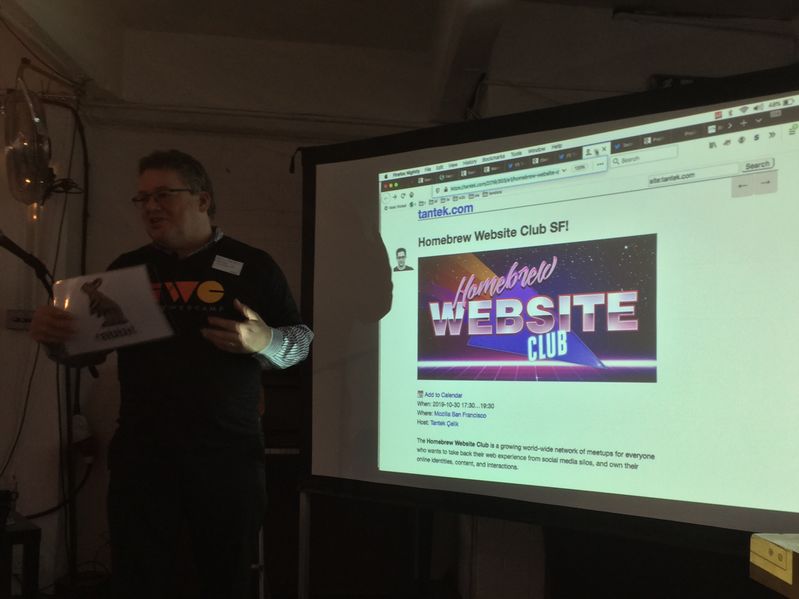
Kevin Marks started the session by having me bring up the tabs that I’d shown in my lightning talk earlier, digging into the specifications, tools, and services linked therein. Participants asked questions and Kevin & I answered, demonstrating additional resources as necessary.
IndieWeb Profiles and IndieWebify
One of the first questions was about how do people represent themselves on the IndieWeb, in a way that is discoverable and expresses various properties.
Kevin described how the h-card standard works and is used to express a person’s name, their logo or photo, and other bits of optional information. He showed his own site kevinmarks.com and asked me to Show View Source to illustrate the markup.
Next we showed indiewebify.me which has a form to check your h-card, show what it found and suggest properties you could add to your profile on your home page.
Checking microformats and JSON output
From the consuming code perspective, we demonstrated the microformats2 parser at microformats.io using Kevin’s site again. We went through the standard parser JSON output with clear values for the name, photo, and other properties.
Similarly we took a look at one of my posts parsed by microformats.io as an examle of parsing an h-entry and seeing the author, content etc. properties in the JSON output.
IndieWeb Standards, W3C Micropub Recommendation & Test Suite
Next we walked through the overview of IndieWeb specifications that I’d quickly mentioned by name in my lightning talk but had not explicitly described. We explained each of these building block standards, its features, and what user functionality each provides when implemented.
In particular we spent some time on the Micropub living standard for client software and websites to post and update content. The living standard editor’s draft has errata and updates from the official W3C Micropub Recommendation which itself was finished using the Micropub.rocks test suite & implementation results used to demonstrate that each feature was interoperably implementable, by several implementations.
Lastly we noted that many more Micropub clients & servers have been interoperably developed since then using the test suite, and the importance of test suites for longterm interopability and dependable standards in general.
IndieWeb Events & RSVPs
Kevin used his mobile phone to post an Indie RSVP post in response to the Indie Event post that I’d shown in my talk. He had me bring it up again to show that this time it had an RSVP from him.
Clicking it took us to Kevin’s Known site which he’d used to post the RSVP from his mobile. I had to enable JavaScript for the “Filter Content” dropdown navigation menu to work (It really should work without JS, via CSS using googleable well established techniques). Choosing RSVP showed a list of recent RSVPs, at
As part of our ongoing work to make add-ons safer for Firefox users, we are updating our Add-on Policies to add clarification and guidance for developers regarding data collection. The following is a summary of the changes, which will go into effect on December 2, 2019.
- Search functionality provided or loaded by the add-on must not collect search terms or intercept searches that are going to a third-party search provider.
- If the collection of visited URLs or user search terms is required for the add-on to work, the user must provide affirmative consent (i.e., explicit opt-in from the user) at first-run, since that information can contain personal information. For more information on how to create a data collection consent dialog, refer to our best practices.
- Add-ons must not load or redirect to a remote new tab page. The new tab page must be contained within the add-on.
You can preview the policies and ensure your extensions abide by them to avoid any disruption. If you have questions about these updated policies or would like to provide feedback, please post to this forum thread.
The post Add-on Policies Update: Newtab and Search appeared first on Mozilla Add-ons Blog.
https://blog.mozilla.org/addons/2019/10/28/add-on-policies-update-newtab-and-search/
After the Whistler All-Hands this past summer, I started seriously looking at whether Firefox should switch to using Bazel for its build system.
The motivation behind switching build systems was twofold. The first motivation was that build times are one of the most visible developer-facing aspects of the build system and everybody appreciates faster builds. What’s less obvious, but equally important, is that making builds faster improves automation: less time waiting for try builds, more flexibility to adjust infrastructure spending, and less turnaround time with automated reviews on patches submitted for review. The second motivation was that our build system is used by exactly one project (ok, two projects), so there’s a lot of onboarding cost both in terms of developers who use the build system and in terms of developers who need to develop the build system. If we could switch to something more off-the-shelf, we could improve the onboarding experience and benefit from work that other parties do with our chosen build system.
You may have several candidates that we should have evaluated instead. We did look at other candidates (although perhaps none so deeply as Bazel), and all of them have various issues that make them unsuitable for a switch. The reasons for rejecting other possibilities fall into two broad categories: not enough platform support (read: Windows support) and unlikely to deliver on making builds faster and/or improving the onboarding/development experience. I’ll cover the projects we looked at in a separate post.
With that in mind, why Bazel?
Bazel advertises itself with the tagline “{Fast, Correct} – Choose two”. What’s sitting behind that tagline is that when building software via, say, Make, it’s very easy to write Makefiles in such a way that builds are fast, but occasionally (or not-so-occasionally) fail because somebody forgot to specify “to build thing X, you need to have built thing Y”. The build doesn’t usually fail because thing Y is built before thing X: maybe the scheduling algorithm for parallel execution in make chooses to build Y first 99.9% of the time, and 99% of those times, building Y finishes prior to even starting to build X.
The typical solution is to become more conservative in how you build things such that you can be sure that Y is always built before X…but typically by making the dependency implicit by, say, ordering the build commands Just So, and not by actually making the dependency explicit to make itself. Maybe specifying the explicit dependency is rather difficult, or maybe somebody just wants to make things work. After several rounds of these kind of fixes, you wind up with Makefiles that are (probably) correct, but probably not as fast as it could be, because you’ve likely serialized build steps that could have been executed in parallel. And untangling such systems to the point that you can properly parallelize things and that you don’t regress correctness can be…challenging.
(I’ve used make in the above example because it’s a lowest-common denominator piece of software and because having a concrete example makes differentiating between “the software that runs the build” and “the specification of the build” easier. Saying “the build system” can refer to either one and sometimes it’s not clear from context which is in view. But you should not assume that the problems described above are necessarily specific to make; the problems can happen no matter what software you rely on.)
Bazel advertises a way out of the quagmire of probably correct specifications for building your software. It does this—at least so far as I understand things, and I’m sure the Internet will come to correct me if I’m wrong—by asking you to explicitly specify dependencies up front. Build commands can then be checked for correctness by executing the commands in a “sandbox” containing only those files specified as dependencies: if you forgot to specify something that was actually needed, the build will fail because the file(s) in question aren’t present.
Having a complete picture of the dependency graph enables faster builds in three different ways. The first is that you can maximally parallelize work across the build. The second is that Bazel comes with built-in facilities for farming out build tasks to remote machines. Note that all build tasks can be distributed, not just C/C++/Rust compilation as via
Prototyping with HTML and CSS grid is really helpful for understanding flexibility models. I was able to understand how my design works in a way that was completely different than doing it in a static design program.
Links:
- This video on YouTube
- Creating Flexibility Models with CSS Grid – Layout Land
- Why isn’t this CSS doing anything? – Mozilla Developer
- Keep Track of Changes to CSS You’ve Made in DevTools – Mozilla Developer
Transcript:
So I’m working on a design of the new address bar in Firefox. Our code name for it is the QuantumBar. There’s a lot of pieces to this. But one of the things that I’ve been trying to figure out is how it fits into the Firefox toolbar and how it collapses and expands, the squishiness of the toolbar, and trying to kinda rethink that by just building it in code. So I have this sort of prototype here where I’ve recreated the Firefox top toolbar here in HTML, and you can see how it like collapses and things go away and expands as I grow and shrink this here.
I’ve used CSS Grid to do a lot of this layout. And here I’ve turned on the grid lines just for this section of the toolbar. It’s one of the many grids that I have here. But I wanna point out these like flexible spaces over here, and then this part here, the actual QuantumBar piece, right? So you can see I’ve played around with some different choices about how big things can be at this giant window size here. And I was inspired by my friend, Jen Simmons, who’s been talking about Grid for a long time, and she was explaining how figuring out whether to use minmax or auto or fr units. It’s something that is, you can only really figure out by coding it up and a little trial and error here. And it allowed me to understand better how the toolbar works as you squish it and maybe come up with some better ways of making it work.
Yeah, as we squish it down, maybe here we wanna prioritize the width of this because this is where the results are gonna show up in here, and we let these flexible spaces squish a little sooner and a little faster. And that’s something that you can do with Grid and some media queries like at this point let’s have it squished this way, at this point let’s have it squished another way. Yeah, and I also wanted to see how it would work then if your toolbar was full of lots of icons and you have the other search bar and no spacers, how does that work? And can we prioritize maybe the size of the address bar a little more so that because you’ll notice on the top is the real Firefox, we can get in weird situations where this, it’s just not even usable anymore. And maybe we should stop it from getting that small and still have it usable.
Anyway it’s a thing I’ve been playing with and what I’ve found was that using HTML and CSS to mock this up had me understand it in a way that was way better than doing it in some sort of static design program.
https://blog.mozilla.org/ux/2019/10/prototyping-firefox-with-css-grid/
Are you one of the allegedly 400 million users of Avast antivirus products? Then I have bad news for you: you are likely being spied upon. The culprit is the Avast Online Security extension that these products urge you to install in your browser for maximum protection.
But even if you didn’t install Avast Online Security yourself, it doesn’t mean that you aren’t affected. This isn’t obvious but Avast Secure Browser has Avast Online Security installed by default. It is hidden from the extension listing and cannot be uninstalled by regular means, its functionality apparently considered an integral part of the browser. Avast products promote this browser heavily, and it will also be used automatically in “Banking Mode.” Given that Avast bought AVG a few years ago, there is also a mostly identical AVG Secure Browser with the built-in AVG Online Security extension.
Summary of the findings
When Avast Online Security extension is active, it will request information about your visited websites from an Avast server. In the process, it will transmit data that allows reconstructing your entire web browsing history and much of your browsing behavior. The amount of data being sent goes far beyond what’s necessary for the extension to function, especially if you compare to competing solutions such as Google Safe Browsing.
Avast Privacy Policy covers this functionality and claims that it is necessary to provide the service. Storing the data is considered unproblematic due to anonymization (I disagree), and Avast doesn’t make any statements explaining just how long it holds on to it.
What is happening exactly?
Using browser’s developer tools you can look at an extension’s network traffic. If you do it with Avast Online Security, you will see a request to https://uib.ff.avast.com/v5/urlinfo whenever a new page loads in a tab:
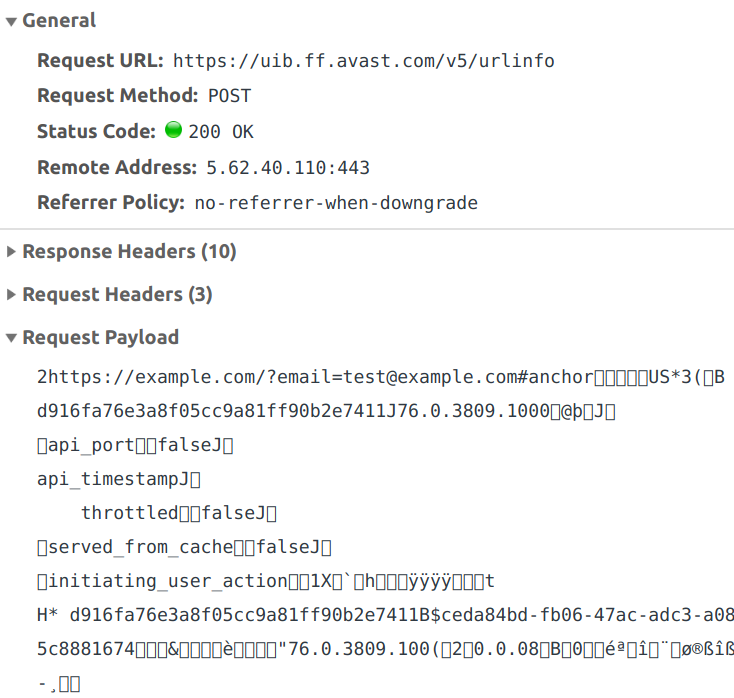
So the extension sends some binary data and in return gets information on whether the page is malicious or not. The response is then translated into the extension icon to be displayed for the page. You can clearly see the full address of the page in the binary data, including query part and anchor. The rest of the data is somewhat harder to interpret, I’ll get to it soon.
This request isn’t merely sent when you navigate to a page, it also happens whenever you switch tabs. And there is an additional request if you are on a search page. This one will send every single link found on this page, be it a search result or an internal link of the search engine.
What data is being sent?
The binary UrlInfoRequest data structure used here can be seen in the extension source code. It is rather extensive however, with a number of fields being nested types. Also, some fields appear to be unused, and the purpose of others isn’t obvious. Finally, there are “custom values” there as well which are a completely arbitrary key/value collection. That’s why I decided to stop the extension in the debugger and have a look at the data before it is turned into binary. If you want to do it yourself, you need to find this.message() call in
Season 4 of ZigZag is about examining the current culture of business and work, figuring out what needs to change, and experimenting with new ways to do it. Sign up for their newsletter and subscribe to the podcast for free wherever you get your podcasts.
https://irl.simplecast.com/episodes/bonus-from-zigzag-h6exysMb
Over the last few years we have kept our work on the Pernosco debugger mostly under wraps, but finally it's time to show the world what we've been working on! So, without further ado, here's an introductory demo video showing Pernosco debugging a real-life bug:
This demo is based on a great gdb tutorial created by Brendan Gregg. If you read his blog post, you'll get more background and be able to compare Pernosco to the gdb experience.
Pernosco makes developers more productive by providing scalable omniscient debugging — accelerating existing debugging strategies and enabling entirely new strategies and features — and by integrating that experience into cloud-based workflows. The latter includes capturing test failures occurring in CI so developers can jump into a debugging session with one click on a URL, separating failure reproduction from debugging so QA staff can record test failures and send debugger URLs to developers, and letting developers collaborate on debugging sessions.
Over the next few weeks we plan to say a lot more about Pernosco and how it benefits software developers, including a detailed breakdown of its approach and features. To see those updates, follow @_pernosco_ or me on Twitter. We're opening up now because we feel ready to serve more customers and we're keen to talk to people who think they might benefit from Pernosco; if that's you, get in touch. (Full disclosure: Pernosco uses rr so for now we're limited x86-64 Linux, and statically compiled languages like C/C++/Rust.)
http://robert.ocallahan.org/2019/10/pernosco-demo-video.html
Today, Mozilla Co-Founder and Chairwoman Mitchell Baker announced that Mozilla Foundation Board member Bob Lisbonne has moved to the Mozilla Corporation Board; and as part of a planned, phased transition, Mozilla Corporation’s departing CEO Chris Beard has stepped down from his role as a Mozilla Corporation board member.
“We are in debt to Chris for his myriad contributions to Mozilla,” said Mozilla Chairwoman and Co-Founder Mitchell Baker. “We’re fortunate to have Bob make this shift at a time when his expertise is so well matched for Mozilla Corporation’s current needs.”
Bob has been a member of the Mozilla Foundation Board since 2006, but his contributions to the organization began with Mozilla’s founding. Bob played an important role in converting the earlier Netscape code into open source code and was part of the team that launched the Mozilla project in 1998.
“I’m incredibly fortunate to have been involved with Mozilla for over two decades,” said Bob Lisbonne. “Creating awesome products and services that advance the Mozilla mission remains as important as ever. In this new role, I’m eager to contribute my expertise and help advance the Internet as a global public resource, open and accessible to all.”
During his tenure on the Mozilla Foundation board, Bob has been a significant creative force in building both the Foundation’s programs — in particular the programs that led to MozFest — and the strength of the board. As he moves to the Mozilla Corporation Board, Bob will join the other Mozilla Corporation Board members in selecting, onboarding, and supporting a new CEO for Mozilla Corporation. Bob’s experience across innovation, investment, strategy and execution in the startup and technology arenas are particularly well suited to Mozilla Corporation’s setting.
Bob’s technology career spans 25 years, during which he played key roles as entrepreneur, venture capitalist, and executive. He was CEO of internet startup Luminate, and a General Partner with Matrix Partners. He has served on the Boards of companies which IPO’ed and were acquired by Cisco, HP, IBM, and Yahoo, among others. For the last five years, Bob has been teaching at Stanford University’s Graduate School of Business.
With Bob’s move and Chris’ departure, the Mozilla Corporation board will include: Mitchell Baker, Karim Lakhani, Julie Hanna, and Bob Lisbonne. The remaining Mozilla Foundation board members are: Mitchell Baker, Brian Behlendorf, Ronaldo Lemos, Helen Turvey, Nicole Wong and Mohamed Nanabhay.
The Mozilla Foundation board will begin taking steps to fill the vacancy created by Bob’s move. At the same time, the Mozilla Corporation board’s efforts to expand its make-up will continue.
Founded as a community open source project in 1998, Mozilla currently consists of two organizations: the 501(c)3 Mozilla Foundation, which backs emerging leaders and mobilizes citizens to create a global movement for the health of the internet; and its wholly owned subsidiary, the Mozilla Corporation, which creates products, advances public policy and explores new technologies that give people more control over their lives online, and shapes the future of the internet platform for the public good. Each is governed by a separate board of directors. The two organizations work in concert with each other and a global community of tens of thousands of volunteers under the single banner: Mozilla.
Because of its unique structure, Mozilla stands apart from its peers in the technology and social enterprise sectors globally as one of the most impactful and successful social enterprises in the world.
“I wanted to offer a useful extension people can trust,” explains Maxime RF, creator of Enhancer for YouTube, a browser extension providing a broad assortment of customization options so you … Read more
The post Firefox Extension Spotlight: Enhancer for YouTube appeared first on The Firefox Frontier.
(“This Week in Glean” is a series of blog posts that the Glean Team at Mozilla is using to try to communicate better about our work. They could be release notes, documentation, hopes, dreams, or whatever: so long as it is inspired by Glean.)
Last week's blog post: This Week in Glean: Glean on Desktop (Project FOG) by chutten.
Back in June when Firefox Preview shipped, it also shipped with Glean, our new Telemetry library, initially targeting mobile platforms. Georg recently blogged about the design principles of Glean in Introducing Glean — Telemetry for humans.
Plans for improving mobile telemetry for Mozilla go back as as far as December 2017. The first implementation of the Glean SDK was started around August 2018, all written in Kotlin (though back then it was mostly ideas in a bunch of text documents). This implementation shipped in Firefox Preview and was used up until now.
On March 18th I created an initial Rust workspace. This kicked of a rewrite of Glean using Rust to become a cross-platform telemetry SDK to be used on Android, iOS and eventually coming back to desktop platforms again.
1382 commits later1 I tagged v19.0.02.
Obviously that doesn't make people use it right away, but given all consumers of Glean right now are Mozilla products, it's up on us to get them to use it. So Alessio did just that by upgrading Android Components, a collection of Android libraries to build browsers or browser-like applications, to this new version.
This will soon roll out to nightly releases of Firefox Preview and, given we don't hit any larger bugs, hit the release channel in about 2 weeks. Additionally, that finally unblocks the Glean team to work on new features, ironing out some sharp edges and bringing Glean to Firefox on Desktop. Oh, and of course we still need to actually release it for iOS.
Thanks
Glean in Rust is the project I've been constantly working on since March. But getting it to a release was a team effort with help from a multitude of people and teams.
Thanks to everyone on the Glean SDK team:
- Alessio Placitelli
- Michael Droettboom
- Travis Long
- Georg Fritzsche
- Chris Hutten-Czapski
- Beatriz Rizental
Thanks to Frank Bertsch for a ton of backend work as well as the larger Glean pipeline team led by Mark Reid, to ensure we can handle the incoming telemetry data and also reliably analyse it. Thanks to the Data Engineering team led by Katie Parlante. Thanks to Mihai Tabara, the Release Engineering team and the Cloud Operations team, to help us with the release on short notice. Thanks to the Application Services team for paving the way of developing mobile libraries with Rust and to the Android Components team for constant help with Android development.
Not all of which are just code for the Android version. There's a lot of documentation too.
This is the first released version. This is just the version
This is a short story of how js13kGames, an online “code golf” competition for web game developers, tried out Web Monetization this year. And ended up at the Mozilla Festival, happening this week in London, where we’re showcasing some of our winning entries.

A brief history of js13kGames
The js13kGames online competition for HTML5 game developers is constantly evolving. We started in 2012, and we run every year from August 13th to September 13th. In 2017, we added a new A-Frame category.
You still had to build web games that would fit within the 13 kilobytes zipped package as before, but the new category added the A-Frame framework “for free”, so it wasn’t counted towards the size limit. The new category resulted in some really cool entries.
Fast forward twelve months to 2018 – the category changed its name to WebXR. We added Babylon.js as a second option. In 2019, the VR category was extended again, with Three.js as the third library of choice. Thanks to the Mozilla Mixed Reality team we were able to give away three Oculus Quest devices to the winning entries.

The evolution of judging mechanics
The process for judging js13kGames entries has also evolved. At the beginning, about 60 games were submitted each year. Judges could play all the games to judge them fairly. In recent years, we’ve received nearly 250 entries. It’s really hard to play all of them, especially since judges tend to be busy people. And then, how can you be sure you scored fairly?
That’s why we introduced a new voting system. The role of judges changed: they became experts focused on giving constructive feedback, rather than scoring. Expert feedback is valued highly by participants, as one of the most important benefits in the competition.
At the same time, Community Awards became the official results. We upgraded the voting system with the new mechanism of “1 on 1 battles.” By comparing two games at once, you can focus and judge them fairly, and then move on to vote on another pair.
Voters compared the games based on consistent criteria: gameplay, graphics, theme, etc. This made “Community” votes valuable to developers as a feedback mechanism also. Developers could learn what their game was good at, and where they could improve. Many voting participants also wrote in constructive feedback, similar to what the experts provided. This feedback was accurate and eventually valuable for future improvements.
Web Monetization in the world of indie games

This year we introduced the Web Monetization category in partnership with Coil. The challenge to developers was to integrate Web Monetization API concepts within their js13kGames entries. Out of 245 games submitted overall, 48 entries (including WebXR ones) had implemented the Web Monetization API. It wasn’t that difficult.
Basically, you add a special monetization meta tag to index.html:
// ...
And then you need to add code to detect if a visitor is a paid subscriber (to Coil or any other similar service available in the future):
if(document.monetization && document.monetization.state === As I’ve done in previous years, here’s The State Of Mozilla, as observed by me and presented by me to our local Linux user group.
Presentation:[ https://www.youtube.com/embed/RkvDnIGbv4w ]
And Q&A: [ https://www.youtube.com/embed/jHeNnSX6GcQ ]
Nothing tectonic in there – I dodged a few questions, because I didn’t want to undercut the work that was leading up to the release of Firefox 70, but mostly harmless stuff.
Can’t be that I’m getting stockier, though. Must be the shirt that’s unflattering. That’s it.
http://exple.tive.org/blarg/2019/10/23/the-state-of-mozilla-2019/
Back in June, Mozilla announced Firefox Preview, an early version of the new browser for Android that is built on top of Firefox’s own mobile browser engine, GeckoView. We’ve gotten great feedback about the superior performance of GeckoView so far. Not only is it faster than ever, it also opens up many opportunities for building deeper privacy features that we have already started exploring, and a lot of users were wondering what this step meant for add-ons.
We’re happy to confirm that GeckoView is currently building support for extensions through the WebExtensions API. This feature will be available in Firefox Preview, and we are looking forward to offering a great experience for both mobile users and developers.
Bringing GeckoView and Firefox Preview up to par with the APIs that were supported previously in Firefox for Android won’t happen overnight. For the remainder of 2019 and leading into 2020, we are focusing on building support for a selection of content from our Recommended Extensions program that work well on mobile and cover a variety of utilities and features.
At the moment, Firefox Preview does not yet officially support extensions. While some members of the community have discovered that some extensions inadvertently work in Firefox Preview, we do not recommend attempting to install them until they are officially supported as other issues may arise. We expect to implement support for the initial selection of extensions in the first half of 2020, and will post updates here as we make progress.
If you haven’t yet had a chance, why don’t you give Firefox Preview a try and let us know what you think.
The post Firefox Preview/GeckoView Add-ons Support appeared first on Mozilla Add-ons Blog.
https://blog.mozilla.org/addons/2019/10/23/fx-preview-geckoview-add-ons-support/
If you like to read release notes, then you may have spotted in the Firefox 70 notes a line about the implementation of the two-value syntax of the display CSS property. Or maybe you saw a mention in yesterday’s Firefox 70 roundup post. Today I’ll explain what this means, and why understanding this two-value syntax is important despite only having an implementation in Firefox right now.
The display property
The display property is how we change the formatting context of an element and its children. In CSS some elements are block by default, and others are inline. This is one of the first things you learn about CSS.
The display property enables switching between these states. For example, this means that an h1, usually a block element, can be displayed inline. Or a span, initially an inline element, can be displayed as a block.
More recently we have gained CSS Grid Layout and Flexbox. To access these we also use values of the display property — display: grid and display: flex. Only when the value of display is changed do the children become flex or grid items and begin to respond to the other properties in the grid or flexbox specifications.
Two-value display – span with display: flex
What grid and flexbox demonstrate, however, is that an element has both an outer and an inner display type. When we use display: flex we create a block-level element, with flex children. The children are described as participating in a flex formatting context. You can see this if you take a span and apply display: flex to it — the span is now block-level. It behaves as block-level things do in relationship to other boxes in the layout. It’s as if you had applied display: block to the span, however we also get the changed behavior of the children. In the CodePen below you can see that the string of text and the em have become two flex items.
See the Pen
Mozilla Hacks two-value Display: span with display: flex by rachelandrew (@rachelandrew)
on CodePen.
Two-value display – span with display: grid
Grid layout behaves in the same way. If we use display: grid we create a block-level element and a grid formatting context for the children. We also have methods to create an inline-level box with flex or grid children with display: inline-flex and display: inline-grid. The next example shows a div, normally a block-level element, behaving as an inline element with grid item children.
As an inline element, the box does not take up all the space in the inline dimension, and the following string of text displays next to it. The children however are still grid items.
See the Pen
Mozilla Hacks two-value display: inline-grid by rachelandrew (@rachelandrew)
on CodePen.
Refactoring display
As the above examples show, the outer display type of an element is always block or inline, and dictates how the box behaves in the normal flow of the document. The inner display type then changes the formatting context of the children.
To better describe this behavior, the CSS Display specification has been refactored to allow for display to accept two values. The first describes whether the outer display type is block or inline, whereas the second value describes the formatting of the children. This table shows how some of these new values map to the single values – now referred to as legacy values – in the spec.
| Single value | New value |
|---|---|
| block | block flow |
| flow-root | block flow-root |
| inline | inline flow |
| inline-block | inline |