Mozilla and the German Ministry for Economic Cooperation and Development (BMZ) to jointly build new alliance to foster open voice data and technology in Africa and beyond
Berlin – 25 November 2019. Today, Mozilla and the German Ministry for Economic Cooperation and Development (BMZ) have announced to join forces in the collection of open speech data in local languages, as well as the development of local innovation ecosystems for voice-enabled products and technologies. The initiative builds on the pilot project, which our Open Innovation team and the Machine Learning Group started together with the organization “Digital Umuganda” earlier this year. The Rwandan start-up collects language data in Kinyarwanda, an African language spoken by over 12 million people. Further languages in Africa and Asia are going to be added.

Kelly Davis, Head of Mozilla’s Machine Learning Group, explaining the design and technology behind Deep Speech and Common Voice at a Hackathon in Kigali, February 2019.
Mozilla’s projects Common Voice and Deep Speech will be the heart of the joint initiative, which aims at collecting diverse voice data and opening up a common, public database. Mozilla and the BMZ are planning to partner and collaborate with African start-ups, which need respective training data in order to develop locally suitable, voice-enabled products or technologies that are relevant to their Sustainable Development Goals (SDGs). Mozilla and the BMZ are also inviting like-minded companies and identifying further countries interested in joining their efforts to open up language data.
The German Ministry and Mozilla share a similar vision and work towards the responsible use of automated decision-making and artificial intelligence for sustainable development on scale. Supporting partner countries in reaching the SDGs, today, the BMZ is carrying out more than 470 digitally enhanced projects in over 90 countries around the world. As part of the National Strategy for Artificial Intelligence, the Federal German Government has agreed to support developing countries in building up capacities and knowledge on opportunities and challenges of AI – an area of expertise that the Mozilla Foundation has heavily invested in with their work on trustworthy AI.
“Artificial Intelligence is changing and shaping our societies globally. It is critical that these technologies are both trustworthy and truly serve everyone. And that means they need to be developed with local needs and expertise in mind, diverse, decentralized, and not driven by monopolies,” says Mark Surman, Executive Director of the Mozilla Foundation.
“Innovating in AI poses complex technological, regulatory and ethical challenges. This is why I am very pleased to see multiple teams within Mozilla working together in this promising cooperation with the BMZ, building on our shared visions and objectives for a positive digital future,” adds Katharina Borchert, Chief Open Innovation Officer of the Mozilla Corporation.
The cooperation was announced at Internet Governance Forum (IGF) in Berlin and will be part of the BMZ initiative “Artificial Intelligence for All: FAIR FORWARD”. A Memorandum of Understanding (MoU) was signed at Mozilla’s headquarters in Mountain View on November 14.

From left to right: Bj"orn Richter, Head of Digital Development Sector Program, GIZ, Dr. Andreas Foerster, Head of Division Digital Technologies in Development Cooperation, BMZ, Katharina Borchert, Chief Open Innovation Officer, Mozilla, Ashley Boyd, VP, Advocacy Mozilla
It surprises people to know that there were authorized non-Apple Macintoshes, and not just the infamous Power Mac clones during the Spindler-Amelio years (or the notoriously overhyped NuTek machines, which tried to get around Apple by reverse-engineering the Mac OS, and not with much success). The most interesting of these were probably the early portables prior to the PowerBook 100, which was a true revolution and ended up eating everybody's lunch (and put most of these companies out of business). Until then these machines had the market all to themselves, even (or especially) when Apple brought out the 16-pound Macintosh Portable, which was big and dumb and today a collector's item but sprawled across most of a desk and gave people hernias just by looking at them.
The 68K laptop manufacturers got around Apple's (later well-founded) clone phobia by importing various components from functioning Macs sold at retail or licensing the chips; some required lobotomizing an otherwise functional machine for its ROMs or even its entire logic board, though at these machines' cheaper price point it was probably still worth it. The big three companies in this particular market were Colby, Dynamac and Outbound. Colby made the WalkMac, which was smaller than the Portable but not much lighter, and required either an SE or SE/30 motherboard. Still, it sold well enough for Sony to threaten to sue them over the Walkman trademark and for Chuck Colby to even develop a tablet version based on the Mac Classic. Dynamac's two models used Mac Plus motherboards (which Apple would only sell to them as entire units, requiring Dynamac to pay for and dispose of the screens and cases they never used), but the EL variant was especially noteworthy for its distinctive 9" amber electroluminescent display.
However, my personal favourite was Outbound. The sprightly kangaroo logo on the case and on the boot screen made people think it was an Australian company (they were actually headquartered in Colorado), including my subsequently disappointed Aussie wife when I landed one for my collection. Outbound distinguished themselves in this market by developing their own logic boards and hardware and only requiring the ROMs from a donor Mac (usually an SE or Plus). Their first was the 1989 Outbound Laptop, which was a briefcase portable not unlike the Compaq Portables of the time, and running at a then-impressive 15MHz. The keyboard connected by infrared, which causes a little PTSD in me because I remember how hideous the IBM PCjr's infrared keyboard was. However, the pointing device was a "trackbar" (trademarked as "Isopoint"), a unique rolling rod that rolled forward and back and side to side. You just put your finger on it and rolled or slid the rod to move the pointer. Besides the obvious space savings, using it was effortless and simple; even at its side extents the pointer would still move if you pushed the bar in the right direction. The Outbound Laptop also let you plug it back into the donor Mac to use that Mac with its ROMs in the Outbound, something they called "hive mode." Best of all, it ran on ordinary VHS camcorder batteries, which you can still find today, and although it was a bit bulky it was about half the weight of the Mac Portable. At a time when the Portable sold for around $6500 it was just $3995.
In 1991 Outbound negotiated a deal with Apple to actually get ROMs from them without having to sacrifice another Mac in the process. They used these to construct the Outbound Notebook, which of the two (today rather rare) Outbound machines is easily the more commonly found. The first model 2000 used the same 68000 as the Laptop, boosting it to 20MHz, but the 2030 series moved to the 68030 and ran up to 40MHz. These could even take a 68882 FPU, though they were still limited to 4MB RAM like the Laptop (anything more was turned into a "Silicon" RAM disk supported by an included CDEV). They featured a very nice keyboard and the same innovative trackbar, also took VHS camcorder batteries, and folded to a very trim letter size dimension (about 2" thick) weighing just over six pounds. Thanks to its modular construction it could even be upgraded: the RAM was ordinary 30-pin SIMMs attached to a removable CPU daughtercard where the ROMs, FPU and main CPU connected, and the 2.5" IDE hard drive could also be easily removed, though Outbound put a warranty sticker on it to discourage third-party replacements.
(“This Week in Glean” is a series of blog posts that the Glean Team at Mozilla is using to try to communicate better about our work. They could be release notes, documentation, hopes, dreams, or whatever: so long as it is inspired by Glean.)
In the Kotlin implementation of the Glean SDK we have a glean.private package. (( Ideally anything that was actually private in the Glean SDK would actually _be_ private and inaccessible, but in order to support our SDK magic (okay, so that the SDK could work properly by generating the Specific Metrics API in subcomponents) we needed something public that we just didn’t want anyone to use. )) For a little while this week it looked like the use of the Java keyword private in the name was going to be problematic. Here are some of the alternatives we came up with:
glean.pvtglean.privatglean.p.r.i.v.a.t.eglean.thisIsntForYouDontUseItglean.turn_off_all_security_so_that_viruses_can_take_over_this_computerglean.chutten.says.noglean.using.this.makes.janerik.weepglean.dont.use.or.md.BOOMglean.corporal– Likeglean.privatebut with a promotion
Fortunately (or unfortunately) :mdboom (whom I might have to start calling Dr. Boom) came up with a way to make it work with the package private intact, so we’ll never know which one we would’ve gone with.
Alas.
I guess I’ll just have to console myself with the knowledge that we’ve deployed this fix to Fenix, Python bindings are becoming a reality, and the first code supporting the FOGotype might be landing in mozilla-central. (More to come on all of that, later)
:chutten
https://chuttenblog.wordpress.com/2019/11/22/this-week-in-glean-glean-in-private/
This year, I have a special treat for my readers. On Monday, November 25, at 12 PM UTC, I will start a 30 day series about everything and anything. Could be an accessibility tip, an how-to about using a feature in an app I use frequently, some personal opinion on something, a link to something great I came across on the web… I am totally not certain yet. I have ideas about some things I want to blog about, but by far not 30 of them yet.
Are you as excited about where this 30 day journey will take us as I am? Well then feel free to join me! You can like this blog in the section at the bottom, follow the RSS feed, follow my Twitter or Mastodon timelines, or like my shiny new Facebook page for the blog. The new posts will appear every day at 12 PM UTC. For those in Europe and Africa this is great, for the U.S. and other parts of the north, central, and south American content it’s earlier, and for those in Asia and Australia it’s late in the day.
I look forward to your comments about what I’ll be posting! Let’s all have some end of year fun together!
https://marcozehe.de/2019/11/22/my-extended-advent-calendar/
Week Notes?
Week Notes. I'm not sure I will be able to commit to this. But they have a bit of revival around my blogging reading echo chamber. Per revival, I mean I see them again.
The Open Data Institute just started one with a round about them. I subscribed again to the feed of Brian Suda and his own week notes. Alice Bartlett has also a very cool personal, down to earth and simple summary of her week. I love that she calls them weaknotes She's on week 63 by now.
So these will not be personal but more covering a bit of the things I (we?) do, learn, fail about webcompat. The only way to do that is to write down properly things. The possible issues: redundancy in writing things elsewhere, the fatigue associated with the regularity. I did a stretch of worklogs in the past.
Bugs
- Apple is using HLS for their videos. This is only implemented in Safari, but still this is working in Chrome, because of
HLS.js. But this library fails in Firefox because this is using RegExp named groups, which are not yet implemented. - Second bug this week showing serious performance issue when the
blurfilter is applied to a large context in the page. - There was an issue about the image viewer on Wikipedia, so I ran
mozregressionand found this changelog. Gecko 3 months made history navigation asynchronous. Kohei Yoshino had already written about it in his excellent Firefox Site Compatibility notes. wikimedia is aware of it. - Another regression related to Make CSP frame-ancestors work with fission enabled
- An additional
inputevent is fired aftercompositionend. It probably should not and that might create a webcompat issue. - There are still issues and differences in the Quirks mode. In this issue, the top relative positioning is not handled properly in quirks mode, it was closed as a duplicate of this previously reported bug.
- missing images are not rendered the same in Chrome, Safari and Firefox. I created tests and I need to file bugs at the appropriate places.
data:text/html,Update: bugs already exists, see the comment by Emilio. - a code using
Event.path(only in Blink) instead ofEvent.composedPath. I wonder if it's a recurrent issue. So there was an issue to drop it on Blink on July 2017. And it was not because it had 2.19% usage on Chromium. And this is even worse now… it has above

TenFourFox Feature Parity Release 17 beta 1 is now available (downloads, hashes, release notes). SourceForge seems to have fixed whatever was making TenFourFox barf on its end which now might actually be an issue over key exchange. For a variety of reasons, but most importantly backwards compatibility, my preference has been to patch up the NSS security library in TenFourFox to support new crypto and ciphers rather than just drop in a later version. We will see if the issue recurs.
This release fixes the "infinite loop" issue on Github with a trivial "hack" mitigation. This mitigation makes JavaScript slightly faster as a side-effect but it's because it relaxes some syntax constraints in the runtime, so I don't consider this a win really. It also gets rid of some debug-specific functions that are web-observable and clashed on a few pages, an error Firefox corrected some time ago but missed my notice. Additionally, since 68ESR newly adds the ability to generate and click on links without embedding them in the DOM, I backported that patch so that we can do that now too (a 4-year-old bug only recently addressed in Firefox 70). Apparently this functionality is required for certain sites' download features and evidently this was important enough to merit putting in an extended support release, so we will follow suit.
I also did an update to cookie security, with more to come, and cleared my backlog of some old performance patches I had been meaning to backport. The most important of these substantially reduces the amount of junk strings JavaScript has hanging around, which in turn reduces memory pressure (important on our 32-bit systems) and garbage collection frequency. Another enables a fast path for layout frames with no properties so we don't have to check the hash tables as frequently.
By user request, this version of TenFourFox also restores the old general.useragent.override.* site-specific override pref feature. This was removed in bug 896114 for performance reasons and we certainly don't need anything that makes the browser any slower, so instead of just turning it back on I also took the incomplete patch in that bug as well and fixed and finished it. This means, in the default state with no site-specific overrides, there is no penalty. This is the only officially supported state. I do not have any plans to expose this feature to the UI because I think it will be troublesome to manage and the impact on loading can be up to 9-10%, so if you choose to use this, you do so at your own risk. I've intentionally declined to mention it in the release notes or to explain any further how this works since only the people who already know what it does and how it operates and most importantly why they need it should be using it. For everyone else, the only official support for changing the user agent remains the global selector in the TenFourFox preference pane (which I might add now allows you to select Firefox 68 if needed). Note that if you change the global setting and have site-specific overrides at the same time, the browser's behaviour becomes "officially undefined." Don't file any bug reports on that, please.
Finally, this release also updates the ATSUI font blacklist and basic adblock database, and has the usual security, certificate, pin, HSTS and TLD updates. Assuming no issues, it will go live on December 2nd or thereabouts.
For FPR18, one thing I would like to improve further is the built-in Reader mode to at least get it more consistent with current Firefox releases. Since layout is rapidly approaching its maximum evolution (as determined by the codebase, the level of work required and my rapidly dissipating free time), the Reader mode is probably the best means for dealing with the (fortunately relatively small) number of sites right now that lay out problematically. There are some other backlogged minor changes I would like to consider for that release as well. However, FPR18 will be parallel with the first of the 4-week cadence Firefox releases and as I have mentioned before I need to consider how sustainable that is with my other workloads, especially as most of the low-hanging fruit has long since been picked.
http://tenfourfox.blogspot.com/2019/11/tenfourfox-feature-parity-release-17.html
When the Disney+ streaming service rolled out, millions of people flocked to set up accounts. And within a week, thousands of poor unfortunate souls reported that their Disney passwords were … Read more
The post Princesses make terrible passwords appeared first on The Firefox Frontier.
We’re entering another holiday shopping season, and while you’re browsing around on the internet looking for thoughtful presents for friends and loved ones, it’s also a good time to give … Read more
The post Two ways Firefox protects your holiday shopping appeared first on The Firefox Frontier.
Let’s say you stumble upon an interesting image on the web and you want to learn more about it, like… where did it come from? Who are the people in … Read more
The post Firefox Extension Spotlight: Image Search Options appeared first on The Firefox Frontier.
https://blog.mozilla.org/firefox/firefox-extension-image-search-options/
Mozilla is unveiling its annual holiday ranking of the creepiest and safest connected devices. Our researchers reviewed the security and privacy features and flaws of 76 popular gifts for 2019’s *Privacy Not Included guide
Mozilla today launches the third-annual *Privacy Not Included, a report and shopping guide identifying which connected gadgets and toys are secure and trustworthy — and which aren’t. The goal is two-fold: arm shoppers with the information they need to choose gifts that protect the privacy of their friends and family. And, spur the tech industry to do more to safeguard consumers.
Mozilla researchers reviewed 76 popular connected gifts available for purchase in the United States across six categories: Toys & Games; Smart Home; Entertainment; Wearables; Health & Exercise; and Pets. Researchers combed through privacy policies, sifted through product and app specifications, reached out to companies about their encryption and bug bounty programs, and more. As a result, we can answer questions like: How accessible is the privacy policy, if there is one? Does the product require strong passwords? Does it collect biometric data? And, Are there automatic security updates?
The guide also showcases the Creep-O-Meter, an interactive tool allowing shoppers to rate the creepiness of a product using an emoji sliding scale from “Super Creepy” to “Not Creepy.
Says Ashley Boyd, Mozilla’s Vice President of Advocacy: “This year we found that many of the big tech companies like Apple and Google are doing pretty well at securing their products, and you’ll see that most products in the guide meet our Minimum Security Standards. But don’t let that fool you. Even though devices are secure, we found they are collecting more and more personal information on users, who often don’t have a whole lot of control over that data.”
For the first time ever, this year’s guide is launching alongside new longform research from Mozilla’s Internet Health Report. Two companion articles are debuting alongside the guide and provide additional context and insight into the realm of connected devices: what’s working, what’s not, and how consumers can wrestle back control. The articles include “How Smart Homes Could Be Wiser,” an exploration of why trustworthy connected devices are so scarce, and what consumers can do to remedy this. And “5 key decisions for every smart device,” a look at five key areas manufacturers should address when designing private and secure connected devices.
*Privacy Not Included highlights include:
- 62 products were awarded a badge for meeting the Minimum Security Standards created by Mozilla, Internet Society and Consumer International. To receive a badge, products must: use encryption; have automatic security updates; feature strong password mechanics; manage security vulnerabilities; and offer accessible privacy policies. A star rating near the top of each product page shows how well each product does on the Minimum Security Standards. Products meeting Minimum Security Requirements include: Nintendo Switch, Apple Watch 5, Amazon Fire Kids HD, and Disney
Firefox 71 is an exciting release for anyone who cares about CSS Layout. While I am very excited to have subgrid available in Firefox, there is another property that I’ve been keeping an eye on. Firefox 71 implements column-span from Multiple-column Layout. In this post I’ll explain what it is and a little about the progress of the Multiple-column Layout specification.
Multiple-column Layout, usually referred to as multicol, is a layout method that does something quite different to layout methods such as flexbox and grid. If you have some content marked up and displaying in Normal Flow, and turn that into a multicol container using the column-width or column-count properties, it will display as a set of columns. Unlike Flexbox or Grid however, the content inside the columns flows just as it did in Normal Flow. The difference is that it now flows into a number of anonymous column boxes, much like content in a newspaper.
See the Pen
Columns with multicol by rachelandrew (@rachelandrew)
on CodePen.
Multicol is described as fragmenting the content when it creates these anonymous column boxes to display content. It does not act on the direct children of the multicol container in a flex or grid-like way. In this way it is most similar to the fragmentation that happens when we print a web document, and the content is split between pages. A column-box is essentially the same thing as a page.
What is column-span?
We can use the column-span property to take an element appearing in a column, and cause it to span across all of the columns. This is a pattern common in print design. In the CodePen below I have two such spanning elements:
- The
h1is inside the article as the first child element and is spanning all of the columns. - The
h2is inside the second section, and also spans all of the columns.
See the Pen
Columns with multicol and column-span by rachelandrew (@rachelandrew)
on CodePen.
This example highlights a few things about column-span. Firstly, it is only possible to span all of the columns, or no columns. The allowable values for column-span are all, or none.
Secondly, when a span interrupts the column boxes, we end up with two lines of columns. The columns are created in the inline direction above the spanning element, then they restart below. Content in the columns does not “jump over” the spanning element and continue.
In addition, the h1 is a direct child of the multicol container, however the h2 is not. The h2 is nested inside a section. This demonstrates the fact that items do not need to be a direct child to have column-span applied to them.
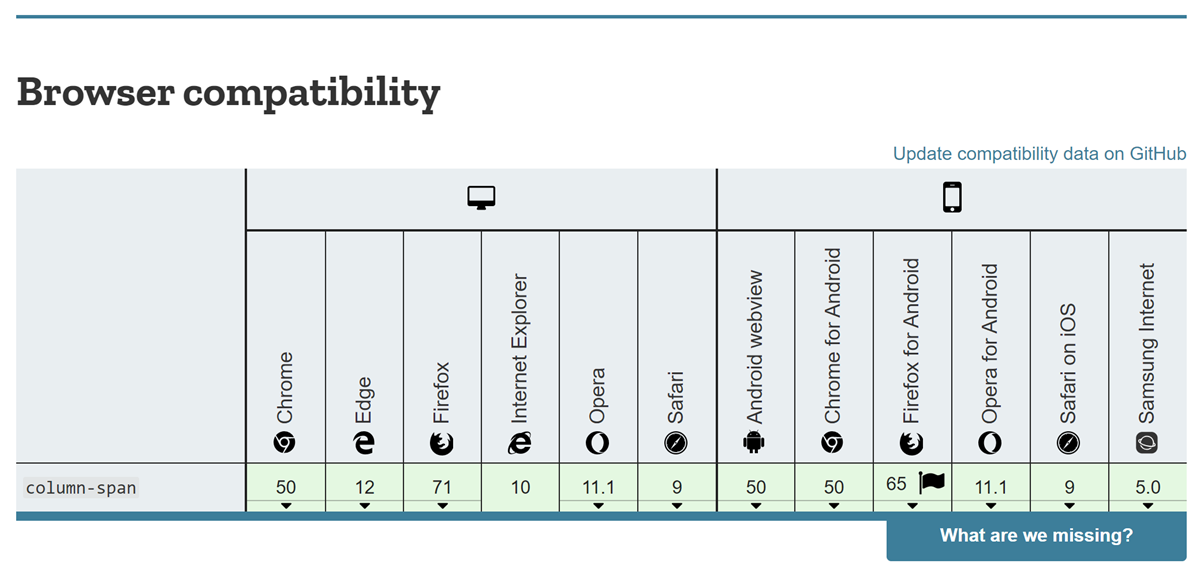
Firefox has now joined other browsers in implementing the column-span property. This means that we have good support for the property across all major browsers, as the Compat data for column-span shows.
The multicol specification
My interest in the implementation of column-span is partly because I am one of the editors of the multicol specification. I volunteered to edit the multicol specification as it had been stalled for some time, with past resolutions by the WG not having been edited into the spec. There were also a number of unresolved issues, many of which were to do with the column-span feature. I started work by digging through the mailing list archives to find these issues and resolutions where we had them. I then began working through them and editing them into the
Update: You may want to fast forward to the latest part… of this blog post. (Head explodes).
Thinking out loud on separating our images into a separate service. The initial goal was to push the images to the cloud, but I think we could probably have a first step. We could keep the images on our server, but instead of the current save, we could send them to another service, let say upload.webcompat.com with a HTTP PUT. And this service would save them locally.
That way it would allow us two things:
- Virtualize the core app on heroku if needed
- Replace when we are ready the microservice by another cloud hosting solution.
All of this is mainly thinking for now.
Anatomy of our environment
config/environment.py defines:
UPLOADS_DEFAULT_DEST = os.environ.get('PROD_UPLOADS_DEFAULT_DEST')
UPLOADS_DEFAULT_URL = os.environ.get('PROD_UPLOADS_DEFAULT_URL')
The maximum limit for images is defined in __init__.py
Currently in views.py, there is a route for localhost upload.
# set limit of 5.5MB for file uploads
# in practice, this is ~4MB (5.5 / 1.37)
# after the data URI is saved to disk
app.config['MAX_CONTENT_LENGTH'] = 5.5 * 1024 * 1024
The localhost part would probably not changed much. This is just for reading the images URL.
if app.config['LOCALHOST']:
    @app.route('/uploads/')
    def download_file(filename):
        """Route just for local environments to send uploaded images.

        In production, nginx handles this without needing to touch the
        Python app.
        """
        return send_from_directory(
            app.config['UPLOADS_DEFAULT_DEST'], filename)
then the api for uploads is defined in api/uploads.py
This is where the production route is defined.
@uploads.route('/', methods=['POST'])
def upload():
    '''Endpoint to upload an image.

    If the image asset passes validation, it's saved as:
        UPLOADS_DEFAULT_DEST + /year/month/random-uuid.ext

    Returns a JSON string that contains the filename and url.
    '''
    …
    # cut some stuff.
    try:
        upload = Upload(imagedata)
        upload.save()
        data = {
            'filename': upload.get_filename(upload.image_path),
            'url': upload.get_url(upload.image_path),
            'thumb_url': upload.get_url(upload.thumb_path)
        }
        return (json.dumps(data), 201, {'content-type': JSON_MIME})
    except (TypeError, IOError):
        abort(415)
    except RequestEntityTooLarge:
Mozilla was one of the first companies to establish a bug bounty program and we continually adjust it so that it stays as relevant now as it always has been. To celebrate the 15 years of the 1.0 release of Firefox, we are making significant enhancements to the web bug bounty program.
Increasing Bounty Payouts
We are doubling all web payouts for critical, core and other Mozilla sites as per the Web and Services Bug Bounty Program page. In addition we are tripling payouts to $15,000 for Remote Code Execution payouts on critical sites!
Adding New Critical Sites to the Program
As we are constantly improving the services behind Firefox, we also need to ensure that sites we consider critical to our mission get the appropriate attention from the security community. Hence we have extended our web bug bounty program by the following sites in the last 6 months:
- Autograph – a cryptographic signature service that signs Mozilla products.
- Lando – Mozilla’s new automatic code-landing service which allows us to easily commit Phabricator revisions to their destination repository.
- Phabricator – a code management tool used for reviewing Firefox code changes.
- Taskcluster the task execution framework that supports Mozilla’s continuous integration and release processes (promoted from core to critical).
Adding New Core Sites to the Program
The sites we consider core to our mission have also been extended to include:
- Firefox Monitor – a site where you can register your email address so that you can be informed if your account details are part of a data breach.
- Localization – a service contributors can use to help localize Mozilla products.
- Payment Subscription – a service that is used as the interface in front of the payment provide (Stripe).
- Firefox Private Network – a site from which you can download a desktop extension that helps secure and protect your connection everywhere you use Firefox.
- Ship It – a system that accepts requests for releases from humans and translates them into information and requests that our Buildbot-based release automation can process.
- Speak To Me – Mozilla’s Speech Recognition API.
The new payouts have already been applied to the most recently reported web bugs.
We hope the new sites and increased payments will encourage you to have another look at our sites and help us keep them safe for everyone who uses the web.
Happy Birthday, Firefox. And happy bug hunting to you all!
The post Updates to the Mozilla Web Security Bounty Program appeared first on Mozilla Security Blog.
https://blog.mozilla.org/security/2019/11/19/updates-to-the-mozilla-web-security-bounty-program/
Version 0.10 of Mozilla’s WebThings Gateway brings support for extension-type add-ons. Released last week, this powerful new capability lets developers modify the user interface (UI) to their liking with JavaScript and CSS.
Although the initial set of extension APIs is fairly minimal, we believe that they will already enable a large amount of functionality. To go along with the UI extensions, developers can also extend the gateway’s REST API with their own handlers, allowing for back-end analytics, for example.
In this post, we’ll walk through a simple example to get you started with building your own extension.
The Basics
If you’re completely new to building add-ons for the WebThings Gateway, there are a couple things you should know.
An add-on is a set of code that runs alongside the gateway. In the case of extensions, the code runs as part of the UI in the browser. Add-ons can provide all sorts of functionality, including support for new devices, the ability to notify users via some outlet, and now, extending the user interface.
Add-ons are packaged up in a specific way and can then be published to the add-on list, so that they can be installed by other users. For best results, developers should abide by these basic guidelines.
Furthermore, add-ons can theoretically be written in any language, as long as they know how to speak to the gateway via IPC (interprocess communication). We provide libraries for Node.js and Python.
The New APIs
There are two new groups of APIs you should know about.
First, the front end APIs. Your extension should extend the Extension class, which is global to the browser window. This gives you access to all of the new APIs. In this 0.10 release, extensions can add new entries to the top-level menu and show and hide top-level buttons. Each extension gets an empty block element that they can draw to as they please, which can be accessed via the menu entry or some other means.
Second, the back end APIs. An add-on can register a new APIHandler. When an authenticated request is made to /extensions//api/*, your API handler will be invoked with request information. It should send back the appropriate response.
Basic Example
Now that we’ve covered the basics, let’s walk through a simple example. You can find the code for this example on GitHub. Want to see the example in Python, instead of JavaScript? It’s available here.
This next example is really basic: create a form, submit the form, and echo the result back as JSON.
Let’s go ahead and create our API handler. For this example, we’ll just echo back what we received.
const {APIHandler, APIResponse} = require('gateway-addon');
const manifest = require('./manifest.json');

/**
* Example API handler.
*/
class ExampleAPIHandler extends APIHandler {
  constructor(addonManager) {
    super(addonManager, manifest.id);
    addonManager.addAPIHandler(this);
  }

  async handleRequest(request) {
    if (request.method !== 'POST' || request.path !== '/example-api') {
      return new APIResponse({status: 404});
    }

    // echo back the body
    return new APIResponse({
      status: 200,
      contentType: 'application/json',
      content: JSON.stringify(request.body),
    });
  }
}
module.exports = ExampleAPIHandler;
The gateway-addon library provides nice wrappers for the API requests and responses. You fill in the basics: status code, content type, and content. If there is no content, you can omit those fields.
Now, let’s create a UI that can actually use the new API
(“This Week in Glean” is a series of blog posts that the Glean Team at Mozilla is using to try to communicate better about our work. They could be release notes, documentation, hopes, dreams, or whatever: so long as it is inspired by Glean. The previous post of the series lives here.) This week in … ->
https://www.a2p.it/wordpress/tech-stuff/mozilla/geckoview-glean-fenix-performance-metrics/
On this very day five years ago, I committed the initial code of what later became git-cinnabar. It is kind of an artificial anniversary, because I didn’t actually publish anything until 3 weeks later, and I also had some prototypes months earlier.
The earlier prototypes of what I’ll call “pre-git-cinnabar” could handle doing git clone hg::https://hg.mozilla.org/mozilla-central (that is, creating a git clone of a Mercurial repository), but they couldn’t git pull later. That pre-git-cinnabar initial commit, however, was the first version that did.
The state of the art back then was similar git helpers, the most popular choice being Felipec’s git-remote-hg, or the opposite tool: hg-git, a mercurial plugin that allows to push to a git repository.
They both had the same caveats: they were slow to handle a repository the size of mozilla-central back then, and both required a local mercurial repository (hidden in the .git directory in the case of Felipec’s git-remote-hg).
This is what motivated me to work on pre-git-cinnabar, which was also named git-remote-hg back then because of how git requires a git-remote-hg executable to handle hg::-prefixed urls.
Fast forward five years, mozilla-central has grown tremendously, and another mozilla-unified repository was created that aggregates the various mozilla branches (esr*, release, beta, central, integration/*).
git-cinnabar went through multiple versions, multiple changes to the metadata it keeps, and while I actually haven’t cumulatively worked all that much on it considering the number of years, a lot of progress has been made.
But let’s go back to the 19th of November 2014. Thankfully, Mercurial allows to strip everything past a certain date, artificially allowing to restore the state of the repository at that date. Unfortunately, pre-git-cinnabar only supports the old Mercurial bundle format, which both the mozilla-central and mozilla-unified repositories now don’t allow. So pre-git-cinnabar can’t clone them out of the box anymore. It’s still possible to allow it in mirror repositories, but because they now use generaldelta, that incurs a server-side conversion that is painfully slow (the hg.mozilla.org server rejects clients that don’t support the new format for this reason).
So for testing purposes, I setup a nginx reverse-proxy and cache, such that the conversion only happens once, and performed clones multiple times, removing any bundling and conversion cost out of the equation. And tested the current version of Felipec’s git-remote-hg, the current version of hg-git, pre-git-cinnabar, and last git-cinnabar release (0.5.2 as of writing), on some AWS instances, with Xeon Platinum 8124M 3Ghz CPUs. That’s a different CPU from what I had back in 2014, yielding some different results from what I wrote in that first announcement.
I’ve thus cloned both mozilla-central (denoted m-c) and mozilla-unified (denoted m-u), with simulated old states of the repositories. Mozilla-unified didn’t exist before 2016, but it’s still interesting to simulate its content as if it had existed because it allows to learn how the tools perform with the additional branches it contains, with the implication they have on how the data is stored in the repository.
Note: I didn’t test older versions of git-remote-hg or hg-git to see how they performed at the time, and how things evolved for them.
There are multiple things of note in the results
I was invited to a team dinner as part of a work week the Data Platform team was having in Toronto. I love working with these folks, and I like food, so I set about planning my logistics.
The plan was solid, but unimpressive. It takes three hours or so to get from my home to the Toronto office by transit, so I’d be relying on the train’s WiFi to allow me to work on the way to Toronto, and I’d be arriving home about 20min before midnight.
Here’s how it went:
- 0800 Begin
- 0816 Take the GRT city bus to Kitchener train station
- 0845 Try to find a way to get to the station (the pedestrian situation around the station is awful)
- 0855 Learn that my 0918 train is running 40min late.
- 0856 Purchase a PRESTO card for my return journey, being careful to not touch any of the blood stains on the vending machine. (Seriously. Someone had a Bad Time at Kitchener Station recently)
- 0857 Learn that they had removed WiFi from the train station, so the work I’ll be able to do is limited to what I can manage on my phone’s LTE
- 0900 Begin my work day (Slack and IRC only), and eat the breakfast I packed because I didn’t have time at home.
- 0943 Train arrives only 35min late. Goodie.
- 0945 Learn from the family occupying my seat that I actually bought a ticket for the wrong day. Applying a discount code didn’t keep the date and time I selected, and I didn’t notice until it was too late. Sit in a different seat and wonder what the fare inspector will think.
- 0950 Start working from my laptop. Fear of authority can build on its own time, I have emails to answer and bugs to shuffle.
- 1030 Fare inspector finally gets around to me as my nervousness peaks. Says they’ll call it in and there might be an adjustment charge to reschedule it.
- 1115 Well into Toronto, the fare inspector just drops my ticket into my lap on their way to somewhere else. I… guess everything’s fine?
- 1127 Train arrives at Toronto Union Station. Disconnect WiFi, disembark and start walking to the office. (Public transit would be slower, and I’m saving my TTC token for tonight’s trip)
- 1145 Arrive at MoTo just in time for lunch.
Total time to get to Mozilla Toronto: 3h45min. Total distance traveled: 95km Total cost: $26 for the Via rail ticket, $2.86 for the GRT city bus.
The way back wasn’t very much better. I had to duck out of dinner at 8pm to have a hope of getting home before the day turned into tomorrow:
- 2000 Leave the team dinner, say goodnights. Start walking to the subway
- 2012 At the TTC subway stop learn that the turnstiles don’t take tokens any more. Luckily there’s someone in the booth to take my fare.
- 2018 Arrive at Union station and get lost in the construction. I thought the construction was done (the construction is never done).
- 2025 Ask at the PRESTO counter how to use PRESTO properly. I knew it was pay-by-distance but I was taking a train _and_ a bus, so I wasn’t sure if I needed to tap in between the two modes (I do. Tap before the train, after the train, on the bus when you get on, and on the bus when you get off. Seems fragile, but whatever).
- 2047 Learn that the train’s been rescheduled 6min later. Looks like I can still make my bus connection in Bramalea.
- 2053 Tap on the thingy, walk up the flights of stairs to the train, find a seat.
- 2102 “Due to platform restrictions, the doors on car 3107 will not open at Bramalea”… what car am I on? There’s no way to tell from where I’m sitting.
- 2127 Arrive at Bramalea. I’m not on car 3107.
- 2130 Learn that there’s one correct way to leave the platform and I took the other one that leads to the parking lot. Retrace my steps.
- 2132 Tap the PRESTO on the thingy outside the station building (closed)
- 2135 Tap the PRESTO on the thingy inside the bus. BEEP BEEP. Bus driver says insufficient funds. That can’t be, I left myself plenty of room. Tick tock.
- 2136 Cold air aching in my lungs from running I load another $20 onto the PRESTO
- 2137 Completely out of breath, tap the PRESTO on the thingy inside the bus. Ding. Collapse in a seat. Bus pulls out just moments later.
- 2242 Arrive in Kitchener. Luckily the LRT, running at 30min headways, is 2min away. First good connection of the day.
- 2255 This is the closest the train can get me. There’s a 15min wait (5 of which I’ll have to walk in the cold to get to the stop) for a bus that’ll get me, in 7min, within a 10min walk from home. I decide to walk instead, as it’ll be faster.
- 2330 Arrive home.
Total time to get home: 3h30min. Total distance traveled: 103km. Total cost: $3.10 for the subway token, $46 PRESTO ($6 for the card, $20 for the fare, $20 for the surprise fare), $2.86 for the LRT.
At this point I’ve been awake for over 20 hours.
Is it worth