Wasmtime, the WebAssembly runtime from the Bytecode Alliance, recently added an early preview of an API for .NET Core, Microsoft’s free, open-source, and cross-platform application runtime. This API enables developers to programmatically load and execute WebAssembly code directly from their .NET programs.
.NET Core is already a cross-platform runtime, so why should .NET developers pay any attention to WebAssembly?
There are several reasons to be excited about WebAssembly if you’re a .NET developer, such as sharing the same executable code across platforms, being able to securely isolate untrusted code, and having a seamless interop experience with the upcoming WebAssembly interface types proposal.
Share more code across platforms
.NET assemblies can already be built for cross-platform use, but using a native library (for example, a library written in C or Rust) can be difficult because it requires native interop and distributing a platform-specific build of the library for each supported platform.
However, if the native library were compiled to WebAssembly, the same WebAssembly module could be used across many different platforms and programming environments, including .NET; this would simplify the distribution of the library and the applications that depend on it.
Securely isolate untrusted code
The .NET Framework attempted to sandbox untrusted code with technologies such as Code Access Security and Application Domains, but ultimately these failed to properly isolate untrusted code. As a result, Microsoft deprecated their use for sandboxing and ultimately removed them from .NET Core.
Have you ever wanted to load untrusted plugins in your application but couldn’t figure out a way to prevent the plugin from invoking arbitrary system calls or from directly reading your process’ memory? You can do this with WebAssembly because it was designed for the web, an environment where untrusted code executes every time you visit a website.
A WebAssembly module can only call the external functions it explicitly imports from a host environment, and may only access a region of memory given to it by the host. We can leverage this design to sandbox code in a .NET program too!
Improved interoperability with interface types
The WebAssembly interface types proposal introduces a way for WebAssembly to better integrate with programming languages by reducing the amount of glue code that is necessary to pass more complex types back and forth between the hosting application and a WebAssembly module.
When support for interface types is eventually implemented by the Wasmtime for .NET API, it will enable a seamless experience for exchanging complex types between WebAssembly and .NET.
Diving into using WebAssembly from .NET
In this article we’ll dive into using a Rust library compiled to WebAssembly from .NET with the Wasmtime for .NET API, so it will help to be a little familiar with the C# programming language to follow along.
The API described here is fairly low-level. That means that there is quite a bit of glue code required for conceptually simple operations, such as passing or receiving a string value.
In the future we’ll also provide a higher-level API based on WebAssembly interface types which will significantly reduce the code required for the same operations. Using that API will enable interacting with a WebAssembly module from .NET as easily as you would a .NET assembly.
Note also that the API is still under active development and will change in backwards-incompatible ways. We’re aiming to stabilize it as we stabilize Wasmtime itself.
If you’re reading this and you aren’t a .NET developer, that’s okay! Check out the Wasmtime Demos repository for corresponding implementations for Python, Node.js, and Rust too!
Creating the WebAssembly module
We’ll start by building a Rust library that can be used to render Markdown to HTML. However, instead of compiling the Rust library for your processor architecture, we’ll be compiling it to WebAssembly so we can use it from .NET.
You don’t need to be familiar with the Rust programming language to follow along, but it will help to have a Rust toolchain installed if you want to build the
By late 2019, there’s an estimated amount of ten billion curl installations in the world. Of course this is a rough estimate and depends on how you count etc.
There are several billion mobile phones and tablets and a large share of those have multiple installations of curl. Then there all the Windows 10 machines, web sites, all macs, hundreds of millions of cars, possibly a billion or so games, maybe half a billion TVs, games consoles and more.

How much data are they transferring?
In the high end of volume users, we have at least two that I know of are doing around one million requests/sec on average (and I’m not even sure they are the top users, they just happen to be users I know do high volumes) but in the low end there will certainly be a huge amount of installations that barely ever do any requests at all.
If there are two users that I know are doing one million requests/sec, chances are there are more and there might be a few doing more than a million and certainly many that do less but still many.
Among many of the named and sometimes high profiled apps and users I know use curl, I very rarely know exactly for what purpose they use curl. Also, some use curl to do very many small requests and some will use it to do a few but very large transfers.
Additionally, and this really complicates the ability to do any good estimates, I suppose a number of curl users are doing transfers that aren’t typically considered to be part of “the Internet”. Like when curl is used for doing HTTP requests for every single subway passenger passing ticket gates in the London underground, I don’t think they can be counted as Internet transfers even though they use internet protocols.
How much data are browsers driving?
According to some data, there is today around 4.388 billion “Internet users” (page 39) and the world wide average time spent “on the Internet” is said to be 6 hours 42 minutes (page 50). I think these numbers seem credible and reasonable.
According to broadbandchoices, an average hour of “web browsing” spends about 25MB. According to databox.com, an average visit to a web site is 2-3 minutes. httparchive.org says the median page needs 74 HTTP requests to render.
So what do users do with their 6 hours and 42 minutes “online time” and how much of it is spent in a browser? I’ve tried to find statistics for this but failed.
@chuttenc (of Mozilla) stepped up and helped me out with getting stats from Firefox users. Based on stats from users that used Firefox on the day of October 1, 2019 and actually used their browser that day, they did 2847 requests per client as median with the median download amount 18808 kilobytes. Of that single day of use.
I don’t have any particular reason to think that other browsers, other days or users of other browsers are very different than Firefox users of that single day. Let’s count with 3,000 requests and 20MB per day. Interestingly, that makes the average data size per request a mere 6.7 kilobytes.
A median desktop web page total size is 1939KB right now according to httparchive.org (and the mobile ones are just slightly smaller so the difference isn’t too important here).
Based on the median weight per site from httparchive, this would imply that a median browser user visits the equivalent of 15 typical sites per day (30MB/1.939MB).
If each user spends 3 minutes per site, that’s still just 45 minutes of browsing per day. Out of the 6 hours 42 minutes. 11% of Internet time is browser time.
3000 requests x 4388000000 internet users, makes 13,164,000,000,000 requests per day. That’s 13.1 trillion HTTP requests per day.
The world’s web users make about 152.4 million HTTP requests per second.
(I think this is counting too high because I find it unlikely that all internet users on the globe use their browsers this much every day.)
The equivalent math to figure out today’s daily data amounts transferred by browsers makes it 4388000000 x 30MB = 131,640,000,000 megabytes/day. 1,523,611 megabytes per second. 1.5
Is health data being used by third party trackers to target you when you’re potentially at your most vulnerable? According to an investigation by The Financial Times, a global newspaper … Read more
The post How to stop third party tracking on health sites appeared first on The Firefox Frontier.
https://blog.mozilla.org/firefox/how-to-stop-third-party-tracking-on-health-sites/
Another release is upon us: please welcome Firefox 71 to the stage! This time around, we have a plethora of new developer tools features. These include the web socket message inspector, console multi-line editor mode, log on events, and network panel full text search!
And as if that wasn’t good enough, there are important new web platform features available, like CSS subgrid, column-span, Promise.allSettled, and the Media Session API.
Read on for more details of the highlights, and find the full list of additions with the links below:
Developer tools
Let’s start with our new developer tool features! Many of these were first made available in Firefox Developer Edition, and then improved based on feedback from early adopters. We’d like to thank you all for your help!
Continued speed and reliability improvements
Improvements in Firefox 71 continue our promise to provide a rock-solid and fast DevTools experience.
We know it’s important that DevTools load quickly. We have automation in place to help ensure we keep driving this time down. In 71 we got some help from the JavaScript team, when their improvements to caching scripts for startup not only made Firefox start faster, but DevTools too. One Console test got an astonishing 40% improvement while times across every panel were boosted by 8-15%!
Interaction with pretty-printed code has gotten a lot of attention. Over past releases we’ve already improved breakpoint handling and pausing. In 71, links to scripts (like from the event handler tooltip in the Inspector or the stack traces in the Console) reliably get you to the expected line, and debugging sources loaded through eval() now also works as expected.
WebSocket Message Inspector
The Network panel has a new Messages tab. You can observe all messages sent and received through a WebSocket connection:

Sent frames have a green up-arrow icon, while received frames have a red down-arrow icon. You can click on an individual frame to view its formatted data.
Find out more about WebSockets and how to use the tool in this post about Firefox’s New WebSocket Inspector. Thanks a lot to Heng Yeow Tan, who worked on this feature as part of his Google Summer of Code (GSoC) internship.
Network full-text search
Sometimes you need to find a CSS file that defines a color, or work out which file generates a button label on a page. Full-text search makes this possible by letting you search through all resources in the Network Monitor. Similar to other DevTools, you can open the new panel by clicking the new “Search” icon in the toolbar or using the shortcut (Windows: Ctrl + Shift + F, Mac: Cmd + Shift + F). The full-text search will highlight matches in request/response bodies, headers, and cookies.

Tip: You can use the Network panel’s existing URL and type filters to limit which requests are being matched in search.
Thanks a lot to lloan Alas, who worked on this feature as part of his Outreachy internship.
Network request blocking
Simulating blocked requests lets you test how a page loads
Another release is upon us: please welcome Firefox 71 to the stage! This time around, we have a plethora of new developer tools features. These include the web socket message inspector, console multi-line editor mode, log on events, and network panel full text search!
And as if that wasn’t good enough, there are important new web platform features available, like CSS subgrid, column-span, Promise.allSettled, and the Media Session API.
Read on for more details of the highlights, and find the full list of additions with the links below:
Developer tools
Let’s start with our new developer tool features! Many of these were first made available in Firefox Developer Edition, and then improved based on feedback from early adopters. We’d like to thank you all for your help!
Continued speed and reliability improvements
Improvements in Firefox 71 continue our promise to provide a rock-solid and fast DevTools experience.
We know it’s important that DevTools load quickly. We have automation in place to help ensure we keep driving this time down. In 71 we got some help from the JavaScript team, when their improvements to caching scripts for startup not only made Firefox start faster, but DevTools too. One Console test got an astonishing 40% improvement while times across every panel were boosted by 8-15%!
Interaction with pretty-printed code has gotten a lot of attention. Over past releases we’ve already improved breakpoint handling and pausing. In 71, links to scripts (like from the event handler tooltip in the Inspector or the stack traces in the Console) reliably get you to the expected line, and debugging sources loaded through eval() now also works as expected.
WebSocket Message Inspector
The Network panel has a new Messages tab. You can observe all messages sent and received through a WebSocket connection:
Sent frames have a green up-arrow icon, while received frames have a red down-arrow icon. You can click on an individual frame to view its formatted data.
Find out more about WebSockets and how to use the tool in this post about Firefox’s New WebSocket Inspector. Thanks a lot to Heng Yeow Tan, who worked on this feature as part of his Google Summer of Code (GSoC) internship.
Network full-text search
Sometimes you need to find a CSS file that defines a color, or work out which file generates a button label on a page. Full-text search makes this possible by letting you search through all resources in the Network Monitor. Similar to other DevTools, you can open the new panel by clicking the new “Search” icon in the toolbar or using the shortcut (Windows: Ctrl + Shift + F, Mac: Cmd + Shift + F). The full-text search will highlight matches in request/response bodies, headers, and cookies.
Tip: You can use the Network panel’s existing URL and type filters to limit which requests are being matched in search.
Thanks a lot to lloan Alas, who worked on this feature as part of his Outreachy internship.
Network request blocking
Simulating blocked requests lets you test how a page loads
I’ve watched how my thirteen year old son goes about to acquire information about things online. I am astonished how he time and time again deliberately chooses to get it from a video on YouTube rather than trying to find the best written documentation for whatever he’s looking for. I just have to accept that some people, even some descendants in my own family tree, prefer video as a source of information. And I realize he’s not alone.
So therefore, I bring you, the…
libcurl video tutorial
My intent is to record a series of short and fairly independent episodes, each detailing a specific libcurl area. A particular “thing”, feature, option or area of the APIs. Each episode is also thoroughly documented and all the source code seen on the video is available on the site so that viewers can either follow along while viewing, or go back to the code afterward as a reference. Or both!
I’ve done the four first episodes so far, and they range from five minutes to nineteen minutes a piece. I expect that it might take me a while to just complete the list of episodes I could come up with myself. I also hope and expect that readers and viewers will think of other areas that I could cover so the list of video episodes could easily expand over time.
Feedback
If you have comments on the episodes. If you have suggestion of what to improve or subjects to cover, head over to the libcurl-video-tutorials github page and file an issue or two!
Video setup
I use a Debian Linux installation to develop on. I figure it should be similar enough to many other systems.
Video wise, in each episode I show you my text editor for code, a terminal window for building the code, running what we build in the episode and also for looking up man page information etc. And a small image of myself. Behind those three squares, there’s a photo of a forest (taken by me).
I plan to make each episode use the same basic visuals.
In the initial “setup” episode I create a generic Makefile, which we can reuse in several (all?) other episodes to build the example code easily and swiftly. I’ve previously learned that people consider Makefiles difficult, or sometimes even magic, to work with so I wanted to get that out of the way from the start and then focus more directly on actual C code that uses libcurl.
Receive data episode
Here’s the “receive data” episode as an example of how this can look.
The link: https://bagder.github.io/libcurl-video-tutorials/
https://daniel.haxx.se/blog/2019/12/03/libcurl-video-tutorial/
Last month, the Internet Society (ISOC) announced plans to sell the Public Interest Registry (PIR) — the organization that manages all the dot org domain names in the world — to a private equity firm named Ethos. This caught the attention of Mozilla and other public benefit orgs.
Many have called for the deal to be stopped. It’s not clear that this kind of sale is inherently bad. It is possible that with the right safeguards a private company could act as a good steward of the dot org ecosystem. However, it is clear that the stakes are high — and that anyone with the power to do so should urgently step in to slow things down and ask some hard questions.
For example: Is this deal a good thing for orgs that use these domains? Is it structured to ensure that dot org will retain its unique character as a home for non-commercial organizations online? What accountability measures will be put in place?
In a letter to ISOC, the EFF and others summarize why the stakes are high. Whoever runs the dot org registry has the power to: set (and raise) prices; define rights protection rules; and suspend or take down domains that are unlawful, a standard that varies widely from jurisdiction to jurisdiction. It is critical that whoever runs the dot org registry is a reliable steward who can be held accountable for exercising these powers fairly and effectively.
ISOC and Ethos put up a site last week called keypointsabout.org which argues that the newly privatized PIR will be just such a steward. Measures outlined on the site include the creation of a stewardship council, price caps, and the incorporation of the new PIR as a B Corp. These sound like good plans at first read, but they need much more scrutiny and detail given what is at stake.
ICANN and the ISOC board are both in a position to slow things down and offer greater scrutiny and public transparency. We urge them to step back and provide public answers to questions of interest to the public and the millions of orgs that have made dot org their home online for the last 15 years. Specific questions should include:
- Are the stewardship measures proposed for the new PIR sufficient to protect the interests of the dot org community? What is missing?
- What level of scope, authority and independence will the proposed Stewardship Council possess? Will dot org stakeholders have opportunities to weigh in on the selection of the Council and development of its bylaws and its relationship to PIR and Ethos?
- What assurances can the dot org community have that Ethos and PIR will keep their promises regarding price increases? Will there be any remedy if these promises are not kept?
- What mechanisms does PIR currently have in place to implement measures to protect free speech and other rights of domain holders under its revised contract, and will those mechanisms change in any way with the transfer of ownership and control? In particular, how will PIR handle requests from government actors?
- When is the planned incorporation of PIR as a B corp? Are there any repercussions for Ethos and/or PIR if this incorporation does not take place?
- What guarantees are in place to retain the unique character of the dot org as a home for non-commercial organizations, one of the important stewardship promises made by PIR when it was granted the registry?
- Did ISOC receive multiple bids for PIR? If yes, what criteria in addition to price were used to review the bids? Were the ICANN criteria originally applied to dot org bidders in 2002 considered? If no, would ISOC consider other bids should the current proposal be rejected?
- How long has Ethos committed to stay invested in PIR? Are there measures in place to ensure continued commitment to the answers above in the event of a resale?
- What changes to ICANN’s agreement with PIR should be made to ensure that dot org is maintained in a manner that serves the public interest, and that ICANN has recourse to act swiftly if it is not?
In terms of process, ICANN needs to approve or reject the transfer of control over the dot org contract. And, presumably, the ISOC board has the power to go back and ask further questions about the deal before it is finalized. We urge these groups to step up to ask questions like the ones above — and not finalize the deal until they and a broad cross section of the dot org community are satisfied with the answers. As they address these questions, we urge them to
Hi SUMO Community,
Following up on our previous announcement about Firefox Private Network, today marks another milestone for Firefox. We are so excited to expand Firefox Private Network into two different offerings.
Browser-level protection (Extension for any desktop running the Firefox browser)
We are continuing our beta testing of the Firefox Private Network extension that we released earlier this year. The extension hides your Firefox browsing activity and location. This prevents eavesdroppers on public Wi-Fi from spying on the actions you take online by masking your IP address and routing your traffic through our partner’s secure servers. It also protects you from internet service providers collecting or selling data on your browsing activity. And it hides your locations from websites and data collectors that profile you to target ads.
There will be no changes for test pilots who have already started using the extension by logging in with their Firefox account. For those who are not yet using the extension, we invite you to join the Test Pilot program and try it out. When you sign up or log in with a Firefox account and become one of our beta testers, you’ll get 12 hours of protected browsing for free this month. We are continuing to explore the best way to deliver browser-level protection to our users and we welcome your feedback and input each step of the way.
Get extra security by using full-device protection (Windows 10)
If you are looking for unlimited private internet connection that goes beyond the Firefox browser, we are also offering full-device protection with Firefox Private Network. Firefox Private Network full-device protection is a device-level VPN that provides an encrypted tunnel to the web from any software or app on your Windows 10 device.That means your connection is secure and private regardless of which browser or application you are using.
Private Network’s full-device protection is currently available for beta testers in the United States with Windows 10 devices, but it will be available on other platforms soon. You can join the waitlist for the VPN beta here. Selected users will receive an invitation to subscribe for 4.99 USD per month with a U.S. credit card during the beta period.
How can I help as a SUMO contributor?
For the SUMO community, it’s important to understand that we now have two separate products for both services in the Kitsune platform. In addition to that, we also offer another level of support for the paying customers of the Firefox Private Network device-level protection that will be delivered through a ticketing system called Zendesk. As such, both the forums and also Zendesk will be managed by our designated staff member, Brady. However, as with the previous beta phase, we will also welcome any help you may provide for the users in the forum. We are also working on an escalation process from the community to the designated staff member, so expect more updates on that.
We are enthusiastic about this new opportunity and hope that you’ll support us along the way. To get the best out of Firefox experience, sign up for a Firefox Account and join our fight to keep the internet open and accessible to all!
https://blog.mozilla.org/sumo/2019/12/03/updates-on-firefox-private-network/
In June we made an announcement, that left us — just like many of our users — particularly excited: we introduced Firefox Preview, a publicly available test version of our upcoming best in class browser for Android that will be fueled by GeckoView. GeckoView is Mozilla’s own high-performance mobile browser engine, which enables us to deliver an even better, faster and more private Firefox to Android device owners. Hundreds of thousands of users have downloaded and tested Firefox Preview since it became available.
Over the past 5 months we’ve been working diligently on improvements to the app. We’ve been listening closely to user feedback and are basing app development on users’ requests and needs; one very recent example is our support for extensions through the WebExtensions API. We will still continue to test Firefox Preview Beta and we’re expecting to launch as a final product in the first half of 2020. Today, we want to provide an update on our progress, and share some of the amazing new features we’ve added to Firefox Preview since the beta release of 1.0.
Please note: The rollout of Firefox Preview Beta 3.0 is currently delayed. The newest features, such as Site Protections, will be made available within the next couple of days. Thanks for your patience.
Browse the web conveniently on mobile with privacy by default
At Firefox, we foster user choice and individual decision making. However, we’ve noticed the massive change the internet economy has undergone over the last couple of years. This transformation has distorted the value exchange between online businesses, the ad industry in particular, and users. It is no longer transparent and consumers are being taken advantage of more and more. We want a better web for people. One that puts users first while still being fast, performant and, above all, private and secure. Still, we can’t expect every user to become an expert on these topics in order to protect themselves. That’s why we’re now making next-level privacy protections the default instead of an option for only the tech-savvy.
This is a guiding principle for the whole Firefox product family and it’s why we’re now taking Firefox Preview to the next level by equipping it with Enhanced Tracking Protection, an innovative technology we first introduced in Firefox for desktop earlier this year, and have been improving ever since. Enhanced Tracking Protection is our approach to put users back in control of their online life by stopping third-party tracking cookies from following them around on the web.
When mapping out how to implement this feature in the next Firefox for Android, we took the distinct use-cases for mobile and desktop into account. On the phone or tablet, most users care much more about performance and blocking of annoyances compared to desktop. Users are more forgiving when a site doesn’t load exactly like it’s meant to. So we decided that while Firefox for desktop’s default mode is “Standard”, Firefox Preview will use “Strict” mode. “Standard” prevents third-party trackers from (re)using cookies to identify a user while still allowing the trackers to run on the site, “strict” actually blocks the trackers, which makes the browser up to 20% percent faster. Users will no longer face ad banners that contain trackers and therefore have a rather uninterrupted browsing experience, though there is a chance that some website content may not work. If users prefer to avoid that they can always switch to “Standard” mode with just 3 taps or turn off Enhanced Tracking Protection with only 2 taps.
 Enhanced Tracking Protection in Firefox Preview defaults to “Strict” mode, blocking tracking cookies and
As the year comes to a close, we look back at what we’ve accomplished. As recently noted in the press, this year may be the mark of our privacy-renaissance. We’ve built additional privacy protections in the browser which included blocking third party tracking cookies and cryptomining by default and created an easy-to-view report which shows the trackers that follow you and collect your online browsing habits and interests. To date, we’ve blocked more than 1 Trillion tracking requests that attempt to follow you around the web! Privacy has always been part of our DNA. We’ve always believed our role is and has always been to help give people more control over their online lives.
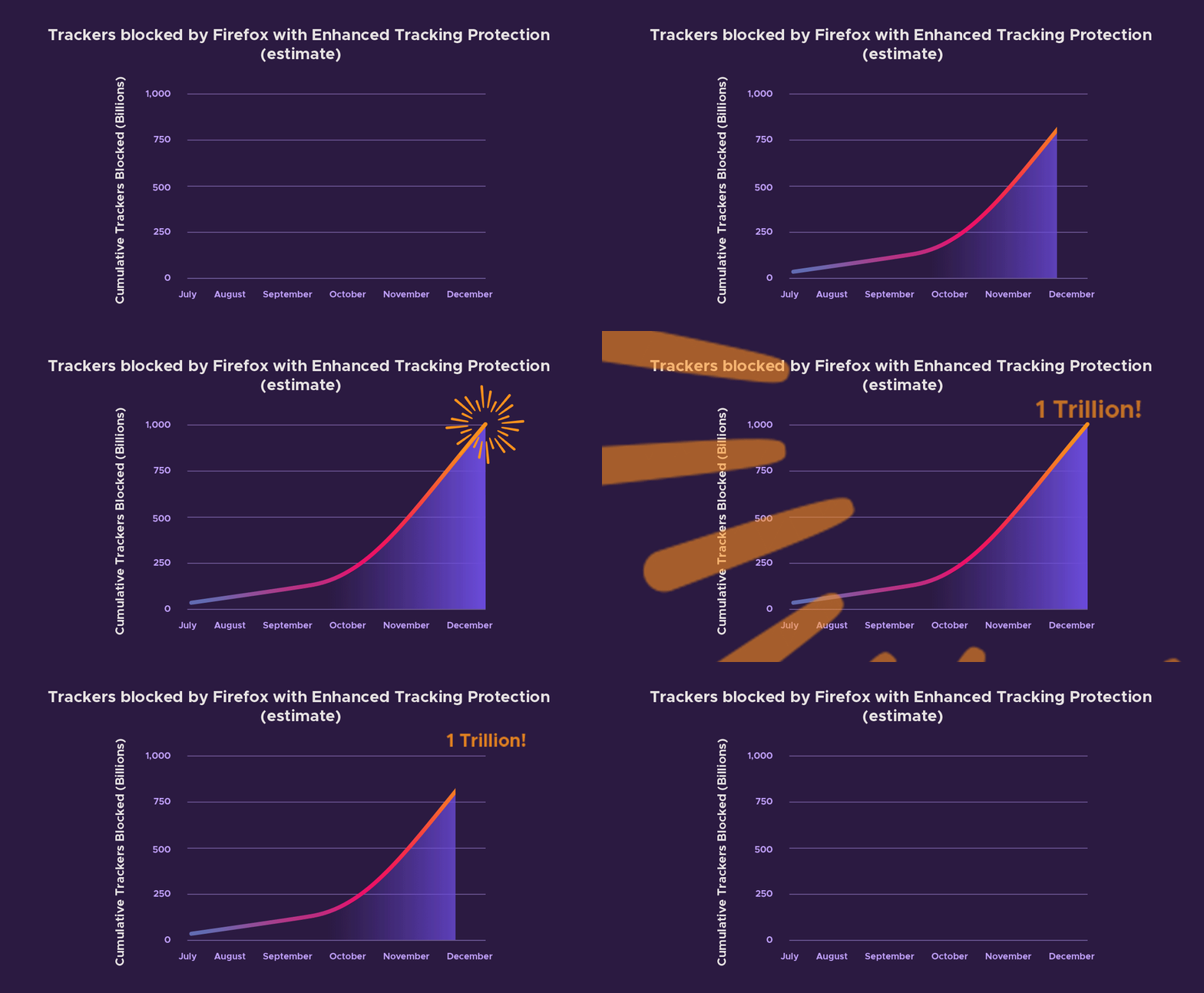
1 Trillion tracking requests have been blocked with Enhanced Tracking Protection
Today, we’ve got something for everyone, for tech savvy folks who want to test-drive privacy-first features and products or those who love to multitask while on their desktop. We have a lot in store for the next year, and will continue to uphold our promise to create privacy-focused products and features. Before we roll anything out widely to consumers, we’ve still got some fine-tuning to do. So today we’re kicking off the next phase in our ongoing testing of our Firefox Private Network Beta, and the latest Firefox Preview app for Android powered by GeckoView. Although the year might be winding down, just like Santa’s elves, we’re working around the clock to deliver experiments and the latest versions of our Firefox browser for desktop and iOS.
Latest Firefox Private Network Beta test protects users just in time for the holidays
In September, we introduced the beta release of our Firefox Private Network (FPN), an extension which provides a secure, encrypted path to the web to protect your connection and personal information when you use the Firefox browser. Since then, we’ve received feedback from our beta testers on how they’re using FPN, its protections, and we learned about websites that weren’t compatible as well as connection issues. This allowed us to quickly identify and fix bugs, and ensure a stable product.
As we continue our beta testing, we are considering various ways to bring additional privacy protections to our users. Today we’re announcing an additional beta test for US-based Firefox account users who didn’t get a chance to get in the initial group, and are interested in testing FPN.
In the next phase of our beta, we are offering a limited-time free service that lets you encrypt your Firefox connections for up to 12 hours a month. With the holidays around the corner, the FPN couldn’t come at a more convenient time. We know people are traveling and might have to rely on an unsecured public Wi-Fi network, like the one at the airport, at your local coffee shop, or even at your doctor’s office. FPN provides encrypted internet traffic thus giving you peace of mind whenever you’re using our browser.
This limited-time free service is currently available in the US on the Firefox desktop browser and you’ll need a Firefox account to try the service. You can sign up directly from the extension which can be found here.
For those looking to extend their protection beyond the browser, you can now sign up to be one of the first to experience the newest member of the FPN family. This month, Firefox account holders can request invitations to experience device-level protection with our new full-device VPN (virtual private network).
A month ago I wrote about Avast browser extensions being essentially spyware. While this article only names Avast Online Security and AVG Online Security extensions, the browser extensions Avast SafePrice and AVG SafePrice show the same behavior: they upload detailed browsing profiles of their users to uib.ff.avast.com. The amount of data collected here exceeds by far what would be considered necessary or appropriate even for the security extensions, for the shopping helpers this functionality isn’t justifiable at all.
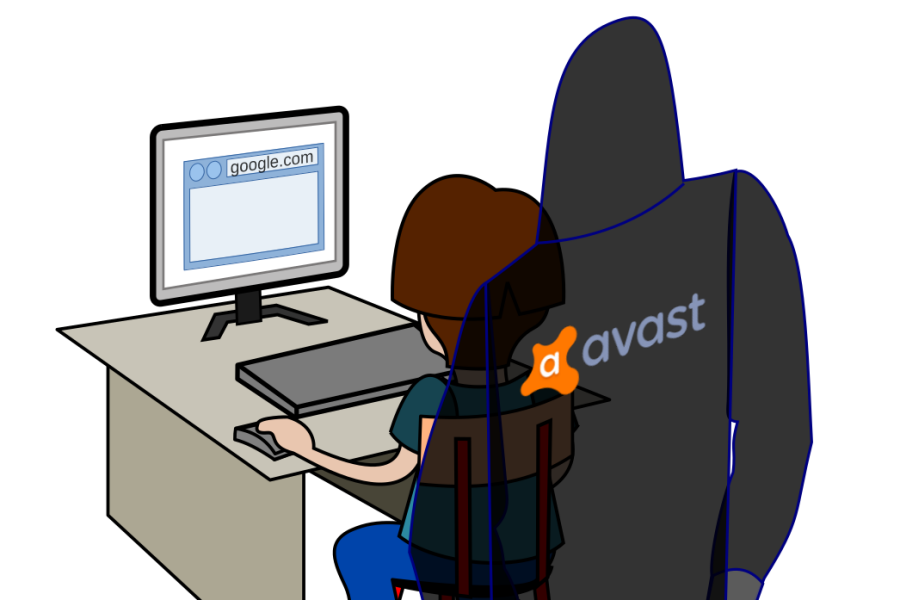
After I published my article I got the hint to look at Jumpshot, a company acquired by Avast in 2013. And indeed, that suddenly made perfect sense. On their website, Jumpshot praises its “clickstream data” product:
Incredibly detailed clickstream data from 100 million global online shoppers and 20 million global app users. Analyze it however you want: track what users searched for, how they interacted with a particular brand or product, and what they bought. Look into any category, country, or domain.
That sounds exactly like the data that Avast collects from their SafePrice and Online Security users. Yes, you are the product – even if you paid for that antivirus.
Spying on your users is clearly a violation of the terms that both Google and Mozilla make extension developers sign. So yesterday I reported these four extensions to Mozilla and Google. Mozilla immediately disabled the extension listings, so that these extensions can no longer be found on the Mozilla Add-ons site. Mozilla didn’t blacklist the extensions however, stating that they are still talking to Avast. So for existing users these extensions will still be active and continue spying on the users.
Update (2019-12-04): I also reported these extensions to Opera. 16 hours later I received a response from Opera:
Thanks for reporting it to us. We unpublished these extensions from our store.
And what about Google? Google Chrome is where the overwhelming majority of these users are. The only official way to report an extension here is the “report abuse” link. I used that one of course, but previous experience shows that it never has any effect. Extensions have only ever been removed from the Chrome Web Store after considerable news coverage. Or does anybody have a contact at Google who would be able to help?
Update (2019-12-03): This article initially stated incorrectly that Google removed these extensions as well. This isn’t currently the case, somehow I didn’t look them up correctly.
A month ago I wrote about Avast browser extensions being essentially spyware. While this article only names Avast Online Security and AVG Online Security extensions, the browser extensions Avast SafePrice and AVG SafePrice show the same behavior: they upload detailed browsing profiles of their users to uib.ff.avast.com. The amount of data collected here exceeds by far what would be considered necessary or appropriate even for the security extensions, for the shopping helpers this functionality isn’t justifiable at all.

After I published my article I got the hint to look at Jumpshot, a company acquired by Avast in 2013. And indeed, that suddenly made perfect sense. On their website, Jumpshot praises its “clickstream data” product:
Incredibly detailed clickstream data from 100 million global online shoppers and 20 million global app users. Analyze it however you want: track what users searched for, how they interacted with a particular brand or product, and what they bought. Look into any category, country, or domain.
That sounds exactly like the data that Avast collects from their SafePrice and Online Security users. Yes, you are the product – even if you paid for that antivirus.
Spying on your users is clearly a violation of the terms that both Google and Mozilla make extension developers sign. So yesterday I reported these four extensions to Mozilla and Google. Quite surprisingly, as of today all of these extensions are no longer listed on either Mozilla Add-ons website or Chrome Web Store. That was a rather swift action!
It remains to be seen how this will affect millions of existing extension users. At least Mozilla didn’t add Avast extensions to the blocklist yet, stating that they are still talking to Avast. So the extensions will remain active and keep spying on the users for now. As to Google, I don’t really know where I can see their blocklist, any hints?
https://palant.de/2019/12/03/mozilla-and-google-remove-avast-extensions-from-add-on-stores/
Welcome to the fourth edition of Multilingual Gecko Status Update!
In the previous update we covered the work which landed in Firefox 61-64.
At the time, we were landing Fluent DOM Localization APIs, still adding mozIntl features, and we had close to 800 strings migrated to Fluent.
I indicated that 2019 should be quieter, and in result I reduced the update frequency to just one this year.
Let’s dive into what happened:
Firefox 65 (January 2019)
We left off at Firefox 64 introducing document.l10n API which became the core way to handle localization of Firefox UI.
In Firefox 65, we extended that to handle non-system-principal documents which means documents that don’t have special privileges – about:neterror etc.
There were a number of smaller changes, but the only other one that stands out is the landing of Intl.RelativeTimeFormat by Andr'e Bargull, and a period update to ICU 63 by him.
Notable changes [my work] [intl module]:
Firefox 66 (March 2019)
In Firefox 66 we deepened the relationship between Fluent and DOM making our layout block on initial translation.
It’s been a major milestone and I spent a lot of time testing for any potential regressions that may come out of placing Fluent on the blocking path, but fortunately we avoided any regressions and were able to get much closer to Fluent performing well on the startup path.
The only other noticeable change was the introduction of a sync path for Fluent in Gecko.
Since the very beginning we received request from the principal engineers to design Fluent as asynchronous, and that’s how we landed it in Gecko and implemented so far.
But startup path is one place where the risk of blocking UI on resource loading is not realistic, while getting the resources needed to paint the first UI is all that matters.
For that reason Boris Zbarsky asked me to make the main UI initial localization synchronous, and in Firefox 66 I landed a synchronous version of L10nRegistry API to enable that.
Notable changes [my work] [intl module]:
- Bug 1518252 – Block layout on Fluent
- Bug 1509609 – Provide a sync version of generateBundles for L10nregistry
Firefox 67 (May 2019)
Firefox 67 was very quiet. My main focus was the C++ DOM bindings for Fluent, but only one change landed in this cycle.
Notable changes [my work] [intl module]:
It's that time again! Time for us to take a look at how the Rust project is doing, and what we should plan for the future. The Rust Community Team is pleased to announce our 2019 State of Rust Survey! Whether or not you use Rust today, we want to know your opinions. Your responses will help the project understand its strengths and weaknesses and establish development priorities for the future.
Completing this survey should take about 10–15 minutes and is anonymous unless you choose to give us your contact information. We will be accepting submissions until December 16th, and we will write up our findings a month or so afterwards to blog.rust-lang.org. You can also check out last year’s results.
- English
- Simplified Chinese
- Traditional Chinese
- French
- German
- Italian
- Japanese
- Korean
- Polish
- Portuguese
- Russian
- Spanish
- Swedish
- Vietnamese
(If you speak multiple languages, please pick one)
Please help us spread the word by sharing the survey link on your social network feeds, at meetups, around your office, and in other communities.
If you have any questions, please see our frequently asked questions or email the Rust Community team at community-team@rust-lang.org.
Finally, we wanted to thank everyone who helped develop, polish, and test the survey. In particular we'd like to thank Dr. Jasun Carr, for providing their expertise in communication processes with helping to create this year's survey, and all of the volunteers who worked to provide all of the translations available this year.
Help Test Firefox’s built-in HTML Sanitizer to protect against UXSS bugs
I recently gave a talk at OWASP Global AppSec in Amsterdam and summarized the presentation in a blog post about how to achieve “critical”-rated code execution vulnerabilities in Firefox with user-interface XSS. The end of that blog posts encourages the reader to participate the bug bounty program, but did not come with proper instructions. This blog post will describe the mitigations Firefox has in place to protect against XSS bugs and how to test them.
Our about: pages are privileged pages that control the browser (e.g., about:preferences, which contains Firefox settings). A successful XSS exploit has to bypass the Content Security Policy (CSP), which we have recently added but also our built-in XSS sanitizer to gain arbitrary code execution. A bypass of the sanitizer without a CSP bypass is in itself a severe-enough security bug and warrants a bounty, subject to the discretion of the Bounty Committee. See the bounty pages for more information, including how to submit findings.
How the Sanitizer works
The Sanitizer runs in the so-called “fragment parsing” step of innerHTML. In more detail, whenever someone uses innerHTML (or similar functionality that parses a string from JavaScript into HTML) the browser builds a DOM tree data structure. Before the newly parsed structure is appended to the existing DOM element our sanitizer intervenes. This step ensures that our sanitizer can not mismatch the result the actual parser would have created – because it is indeed the actual parser.
The line of code that triggers the sanitizer is in nsContentUtils::ParseFragmentHTML and nsContentUtils::ParseFragmentXML. This aforementioned link points to a specific source code revision, to make hotlinking easier. Please click the file name at the top of the page to get to the newest revision of the source code.
The sanitizer is implemented as an allow-list of elements, attributes and attribute values in nsTreeSanitizer.cpp. Please consult the allow-list before testing.
Finding a Sanitizer bypass is a hunt for Mutated XSS (mXSS) bugs in Firefox – Unless you find an element in our allow-list that has recently become capable of running script.
How and where to test
A browser is a complicated application which consists of millions of lines of code. If you want to find new security issues, you should test the latest development version. We often times rewrite lots of code that isn’t related to the issue you are testing but might still have a side-effect. To make sure your bug is actually going to affect end users, test Firefox Nightly. Otherwise, the issues you find in Beta or Release might have already been fixed in Nightly.
Sanitizer runs in all privileged pages
Some of Firefox’s internal pages have more privileges than regular web pages. For example about:config allows the user to modify advanced browser settings and hence relies on those expanded privileges.
Just open a new tab and navigate to about:config. Because it has access to privileged APIs it can not use innerHTML (and related functionality like outerHTML and so on) without going through the sanitizer.
Using Developer Tools to emulate a vulnerability
From about:config, open The developer tools console (Go to Tools in the menu bar. Select
Now that I’m done with Kaspersky, it’s time to look at some other antivirus software. Our guest today is McAfee Total Protection 16.0. Let’s say this up front: it’s nowhere near the mess we’ve seen with Kaspersky. It doesn’t break up your encrypted connections, and the web protection component is limited to the McAfee WebAdvisor browser extension. So the attack surface is quite manageable here. The extension also uses native messaging to communicate with the application, so we won’t see websites taking over this communication channel.
Of course, browser extensions claiming to protect you from online threats have some rather big shoes to fill. They have to be better than the browser’s built-in malware and phishing protection, not an easy task. In fact, McAfee WebAdvisor “blocks” malicious websites after they already started loading, this being not quite optimal but rather typical for this kind of extension. I also found three issues in the way McAfee WebAdvisor 6.0 was implemented which made its protection far less reliable than it should be.

Summary of the findings
A bug in the way McAfee WebAdvisor deals with malicious frames made it trivial for websites to avoid blocking. Also, I found ways for websites to unblock content programmatically, both for top-level and frame-level blocking (CVE-2019-3665).
In fact, the way unblocking top-level content was implemented, it allowed arbitrary websites to open special pages (CVE-2019-3666). Browsers normally prevent websites from opening these pages to avoid phishing attacks or exploitation of potential security vulnerabilities in browser extensions. McAfee WebAdvisor allowed websites to circumvent this security mechanism.
Breaking frame blocking
Let’s say that somebody hacked a benign website. However, they don’t want this website with a good reputation to be blacklisted, so instead of putting malicious code onto this website directly they add a frame pointing to a less valuable website, one that is already known to be malicious. Let’s go with malware.wicar.org here which is a test site meant to trigger warnings.
McAfee WebAdvisor won’t allow this of course:
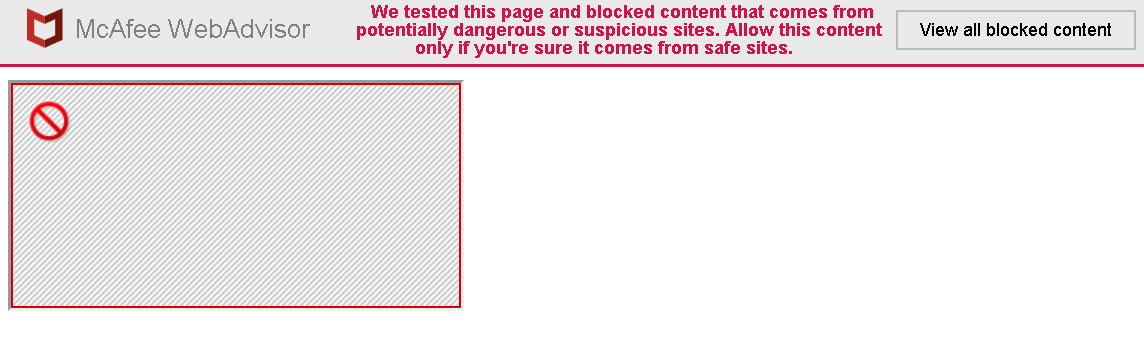
The frame will be blocked and the user will be informed about it. Nice feature? It is, at least until you look at the Network tab of the Inspector Tools.

So the malicious document actually managed to load fully and was only replaced by restricted.html after that. So there was a window of opportunity for it to do its malicious thing. But that’s not actually the worst issue with this approach.
Replacing frame document is being done by the extension’s content script. In order to make a decision, that content script sends the message isframeblocked to the background page. If the frame should be blocked, the response will contain a redirect URL. Not quite trusting the whole thing, the content script will perform an additional check:
processFrameBlocking(redirectURI) {
  const domain = URI.getParam(redirectURI,