I last wrote in October about my work on speeding up the Rust compiler. With the year’s end approaching, it’s time for an update.
Doc comments
#65750: Normal comments are stripped out during parsing and not represented in the AST. But doc comments have semantic meaning (`/// blah` is equivalent to the attribute #[doc="blah"]) and so must be represented explicitly in the AST. Furthermore:
- In a multi-line doc comment using
///or//!comment markers every separate line is treated as a separate attribute; - Multi-line doc comments using
///and//!markers are very common, much more so than those using/** */or/*! */markers, particularly in the standard library where doc comment lines often outnumber code lines; - The AST representation of attributes is quite expensive, partly because it retains the original tokens for complex reasons involving procedural macros.
As a result, doc comments had a surprisingly high cost. This PR introduced a special, cheaper representation for doc comments, giving wins on many benchmarks, some in excess of 10%.
Token streams
#65455: This PR avoided some unnecessary conversions from TokenTree type to the closely related TokenStream type, avoiding allocations and giving wins on many benchmarks of up to 5%. It included one of the most satisfying commits I’ve made to rustc.
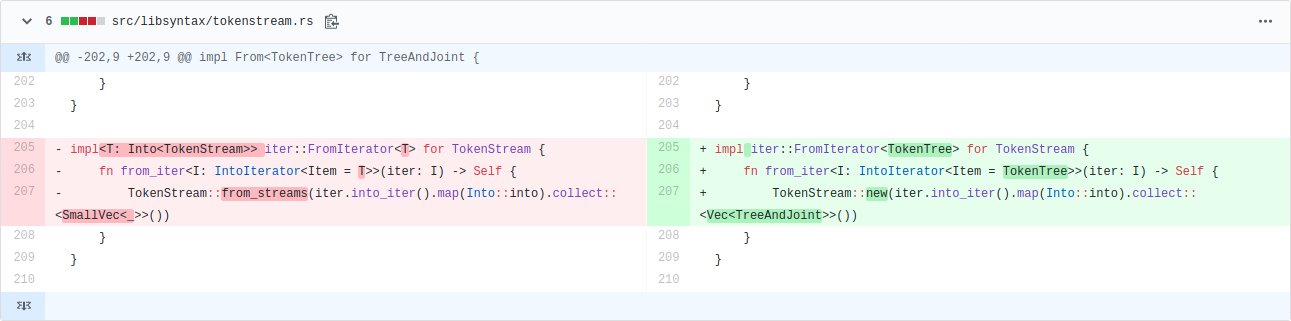
Up to 5% wins by changing only three lines. But what intricate lines they are! There is a lot going on, and they’re probably incomprehensible to anyone not deeply familiar with the relevant types. My eyes used to just bounce off those lines. As is typical for this kind of change, the commit message is substantially longer than the commit itself.
It’s satisfying partly because it shows my knowledge of Rust has improved, particularly Into and iterators. (One thing I worked out along the way: collect is just another name for FromIterator::from_iter.) Having said that, now that a couple of months have passed, it still takes me effort to remember how those lines work.
But even more so, it’s satisfying because it wouldn’t have happened had I not repeatedly simplified the types involved over the past year. They used to look like this:
pub struct TokenStream { kind: TokenStreamKind };
pub enum TokenStreamKind {
    Empty,
    Tree(TokenTree),
    JointTree(TokenTree),
    Stream(RcVec),
}
(Note the recursion!)
After multiple simplifying PRs (#56737, #57004, #57486, #58476, #65261), they now look like this:
pub struct TokenStream(pub Lrc>);
pub type TreeAndJoint = (TokenTree, IsJoint);
pub enum IsJoint { Joint, NonJoint }
(Note the lack of recursion!)
I didn’t set out to simplify the type for speed, I just found it ugly and confusing. But now it’s simple enough that understanding and optimizing intricate uses is much easier. When those three lines appeared in a profile, I could finally understand them. Refactoring FTW!
(A third reason for satisfaction: I found the inefficiency using the improved DHAT I worked on earlier this year. Hooray for nice tools!)
Introduction

Two months ago we released ECSY, a framework-agnostic Entity Component System library you could use to build real time applications with the engine of your choice.
Today we are happy to announce a developer tools extension for ECSY, aiming to help you better understand what it is going on in your application when using ECSY.
A common requirement when building applications that require high performance- such as real time 3D graphics, AR and VR experiences- is the need to understand which part of our application is consuming more resources. We could always use the browsers’ profilers to try to understand our bottlenecks but they can be a bit unintuitive to use, and it is hard to get an overview of what is going on in the entire application, rather than focusing on a specific piece of your code.
With the ECSY developer tools extension you can now see that overview, getting statistics in realtime on how your systems are performing. Once you know which system is causing troubles in performance you can then use the browser profiler to dig into the underlying issue.
Apart from showing the status of the application, the extension lets you control the execution (eg: play/pause, step system, step frame) for debugging or learning purposes, as well as accessing the value of the queries and components used in your application.
How do I use it?
- Install the extension from the extension store for your browser (Firefox, Chrome)
- Launch any ECSY application (For example https://ecsy.io/examples/circles-boxes/index.html). You will notice that the “ECSY” icon on the toolbar changes its color indicating that the ECSY library is detected:

- Open the “ECSY” tab in the browser’s developer tool (Firefox, Chrome) and you will see the state of the application.

Panel overview

When the ECSY extension panel is loaded, you will see all the sections available on the UI. (A big shout out to the flecs team as their work on their admin panel was a big inspiration for us when designing the UI)
- (1) Main toolbar: You can control options that affect all the main panels. The buttons in order are:
- Entities (E), Components (C), Queries (Q) and Systems (S): the buttons will toggle the visibility for each of the main panels.
- Show relationship between components: When enabled it will highlight the relationships between Components, Queries and Systems. Eg: If you hover the
Rotatingcomponent, it will highlight theRotatingquery as it is using that component, as well as theRotatingSystem. - Show debug: Show the JSON with all the stats and info collected from the ECSY application used by the extension.
- Show remote console (If debugging a remote device): It lets you enter commands to be executed on the remote device.
- Show Graphs: Toggle the graphs on all the sections.
- Show Stats: Toggle detailed stats on all the sections. This includes the following computed values for each entry:
- Minimum
- Maximum
- Mean
- Standard deviation
- (2) Version info: Shows the version info as well as the connection details
Yesterday, the Government of India shared a near final draft of its data protection law with Members of Parliament, after more than a decade of engagement from industry and civil society. This is a significant milestone for a country with the second largest population on the internet and where privacy was declared a fundamental right by its Supreme Court back in 2017.
Like the previous version of the bill from July 2018 developed by the Justice Srikrishna Committee, this bill offers strong protections in regards to data processing by companies. Critically, this latest bill is a dramatic step backward in terms of the exceptions it grants for government processing and surveillance.
The original draft, which we called groundbreaking in many respects, contained some concerning issues: glaring exceptions for the government use of data, data localisation, an insufficiently independent data protection authority, and the absence of a right to deletion and objection to processing. While this new bill makes progress on some issues like data localisation, it also introduces new threats to privacy such as user verification for social media companies and forced transfers of non-personal data.
As the bill is introduced and reviewed in Parliament, attention and action is needed on several provisions. Here are some highlights:
- Exceptions for Law Enforcement and other government use: The biggest concern in the new draft is the bill’s expansion of the broad exceptions that were present in the 2018 draft of the data protection bill for the government processing of data. Crucially, the requirement that government processing of data be “necessary and proportionate” has been cut. Furthermore, a provision was added granting the government complete discretion to exempt any entity or department from any part of the law. This leaves the current legal vacuum around India’s surveillance and intelligence services intact, which is fundamentally incompatible with effective privacy protection.
- Independence of the Data Protection Authority: The new law further reduces the powers and independence of the data protection authority (DPA) by significantly weakening the commission that will appoint the Chairperson and members of the DPA. Where the 2018 draft said that they were to be appointed by a diverse committee with executive, judicial, and external expertise, the new law limits this committee to members of the executive. As with the last bill, Adjudicating Officers are also appointed by the government. Together, this will make it much harder for the DPA to be empowered and effective as the entire governing structure will be appointed exclusively by the government.
- Social Media User Verification: In a move that will be disastrous for the privacy and anonymity of internet users, the law contains a provision requiring companies to provide the option for users to voluntarily verify their identities. This would likely entail users sending photos of government issued IDs to the companies. There are also reports that intermediaries will have to report accounts that do not verify themselves using such procedures to the government, which could make them a target for government scrutiny and investigation. This provision will incentivise the collection of sensitive personal data from government IDs that are submitted for this verification, which can then be used to profile and target users. This is not hypothetical conjecture – we have already seen phone numbers collected for security purposes being used for profiling. This provision will also increase the risk from data breaches and entrench power in the hands of large players in the social media space who can afford to build and maintain such verification systems. There is no evidence to prove that this measure will help fight misinformation (its motivating factor), and it ignores the benefits that anonymity can bring to the internet, such as whistleblowing and protection from stalkers.
- Forced Transfer of Non-Personal Data: The law also mandates that certain companies can be forced to transfer non-personal data to the government for public good and policy planning purposes. Not only can non-personal data constitute protected trade secrets and the insights derived from such data be protected by
The Firefox Devtools team, along with our community of code contributors, have been working hard to pack Firefox 72 full of improvements. This post introduces the watchpoints feature that’s available right now in Firefox Developer Edition! Keep reading to get up to speed on watchpoints and how to use them.
What are watchpoints and why are they useful?
Have you ever wanted to know where properties on objects are read or set in your code, without having to manually add breakpoints or log statements? Watchpoints are a type of breakpoint that provide an answer to that question.
If you add a watchpoint to a property on an object, every time the property is used, the debugger will pause at that location. There are two types of watchpoints: get and set. The get watchpoint pauses whenever a property is read, and the set watchpoint pauses whenever a property value changes.
The watchpoint feature is particularly useful when you are debugging large, complex codebases. In this type of environment, it may not be straightforward to predict where a property is being set/read.
Watchpoints are also available in Firefox’s Visual Studio Code Extension where they’re referred to as “data breakpoints.” You can download the Debugger for Firefox extension from the VSCode Marketplace. Then, read more about how to use VSCode’s data breakpoints in VSCode’s debugging documentation.
Getting Started
To set a watchpoint, pause the debugger, find a property in the Debugger’s ‘Scopes’ pane, and right-click it to view the menu. Once the menu is displayed, you can choose to add a set or get watchpoint. Here we want to debug obj.a, so we will add a set watchpoint on it.

Voila, the set watchpoint has been added, indicated by the blue watchpoint icon to the right of the property. Here comes the easy part in your code — where you let the debugger inform you when properties are set. Just hit resume (or F8), and we’re off.

The debugger has paused on line 7 where obj.a is set. Also notice the yellow pause message panel in the upper right corner which tells us that we are breaking because of a set watchpoint.

Deleting a watchpoint is like deleting a regular breakpoint—just click the blue watchpoint icon.
And that’s it! This feature is simple to use, but it’s powerful to have in your debugging toolbox.
Implementation
When you add a watchpoint to a property, getter and setter functions are defined for the property using JavaScript’s native Object.defineProperty method. These getter/setter functions run every time your property is used, and they call a function that pauses the debugger. You can check out the server code for this feature.
When we built the implementation of watchpoints, we faced an interesting challenge. The team needed to be sure that our use of Object.defineProperty would be transparent to the user. For this reason, we had to make sure that original values rather than getter/setter functions appeared in the debugger.
Some things to keep in mind:
-Watchpoints do not work for getters and setters.
-When a variable is garbage-collected, it takes the
My personal favorite e-mail provider mailbox.org is giving away Christmas vouchers until January 10, 2020, for each new customer registration. Details if you read on.
Mailbox.org is an e-mail and calendaring/office suite provider based in Germany. They are very privacy focused, run on renewable energy exclusively, and are committed to using Open Source wherever possible. They are promoters of open standards such as IMAP and SMTP, CalDav, CardDav and WebDav for their offerings. They use Open-Xchange as their software of choice. Their service offers e-mail, calendar, contacts, tasks, file storage, word processing, spreadsheet and presentation software as well as an integrated PGP module for secure encrypted e-mails.
This year, from now until January 10, 2020, each new customer can get a voucher of 6 Euros upon registration and using the voucher code “christmas2019”. All details and conditions in the linked blog post.
The Open-Xchange web front-end is very accessible in many parts, and more stuff is added frequently with each release. I use it for my personal e-mail, and am really liking it. You can also use any compatible IMAP/SMTP mail client, the open standards integrate extremely well with iOS and MacOS.
Disclaimer: I am not getting any money from this promotion. I pass this on because I like their service a lot and can only recommend it to others. And this seems like a pretty good incentive for trying it for a bit. Enjoy!
https://marcozehe.de/2019/12/10/mailbox-org-is-giving-new-customers-e6-until-jan-10-2020/
The Mr Robot TV series features a security expert and hacker lead character, Elliot.
Season 4, episode 8
Vasilis Lourdas reported that he did a “curl sighting” in the show and very well I took a closer peek and what do we see some 37 minutes 36 seconds into episode 8 season 4…
(I haven’t followed the show since at some point in season two so I cannot speak for what actually has happened in the plot up to this point. I’m only looking at and talking about what’s on the screenshots here.)
Elliot writes Python. In this Python program, we can see two curl invokes, both unfortunately a blurry on the right side so it’s hard to see them exactly (the blur is really there in the source and I couldn’t see/catch a single frame without it). Fortunately, I think we get some additional clues later on in episode 10, see below.
He invokes curl with -i to see the response header coming back but then he makes some questionable choices. The -k option is the short version of --insecure. It truly makes a HTTPS connection insecure since it completely switches off the CA cert verification. We all know no serious hacker would do that in a real world use.
Perhaps the biggest problem for me is however the following -X POST. In itself it doesn’t have to be bad, but when taking the second shot from episode 10 into account we see that he really does combine this with the use of -d and thus the -X is totally superfluous or perhaps even wrong. The show technician who wrote this copied a bad example…
The -b that follows is fun. That sets a specific cookie to be sent in the outgoing HTTP request. The random look of this cookie makes it smell like a session cookie of some sorts, which of course you’d rarely then hard-code it like this in a script and expect it to be of use at a later point. (Details unfold later.)

Season 4, episode 10
Lucas Pardue followed-up with this second sighting of curl from episode 10, at about 23:24. It appears that this might be the python program from episode 8 that is now made to run on or at least with a mobile phone. I would guess this is a session logged in somewhere else.
In this shot we can see the command line again from episode 8.
We learn something more here. The -b option didn’t specify a cookie – because there’s no = anywhere in the argument following. It actually specified a file name. Not sure that makes anything more sensible, because it seems weird to purposely use such a long and random-looking filename to store cookies in…
Here we also see that in this POST request it passes on a bank account number, a “coin address” and amountOfCoins=3684210526.31579 to this URL: https://buy-crypto-coin.net/purchase, and it gets 200 OK back from a HTTP/1.1 server.
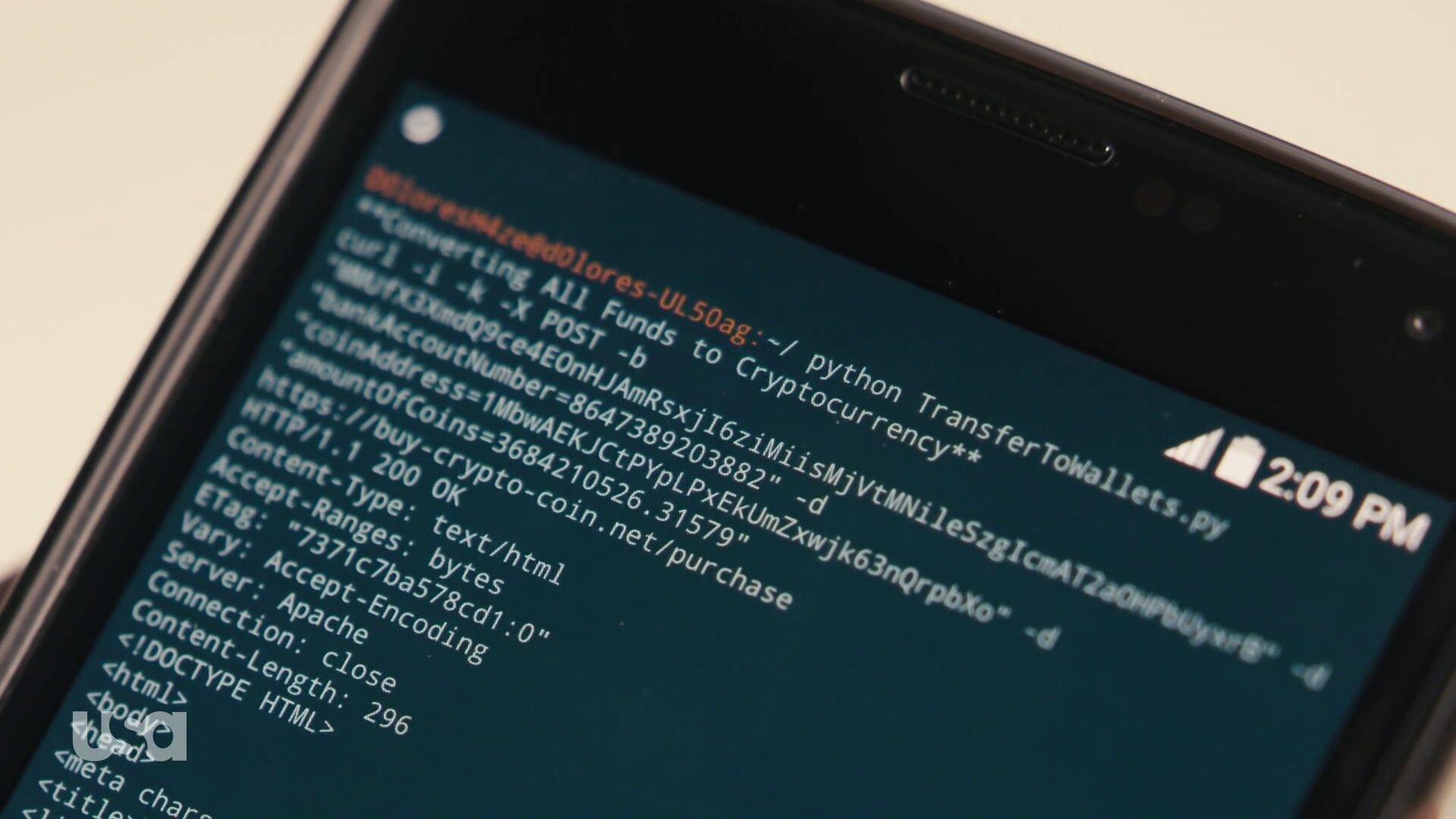
I tried it
curl -i -k -X POST -d bankAccountNumber=8647389203882 -d coinAddress=1MbwAEKJCtPYpLPxEkUmZxwjk63nQrpbXo -d amountOfCoins=3684210526.31579 https://buy-crypto-coin.net/purchase
I don’t have the cookie file so it can’t be repeated completely. What did I learn?
First: OpenSSL 1.1.1 doesn’t even want to establish a TLS connection against this host and says dh key too small. So in order to continue this game I took to a curl built with a TLS library that didn’t complain on this silly server.
Next: I learned that the server responding on this address (because there truly is a HTTPS server there) doesn’t have this host name in its certificate so -k is truly required to make curl speak to this host!
Then finally it didn’t actually do anything fun that I could notice. How boring. It just responded with a 301 and Location: http://www.buy-crypto-coin.net. Notice how it redirects away from HTTPS.
What’s on that site? A rather good-looking fake cryptocurrency market site. The links at the bottom all go to various NBC Universal and USA Network URLs, which I presume are the companies behind the TV series. I saved a screenshot below just in case it changes.
In keeping with a longstanding commitment to privacy and online security, this year Mozilla has launched products and features that ensure privacy is respected and is the default. We recognize that technology alone isn’t enough to protect your privacy. To build a product that truly protects people, you need strong data policies.
An example of our work here is the U.S. deployment of DNS over HTTPS (DoH), a new protocol to keep people’s browsing activity safe from being intercepted or tampered with, and our Trusted Recursive Resolver program (TRR). Connecting the right technology with strict operational requirements will make it harder for malicious actors to spy on or tamper with users’ browsing activity, and will protect users from DNS providers, including internet service providers (ISPs), that can abuse their data.
DoH’s ability to encrypt DNS data addresses only half the problem we are trying to solve. The second half is requiring that companies with the ability to see and store your browsing history change their data handling practices. This is what the TRR program is for. With these two initiatives, we’re helping close data leaks that have been part of the Internet since the DNS was created 35 years ago.
Our TRR program aims to standardize requirements in three areas: limiting data collection and retention, ensuring transparency for any data retention that does occur, and limiting blocking or content modification. For any company Mozilla partners with, our expectation is that they respect modern standards for privacy and security for our users. Specifically:
- Limiting data. Your DNS data can reveal a lot of sensitive information about you, and currently DNS providers aren’t subject to any limits on what they can do with that data; we want to change that. Our policy requires that your data will only be used for the purpose of operating the service, must not be retained for longer than 24 hours, and cannot be sold, shared, or licensed to other parties.
- Transparency. It isn’t enough that our partners tell Mozilla privately about their data retention and use policies. What is more important is that they attest to those good policies publicly and that they make a commitment users can see and understand about how their data is handled. That is why our policy requires resolvers to publish a public privacy notice that documents what data is retained and how it is used.
- Blocking & Modification. DNS can be used to control what information you are allowed to see. DNS providers can potentially censor your browsing activity, give you the wrong results, or surface their own content. We think you should be the one deciding what information you need, not your DNS provider. Our requirements prevent resolvers, from blocking, filtering, modifying, or providing inaccurate responses, unless they are strictly required by law to do so. Alternatively, we are supporting operation of filtering when a user explicitly opts-in, as with parental controls.
These policy requirements are a critical part of our strategy to put people back in control of their data and privacy online. And we look forward to bringing more partners into our TRR program who are willing to put people over profit. Our hope is that the rest of the industry follows suit and helps us bring DNS into the 21st century with the privacy and security protections that people deserve.
The post Trusted Recursive Resolvers – Protecting Your Privacy with Policy and Technology appeared first on Open Policy & Advocacy.
Around the globe, Mozilla has been a supporter of data privacy laws that empower people – including the California Consumer Protection Act (CCPA). For the last few weeks, we’ve been considering the draft regulations, released in October, from Attorney General Becerra. Today, we submitted comments to help California effectively and meaningfully implement CCPA.
We all know that people deserve more control over their online data. And we take care to provide people protection and control by baking privacy and the same principles we want to see in legislation into the Firefox browser.
In our comments, we discuss three important provisions:
- The definition of a third party: Usually, third party interactions are defined by the context of the data collection – not whether or not the party has a direct relationship with the user. More and more, we see companies collect data from a number of contexts: first parties, as a third party on a different site, or simply buying data directly from a data broker or reseller. These definitions should be clear that data is not regulated based solely on how the entity is categorized – but rather about the context in which the data was obtained.
- The potential for fraud with data requests coming through authorized agents: We’re encouraged by authentication requirements, but concerned that a set of unauthorized agents may blanket companies with fraudulent requests .The opportunity for fraud and abuse is high particularly if the business responding to such a request does not have a meaningful opportunity to pursue their own authentication other than asking the authorized agent for proof of such authorization. Additional guidance on companies’ obligations to respond to third party agents would be helpful as companies try to balance security with responsiveness to access requests.
- Metrics reporting: The regulations outline a series of public facing metrics companies must release about access requests. the specific reporting breakdowns required (do not significantly increase the understanding of how CCPA rights are being exercised and complied with. Companies like Mozilla that extend the same personal data rights to any person and cannot determine that individual’s location, will have difficulty complying with the metrics reporting as outlined in the draft regulations. We do not want to ask users who send us data access requests for additional personal information in order to comply with a metrics standard.
We look forward to continuing to work with the California Attorney General’s office to help protect the data of Californians – and we will keep working across jurisdictions to enact privacy and data protection laws across the globe.
While we will all have to see how implementation and enforcement roll out, we continue to be very encouraged to see California acting where the U.S. Congress has not (although we were also happy to see several frameworks released in advance of this week’s hearing). There are many shared elements between these laws, regulations, and drafts and the privacy blueprint we released earlier this year.
The post Mozilla comments on CCPA regulations appeared first on Open Policy & Advocacy.
https://blog.mozilla.org/netpolicy/2019/12/09/mozilla-comments-on-ccpa-regulations/
Accounts on addons.mozilla.org (AMO) are integrated with Firefox Accounts, which lets you manage multiple Mozilla services from one login. To prevent unauthorized people from accessing your account, even if they obtain your password, we strongly recommend that you enable two-factor authentication (2FA). 2FA adds an extra layer of security to your account by adding an additional step to the login process to prove you are who you say you are.
When logging in with 2FA enabled, you will be asked to provide a verification code from an authentication application, in addition to your user name and password. This article on support.mozilla.org includes a list of supported authenticator applications.
Starting in early 2020, extension developers will be required to have 2FA enabled on AMO. This is intended to help prevent malicious actors from taking control of legitimate add-ons and their users. 2FA will not be required for submissions that use AMO’s upload API.
Before this requirement goes into effect, we’ll be working closely with the Firefox Accounts team to make sure the 2FA setup and login experience on AMO is as smooth as possible. Once this requirement goes into effect, developers will be prompted to enable 2FA when making changes to their add-ons.
You can enable 2FA for your account before the requirement goes into effect by following these instructions from support.mozilla.org.
Once you’ve finished the set-up process, be sure to download or print your recovery codes and keep them in a safe place. If you ever lose access to your 2FA devices and get locked out of your account, you will need to provide one of your recovery codes to regain access. Misplacing these codes can lead to permanent loss of access to your account and your extensions on AMO.
The post Secure your addons.mozilla.org account with two-factor authentication appeared first on Mozilla Add-ons Blog.
curl_multi_wakeup() is a new friend in the libcurl API family. It will show up for the first time in the upcoming 7.68.0 release, scheduled to happen on January 8th 2020.
Sleeping is important
One of the core functionalities in libcurl is the ability to do multiple parallel transfers in the same thread. You then create and add a number of transfers to a multi handle. Anyway, I won’t explain the entire API here but the gist of where I’m going with this is that you’ll most likely sooner or later end up calling the curl_multi_poll() function which asks libcurl to wait for activity on any of the involved transfers – or sleep and don’t return for the next N milliseconds.
Calling this waiting function (or using the older curl_multi_wait() or even doing a select() or poll() call “manually”) is crucial for a well-behaving program. It is important to let the code go to sleep like this when there’s nothing to do and have the system wake up it up again when it needs to do work. Failing to do this correctly, risk having libcurl instead busy-loop somewhere and that can make your application use 100% CPU during periods. That’s terribly unnecessary and bad for multiple reasons.
Wakey wakey
When your application calls libcurl to say “sleep for a second or until something happens on these N transfers” and something happens and the application for example needs to shut down immediately, users have been asking for a way to do a wake up call.
– Hey libcurl, wake up and return early from the poll function!
You could achieve this previously as well, but then it required you to write quite a lot of extra code, plus it would have to be done carefully if you wanted it to work cross-platform etc. Now, libcurl will provide this utility function for you out of the box!
curl_multi_wakeup()
This function explicitly makes a curl_multi_poll() function return immediately. It is designed to be possible to use from a different thread. You will love it!
curl_multi_poll()
This is the only call that can be woken up like this. Old timers may recognize that this is also a fairly new function call. We introduced it in 7.66.0 back in September 2019. This function is very similar to the older curl_multi_wait() function but has some minor behavior differences that also allow us to introduce this new wakeup ability.
Credits
This function was brought to us by the awesome Gergely Nagy.
Top image by Wokandapix from Pixabay
https://daniel.haxx.se/blog/2019/12/09/this-is-your-wake-up-curl/
Since the update from October 2018, (Version 1809), Windows 10 has had an extended clipboard feature. Here’s how you turn it on and use it.
Turn it on
With this feature, the last 25 text bits you copied or cut to the clipboard will be available to paste. You can either just use the clipboard history for one computer, or synchronize across multiple devices logged into the same Microsoft account. But you have to turn it on first. On each computer that should participate, do the following:
- Open Start Menu and type Settings. Press Enter to open.
- In the search box, type clipboard, then choose Clipboard Settings and press Enter.
- Tab to the first option that says to turn on Clipboard History. It might be turned on for you, in which case you don’t have to do anything. Otherwise, toggle it on using the Space bar.
- Optionally, tab forward once and turn on the toggle to use the clipboard from all devices connected to the same Microsoft account.
- Once you’ve done that, you can then choose the synchronization option for the clipboard from this device. You can choose for each device whether it should just use the common clipboard history, or also actively sync its own content with the others. So, you can have two that sync, and one that doesn’t, but can still use the contents of the other two.
Using it
To paste any of the last 25 text snippets, instead of pressing CTRL+V as usual, press WindowsKey+V instead. This will open a list, sorted from newest to oldest, of the last 25 copied or cut text snippets. Focus is on the newest. Use arrow keys right and left to choose. Press Enter to paste.
A note about Control+V behavior: After you turn on the feature, it acts normally, meaning it will paste the last text you copied as usual. The one exception is if you pasted a different snippet from the above steps. From that moment on, until you either choose a different item or copy or cut some new text, CTRL+V will paste the last item you chose from that list of 25 snippets.
A warning to users of the NVDA screen reader: There seems to be a bug in the way NVDA interacts with this feature, and it is in all versions I’ve tested up to the upcoming spring 2020 release (2004) and NVDA 2019.3 beta 1. Sometimes after pasting, the control key appears to be stuck software-wise. It is as if it is being held down continuously, meaning arrow keys will suddenly move by word or paragraph instead of by character or line. It is intermittent. If it happens, just press the Control key once to rectify the situation.
Pinning or deleting items
In the Clipboard History window, you can pin items that you paste frequently. You can also delete a single or all items from the history.
To do this, open the Clipboard History window with WindowsKey+V, and select an item. Next, press Tab once to focus the More button. Press Space to open the popup menu. here, you have the Pin and Delete plus Delete All items available.
Note that there is another bug in NVDA where it does not interact with both the button and the menu properly at the time of this writing. I have informed the NVDA team about both issues.
Closing remark
This is, in my opinion, by far one of the best features Microsoft introduced to Windows in recent years. It has made me so much more productive and made so many tasks easier that I cannot even begin to count them. And whenever I am at a device that doesn’t have this feature, I ask myself how I could ever live without it.
I hope you’ll find it just as useful. Have fun playing with it!
https://marcozehe.de/2019/12/08/how-to-use-the-extended-clipboard-in-windows-10/
Some of you may have noticed that since May, my blog is displaying ads here and there. It was kind of an experiment, and here are my conclusions after six months.
When I got sick in March, I came down so hard that it wasn’t clear for a long time whether I would recover enough to be able to remain fully employed. More on that at another time maybe. However, this led to my looking at my then current blog situation. I ran three blogs. This one, a German technically focused and one where I blogged about some private stuff. All of them ran WordPress, a bunch of custom plugins because at some point I had obted out of the JetPack services and wanted to replace the functionality all with extra plugins. This resulted in constant stress of having to maintain WordPress itself, especially when major version upgrades came out, and plugins and themes. The worst was when one plugin at one point got updated and started pulling in malicious third-party scripts which broke the blogs completely. That was already when I was sick. I ended up just disabling that damn thing and not look for a replacement.
In addition, the web hosting was expensive, but not really performant. And they often let essential software get out of date. My WordPress at some point had started complaining because my PHP version was too old. Turned out that the defaults for shared hosts were not upgraded to a newer version by default by the hoster, and one had to go into an obnoxious backend to fiddle with some setting somewhere to use a newer version of PHP.
I then decided to try something completely new. I exported the contents of my three blogs and set up blogs at WordPress.com, the hosted WordPress offering from the makers themselves: Automattic. I looked at their plans, and the Premium plan, which cost me 8€ per month, per blog felt suitable. I also took the opportunity to pull both German language blogs together into one. I just added two categories that those who just want to see my tecnical stuff, or the private stuff, could still do so.
With that move, I got a good set of features that I would normally use on a self-hosted blog as well, so I set up some widgets, some theme that comes with the plan, and imported all my content including comments and such. I lost my statistics from the custom plugins, but hey, I had lost years of statistics from before that when I decided to no longer use JetPack on my self-hosted blogs, too, so what.
And I did two more things. I added a “Buy me a coffee” button so people could show their appreciation for my content if they wanted to. And I opted into the Word Ads program, that would display some advertisement on the blog’s main page and below each individual post. I simply wanted to see if my content would be viable enough to generate any significant enough income.
Problems
The quick answer is: No, it isn’t. Since I started displaying ads in May, until the end of October, this blog has generated $21.52 of ad income. The German blog is even better, it generated a whopping $0.35 in the same time period. The minimum amount for Automattic to generate a payout is $100. So this blog would effectively have to run two more years before I would see the first payout. The German blog much much much longer.
For full transparency: The German language readers have bought me coffee at a value of about 50$, and I just received the first 25$ on this blog in December, by one generous donor who bought me five at once.
And there are real problems with some of the ads that are being displayed, which put me in a moral dilemma. Some of these could be perceived as really offensive to some people or mindsets. The trouble is that I have no control over the ads that get shown. They are geographically tailored, and they are from a network I cannot make adjustments to.
Automattic do have a mechanism to report offensive ads. However, this requires that those readers who see such ads send me screenshots of said ads when they encounter them. I, myself, when logged in, do not see any ads because I am a subscriber on a paid plan. And all paid plans come without ads. But I have to be the one to report those ads to Automattic. In other words, a real chore to deal with.
If I wanted to switch to a service like Google Adsense, which would require me to install a third-party plugin, I would have to upgrade to the business plan at a whopping $25 per month per blog.
Consequences
As a consequence, once my extended advent calendar and the Christmas festivities are over, I will move blog contents once again. This time, I will move to a different web host, with more control and a very friendly, very technical, engaged team. I will run two self-hosted blogs and once again use the JetPack integration for some of the features I really like
Today, just a quick reading tip for you. Michael Scharnagl posted a great article on Wednesday about when to use Hamburger menus, when not to use them, and what to consider for each decision. And that includes accessibility. Thank you, Michael!
https://marcozehe.de/2019/12/06/dos-and-donts-on-hamburger-menus/
The other day we celebrated curl reaching 25,000 commits, and just days later I received the following gift in the mail.
The text found in that little note is in Swedish and a rough translation to English makes it:
Twenty-five thousand thanks for curl. The cake delivery failed so here is a commit mascot and some new bugs to squash.
I presumed the cake reference was a response to a tweet of mine suggesting cake would be a suitable way to celebrate this moment.

The gift arrived without any clue who sent it, but when I tweeted this image, my mystery friend Filip soon revealed himself:

Thank you Filip!
(Top image by Arek Socha from Pixabay)
The
ETagHTTP response header is an identifier for a specific version of a resource. It lets caches be more efficient and save bandwidth, as a web server does not need to resend a full response if the content has not changed. Additionally, etags help prevent simultaneous updates of a resource from overwriting each other (“mid-air collisions”).
That’s a quote from the mozilla ETag documentation. The header is defined in RFC 7232.
In short, a server can include this header when it responds with a resource, and in subsequent requests when a client wants to get an updated version of that document it sends back the same ETag and says “please give me a new version if it doesn’t match this ETag anymore”. The server will then respond with a 304 if there’s nothing new to return.
It is a better way than modification time stamp to identify a specific resource version on the server.
ETag options
Starting in version 7.68.0 (due to ship on January 8th, 2020), curl will feature two new command line options that makes it easier for users to take advantage of these features. You can of course try it out already now if you build from git or get a daily snapshot.
The ETag options are perfect for situations like when you run a curl command in a cron job to update a file if it has indeed changed on the server.
--etag-save
Issue the curl command and if there’s an ETag coming back in the response, it gets saved in the given file.
--etag-compare
Load a previously stored ETag from the given file and include that in the outgoing request (the file should only consist of the specific ETag “value” and nothing else). If the server deems that the resource hasn’t changed, this will result in a 304 response code. If it has changed, the new content will be returned.
Update the file if newer than previously stored ETag:
curl --etag-compare etag.txt --etag-save etag.txt https://example.com -o saved-file
If-Modified-Since options
The other method to accomplish something similar is the -z (or --time-cond) option. It has been supported by curl since the early days. Using this, you give curl a specific time that will be used in a conditional request. “only respond with content if the document is newer than this”:
curl -z "5 dec 2019" https:/example.com
You can also do the inversion of the condition and ask for the file to get delivered only if it is older than a certain time (by prefixing the date with a dash):
curl -z "-1 jan 2003" https://example.com
Perhaps this is most conveniently used when you let curl get the time from a file. Typically you’d use the same file that you’ve saved from a previous invocation and now you want to update if the file is newer on the remote site:
curl -z saved-file -o saved-file https://example.com
Tool, not libcurl
It could be noted that these new features are built entirely in the curl tool by using libcurl correctly with the already provided API, so this change is done entirely outside of the library.
Credits
The idea for the ETag goodness came from Paul Hoffman. The implementation was brought by Maros Priputen – as his first contribution to curl! Thanks!
Between 2017 and 2018 we refactored a major component of the Gecko Platform – the intl/locale module. The main motivator was the vision of Multilingual Gecko which I documented in a blog post.
Firefox 65 brought the first major user-facing change that results from that refactor in form of Locale Selection. It’s a good time to look back at the scale of changes. This post is about the refactor of the whole module which enabled many of the changes that we were able to land in 2019 to Firefox.
All of that work led to the following architecture:
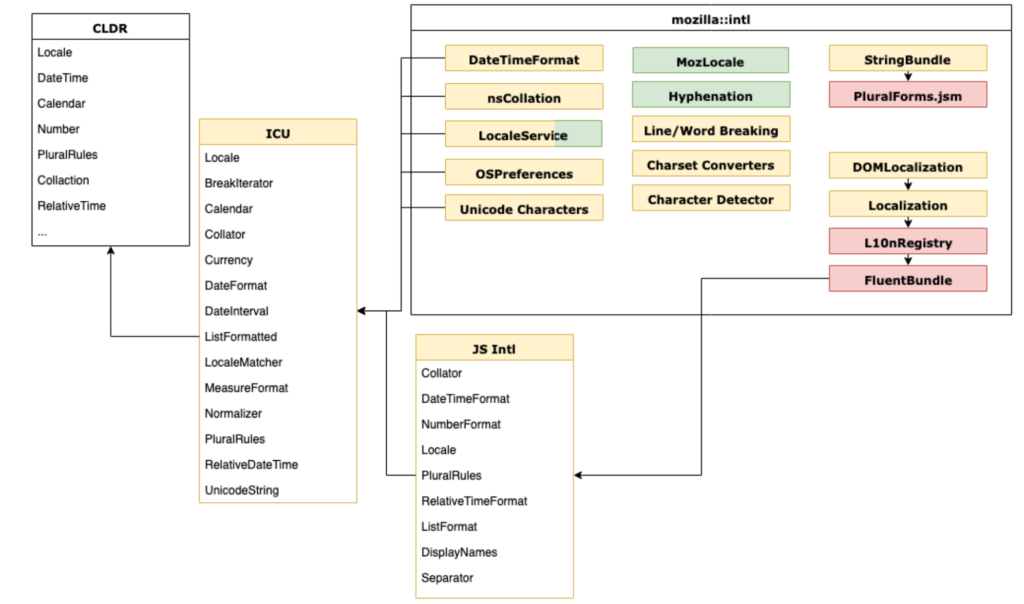
Yellow – C++, Red – JavaScript, Green – Rust
Evolution vs Revolution
It’s very rare in software engineering that projects of scale (a Gecko module with close to 500 000 lines of code) go through such a major transition. We’ve done it a couple times, with Stylo, WebRender etc., but each case is profound, unique and rare.
There are good reasons not to touch an old code, and there are good reasons against rewriting such a large pile of code.
There’s not a lot of accrued organizational knowledge about how to handle such transitions, what common pitfalls await, and how to handle them.
That makes it even more unique to realize how smooth this change was. We started 2017 with a vision of putting a modern localization system into Firefox, and a platform that required a substantial refactor to get there.
We spent 2017 moving thousands of lines of 20 years old code around, and replacing them with a modern external library – ICU. We designed a new unified locale management and regional preferences modules, together with new internationalization wrappers finishing the year by landing Fluent into Gecko.
To give you a rough idea on the scope of changes – only 10% of ./intl/locale directory remained the same between Firefox 51 and 65!
In 2018, we started building on top of it, witnessing a reduced amount of complex work on the lower level, and much higher velocity of higher level changes with three overarching themes:
- Migrate Firefox to Fluent
- Improve Firefox locale management and multilingual use cases
- Upstream all of what we can to be part of the Web Platform
We then ended up Q1 2019 with a Fluent 1.0 release, close to 50% of DTD strings migrated to Fluent, with all major new JavaScript ECMA402 APIs based on our Gecko work and what’s even more important, with proven runtime ability to select locales from the Preferences UI.
What’s amazing to me, is that we avoided any major architectural regression in this transition. We didn’t have to revisit, remodel, revert or otherwise rethink in any substantial way any of the new APIs! All of the work, as you can see above, was put into incremental updates, deprecation of old code, standardization and integration of the new. Everything we designed to handle Firefox UI that has been proposed for standardization has been accepted, in roughly that form, by our partners from ECMA TC39 committee, and no major assumption ended up being wrong.
I believe that the reason for that success is the slow pace we took (a year of time to refactor, a year to stabilize), support from the whole organization, good test coverage and some luck.
On December 26th 2016 I filed a bug titled “Unify locale