
In the curl project we produce and ship a rock solid and reliable library for the masses, we must never exit, leak memory or do anything in an ungraceful manner. We must free all resources and error out nicely whatever problem we run into at whatever moment in the process.
To help us stay true to this, we have a way of testing we call “torture tests”. They’re very effective error path tests. They work like this:
Torture tests
They require that the code is built with a “debug” option.
The debug option adds wrapper functions for a lot of common functions that allocate and free resources, such as malloc, fopen, socket etc. Fallible functions provided by the system curl runs on.
Each such wrapper function logs what it does and can optionally either work just like it normally does or if instructed, return an error.
When running a torture test, the complete individual test case is first run once, the fallible function log is analyzed to count how many fallible functions this specific test case invoked. Then the script reruns that same test case that number of times and for each iteration it makes another of the fallible functions return error.
First make function 1 return an error. Then make function 2 return and error. Then 3, 4, 5 etc all the way through to the total number. Right now, a typical test case uses between 100 and 200 such function calls but some have magnitudes more.
The test script that iterates over these failure points also verifies that none of these invokes cause a memory leak or a crash.
Very slow

Running many torture tests takes a long time.
This test method is really effective and finds a lot of issues, but as we have thousands of tests and this iterative approach basically means they all need to run a few hundred times each, completing a full torture test round takes many hours even on the fastest of machines.
In the CI, most systems don’t allow jobs to run more than an hour.
The net result: the CI jobs only run torture tests on a few selected test cases and virtually no human ever runs the full torture test round due to lack of patience. So most test cases end up never getting “tortured” and therefore we miss out verifying error paths even though we can and we have the tests for it!
But what if…
It struck me that when running these torture tests on a large amount of tests, a lot of error paths are actually identical to error paths that were already tested and will just be tested again and again in subsequent tests.
If I could identify the full code paths that were already tested, we wouldn’t have to test them again. But getting that knowledge would require insights that our test script just doesn’t have and it will be really hard to make portable to even a fraction of the platforms we run and test curl on. Not the most feasible idea.
I went with something much simpler.
I simply estimate that most test cases actually have many code paths in common with other test cases. By randomly skipping a few iterations on each test, those skipped code paths might still very well be tested in another test. As long as the skipping is random and we do a large number of tests, chances are we cover most paths anyway. I say most because it certainly will not be all.
Random skips
In my first shot at this (after I had landed to change that allows me to control the torture tests this way) I limited the number of errors to 40 per test case. Now suddenly the CI machines can actually blaze through the test cases at a much higher speed and as a result, they ran torture tests on tests we hadn’t tortured in a long time.
I call this option to the runtests.pl script --shallow.
Already on this my first attempt in doing this, I struck gold and the script highlighted code paths that would create memory leaks or even crashes!
As a direct result of more test cases being tortured, I found and fixed nine independent bugs in curl already before I could land this in the master branch, and there seems to be more failures that pop up after the merge too! The randomness involved may of course delay the detection of some problems.
Room for polishing
The test script right now uses a fixed random seed
Webcompat bugs
- Brian Birtles has a strange issue that he can reproduce only on
JapaneseWindows with Firefox. We tried on 3 different windows, and it reproduces. But it doesn't reproduce on Windows for Sergiu. - Another issue related to user agent sniffing, which has a bad consequence for the code.
- Strange behavior of an anchor, followup the issue and discussion on bugzilla.
- Known issue about
overflowandpaddingon elements. - Google Docs graph in
canvasdoes not have the right resolution. The weird thing is that Firefox seems to return an incoherent value for the device to pixel ratio. - Flexbox issue.
flex-basis: 100%doesn't resolve the same way in Firefox and Chrome. Usually you are on the safer side, if you useflex-basis: autoinstead. Another site, same issue with the addition of using the first webkit version of Flexbox. Basically this site would be falling apart if it was not for the implementation of-webkit-prefixes for flexbox. Sad panda. - I haven't cracked down this one yet. The site deviantart is displaying the wrong contextual menu on double click.
- On minecraft website, there is an infinite resize of the canvas. and it's growing, growing, growing.
Outreach Q42019
We decided to try to tackle the pile of issues which needed contacts. Before we had dedicated persons: Adam and myself. But we now kind of switched roles. So without daily love, the piles of needscontact (we need to find a contact) and contactready (we need to actually contact) tends to grow. So this week, I made a special effort specifically on the contactready list. One of my axioms for Webcompat:
If you wait long enough, a bug goes away.
Indeed. The site disappears, has been redesigned, the libraries have been changed. With Adam, we had determined that if we were doing the full process quickly, we had more chances to catch bugs and solve issues for users. Reality and the volume of incoming bugs make this difficult.
Fixing the Web requires a dedicated will from the whole industry to change its practices. Web compatibility issues share some of the aspects of the climate change (except no mass extinction if the Web disappears).
This outreach week was a mixed bag of not valid anymore bugs and still ongoing issues. Once contacted, it doesn't mean the issue will be fixed. Note that this process is open to everyone. If you want to help, you are more than welcome.
Misc
- A bit of code review. I'm getting rusty.
- One week to wrap up the 2019Q4 projects. And to add to my misery of 2 weeks ago, I completely missed the meeting last Tuesday. Not in my calendar, but still a complete slip of mind. I'm glad holidays are coming soon. I probably need a good time resting.
- Berlin Mozilla All Hands is approaching.
- Sonia Singla is joining the team during a couple of months to work on UX stuff. She's joining in the context of outreachy.
- It's very cool to see Kate and
Firefox 72, currently in beta, received some fixes to the Accessibility Inspector this week. Here they are.
The first fix is to a longer standing issue. If you opened Accessibility Inspector by right-clicking an element and choosing Inspect Accessibility Properties, keyboard focus would not land on the Inspector or Properties tree view, but in limbo somewhere on the document. You had to tab a couple of times to get focus to the correct place. Well, that will be no more. From now on, keyboard focus will land in the properties tree, so you can directly start exploring the name, role, states etc., of the element you are interested in.
Related to that, if you selected to inspect an accessibility element’s property either from the browser or DOM Inspector context menus, the selected row in the Accessible Objects tree would not always scroll to actually show the selected item. That too has been fixed.
Moreover, if you’re already following along the betas, you may have noticed that within Accessibility Properties, the thing that was once called DOM Node, and which allows you to quickly jump to the HTML element that created this accessible object, was called “Node Front”. Well, that has also been addressed and will probably soon even be localized.
And last, but not least, resulting from direct feedback we received after Firefox 70 was released, if you have an SVG element which is properly labeled at its root, its children elements will no longer be flagged as having no proper label when auditing your site for accessibility problems. If an SVG has a role of “img” and is tagged, that will be sufficient to satisfy the auditing facility. In fact, this change is already in Firefox 72 Beta 5 or newer, whereas the other changes mentioned above will appear in Firefox 72 Beta 7 early next week.
Keep the feedback coming! We are constantly fixing bugs and improving the auditing tool to give you better results when testing or developing.
https://marcozehe.de/2019/12/14/some-fixes-in-accessibility-inspector-in-firefox-72/
Home security cameras are in the news (again), featuring startling clips of hackers speaking creepily to children and sleeping adults through Ring cameras inside private homes. Ring says there has … Read more
The post Tips to improve your Ring camera security appeared first on The Firefox Frontier.
Today, Mozilla continues the fight to preserve net neutrality protection as a fundamental digital right. Alongside other petitioners in our FCC challenge, Mozilla, Etsy, INCOMPAS, Vimeo and the Ad Hoc Telecom Users Committee filed a petition for rehearing and rehearing en banc in response to the D.C. Circuit decision upholding the FCC’s 2018 Order, which repealed safeguards for net neutrality.
Our petition asks the original panel of judges or alternatively the full complement of D.C. Circuit judges to reconsider the decision both because it conflicts with D.C. Circuit or Supreme Court precedent and because it involves questions of exceptional importance.
Mozilla’s petition focuses on the FCC’s reclassification of broadband as an information service and on the FCC’s failure to properly address competition and market harm. We explain why we believe the Court can in fact overturn the FCC’s new treatment of broadband service despite some of the deciding judges’ belief that Supreme Court precedent prevents rejection of what they consider a nonsensical outcome. In addition, we point out that the Court should have done more than simply criticize the FCC’s assertion that existing antitrust and consumer protection laws are sufficient to address concerns about market harm without engaging in further analysis. We also note inconsistencies in how the FCC handled evidence of market harm, and the Court’s upholding of the FCC’s approach nonetheless.
We are excited to continue to lead this effort as part of a broad community pressing for net neutrality protections, and Mozilla supports other petitioners’ filings at this stage that address additional important issues for reconsideration. See below for copies of the petitions filed.
Petition for rehearing and rehearing en banc filed by:
Mozilla, Etsy, INCOMPAS, Vimeo, and the Ad Hoc Telecom Users Committee
National Hispanic Media Coalition
The post Petitioning for rehearing in Mozilla v. FCC appeared first on The Mozilla Blog.
https://blog.mozilla.org/blog/2019/12/13/petitioning-for-rehearing-in-mozilla-v-fcc/
Late in November, I published a personal opinion on the state of Gutenberg accessibility. Today, I’d like to give an introduction to Gutenberg from a screen reader user perspective.
Gutenberg, the WordPress block editor, is the new way to create content and build sites in WordPress. It is a rich web application that uses many modern techniques such as dynamic updates, toolbars, side bars and other items to completely update the posting experience. It can also be quite daunting at first. Let us try to shed a little light on some of the mysteries around it.
It is not mandatory
First things first: It is not mandatory yet to use Gutenberg. You can install the Classic Editor plugin, which is fully maintained by the WordPress team for the foreseeable future. Once installed, you change a setting in your user profile to make sure you get the Classic Editor experience. Once you change this, you will have the same well-known WordPress posting experience you’ve always had, with both a plain HTML text and the TinyMCE editor for more rich editing of your post.
Once you enable that setting, WordPress will take Gutenberg out of the mix. You will have your post types, categories, tags, and other information where you are used to in your WordPress Admin, Create A New Post interface.
A general overview
But if you decide to go all in on Gutenberg, here is a general overview. Gutenberg manages the whole posting experience from initial creation to proof-reading, rearranging content, adding categories and tags, adjusting the publishing date, to pressing the big scary Publish button. The interface consists of several more or less static elements as well as one central area that is very dynamic in nature.
The top of the editor contains two toolbars. One is labeled the document tools toolbar and contains buttons to insert a new block, undo changes, re-do them, and since Gutenberg 7.0, a toggle under the More Options menu that tells the editor whether it is in selection or editing mode. More on that later.
The other toolbar right below that contains options to save, enable or disable the Settings side bar, adjust Jetpack settings, and bring up the publishing panel. Its More Options menu contains items to control various other options, open a dialog with a current set of keyboard shortcuts, etc. This is all pretty standard and works great with a screen reader. Focus is managed correctly when opening and closing menus, etc. Feel free to explore.
The other pretty standard item is the side bar. This is located at the very bottom of the virtual buffer, if you are using a screen reader that has one, such as NVDA or JAWS. It shows either the document settings, or the settings for the currently selected paragraph. The document settings is where you set your categories, tags, maybe add a post excerpt, control whether your post can receive comments or trackbacks, etc. The block settings can vary. For paragraphs, you get items for adjusting font size and family, maybe colors, and more. For images, this is where you set the alternative text, among other things. A set of two tabs at the bottom switches between Document and Block settings.
One other item that appears here is the Jetpack settings if you select that from the main toolbar, and the Publishing settings. Many items in the Publishing panel are similar to the document settings described above, but if you have Social Media Sharing set up, for example, this is where you adjust your Tweet text for the initial post. These controls are also all pretty standard. The collapsible sections expand or collapse if you press Enter on them, and even items such as the calendar for adjusting the publishing date and time is very accessible.
The main block contents
The real fun begins in the central editor part. It begins with the post title, and then spans one or multiple blocks you add to your post or page. My workflow, for example, is to type the title, then press Enter. You could also press tab, which will then take you to the Copy Permalink item, and then onto the URL itself, plus into the actual first block.
Depending on your version of Gutenberg, after you press Enter after typing the title, the editor places you in either selection or editing mode. In 7 and later, it will default to editing mode, so you can continue typing your text. In 6.9, it will place you on a Paragraph block button. That is selection mode, and you have to press Enter once more to actually enter editing mode and being able to type. Caveat: Sometimes screen readers don’t speak the focus
After I watched a talk by Marcus Olsson about docs as code (at foss-sthlm on December 12 2019), I got inspired to provide links on the curl web site to make it easier for users to report bugs on documentation.
Starting today, there are two new links on the top right side of all libcurl API function call documentation pages.
File a bug about this page – takes the user directly to a new issue in the github issue tracker with the title filled in with the name of the function call, and the label preset to ‘documentation’. All there’s left is for the user to actually provide a description of the problem and pressing submit (and yeah, a github account is also required).
View man page source – instead takes the user over to browsing that particular man pages’s source file in the github source code repository.

Since this is also already live on the site, you can also browse the documentation there. Like for example the curl_easy_init man page.
If you find mistakes or omissions in the docs – no matter how big or small – feel free to try out these links!
Credits
https://daniel.haxx.se/blog/2019/12/13/reporting-documentation-bugs-in-curl-got-easier/
Hello everyone,
We have an important announcement to make today, regarding the future of the Testday and Bugday community events we have been holding for our desktop product.
The state of things
QMO events have been around for several years now, with many loyal Mozilla contributors engaged in various types of manual testing activities– some centered around verification of bug fixes, others on trying out exciting new features or significant changes made to the browser’s core ones. The feedback we received through them, during the Nightly and Beta phases, helped us ship polished products with each iteration, and it’s something that we’re very grateful for.
We also feel that we could do more with the Testday and Bugday events. Their format has remained unchanged since we introduced them and the lack of a fresh new take on these events is now more noticeable than ever, as the overall interest in them has been dialing down for the past couple of years.
We think it’s time to take a step back, review things and think about new ways to engage the community going forward.
Goodbye, for now
Starting 2020, we are going to take some time to figure out what our next plans are. Test Days and Bugdays will be paused as a result, but we do plan to hold a final Testday this year, on December 20– we hope to see all of you there!
As we move forward, the #qa IRC channel will remain the best way to connect with us, so don’t hesitate to drop by and say hi. You’ll still be able to contribute towards bug fix verification by looking at bugs with the [good first verify] keyword.
Thank you all for your passion, loyalty and dedication to Firefox! As always, it’s inspiring to work with such amazing people!
https://quality.mozilla.org/2019/12/ending-qa-community-events-for-now/
I'm ramping up on a project to understand how Firefox retains users. Right now I'm trying to build some context quickly. For example, what's our monthly retention? How about our annual retention? There's a bunch of interesting and nuanced measurement questions that we'll eventually have to answer, but for now …
I've been working on some RSS/Atom blog aggregation software with my open source students. Recently we got everything working, and it let me do an analysis of the past 15 years of blogging by my students.
I wanted to answer the question, "What is a blog post?" That is, which HTML elements are used at all, and most often? Which are never used? My students have used every blogging platform you can think of over the years, from WordPress to Blogger to Medium, and many have rolled their own. Therefore, while not perfect, this is a pretty good view into what blogging software uses.
Analyzing many thousands of posts, and hundreds of thousands of elements, here's what I found. The top 5 elements account for 75% of all elements used. A blog post is mostly:
I'm really surprised at
(3%)(2%)(2%)(1.5%)(1.3%)
And the remainder are all used infrequently (< 1%):
It's intresting to see the order of the heading levels match their frequency. I'm also interested in what isn't here. In all these posts, there's no , ever.
As part of our efforts to make add-ons safer for users, and to support evolving manifest v3 features, we are making changes to apply the Content Security Policy (CSP) to content scripts used in extensions. These changes will make it easier to enforce our long-standing policy of disallowing execution of remote code.
When this feature is completed and enabled, remotely hosted code will not run, and attempts to run them will result in a network error. We have taken our time implementing this change to decrease the likelihood of breaking extensions and to maintain compatibility. Programmatically limiting the execution of remotely hosted code is an important aspect of manifest v3, and we feel it is a good time to move forward with these changes now.
We have landed a new content script CSP, the first part of these changes, behind preferences in Firefox 72. We’d love for developers to test it out to see how their extensions will be affected.
Testing instructions
Using a test profile in Firefox Beta or Nightly, please change the following preferences in about:config:
- Set
extensions.content_script_csp.enabledtotrue - Set
extensions.content_script_csp.report_onlytofalseto enable policy enforcement
This will apply the default CSP to the content scripts of all installed extensions in the profile.
Then, update your extension’s manifest to change your content_security_policy. With the new content script CSP, content_scripts works the same as extension_pages. This means that the original CSP value moves under the extension_pages key and the new content_scripts key will control content scripts.
Your CSP will change from something that looks like:
content_security_policy: "script-src 'self'; object-src 'none'"
To something that looks like:
content_security_policy: {
  extension_pages: "script-src 'self'; object-src 'none'",
  content_scripts: "script-src 'self'; object-src 'none'"
}
Next, load your extension in about:debugging. The default CSP now applied to your content scripts will prevent the loading of remote resources, much like what happens when you try to insert an image into a website over http, possibly causing your extension to fail. Similar to the old content_security_policy (as documented on MDN), you may make changes using the content_scripts key.
Please do not loosen the CSP to allow remote code, as we are working on upcoming changes to disallow remote scripts.
As a note, we don’t currently support any other keys in the content_security_policy object. We plan to be as compatible as possible with Chrome in this area will support the same key name they use for content_scripts in the future.
Please tell us about your testing experience on our community forums. If you think you’ve found a bug, please let us know on Bugzilla.
Implementation timeline
More changes to the CSP for extensions are expected to land behind preferences in the upcoming weeks. We will publish testing instructions once those updates are ready. The full set of changes should be finished and enabled by default in 2020, meaning that you will be able to use the new format without toggling any preferences in Firefox.
Even after the new CSP is turned on by default, extensions using manifest v2 will be able to continue using the string form of the CSP. The object format will only be required for extensions that use manifest v3 (which is not yet supported in Firefox).
There will be a transition period when Firefox supports both manifest v2 and manifest

A special update for Firefox Reality is available today -- just in time for the holidays! Now you can send tabs from your phone or computer straight to your VR headset.
Say you’re waiting in line for your festive peppermint mocha, killing time on your phone. You stumble on an epic 3D roller coaster video that would be great to watch in VR. Since you’ve already signed in to your Firefox Account on Firefox Reality, you can send that video right to your headset, where it will be ready to watch next time you open the app. You can also send tabs from VR over to your phone or desktop, for when you eventually take your headset off.
When you use Firefox on multiple devices, you can sync your history and bookmarks too. No more waving the laser pointer around to type wonky URLs or trying retrace your steps back to that super funny site from yesterday. Stay tuned in the new year for more features like these that make using VR a more seamless part of your everyday life.
But wait, there's more
We’ve also added a few small-but-mighty features that our users have requested. First is the ability to copy and paste text and links. Similar to how you do it on your phone, you can press-and-hold to get a menu of choices. With this update you can also use your Bluetooth keyboard to type, if your device has Bluetooth capabilities.
And finally, we’ve added six new languages and custom keyboards for Swedish, Finnish, Norwegian, Danish, Dutch and Polish.
Full release notes for this and all our updates can be found in our GitHub repository.
Firefox Reality 7 is available right now.
Download for Oculus Go
Download for Oculus Quest
Download for Viveport
PS: We want to hear from you! Starting now, we’ll be publishing a survey with each update. You can find the link inside Firefox Reality on the Settings page or just click here.
TL;DR: As a rule of thumb, if you label something via aria-label or aria-labelledby, make sure it has a proper widget or landmark role.
The longer version is that several elements created extraneous amount of announcements in screen readers in the past that were not really useful. Especially in the ARIA 1.0 days where a lot of things weren’t as clear and people were still gathering experience, this was an issue for elements or roles that mapped to regions, multiple landmarks of the same type on a page, etc. Therefore, best practice has become to label both widgets (which should be labeled anyway), and landmarks with means such as aria-label or aria-labelledby, to make them more useful. This is important for several reasons:
- Assistive technologies don’t use all divs or span elements, and browsers filter them out if they’re not interesting enough, to keep the accessibility tree manageable.
- “Section”, which is the accessible object role for an unlabeled section or div, is neither interactive nor specific, and neither is “TextFrame”, which is what gets rendered on Windows as the equivalent of a span element.
- Such items are usually not focusable, so labeling them is largely superfluous.
So to give your aria-label or aria-labelledby more meaning, if you need to use these in the first place, it is best practice, and will probably soon be required, to give such elements a proper widget role such as “button” or “link”, or landmark role such as “complementary”, or “region”. In fact, there will, alongside this requirements change, probably be requirements for user agents in the future to no longer expose aria-label* if an associated role isn’t present. These assumptions I am making are based on the way practitioners have advised these techniques in recent times, as well as rumours and fragmented discussions in various channels among people close to the ARIA and HTML specifications.
I, for one, also recommend and welcome such changes. A div with an aria-label is much more meaningful if it is clear that it groups some elements together. It probably is meant to act as a composit widget or grouping element for true widgets anyway, so giving it a role of “group” in such situations is more correct anyway. That is, if you cannot use fieldset and legend for some reason.
Some of these rules are already enforced on the HTML side of things, for example an HTML section element is only mapped to a region if a label is provided. This all is to reduce the amount of noise certain elements can create if not labeled, and also make sure that if you label something, it also has a meaningful expression of what it is you’re labeling.
Screen readers use this better information to help users navigate complex pages. Hearing “complementary” multiple times is far less meaningful than actually telling users that it’s a certain type of side bar or adjacent element group to something else you’re interacting with.
https://marcozehe.de/2019/12/12/if-you-aria-label-something-give-it-a-role/
I was talking about tooling with Mark Reid a few weeks ago. I've been trying to find a way to simplify sharing analyses throughout the company. This is an old problem at Mozilla that I've tried to address a couple of times but I haven't found the silver bullet yet …
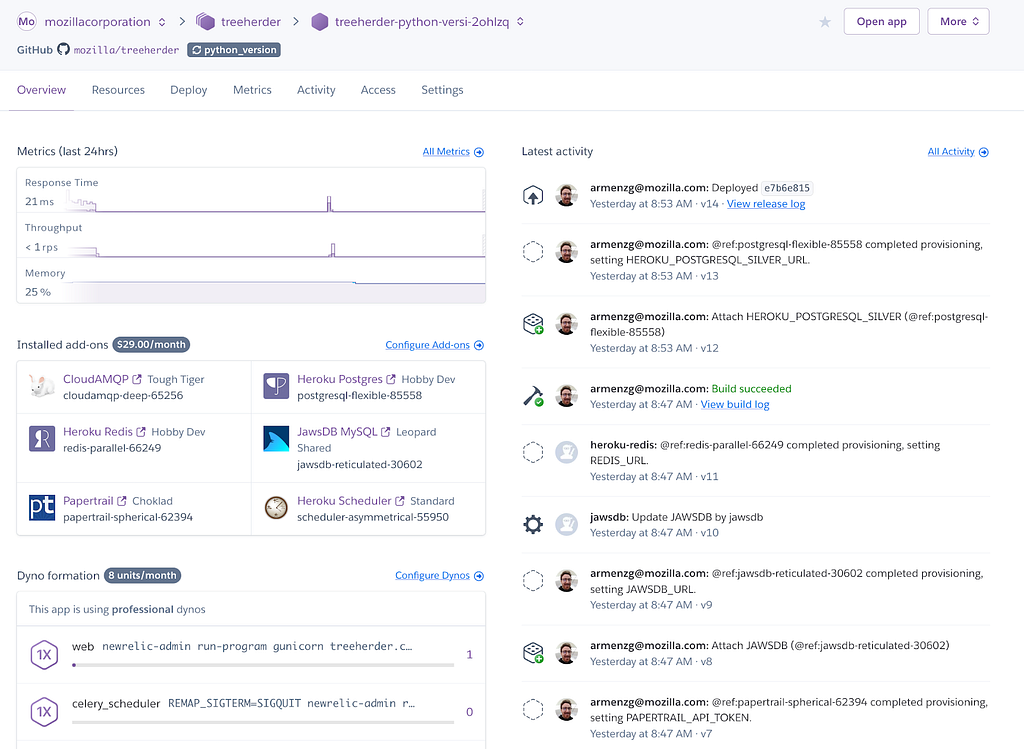
In bug 1566207 I added support for Heroku Review Apps (link to official docs). This feature allows creating a full Treeherder deployment (backend, frontend and data ingestion pipeline) for a pull request. This gives Treeherder engineers the ability to have their own deployment without having to compete over the Treeherder prototype app (a shared deployment). This is important as the number of engineers and contributors increases.

Once created you get a complete Heroku environment with add-ons and workers configured and the deployment for it.
Looking back, there are few new features that came out of the work, however, Heroku Review apps are not used as widely as I would have hoped for.
One of the benefits that came out of this project is that incidentally we solved a long standing Pulse consumption feature request (Thanks Dustin for the idea!) In order to consume data from Pulse, we need to provide a username and a password. There’s no guest or unauthenticated method for Pulse messages consumption. If credentials were to be shared we would have multiple consumers for the same queues with each consumer competing for the same set of messages. The solution to this problem is by creating queues dynamically with a couple of environment variables (see code). This means that each Heroku Review App will use the same set of credentials, however, consumer from different queues, thus, not competing for messages. This solution also solves the same problem for local development. The local development set up will be able to share credentials across Treeherder developers (each having their own queues).
Another good thing that came out of the project is that we can reduce the number of tasks the pipeline consumes. This is important for the Heroku Review App (as well as the local development set up) because we don’t need to set up too many Heroku workers to process all the data that comes out of Taskcluster (Firefox’s CI). In Heroku, we have close to 20 workers to handle the load. In order to keep the cost down for a Heroku Review App (workers + add-ons) I decided to limit the ingestion to autoland & android-components. This is accomplished with the PROJECTS_TO_INGEST environment variable which can be changed after the app is created. The day is nearer when the local ingestion pipeline could be started automatically without bringing your laptop to its knees.
One last advantage is that we can test different versions of MySql by simply changing one line for the JawsDB Heroku add-on. This is important because it will remove coordinating Treeherder RDS/Terraform changes with dividehex before we’re fully ready. We can also modify other add-ons, however, changing the MySql version is the most significant we can tweak.
Unfortunately, the Heroku Review Apps are not used as much as I would have wished for. Treeherder devs tend to borrow the Heroku treeherder-prototype app instead of creating a Heroku Review App. I know it will be useful in the future since I have experienced at least once where three of us wanted to use the shared Heroku app.
On a separate note, the configuration of the add-ons is not as advertised. You don’t have full control of what plans your add-ons get configured with. For instance, I could specify the Tiger plan for the CloudAMQP add-on yet get the Lemur plan instead. I found out that permitting certain add-ons needs to be requested via a Heroku support ticket. This is because I’m not a Mozilla
After many months of discussion on the mozilla.dev.security.policy mailing list, our Root Store Policy governing Certificate Authorities (CAs) that are trusted in Mozilla products has been updated. Version 2.7 has an effective date of January 1st, 2020.
More than one dozen issues were addressed in this update, including the following changes:
- Beginning on 1-July, 2020, end-entity certificates MUST include an Extended Key Usage (EKU) extension containing KeyPurposeId(s) describing the intended usage(s) of the certificate, and the EKU extension MUST NOT contain the KeyPurposeId anyExtendedKeyUsage. This requirement is driven by the issues we’ve had with non-TLS certificates that are technically capable of being used for TLS. Some CAs have argued that certificates not intended for TLS usage are not required to comply with TLS policies, however it is not possible to enforce policy based on intention alone.
- Certificate Policy and Certificate Practice Statement (CP/CPS) versions dated after March 2020 can’t contain blank sections and must – in accordance with RFC 3647 – only use “No Stipulation” to mean that no requirements are imposed. That term cannot be used to mean that the section is “Not Applicable”. For example, “No Stipulation” in section 3.2.2.6 “Wildcard Domain Validation” means that the policy allows wildcard certificates to be issued.
- Section 8 “Operational Changes” will apply to unconstrained subordinate CA certificates chaining up to root certificates in Mozilla’s program. With this change, any new unconstrained subordinate CA certificates that are transferred or signed for a different organization that doesn’t already have control of a subordinate CA certificate must undergo a public discussion before issuing certificates.
- We’ve seen a number of instances in which a CA has multiple policy documents and there is no clear way to determine which policies apply to which certificates. Under our new policy, CAs must provide a way to clearly determine which CP/CPS applies to each root and intermediate certificate. This may require changes to CA’s policy documents.
- Mozilla already has a “required practice” that forbids delegation of email validation to third parties for S/MIME certificates. With this update, we add this requirement to our policy. Specifically, CAs must not delegate validation of the domain part of an email address to a third party.
- We’ve also added specific S/MIME revocation requirements to policy in place of the existing unclear requirement for S/MIME certificates to follow the BR 4.9.1 revocation requirements. The new policy does not include specific requirements on the time in which S/MIME certificates must be revoked.
Other changes include:
- Detail the permitted signature algorithms and encodings for RSA keys and ECDSA keys in sections 5.1.1 and 5.1.2 (along with a note that Firefox does not currently support RSASSA-PSS encodings).
- Add the P-521 exclusion in section 5.1 of the Mozilla policy to section 2.3 where we list exceptions to the BRs.
- Change references to “PITRA” in section 8 to “Point-in-Time Audit”, which is what we meant all along.
- Update required minimum versions of audit criteria in section 3.1
- Formally require incident reporting
A comparison of all the policy changes is available here.
A few of these changes may require that CAs revise their CP/CPS(s). Mozilla will send a CA Communication to alert CAs of the necessary changes, and ask CAs to provide the date by which their CP/CPS documents will be compliant.
We have also recently updated the Common CA Database (CCADB) Policy to provide specific guidance to CAs and auditors on audit statements. As a repository of information about publicly-trusted CAs, CCADB now automatically processes audit statements submitted by CAs. The requirements added in section 5.1 of the policy help to ensure that the automated processing is successful.
The post Announcing Version 2.7 of the Mozilla Root Store Policy
A while back we’ve seen how Avast monetizes their users. Today we have a much smaller fish to fry, largely because the Avira’s extensions in question aren’t installed by default and require explicit user action for the additional “protection.” So these have far fewer users, currently 400 thousands on Firefox and slightly above a million on Chrome according to official add-on store numbers. It doesn’t make their functionality any less problematic however.
That’s especially the case for Avira Browser Safety extension that Avira offers for Firefox and Opera. While the vendor’s homepage lists “Find the best deals on items you’re shopping for” as last feature in the list, the extension description in the add-on stores “forgets” to mention this monetization strategy. I’m not sure why the identical Chrome extension is called “Avira Safe Shopping” but at least here the users get some transparency.
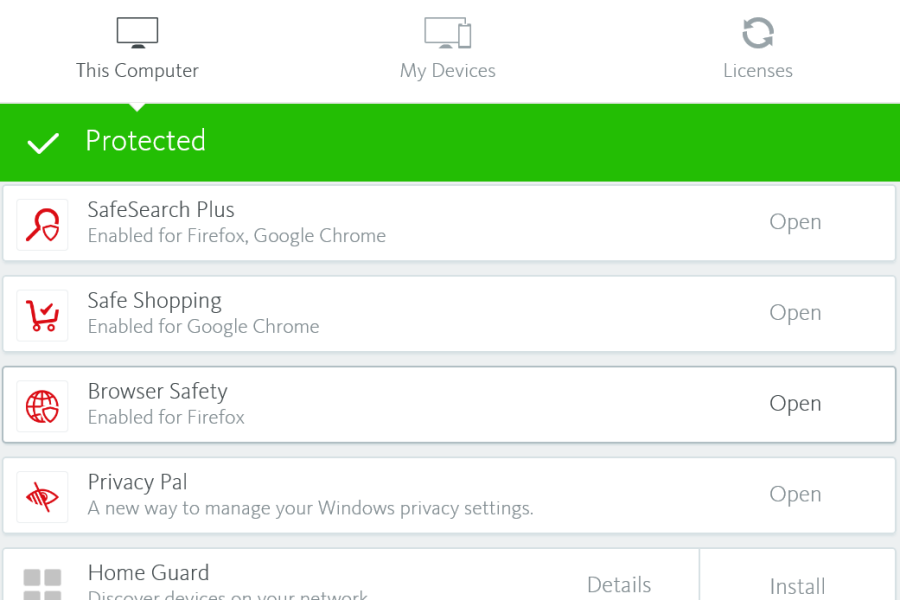
Summary of the findings
The Avira Browser Safety extension is identical to Avira Safe Shopping and monetizes by offering “best shopping deals” to the users. This functionality is underdocumented, particularly in Avira’s privacy policy. It is also risky however, as Avira chose to implement it in such a way that it will execute JavaScript code from Avira’s servers on arbitrary websites as well as in the context of the extension itself. In theory, this allows Avira or anybody with control of this particular server to target individual users, spy on them or mess with their browsing experience in almost arbitrary ways.
In addition to that, the security part of the extension is implemented in a suboptimal way and will upload the entire browsing history of the users to Avira’s servers without even removing potentially sensitive data first. Again, Avira’s privacy policy is severely lacking and won’t make any clear statements as to what happens with this data.
How does this monetization approach work?
You’ve probably seen some of the numerous websites offering you coupon codes for certain shops to help you get the best deal. Or maybe you’ve even used browser extensions doing the same. If you ever asked yourself what these are getting out of it: the shop owners are paying them for referring customers to the shop. So even if you already were at this shop and selected the product you wanted to buy, if you then wandered off to a coupon deal website and had it send you back to the shop – the owner of the coupon deal website gets paid a certain percentage of your spending.
And that’s the reason why users of Avira Browser Safety, having installed that browser extension for protection, will occasionally see a message displayed on top of a website. Whenever some user takes advantage of the offers, the shop owners pay Avira. Not directly of course but via their partner Ciuvo GmbH which appears to provide the technology behind this feature.

Why is this feature problematic?
Monetizing a product in this way isn’t unusual. Ciuvo has their own browser extension sharing some code with Avira’s. And a bunch of other antivirus vendors also offer shopping extensions, without these being considered problematic as long as users install them by choice. However, Avira for some reason decided that they want full control over this feature without having to release a new extension
curl supports more TLS libraries than any other software I know of. The current count stops at 14 different ones that can be used to power curl’s TLS-based protocols (HTTPS primarily, but also FTPS, SMTPS, POP3S, IMAPS and so on).
The beginning
The very first curl release didn’t have any TLS support, but already in June 1998 we shipped the first version that supported HTTPS. Back in those days the protocol was still really SSL. The library we used then was called SSLeay. (No, I never understood how that’s supposed to be pronounced)
The SSLeay library became OpenSSL very soon after but the API was brought along so curl supported it from the start.
More than one
In the spring of 2005 we merged the first support for building curl with a different TLS library. It was GnuTLS, which comes under a different license than OpenSSL and had a slightly different feature set. The race had began.
BearSSL
A short while ago and in time to get shipped in the coming 7.68.0 release (set to ship on January 8th 2020), the 14th TLS backend was merged into the curl source tree in the shape of support for BearSSL. BearSSL is a TLS library aimed at smaller devices and is perhaps lacking a bit in features (like no TLS 1.3 for example) but has still been requested by users in the past.
Multi-SSL
Since September 2017, you can even build libcurl to support one or more TLS libraries in the same build. When built that way, users can select which TLS backend curl should use at each start-up. A feature used and appreciated by for example git for Windows.
Time line
Below is an attempt to visualize how curl has grown in this area. Number of supported TLS backends over time, from the first curl release until today. The image comes from a slide I intend to use in a future curl presentation. A notable detail on this graph is the removal of axTLS support in late 2018 (removed in 7.63.0). PolarSSL is targeted to meet the same destiny in February 2020 since it gets no updates anymore and has in practice already been replaced by mbedTLS.

QUIC and TLS
If you’ve heard me talk about HTTP/3 (h3) and QUIC (like my talk at Full Stack Fest 2019), you already know that QUIC needs new APIs from the TLS libraries.
For h3 support to become reality in curl shipped in distros etc, the TLS library curl is set to use needs to provide a QUIC compatible API and the QUIC/h3 library curl uses then needs to support that.
It is likely that some TLS libraries are going to be fast with providing such APIs and some are going be (very) slow. Their particular individual abilities combined with the desire to ship curl with h3 support is likely going to affect what TLS library you will see used by curl in your distro will affect what TLS library you will build your own curl builds to use in the future.
Credits
The recently added BearSSL backend was written by Michael Forney. Top image by LEEROY Agency from Pixabay
https://daniel.haxx.se/blog/2019/12/11/bearssl-is-curls-14th-tls-backend/
A week with a bad cold makes it more difficult to write week notes. So here my weak notes. Everything seems heavier to type, to push.
This last week-end I was at JSConf JP. I wrote down some notes about it.
The week starts with two days of fulltime diagnosis (Monday, Tuesday). Let's get to it: 69 open bugs for Gecko. We try to distribute our work across the team so we are sure that at least someone is on duty for each day of the week. When we have finished our shift, we can add ourselves for more days. That doesn't prevent us for working on bugs the rest of the week. Some of the bugs take longer.

Webcompat bugs
Some of the weeks during diagnosis, a lot of bugs can't be reproduced. There's always a chance we are missing out some critical step to reproduce the issue. But without being able to reproduce, it is also very hard to diagnose. I end up sometimes closing them knowing that there might be a real bug, but that it would resurface again if it's a really common bug. Handling priorities, I guess.
- strange issue involving
overflow,flexandinputelement minimum size. - we see more and more bugs related to the async change for history navigation.
- yet another Fastclick issue. Just remove it from your projects.
- Certificates errors are on the rise on Firefox Nightly. The browsers vendors are planning to remove TLS 1.0 and 1.1 on March 2020. If your site is under https and an old version of TLS, update your certificate ASAP. if your site is under http, you are lucky. No troubles.
- Not very practical to compute your tax when the number disappears as soon as you enter in another form field.
- If you know someone working on the design of Yummly, please tell them about this bug.
- Issue with file uploader on Linkedin.
Python virtualenv required!
I didn't know about export PIP_REQUIRE_VIRTUALENV=true. This is quite cool.
After saving this change and sourcing the ~/.bashrc file with source ~/.bashrc, pip will no longer let you install packages if you are not in a virtual environment. If you try to use pip install outside of a virtual environment pip will gently remind you that an activated virtual environment is needed to install packages.
I never install globally for the last couple of years. If I really want to install something, I always use: pip install --user project_name, but I could probably go a tad further by doing the virtualenv requirements. It's easy.
mkdir pet_project
cd pet_project
python -m venv env
source env/bin/activate
Thoughts
A complex system that works is invariably found to have evolved from a simple system that worked. A complex system designed from scratch never works and cannot be patched up to make it work. You have to start over with a working simple system. — Gall's law
- Working with a nasty cold makes it more difficult to take interesting notes.
- How to test Amazon S3 without an Amazon account? This is the thing bothering me with all these external services. There should be way to have dumb servers which are mocking the API responses without providing the actual service. In that way, people could figure out if they really want to use this service for their own code.
Otsukare!