If you have a VR headset, go to https://mixedreality.mozilla.org/jumpy-balls/ and try the game!

Jumpy Balls is a simple game where you have to guide balls shot from a cannon towards a target. Use your controllers to drag blocks with different physical properties, making the balls bounce and reach their goal.
Behind Jumpy Balls
Developing a 3D application is a complex task. While 3D engines like three.js provide a solid foundation, there are still many different systems that must work together (eg: app states, flow, logic, collisions, physics, UI, IA, sound…), and you probably do not want to rebuild all this from scratch on each project.
Also, when creating a small experiment or simple technical demo (like those at https://threejs.org/examples), disparate parts of an application can be managed in an ad-hoc manner. But as the software grows with more interactions, a richer UI, and more user feedback, the increased complexity demands a better strategy to coordinate modules and state.
We created ECSY to help organize all of this architecture of more complex applications and ECSY-Three to ease the process when working with the three.js engine.
The technologies we used to develop Jumpy Balls were:
- ecsy and ecsy-three for renderer and logic
- ammo.js for physics
- Blender and glTF for all models and animations.
- Audacity for sound effects.
- Madtracker for the awesome music by Jose Manuel Perez (aka JosSs)
- ECSY developer tools, which have proven to be really useful when debugging and especially detecting leaks on the life cycle of the entities and components.
The ecsy-three Module
We created ecsy-three to facilitate developing applications using ECSY and three.js. It is a set of components, systems, and helpers that will (eventually) include a large number of reusable components for the most commonly used patterns when developing 3D applications.

The ecsy-three module exports an initialize() function that creates the entities that you will commonly need in a three.js application: scene, camera and renderer.
// Create a new world to hold all our entities and systems
world = new World();

// Initialize the default sets of entities and systems
let data = initialize(world, {vr: true});
And data will have the following structure, letting you access the created entities:
{
   world,
   entities: {
     scene,
     camera,
     cameraRig,
     renderer,
     renderPass
   }
}
It will also initialize internally the systems that will take care of common tasks such as updating the transforms of the objects, listening for changes on the cameras, and of course, rendering the scene.
Please notice that you can always modify that behaviour if needed and create the entities by yourself.
Once you get the initialized entities, you can modify them. For example, changing the camera position:
// Grab the initialized entities
let {scene, renderer, camera} = data.entities;

// Modify the position for the default camera
let transform = camera.getMutableComponent(Transform);
transform.position.z = 40;
You could then create a textured box using the standard
Welcome to another round of updates from Firefox Add-ons in Firefox 74. Here is what our community has been up to:
- Keyboard shortcuts using the commands API can now be unset by setting them to an empty string using commands.update. Users can also do so manually via the new shortcut removal control at
about:addons. (Thanks, Rob) - There were some issues with long browserAction badge texts wrapping incorrectly. The badge text supports three characters, a fourth may fit in depending on the letters used. Everything else will be cropped. Please keep this in mind when setting your badge text (Thank you Brian)
- The global theme is not reset using themes.reset unless the current global theme was created by the extension (Kudos to you, Ajitesh)
- An urlClassification value was added to webRequest to give insight into how the URLs were classified by Firefox. (Hurrah, Shane)
- The
extensions.webextensions.remotepreference will only be read once. If you are changing this preference, the browser needs to be restarted for it to apply. This preference is used to disable out-of-process extensions, which is an unsupported configuration. The preference will be removed in a future update (bug 1613141).
We’ll be back for more in a few weeks when Firefox 75 is on the horizon. If you’d like to help make this list longer, please consider contributing to add-ons in Firefox. I’d be excited to feature your changes next time.
The post Extensions in Firefox 74 appeared first on Mozilla Add-ons Blog.
https://blog.mozilla.org/addons/2020/03/05/extensions-in-firefox-74/
Can you even remember a world before selfies or memes? Things have escalated quickly. Social media has taken over our lives and, for better or worse, become an extension of … Read more
The post Four tips to refresh your relationship status with social media appeared first on The Firefox Frontier.
I’ve spent the past few weeks, and will spend the next few weeks, setting up cross-compiled builds of Firefox for Windows on Linux workers on Mozilla’s CI. Following is a long wall of text, if that’s too much for you, you may want to check the TL;DR near the end. If you’re a Windows user wondering about the Windows Subsystem for Linux, please at least check the end of the post.
What is it?
Traditionally, compiling software happens mostly on the platform it is going to run on. Obviously, this becomes less true when you’re building software that runs on smartphones, because you’re usually not developing on said smartphone. This is where Cross-Compilation comes in.
Cross-Compilation is compiling for a platform that is not the one you’re compiling on.
Cross-Compilation is less frequent for desktop software, because most developers will be testing the software on the machine they are building it with, which means building software for macOS on a Windows PC is not all that interesting to begin with.
Continuous Integration, on the other hand, in the era of “build pipelines”, doesn’t necessarily care that the software is built in the same environment as the one it runs on, or is being tested on.
But… why?
Five years ago or so, we started building Firefox for macOS on Linux. The main drivers, as far as I can remember, were resources and performance, and they were both tied: the only (legal) way to run macOS in a datacenter is to rack… Macs. And it’s not like Apple had been producing rackable, server-grade, machines. Okay, they have, but that didn’t last. So we were using aging Mac minis. Switching to Linux machines led to faster compilation times, and allowed to recycle the Mac minis to grow the pool running tests.
But, you might say, Windows runs on standard, rackable, server-grade machines. Or on virtually all cloud providers. And that is true. But for the same hardware, it turns out Linux performs better (more on that below), and the cost per hour per machine is also increased by the Windows license.
But then… why only now?
Firefox has a legacy of more than 20 years of development. That shows in its build system. All the things that allow cross-compiling Firefox for Windows on Linux only lined up recently.
The first of them is the compiler. You might interject with “mingw something something”, but the reality is that binary compatibility for accessibility (screen readers, etc.) and plugins (Flash is almost dead, but not quite) required Microsoft Visual C++ until recently. What changed the deal is clang-cl, and Mozilla has stopped using MSVC for the builds of Firefox it ships with Firefox 63, about 20 months ago. , Another is the process of creating the symbol files used to process crash reports, which was using one of the tools from breakpad to dump the debug info from PDB files in the right format. Unfortunately, that was using a Windows DLL to do so. What recently changed is that we now have a platform-independent tool to do this, that doesn’t require that DLL. And to place credit where credit is due, this was thanks to the people from Sentry providing Rust crates for most of the pieces necessary to do so.
Another is the build system itself, which assumed in many places that building for Windows meant you were on Windows, which doesn’t help cross-compiling for Windows. But worse than that, it also assumed that the compiler was similar. This worked fine when cross-compiling for Android or MacOS on Linux because compiling tools for the build itself (most notably a clang plugin) and compiling Firefox use compatible compilers, that take the same kind of arguments. The story is different when one of the compilers is clang, which has command line arguments like GCC, and the other is clang-cl, which has command line arguments like MSVC. This changed recently with work to allow building Android Geckoview on Windows (I’m not entirely sure all the pieces for that are there just yet, but the ones in place surely helped me ; I might have inadvertently broken some things, though).
So how does that work?
The above is unfortunately not the whole story, so when I started looking a few weeks ago, the idea was to figure out how far off we were, and what kind of shortcuts we could take to make it happen.
It turns out we weren’t that far off, and for a few things, we could work around by… just running the necessary Windows programs with Wine with some
Ever since I was on a tour to Star Trek filming sites in 2016 with Geek Nation Tours and Larry Nemecek, I've become ever more interested in finding out to which actual real-world places TV/film crews have gone "on location" and shot scenes for our favorite on-screen stories. While the background of production of TV and film is of interest to me in general, I focus mostly on everything Star Trek and I love visiting locations they used and try to catch pictures that recreate the base setting of the shots in the production - but just the way the place looks "in the real world" and right now.
This has gone as far as me doing several presentations about the topic - two of which (one in German, one in English language) I will give at this year's FedCon as well, and creating an experimental website at filmingsites.com where I note all locations used in Star Trek productions as soon as I become aware of them.
In the last few years, around the Star Trek Las Vegas Conventions, I did get the chance to have a few days traveling around Los Angeles and vicinity, visit a few locations and take pictures there. And after Discovery being filmed up in the Toronto area (and generally using quite few locations outside the studios), Picard is back producing in Southern California and using plenty of interesting places! And now with the first half of season 1 in the books (or at least ready to watch for us via streaming), here are a few filming sites I found in those episodes:
And we actually get started with our first location (picture is a still from the series) in "Remembrance" right after Picard wakes up from the "cold open" dream sequence: Ch^ateau Picard was filmed at Sunstone Winery's Villa this time (after different places were used in its TNG appearances). The Winery's general manager even said "We encourage all the Trekkies and Trekkers to come visit us." - so I guess I'll need to put it in my travels plans soon.
Another one I haven't seen yet but will need to put in my plans to see is One Culver, previously known as Sony Pictures Plaza. That's where the scenes in the Daystrom Institute were shot - interestingly, in walking distance to the location of the former Desilu Culver soundstages (now "The Culver Studios") and its backlot (now a residential area), where the original Star Trek series shot its first episodes and several outdoor scenes of later ones as well. One Culver's big glass front structure and the huge screen on its inside are clearly visible multiple times in Picard's Daystrom Institute scenes, as is the rainbow arch behind it on the Sony Studios parking lot. Not having been there, I could only include a promotional picture from their website here.
Now a third filming site that appears in "Remembrance" is actually one I do have my own pictures of: After seeing the first trailer for Picard and getting a hint where that building depicted that clip is, I made my way last summer to a place close to Disneyland and took a few pictures of Anaheim Convention Center. Walking by to the main entrance, I found the attached Arena to just look good, so I also got one shot of that one in - and then I see that in this episode, they used it as the Starfleet Archive Museum!
Of course, in the second episode, "Maps and Legends", we then see the main entrance, where Picard goes to meet the C-in-C, so presumably Starfleet headquarters. It
Or: The Implementation of the SpiderMonkey Debugger (and its cleanup)
We’ve made major improvements to JavaScript debugging in Firefox DevTools over the past two years. Developer feedback has informed and validated our work on performance, source maps, stepping reliability, pretty printing, and more types of breakpoints. Thank you. If you haven’t tried Firefox for debugging modern JavaScript in a while, now is the time.
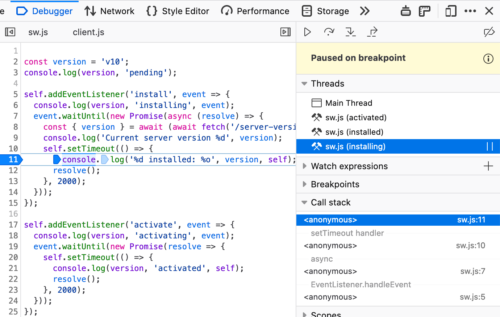
Many of the aforementioned efforts focused on the Debugger frontend (written in React and Redux). We were able to make steady progress. The integration with SpiderMonkey, Firefox’s JavaScript engine, was where work went more slowly. To tackle larger features like proper asynchronous call stacks (available now in DevEdition), we needed to do a major cleanup. Here’s how we did that.
Background: A Brief History of the JS Debugger
The JavaScript debugger in Firefox is based on the SpiderMonkey engine’s Debugger API. This API was added in 2011. Since then, it has survived the addition of four JIT compilers, the retirement of two of them, and the addition of a WebAssembly compiler. All that, without needing to make substantial changes to the API’s users. Debugger imposes a performance penalty only temporarily, while the developer is closely observing the debuggee’s execution. As soon as the developer looks away, the program can return to its optimized paths.
A few key decisions (some ours, others imposed by the situation) influenced the Debugger‘s implementation:
- For better or worse, it is a central tenet of Firefox’s architecture that JavaScript code of different privilege levels can share a single heap. Object edges and function calls cross privilege boundaries as needed. SpiderMonkey’s compartments ensure the necessary security checks get performed in this free-wheeling environment. The API must work seamlessly across compartment boundaries.
Debuggeris an intra-thread debugging API: events in the debuggee are handled on the same thread that triggered them. This keeps the implementation free of threading concerns, but invites other sorts of complications.Debuggers must interact naturally with garbage collection. If an object won’t be missed, it should be possible for the garbage collector to recycle it, whether it’s aDebugger, a debuggee, or otherwise.- A
Debuggershould observe only activity that occurs within the scope of a given set of JavaScript global objects (say, a window or a sandbox). It should have no effect on activity elsewhere in the browser. But it should also be possible for multipleDebuggers to observe the same global, without too much interference.
Garbage Collection
People usually explain garbage collectors by saying that they recycle objects that are “unreachable”, but this is not quite correct. For example, suppose we write:
fetch("https://www.example.com/")
  .then(res => {
    res.body.getReader().closed.then(() => console.log("stream closed!"))
  });
Once we’re done executing this statement, none of the objects it constructed are reachable by the rest of the program. Nonetheless, the WHATWG specification forbids the browser from garbage collecting everything and terminating the fetch. If it were to do so, the message would not be logged to the console, and the user would know the garbage collection had occurred.
Garbage collectors obey an interesting principle: an object may be recycled only if it never would be missed. That is, an object’s memory may be recycled only if doing so would have no observable effect on the program’s future
We don’t think twice when it comes to using technology for convenience. That can include some seriously personal aspects of day-to-day life like menstruation and fertility tracking. For people who … Read more
The post Spotty privacy practices of popular period trackers appeared first on The Firefox Frontier.
https://blog.mozilla.org/firefox/privacy-practices-period-trackers/
The 2020 U.S. presidential election season is underway, and no matter your political lean, you want to know the facts. What do all of these politicians believe? How do their … Read more
The post More privacy means more democracy appeared first on The Firefox Frontier.
https://blog.mozilla.org/firefox/more-privacy-means-more-democracy/
There has been 56 days since the previous release. As always, download the latest version over at curl.haxx.se.
Perhaps the best news this time is the complete lack of any reported (or fixed) security issues?
Numbers
the 189th release
3 changes
56 days (total: 8,020)
123 bug fixes (total: 5,911)
233 commits (total: 25,357)
0 new public libcurl function (total: 82)
1 new curl_easy_setopt() option (total: 270)
1 new curl command line option (total: 230)
69 contributors, 39 new (total: 2,127)
32 authors, 15 new (total: 771)
0 security fixes (total: 93)
0 USD paid in Bug Bounties
Contributors
Let me first highlight these lovely facts about the community effort that lies behind this curl release!
During the 56 days it took us to produce this particular release, 69 persons contributed to what it is. 39 friends in this crowd were first-time contributors. That’s more than one newcomer every second day. Reporting bugs and providing code or documentation are the primary ways people contribute.
We landed commits authored by 32 individual humans, and out of those 15 were first-time authors! This means that we’ve maintained an average of well over 5 first-time authors per month for the last several years.
The making of curl is a team effort. And we have a huge team!
Changes
In this release cycle we finally removed all traces of support for PolarSSL in the TLS related code. This library doesn’t get updates anymore and has effectively been superseded by its sibling mbedTLS – which we already support since years back. There’s really no reason for anyone to hang on to PolarSSL anymore. Move over to a modern library. wolfSSL, mbedTLS and BearTLS are all similar in spirit and focus. curl now supports 13 different TLS libraries.
We added support for a command line option (--mail-rcpt-allowfails) as well as a libcurl option (CURLOPT_MAIL_RCPT_ALLLOWFAILS) that allows an application to tell libcurl that recipients are fine to fail, as long as at least one is fine. This makes it much easier for applications to send mails to a series of addresses, out of which perhaps a few will fail immediately.
We landed initial support for wolfSSH as a new SSH backend in curl for SFTP transfers.
My top-11 favorite bug-fixes
As usual we’ve landed over a hundred bug-fixes, where most are minor. Here are eleven of the fixes I think stand out a little:
SOCKS connects are now non-blocking
For a very long time we’ve had this outstanding issue that libcurl did the connection phase to SOCKS proxies in a blocking fashion. This of course had unfortunate side-effects if you do many parallel transfers and maybe use slow or remote SOCKS proxies as then each such connection would starve out the others for the duration of the connect handshake.
Now that’s history and libcurl performs SOCKS connection establishment totally non-blocking!
Improved alt-svc parsing
Turns out I had misunderstood the spec a little and the parser needed to be fixed to better deal with some of the real-world Alt-Svc: response headers out there! A fine side effect of more people trying out our early HTTP/3 support, as this is the first major use case of this header in the wild.
Atomic cookie and alt-svc file saves
When saving files to disk, libcurl would previously simply open the file, write all the contents to it and then close it. This caused issues for multi-threaded libcurl users that potentially could start to try to use the saved file before it was done saving, and thus would end up reading partial file. This concerns both cookie and alt-svc usage.
Starting now, libcurl will always save these files into a temporary file with a random suffix while writing data to them, and then when everything is complete, rename the file over to the actual and proper file name. This will make the saving (appear) atomic to all consumers of such files, even in multi-threaded scenarios.
HTTP/2 stream pauses
An application using libcurl to receive a download can tell libcurl to pause the transfer at any given moment. Typically this is used by applications that for some reason consumes the incoming data slowly or has to use small local buffer for
Before Oleksandr Popov had the idea to build a browser extension that could broadcast thousands of global radio stations, his initial motivation was as abstract as it was aspirational. “I … Read more
The post Extension Spotlight: Worldwide Radio appeared first on The Firefox Frontier.
https://blog.mozilla.org/firefox/firefox-extension-worldwide-radio/
Every day online, we’re bombarded with messages from 2020 U.S. presidential candidates, their supporters, and their adversaries. Just how much does the internet impact our political views? Are online election … Read more
The post Your 2020 election podcast playlist appeared first on The Firefox Frontier.
https://blog.mozilla.org/firefox/your-2020-election-podcast-playlist/
For some time I thought that jQuery was a thing of the past, only being used in old projects for legacy reasons. I mean, there are now so much better frameworks, why would anyone stick with jQuery and its numerous shortcomings? Then some colleagues told me that they weren’t aware of jQuery’s security downsides. And I recently discovered two big vulnerabilities in antivirus software 1 2 which existed partly due to excessive use of jQuery. So here is your official public service announcement: jQuery is bad for the security of your project.
By that I don’t mean that jQuery is inherently insecure. You can build a secure project on top of jQuery, if you are sufficiently aware of the potential issues and take care. However, the framework doesn’t make it easy. It’s not secure by default, it rather invites programming practices which are insecure. You have to constantly keep that in mind and correct for it. And if don’t pay attention just once you will end up with a security vulnerability.
Why is jQuery like that?
You have to remember that jQuery was conceived in 2006. Security of web applications was a far less understood topic, e.g. autoescaping in Django templates to prevent server-side XSS vulnerabilities only came up in 2007. Security of client-side JavaScript code was barely considered at all.
So it’s not surprising that security wasn’t a consideration for jQuery. Its initial goal was something entirely different: make writing JavaScript code easy despite different browsers behaving wildly differently. Internet Explorer 6 with its non-standard APIs was still prevalent, and Internet Explorer 7 with its very modest improvements wasn’t even released yet. jQuery provided a level of abstraction on top of browser-specific APIs with the promise that it would work anywhere.
Today you can write document.getElementById("my-element") and call it done. Back then you might have to fall back to document.all["my-element"]. So jQuery provided you with jQuery("#my-element"), a standardized way to access elements by selector. Creating new elements was also different depending on the browser, so jQuery gave you jQuery("
The danger of simple
You might have noticed a pattern above which affects many jQuery functions: the same function will perform different operations depending on the parameters it receives. You give it something and the function will figure out what you meant it to do. The jQuery() function will accept among other things a selector of the element to be located and HTML code of an element to be created. How does it decide which one of these fundamentally different operations to perform, with the parameter being a string both times? The initial logic was: if there is something looking like an HTML tag in the contents it must be HTML code, otherwise it’s a selector.
And there you have the issue: often websites want to find an element by selector but use untrusted data for parts of that selector. So attackers can inject HTML code into the selector and trick jQuery into substituting the safe “find element” operation by a dangerous “create a new element.” A side-effect of the latter would be execution of malicious JavaScript code, a typical client-side XSS vulnerability.
It took until jQuery 1.9 (released in 2013) for this issue to be addressed. In order to be interpreted as HTML code, a string has to start with < now. Given incompatible changes, it took websites years to migrate to safer jQuery versions. In particular, the Addons.Mozilla.Org website still had some vulnerabilities in 2015 going back to this 1 2.
The root issue that the same function performs both safe and dangerous operations remains part of jQuery however, likely due to backwards compatibility constrains. It can still cause issues even now. Attackers would have to manipulate the start of a selector which is less likely, but it is still something that application developers have to keep
Woops, looks like I missed my Two Year Moziversary! 2 years ago, in March 2018, I joined Mozilla as a Firefox Telemetry Engineer. Last year I blogged about what happened in my first year.
One year later I am still in the same team, but other things changed. Our team grew (hello Bea & Mike!), and shrank (bye Georg!), lots of other changes at Mozilla happened as well.
However one thing stayed during the whole year: Glean.
Culminating in the very first Glean-written-in-Rust release, but not slowing down after,
the Glean project is changing how we do telemetry in Mozilla products.
Glean is now being used in multiple products across mobile and desktop operating systems (Firefox Preview, Lockwise for Android, Lockwise for iOS, Project FOG). We've seen over 2000 commits on that project, published 16 releases and posted 14 This Week in Glean blogposts.
This year will be focused on maintaining Glean, building new capabailities and bringing more of Glean back into Firefox on Desktop. I am also looking forward to speak more about Rust and how we use it to build and maintain cross-platform libraries.
To the next year and beyond!
Thank you
Thanks to my team: :bea, :chutten, :Dexter, :mdboom & :travis!
Lots of my work involves collaborating with people outside my direct team, gathering feedback, taking in feature requests and triaging bug reports.
So thanks also to all the other people at Mozilla I work with.
Left, right, or center. Blue, red, or green. Whatever your flavor, it’s your right to decide the direction of your community, state and country. The first step is to check … Read more
The post Are you registered to vote? appeared first on The Firefox Frontier.
(previously posted options of the week)
--next has the short option alternative -:. (Right, that’s dash colon as the short version!)
Working with multiple URLs
You can tell curl to send a string as a POST to a URL. And you can easily tell it to send that same data to three different URLs. Like this:
curl -d data URL1 URL2 URL2
… and you can easily ask curl to issue a HEAD request to two separate URLs, like this:
curl -I URL1 URL2
… and of course the easy, just GET four different URLs and send them all to stdout:
curl URL1 URL2 URL3 URL4
Doing many at once is beneficial
Of course you could also just invoke curl two, three or four times serially to accomplish the same thing. But if you do, you’d loose curl’s ability to use its DNS cache, its connection cache and TLS resumed sessions – as they’re all cached in memory. And if you wanted to use cookies from one transfer to the next, you’d have to store them on disk since curl can’t magically keep them in memory between separate command line invokes.
Sometimes you want to use several URLs to make curl perform better.
But what if you want to send different data in each of those three POSTs? Or what if you want to do both GET and POST requests in the same command line? --next is here for you!
--next is a separator!
Basically, --next resets the command line parser but lets curl keep all transfer related states and caches. I think it is easiest to explain with a set of examples.
Send a POST followed by a GET:
curl -d data URL1 --next URL2
Send one string to URL1 and another string to URL2, both as POST:
curl -d one URL1 --next -d another URL2
Send a GET, activate cookies and do a HEAD that then sends back matching cookies.
curl -b empty URL1 --next -I URL1
First upload a file with PUT, then download it again
curl -T file URL1 --next URL2
If you’re doing parallel transfers (with -Z), curl will do URLs in parallel only until the --next separator.
There’s no limit
As with most things curl, there’s no limit to the number of URLs you can specify on the command line and there’s no limit to the number of --next separators.
If your command line isn’t long enough to hold them all, write them in a file and point them out to curl with -K, --config.
(“This Week in Glean” is a series of blog posts that the Glean Team at Mozilla is using to try to communicate better about our work. They could be release notes, documentation, hopes, dreams, or whatever: so long as it is inspired by Glean. You can find an index of all TWiG posts online.)
This is a special guest post by non-Glean-team member William Lachance!
As I mentioned last time I talked about mozregression, I have been thinking about adding some telemetry to the system to better understand the usage of this tool, to justify some part of Mozilla spending some cycles maintaining and improving it (assuming my intuition that this tool is heavily used is confirmed).
Coincidentally, the Telemetry client team has been working on a new library for measuring these types of things in a principled way called Glean, which even has python bindings! Using this has the potential in saving a lot of work: not only does Glean provide a framework for submitting data, our backend systems are automatically set up to process data submitted via into Glean into BigQuery tables, which can then easily be queried using tools like sql.telemetry.mozilla.org.
I thought it might be useful to go through some of what I’ve been exploring, in case others at Mozilla are interested in instrumenting their pet internal tools or projects. If this effort is successful, I’ll distill these notes into a tutorial in the Glean documentation.
Initial steps: defining pings and metrics
The initial step in setting up a Glean project of any type is to define explicitly the types of pings and metrics. You can look at a “ping” as being a small bucket of data submitted by a piece of software in the field. A “metric” is something we’re measuring and including in a ping.
Most of the Glean documentation focuses on browser-based use-cases where we might want to sample lots of different things on an ongoing basis, but for mozregression our needs are considerably simpler: we just want to know when someone has used it along with a small number of non-personally identifiable characteristics of their usage, e.g. the mozregression version number and the name of the application they are bisecting.
Glean has the concept of event pings, but it seems like those are there more for a fine-grained view of what’s going on during an application’s use. So let’s define a new ping just for ourselves, giving it the unimaginative name “usage”. This goes in a file called pings.yaml:
---
$schema: moz://mozilla.org/schemas/glean/pings/1-0-0

usage:
  description: >
    A ping to record usage of mozregression
  include_client_id: true
  notification_emails:
    - wlachance@mozilla.com
  bugs:
    - http://bugzilla.mozilla.org/123456789/
  data_reviews:
    - http://example.com/path/to/data-review
We also need to define a list of things we want to measure. To start with, let’s just test with one piece of sample information: the app we’re bisecting (e.g. “Firefox” or “Gecko View Example”). This goes in a file called metrics.yaml:
---
$schema: moz://mozilla.org/schemas/glean/metrics/1-0-0

usage:
  app:
    type: string
    description: >
      The name of the app being bisected
    notification_emails:
      - wlachance@mozilla.com
    bugs:
      - https://bugzilla.mozilla.org/show_bug.cgi?id=1581647
    data_reviews:
      - http://example.com/path/to/data-review
    expires: never
    send_in_pings:
      - usage
The data_reviews sections in both of the above are obviously bogus, we will need to actually get data review before landing and using this code, to make sure that we’re in conformance with Mozilla’s data collection policies.
Testing it out
But in the mean time, we can test our setup with the Glean debug pings viewer by setting a special tag (mozregression-test-tag) on our output. Here’s a small python script which does just that:
from pathlib import Path
from glean import Glean, Configuration
from glean import (load_metrics,
One of the persistent myths about HTTP is that it is “a simple protocol”.
Expect: – not always expected
One of the dusty spec corners of HTTP/1.1 (Section 5.1.1 of RFC 7231) explains how the Expect: header works. This is still today in 2020 one of the HTTP request headers that is very commonly ignored by servers and intermediaries.
Background
HTTP/1.1 is designed for being sent over TCP (and possibly also TLS) in a serial manner. Setting up a new connection is costly, both in terms of CPU but especially in time – requiring a number of round-trips. (I’ll detail further down how HTTP/2 fixes all these issues in a much better way.)
HTTP/1.1 provides a number of ways to allow it to perform all its duties without having to shut down the connection. One such an example is the ability to tell a client early on that it needs to provide authentication credentials before the clients sends of a large payload. In order to maintain the TCP connection, a client can’t stop sending a HTTP payload prematurely! When the request body has started to get transmitted, the only way to stop it before the end of data is to cut off the connection and create a new one – wasting time and CPU…
“We want a 100 to continue”
A client can include a header in its outgoing request to ask the server to first acknowledge that everything is fine and that it can continue to send the “payload” – or it can return status codes that informs the client that there are other things it needs to fulfill in order to have the request succeed. Most such cases typically that involves authentication.
This “first tell me it’s OK to send it before I send it” request header looks like this:
Expect: 100-continue
Servers
Since this mandatory header is widely not understood or simply ignored by HTTP/1.1 servers, clients that issue this header will have a rather short timeout and if no response has been received within that period it will proceed and send the data even without a 100.
The timeout thing is happening so often that removing the Expect: header from curl requests is a very common answer to question on how to improve POST or PUT requests with curl, when it works against such non-compliant servers.
Popular browsers
Browsers are widely popular HTTP clients but none of the popular ones ever use this. In fact, very few clients do. This is of course a chicken and egg problem because servers don’t support it very well because clients don’t and client’s don’t because servers don’t support it very well…
curl sends Expect:
When we implemented support for HTTP/1.1 in curl back in 2001, we wanted it done proper. We made it have a short, 1000 milliseconds, timeout waiting for the 100 response. We also made curl automatically include the Expect: header in outgoing requests if we know that the body is larger than NNN or we don’t know the size at all before-hand (and obviously, we don’t do it if we send the request chunked-encoded).
The logic being there that if the data amount is smaller than NNN, then the waste is not very big and we can just as well send it (even if we risk sending it twice) as waiting for a response etc is just going to be more time consuming.
That NNN margin value (known in the curl sources as the EXPECT_100_THRESHOLD) in curl was set to 1024 bytes already then back in the early 2000s.
Bumping EXPECT_100_THRESHOLD
Starting in curl 7.69.0 (due to ship on March 4, 2020) we catch up a little with the world around us and now libcurl will only automatically set the Expect: header if the amount of data to send in the body is larger than 1 megabyte. Yes, we raise the limit by 1024 times.
The reasoning is of course that for most Internet users these days, data sizes below a certain size isn’t even noticeable when transferred and so we adapt. We then also reduce the amount of problems for the very small data amounts where waiting for the 100 continue response is a waste of time anyway.
Credits: landed in this commit. (sorry but my WordPress stupidly can’t show the proper Asian name of the author!)
417 Expectation Failed
One of the ways that a HTTP/1.1 server can deal with an Expect: 100-continue header in a request, is to respond with a 417 code, which should tell the client to retry the same request again, only without the Expect: header.
While this response is fairly uncommon among servers, curl users who ran into 417 responses have previously had to resort to removing the Expect: header “manually” from the request for such