The Firefox platform development team recently announced plans to first disable, and then remove the implementation for built-in FTP from the browser. FTP is a protocol to transfer files from one host to another. It predates the Web and was not designed with security in mind. Now, we have decided to remove it because it is an infrequently used and insecure protocol. After FTP is disabled in Firefox, people can still use it to download resources if they really want to, but the protocol will be handled by whatever external application is supported on their platform.
FTP was disabled on the Firefox Nightly pre-release channel on April 9. To mitigate the risk of potentially causing breakages during the COVID-19 pandemic, FTP will not be disabled from the Firefox release channel until at least July 2020. If the pandemic situation has not improved by July 28 (the expected release date for Firefox 79), there may be further delays.
Add-ons that use FTP may experience breakage on Nightly but will continue to work as usual on the Beta and release channels. We want to help developers address these breakages as best as we can while this change is on Nightly. If you maintain an extension that uses FTP, please test it on Nightly (or on any current version of Firefox by flipping the preference network.ftp.enabled to false) and file a bug if you notice any issues. We will also evaluate whether new features should be added to help you maintain file transfer functionality.
In the long-term, we encourage developers to move away from using FTP in their extensions. However, if you would like to continue using FTP for as long as it is enabled, we encourage you to wrap any features that require FTP and use the browserSettings API to check whether FTP is enabled before exposing that functionality.
Please let us know if there are any questions on our developer community forum.
The post What to expect for the upcoming deprecation of FTP in Firefox appeared first on Mozilla Add-ons Blog.
Human Core Dump
I worked as normal and until Wednesday evening, April 1st, 2020 and in the early hours of Thursday, April 2nd, 2020, I had an erratic heart incident that I thought was a stroke, but was probably an epilepsy. Fast forward. The body has been repaired I passed all the details of brain surgery. I will be probably slowly coming back into actions gradually. Thanks to the full webcompat team for the love and support and Mike Taylor for being always so human.
Just tremendously happy to be alive.
The interrupted work week below…
diagnosis
- mailto and sms schemes are not working currently on Firefox Preview Nightly.
- strange issue with switching context.
- 2020-03-31: Finally created an issue about it. It doesn't reproduce in Fennec.
- a multi-dimensional issue with svg, img without an src and content url and probably a web developer who never tested the homepage in firefox.
- 2020-03-31: And it seems this has quite a lot of implications around chrome and firefox. If an image has a broken source it should display an
alttextual alternative, but what is happening if acontent: url()pointing an image is specified? See the examples given in the bugzilla issue.
- 2020-03-31: And it seems this has quite a lot of implications around chrome and firefox. If an image has a broken source it should display an
misc
- A bit of code review. It's worth sometimes checking in the python module library to see if something already exists. Each time I do a review, I learn something. This time
os.path.commonprefix()
test_results = ["/a/b/c.html", "/a/b/d.html", "/a/b/e.html", "/a/b/f.html", "/a/b/g.html"]
import os.path
os.path.commonprefix(test_results)
# '/a/b/'
but unfortunately it's not really path minded.
test_results = ["/a/b/cde.html", "/a/b/cdf.html"]
import os.path
os.path.commonprefix(test_results)
# '/a/b/cd'
which both makes sense and is slightly unfortunate at the same time.
- Another discovery on Wednesday: MappingProxyType, which was created when the frozen dictionary proposal was rejected.
from types import MappingProxyType
some_dict = {'fr': 'baguette', 'ja': 'furansupan'}
frozen_dict = MappingProxyType(some_dict)
frozen_dict['fr']
# 'baguette'
frozen_dict['fr'] = 'pain de mie' # heresy
# Traceback (most recent call last):
# File "", line 1, in
# TypeError: 'mappingproxy' object does not support item assignment
- fluent style in programming. See below.
- Mozilla is making an experiment with udemy. I have decided to try a class about Machine Learning.
- So far it has been refreshingly satisfying. Kind of diving in maths topics I was used to master when I was doing Astrophysics but that I had long forgotten. Happy.
- I should do that more often.
fluent or not fluent in python for the webcompat ml code

For the Firefox Reality v9 release, we focused on delivering a more polished user experience, here are some examples of what we improved:
- Updated full screen UI
- Updated voice search capabilities
- Ability to set private mode in navigation bar
- Fixed the color scheme of the buttons to also reflect private mode
A good chunk of this release was spent fixing bugs and making performance improvements.
In the exciting world of partnerships, we’re ramping up on PicoVR support across the board. Everything from controller support to G2 touchpad support are included in this release.
There’s a ton more coming in our next release, including 2 hand keyboard typing and downloading capabilities. We’re super thrilled to reveal what is to come. Stay tuned!
https://blog.mozvr.com/performance-improvements-better-user-performance-and-more-in-this-release/
Firefox 75 seems to build uneventfully on this Raptor Talos II and as always this post is being typed in the new version. I'm not particularly enamoured of the zooming address bar and I'm sure you won't be able to turn it off eventually, but for now you can. A number of the developer-facing features are quite compelling, though. In addition, if you're on Wayland (Xorg forever), Firefox on Wayland now has H.264 VA-API and full WebGL support; I don't know how well these work on Wayland on ppc64le and I'm not going to be the one to tell you, but I'm sure some of you folks will try.
Total build time for opt on this dual-4 DD2.2 system was 36:36.67 (with -j24). Why mention it? Well, my dual-8 DD2.3 is almost here and this sounds like a convenient real-world benchmark to try out on the new box. I'm thinking -j48 sounds nice and still gives me a whole 16 threads for serious business during the compile.
The opt and debug .mozconfigs I'm using are unchanged from Firefox 67.
Mar 31 2020, 11:13:38: I get a message from Frank in the #curl IRC channel over on Freenode. I’m always “hanging out” on IRC and Frank is a long time friend and fellow freuent IRCer in that channel. This time, Frank informs me that the curl web site is acting up:
“I’m getting 403s for some mailing list archive pages. They go away when I reload”
That’s weird and unexpected. An important detail here is that the curl web site is “CDNed” by Fastly. This means that every visitor of the web site is actually going to one of Fastly’s servers and in most cases they get cached content from those servers, and only infrequently do these servers come back to my “origin” server and ask for an updated file to send out to a web site visitor.
A 403 error for a valid page is not a good thing. I started checking out some of my logs – which then only are for the origin as I don’t do any logging at all at CDN level (more about that later) – and I could verify the 403 errors. So they’re in my log meaning it isn’t caused by (a misconfiguration of) the CDN. Why would a perfectly legitimate URL suddenly return 403 to have it go away again after a reload?
Why does he get a 403?
I took a look at Fastly’s management web interface and I spotted that the curl web site was sending out data at an unusual high speed at the moment. An average speed of around 50mbps, while we typically average at below 20. Hm… something is going on.
While I continued to look for the answers to these things I noted that my logs were growing really rapidly. There were POSTs being sent to the same single URL at a high frequency (10-20 reqs/second) and each of those would get some 225Kbytes of data returned. And they all used the same User-agent: QQGameHall. It seems this started within the last 24 hours or so. They’re POSTs so Fastly basically always pass them through to my server.
Before I could figure out Franks’s 403s, I decided to slow down this madness by temporarily forbidding this user-agent access so that the bot or program or whatever would notice it starts to fail, and it would of course then stop bombarding the site.
Deny
Ok, a quick deny of the user-agent made my server start responding with 403s to all those requests and instead of a 225K response it now sent back 465 bytes per request. The average bandwidth on the site immediately dropped down to below 20Mbps again. Back to looking for Frank’s 403-problem

The answer was pretty simple and I didn’t have to search a lot. The clues existed in the error logs and it turned out we had “mod_evasive” enabled since another heavy bot load “attack” a while back. It is a module for “rate limiting” incoming requests and since a lot of requests to our server now comes from Fastly’s limited set of IP addresses and we had this crazy QQ thing hitting us, my server would return a 403 every now and then when it considered the rate too high.
I whitelisted Fastly’s requests and Frank’s 403 problems were solved.
Deny a level up
The bot traffic showed no sign of slowing down. Easily 20 requests per second, to the same URL and they all get an error back and obviously they don’t care. I decided to up my game a little so with help, I moved my blocking of this service to Fastly. I now block their user-agent already there so the traffic doesn’t ever reach my server. Phew, my server was finally back to its regular calm state. They way it should be.
It doesn’t stop there. Here’s a follow-up graph I just grabbed, a little over a week since I started the blocking. 16.5 million blocked requests (and counting). This graph here shows number of requests/hour on the Y axis, peeking at almost 190k; around 50 requests/second. The load is of course not actually a problem, just a nuisance now. QQGameHall keeps on going.

QQGameHall
What we know about this.
Friends on Twitter and googling for this name informs us that this is a “game launcher” done by Tencent. I’ve tried
The internet is now our lifeline, as a good portion of humanity lives as close to home as possible. Those who currently don’t have access will feel this need ever more acutely. The qualities of online life increasingly impact all of our lives.
Mozilla exists to improve the nature of online life: to build the technology and products and communities that make a better internet. An internet that is accessible, safe, promotes human dignity, and combines the benefits of “open” with accountability and responsibility to promote healthy societies.
I’m honored to become Mozilla’s CEO at this time. It’s a time of challenge on many levels, there’s no question about that. Mozilla’s flagship product remains excellent, but the competition is stiff. The increasing vertical integration of internet experience remains a deep challenge. It’s also a time of need, and of opportunity. Increasingly, numbers of people recognize that the internet needs attention. Mozilla has a special, if not unique role to play here. It’s time to tune our existing assets to meet the challenge. It’s time to make use of Mozilla’s ingenuity and unbelievable technical depth and understanding of the “web” platform to make new products and experiences. It’s time to gather with others who want these things and work together to make them real.
There’s a ton of hard work ahead. It’s important work, meaningful today and for the future. I’m committed to the vision and the work to make it real. And honored to have this role in leading Mozilla through this crisis and into the future beyond.
The post Our Journey to a Better Internet appeared first on The Mozilla Blog.
https://blog.mozilla.org/blog/2020/04/08/our-journey-to-a-better-internet/
The independent directors of the Mozilla board are pleased to announce that Mitchell Baker has been appointed permanent CEO of Mozilla Corporation.
We have been conducting an external candidate search for the past eight months, and while we have met several qualified candidates, we have concluded that Mitchell is the right leader for Mozilla at this time.
Mozilla’s strategic plan is focused on accelerating the growth levers for the core Firefox browser product and platform while investing in innovative solutions to mitigate the biggest challenges facing the internet. There is incredible depth of technical expertise within the organization, but these problems cannot be solved by Mozilla alone, so the plan also calls for a renewed focus on convening technologists and builders from all over the world to collaborate and co-create these new solutions. The need for innovation not only at Mozilla, but for the internet at large is more important than ever, especially at a time when online technologies and tools have a material and enduring impact on our daily lives.
Since last August when it was announced that Mozilla would be seeking a new CEO, Mitchell has assumed an active role in day-to-day operations, formally becoming interim CEO in December 2019. Over the course of this time, she has honed the organization’s focus on long-term impact. Mitchell’s deep understanding of Mozilla’s existing businesses gives her the ability to provide direction and support to drive this important work forward. Her involvement in organizations such as the Oxford Internet Institute, the MIT Initiative on the Digital Economy, ICANN and the U.S. Department of Commerce Digital Economy Board gives her the ability to not only impact the broader internet landscape, but also bring those valuable outside perspectives back into Mozilla. And her leadership style grounded in openness and honesty is helping the organization navigate through the uncertainty that COVID-19 has created for Mozillians at work and at home.
This balance of urgency, transparency and empathy, coupled with an innate knowledge of Mozilla, along with connections into the communities that are influencing the trajectory of the internet, make Mitchell Baker the right person to lead Mozilla today to make an impact into the future.
Statements from Mozilla Corporation Board Members:
Bob Lisbonne, Lecturer at Stanford Graduate School of Business:
“I’ve known Mitchell since Mozilla.org originally started back in 1998. Her authentic leadership style, commitment to the organization, and passion for improving the internet inspire trust and respect from mozillians worldwide.”
Julie Hanna, Venture Partner at Obvious Ventures:
“Mitchell is the embodiment and soul of Mozilla, possessing both the aspirational vision and institutional memory of the organization. We are fortunate for her long-standing service, tireless commitment and the stabilizing effect of her presence and leadership, especially at such a critical juncture.”
Karim R. Lakhani, Professor Harvard Business School:
“Mitchell has a proven track record of enabling communities and companies to collaborate and innovate. As we look to Mozilla’s future, this experience is going to be crucial to our future success.”
The post Mitchell Baker Named CEO of Mozilla appeared first on The Mozilla Blog.
https://blog.mozilla.org/blog/2020/04/08/mitchell-baker-named-ceo-of-mozilla/
COVID-19 has afflicted more than one million people worldwide, and the number continues to climb every day. However long the pandemic lasts, we know that scientists and others’ ability to share work toward solutions is critical to ending it.
The Open COVID Pledge, a project of an international coalition of scientists, technologists, and legal experts, has been created to address this issue. The project calls on companies, universities and other organizations to make their intellectual property (IP) temporarily available free of charge for use in ending the pandemic and minimizing its impact.
Mozilla is grateful to the organizers of and contributors to the Open COVID Pledge, and is proud to support this critical effort. We are an organization dedicated to keeping the internet open and accessible to all. We support the open exchange of ideas, technologies, and resources in our day-to-day work and recognize the power of removing barriers in this time of crisis to preserve the social fabric and save lives.
We invite others to join us in supporting this important initiative to help combat the spread of COVID-19.
The post Mozilla Supports the Open COVID Pledge: Making Intellectual Property Freely Available for the Fight Against COVID-19 appeared first on The Mozilla Blog.
by Joe Hildebrand and Selena Deckelmann. There’s likely not a single person reading this who hasn’t been impacted in some way by the COVID-19 pandemic. We know that school and … Read more
The post Keeping Firefox working for you during challenging times appeared first on The Firefox Frontier.
https://blog.mozilla.org/firefox/keeping-firefox-working-for-you-during-challenging-times/
We have all been spending a lot more time online lately whether it’s for work, helping our kids stay connected to their schools or keeping in touch with loved ones. While connecting is more important than ever as we face this pandemic together, we’ve also been relying on the power of “search” to access information, news and resources through the browser. Today’s Firefox release makes it even easier to get to the things that matter most to you online. Bringing this improved functionality to Firefox is our way of continuing to serve you now and in the future.
Making search faster for you through the address bar
Did you know that there’s a super fast way to do your searches through the address bar? Simply press CTRL and L (command-L on a Mac). It’s just one of our many keyboard shortcuts. Check out the other ways we’ve made it easier to do searches right from the address bar.
- Refreshed look and feel: We’ve enlarged the address bar anytime you want to do a search and simplified it in a single view with larger font, shorter URLs, adjusts to multiple sizes and a shortcut to the most popular sites to search.
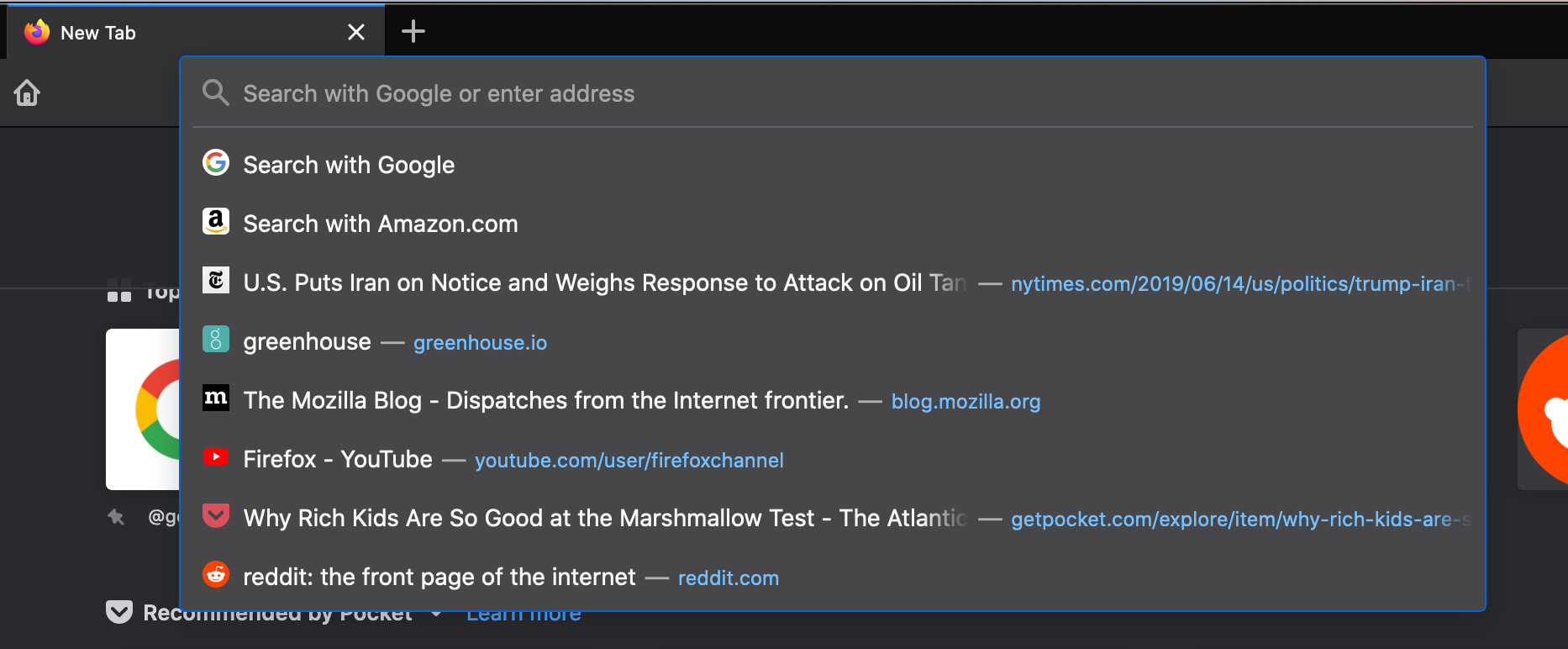
Enlarged and simplified address bar for your searches
- Smarter searches: For example if you’re considering a “standing desk” for your home office we’ve bolded additional popular keywords that you might not have thought of to narrow your search even further.
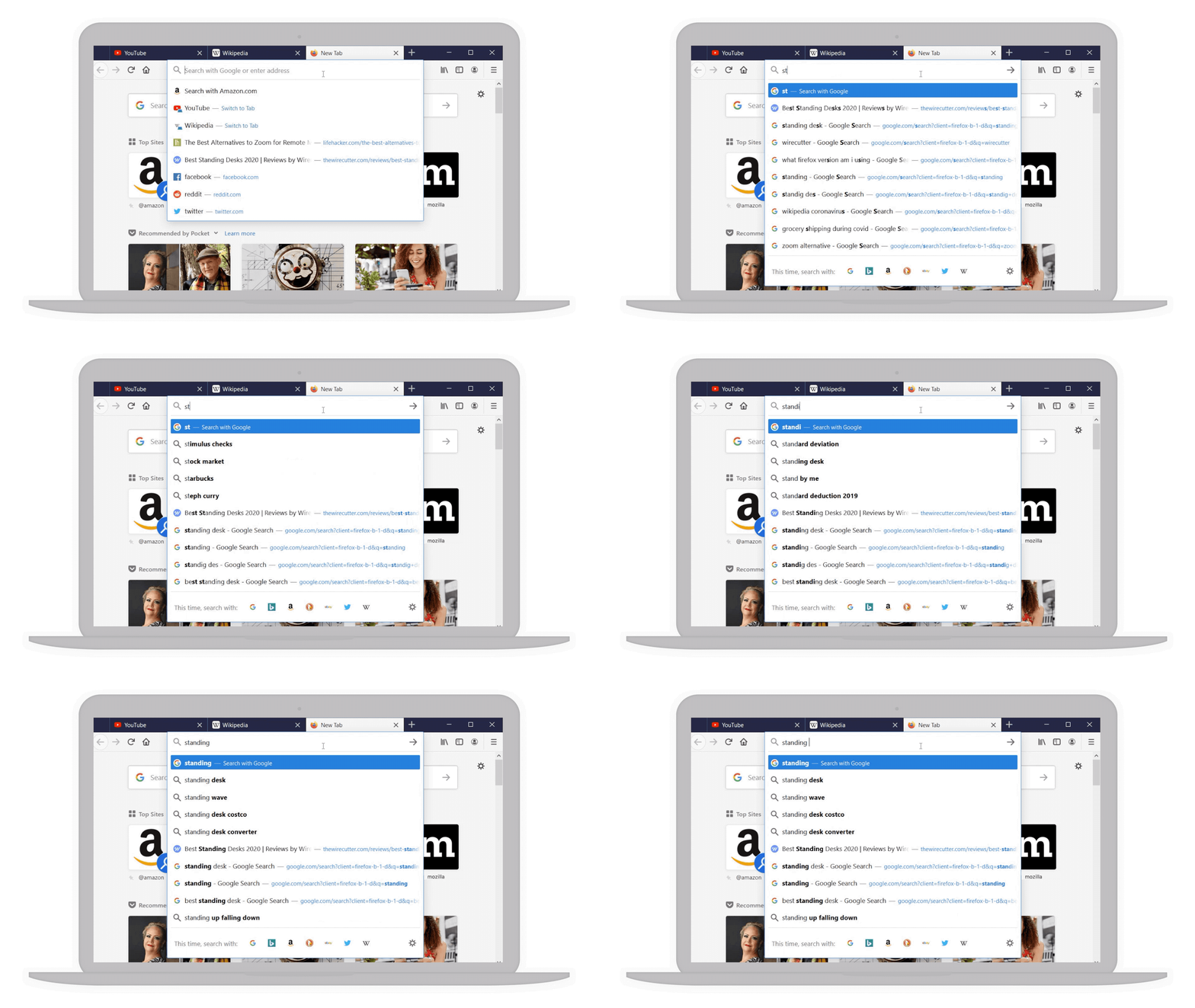
Popular keywords in bold to help narrow your search
- Your top sites right at your fingertips: With a single click in the address bar, you’ve got access to your most visited sites. And if by chance you have that site already opened in another tab but can’t find it, we’ve highlighted a text shortcut next to it (in teal!) so you can easily jump to that tab rather than going through the gazillion tabs you already have open. This also works for any page you’ve searched, and may not realize you’ve already opened it.

Top sites and shortcuts in your address bar
To see what else is new or what we’ve changed in today’s desktop and iOS release, you can check out our release notes.
Check out the latest updates to the address bar and download the latest version of Firefox available here.
The post Latest Firefox updates address bar, making search easier than ever appeared first on The Mozilla Blog.
Prior to being able to display a web page within a browser the rendering engine checks and verifies the MIME type of the document being loaded. In case of an html page, for example, the rendering engine expects a MIME type of ‘text/html’. Unfortunately, time and time again, misconfigured web servers incorrectly use a MIME type which does not match the actual type of the resource. If strictly enforced, this mismatch in types would downgrade a users experience. More precisely, the rendering engine within a browser will try to interpret the resource based on the ruleset for the provided MIME type and at some point simply would have to give up trying to display the resource. To compensate, Firefox implements a MIME type sniffing algorithm – amongst other techniques Firefox inspects the initial bytes of a file and searches for ‘Magic-Numbers’ which allows it to determine the MIME type of a file independently of the one set by the server.
Whilst sniffing of the MIME type of a document improves the browsing experience for the majority of users, it also enables so-called MIME confusion attacks. In more detail, imagine an application which allows hosting of images. Let’s further assume the application allows users to upload ‘.jpg’ files but fails to correctly verify that users of that application actually upload only valid .jpg files. An attacker could craft an ‘evil.jpg’ file containing valid html and upload that through the application. The innocent victim of that application solely expects images to be displayed. Within the browser, however, the MIME sniffer steps in and determines that the file contains valid html and overrides the MIME type to load the file like any other page within the application. Additionally, embedded JavaScript fragments within that page will be treated as same-origin and hence be granted the same permissions as the host application. In turn, the granted permissions allow the attacker to gain access to confidential user information.
To mitigate such MIME confusion attacks Firefox expands support of the header ‘X-Content-Type-Options: nosniff’ to page loads (view specification). Firefox has been supporting ‘XCTO: nosniff’ for JavaScript and CSS resources since Firefox 50 and starting with Firefox 75 will use the provided MIME type for page loads even if incorrect.

Left: Firefox 74 ignoring XCTO, sniffing HTML, and executing script.
Right: Firefox 75 respecting XCTO, and defaulting to plaintext.
If the provided MIME type does not match the content, Firefox will not sniff the MIME type but will show an error to the user instead. As illustrated above, if no MIME type was provided at all, Firefox will try to use plaintext or prompt a download . Showing the user an error in the case of a detected MIME type mismatch instead of trying to sniff and render a potentially malicious page allows Firefox to mitigate such MIME confusion attacks.
The post Firefox 75 will respect ‘nosniff’ for Page Loads appeared first on Mozilla Security Blog.
https://blog.mozilla.org/security/2020/04/07/firefox-75-will-respect-nosniff-for-page-loads/
If you are newly working or going to school from home, the remote approach can be a big shift in how to get things done. Firefox has a number of … Read more
The post 13 Firefox browser extensions to make remote work and school a little better appeared first on The Firefox Frontier.
https://blog.mozilla.org/firefox/firefox-extensions-work-from-home/
More than ever these days, people are relying on the internet to stay informed, productive and connected to friends and family. A well-timed entertainment break also helps relieve stress and … Read more
The post 6 Firefox browser extensions that make remote streaming even better appeared first on The Firefox Frontier.
https://blog.mozilla.org/firefox/firefox-extensions-streaming/
Of course, we cannot send a physical item to an Ethereum address (which is just a mostly-random number) so we needed a way for the owner of the NFT to give us (or actually Post AG) a postal address to send the physical stamp to. For this, we added a form to allow them to enter the postal address for stamps that were bought via the OnChain shop - but then the issue arose of how would we would verify that the sender was the actual owner of the NFT. Additionally, we had to figure out how do we do this without requiring a separate database or authentication in the back end, as we also did not need those features for anything else, since authentication for purchases are already done via signed transactions on the blockchain, and any data that needs to be stored is either static or on the blockchain.
We can easily verify the ownership if we send the information to a Smart Contract function on the blockchain, given that the owner has proven to be able to do such calls by purchasing via the OnChain shop already, and anyone sending transactions there has to sign those. To not need to store the whole postage address in the blockchain state database, which is expensive, we just emit an event and therefore put it in the event log, which is much cheaper and can still be read by our back end service and forwarded to Post AG. But then, anything sent to the public Ethereum blockchain (no matter if we put it into state or logs afterwards) is also visible to everyone else, and postal address are private data, so we need to ensure others reading the message cannot actually read that data.
So, our basic idea sounded simple: We generate a public/private key pair, use the public key to encrypt the postage address on the website, call a Smart Contract function with that data, signed by the user, emit an event with the data, and decrypt the information on the back-end service when receiving the event, before forwarding it to the actual shipping department in a nice format. As someone who has heard a lot about encryption but not actually coded encryption usage, I was surprised how many issues we ran into when actually writing the code.
So, first thing I did was seeing what techniques there are for sending encrypted messages, and pretty soon I found
With the release of Firefox 75, we are pleased to welcome the 40 developers who contributed their first code change to Firefox in this release, 38 of whom were brand new volunteers! Please join us in thanking each of these diligent and enthusiastic individuals, and take a look at their contributions:
- jacquelinechan2: 1609873
- jcadler: 1476639, 1609821
- sekhavat17: 1617984
- tusharxdev: 1617529
- Aggelos Gamvrinos: 1616796, 1617540
- Artem: 1608167
- Atique Ahmed Ziad: 1605403
- Chris Fronk: 1614432
- Divya Rani: 1619280
- Emil Farisan: 1618487
- Farooq AR: 1607686
- Harsh: 1586305
- Hubert Boma Manilla: 1613881, 1613882, 1613888, 1613890
- John Elliot V: 1610402
- Jonathan Michalon: 1581578
- Julian Gaibler: 1583215, 1616522
- Julian Shomali: 1608215
- KC: 1618270, 1619866
- Lana Honcharuk: 1587031
- Lina R: 1590196
- Manish Sahani: 1619590
- Manvel Saroyan: 1432083
- Marc Streckfuss: 1353652, 1584501, 1615270, 1615375, 1616800, 1617405
- Outvi V: 1593837, 1617672
- Pete Collins: 1583854
- Philipp Zech: 1614147, 1617644, 1620034
- Razvan Maries: 1616369
- Sam Zeter: 1613256
- Sergio Schvezov:
“War stories” in programming are entertaining tales of truly evil bugs that kept you up at night. Inspired by posts like My Hardest Bug Ever, Debugging an evil Go runtime bug, and others from /r/TalesFromDebugging, I wanted to share with you one of my favorites from recent memory. Recent work has given me much fulfilment and a long list of truly awful bugs to recount. My blog has been quieter than I would have liked; hopefully I can find more time to document some of these, maybe in series form. May I present to you episode I; “Off by Two.”
Distracted in a conference grand ballroom, above what might be the largest mall in the world or at least Bangkok, a blank QEMU session has me seriously questioning my life choices. No output. Fuck! My freshly built Linux kernel, built with a large new compiler feature that’s been in development for months is finally now building but is not booting. Usually a panic prints a nice stack trace and we work backwards from there. I don’t know how to debug a panic during early boot, and I’ve never had to; with everything I’ve learned up to this point, I’m afraid I won’t have it in me to debug this.
Attaching GDB, the kernel’s sitting an infinite loop:
1 2 3 4 5 6 7 | |
Some sort of very early exception handler; better to sit busy in an infinite loop than run off and destroy hardware or corrupt data, I suppose. It seems this is some sort of exception handler for before we’re ready to properly panic; maybe the machinery is not in place to even collect a stack trace, unwind, and print that over the serial driver. How did things go so wrong and how did we get here? I decide to ask for help.
Setting breakpoints and rerunning my boot, it looks like the fourth call to __early_make_pgtable() is deterministically going awry. Reading through callers, from the early_idt_handler_common subroutine in arch/x86/kernel/head_64.S the address was stored in %cr2 (the “page fault linear address”). But it’s not clear to me who calculated that address that created the fault. My understanding is that early_idt_handler_common is an exception vector setup in early_idt_handler_array, which gets invoked upon access to “unmapped memory” which gets saved into %cr2.
Beyond that, GDB doesn’t want me to be able to read %cr2.
Jann Horn gets back to me first:
Can you use QEMU to look at the hardware frame (which contains values pushed by the hardware in response to the page fault) in early_idt_handler_common? RSP before the call to early_make_pgtable should basically point to a “struct pt_regs”
When the CPU encounters an exception, it pushes an exception frame onto the stack. That doesn’t happen in kernel code; the CPU does that on its own. That exception frame consists of the last six elements of struct pt_regs. This is also documented in a comment at the start of early_idt_handler_common (“hardware frame” and “error code” together are the exception frame):
/*
 * The stack is the hardware frame, an error code or zero, and the
 * vector number.
 */
After the CPU has pushed that stuff, it picks one of the exception handlers that have been set up in idt_setup_early_handler(); so it jumps to &early_idt_handler_array[i]. early_idt_handler_array pushes the number of the interrupt vector, then calls into early_idt_handler_common; early_idt_handler_common spills the rest of the register state (which is still the way it was before the exception was triggered) onto the stack (which among other things involves reading the vector number into a
(Previous entries in the curl option of the week series.)
This is one of the original 24 command line options that existed already in the first ever curl release in the spring of 1998. The -v option’s long version is --verbose.
Note that this uses the lowercase ‘v’. The uppercase -V option shows detailed version information.
So use it!
In a blog post series of curl command line options you’d think that this option would basically be unnecessary to include since it seems to basic, so obvious and of course people know of it and use it immediately to understand why curl invokes don’t behave as expected!
Time and time again the first response to users with problems is to please add –verbose to the command line. Many of those times, the problem is then figured out, understood and sorted out without any need of further help.
--verbose should be the first action to try for everyone who runs a curl command that fails unexplainably.
What verbose shows
First: there’s only one verbosity level in curl. There’s normal and there’s verbose. Pure binary; on or off. Adding more -v flags on the same line won’t bring you more details. In fact, adding more won’t change anything at all other than making your command line longer. (And yes, you have my permission to gently taunt anyone you see online who uses more than one -v with curl.)
Verbose mode shows outgoing and incoming headers (or protocol commands/responses) as well as “extra” details that we’ve deemed sensible in the code.
For example you will get to see which IP addresses curl attempts to connect to (that the host name resolved to), it will show details from the server’s TLS certificate and it will tell you what TLS cipher that was negotiated etc.
-v shows details from the protocol engine. Of course you will also see different outputs depending on what protocol that’s being used.
What verbose doesn’t show
This option is meant to help you understand the protocol parts but it doesn’t show you everything that’s going on – for example it doesn’t show you the outgoing protocol data (like the HTTP request body). If -v isn’t enough for you, then the --trace and --trace-ascii options are there for you.
If you are in the rare situation where the trace options aren’t detailed enough, you can go all-in with full SSLKEYLOGFILE mode and inspect curl’s network traffic with Wireshark.
Less verbose?
It’s not exactly “verbose level” but curl does by default for example show a progress meter and some other things. You can silence curl completely by using -s (--silent) or use the recently introduced option --no-progress-meter.
Example
curl -v https://example.com/
https://daniel.haxx.se/blog/2020/04/06/curl-ootw-v-is-for-verbose/

You might have noticed that I didn’t update this blog frequently in the past year. It’s not because I’m lazy, but I focused all my creative energy on writing this book: Practical Rust Projects. The book is now available on Apress, Amazon and O’Reilly. In this post, I’ll share some of the lessons I learned in writing this book.
Although I’ve been writing Rust for quite a few years, I haven’t really studied the internals of the Rust language itself. Many of the Rust enthusiasts whom I know seem to be having much fun appreciating how the language is designed and built. But I take more joy in using the language to build tangible things. Therefore, I’ve been thinking about writing a cookbook-style book on how to build practical projects with Rust, ever since I finished the video course Building Reusable Code with Rust.
Out of my surprise, I received an email from Steve Anglin, an acquisition editor from Apress, in April 2019. He initially asked me to write a book on the RustPython project. But the project was still growing rapidly thanks to the contributors. I’ve already lost grip on the overall architecture, so I can’t really write much about it. So I proposed the topic I have in mind to Steve. Fortunately, the editorial board accepted my proposal, and we decided to write two books: one for general Rust projects and one for web-related Rust projects.
Since this is my first time writing a book that will be published in physical form (or as The Rust Book put it, “dead tree form”), I learned quite a lot throughout the process. Hopefully, these points will help you if you are considering or are already writing your own book.
The Pomodoro Technique works!
It might be tempting to write a waterfall-style book writing plan, something along the lines of “I’ll write one section per day”. But there is a fundamental flaw with this approach: not all sections are of the same length and difficulty. A section about how to setup software might be very mechanical and easy to write, but a section about the history of a piece of software might take you days of research. Therefore, you can’t reliably predict how long it will take to finish a chapter, resulting in fear of starting and procrastination.
I find the Pomodoro Technique to be a constructive alternative in structuring my writing plan. The Pomodoro Technique is a time management method where you break your work into 25 minutes intervals and rest in between. Instead of saying, “I’ll finish this chapter by today”, say “I’ll do 2 Pomodoro sessions (25 x 2 = 50 min) today”. This way, no matter if you are making good progress or not, you know you are committing enough effort into the book writing project. A good side effect is that once I started writing, I got into the flow and ended up writing more Pomodoro sessions then I planned.
An Outline is important
I usually write freely without and outline when I write my blog. But writing a book is a completely different thing. An outline will help you structure the content much better and avoid missing important topics. I usually start with a very high-level chapter outline, then add a section outline before I start writing each section. It’s nice to write the outline for all the chapters before starting. When you are writing Chapter 1 and suddenly have an idea about something in Chapter 3, you can quickly add that to the Chapter 3 outline as a reminder.
Example code is a crucial part of a programming book. It’s also beneficial to list down each step in the outline while you develop the example code. Because if you write all the example code in one go, you’ll forget about many steps that are not in the final code when you revisit it. For example,
- Installing an external dependency
- Important trail-and-error you went through
- Informative compiler errors and warnings
These are all key points that need to be mentioned, but they don’t show up in the final code. Although you can dig that up by going through the git history, it’s still easier to write them down during development.
Version control and LaTex
Version control is not only for code. The draft will go through multiple reviews and revise passes. You’ll usually have to revise the previous