Will things like digital contact tracing leave a legacy of better privacy norms, or worse ones?
The conversation about privacy and the pandemic — and about the idea of digital contact tracing in particular — has shifted a great deal in the last few weeks. It’s moved from an understandable ‘we don’t want to live in this dystopian science fiction novel’ gut response (my initial gut reaction) to a vigorous debate about whether privacy-by-design and good data governance make it possible to trace COVID contacts in a way that we can all trust (I’m still trying to sort through all this). A recent tweet from @hackylawyER summed up the state of the conversation nicely:
I’m not happy things are headed this way but if they are, we’d damn well better have safeguards.
Watching all of this, I’ve tried to step back and ask myself: what exactly are we worried about? And, amidst the rush to tech solutions, is this all downside for privacy and data governance, or is there an upside? Could we actually use this moment to set new and better norms for privacy?
What are we worried about?
The gut reaction worries are obvious: tracking everyone (or the bulk of people) with a smartphone to monitor COVID exposure could go wrong in myriad ways if done poorly or if the data falls into the wrong hands. And, on top of it, many have called into question whether this kind of tracking is even effective at stopping the spread of the virus. There is a legitimate worry that we could quickly find ourselves inside a huge mass surveillance experiment that has limited or no return in terms of public health and safety. Questions about efficacy and privacy are step one in considering whether or not to roll out contact tracing. While it’s far from universal, a fair number of governments are digging into these questions in earnest.
There is also a longer term, potentially more serious worry that seems to be getting less consideration: that governments, tech platforms and telcos working together to track citizens at scale becomes normalized in democracies. And, that this kind of surveillance gets used for reasons other than tackling the pandemic. Earlier this week, an open letter on digital contact tracing by scientists and researchers from 26 countries noted that:
… some “solutions” to the crisis may, via mission creep, result in systems which would allow unprecedented surveillance of society at large.
Centralized approaches like BlueTrace in Singapore include the collection of significant information about citizens and their contacts. And there are indications that some governments are pressuring Google and Apple to modify their decentralized approach to provide health officials with more information. As we learned from the Snowden experience, the in-the-moment desire to collect information about citizens in crisis can lead to a systemic invasion of privacy that lasts decades.
A few weeks ago, I was worried that this was where we were headed: increased government and tech company surveillance as the new norm. The rallying of the privacy and data governance communities has me cautiously hopeful that we could go in the opposite direction. There may be a chance to use this moment to set new and better norms for privacy.
Embracing privacy-by-design
One source of this hope has been the rapid momentum that has grown behind decentralized, Bluetooth-based approaches to contact tracing. This general approach was initially proposed by academic groups like DP3T in Europe and PACT in the US, and was picked up by Apple and Google as something they could roll out across all their smartphones. The idea is to use Bluetooth to collect contact data locally on phones, leaving it there (and private) unless a person tests positive for COVID. In that case, a set of ‘beacons’ informs possible contacts that they may want to self isolate and get tested. Governments don’t get access to any of the contact data, striking a balance between public health and privacy. This comic
About the Firefox User Research (UR) Team at Mozilla
Firefox User Research is a distributed team within Mozilla dedicated to conducting mixed methods research to define and support work related to Firefox products and services, present and future. Currently, the team consists of 11 people across North America: a director, a research operations specialist, and nine researchers with different backgrounds, training, and experiences.

Some members of the Firefox User Research team in Berlin, Germany in January 2020 (Thank you to Gemma Petrie for sharing the photo.)
In early 2019, then Firefox UR team members decided to develop a team charter, a living document containing information about team members, individual and team learning goals, and team operating principles and guidelines. At that time, the team and Mozilla were undergoing some big changes, and both the act of composing a charter and the charter itself were meant to help us:
- Take care of one another
- Individually and collectively reflect on what we want to learn and the kind of team we want to be
- Define and discuss values and norms
- Make goals and aspirations explicit
How we made our first team charter
Back in 2019, the team held a team charter kick-off meeting over video conference to develop a shared understanding of what team charters are and to discuss an approach for creating a charter.

Title slide from the Firefox User Research team’s team charter kick-off (Photo by Randy Fath on Unsplash)
The charter format we used includes the following key areas:
- Individual learning goals: What each team member wants to learn from being a member of the team
- Team learning goals: What the team collectively wants to accomplish
- Team operating principles, expectations, and ways of working: Specific team values with related expectations and example behaviors
- Personal profiles: An overview of each member of the team including background, key personality traits, preferred modes of communication, work style and habits, work time availability, and anything else the team member believes teammates should know
- Charter governance: How the team expects to develop and maintain the team charter
The original team charter template also included two other sections, which the team has foregone for the time being. There was a section for defining team roles, which the team decided does not apply to us given how we work with different product teams. There was also a section on how we give developmental feedback, which the team decided to delay since we were in the middle of hiring a director, who we assumed may want to define a feedback process.
Team culture considerations
The Firefox User Research team charter is a document private to the people currently on the team since we discuss very specific aspects of our working styles and professional goals in the charter. For this post, the team has given me permission to share a few examples from our charter to illustrate what a UR team charter might include.
Team charter goals are not used to measure performance. One of the questions I got when introducing the team charter structure to the team in 2019 was: “Should the individual and team goals to be listed in the charter be the same as our individual and team OKRs that we use bi-annually as a Mozilla-wide practice?” For the time being, the team decided that charter goals and OKRs should be distinct, the former being time-bound and with the qualities of SMART goals and the latter longer-term and perhaps more aspirational. An individual OKR may revolve around socializing user research in new ways and publishing a blog post about a past study, whereas an individual learning goal in the charter might be to gain experience with research methods that are less familiar.
Sharing and celebrating each other’s work. The section of the
As we’re all online more these days, the Firefox browser privacy features have never been more important. For instance, as you’re hopping through different sites searching for pantry recipes or … Read more
The post Firefox browser privacy features explained appeared first on The Firefox Frontier.
https://blog.mozilla.org/firefox/firefox-privacy-features-explained/
This option is -4 as the short option and --ipv4 as the long, added in curl 7.10.8.
IP version
So why would anyone ever need this option?
Remember that when you ask curl to do a transfer with a host, that host name will typically be resolved to a list of IP addresses and that list will contain both IPv4 and IPv6 addresses. When curl then connects to the host, it will iterate over that list and it will attempt to connect to both IPv6 and IPv4 addresses, even at the same time in the style we call happy eyeballs.
The first connect attempt to succeed will be the one curl sticks to and will perform the transfer over.
When IPv6 acts up
In rare occasions or even in some setups, you may find yourself in a situation where you get back problematic IPv6 addresses in the name resolve, or the server’s IPv6 behavior seems erratic, your local config simply makes IPv6 flaky or things like that. Reasons you may want to ask curl to stick to IPv4-only to avoid a headache.
Then --ipv4 is here to help you.
--ipv4
First, this option will make the name resolving only ask for IPv4 addresses so there will be no IPv6 addresses returned to curl to try to connect to.
Then, due to the disabled IPv6, there won’t be any happy eyeballs procedure when connecting since there are now only addresses from a single family in the list.
It could perhaps be worth to stress that if the host name you target then doesn’t have any IPv4 addresses associated with it, the operation will instead fail when this option is used.
Example
curl --ipv4 https://example.org/
Related options
The reversed request, ask for IPv6 only is done with the --ipv6 option.
There are also options for specifying other protocol versions, in particular for example HTTP with --http1.0, --http1.1, --http2 and --http3 or for TLS with --tslv1, --tlsv1.2, --tlsv1.3 and more.
TenFourFox Feature Parity Release 22 beta 1 is now available (downloads, hashes, release notes). I have abandoned trying to write that AltiVec GCM routine because it really needs 64-bit elements, something that 32-bit AltiVec obviously doesn't have, and the 32-bit version I attempted to throw together ended up being not much faster (if at all) than a scalar approach. Since this seemed like a lot of risk for no gain, I just threw in the towel. Instead, this release has a syntactic update to JavaScript and also improves the performance of H.264 streams using the MP4 Enabler, especially on multiprocessor systems. This now by default uses the lower "fast" quality mode of ffmpeg and because it is not spec-compliant may cause odd behaviour on a few videos. If you notice this, advise which URL, and then set tenfourfox.mp4.high_quality to true (you may need to add this preference). TenFourFox FPR22 final will come out parallel with Firefox 76/68.8 on or around May 5.
http://tenfourfox.blogspot.com/2020/04/tenfourfox-fpr22b1-available.html
Neither a visa or a rejection yet, exactly two years since I completed my US visa application. Not a lot more to say that I haven’t already said before on this subject.
Of course I’m not surprised that I won’t get an approval in these travel-restricted Covid-19 times – as it would be a fine irony to get a visa and then not be allowed to travel anyway due to a general travel ban – but it also seems like the US immigration authorities haven’t yet used the pandemic as an excuse to (finally) just deny my application.
I was first prevented from traveling to the US on June 26 2017 (on ESTA) but it wasn’t until the following spring that I applied for a visa in an attempt to rectify the situation.
Greetings Rustaceans!
We are happy to present the results of our fourth annual survey of our Rust community. Before we dig into the analysis, we want to give a big "thank you!" to all of the people who took the time to respond. You are vital to Rust continuing to improve year after year!
Let's start by looking at the survey audience.
Survey Audience
The survey was available in 14 different languages and we received 3997 responses.
Here is the language distribution of the responses we received.
- English: 69.6%
- Chinese: 10.8%
- German: 4.3%
- French: 3.3%
- Japanese: 3.0%
- Polish: 1.2%
- Portuguese: 1.2%
- Spanish: .9%
- Korean: .8%
- Italian: .6%
- Swedish: .5%
- Vietnamese: .2%
In the 2019 survey, 82.8% of responders indicated they used Rust, 7.1% indicated they did not currently use Rust but had used it in the past, and 10.1% indicated that they had never used Rust.
If we compare this to the 2018 survey (where 75% of responders indicated they used Rust, 8% indicated the did not currently use Rust but had used it in the past, and 8% indicated they had never used Rust) more responders were using Rust in 2019.
Looking Back on Rust 2018
In December 2018 we released the Rust 2018 edition - Rust 1.31.0. In the 2019 survey, 92% of Rust users indicated they were using the new edition. 85% said that upgrading to the Rust 2018 edition was easy.
Next, we asked users to rate the improvement of key aspects of the Rust language.
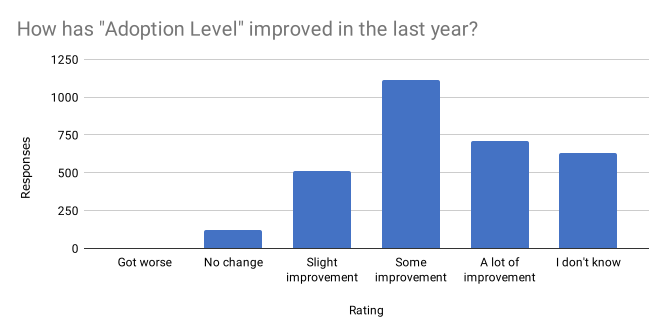
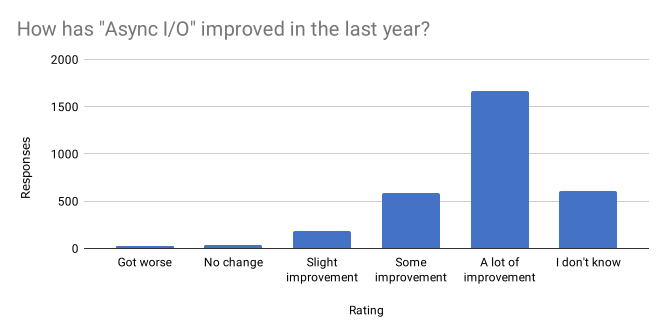
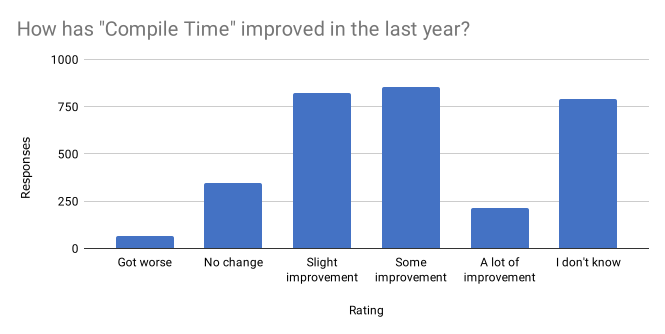
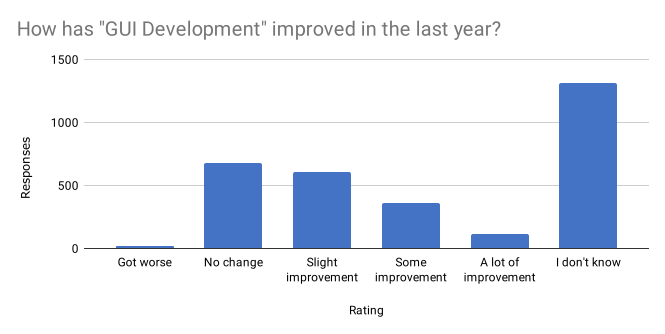
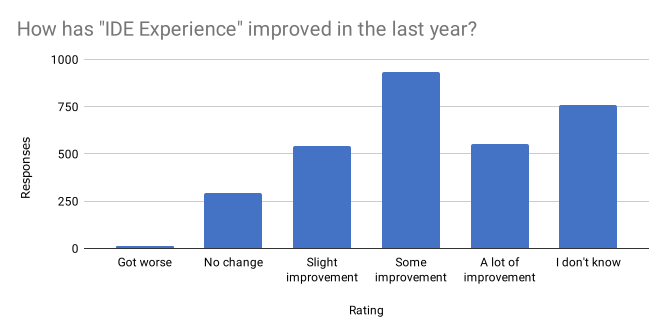
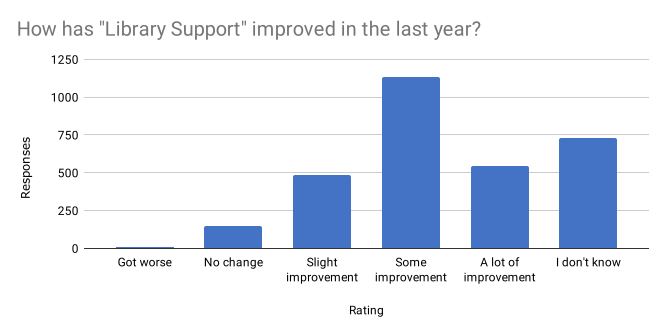
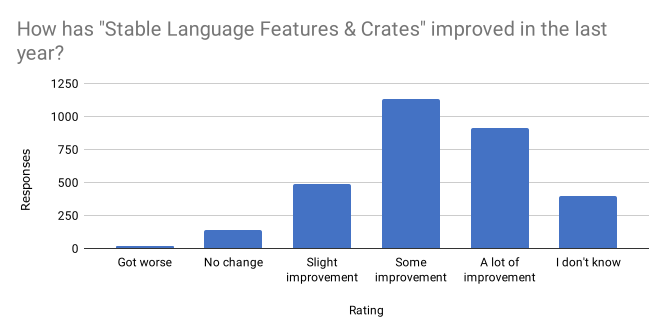
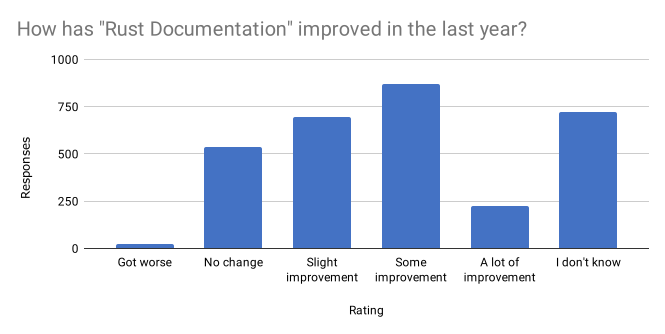
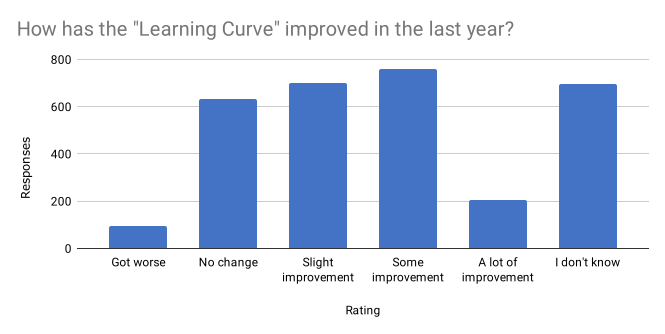
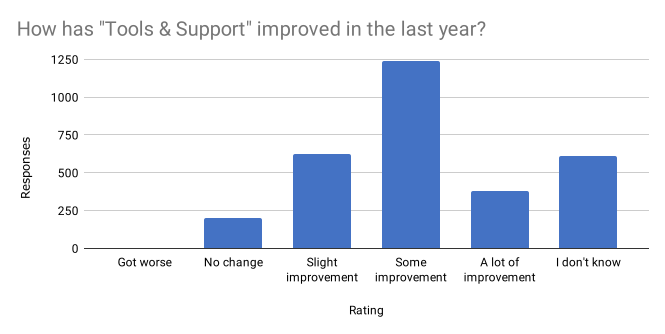
Overall, many aspects of the Rust language were perceived as "somewhat better" in the 2018 edition.
Conferences and Community
We noticed some differences between English language and other language results. Within the non-English language survey subset, the majority of the issues and concerns identified are the same as those within the English language. However, one concern/trend stands out among the non-English speaking subset - a desire for Rust documentation in their native language, or the language they took the survey in. This was particularly notable within the Chinese-language group, though that is likely due to the higher representation.
We are tracking the ongoing translation efforts with the "Translation" GitHub issue label.
We received a lot of feedback on how we can improve Rust and make it feel more welcoming to more people. We can't include all of it here, so here is a summary of some of the feedback that stood out to us.
People are in general asking for more learning material about Rust. In terms of expertise it's mainly beginner and intermediate level material being requested. A lot of these requests also asked for video content specifically.
The common blockers that people mention to participating is that they have social anxiety,

As so many other events in these mysterious times, the foss-north conference went online-only and on March 30, 2020 I was honored to be included among the champion speakers at this lovely conference and I talked about how to “curl better” there.
The talk is a condensed run-through of how curl works and why, and then a look into how some of the more important HTTP oriented command line options work and how they’re supposed to be used.
As someone pointed out: I don’t do a lot of presentations about the curl tool. Maybe I should do more of these.
curl is widely used but still most users only use a very small subset of options or even just copy their command line from somewhere else. I think more users could learn to curl better. Below is the video of this talk.
Doing a talk to a potentially large audience in front of your laptop in completely silence and not seeing a single audience member is a challenge. No “contact” with the audience and no feel for if they’re all going to sleep or seem interested etc. Still I have the feeling that this is the year we all are going to do this many times and hopefully get better at it over time…
A design sprint focused on privacy and browsing on mobile devices
Eight people from the Firefox for iOS team spent four days last week in a Google Ventures-style, remote design sprint. The team was inspired to gather for a sprint by existing Firefox user research about privacy and mobile devices and some business challenges that Firefox for iOS is facing.
In many ways, the sprint was traditional in its format. The two-year goal we set for the sprint was for Firefox to be the iOS browser people choose first for privacy. Related to that goal, we surfaced the following key questions:
- Can we convert people into privacy-conscious browser users?
- Can we solve the problems facing an unsavvy majority, rather than those of a savvy minority?
- Can we connect this feature to revenue, conversion, and retention?
Using Miro as our primary tool (building on JustMad’s Miro template), our sprint team, comprised of engineering, design, content strategy, marketing, product, program management, and user research expertise, devised a solution that was a combination of sketches made by sprint team members. We initially named the final solution Private by Default and then re-named it to PandaBrowser for the purposes of user research. (We chose “panda” for our made-up product because pandas’ faces remind us of the mask used to signify Private Browsing Mode in Firefox today.)
Launch screen for our design sprint concept, the PandaBrowser
The PandaBrowser was meant to be an iOS browser with private browsing mode on by default that included direct value-driven messages and other signals of privacy, including a straightforward way to clear one’s browser activity.
On the last day of the sprint, we ran five unmoderated sessions on the usertesting.com platform to evaluate a basic InVision prototype of the concept and learned the following:
- Participants were familiar with the concepts of private browsing mode and incognito and confidently expressed what they thought those modes achieved, whether or not those perceptions were accurate for existing private browsing mode offerings by Mozilla and other companies.
- Participants also mentioned privacy-related concepts like cookies, geo-location, and ad tracking, but may or may not have accurate mental models of those items.
- Participants found value in their phone browser history, tabs, and/or bookmarks for task continuity and returning to previously visited sites, which for some participants meant that a browser defaulting to a private browsing mode that clears activity often would be inconvenient.
- Participants assumed that our Private by Default concept was similar to Firefox Focus in that there was not a “regular” browsing mode to which one could switch. While the prototype did not include any UI elements for switching to a “non-private” mode, the original concept did envision a toggle for switching out of the default private mode.
- Participants described specific use cases for a private mode which included watching pornography, searching for niche products like fake Juul pods, location-based searches, and monitoring prices for things like flights.
The team is now in the process of identifying which sprint learnings we want to pursue with further design iterations, experimentation, and user research in 2020.
Also a design sprint against the backdrop of a global pandemic
Mozilla has a long history of having a distributed workforce with close to half of employees working remotely. While this design sprint was originally planned to take place in-person in our Toronto office, the COVID-19 pandemic forced everyone to stay home and participate in the sprint over Zoom. Remote design sprints are not uncommon, but we did the following beyond typical remote working to be sensitive to the trying times in which everyone is living and working.
Rewrote the sprint guidelines to prioritize “Be kind to yourself”
We emphasized at the start of each day that “be kind to yourself” was the most important guideline for the sprint. This included making explicit that people could take breaks as
(“This Week in Glean” is a series of blog posts that the Glean Team at Mozilla is using to try to communicate better about our work. They could be release notes, documentation, hopes, dreams, or whatever: so long as it is inspired by Glean. You can find an index of all TWiG posts online.)
I’ve written before about data, but never tackled the business perspective. To a business, what is data? It could be considered an asset, I suppose: a tool, like a printer, to make your business more efficient.
But like that printer and other assets, data has a cost. We can quite easily look up how much it costs to store arbitrary data on AWS (less than 2.3 cents USD per GB per month) but that only provides the cost of the data at rest. It doesn’t consider what it took for the data to get there or how much it costs to be useful once it’s stored.
So let’s imagine that you come across a decision that can only be made with data. You’ve tried your best to do without it, but you really do need to know how many Live Bookmarks there are per Firefox profile… maybe it’s in wide use and we should assign someone to spruce it up. Maybe almost no one uses it and so Live Bookmarks should be removed and instead become a feature provided by extensions.
This should be easy, right? Slap the number into an HTTP payload and send it to a Mozilla-controlled server. Then just count them all up!
As one of the Data Organization’s unofficial mottos puts it: Counting is Harder Than It Looks.
Let’s look at the full lifecycle of the metric from ideation and instrumentation to expiry and deletion. I’ll measure money and time costs, being clear about the assumptions guiding my estimates and linking to sources where available.
For a rule of thumb, time costs are $50 per hour. Developers and Managers and PMs cost more than $100k per year in total compensation in many jurisdictions, and less in many others. Let’s go with this because why not. I considered ignoring labour costs altogether because these people are doing their jobs whether they’re performing their part in this collection or not… but that’s assuming they have the spare capacity and would otherwise be doing nothing. Everyone I talk to is busy, so everyone’s doing this data collection work instead of something else they could be doing: so there is an opportunity cost.
Fixed costs, like the cost of building and maintaining a data collection library, data collection pipeline, bug trackers, code review tooling, dev computers are all ignored. We could amortize that per data collection… but it’d probably work out to $0 anyway.
Also, for the purposes of measuring data we’re counting only the size of the data itself (the count of the number of Live Bookmarks). To be more complete we’d need to amortize the cost of sending the data point (HTTP headers, payload metadata, the data point’s identifier, etc.) and factor in additional complexity (transfer encoding, compression, etc.). This would require a lot of words, and in the present Firefox Telemetry system this amortizes to 0 because the “main” ping has many data points in it and gzip compression is pretty good.
Also, this is a Best Case Estimate. I make many assumptions small in order to make this a lower-bound cost if everything goes according to plan and everyone acts the way they should.
Ideation – Time: 30min, Cost: $25
How long does it take you to figure out how to measure something? You need to know the feature you’re measuring, the capabilities of the data collection library you’re using to do the measuring, and some idea of how you’ll analyse it at the other end. If you’re trying to send something clever like the state of a customizable UI element or do something that requires custom analysis, this will take longer and take more people which will cost more money.
But for our example we know what we’re collecting: numbers of things. The data collection library is old and well understood. The analysis is straightforward. This takes one person a half hour to think through.
Instrumentation – Time: 60min, Cost: $50
Knowing the feature is not the same as knowing the code. You need a subject matter expert (developer who knows the feature and the code as well as the data collection library’s API) to figure out on exactly which line of code we should call exactly what method with exactly which count. If it’s complicated, several people may need to meet in order to figure out what to do here: are the

FTP is going out of style.
The Chrome team has previously announced that they are deprecating and removing support for FTP.

Mozilla also announced their plan for the deprecation of FTP in Firefox.
Both browsers have paused or conditioned their efforts to not take the final steps during the Covid-19 outbreak, but they will continue and the outcome is given: FTP support in browsers is going away. Soon.
curl

curl supported both uploads and downloads with FTP already in its first release in March 1998. Which of course was many years before either of those browsers mentioned above even existed!
In the curl project, we work super hard and tirelessly to maintain backwards compatibility and not break existing scripts and behaviors.
For these reasons, curl will not drop FTP support. If you have legacy systems running FTP, curl will continue to have your back and perform as snappy and as reliably as ever.
FTP the protocol
FTP is a protocol that is quirky to use over the modern Internet mostly due to its use of two separate TCP connections. It is unencrypted in its default version and the secured version, FTPS, was never supported by browsers. Not to mention that the encrypted version has its own slew of issues when used through NATs etc.
To put it short: FTP has its issues and quirks.
FTP use in general is decreasing and that is also why the browsers feel that they can take this move: it will only negatively affect a very minuscule portion of their users.
Legacy
FTP is however still used in places. In the 2019 curl user survey, more than 29% of the users said they’d use curl to transfer FTP within the last two years. There’s clearly a long tail of legacy FTP systems out there. Maybe not so much on the public Internet anymore – but in use nevertheless.
Alternative protocols?
SFTP could have become a viable replacement for FTP in these cases, but in practice we’ve moved into a world where HTTPS replaces everything where browsers are used.
Credits
Train image by D Thory from Pixabay
https://daniel.haxx.se/blog/2020/04/15/curl-is-not-removing-ftp/
I recently undertook a project to improve the stack fixing tools used for Firefox. This has resulted in some large performance wins (e.g. 10x-100x) and a significant improvement in code quality. The story involves Rust, Python, executable and debug info formats, Taskcluster, and many unexpected complications.
What is a stack fixer?
Within the Firefox code base, a stack fixer is a program that post-processes (“fixes”) the stack frames produced by MozFormatCodeAddress(), which often lack one or more of: function name, file name, or line number. It reads debug info from binaries (libraries and executables) to do so. It reads from standard input and writes to standard output. Lines matching the special stack frame format are modified appropriately. For example, a line like this in the input that names an executable or library:
#01: ???[tests/example +0x43a0]
is changed to a line in the output that names a function, source file, and line number:
#01: main (/home/njn/moz/fix-stacks/tests/example.c:24)
Lines that do not match the special stack frame format are passed through unchanged.
This process is sometimes called “symbolication”, though I will use “stack fixing” in this post because that’s the term used within the Firefox code base.
Stack fixing is used in two main ways for Firefox.
- When tests are run on debug builds, a stack trace is produced if a crash or assertion failure happens.
- The heap profiling tool DMD records many stack traces at heap allocation points. The stack frames from these stack traces are written to an output file.
A developer needs high-quality stack fixing for the stack traces to be useful in either case.
That doesn’t sound that complicated
The idea is simple, but the reality isn’t.
- The debug info format is different on each of the major platforms: Windows (PE/PDB), Mac (Mach-O), and Linux (ELF/DWARF).
- We also support Breakpad symbols, a cross-platform debug info format that we use on automation. (Using it on local builds is something of a pain.)
- Each debug info format is complicated.
- Firefox is built from a number of libraries, but most of its code is in a single library called libxul, whose size ranges from 100 MiB to 2 GiB, depending on the platform and the particular kind of build. This stresses stack fixers.
Before I started this work, we had three different Python scripts for stack fixing.
fix_linux_stack.py: This script does native stack fixing on Linux. It farms out most of the work toaddr2line,readelf, andobjdump.fix_macosx_stack.py: This script does native stack fixing on Mac. It farms out most of the work toatos,otool, andc++filt.fix_stack_using_bpsyms.py: This script does stack fixing using Breakpad symbols. It does the work itself.
Note that there is no fix_windows_stack.py script. We did not have a native stack-fixing option for Windows.
This was an inelegant mishmash. More importantly, the speed of these scripts was poor and highly variable. Stack fixing could take anywhere from tens of seconds to tens of minutes, depending on the platform, build configuration, and number of stack frames that needed fixing. For example, on my fast 28-core Linux box I would often have to wait 20 minutes or more to post-process the files from a DMD run.
One tool to rule them all
It would be nice to have a single program that could handle all the necessary formats. It would also be nice if it was much faster than the existing scripts.
Fortunately, the Symbolic Rust crate written by Sentry provided the perfect foundation for such a tool. It provides the multi-platform debug info functionality needed for stack fixing, and also has high performance. In November last year I started a project to implement a new stack fixer in Rust, called fix-stacks.
Implementing the tool
First I got
Starting in version 75, Firefox can be configured to use client certificates provided by the operating system on Windows and macOS.
Background
When Firefox negotiates a secure connection with a website, the web server sends a certificate to the browser for verification. In some cases, such as corporate authentication systems, the server requests that the browser send a certificate back to it as well. This client certificate, combined with a signature from the private key corresponding to that certificate, allows the user to authenticate to the website.
These client certificates and private keys are often stored in hardware tokens or in storage provided by the operating system.
Using Firefox to access a client certificate stored on a hardware token typically involves loading a shared library written by either the vendor of the token or another third party into Firefox’s process. These third party libraries can cause stability issues with Firefox and are concerning from a security perspective. For instance, a vulnerability in one of these libraries can potentially put Firefox users at risk.
Alternatively, Firefox can use client certificates that have exportable keys if they are manually saved to a file and then imported into a Firefox profile. Though this storage mechanism can be protected by a password, this option increases the potential for a private key to be compromised. Additionally, this method does not work at all for unexportable keys.
A New Approach
To address these issues, we have developed a library that allows Firefox to interface with certificate storage provided by the operating system. Rather than loading third-party libraries to communicate with hardware tokens, Firefox can delegate this task to the operating system. Also, instead of forcing the user to export client certificates and re-import them into their Firefox profile, Firefox can look for these certificates directly. In addition to protecting private keys, this new mechanism allows Firefox to make use of client certificates with unexportable keys.
Because this library is entirely new, we took the opportunity to select an implementation language that would allow us to access the low-level operating system APIs we needed while enforcing strong safety properties. Rust was the obvious choice to fill those needs.
Availability
This library is shipping as part of Firefox Desktop on Windows and macOS, starting with version 75. To enable it, set the about:config preference “security.osclientcerts.autoload” to true.
For users running various flavors of Linux, the OpenSC project (https://github.com/OpenSC/OpenSC/wiki) can provide similar functionality.
We expect this feature to be of great benefit to our enterprise users who have previously gone to great lengths to configure Firefox to work in their environment.
The post Expanding Client Certificates in Firefox 75 appeared first on Mozilla Security Blog.
https://blog.mozilla.org/security/2020/04/14/expanding-client-certificates-in-firefox-75/
Back in February, we announced support for the first extension for Firefox Preview, the new and rebuilt mobile browser for Android that is set to replace Firefox for Android later this year.
We’ve since expanded support for more add-ons from the Recommended Extensions program that we’d like to introduce to you. These add-ons will be available in Firefox Preview within the next 2 weeks.
With Dark Reader, websites on mobile will be easy to read when the lights are dim. The extension automatically inverts bright colors on web pages to offer an eye-pleasing dark mode. There are a number of configuration options allowing you to customize your experience.
When you are on the go, you don’t want people eavesdropping on your browsing behavior. HTTPS Everywhere automatically enables website encryption for pages that default to unencrypted communications. This is especially helpful if you are surfing via a shared wifi connection.
If you are worried about potentially malicious web content, NoScript protects against a number of web security exploits by disabling potentially malicious scripts from running on websites. You can fine-tune the configuration of NoScript and permit scripts to run only on sites you trust.
Concerned about advertisers and other third-party trackers from following you around the web? Privacy Badger nicely complements Firefox’s built-in tracking protection. The extension automatically learns when websites start tracking you and will put an end to the privacy invasion. It also includes additional privacy protections like block link tracking.
If you’ve said “now where did I see that picture before” once too often, then Search by Image is the right extension for you. With the help of this extension you can select images and feed them into reverse image searches from more than 20 search engines.
We’d like to thank the developers of these add-ons for supporting Firefox Preview. The developers have made some great adjustments to optimize their extensions for mobile and have been a pleasure to talk to.
While we’re pleased to offer these six highly recommended add-ons as a starting point, it’s clear that add-on developers have more great ideas for extensions that can enhance the mobile browsing experience. We intend to enable more add-ons from the Recommended Extensions program within the next few months and will be reaching out to developers soon.
The post April Extensions for Firefox Preview appeared first on Mozilla Add-ons Blog.
https://blog.mozilla.org/addons/2020/04/14/april-extensions-for-firefox-preview/

One of the questions that the Hubs team is often asked is about the benefits of shared virtual environments compared to traditional video conferencing. While Hubs was built to support virtual reality devices, and there are a number of benefits that a VR headset can provide for meeting with people online, we’ve been interested in understanding the different ways that people connect in Hubs even when they’re on a desktop or mobile device. As we think about the future of mixed reality, it’s important to recognize that the device form factors that people will use will vary from handheld and standalone devices as well as headsets. In this post, we’ll share a few thoughts about how meeting in shared 3D environments (even without a virtual reality device) can provide an alternative to video conferencing, and when it does - or doesn’t - work effectively.
Creating a shared context for conversation
We, as humans, are spatial creatures. As members of different societies throughout history, we have developed to remember and react to different physical locations that we’re in, and to use cues from our surroundings to provide context and guidance about what is expected of us. Architectural decisions are made to enforce or guide specific expectations when we enter a space, and provide cues around whether the expectation is for us to be serious, playful, formal or informal, and anywhere in between - and that applies to virtual spaces, too.
When we meet in groups digitally, we always bring our own context to the virtual meeting spaces. With video conferencing, we are each grounded, spatially, to our own physical location. Video calls lack a sense of shared place, where we are bringing ourselves to a single, shared environment. In video calls, we get a small sense of the other environments that others are part of, but we do not place ourselves cognitively into those spaces, for the most part. Having a shared 3D place that we can connect in allows us to be grounded in a similar place, and cognitively places each meeting participant into the same virtual location as everyone else. This effect can be felt even when the 3D place is experienced through a 2D window - you get the benefits even without a VR headset! This is especially beneficial when the meeting itself involves discussing a form of spatial content. If you need to collectively view and discuss a model of a building, for example, being able to gather around and point at, annotate, and collectively experience that model can result in a more productive conversation.

In addition to the environmental cues, having a shared context for conversation in a virtual space means that people may be able to better understand hierarchies of conversations. It also allows for more natural groupings, since people can easily break off from a larger group, organize in smaller groups to have separate conversations (without leaving the shared place), and convene.
By being able to have a shared awareness of which participant is speaking, or indicate via simulated gaze who should react to something, some users may find avatar-based communication more equitable and conversational than video conversations. The tradeoff - at least at this stage of virtual chat apps - is that video is still superior in contexts where eye contact or facial expressions are critical to the content of the conversation being had, but those calls have their own cognitive load.
This is the 25th transfer protocol added to curl. The first new addition since we added SMB and SMBS back in November 2014.
Background
Back in early 2019, my brother Bj"orn Stenberg brought a pull request to the curl project that added support for MQTT. I tweeted about it and it seemed people were interested in seeing this happen.
Time passed and Bj"orn unfortunately didn’t manage to push his work forward and instead it grew stale and the PR eventually was closed due to that inactivity later the same year.
Roadmap 2020
In my work trying to go over and figure out what I want to see in curl the coming year and what we (wolfSSL) as a company would like to see being done, MQTT qualified as a contender for the list. See my curl roadmap 2020 video.
It’s happening again
I grabbed Bj"orn’s old pull-request and rebased it onto git master, fixed a few minor conflicts and small cleanups necessary and then brought it further. I documented two of my early sessions on this, live-streamed on twitch. See MQTT in curl and MQTT part two below:
Polish
Bj"orn’s code was an excellent start but didn’t take us all the way.
I wrote an MQTT test server, created a set of test cases, made sure the code worked for those test cases, made it more solid and more. It is still early days and the MQTT support is basic and comes with several caveats, but it’s slowly getting there.
MQTT – really?
When I say that MQTT almost fits the curl concepts and paradigms, I mean that you can consider what an MQTT client does to be “sending” and “receiving” and you can specify that with a URL.
Fetching an MQTT URL with curl means doing SUSCRIBE on a topic and waiting for that to arrive and get the payload sent to the output.
Doing the equivalent of a HTTP POST with curl, like with the command line’s -d option makes an MQTT PUBLISH and sends a payload to a topic.
Rough corners and wrong assumptions
I’m an MQTT rookie. I’m sure there will be mistakes and I will have misunderstood things. The MQTT will be considered experimental for a time forward so that people will get a chance to verify the functionality and we have a chance to change and correct the worst decisions and fatal mistakes. Remember that for experimental features in curl, we reserve ourselves the right to change behavior, API and ABI so nobody should ship such features enabled anywhere without first thinking it through very carefully!
If you’re a person who think MQTT in curl would be useful, good or just fun and you have use cases or ideas where you’d want to use this. Please join in and try and let us know how it works and what you think we should polish or fix to make it truly stellar!
The code is landed in the master branch since PR 5173 was merged. The code will be present in the coming 7.70.0 release, due to ship on April 29 2020.
TODO
As I write this, the MQTT support is still very basic. I want a first version out to users as early as possible as I want to get feedback and comments to help verify that we’re in the right direction and then work on making the support of the protocol more complete. TLS, authentication, QoS and more will come as we proceed. Of course, if you let me know what we must support for MQTT to make it interesting for you, I’ll listen! Preferably, you do the discussions on the curl-library mailing list.
We’ve only just started.
Credits
The initial MQTT patch that kicked us off was written by Bj"orn Stenberg. I brought it forward from there, bug-fixed it, extended it, added a test server and test cases and landed the lot in the master branch.
Hello and welcome to another issue of This Week in Rust! Rust is a systems language pursuing the trifecta: safety, concurrency, and speed. This is a weekly summary of its progress and community. Want something mentioned? Tweet us at @ThisWeekInRust or send us a pull request. Want to get involved? We love contributions.
This Week in Rust is openly developed on GitHub. If you find any errors in this week's issue, please submit a PR.
Updates from Rust Community
News & Blog Posts
- How often does Rust change?
- The differences between Ok-wrapping, try blocks, and function level try.
- Mental models around Ok-wrapping.
- The problem of effects in Rust.
- Library-ification and analyzing Rust.
- A possible new backend for Rust.
- Simple but powerful Pratt parsing.
- Ruma is dead, long live Ruma.
- Programming Servo: My own private runtime.
- Hyper traps.
- Downloading all the crates on crates.io.
- Kubernetes: A Rusty Friendship.
- Fallible Iterator Adapters.
- Types over strings: Extensible architectures in Rust.
- [pdf] LLHD: Rust is used to drive research in Hardware Design Languages.
- rust-analyzer changelog 20.
- IntelliJ Rust changelog 120.
- New sysinfo release: processes disk usage.
- April lang team design meetings.
Crate of the Week
This week's crate is sudo, a library to let your program run as root.
Thanks to Stefan Schindler for the suggestion!
Submit your suggestions and votes for next week!
Call for Participation
Always wanted to contribute to open-source projects but didn't know where to start? Every week we highlight some tasks from the Rust community for you to pick and get started!
Some of these tasks may also have mentors available, visit the task page for more information.
- tree-buf: Floating point compression. Tree-buf is an experimental serialization system written in Rust.
If you are a Rust project owner and are looking for contributors, please submit tasks here.
Updates from Rust Core
367 pull requests were merged in the last
Previously mentioned command line options of the week.
--append is the long form option, -a is the short. The option has existed since at least May 1998 (present in curl 4.8). I think it is safe to say that if we would’ve created this option just a few years later, we would not have “wasted” a short option letter on it. It is not a very frequently used one.
Append remotely
The append in the option name is a require to the receiver to append to — rather than replace — a destination file. This option only has any effect when uploading using either FTP(S) or SFTP. It is a flag option and you use it together with the --upload option.
When you upload to a remote site with these protocols, the default behavior is to overwrite any file that happens to exist on the server using the name we’re uploading to. If you append this option to the command line, curl will instead instruct the server to append the newly uploaded data to the end of the remote file.
The reason this option is limited to just subset of protocols is of course that they are the only ones for which we can give that instruction to the server.
Example
Append the local file “trailer” to the remote file called “begin”:
curl --append --upload trailer ftp://example.com/path/begin