Seven years ago, on April 29th 2013, I walked into the old Castro Street Mozilla headquarters in Mountain View for my week of onboarding and orientation. Jubilant and full of imposter syndrom, that day marked the start of a whole new era in my professional career.
I'm not going to spend an entire post reminiscing about the good ol' days (though those days were good indeed). Instead, I thought it might be useful to share a few things that I've learned over the last seven years, as I went from senior engineer to senior manager.
Be brief
Je n’ai fait celle-ci plus longue que parce que je n’ai pas eu le loisir de la faire plus courte.
- Blaise Pascal
Pascal's famous quote - If I had more time, I would have written a shorter letter - is strong advice. One of the best way to disrupt any discussion or debate is indeed to be overly verbose, to extend your commentary into infinity, and to bore people to death.
Here's the thing: nobody cares about the history of the universe. Be brief. If someone asks for someone specific, give them that information, and perhaps mention that there's more to be said about it. They'll let you know if they are interested in hearing the backstory.
People like to hear themselves talk. I certainly do. But over time I realized that, by being brief, I get a lot more attention from people, so they ask more questions, reach out more often, because they know I won't drag them into a lengthy debate.
But don't fall into the extreme opposite. Being overly brief can be detrimental to a conversation, or make you appear like you don't care to participate. The is a right balance to be found between too short and too long, depending on the context and your audience.
Tell a good story
Or more accurately, tell a story that touches your audience directly. If you're working on a security review of a nodejs application hosted in heroku, tell them stories of other nodejs applications hosted in heroku, ideally from a nearby team or organization. Don't go lecture them on the need for network security monitoring in datacenters, they simply won't care, as it doesn't touch them.
If you want to get people interested in what you're doing, first you need to take interest into what they are doing, then you need to tell them a good story they will care about. Finding out what that is will increase your chances of success.
That story will also change depending on your audience. Engineers will care about one thing, their managers something else, and the executives another thing entirely. Emphasize the parts of your project or idea that your audience will be most interested in to catch their attention, without losing the nature of your work.
This isn't rocket science. In fact, it's old school business playbook. Dale Carnegie's 1936 "How to Win Friends & Influence People" covers this at length. And while I certainly wouldn't take that book to the letter, it raises a number of points which I think are relevant to security professionals.
Be technical
I started out at Mozilla as a senior security engineer focused entirely on operations and infrastructure. I spent my days doing security reviews, making guides and writing code. 100% technical work. When I got promoted to staff, then to manager, then to senior manager, the proportion of technical work gradually reduced to make room for managerial work.
Managing is important. With 9-or-so people on the team, being able to accurately focus attention on the right set of problems is critical to the security of the perimeter. In fact, there's an entire school of thought that advocates that managers should be entirely focused on management tasks, and stay away from technical work.
For better or worse, I don't buy into that. I believe, for myself and for my team, that I'm a better team manager and security strategist when I have a deep technical understanding of the issues at hand.
That doesn't mean non-technical managers are bad. In fact, I think there are many situations where a non-technical manager is a better choice than a technical one. But for the field of operations security, at Mozilla, managing the people I manage, I think being technical is a strength.
How do you remain technical while being a manager? There are certainly areas in which I don't have a deep technical understanding and struggle to acquire one. But in general, I find that experimenting outside core projects, and picking up tasks outside the critical path, helps remain current and relevant.
For example, if the organization decide to switch to writing web applications in Rust with Actix, I'll write one myself. I won't get to the level of expertise I have in other areas, but I'll know enough to be relevant during security reviews and threat modeling sessions. And I continue to
We’ve done many curl releases over the years and this 191st one happens to be the 20th release ever done in the month of April, making it the leading release month in the project. (February is the month with the least number of releases with only 11 so far.)
Numbers
the 191st release
4 changes
49 days (total: 8,076)
135 bug fixes (total: 6,073)
262 commits (total: 25,667)
0 new public libcurl function (total: 82)
0 new curl_easy_setopt() option (total: 270)
1 new curl command line option (total: 231)
65 contributors, 36 new (total: 2,169)
40 authors, 19 new (total: 788)
0 security fixes (total: 92)
0 USD paid in Bug Bounties
Security
There’s no security advisory released this time. The release of curl 7.70.0 marks 231 days since the previous CVE regarding curl was announced. The longest CVE-free period in seven years in the project.
Changes
The curl tool got the new command line option --ssl-revoke-best-effort which is powered by the new libcurl bit CURLSSLOPT_REVOKE_BEST_EFFORT you can set in the CURLOPT_SSL_OPTIONS. They tell curl to ignore certificate revocation checks in case of missing or offline distribution points for those SSL backends where such behavior is present (read: Schannel).
curl’s --write-out command line option got support for outputting the meta data as a JSON object.
We’ve introduced the first take on MQTT support. It is marked as experimental and needs to be explicitly enabled at build-time.
Bug-fixes to write home about
This is just an ordinary release cycle worth of fixes. Nothing particularly major but here’s a few I could add some extra blurb about…
gnutls: bump lowest supported version to 3.1.10
GnuTLS has been a supported TLS backend in curl since 2005 and we’ve supported a range of versions over the years. Starting now, we bumped the lowest supported GnuTLS version to 3.1.10 (released in March 2013). The reason we picked this particular version this time is that we landed a bug-fix for GnuTLS that wanted to use a function that was added to GnuTLS in that version. Then instead of making more conditional code, we cleaned up a lot of legacy and simplified the code significantly by simply removing support for everything older than this. I would presume that this shouldn’t hurt many users as I suspect it is a very bad idea to use older versions anyway, for security reasons if nothing else.
libssh: Use new ECDSA key types to check known hosts
curl supports three different SSH backends, and one them is libssh. It turned out that the glue layer we have in curl between the core libcurl and the SSH library lacked proper mappings for some recent key types that have been added to the SSH known_hosts file. This file has been getting new key types added over time that OpenSSH is using by default these days and we need to make sure to keep up…
multi-ssl: reset the SSL backend on Curl_global_cleanup()
curl can get built to support multiple different TLS backends – which lets the application to select which backend to use at startup. Due to an oversight we didn’t properly support that the application can go back and cleanup everything and select a different TLS backend – without having to restart the application. Starting now, it is possible!
Revert “file: on Windows, refuse paths that start with \\”
Back in January 2020 when we released 7.68.0 we announced what we then perceived was a security problem: CVE-2019-15601.
Later, we found out more details and backpedaled on that issue. “It’s not a bug, it’s a feature” as the saying goes. Since it isn’t a bug (anymore) we’ve now also subsequently removed the “fix” that we introduced back then…
tests: introduce preprocessed test cases
This is
One of the things I work on is Tecken which runs Mozilla Symbols Server. It's a server that handles Breakpad symbols files upload, download, and stack symbolication.
Bug #1614928 covers adding line numbers to the symbolicated stack results for the symbolication API. The current code doesn't parse line records in Breakpad symbols files, so it doesn't know anything about line numbers. I spent some time looking at how much effort it'd take to improve the hand-written Breakpad symbol file parsing code to parse line records which requires us to carry those changes through to the caching layer and some related parts--it seemed really tricky.
That's the point where I decided to go look at Symbolic which I had been meaning to look at since Jan wrote the Native Crash Reporting: Symbol Servers, PDBs, and SDK for C and c++ blog post a year ago.
What is symbolication?
There are lots of places where stacks are interesting. For example:
the stack of the crashing thread in a crash report
the stacks of the parent and child processes in a hung IPC channel
the stack of a thread being profiled
the stack of a thread at a given point in time for debugging
"The stack" is an array of addresses in memory corresponding to the value of
the instruction pointer for each of those stack frames. You can use the module
information to convert that array of memory offsets to an array of [module,
module_offset] pairs. Something like this:
[ 3, 6516407 ],
[ 3, 12856365 ],
[ 3, 12899916 ],
[ 3, 13034426 ],
[ 3, 13581214 ],
[ 3, 13646510 ],
...
with modules:
[ "firefox.pdb", "5F84ACF1D63667F44C4C44205044422E1" ],
[ "mozavcodec.pdb", "9A8AF7836EE6141F4C4C44205044422E1" ],
[ "Windows.Media.pdb", "01B7C51B62E95FD9C8CD73A45B4446C71" ],
[ "xul.pdb", "09F9D7ECF31F60E34C4C44205044422E1" ],
...
That's neat, but hard to work with.
What you really want is a human-readable stack of function names and files and line numbers. Then you can go look at the code in question and start your debugging adventure.
When the program is compiled, the act of compiling produces a bunch of compiler
debugging information. We use dump_syms to extract the symbol information
and put it into the Breakpad symbols file format. Those files get uploaded to
Mozilla Symbols Server where they join all the symbols files for all the builds
for the last 2 years.
Symbolication takes the array of [module, module_offset] pairs, the list of
modules in memory, and the Breakpad symbols files for those modules and looks
up the symbols for the [module, module_offset] pairs producing symbolicated
frames.
Then you get something nicer like this:
0  xul.pdb  mozilla::ConsoleReportCollector::FlushReportsToConsole(unsigned long long, nsIConsoleReportCollector::ReportAction)
1  xul.pdb  mozilla::net::HttpBaseChannel::MaybeFlushConsoleReports()",
2  xul.pdb  mozilla::net::HttpChannelChild::OnStopRequest(nsresult const&, mozilla::net::ResourceTimingStructArgs const&, mozilla::net::nsHttpHeaderArray const&, nsTArray const&)
3  xul.pdb  std::_Func_impl_no_alloc<`lambda at /builds/worker/checkouts/gecko/netwerk/protocol/http/HttpChannelChild.cpp:1001:11',void>::_Do_call()
...
Yay! Much rejoicing! Something we can do something with!
I wrote about this a bit in Crash pings and crash reports.
Tecken has a symbolication API, so you can send in a well-crafted HTTP POST and it'll symbolicate the stack for you and return it.
Quickstart with Symbolic in Python
Symbolic is a Rust crate with a Python library wrapper. The Sentry folks do a great job of generating wheels and uploading those to PyPI, so installing Symbolic is as easy as:
pip install symbolic
The Symbolic docs are terse. I found the following documentation:
That helped, but I had questions those didn't answer. I have an intrepid freshman understanding of Rust, so I ended up reading the code, tests, and examples.
The one big thing that tripped

On May 7, 2020 I will present common mistakes when using libcurl (and how to fix them) as a webinar over Zoom. The presentation starts at 19:00 Swedish time, meaning 17:00 UTC and 10:00 PDT (US West coast).
Abstract
libcurl is used in thousands of different applications and devices for client-side Internet transfer and powers a significant part of what flies across the wires of the world a normal day.
Over the years as the lead curl and libcurl developer I’ve answered many questions and I’ve seen every imaginable mistake done. Some of the mistakes seem to happen more frequently and some of the mistake seem easier than others to avoid.
I’m going to go over a list of things that users often get wrong with libcurl, perhaps why they do and of course I will talk about how to fix those errors.
Length
It should be done within 30-40 minutes, plus some additional time for questions at the end.
Audience
You’re interested in Internet transfer, preferably you already know what libcurl is and perhaps you have even written code that uses libcurl. Directly in C or using a binding in another language.
Material
The video and slides will of course be made available as well in case you can’t tune in live.
Sign up
If you sign up to attend, you can join, enjoy the talk and of course ask me whatever is unclear or you think needs clarification around this topic. See you next week!
https://daniel.haxx.se/blog/2020/04/28/webinar-common-libcurl-mistakes/
by Astrid Rivera For the past month or so I’ve been living my life exclusively indoors and online. This new normal means that everything has shifted to a virtual realm … Read more
The post Now that my entire life is online, how do I protect my personal data? appeared first on The Firefox Frontier.

Hubs Cloud is a new product offering from the Mozilla Mixed Reality group that allows companies and organizations to create their own private, social spaces that work with desktop, mobile, and VR headsets. Hubs Cloud contains the underlying architecture that runs hubs.mozilla.com, and is being offered in Early Access on AWS. With Hubs Cloud, it is now possible for external organizations to deploy, customize and configure their own unique instances of the Hubs platform.
When we began building Hubs, the plan was not to try and create a singular, shared online experience owned entirely by Mozilla. Instead, we wanted to create a platform that could be adopted and deployed by organizations to suit their own needs and build their own social applications that worked on both 2D and on VR devices. With that in mind, the team set out to build a set of collaboration tools with versatile web frameworks that could lay the foundation of a platform that provides private rooms, customizable avatars, and the power of virtual reality to connect people regardless of whether or not they were in a shared physical location.
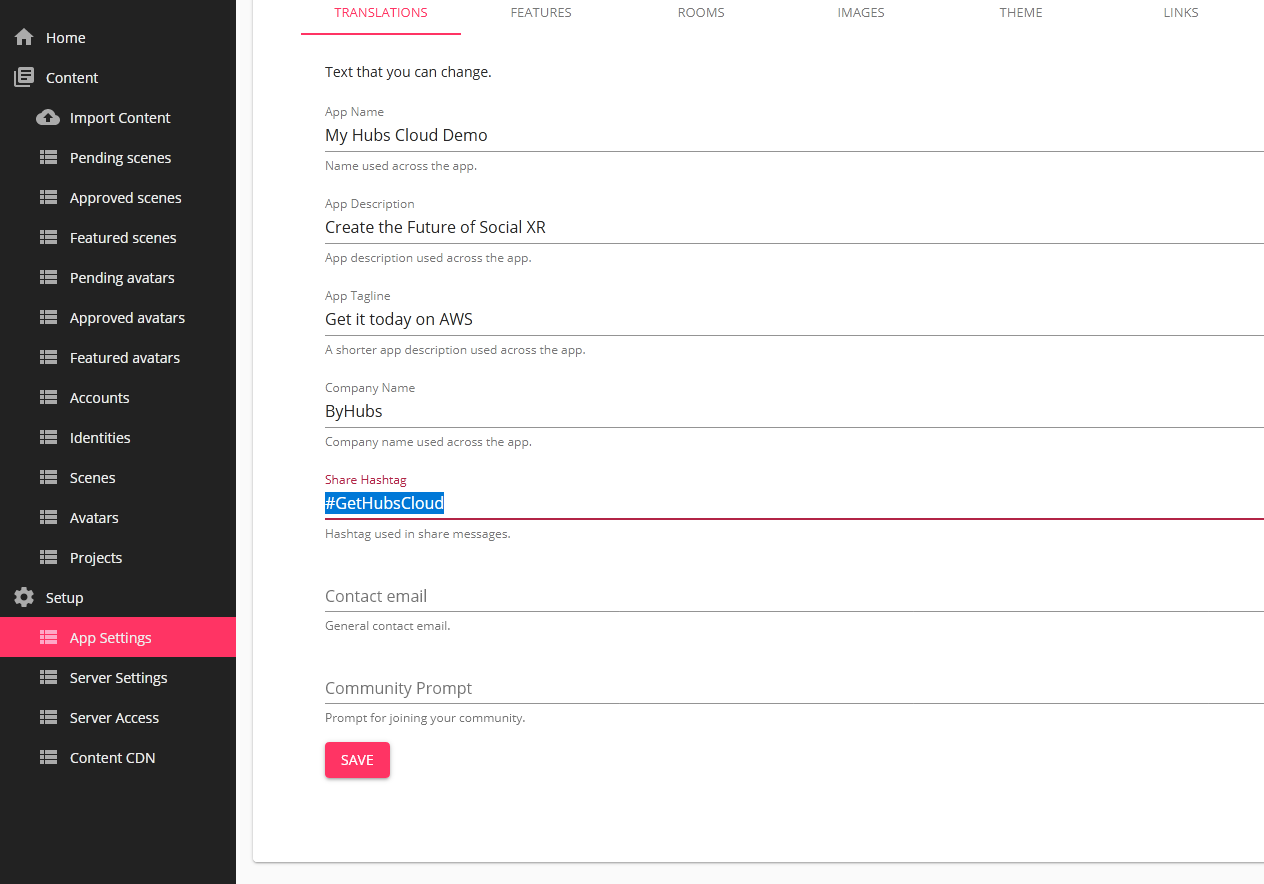
Over the past several months, we’ve done a lot of work to provide a way for external development teams to stand up private instances of our Hubs infrastructure on an organizational AWS account. Hubs Cloud instances are compatible with the same avatars and scenes that are published on the main hubs.mozilla.com site, or you can choose to create your own content, unique to your application. Hubs Cloud offers access to an administrator panel that allows you to customize the branding for your site, approve scenes and avatars that are submitted, import default environments and set platform-wide room settings, and use your own domain names. And, since the deployment is done through your organization’s AWS account, you control the account access and data for your individual instances.
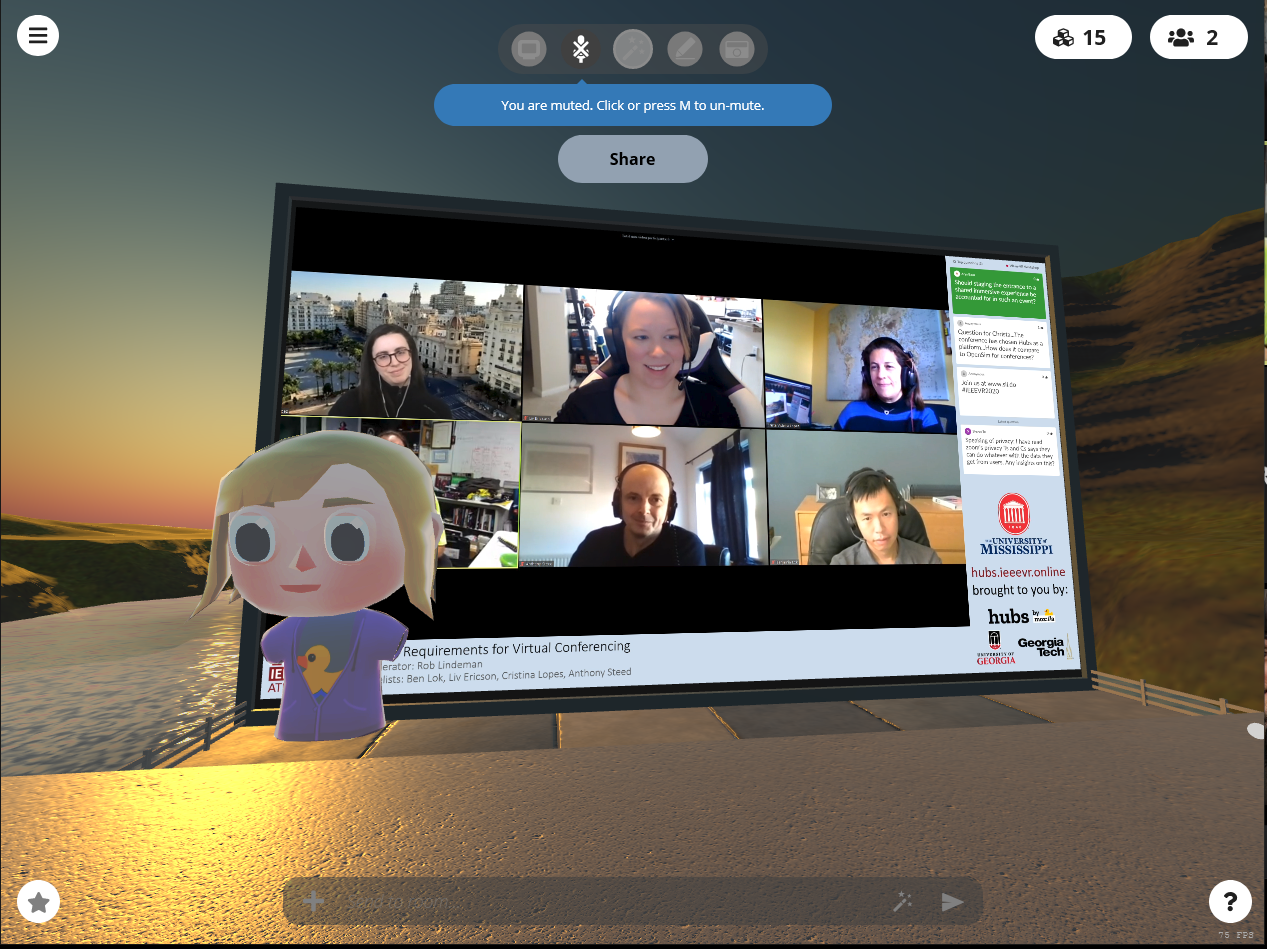
We’ve been incredibly excited by the use cases that we’ve seen from our early partners who have deployed Hubs Cloud. Last month, IEEE deployed a custom Hubs Cloud instance to host an online experience for their VR conference, and brought viewing parties, poster sessions, and breakout sessions into shared virtual spaces. Companies have also begun deploying custom instances of Hubs for industry-specific verticals, bringing the power of collaborative 3D computing to their existing workflows in areas such as accident visualization and reconstruction. We’ve also seen explorations in educational initiatives at the K-12 and university levels, and look forward to sharing more about what our partners are working on in the coming months.
Hubs Cloud is available in Personal and Enterprise editions. For both editions, billing is based on hourly metering and the instance sizes used. On the AWS Marketplace page, there is a cost estimation calculator to help estimate these ahead of time, and are dependent on the concurrency expected, uptime for the system, data, and storage costs. Both Personal and Enterprise offer the same platform features, but Personal is configured to use a smaller instance size at lower costs and has limits on system-wide scalability.
In the coming months, we’ll be working on bringing Hubs Cloud to additional providers, with Digital Ocean as our next target platform.
Get started with deploying Hubs Cloud today at hubs.mozilla.com/cloud, check out the documentation, or send us a message at hubs@mozilla.com to learn more.
Amid the pandemic, Mozilla is educating consumers about popular video apps’ privacy and security features and flaws
Right now, a record number of people are using video call apps to conduct business, teach classes, meet with doctors, and stay in touch with friends. It’s more important than ever for this technology to be trustworthy — but some apps don’t always respect users’ privacy and security.
So today, Mozilla is publishing a guide to popular video call apps’ privacy and security features and flaws. Consumers can use this information to choose apps they’re comfortable with — and to avoid ones they find creepy.
This work is an addition to Mozilla’s annual *Privacy Not Included guide, which rates popular connected products’ privacy and security features during the holiday shopping season. We created this new edition based on reader demand: Last month, we asked our community what information they need most right now, and an overwhelming number asked for privacy and security insights into video call apps.
In this latest installment, Mozilla researchers dug into 15 apps, from Zoom and Skype to HouseParty and Discord. Our researchers answered important questions like: Does the app share user data — and if so, with whom? Are users alerted when meetings are recorded? Is the app compliant with U.S. medical privacy laws? And many more.
Researchers also determined whether or not apps meet Mozilla’s Minimum Security Standards. These five guidelines include: Using encryption; providing security updates; requiring strong passwords; managing vulnerabilities; and featuring a privacy policy.
In total, 12 apps met Mozilla’s Minimum Security Standards: Zoom, Google Duo/HangoutsMeet, Apple FaceTime, Skype, Facebook Messenger, WhatsApp, Jitsi Meet, Signal, Microsoft Teams, BlueJeans, GoTo Meeting, and Cisco WebEx.
Three products did not meet Mozilla’s Minimum Security Standards: Houseparty, Discord, and Doxy.me.
The Minimum Security Standards are just one layer of our guide, however. What else did our research uncover?
- Competition is fierce in the video call app space — which is good news for consumers
- Zoom has been criticized for privacy and security flaws. Because there are many other video call app options out there, Zoom acted quickly to address concerns. This isn’t something we necessarily see with companies like Facebook, which don’t have a true competitor
- When one company adds a feature that users really like, other companies are quick to follow. For example, Zoom and Google Hangouts popularized one-click links to get into meetings, and Skype recently added the feature. And just last week Facebook added Messenger Rooms, which allows up to 50 people to chat at once in Messenger for as long as they want
- All apps use some form of encryption, but not all encryption is equal
- All the video call apps in our guide offer some form of encryption. But not all apps use the holy grail: end-to-end encryption. End-to-end encryption means only those who are part of the call can access the call’s content. No one can listen in, not even the company. Other apps use client-to-server encryption, similar to what your browser does for HTTPS web sites. As your data moves from one point to another, it’s unreadable. Though unlike end-to-end encryption, once your data lands on a company’s servers, it then becomes readable
- Video call apps targeting businesses have a different set of features than video call apps targeting everyday use
- This may seem obvious. But it’s important. Video call apps like FaceTime, Google Duo, Signal, and
This option only has a long version and it is --remote-name-all.
Shipped curl 7.19.0 for the first time – September 1 2008.
History of curl output options
I’m a great fan of the Unix philosophy for command line tools so for me there was never any deeper thoughts on what curl should do with the contents of the URL it gets already from the beginning: it should send it to stdout by default. Exactly like the command line tool cat does for files.
Of course I also realized that not everyone likes that so we provided the option to save the contents to a given file. Output to a named file. We selected -o for that option – if I remember correctly I think I picked it up from some other tools that used this letter for the same purpose: instead of sending the response body to stdout, save it to this file name.
Okay but when you selected “save as” in a browser, you don’t actually have to select the full name yourself. It’ll propose the default name to use based on the URL you’re viewing, probably because in many cases that makes sense for the user and is a convenient and quick way to get a sensible file name to save the content as.
It wasn’t hard to come with the idea that curl could offer something similar. Since the URL you give to curl has a file name part when you want to get a file name, having a dedicated option pick the name from the rightmost part of the URL for the local file name was easy. As different output option that -o,it felt natural to pick the uppercase O option for this slightly different save-the-output option: -O.
Enter more than URL
curl sends everything to stdout, unless to tell it to direct it somewhere else. Then (this is still before the year 2000, so very early days) we added support for multiple URLs on the command line and what would the command line options mean then?
The default would still be to send data to stdout and since the -o and -O options were about how to save a single URL we simply decided that they do exactly that: they instruct curl how to send a single URL. If you provide multiple URLs to curl, you subsequently need to provide multiple output flags. Easy!
It has the interesting effect that if you download three files from example.com and you want them all named according to their rightmost part from the URL, you need to provide multiple -O options:
curl https://example.com/1 https://example.com/2 https://example.com/3 -O -O -O
Maybe I was a bit sensitive
Back in 2008 at some point, I think I took some critique about this maybe a little too hard and decided that if certain users really wanted to download multiple URLs to local file names in an easier manner, that perhaps other command line internet download tools do, I would provide an option that lets them to this!
--remote-name-all was born.
Specifying this option will make -O the default behavior for URLs on the command line! Now you can provide as many URLs as you like and you don’t need to provide an extra flag for each URL.
Get five different URLs on the command line and save them all locally using the file part form the URLs:
curl --remote-name-all https://example.com/a.html https://example.com/b.html https://example.com/c.html https://example.com/d.html https://example.com/e.html
Then if you don’t want that behavior you need to provide additional -o flags…
.curlrc perhaps?
I think the primary idea was that users who really want -O by default like this would put --remote-name-all in their .curlrc files. I don’t this ever really materialized. I believe this remote name all option is one of the more obscure and least used options in curl’s huge selection of options.
https://daniel.haxx.se/blog/2020/04/27/curl-ootw-remote-name-all/
The Picture-in-Picture feature in the Firefox browser makes multitasking with video content easy, no window shuffling necessary. With Picture-in-Picture, you can play a video in a separate, scalable window that … Read more
The post Try Firefox Picture-in-Picture for multi-tasking with videos appeared first on The Firefox Frontier.
https://blog.mozilla.org/firefox/firefox-picture-in-picture-for-videos/

Again, I say "semi-review" because if I were going to do this right, I'd have set up both the dual-4 and the dual-8 identically, had them do the same tasks and gone back if the results were weird. However, when you're buying a $7000+ workstation you economize where you can, which means I didn't buy any new NVMe cards, bought additional rather than spare RAM, and didn't buy another GPU; the plan was always to consolidate those into the new machine and keep the old chassis, board and CPUs/HSFs as spares. Plus, I moved over the case stickers and those totally change the entire performance characteristics of the system, you dig? We'll let the Phoronix guy(s) do that kind of exacting head-to-head because I pay for this out of pocket and we've all gotta tighten our belts in these days of plague. Here's the new beast sitting beside me under my work area:

(By the way, I'm still taking candidates for #ShowUsYourTalos. If you have pictures uploaded somewhere, I'll rebroadcast them here with your permission and your system's specs. Blackbirds, POWER8s and of course any other OpenPOWER systems welcome. Post in the comments.)
This new "consolidated" system has 64GB of RAM, Raptor's BTO option Radeon WX7100 workstation GPU and two NVMe main drives on the current Talos II 1.01 board, running Fedora 31 as before. In normal usage the dual-8 runs a bit hotter than the dual-4, but this is absolutely par for the course when you've just doubled the number of processors onboard. In my low-Earth-orbit Southern California office the dual-4's fastest fan rarely got above 2100rpm while the dual-8 occasionally spins up to 2300 or 2600rpm. Similarly, give or take system load, the infrared thermometer pegged the dual-4's "exhaust" at around 95 degrees Fahrenheit; the dual-8 puts out about 110 F. However, idle power usage is only about 20W more when sitting around in Firefox and gnome-terminal (130W vs 110W), and the idle fan speeds are about the same such that overall the dual-8 isn't appreciably louder than the very quiet dual-4 was with the most current firmware (with the standard Supermicro fan assemblies, though I replaced the dual-4's PSUs with "super-quiets" a while back and those are in the dual-8 now too).
Naturally the CPUs are the most notable change. Recall that the Sforza "scale out" POWER9 CPUs in Raptor family workstations are SMT-4, i.e., each core offers four hardware threads, which appear as discrete CPUs to the operating system. My dual-4 appeared to be a 32 CPU system to Fedora; this dual-8 appears to have 64. These threads come from "slices," and SMT-4 cores have four which are paired into two "super-slices." They look like this:

Each slice has a vector-scalar unit and an address generator feeding a load-store unit. The VSU has 64-bit integer, floating point and vector ALU components; two slices are needed to get the full 128-bit width of a VMX vector, hence their pairing as super-slices. The super-slices do not have L1 cache of their own, nor do they handle branch instructions or
Just a quick note that, as a side-effect of the work I mentioned a while ago to add telemetry to mozregression, mozregression now has a graphical Mac client! It’s a bit of a pain to install (since it’s unsigned), but likely worlds easier for the average person to get going than the command-line version. Please feel free to point people to it if you’re looking to get a regression range for a MacOS-specific problem with Firefox.

More details: The Glean Python SDK, which mozregression now uses for telemetry, requires Python 3. This provided the impetus to port the GUI itself to Python 3 and PySide2 (the modern incarnation of PyQt), which brought with it a much easier installation/development experience for the GUI on platforms like Mac and Linux.
I haven’t gotten around to producing GUI binaries for the Linux yet, but it should not be much work.
Speaking of Glean, mozregression, and Telemetry, stay tuned for more updates on that soon. It’s been an adventure!
https://wlach.github.io/blog/2020/04/mozregression-for-macos/?utm_source=Mozilla&utm_medium=RSS
I last wrote in December 2019 about my work on speeding up the Rust compiler. Time for another update.
Incremental compilation
I started the year by profiling incremental compilation and making several improvements there.
#68914: Incremental compilation pushes a great deal of data through a hash function, called SipHasher128, to determine what code has changed since the last compiler invocation. This PR greatly improved the extraction of bytes from the input byte stream (with a lot of back and forth to ensure it worked on both big-endian and little-endian platforms), giving incremental compilation speed-ups of up to 13% across many benchmarks. It also added a lot more comments to explain what is going on in that code, and removed multiple uses of unsafe.
#69332: This PR reverted the part of #68914 that changed the u8to64_le function in a way that made it simpler but slower. This didn’t have much impact on performance because it’s not a hot function, but I’m glad I caught it in case it gets used more in the future. I also added some explanatory comments so nobody else will make the same mistake I did!
#69050: LEB128 encoding is used extensively within Rust crate metadata. Michael Woerister had previously sped up encoding and decoding in #46919, but there was some fat left. This PR carefully minimized the number of operations in the encoding and decoding loops, almost doubling their speed, and giving wins on many benchmarks of up to 5%. It also removed one use of unsafe. In the PR I wrote a detailed description of the approach I took, covering how I found the potential improvement via profiling, the 18 different things I tried (10 of which improved speed), and the final performance results.
LLVM bitcode
Last year I noticed from profiles that rustc spends some time compressing the LLVM bitcode it produces, especially for debug builds. I tried changing it to not compress the bitcode, and that gave some small speed-ups, but also increased the size of compiled artifacts on disk significantly.
Then Alex Crichton told me something important: the compiler always produces both object code and bitcode for crates. The object code is used when compiling normally, and the bitcode is used when compiling with link-time optimization (LTO), which is rare. A user is only ever doing one or the other, so producing both kinds of code is typically a waste of time and disk space.
In #66598 I tried a simple fix for this: add a new flag to rustc that tells it to omit the LLVM bitcode. Cargo could then use this flag whenever LTO wasn’t being used. After some discussion we decided it was too simplistic, and filed issue #66961 for a more extensive change. That involved getting rid of the use of compressed bitcode by instead storing uncompressed bitcode in a section in the object code (a standard format used by clang), and introducing the flag for Cargo to use to disable the production of bitcode.
The part of rustc that deals with all this was messy. The compiler can produce many different kinds of output: assembly code, object code, LLVM IR, and LLVM bitcode in a couple of possible formats. Some of these outputs are dependent on other outputs, and the choices on what to produce depend on various command line options, as well as details of the particular target platform. The internal state used to track output production relied on many boolean values, and various nonsensical combinations of these boolean values were possible.
When faced with messy code that I need to understand, my standard approach is to start refactoring. I wrote #70289, #70345, and #70384 to clean up code generation, #70297, #70729 , and #71374
WebGPU is an emerging API that provides access to the graphics and computing capabilities of hardware on the web. It’s designed from the ground up within the W3C GPU for the Web group by all major browser vendors, as well as Intel and a few others, guided by the following principles:

We are excited to bring WebGPU support to Firefox because it will allow richer and more complex graphics applications to run portably in the Web. It will also make the web platform more accessible to teams who mostly target modern native platforms today, thanks to the use of modern concepts and first-class WASM (WebAssembly) support.
API concepts
WebGPU aims to work on top of modern graphics APIs: Vulkan, D3D12, and Metal. The constructs exposed to the users reflect the basic primitives of these low-level APIs. Let’s walk through the main constructs of WebGPU and explain them in the context of WebGL – the only baseline we have today on the Web.
Separation of concerns
The first important difference between WebGPU and WebGL is that WebGPU separates resource management, work preparation, and submission to the GPU (graphics processing unit). In WebGL, a single context object is responsible for everything, and it contains a lot of associated state. In contrast, WebGPU separates these into multiple different contexts:
GPUDevicecreates resources, such as textures and buffers.GPUCommandEncoderallows encoding individual commands, including render and compute passes.- Once done, it turns into
GPUCommandBufferobject, which can be submitted to aGPUQueuefor execution on the GPU. - We can present the result of rendering to the HTML canvas. Or multiple canvases. Or no canvas at all – using a purely computational workflow.

Overall, this separation will allow for complex applications on the web to stream data in one or more workers and create any associated GPU resources for it on the fly. Meanwhile, the same application could be recording work on multiple workers, and eventually submit it all together to GPUQueue. This matches multi-threading scenarios of native graphics-intensive applications and allows for high utilization of multi-core processors.
Pipeline state
The second important change is how WebGPU encapsulates pipeline state.
In WebGL, the user would create a shader program at program initialization. Later when the user attempts to use this shader program, the driver takes into consideration all the other states currently set, and may need to internally recompile the shader program. If the driver does recompile the shader program, this could introduce CPU stalls.
In contrast, WebGPU has the concept of a pipeline state object (namely, GPURenderPipeline and GPUComputePipeline). A pipeline state object is a combination of various states that the user creates in advance on the device – just like in native APIs. The user provides all this state upfront, which allows the browsers and hardware drivers to avoid extra work (such as shader recompilation) when it’s used later in GPU operations.
From the developer perspective, it’s easier to manage these coarse state objects as well. They don’t have to think as much about which of the fine-grained states to change, and which ones to preserve.
The pipeline state includes:
- Shaders
- Layouts of vertex buffers and attributes
- Layouts of bind groups
- Blending, depth, and stencil states
- Formats of the output render
Firefox has one of the oldest security bug bounties on the internet, dating back to 2004. From 2017-2019, we paid out $965,750 to researchers across 348 bugs, making the average payout $2,775 – but as you can see in the graph below, our most common payout was actually $4,000!

After adding a new static analysis bounty late last year, we’re excited to further expand our bounty program in the coming year, as well as provide an on-ramp for more participants. We’re updating our bug bounty policy and payouts to make it more appealing to researchers and reflect the more hardened security stance we adopted after moving to a multi-process, sandboxed architecture. Additionally, we’ll be publishing more posts about how to get started testing Firefox – which is something we began by talking about the HTML Sanitization we rely on to prevent UXSS . By following the instructions there you can immediately start trying to bypass our sanitizer using your existing Firefox installation in less than a minute.
Firstly, we’re amending our current policy to be more friendly and allowing duplicate submissions. Presently, we have a ‘first reporter wins’ policy, which can be very frustrating if you are fuzzing our Nightly builds (which we encourage you to do!) and you find and report a bug mere hours after another reporter. From now on, we will split the bounty between all duplicates submitted within 72 hours of the first report; with prorated amounts for higher quality reports. We hope this will encourage more people to fuzz our Nightly ASAN builds.
Besides rewarding duplicate submissions, we’re clarifying our payout criteria and raising the payouts for higher impact bugs. Now, sandbox escapes and related bugs will be eligible for a baseline $8,000, with a high quality report up to $10,000. Additionally, proxy bypass bugs are eligible for a baseline of $3,000, with a high quality report up to $5,000. And most submissions are above baseline: previously the typical range for high impact bugs was $3,000 – $5,000 but as you can see in the graphic above, the most common payout for those bugs was actually $4,000! You can find full details of the criteria and amounts on our Client Bug Bounty page.
Again, we want to emphasize – if it wasn’t already – that a bounty amount is not determined based on your initial submission, but rather on the outcome of the discussion with developers. So improving test cases post-submission, figuring out if an engineer’s speculation is founded or not, or other assistance that helps resolve the issue will increase your bounty payout.
And if you’re inclined, you are able to donate your bounty to charity – if you wish to do so and have payment info on file, please indicate this in new bugs you file and we will contact you.
Lastly, we would like to let you know that we have cross-posted this to our new Attack & Defense blog. This new blog is a vehicle for tailored content specifically for engineers, security researchers, and Firefox bug bounty participants. We’ll be highlighting improvements to the bug bounty program (which will often be posted to this Security blog also) – but also posting guides on how to test different parts of Firefox. You can follow us via RSS or Twitter, where we’ll be boosting tweets relevant to browser security: exploitation walkthroughs, conference talks, and the like.
The post Firefox’s Bug Bounty in 2019 and into the Future appeared first on Mozilla Security Blog.
https://blog.mozilla.org/security/2020/04/23/bug-bounty-2019-and-future/
On April 22nd 2019, we announced our current, this, incarnation of the curl bug bounty. In association with Hackerone we now run the program ourselves, primarily funded by gracious sponsors. Time to take a closer look at how the first year of bug bounty has been!
Number of reports
We’ve received a total of 112 reports during this period.
On average, we respond with a first comment to reports within the first hour and we triage them on average within the first day.
Out of the 112 reports, 6 were found actual security problems.

Bounties
All confirmed security problems were rewarded a bounty. We started out a bit careful with the amounts but we are determined to raise them as we go along and we’ve seen that there’s not really a tsunami coming.
We’ve handed out 1,400 USD so far, which makes it an average of 233 USD per confirmed report. The top earner got two reports rewarded and received 450 USD from us. So far…
But again: our ambition is to significantly raise these amounts going forward.
Trends
The graph above speaks clearly: lots of people submitted reports when we opened up and the submission frequency has dropped significantly over the year.
A vast majority of the 112 reports we’ve received have were more or less rubbish and/or more or less automated reports. A large amount of users have reported that our wiki can be edited by anyone (which I consider to be a fundamental feature of a wiki) or other things that we’ve expressly said is not covered by the program: specific details about our web hosting, email setup or DNS config.
A rough estimate says that around 80% of the reports were quickly dismissed as “out of policy” – ie they reported stuff that we documented is not covered by the bug bounty (“Sirs, we can figure out what http server that’s running” etc). The curl bug bounty covers the products curl and libcurl, thus their source code and related specifics.
Bounty funds
curl has no ties to any organization. curl is not owned by any corporation. curl is developed by individuals. All the funds we have in the project are graciously provided to us by sponsors and donors. The curl funds are handled by the awesome Open Collective.
Security is of utmost importance to us. It trumps all other areas, goals and tasks. We aim to produce solid and secure products for the world and we act as swiftly and firmly as we can on all reported security problems.
Security vulnerability trends
We have not published a single CVE for curl yet this year (there was one announced, CVE-2019-15601 but after careful considerations we have backpedaled on that, we don’t consider it a flaw anymore and the CVE has been rejected in the records.)
As I write this, there’s been exactly 225 days since the latest curl CVE was published and we’re aiming at shipping curl 7.70.0 next week as the 6th release in a row without a security vulnerability to accompany it. We haven’t done 6 “clean” consecutive release like this since early 2013!
Looking at the number of CVEs reported in the curl project per year, we can of course see that 2016 stands out. That was the year of the security audit that ended up the release of curl 7.51.0 with no less than eleven security vulnerabilities announced and fixed. Better is of course the rightmost bar over the year 2020 label. It is still non-existent!

Please note some of the information provided in this report may be subject to change as we are sometimes sharing information about projects that are still in early stages and are not final yet.
Before we get into the report, we must share that Youghourta Benali, one of the Arabic l10n community’s managers, has passed away due to prior health issues. He was a passionate activist for the open Web and Arabic’s presence on the Web, localizing Mozilla projects for over 7 years. We’ll all miss him and wish his family and friends peace at this time. The surviving Arabic managers are currently writing a guest post that we’ll post here when ready.
Welcome!
Are you a locale leader and want us to include new members in our upcoming reports? Contact us!
New community/locales added
- Central Kurdish (ckb)
Other updates
Enforcing 2 factors authentication in GitHub for mozilla-l10n
As recently communicated in our mailing lists, on April 27 we will enforce the 2 factor authentication (2FA) in GitHub for the mozilla-l10n organization.
If you are part of the mozilla-l10n organization, but don’t have 2FA enabled, you will be automatically removed. This won’t prevent you from opening pull requests or filing issues, for example, and you will be able to rejoin (if you want) after enabling 2FA.
As explained in the original announcement, a lot has changed since we started using GitHub for Mozilla Localization, almost 5 years ago. We have consolidated contribution paths to l10n to Pontoon, and having direct access to repositories is not necessary anymore. Write access is already not allowed for some repositories, since formats are not user-friendly and can be properly managed only through localization tools.
For more information about enabling 2FA in GitHub, refer to this document.
New content and projects
What’s new or coming up in Firefox desktop
Upcoming deadlines:
- Firefox 76 is currently in beta and will be released on May 5. The deadline to update localization has just passed (April 21).
- The deadline to update localizations for Firefox 77, currently in Nightly, will be May 19 (4 weeks after the previous deadline).
As explained in previous editions of the l10n report, In terms of localization priority and deadlines, note that the content of the What’s new panel, available at the bottom of the hamburger menu, doesn’t follow the release train. For example, content for 76 has been exposed on April 15, but it will be possible to update translations until the very end of the cycle, beyond the normal deadline for that version. You can find these strings in the asrouter.ftl file in Pontoon.
To test on Nightly:
- Type
about:configin the address bar and press enter. Click the button to accept the risk and continue. - Search for
browser.newtabpage.activity-stream.asrouter.devtoolsEnabledand make sure that it’s set to true (double click it if it’s false). This will enable a new wrench icon in the New Tab page. - Search for
browser.newtabpage.activity-stream.asrouter.useRemoteL10nand set it to false. This will force the browser to use translations available in the build, instead of translations hosted remotely (those are updated less frequently). It’s important to use Nightly and not Beta for this. - Open a New Tab, click on the wrench icon in the top right corner. This should open the
about:newtab#devtoolspage. On the left sidebar, click on What’s New Panel, then click the button Open What’s New Panel.

 There is also a new warning for vulnerable passwords in about:logins. You can find information on how to trigger this warning in this page.

What’s new or coming up in
Please partake in the git-cinnabar survey.
Git-cinnabar is a git remote helper to interact with mercurial repositories. It allows to clone, pull and push from/to mercurial remote repositories, using git.
These release notes are also available on the git-cinnabar wiki.
What’s new since 0.5.4?
- Updated git to 2.26.2 for the helper.
- Improved experimental support for pushing merges.
- Fixed a few issues with experimental support for python 3.
- Don’t complain the helper is outdated if it’s newer.
- Auto-enable graft when cinnabarclone contains a graft that can be fulfilled.
- Exclude git-cinnabar notes and git-filter-branch backups from graft candidates.
- Graft failures are more now silent.
- Fixed handling of a null manifest.
The Rust team is happy to announce a new version of Rust, 1.43.0. Rust is a programming language that is empowering everyone to build reliable and efficient software.
If you have a previous version of Rust installed via rustup, getting Rust 1.43.0 is as easy as:
rustup update stable
If you don't have it already, you can get rustup from the
appropriate page on our website, and check out the detailed release notes for
1.43.0 on GitHub.
What's in 1.43.0 stable
This release is fairly minor. There are no new major features. We have some new stabilized APIs, some compiler performance improvements, and a small macro-related feature. See the detailed release notes to learn about other changes not covered by this post.
item fragments
In macros, you can use item fragments to interpolate items into the body of traits,
impls, and extern blocks. For example:
macro_rules! mac_trait {
    ($i:item) => {
        trait T { $i }
    }
}
mac_trait! {
    fn foo() {}
}
This will generate:
trait T {
    fn foo() {}
}
Type inference around primitives
The type inference around primitives, references, and binary operations was improved. A code sample makes this easier to understand: this code fails to compile on Rust 1.42, but compiles in Rust 1.43.
let n: f32 = 0.0 + &0.0;
In Rust 1.42, you would get an error that would say "hey, I don't know how to add
an f64 and an &f64 with a result of f32." The algorithm now correctly decides
that both 0.0 and &0.0 should be f32s instead.
New Cargo environment variable for tests
In a move to help integration testing, Cargo will set some new environment variables.
This is easiest to explain by example: let's say we're working on a command
line project, simply named "cli". If we're writing an integration test, we want
to invoke that cli binary and see what it does. When running tests and
benchmarks, Cargo will set an environment variable named CARGO_BIN_EXE_cli,
and I can use it inside my test:
let exe = env!("CARGO_BIN_EXE_cli");
This makes it easier to invoke cli, as we now have a path to it directly.
Library changes
You can now use associated constants on floats and integers directly, rather
than having to import the module. That is, you can now write u32::MAX or f32::NAN
with no use std::u32; or use std::f32;.
There is a new primitive
module that re-exports Rust's
primitive types. This can be useful when you're writing a macro and want to make
sure that the types aren't shadowed.
Additionally, we stabilized six new APIs: