(“This Week in Glean” is a series of blog posts that the Glean Team at Mozilla is using to try to communicate better about our work. They could be release notes, documentation, hopes, dreams, or whatever: so long as it is inspired by Glean. You can find an index of all TWiG posts online.)
This is a special guest post by non-Glean-team member William Lachance!
This is a continuation of an exploration of adding Glean-based telemetry to a python application, in this case mozregression, a tool for automatically finding the source of Firefox regressions (breakage).
When we left off last time, we had written some test scripts and verified that the data was visible in the debug viewer.
Adding Telemetry to mozregression itself
In many ways, this is pretty similar to what I did inside the sample application: the only significant difference is that these are shipped inside a Python application that is meant to be be installable via pip. This means we need to specify the pings.yaml and metrics.yaml (located inside the mozregression subirectory) as package data inside setup.py:
setup(
    name="mozregression",
    ...
    package_data={"mozregression": ["*.yaml"]},
    ...
)
There were also a number of Glean SDK enhancements which we determined were necessary. Most notably, Michael Droettboom added 32-bit Windows wheels to the Glean SDK, which we need to make building the mozregression GUI on Windows possible. In addition, some minor changes needed to be made to Glean’s behaviour for it to work correctly with a command-line tool like mozregression — for example, Glean used to assume that Telemetry would always be disabled via a GUI action so that it would send a deletion ping, but this would obviously not work in an application like mozregression where there is only a configuration file — so for this case, Glean needed to be modified to check if it had been disabled between runs.
Many thanks to Mike (and others on the Glean team) for so patiently listening to my concerns and modifying Glean accordingly.
Getting Data Review
At Mozilla, we don’t just allow random engineers like myself to start collecting data in a product that we ship (even a semi-internal like mozregression). We have a process, overseen by Data Stewards to make sure the information we gather is actually answering important questions and doesn’t unnecessarily collect personally identifiable information (e.g. email addresses).
You can see the specifics of how this worked out in the case of mozregression in bug 1581647.
Documentation
Glean has some fantastic utilities for generating markdown-based documentation on what information is being collected, which I have made available on GitHub:
https://github.com/mozilla/mozregression/blob/master/docs/glean/metrics.md
The generation of this documentation is hooked up to mozregression’s continuous integration, so we can sure it’s up to date.
I also added a quick note to mozregression’s web site describing the feature, along with (very importantly) instructions on how to turn it off.
Enabling Data Ingestion
Once a Glean-based project has passed data review, getting our infrastructure to ingest it is pretty straightforward. Normally we would suggest just filing a bug and let us (the data team) handle the details, but since I’m on that team, I’m going to go a (little bit) of detail into how the sausage is made.
Behind the
A few days ago I published a very technical article confirming that Xiaomi browsers collect a massive amount of private data. This fact was initially publicized in a Forbes article based on the research by Gabriel C^irlig and Andrew Tierney. After initially dismissing the report as incorrect, Xiaomi has since updated their Mint and Mi Pro browsers to include an option to disable this tracking in incognito mode.

Is the problem solved now? Not really. There is now exactly one non-obvious setting combination where you can have your privacy with these browsers: “Incognito Mode” setting on, “Enhanced Incognito Mode” setting off. With these not being the default and the users not informed about the consequences, very few people will change to this configuration. So the browsers will continue spying on the majority of their user base.
In this article I want to provide a high-level overview of the data being exfiltrated here. TL;DR: Lots and lots of it.
Table of Contents
Disclaimer: This article is based entirely on reverse engineering Xiaomi Mint Browser 3.4.3. I haven’t seen the browser in action, so some details might be wrong. Update (2020-05-08): From a quick glance at Xiaomi Mint Browser 3.4.4 which has been released in the meantime, no further changes to this functionality appear to have been implemented.
Event data
When allowed, Xiaomi browsers will send information about a multitude of different events, sometimes with specific data attached. For example, an event will typically be generated when some piece of the user interface shows up or is clicked, an error occurs or the current page’s address is copied to clipboard. There are more interesting events as well however, for example:
- A page started or finished loading, with the page address attached
- Change of default search engine, with old and new search engines attached
- Search via the navigation bar, with the search query attached
- Reader mode switched on, with the page address attached
- A tab clicked, with the tab name attached
- A page being shared, with the page address attached
- Reminder shown to switch on Incognito Mode, with the porn site that triggered the reminder attached
- YouTube searches, with the search query attached
- Video details for a YouTube video opened or closed, with video ID attached
- YouTube video played, with video ID attached
- Page or file downloaded, with the address attached
- Speed dial on the homepage clicked, added or modified, with the target address attached
Generic annotations
Some pieces of data will be attached to every event. These are meant to provide the context, and to group related events of course. This data includes among other things:
- A randomly generated identifier that is unique to your browser instance. While this identifier is supposed to change every 90 days, this won’t actually happen due to a bug. In most cases, it should be fairly easy to recognize the person behind the identifier.
- An additional device identifier (this one will stay unchanged even if app data is cleared)
- If you are logged into your Mi Account: the identifier of this account
- The exact time of the event
- Device manufacturer and model
- Browser version
- Operating system version
- Language setting of your
As I posted previously, I did a webinar and here’s the recording and the slides I used for it.

https://daniel.haxx.se/blog/2020/05/08/video-common-mistakes-when-using-libcurl/
Title: Curl Programming
Author: Dan Gookin
ISBN: 9781704523286
Weight: 181 grams

Not long ago I discovered that someone had written this book about curl and that someone wasn’t me! (I believe this is a first) Thrilled of course that I could check off this achievement from my list of things I never thought would happen in my life, I was also intrigued and so extremely curious that I simply couldn’t resist ordering myself a copy. The book is dated October 2019, edition 1.0.
I don’t know the author of this book. I didn’t help out. I wasn’t aware of it and I bought my own copy through an online bookstore.
First impressions
It’s very thin! The first page with content is numbered 13 and the last page before the final index is page 110 (6-7 mm thick). Also, as the photo shows somewhat: it’s not a big format book either: 225 x 152 mm. I suppose a positive spin on that could be that it probably fits in a large pocket.

I’m not the target audience
As the founder of the curl project and my role as lead developer there, I’m not really a good example of whom the author must’ve imagined when he wrote this book. Of course, my own several decades long efforts in documenting curl in hundreds of man pages and the Everything curl book makes me highly biased. When you read me say anything about this book below, you must remember that.
A primary motivation for getting this book was to learn. Not about curl, but how an experienced tech author like Dan teaches curl and libcurl programming, and try to use some of these lessons for my own writing and manual typing going forward.
What’s in the book?
Despite its size, the book is still packed with information. It contains the following chapters after the introduction:
- The amazing curl … 13
- The libcurl library … 25
- Your basic web page grab … 35
- Advanced web page grab … 49
- curl FTP … 63
- MIME form data … 83
- Fancy curl tricks … 97
As you can see it spends a total of 12 pages initially on explanations about curl the command line tool and some of the things you can do with it and how before it moves on to libcurl.
The book is explanatory in its style and it is sprinkled with source code examples showing how to do the various tasks with libcurl. I don’t think it is a surprise to anyone that the book focuses on HTTP transfers but it also includes sections on how to work with FTP and a little about SMTP. I think it can work well for someone who wants to get an introduction to libcurl and get into adding Internet transfers for their applications (at least if you’re into HTTP). It is not a complete guide to everything you can do, but then I doubt most users need or even want that. This book should get you going good enough to then allow you to search for the rest of the details on your own.
I think maybe the biggest piece missing in this book, and I really thing it is an omission mr Gookin should fix if he ever does a second edition: there’s virtually no mention of HTTPS or TLS at all. On the current Internet and web, a huge portion of all web pages and page loads done by browsers are done with HTTPS and while it is “just” HTTP with TLS on top, the TLS part itself is worth some special attention. Not the least because certificates and how to deal with them in a libcurl world is an area that sometimes seems hard for users to grasp.
A second thing I noticed no mention of, but I think should’ve been there: a description of curl_easy_getinfo(). It is a versatile function that provides information to users about a just performed transfer. Very useful if you ask me, and a tool in the toolbox every libcurl user should know about.
The author mentions that he was using libcurl 7.58.0 so that version or later should be fine to use to use all the code shown. Most of the code of course work in older libcurl versions as well.
Comparison to Everything curl
Firefox 76 is released. Besides other CSS, HTML and developer features, it refines that somewhat obnoxious zooming bar a bit, improves Picture-in-Picture further (great for livestreams: using it a lot for church), and most notably adds critical alerts for website breaches and improved password security (both generating good secure passwords and notifying you when a password used on one or other sites may have been stolen). The .mozconfigs are unchanged from Firefox 67, which is good news, because we've been stable without changing build options for quite a while at this point and we might be able to start investigating why some build options fail which should function. In particular, PGO and LTO would be nice to get working.
In less than two weeks, Mozilla received more than 160 applications from 30 countries for its COVID-19 Solutions Fund Awards. Today, the Mozilla Open Source Support Program (MOSS) is excited to announce its first three recipients. This Fund was established at the end of March, to offer up to $50,000 each to open source technology projects responding to the COVID-19 pandemic.
VentMon, created by Public Invention in Austin, Texas, improves testing of open-source emergency ventilator designs that are attempting to address the current and expected shortage of ventilators.
The same machine and software will also provide monitoring and alarms for critical care specialists using life-critical ventilators. It is a simple inline device plugged into the airway of an emergency ventilator, that measures flow and pressure (and thereby volume), making sure the ventilator is performing to specification, such as the UK RVMS spec. If a ventilator fails, VentMon raises an audio and internet alarm. It can be used for testing before deployment, as well as ICU patient monitoring. The makers received a $20,000 award which enables them to buy parts for the Ventmon to support more than 20 open source engineering teams trying to build ventilators.
Based in the Bay Area, Recidiviz is a tech non-profit that’s built a modeling tool that helps prison administrators and government officials forecast the impact of COVID-19 on their prisons and jails. This data enables them to better assess changes they can make to slow the spread, like reducing density in prison populations or granting early release to people who are deemed to pose low risk to public safety.
It is impossible to physically distance in most prison settings, and so incarcerated populations are at dangerous risk of COVID-19 infection. Recidiviz’s tool was downloaded by 47 states within 48hrs of launch. The MOSS Committee approved a $50,000 award.
“We want to make it easier for data to inform everything that criminal justice decision-makers do,” said Clementine Jacoby, CEO and Co-Founder of Recidiviz. “The pandemic made this mission even more critical and this funding will help us bring our COVID-19 model online. Already more than thirty states have used the tool to understand where the next outbreak may happen or how their decisions can flatten the curve and reduce impact on community hospital beds, incarcerated populations, and staff.”
COVID-19 Supplies NYC is a project created by 3DBrooklyn, producing around 2,000 face shields a week, which are urgently needed in the city. They will use their award to make and distribute more face shields, using 3D printing technology and an open source design. They also maintain a database that allows them to collect requests from institutions that need face shields as well as offers from people with 3D printers to produce parts for the face shields. The Committee approved a $20,000 award.
“Mozilla has long believed in the power of open source technology to better the internet and the world,” said Jochai Ben-Avie, Head of International Public Policy and Administrator of the Program. “It’s been inspiring to see so many open source developers step up and collaborate on solutions to increase the capacity of healthcare systems to cope with this crisis.”
In the coming weeks Mozilla will announce the remaining winning applicants. The application form has been closed for now, owing to the high number of submissions already being reviewed.
The post Mozilla announces the first three COVID-19 Solutions Fund Recipients appeared first on The Mozilla Blog.
Hello folks, hope you are all doing well and staying safe.
A new version of your favourite browser is always worth looking forward to, and here we are with Firefox 76! Web platform support sees some great new additions in this release, such as Audio Worklets and Intl improvements, on the JavaScript side. Also, we’ve added a number of nice improvements into Firefox DevTools to make development easier and quicker.
As always, read on for the highlights, or find the full list of additions in the following articles:
Developer tools additions
There are interesting DevTools updates in this release throughout every panel. And upcoming features can be previewed now in Firefox Dev Edition.
More JavaScript productivity tricks
Firefox JavaScript debugging just got even better.
Ignore entire folders in Debugger
Oftentimes, debugging efforts only focus on specific files that are likely to contain the culprit. With “blackboxing” you can tell the Debugger to ignore the files you don’t need to debug.
Now it’s easier to do this for folders as well, thanks to Stepan Stava‘s new context menu in the Debugger’s sources pane. You can limit “ignoring” to files inside or outside of the selected folder. Combine this with “Set directory root” for a laser-focused debugging experience.

Collapsed output for larger console snippets
The Console‘s multi-line editor mode is great for iterating on longer code snippets. Early feedback showed that users didn’t want the code repeated in the Console output, to avoid clutter. Thanks to thelehhman‘s contribution, code snippets with multiple lines are neatly collapsed and can be expanded on demand.

Copy full URLs in call stack
Copying stacks in the Debugger makes it possible to share snapshots during stepping. This helps you file better bugs, and facilitates handover to your colleagues. In order to provide collaborators the full context of a bug, the call stack pane‘s “Copy stack trace” menu now copies full URLs, not just filenames.

Always offer “Expand All” in Firefox’s JSON preview
Built-in previews for JSON files make it easy to search through responses and explore API endpoints. This also works well for large files, where data can be expanded as needed. Thanks to a contribution from zacnomore, the “Expand All” option is now always visible.
More network inspection tricks
Firefox 76 provides even easier access to network information via the
There’s no doubt that during the last couple of weeks you’ve been signing up for new online services like streaming movies and shows, ordering takeout or getting produce delivered to … Read more
The post More reasons you can trust Firefox with your passwords appeared first on The Firefox Frontier.
https://blog.mozilla.org/firefox/trust-firefox-with-your-passwords/
This is my presentation for curl up 2020 summing up where we’re at with HTTP/3 support in curl right now.
Video
With the release of Firefox 76, we are pleased to welcome the 52 developers who contributed their first code change to Firefox in this release, 50 of whom were brand new volunteers! Please join us in thanking each of these diligent and enthusiastic individuals, and take a look at their contributions:
In case you missed it, there was a Forbes article on Mi Browser Pro and Mint Browser which are preinstalled on Xiaomi phones. The article accuses Xiaomi of exfiltrating a history of all visited websites. Xiaomi on the other hand accuses Forbes of misrepresenting the facts. They claim that the data collection is following best practices, the data itself being aggregated and anonymized, without any connection to user’s identity.
TL;DR: It is really that bad, and even worse actually.
If you’ve been following my blog for a while, you might find this argumentation familiar. It’s almost identical to Avast’s communication after they were found spying on the users and browser vendors pulled their extensions from add-on stores. In the end I was given proof that their data anonymization attempts were only moderately successful if you allow me this understatement.
Given that neither the Forbes article nor the security researchers involved seem to provide any technical details, I wanted to take a look for myself. I decompiled Mint Browser 3.4.0 and looked for clues. This isn’t the latest version, just in case Xiaomi already modified to code in reaction to the Forbes article.
Disclaimer: I think that this is the first time I analyzed a larger Android application, so please be patient with me. I might have misinterpreted one thing or another, even though the big picture seems to be clear. Also, my conclusions are based exclusively on code analysis, I’ve never seen this browser in action.
The general analytics setup
The Forbes article explains that the data is being transmitted to a Sensors Analytics backend. The Xiaomi article then provides the important clue: sa.api.intl.miui.com is the host name of this backend. They then go on explaining how it’s a server that Xiaomi owns rather than a third party. But they are merely trying to distract us: if sensitive data from my browser is being sent to this server, why would I care who owns it?
We find this server name mentioned in the class miui.globalbrowser.common_business.g.i (yes, some package and class names are mangled). It’s used in some initialization code:
final StringBuilder sb = new StringBuilder();
sb.append("https://sa.api.intl.miui.com/sa?project=global_browser_mini&r=");
sb.append(A.e);
a = sb.toString();
Looking up A.e, it turns out to be a country code. So the i.a static member here ends up holding the endpoint URL with the user’s country code filled in. And it is being used in the class’ initialization function:
public void a(final Context c) {
    SensorsDataAPI.sharedInstance(this.c = c, i.a, this.d);
(“This Week in Glean” is a series of blog posts that the Glean Team at Mozilla is using to try to communicate better about our work. They could be release notes, documentation, hopes, dreams, or whatever: so long as it is inspired by Glean.)
Last week's blog post: This Week in Glean: Glean for Python on Windows by Mike Droettboom. All "This Week in Glean" blog posts are listed in the TWiG index (and on the Mozilla Data blog). This article is cross-posted on the Mozilla Data blog.
With the Glean SDK we follow in the footsteps of other teams to build a cross-platform library to be used in both mobile and desktop applications alike. In this blog post we're taking a look at how we transport some rich data across the FFI boundary to be reused on the Kotlin side of things. We're using a recent example of a new API in Glean that will drive the HTTP upload of pings, but the concepts I'm explaining here apply more generally.
Note: This blog post is not a good introduction on doing Rust on Android, but I do plan to write about that in the future as well.
Most of this implementation was done by Bea and I have been merely a reviewer, around for questions and currently responsible for running final tests on this feature.
The problem
The Glean SDK provides an FFI API that can be consumed by what we call language bindings. For the most part we pass POD over that API boundary: integers of various sizes (a problem in and of itself if the sides disagree about certain integer sizes and signedness), bools (but actually encoded as an 8-bit integer1), but also strings as pointers to null-terminated UTF-8 strings in memory (for test APIs we encode data into JSON and pass that over as strings).
However for some internal mechanisms we needed to communicate a bit more data back and forth. We wanted to have different tasks, where each task variant could have additional data. Luckily this additional data is either some integers or a bunch of strings only and not further nested data.
So this is the data we have on the Rust side:
enum Task {
    Upload(Request),
    Wait,
    Done,
}

struct Request {
    id: String,
    url: String,
}
(This code is simplified for the sake of this blog post. You can find the full code online in the Glean repository.)
And this is the API a user would call:
fn get_next_task() -> Task
The solution
Before we can expose a task through FFI we need to transform it into something C-compatible:
use std::os::raw::c_char;

#[repr(u8)]
pub enum
(Previous options of the week.)
The long version option is called --get and the short version uses the capital -G. Added in the curl 7.8.1 release, in August 2001. Not too many of you, my dear readers, had discovered curl by then.
The thinking behind it
Back in the early 2000s when we had added support for doing POSTs with -d, it become obvious that to many users the difference between a POST and a GET is rather vague. To many users, sending something with curl is something like “operating with a URL” and you can provide data to that URL.
You can send that data to an HTTP URL using POST by specifying the fields to submit with -d. If you specify multiple -d flags on the same command line, they will be concatenated with an ampersand (&) inserted in between. For example, you want to send both name and bike shed color in a POST to example.com:
curl -d name=Daniel -d shed=green https://example.com/
POST-envy
Okay, so curl can merge -d data entries like that, which makes the command line pretty clean. What if you instead of POST want to submit your name and the shed color to the URL using the query part of the URL instead and you still would like to use curl’s fancy -d concatenation feature?
Enter -G. It converts what is setup to be a POST into a GET. The data set with -d to be part of the request body will instead be put after the question mark in the HTTP request! The example from above but with a GET:
curl -G -d name=Daniel -d shed=green https://example.com/
(The actual placement or order of -G vs -d is not important.)
The exact HTTP requests
The first example without -G creates this HTTP request:
POST / HTTP/1.1
Host: example.com
User-agent: curl/7.70.0
Accept: /
Content-Length: 22
Content-Type: application/x-www-form-urlencoded

name=Daniel&shed=green
While the second one, with -G instead does this:
GET /?name=Daniel&shed=green HTTP/1.1
Host: example.com
User-agent: curl/7.70.0
Accept: /
If you want to investigate exactly what HTTP requests your curl command lines produce, I recommend --trace-ascii if you want to see the HTTP request body as well.
-X GET vs -G
One of the highest scored questions on stackoverflow that I’ve answered concerns exactly this.
-X is only for changing the actual method string in the HTTP request. It doesn’t change behavior and the change is mostly done without curl caring what the new string is. It will behave as if it used the original one it intended to use there.
If you use -d in a command line, and then add -X GET to it, curl will still send the request body like it does when -d is specified.
If you use -d plus -G in a command line, then as explained above, curl sends a GET in the command line and -X GET will not make any difference (unless you also follow a redirect, in which the -X may ruin the fun for you).
Other options
HTTP allows more kinds of requests than just POST or GET and curl also allows sending more complicated multipart POSTs. Those don’t mix well with -G; this option is really designed only to convert simple -d uses to a query string.
WebGPU is a new graphics and compute API designed on the grounds of W3C organization (mostly) by the browser vendors. It’s designed for the Web, used by JavaScript and WASM applications, and driven by the shared principles of Web APIs. It doesn’t have to be only for the Web though. In this post, I want to share the vision of why WebGPU on native platforms is important to me. This is highly subjective and doesn’t represent any organization I’m in.
Story
The story of WebGPU-native is as old as the API itself. The initial hearings at Khronos had the same story heard at both the exploration “3D portability” meeting, and the “WebGL Next” one, told by the very same people. These meetings had similar goals: find a good portable intersection of the native APIs, which by that time (2016) clearly started diverging and isolating in their own ecosystems. The differences were philosophical: the Web prioritized security and portability, while the native wanted more performance. This split manifested in creation of two real working groups: one in W3C building the Web API, and another - “Vulkan Portability” technical subgroup in Khronos. Today, I’m the only person (“ambassador”) who is active in both groups, simply because we implement both of these APIs on top of gfx-rs.
Vulkan Portability attempts to make Vulkan available everywhere by layering it on top of Metal, D3D12, and others. Now, everybody starts using Vulkan, celebrate, and never look back, right? Not exactly. Vulkan may be fast, but its definition of “portable” is quite weak. Developing an app that doesn’t trigger Vulkan validation warnings(!) on any platform is extremely challenging. Reading Vulkan spec is exciting and eye opening in many respects, but applying it in practice is a different experience. Vulkan doesn’t provide low-level API to all GPU hardware, it has the head of a lion, the body of a bear, and the tail of a crocodile. Each piece of Vulkan matches some hardware (e.g. vkImageLayout matches AMD’s), but the other hardware treats it as a no-op at best, and as a burden at worst. It’s a jack of all trades.
Besides, real Vulkan isn’t everywhere. More specifically, there are no drivers for Intel Haswell/Broadwell iGPUs on Windows, it’s forbidden on Windows UWP (including ARM), it’s below 50% on Android, and totally absent on macOS and iOS. Vulkan Portability aims to solve it, but it’s another fairly complex layer for your application, especially considering the shader translation logic of SPIRV-Cross, and it’s still a WIP.
In gfx-rs community, we made a huge bet on Vulkan API when we decided to align our low-level Rusty API to it (see our Fosdem 2018 talk) instead of figuring out our own path. But when we (finally) understood that Vulkan API is simply unreachable by most users, we also realized that WebGPU on native is precisely the API we need to offer them. We saw a huge potential in a modern, usable, yet low-level API. Most importantly - WebGPU is safe, and that’s something Rust expresses in the type system, making this property highly desired for any library.
This is where wgpu project got kicked off. For a long while, it was only implementing WebGPU on native, and only recently became a part of Firefox (Nightly only).
Promise
Let’s start with a bold controversial statement: there was never a time where developers could target a single API and reach the users, consistently with high quality. On paper, there was OpenGL, and it was indeed everywhere. In practice, however, OpenGL drivers on both desktop and mobile were poor. It was wild west: full of bugs and hidden secrets on how to convince the drivers to not do the wrong thing. Most games targeted Windows, where at some point D3D10+ was miles ahead of OpenGL in both the model it presented to developers, and the quality of drivers. Today, Web browsers on Windows don’t run on OpenGL, even though they accept WebGL APIs, and Firefox has WebRender on OpenGL, and Chromium has SkiaGL. They run that all on top of Angle, which translates OpenGL to D3D11…
This is where WebGPU on native comes on stage. Don’t get fooled by the “Web” prefix here: it’s a sane native API that is extremely portable, fairly performant, and very easy to get right when targeting it. It’s an API that could be your
TenFourFox Feature Parity Release 22 final is now available for testing (downloads, hashes, release notes). There is no difference from the beta except for outstanding security fixes and updated timezone locales. As usual, if all goes well, it becomes live Monday evening Pacific time.
I don't have much on deck for FPR23 right now, but we'll see what low-hanging fruit is still to be picked.
http://tenfourfox.blogspot.com/2020/05/tenfourfox-fpr22-available.html
Hello everyone! I know you have been missing your favorite and only newsletter about software engineers staying at home, washing their hands often and fixing strange rendering glitches in Firefox’s graphics engine. In the last two months there has been a heap of fixes and improvements. Before the usual change list I’ll go through a few highlights:
- A number of us focused on shipping WebRender to a wider range of Intel devices on Windows. This involved quite a bit of testing, profiling, puzzlement about driver behavior and of course heaps of improvements, a lot of which will benefit other configurations as well. See the “WebRender where” page for an overview of WebRender’s deployment.
- DirectComposition integration with picture caching was a very important part of making this possible, yielding big performance and power usage improvements. It is now enabled by default on windows as of Firefox 75 in some configurations where WebRender is enabled and will expand to more configurations in 76 and 77.
-
In 76 we have improved DirectComposition usage for video playback. This reduces GPU usage during video play a lot. On an Intel HD 530 1080p60 video playback has 65% usage with WebRender on in 75, 40% with Webrender off, and 32% usage with WebRender on in 76.
-
The new vsync implementation on Windows, which improved our results on various benchmarks such as vsynctester.com and motionmark, reduced stuttering during video playback and scrolling.
-
Steady progress on WebRender’s software implementation (introduced at the top of the previous episode), codenamed
SWGL(pronounced “swigle”), which will in the long run let us move even the most exotic hardware configurations to WebRender. -
And hardware accelerated GL contexts on Wayland, and pre-optimized shaders, and WebGPU, and… So many other improvements everywhere it is actually quite hard to highlight only a few.
What’s new in gfx
- Botond and Micah Tigley added initial support for double-click-to-zoom gestures in Responsive Design Mode
- Botond and Agi Sferro tracked down and fixed a regression that was causing about:support to load zoomed in on Android.
- Sotaro re-enabled video frame recycling with the RDD process.
- Sotaro fixed an issue canvases to not be re-created after GPU context loss.
- Lee worked around a memory leak.
- Markus fixed a rendering glitch.
- Jonathan Kew avoided defaulting to a monospace font as fallback on MacOS.
- Nical attempted yet another fix at a crash that keeps coming back.
- Jonathan Kew implemented distinguishing between OS-provided and user-installed fonts in the system font list.
- Botond fixed non-unified build errors.
- Kats improved the behavior of momentum scrolling.
- Jonathan Kew fixed a crash.
- Kats prevented the viewport clip from clipping position:sticky items.
- Kris added desktop-zooming information to about:support.
- Snorp made it possible to disambiguate top-level from other APZ events.
- Roger Zanoni addressed some static analysis
A lot of great work was done in the backend to the WebExtensions API in Firefox 76. There is one helpful feature I’d like to surface in this post. The Firefox Profiler, a tool to help analyze and improve Firefox performance, will now show markers when network requests are suspended by extensions’ blocking webRequest handlers. This can be useful especially to developers of content blocker extensions to ensure that Firefox remains at top speed.
Here’s a screenshot of the Firefox profiler in action:
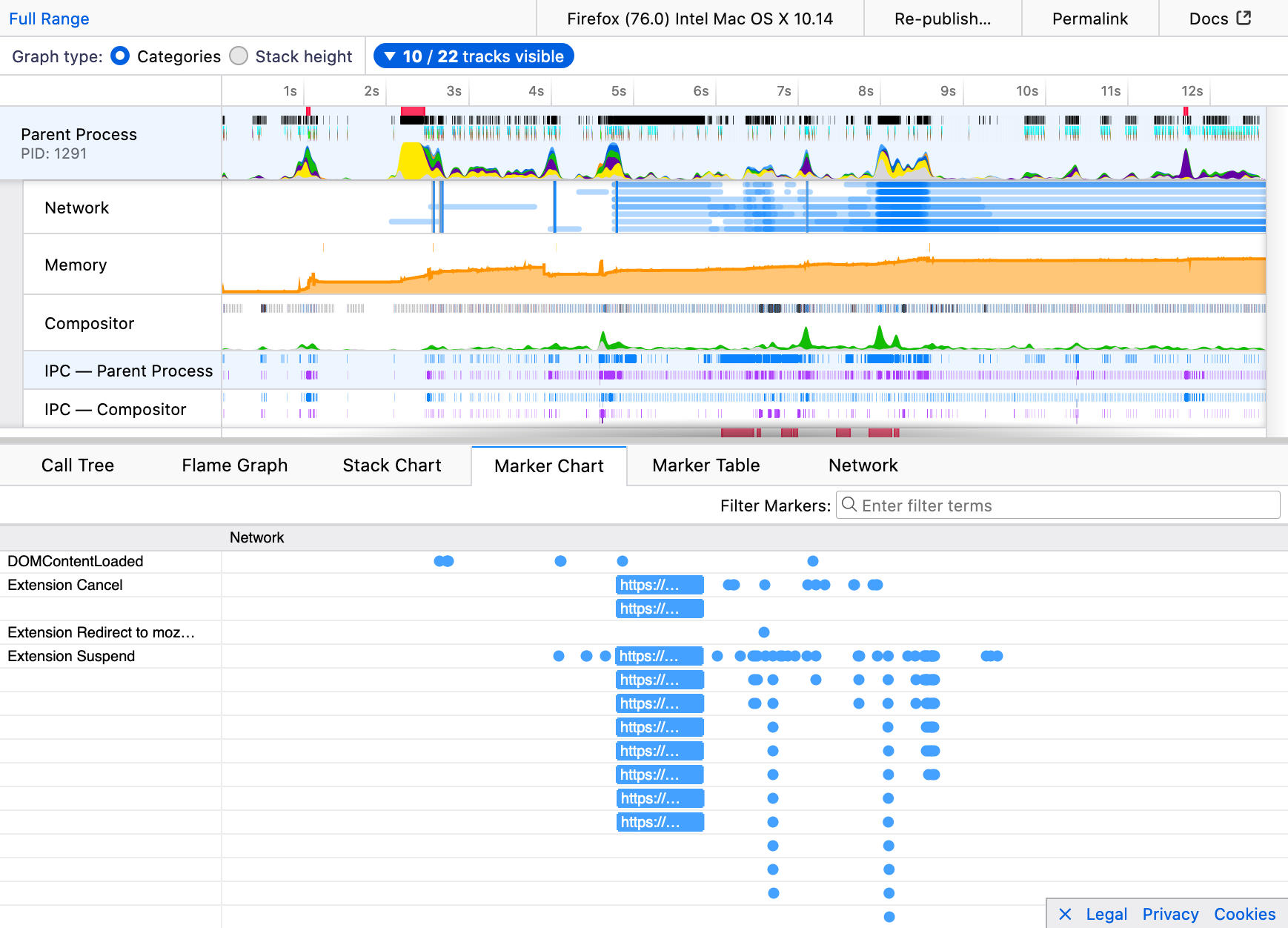 Many thanks to contributors Ajitesh, Myeongjun Go, Jayati Shrivastava, Andrew Swan and the team at Mozilla for not only working on the visible new features but also maintaining the groundwork that keeps extensions running.
The post Extensions in Firefox 76 appeared first on Mozilla Add-ons Blog.
https://blog.mozilla.org/addons/2020/04/30/extension-in-firefox-76/
TL;DR, An Introduction
Fuzzing, or fuzz testing, is an automated approach for testing the safety and stability of software. It’s typically performed by supplying specially crafted inputs to identify unexpected or even dangerous behavior. If you’re unfamiliar with the basics of fuzzing, you can find lots more information in the Firefox Fuzzing Docs and the Fuzzing Book.
For the past 3 years, the Firefox fuzzing team has been developing a new fuzzer to help identify security vulnerabilities in the implementation of WebAPIs in Firefox. This fuzzer, which we’re calling Domino, leverages the WebAPIs’ own WebIDL definitions as a fuzzing grammar. Our approach has led to the identification of over 850 bugs. 116 of those bugs have received a security rating. In this post, I’d like to discuss some of Domino’s key features and how they differ from our previous WebAPI fuzzing efforts.
Fuzzing Basics
Before we begin discussing what Domino is and how it works, we first need to discuss the types of fuzzing techniques available to us today.
Types of Fuzzers
Fuzzers are typically classified as either blackbox, greybox, or whitebox. These designations are based upon the level of communication between the fuzzer and the target application. The two most common types are blackbox and greybox fuzzers.
Blackbox Fuzzing
Blackbox fuzzing submits data to the target application with essentially no knowledge of how that data affects the target. Because of this restriction, the effectiveness of a blackbox fuzzer is based entirely on the fitness of the generated data.
Blackbox fuzzing is often used for large, non-deterministic applications or those which process highly structured data.
Whitebox Fuzzing
Whitebox fuzzing enables direct correlation between the fuzzer and the target application in order to generate data that satisfies the application’s “requirements”. This typically involves the use of theorem solvers to evaluate branch conditions and generate data to intentionally exercise all branches. In doing so, the fuzzer can test hard-to-reach branches that might never be tested by blackbox or greybox fuzzers.
The downside of this type of fuzzing—it is computationally expensive. Large applications with complex branching may require a significant amount of time to solve. This greatly reduces the number of inputs tested. Outside of academic exercises, whitebox fuzzing is often not feasible for real-world applications.
Greybox Fuzzing
Greybox fuzzing has emerged as one of the most popular and effective fuzzing techniques. These fuzzers implement a feedback mechanism, typically via instrumentation, to inform decisions on what data to generate in the future. Inputs which appear to cover more code are reused as the basis for later tests. Inputs which decrease coverage are discarded.
This method is incredibly popular due to its speed and efficiency in reaching obscure code paths. However, not all targets are good candidates for greybox fuzzing. Greybox fuzzing typically works best with smaller, deterministic targets that can process a large number of inputs quickly (several hundred a second).
We often use these types of fuzzers to test individual components within Firefox such as media parsers. If you’re interested in learning how to leverage these fuzzers to test your code, take a look at the Fuzzing Interface documentation here.
Unfortunately, we are somewhat limited in the techniques that we can use when fuzzing WebAPIs. The browser by nature is non-deterministic and the input is highly structured. Additionally, the process of starting the browser, executing tests, and monitoring for faults is slow (several seconds to minutes per test). With these limitations, blackbox fuzzing is the most appropriate solution.
However, since the inputs expected by these APIs are highly structured, we need to ensure that our fuzzer generates data that is considered valid.
Grammar-Based Fuzzing
Grammar-based fuzzing is a fuzzing technique that uses a formal language grammar to define the structure of the data to be generated. These grammars are typically represented in plain-text and
As tradition dictates, I do a “the state of curl” presentation every year. This year, as there’s no physical curl up conference happening, I have recorded the full presentation on my own in my solitude in my home.
This is an in-depth look into the curl project and where it’s at right now. The presentation is 1 hour 53 minutes.
The slides: https://www.slideshare.net/bagder/the-state-of-curl-2020

https://daniel.haxx.se/blog/2020/04/30/the-state-of-curl-2020/
Digital contact tracing apps have emerged in recent weeks as one potential tool in a suite of solutions that would allow countries around the world to respond to the COVID-19 pandemic and get people back to their daily lives. These apps raise a number of challenging privacy issues and have been subject to extensive technical analysis and argument. One important question that policymakers are grappling with is whether they should pursue more centralized designs that share contact information with a central authority, or decentralized ones that leave contact information on people’s devices and out of the reach of governments and companies.
Firefox Chief Technology Officer Eric Rescorla has an excellent overview of these competing design approaches, with their different potential risks and benefits. One critical insight he provides is that there is no Silicon Valley wizardry that will easily solve our problems. These different designs present us with different trade-offs and policy choices.
In this post, we want to provide a direct answer to one policy choice: Our view is that centralized designs present serious risk and should be disfavored. While decentralized systems present concerns of their own, their privacy properties are generally superior in situations where governments have chosen to deploy contact tracing apps.
Should your government have the social graph?
Centralized designs share data directly with public health professionals that may aid in their manual contact tracing efforts, providing a tool to identify and reach out to other potentially infected people. That is a key benefit identified by the designers of the BlueTrace system in use in Singapore. The biggest problem with this approach, as described recently by a number of leading technologists, is that it would expand government access to the “social graph” — data about you, your relationships, and your links with others.
The scope of this risk will depend on the details of specific proposals. Does the data include your location? Is it linked to phone numbers or emails? Is app usage voluntary or compulsory? A number of proposals only share your contact list when you are infected, and, if the infection rate is low, then access to the social graph will be more limited. But regardless of the particulars, we know this social graph data is near impossible to truly anonymize. It will provide information about you that is highly sensitive, and can easily be abused for a host of unintended purposes.
Social graph data could be used to see the contacts of political dissidents, for criminal investigations, or for immigration enforcement, to give just a few examples. This isn’t just about risk to personal privacy. Governments, in partnership with the private sector, could use this data to target or discriminate against particular segments of society.
Recently, many have pointed to well-established privacy principles as important tools that can mitigate privacy risk created by contact tracing apps. These include data minimization, rules governing data access and use, strict retention limits, and sunsetting of technical solutions when they are no longer needed. These are principles that Mozilla has long advocated for, and they may have important applications to contact tracing systems.
These protections are not strong enough, however, to prevent the potential abuse of data in centralized systems. Even minimized data is inherently sensitive because the government needs to know who tested positive, and who their contacts are. Recent history has shown that this kind of data, once collected, creates a tempting target for new uses — and for attackers if not kept securely. Neither governments nor the private sector have shown themselves up to the task of policing these new uses. The incentives to put data to unintended uses are simply too strong, so privacy principles don’t provide enough protection.
Moreover, as Mozilla Executive Director Mark Surman observes, the norms we establish today will live far beyond any particular app. This is an opportunity to establish the precedent that privacy is not optional. Centralized contact tracing apps threaten to do the opposite,