Floodgap is down due to an upstream circuit cut and TenFourFox users may get timeouts when checking versions. All Floodgap services including web, gopher and E-mail are affected. The telco is on it, but I have no ETA for repair. If the downtime will be prolonged, I may host some services temporarily on a VPS.
http://tenfourfox.blogspot.com/2021/08/unplanned-floodgap-downtime.html
Please note some of the information provided in this report may be subject to change as we are sometimes sharing information about projects that are still in early stages and are not final yet.
Welcome!
New localizers
- Sirus of Nias (nia)
Are you a locale leader and want us to include new members in our upcoming reports? Contact us!
New community/locales added
New content and projects
What’s new or coming up in Firefox desktop
In terms of new content, it’s been a pretty calm period for Firefox after the MR1 release, with less than 50 strings added over the last 6 weeks. We expect that to change in the coming weeks, starting with a few clean-ups that didn’t land in time for MR1, and brand new features.
These are the relevant deadlines for the next month:
- Firefox 91 shipped last Tuesday (August 10), and we welcomed a new locale with it: Scots.
- The deadline to localize Firefox 92 is August 29 (release will happen on September 7), while Firefox 93 just started its life cycle in Nightly.
A reminder that Firefox 91 is also the new ESR, and will be supported for about 1 year. We plan to update localizations for 91 ESR in a few weeks, to improve coverage and pick up some bug fixes.
What’s new or coming up in mobile
We have exciting news coming up on the mobile front. In case you haven’t heard yet, we just brought back Focus for iOS and Focus for Android to Pontoon for localization. We are eager to bring back these products to a global audience with updated translations!
Both Focus for Android and Focus for iOS should have all strings in by August 17th. L10n deadline for both localizing and testing your work is September 6th. One difference you will notice is that iOS strings will be trickling in regularly – vs what we usually do for Firefox for iOS where you get all strings in one bulk.
Concerning Firefox for Android and Firefox for iOS: both projects are going to start landing strings for the next release, which promises to be a very interesting one. More info to come soon, please stay tuned on Matrix and Discourse for this!
What’s new or coming up in web projects
mozilla.org
A set of VPN pages were landed recently. As the Mozilla VPN product expands to more markets, it would be great to get these pages localized. Do plan to take some time and work as a team to complete 4000+ words of new content. The pages contain some basic information on what distinguishes Mozilla’s VPN from others on the market. You will find it useful to spread the words and promote the product in your language.
There will be a couple of new projects on the horizon. Announcements will be made through Discourse and Matrix.
Newly published localizer facing documentation
- Mobile documentation has been updated.
Events
Want to showcase an event coming up that your community is participating in? Reach out to any l10n-driver and we’ll include that (see links to emails at the bottom of this report)
Opportunities
International Translation Day
Call for community translator or manager as a panelist to represent the Mozilla l10n community:
As part of Translation Day 2021, the WordPress Polyglots team is organizing a handful of global events (in English) from Sept. 17 – 30, 2021. The planning team is still deciding on the format and dates for these events, but they will be virtual/online and accessible to anyone who’s interested. One of the events the team is putting together is a panel discussion between contributors from multiple open source or community-led translation projects. If you or anyone in your community would be interested in talking about your experience as a community translator and how translations work in your community or project, you would be a great fit!
Check out what the organizer and the communities were able to accomplish last year and what they are planning for
Today is my final day as an employee of Mozilla Corporation.
My first patch landed in Firefox 19, and my final patch as an employee has landed in Nightly for Firefox 93.
I’ll be moving on to something new in a few weeks’ time, but for now, I’d just like to say this:
My time at Mozilla has made me into a better software developer, a better leader, and more importantly, a better person.
I’d like to thank all the Mozillians whom I have interacted with over the years for their contributions to making that happen.
I will continue to update this blog with catch-up posts describing my Mozilla work, though I am unsure what content I will be able to contribute beyond that. Time will tell!
Until next time…
The newest stable release of Thunderbird, version 91, is available for download on our website now. Existing Thunderbird users will be updated to the newest version in the coming weeks.
Thunderbird 91 is our biggest release in years with a ton of new features, bug fixes and polish across the app. This past year had its challenges for the Thunderbird team, our community and our users. But in the midst of a global pandemic, the important role that email plays in our lives became even more obvious. Our team was blown away by the support we received in terms of donations and open source contributions and we extend a big thanks to everyone who helped out Thunderbird in the lead up to this release.
There are a ton of changes in the new Thunderbird, you can see them all in the release notes. In this post we’ll focus on the most notable and visible ones.
Multi-Process Support (Faster Thunderbird)
Thunderbird has gotten faster with multi-process support. The new multi-process Thunderbird takes better advantage of the processor in your computer by splitting up the application into multiple smaller processes instead of running as one large one. That’s a lot of geekspeak to say that Thunderbird 91 will feel like it got a speed boost.
New Account Setup
One of the most noticeable changes for Thunderbird 91 is the new account setup wizard. The new wizard not only features a better look, but does auto-discovery of calendars and address books and allows most users to set them up with just a click. After setting up an account, the wizard also points users at additional (optional) things to do – such as adding a signature or setting up end-to-end encryption.

The New Account Setup Wizard
Attachments Pane + Drag-and-Drop Overlay
The attachments pane been moved to the bottom of the compose window for better visibility of filenames as well as being able to see many at once. We’ve also added an overlay that appears when you drag-and-drop a file into the compose window asking how you would like to handle the file in that email (such as putting a picture in-line in your message or simply attaching it to the email).

Compose window with bottom attachment pane.

The new attachment drag-and-drop overlay.
PDF Viewer
Thunderbird now has a built-in PDF viewer, which means you can read and even do some editing on PDFs sent to you as attachments. You can do all this without ever leaving Thunderbird, allowing you to return to your inbox without missing a beat.

The PDF Viewer in Thunderbird 91
UI Density Control
Depending on how you use Thunderbird and whether you are using it on a large desktop monitor or a small laptop touchscreen, you may want the icons and text of the interface to be larger and more spread out or very compact. In Thunderbird 91 under the View -> Density in the menu, you can select the UI density for the entire application. Three options are available: compact – which puts everything closer together, normal – the experience you are accustomed to in Thunderbird, and touch – that makes icons bigger and separates elements.
Play around with this new level of control and find what works best for you!
Firefox 91 is out. Yes, it further improves cookie isolation and cleanup, has faster paint scheduling (noticeably, in some cases), and new JavaScript and DOM support. But for my money, the biggest news is the Scots support: aye, laddie, noo ye kin stravaig the wab lik Robert Burns did. We've waited tae lang fur this.
Anyway, Firefox 91 builds oot o the kist oa, er, Firefox 91 builds out of the box on OpenPOWER using the same .mozconfigs for Firefox 90; I made a wee change to the PGO-LTO patch since I messed up the diff the last time and didn't notice. The crypto issues in Fx90 are fixed in this release.
Meanwhile, the OpenPOWER JIT is now passing all but a handful of the basic tests in Baseline Interpreter mode, and some amount of Wasm, though this isn't nearly as far along. Ye kin hulp.
https://www.talospace.com/2021/08/firefox-91-on-power-fur-fowk.html
Hopping on Firefox 91
August is already here, which means so is Firefox 91! This release has a Scottish locale added and, if the ‘increased contrast’ setting is checked, auto enables High Contrast mode on macOS.
Private browsing windows have an HTTPS-first policy and will automatically attempt to make all connections to websites secure. Connections will fall back to HTTP if the website does not support HTTPS.
For developers Firefox 91 supports the Visual Viewport API and adds some more additions to the Intl.DateTimeFormat object.
This blog post provides merely a set of highlights; for all the details, check out the following:
Visual Viewport API
Implemented back in Firefox 63, the Visual Viewport API was behind the pref dom.visualviewport.enabled in the desktop release. It is now no longer behind that pref and enabled by default, meaning the API is now supported in all major browsers.
There are two viewports on the mobile web, the layout viewport and the visual viewport. The layout viewport covers all the elements on a page and the visual viewport represents what is actually visible on screen. If a keyboard appears on screen, the visual viewport dimensions will shrink, but the layout viewport will remain the same.
This API gives you information about the size, offset and scale of the visual viewport and allows you to listen for resize and scroll events. You access it via the visualViewport property of the window interface.
In this simple example the resize event is listened for and when a user zooms in, hides an element in the layout, so as not to clutter the interface.
const elToHide = document.getElementById('to-hide');

var viewport = window.visualViewport;

function resizeHandler() {

   if (viewport.scale > 1.3)
     elToHide.style.display = "none";
   else
     elToHide.style.display = "block";
}

window.visualViewport.addEventListener('resize', resizeHandler);
New formats for Intl.DateTimeFormat
A couple of updates to the Intl.DateTimeFormat object include new timeZoneName options for formatting how a timezone is displayed. These include the localized GMT formats shortOffset and longOffset, and generic non-location formats shortGeneric and longGeneric. The below code shows all the different options for the timeZoneName and their format.
var date = Date.UTC(2021, 11, 17, 3, 0, 42);
const timezoneNames = ['short', 'long', 'shortOffset', 'longOffset', 'shortGeneric', 'longGeneric']

for (const zoneName of timezoneNames) {

  // Do something with currentValue
  var formatter = new Intl.DateTimeFormat('en-US', {
    timeZone: 'America/Los_Angeles',
    timeZoneName: zoneName,
  });

console.log(zoneName + ": " + formatter.format(date) );

}

// expected output:
// > "short: 12/16/2021, PST"
// > "long: 12/16/2021, Pacific Standard Time"
// > "shortOffset: 12/16/2021, GMT-8"
// > "longOffset: 12/16/2021, GMT-08:00"
// > "shortGeneric: 12/16/2021, PT"
// > "longGeneric: 12/16/2021, Pacific Time"
You can now format date ranges as well with the new formatRange() and formatRangeToParts() methods. The former returns a localized and formatted string for the range between two Date objects:
const options = { weekday: 'long', year: 'numeric', month: 'long', day: 'numeric' };

const startDate = new We are pleased to announce a new, major privacy enhancement to Firefox’s cookie handling that lets you fully erase your browser history for any website. Today’s new version of Firefox Strict Mode lets you easily delete all cookies and supercookies that were stored on your computer by a website or by any trackers embedded in it.
Building on Total Cookie Protection, Firefox 91’s new approach to deleting cookies prevents hidden privacy violations and makes it easy for you to see which websites are storing information on your computer.
When you decide to tell Firefox to forget about a website, Firefox will automatically throw away all cookies, supercookies and other data stored in that website’s “cookie jar”. This “Enhanced Cookie Clearing” makes it easy to delete all traces of a website in your browser without the possibility of sneaky third-party cookies sticking around.
What data websites are storing in your browser
Browsing the web leaves data behind in your browser. A site may set cookies to keep you logged in, or store preferences in your browser. There are also less obvious kinds of site data, such as caches that improve performance, or offline data which allows web applications to work without an internet connection. Firefox itself also stores data safely on your computer about sites you have visited, including your browsing history or site-specific settings and permissions.
Firefox allows you to clear all cookies and other site data for individual websites. Data clearing can be used to hide your identity from a site by deleting all data that is accessible to the site. In addition, it can be used to wipe any trace of having visited the site from your browsing history.
Why clearing this data can be difficult
To make matters more complicated, the websites that you visit can embed content, such as images, videos and scripts, from other websites. This “cross-site” content can also read and write cookies and other site data.
Let’s say you have visited facebook.com, comfypants.com and mealkit.com. All of these sites store data in Firefox and leave traces on your computer. This data includes typical storage like cookies and localStorage, but also site settings and cached data, such as the HTTP cache. Additionally, comfypants.com and mealkit.com embed a like button from facebook.com.

Firefox Strict Mode includes Total Cookie Protection, where the cookies and data stored by each website on your computer are confined to a separate cookie jar. In Firefox 91, Enhanced Cookie Clearing lets you delete all the cookies and data for any website by emptying that cookie jar. Illustration: Megan Newell and Michael Ham.
Embedded third-party resources complicate data clearing. Before Enhanced Cookie Clearing, Firefox cleared data only for the domain that was specified by the user. That meant that if you were to clear storage for comfypants.com, Firefox deleted the storage of comfypants.com and left the storage of any sites embedded on it (facebook.com) behind. Keeping the embedded storage of facebook.com meant that it could identify and track you again the next time you visited comfypants.com.
How Enhanced Cookie Clearing solves this problem
Total Cookie Protection, built into Firefox, makes sure that facebook.com can’t use cookies to track you across websites. It does this by partitioning data storage into one cookie jar per website, rather than using one big jar for all of facebook.com’s storage. With Enhanced Cookie Clearing, if you clear site data for comfypants.com, the entire cookie jar is emptied, including any data facebook.com set while embedded in comfypants.com.
Now, if you click on Settings > Privacy and Security > Cookies and Site Data > Manage Data, Firefox no longer shows individual domains that store data. Instead, Firefox lists a cookie jar for each website you have visited. That means you can easily recognize and remove all data a website has stored on your computer, without having to worry about leftover data from third parties embedded in that website. Here is how it looks:
We are excited to announce that, starting in Firefox 91, Private Browsing Windows will favor secure connections to the web by default. For every website you visit, Firefox will automatically establish a secure, encrypted connection over HTTPS whenever possible.
What is the difference between HTTP and HTTPS?
The Hypertext Transfer Protocol (HTTP) is a key protocol through which web browsers and websites communicate. However, data transferred by the traditional HTTP protocol is unprotected and transferred in clear text, such that attackers are able to view, steal, or even tamper with the transmitted data. The introduction of HTTP over TLS (HTTPS) fixed this privacy and security shortcoming by allowing the creation of secure, encrypted connections between your browser and the websites that support it.
In the early days of the web, the use of HTTP was dominant. But, since the introduction of its secure successor HTTPS, and further with the availability of free, simple website certificates, the large majority of websites now support HTTPS. While there remain many websites that don’t use HTTPS by default, a large fraction of those sites do support the optional use of HTTPS. In such cases, Firefox Private Browsing Windows now automatically opt into HTTPS for the best available security and privacy.
How HTTPS by Default works
Firefox’s new HTTPS by Default policy in Private Browsing Windows represents a major improvement in the way the browser handles insecure web page addresses. As illustrated in the Figure below, whenever you enter an insecure (HTTP) URL in Firefox’s address bar, or you click on an insecure link on a web page, Firefox will now first try to establish a secure, encrypted HTTPS connection to the website. In the cases where the website does not support HTTPS, Firefox will automatically fall back and establish a connection using the legacy HTTP protocol instead:

If you enter an insecure URL in the Firefox address bar, or if you click an insecure link on a web page, Firefox Private Browsing Windows checks if the destination website supports HTTPS. If YES: Firefox upgrades the connection and establishes a secure, encrypted HTTPS connection. If NO: Firefox falls back to using an insecure HTTP connection.
(Note that this new HTTPS by Default policy in Firefox Private Browsing Windows is not directly applied to the loading of in-page components like images, styles, or scripts in the website you are visiting; it only ensures that the page itself is loaded securely if possible. However, loading a page over HTTPS will, in the majority of cases, also cause those in-page components to load over HTTPS.)
We expect that HTTPS by Default will expand beyond Private Windows in the coming months. Stay tuned for more updates!
It’s Automatic!
As a Firefox user, you can benefit from the additionally provided security mechanism as soon as your Firefox auto-updates to version 91 and you start browsing in a Private Browsing Window. If you aren’t a Firefox user yet, you can download the latest version here to start benefiting from all the ways that Firefox works to protect you when browsing the internet.
Thank you
We are thankful for the support of our colleagues at Mozilla including Neha Kochar, Andrew Overholt, Joe Walker, Selena Deckelmann, Mikal Lewis, Gijs Kruitbosch, Andrew Halberstadt and everyone who is passionate about building the web we want: free, independent and secure!
The post Firefox 91 introduces HTTPS by Default in Private Browsing appeared first on Mozilla Security Blog.
You’re probably a digital designer or work in some publishing capacity (otherwise it would be pretty strange to have a fascination with fonts); and you appreciate the aesthetic power of exceptional typography.
So what do you do when you encounter a wonderful font in the wild that you might want to use in your own design work? Well, if you have a font finder browser extension you can learn all about it within a couple mouse clicks. Here are some of our favorite font discovery extensions…
Font Finder (revived)
Striking a balance between simple functionality and nuanced features, Font Finder (revived) delivers about everything you’d want in a font inspector.
The extension provides three main functions:
- Typography analysis. Font Finder reveals all relevant typographical characteristics like color, spacing, alignment, and of course font name.
- Copy information. Any portion of the font analysis can be copied to a clipboard so you can easily paste it anywhere.
- Inline editing. All font characteristic (e.g. color, size, type) on an active element can be changed right there on the page.
WhatFont
If you just want to know the name of any font you find and not much else, WhatFont is the ideal tool.
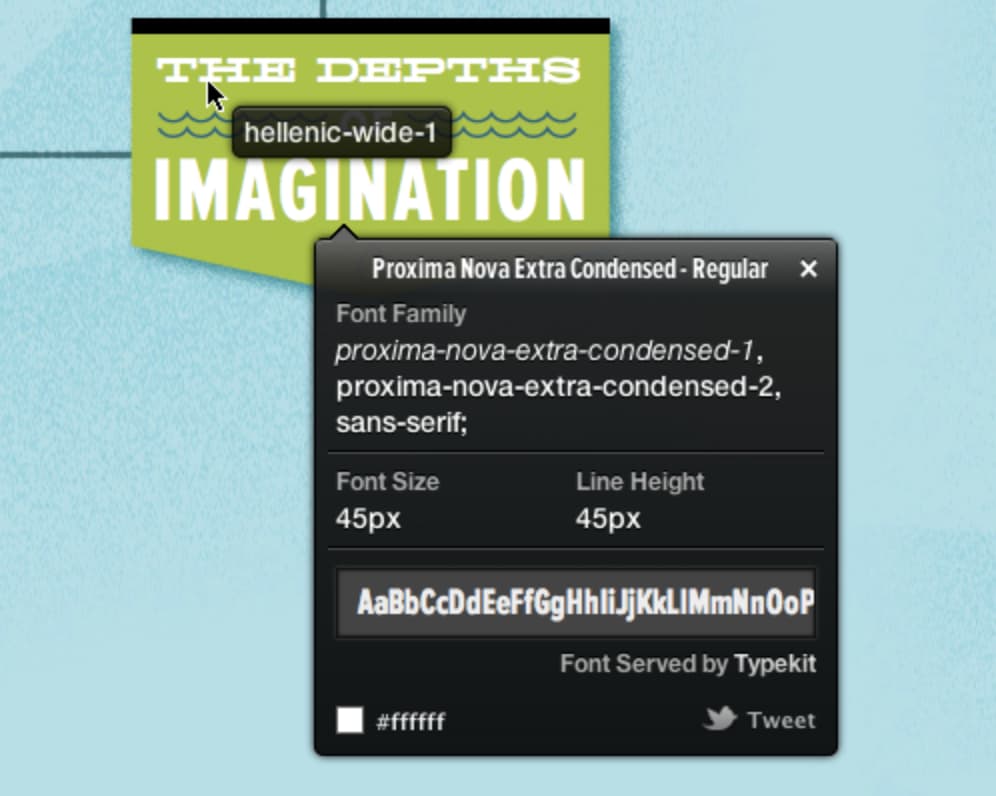
See an interesting font? Just click the WhatFont toolbar button and mouseover any text on the page to see its font. If you want a bit more info, click the text and a pop-up will show font size, color, and family.
FontsNinja
With a few distinct features, FontsNinja is great if you’re doing a lot of font finding and organization.
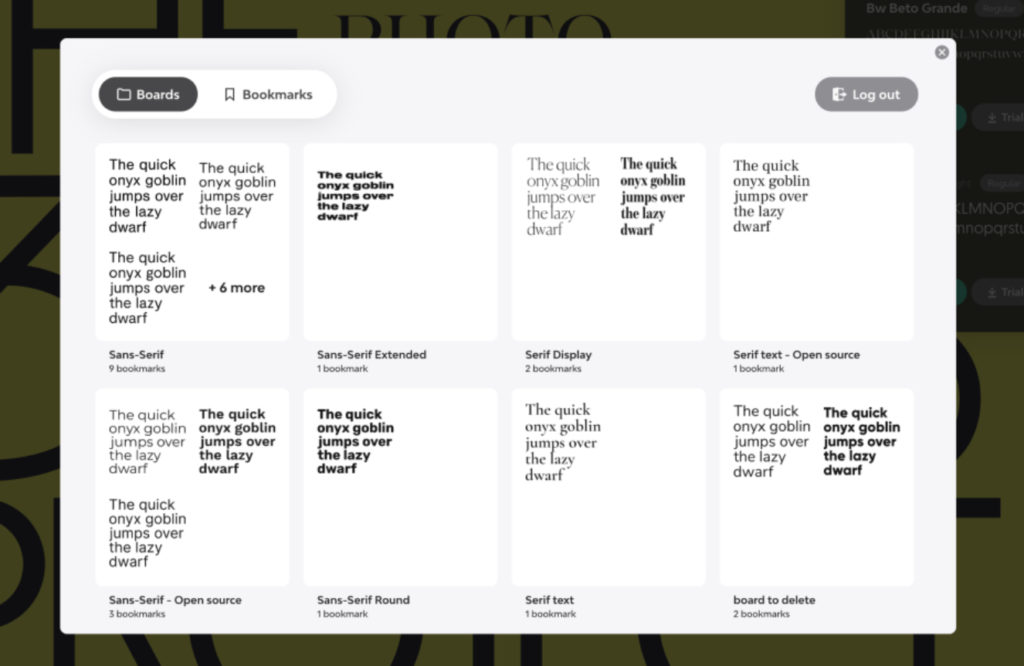
The extension really shines when you encounter a page loaded with a bunch of different fonts you want to learn about. Click the toolbar button and Fonts Ninja will analyze the entire page and display info for every single font found. Then, when you mouseover text on the page you’ll see which font it is and its CSS properties.
We hope these extensions help in your search for amazing fonts! Explore more visual customization extensions on addons.mozilla.org.
https://addons.mozilla.org/blog/find-that-font-i-must-have-that-font/
TenFourFox Feature Parity Release 32 Security Parity Release 3 "32.3" is available for testing (downloads, hashes). There are, once again, no changes to the release notes and nothing notable regarding the security patches in this release. Assuming no major problems, FPR32.3 will go live Monday evening Pacific time as usual. FPR32.4 will appear on September 7 and the final official build FPR32.5 on October 5.
http://tenfourfox.blogspot.com/2021/08/tenfourfox-fpr32-spr3-available.html
I'm going to be very tightly focused in this post, because there are tons of politics swirling around COVID-19 (and anyone who knows my actual line of work will know my opinions about it); any comments about masks, vaccines, etc. will be swiftly removed. Normally I don't discuss non-technical topics here, but this is a situation that personally affects me and this is my blog, so there. I want to talk specifically about the newly announced policy that Australians normally resident overseas will now require an exemption to leave the country.

I am an Australian-American dual citizen (via my mother, who is Australian, but is resident in the United States), and my wife of five years is Australian. She is legimately a resident of Australia because she was completing her master's degree there and had to teach in the Australian system to get an unrestricted credential. All this happened when the borders closed. Anyone normally resident in Australia must obtain an exemption to leave the country and cite good cause, except to a handful of countries like New Zealand (who only makes the perfectly reasonable requirement that its residents have a spot in quarantine for when they return).
It was already difficult to exit Australia before, which is why, for the six weeks that I've gotten to see my wife since January 2020, it was me traveling to Australia. Here again many thanks to Air New Zealand, who were very understanding on rescheduling (twice) and even let us keep our Star Alliance Gold status even though we weren't flying much, I did my two weeks of quarantine, got my two negative tests, and was released into the hinterlands of regional New South Wales to visit that side of the family. Upon return to Sydney Airport, it was a simple matter to leave the country, since it was already obvious in the immigration records that I don't normally reside in it.

Now, there is the distinct possibility that if I can land a ticket to visit my wife, and if I can get space in hotel quarantine (at A$3000, plus greatly inflated airfares), despite being fully vaccinated, I may not be able to leave. Trying to get my credentials approved in Australia has been hung up for months so I wouldn't be able to have a job there in my current employ, and with my father currently on chemo, if he were to take a turn for the worse there are plenty of horror stories of Australians being unable to see terminally ill family members due to refused exemptions (or, adding insult to injury, being approved when they actually died).
I realize as (technically) an expat there isn't much of a constituency to join, but even given we're in the middle of a pandemic this crap has to stop. Restricting entries is heavyhanded, but understandable. Reminding those exiting that they're responsible for hotel or camp quarantine upon return is onerous (and should be reexamined at minimum for those who have indeed gotten the jab), but defensible. Preventing Australian citizens from leaving altogether, especially those with family, is unconscionable and the arbitrary nature of the exemption process is a foul joke.
If Premier Palaszczuk can strike a pose at the International Olympic Committee and Prime Minster Morrison can go gallivanting with randos in English pubs, those of us who are vaccinated and following the law should have that same freedom. I should be able to visit my wife and she should be able to visit me.
Every summer I say I’m going to go watch the meteor showers, but life always seems to get in the way. This year, however, I scored a last minute midweek campsite on the Washington coast so I can take in the Perseid meteor shower away from city lights. While the Perseids are ongoing from mid-July to the end of August, they are expected to peak on the night of August 11 all around the world. This year’s Perseid event is predicted to be extra special due to the waxing crescent moon, which is to say, the moon will be a mere sliver in the sky. Less moonlight means the sky is darker, which means meteor showers appear brighter.
Interested in learning more? Here are some internet resources for newbie astronomers out there:
- Getting away from human-made light is essential to a great stargazing experience. This light pollution map can help you find a nearby spot with maximum darkness. Plus, there’s a layer for cloud coverage and aurora forecasts.
- The Perseid meteor shower may be one of the largest, but they’re not the only ones. Check out these detailed tips for meteor shower viewing all year around from EarthSky.
- The American Meteor Society has just about everything you’ve ever wanted to know about meteors in the U.S., including a volunteer reporting system for fireballs, which are extra large, extra bright meteors.
- If you take a photos, or it didn’t happen approach, these tips for photographing meteor showers from NASA are just what you need.
- The New York Times has a free space-related events calendar you subscribe to for staying updated about major events like meteor showers, rocket launches, scientific missions and more.
- Want to know what’s happening in your night sky on any given day? This interactive sky chart from Sky & Telescope magazine lets you add your location and it gives you a personalized sky chart. Plus, they have tons of great tips for getting started as a backyard astronomer.

Our mysterious, magnificent Moon
Get to know our nearest celestial neighbor a little bit better with this lunar reading listFirefox themes for daytime stargazing
If you work at a computer all day, a fun thing about Firefox is that you can style your browser with a colorful theme. Keep the Perseid inspiration going all day at the keyboard with a free space-themed skin for Firefox. Browser themes are easy to install and change any time you’re in the mood.


(“This Week in Glean” is a series of blog posts that the Glean Team at Mozilla is using to try to communicate better about our work. They could be release notes, documentation, hopes, dreams, or whatever: so long as it is inspired by Glean.) All “This Week in Glean” blog posts are listed in the TWiG index (and on the Mozilla Data blog).
As part of the DUET (Data User Engagement Team) working group, some of my day-to-day work involves building dashboards for visualizing user engagement aspects of the Firefox product. At Mozilla, we recently decided to use Looker to create dashboards and interactive views on our datasets. It’s a new system to learn but provides a flexible model for exploring data. In this post, I’ll walk through the development of several mobile acquisition funnels built in Looker. The most familiar form of engagement modeling is probably through funnel analysis — measuring engagement by capturing a cohort of users as they flow through various acquisition channels into the product. Typically, you’d visualize the flow as a Sankey or funnel plot, counting retained users at every step. The chart can help build intuition about bottlenecks or the performance of campaigns.
Mozilla owns a few mobile products; there is Firefox for Android, Firefox for iOS, and then Firefox Focus on both operating systems (also known as Klar in certain regions). We use Glean to instrument these products. The foremost benefit of Glean is that it encapsulates many best practices from years of instrumenting browsers; as such, all of the tables that capture anonymized behavior activity are consistent across the products. One valuable idea from this setup is that writing a query for a single product should allow it to extend to others without too much extra work. In addition, we pull in data from both the Google Play Store and Apple App Store to analyze the acquisition numbers. Looker allows us to take advantage of similar schemas with the ability to templatize queries.
ETL Pipeline
The pipeline brings all of the data into BigQuery so it can be referenced in a derived table within Looker.

- App Store data is exported into a table in BigQuery.
- Glean data flows into the org_mozilla_firefox.baseline table.
- A derived org_mozilla_firefox.baseline_clients_first_seen table is created from the baseline table. An org_mozilla_firefox.baseline_clients_daily table is created that references the first seen table.
- A Looker explore references the baseline_clients_clients_daily table in a parameterized SQL query, alongside data from the Google Play Store.
- A dashboard references the explore to communicate important statistics at first glance, alongside configurable parameters.
Peculiarities of Data Sources
Before jumping off into implementing a dashboard, it’s essential to discuss the quality of the data sources. For one, Mozilla and the app stores count users differently, which leads to subtle inconsistencies.
For example, there is no way for Mozilla to tie a Glean client back to the Play Store installation event in the Play Store. Each Glean client is assigned a new identifier for each device, whereas the Play Store only counts new installs by account (which may have several devices). We can’t track a single user across this boundary, and instead have to rely on the relative proportions over time. There are even more complications when trying to compare numbers between Android and iOS. Whereas the Play Store may show the number of accounts that have visited a page, the Apple App Store shows the total number of page visits instead. Apple also only reports users that have opted into data collection, which under-represents the total number of users.
These differences can be confusing to people who are not intimately familiar with the peculiarities of these different systems. Therefore, an essential part of putting together this view is documenting and educating the dashboard users to understand the data better.
Building a Looker Dashboard
There are three components to building a Looker dashboard: a view, an explore, and a dashboard. These files are written in a markup called LookML. In this project, we consider three files:
- mobile_android_country.view.lkml
- Contains the templated SQL query for preprocessing the data, parameters for the query, and a specification of available metrics and dimensions.
- mobile_android_country.explore.lkml
- Contains joins across views, and any aggregate tables suggested by
Given the broad visibility of Recommended extensions across addons.mozilla.org (AMO), the Firefox Add-ons Manager, and other places we promote extensions, we believe our curatorial process should include a wide range of perspectives from our global community of contributors. That’s why we have the Recommended Extensions Advisory Board—an ongoing project that involves a rotating group of contributors to help identify and evaluate new extension candidates for the program.
Our most recent community board just completed their six-month project and I’d like to take a moment to thank Sylvain Giroux, Jyotsna Gupta, Chandan Baba, Juraj M"asiar, and Pranjal Vyas for sharing their time, passion, and knowledge of extensions. Their insights helped usher a wave of new extensions into the Recommended program, including really compelling content like I Don’t Care About Cookies (A+ cookie manager), Tab Stash (highly original take on tab management), Custom Scrollbars (neon colored scrollbar? Yes please!), PocketTube (great way to organize a bunch of YouTube subscriptions), and many more.
On behalf of the entire Add-ons staff, thank you and all!
Now we’ll turn our attention to forming the next community board for another six-month project dedicated to evaluating new Recommended candidates. If you have a passion for browser extensions and you think you could make an impact contributing your insights to our curatorial process, we’d love to hear from you by Monday, 30 August. Just drop us an email at amo-featured [at] mozilla.org along with a brief note letting us know a bit about your experience with extensions—whether as a developer, user, or both—and why you’d like to participate on the next Recommended Extensions Community Advisory Board.
The post Thank you, Recommended Extensions Community Board! appeared first on Mozilla Add-ons Community Blog.
https://blog.mozilla.org/addons/2021/08/05/thank-you-recommended-extensions-community-board/
In the last six months the Firefox performance team has implemented changes to improve startup, responsiveness, security (Fission), and web standards.
Startup and perceived startup
Doug Thayer and Emma Malysz implemented work to improve the perceived startup of Firefox on Windows using a concept called the skeleton UI. Users on Windows may click the Firefox icon and not get visual feedback in the timeline they expect that Firefox is starting. So they click the icon again. And again. And then their screen looks like this.
The reason that startup takes a long time is that many things need to happen before Firefox starts.
As part of startup, we need to start the JS engine, load the profile to get the size and position of the window. We also need to load a large library called XUL.dll which takes a lot of time to read from disk, especially if your computer is slow.
So what changes did the skeleton UI implement? Basically after the icon is clicked, we immediately show a window to indicate that Firefox is starting.
The final version of the skeleton UI looks at the user’s past sessions and creates a window with the theme, window dimensions, toolbar content and positions. You can see what it looks like in this video where the right hand side starts up with the skeleton UI in place. These changes are now available on Firefox 92 beta and riding the trails to release!
In other impactful work to address startup, last summer, Keefer Rourke, an intern on the performance team wrote a simplified API for file IO called IOUtils for use with privileged JavaScript. Emma Malysz and Barret Rennie, along with contributors migrated the existing startup code to IOUtils to improve startup performance.
Responsiveness
Previously, when a Firefox user encountered a page that had a script that ran over a certain timing threshold, you would see a warning message that looked as follows:
For many people, this warning showed up too often, the cause was unclear and the options or next steps were confusing.
Doug Thayer and Emma Malysz embarked on work in early 2021 to reduce the proportion of users who experience the slow script warning. The solution that was implemented changed the user experience so the warning would only show if a user interacted with a hung page. They also added code to blame the page that’s causing the hang and remove the confusing “wait button”.
The result is a 50% reduction in slow script notification submissions!
Vsync
Sean Feng implemented changes to make user interaction more strictly aligned with when the next frame is going to be presented on the screen. This makes Firefox feel more responsive by making sure a Frame always contains the result of all pending user interactions. On mobile Sean also implemented changes for better responsiveness on mobile devices. Sean landed code to allow the coalescing of more touchmove events to generate the events more efficiently.
The impact of Sean’s work plus