Helping kids with school work can be challenging in the best of times (“new” math anyone?) let alone during a worldwide pandemic. These Firefox features can help make managing school … Read more
The post Firefox features for remote school (that can also be used for just about anything) appeared first on The Firefox Frontier.
https://blog.mozilla.org/firefox/firefox-features-remote-school/
Please note some of the information provided in this report may be subject to change as we are sometimes sharing information about projects that are still in early stages and are not final yet.
Welcome!
New localizer
- Darli of Luganda
Are you a locale leader and want us to include new members in our upcoming reports? Contact us!
New community/locales added
- Armenian Western (hyw)
New content and projects
What’s new or coming up in Firefox desktop
Upcoming deadlines:
- Firefox 77 is currently in beta and will be released on Jun 2. The deadline to update localization was on May 19.
- The deadline to update localizations for Firefox 78, currently in Nightly, will be Jun 16 (4 weeks after the previous deadline).
IMPORTANT: Firefox 78 is the next ESR (Extended Support Release) version. That’s a more stable version designed for enterprises, but also used in some Linux distributions, and it remains supported for about a year. Once Firefox 78 moves to release, that content will remain frozen until that version becomes unsupported (about 15 months), so it’s important to ship the best localization possible.
In Firefox 78 there’s a lot of focus on the about:protections page. Make sure to test your changes on a new profile and in different states (e.g. logged out of Firefox Account and Monitor, logged into one of them, etc.). For example, the initial description changes depending on the fact that the user has enabled Enhanced Tracking Protection (ETP) or not:
- Protections enabled: Firefox is actively protecting them, hence “Firefox protects your privacy behind the scenes while you browse”.
- Protections disabled: Firefox could protect them, but it currently isn’t. So, ““Firefox can protect your privacy behind the scenes while you browse”.
Make sure to keep these nuances in your translation.
New Locales
With Firefox 78 we added 3 new locales to Nightly, since they made good progress and are ready for initial testing:
- Central Kurdish (ckb)
- Eastern Armenian with Classic Orthography (hye)
- Mixteco Yucuhiti (meh)
All three are available for download on mozilla.org.
What’s new or coming up in mobile
- Fennec Nightly and Beta channels have been successfully migrated to Fenix! Depending on the outcome of an experiment that launched this week, we may see the release channel migration happen soon. We’ll be sending some Fenix-specific comms this week.
- The localization cycle for Firefox for iOS v26 has ended as of Monday, May 25th.
What’s new or coming up in web projects
Mozilla.org
Mozilla.org is now at its new home: it was switched from .lang to Fluent format last Friday. Changing to the new format would allow us:
- to put more natural expression power in localizers hands.
- greater flexibility for translations & making string changes.
- to make `en` as the source for localization, while en-US is a locale.
- to push localized content to production more often and automatically throughout the day.
Only a handful high priority files have been migrated to the new format, as you have seen in the project dashboard. Please dedicate some time to go over the migrated files and report any technical issues you discover. Please go over the updated How to test mozilla.org] documentation for what to focus on and how to report technical issues regarding the new file format.
The migration from the old format to the new would take some time to complete. Check the mozilla.org dashboard in Pontoon regularly for updates. In the coming weeks, there will be new pages added, including the next WNP.
Web of Things
No new feature development for the foreseeable future. However, adding new locales, bug fixes and localized content are being made to the GitHub repository on a regular basis.
What’s new or coming up in SuMo
Next week is Firefox 77 release. It presents few updates to our KB articles:
Process, strategic goals, and next steps
The programme may be new, but the process has been shaping for years: In March 2020, Mozilla officially launched a dedicated Environmental Sustainability Programme, and I am proud and excited to be stewarding our efforts.
Since we launched, the world has been held captive by the COVID-19 pandemic. People occasionally ask me, “Is this really the time to build up and invest in such a large-scale, ambitious programme?” My answer is clear: Absolutely.
A sustainable internet is built to sustain economic well-being and meaningful social connection, just as it is mindful of a healthy environment. Through this pandemic, we’re reminded how fundamental the internet is to our social connections and that it is the baseline for many of the businesses that keep our economies from collapsing entirely. The internet has a significant carbon footprint of its own — data centers, offices, hardware and more require vast amounts of energy. The climate crisis will have lasting effects on infrastructure, connectivity and human migration. These affect the core of Mozilla’s business. Resilience and mitigation are therefore critical to our operations.
In this world, and looking towards desirable futures, sustainability is a catalyst for innovation.
To embark on this journey towards environmental sustainability, we’ve set three strategic goals:
- Reduce and mitigate Mozilla’s operational impact;
- Train and develop Mozilla staff to build with sustainability in mind;
- Raise awareness for sustainability, internally and externally.
We are currently busy conducting our Greenhouse Gas (GHG) baseline emissions assessment, and we will publish the results later this year. This will only be the beginning of our sustainability work. We are already learning that transparently and openly creating, developing and assessing GHG inventories, sustainability data management platforms and environmental impact is a lot harder than it should be, given the importance of these assessments.
If Mozilla, as an international organisation, struggles with this, what must that mean for smaller non-profit organisations? That is why we plan to continuously share what we learn, how we decide, and where we see levers for change.
Four principles that guide us:
Be humble
We’re new to this journey and the larger environmental movement as well as recognising that the mitigation of our own operational impact won’t be enough to address the climate crisis. We understand what it means to fuel larger movements that create the change we want to see in the world. We are leveraging our roots and experience towards this global, systemic challenge.
Be open
We will openly share what we learn, where we make progress, and how our thinking evolves — in our culture as well as in our innovation efforts. We intend to focus our efforts and thinking on the internet’s impact. Mozilla’s business builds on and grows with the internet. We understand the tech, and we know where and how to challenge the elements that aren’t working in the public interest.
Be optimistic
We approach the future in an open-minded, creative and strategic manner. It is easy to be overwhelmed in the face of a systemic challenge like the climate crisis. We aim to empower ourselves and others to move from inertia towards action, working together to build a sustainable internet. Art, strategic foresight, and other thought-provoking engagements will help us imagine positive futures we want to create.
Be opinionated
Mozilla’s mission drives us to develop and maintain the internet as a global public resource. Today, we understand that an internet that serves the public interest must be sustainable. A sustainable internet is built to sustain economic wellbeing and meaningful social connection; it is also mindful of the environment. Starting with a shared glossary, we will finetune our language, step up, and speak out to drive change.
I look forward to embarking on this journey with all of you.
The post
I recently upgraded my aging “fast” build machine. Back when I assembled the machine, it could do a full clobber build of Firefox in about 10 minutes. That was slightly more than 10 years ago. This upgrade, and the build times I’m getting on the brand new machine (now 6 months old) and other machines led me to look at how some parameters influence build times.
Note: most of the data that follows was gathered a few weeks ago, building off Mercurial revision 70f8ce3e2d394a8c4d08725b108003844abbbff9 of mozilla-central.
Old vs. new
The old “fast” build machine had a i7-870, with 4 cores, 8 threads running at 2.93GHz, turbo at 3.6GHz, and 16GiB RAM. The new machine has a Threadripper 3970X, with 32 cores, 64 threads running at 3.7GHz, turbo at 4.5GHz (rarely reached to be honest), and 128GiB RAM (unbuffered ECC).
Let’s compare build times between them, at the same level of parallelism:

That is 63 minutes for the i7-870 vs. 26 for the Threadripper, with a twist: the Threadripper was explicitly configured to use 4 physical cores (with 2 threads each) so as to be fair to the poor i7-870.
Assuming the i7 maxed out at its base clock, and the Threadripper at turbo speed (which it actually doesn’t, but it’s closer to the truth than the base clock is with a eighth of the cores activated), the speed-up from the difference in frequency alone would make the build 1.5 times faster, but we got close to 2.5 times faster.
But that doesn’t account for other factors we’ll explore further below.
Before going there, let’s look at what unleashing the full power of the Threadripper brings to the table:
Yes, that is 5 minutes for the Threadripper 3970X, when using all its cores and threads.
Spinning disk vs. NVMe
The old machine was using spinning disks in RAID 1. I can’t really test much faster SSDs on that machine because I don’t have any that would fit, and the machine is now dismantled, but I was able to try the spinning disks on the Threadripper.
Using spinning disks instead of modern solid-state makes the build almost 3 times as slow! (or an addition of almost 10 minutes). And while I kind of went overboard with this new machine by setting up not one but two NVMe PCIe 4.0 SSDs in RAID1, I also slowed them down by using Full Disk Encryption, but it doesn’t matter, because I get the same build times (within noise) if I put everything in memory (because I can).
It would be interesting to get more data with different generations of SSDs, though (SATA ones may still have a visible overhead, for instance).
Going back to the original comparison between the i7-870 and the downsized Threadripper, assuming the overhead from disk alone corresponds to what we see here (which it probably doesn’t, actually, because less parallelism means less concurrent accesses, means less seeks, means more speed), the speed difference now looks closer to “only” 2x.
Desktop vs. Laptop
My most recent laptop is a 3.5 years old Dell XPS13 9360, that came with a i7-7500U (2 cores, 4 threads, because that’s all you could get in the 13'' form factor back then; 2.7GHz, 3.5GHz turbo), and 16GiB RAM.
A more recent 13'' laptop would be the Apple Macbook Pro 13'' Mid 2019, sporting an i7-8569U (4 cores, 8 threads, 2.8GHz, 4.7GHz turbo), and 16GiB RAM. I don’t own one, but Mozilla’s procurement system contains build times for it (although I don’t know what changeset that corresponds to, or what compilers were used ; also, the OS is different).
The XPS13 being old, it is subject to thermal throttling, making it slower than it should be, but it wouldn’t beat the 10 years old desktop anyway. Macbook Pros tend to get into these thermal issues after a while too.
I’ve relied on laptops for a long time.
Tom Critchlow has a great post here outlining some points on how important writing is for an organization.
I'm still working through the links, but his post already sparked some ideas. In particular, I'm very interested in the idea of an internal blog for sharing context.
Snippets
My team keeps …
Facebook is squarely in the crosshairs of global competition regulators, but despite that scrutiny, is moving to acquire Giphy, a popular platform that lets users share images on social platforms, such as Facebook, or messaging applications, such as WhatsApp. This merger – how it is reviewed, whether it is approved, and if approved under what sort of conditions – will set a precedent that will influence not only future mergers, but also the shape of legislative reforms being actively developed all around the world. It is crucial that antitrust agencies incorporate into their processes a deep understanding of the nature of the open internet and how it promotes competition, how data flows between integrated services, and in particular the role played by interoperability.
Currently Giphy is integrated with numerous independent social messaging services, including, for example, Slack, Signal, and Twitter. A combined Facebook-Giphy would be in a position to restrict access by those companies, whether to preserve their exclusivity or to get leverage for some other reason. This would bring clear harm to users who would suddenly lose the capabilities they currently enjoy, and make it harder for other companies to compete.
As is typical at this stage of a merger, Facebook said in its initial blog post that “developers and API partners will continue to have the same access to GIPHY’s APIs” and “we’re looking forward to investing further in its technology and relationships with content and API partners.” But we have to evaluate that promise in light of Facebook’s history of limiting third-party access to its own APIs and making plans to integrate its own messaging services into a modern-day messaging silo.
We also know of one other major risk: the loss of user agency and control over data. In 2014, Facebook acquired the new messaging service WhatsApp for a staggering $19 billion. WhatsApp had done something remarkable even for the high tech sector: its user growth numbers were off the charts. At that time, before today’s level of attention to interoperability and competition, the primary concern raised by the merger was the possibility of sharing user data and profiles across services. So the acquisition was permitted under conditions limiting such sharing, although Facebook was subsequently fined by the European Commission for violating these promises.
We don’t know, at this point, the full scale of potential data sharing harms that could result from the Giphy acquisition. Certainly, that’s a question that deserves substantial exploration. User data previously collected by Giphy – such as the terms used to look for images – may at some point in the future be collected by Facebook, and potentially integrated with other services, the same fact pattern as with WhatsApp.
We must learn from the missed opportunity of the Facebook/WhatsApp merger. If this merger is allowed to proceed, Facebook should at minimum be required to keep to its word and preserve the same access to Giphy’s APIs for developers and API partners. Facebook should go one step further, and commit to using open standards whenever possible, while also making available to third parties under fair, reasonable, and nondiscriminatory terms and conditions any APIs or other interoperability interfaces it develops between Giphy and Facebook’s current services. In order to protect users from yet more tracking of their behavior, Facebook should commit not to combine data collected by Giphy with other user data that it collects – a commitment that fell short in the WhatsApp case, but can be strengthened here. Together these restrictions would help open up the potential benefits of technology integration while simultaneously making them available to the entire ecosystem, protecting users broadly.
As antitrust agencies begin their investigations of this transaction, they must conduct a full and thorough review based on a detailed technical understanding of the services, data flows, and partnerships involved, and ensure that the outcome protects user agency and promotes openness and interoperability. It’s time to chart a new course for tech competition, and this case represents a golden opportunity.
The post An opportunity for openness and user agency in the proposed Facebook-Giphy merger appeared first on
Hello and welcome to another issue of This Week in Rust! Rust is a systems language pursuing the trifecta: safety, concurrency, and speed. This is a weekly summary of its progress and community. Want something mentioned? Tweet us at @ThisWeekInRust or send us a pull request. Want to get involved? We love contributions.
This Week in Rust is openly developed on GitHub. If you find any errors in this week's issue, please submit a PR.
Check out this week's This Week in Rust Podcast
Updates from Rust Community
News & Blog Posts
- Compiling Rust binaries for Windows 98 SE and more: a journey
- Zero To Production #0: Foreword
- Some Extensive Projects Working with Rust
- Writing Python inside your Rust code — Part 4
- Drawing SVG Graphics with Rust
- Designing the Rust Unleash API Client
- Conway's Game of Life on the NES in Rust
- How to organize your Rust tests
- Just: How I Organize Large Rust Programs
- Integrating Qt events into Actix and Rust
- Actix-Web in Docker: How to build small and secure images
- Angular, Rust, WebAssembly, Node.js, Serverless, and... the NEW Azure Static Web Apps!
- The Chromium project finds that around 70% of our serious security bugs are memory safety problems
- Integration of AV-Metrics Into rav1e, the AV1 Encoder
- Oxidizing the technical interview
- Porting K-D Forests to Rust
- Rust Macro Rules in Practice
- Rust: Dropping heavy things in another thread can make your code 10000 times faster
- Rust's Runtime
- [audio] Tech Except!ons: What Microsoft has to do with Rust? With Ryan Levick
- [video] [Russian] Rust: Not as hard as you think - Meta/conf: Backend Meetup 2020
- [video] 3 Part Video for Beginners to Rust Programming on Iteration
- [video] Bringing WebAssembly outside the web with WASI by Lin Clark
- [video] Microsoft's Safe Systems Programming Languages Effort
- [video] Rust, WebAssembly, and
Fluent is an extremely powerful system, providing localizers with a level of flexibility that has no equivalent in other localization systems. It can be as straightforward as older formats, thanks to Pontoon’s streamlined interface, but it requires some understanding of the syntax to fully utilize its potential.
Here are a few examples of how you can get the most out of Fluent. But, before jumping in, you should get familiar with our documentation about Fluent syntax for localizers, and make sure to know how to switch to the Advanced FTL mode, to work directly with the syntax of each message.
Plurals
Plural forms are a really complex subject; some locales don’t use any (e.g. Chinese), English and most Romance languages use two (one vs many), others use all the six forms defined by CLDR (e.g. Arabic). Fluent gives you all the flexibility that you need, without forcing you to provide all forms if you don’t need them (unlike Gettext, for example).
Consider this example displayed in Pontoon for Arabic:
 The underlying reference message is:
# Variables:
# $numBreachesResolved (Number) - Number of breaches marked as resolved by the user on Monitor.
# $numBreaches (Number) - Number of breaches in which a user's data was involved, detected by Monitor.
monitor-partial-breaches-title =
    { $numBreaches ->
       *[other] { $numBreachesResolved } out of { $numBreaches } breaches marked as resolved
    }
You can see it if you switch to the FTL advanced mode, and temporarily COPY the English source.
This gives you a lot of information:
- It’s a message with plurals, although only the
othercategory is defined for English. - The
othercategory is also the default, since it’s marked with an asterisk. - The value of
$numBreachesdefines which plural form will be used.
First of all, since you only have one form, you can decide to remove the select logic completely. This is equivalent to:
monitor-partial-breaches-title = { $numBreachesResolved } out of { $numBreaches } breaches marked as resolved
You might ask: why is there a plural in English then? That’s a great question! It’s just a small hack to trick Pontoon into displaying the UI for plurals.
But there’s more: what if this doesn’t work for your language? Consider Italian, for example: to get a more natural sounding sentence, I would translate it as “10 breaches out of 20 marked as resolved”. There are two issues to solve: I need $numBreachesResolved (number of solved breaches) to determine which plural form to use, not the total number, and I need a singular form. While I can’t make these changes directly through Pontoon’s UI, I can still write my own syntax:
monitor-partial-breaches-title =
    { $numBreachesResolved ->
        [one] { $numBreachesResolved } violazione su { $numBreaches } contrassegnata come risolta
       *[other] { $numBreachesResolved } violazioni su { $numBreaches } contrassegnate come risolte
    }
Notice the two relevant changes:
- There is now a
oneform (used for 1 in Italian). $numBreachesResolvedis used to determine which plural form is selected ($numBreachesResolved ->).
Terms
We recently started migrating mozilla.org to Fluent, and there are a lot of terms defined for specific feature names and brands. Using terms instead of hard-coding text in strings helps ensure consistency and enforce branding rules. The best example is probably the term for Firefox Account, where the “account” part is localizable.
-brand-name-firefox-account = Firefox Account
In Italian it’s translated as “account Firefox”. But it should be “Account Firefox” if used at the beginning of a sentence. How can I solve this, without removing the term and getting warnings in Pontoon? I can define a parameterized term.
-brand-name-firefox-account =
    { $capitalization ->
       *[lowercase] account Firefox
        [uppercase] Account Firefox
(“This Week in Glean” is a series of blog posts that the Glean Team at Mozilla is using to try to communicate better about our work. They could be release notes, documentation, hopes, dreams, or whatever: so long as it is inspired by Glean.)
Last week’s blog post:This Week in Glean: mozregression telemetry (part 2) by William Lachance.
All “This Week in Glean” blog posts are listed in the TWiG index (and on the Mozilla Data blog).
In the Glean SDK, when a ping is submitted it gets internally persisted to disk and then queued for upload. The actual upload may happen later on, depending on factors such as the availability of an Internet connection or throttling. To save users’ bandwidth and reduce the costs to move bytes within our pipeline, we recently introduced gzip compression for outgoing pings.
This article will go through some details of our upload system and what it took us to enable the ping compression.
How does ping uploading work?
Within the Glean SDK, the glean-core Rust component does not provide any specific implementation to perform the upload of pings. This means that either the language bindings (e.g. Glean APIs for Android in Kotlin) or the product itself (e.g. Fenix) have to provide a way to transport data from the client to the telemetry endpoint.
Before our recent changes (by Beatriz Rizental and Jan-Erik) to the ping upload system, the language bindings needed to understand the format with which pings were persisted to disk in order to read and finally upload them. This is not the case anymore: glean-core will provide language bindings with the headers and the data (ping payload!) of the request they need to upload.
The new upload API empowers the SDK to provide a single place in which to compress the payload to be uploaded: glean-core, right before serving upload requests to the language bindings.
gzipping: the implementation details
The implementation of the function to compress the payload is trivial, thanks to the `flate2` Rust crate:
/// Attempt to gzip the provided ping content.

fn gzip_content(path: &str, content: &[u8]) -> Option> {

let mut gzipper = GzEncoder::new(Vec::new(), Compression::default());

// Attempt to add the content to the gzipper.

if let Err(e) = gzipper.write_all(content) {

log::error!("Failed to write to the gzipper: {} - {:?}", path, e);

return None;

}

gzipper.finish().ok()

}
And an even simpler way to use it to compress the body of outgoing requests:
pub fn new(document_id: &str, path: &str, body: JsonValue) -> Self {

let original_as_string = body.to_string();

let gzipped_content = Self::gzip_content(path, original_as_string.as_bytes());

let add_gzip_header = gzipped_content.is_some();

let body = gzipped_content.unwrap_or_else(|| original_as_string.into_bytes());

let body_len = body.len();

Self {

document_id: document_id.into(),

path: path.into(),

body,

headers: Self::create_request_headers(add_gzip_header, body_len),

}

}
What’s next?
The new upload mechanism and its compression improvement is only currently available for the iOS and Android Glean SDK language bindings. Our next step (currently in progress!) is to add the newer APIs to the Python bindings as well, moving the complexity of handling the upload process to the shared Rust core.
In our future, the new upload mechanism will additionally provide a flexible constraint-based scheduler (e.g. “send at most 10 pings per hour”) in addition to pre-defined rules for products to use.
(Previous option of the week posts.)
--socks5 was added to curl back in 7.18.0. It takes an argument and that argument is the host name (and port number) of your SOCKS5 proxy server. There is no short option version.
Proxy
A proxy, often called a forward proxy in the context of clients, is a server that the client needs to connect to in order to reach its destination. A middle man/server that we use to get us what we want. There are many kinds of proxies. SOCKS is one of the proxy protocols curl supports.
SOCKS
SOCKS is a really old proxy protocol. SOCKS4 is the predecessor protocol version to SOCKS5. curl supports both and the newer version of these two, SOCKS5, is documented in RFC 1928 dated 1996! And yes: they are typically written exactly like this, without any space between the word SOCKS and the version number 4 or 5.
One of the more known services that still use SOCKS is Tor. When you want to reach services on Tor, or the web through Tor, you run the client on your machine or local network and you connect to that over SOCKS5.
Which one resolves the host name
One peculiarity with SOCKS is that it can do the name resolving of the target server either in the client or have it done by the proxy. Both alternatives exists for both SOCKS versions. For SOCKS4, a SOCKS4a version was created that has the proxy resolve the host name and for SOCKS5, which is really the topic of today, the protocol has an option that lets the client pass on the IP address or the host name of the target server.
The --socks5 option makes curl itself resolve the name. You’d instead use --socks5-hostname if you want the proxy to resolve it.
--proxy
The --socks5 option is basically considered obsolete since curl 7.21.7. This is because starting in that release, you can now specify the proxy protocol directly in the string that you specify the proxy host name and port number with already. The server you specify with --proxy. If you use a socks5:// scheme, curl will go with SOCKS5 with local name resolve but if you instead sue socks5h:// it will pick SOCKS5 with proxy-resolved host name.
SOCKS authentication
A SOCKS5 proxy can also be setup to require authentication, so you might also have to specify name and password in the --proxy string, or set separately with --proxy-user. Or with GSSAPI, so curl also supports --socks5-gssapi and friends.
Examples
Fetch HTTPS from example.com over the SOCKS5 proxy at socks5.example.org port 1080. Remember that –socks5 implies that curl resolves the host name itself and passes the address to to use to the proxy.
curl --socks5 socks5.example.org:1080 https://example.com/
Or download FTP over the SOCKS5 proxy at socks5.example port 9999:
curl --socks5 socks5.example:9999 ftp://ftp.example.com/SECRET
Useful trick!
A very useful trick that involves a SOCKS proxy is the ability OpenSSH has to create a SOCKS tunnel for us. If you sit at your friends house, you can open a SOCKS proxy to your home machine and access the network via that. Like this. First invoke ssh, login to your home machine and ask it to setup a SOCKS proxy:
ssh -D 8080 user@home.example.com
Then tell curl (or your browser, or both) to use this new SOCKS proxy when you want to access the Internet:
curl --socks5 localhost:8080 https:///www.example.net/
This will effectively hide all your Internet traffic from your friends snooping and instead pass it all through your encrypted ssh tunnel.
Related options
As already mentioned above, --proxy is typically the preferred option these days to set the proxy. But --socks5-hostname is there too and the related --socks4 and --sock4a.
On 4 June, Mozilla will host the next installment of Mozilla Mornings – our regular breakfast series that brings together policy experts, policymakers and practitioners for insight and discussion on the latest EU digital policy developments.
In 2020 Mozilla Mornings has adopted a thematic focus, starting with a three-part series on the upcoming Digital Services Act. This second virtual event in the series will focus on advertising and micro-targeting; whether and to what extent the DSA should address them. With several European Parliament resolutions dealing with this question and given its likely prominence in the upcoming European Commission public consultation, the discussion promises to be timely and insightful.
Speakers
Tiemo W"olken MEP
JURI committee rapporteur, Digital Services Act INI
Katarzyna Szymielewicz
President
Panoptykon Foundation
Stephen Dunne
Senior Policy Advisor
Centre for Data Ethics & Innovation
Brandi Geurkink
Senior Campaigner
Mozilla Foundation
With opening remarks by Raegan MacDonald
Head of European Public Policy, Mozilla Corporation
Moderated by Jennifer Baker
EU Tech Journalist
Logistical information
4 June, 2020
10:30-12:00 CEST
Zoom webinar (conferencing details post-registration)
Register here or by email to mozillabrussels@loweurope.eu
The post Mozilla Mornings on advertising and micro-targeting in the EU Digital Services Act appeared first on Open Policy & Advocacy.
I’ve been thinking a lot about markdown, presentation, dashboards, and other frontendy sorts of things lately, partly inspired by my work on Iodide last year, partly inspired by my recent efforts on improving docs.telemetry.mozilla.org. I haven’t fully fleshed out my thoughts on this yet, but in general I think blogs (for some value of “blog”) are still a great way to communicate ideas and concepts to an interested audience.
Like many organizations, Mozilla’s gone down the path of Google Docs, Zoom and Slack which makes me more than a little sad: good ideas disappear down the memory hole super quickly with these tools, not to mention the fact that they are closed-by-default (even to people inside Mozilla!). My view on “open” is a bit more nuanced than it used to be: I no longer think everything need be all-public, all-the-time— but I still think talking about and through our ideas (even if imperfectly formed or stated) with a broad audience builds trust and leads to better outcomes.
Is there some way we can blend some of these old school ideas (blogs, newsgroups, open discussion forums) with better technology and social practices? Let’s find out.
https://wlach.github.io/blog/2020/05/the-humble-blog/?utm_source=Mozilla&utm_medium=RSS
 Last Thursday, the US Senate voted to renew the USA Freedom Act which authorizes a variety of forms of national surveillance. As has been reported, this renewal does not include an amendment offered by Sen. Ron Wyden and Sen. Steve Daines that would have explicitly prohibited the warrantless collection of Web browsing history. The legislation is now being considered by the House of Representatives and today Mozilla and a number of other technology companies sent a letter urging them to adopt the Wyden-Daines language in their version of the bill. This post helps fill in the technical background of what all this means.
Despite what you might think from the term “browsing history,” we’re not talking about browsing data stored on your computer. Web browsers like Firefox store, on your computer, a list of the places you’ve gone so that you can go back and find things and to help provide better suggestions when you type stuff in the awesomebar. That’s how it is that you can type ‘f’ in the awesomebar and it might suggest you go to Facebook.
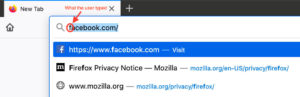
Browsers also store a pile of other information on your computer, like cookies, passwords, cached files, etc. that help improve your browsing experience and all of this can be used to infer where you have been. This information obviously has privacy implications if you share a computer or if someone gets access to your computer, and most browsers provide some sort of mode that lets you surf without storing history (Firefox calls this Private Browsing). Anyway, while this information can be accessed by law enforcement if they have access to your computer, it’s generally subject to the same conditions as other data on your computer and those conditions aren’t the topic at hand.
In this context, what “web browsing history” refers to is data which is stored outside your computer by third parties. It turns out there is quite a lot of this kind of data, generally falling into four broad categories:
- Telecommunications metadata. Typically, as you browse the Internet, your Internet Service Provider (ISP) learns every website you visit. This information leaks via a variety of channels (DNS lookups), the IP address of sites, TLS Server Name Indication (SNI), and then ISPs have various policies for how much of this data they log and for how long. Now that most sites have TLS Encryption this data generally will be just the name of the Web site you are going to, but not what pages you go to on the site. For instance, if you go to WebMD, the ISP won’t know what page you went to, they just know that you went to WebMD.
- Web Tracking Data. As is increasingly well known, a giant network of third party trackers follows you around the Internet. What these trackers are doing is building up a profile of your browsing history so that they can monetize it in various ways. This data often includes the exact pages that you visit and will be tied to your IP address and other potentially identifying information.
- Web Site Data. Any Web site that you go to is very likely to keep extensive logs of everything you do on the site, including what pages you visit and what links you click. They may also record what outgoing links you click. For instance, when you do searches, many search engines record not just the search terms, but what links you click on, even when they go to other sites. In addition, many sites include various third party analytics systems which themselves may record your browsing history or even make a recording of your
As the maker of Firefox, we know that browsing and search data can provide a detailed portrait of our private lives and needs to be protected. That’s why we work to safeguard your browsing data, with privacy features like Enhanced Tracking Protection and more secure DNS.
Unfortunately, too much search and browsing history still is collected and stored around the Web. We believe this data deserves strong legal protections when the government seeks access to it, but in many cases that protection is uncertain.
The US House of Representatives will have the opportunity to address this issue next week when it takes up the USA FREEDOM Reauthorization Act (H.R. 6172). We hope legislators will amend the bill to limit government access to internet browsing and search history without a warrant.
The letter in the link below, sent today from Mozilla and other companies and internet organizations, calls on the House to preserve this essential aspect of personal privacy online.
The post Protecting Search and Browsing Data from Warrantless Access appeared first on The Mozilla Blog.
TenFourFox Feature Parity Release 23 beta 1 is now available (downloads, hashes, release notes). This version brings various oddiments of image tags up to spec, fixing issues with broken or misdimensioned images on some sites, and also has a semantic upgrade to Content Security Policy which should fix other sites but is most important to me personally because now TenFourFox can directly talk to the web BMC interface on Raptor Talos II and Blackbird systems -- like the one sitting next to the G5. There is also a minor performance tweak to JavaScript strings and the usual security updates. Assuming no major issues, FPR23 should go live on or about June 2nd.
http://tenfourfox.blogspot.com/2020/05/tenfourfox-fpr23b1-available.html

Mozilla's Mixed Reality team is excited to announce the first public release of Firefox Reality in the Microsoft store. We announced at Mobile World Congress 2019 that we were working with Microsoft to bring a mixed reality browser to the HoloLens 2 platform, and we're proud to share the result of that collaboration.
Firefox Reality is an experimental browser for a promising new platform, and this initial release focuses on exposing the powerful AR capabilities of HoloLens 2 devices to web developers through the new WebXR standard.
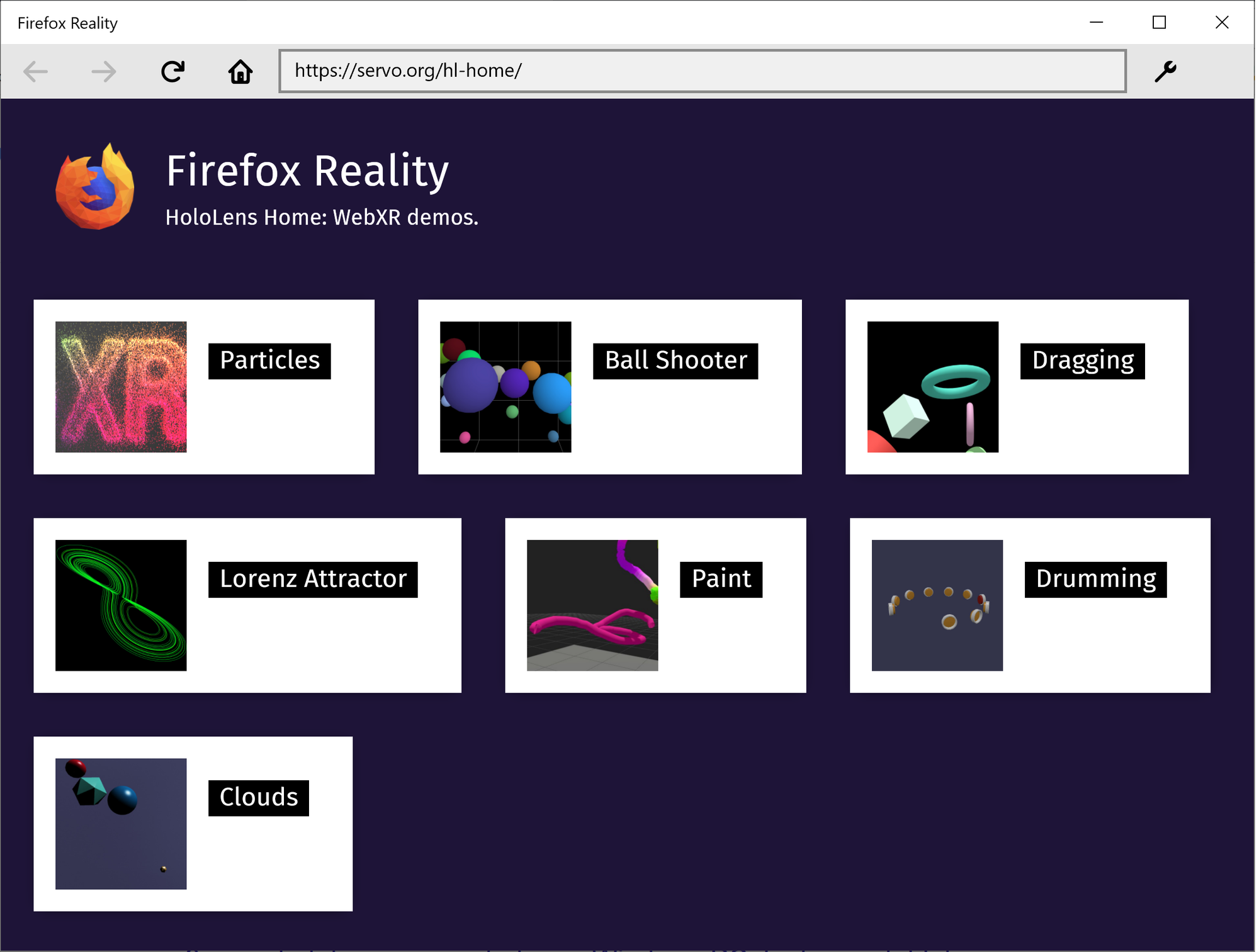
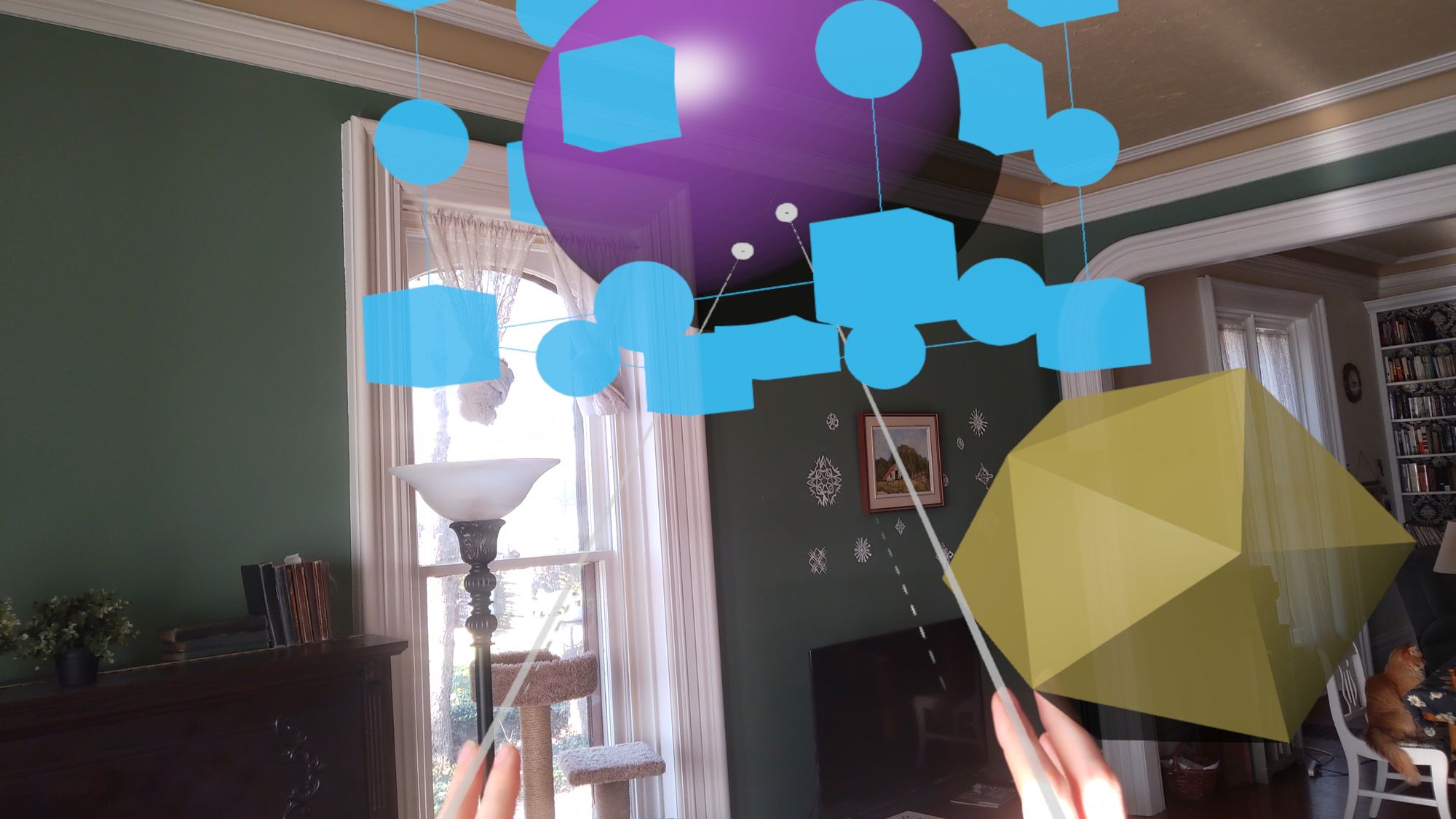
This release highlights several early demos which are built on standard Babylon.js and three.js libraries. That means the same pages can be loaded in AR or VR headsets, or in a 2D desktop browser, without requiring the developer to create a custom experience for each platform.
The Firefox Reality team continues to work on standardizing and implementing new WebXR modules to expand the web platform's capabilities on the device. We encourage developers with HoloLens 2 access to give our new browser a spin and explore the potential for bringing new experiences to the augmented reality web!

Our team has been hard at work on the latest version of Firefox Reality. In our last two versions, we had a heightened focus on performance and stability. With this release, fans of our browser on standalone VR headsets can enjoy the best of both worlds—a main course of in-demand features, with sides of performance and UI improvements. Firefox Reality 10 is a feature-packed release with something for every VR enthusiast.
But perhaps the most exciting news of this release is we’re releasing in conjunction with our new partner, Pico Interactive! We’re teaming up to bring the latest and greatest in VR browsing to Pico’s headsets, including the Neo 2 – an all-in-one (AIO) device with 6 degrees of freedom (DoF) head and controller tracking. Firefox Reality will be released and shipped with all Pico headsets. Learn more about what this partnership means here. And check out Firefox Reality in the Pico store.

What's New?
But what about all the exciting features we served up in this release, you might ask? Let’s dig in!
You Are Now Entering WebXR

Firefox Reality now supports WebXR! WebXR is the successor to the WebVR spec. It provides a host of improvements in cross-device functionality and tooling for both VR and AR applications. With WebXR, a site can support a wide variety of controller devices without writing support for each one individually. WebXR takes care of choosing the right controls for actions such as selecting and grabbing objects.
You can get started right now using WebXR applications in Firefox Reality 10. If you’re looking for ways to get started building your own WebXR applications, take a look at the MDN Docs for the WebXR API. And if you’re already working with Unity and want to explore developing WebXR applications, check out our Unity WebXR Exporter.
Making the transition from WebVR to WebXR
We understand WebXR support among the most widely used browsers is fairly new and the community has largely been developing for WebVR until very recently. We want to help people to get to WebXR, but the vast majority of web content that is VR-enabled is WebVR content—twenty-five percent (25%) of our users consume WebVR content. Not to worry, we've got you covered.
This release also continues our support for WebVR, making Firefox Reality 10 the only standalone browser that supports both WebVR and WebXR experiences.
This will help our partners and developer community gracefully transition to WebXR without worrying that their audiences will lose functionality immediately. We will eventually deprecate WebVR. We’re currently working on a timeline for removing WebVR support, but we’ll share that timeline with our community well in advance of any action.
Gaze Support
Another useful feature included in this release is gaze navigation support. This allows viewers to navigate within the browser without controllers, using only head movement and headset buttons. This is great for users who may not be able to use controllers, or for use with headsets that don’t include controllers or allow you unbind controllers. See a quick demo of this feature on the Pico Neo 2 below. Here we’re able to scroll, select and type, all without the use of a physical controller.
Dual-controller typing
Many of us know how tedious it can be to type on a virtual keyboard with one controller. Additionally, one-hand typing may be counter-intuitive for those who are used to typing with two hands in most environments. With this version we’re introducing dual-controller typing to create a more natural keyboard experience.
Download Management
This version allows users to download files and manage previously downloaded
The previous Contribute page on Mozilla.org received around 100,000 views a month and had a 70% bounce rate.
For page engagements just over 1% of those viewers clicked on the “Get Involved” button, taking them to the Mozilla Activate page.
We wanted to change that.
We began this redesign project with a discovery phase. As a result of the strict environment the page would live in, all of our assumption testing had to be carried out through upfront discovery research as opposed to evaluative A/B testing post design.
We started to collate previous findings and analysis, drawing conclusions from past efforts like the Contribute Survey Analysis carried out in 2019.
With a broad idea of what visitors are looking for we looked internally with stakeholder interviews. A series of one to one remote meetings with Mozilla community staff were scheduled to uncover their hopes for a redesign and what they felt the current offering lacked. From this, two themes emerged:
- A need to describe what the community and contribution look like.
- Illustrating the breadth of volunteer opportunities.
The next exercise was to address the copy of the page. Using both analytics data and stakeholder feedback a series of “content blocks” were arranged to define what content we needed and the hierarchy it belonged in. A copywriter and marketing team member would review an initial draft however this was sufficient to populate wireframes for testing purposes.
Three wireframe layouts were produced, each putting slightly more emphasis on a different element of the page. One focused on telling a story, another focused on providing the widest volunteer entry points and the final layout was tasked with being direct and minimal.
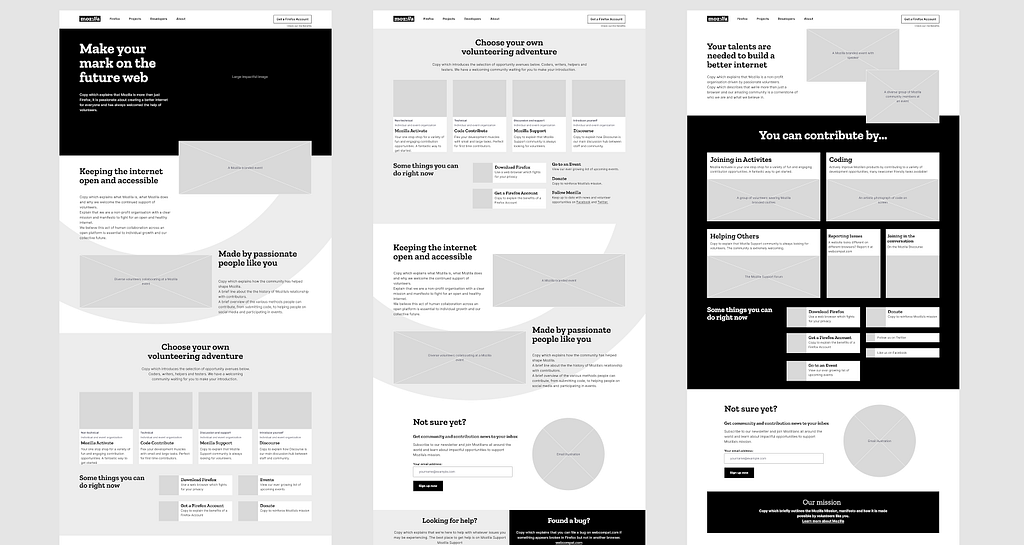
The Mozilla All Hands Event in Berlin was the perfect opportunity to gather some feedback from existing contributors. Both volunteers and staff were asked upfront questions about their expectations of a volunteer page before being presented with large printouts of each wireframe for review.
The community feedback was overwhelming with an emerging trend. “Story” was appreciated, however it was sufficient to know it was there “somewhere”. Conversely, volunteer opportunities needed to be clear and relatively upfront.
There was one additional research method we could utilise before casting some of our findings into design, remote unmoderated usability testing. With the ability to target participants with existing volunteer experience, we presented three wireframes to separate groups, again asking upfront questions on their expectations before revealing each design.
In three key ways the findings echoed the feedback of the All Hands interviews.
- An appreciation for a little upfront story, but not too much.
- An explicit, straight-talking tone was a clear preference.
- Volunteer opportunities should not be buried within the page.
Some additional findings revealed:
- Participants liked to see the opportunities categorised as either Technical or Non Technical.
- Participants were keen to understand the time and travel investment of each opportunity.
The feedback of the following research methods gave the team a shared vision of the final product before it had been designed:
- Stakeholder interviews
- User interviews
- Guerilla usability testing
- Unmoderated remote usability testing
Merging the copy approved content with Mozilla brand guidelines, a selection of designs were delivered and shared with the team for asynchronous feedback. After a final group call and some final tweaks we had our new Contribute page design ready for development.
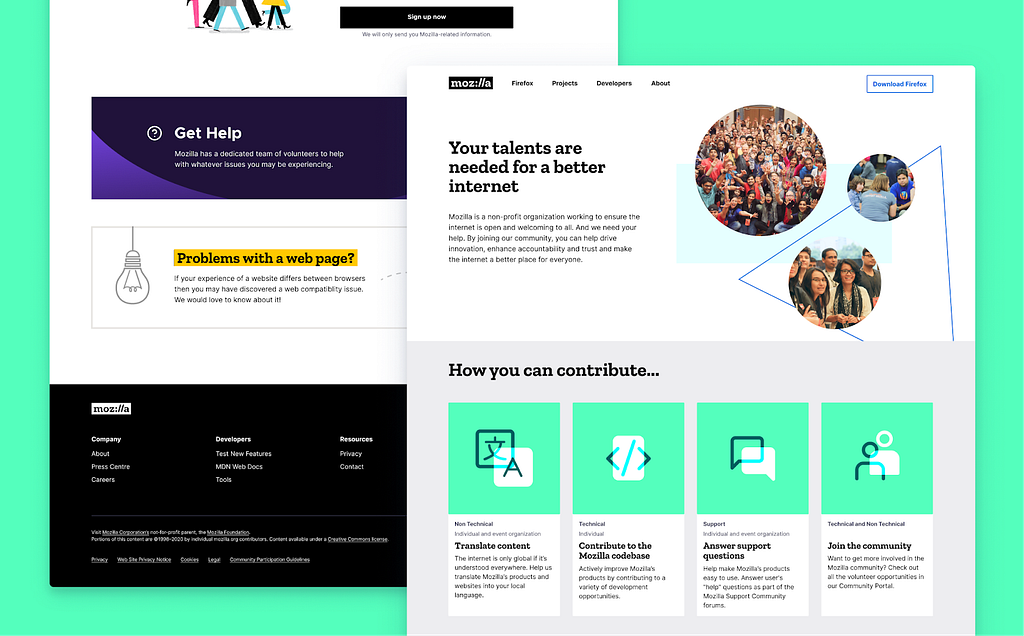
The page design pays various tributes to the Mozilla Community Portal, fitting, as both projects wish to serve Mozilla’s new and existing volunteer communities.
We will be monitoring the success of the page over time to determine the impact of the research-lead redesign. You can visit the new Contribute page on the Mozilla website, maybe you’ll discover something new about Mozilla when you get there!