Note: This blog post was co-authored by AMP and Igalia teams.
Web developers continue to face challenges with web interoperability issues and a lack of implementation of important features. As an open-source project, the AMP Project can help represent developers and aid in addressing these challenges. In the last few years, we have partnered with Igalia to collaborate on helping advance predictability and interoperability among browsers. Standards and the degree of interoperability that we want can be a long process. New features frequently require experimentation to get things rolling, course corrections along the way and then, ultimately as more implementations and users begin exploring the space, doing really interesting things and finding issues at the edges we continue to advance interoperability.
Both AMP and Igalia are very pleased to have been able to play important roles at all stages of this process and help drive things forward. During the first half of this year, here’s what we’ve been up to…
Default Aspect Ratio of Images
In our previous blog post we mentioned our experiment to implement the intrinsic size attribute in WebKit. Although this was a useful prototype for standardization discussions, at the end there was a consensus to switch to an alternative approach. This new approach addresses the same use case without the need of a new attribute. The idea is pretty simple: use specified width and height attributes of an image to determine the default aspect ratio. If additional CSS is used e.g. “width: 100%; height: auto;”, browsers can then compute the final size of the image, without waiting for it to be downloaded. This avoids any relayout that could cause bad user experience. This was implemented in Firefox and Chromium and we did the same in WebKit. We implemented this under a flag which is currently on by default in Safari Tech Preview and the latest iOS 14 beta.
Scrolling
We continued our efforts to enhance scroll features. In WebKit, we began with scroll-behavior, which provides the ability to do smooth scrolling. Based on our previous patch, it has landed and is guarded by an experimental flag “CSSOM View Smooth Scrolling” which is disabled by default. Smooth scrolling currently has a generic platform-independent implementation controlled by a timer in the web process, and we continue working on a more efficient alternative relying on the native iOS UI interfaces to perform scrolling.
We have also started to work on overscroll and overscroll customization, especially for the scrollend event. The scrollend event, as you might expect, is fired when the scroll is finished, but it lacked interoperability and required some additional tests. We added web platform tests for programmatic scroll and user scroll including scrollbar, dragging selection and keyboard scrolling. With these in place, we are now working on a patch in WebKit which supports scrollend for programmatic scroll and Mac user scroll.
On the Chrome side, we continue working on the standard scroll values in non-default writing modes. This is an interesting set of challenges surrounding the scroll API and how it works with writing modes which was previously not entirely interoperable or well defined. Gaining interoperability requires changes, and we have to be sure that those changes are safe. Our current changes are implemented and guarded by a runtime flag “CSSOM View Scroll Coordinates”. With the help of Google engineers, we are trying to collect user data to decide whether it is safe to enable it by default.
Another minor interoperability fix that we were involved in was to ensure that the scrolling attribute of frames recognizes values “noscroll” or “off”. That was already the case in Firefox and this is now the case in Chromium and WebKit too.
Intersection and Resize Observers
In Filter Treeherder jobs by test or manifest path I describe the feature. In this post I will explain how it came about.
I want to highlight the process between a conversation and a deployed feature. Many times, it is an unseen part of the development process that can be useful for contributors and junior developers who are trying to grow as developers.
Back in the Fall of 2019 I started inquiring into developers’ satisfaction with Treeherder. This is one of the reasons I used to go to the office once in a while. One of these casual face-to-face conversations led to this feature. Mike Conley explained to me how he would look through various logs to find a test path that had failed on another platform (see referenced post for further details).
After I understood the idea, I tried to determine what options we had to implement it. I wrote a Google Doc with various alternative implementations and with information about what pieces were needed for a prototype. I requested feedback from various co-workers to help discover blind spots in my plans.
Once I had some feedback from immediate co-workers, I made my idea available in a Google group (increasing the circle of people giving feedback). I described my intent to implement the idea and was curious to see if anyone else was already working on it or had better ideas on how to implement it. I did this to raise awareness in larger circles, reduce duplicate efforts and learn from prior work.
I also filed a bug to drive further technical discussions and for interested parties to follow up on the work. Fortunately, around the same time Andrew Halberstadt started working on defining explicitly what manifests each task executes before the tasks are scheduled (see bug). This is a major component to make the whole feature on Treeherder functional. In some cases, talking enough about the need can enlist others from their domains of expertise to help with your project.
At the end of 2019 I had time to work on it. Once I endlessly navigated through Treeherder’s code for a few days, I decided that I wanted to see a working prototype. This would validate its value and determine if all the technichal issues had been ironed out. In a couple of days I had a working prototype. Most of the code could be copy/pasted into Treeherder once I found the correct module to make changes in.
Finally, in January the feature landed. There were some small bugs and other follow up enhancements later on.
Stumbling upon this feature was great because on H1 we started looking at changing our CI’s scheduling to use manifests for scheduling instead of tasks and this feature lines up well with it.
At the beginning of this year we landed a new feature on Treeherder. This feature helps our users to filter jobs using test paths or manifest paths.
This feature is useful for developers and code sheriffs because it permits them to determine whether or not a test that fails in one platform configuration also fails in other ones. Previously, this was difficult because certain test suites are split into multiple tasks (aka “chunks”). In the screenshot below, you can see that the manifest path devtools/client/framework/browser-toolbox/test/browser.ini is executed in different chunks.
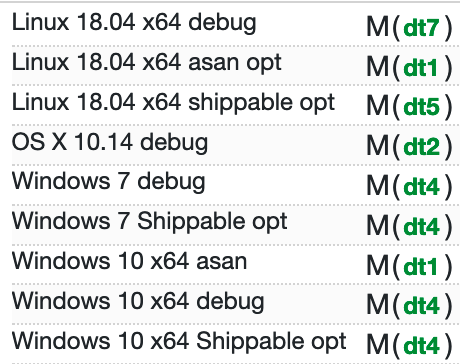
NOTE: A manifest is a file that defines various test files, thus, a manifest path defines a group of test paths. Both types of paths can be used to filter jobs.
This filtering method has been integrated to the existing feature, “Filter by a job field” (the funnel icon). See below what the UI looks like:

If you’re curious about the work you can visit the PR.
There’s a lot more coming around this realm as we move toward manifest-based scheduling in the Firefox CI instead of task-based scheduling. Stay tuned! Until then keep calm and filter away.
The webinar from June 30, now on video. The slides are here.
https://daniel.haxx.se/blog/2020/07/02/video-testing-curl-for-security/
Hi folks,
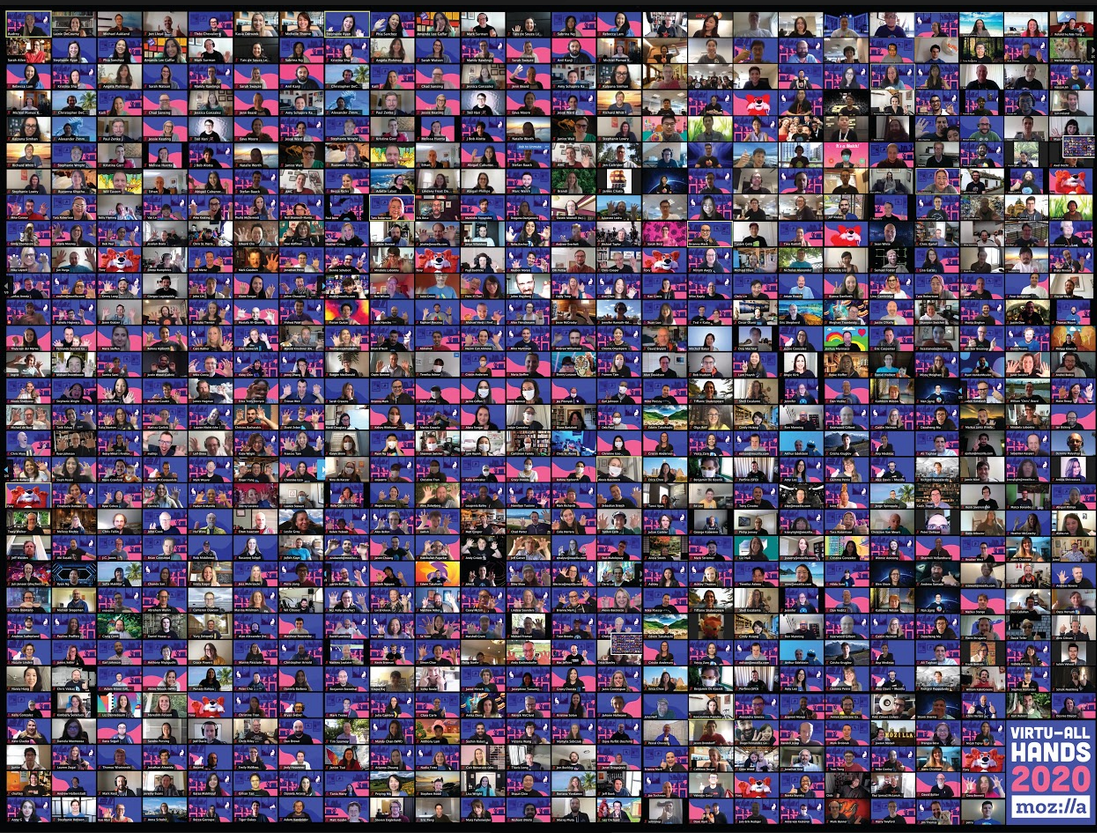
Here I am again sharing with you the amazing experience of another All Hands.
This time no traveling was involved, and every meeting, coffee, and chat were left online.
Virtuality seems the focus of this 2020 and if on one side we strongly missed the possibility of being together with colleagues and contributors, on the other hand, we were grateful for the possibility of being able to connect.
Virtual All Hands has been running for a week, from the 15th of June to the 18th, and has been full of events and meetups.
As SUMO team we had three events running on Tuesday, Wednesday, and Thursday, along with the plenaries and Demos that were presented on Hubs. Floating in virtual reality space while experiencing and listening to new products and features that will be introduced in the second part of the year has been a super exciting experience and something really enjoyable.
Let’s talk about our schedule, shall we?
On Tuesday we run our Community update meeting in which we focussed around what happened in the last 6 months, the projects that we successfully completed, and the ones that we have left for the next half of the year.
We talked a lot about the community plan, and which are the next steps we need to take to complete everything and release the new onboarding experience before the end of the year.
We did not forget to mention everything that happened to the platform. The new responsive redesign and the ask-a-question flow have greatly changed the face of the support forum, and everything was implemented while the team was working on a solution for the spam flow we have been experiencing in the last month.
If you want to read more about this, here are some forum posts we wrote in the last few weeks you can go through regarding these topics:
On Wednesday we focused on presenting the campaign for the Respond Tool. For those of you who don’t know what I am talking about, we shared some resources regarding the tool here. The campaign will run up until today, but we still need your intake on many aspects, so join us on the tool!
The main points we went through during the meeting were:
- Introduction about the tool and the announcement on the forum
- Updates on Mozilla Firefox Browser
- Update about the Respond Tool
- Demo (how to reply, moderate, or use canned response) – Teachable course
- Bugs. If you use the Respond Tool, please file bugs here
- German and Spanish speakers needed: we have a high volume of review in Spanish and German that need your help!
On Thursday we took care of Conversocial, the new tool that substitutes Buffer from now on. We have already some contributors joining us on the tool and we are really happy with everyone ‘s excitement in using the tool and finally having a full twitter account dedicated to SUMO. @firefoxsupport is here, please go, share and follow!
The agenda of the meeting was the following:
- Introduction about the tool
- Contributor roles
- Escalation process
- Demo on Conversocial
- @FirefoxSupport overview
If you were invited to the All Hands or you have NDA access you can access to the meetings at this link: https://onlinexperiences.com
Thank you for your participation and your enthusiasm as always, we are missing live interaction but we have the opportunity to use some great tools as well. We are happy that so many
Firefox release dates for Gamepad API updates
As part of Mozilla’s ongoing commitment to improve the privacy and security of the web platform, over the next few months we will be making some changes to how the Gamepad_API works.
Here are the important dates to keep in mind:
- 25 of August 2020 (Firefox 81 Beta/Developer Edition):
.getGamepads()method will only return game pads if called in a “secure context” (e.g., https://).- 22 of September 2020 (Firefox 82 Beta/Developer Edition):
- Switch to requiring a permission policy for third-party contexts/iframes.
We are collaborating on making these changes with folks from the Chrome team and other browser vendors. We will update this post with links to their announcements as they become available.
Restricting gamepads to secure contexts
Starting with Firefox 81, the Gamepad API will be restricted to what are known as “secure contexts” (bug 1591329). Basically, this means that Gamepad API will only work on sites served as “https://”.
For the next few months, we will show a developer console warning whenever .getGamepads() method is called from an insecure context.
From Firefox 81, we plan to require secure context for .getGamepads() by default. To avoid significant code breakage, calling .getGamepads() will return an empty array. We will display this console warning indefinitely:

The developer console nows shows a warning when .getGamepads() method is called from insecure contexts
Permission Policy integration
From Firefox 82, third-party contexts (i.e., s that are not same origin) that require access to the Gamepad API will have to be explicitly granted access by the hosting website via a Permissions Policy.
In order for a third-party context to be able to use the Gamepad API, you will need to add an “allow” attribute to your HTML like so:
Once this ships, calling .getGamepads() from a disallowed third-party context will throw a JavaScript security error.
You can our track our implementation progress in bug 1640086.
WebVR/WebXR
As WebVR and WebXR already require a secure context to work, these changes
shouldn’t affect any sites relying on .getGamepads(). In fact, everything should continue to work as it does today.
Future improvements to privacy and security
When we ship APIs we often find that sites use them in unintended ways – mostly creatively, sometimes maliciously. As new privacy and security capabilities are added to the web platform, we retrofit those solutions to better protect users from malicious sites and third-party trackers.
Adding “secure contexts” and “permission policy” to the Gamepad API is part of this ongoing effort to improve the overall privacy and security of the web. Although we know these changes can be a short-term inconvenience to developers, we believe it’s important to constantly evolve the web to be as secure and privacy-preserving as it can be for all users.
The post Securing Gamepad API appeared first on Mozilla Hacks - the Web developer blog.
This is a follow-up patch release a mere week after the grand 7.71.0 release. While we added a few minor regressions in that release, one of them were significant enough to make us decide to fix and ship an update sooner rather than later. I’ll elaborate below.
Every early patch release we do is a minor failure in our process as it means we shipped annoying/serious bugs. That of course tells us that we didn’t test all features and areas good enough before the release. I apologize.
Numbers
the 193rd release
0 changes
7 days (total: 8,139)
18 bug fixes (total: 6,227)
32 commits (total: 25,943)
0 new public libcurl function (total: 82)
0 new curl_easy_setopt() option (total: 277)
0 new curl command line option (total: 232)
16 contributors, 8 new (total: 2,210)
5 authors, 2 new (total: 805)
0 security fixes (total: 94)
0 USD paid in Bug Bounties
Bug-fixes
compare cert blob when finding a connection to reuse – when specifying the client cert to libcurl as a “blob”, it needs to compare that when it subsequently wants to reuse a connection, as curl already does when specifying the certificate with a file name.
curl_easy_escape: zero length input should return a zero length output – a regression when I switched over the logic to use the new dynbuf API: I inadvertently modified behavior for escaping an empty string which then broke applications. Now verified with a new test.
set the correct URL in pushed HTTP/2 transfers – the CURLINFO_EFFECTIVE_URL variable previously didn’t work for pushed streams. They would all just claim to be the parent stream’s URL.
fix HTTP proxy auth with blank password – another dynbuf conversion regression that now is verified with a new test. curl would pass in “(nil)” instead of a blank string (“”).
terminology: call them null-terminated strings – after discussions and an informal twitter poll, we’ve rephrased all documentation for libcurl to use the phrase “null-terminated strings” and nothing else.
allow user + password to contain “control codes” for HTTP(S) – previously byte values below 32 would maybe work but not always. Someone with a newline in the user name reported a problem. It can be noted that those kind of characters will not work in the credentials for most other protocols curl supports.
Reverted the implementation of “wait using winsock events” – another regression that apparently wasn’t tested good enough before it landed and we take the opportunity here to move back to the solution we have before. This change will probably take another round and aim to get landed in a better shape in a future.
ngtcp2: sync with current master – interestingly enough, the ngtcp2 project managed to yet again update their API exactly this week between these two curl releases. This means curl 7.71.1 can be built against the latest ngtcp2 code to speak QUIC and HTTP/3.
In parallel with that ngtcp2 sync, I also ran into a new problem with BoringSSL’s master branch that is fixed now. Timely for us, as we can now also boast with having the quiche backend in sync and speaking HTTP/3 fine with the latest and most up-to-date software.
Next
We have not updated the release schedule. This means we will have almost three weeks for merging new features coming up then four weeks of bug-fixing only until we ship another release on August 19 2020. And on and on we go.
https://daniel.haxx.se/blog/2020/07/01/curl-7-71-1-try-again/
Firefox 78 is released and is running on this Talos II. This version in particular features an updated RegExp engine but is most notable (notorious) for disabling TLS 1.0/1.1 by default (only 1.2/1.3). Unfortunately, because of craziness at $DAYJOB and the lack of a build waterfall or some sort of continuous integration for ppc64le, a build failure slipped through into release but fortunately only in the (optional) tests. The fix is trivial, another compilation bug in the profiler that periodically plagues unsupported platforms, and I have pushed it upstream in bug 1649653. You can either apply that bug to your tree or add ac_add_options --disable-tests to your .mozconfig. Speaking of, as usual, the .mozconfigs we use for debug and optimized builds have been stable since Firefox 67.
UPDATE: The patch has landed on release, beta and ESR 78, so you should be able to build straight from source.
We enabled the link preload web feature support in Firefox 78, at this time only at Nightly channel and Firefox Early Beta and not Firefox Release because of pending deeper product integrity checking and performance evaluation.
What is “preload”
Web developers may use the the Link: <..>; rel=preload response header or markup to give the browser a hint to preload some resources with a higher priority and in advance.
Firefox can now preload number of resource types, such as styles, scripts, images and fonts, as well as responses to be later used by plain fetch() and XHR. Use preload in a smart way to help the web page to render and get into the stable and interactive state faster.
Don’t misplace this for “prefetch”. Prefetching (with a similar technique using tags) loads resources for the next user navigation that is likely to happen. The browser fetches those resources with a very low priority without an affect on the currently loading page.
Web Developer Documentation
There is a Mozilla provided MDN documentation for how to use . Definitely worth reading for details. Scope of this post is not to explain how to use preload, anyway.
Implementation overview
Firefox parses the document’s HTML in two phases: a prescan (or also speculative) phase and actual DOM tree building.
The prescan phase only quickly tokenizes tags and attributes and starts so called “speculative loads” for tags it finds; this is handled by resource loaders specific to each type. A preload is just another type of a speculative load, but with a higher priority. We limit speculative loads to only one for a URL, so only the first tag referring that URL starts a speculative load. Hence, if the order is the consumer tag and then the related tag for the same URL, then the speculative load will only have a regular priority.
At the DOM tree building phase, during which we create actual consuming DOM node representations, the respective resource loader first looks for an existing speculative load to use it instead of starting a new network load. Note that except for stylesheets and images, a speculative load is used only once, then it’s removed from the speculative load cache.
Firefox preload behavior
Supported types
“style”, “script”, “image”, “font”, “fetch”.
The “fetch” type is for use by fetch() or XHR.
The “error” event notification
Conditions to deliver the error event in Firefox are slightly different from e.g. Chrome.
For all resource types we trigger the error event when there is a network connection error (but not a DNS error – we taint error event for cross-origin request and fire load instead) or on an error response from the server (e.g. 404).
Some resource types also fire the error event when the mime type of the response is not supported for that resource type, this applies to style, script and image. The style type also produces the error event when not all @imports are successful.
Coalescing
If there are two or more tags before the consuming tag, all mapping to the same resource, they all use the same speculative preload – coalesce to it, deliver event notifications, and only one network load is started.
If there is a tag after the consuming tag, then it will start a new preload network fetch during the DOM tree building phase.
Sub-resource Integrity
Handling of the integrity metadata for Sub-resource integrity checking (SRI) is a little bit more complicated. For it’s currently supported only for the “script” and “style” types.
The rules are: the first tag for a resource we hit during the prescan phase, either a or a consuming tag, we fetch regarding this first tag with SRI according to its integrity attribute. All other tags matching the same resource (URL) are ignored during the prescan phase, as mentioned earlier.
At the DOM tree building phase, the consuming tag reuses the preload only if this consuming tag is either of:
- missing the
integrityattribute completely, - the value of it is exactly the same,
- or the value is “weaker” – by means of the hash algorithm of the consuming tag is weaker than the hash algorithm of the link preload tag;
- otherwise, the consuming tag starts a completely
Welcome!
New community/locales added
New content and projects
What’s new or coming up in Firefox desktop
Deadlines
Upcoming deadlines:
- Firefox 78 is currently in beta and will be released on June 30. The deadline to update localization was on Jun 16.
- The deadline to update localizations for Firefox 79, currently in Nightly, will be July 14 (4 weeks after the previous deadline).
Fluent and migration wizard
Going back to the topic of how to use Fluent’s flexibility at your advantage, we recently ported the Migration Wizard to Fluent. That’s the dialog displayed to users when they import content from other browsers.
Before Fluent, this is how the messages for “Bookmarks” would look like:
32_ie=Favorites
32_edge=Favorites
32_safari=Bookmarks
32_chrome=Bookmarks
32_360se=Bookmarks
That’s one string for each supported browser, even if they’re all identical. This is how the same message looks like in Fluent:
browser-data-bookmarks-checkbox =
  .label = { $browser ->
     [ie] Favorites
     [edge] Favorites
    *[other] Bookmarks
  }
If all browsers use the same translations in a specific language, this can take advantage of the asymmetric localization concept available in Fluent, and be simplified (“flattened”) to just:
browser-data-bookmarks-checkbox =
  .label = Translated_bookmarks
The same is true the other way around. The section comment associated to this group of strings says:
## Browser data types
## All of these strings get a $browser variable passed in.
## You can use the browser variable to differentiate the name of items,
## which may have different labels in different browsers.
## The supported values for the $browser variable are:
##   360se
##   chrome
##   edge
##   firefox
##   ie
##   safari
## The various beta and development versions of edge and chrome all get
## normalized to just "edge" and "chrome" for these strings.
So, if English has a flat string without selectors:
browser-data-cookies-checkbox =
    .label = Cookies
A localization can still provide variants if, for example, Firefox is using a different term for cookies than other browsers:
browser-data-cookies-checkbox =
    .label = { $browser ->
        [firefox] Macarons
       *[other] Cookies
}
HTTPS-Only Error page
There’s a new mode, called “HTTPS-Only”, currently tested in Nightly: when users visit a page not available with a secure connection, Firefox will display a warning.
In order to test this page, you can change the value of the dom.security.https_only_mode preference in about:config, then visit this website. Make sure to test the page with the window at different sizes, to make sure all elements fit.

What’s new or coming up in mobile
Concerning mobile right now, we just got updated screenshots for the latest v27 of Firefox for iOS: https://drive.google.com/drive/folders/1ZsmHA-qt0n8tWQylT1D2-J4McjSZ-j4R
We are trying out several options for screenshots going forwards, so stayed tuned so you can tell us which one you prefer.
Otherwise our Fenix launch is still in progress. We are string frozen now, so if you’d like to catch up and test your work, it’s this way: https://pontoon.mozilla.org/projects/android-l10n/tags/fenix/
You should have until July 18th to finish all l10n work on this project, before the cut-off date.
What’s new or coming up in web projects
Firefox Accounts
A third file called main.ftl was added to Pontoon a couple of weeks ago in preparation to support subscription based products. This component contains payment strings for the subscription platform, which will be rolled out to a few countries

As the readers of this blog almost surely know, I'm the author of NoScript, a web browser security enhancer which can be installed on Firefox and Chrome, and comes built-in with the Tor Browser.
NoScript has received support by the Open Technology Fund (OTF) for specific development efforts: especially, to make it cross-browser, better internationalized and ultimately serving a wider range of users.
OTF's mission is supporting technology to counter surveillance and censorship by repressive regimes and foster Internet Freedom. One critical and strict requirement, for OTF to fund or otherwise help software projects, is them being licensed as Free/Libre Open Source Software (FLOSS), i.e. their code being publicly available for inspection, modification and reuse by anyone. Among the successful projects funded by OTF, you may know or use Signal, Tor, Let's Encrypt, Tails, QubeOS, Wireshark, OONI, GlobaLeaks, and millions of users all around the world, no matter their political views, trust them because they are FLOSS, making vulnerabilities and even intentionally malicious code harder to hide.
Now this virtuous modus operandi is facing an existential threat, started when the whole OTF leadership has been fired and replaced by Michael Pack, the controversial new CEO of th U.S. Agency for Global Media (USAGM), the agency OTF reports to.
Lobbying documents emerged on the eve of former OTF CEO Libby Liu's defenestration, strongly suggesting this purge preludes a push to de-fund FLOSS, and especially "p2p, privacy-first" tools, in favor of large scale, centralized and possibly proprietary "alternatives": two closed source commercial products are explicitly named among the purportedly best recipients of funding.
Beside the weirdness of seeing "privacy-first" used as a pejorative when talking about technologies protecting journalists and human rights defenders from repressive regimes such as Iran or People's Republic of China (even more now, while the so called "Security Law" is enforced against Hong Kong protesters), I find very alarming the lack of recognition for the radical importance of the tools being open source to be trusted by their users, no matter the country or the fight they're in, when their lives are at risk.
Talking of my own experience (but I'm confident most other successful and effective OTF-funded software projects have similar stories to tell): I've been repeatedly approached by law enforcement representatives from different countries (including PRC) - and also by less "formal" groups - with a mix of allegedly noble reasons, interesting financial incentives and veiled threats, to put ad-hoc backdoors in NoScript. I could deny all such requests not because of any exceptional moral fiber of mine, even though being part of the "OTF community", where the techies who build the tools meet the human rights activists who use them on the field, helped me growing awareness of my responsibilities. I could say "no" just because NoScript being FLOSS made it impractical/suicidal: everyone, looking at the differences in the source code, could spot the backdoor, and I would loose any credibility as a security software developer. NoScript would be forked, in the best case scenario, or dead.
The strict FLOSS requirement is only one of the great features in OTF's transparent, fair, competitive and evidence-based award process, but I believe it's the best assurance we can actually trust our digital freedom tools.
I'm aware of (very few) other organizations and funds adopting similar criteria, and likely managing larger budgets too, especially in Europe: so if USA really decides to give up their leadership in the Internet Freedom space, NoScript and other tools such as Tor, Tails or OONI would still have a door to knock at.
But none of these entities, AFAIK, own OTF's "secret sauce": bringing together technologists and users in a unique, diverse and inclusive community of caring humans, where real and touching stories of oppression and danger are shared in a safe space, and help shape effective technology which can save lives.
So please, do your part to save Internet Freedom, save OTF, save
A new stable Firefox version rolls out today, providing new features for web developers. A new regex engine, updates to the ECMAScript Intl API, new CSS selectors, enhanced support for WebAssembly, and many improvements to the Firefox Developer Tools await you.
This blog post provides merely a set of highlights; for all the details, check out the following:
Developer tool improvements
Source-mapped variables, now also in Logpoints
With our improvements over the recent releases, debugging your projects with source maps will feel more reliable and faster than ever. But there are more capabilities that we can squeeze out of source maps. Did you know that Firefox’s Debugger also maps variables back to their original name? This especially helps babel-compiled code with changed variable names and added helper variables. To use this feature, pause execution and enable the “Map” option in the Debugger’s “Scopes” pane.
As a hybrid between the worlds of the DevTools Console and Debugger, Logpoints make it easy to add console logs to live code–or any code, once you’ve added them to your toolbelt. New in Firefox 75, original variable names in Logpoints are mapped to the compiled scopes, so references will always work as expected.

To make mapping scopes work, ensure that your source maps are correctly generated and include enough data. In Webpack this means avoid the “cheap” and “nosources” options for the “devtools” configuration.
Promises and frameworks error logs get more detailed
Uncaught promise errors are critical in modern asynchronous JavaScript, and even more so in frameworks like Angular. In Firefox 78, you can expect to see all details for thrown errors show up properly, including their name and stack:

The implementation of this functionality was only possible through the close collaboration between the SpiderMonkey engineering team and a contributor, Tom Schuster. We are investigating how to improve error logging further, so please let us know if you have suggestions.
Monitoring failed request issues
Failed or blocked network requests come in many varieties. Resources may be blocked by tracking protection, add-ons, CSP/CORS security configurations, or flaky connectivity, for example. A resilient web tries to gracefully recover from as many of these cases as possible automatically, and an improved Network monitor can help you with debugging them.

Firefox 78 provides detailed reports in the Network panel for requests blocked by Enhanced Tracking Protection,
People are amazing creatures. When discussing a complex issue, they are able to keep multiple independent arguments in their heads, the pieces of supporting and disproving evidence, and can collapse this system into a concrete solution. We can spend hours navigating through the issue comments on Github, reconstructing the points of view, and making sense of the discussion. Problem is: we don’t actually want to apply this superpower and waste time nearly as often.
Problem with technical discussions
Have you heard of async in Rust? Ever wondered why the core team opted into a completely new syntax for this feature? Let’s dive in and find out! Here is #57640 with 512 comments, kindly asking everyone to check #50547 (with just 308 comments) before expressing their point of view. Following this discussion must have been exhausting. I don’t know how it would be possible to navigate it without the summary comments.
Another example is the loop syntax in WebGPU. Issue #569 has only 70 comments, with multiple attempts to summarize the discussion in the middle. It would probably take a few hours at the minimum to get a gist of the group reasoning for somebody from the outside. And that doesn’t include the call transcripts.
Github has emojis which allow certain comments to show more support. Unfortunately, our nature is such that comments are getting liked when we agree with them, not when they advance the discussion in a constructive way. They are all over the place and don’t really help.
What would help though is having a non-linear structure for the discussion. Trees! They make following HN and Reddit threads much easier, but they too have problems. Sometimes, a really important comment is buried deep in one of the branches. Plus, trees don’t work well for a dialog, when there is some back-and-forth between people.
That brings us to the point: most technical discussions are terrible. Not in a sense that people can’t make good points and progress through it, but rather that there is no structure to a discussion, and it’s too hard to follow. What I see in reality is a lot of focus from a very few dedicated people, and delegation by the other ones to those focused. Many views get misrepresented, and many perspectives never heard, because the flow of comments quickly filters out most potential participants.
Structured discussion
My first stop in the search of a solution was on Discourse. It is successfully used by many communities, including Rust users. Unfortunately, it still has linear structure, and doesn’t bring a lot to the table on top of Github. Try following this discussion about Rust in 2020 for example.
Then I looked at platforms designed specifically for a structured argumentation. One of the most popular today is Kialo. I haven’t done a good evaluation on it, but it seemed that Kialo isn’t targeted at engineers, and it’s a platform that we’d have to register in for use. Wishing to use Markdown with a system like that, I stumbled upon Argdown, and realized that it concluded my search.
Argdown introduces a syntax for defining the structure of an argument in text. Statements, arguments, propositions, conclusions - it has it all, written simply in your text editor (especially if its VSCode, for which there is a plugin), or in the playground. It has command-line tools to produce all sorts of derivatives, like dot graphs, web components, JSON, you name it, from an .argdown file. Naturally, formatting with Markdown in it is also supported.
That discovery led me to two questions. (1) - what would an existing debate look like in such a system? And (2) - how could we shift the workflow towards using one?
So I picked the most contentious topic in WebGPU discussions and tried to reconstruct it. Topic was about choosing the shading language, and why SPIR-V wasn’t accepted. It was discussed by the W3C group over the course of 2+ years, and it’s evident that there is
While fake news is a real problem, the Brazilian Law of Freedom, Liability, and Transparency on the Internet (colloquially referred to as the “fake news law”) is not a solution. This hastily written legislation — which could be approved by the Senate as soon as today — represents a serious threat to privacy, security, and free expression. The legislation is a major step backwards for a country that has been hailed around the world for its landmark Internet Civil Rights Law (Marco Civil) and its more recent data protection law.
Substantive concerns
While this bill poses many threats to internet health, we are particularly concerned by the following provisions:
Breaking end-to-end encryption: According to the latest informal congressional report, the law would mandate all communication providers to retain records of forwards and other forms of bulk communications, including origination, for a period of three months. As companies are required to report much of this information to the government, in essence, this provision would create a perpetually updating, centralized log of digital interactions of nearly every user within Brazil. Apart from the privacy and security risks such a vast data retention mandate entails, the law seems to be infeasible to implement in end-to-end encrypted services such as Signal and WhatsApp. This bill would force companies to leave the country or weaken the technical protections that Brazilians rely on to keep their messages, health records, banking details, and other private information secure.
Mandating real identities for account creation: The bill also broadly attacks anonymity and pseudonymity. If passed, in order to use social media, Brazilian users would have to verify their identity with a phone number (which itself requires government ID in Brazil), and foreigners would have to provide a passport. The bill also requires telecommunication companies to share a list of active users (with their cellphone numbers) to social media companies to prevent fraud. At a time when many are rightly concerned about the surveillance economy, this massive expansion of data collection and identification seems particularly egregious. Just weeks ago, the Brazilian Supreme Court held that mandatory sharing of subscriber data by telecom companies was illegal, making such a provision legally tenuous.
As we have stated before, such a move would be disastrous for the privacy and anonymity of internet users while also harming inclusion. This is because people coming online for the first time (often from households with just one shared phone) would not be able to create an email or social media account without a unique mobile phone number.
This provision would also increase the risk from data breaches and entrench power in the hands of large players in the social media space who can afford to build and maintain such large verification systems. There is no evidence to prove that this measure would help fight misinformation (its motivating factor), and it ignores the benefits that anonymity can bring to the internet, such as whistleblowing and protection from stalkers.
Vague Criminal Provisions: The draft version of the law over the past week has additional criminal provisions that make it illegal to:
- create or share content that poses a serious risk to “social peace or to the economic order” of Brazil, with neither term clearly defined, OR
- be a member of an online group knowing that its primary activity is sharing defamatory messages.
These provisions, which might be modified in the subsequent drafts based on widespread opposition, would clearly place untenable, subjective restrictions on the free expression rights of Brazilians and have a chilling effect on their ability to engage in discourse online. The draft law also contains other concerning provisions surrounding content moderation, judicial review, and online transparency that pose significant
Hello and welcome to another issue of This Week in Rust! Rust is a systems language pursuing the trifecta: safety, concurrency, and speed. This is a weekly summary of its progress and community. Want something mentioned? Tweet us at @ThisWeekInRust or send us a pull request. Want to get involved? We love contributions.
This Week in Rust is openly developed on GitHub. If you find any errors in this week's issue, please submit a PR.
Check out this week's This Week in Rust Podcast
Updates from Rust Community
News & Blog Posts
- A practical guide to async in Rust
- Secure Rust Guidelines - ANSSI (National Cybersecurity Agency of France)
- Faster Rust development on AWS EC2 with VSCode
- Rust verification tools
- Examining ARM vs X86 Memory Models with Rust
- Disk space and LTO improvements
- Building a faster CouchDB View Server in Rust
- Implementing a Job queue with SQLx and Postgres
- Rust + Actix + CosmosDB (MongoDB) tutorial api
- Extremely Simple Rust Rocket Framework Tutorial
- Build a Smart Bookmarking Tool with Rust and Rocket
- A Future is a Suspending Scheduler
- Cross building Rust GStreamer plugins for the Raspberry Pi
- xi-editor retrospective
- This month in my Database project written in Rust
- A Few More Reasons Rust Compiles Slowly
- Fixing Rust's test suite on RISC-V
- Protobuf code generation in Rust
- Tracking eye centers location with Rust & OpenCV
- Using rust, blurz to read from a BLE device
- rust-analyzer changelog #31
- IntelliJ Rust Changelog #125
- [video] Manipulating ports, virtual ports and pseudo terminals - Rust Wroclaw Webinar
- [video] Rust Stream: Iterators
Crate of the Week
This week's crate is print_bytes, a library to print arbitrary bytes to a stream as losslessly as possible.
The “fake news” law being rushed through Brazil’s Senate will massively harm privacy and freedom of expression online. Among other dangerous provisions, this bill would force traceability of forwarded messages, which will require breaking end-to-end encryption. This legislation will substantially harm online security, while entrenching state surveillance.
Brazil currently enjoys some of the most comprehensive digital protections in the world, via its Internet Bill of Rights and the upcoming data protection law is poised to add even more protections. In order to preserve these rights, the ‘fake news’ law should be immediately withdrawn from consideration and be subject to rigorous congressional review with input from all affected parties.
The post Brazil’s fake news law will harm users appeared first on Open Policy & Advocacy.
https://blog.mozilla.org/netpolicy/2020/06/29/brazils-fake-news-law-will-harm-users/
Thanks to @AnAverageHuman, mozregression once again has an easy to use and install GUI version for Linux! This used to work a few years ago, but got broken with some changes in the mozregression-python2 era and didn’t get resolved until now:

This is an area where using telemetry in mozregression can help us measure the impact of a change like this: although Windows still dominates in terms of marketshare, Linux is very widely used by contributors — of the usage of mozregression in the past 2 months, fully 30% of the sessions were on Linux (and it is possible we were undercounting that due to bug 1646402):

link to query (internal-only)
It will be interesting to watch the usage numbers for Linux evolve over the next few months. In particular, I’m curious to see what percentage of users on that platform prefer a GUI.
Appendix: reducing mozregression-GUI’s massive size
One thing that’s bothered me a bunch lately is that the mozregression GUI’s size is massive and this is even more apparent on Linux, where the initial distribution of the GUI came in at over 120 megabytes! Why so big? There were a few reasons:
- PySide2 (the GUI library we use) is very large (10s of megabytes), and PyInstaller packages all of it by default into your application distribution.
- The binary/rust portions of the Glean Python SDK were been built with debugging information included (basically as a carry-over when it was a pre-alpha product), which made it 38 megabytes big (!) on Linux.
- On Linux at least, a large number of other system libraries are packaged into the distribution.
A few aspects of this were under our control: Ian Moody (:Kwan) and myself crafted a script to manually remove unneeded PySide2 libraries as part of the packaging process. The Glean team was awesome-as-always and quickly rebuilt Glean without debugging information (this was basically an oversight). Finally, I managed to shave off a few more megabytes by reverting the Linux build to an earlier version of Ubuntu (Xenial), which is something I had been meaning to do anyway.
Even after doing all of these things, the end result is still a little underwhelming: the mozregression GUI distribution on Linux is still 79.5 megabytes big. There are probably other things we could do, but we’re definitely entering the land of diminishing returns.
Honestly, my main takeaway is just not to build an application like this in Python unless you absolutely have to (e.g. you’re building an application which needs system-level access). The web is a pretty wonderful medium for creating graphical applications these days, and by using it you sidestep these type of installation issues.
In Firefox 78, we’ve done a lot of the changes under the hood. This includes preparation for changes coming up in Firefox 79, improvements to our tests, and improvements to make our code more resilient. There are three things I’d like to highlight for this release:
- When using proxy.onRequest, a filter that limits based on tab ID or window ID is now correctly applied. We’ve also greatly improved the performance of these filters. This could be useful for add-ons that want to provide proxy functionality in just one window.
- Clicking within the context menu from the “all tabs” dropdown now passes the appropriate tab object. In the past, the active tab was erroneously passed.
- When using downloads.download with the
saveAsoption set totrue, the recently used directory is now remembered on a per-extension basis. For example, a user of a video downloader would benefit from not having to navigate to their videos folder every time the extension offers a file to download.
These and other changes were brought to you by Atique Ahmed Ziad, Tom Schuster, Mark Smith, as well as various teams at Mozilla. A big thanks to everyone involved in the subtle but important changes to WebExtensions in Firefox.
The post Extensions in Firefox 78 appeared first on Mozilla Add-ons Blog.
https://blog.mozilla.org/addons/2020/06/29/extensions-in-firefox-78/
Excerpts: “This Is Just To Say” by William Carlos Williams and a Firefox error message
Word nerds make their way into user experience (UX) writing from a variety of professional backgrounds. Some of the more common inroads are journalism and copywriting. Another, perhaps less expected path is poetry.
I’m a UX content strategist, but I spent many of my academic years studying and writing poetry. As it turns out, those years weren’t just enjoyable — they were useful preparation for designing product copy.
Poetry and product copy wrestle with similar constraints and considerations. They are each often limited to a small amount of space and thus require an especially thoughtful handling of language that results in a particular kind of grace.
While the high art of poetry and the practical, business-oriented work of UX are certainly not synonymous, there are some key parallels to learn from as a practicing content designer.
1. Both consider the human experience closely
Poets look closely at the human experience. We use the details of the personal to communicate a universal truth. And how that truth is communicated — the context, style, and tone — reflect the culture and moment in time. When a poem makes its mark, it hits a collective nerve.

“Tired” by Langston Hughes
Like poetry, product copy looks closely at the human experience, and its language reflects the culture from which it was born. As technology has become omnipresent in our lives, the language of the interface has, in turn, become more conversational. “404 Not Found” messages are (ideally) replaced with plain language. Emojis and Hmms are sprinkled throughout the digital experience, riding the tide of memes and tweets that signify an increasingly informal culture. You can read more about the relationship between technology and communication in Erika Hall’s seminal work, Conversational Design.
While the topic at hand is often considerably less exalted than that of poetry, a UX writer similarly considers the details of a moment in time. Good copy is informed by what the user is experiencing and feeling — the frustration of a failed page load or the success of a saved login — and crafts content sensitive to that context.
Product copy strikes the wrong note when it fails to be empathetic to that moment. For example, it’s unhelpful to use technical jargon or make a clever joke when a user encounters a dead end. This insensitivity is made more acute if the person is using the interface to navigate a stressful life event, like filing for leave when a loved one is ill. What they need in that moment is plain language and clear instructions on a path forward.
2. They make sense of complexity with language
Poetry helps us make sense of complexity through language. We turn to poetry to feel our way through dark times — the loss of a loved one or a major illness — and to commemorate happy times — new love, the beauty of the natural world. Poetry finds the words to help us understand an experience and (hopefully) move forward.