TenFourFox Feature Parity Release 25 final is now available for testing (downloads, hashes, release notes). There are no additional changes other than outstanding security updates. Assuming all goes well, it will go live on Monday afternoon/evening Pacific time.
For FPR26 there will be one additional change to DOM workers and I'm looking at some problem sites to see if there are some easy fixes. Still, the big issues continue to be the big issues and we'll just have to do things like the AppleScript workarounds to deal with them better in future. I'd like to see more people experimenting with AppleScript, too -- we have a whole page of documentation devoted to it and some examples which you can download if you don't want to type them in.
Meantime, did you know Apple had LocalTalk cards for the PC?
http://tenfourfox.blogspot.com/2020/07/tenfourfox-fpr25-available.html
We have a little more news this release: a new API method, a reminder about a recently announced change, a preview of some things to come, and a few interesting improvements. Let’s get started!
Warming up tabs
To optimize resource usage, render information on inactive tabs is discarded. When Firefox anticipates that a tab will be activated, the tab is “warmed up”. Switching to it then feels much more instantaneous. With the new tabs.warmup function, tab manager extensions will be able to benefit from the same perceived performance improvements. Note this API does not work on discarded tabs and does not need to be called immediately prior to switching tabs. It is merely a performance improvement when the tab switch can be anticipated, such as when hovering over a button that when clicked would switch to the tab.
Changes to storage.sync
We’ve blogged about this recently, but given this is part of Firefox 79 I wanted to make sure to remind you about the storage.sync changes we’ve been working on. Storage quotas for the storage.sync API are now being enforced as part of backend changes we’ve introduced for better scalability and performance.
There is no immediate action required if you don’t use the storage.sync API or are only storing small amounts of data. We encourage you to make your code resilient while your storage needs grow by checking for quota errors. Also, if you are getting support requests from users related to stored preferences you may want to keep this change in mind and support them in filing a bug as necessary.
For more information and how to file a bug in case you come across issues with this change, please see the blog post.
Firefox site isolation coming later this year
The Firefox platform team has been working on a new security architecture that isolates sites from each other, down to separating cross-origin iframes from the tab’s process. This new model, nicknamed Fission, is currently available for opt-in testing in Nightly. The platform team is planning to begin roll-out to Nightly and Beta users later this year.
So far, we have identified two changes with Fission enabled that will impact extensions:
- Content scripts injecting extension iframes (from a
moz-extension://url) and accessing them directly via thecontentWindowproperty will be incompatible with Fission, since that iframe will run in a different process. The recommended pattern, as always, is to use postMessage and extension messaging instead. - The synchronous canvas
drawWindowAPI will be deprecated, since it’s unable to draw out-of-process iframes. You should switch to the captureTab method, which we are looking to extend with more functionality to provide a sufficient replacement.
If you are the developer of an extension that uses one of these features, we recommend that you update your extension in the coming months to avoid potential breakages.
We’re working to make the transition to Fission as smooth as possible for users and extension developers, so we need your help: please test your extensions with Fission enabled, and report any issues on Bugzilla as blocking the fission-webext meta bug. If you need help or have any questions, come find us on our community forum or Matrix.
We will continue to monitor changes that will require add-ons to be updated. We encourage you to
We have a little more news this release: a new API method, a reminder about a recently announced change, a preview of some things to come, and a few interesting improvements. Let’s get started!
Warming up tabs
To optimize resource usage, render information on inactive tabs is discarded. When Firefox anticipates that a tab will be activated, the tab is “warmed up”. Switching to it then feels much more instantaneous. With the new tabs.warmup function, tab manager extensions will be able to benefit from the same perceived performance improvements. Note this API does not work on discarded tabs and does not need to be called immediately prior to switching tabs. It is merely a performance improvement when the tab switch can be anticipated, such as when hovering over a button that when clicked would switch to the tab.
Changes to storage.sync
We’ve blogged about this recently, but given this is part of Firefox 79 I wanted to make sure to remind you about the storage.sync changes we’ve been working on. Storage quotas for the storage.sync API are now being enforced as part of backend changes we’ve introduced for better scalability and performance.
There is no immediate action required if you don’t use the storage.sync API or are only storing small amounts of data. We encourage you to make your code resilient while your storage needs grow by checking for quota errors. Also, if you are getting support requests from users related to stored preferences you may want to keep this change in mind and support them in filing a bug as necessary.
For more information and how to file a bug in case you come across issues with this change, please see the blog post.
Firefox site isolation coming later this year
The Firefox platform team has been working on a new security architecture that isolates sites from each other, down to separating cross-origin iframes from the tab’s process. This new model, nicknamed Fission, is currently available for opt-in testing in Nightly. The platform team is planning to begin roll-out to Nightly and Beta users later this year.
So far, we have identified two changes with Fission enabled that will impact extensions:
- Content scripts injecting extension iframes (from a
moz-extension://url) and accessing them directly via thecontentWindowproperty will be incompatible with Fission, since that iframe will run in a different process. The recommended pattern, as always, is to use postMessage and extension messaging instead. - The synchronous canvas
drawWindowAPI will be deprecated, since it’s unable to draw out-of-process iframes. You should switch to the captureTab method, which we are looking to extend with more functionality to provide a sufficient replacement.
If you are the developer of an extension that uses one of these features, we recommend that you update your extension in the coming months to avoid potential breakages.
We’re working to make the transition to Fission as smooth as possible for users and extension developers, so we need your help: please test your extensions with Fission enabled, and report any issues on Bugzilla as blocking the fission-webext meta bug. If you need help or have any questions, come find us on our community forum or Matrix.
We will continue to monitor changes that will require add-ons to be updated. We encourage you to
Unity's development tools and engine are far and away the most common way to build applications for VR and AR today. Previously, we've made it possible to export web-based experiences from Unity. Today, we're excited to show some early work addressing the other way that Unity developers want to use the web: as a component in their Unity-based virtual environments.
Building on our work porting a browser engine to many platforms and embedding scenarios, including as Firefox Reality AR for HoloLens 2, we have built a new Unity component based on Servo, a modern web engine written in the Rust language.
The Unity engine has a very adaptable multi-platform plugin system with a healthy ecosystem of third-party plugins, both open-source and proprietary. The plugin system allows us to run OS-native modules and connect them directly to components executing in the Unity scripting environment.
The goals of the experiments were to build a Unity native plugin and a set of Unity C# script components that would allow third parties to incorporate Servo browser windows into Unity scenes, and optionally, provide support for using the browser surface in VR and AR apps built in Unity.
Today, we’re releasing a fully-functional prototype of the Servo web browser running inside a Unity plugin. This is an early-stage look into our work, but we know excitement is high for this kind of solution, so we hope you’ll try out this prototype, provide your feedback, and join us in building things with it. The version released today targets the macOS platform, but we will add some of the other platforms supported by Servo very soon.
Getting started
We’ve open-sourced the plugin, at https://github.com/MozillaReality/servo-unity. Head on over, click the star and fork the code, check it out to your local machine, and then open the project inside Unity.

Developer instructions are in the README file in the repository.
What it does
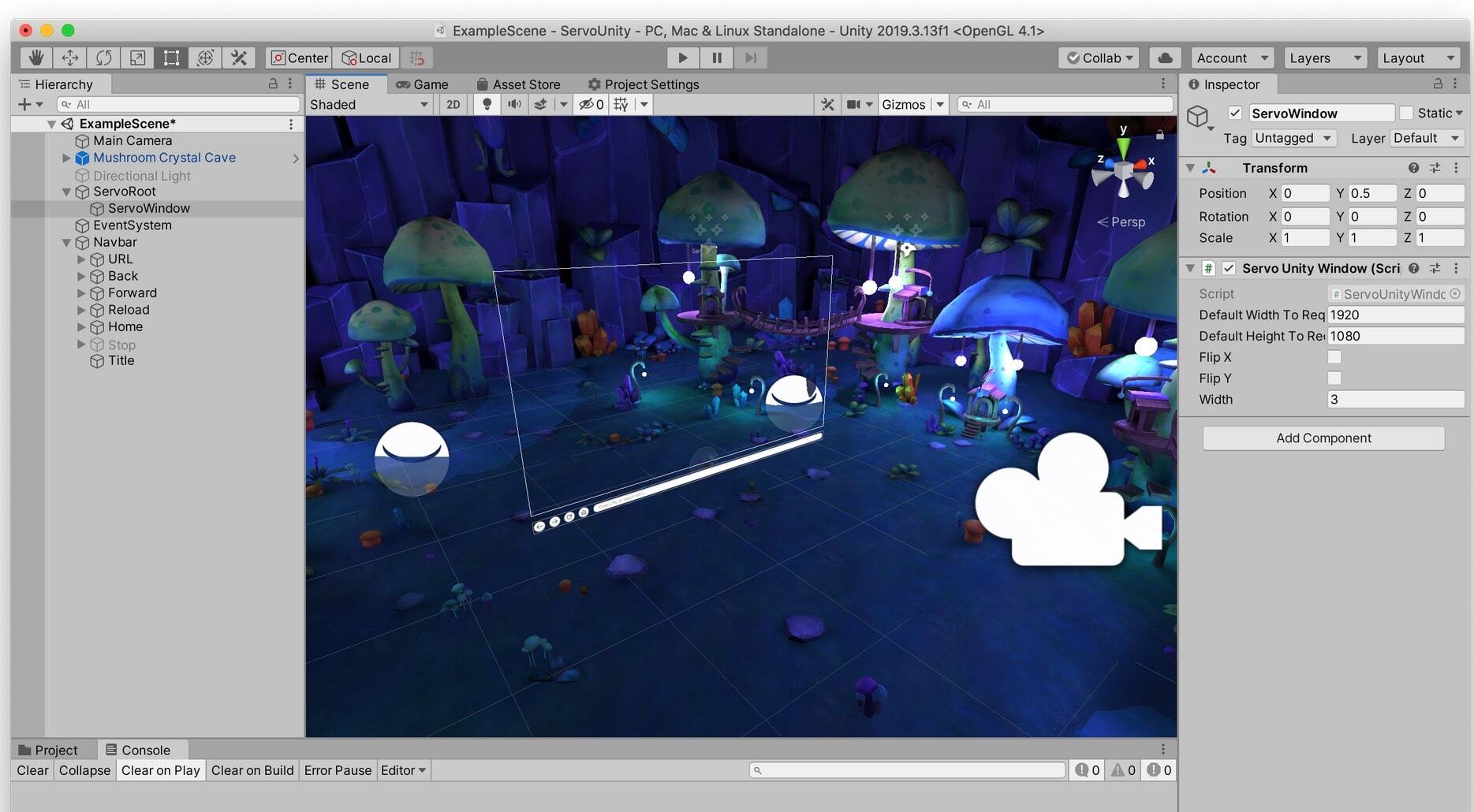
You can work directly with the browser window and controls inside the Unity Editor. Top-level config is on the ServoUnityController object. Other important objects in the scene include the ServoUnityWindow, ServoUnityNavbarController, and ServoUnityMousePointer.
The ServoUnityWindow can be positioned anywhere in a Unity scene. Here, we’ve dropped it into the Mozilla mushroom cave (familiar to users of Firefox Reality, by the amazing artist Jasmin Habezai-Fekri), and provided a camera manipulator that allows us to move around the scene and see that it is a 3D view of the browser content.
Servo has high-quality media playback via the GStreamer framework, including audio support. Here we’re viewing sample MPEG4 video, running inside a deployed Unity player build.
Customizable search is included in the plugin. A wide variety of web content is viewable with the current version of Servo, with greater web compatibility being actively worked on (more on that below). WebGL content works too.
How it works
Architecture
Development in Unity uses a component-based architecture, where Unity executes user code attached to GameObjects, organised into scenes. Users customise GameObjects by attaching scripts which execute in a C# environment, either using the Mono runtime or the IL2CPP ahead-of-time compiler. The Unity event lifecycle is accessible to user scripts inheriting from the Unity C# class MonoBehaviour. User scripts can invoke native code in plugins (which are just OS-native dynamic shared objects) via the C# runtime’s P/Invoke mechanism. In fact, Unity’s core itself is implemented in C++ and provides native code in plugins with a second set of C/C++-accessible interfaces to assist in some low-level plugin tasks.
Servo is itself a complex piece of software. By design, most of its non user-facing functionality is compiled into a Rust library, libservo. For this first phase of the project, we make use of a simplified C-compatible interface in another Rust library named
Unity's development tools and engine are far and away the most common way to build applications for VR and AR today. Previously, we've made it possible to export web-based experiences from Unity. Today, we're excited to show some early work addressing the other way that Unity developers want to use the web: as a component in their Unity-based virtual environments.
Building on our work porting a browser engine to many platforms and embedding scenarios, including as Firefox Reality AR for HoloLens 2, we have built a new Unity component based on Servo, a modern web engine written in the Rust language.
The Unity engine has a very adaptable multi-platform plugin system with a healthy ecosystem of third-party plugins, both open-source and proprietary. The plugin system allows us to run OS-native modules and connect them directly to components executing in the Unity scripting environment.
The goals of the experiments were to build a Unity native plugin and a set of Unity C# script components that would allow third parties to incorporate Servo browser windows into Unity scenes, and optionally, provide support for using the browser surface in VR and AR apps built in Unity.
Today, we’re releasing a fully-functional prototype of the Servo web browser running inside a Unity plugin. This is an early-stage look into our work, but we know excitement is high for this kind of solution, so we hope you’ll try out this prototype, provide your feedback, and join us in building things with it. The version released today targets the macOS platform, but we will add some of the other platforms supported by Servo very soon.
Getting started
We’ve open-sourced the plugin, at https://github.com/MozillaReality/servo-unity. Head on over, click the star and fork the code, check it out to your local machine, and then open the project inside Unity.
Developer instructions are in the README file in the repository.
What it does
You can work directly with the browser window and controls inside the Unity Editor. Top-level config is on the ServoUnityController object. Other important objects in the scene include the ServoUnityWindow, ServoUnityNavbarController, and ServoUnityMousePointer.
The ServoUnityWindow can be positioned anywhere in a Unity scene. Here, we’ve dropped it into the Mozilla mushroom cave (familiar to users of Firefox Reality, by the amazing artist Jasmin Habezai-Fekri), and provided a camera manipulator that allows us to move around the scene and see that it is a 3D view of the browser content.
Servo has high-quality media playback via the GStreamer framework, including audio support. Here we’re viewing sample MPEG4 video, running inside a deployed Unity player build.
Customizable search is included in the plugin. A wide variety of web content is viewable with the current version of Servo, with greater web compatibility being actively worked on (more on that below). WebGL content works too.
How it works
Architecture
Development in Unity uses a component-based architecture, where Unity executes user code attached to GameObjects, organised into scenes. Users customise GameObjects by attaching scripts which execute in a C# environment, either using the Mono runtime or the IL2CPP ahead-of-time compiler. The Unity event lifecycle is accessible to user scripts inheriting from the Unity C# class MonoBehaviour. User scripts can invoke native code in plugins (which are just OS-native dynamic shared objects) via the C# runtime’s P/Invoke mechanism. In fact, Unity’s core itself is implemented in C++ and provides native code in plugins with a second set of C/C++-accessible interfaces to assist in some low-level plugin tasks.
Servo is itself a complex piece of software. By design, most of its non user-facing functionality is compiled into a Rust library, libservo. For this first phase of the project, we make use of a simplified C-compatible interface in another Rust library named
Facebook is still a place where it’s too easy to find hate, bigotry, racism, antisemitism and calls to violence. Today, we are standing alongside our partners in the #StopHateForProfit coalition … Read more
The post Use your voice to #StopHateForProfit appeared first on The Firefox Frontier.
With the release of Firefox 79, we are pleased to welcome the 21 developers who contributed their first code change to Firefox in this release, 18 of whom were brand new volunteers! Please join us in thanking each of these diligent and enthusiastic individuals, and take a look at their contributions:
- bharath.bmsce: 1626761
- kenrick95: 1577457, 1596160, 1645036, 1645384
- nd419: 1629419
- wekerbugs: 1628749
- zekemedley: 1642448
- Andrew Park: 1646569
- Daniel Roberts: 1622660
- Deepika Karanji: 1637431
- Delan Azabani: 1630935
- Grace Bramley-Simmons: 1618987
- Jeremy Orem: 1635525
- Keefer Rourke: 1608515
- Michael Weghorn: 1646499
- Nilabja Bhattacharya: 1641324
- R. Martinho Fernandes: 1594119, 1645192
- Richard Sherman: 1631545, 1642811
- Riley Byrd: 1518234
- Surya Balakrishnan: 1637842
- Taegeon Lee: 1629421, 1640882, 1647254
- Tahia K: 1602668
- Vandan: 1645189, 1645191, 1645197
- chocos: 1622678
https://blog.mozilla.org/community/2020/07/23/firefox-79-new-contributors/
With the release of Firefox 79, we are pleased to welcome the 21 developers who contributed their first code change to Firefox in this release, 18 of whom were brand new volunteers! Please join us in thanking each of these diligent and enthusiastic individuals, and take a look at their contributions:
- bharath.bmsce: 1626761
- kenrick95: 1577457, 1596160, 1645036, 1645384
- nd419: 1629419
- wekerbugs: 1628749
- zekemedley: 1642448
- Andrew Park: 1646569
- Daniel Roberts: 1622660
- Deepika Karanji: 1637431
- Delan Azabani: 1630935
- Grace Bramley-Simmons: 1618987
- Jeremy Orem: 1635525
- Keefer Rourke: 1608515
- Michael Weghorn: 1646499
- Nilabja Bhattacharya: 1641324
- R. Martinho Fernandes: 1594119, 1645192
- Richard Sherman: 1631545, 1642811
- Riley Byrd: 1518234
- Surya Balakrishnan: 1637842
- Taegeon Lee: 1629421, 1640882, 1647254
- Tahia K: 1602668
- Vandan: 1645189, 1645191, 1645197
- chocos: 1622678
https://blog.mozilla.org/community/2020/07/23/firefox-79-new-contributors/
Today, Mozilla is pleased to announce that we’re joining the Ford Foundation, the Sloan Foundation, and the Open Society Foundations to launch a request for proposals (RFP) for research on open source digital infrastructure. To kick off this RFP, we’re joining with our philanthropic partners to host a webinar today at 9:30 AM Pacific. The Mozilla Open Source Support Program (MOSS) is contributing $25,000 to this effort.
Nearly everything in our modern society, from hospitals and banks to universities and social media platforms, runs on “digital infrastructure” – a foundation of open source code that is designed to solve common challenges. The benefits of digital infrastructure are numerous: it can reduce the cost of setting up new businesses, support data-driven discovery across research disciplines, enable complex technologies such as smartphones to talk to each other, and allow everyone to have access to important innovations like encryption that would otherwise be too expensive.
In joining with these partners for this funding effort, Mozilla hopes to propel further investigation into the sustainability of open source digital infrastructure. Selected researchers will help determine the role companies and other private institutions should play in maintaining a stable ecosystem of open source technology, the policy and regulatory considerations for the long-term sustainability of digital infrastructure, and much more. These aims align with Mozilla’s pledge for a healthy internet, and we’re confident that these projects will go a long way towards deepening a crucial collective understanding of the industrial maintenance of digital infrastructure.
We’re pleased to invite interested researchers to apply to the RFP, using the application found here. The application opened on July 20, 2020, and will close on September 4, 2020. Finalists will be notified in October, at which point full proposals will be requested. Final proposals will be selected in November.
More information about the RFP is available here.
The post Mozilla Joins New Partners to Fund Open Source Digital Infrastructure Research appeared first on The Mozilla Blog.
On July 23, MDN Web Docs turned 15 years old. From humble beginnings, rising out of the ashes of Netscape DevEdge, MDN has grown to be one of the best-respected web platform documentation sites out there. Our popularity is growing, and new content and features arrive just about every day.
When we turned 10, we had a similar celebration, talking about MDN Web Docs’ origins, history, and what we’d achieved up until then. Refer to MDN at ten if you want to go further back!
In the last five years, we’ve broken much more ground. These days, we can boast roughly 15 million views per month, a comprehensive browser compatibility database, an active beginner’s learning community, editable interactive examples, and many other exciting features that didn’t exist in 2015. An anniversary to be proud of! 
In this article, we present 15 sections highlighting our most significant achievements over the last five years. Read on and enjoy, and please let us know what MDN means to you in the comments section.
1. We’ve got an MDN Web Docs Swag Store
Launched earlier this year, the MDN Web Docs Store is the place to go to show your support for web standards documentation and get your MDN Web Docs merchandise. Whether it’s clothing, bags, or other accessories featuring your favorite dino head or MDN Web Docs logos, we’ve got something for you.
And, for a limited time only, you can pick up special 15th anniversary designs.
2. MDN’s audience has grown like never before
In 2015, MDN served 4.5 million users on a monthly basis. A year later, we launched a product strategy designed to better serve Web Developers and increase MDN’s reach. We improved the site’s performance significantly. Page load time has gone down from 5s to 3.5s for the slowest 90th percentile on MDN, in the last two years alone.
We fixed many issues that made it harder to surface MDN results in search engines, from removing spam to removing hundreds of thousands of pages from indexing. We listened to users to address an under-served audience on MDN: action-oriented developers, those who like actionable information right away. You can read below about some of the specific changes we made to better serve this audience.
With over 3,000 new articles in the last 3 years, 260,000 article edits, and all the other goodness you can read about here, MDN has grown in double-digit percentages, year over year, every year — since 2015. Today MDN is serving more than 15 million web developers on a monthly basis. And, it’s serving them better than ever before.
3. Satisfaction guaranteed
When we first started tracking task completion and satisfaction on MDN Web Docs 4 years ago, we were thrilled to see that more than 78% of MDN users were either satisfied or very satisfied with MDN, and 87% of MDN users reported that they were able to complete the task that brought them to the site.
Since then it has been our goal to address a larger share of the developer audience while still maintaining these levels of satisfaction and task completion. Today, even though we have tripled our audience size, the share of people satisfied or very satisfied with MDN has gone up to 80%. Task completion has increased to a phenomenal 92%.
4. The learning area: MDN becomes beginner-friendly
Around the middle of 2015, the writers’ team began to act on user feedback that MDN wasn’t very beginner-friendly. We heard from novice web developers that MDN had been recommended as a good source of documentation. However, when they went to check out the site, they found it too advanced for their needs.

In response to this feedback, we started the Learn Web Development section, informally known as the learning area. This area initially covered a variety of beginner’s topics ranging from what tools you need and how to get content on the web, to the very basics of web languages like HTML, CSS, and JavaScript. Getting
Welcome!
New localizers
Welcome Prasanta Hembram, Cloud-Prakash and Chakulu Hembram, from the newly created Santali community! They are currently localizing Firefox for iOS in Santali Ol Chiki script.
Are you a locale leader and want us to include new members in our upcoming reports? Contact us!
New community/locales added
Santali (Ol-Chiki script “sat-Olck”) has been added to Pontoon.
New content and projects
What’s new or coming up in Firefox desktop
Deadlines
Upcoming deadlines:
- Firefox 79 is currently in beta and will be released on July 28. The deadline to update localization was on July 14.
- The deadline to update localizations for Firefox 80, currently in Nightly, will be August 11 (4 weeks after the previous deadline).
Using a more inclusive language
As explained in a recent email to dev-l10n, we’re in the process of removing English terms that make direct or indirect references to racial oppression and discrimination.
In terms of impact on localization, that mainly involves the Master Password feature, which is now called Primary Password, starting from Firefox 80.
A Primary Password is a password that unlocks the other passwords saved locally in Firefox. Primary passwords are not synced between profiles or devices.
We ask all localizers to keep these implications in mind when translating, and to evaluate the translations previously used for “Master Password” in this light. If you identify other terms in your localizations or in the en-US version of our products that you feel are racially-charged, please raise the issue in Bugzilla and CC any of the l10n-drivers.
Most string changes regarding this update already landed in the last few days, and are available for translation in Pontoon. There is also going to be an alert in Firefox 80, to warn the users about the change:
 If your translations for “Master Password” and “Primary Password” are identical, you can leave that string empty, otherwise you should translate “Formerly known as Master Password” accordingly, so that the warning is displayed. The string should be exposed in Pontoon shortly after this l10n report is published.
New Onboarding
Make sure to test the new about:welcome in Nightly. As usual, it’s a good idea to test this type of changes in a new profile.
Note that a few more string updates and changes are expected to land this week, before Firefox 80 moves to beta.

New Experiments Section
Firefox 80 has a new Experiments section in Preferences (about:preferences#experimental). By the end of this Nightly cycle, there should be about 20 experiments listed there, generating a sizable content to translate, and often quite technical.
These are experiments that existed in Firefox for a while (since Firefox 70), but could only be manually enabled in about:config before this UI existed. Once the initial landing is complete, this feature will not require such a large amount of translation on a regular basis.
Most of these experiments will be available only in Nightly, and will be hidden in more stable versions, so it’s important – as always – to test your translations in Nightly. Given this, you should also prioritize translation for these strings accordingly, and focus on more visible parts first (always check the priority assigned to files in Pontoon).
What’s new or coming up in mobile
As many are already aware, the l10n deadline for getting strings into the Fenix release version was this past Saturday July 18th. Out of the 90 locales working on Fenix on Pontoon, 85 made it to release! Congratulations to everyone for their hard work and dedication in trying to keep the same mobile experience to all our global users! This was a very critical step in
Have you ever been engrossed in music or a great video when YouTube suddenly interrupts your experience to inject an ad? It’s jarring and ruins the mood of any moment. … Read more
The post Extension Spotlight: SponsorBlock for YouTube appeared first on The Firefox Frontier.
https://blog.mozilla.org/firefox/firefox-extension-sponsorblock/
On December 19, 2019, Mozilla announced that it will switch to Matrix and Riot as the main synchronous communication platform, replacing IRC. In July 2020, Riot was renamed to Element, along with some other rebranding that happened around the software and services. This post is aimed to give you an introduction to using Element, the most popular Matrix client, with a screen reader.
Matrix itself is an open standard protocol that defines how a chat client, such as Element, talks to a server, such as Synapse, and how servers communicate to each other to exchange messages in shared, or as is the jargon, federated, rooms. In the Matrix network, rooms can be federated across the whole network, so no matter which server you choose as your home server, you’ll get the messages in rooms you join no matter where they originated from.
You can imagine this as if you were signing up to a particular e-mail or news server, and then getting messages from other servers depending on which newsgroups you subscribe to or e-mail lists you joined.
IRC, on the other hand, is pretty self-contained. You have to connect to a particular server to join a particular network. And federation was not built into the platform. There are a few non-standard ways for servers to communicate with one another to share the load on any single network, but as this is non-standard, it is also error-prone. Ever heard of net splits? Pretty not pretty.
But one thing both networks have in common is the fact that there are client choices available. There are clients for mobile platforms, the command line, the web, and first native offerings are also in the works. Check out this non-exhaustive list of clients for inspiration.
The client most people will, however, probably come in contact with initially is Element, the client primarily developed by Element Matrix Services, a company behind many Matrix offerings. Element for web/desktop, iOS, and Android are all open-source, with repositories on Github. Filing issues or submitting pull requests is therefore possible for anyone who wants to improve them.
Initially, accessibility was terrible across the board. And there are still a number of issues open for the web client. But things have improved massively since the one-month trial Mozilla did in September and October 2019.
But the team didn’t stop there and is improving accessibility, with also some help by yours truly, until now and beyond. So by the time you read this, there may already be more things working than described here.
The web client
The web client, once you signed up and logged in, consists of a top part that has a header, a Communities button which currently doesn’t do much, and a User sub menu button. That sub menu, when opened, has shortcuts to notifications, privacy, and all settings, feedback and Logout options.
The Settings, when opened, come up in a modal dialog. The buttons at the top are actually kind of tabs, just not exposed that way yet. They control various settings which then appear below. The settings apply once you change them. Some screens offer a Save button at the bottom. To close the dialog, choose the Close button at the top.
Back in the main UI, following the top bar is the left side bar. You first get a Search field. This is to filter your active rooms shown in the room list below. You can press DownArrow to move straight from the search field to the room list. This is arranged as a tree view. The top-level nodes are direct messages and rooms, and sometimes system alerts. Below those, when expanded, are the actual persons, rooms, and bots that sent those alerts. Use standard navigation like in Explorer’s folder tree to navigate.
Direct messages are private messages. They can be one-on-one, or small groups of people. You can focus the edit field for search, then tab forward once and use the arrow keys to navigate. Press Enter to switch to the selected room. You can also invoke a context menu by usual means to access more options. You can also start a new chat when in the People group, or create your own room when within the Rooms group.
If from the search field, you press Tab instead, you land on an Explore button. This allows you to explore other rooms on the server or the whole Matrix network. Type in a phrase you want to search
In the past week, we merged 62 PRs in the Servo organization’s repositories.
The latest nightly builds for common platforms are available at download.servo.org.
We now have a collection of tips & tricks for using Firefox Reality on the HoloLens 2.
Planning and Status
Our roadmap is available online, including the team’s plans for 2020.
This week’s status updates are here.
Exciting works in progress
- pcwalton is implementing support for CSS floats in the new Layout 2020 engine.
- AbhishekSharma102 and gterzian are making some JS scripts compile off the main thread.
- kunalmohan is implementing the draft WebGPU specification.
Notable Additions
- jdm avoided a GL error when exiting immersive mode.
- asajeffrey implemented support for streaming from webxr content to the GStreamer plugin embedding.
- jdm fixed an issue with websocket HTTP requests, enabling Mozilla Hubs to load.
- ferjm fixed a regression preventing getUserMedia and other MediaStream APIs from working.
- kunalmohan implemented error scopes for WebGPU.
- avr1254 added the missing
relListDOM attribute for HTMLFormElement. - paulrouget improved the behaviour of dismissing an on-screen keyboard in Firefox Reality.
- cybai implemented support for dynamic module imports.
New Contributors
Interested in helping build a web browser? Take a look at our curated list of issues that are good for new contributors!
wgpu is a native WebGPU implementation in Rust, developed by gfx-rs community with help of Mozilla. It’s still an emerging technology, and it has many users:
- Gecko and Servo - for implementing WebGPU in the browsers
- wgpu-rs - for using idiomatically from Rust
- wgpu-native - for using from C language and others binding to C (Scopes, Python, even Julia), striving for C header compatibility with Dawn via the shared webgpu-headers.
Given the diversity of platforms and configurations it runs, and the variety of users, the questions of reproducing issues, debugging, and testing the implementation were critical to resolve.
Prior art
Fortunately, I had some success in the past rolling out serialization-based infrastructures for capturing and testing complex pipelines.
gfx-rs Warden
First, it was Warden test framework in gfx-rs. It defined serializable types for all of gfx-rs commands, and also allowed describing different scenes, test-cases, and expectations. All the data was hand-written in RON format, which by the time was quite young, and not used anywhere seriously. The ability to test gfx-rs without code was very exciting to us, and in general it worked out OK. In the end, we haven’t written too many tests, mostly because we aggressively tested with Vulkan CTS (over gfx-portability) instead, which was enormous. The separation of scenes and workloads also ended up with a few gotchas and a less-than-elegant implementation. It was also a bit awkward to write the implicit synchronization code in Warden for grabbing back the results, or re-initializing the state between tests.
WebRender capturing
The other related project was done in WebRender: the capturing infrastructure. The purpose of this one was different: assist in reproducing and debugging issues. It serialized the pipeline at two different stages to disk, allowing the capture to be transferred to a different computer and reproduced in a simple standalone tool we called Wrench. The beauty of it is that we’d mess with the RON files by hands: remove items, or whole files, change values, just playing around and seeing how the problem reacts. Even if something goes off-rails, and your capture fails to replay, it was often possible to tweak it into a working state.
Overall, it was a huge success, and it became an indispensable tool in the arsenal of Firefox graphics team. Reproducing a bug in Firefox was half the problem, debugging it within Firefox was another half. The capturing infra solved both. However, I wanted to do more with it: I wanted to have a “portable” representation of a WR scene defined with a conversion to the regular WR scene. With this, we’d be able to route all the reftests through it, replacing the hand-parsed YAML format. This part of the story never happened - there were (and still are) more important things to do.
wgpu trace/replay
Now, wgpu is fresh from the oven, and I wanted to roll in something as the best of both worlds.
First problem was the incoming flow of bugs reported by users of wgpu-rs, users of Python API, users of Gecko, on different platforms, with closed source code, and so on. Reproducing these issues and debugging them was quite challenging. We figured that wgpu was the place where all the roads met, and we needed to serialize everything that reaches that intersection, to be replayed independently, on a different machine. We defined a serialization format that we’d save all the incoming commands into at device timeline. We introduced a standalone “player” tool to replay the traces, which once again were stored as RON files.
With this in, all we needed from a bug
This year ‘s Virtual All Hands (aka VirtuAllHands) was different from any other.
Some things were also familiar: plenaries, plenty of interesting conversations, new things to learn, and yes, even a bit of exhaustion. It was even possible to meet and chat with other people, even if using your avatar using MozillaHubs! All in all, as we were assured by a Mozilla Rep veteran of numerous All-Hands, that although virtual, “it really feels like a real All Hands”.
During the VirtuAllHands, the Mozilla Reps program organized four meetings each led by a Reps Council member. These meetings focused on a review of history, and future challenges for three central issues: communication, ‘activities & campaigns’, and mentorship. The meetings uncovered many challenges, but also successes and progresses.
Two meetings were focused on communication – the first led by Felipe and the second by Tim. Felipe and Tim spoke about the Reps Council’s existing work to improve communication and then led a discussion on the main communication challenges within the Reps program. The importance of clarity on communication tools and the location of information emerged, as well as a need to centralize and summarize information. The reps also underlined the importance of having clear mechanisms through which information and communications can flow between the organization, the reps and local communities.
Our third meeting was led by Shina and Shahbaz and dealt with “activities & campaigns”. Shina led us through a presentation that can be used by the reps to guide community members on activities and campaigns available, then opened the floor for discussion. The conversation on the engagement of communities in activities and campaigns, shone some lights on the issues that reps often front. Reps talked about the importance of having locally relevant campaigns, challenges in keeping contributors engaged after a campaign has ended, as well as the need to improve the widespread communication of campaigns, and challenges in setting up events.
The last meeting was led by Faisal and focused on mentorship within the reps program. Faisal presented a brief history of the mentorship program, and led a discussion over its issues. Again the need for clarity emerged, as the reps discussed how mentors role and activities should be better defined and, in some areas, re-defined.
Thanks to you all for taking the time to participate, lead and organize these meetings. All the feedback collected during these discussions will be of crucial importance to focus our work going forward!
On behalf of the community development team:
Francesca and Konstantina
https://blog.mozilla.org/mozillareps/2020/07/17/mozilla-reps-at-the-virtuallhands-2020/
Thunderbird 78 is our newest ESR (extended-support release), which comes out yearly and is considered the latest stable release. Right now you can download the newest version from our website, and existing users will be automatically updated in the near future. We encourage those who rely on the popular add-on Enigmail to wait to update until the automatic update rolls out to them to ensure their encrypted email settings are properly imported into Thunderbird’s new built-in OpenPGP encrypted email feature.
Last year’s release focused on ensuring Thunderbird has a stable foundation on which to build. The new Thunderbird 78 aims to improve the experience of using Thunderbird, adding many quality-of-life features to the application and making it easier to use.
Compose Window Redesign

The compose window has been reworked to help users find features more easily and to make composing a message faster and more straightforward. The compose window now also takes up less space with recipients listed in “pills” instead of an entire line for every address.
Dark Mode

Thunderbird’s new Dark Mode is easier on the eyes for those working in the dark, and it has the added benefit of looking really cool! The Dark Mode even works when writing and reading emails – so you are not suddenly blinded while you work. Thunderbird will look at your operating system settings to see if you have enabled dark mode OS-wide and respect those settings. Here are the instructions for setting dark mode in Mac, and setting dark mode in Windows.
Calendar and Tasks Integrated
Thunderbird’s Lightning calendar and tasks add-on is now a part of the application itself, which means everyone now has access to these features the moment they install Thunderbird. This change also sets the stage for a number of future improvements the Thunderbird team will make in the calendar. Much of this will be focused on improved interoperability with the mail part of Thunderbird, as well as improving the user experience of the calendar.
Account Setup & Account Central Updated

The Account Setup window and the Account Central tab, which appears when you do not have an account setup or when you select an existing account in the folder tree, have both been updated. The layout and dialogues have been improved in order to make it easier to understand the information displayed and to find relevant settings. The Account Central tab also has new information about the Thunderbird project and displays the version you are using.
Folder Icons and Colors Update

Folder icons have been replaced and modernized with a new vector style. This will ensure better compatibility with HiDPI monitors and dark mode. Vector icons also means you will be able to customize their default colors to better distinguish and categorize your folders list.
Minimize to Tray
Windows users have reason to rejoice, as Thunderbird 78 can now be minimized to tray. This has been a repeatedly requested feature that has been available through many popular add-ons, but it is now part of Thunderbird core – no add-on needed! This feature has been a long time coming and we hope to bring more operating-system specific features for each platform to Thunderbird in the coming releases.
End-to-End Encrypted Email Support

Thunderbird 78.2, due out in the coming months, will offer a new feature that allows you to