This is a time of change for the internet and for Mozilla. From combatting a lethal virus and battling systemic racism to protecting individual privacy — one thing is clear: an open and accessible internet is essential to the fight.
Mozilla exists so the internet can help the world collectively meet the range of challenges a moment like this presents. Firefox is a part of this. But we know we also need to go beyond the browser to give people new products and technologies that both excite them and represent their interests. Over the last while, it has been clear that Mozilla is not structured properly to create these new things — and to build the better internet we all deserve.
Today we announced a significant restructuring of Mozilla Corporation. This will strengthen our ability to build and invest in products and services that will give people alternatives to conventional Big Tech. Sadly, the changes also include a significant reduction in our workforce by approximately 250 people. These are individuals of exceptional professional and personal caliber who have made outstanding contributions to who we are today. To each of them, I extend my heartfelt thanks and deepest regrets that we have come to this point. This is a humbling recognition of the realities we face, and what is needed to overcome them.
As I shared in the internal message sent to our employees today, our pre-COVID plan for 2020 included a great deal of change already: building a better internet by creating new kinds of value in Firefox; investing in innovation and creating new products; and adjusting our finances to ensure stability over the long term. Economic conditions resulting from the global pandemic have significantly impacted our revenue. As a result, our pre-COVID plan was no longer workable. Though we’ve been talking openly with our employees about the need for change — including the likelihood of layoffs — since the spring, it was no easier today when these changes became real. I desperately wish there was some other way to set Mozilla up for long term success in building a better internet.
But to go further, we must be organized to be able to think about a different world. To imagine that technology will become embedded in our world even more than it is, and we want that technology to have different characteristics and values than we experience today.
So going forward we will be smaller. We’ll also be organizing ourselves very differently, acting more quickly and nimbly. We’ll experiment more. We’ll adjust more quickly. We’ll join with allies outside of our organization more often and more effectively. We’ll meet people where they are. We’ll become great at expressing and building our core values into products and programs that speak to today’s issues. We’ll join and build with all those who seek openness, decency, empowerment and common good in online life.
I believe this vision of change will make a difference — that it can allow us to become a Mozilla that excites people and shapes the agenda of the internet. I also realize this vision will feel abstract to many. With this in mind, we have mapped out five specific areas to focus on as we roll out this new structure over the coming months:
- New focus on product. Mozilla must be a world-class, modern, multi-product internet organization. That means diverse, representative, focused on people outside of our walls, solving problems, building new products, engaging with users and doing the magic of mixing tech with our values. To start, that means products that mitigate harms or address the kinds of the problems that people face today. Over the longer run, our goal is to build new experiences that people love and want, that have better values and better characteristics inside those products.
- New mindset. The internet has become the platform. We love the traits of it — the decentralization, its permissionless innovation, the open source underpinnings of it, and the standards part — we love it all. But to enable these changes, we must shift our collective mindset from a place of defending, protecting, sometimes even huddling up and trying to keep a piece of what we love to one that is proactive, curious, and engaged with people out in the world. We will become the modern organization we aim to be — combining product, technology and advocacy — when we are building new things, making changes within ourselves and seeing how the traits of the past can show up in new ways in the future.
- New focus on technology. Mozilla is a
Hello and welcome to another issue of This Week in Rust! Rust is a systems language pursuing the trifecta: safety, concurrency, and speed. This is a weekly summary of its progress and community. Want something mentioned? Tweet us at @ThisWeekInRust or send us a pull request. Want to get involved? We love contributions.
This Week in Rust is openly developed on GitHub. If you find any errors in this week's issue, please submit a PR.
Check out this week's This Week in Rust Podcast
Updates from Rust Community
No official Rust announcements this week! :)
Tooling
Newsletters
Observations/Thoughts
- Steve Klabnik Interview
- Why QEMU should move from C to Rust
- First Impressions of Rust
- How to Stick with Rust
- Why learning Rust is great...As a second language
- What Is The Minimal Set Of Optimizations Needed For Zero-Cost Abstraction?
- Propane: an experimental generator syntax for Rust
- [ES] ?Por qu'e me gusta tanto Rust?
Learn Standard Rust
- Moves, copies and clones in Rust
- Rust for a Pythonista #2: Building a Rust crate for CSS inlining
- Surviving Rust async interfaces
- Two Easy Ways to Test Async Functions in Rust
- Cloning yourself - a refactoring for thread-spawning Rust types
- Allocation API, allocators and virtual memory
- Variables and memory management in Rust
- [ES] Polimorfismo con traits en Rust
- [PT] Aprendendo Rust: 06 - Controles de fluxo
- [PT] Meia hora aprendendo Rust - Parte 1
- [video] Crust of Rust: Channels
Learn More Rust
- Zero To Production #3: How To Bootstrap A Rust Web API From Scratch
- Using Rust Lambdas in Production
In the past two weeks, we merged 108 PRs in the Servo organization’s repositories.
The latest nightly builds for common platforms are available at download.servo.org.
Last week we released Firefox Reality v1.2, which includes a smoother developer tools experience, along with support for Unity WebXR content and self-signed SSL certificates. See the full release notes for more information about the new release.

Planning and Status
Our roadmap is available online, including the team’s plans for 2020.
This week’s status updates are here.
Exciting works in progress
- paulrouget is adding bookmarks to Firefox Reality.
- Manishearth is implementing basic table support in the new Layout 2020 engine.
- jdm is making it easy to create builds that integrate AddressSanitizer.
- pcwalton is implementing support for CSS floats in the new Layout 2020 engine.
- kunalmohan is implementing the draft WebGPU specification.
Notable Additions
New layout engine
- jdm made
- Manishearth implemented support for the
clipCSS property. - Manishearth fixed the behaviour of the
insetCSS property for absolutely positioned elements.
Non-layout changes
- kunalmohan added the WebGPU conformance test suite to Servo’s automated tests.
- jdm improved the macOS nightly GStreamer packaging.
- nicoabie made a SpiderMonkey Rust binding API more resilient.
- utsavoze added support for
mouseenterandmouseleaveDOM events. - avr1254 removed some unnecessary UTF-8 to UTF-16 conversions when interacting with SpiderMonkey.
- jdm implemented
preserveDrawbingBuffersupport in WebGL code. - paulrouget added a crash reporting UI to Firefox Reality.
- mustafapc19 implemented the
Console.clearDOM API. - kunalmohan fixed a WebGPU crash related to the
GPUErrorScopeAPI, and improved the reporting behaviour to match the specification. - asajeffrey fixed a source of WebGL texture corruption in WebXR.
- asajeffrey added infrastructure to the GStreamer plugin to allow live-streaming 360 degree videos of Hubs rooms to Youtube.
- kunalmohan improved the error reporting behaviour of the WebGPU API.
- asajeffrey update the WebXR Layers implementation to match the latest specification.
A number of programming languages offer a feature called “Named Arguments” or “Labeled Arguments”, which makes some function calls much more readable and safer.
Let’s see how hard it would be to add these in Rust.

Source: Vlad Tchompalov, Unsplash.
Our tiny UX content strategy team works to deliver the right content to the right users at the right time. We make sure product content is useful, necessary, and appropriate. This includes everything from writing an error message in Firefox to developing the full end-to-end content experience for a stand-alone product.
Mozilla has around 1,000 employees, and many of those are developers. Our UX team has 20 designers, 7 researchers, and 3 content strategists. We support the desktop and mobile Firefox browsers, as well as satellite products.
There’s no shortage of requests for content help, but there is a shortage of hours and people to tackle them. When the organization wants more of your time than you actually have, what’s a strategic content strategist to do?
1. Identify high-impact projects and work on those
We prioritize our time for the projects with high impact — those that matter most to the business and reach the most end users. Tactically, this means we do the following:
- Review high-level organizational goals as a team at the beginning of every planning cycle.
- Ask product managers to identify and rank order the projects needing content strategy support.
- Evaluate those requests against the larger business priorities and estimate the work. Will this require 10 percent of one content strategist’s time? 25 percent?
- Communicate out the projects that content strategy will be able to support.
By structuring our work this way, we aim to develop deep expertise on key focus areas rather than surface-level understanding of many.
2. Embed yourself and partner with product management
People sometimes think ‘content strategist’ is another name for ‘copywriter.’ While we do write the words that appear in the product, writing interface copy is about 10–20 percent of our work. The lion’s share of a content strategist’s day is spent laying the groundwork leading up to writing the words:
- Driving clarity
- Collaborating with designers
- Understanding technical feasibility and constraints
- Conducting user research
- Developing processes
- Aligning teams
- Documenting and communicating decisions up and out
To do this work, we embed with cross-functional teams. Content strategy shows up early and stays late. We attend kickoffs, align on user problems, crystallize solutions, and act as connective tissue between the product experience and our partners in localization, legal, and the support team. We often stay involved after designs are handed off because content decisions have long tentacles.
We also work closely with our product managers to ensure that the strategy we bring to the table is the right one. A clear up-front understanding of user and business goals leads to more thoughtful content design.
3. Participate in and lead research
A key way we shape strategy is by participating in user research (as observers and note-takers) and leading usability studies.
“I’m not completely certain what you mean when you say, ‘found on your device.’ WHICH device?” — Usability study participant on a redesigned onboarding experience (User Research Firefox UX, Jennifer Davidson, 2020)
Designing a usability study not only requires close partnership with design and product management, but also forces you to tackle product clarity and strategy issues early. It gives you the opportunity to test an early solution and hear directly from your users about what’s working and what’s not. Hearing the language real people use is enlightening, and it can help you articulate and justify the decisions you make in copy later on.
4. Collaborate with each other
Just because your team works on different projects doesn’t mean you can’t collaborate. In fact, it’s more of a reason to share and align. We want to present our users with a unified end experience, no matter when they encounter our product — or which content strategist worked on a particular aspect of it.
- Peer reviews. Ask one of your content strategy teammates to provide a second set of eyes on your work. This is especially useful for identifying confusing terminology or jargon that you, as the dedicated content strategist, may
When you log into your Firefox Account, you expect a seamless experience across all your devices. In the past, we weren’t doing the best job of delivering on that experience, because we didn’t have the tools to collect cross-product metrics to help us make educated decisions in a way that fulfilled our lean data practices and our promise to be a trusted steward of your data. Now we do.
Firefox 81 will include new telemetry measurements that help us understand the experience of Firefox Account users across multiple products, answering questions such as: Do users who set up Firefox Sync spend more time on desktop or mobile devices? How is Firefox Lockwise, the password-manager built into the Firefox desktop browser, used differently than the Firefox Lockwise apps? We will use the unique privacy features of Firefox Accounts to answer questions like these while staying true to Mozilla’s data principles of necessity, privacy, transparency, and accountability–in particular, cross-product telemetry will only gather non-identifiable interaction data, like button clicks, used to answer specific product questions.
We achieve this by introducing a new telemetry ping that is specifically for gathering cross-product metrics. This ping will include a pseudonymous account identifier or pseudonym so that we can tell when two pings were created by the same Firefox Account. We manage this pseudonym in a way that strictly limits the ability to map it back to the real user account, by using the same technology that keeps your Firefox Sync data private (you can learn more in this post if you’re curious). Without getting into the cryptographic details, we use your Firefox Account password as the basis for creating a secret key on your client. The key is known only to your instances of Firefox, and only when you are signed in to your Firefox account, and we use that key to generate the pseudonym for your account.
We’ll have more to share soon. As we gain more insight into Firefox, we’ll come back to tell you what we learn!
https://blog.mozilla.org/data/2020/08/07/improving-your-experience-across-products/
The California legislature is currently considering a bill directing a public board to pilot the use of blockchain-type tools to communicate Covid-19 test results and other medical records. We believe the bill unduly dictates one particular technical approach, and does so without considering the privacy, security, and equity risks it poses. We urge the California Senate to reconsider.
The bill in question is A.B. 2004, which would direct the Medical Board of California to create a pilot program using verifiable digital credentials as electronic patient records to communicate COVID-19 test results and other medical information. The bill seems like a well-intentioned attempt to use modern technology to address an important societal problem, the ongoing pandemic. However, by assuming the suitability of cryptography-based verifiable credential models for this purpose, rather than setting out technology-neutral principles and guidelines for the proposed pilot program, the bill would set a dangerous precedent by effectively legislating particular technology outcomes. Furthermore, the chosen direction risks exacerbating the potential for discrimination and exclusion, a lesson Mozilla has learned in our work on digital identity models being proposed around the world. While we appreciate the safeguards that have been introduced into the legislation in its current form, such as its limitations on law enforcement use, they are insufficient. A new approach, one that maximizes public good while minimizing harms of privacy and exclusion, is needed.
A.B. 2004 is grounded in large part on legislative findings that the verifiable credential models being explored by the World Wide Web Consortium (W3C) “show great promise” (in the bill’s words) as a technology for communicating sensitive health information. However, W3C’s standards should not be misconstrued as endorsement of any particular use-case. Mozilla is an active member of and participant in W3C, but does not support the W3C’s verifiable credentials work. From our perspective, this bill over-relies on the potential of verifiable credentials without unpacking the tradeoffs involved in applying them to the sensitive public health problems at hand. The bill also fails to appreciate the many limitations of blockchain technology in this context, as others have articulated.
Fortunately, this bill is designed as the start of a process, establishing a pilot program rather than committing to a long term direction. However, a start in the wrong direction should nevertheless be avoided, rather than spending time and resources we can’t spare. Tying digital real world identities (almost certainly implicated in electronic patient records) to contact tracing solutions and, in time, vaccination and “other medical test results” is categorically concerning. Such a move risks creating new avenues for the discrimination and exclusion of vulnerable communities, who are already being disproportionately impacted by COVID-19. It sets a poor example for the rest of the United States and for the world.
At Mozilla, our view is that digital identity systems — for which verifiable credentials for medical status, the subject at issue here, are a stepping stone and test case — are a key real-world implementation challenge for central policy values of privacy, security, competition, and social inclusion. As lessons from India and Kenya have shown us, attempting to fix digital ID systems retroactively is a convoluted process that often lets real harms continue unabated for years. It’s therefore critical to embrace openness as a core methodology in system design. We published a white paper earlier this year to identify recommendations and guardrails to make an “open” ID system work in reality.
A better approach to developing the pilot program envisioned in this bill would establish design principles, guardrails, and outcome goals up front. It would not embrace any specific technical models in advance, but would treat feasible technology solutions equally, and set up a diverse working group to evaluate a broad range of approaches and paradigms. Importantly, the process should build in the possibility that no technical solution is suitable, even if this outcome forces policymakers
We just released ECSY v0.4 and ECSY-THREE v0.1!
Since the initial release of ECSY we have been focusing on API stability and bug fixing as well as providing some features (such as components’ schemas) to improve the developer experience and provide better validation and descriptive errors when working in development mode.
The API layer hasn't changed that much since its original release but we introduced some new concepts:
Components schemas: Components are now required to have a schema (Unless you are defining a TagComponent).
Defining a component schema is really simple, you just need to define the properties of your component, their types, and, optionally, their default values
class Velocity extends Component {}
Velocity.schema = {
  x: { type: Types.Number, default: 0 },
  y: { type: Types.Number, default: 0 }
};
We provide type definitions for the basic javascript types, and also on ecsy-three for most of the three.js data types, but you can create your own custom types too.
Defining a schema for a component will give you some benefits for free like:
- Default
copy,cloneandresetimplementation for the component. Although you could define your own implementation for these functions for maximum performance. - Components pool to reuse instances to improve performance and GC stability.
- Tooling such as validators or editors which could show specific widgets depending on the data type and value.
- Serializers for components so we can store them in JSON or ArrayBuffers, useful for networking, tooling or multithreading.
Registering components: One of the requirements we introduced recently is that you must always register your components before using them, and that includes registering them before registering systems that use these components too. This was initially done to support an optimization to Queries, but we feel making this an explicit rule will also allow us to add further optimizations down the road, as well as just generally being easier to reason about.
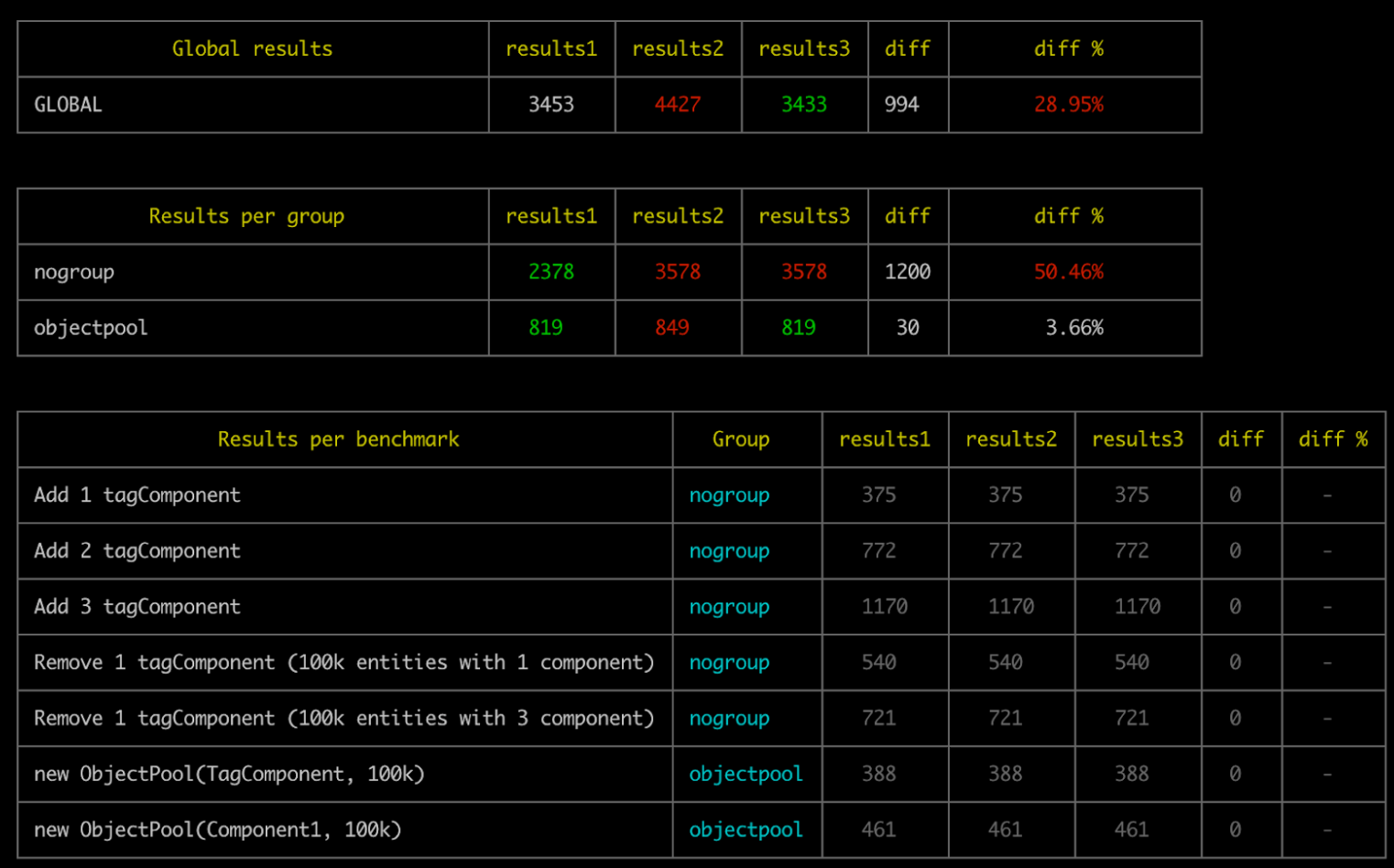
Benchmarks: When building a framework like ECSY that is expected to be doing a lot of operations per frame, it’s hard to infer how a change in the implementation will impact the overall performance. So we introduced a benchmark command to run a set of tests and measure how long they take.
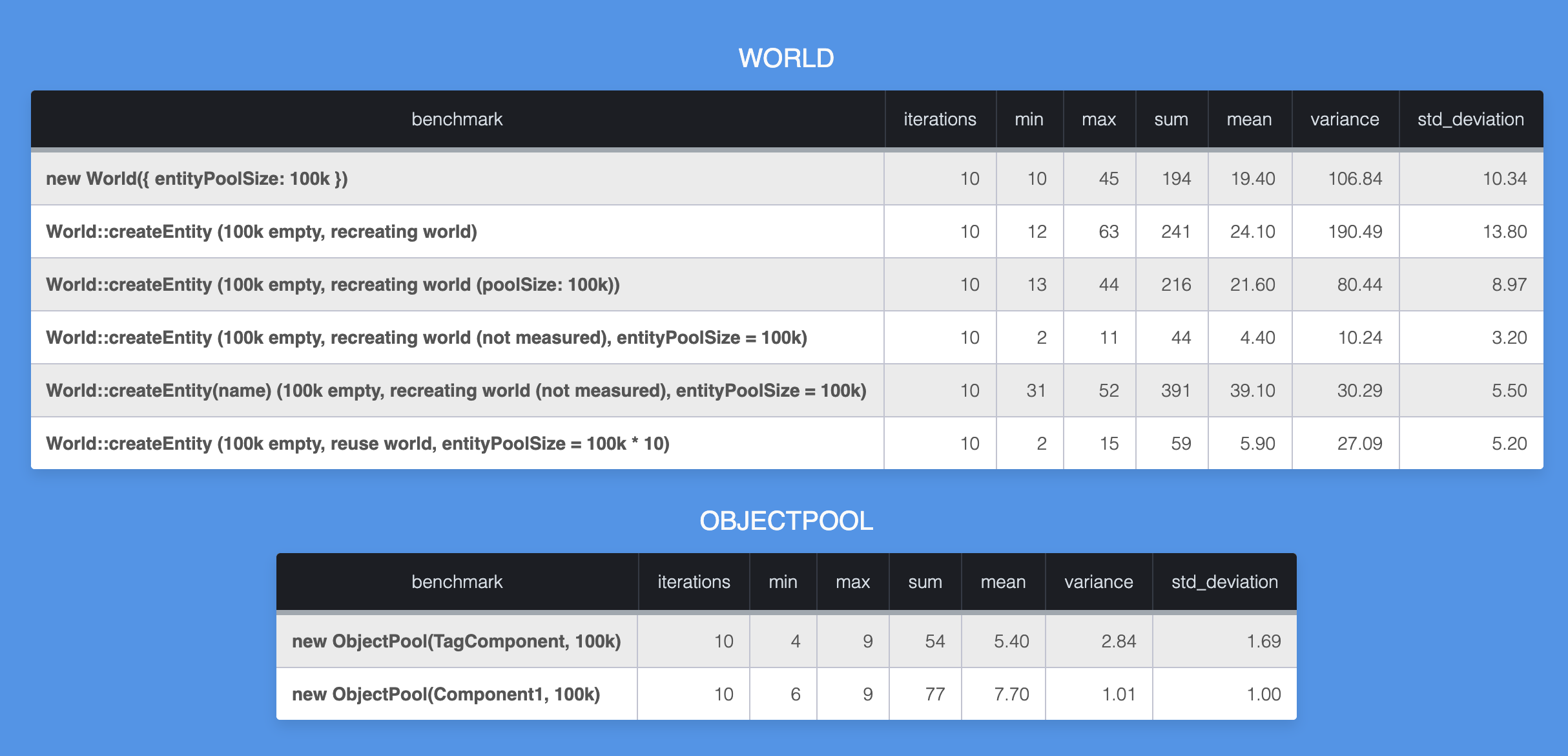
We can use this data to compare across different branches and get an estimation on how much specific changes are affecting the performance.
ECSY-THREE
We created ecsy-three to facilitate developing applications using ECSY and three.js by providing a set of components and systems for interacting with ThreeJS from ECSY. In this release it has gotten a major refactor and we got rid of all the “extras” in the main repository, to focus on the “core” API to make it easy to use with three.js without adding unneeded abstractions.
We introduce extended implementations of ECSY's World and Entity classes (ECSYThreeWorld and ECSYThreeEntity) which provides some helpers to interact with three.js' Object3Ds.
The main helper you will be using is Entity.addObject3DComponent(Object3D, parent) that will add the Object3DComponent to the entity holding a three.js' Object3D reference, as well as adding extra tag components to indentify the type of Object3D we are adding.
Please note that we have been adding tag components for almost every type of Object3D in three.js (Mesh, Light, Camera, Scene, …) but you could still add any
In 2019 we started looking into our experiences and 2020 saw us release the new responsive redesign, a new AAQ flow, a finalized Firefox Accounts migration, and a few other minor tweaks. We have also performed a Python and Django upgrade carrying on with the foundational work that will allow us to grow and expand our support platform. This was a huge win for our team and the first time we have improved our experience in years! The team is working on tracking the impact and improvement to our overall user experience.
We also know that contributors in Support have had to deal with an old, sometimes very broken, toolset, and so we wanted to work on that this year. You may have already heard the updates from Kiki and Giulia through their monthly strategy updates. The research and opportunity identification the team did was hugely valuable, and the team identified onboarding as an immediate area for improvement. We are currently working through an improved onboarding process and look forward to implementing and launching ongoing work.
Apart from that, we’ve done a quite chunk of work on the Social Support side with the transition from Buffer Reply to Conversocial. The change was planned since the beginning of this year and we worked together with the Pocket team on the implementation. We’ve also collaborated closely with the marketing team to kick off the @FirefoxSupport Twitter account that we’ll be using to focus our Social Support community effort.
Now, the community managers are focusing on supporting the Fennec to Fenix migration. A community campaign to promote the Respond Tool is lining up in parallel with the migration rollout this week and will run until the end of August as we’re completing the rollout.
We plan to continue implementing the information architecture we developed late last year that will improve our navigation and clean up a lot of the old categories that are clogging up our knowledge base editing tools. We’re also looking into redesigning our internal search architecture, re-implement it from scratch and expand our search UI.
2020 is also the year we have decided to focus more on data. Roland and JR have been busy building out our product dashboards, all internal for now – and we are now working on how we make some of this data publicly available. It is still work in progress, but we hope to make this possible sometime in early 2021.
In the meantime, we welcome feedback, ideas, and suggestions. You can also fill out this form or reach out to Kiki/Giulia for questions. We hope you are all as excited about all the new things happening as we are!
Thanks,
Patrick, on behalf of the SUMO team
Let’s brainstorm a sustainable future together.
Imagine: We are in the year 2050 and we’re opening the Museum of the Fossilized Internet, which commemorates two decades of a sustainable internet. The exhibition can now be viewed in social VR. Join an online tour and experience what the coal and oil-powered internet of the past was like.
Visit the Museum from home
In March 2020, Michelle Thorne and I announced office tours of the Museum of the Fossilized Internet as part of our new Sustainability programme. Then the pandemic hit, and we teamed up with the Mozilla Mixed Reality team to make it more accessible while also demonstrating the capabilities of social VR with Hubs.
We now welcome visitors to explore the museum at home through their browsers.
The museum was created to be a playful source of inspiration and an invitation to imagine more positive, sustainable futures. Here’s a demo tour to help you get started on your visit.
Video Production: Dan Fernie-Harper; Spoke scene: Liv Erickson and Christian Van Meurs; Tour support: Elgin-Skye McLaren.
Foresight workshops
But that’s not all. We are also building on the museum with a series of foresight workshops. Once we know what preferable, sustainable alternatives look like, we can start building towards them so that in a few years, this museum is no longer just a thought experiment, but real.
Our first foresight workshop will focus on policy with an emphasis on trustworthy AI. In a pilot, facilitators Michelle Thorne and Fieke Jansen will specifically focus on the strategic opportunity that the European Commission is in the process of defining its AI strategy, climate agenda and COVID-19 recovery plans. Thought together, this workshop will develop options to advance both, trustworthy AI and climate justice.
More foresight workshops should and will follow. We are currently looking at businesses, technology, or the funders community as additional audiences. Updates will be available on the wiki.
You are also invited to join the sustainability team as well as our environmental champions on our Matrix instance to continue brainstorming sustainable futures. More updates on Mozilla’s journey towards sustainability will be shared here on the Mozilla Blog.
The post Virtual Tours of the Museum of the Fossilized Internet appeared first on The Mozilla Blog.
https://blog.mozilla.org/blog/2020/08/06/virtual-tours-of-the-museum-of-the-fossilized-internet/
(“This Week in Glean” is a series of blog posts that the Glean Team at Mozilla is using to try to communicate better about our work. They could be release notes, documentation, hopes, dreams, or whatever: so long as it is inspired by Glean. You can find an index of all TWiG posts online.)
This is a special guest post by non-Glean-team member Daosheng Mu!
You might notice Firefox Reality PC Preview has been released in HTC’s Viveport store. That is a VR web browser that provides 2D overlay browsing alongside immersive content and supports web-based immersive experiences for PC-connected VR headsets. In order to easily deploy our product into the Viveport store, we take advantage of Unity to help make our application launcher. Also because of that, it brings us another challenge about how to use Mozilla’s existing telemetry system.
As we know, Glean SDK has provided language bindings for different programming language requirements that include Kotlin, Swift, and Python. However, when we are talking about supporting applications that use Unity as their development toolkit, there are no existing bindings available to help us achieve it. Unity allows users using a Python interpreter to embed Python scripts in a Unity project; however, due to Unity’s technology being based on the Mono framework, that is not the same as our familiar Python runtime for running Python scripts. So, the alternative way we need to find out is how to run Python on .Net Framework or exactly on Mono framework. If we are discussing possible approaches to run Python script in the main process, using IronPython is the only solution. However, it is only available for Python 2.7, and the Glean SDK Python language binding needs Python 3.6. Hence, we start our plans to develop a new Glean binding for C#.
Getting started
The Glean team and I initialized the discussions about what are the requirements of running Glean in Unity to implement C# binding from Glean. We followed minimum viable product strategy and defined very simple goals to evaluate if the plan could be workable. Technically, we only need to send built-in and custom pings as the current Glean Python binding mechanism, and we are able to just use StringMetricType as our first metric in this experimental Unity project. Besides, we also notice .Net Frameworks have various versions, and it is essential to consider the compatibility with the Mono framework in Unity. Therefore, we decide Glean C# binding would be based on .Net Standard 2.0. Based on these efficient MVP goals and Glean team’s rapid production, we got our first alpha version of C# binding in a very short moment. I really appreciate Alessio, Mike, Travis, and other team members from the Glean team. Their hard work made it happen so quickly, and they were patient with my concerns and requirements.
How it works
In the beginning, it is worth it for us to explain how to integrate Glean into a Hello World C# application. We can choose either importing the C# bindings source code from glean-core/csharp or just building the csharp.sln from the Glean repository and then copy and paste the generated Glean.dll to your own project. Then, in your C# project’s Dependencies setting, add this Glean.dll. Aside from this, we also need to copy and paste glean_ffi.dll that is existing in the folder from pulling Glean after running `cargo build`. Lastly, add Serilog library into your project via NuGet. We can install it through NuGet Package Manager Console as below:
PM> Install-Package Serilog
PM> Install-Package Serilog.Sinks.Console
Defining pings and metrics
Before we start to write our program, let’s design our metrics first. Based on the current ability of Glean SDK C# language binding, we can create a custom ping and set a string type metric for this custom ping. Then, at the end of the program, we will submit this custom ping, this string metric would be collected and uploaded to our data server. The ping and metric description files are as below:
Testing and verifying it
Now, it is time for us to write our HelloWorld program.
As we can see, the code above is very

I'm writing this post in what Google is euphemistically referring to as an improvement. I don't understand this. I managed to ignore New Blogger for a few weeks but Google's ability to fark stuff up has the same air of inevitability as rotting corpses. Perhaps on mobile devices it's better, and even that is a matter of preference, but it's space-inefficient on desktop due to larger buttons and fonts, it's noticeably slower, it's buggy, and very soon it's going to be your only choice.
My biggest objection, however, is what they've done to the HTML editor. I'm probably the last person on earth to do so, but I write my posts in raw HTML. This was fine in the old Blogger interface which was basically a big freeform textbox you typed tags into manually. There was some means to intercept tags you didn't close, which was handy, and when you added elements from the toolbar you saw the HTML as it went in. Otherwise, WYTIWYG (what you typed is what you got). Since I personally use fairly limited markup and rely on the stylesheet for most everything, this worked well.
The new one is a line editor ... with indenting. Blogger has always really, really wanted you to use
as a container, even though a closing tag has never been required. But now, thanks to the indenter, if you insert a new paragraph then it starts indenting everything, including lines you've already typed, and there's no way to turn this off! Either you close every
tag immediately to defeat this behaviour, or you start using a lot of
s, which specifically defeats any means of semantic markup. (More about this in a moment.) First world problem? Absolutely. But I didn't ask for this "assistance" either, nor to require me to type additional unnecessary content to get around a dubious feature.
But wait, there's less! By switching into HTML view, you lose ($#@%!, stop indenting that line when I type emphasis tags!) the ability to insert hyperlinks, images or other media by any other means other than manually typing them out. You can't even upload an image, let alone automatically insert the HTML boilerplate and edit it.
So switch into Compose view to actually do any of those things, and what happens? Like before, Blogger rewrites your document, but now this happens all the time because of what you can't do in HTML view. Certain arbitrarily-determined naughtytags(tm) like become (my screen-reader friends will be disappointed). All those container close tags that are unnecessary bloat suddenly appear. Oh, and watch out for that dubiously-named "Format HTML" button, the only special feature to appear in the HTML view, as opposed to anything actually useful. To defeat the HTML autocorrupt while I was checking things writing this article, I actually copied and repasted my entire text multiple times so that Blogger would stop the hell messing with it. Who asked for this?? Clearly the designers of this travesty, assuming it isn't some cruel joke perpetuated by a sadistic UI anti-expert or a covert means to make people really cheesed off at Blogger so Google can claim no one uses it and shut it down, now intend HTML view to be strictly touch-up only, if that, and not a primary means of entering a post. Heaven forbid people should learn HTML anymore and try to write something efficient.
Oh, what else? It's slower, because of all the additional overhead (remember, it used to be just a big ol' box o' text that you just typed into, and a selection of mostly static elements making up the UI otherwise). Old Blogger was smart enough (or perhaps it was a happy accident) to know you already had a preview tab open and would send your preview there. New Blogger opens a new, unnecessary tab every time. The fonts and the buttons are bigger, but the icons are of similar size, defeating any reasonable argument of accessibility and just looks stupid on the G5 or the Talos II. There's lots of wasted empty space, too. This may reflect the contents of the crania of the people who worked on it,
I was reading In a Land Before Dev Tools by Amber, and I thought, Oh here missing in the history the beautifully chiseled Opera Dragonfly and F12 for Internet Explorer. So let's see what are all the things I myself didn't know.
(This is slightly larger than just browser devtools, but close from what the web developers had to be able to work. If you feel I had a glaring omission in this list, send me an email kdubost is working at mozilla.com)
- 1997-12: JavaScript debugger for Netscape Communicator, future Firefox. (JavaScript Debugger)
- 1998-02: Microsoft Script Debugger for IE 4.0. Thanks to Kilian Valkhof (added on 2020-08-07)
- ~2001: DOM Inspector in Mozilla code base.
- 2001-10: Venkman, JavaScript debugger inside Mozilla Suite by Robert Ginda. (Venkman)
- 2003-10: Fiddler for IE for understanding HTTP network issues (History of releases)
- 2005-09: Developer Toolbar for IE. (Developer Toolbar for IE announced at PDC) which later on became F12
- 2006-01: Firebug for Firefox by Joe Hewitt as an extension for Firefox. Probably 2005, but the first release is January 2006. (11 years of history)
- 2006-01: Web Inspector for Safari. (Introducing the Web Inspector and 10 Years of Web Inspector)
- 2006-06: Drosera for Safari, JavaScript debugger (Introducing Drosera)
- 2007-07: Yslow made by Yahoo! for Firebug originally. It analyzed the pages for its performances. (YSlow Release on YDN)
- 2008-05: Opera Dragonfly in… Opera. Died in 2012 when the company decided to switched to Blink. Sniff. One of the best debugging tools at the time. Opera Dragonfly homepage
- 2008-09: DevTools in Chrome (10 years anniversary post)
- 2009-06: PageSpeed, a tool to evaluate the performance of the Web page, similar to Yslow. (Introducing Page Speed)
- 2009-07: Opera Scope Protocol initially proposed to have a common protocol for all devtools. Browser implementers decided that they were not interested to converge. Opera Scope Protocol Specification Released
- 2009-10: HTTP Archive Specification, a format for HTTP monitoring tools.
- 2010-02: Firebug Lite for Chrome
Note: Without WebArchive, all this history would not have been possible to retrace. The rust of the Web is still ongoing.
Otsukare!
https://www.otsukare.info/2020/08/06/browser-devtools-timeline
When: Aug 13, 2020 10:00 AM Pacific Time (US and Canada) (17:00 UTC)
Length: 30 minutes
Abstract: curl is a wildly popular and well-used open source tool and library, and is the result of more than 2,200 named contributors helping out. Over 800 individuals wrote at least one commit so far.
In this presentation, curl’s lead developer Daniel Stenberg talks about how any developer can proceed in order to get their first code contribution submitted and ultimately landed in the curl git repository. Approach to code and commits, style, editing, pull-requests, using github etc. After you’ve seen this, you’ll know how to easily submit your improvement to curl and potentially end up running in ten billion installations world-wide.
Register in advance for this webinar:
https://us02web.zoom.us/webinar/register/WN_poAshmaRT0S02J7hNduE7g
I last wrote in April about my work on speeding up the Rust compiler. Time for another update.
Weekly performance triage
First up is a process change: I have started doing weekly performance triage. Each Tuesday I have been looking at the performance results of all the PRs merged in the past week. For each PR that has regressed or improved performance by a non-negligible amount, I add a comment to the PR with a link to the measurements. I also gather these results into a weekly report, which is mentioned in This Week in Rust, and also looked at in the weekly compiler team meeting.
The goal of this is to ensure that regressions are caught quickly and appropriate action is taken, and to raise awareness of performance issues in general. It takes me about 45 minutes each time. The instructions are written in such a way that anyone can do it, though it will take a bit of practice for newcomers to become comfortable with the process. I have started sharing the task around, with Mark Rousskov doing the most recent triage.
This process change was inspired by the “Regressions prevented” section of an excellent blost post from Nikita Popov (a.k.a. nikic), about the work they have been doing to improve the speed of LLVM. (The process also takes some ideas from the Firefox Nightly crash triage that I set up a few years ago when I was leading Project Uptime.)
The speed of LLVM directly impacts the speed of rustc, because rustc uses LLVM for its backend. This is a big deal in practice. The upgrade to LLVM 10 caused some significant performance regressions for rustc, though enough other performance improvements landed around the same time that the relevant rustc release was still faster overall. However, thanks to nikic’s work, the upgrade to LLVM 11 will win back much of the performance lost in the upgrade to LLVM 10.
It seems that LLVM performance perhaps hasn’t received that much attention in the past, so I am pleased to see this new focus. Methodical performance work takes a lot of time and effort, and can’t effectively be done by a single person over the long-term. I strongly encourage those working on LLVM to make this a team effort, and anyone with the relevant skills and/or interest to get involved.
Better benchmarking and profiling
There have also been some major improvements to rustc-perf, the performance suite and harness that drives perf.rust-lang.org, and which is also used for local benchmarking and profiling.
#683: The command-line interface for the local benchmarking and profiling commands was ugly and confusing, so much so that one person mentioned on Zulip that they tried and failed to use them. We really want people to be doing local benchmarking and profiling, so I filed this issue and then implemented PRs #685 and #687 to fix it. To give you an idea of the improvement, the following shows the minimal commands to benchmark the entire suite.
# Old target/release/collector --dbbench_local --rustc --cargo # New target/release/collector bench_local
Full usage instructions are available in the README.
#675: Joshua Nelson added support for benchmarking rustdoc. This is good because rustdoc performance has received little attention in the
We are changing the default value of the SameSite attribute for cookies from None to Lax. This will greatly improve security for users. However, some web sites may depend (even unknowingly) on the old default, potentially resulting in breakage for those sites. At Mozilla, we are slowly introducing this change. And we are strongly encouraging all web developers to test their sites with the new default.
Background
SameSite is an attribute on cookies that allows web developers to declare that a cookie should be restricted to a first-party, or same-site, context. The attribute can have any of the following values:
None– The browser will send cookies with both cross-site and same-site requests.Strict– The browser will only send cookies for same-site requests (i.e., requests originating from the site that set the cookie).Lax– Cookies will be withheld on cross-site requests (such as calls to load images or frames). However, cookies will be sent when a user navigates to the URL from an external site; for example, by following a link.
Currently, the absence of the SameSite attribute implies that cookies will be attached to any request for a given origin, no matter who initiated that request. This behavior is equivalent to setting SameSite=None. However, this “open by default” behavior leaves users vulnerable to Cross-Site Request Forgery (CSRF) attacks. In a CSRF attack, a malicious site attempts to use valid cookies from legitimate sites to carry out attacks.
Making the Web Safer
To protect users from CSRF attacks, browsers need to change the way cookies are handled. The two primary changes are:
- When not specified, cookies will be treated as
SameSite=Laxby default - Cookies that explicitly set
SameSite=Nonein order to enable cross-site delivery must also set theSecureattribute. (In other words, they must require HTTPS.)
Web sites that depend on the old default behavior must now explicitly set the SameSite attribute to None. In addition, they are required to include the Secure attribute. Once this change is made inside of Firefox, if web sites fail to set SameSite correctly, it is possible those sites could break for users.
Introducing the Change
The new SameSite behavior has been the default in Firefox Nightly since Nightly 75 (February 2020). At Mozilla, we’ve been able to explore the implications of this change. Starting with Firefox 79 (June 2020), we rolled it out to 50% of the Firefox Beta user base. We want to monitor the scope of any potential breakage.
There is currently no timeline to ship this feature to the release channel of Firefox. We want to see that the Beta population is not seeing an unacceptable amount of site breakage—indicating most sites have adapted to the new default behavior. Since there is no exact definition of “breakage” and it can be difficult to determine via telemetry, we are watching for reports of site breakage in several channels (e.g. Bugzilla, social media, blogs).
Additionally, we’d like to see the proposal advance further in the IETF. As proponents of the open web, it is important that changes to the web ecosystem are properly standardized.
Industry Coordination
This is an industry-wide change for browsers and is not something Mozilla is undertaking alone. Google has been rolling this change out to Chrome users since February 2020, with SameSite=Lax being the default for a certain (unpublished) percentage of all their channels (release, beta, canary).
Mozilla is cooperating with Google to track and share reports of website breakage in our respective bug tracking databases. Together, we are encouraging all web developers to start explicitly setting the SameSite attribute as a best practice.
Call to Action for Web
In 2020 a lot of the SUMO platform’s team work is focused on modernizing our support platform (Kitsune) and performing some foundational work that will allow us to grow and expand the platform. We have started this in H1 with the new Responsive and AAQ redesign. Last week we completed a new milestone: the Python/Django upgrade.
Why was this necessary
Support.mozilla.org was running on Python 2.7, meaning our core technology stack was running on a no longer supported version. We needed to upgrade to at least 3.7 and, at the same time, upgrade to the latest Django Long Term Support (LTS) version 2.2.
What have we focused on
During the last couple of weeks our work focused on upgrading the platform’s code-base from Python 2.7 to Python 3.8. We have also upgraded all the underlying libraries to their latest version compatible with Python 3.8 and replaced non compatible Python libraries with a compatible library with equivalent functionality. Furthermore we upgraded Django to the latest LTS version, augmented testing coverage and improved developer tooling.
What’s next
In H2 2020, we’re continuing the work on platform modernization, our next milestone being the full redesign of our search architecture (including the upgrade of the ElasticSearch service from and re implementation of the search functionality from scratch). With this we are also looking into expanding our Search UI and adding new features to offer a better internal search experience to our users.
https://blog.mozilla.org/sumo/2020/08/04/new-platform-milestone-completed-python-upgrade/
Today, Firefox is introducing Enhanced Tracking Protection (ETP) 2.0, our next step in continuing to provide a safe and private experience for our users. ETP 2.0 protects you from an advanced tracking technique called redirect tracking, also known as bounce tracking. We will be rolling out ETP 2.0 over the next couple of weeks.
Last year we enabled ETP by default in Firefox because we believe that understanding the complexities and sophistication of the ad tracking industry should not be required to be safe online. ETP 1.0 was our first major step in fulfilling that commitment to users. Since we enabled ETP by default, we’ve blocked 3.4 trillion tracking cookies. With ETP 2.0, Firefox brings an additional level of privacy protection to the browser.
Since the introduction of ETP, ad industry technology has found other ways to track users: creating workarounds and new ways to collect your data in order to identify you as you browse the web. Redirect tracking goes around Firefox’s built-in third-party cookie-blocking policy by passing you through the tracker’s site before landing on your desired website. This enables them to see where you came from and where you are going.
Firefox deletes tracking cookies every day
With ETP 2.0, Firefox users will now be protected against these methods as it checks to see if cookies and site data from those trackers need to be deleted every day. ETP 2.0 stops known trackers from having access to your information, even those with which you may have inadvertently visited. ETP 2.0 clears cookies and site data from tracking sites every 24 hours.
Sometimes trackers do more than just track. They may also offer services you engage with, such as a search engine or social network. If Firefox cleared cookies for these services we’d end up logging you out of your email or social network every day, so we don’t clear cookies from sites you have interacted with in the past 45 days, even if they are trackers. This way you don’t lose the benefits of the cookies that keep you logged in on sites you frequent, and you don’t open yourself up to being tracked indefinitely based on a site you’ve visited once. To read the technical details about how this works, visit our Security Blog post.
What does this all mean for you? You can simply continue to browse the web with Firefox. We are doing more to protect your privacy, automatically. Without needing to change a setting or preference, this new protection deletes cookies that use workarounds to track you so you can rest easy.
Check out and download the latest version of Firefox available here.
The post Latest Firefox rolls out Enhanced Tracking Protection 2.0; blocking redirect trackers by default appeared first on The Mozilla Blog.
A little over a year ago we enabled Enhanced Tracking Protection (ETP) by default in Firefox. We did so because we recognize that tracking poses a threat to society, user safety, and the autonomy of individuals and we’re committed to protecting users against these threats by default. ETP was our first step in fulfilling that commitment, but the web provides many covert avenues trackers can use to continue their data collection.
Today’s Firefox release introduces the next step in providing a safer and more private experience for our users with Enhanced Tracking Protection 2.0, where we will block a new advanced tracking technique called redirect tracking, also known as bounce tracking. ETP 2.0 clears cookies and site data from tracking sites every 24 hours, except for those you regularly interact with. We’ll be rolling ETP 2.0 out to all Firefox users over the course of the next few weeks.
What is “redirect” tracking?
When we browse the web we constantly navigate between websites; we might search for “best running shoes” on a search engine, click a result to read reviews, and finally click a link to buy a pair of shoes from an online store. In the past, each of these websites could embed resources from the same tracker, and the tracker could use its cookies to link all of these page visits to the same person. To protect your privacy ETP 1.0 blocks trackers from using cookies when they are embedded in a third party context, but still allows them to use cookies as a first party because blocking first party cookies causes websites to break. Redirect tracking takes advantage of this to circumvent third-party cookie blocking.
Redirect trackers work by forcing you to make an imperceptible and momentary stopover to their website as part of that journey. So instead of navigating directly from the review website to the retailer, you end up navigating to the redirect tracker first rather than to the retailer. This means that the tracker is loaded as a first party and therefore is allowed to store cookies. The redirect tracker associates tracking data with the identifiers they have stored in their first-party cookies and then forwards you to the retailer.
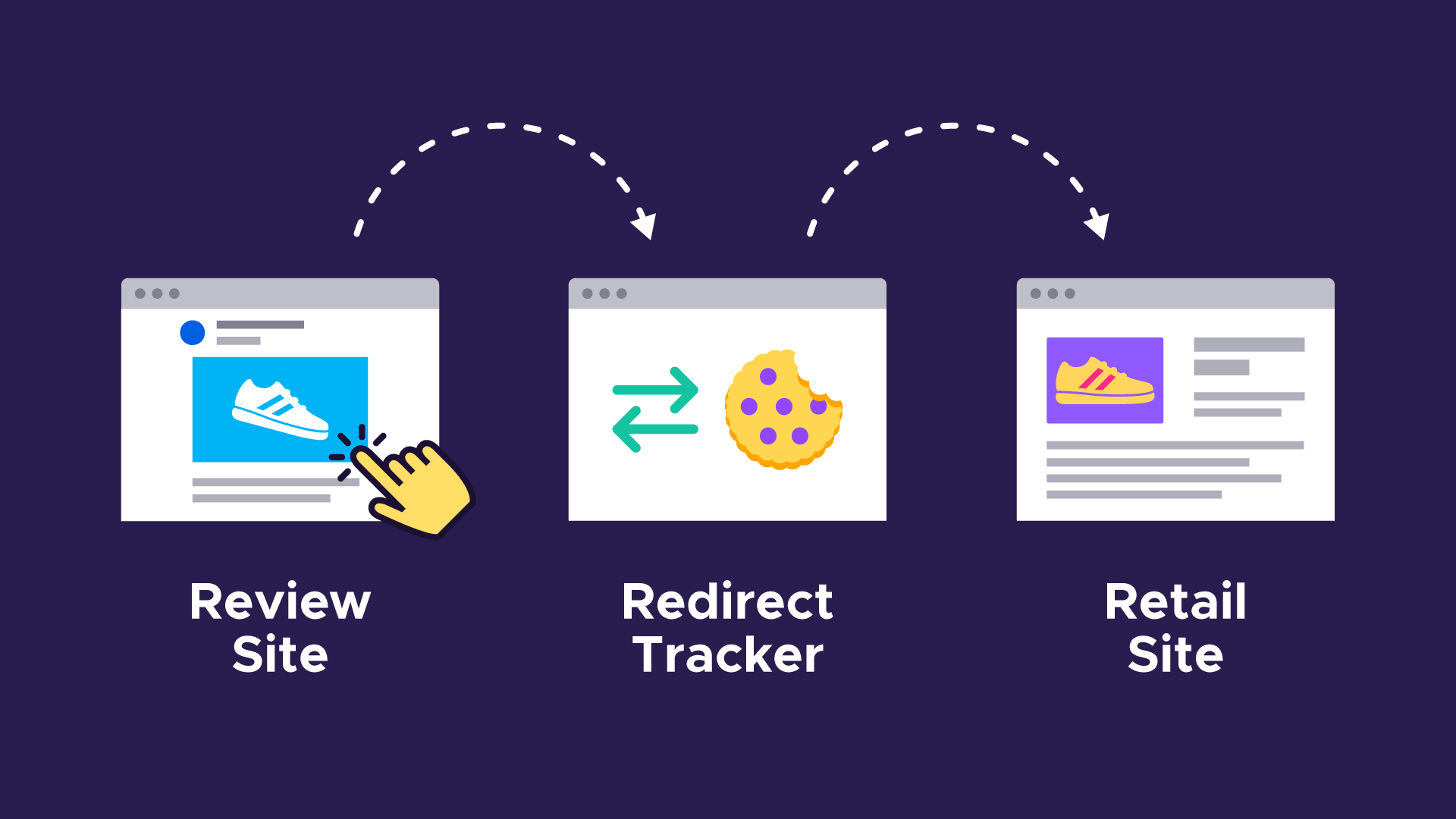
A step-by-step explanation of redirect tracking:
Let’s say you’re browsing a product review website and you click a link to purchase a pair of shoes from an online retailer. A few seconds later Firefox navigates to the retailer’s website and the product page loads. Nothing looks out of place to you, but behind the scenes you were tracked using redirect tracking. Here’s how it happened:
- Step 1: On the review website you click a link that appears to take you to the retail site. The URL that was visible when you hovered over the link belonged to the retail site.
- Step 2: A redirect tracker embedded in the review site intercepts your click and sends you to their website instead. The tracker also saves the intended destination—the retailer’s URL that you actually thought you were visiting when you clicked the link.
- Step 3: When the redirect tracker is loaded as a first party, the tracker will be able to access its cookies. It can associate information about which website you’re coming from (and where you’re headed) with identifiers stored in those cookies. If a lot of websites redirect through this tracker, the tracker can effectively track you across the web.
- Step 4: After it finishes saving its tracking data, it automatically redirects you to the original destination.
How does Firefox protect against redirect tracking?
Once every 24 hours ETP 2.0 will completely clear out any cookies and site data stored by known trackers. This prevents redirect trackers from being able to build a long-term profile of your activity.
When you first visit a redirect tracker it can store a unique identifier in its cookies. Any redirects to that tracker during the 24 hour window will be able to associate tracking data with that same identifying cookie. However, once ETP 2.0’s cookie clearing runs, the identifying cookies will be deleted from Firefox and you’ll look like a fresh user the next time you visit the tracker.
This only applies to known