TL;DR: we’re adding 3 new features to KryptoSign today!
- CSV downloads of a document’s signers
- Document Locking (prevent further signing)
- Document Lotteries (pick a winner from list of signers)
Why? Well, you folks keep abusing this simple Ethereum-native document signing tool to run contests for airdrops and pre-sales, so we thought we’d make your lives a bit easier! :)
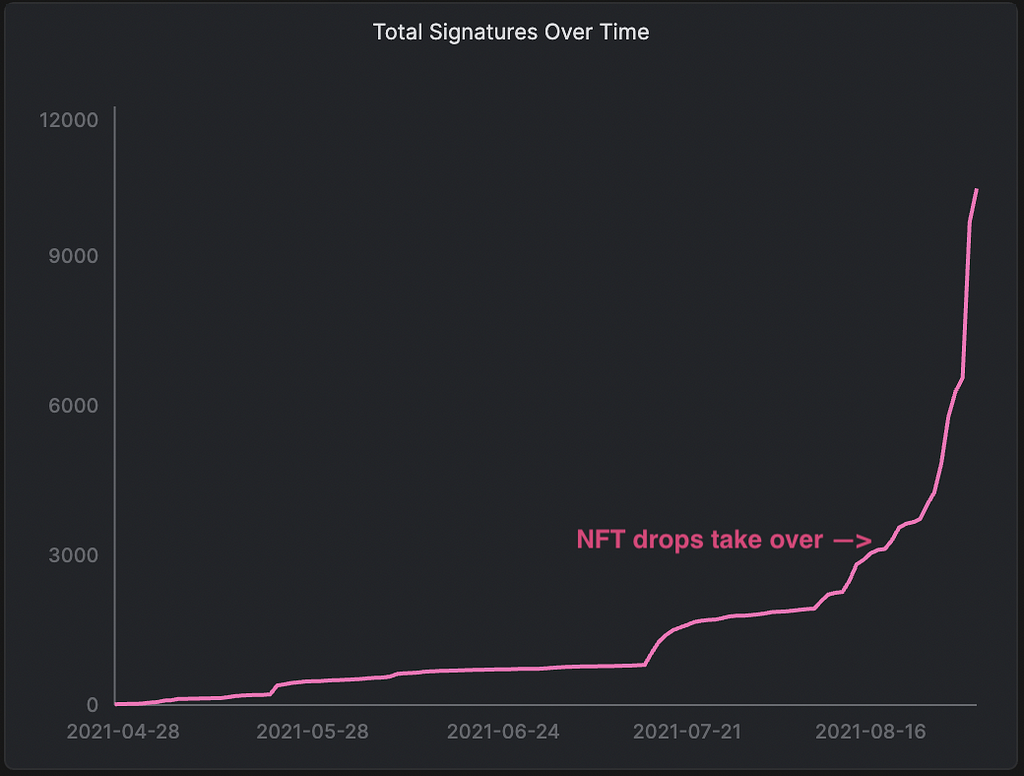
We launched KryptoSign in May this year as tool for Kai, Bart, and I to do the lightest possible “contract signing” using our MetaMask wallets. Write down a simple scope of work with someone, both parties sign with their wallet to signal they agree. When the job is complete, their Ethereum address is right there to copy-n-paste into a wallet to send payment. Quick, easy, delightful. :)
But as often happens, users started showing up and using it for other things. Like guestbooks. And then guestbooks became a way to sign up users for NFT drops as part of contests and pre-sales, and so on. The organizer has everyone sign a KS doc, maybe link their Discord or Twitter, and then picks a winner and sends a NFT/token/etc. to their address in the signature block. Cool.
As these NFT drops started getting really hot the feature you all wanted was pretty obvious: have folks sign a KS document as part of a pre-sales window, and have KS pick the winner automatically. Because the stakes on things like hot NFT pre-sales are high, we decided to implement the random winner using Chainlink’s VRF — verifiable random functions — which means everyone involved in a KryptoSign lottery can independently confirm how the random winner was picked. Transparency is nice!
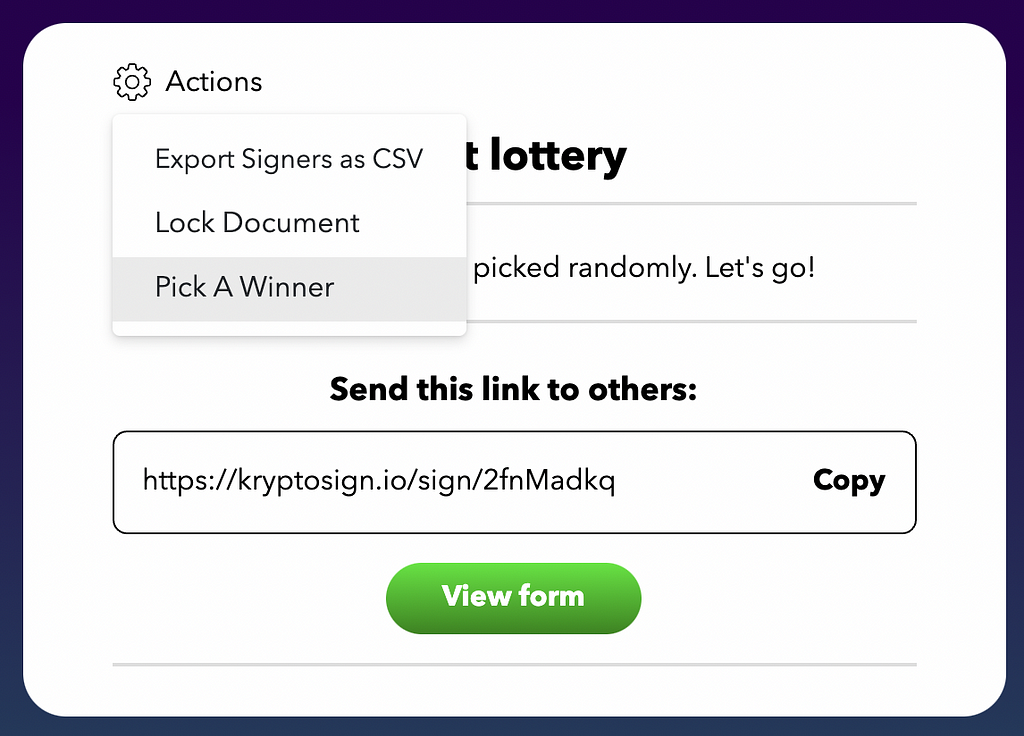
The UI for doing this is quite simple, as you’d hope and expect from KryptoSign. There’s an action icon on the document now:
When you’re ready to pick a winner, it’s pretty easy. Lock the document, and hit the button:
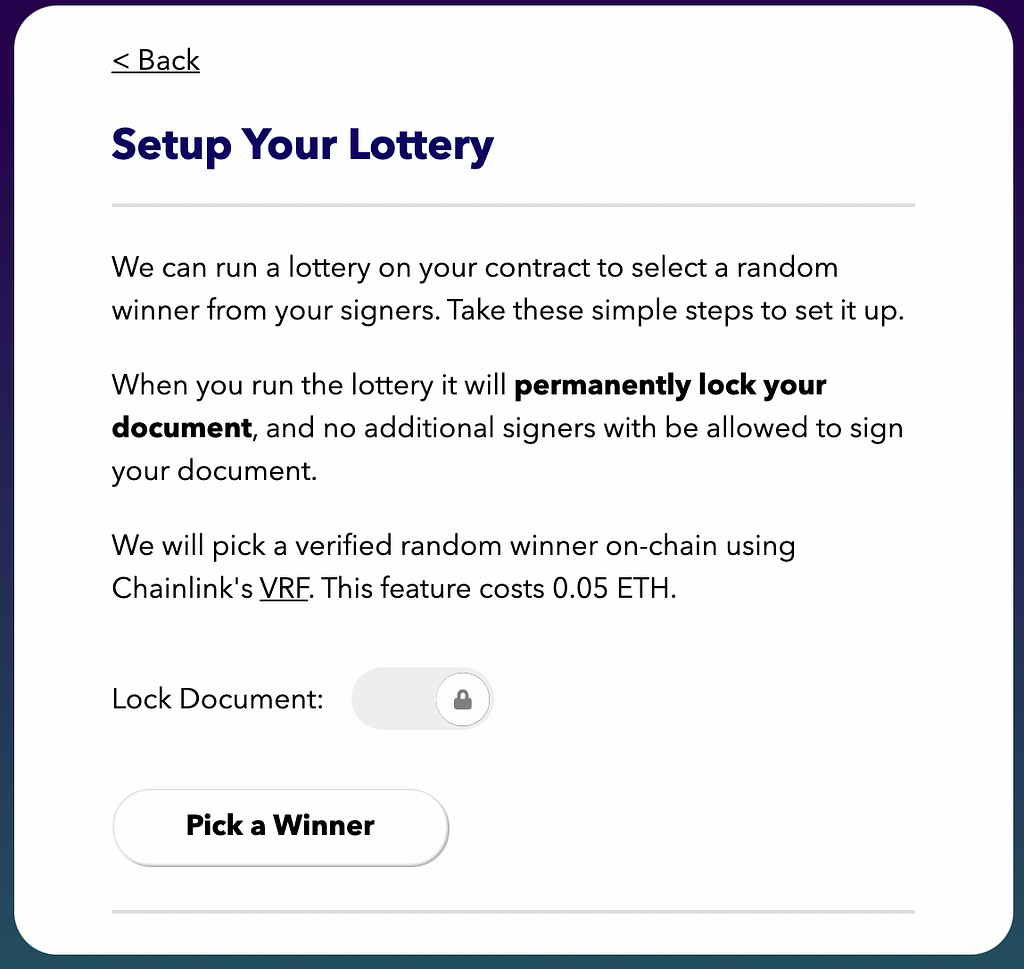
Of note, to pick a winner we’re collecting to 0.05 ETH from you to cover the cost of the 2 LINK required to invoke the VRF on mainnet. You don’t need your own LINK and all the gas-incurring swapping that would imply. Phew! The user approves a single transaction with their wallet (including gas to interact with the smart contract) and they’re done.
Our initial users really wanted the on-chain trust of a VRF, and are willing to pay for it so their communities can trust the draw, but for other use cases you have in mind, maybe it’s overkill? Let us know! We’ll continue to build upon KryptoSign as long as people find useful things to do with it.
Finally, big props to our team who worked through some rough patches with calling the Chainlink VRF contract. Blockchain is weird, yo! This release saw engineering contributions from Neo Cho, Ryan Ouyang, and Josh Peters. Thanks!
— Mark
Celebrating 10k KryptoSign users with an on-chain lottery feature! was originally published in Block::Block on Medium, where people are continuing the conversation by highlighting and responding to this story.
Today, Mozilla published an independent security audit of its Mozilla VPN, which provides encryption and device-level protection of your connection and information when you are on the Web, from Cure53, an unbiased cybersecurity firm based in Berlin with more than 15 years of running software testing and code auditing. Mozilla periodically works with third-party organizations to complement our internal security programs and help improve the overall security of our products. During the independent audit, there were two medium and one high severity issues that were discovered. We have addressed these in this blog post and published the security audit report.
Since our launch last year, Mozilla VPN, our fast and easy-to-use Virtual Private Network service, has expanded to seven countries including Austria, Belgium, France, Germany, Italy, Spain and Switzerland adding to a total of 13 countries where Mozilla VPN is available. We also expanded our VPN service offerings and it’s now available on Windows, Mac, Linux, Android and iOS platforms. Lastly, our list of languages that we support continues to grow, and to date we support 28 languages.
Developed by Mozilla, a mission-driven company with a 20-year track record of fighting for online privacy and a healthier internet, we are committed to innovate and bring new features to the Mozilla VPN through feedback from our community. This year, the team has been working on additional security and customization features which will soon be available to our users.
We know that it’s more important than ever for you to feel safe, and for you to know that what you do online is your own business. Check out the Mozilla VPN and subscribe today from our website.
For more on Mozilla VPN:
Celebrating Mozilla VPN: How we’re keeping your data safe for you
Latest Mozilla VPN features keep your data safe
Mozilla Puts Its Trusted Stamp on VPN
The post Mozilla VPN Completes Independent Security Audit by Cure53 appeared first on The Mozilla Blog.
https://blog.mozilla.org/en/mozilla/news/mozilla-vpn-completes-independent-security-audit-by-cure53/
To provide transparency into our ongoing efforts to protect your privacy and security on the Internet, we are releasing a security audit of Mozilla VPN that Cure53 conducted earlier this year.
The scope of this security audit included the following products:
- Mozilla VPN Qt5 App for macOS
- Mozilla VPN Qt5 App for Linux
- Mozilla VPN Qt5 App for Windows
- Mozilla VPN Qt5 App for iOS
- Mozilla VPN Qt5 App for Android
Here’s a summary of the items discovered within this security audit that were medium or higher severity:
- FVP-02-014: Cross-site WebSocket hijacking (High)
- Mozilla VPN client, when put in debug mode, exposes a WebSocket interface to localhost to trigger events and retrieve logs (most of the functional tests are written on top of this interface). As the WebSocket interface was used only in pre-release test builds, no customers were affected. Cure53 has verified that this item has been properly fixed and the security risk no longer exists.
- FVP-02-001: VPN leak via captive portal detection (Medium)
- Mozilla VPN client allows sending unencrypted HTTP requests outside of the tunnel to specific IP addresses, if the captive portal detection mechanism has been activated through settings. However, the captive portal detection algorithm requires a plain-text HTTP trusted endpoint to operate. Firefox, Chrome, the network manager of MacOS and many applications have a similar solution enabled by default. Mozilla VPN utilizes the Firefox endpoint. Ultimately, we have accepted this finding as the user benefits of captive portal detection outweigh the security risk.
- FVP-02-016: Auth code could be leaked by injecting port (Medium)
- When a user wants to log into Mozilla VPN, the VPN client will make a request to https://vpn.mozilla.org/api/v2/vpn/login/windows to obtain an authorization URL. The endpoint takes a port parameter that will be reflected in a
element after the user signs into the web page. It was found that the port parameter could be of an arbitrary value. Further, it was possible to inject the @ sign, so that the request will go to an arbitrary host instead of localhost (the site’s strict Content Security Policy prevented such requests from being sent). We fixed this issue by improving the port number parsing in the REST API component. The fix includes several tests to prevent similar errors in the future.
- When a user wants to log into Mozilla VPN, the VPN client will make a request to https://vpn.mozilla.org/api/v2/vpn/login/windows to obtain an authorization URL. The endpoint takes a port parameter that will be reflected in a
If you’d like to read the detailed report from Cure53, including all low and informational items, you can find it here.
More information on the issues identified in this report can be found in our MFSA2021-31 Security Advisory published on July 14th, 2021.
The post Mozilla VPN Security Audit appeared first on Mozilla Security Blog.
https://blog.mozilla.org/security/2021/08/31/mozilla-vpn-security-audit/
 On 13 September, Mozilla will host the next installment of Mozilla Mornings – our regular event series that brings together policy experts, policymakers and practitioners for insight and discussion on the latest EU digital policy developments.
For this installment, we’re checking in on the Digital Markets Act. Our panel of experts will discuss the key outstanding questions as the debate in Parliament reaches its fever pitch.
Speakers
Andreas Schwab MEP
IMCO Rapporteur on the Digital Markets Act
Group of the European People’s Party
Mika Shah
Co-Acting General Counsel
Mozilla
Vanessa Turner
Senior Advisor
BEUC
With opening remarks by Raegan MacDonald, Director of Global Public Policy, Mozilla
Moderated by Jennifer Baker
EU technology journalist
Logistical details
Monday 13 September, 17:00 – 18:00 CEST
Zoom Webinar
Register *here*
Webinar login details to be shared on day of event
The post Mozilla Mornings on the Digital Markets Act: Key questions for Parliament appeared first on Open Policy & Advocacy.
Hold the date! The next Cross Team Collaboration Fun Times meeting will be 2021-09-20. We’ll be using the “Asia-friendly” time slot of 21:00 EST.
What will the talks be about?
A detailed agenda will be announced in a few weeks. Current thinking however is to center the agenda on Rust interest groups and domain working groups, those brave explorers who are trying to put Rust to use on all kinds of interesting domains, such as game development, cryptography, machine learning, formal verification, and embedded development. If you run an interest group and I didn’t list your group here, perhaps you want to get in touch! We’ll be talking about how these groups operate and how we can do a better job of connecting interest groups with the Rust org.
Will there be a social hour?
Absolutely! The social hour has been an increasingly popular feature of the CTCFT meeting. It will take place after the meeting (22:00 EST).
How can I get this on my calendar?
The CTCFT meetings are announced on this google calendar.
Wait, what about August?
Perceptive readers will note that there was no CTCFT meeting in August. That’s because I and many others were on vacation. =)
http://smallcultfollowing.com/babysteps/blog/2021/08/30/next-ctcft-meeting-2021-09-20/
Whatever kind of writing you do—technical documentation, corporate communications, Harry Potter-vampire crossover fan fiction—it likely happens online. Here are some great browser extensions that will benefit anyone who writes on the web. Get grammar help, productivity tools, and other strong writing aids…
LanguageTool
It’s like having your own copy editor with you wherever you write on the web. Language Tool – Grammar and Spell Checker will make you a better writer in 25+ languages.
More than just a spell checker, LanguageTool also…
- Recognizes common misuses of similar sounding words (e.g. there/their or your/you’re)
- Works on social media sites and email
- Offers alternate phrasing and style suggestions for brevity and clarity
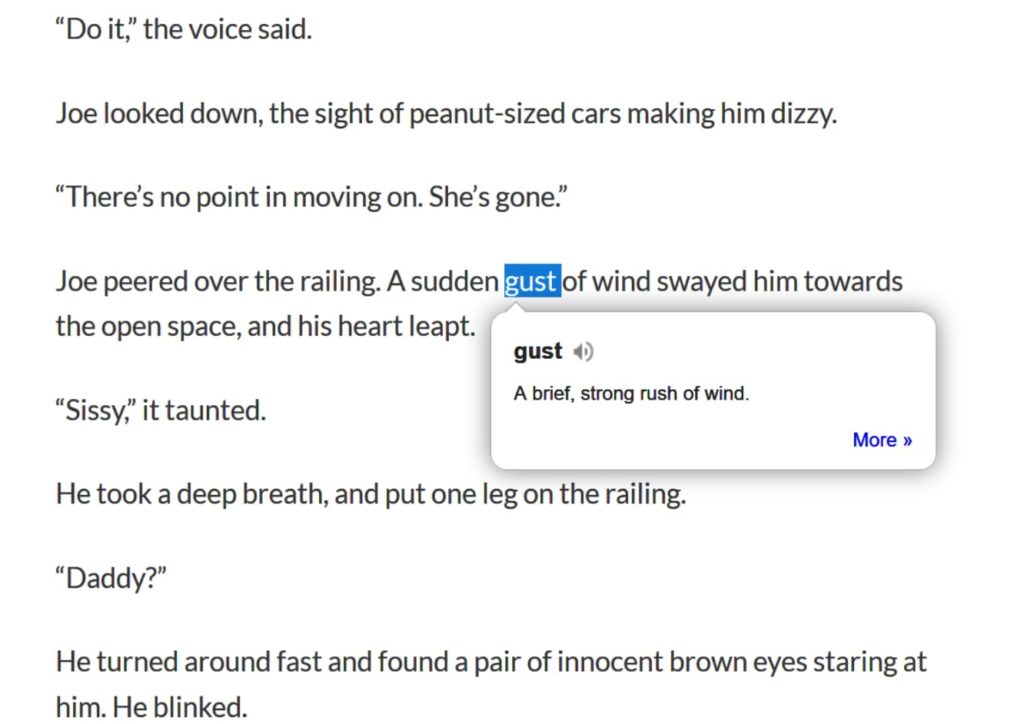
Dictionary Anywhere
Need a quick word definition? With Dictionary Anywhere just double-click any word you find on the web and get an instant pop-up definition.
You can even save and download words and their definitions for later offline reference.
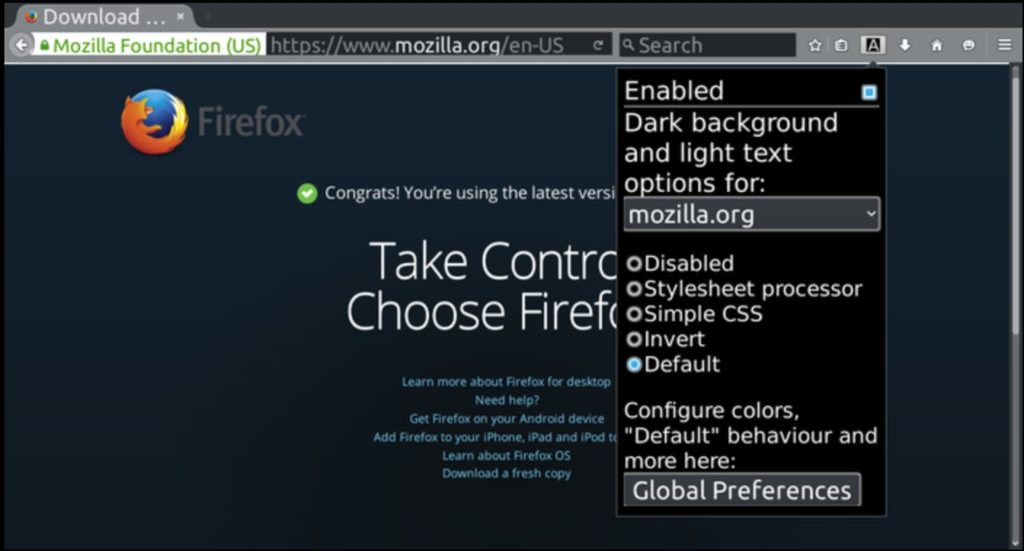
Dark Background and Light Text
Give your eyes a break, writers. Dark Background and Light Text makes staring at blinking words all day a whole lot easier on your lookers.
Really simple to use out of the box. Once installed, the extension’s default settings automatically flip the colors of every web page you visit. But if you’d like more granular control of color settings, just click the extension’s toolbar button to access a pop-up menu that lets you customize color schemes, set page exceptions for sites you don’t want colors inverted, and more simple controls.
Clippings
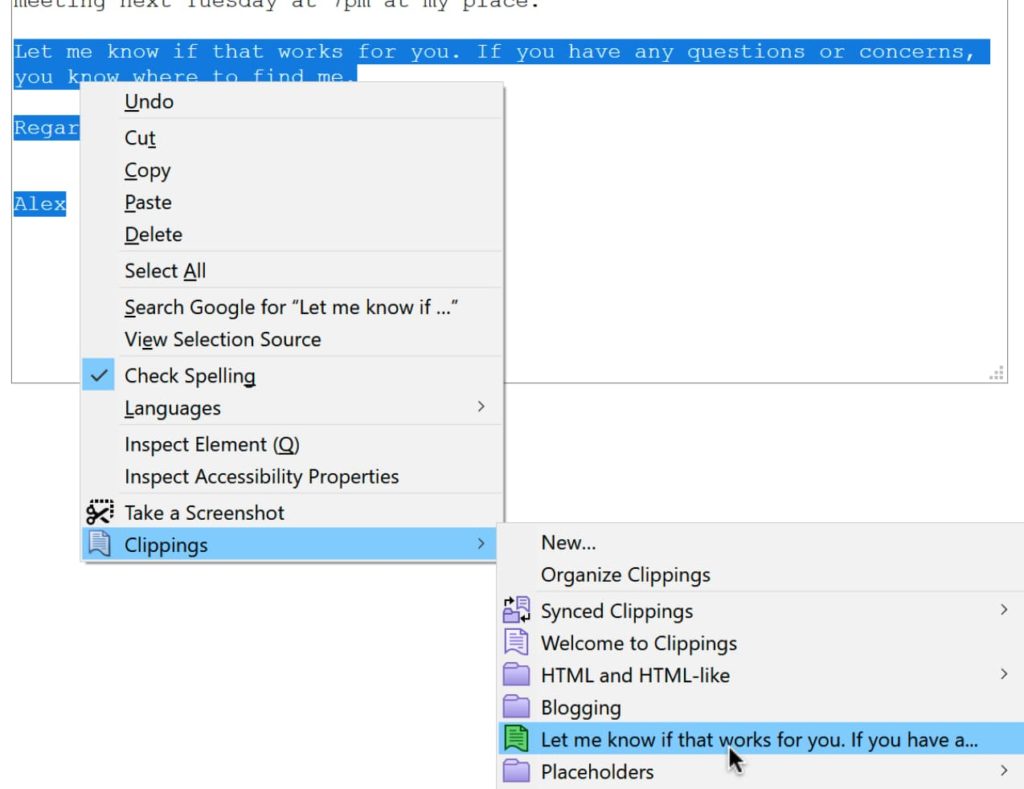
If your online writing requires the repeated use of certain phrases (for example, work email templates or customer support responses), Clippings can be a huge time saver.
Key features…
- Create a practically limitless library of saved phrases
- Paste your clippings anywhere via context menu
- Organize batches of clippings with folders and color coded labels
- Shortcut keys for power users
- Extension supported in English, Dutch, French, German, and Portuguese (Brazil)
We hope one of these extensions helps your words pop off the screen. Some writers may also be interested in this collection of great productivity extensions for optimizing written project plans. Feel free to explore thousands of other potentially useful extensions on addons.mozilla.org.
https://addons.mozilla.org/blog/boost-your-writing-skills-with-a-browser-extension/
The internet has ingrained itself into every aspect of our lives, but there’s one aspect of the digital world that I bet you take for granted. Did you ever notice that many links, specifically hyperlinks, are blue? When a co-worker casually asked me why links are blue, I was stumped. As a user experience designer who has created websites since 2001, I’ve always made my links blue. I have advocated for the specific shade of blue, and for the consistent application of blue, yes, but I’ve never stopped and wondered, why are links blue? It was just a fact of life. Grass is green and hyperlinks are blue. Culturally, we associate links with the color blue so much that in 2016, when Google changed its links to black, it created quite a disruption.
But now, I find myself all consumed by the question, WHY are links blue? WHO decided to make them blue? WHEN was this decision made, and HOW has this decision made such a lasting impact?
I turned to my co-workers to help me research, and we started to find the answer. Mosaic, an early browser released by Marc Andreessen and Eric Bina on January 23, 1993, had blue hyperlinks. To truly understand the origin and evolution of hyperlinks though, I took a journey through technology history and interfaces to explore how links were handled before color monitors, and how interfaces and hyperlinks rapidly evolved once color became an option.
The ancestors of the blue hyperlink
By looking at these pre-color hyperlink solutions, we can see how hyperlinks evolved over time and how these early innovations impact usability on the web today.
1964 – Project Xanadu
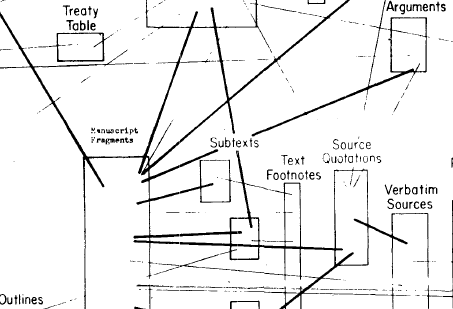
Project Xanadu connected two pages of information for the first time in history. Links were visual lines between pages.
1983 – HyperTIES system
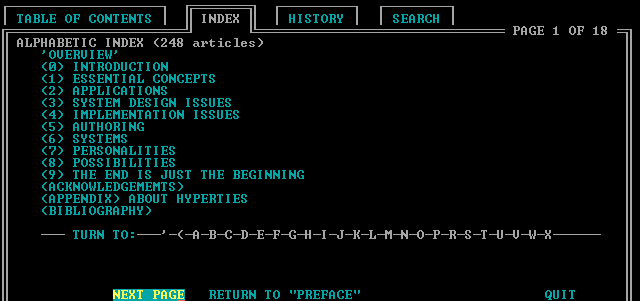
This system introduces color, as it used cyan hyperlinks on a black background. HyperTies was used as an “electric journal.” This may be an ancestor of our blue hyperlink we know and love today, but I do not believe that this is the first instance of the blue hyperlink since this color is cyan, and not dark blue.
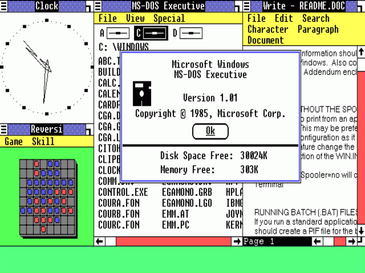
1985 – Windows 1.0
Windows 1.0 brought a full color graphic interface. The links and buttons are still black, similar to Apple’s interface at the time. What I do find interesting, however, is that this is the first instance of our dark blue used in a layout. The dark blue is heavily used in the headings and on borders around modals.
Another interesting thing about Windows 1.0 that still appears in modern websites is the underlined hyperlink. This is the first example of an underline being used to indicate a hyperlink that I have been able to find.
To make Windows 1.0 even more interesting, we see the introduction of a hover state. The hallmarks of modern interaction design were alive and well in 1985.
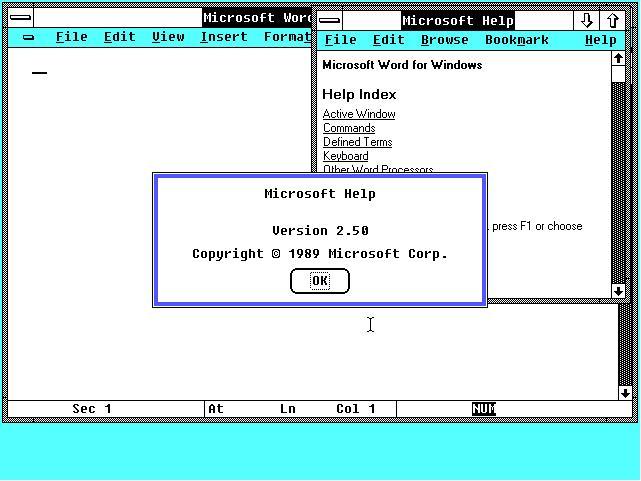
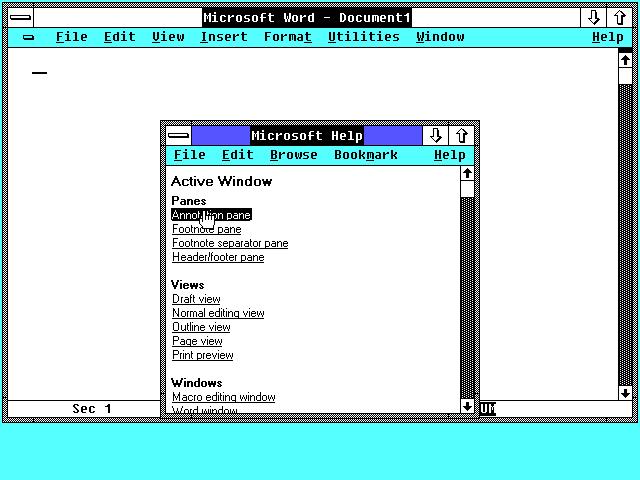
 [показать]
1987 – HyperCard
Released by Apple for the Macintosh, this program used hyperlinks between pages and apps. While aesthetically beautiful, this version did not use color in its hyperlinks.
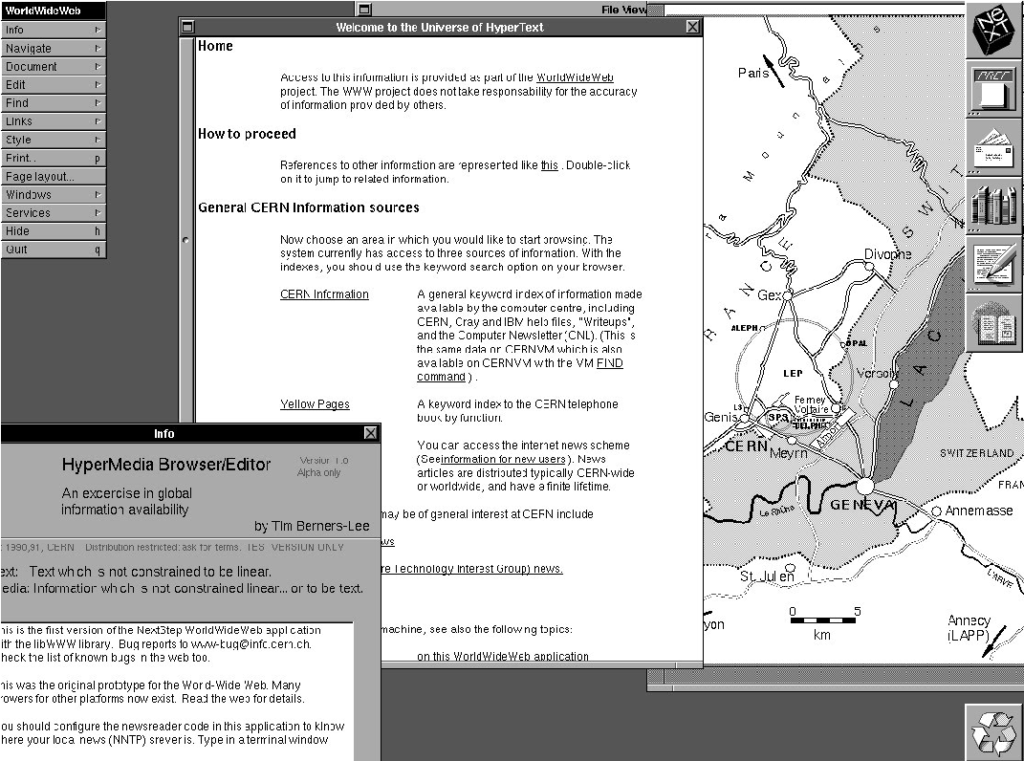
1987 – WorldWideWeb (WWW)
WWW was the
I needed a meter to tell me what the air quality is like outside. Now I know!
If you need one as well, or if you are looking for an accessible gauge for anything else, here you go.
You can also mess with it on Codepen.
With Listen, you can have your articles in Pocket read out loud. This is perfect for those times when you’re doing chores around the house or driving during your commute, when your eyes and hands are busy.
Step 1: Open your Pocket list in your mobile device and choose an article.
Step 2: Tap the headset icon to launch text-to-voice.
Step 3: Tap the Play button to start listening.
Step 4: Use the controls to adjust the experience — voice speed, play/pause button, skip to next article and archive.
Enjoy!
The post How to enable text-to-speech in Pocket appeared first on The Mozilla Blog.
https://blog.mozilla.org/en/videos/how-to-enable-text-to-speech-in-pocket/
This past graduation season, Mozilla’s Pocket teamed up with Her Campus for The Future Connection, a writing contest for college students to reflect on what it’s like to come of age in a “hyper-online and always-connected world.” While this isn’t a new concept for them — this generation, including our essay contest winner, Esther Omole, were born into a digital society — the postponement and outright cancelation of in-person graduations and prom-nights because of COVID-19, made the last truly “offline” rites of passage to adulthood into virtual events.
As both a mom and a leader in tech, I think about the impact of growing up with technology a lot — especially during the last 19 months. What would social distancing as a result of COVID-19 look like without the internet? Earlier this year, when I helped my mom learn to video-call so that she, too, could attend the virtual festivities of graduation season, I was so thankful for the connection of the internet. But I still wonder, have the oddly connective-yet-destructive powers of the internet created a larger void for the younger generations that never lived in a world free of shiny screens?
That same complicated feeling of ‘loss’ around the increasing dependence of being online for everything I’ve felt this year, was mirrored time and time again in the essays from young people I read. Here are my main takeaways from this experience:
They are the IoT Generation
The more conversations I have had with folks at the start of their career, the more nostalgic it makes me feel that the way I think about the ‘Internet of Things’ is outdated: Digital life and the opportunities and challenges it represents are not something young people are actively exploring. Being online is equivalent to breathing oxygen for them and has been a constant since day-one.
It’s a different perspective and even as a CMO who frequently speaks on the ‘Internet of Things,’ that humility to move forward and steward our mission on to a new and increasingly brilliant generation is something that I need to continually remind myself of. Yes, my generation did some great shit, but it’s important for me to take a step back and recognize that even after so much change, the internet remains this incredibly innovative space.
Speaking In Meme
Many of us feel uncomfortable or even ‘naked’ without our mobile device in hand. While society tells us that this sensation is unhealthy, one of the most provocative essays I read exuded absolute pride in the uncanny attachment their generation has with consumer technology.
My kids are 14 and 11. They were delivered right into the internet. It completely dominates their culture, and even if they’re not online all the time, so much of how they interact with each other and how their generation relates to each other is found in the ‘Internet of Things’. They literally speak in memes – a language that’s sometimes hard for me to understand. It’s hard to blame them when the most up-to-date news information is online, the majority of today’s entertainment is consumed via Twitter threads and sub-Reddits, and even the food we eat is influenced by TikTok recipes and Instagram-foodies. So instead of questioning the morality of today’s hyper-online culture, the better question to ask is how society can expect this generation to navigate life without carrying their phones around like a second-limb? It’s the reality they were born into.
“God, it’s brutal out here!”
In the wise words of pop-princess, Olivia Rodrigo– the internet can be a pretty harsh place. The constant cycle of performance and consumption over and again on a small, bright screen filled with hundreds of others doing the exact same thing can be pretty numbing. At the same time, the internet is a gift, connecting us intimately with friends, distant family members, and even neighborly strangers that we never would have known of otherwise. This turbulent duality is a consequence of living in an always-connected world.
There is a community of other like-minded people for everyone on the internet. This internet culture of support and constructive criticism in micro-communities has helped young people redefine what success and happiness means to them, effectively breaking the molds and cultural norms that were passed on to them from hometowns, families, and traditions. However, even though our favorite people are a text, DM or Slack away – you’re never truly alone online — it’s still possible to feel lonely and isolated.
Speaking with Esther, who confirmed this sentiment, advised the next generation growing up in the digital age to
For context, please see Character Encoding Menu in 2014, Text Encoding Menu in 2021, and A Look at Encoding Detection and Encoding Menu Telemetry from Firefox 86.
Firefox 91 was released two weeks ago. This is the first release that does not have a Text Encoding submenu. Instead, the submenu has been replaced with a single menu item called to Repair Text Encoding. It performs the action that was previously performed by the item Automatic in the Text Encoding submenu: It runs chardetng with UTF-8 as a permitted outcome and ignoring the top-level domain.
The Repair Text Encoding menu item is in the View menu, which is hidden by default on Windows and Linux. The action is also available as an optional toolbar button (invoke the context menu on empty space in the toolbar and choose Customize Toolbar…). On Windows and Linux, you can invoke the menu item from the keyboard by pressing the v key while holding the alt key and then pressing the c key. (The keys may vary with the localization.)
What Problem Does “Repair Text Encoding” Solve?
Sometimes the declared encoding is wrong, and the Web Platform would become more brittle if we started second-guessing the declared encoding automatically without user action.
The typical case is that university faculty have created content over the years that is still worthwhile to read, and the old content is in a legacy encoding. However, independently of the faculty, the administrator has either explicitly or as a side effect of server software update caused the server configuration to claim UTF-8 server-wide even though this is wrong for old content. When the context is in the Latin script, the result is still readable. When the content is in a non-Latin script, the result is completely unreadable (without this feature).
For non-Latin scripts, unlabeled UTF-8 is completely unreadable. Fixing this problem without requiring user action and also without making the Web Platform more brittle is a hard problem. There is a separate write-up on that topic alone. This problem might get solved one day in a way that does not involve user action but not today.
Why Remove the Other Submenu Items?
Supporting the specific manually-selectable encodings caused significant complexity in the HTML parser when trying to support the feature securely (i.e. not allowing certain encodings to be overridden). With the current approach, the parser needs to know of one flag to force chardetng, which the parser has to be able to run in other situations anyway, to run. Previously, the parser needed to keep track of a specific manually-specified encoding alongside the encoding information for the Web sources.
Indeed, when implementing support for declaring the encoding via the bogo XML declaration, the above-mentioned complexity got in the way, and I wish I had replaced the menu with a single item before implementing the bogo XML declaration support. Now, I wanted to get rid of the complexity before aligning
meta charsethandling with WebKit and Blink.Elaborate UI surface for a niche feature risks the whole feature getting removed, which is bad if the feature is still relevant to (a minority of) users. (Case in point: The Proton UI refresh removed the Text Encoding menu entry point from the hamburger menu.)
Telemetry showed users making a selection from the menu when the encoding of the page being overridden had come from a previous selection from the menu. This suggested that users aren’t that good at choosing correctly manually.
Why Not Remove the Whole Thing?
Chrome removed their menu altogether as part of what they called Project Eraser. (Amusingly, this lead to a different department of Google publishing a support article about using other browsers to access this functionality.) Mobile versions of Chrome, Safari, and Firefox don’t have the menu, either. So why not just follow Chrome?
Every time something in this area breaks intentionally or accidentally, feedback from Japan shows up relatively quickly. That’s the main reason why I believe users in Japan still care
As of this afternoon, the Baseline Interpreter-only form of the OpenPOWER JIT (64-bit little-endian) now passes all of the JIT tests except for the Wasm ones, which are being actively worked on. Remember, this is just the first of the three phases and we need all three for the full benefit, but it already yields a noticeable boost in my internal tests over the C++ interpreter. The MVP is Baseline Interpreter and Wasm, so once it passes the Wasm tests as well, it's time to pull it current with 91ESR. You can help.
https://www.talospace.com/2021/08/openpower-firefox-jit-update.html
(“This Week in Glean” is a series of blog posts that the Glean Team at Mozilla is using to try to communicate better about our work. They could be release notes, documentation, hopes, dreams, or whatever: so long as it is inspired by Glean. You can find an index of all TWiG posts online.)
One of my favorite tasks that comes up in my day to day adventure at Mozilla is a chance to work with the data collected by this amazing Glean thing my team has developed. This chance often arises when an engineer needs to verify something, or a product manager needs a quick question answered. I am not a data scientist (and I always include that caveat when I provide a peek into the data), but I do understand how the data is collected, ingested, and organized and I can often guide people to the correct tools and techniques to find what they are looking for.
In this regard, I often encounter challenges in trying to read or analyze data that is related to another common task I find myself doing: advising engineering teams on how we intend Glean to be used and what metric types would best suit their needs. A recent example of this was a quick Q&A for a group of mobile engineers who all had similar questions. My teammate chutten and I were asked to explain the differences between Counter Metrics and Event Metrics, and try and help them understand the situations where each of them were the most appropriate to use. It was a great session and I felt like the group came away with some deeper understanding of the Glean principles. But, after thinking about it afterwards, I realized that we do a lot of hand-wavy things when explaining why not to do things. Even in our documentation, we aren’t very specific about the overhead of things like Event Metrics. For example, from the Glean documentation section regarding “Choosing a Metric Type” in a warning about events:
“Important: events are the most expensive metric type to record, transmit, store and analyze, so they should be used sparingly, and only when none of the other metric types are sufficient for answering your question.”
This is sufficiently scary to make me think twice about using events! But what exactly do we mean by “they are the most expensive”? What about recording, transmitting, storing, and analyzing makes them “expensive”? Well, that’s what I hope to dive into a little deeper with some real numbers and examples, rather than using scary hand-wavy words like “expensive” and “should be used sparingly”. I’ll mostly be focusing on events here, since they contain the “scariest” warning. So, without further ado, let’s take a look at some real comparisons between metric types, and what challenges someone looking at that data may encounter when trying to answer questions about it or with it.
Our claim is that events are expensive to record, store and transmit; so let’s start by examining that a little closer. The primary API surface for the Event Metric Type in Glean is the record() function. This function also takes an optional collection of “extra” information in a key-value shape, which is supposed to be used to record additional state that is important to the event. The “extras”, along with the category, name, and (relative) timestamp, makes up the data that gets recorded, stored, and eventually transmitted to the ingestion pipeline for storage in the data warehouse.
Since Glean is built with Rust and then provides SDKs in various target languages, one of the first things we have to do is serialize the data from the shiny target language object that Glean generates into something we can pass into the Rust that is at the heart of Glean. It is worth noting that the Glean JavaScript SDK does this a little differently, but the same ideas should apply about events. A similar structure is used to store the data and then transmit it to the telemetry endpoint when the Events Ping is assembled. A
This past May, Pocket and HerCampus teamed up to announce an essay contest asking college students to reflect on what it’s like to come of age in a hyper-online world for a $5,000 cash prize and the opportunity to be published and promoted on Pocket. There were over 800 entries, and we are excited to announce the winner of our contest — Esther Omole — and share her essay.
Angle your head between two mirrors and watch yourself watching yourself for a while. I never understood what my 7-year-old self loved about it. Sandwiched between two floor-length mirrors, I would pretend that the little Black girls dancing behind me in an accordion-like formation were my back up, my chorus. Now I feel suffocated by the memory of cascading versions of myself, recessing further than my eyes could trace. In a hyper-online world, this feeling is mirrored in the way I see my image read, projected, and thrust back to me by unflinching algorithms and ever-reflective screens.
As a result of the pandemic, I went into my final year of college waging a fervent war against my own loneliness. Like most, I clung to my devices as a way of digging my feet (or, in this case, the ever active thumb) into a world that was increasingly out of physical reach. I dragged my eyes down timelines, devoted daily scrolls to TikTok, and stared longingly at my explore page until it blurred into an addictive, multicolored collage. A host of unknown companies were learning me everyday via the internet, which had become my lounge, workplace, and school.
Through my increasing (admittedly, delicious) entanglement with the web, I got content that was more sharply tailored to me. As I grew lonelier, I offered up more time. I scrutinized my profiles, comparing myself to people who shared my interests, my age, and even likeness live out successes and failures that I hadn’t. I saw Black women like me harassed, dehumanized, and belittled on social media daily. I felt over-rendered by images of what I had told the algorithm I wanted, things that were like me but not quite me.
The result was a feeling of suffocation not unlike being wedged between the mirrors. I was consumed by my profiles, followers, and peers–like I was being guided along the current of my online life, watching unfamiliar mirror images of me bounce from platform to platform. Black women are subject to this kind of dissonance independent of the internet—we are often portrayed as universally hyper-sexual, hyper-masculine, angry, and resilient to pain in popular media. This is exacerbated by the hyper-connected online world, which often promotes these skewed archetypes of our own bodies and projects them back at us.
Confronted with these images at all angles, I searched for ways to reclaim the myriad pathways technology was offering me. I listened to other Black women share stories about loneliness online, found networks like Therapy for Black girls, and set up telehealth appointments all on the same screen. The globalized online world became a gateway to explore my individual complexity, the identity that was unique to me. I could be like my 7 years old self, strengthened by my own undulating reflections and multitudes. Instead of being made an unmade, scrutinized and hidden, I was doing the creating, watching myself grow in the selfie cam of my online world with pride. And I loved it.
Esther Abisola Omole is a Nigerian American visual artist, poet, and musician from Broward County, Florida. She is a recent graduate at Stanford University, where she studied Architecture and African and African American Studies. She is especially enamored with Black feminists poetics, Black creation and space making.
The post Reflection: Embracing My Undulating Image appeared first on The Mozilla Blog.
https://blog.mozilla.org/en/products/pocket/college-esssay-contest-winner-mozilla-pocket-hercampus/
Did you know your finger is larger than one pixel? I mean, sure, your physical finger should always be larger than one pixel, unless your screen has a really low resolution. But did you know that when using Firefox for Android, your finger is actually 6x7 millimeters large? Now you do!
Unlike a pixel-perfect input device like a mouse or even a laptop’s trackpad, your finger is weird. Not only is it all soft and squishy, it also actively obstructs your view when touching things on the screen. When you use a web browser and want to click on a link, it is surprisingly difficult to hit it accurately with the center of your fingertip, which is what your touchscreen driver sends to the browser. To help you out, your friendly Firefox for Android helps you out by slightly enlarging the “touch point”.
Usually, this works fine and is completely transparent to users. Sometimes, however, it breaks things.
Here is an example of a clever CSS-only implementation of a menu with collapsible sub-navigation that I extracted from an actual Web Compatibility bug report I looked at earlier. Please do not actually use this, this is broken by design to make a point. :) Purely visual CSS declarations have been omitted for brevity.
Source:
span> id="menu-demo">

    span> href="#menu-demo">One

      Two with Subnav

        span> href="#menu-demo">Two > One
        span> href="#menu-demo">Two > Two


    span> href="#menu-demo">Three
Result:
Now, just imagine that on Desktop, this is a horizontal menu and not a vertical list, but I’m too lazy to write media queries right now. It works fine on Desktop. However, if you try this in Firefox for Android, you will find that it’s pretty much impossible to select the second entry, and you will just hit “One” or “Three” most of the time.
To understand what’s going on here, we have to talk about two things: the larger “finger radius” I explained earlier, and the rules by which Firefox detects the element the user probably wanted to click on.
Touch Point expansion
The current touch point expansion settings, as set by the ui.mouse.radius.* preferences in about:config, are: 5mm to the top; 3mm to the left; 3mm to the right; 2mm to the bottom. There probably is a good reason why the top/bottom expansion is asymmetric, and I assume this has something to do with viewing angles or how your finger is shaped, but I actually don’t know.
To visualize this, I prepared a little annotated screenshot of how this “looks like” on my testing Android device:
The red dot marks the center of the touch point, the blue outline marks the area as expanded by Firefox for Android. As you can see, the expanded touch area covers part of the previous menu item, “One”. If you’d try to touch lower on the item, then the bottom expansion will start to cover parts of the “Three” item. In this example, you have a 9px window to actually hit “Two with Subnav”. On my device, that’s roughly 0.9mm. Good luck with that!
With this expansion in mind, you might wonder why you’re not
Hey SUMO folks,
Summer is here. Despite the current situation of the world, I hope you can still enjoy a bit of sunshine and the breezing air wherever you are. And while vacations are planned, SUMO is still busy with lots of projects and releases. So let’s get the recap started!
Welcome on board!
Community news
- One of our goal for Q3 this year is to revamp the onboarding experience for contributor that is focused on the /get-involved page. To support this work, we’re currently conducting a survey to understand how effective is the current onboarding information we provide. Please fill out the survey if you haven’t and share it to your community and fellow contributors!
- No Kitsune update for this month. Check out SUMO Engineering Board instead to see what the team is currently doing.
Community call
- Watch the monthly community call if you haven’t. Learn more about what’s new in July!
- Reminder: Don’t hesitate to join the call in person if you can. We try our best to provide a safe space for everyone to contribute. You’re more than welcome to lurk in the call if you don’t feel comfortable turning on your video or speaking up. If you feel shy to ask questions during the meeting, feel free to add your questions on the contributor forum in advance, or put them in our Matrix channel, so we can address them during the meeting.
Community stats
KB
KB pageviews (*)
| Month | Page views | Vs previous month |
| Jul 2021 | 8,237,410 | -10.81% |
* KB pageviews number is a total of KB pageviews for /en-US/ only
Top 5 KB contributors in the last 90 days:
KB Localization
Top 10 locale based on total page views
| Locale | Apr 2021 pageviews (*) | Localization progress (per Jul, 9)(**) |
| de | 8.62% | 99% |
| zh-CN | 6.92% | 100% |
| pt-BR | 6.32% | 64% |
| es | 6.22% | 45% |
| fr | 5.70% | 91% |
| ja | 4.13% | 55% |
| ru | 3.61% | 99% |
| it | 2.08% | 100% |
| pl | 2.00% | 84% |
| zh-TW | 1.44% | 6% |
* Locale pageviews is an overall pageviews from the given locale (KB and other pages)

** Localization progress is the percentage of localized article from all KB articles per locale
Top 5 localization contributors in the last 90 days:

Illustration by Daryl Alexsy
The bags have been filled up with all the things we’re ready to let go of and it’s time to take them to the charity shop.
Archiving content
Last month we removed a bunch of content from MDN. MDN is 16 years old (and yes it can drink in some countries), all that time ago it was a great place for all of Mozilla to document all of their things. As MDN evolved and the web reference became our core content, other areas became less relevant to the overall site. We have ~11k active pages on MDN, so keeping them up to date is a big task and we feel our focus should be there.
This was a big decision and had been in the works for over a year. It actually started before we moved MDN content to GitHub. You may have noticed a banner every now and again, saying certain pages weren’t maintained. Various topics were removed including all Firefox (inc. Gecko) docs, which you can now find here. Mercurial, Spidermonkey, Thunderbird, Rhino and XUL were also included in the archive.
So where is the content now?
It’s saved – it’s in this repo. We haven’t actually deleted it completely. Some of it is being re-hosted by various teams and we have the ability to redirect to those new places. It’s saved in both it’s rendered state and the raw wiki form. Just. In. Case.
The post Spring cleaning MDN: Part 2 appeared first on Mozilla Hacks - the Web developer blog.
https://hacks.mozilla.org/2021/08/spring-cleaning-mdn-part-2/