A few days ago Mozilla announced the release of their new Android browser. This release, dubbed “Firefox Daylight,” is supposed to achieve nothing less than to “revolutionize mobile browsing.” And that also goes for browser extensions of course:
Last but not least, we revamped the extensions experience. We know that add-ons play an important role for many Firefox users and we want to make sure to offer them the best possible experience when starting to use our newest Android browsing app. We’re kicking it off with the top 9 add-ons for enhanced privacy and user experience from our Recommended Extensions program.
What this text carefully avoids stating directly: that’s the only nine (as in: single-digit 9) add-ons which you will be able to install on Firefox for Android now. After being able to use thousands of add-ons before, this feels like a significant downgrade. Particularly given that there appears to be no technical reason why none of the other add-ons are allowed any more, it being merely a policy decision. I already verified that my add-ons can still run on Firefox for Android but aren’t allowed to, same should be true for the majority of other add-ons.
Contents
Why would Mozilla kill mobile add-ons?
Before this release, Firefox was the only mobile browser to allow arbitrary add-ons. Chrome experimented with add-ons on mobile but never actually released this functionality. Safari implemented a halfhearted ad blocking interface, received much applause for it, but never made this feature truly useful or flexible. So it would seem that Firefox had a significant competitive advantage here. Why throw it away?
Unfortunately, supporting add-ons comes at a considerable cost. It isn’t merely the cost of developing and maintaining the necessary functionality, there is also the performance and security impact of browser extensions. Mozilla has been struggling with this for a while. The initial solution was reviewing all extensions before publication. It was a costly process which also introduced delays, so by now all add-ons are published immediately but are still supposed to be reviewed manually eventually.
Mozilla is currently facing challenges both in terms of market share and financially, the latter being linked to the former. This once again became obvious when Mozilla laid off a quarter of its workforce a few weeks ago. In the past, add-ons have done little to help Mozilla achieve a breakthrough on mobile, so costs being cut here isn’t much of a surprise. And properly reviewing nine extensions is certainly cheaper than keeping tabs on a thousand.
But won’t Mozilla add more add-ons later?
Yes, they also say that more add-ons will be made available later. But if you look closely, all of Mozilla’s communication around that matter has been focused on containing damage. I’ve looked through a bunch of blog posts, and nowhere did it simply say: “When this is released, only a handful
When I first moved to Z"urich I had the good fortune to have dinner with Emil. I had never met someone before with such a passion for food. (That day I met two.) Except for the food we had a good time. I found it particularly enjoyable that he was so upset — though in a very upbeat manner — with the quality of the food that having dessert there was no longer on the table.
The last time I remember running into Emil was in Lisbon, enjoying hamburgers and fries of all things. (Rest assured, they were very good.)
Long before all that, I used to frequent EAE.net, to learn how to make browsers do marvelous things and improve user-computer interaction.
[Disclaimer: this has been sitting as a draft for close to three months ; I forgot to publish it, this is now finally done.]
In my previous blog post, I built Firefox in a multiple different number of configurations where I’d disable the CPU turbo, some of its cores or some of its threads. That is something that was traditionally done via the BIOS, but rebooting between each attempt is not really a great experience.
Fortunately, the Linux kernel provides a large number of knobs that allow this at runtime.
Turbo
This is the most straightforward:
$ echo 0 > /sys/devices/system/cpu/cpufreq/boost
Re-enable with
$ echo 1 > /sys/devices/system/cpu/cpufreq/boost
CPU frequency throttling
Even though I haven’t mentioned it, I might as well add this briefly. There are many knobs to tweak frequency throttling, but assuming your goal is to disable throttling and set the CPU frequency to its fastest non-Turbo frequency, this is how you do it:
$ echo performance > /sys/devices/system/cpu/cpu$n/cpufreq/scaling_governor
where $n is the id of the core you want to do that for, so if you want to do that for all the cores, you need to do that for cpu0, cpu1, etc.
Re-enable with:
$ echo ondemand > /sys/devices/system/cpu/cpu$n/cpufreq/scaling_governor
(assuming this was the value before you changed it ; ondemand is usually the default)
Cores and Threads
This one requires some attention, because you cannot assume anything about the CPU numbers. The first thing you want to do is to check those CPU numbers. You can do so by looking at the physical id and core id fields in /proc/cpuinfo, but the output from lscpu --extended is more convenient, and looks like the following:
CPU NODE SOCKET CORE L1d:L1i:L2:L3 ONLINE MAXMHZ    MINMHZ
0   0    0      0    0:0:0:0       yes    3700.0000 2200.0000
1   0    0      1    1:1:1:0       yes    3700.0000 2200.0000
2   0    0      2    2:2:2:0       yes    3700.0000 2200.0000
3   0    0      3    3:3:3:0       yes    3700.0000 2200.0000
4   0    0      4    4:4:4:1       yes    3700.0000 2200.0000
5   0    0      5    5:5:5:1       yes    3700.0000 2200.0000
6   0    0      6    6:6:6:1       yes    3700.0000 2200.0000
7   0    0      7    7:7:7:1       yes    3700.0000 2200.0000
(...)
32  0    0      0    0:0:0:0       yes    3700.0000 2200.0000
33  0    0      1    1:1:1:0       yes    3700.0000 2200.0000
34  0    0      2    2:2:2:0       yes    3700.0000 2200.0000
35  0    0      3    3:3:3:0       yes    3700.0000 2200.0000
36  0    0      4    4:4:4:1       yes    3700.0000 2200.0000
37  0    0      5    5:5:5:1       yes    3700.0000 2200.0000
38  0    0      6    6:6:6:1       yes    3700.0000 2200.0000
39  0    0      7    7:7:7:1       yes    3700.0000 2200.0000
(...)
Now, this output is actually the ideal case, where pairs of CPUs (virtual cores) on the same physical core are always n, n+32, but I’ve had them be pseudo-randomly spread in the past, so be careful.
To turn off a core, you want to turn off all the CPUs with the same CORE identifier. To turn off a thread (virtual core), you want to turn off one CPU. On machines with multiple sockets, you can also look at the SOCKET column.
Turning off one CPU is done with:
$ echo 0 > /sys/devices/system/cpu/cpu$n/online
Re-enable with:
$ echo 1 > /sys/devices/system/cpu/cpu$n/online
Extra: CPU sets
CPU sets are a feature of Linux’s cgroups. They allow to restrict groups of processes to a set of cores. The first step is to create a group like so:
$ mkdir /sys/fs/cgroup/cpuset/mygroupPlease note you may already have existing groups, and you may want to create subgroups. You can do so by creating subdirectories.
Then you can configure on which CPUs/cores/threads you want processes in this group to run on:
$ echo 0-7,16-23 > /sys/fs/cgroup/cpuset/mygroup/cpuset.cpusThe value you write in this file is a comma-separated list of CPU/core/thread numbers or ranges. 0-3 is the range for CPU/core/thread 0 to 3 and is thus equivalent to 0,1,2,3. The numbers correspond to /proc/cpuinfo or the output from lscpu as mentioned above.
There are also memory aspects to CPU sets, that I won’t detail here (because I don’t have a machine with multiple memory nodes), but you can start with:
$ cat /sys/fs/cgroup/cpuset/cpuset.mems > /sys/fs/cgroup/cpuset/mygroup/cpuset.memsNow you’re ready to assign
Introduction
Hello everyone! I am Kunal(@kunalmohan), an undergrad student at Indian Institute of Technology Roorkee, India. As a part of Google Summer of Code(GSoC) 2020, I worked on implementing WebGPU in Servo under the mentorship of Mr. Dzmitry Malyshau(@kvark). I devoted the past 3 months working on ways to bring the API to fruition in Servo, so that Servo is able to run the existing examples and pass the Conformance Test Suite(CTS). This is going to be a brief account of how I started with the project, what challenges I faced, and how I overcame them.
What is WebGPU?
WebGPU is a future web standard, cross-platform graphics API aimed to make GPU capabilities more accessible on the web. WebGPU is designed from the ground up to efficiently map to the Vulkan, Direct3D 12, and Metal native GPU APIs. A native implementation of the API in Rust is developed in the wgpu project. Servo implementation of the API uses this crate.
The Project
At the start of the project the implementation was in a pretty raw state- Servo was only able to accept shaders as SPIRV binary and ran just the compute example. I had the following tasks in front of me:
- Implement the various DOM interfaces that build up the API.
- Setup a proper Id rotation for the GPU resources.
- Integrate WebGPU with WebRender for presenting the rendering to HTML canvas.
- Setup proper model model for async error recording.
The final goal was to be able to run the live examples at https://austineng.github.io/webgpu-samples/ and pass a fair amount of the CTS.
Implementation
Since Servo is a multi-process browser, GPU is accessed from a different process(server-side) than the one running the page content and scripts(content process). For better performance and asynchronous behaviour, we have a separate wgpu thread for each content process.
Setting up a proper Id rotation for the GPU resources was our first priority. I had to ensure that each Id generated was unique. This meant sharing the Identity Hub among all threads via Arc and Mutex. For recycling the Ids, wgpu exposes an IdentityHandler trait that must be implemented on the server-side interface of the browser and wgpu. This facilitates the following: when wgpu detects that an object has been dropped by the user (which is some time after the actual drop/garbage collection), wgpu calls the trait methods that are responsible for releasing the Id. In our case they send a message to the content process to free the Id and make it available for reuse.
Implementing the DOM Interfaces was pretty straight forward. A DOM object is just an opaque handle to an actual GPU resource. Whenever a method, that performs an operation, is called on a DOM object there are 2 things to be done- convert the IDL types to wgpu types. And send a message to the server to perform the operation. Most of the validation is done within wgpu.
Presentation
WebGPU textures can be rendered to HTML canvas via GPUCanvasContext, which can be obtained from canvas.getContext('gpupresent'). All rendered images are served to WebRender as ExternalImages for rendering purpose. This is done via an async software presentation path. Each new GPUCanvasContext object is assigned a new ExternalImageId and a new swap chain is assigned a new ImageKey. Since WebGPU threads are spawned on-demand, an image handler for WebGPU is initialized at startup, stored in Constellation, and supplied to threads at the time of spawn. Each time GPUSwapChain.getCurrentTexture() is called the canvas is marked as dirty which is then flushed at the time of reflow. At the time of flush, a message is sent to the wgpu server to update the image data provided to WebRender. The following happens after this:
- The contents of the rendered texture are copied to a buffer.
- Buffer is mapped asynchronously for read.
- The data read from the buffer is copied to a staging area in
PresentionData.PresentationDatastores the data and all the required machinery for this async presentation belt. - When WebRender wants to read the data, it locks on the data to prevent it from being altered during read.
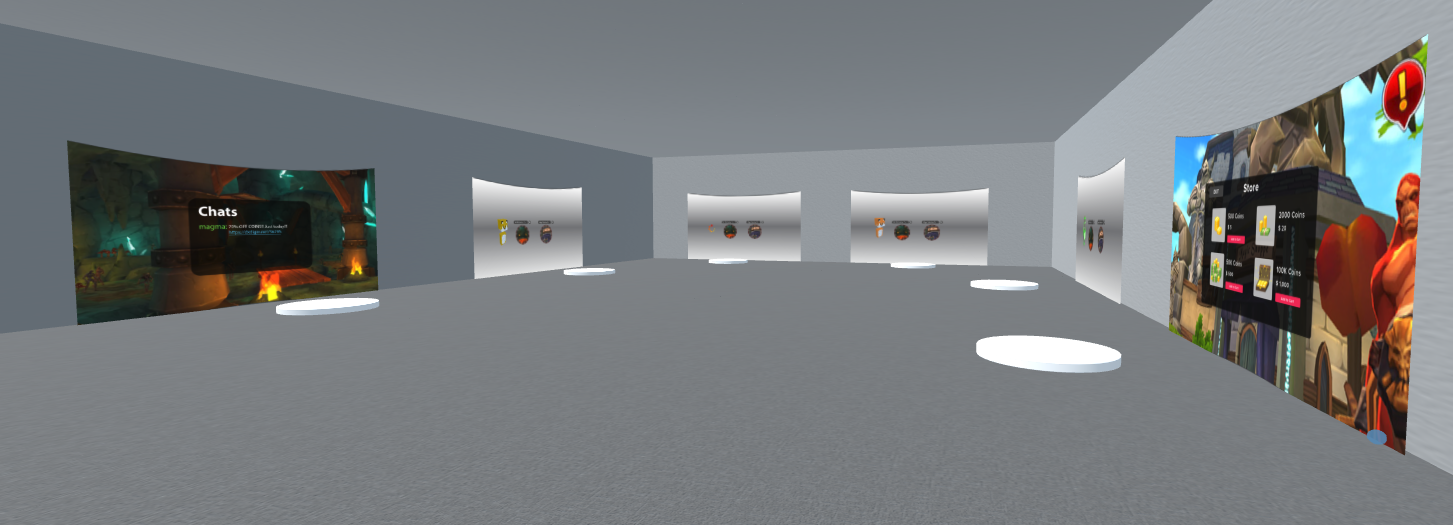
Amidst the pandemic, our research team from Mozilla and The Extended Mind performed user testing research entirely in a remote 3D virtual space where participants had to BYOD (Bring Your Own Device). This research aimed to test security concepts that could help users feel safe traversing links in the immersive web, the results of which are forthcoming in 2021. By utilizing a virtual space, we were able to get more intimate knowledge of how users would interact with these security concepts because they were immersed in a 3D environment.
The purpose of this article is to persuade you that Hubs, and other VR platforms offer unique affordances for qualitative research. In this blog post, I’ll discuss the three key benefits of using VR platforms for research, namely the ability to perform immersive and embodied research across distances, with global participants, and the ability to test out concepts prior to implementation. Additionally, I will discuss the unique accessibility of Hubs as a VR platform and the benefits it provided us in our research.
To perform security concept research in VR, The Extended Mind recruited nine Oculus Quest users and brought them into a staged Mozilla Hubs room where we walked them through each security concept design and asked them to rate their likelihood to click a link and continue to the next page. (Of the nine subjects, seven viewed the experience on the Quest and two did on PC due to technical issues). For each security concept, we walked them through the actual concept, as well as spoofs of the concept to see how well people understood the indicators of safety (or lack thereof) they should be looking for.
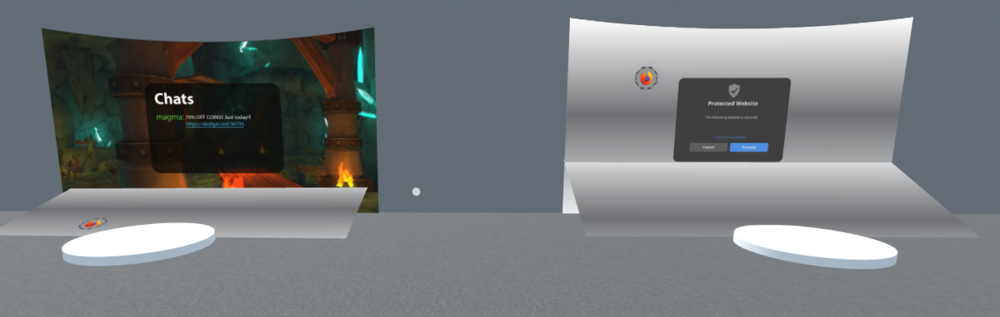
Because we were able to walk the research subjects through each concept, in multiple iterations, we were able to get a sense not only of their opinion of the concepts, but data on what spoofed them. And giving our participants an embodied experience made it so that we, as the researchers, did not have to do as much explaining of the concepts. To fully illustrate the benefits of performing research in VR, we’ll walk through the key benefits it offers.
Immersive Research Across Distances
The number one affordance virtual reality offers qualitative researchers is the ability to perform immersive research remotely. Research participants can partake no matter where they live, and yet whatever concept is being studied can be approached as an embodied experience rather than a simple interview.
If researchers wanted qualitative feedback on a new product, for instance, they could provide participants with the opportunity to view the object in 360 degrees, manipulate it in space, and even create a mock up of its functionality for participants to interact with - all without having to collect participants in a single space or provide them with physical prototypes of the product.
Global Participants
The second affordance is that researchers can do global studies. The study we performed with Mozilla had participants from the USA, Canada, Australia and Singapore. Whether researchers want a global samping or to perform a cross-cultural analysis on a certain subject, VR provides qualitative researchers to collect that data through an immersive medium.
Collect Experiential Qualitative Feedback on Concepts Pre-Implementation
The third affordance is that researchers can gather immersive feedback on concepts before they are implemented. These concepts may be mock-ups of buildings, public spaces, or concepts for virtual applications, but across the board virtual reality offers researchers a deeper dive into participants’ experiences of new concepts and designs than other platforms.
We used flat images to simulate link traversal inside of Hubs by Mozilla and just arranged them in a way that conveyed the storytelling appropriately (one concept per room). Using Hubs to test concepts allows for rapid and inexpensive prototyping. One parallel to this type of research is when people in the Architecture, Engineer, and Construction (AEC) fields use interactive virtual and augmented reality models to drive design decisions. Getting user feedback inside of an
Last year, I went to RustConf 2019 in Portland. It was a lovely conference. Everyone I saw was so exuberantly happy to be there--it was just remarkable. It was my first RustConf. Plus while I've been sort-of learning Rust for a while and cursorily related to Rust things (I work on crash ingestion and debug symbols things), I haven't really done any Rust work. Still, it was a remarkable and very exciting conference.
RustConf 2020 was entirely online. I'm in UTC-4, so it occurred during my afternoon and evening. I spent the entire time watching the RustConf 2020 stream and skimming the channels on Discord. Everyone I saw on the channels were so exuberantly happy to be there and supportive of one another--it was just remarkable. Again! Even virtually!
I missed the in-person aspect of a conference a bit. I've still got this thing about conferences that I'm getting over, so I liked that it was virtual because of that and also it meant I didn't have to travel to go.
I enjoyed all of the sessions--they're all top-notch! They were all pretty different in their topics and difficulty level. The organizers should get gold stars for the children's programming between sessions. I really enjoyed the "CAT!" sightings in the channels--that was worth the entrance fee.
This is a summary of the talks I wrote notes for.
Read more… (1 min remaining to read)
https://bluesock.org/~willkg/blog/dev/rustconf_2020_thoughts.html
Please note some of the information provided in this report may be subject to change as we are sometimes sharing information about projects that are still in early stages and are not final yet.
As you are probably aware, Mozilla just went through a massive round of layoffs. About 250 people were let go, reducing the overall size of the workforce by a quarter. The l10n-drivers team was heavily impacted, with Axel Hecht (aka Pike) leaving the company.
We are still in the process of understanding how the reorganization will affect our work and the products we localize. A first step was to remove some projects from Pontoon, and we’ll make sure to communicate any further changes in our communication channels.
Telegram channel and Matrix
The “bridge” between our Matrix and Telegram channel, i.e. the tool synchronizing content between the two, has been working only in one direction for a few weeks. For this reason, and given the unsupported status of this tool, we decided to remove it completely.
As of now:
- Our Telegram and Matrix channels are completely independent from each other.
- The l10n-community channel on Matrix is the primary channel for synchronous communications. The reason for this is that Matrix is supported as a whole by Mozilla, offering better moderation options among other things, and can be easily accessed from different platforms (browser, phone).
If you haven’t used Matrix yet, we encourage you to set it up following the instructions available in the Mozilla Wiki. You can also set an email address in your profile, to receive notifications (like pings) when you’re offline.
We plan to keep the Telegram channel around for now, but we might revisit this decision in the future.
New content and projects
What’s new or coming up in Firefox desktop
Upcoming deadlines:
- Firefox 81 is currently in beta and will be released on September 22nd. The deadline to update localization is on September 8.
In terms of content and new features, most of the changes are around the new modal print preview, which can be currently tested on Nightly.

What’s new or coming up in mobile
The new Firefox for Android has been rolled out at 100%! You should therefore have either been upgraded from the older version (or will be in just a little bit) – or you can download it directly from the Play Store here.
Congratulations to everyone who has made this possible!
For the next Firefox for Android release, we are expecting string freeze to start towards the end of the week, which will give localizers two weeks to complete localizing and testing.
Concerning Firefox for iOS: v29 strings have been exposed on Pontoon. We are still working out screenshots for testing with iOS devs at the moment, but these should be available soon and as usual from the Pontoon project interface.
On another note, and as mentioned at the beginning of this blog post, due to the recent lay-offs, we have had to deactivate some projects from Pontoon. The mobile products are currently: Scryer, Firefox Lite and Lockwise iOS. More may be added to this list soon, so stay tuned. Once more, thanks to all the localizers who have contributed their time and effort to these projects across the years. Your help has been invaluable for Mozilla.
What’s new or coming up in web projects
Common Voice
The Common Voice team is greatly impacted due to the changes in recent announcement. The team has stopped the two-week sprint cycle and is working in a maintenance mode right now. String updates and new language requests would take longer time to process due to resource constraints
Some other changes to the project before the reorg:
I think it is fair to say that libcurl is a library that is very widely spread, widely used and powers a sizable share of Internet transfers. It’s age, it’s availability, it’s stability and its API contribute to it having gotten to this position.
libcurl is in a position where it could remain for a long time to come, unless we do something wrong and given that we stay focused on what we are and what we’re here for. I believe curl and libcurl might still be very meaningful in ten years.
Bindings are key
Another explanation is the fact that there are a large number of bindings to libcurl. A binding is a piece of code that allows libcurl to be used directly and conveniently from another programming language. Bindings are typically authored and created by enthusiasts of a particular language. To bring libcurl powers to applications written in that language.
The list of known bindings we feature on the curl web sites lists around 70 bindings for 62 something different languages. You can access and use libcurl with (almost) any language you can dream of. I figure most mortals can’t even name half that many programming languages! The list starts out with Ada95, Basic, C++, Ch, Cocoa, Clojure, D, Delphi, Dylan, Eiffel, Euphoria and it goes on for quite a while more.
Keeping bindings in sync is work
The bindings are typically written to handle transfers with libcurl as it was working at a certain point in time, knowing what libcurl supported at that moment. But as readers of this blog and followers of the curl project know, libcurl keeps advancing and we change and improve things regularly. We add functionality and new features in almost every new release.
This rather fast pace of development offers a challenge to binding authors, as they need to write the binding in a very clever way and keep up with libcurl developments in order to offer their users the latest libcurl features via their binding.
With libcurl being the foundational underlying engine for so many applications and the number of applications and services accessing libcurl via bindings is truly uncountable – this work of keeping bindings in sync is not insignificant.
If we can provide mechanisms in libcurl to ease that work and to reduce friction, it can literally affect the world.
“easy options” are knobs and levers
Users of the libcurl knows that one of the key functions in the API is the curl_easy_setopt function. Using this function call, the application sets specific options for a transfer, asking for certain behaviors etc. The URL to use, user name, authentication methods, where to send the output, how to provide the input etc etc.
At the time I write this, this key function features no less than 277 different and well-documented options. Of course we should work hard at not adding new options unless really necessary and we should keep the option growth as slow as possible, but at the same time the Internet isn’t stopping and as the whole world is developing we need to follow along.
Options generally come using one of a set of predefined kinds. Like a string, a numerical value or list of strings etc. But the names of the options and knowing about their existence has always been knowledge that exists in the curl source tree, requiring each bindings to be synced with the latest curl in order to get knowledge about the most recent knobs libcurl offers.
Until now…
Introducing an easy options info API
Starting in the coming version 7.73.0 (due to be released on October 14, 2020), libcurl offers API functions that allow applications and bindings to query it for information about all the options this libcurl instance knows about.
curl_easy_option_next lets the application iterate over options, to either go through all of them or a set of them. For each option, there’s details to extract about it that tells what kind of input data that option expects.
curl_easy_option_by_name allows the application to look up details about a specific option using its name. If the application instead has the internal “id” for the option, it can look it up using curl_easy_option_by_id.
With these new functions, bindings should be able to better adapt to the current run-time version of the library and become

The wider XR community has long supported the Mozilla Mixed Reality team, and we look forward to that continuing as the team restructures itself in the face of recent changes at Mozilla.
Charting the future with Hubs
Going forward we will be focusing much of our efforts on Hubs. Over the last few months we have been humbled and inspired by the thousands of community organizers, artists, event planners and educators who’ve joined the Hubs community. We are increasing our investment in this project, and Hubs is excited to welcome several new members from the Firefox Reality team. We are enthusiastic about the possibilities of remote collaboration, and look forward to making Hubs even better. If you are interested in sharing thoughts on new features or use-cases we would love your input here in our feedback form.
The state of Firefox Reality and WebXR
Having developed a solid initial Firefox Reality offering that brings the web to virtual reality, we are going to continue to invest in standards. We’ll also be supporting our partners, but in light of Covid-19 we have chosen to reduce our investment in broad new features at this time.
At the end of the month, we will release Firefox Reality v12 for standalone VR headsets, our last major release for a while. We’ll continue to support the browser (including security updates) and make updates to support Hubs and our partners. In addition, we’ll remain active in the Immersive Web standards group.
Two weeks ago, we released a new preview for Firefox Reality for PC, which we’ll continue to support. We’ll also continue to provide Firefox Reality for Hololens, and it will be accessible in the Microsoft store.
Finally, for iOS users, the WebXR Viewer will remain available, but not continue to be maintained.
If anyone is interested in contributing to the work, we welcome open source contributions at:
We're looking forward to continuing our collaboration with the community and we'll continue to provide updates here on the blog, on the Mixed Reality Twitter, and the Hubs Twitter.
Developers create extensions for a variety of reasons. Some are hobbyists who want to freely share their work with the world. Some find a way to turn their project into a small, independent business. Some companies build extensions as part of a business strategy. Earlier this year, we interviewed several add-on developers to learn more about the business models for their extensions. We learned a lot from those conversations, and have drawn on them to create upcoming experiments that we think will help developers succeed. We’ll be posting more information about participating in these experiments in the next few weeks.
In the meantime, we asked Disconnect CEO Casey Oppenheim to share his thoughts about what has made his company’s popular privacy-enhancing browser extension of the same name successful. Disconnect is an open-source extension that enables users to visualize and block third-party trackers. Together, Mozilla and Disconnect studied the performance benefits of blocking trackers and learned that tracking protection more than doubles page loading speeds. This work led us to build Enhanced Tracking Protection directly into Firefox in 2019 using Disconnect’s tracking protection list.
Today, Disconnect earns revenue by offering privacy apps at different price points and partnerships with organizations like Mozilla. They have also extensively experimented on monetizing the Disconnect browser extension to support its development and maintenance. Following are some of the learnings that Casey shared.
Why did you decide to create this feature as an extension?
Extensions are a really powerful way to improve user privacy. Extensions have the ability to “see” and block network requests on any and all webpages, which gave us the ability to show users exactly what companies were collecting data about their browsing and to stop the tracking. Browser extensions also were a great fit for the protection we offer, because they allow developers to set different rules for different pages. So for example, we can block Facebook tracking on websites Facebook doesn’t own, but allow Facebook tracking on facebook.com, so that we don’t break the user experience.
What has contributed to Disconnect’s success?
Our whole team is sincerely passionate about creating great privacy products. We make the products we want to use ourselves and fortunately that approach has resonated with a lot of users. That said, user feedback is very important to us and some of our most popular features were based on user suggestions. In terms of user growth, we rely a lot on word of mouth and press coverage rather than paid marketing. Being featured on addons.mozilla.org has given us great visibility and helped us reach a larger audience.
When did you decide to monetize your extension?
We began monetizing our extension in mid-2013, years before Firefox itself included tracker blocking. Since that time we have conducted several experiments that have always been based on voluntary payments, the extension has always been free to use.
Are there any tips you would want to share with developers about user acquisition or monetization?
We’ve learned a few lessons on this topic the hard way. Probably the most important is that it is very difficult to successfully monetize by interrupting the user flow. For example, we had the great idea of serving a notification inside the extension to try and get users to pay. The end result was terrible reviews and a bad user experience coupled with minimal increase in revenue. In our experience, trying to monetize in context (e.g., right after install) or passively (e.g., a button that is visible in the user interface) works better.
Is there anything else you would like to add?
Extensions are essential apps for billions of users. Developers should absolutely pursue monetization.
Thank you, Casey!
The newly redesigned Firefox browser for Android is here! The Firefox app has been overhauled and redesigned from the ground up for Android fans, with more speed, customization and privacy … Read more
The post 7 things to know (and love) about the new Firefox for Android appeared first on The Firefox Frontier.
The numbers aren’t in yet, but we’ll go out on a limb and say that we’ve been online more in 2020 than ever before. Of course we have! The internet … Read more
The post Get organized with Firefox Collections appeared first on The Firefox Frontier.
https://blog.mozilla.org/firefox/get-organized-with-firefox-collections/
You remember my tiny-curl effort to port libcurl to more Real-time operating systems? Back in May 2020 I announced it in association with me porting tiny-curl to FreeRTOS.
Today I’m happy to bring you the news that tiny-curl 7.72.0 was just released. Now it also builds and runs fine on the Micrium OS.
Timed with this release, I changed the tiny-curl version number to use the same as the curl release on which this is based on, and I’ve created a new dedicated section on the curl web site for tiny-curl:
Head over there to download.
Why tiny-curl
With tiny-curl you get an HTTPS-focused small library, that typically fits in 100Kb storage, needing less than 20Kb of dynamic memory to run (excluding TLS and regular libc needs).
You want to go with libcurl even in these tiny devices because your other options are all much much worse. Lots of devices in this category (I call it “devices that are too small to run Linux“) basically go with some default example HTTP code from the OS vendor or similar and sure, that can often be built into a much smaller foot-print than libcurl can but you also get something that is very fragile and error prone. With libcurl, and tiny-curl, instead you get:
- the same API on all systems – porting your app over now or later becomes a smooth ride
- a secure and safe library that’s been battle-proven, tested and checked a lot
- the best documented HTTP library in existence
- commercial support is readily available
tiny and upward
tiny-curl comes already customized as small as possible, but you always have the option to enable additional powers and by going up slightly in size you can also add more features from the regular libcurl plethora of powerful offerings.
https://daniel.haxx.se/blog/2020/08/27/tiny-curl-7-72-0-micrium/
This summer, I had the pleasure of interning at Mozilla with the Android Performance Team. Previously, I had some experience with Android, but not particularly with the performance aspect except for some basic performance optimizations. Throughout the internship, my perspective on the importance of Android performance changed. I learned that we could improve performance by looking at the codebase through the lens of four pillars of android performance. In this blog, I will describe those four pillars of performance: parallelism, prefetching, batching, and improving XML layouts.
Parallelism
Parallelism is the idea of executing multiple tasks simultaneously so that overall time for running a program is shorter. Many tasks have no particular reasons to run on the main UI thread and can be performed on other threads. For example, disk reads are almost always frowned upon and rightfully so. They are generally very time consuming and can block the main thread. It is often helpful to look through your codebase and ask: does this need to be on the main thread? If not, move it to another thread. The main thread’s only responsibilities should be to update the UI and handle the user interactions.
We are used to parallelism through multi-threading in languages such as Java and C++. However, multi-threaded code has several disadvantages, such as higher complexity to write and understand the code. Furthermore, the code can be harder to test, subject to deadlocks, and thread creation is costly. In comes the coroutines! Kotlin’s coroutines are runnable tasks that we can execute concurrently. They are like lightweight threads, which can be suspended/resumed quickly. Structured concurrency, as presented in Kotlin, makes it easier to reason about concurrent applications. Hence, when the code is easier to read, it’s easier to focus on the performance problems.
Kotlin’s coroutines are dispatched on specific threads. Here are the four dispatchers for coroutines.
- Main
- Consists of only the Main UI thread.
- A good rule of thumb is to avoid putting any long-running jobs in this thread, so the jobs do not block the UI.
- IO
- Expected to be waiting on IO operations most of the time.
- Useful for long-running tasks such as Network calls.
- Default
- Default when no dispatcher is provided.
- Optimized for intensive CPU workloads.
- Unconfined
- Not restrained to any specific thread or thread-pool.
- Coroutine dispatched through the Unconfined dispatcher is executed immediately.
- Used when we do not care about what thread the code runs on.
Furthermore, the function withContext() is optimized for switching between thread-pools. Therefore, you can perform an IO operation on the IO thread and switch to the main thread for updating the UI. Since the system does thread management, all we need to do is tell the system which code to run on which thread pool through the dispatchers.
fun fetchAndDisplayUsers() {
scope.launch(IO) {
// fetch users inside IO thread
val users = fetchUsersFromDB()
withContext(Main) {
// update the UI inside the main thread
}
}
}
Prefetching
Prefetching is the idea of fetching the resources early and storing them in memory for faster access when the data is eventually needed. Prefetching is a prevalent technique used by computer processors to get data from slow storage and store them in fast-access storage before the data is required. A standard pattern is to do the prefetching while the application is in the background. One example of prefetching is making network calls in advance and storing the results locally until needed. Prefetching, of course, needs to be balanced. For instance, if the application is trying to provide a smooth scrolling experience that relies on prefetching the data. If you prefetch too little, it’s not going to be very useful since the application will spend a lot of the time making a network call. However, prefetch too much, and you run into the risk of making your users wait and potentially draining the battery.
An example of prefetching in Fenix codebase is warming up the BroswersCache inside FenixApplication (Our main Application class).

Batching
Batching is the
Firefox 80 is available, and we're glad it's here considering Mozilla's recent layoffs. I've observed in this blog before that Firefox is particularly critical to free computing, not just because of Google's general hostility to non-mainstream platforms but also the general problem of Google moving the Web more towards Google.
I had no issues building Firefox 79 because I was still on rustc 1.44, but rustc 1.45 asserted while compiling Firefox, as reported by Dan Hor'ak. This was fixed with an llvm update, and with Fedora 32 up to date as of Sunday and using the most current toolchain available, Firefox 80 built out of the box with the usual .mozconfigs.
Since there was a toolchain update, I figured I would try out link-time optimization again since a few releases had elapsed since my last failed attempt (export MOZ_LTO=1 in your .mozconfig). This added about 15 minutes of build-time on the dual-8 Talos II to an optimized build, and part of it was spent with the fans screaming since it seemed to ignore my -j24 to make and just took over all 64 threads. However, it not only builds successfully, I'm typing this post in it, so it's clearly working. A cursory benchmark with Speedometer 2.0 indicated LTO yielded about a 4% improvement over the standard optimized build, which is not dramatic but is certainly noticeable. If this continues to stick, I might try profile-guided optimization for the next release. The toolchain on this F32 system is rustc 1.45.2, LLVM 10.0.1-2, gcc 10.2.1 and GNU ld.bfd 2.34-4; your mileage may vary with other versions.
There's not a lot new in this release, but WebRender is still working great with the Raptor BTO WX7100, and a new feature available in Fx80 (since Wayland is a disaster area without a GPU) is Video Acceleration API (VA-API) support for X11. The setup is a little involved. First, make sure WebRender and GPU acceleration is up and working with these prefs (set or create):
gfx.webrender.enabled true
layers.acceleration.force-enabled true
Restart Firefox and check in about:support that the video card shows up and that the compositor is WebRender, and that the browser works as you expect.
VA-API support requires EGL to be enabled in Firefox. Shut down Firefox again and bring it up with the environment variable MOZ_X11_EGL set to 1 (e.g., for us tcsh dweebs, setenv MOZ_X11_EGL 1 ; firefox &, or for the rest of you plebs using bash and descendants, MOZ_X11_EGL=1 firefox &). Now set (or create):
media.ffmpeg.vaapi-drm-display.enabled true
media.ffmpeg.vaapi.enabled true
media.ffvpx.enabled false
The idea is that VA-API will direct video decoding through ffmpeg and theoretically obtain better performance; this is the case for H.264, and the third setting makes it true for WebM as well. This sounds really great, but there's kind of a problem:

Reversing the last three settings fixed this (the rest of the acceleration seems to work fine). It's not clear whose bug this is (ffmpeg, or something about VA-API on OpenPOWER, or both, though VA-API seems to work just fine with VLC), but either way this isn't quite ready for primetime yet on our platform. No worries since the normal decoder seemed more than adequate even on my no-GPU 4-core "stripper" Blackbird. There are known "endian" issues with ffmpeg, presumably because it isn't fully patched yet for little-endian PowerPC, and I suspect once these are fixed then this should "just work."
In the meantime, the LTO improvement with the updated toolchain is welcome, and WebRender continues to be a win. So let's keep evolving Firefox on our platform and supporting Mozilla in the process, because it's supported us and other less common platforms when the big 1000kg gorilla
Hello and welcome to another issue of This Week in Rust! Rust is a systems language pursuing the trifecta: safety, concurrency, and speed. This is a weekly summary of its progress and community. Want something mentioned? Tweet us at @ThisWeekInRust or send us a pull request. Want to get involved? We love contributions.
This Week in Rust is openly developed on GitHub. If you find any errors in this week's issue, please submit a PR.
Updates from Rust Community
Official
Tooling
Newsletters
Observations/Thoughts
- A Story of Rusty Containers, Queues, and the Role of Assumed Identity
- As above, so below: Bare metal Rust generics
- First thoughts on Rust vs OCaml
- The problem of safe FFI bindings in Rust
- That's so Rusty!
- Profiling Doesn't Always Have To Be Fancy
- Why I like Piston, A Rust game engine
- The CXX Debate
- [video] Bending the curve: A personal tutor at your fingertips
Learn Standard Rust
- Why can't I early return in an if statement in Rust?
- Bleed Less during Runtime with Rust's Lifetime
- A Javascript Developer's Cheatsheet for Rust
- [video] RustConf 2020 - Macros for a More Productive Rust
- [video] RustConf 2020 - Rust for Non-Systems Programmers
Learn More Rust
- Different levels of Async in Rust
- How to run Rust on Arduino Uno
- Let's build a single binary gRPC server-client with Rust in 2020 - Part 1
- Writing a Test Case Generator for a Programming Language
- Day 12: Write web app with actix-web - 100DaysOfRust
- Kernel printing with Rust
- Running Animation in Amethyst
- [PL] CrabbyBird #0 Pierwsza przygoda z Rustem i Godotem
- [video]
Firefox 80 includes some minor improvements for developers using the downloads.download API:
- When using the
saveAsoption, the save dialog now shows a more specific file type filter appropriate for the file type being saved. - Firefox now exposes internal errors in the Browser Console to aid debugging.
Special thanks goes to Harsh Arora and Dave for their contributions to the downloads API. This release was also made possible by a number of other folks from within Mozilla for diligent behind-the-scenes work to improve and maintain WebExtensions in Firefox.
The post Extensions in Firefox 80 appeared first on Mozilla Add-ons Blog.
https://blog.mozilla.org/addons/2020/08/25/extensions-in-firefox-80/
Big news for mobile: as of today, Firefox for Android users in Europe will find an entirely redesigned interface and a fast and secure mobile browser that was overhauled down to the core. Users in North America will receive the update on August 27. Like we did with our “Firefox Quantum” desktop browser revamp, we’re calling this release “Firefox Daylight” as it marks a new beginning for our Android browser. Included with this new mobile experience are lots of innovative features, an improved user experience with new customization options, and some massive changes under the hood. And we couldn’t be more excited to share it.
New Firefox features Android users will love
We have made some very significant changes that could revolutionize mobile browsing:
Privacy & security
- Firefox for Android now offers Enhanced Tracking Protection, providing a better web experience. The revamped browsing app comes with our highest privacy protections ever – on by default. ETP keeps numerous ad trackers at bay and out of the users’ business, set to “Standard” mode right out of the box to put their needs first. Stricter protections are available to users who want to customize their privacy settings.
- Additionally, we took the best parts of Firefox Focus, according to its users, and applied them to Private Mode: Now, Private Mode is easily accessible from the Firefox for Android homescreen and users have the option to create a private browsing shortcut on their Android homescreen, which will launch the browsing app automatically in the respective mode and allow users to browse privately on-the-go.
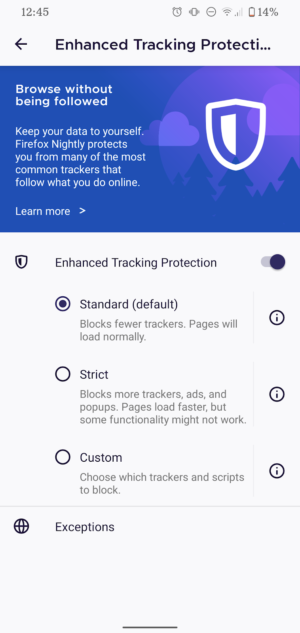
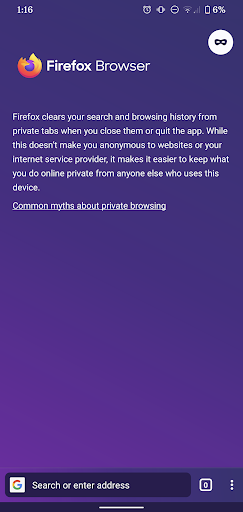
Enhanced Tracking Protection automatically blocks many known third-party trackers, by default, in order to improve user privacy online. Private Mode adds another layer for better privacy on device level.
Appearance & productivity
- With regard to appearance, we redesigned the user interface of our Android browser completely so that it’s now even cleaner, easier to handle and to make it one’s own: users can set the URL bar at the bottom or top of the screen, improving the accessibility of the most important browser element especially for those with smartphones on the larger side.
- Taking forever to enter a URL is therefore now a thing of the past, and so are chaotic bookmarks: Collections help to stay organized online, making it easy to return to frequent tasks, share across devices, personalize one’s browsing experience and get more done on mobile. As a working parent, for example, Collections may come in handy when organizing and curating one’s online searches based on type of activity such as kids, work, recipes, and many more. Multitaskers, who want to get more done while watching videos, will also enjoy the new Picture-in-Picture feature.
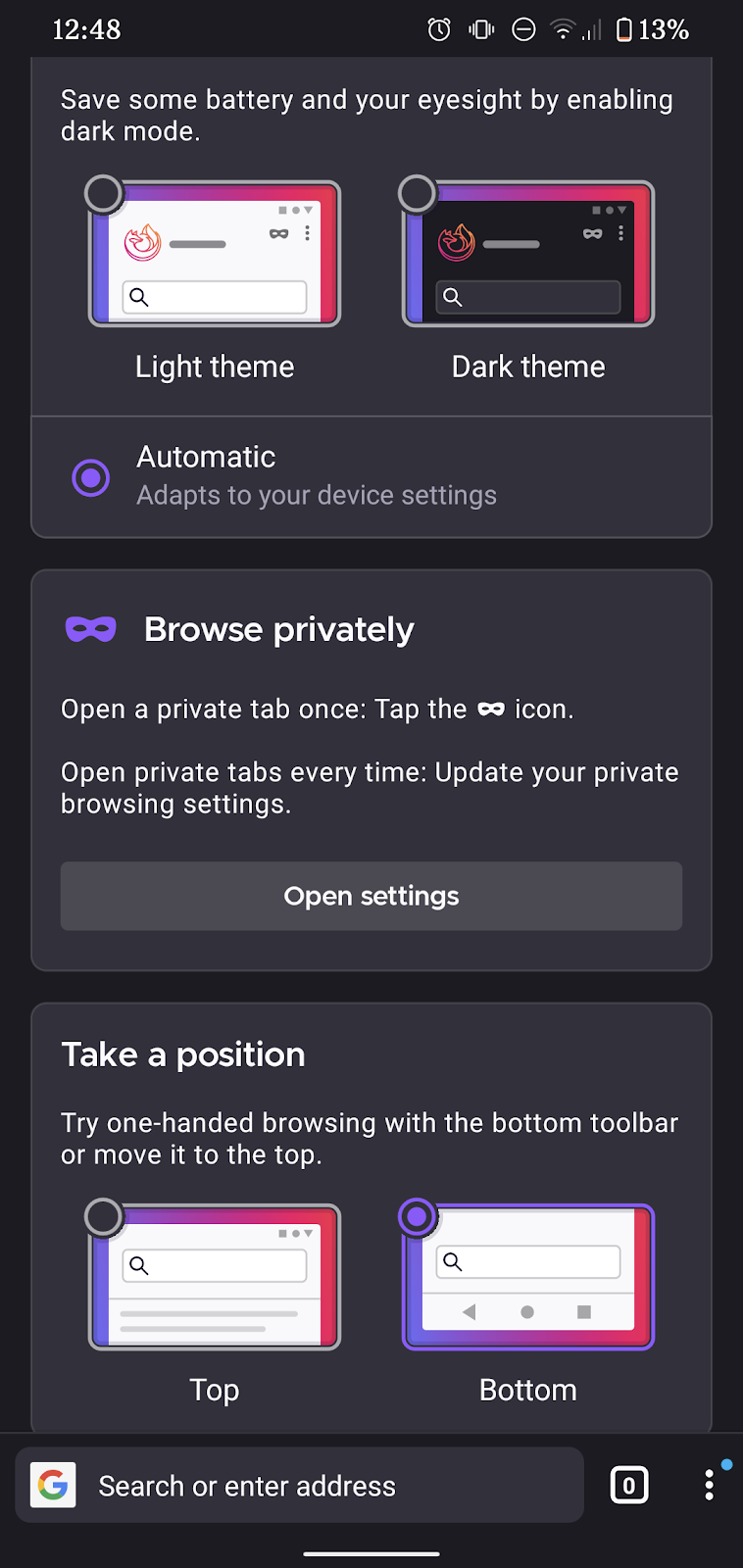
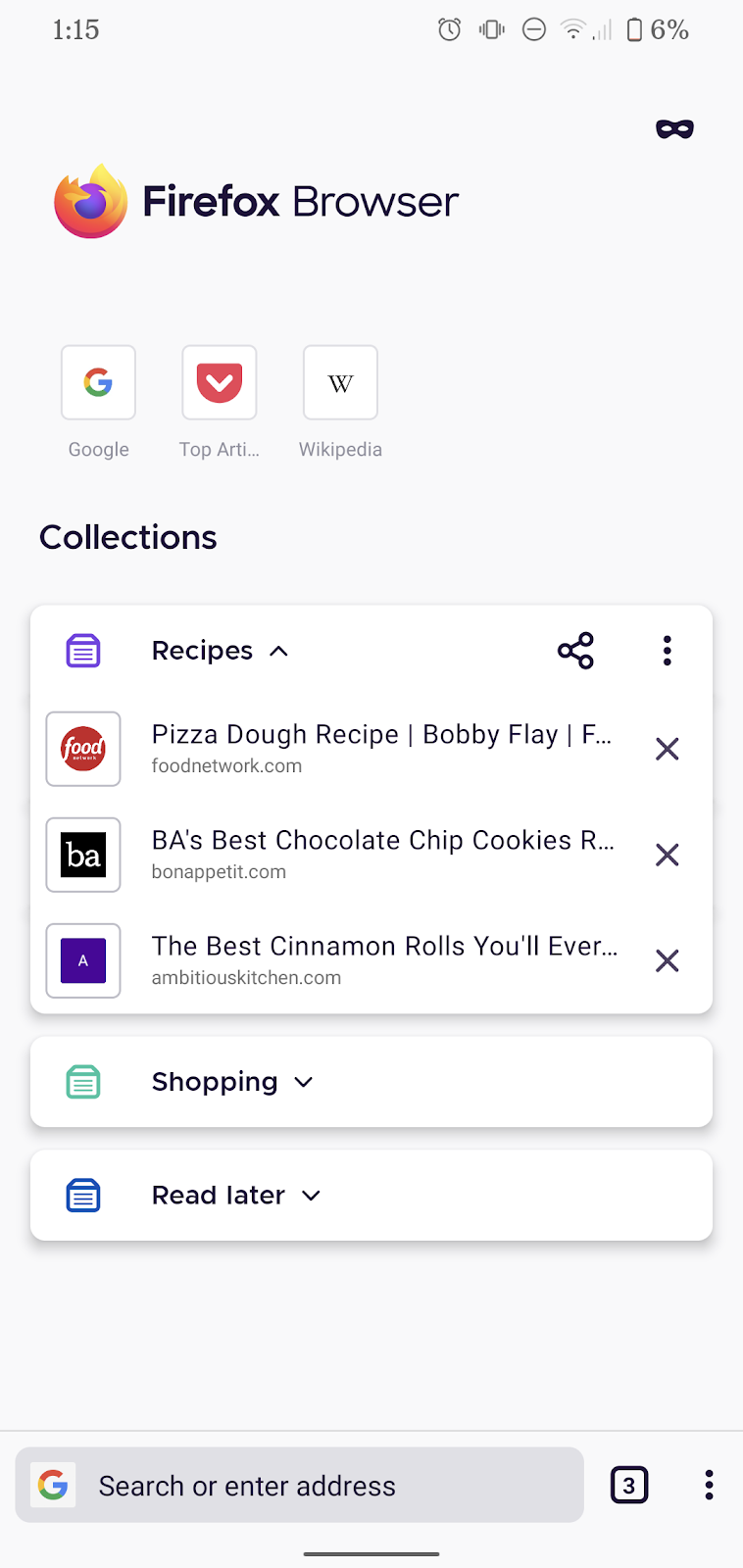
Productivity is key on mobile. That’s why the new Firefox for Android comes with an adjustable URL bar and a convenient solution to organize bookmarks: Collections.
- Bright or dark, day or night: Firefox for Android simplifies toggling between Light and Dark Themes, depending on individual preferences, vision needs or environment. Those who prefer an automatic