No matter where you have been getting your news these past few months, the rise of citizen protest and civil disobedience has captured headlines, top stories and trending topics. The … Read more
The post The age of activism: Protect your digital security and know your rights appeared first on The Firefox Frontier.
The Firefox for Android team recently celebrated an important milestone. We launched a completely overhauled Android experience that’s fast, personalized, and private by design.

Firefox recently launched launched a completely overhauled Android experience.
When I joined the mobile team six months ago as its first embedded content strategist, I quickly saw the opportunity to improve our process by codifying standards. This would help us avoid reinventing solutions so we could move faster and ultimately develop a more cohesive product for end users. Here are a few approaches I took to integrate systems thinking into our UX process.
Create documentation to streamline decision making
I had an immediate ask to write strings for several snackbars and confirmation dialogs. Dozens of these already existed in the app. They appear when you complete actions like saving a bookmark, closing a tab, or deleting browsing data.
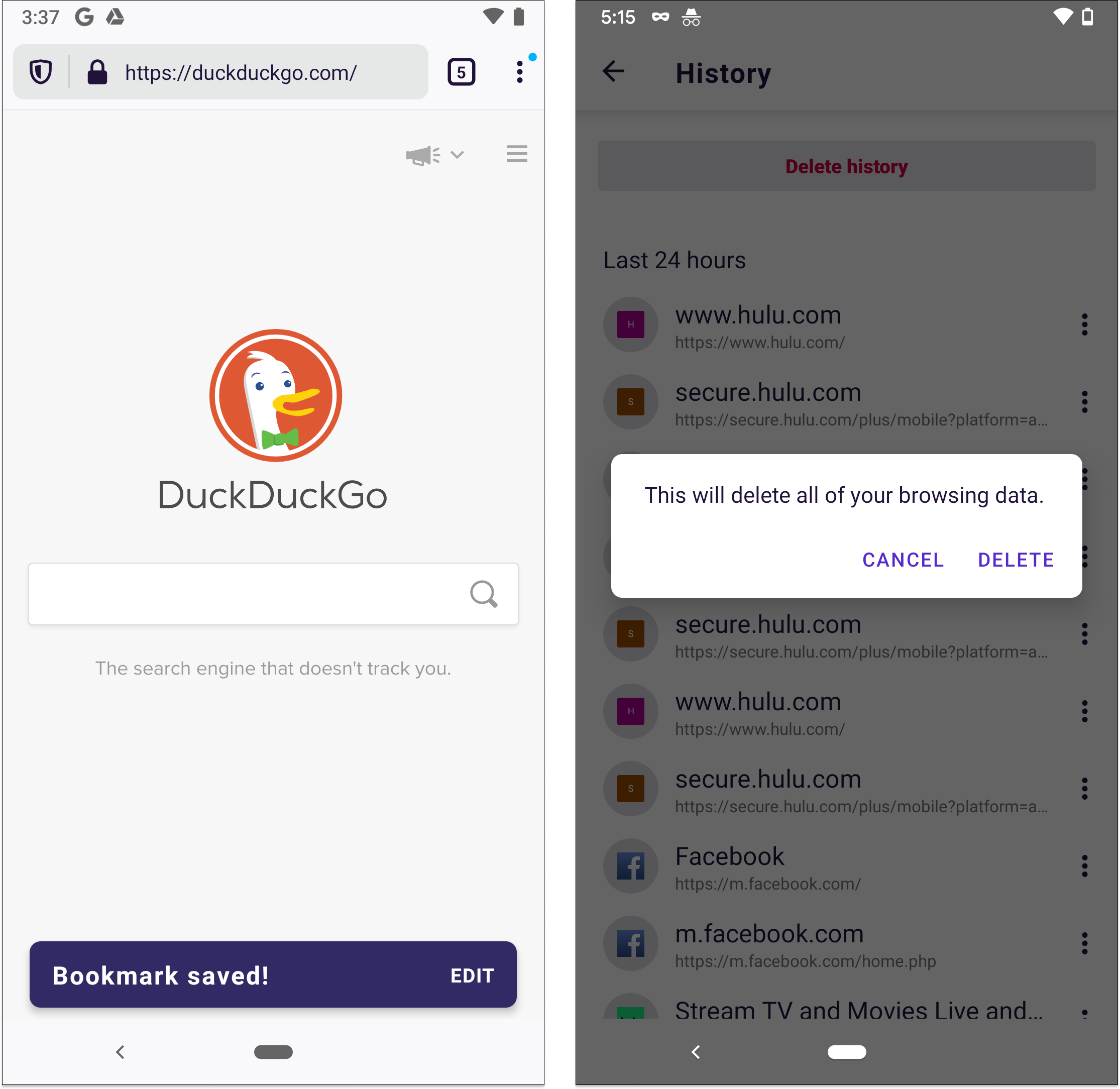
Snackbars and confirmation dialogs appear when you take certain actions inside the app, such as saving a bookmark or deleting your browsing data.
All I had to do was review the existing strings and follow the already-established patterns. That was easier said than done. Strings live in two XML files. Similar strings, like snackbars and dialogs, are rarely grouped together. It’s also difficult to understand the context of the interaction from an XML file.
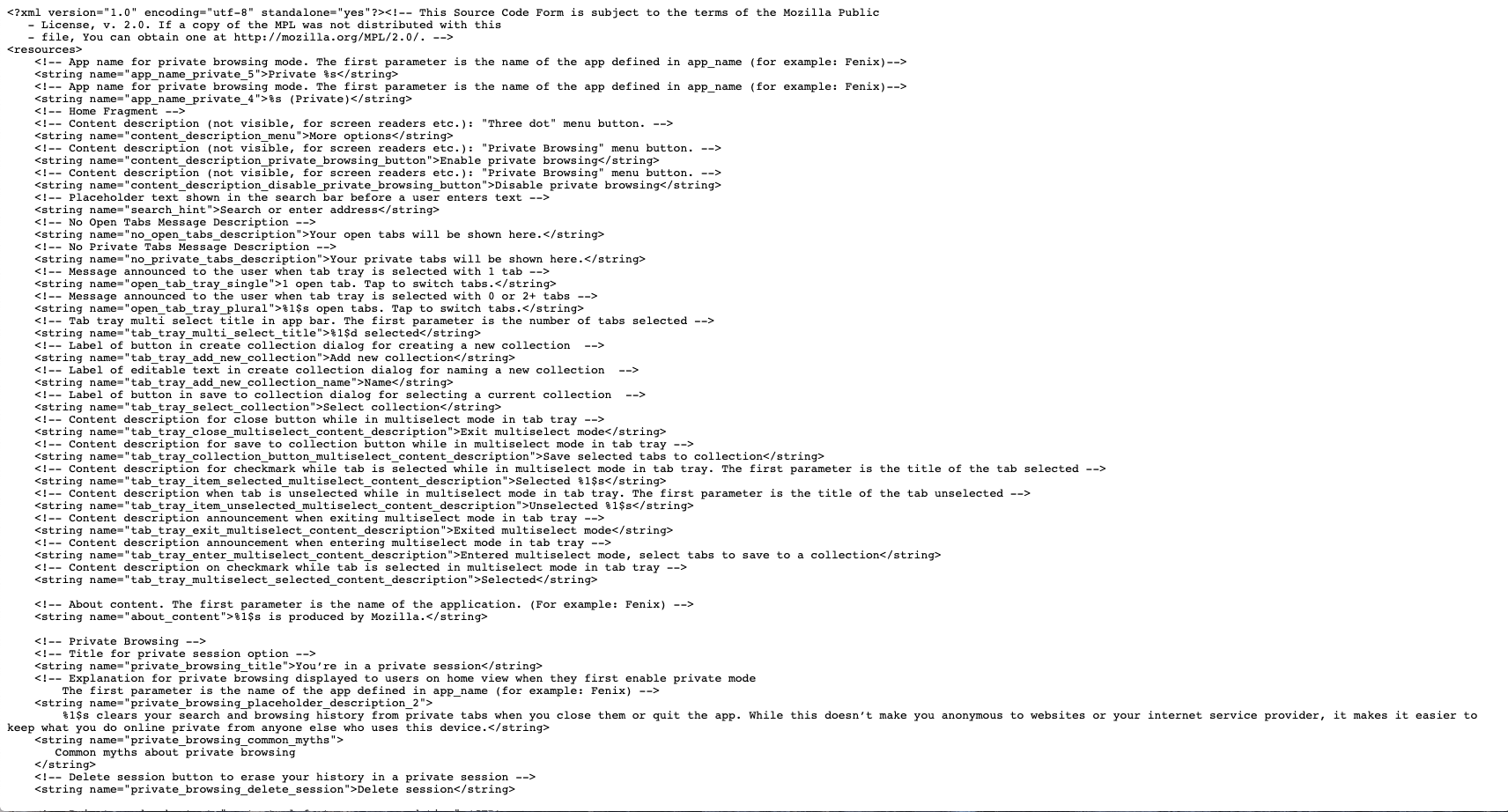
It’s difficult to identify content patterns and inconsistencies from an XML file.
To see everything in one, more digestible place, I conducted a holistic audit of the snackbars and dialogs.
I downloaded the XML files and pulled all snackbar and dialog-related strings into a spreadsheet. I also went through the app and triggered as many of the messages as I could to add screenshots to my documentation. I audited a few competitors, too. As the audit came together, I began to see patterns emerge.
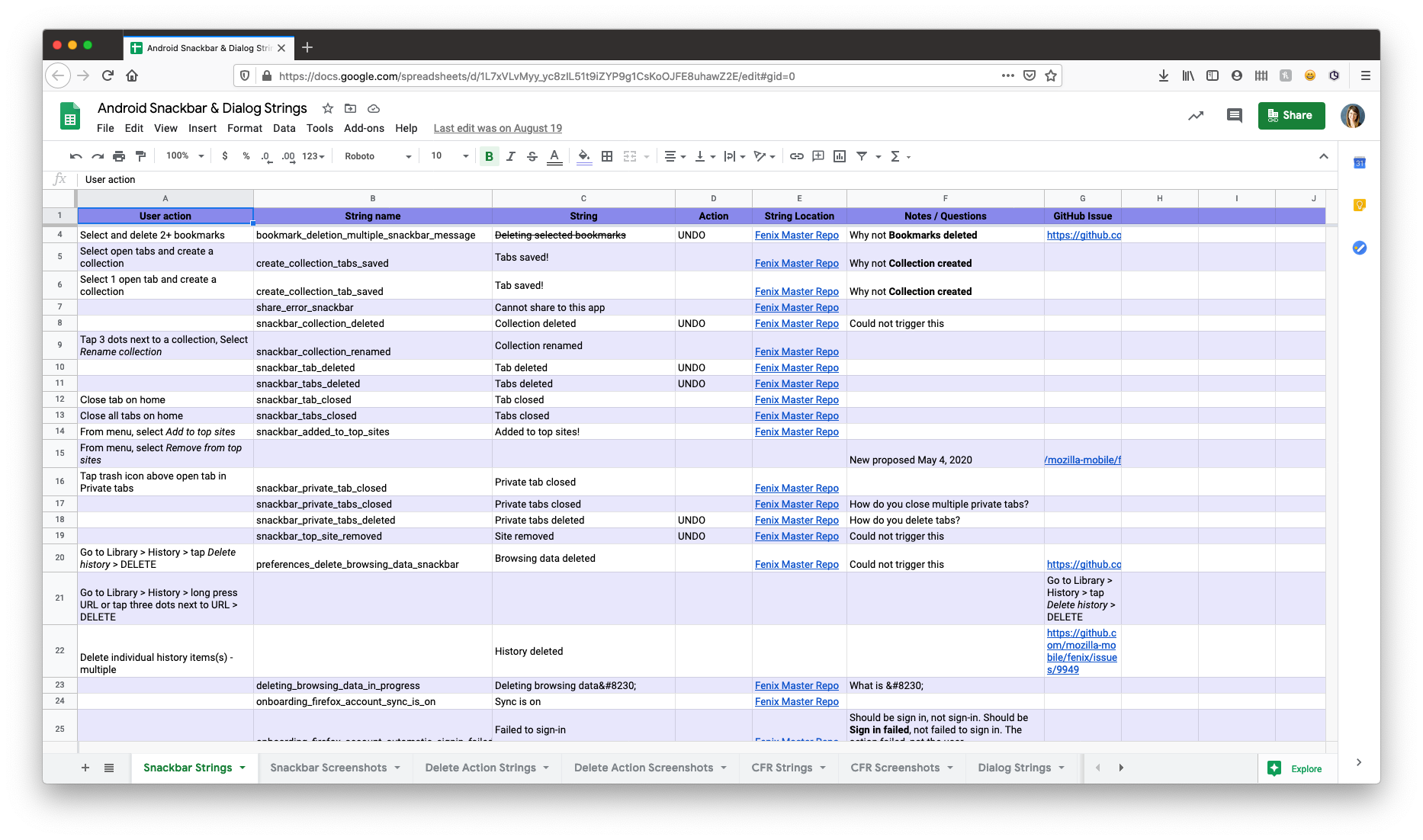
Organizing and coding strings in a spreadsheet helped me identify patterns and inconsistencies.
I identified the following:
- Inconsistencies in strings. Example: Some had terminal punctuation and others did not.
- Inconsistencies in triggers and behaviors. Example: A snackbar should have appeared but didn’t, or should NOT have appeared but did.
I used this to create guidelines around our usage of these components. Now when a request for a snackbar or dialog comes up, I can close the loop much faster because I have documented guidelines to follow.
Define and standardize reusable patterns and components
Snackbars are one component of many within the app. Firefox for Android has buttons, permission prompts, error fields, modals, in-app messaging surfaces, and much more. Though the design team maintained a UI library, we didn’t have clear standards around the components themselves. This led to confusion and in some cases the same components being used in different ways.
I began to collect examples of various in-app components. I started small, tackling inconsistencies as I came across them and worked with individual designers to align our direction. After a final decision was made about a particular component, we shared back with the rest of the team. This helped to build the team’s institutional memory and improve transparency about a decision one or two people may have made.
At Mozilla, with over 400 staff in community-facing roles, and thousands of volunteer contributors across multiple projects: we believe that everyone deserves the right to work, contribute and convene with knowledge that their safety and well-being are at the forefront of how we operate and communicate as an organization.
In my 2017 research into the state of diversity and inclusion in open source, including qualitative interviews with over 90 community members, and a survey of over 204 open source projects, we found that while a majority of projects had adopted a code of conduct, nearly half (47%) of community members did not trust (or doubted) its enforcement. That number jumped to 67% for those in underrepresented groups.
For mission driven organizations like Mozilla, and others building open source into their product development workflows, I found a lack of cross-organizational strategy for enforcement. A strategy that considers the intertwined nature of open source, where staff and contributors regularly work together as teammates and colleagues.
It was clear, that the success of enforcement was dependent on the organizational capacity to respond as a whole, and not as sole responsibility of community managers. This blog post describes our journey to get there.
Why This Matters

Photo by Debby Hudson on Unsplash
Truly ‘open’ participation requires that everyone feel safe, supported, and empowered in their roles.
From an ‘organizational health perspective this is also critical to get right as there are unique risks associated with code of conduct enforcement in open collaboration:
- Safety – Physical/Sexual/Psychological for all involved.
- Privacy – Privacy, confidentiality, security of data related to reports.
- Legal – Failure to recognize applicable law, or follow required processes, resulting in potential legal liability. This includes the geographic region where reporter & reported individuals reside.
- Brand – Mishandling (or not handling) can create mistrust in organizations, and narratives beyond their ability to manage.
Where We Started (Staff)

I want to first acknowledge that across Mozilla’s many projects and communities, maintainers, and project leads were doing an excellent job of managing low to moderate risk cases, including ‘drive by’ trolling.
That said, our processes and program were immature. Many of those same staff found themselves without expertise, tools and lacking key partnerships required to manage escalations and high risk situations. This caused stress and perhaps placed an unfair burden on those people to solve complex problems in real time. Specifically gaps were:
Investigative & HR skill set – Investigation requires both a mindset, and set of tactics to ensure that all relevant information is considered, before making a decision. This and other skills, related to supporting employees, sits in the HR department.
Legal – Legal partnership for both product and employment issues are key to high risk cases (in any of the previously mentioned categories) and those which may involve staff –
tldr: --output-dir [directory] comes in curl 7.73.0
The curl options to store the contents of a URL into a local file, -o (--output) and -O (--remote-name) were part of curl 4.0, the first ever release, already in March 1998.
Even though we often get to hear from users that they can’t remember which of the letter O’s to use, they’ve worked exactly the same for over twenty years. I believe the biggest reason why they’re hard to keep apart is because of other tools that use similar options for maybe not identical functionality so a command line cowboy really needs to remember the exact combination of tool and -o type.
Later on, we also brought -J to further complicate things. See below.
Let’s take a look at what these options do before we get into the new stuff:
--output [file]
This tells curl to store the downloaded contents in that given file. You can specify the file as a local file name for the current directory or you can specify the full path. Example, store the the HTML from example.org in "/tmp/foo":
curl -o /tmp/foo https://example.org
--remote-name
This option is probably much better known as its short form: -O (upper case letter o).
This tells curl to store the downloaded contents in a file name name that is extracted from the given URL’s path part. For example, if you download the URL "https://example.com/pancakes.jpg" users often think that saving that using the local file name “pancakes.jpg” is a good idea. -O does that for you. Example:
curl -O https://example.com/pancakes.jpg
The name is extracted from the given URL. Even if you tell curl to follow redirects, which then may go to URLs using different file names, the selected local file name is the one in the original URL. This way you know before you invoke the command which file name it will get.
--remote-header-name
This option is commonly used as -J (upper case letter j) and needs to be set in combination with --remote-name.
This makes curl parse incoming HTTP response headers to check for a Content-Disposition: header, and if one is present attempt to parse a file name out of it and then use that file name when saving the content.
This then naturally makes it impossible for a user to be really sure what file name it will end up with. You leave the decision entirely to the server. curl will make an effort to not overwrite any existing local file when doing this, and to reduce risks curl will always cut off any provided directory path from that file name.
Example download of the pancake image again, but allow the server to set the local file name:
curl -OJ https://example.com/pancakes.jpg
(it has been said that “-OJ is a killer feature” but I can’t take any credit for having come up with that.)
Which directory
So in particular with -O, with or without -J, the file is download in the current working directory. If you want the download to be put somewhere special, you had to first ‘cd’ there.
When saving multiple URLs within a single curl invocation using -O, storing those in different directories would thus be impossible as you can only cd between curl invokes.
Introducing --output-dir
In curl 7.73.0, we introduce this new command line option --output-dir that goes well together with all these output options. It tells curl in which directory to create the file. If you want to download the pancake image, and put it in /tmp no matter which your current directory is:
curl -O --output-dir /tmp https://example.com/pancakes.jpg
And if you allow the server to select the file name but still want it in /tmp
curl -OJ --output-dir /tmp https://example.com/pancakes.jpg
Create the directory!
This new option also goes well in combination with --create-dirs, so you can specify a non-existing directory with --output-dir and have curl create it for the download and then store the file in there:
curl --create-dirs -O --output-dir /tmp/receipes https://example.com/pancakes.jpg
Ships in 7.73.0
This new option comes in curl 7.73.0. It is curl’s 233rd command line option.
Later this year the European Commission is expected to publish the Digital Services Act (DSA). These new draft laws will aim at radically transforming the regulatory environment for tech companies operating in Europe. The DSA will deal with everything from content moderation, to online advertising, to competition issues in digital markets. Today, Mozilla filed extensive comments with the Commission, to outline Mozilla’s vision for how the DSA can address structural issues facing the internet while safeguarding openness and fundamental rights.
The stakes at play for consumers and the internet ecosystem could not be higher. If developed carefully and with broad input from the internet health movement, the DSA could help create an internet experience for consumers that is defined by civil discourse, human dignity, and individual expression. In addition, it could unlock more consumer choice and consumer-facing innovation, by creating new market opportunities for small, medium, and independent companies in Europe.
Below are the key recommendations in Mozilla’s 90-page submission:
- Content responsibility: The DSA provides a crucial opportunity to implement an effective and rights-protective framework for content responsibility on the part of large content-sharing platforms. Content responsibility should be assessed in terms of platforms’ trust & safety efforts and processes, and should scale depending on resources, business practices, and risk. At the same time, the DSA should avoid ‘down-stack’ content control measures (e.g. those targeting ISPs, browsers, etc). These interventions pose serious free expression risk and are easily circumventable, given the technical architecture of the internet.
**** - Meaningful transparency to address disinformation: To ensure transparency and to facilitate accountability, the DSA should consider a mandate for broad disclosure of advertising through publicly available ad archive APIs.
**** - Intermediary liability: The main principles of the E-Commerce directive still serve the intended purpose, and the European Commission should resist the temptation to weaken the directive in the effort to increase content responsibility.
**** - Market contestability: The European Commission should consider how to best support healthy ecosystems with appropriate regulatory engagement that preserves the robust innovation we’ve seen to date — while also allowing for future competitive innovation from small, medium and independent companies without the same power as today’s major platforms.
**** - Ad tech reform: The advertising ecosystem is a key driver of the digital economy, including for companies like Mozilla. However the ecosystem today is unwell, and a crucial first step towards restoring it to health would be for the DSA to address its present opacity.
**** - Governance and oversight: Any new oversight bodies created by the DSA should be truly co-regulatory in nature, and be sufficiently resourced with technical, data science, and policy expertise.
Our submission to the DSA public consultation builds on this week’s open letter from our CEO Mitchell Baker to European Commission President Ursula von der Leyen. Together, they provide the vision and the practical guidance on how to make the DSA an effective regulatory tool.
In the coming months we’ll advance these substantive recommendations as the Digital Services Act takes shape. We look forward to working with EU lawmakers and the broader policy community to ensure the DSA succeeds in addressing the systemic challenges holding back the internet from what it should be.
A high-level overview of our DSA submission can be found here, and the complete 90-page submission can be found here.
The post Mozilla offers a vision for how the EU Digital Services Act can build a better internet appeared first on Open Policy & Advocacy.
Due to recent changes at Mozilla my time working on the Rust compiler is drawing to a close. I am still at Mozilla, but I will be focusing on Firefox work for the foreseeable future.
So I thought I would wrap up my “How to speed up the Rust compiler” series, which started in 2016.
Looking back
I wrote ten “How to speed up the Rust compiler” posts.
- How to speed up the Rust compiler.The original post, and the one where the title made the most sense. It focused mostly on how to set up the compiler for performance work, including profiling and benchmarking. It mentioned only four of my PRs, all of which optimized allocations.
- How to speed up the Rust compiler some more. This post switched to focusing mostly on my performance-related PRs (15 of them), setting the tone for the rest of the series. I reused the “How to…” naming scheme because I liked the sound of it, even though it was a little inaccurate.
- How to speed up the Rust compiler in 2018. I returned to Rust compiler work after a break of more than a year. This post included updated info on setting things up for profiling the compiler and described another 7 of my PRs.
- How to speed up the Rust compiler some more in 2018. This post described some improvements to the standard benchmarking suite and support for more profiling tools, covering 14 of my PRs. Due to multiple requests from readers, I also included descriptions of failed optimization attempts, something that proved popular and that I did in several subsequent posts. (A few times, readers made suggestions that then led to subsequent improvements, which was great.)
- How to speed up the Rustc compiler in 2018: NLL edition. This post described 13 of my PRs that helped massively speed up the new borrow checker, and featured my favourite paragraph of the entire series: “the html5ever benchmark was triggering out-of-memory failures on CI… over a period of 2.5 months we reduced the memory usage from 14 GB, to 10 GB, to 2 GB, to 1.2 GB, to 600 MB, to 501 MB, and finally to 266 MB”. This is some of the performance work I’m most proud of. The new borrow checker was a huge win for Rust’s usability and it shipped with very little hit to compile times, an outcome that was far from certain for several months.
- How to speed up the Rust compiler in 2019. This post covered 44(!) of my PRs including ones relating to faster globals accesses, profiling improvements, pipelined compilation, and a whole raft of tiny wins from reducing allocations with the help of the new version of DHAT.
- How to speed up the Rust compiler some more in 2019. This post described 11 of my PRs, including several minimising calls to
memcpy, and several improving theObligationForestdata structure. It discussed some PRs by others that reduced library code bloat. I also included a table of overall performance changes since the previous post, something that I continued doing in subsequent posts. - How to speed up the Rust compiler one last time in 2019. This post described 21 of my PRs, including two separate sequences of refactoring PRs that unintentionally led to performance wins.
- How to speed up the Rust compiler in 2020: This post described 23 of my successful PRs relating to performance, including a big change and win from avoiding the generation of LLVM bitcode when LTO is not being used (which is the common case). The post also described 5 of my PRs that represented failed
Updating to Thunderbird 78 from 68
Soon the Thunderbird automatic update system will start to deliver the new Thunderbird 78 to current users of the previous release, Thunderbird 68. This blog post is intended to share with you details about our OpenPGP support in Thunderbird 78, and some details Enigmail add-on users should consider when updating. If you are interested in reading more about the other features in the Thunderbird 78 release, please see our previous blog post.
Updating to Thunderbird 78 is highly recommended to ensure you will receive security fixes, because no more fixes will be provided for Thunderbird 68 after September 2020.
The traditional Enigmail Add-on cannot be used with version 78, because of changes to the underlying Mozilla platform Thunderbird is built upon. Fortunately, it is no longer needed with Thunderbird version 78.2.1 because it enables a new built-in OpenPGP feature.
Not all of Enigmail’s functionality is offered by Thunderbird 78 yet – but there is more to come. And some functionality has been implemented differently, partly because of technical necessity, but also because we are simplifying the workflow for our users.
With the help of a migration tool provided by the Enigmail Add-on developer, users of Enigmail’s classic mode will get assistance to migrate their settings and keys. Users of Enigmail’s Junior Mode will be informed by Enigmail, upon update, about their options for using that mode with Thunderbird 78, which requires downloading software that isn’t provided by the Thunderbird project. Alternatively, users of Enigmail’s Junior Mode may attempt a manual migration to Thunderbird’s new integrated OpenPGP feature, as explained in our howto document listed below.
Unlike Enigmail, OpenPGP in Thunderbird 78 does not use GnuPG software by default. This change was necessary to provide a seamless and integrated experience to users on all platforms. Instead, the software of the RNP project was chosen for Thunderbird’s core OpenPGP engine. Because RNP is a newer project in comparison to GnuPG, it has certain limitations, for example it currently lacks support for OpenPGP smartcards. As a workaround, Thunderbird 78 offers an optional configuration for advanced users, which requires additional manual setup, but which can allow the optional use of separately installed GnuPG software for private key operations.
The Mozilla Open Source Support (MOSS) awards program has thankfully provided funding for an audit of the RNP library and Thunderbird’s related code, which was conducted by the Cure53 company. We are happy to report that no critical or major security issues were found, all identified issues had a medium or low severity rating, and we will publish the results in the future.
More Info and Support
We have written a support article that lists questions that users might have, and it provides more detailed information on the technology, answers, and links to additional articles and resources. You may find it at: https://support.mozilla.org/en-US/kb/openpgp-thunderbird-howto-and-faq
If you have questions about the OpenPGP feature, please use Thunderbird’s discussion list for end-to-end encryption functionality at: https://thunderbird.topicbox.com/groups/e2ee
Several topics have already been discussed, so you might be able to find some answers in its archive.
https://blog.thunderbird.net/2020/09/openpgp-in-thunderbird-78/
Today, Mozilla CEO Mitchell Baker published an open letter to European Commission President Ursula von der Leyen, urging her to seize a ‘once-in-a-generation’ opportunity to build a better internet through the opportunity presented by the upcoming Digital Services Act (“DSA”).
Mitchell’s letter coincides with the European Commission’s public consultation on the DSA, and sets out high-level recommendations to support President von der Leyen’s DSA policy agenda for emerging tech issues (more on that agenda and what we think of it here).
The letter sets out Mozilla’s recommendations to ensure:
- Meaningful transparency with respect to disinformation;
- More effective content accountability on the part of online platforms;
- A healthier online advertising ecosystem; and,
- Contestable digital markets
As Mitchell notes:
“The kind of change required to realise these recommendations is not only possible, but proven. Mozilla, like many of our innovative small and medium independent peers, is steeped in a history of challenging the status quo and embracing openness, whether it is through pioneering security standards, or developing industry-leading privacy tools.”
Mitchell’s full letter to Commission President von der Leyen can be read here.
The post Mozilla CEO Mitchell Baker urges European Commission to seize ‘once-in-a-generation’ opportunity appeared first on The Mozilla Blog.
A few weeks ago, Rina discussed the impact of the recent changes in Mozilla on the SUMO team. This change has resulted in a more focused team that combines Pocket Support and Mozilla Support into a single team that we’re calling Customer Experience, led by Justin Rochell. Justin has been leading the support team in Pocket and will now broaden his responsibilities to oversee Mozilla’s products as well as SUMO community.
Here’s a short introduction from Justin:
Hey everyone! I’m excited and honored to be stepping into this new role leading our support and customer experience efforts at Mozilla. After heading up support at Pocket for the past 8 years, I’m excited to join forces with SUMO to improve our support strategy, collaborate more closely with our product teams, and ensure that our contributor community feels nurtured and valued.
One of my first support jobs was for an email client called Postbox, which is built on top of Thunderbird. It feels as though I’ve come full circle, since support.mozilla.org was a valuable resource for me when answering support questions and writing knowledge base articles.
You can find me on Matrix at @justin:mozilla.org – I’m eager to learn about your experience as a contributor, and I welcome you to get in touch.
We’re also excited to welcomer Olivia Opdahl, who is a Senior Community Support Rep at Pocket and has been on the Pocket Support team since 2014. She’s been responsible for many things in addition to support, including QA, curating Pocket Hits, and doing social media for Pocket.
Here’s a short introduction from Olivia:
Hi all, my name is Olivia and I’m joining the newly combined Mozilla support team from Pocket. I’ve worked at Pocket since 2014 and have seen Pocket evolve many times into what we’re currently reorganizing as a more integrated part of Mozilla. I’m excited to work with you all and learn even more about the rest of Mozilla’s products!
When I’m not working, I’m probably playing video games, hiking, learning programming, taking photos or attending concerts. These days, I’m trying to become a Top Chef, well, not really, but I’d like to learn how to make more than mac and cheese :D
Thanks for welcoming me to the new team!
Besides Justin and Olivia, JR/Joe Johnson, who you might remember for being a maternity cover for Rina earlier this year, will step in as a Release/Insights Manager for the team and work closely with the product team. Joni will continue to be our Content Lead and Angela as a Technical Writer. I will also stay as a Support Community Manager.
We’ll be sharing more information about our team’s focus in the future as we get to know more. For now, please join me to welcome Justin and Olivia on the team!
On behalf of the Customer Experience Team,
Kiki
https://blog.mozilla.org/sumo/2020/09/06/introducing-the-customer-experience-team/
curl 4.8 was released in 1998 and contained 46 command line options. curl --help would list them all. A decent set of options.
When we released curl 7.72.0 a few weeks ago, it contained 232 options… and curl --help still listed all available options.
What was once a long list of options grew over the decades into a crazy long wall of text shock to users who would enter this command and option, thinking they would figure out what command line options to try next.
–help me if you can
We’ve known about this usability flaw for a while but it took us some time to figure out how to approach it and decide what the best next step would be. Until this year when long time curl veteran Dan Fandrich did his presentation at curl up 2020 titled –help me if you can.
Emil Engler subsequently picked up the challenge and converted ideas surfaced by Dan into reality and proper code. Today we merged the refreshed and improved --help behavior in curl.
Perhaps the most notable change in curl for many users in a long time. Targeted for inclusion in the pending 7.73.0 release.
help categories
First out, curl --help will now by default only list a small subset of the most “important” and frequently used options. No massive wall, no shock. Not even necessary to pipe to more or less to see proper.
Then: each curl command line option now has one or more categories, and the help system can be asked to just show command line options belonging to the particular category that you’re interested in.
For example, let’s imagine you’re interested in seeing what curl options provide for your HTTP operations:
$ curl --help http
Usage: curl [options…]
http: HTTP and HTTPS protocol options
--alt-svc Enable alt-svc with this cache file
--anyauth Pick any authentication method
--compressed Request compressed response
-b, --cookie Send cookies from string/file
-c, --cookie-jar Write cookies to after operation
-d, --data HTTP POST data
--data-ascii HTTP POST ASCII data
--data-binary HTTP POST binary data
--data-raw HTTP POST data, '@' allowed
--data-urlencode HTTP POST data url encoded
--digest Use HTTP Digest Authentication
[...]
list categories
To figure out what help categories that exists, just ask with curl --help category, which will show you a list of the current twenty-two categories: auth, connection, curl, dns, file, ftp, http, imap, misc, output, pop3, post, proxy, scp, sftp, smtp, ssh, telnet ,tftp, tls, upload and verbose. It will also display a brief description of each category.
Each command line option can be put into multiple categories, so the same one may be displayed in both in the “http” category as well as in “upload” or “auth” etc.
--help all
You can of course still get the old list of every single command line option by issuing curl --help all. Handy for grepping the list and more.
“important”
The meta category “important” is what we use for the options that we show when just curl --help is issued. Presumably those options should be the most important, in some ways.
Credits
Code by Emil Engler. Ideas and research by Dan Fandrich.
Hello and welcome to another issue of This Week in Rust! Rust is a systems language pursuing the trifecta: safety, concurrency, and speed. This is a weekly summary of its progress and community. Want something mentioned? Tweet us at @ThisWeekInRust or send us a pull request. Want to get involved? We love contributions.
This Week in Rust is openly developed on GitHub. If you find any errors in this week's issue, please submit a PR.
Updates from Rust Community
Official
Tooling
Newsletters
Observations/Thoughts
- Should we trust Rust with the future of systems programming?
- Optionality in the type systems of Julia and Rust
- Migrating from quick-error to SNAFU: a story on revamped error handling in Rust
- Go use those Traits
- Starframe devlog: Architecture
- Event Chaining as a Decoupling Method in Entity-Component-System
- Rust serialization: What's ready for production today?
- rust vs scripted languages; a short case study
- [DE] Entwicklung: Warum Rust die Antwort auf miese Software und Programmierfehler ist
- [video] Is Rust Used Safely by Software Developers?
Learn Standard Rust
- Ownership in Rust, Part 1
- Ownership in Rust, Part 2
- Learning Rust 1: Install things and read a file
- Learning Rust 2: A Tiny Database is Born
- That's so Rusty: Ownership
Learn More Rust
- As above, so below: Bare metal Rust generics 2/2
- Halite III Bot Development Kit in Rust
- Zero To Production #3.5: HTML forms, Databases, Integration tests
- Objective-Rust
- Building web apps with Rust using the Rocket framework
- Writing an asynchronous MQTT Broker in Rust
Given the recent restructuring at Mozilla, many teams have been affected by the layoff. Unfortunately, this includes the Mozilla Tech Speakers program. As one of the volunteers who’s been part of the program since the very beginning, I’d like to share some memories of the last five years, watching the Tech Speakers program grow from a small group of people to a worldwide community.

Mozilla Tech Speakers – a program to bring together volunteer contributors who are already speaking to technical audiences (developers/web designers/computer science and engineering students) about Firefox, Mozilla and the Open Web in communities around the world. We want to support you and amplify your work!
It all started as an experiment in 2015 designed by Havi Hoffman and Dietrich Ayala from the Developer Relations team. They invited a handful of volunteers who were passionate about giving talks at conferences on Mozilla-related technologies and the Open Web in general to trial a program that would support their conference speaking activities, and amplify their impact. That’s how Mozilla Tech Speakers were born.
It was a perfect symbiosis. A small, scrappy Developer Relations team can’t cover all the web conferences everywhere, but with help from trained and knowledgeable volunteers that task becomes a lot easier. Volunteer local speakers can share information at regional conferences that are distant or inaccessible for staff. And for half a decade, it worked, and the program grew in reach and popularity.
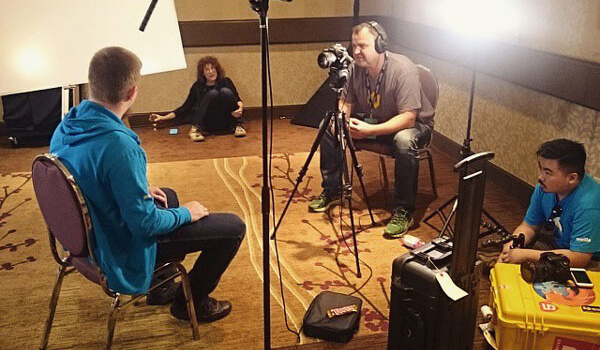
Those volunteers, in return, were given training and support, including funding for conference travel and cool swag as a token of appreciation.
From the first cohort of eight people, the program grew over the years to have more than a hundred of expert technical speakers around the world, giving top quality talks at the best web conferences. Sometimes you couldn’t attend an event without randomly bumping into one or two Tech Speakers. It was a globally recognizable brand of passionate, tech-savvy Mozillians.
The meetups
After several years of growth, we realized that connecting remotely is one thing, but meeting in person is a totally different experience. That’s why the idea for Tech Speakers meetups was born. We’ve had three gatherings in the past four years: Berlin in 2016, Paris in 2018, and two events in 2019, in Amsterdam and Singapore to accommodate speakers on opposite sides of the globe.

The first Tech Speakers meetup in Berlin coincided with the 2016 View Source Conference, hosted by Mozilla. It was only one year after the program started, but we already had a few new cohorts trained and integrated into the group. During the Berlin meetup we gave short lightning talks in front of each other, and received feedback from our peers, as well as professional speaking coach Denise Graveline.

After the meetup ended, we joined the conference as volunteers, helping out in the registration desk, talking to attendees in the booths, and making the speakers feel welcome.

The second meetup took place two years later in Paris – hosted by Mozilla’s unique Paris office, looking literally like a palace. We participated in training workshops about Firefox Reality, IoT, WebAssembly, and Rust. We continued the approach of presenting lightning talks that were evaluated by experts in the web conference scene: Ada Rose Cannon, Jessica Rose, Vitaly Friedman, and Marc Thiele.
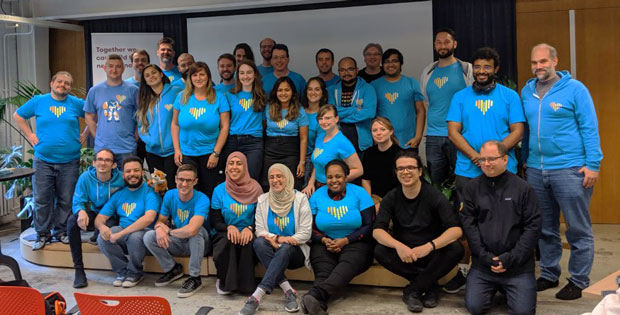
Mozilla hosted two meetups in 2019, before the 2020 pandemic put tech conferences and
The core team is beginning to think about the 2021 Roadmap, and we want to hear from the community. We’re going to be running two parallel efforts over the next several weeks: the 2020 Rust Survey, to be announced next week, and a call for blog posts.
Blog posts can contain anything related to Rust: language features, tooling improvements, organizational changes, ecosystem needs — everything is in scope. We encourage you to try to identify themes or broad areas into which your suggestions fit in, because these help guide the project as a whole.
One way of helping us understand the lens you're looking at Rust through is to give one (or more) statements of the form "As a X I want Rust to Y because Z". These then may provide motivation behind items you call out in your post. Some examples might be:
- "As a day-to-day Rust developer, I want Rust to make consuming libraries a better experience so that I can more easily take advantage of the ecosystem"
- "As an embedded developer who wants to grow the niche, I want Rust to make end-to-end embedded development easier so that newcomers can get started more easily"
This year, to make sure we don’t miss anything, when you write a post please submit it into this google form! We will try to look at posts not submitted via this form, too, but posts submitted here aren’t going to be missed. Any platform — from blogs to GitHub gists — is fine!
To give you some context for the upcoming year, we established these high-level goals for 2020, and we wanted to take a look back at the first part of the year. We’ve made some excellent progress!
- Prepare for a possible Rust 2021 Edition
- Follow-through on in-progress designs and efforts
- Improve project functioning and governance
Prepare for a possible Rust 2021 Edition
There is now an open RFC proposing a plan for the 2021 edition! There has been quite a bit of discussion, but we hope to have it merged within the next 6 weeks. The plan is for the new edition to be much smaller in scope than Rust 2018. It it is expected to include a few minor tweaks to improve language usability, along with the promotion of various edition idiom lints (like requiring dyn Trait over Trait) so that they will be “deny by default”. We believe that we are on track for being able to produce an edition in 2021.
Follow-through on in-progress designs and efforts
One of our goals for 2020 was to push “in progress” design efforts through to completion. We’ve seen a lot of efforts in this direction:
- The inline assembly RFC has merged and new implementation ready for experimentation
- Procedural macros have been stabilized in most positions as of Rust 1.45
- There is a proposal for a MVP of const generics, which we’re hoping to ship in 2020
- The async foundations group is expecting to post an RFC on the
Streamtrait soon - The FFI unwind project group is closing out a long-standing soundness hole, and the first RFC there has been merged
- The safe transmute project group has proposed a draft RFC
- The traits working group is polishing Chalk, preparing rustc integration, and seeing experimental usage in rust-analyzer. You can learn more in their blog posts.
- We are transitioning to rust-analyzer as the official Rust IDE solution, with a merged RFC laying out the plan
- Rust’s tier system is being formalized with guarantees and expectations set in an
Last week, we finished rolling out the new Firefox for Android experience. This launch was the culmination of a year and a half of work rebuilding the mobile browser for Android from the ground up, replacing the previous application’s codebase with GeckoView—Mozilla’s new mobile browser engine—to create a fast, private, and customizable mobile browser. With GeckoView, our mobile development team can build and ship features much faster than before. The launch is a starting point for our new Android experience, and we’re excited to continue developing and refining features.
This means continuing to build support for add-ons. In order to get the new browser to users as soon as possible—which was necessary to iterate quickly on user feedback and limit resources needed to maintain two different Firefox for Android applications—we made some tough decisions about our minimum criteria for launch. We looked at add-on usage on Android, and made the decision to start by building support for add-ons in the Recommended Extensions program that were commonly installed by our mobile users. Enabling a small number of extensions in the initial rollout also enabled us to ensure a good first experience with add-ons in the new browser that are both mobile-friendly and security-reviewed.
More Recommended Extensions will be enabled on release in the coming weeks as they are tested and optimized. We are also working on enabling support for persistent loading of all extensions listed on addons.mozilla.org (AMO) on Firefox for Android Nightly. This should make it easier for mobile developers to test for compatibility, and for interested users to access add-ons that are not yet available on release. You can follow our progress by subscribing to this issue. We expect to have this enabled later this month.
Our plans for add-on support on release have not been solidified beyond what is outlined above. However, we are continuously working on increasing support, taking into account usage and feedback to ensure we are making the most of our available resources. We will post updates to this blog as plans solidify each quarter.
The post Update on extension support in the new Firefox for Android appeared first on Mozilla Add-ons Blog.
I've used Firefox for Android nearly since it was first made available (I still have an old version on my Android 2.3 Nexus One, which compared with my Pixel 3 now seems almost ridiculously small). I think it's essential to having a true choice of browsers on Android as opposed to "Chrome all the things" and I've used it just about exclusively on all my Android devices since. So, when Firefox Daylight presented itself, I upgraded, and I'm pained to say I've been struggling with it for the better part of a week. Yes, this is going to be another one of those "omg why didn't I wait" posts, but I've tried to be somewhat specific about what's giving me heartburn with the new version because it's not uniformly bad and a lot of things are rather good, but it's still got a lot of rough edges and I don't want Daylight to be another stick Mozilla gives to people to let them beat them with.
So, here's the Good:
Firefox Daylight is a lot faster than the old Firefox for Android. Being based on Firefox 79, Daylight also has noticeably better support for newer web features. Top Sites are more screen-sparing. Dark mode is awesome. I like the feature where having private tabs becomes a notification: tap it and instantly all your naughty pages private browsing goes poof (and it's a good reminder they're open), or, if this doesn't appeal to you, it's a regular notification and you can just turn it off. Collections sound like a neat idea and I'll probably start using them if things get a little unwieldy. I'm not a bar-on-the-bottom kind of guy myself, but I can see why people would like that and choice is always good.
All this is a win. Unfortunately, here's the Bad I'm running into so far:
This has been reported lots of places, but the vast majority of the extensions that used to work with the old Firefox suddenly disappeared. For me, the big loss was Cookie Quick Manager, which was a great mobile-friendly way to manage cookies. Now I can't. Hope I don't screw up trying to get around those paywalls sites storing data about me. At least I still have uBlock Origin but I don't have much else.
Firefox Reader doesn't universally appear on pages it used to. Sometimes reloading the page works, sometimes it doesn't. This is a big problem for mobile. Worse, the old hack of prepending an about:reader?url= doesn't seem to work anymore.
Pages that open new windows or tabs sometimes show content and sometimes don't. This actually affects some of my sites personally, so I filed a bug on it. Naturally, it works fine in desktop Firefox and Chrome, and of course the old Android Firefox.
Oh, and what happened to the Downloads list? (This is being fixed.)
Now, some pesky Nits. These are first world problems, I'll grant, but my muscle memory was used to them and getting people onto a new version of the browser shouldn't upset so many of these habits:
When I tapped on the URL to go to a new site, I used to see all my top sites, so I could just switch to them with a touch. Now there's just a whole lot of empty space (or maybe it offers to paste in a URL left over in the clipboard). I have to open a new tab, or partially type the URL, to get to a top site or bookmark. This might be getting fixed, too, but the description of exactly what's getting fixed is a little ambiguous. Related to this, if you enable search suggestions then they dominate the list of suggestions even if it's obvious you're typing part of a domain name you usually visit. In the old browser these were grouped, so it was easy to avoid them if you weren't actually searching.
I often open articles in private browsing mode, and then tap the back button to go to the regular tab I spawned it from. This doesn't work anymore; I have to either switch tab "stacks" or swipe away the private tab.
Anyway, that's enough whining.
I don't really want to have to go back to the old Firefox for Android. I think the new version has a lot to recommend it, and plus I really despise reading bug reports in TenFourFox where the filer drops a bug bomb on my head and then goes back to the previous version. Seriously, I hate that: it screams "I don't care, wake me when you fix it" (whether or not it's really my bug) and says they don't have enough respect even to test a fix, let alone write one.
So I'm sticking with Firefox Daylight, warts and all. But, for all its improvements, Daylight needs work and definitely not at a time when Mozilla has fewer resources to devote to it. I've got fewer resources too: still trying to work on TenFourFox
(“This Week in Glean” is a series of blog posts that the Glean Team at Mozilla is using to try to communicate better about our work. They could be release notes, documentation, hopes, dreams, or whatever: so long as it is inspired by Glean.)
All "This Week in Glean" blog posts are listed in the TWiG index (and on the Mozilla Data blog). This article is cross-posted on the Mozilla Data blog.
A couple of weeks ago I gave a talk titled "Leveraging Rust to build cross-platform mobile libraries". You can find my slides as a PDF. It was part of the Rusty Days Webference, an online conference that was initially planned to happen in Poland, but had to move online. Definitely check out the other talks.
One thing I wanted to achieve with that talk is putting that knowledge out there. While multiple teams at Mozilla are already building cross-platform libraries, with a focus on mobile integration, the available material and documentation is lacking. I'd like to see better guides online, and I probably have to start with what we have done. But that should also be encouragement for those out there doing similar things to blog, tweet & speak about it.
Who else is using Rust to build cross-platform libraries, targetting mobile?
I'd like to hear about it. Find me on Twitter (@badboy_) or drop me an email.
The Glean SDK
I won't reiterate the full talk (go watch it, really!), so this is just a brief overview of the Glean SDK itself.
The Glean SDK is our approach to build a modern Telemetry library, used in Mozilla's mobile products and soon in Firefox on Desktop as well.
The SDK consists of multiple components, spanning multiple programming languages for different implementations. All of the Glean SDK lives in the GitHub repository at mozilla/glean. This is a rough diagram of the Glean SDK tech stack:

On the very bottom we have glean-core, a pure Rust library that is the heart of the SDK.
It's responsible for controlling the database, storing data and handling additional logic (e.g. assembling pings, clearing data, ..).
As it is pure Rust we can rely on all Rust tooling for its development.
We can write tests that cargo test picks up. We can generate the full API documentation thanks to rustdoc
and we rely on clippy to tell us when our code is suboptimal.
Working on glean-core should be possible for everyone that knows some Rust.
On top of that sits glean-ffi.
This is the FFI layer connecting glean-core with everything else.
While glean-core is pure Rust, it doesn't actually provide the nice API we intend for users of Glean.
That one is later implemented on top of it all.
glean-ffi doesn't contain much logic.
It's a translation between the proper Rust API of glean-core and C-compatible functions exposed into the dynamic library.
In it we rely on the excellent ffi-support crate.
ffi-support knows how to translate between Rust and C types, offers a nice (and safer) abstraction for C strings.
glean-ffi holds some state: the instantiated global Glean object and metric objects.
We don't need to pass pointers back and forth. Instead we use opaque handles that index into a map held inside the FFI crate.
The top layer of the Glean SDK are the different language implementations.
Language implementations expose a nice ergonomic API to initialize Glean and record metrics in the respective language.
Additionally each implementation handles some special cases for the platform they are running on, like gathering application and platform data or hooking into system events.
The nice API calls into the Glean SDK using the exposed FFI functions of glean-ffi.
Unfortunately at the moment different language implementations carry different amounts of actual logic
(“This Week in Glean” is a series of blog posts that the Glean Team at Mozilla is using to try to communicate better about our work. They could be release notes, documentation, hopes, dreams, or whatever: so long as it is inspired by Glean.)
All “This Week in Glean” blog posts are listed in the TWiG index.
A couple of weeks ago I gave a talk titled “Leveraging Rust to build cross-platform mobile libraries”. You can find my slides as a PDF. It was part of the Rusty Days Webference, an online conference that was initially planned to happen in Poland, but had to move online. Definitely check out the other talks.
One thing I wanted to achieve with that talk is putting that knowledge out there. While multiple teams at Mozilla are already building cross-platform libraries, with a focus on mobile integration, the available material and documentation is lacking. I’d like to see better guides online, and I probably have to start with what we have done. But that should also be encouragement for those out there doing similar things to blog, tweet & speak about it.
Who else is using Rust to build cross-platform libraries, targetting mobile?
I’d like to hear about it. Find me on Twitter (@badboy_) or drop me an email.
The Glean SDK
I won’t reiterate the full talk (go watch it, really!), so this is just a brief overview of the Glean SDK itself.
The Glean SDK is our approach to build a modern Telemetry library, used in Mozilla’s mobile products and soon in Firefox on Desktop as well.
The SDK consists of multiple components, spanning multiple programming languages for different implementations. All of the Glean SDK lives in the GitHub repository at mozilla/glean. This is a rough diagram of the Glean SDK tech stack:

On the very bottom we have glean-core, a pure Rust library that is the heart of the SDK. It’s responsible for controlling the database, storing data and handling additional logic (e.g. assembling pings, clearing data, ..). As it is pure Rust we can rely on all Rust tooling for its development. We can write tests that cargo test picks up. We can generate the full API documentation thanks to rustdoc and we rely on clippy to tell us when our code is suboptimal. Working on glean-core should be possible for everyone that knows some Rust.
On top of that sits glean-ffi. This is the FFI layer connecting glean-core with everything else. While glean-core is pure Rust, it doesn’t actually provide the nice API we intend for users of Glean. That one is later implemented on top of it all. glean-ffi doesn’t contain much logic. It’s a translation between the proper Rust API of glean-core and C-compatible functions exposed into the dynamic library. In it we rely on the excellent ffi-support crate. ffi-support knows how to translate between Rust and C types, offers a nice (and safer) abstraction for C strings. glean-ffi holds some state: the instantiated global Glean object and metric objects. We don’t need to pass pointers back and forth. Instead we use opaque handles that index into a map held inside the FFI crate.
The top layer of the Glean SDK are the different language implementations. Language implementations expose a nice ergonomic API to initialize Glean and record metrics in the respective language. Additionally each implementation handles some special cases for the platform they are running on, like gathering application and platform data or hooking into system events. The nice API calls into the Glean SDK using the exposed FFI functions of glean-ffi. Unfortunately at the moment different language implementations carry different amounts of actual logic in them. Sometimes metric implementations require this (e.g. we rely on the clock source of Kotlin for timing metrics), in other parts we just didn’t move the logic out of the implementations yet. We’re
Virtual private networks (VPNs) and secure web proxies are solutions for better privacy and security online, but it can be confusing to figure out which one is right for you. … Read more
The post No judgment digital definitions: What is the difference between a VPN and a web proxy? appeared first on The Firefox Frontier.