(“This Week in Glean” is a series of blog posts that the Glean Team at Mozilla is using to try to communicate better about our work. They could be release notes, documentation, hopes, dreams, or whatever: so long as it is inspired by Glean.)
In a previous TWiG blog post, I talked about my experiment on trying to compile glean-core to Wasm. The motivation for that experiment was the then upcoming Glean.js workweek, where some of us were going to take a pass at building a proof-of-concept implementation of Glean in Javascript. That blog post ends on the following note:
My conclusion is that although we can compile glean-core to Wasm, it doesn’t mean that we should do that. The advantages of having a single source of truth for the Glean SDK are very enticing, but at the moment it would be more practical to rewrite something specific for the web.
When I wrote that post, we hadn’t gone through the Glean.js workweek and were not sure yet if it would be viable to pursue a new implementation of Glean in Javascript.
I am not going to keep up the suspense though. We were able to implement a proof of concept version of Glean that works in Javascript environments during that workweek, it:
- Persisted data throughout application runs (e.g. client_id);
- Allowed for recording event metrics;
- Sent Glean schema compliant pings to the pipeline.
And all of this, we were able to make work on:
- Static websites;
- Svelte apps;
- Node.js servers;
- Electron apps;
- Node.js command like applications;
- Node.js server applications;
- Qt/QML apps.
Check out the code for this project on: https://github.com/brizental/gleanjs
The outcome of the workweek confirmed it was possible and worth it to go ahead with Glean.js. For the past weeks the Glean SDK team has officially started working on the roadmap for this project’s MVP.
Our plan is to have an MVP of Glean.js that can be used on webextensions by February/2021.
The reason for our initial focus on webextensions is that the Ion project has volunteered to be Glean.js’ first consumer. Support for static websites and Qt/QML apps will follow. Other consumers such as Node.js servers and CLIs are not part of the initial roadmap.
Although we learned a lot by building the POC, we were probably left with more open questions than answered ones. The Javascript environment is a very special one and when we set out to build something that can work virtually anywhere that runs Javascript, we were embarking on an adventure.
Each Javascript environment has different resources the developer can interact with. Let’s think, for example, about persistence solutions: on web browsers we can use localStorage or IndexedDB, but on Node.js servers / CLIs we would need to go another way completely and use Level DB or some other external library. What is the best way to deal with this and what exactly are the differences between environments?
The issue of having different resources is not even the most challenging one. Glean defines internal metrics and their lifetimes, and internal pings and their schedules. This is important so that our users can do base analysis without having any custom metrics or pings. The hardest open question we were left with was: what pings should Glean.js send out of the box and what should their scheduling look like?
Because Glean.js opens up possibilities for such varied consumers: from websites to CLIs, defining scheduling that will be universal for all of its consumers is probably not even possible. If we decide to tackle these questions for each environment separately, we are still facing tricky consumers and consumers that we are not used to, such as websites and web extensions.
Websites specifically come with many questions: how can we guarantee client side data persistence, if a user can easily delete all of it by running some code in the console or tweaking browser settings. What is the best scheduling for pings, if each website can have so many different usage lifecycles?
We are excited to tackle these and many other challenges in the coming months. Development of the roadmap can be
This is part 2 of a deep-dive into the implementation details of Taskcluster’s backend data stores. Check out part 1 for the background, as we’ll jump right in here!
Azure in Postgres
As of the end of April, we had all of our data in a Postgres database, but the data was pretty ugly. For example, here’s a record of a worker as recorded by worker-manager:
partition_key | testing!2Fstatic-workers
row_key       | cc!2Fdd~ee!2Fff
value         | {
    "state": "requested",
    "RowKey": "cc!2Fdd~ee!2Fff",
    "created": "2015-12-17T03:24:00.000Z",
    "expires": "3020-12-17T03:24:00.000Z",
    "capacity": 2,
    "workerId": "ee/ff",
    "providerId": "updated",
    "lastChecked": "2017-12-17T03:24:00.000Z",
    "workerGroup": "cc/dd",
    "PartitionKey": "testing!2Fstatic-workers",
    "lastModified": "2016-12-17T03:24:00.000Z",
    "workerPoolId": "testing/static-workers",
    "__buf0_providerData": "eyJzdGF0aWMiOiJ0ZXN0ZGF0YSJ9Cg==",
    "__bufchunks_providerData": 1
  }
version       | 1
etag          | 0f6e355c-0e7c-4fe5-85e3-e145ac4a4c6c
To reap the goodness of a relational database, that would be a “normal”[] table: distinct columns, nice data types, and a lot less redundancy.
All access to this data is via some Azure-shaped stored functions, which are also not amenable to the kinds of flexible data access we need:
_load _create _remove _modify _scan
[] In the normal sense of the word – we did not attempt to apply database normalization.
Database Migrations
So the next step, which we dubbed “phase 2”, was to migrate this schema to one more appropriate to the structure of the data.
The typical approach is to use database migrations for this kind of work, and there are lots of tools for the purpose. For example, Alembic and Django both provide robust support for database migrations – but they are both in Python.
The only mature JS tool is knex, and after some analysis we determined that it both lacked features we needed and brought a lot of additional features that would complicate our usage. It is primarily a “query builder”, with basic support for migrations. Because we target Postgres directly, and because of how we use stored functions, a query builder is not useful. And the migration support in knex, while effective, does not support the more sophisticated approaches to avoiding downtime outlined below.
We elected to roll our own tool, allowing us to get exactly the behavior we wanted.
Migration Scripts
Taskcluster defines a sequence of numbered database versions. Each version corresponds to a specific database schema, which includes the structure of the database tables as well as stored functions. The YAML file for each version specifies a script to upgrade from the previous version, and a script to downgrade back to that version. For example, an upgrade script might add a new column to a table, with the corresponding downgrade dropping that column.
version: 29
migrationScript: |-
  begin
    alter table secrets add column last_used timestamptz;
  end
downgradeScript: |-
  begin
    alter table secrets drop column last_used;
  end
So far, this is a pretty normal approach to migrations. However, a major drawback is that it requires careful coordination around the timing of the migration and deployment of the corresponding code. Continuing the example of adding a new column, if the migration is deployed first, then the existing code may execute INSERT queries that omit the new column. If the new code is deployed first, then it will attempt to read a column that does not yet exist.
There are workarounds for these issues. In this example, adding a default value for the new column in the migration, or writing the queries such that they are robust to a missing column. Such queries are typically spread around the codebase, though, and it can be difficult to ensure (by testing, of course) that they all operate correctly.
In practice, most uses of database migrations are continuously-deployed applications – a single website or application server, where the developers of
The other day we celebrated everything curl turning 5 years old, and not too long after that I got myself this printed copy of the Chinese translation in my hands!
This version of the book is available for sale on Amazon and the translation was done by the publisher.
The book’s full contents are available on github and you can read the English version online on ec.haxx.se.
If you would be interested in starting a translation of the book into another language, let me know and I’ll help you get started. Currently the English version consists of 72,798 words so it’s by no means an easy feat to translate! My other two other smaller books, http2 explained and HTTP/3 explained have been translated into twelve(!) and ten languages this way (and there might be more languages coming!).


Unfortunately I don’t read Chinese so I can’t tell you how good the translation is!
https://daniel.haxx.se/blog/2020/10/29/everything-curl-in-chinese/
 Recommended extensions—a curated list of extensions that meet Mozilla’s highest standards of security, functionality, and user experience—are in part selected with input from a rotating editorial board of community contributors. Each board runs for six consecutive months and evaluates a small batch of new Recommended candidates each month. The board’s evaluation plays a critical role in helping identify new potential Recommended additions.
We are now accepting applications for community board members through 18 November. If you would like to nominate yourself for consideration on the board, please email us at amo-featured [at] mozilla [dot] org and provide a brief explanation why you feel you’d make a keen evaluator of Firefox extensions. We’d love to hear about how you use extensions and what you find so remarkable about browser customization. You don’t have to be an extension developer to effectively evaluate Recommended candidates (though indeed many past board members have been developers themselves), however you should have a strong familiarity with extensions and be comfortable assessing the strengths and flaws of their functionality and user experience.
Selected contributors will participate in a six-month project that runs from December – May.
Here’s the entire collection of Recommended extensions, if curious to explore what’s currently curated.
Thank you and we look forward to hearing from interested contributors by the 18 November application deadline!
The post Contribute to selecting new Recommended extensions appeared first on Mozilla Add-ons Blog.
https://blog.mozilla.org/addons/2020/10/29/contribute-to-selecting-new-recommended-extensions/
The time has come for Kuma — the platform that powers MDN Web Docs — to evolve. For quite some time now, the MDN developer team has been planning a radical platform change, and we are ready to start sharing the details of it. The question on your lips might be “What does a Kuma evolve into? A KumaMaMa?”
For those of you not so into Pok'emon, the question might instead be “How exactly is MDN changing, and how does it affect MDN users and contributors”?
For general users, the answer is easy — there will be very little change to how we serve the great content you use everyday to learn and do your jobs.
For contributors, the answer is a bit more complex.
The changes in a nutshell
In short, we are updating the platform to move the content from a MySQL database to being hosted in a GitHub repository (codename: Project Yari).

The main advantages of this approach are:
- Less developer maintenance burden: The existing (Kuma) platform is complex and hard to maintain. Adding new features is very difficult. The update will vastly simplify the platform code — we estimate that we can remove a significant chunk of the existing codebase, meaning easier maintenance and contributions.
- Better contribution workflow: We will be using GitHub’s contribution tools and features, essentially moving MDN from a Wiki model to a pull request (PR) model. This is so much better for contribution, allowing for intelligent linting, mass edits, and inclusion of MDN docs in whatever workflows you want to add it to (you can edit MDN source files directly in your favorite code editor).
- Better community building: At the moment, MDN content edits are published instantly, and then reverted if they are not suitable. This is really bad for community relations. With a PR model, we can review edits and provide feedback, actually having conversations with contributors, building relationships with them, and helping them learn.
- Improved front-end architecture: The existing MDN platform has a number of front-end inconsistencies and accessibility issues, which we’ve wanted to tackle for some time. The move to a new, simplified platform gives us a perfect opportunity to fix such issues.
The exact form of the platform is yet to be finalized, and we want to involve you, the community, in helping to provide ideas and test the new contribution workflow! We will have a beta version of the new platform ready for testing on November 2, and the first release will happen on December 14.
Simplified back-end platform
We are replacing the current MDN Wiki platform with a JAMStack approach, which publishes the content managed in a GitHub repo. This has a number of advantages over the existing Wiki platform, and is something we’ve been considering for a number of years.
Before we discuss our new approach, let’s review the Wiki model so we can better understand the changes we’re making.
Current MDN Wiki platform
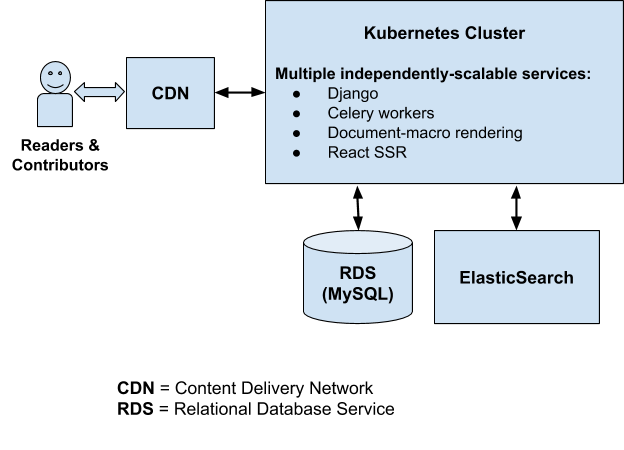
It’s important to note that both content contributors (writers) and content viewers (readers) are served via the same architecture. That architecture has to accommodate both use cases, even though more than 99% of our traffic comprises document page requests from readers. Currently, when a document page is requested, the latest version of the document is read from our MySQL database, rendered into its final HTML form, and returned to the user via the CDN.
That document page is stored and served from the CDN’s cache for the next 5 minutes, so subsequent requests — as long as they’re within that 5-minute window — will be served directly by the CDN. That caching period of 5 minutes is kept deliberately short, mainly due to the fact that we need to accommodate the needs of the writers. If we only had to accommodate the needs of the readers, we could significantly increase the caching period and serve our document pages more quickly, while at the same time reducing the workload on our backend servers.
You’ll also notice that because MDN is a Wiki platform, we’re responsible for managing all of the content, and tasks like storing document revisions, displaying the revision history of a document, displaying differences between revisions, and so on. Currently, the MDN development team maintains a large chunk
This is a deep-dive into some of the implementation details of Taskcluster. Taskcluster is a platform for building continuous integration, continuous deployment, and software-release processes. It’s an open source project that began life at Mozilla, supporting the Firefox build, test, and release systems.
The Taskcluster “services” are a collection of microservices that handle distinct tasks: the queue coordinates tasks; the worker-manager creates and manages workers to execute tasks; the auth service authenticates API requests; and so on.
Azure Storage Tables to Postgres
Until April 2020, Taskcluster stored its data in Azure Storage tables, a simple NoSQL-style service similar to AWS’s DynamoDB. Briefly, each Azure table is a list of JSON objects with a single primary key composed of a partition key and a row key. Lookups by primary key are fast and parallelize well, but scans of an entire table are extremely slow and subject to API rate limits. Taskcluster was carefully designed within these constraints, but that meant that some useful operations, such as listing tasks by their task queue ID, were simply not supported. Switching to a fully-relational datastore would enable such operations, while easing deployment of the system for organizations that do not use Azure.
Always Be Migratin’
In April, we migrated the existing deployments of Taskcluster (at that time all within Mozilla) to Postgres. This was a “forklift migration”, in the sense that we moved the data directly into Postgres with minimal modification. Each Azure Storage table was imported into a single Postgres table of the same name, with a fixed structure:
create table queue_tasks_entities(
    partition_key text,
    row_key text,
    value jsonb not null,
    version integer not null,
    etag uuid default public.gen_random_uuid()
);
alter table queue_tasks_entities add primary key (partition_key, row_key);
The importer we used was specially tuned to accomplish this import in a reasonable amount of time (hours). For each known deployment, we scheduled a downtime to perform this migration, after extensive performance testing on development copies.
We considered options to support a downtime-free migration. For example, we could have built an adapter that would read from Postgres and Azure, but write to Postgres. This adapter could support production use of the service while a background process copied data from Azure to Postgres.
This option would have been very complex, especially in supporting some of the atomicity and ordering guarantees that the Taskcluster API relies on. Failures would likely lead to data corruption and a downtime much longer than the simpler, planned downtime. So, we opted for the simpler, planned migration. (we’ll revisit the idea of online migrations in part 3)
The database for Firefox CI occupied about 350GB. The other deployments, such as the community deployment, were much smaller.
Database Interface
All access to Azure Storage tables had been via the azure-entities library, with a limited and very regular interface (hence the _entities suffix on the Postgres table name).
We wrote an implementation of the same interface, but with a Postgres backend, in taskcluster-lib-entities.
The result was that none of the code in the Taskcluster microservices changed.
Not changing code is a great way to avoid introducing new bugs!
It also limited the complexity of this change: we only had to deeply understand the semantics of azure-entities, and not the details of how the queue service handles tasks.
Stored Functions
As the taskcluster-lib-entities README indicates, access to each table is via five stored database functions:
_load _create _remove _modify _scan
In addition to our brief update on extensions in Firefox 83, this post contains information about changes to the Firefox release calendar and a feature preview for Firefox 84.
Thanks to a contribution from Richa Sharma, the error message logged when a tabs.sendMessage is passed an invalid tabID is now much easier to understand. It had regressed to a generic message due to a previous refactoring.
End of Year Release Calendar
The end of 2020 is approaching (yay?), and as usual people will be taking time off and will be less available. To account for this, the Firefox Release Calendar has been updated to extend the Firefox 85 release cycle by 2 weeks. We will release Firefox 84 on 15 December and Firefox 85 on 26 January. The regular 4-week release cadence should resume after that.
Coming soon in Firefox 84: Manage Optional Permissions in Add-ons Manager
Starting with Firefox 84, currently available on the Nightly pre-release channel, users will be able to manage optional permissions of installed extensions from the Firefox Add-ons Manager (about:addons).
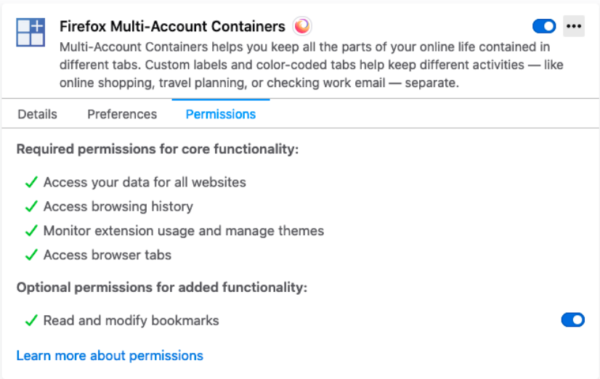
We recommend that extensions using optional permissions listen for the browser.permissions.onAdded and browser.permissions.onRemoved API events. This ensures the extension is aware of the user granting or revoking optional permissions.
The post Extensions in Firefox 83 appeared first on Mozilla Add-ons Blog.
https://blog.mozilla.org/addons/2020/10/28/extensions-in-firefox-83/
What is it?
Everett is a configuration library for Python apps.
Goals of Everett:
flexible configuration from multiple configured environments
easy testing with configuration
easy documentation of configuration for users
From that, Everett has the following features:
is composeable and flexible
makes it easier to provide helpful error messages for users trying to configure your software
supports auto-documentation of configuration with a Sphinx
autocomponentdirectivehas an API for testing configuration variations in your tests
can pull configuration from a variety of specified sources (environment, INI files, YAML files, dict, write-your-own)
supports parsing values (bool, int, lists of things, classes, write-your-own)
supports key namespaces
supports component architectures
works with whatever you're writing--command line tools, web sites, system daemons, etc
v1.0.3 released!
This is a minor maintenance update that fixes a couple of minor bugs, addresses a Sphinx deprecation issue, drops support for Python 3.4 and 3.5, and adds support for Python 3.8 and 3.9 (largely adding those environments to the test suite).
Why you should take a look at Everett
At Mozilla, I'm using Everett for a variety of projects: Mozilla symbols server, Mozilla crash ingestion pipeline, and some other tooling. We use it in a bunch of other places at Mozilla, too.
Everett makes it easy to:
deal with different configurations between local development and server environments
test different configuration values
document configuration options
First-class docs. First-class configuration error help. First-class testing. This is why I created Everett.
If this sounds useful to you, take it for a spin. It's a drop-in replacement
for python-decouple and os.environ.get('CONFIGVAR', 'default_value') style
of configuration so it's easy to test out.
Enjoy!
Where to go for more
For more specifics on this release, see here: https://everett.readthedocs.io/en/latest/history.html#october-28th-2020
Documentation and quickstart here: https://everett.readthedocs.io/
Source code and issue tracker here: https://github.com/willkg/everett
Honey is a popular browser extension built by the PayPal subsidiary Honey Science LLC. It promises nothing less than preventing you from wasting money on your online purchases. Whenever possible, it will automatically apply promo codes to your shopping cart, thus saving your money without you lifting a finger. And it even runs a reward program that will give you some money back! Sounds great, what’s the catch?
With such offers, the price you pay is usually your privacy. With Honey, it’s also security. The browser extension is highly reliant on instructions it receives from its server. I found at least four ways for this server to run arbitrary code on any website you visit. So the extension can mutate into spyware or malware at any time, for all users or only for a subset of them – without leaving any traces of the attack like a malicious extension release.
Contents
The trouble with shopping assistants
Please note that there are objective reasons why it’s really hard to build a good shopping assistant. The main issue is how many online shops there are. Honey supports close to 50 thousand shops, yet I easily found a bunch of shops that were missing. Even the shops based on the same engine are typically customized and might have subtle differences in their behavior. Not just that, they will also change without an advance warning. Supporting this zoo is far from trivial.
Add to this the fact that with most of these shops there is very little money to be earned. A shopping assistant needs to work well with Amazon and Shopify. But supporting everything else has to come at close to no cost whatsoever.
The resulting design choices are the perfect recipe for a privacy nightmare:
- As much server-side configuration as somehow possible, to avoid releasing new extension versions unnecessarily
- As much data extraction as somehow possible, to avoid manual monitoring of shop changes
- Bad code quality with many inconsistent approaches, because improving code is costly
I looked into Honey primarily due to its popularity, it being used by more than 17 million users according to the statement on the product’s website. Given the above, I didn’t expect great privacy choices. And while I haven’t seen anything indicating malice, the poor choices made still managed to exceed my expectations by far.
Unique user identifiers
By now you are probably used to reading statements like the following in company’s privacy statements:
None of the information that we collect from these
A couple of weeks ago I released version 0.8 of django-render-block, this was followed up with a 0.8.1 to fix a regression.
django-render-block is a small library that allows you render a specific block from a Django (or Jinja) template, this is frequently used for emails when …
https://patrick.cloke.us/posts/2020/10/27/django-render-block-0.8-released/
You'll have noticed this post is rather tardy, since Firefox 82 has been out for the better part of a week, but I wanted to really drill down on a couple variables in our Firefox build configuration for OpenPOWER and also see if it was time to blow away a few persistent assumptions.
But let's not bury the lede here: after several days of screaming, ranting and scaring the cat with various failures, this blog post is finally being typed in a fully profile-guided and link-time optimized Firefox 82 tuned for POWER9 little-endian. Although it multiplies compile time by nearly a factor of 3 and the build process intermittently can consume a terrifying amount of memory, the PGO-LTO build is roughly 25% faster than the LTO-only build, which was already 4% faster than the "baseline" -O3 -mcpu=power9 build. That's worth an 84-minute coffee break! (-j24 on a dual-8 Talos II [64 threads], 64GB RAM.)
The problem with PGO and gcc (at least gcc 10, anyway) is that all the .gcda files end up in the same directory as the built objects in an instrumented build. The build system, which is now heavily clang-centric (despite the docs, gcc is clearly Tier 2, since this and other things don't work), does not know how to handle or transfer the resulting profile data and bombs after running the test load. We don't build with clang because in previous attempts it never managed to fully build the browser on ppc64le and I'm sceptical of its code quality on this platform anyway, but since I wanted to verify against a presumably working configuration I did try a clang build first to see if anything had changed. It breaks fairly early now, interestingly while compiling a Rust component:
4:33.00 error: /home/censored/src/mozilla-release/obj-powerpc64le-unknown-linux-gnu/release/deps/libproc_macro_hack-b7d125d9ae0afae7.so: undefined symbol: __muloti4
4:33.00 --> /home/censored/src/mozilla-release/third_party/rust/phf_macros/src/lib.rs:227:5
4:33.00 227 | #[::proc_macro_hack::proc_macro_hack]
4:33.00 | ^^^^^^^^^^^^^^^
4:33.00 error: aborting due to previous error
4:33.00 error: could not compile `phf_macros`.
So there's that. I'm not very proficient in Rust so I didn't do much more diagnosis at this point. Back to the hippo gcc.
What's needed is to hack the build system to copy the .gcda files generated during profiling out of instrumented/ into the regular build tree for the actual (second) build phase, which is essentially the solution proposed in bug 1601903 except without any explanation as to how you actually do it. The PGO driver is fortunately in a standalone Python script, so I decided to simply hijack that. At the end is code to coalesce the .profraw files from a successful instrumented clang build, which shouldn't be running anyway if the compiler is gcc, so I threw in a couple lines to terminate instead after it runs this shell script:
#!/bin/csh -f
set where=/tmp/mozgcda.tar
# all on one line yo
cd /home/censored/src/mozilla-release/obj-powerpc64le-unknown-linux-gnu/instrumented || exit
tar cvf $where `find . -name '*.gcda' -print`
cd ..
tar xvf $where
rm -f $where
This repopulates the .gcda files in the right place before we rebuild with the profile data, but because of this subterfuge, gcc thinks the generated profile is not consistent with the source and spams an incredible amount of complaint messages ... which made it difficult to spot the internal compiler error that the profile-guided rebuild triggered. This required another rebuild with some tweaks to turn that off and some other irrelevant warnings (I'll probably upstream at least one of these changes) so I could determine where the ICE was in the scrollback. Fortunately, it was in a test binary, so I just commented it out in the moz.build and it finally stuck. And so far, it's working impressively well. This may well be the fastest the browser can get while still lacking a JIT.
After all that, it's almost an anticlimax to mention that --disable-release is no longer needed in the build configs. You can put it in the Debug configuration if you want, but I now use --enable-release in optimized builds and it seems to work fine.
If you want to try compiling a PGO-LTO build yourself, here is a gist with the changes I made (they are
The web is getting darker. It is being weaponized by trolls, bullies and bad actors and, as we’ve witnessed, this can have extremely grave consequences for individuals, groups, sometimes entire countries. So far, most of the counter-measures proposed by either governments or private actors are even scarier.
The creators of the Matrix protocol have recently published the most promising plan I have seen. One that I believe stands a chance of making real headway in this fight, while respecting openness, decentralization, open-source and privacy.
I have been offered the opportunity to work on this plan. For this reason, after 9 years as an employee at Mozilla, I’ll be moving to Element, where I’ll try and contribute to making the web a better place. My last day at Mozilla will be October 30th.
I work full time on open source and this is how.
Background
I started learning how to program in my teens, well over thirty years ago and I’ve worked as a software engineer and developer since the early 1990s. My first employment as a developer was in 1993. I’ve since worked for and with lots of companies and I’ve worked on a huge amount of (proprietary) software products and devices over many years. Meaning: I certainly didn’t start my life open source. I had to earn it.
When I was 20 years old I did my (then mandatory) military service in Sweden. After having endured that, I applied to the university while at the same time I was offered a job at IBM. I hesitated, but took the job. I figured I could always go to university later – but life took other turns and I never did. I didn’t do a single day of university. I haven’t regretted it.

I learned to code in the mid 80s on a Commodore 64 and software development has been one of my primary hobbies ever since. One thing it taught me well, that I still carry with me, is to spend a few hours per day in front of my home computer.
And then I shipped curl
In the spring of 1998 I renamed my little pet project of the time again and I released the first ever curl release. I have told this story many times, but since then I have spent two hours or so of my spare time on that project – every day for over twenty years. While still working as a software engineer by day.

Over time, curl gradually grew popular and attracted more users. There was no sudden moment in time where I struck gold and everything took off. It was just slowly gaining ground while me and my fellow project members kept improving and polishing curl. At some point in time I happened to notice that curl and libcurl would appear in more and more acknowledgements and in open source license collections in products and devices.
It was still just a spare time project.
Proprietary Software for years
I’d like to emphasize that I worked as a contract and consultant developer for many years (over 20!), primarily on proprietary software and custom solutions, before I managed to land myself a position where I could primarily write open source as part of my job.
Mozilla
In 2014 I joined Mozilla and got the opportunity to work on the open source project Firefox for a living – and doing it entirely from my home. This was the first time in my career I actually spent most of my days on code that was made public and available to the world. They even allowed me to spend a part of my work hours on curl, even if that didn’t really help them and curl was not a fundamental part of any Mozilla work or products. It was still great.
I landed that job for Mozilla a lot thanks to my many years and long experience with portable network coding and running a successful open source project at this level.
My work setup with Mozilla made it possible for me to spend even more time on curl, apart from the (still going) two daily spare time hours. Nobody at Mozilla cared much about (my work with) curl and no one there even asked me about it. I worked on Firefox for a living.
For anyone wanting to do open source as part of their work, getting a job at a company that already does a lot of open source is probably the best path forward. Even if that might not be easy either, and it might also mean that you would have to accept working on some open source projects that you might not yourself be completely sold on.
In late 2018 I quit Mozilla, in part because I wanted to try to work with curl “for real” (and part other reasons that I’ll leave out here). curl was then already over twenty years old and was used more than ever before.
wolfSSL
I now work for wolfSSL. We sell curl support and related services to companies. Companies pay wolfSSL, wolfSSL pays me a salary and I get food on the table. This works as long as we can convince enough companies that this is a good idea.
The vast majority of curl users out there of course don’t pay anything and will never pay anything. We just need a small number of companies to do it – and it seems to be working. We help customers use curl better, we make curl better for them and we make them ship better products this way.
A decade ago I got to sit in on a talk by one of the designers of Microsoft Office who’d worked on the transition to the new Ribbon user interface. There was a lot to learn there, but the most interesting thing was when he explained the core rationale for the redesign: of the top ten new feature requests for Office, every year, six to eight of them were already features built into the product, and had been for at least one previous version. They’d already built all this stuff people kept saying they wanted, and nobody could find it to use it.
It comes up periodically at my job that we have the same problem; there are so many useful features in Firefox that approximately nobody knows about, even people who’ve been using the browser every day and soaking in the codebase for years. People who work here still find themselves saying “wait, you can do that?” when a colleague shows them some novel feature or way to get around the browser that hasn’t seen a lot of daylight.
In the hopes of putting this particular peeve to bed, I did a casual survey the other day of people’s favorite examples of underknown or underappreciated features in the product, and I’ve collected a bunch of them here. These aren’t Add-ons, as great as they are; this is what you get from Firefox out of the proverbial box. I’m going to say “Alt” and “Ctrl” a lot here, because I live in PC land, but if you’re on a Mac those are “Option” and “Command” respectively.
Starting at the top, one of the biggest differences between Firefox and basically everything else out there is right there at the top of the window, the address bar that we call the Quantumbar.
Most of the chromium-client-state browsers seem to be working hard to nerf out the address bar, and URLs in general. It’s my own paranoia, maybe, but I suspect the ultimate goal here is to make it easier to hide how much of that sweet, sweet behavioral data this will help companies siphon up unsupervised. Hoarding the right to look over your shoulder forever seems to be the name of the game in that space, and I’ve got a set of feelings about that you might be able to infer from this paragraph. It’s true that there’s a lot of implementation detail being exposed there, and it’s true that most people might not care so why show it, but being able to see into the guts of a process so you can understand and trust it is just about the whole point of the open-source exercise. Shoving that already-tiny porthole all the way back into the bowels of the raw codebase – particularly when the people doing the shoving have entire identities, careers and employers none of which would exist at all if they hadn’t leveraged the privileges of open software for themselves – is galling to watch, very obviously a selfish, bad-faith exercise. It reduces clicking a mouse around the Web to little more than clicking a TV remote, what Douglas Adams use to call the “point and grunt interface”.
Fortunately the spirit of the command line, in all its esoteric and hidden power, lives on in a few places in Firefox. Most notably in a rich set of Quantumbar shortcuts you can use to get around your browser state and history:
- Start typing your search with ^ to show only matches in your browsing history.
- * to show only matches in your bookmarks.
- + to show only matches in bookmarks you’ve tagged.
- % to show only matches in your currently open tabs.
- # to show only matches where every search term is part of the title or part of a tag.
- $ to show only matches where every search term is part of the web address (URL). The text “https://” or “http://” in the URL is ignored but not “file:///”.
- Add ? to show only search suggestions.
- Hitting Ctrl-enter in the URL bar works like autocomplete;”mozilla” go straight to www.mozilla.com, for example. Shift-enter will open a URL in a new tab.
Speaking of the Quantumbar, you can customize it by right-clicking any of the options in the three-dot “Page Options” pulldown menu, and adding them to the address bar. The screenshot tool is pretty great, but one of my personal favorites in that pile is Reader Mode. Did you know there’s text-to-speech built into Reader Mode? It surprised me, too. Click those headphones, see how it goes.
It’s sort of Quantumbar-adjacent, but once you’ve been using it for a few hours the Search Keyword feature is one of those things you just don’t go back to not having. If you right-click or a search field on just about any site, “Add a Keyword for this Search” is one of the options. give
The main physical server (we call it giant) we’ve been using at Haxx for a very long time to host sites and services for 20+ domains and even more mailing lists. The machine – a physical one – has been colocated in an ISP server room for over a decade and has served us very well. It has started to show its age.
Some of the more known sites and services it hosts are perhaps curl, c-ares, libssh2 and this blog (my entire daniel.haxx.se site). Some of these services are however primarily accessed via fronting CDN servers.
giant is a physical Dell PowerEdge 1850 server from 2005, which has undergone upgrades of CPU, disks and memory through the years.
giant featured an Intel X3440 Xeon CPU at 2.53GHz with 8GB of ram when decommissioned.

New host
The new host is of course entirely virtual and we’ve finally taken the step into the modern world of VPSes. The new machine is hosted by the same provider as before but as an entirely new instance.
We’ve upgraded the OS, all packages and we’ve remodeled how we run the web services and all our jobs and services from before have been moved into this new fresh server in an attempt to leave some of the worst legacies behind.
The former server will not be used anymore and will be powered down and sent for recycling.
Glitches in this new world
We’ve tried really hard to make this transition transparent and ideally not many users will notice anything or have a reason to bother about this, but of course we also realize that we probably have not managed this to 100% perfection. If you detect something on any of the services we run that used to work or exist but isn’t anymore, do let us know so that become aware of it and can work on a fix!
This site (daniel.haxx.se) already moved weeks ago and nobody noticed. The curl site changed on October 23 and are much more likely to get glitches because of all the many more scripts and automatic things setup for it. Both sites are served via Fastly so ordinary users will not detect or spot that there’s a new host in the back end.
New content and projects
What’s new or coming up in Firefox desktop
Upcoming deadlines:
- Firefox 83 is currently in beta and will be released on November 17. The deadline to update localization is on November 8 (see the previous l10n report to understand why it moved closer to the release date).
- There might be changes to the release schedule in December. If that happens, we’ll make sure to cover them in the upcoming report.
The number of new strings remains pretty low, but there was a change that landed without new string IDs: English switched from a hyphen (-) to an em dash (–) as separator for window titles. Since this is a choice that belongs to each locale, and the current translation might be already correct, we decided to not invalidate all existing translations and notify localizers instead.
You can see the details of the strings that changed in this changeset. The full list of IDs, in case you want to search for them in Pontoon:
- browser-main-window
- browser-main-window-mac
- page-info-page
- page-info-frame
- webrtc-indicator-title
- tabs.containers.tooltip
- webrtcIndicator.windowtitle
- timeline.cssanimation.nameLabel
- timeline.csstransition.nameLabel
- timeline.scriptanimation.nameLabel
- toolbox.titleTemplate1
- toolbox.titleTemplate2
- TitleWithStatus
- profileTooltip
Alternatively, you can search for “ – “ in Pontoon, but you’ll have to skim through a lot of results, since Pontoon searches also in comments.
What’s new or coming up in mobile
Firefox for iOS v29, as well as iOS v14, both recently shipped – bringing with them the possibility to make Firefox your default browser for the first time ever!
v29 also introduced a Firefox homescreen widget, and more widgets will likely come soon. Congratulations to all for helping localize these awesome new features!
v30 strings have just recently been exposed on Pontoon, and the deadline for l10n strings completion is November 4th. Screenshots will be updated for testing very soon.
Firefox for Android (“Fenix”) is currently open for localizing v83 strings. The next couple of weeks should be used for completing your current pending strings, as well as testing your work for the release. Take a look at our updated docs here!
What’s new or coming up in web projects
Mozilla.org
Recently, the monthly WNP pages that went out with the Firefox releases contained content promoting features that were not available for global markets or campaign messages that targeted select few markets. In these situations, for all the other locales, the page was always redirected to the evergreen WNP page. As a result, please make it a high priority if your locale has not completed the page.
More pages were added and migrated to Fluent format. For migrated content, the web team has decided not to make any edits until there is a major content update or page layout redesign. Please take the time to resolve errors first as the page may have been activated. If a placeable error is not fixed, it will be shown on production.
Common Voice & WebThings Gateway
Both projects now have a new point of contact. If you want to add a new language or have any questions with the strings, send an email directly to the person first. Follow the projects’ latest development through the channels on Discourse. The l10n-drivers will continue to provide support to both teams through the Pontoon platform.
What’s new or coming up in SuMo
Please help us localize the following articles for Firefox 82 (desktop and Android):
- What’s New in Firefox for Android
- How to grant camera access
- How to delete sync data
- How to delete Firefox Account
What’s new or coming up in Pontoon
Spring
We’ve made a lot of progress on moving forward with MDN Web Docs in the last couple of months, and we wanted to share where we are headed in the short- to mid-term, starting with our editorial strategy and renewed efforts around community participation.
New editorial strategy
Our updated editorial strategy has two main parts: the creation of content pillars and an editorial calendar.
The MDN writers’ team has always been responsible for keeping the MDN web platform reference documentation up-to-date, including key areas such as HTML, CSS, JavaScript, and Web APIs. We are breaking these key areas up into “content pillars”, which we will work on in turn to make sure that the significant new web platform updates are documented each month.
Note: This also means that we can start publishing our Firefox developer release notes again, so you can keep abreast of what we’re supporting in each new version, as well as Mozilla Hacks posts to give you further insights into what we are up to in Firefox engineering.
We will also be creating and maintaining an editorial calendar in association with our partners on the Product Advisory Board — and the rest of the community that has input to provide — which will help us prioritize general improvements to MDN documentation going forward. For example, we’d love to create more complete documentation on important web platform-related topics such as accessibility, performance, and security.
MDN will work with domain experts to help us update these docs, as well as enlist help from you and the rest of our community — which is what we want to talk about for the rest of this post.
Community call for participation
There are many day-to-day tasks that need to be done on MDN, including moderating content, answering queries on the Discourse forums, and helping to fix user-submitted content bugs. We’d love you to help us out with these tasks.
To this end, we’ve rewritten our Contributing to MDN pages so that it is simpler to find instructions on how to perform specific atomic tasks that will help burn down MDN backlogs. The main tasks we need help with at the moment are:
- Fixing MDN content bugs — Our sprints repo is where people submit issues to report problems found with MDN docs. We get a lot of these, and any help you can give in fixing issues would be much appreciated.
- Help beginners to learn on MDN — Our Learn web development pages get over a million views per month, and have active forums where people go to ask for general help, or request that their assessments be marked. We’d love some help with answering posts, and growing our learning community.
We hope these changes will help revitalize the MDN community into an even more welcoming, inclusive place where anyone can feel comfortable coming and getting help with documentation, or with learning new technologies or tools.
If you want to talk to us, ask questions, and find out more, join the discussion on the MDN Web Docs chat room on Matrix. We are looking forward to talking to you.
Other interesting developments
There are some other interesting projects that the MDN team is working hard on right now, and will provide deeper dives into with future blog posts. We’ll keep it brief here.
Platform evolution — MDN content moves to GitHub
For quite some time now, the MDN developer team has been planning a radical platform change, and we are ready to start sharing details of it. In short, we are updating the platform to move from a Wiki approach with the content in a MySQL database, to a JAMStack approach with the content being
I watched The Social Dilemma last night.

Some people have criticised the film as being light on practical responses that everyday people can make. They point out that while there are recommended steps, they come right at the end of the film while the credits are rolling.
I thought it was excellent, and that the aim of the film was awareness-raising in the general population, with the main focus on politicians and people who make the laws in western societies (particularly the USA). To me, it showed that, far from being regulated as ‘publishers’, governments should instead consider regulating companies running social networks in the same way as they regulate gambling companies.
As I’m not planning on running for political office anytime soon, I thought I’d stick to what I know (new literacies!) and think about what it means to talk about ‘notification literacy’. That particular term currently returns zero results in Google Scholar, a search engine for academic articles. If I search DuckDuckGo, one of my own posts from 2017 is in the top few results.
My conclusion to that post from three years ago:
I think we’re still in a transition period with social networks and norms around them. These, as with all digital literacies, are context-dependent, so what’s acceptable in one community may be very different to what’s acceptable in another. It’s going to be interesting to see how these design patterns evolve over time, and how people develop social norms to deal with them.
Those ‘social norms’ have been shot to pieces by companies employing machine learning to growth hack the human brain. In other words, they’ve optimised engagement with their platforms to such an extent that it bypasses human rationality.
So what can we do about it? #
In work we do with clients, We Are Open Co-op runs what we call a pre-mortem where we imagine that a project has completely failed. Then we think about the preventative measures we can take to stop the reasons for that failure, as well as the mitigating actions to make the situation less bad (if those reasons are already in play).
If we apply that approach to social media usage, let’s imagine that you’re about to join Instagram. Then, let’s add into the mix that six months from now you’re unhappy, depressed, and addicted to the platform. What can we do to prevent that? What can we do to mitigate it?
Preventative measures #
Prevention is always easier than cure. The most obvious step is not to use social networks for which we have proof of harms. But if that’s not an option, then there’s ways of using social networks other than the default. For example, it’s possible to use Instagram and Twitter with a private account which changes who may interact with you.
More importantly, though, as the title of this post suggests, is to think carefully about the notifications you want to receive from the platform. Not only can you change these in the settings of the social network itself, but the latest version of both Android and iOS operating systems allow smartphone users to further configure notifications.
Instead of starting from the default position of having all notifications turned on, you might want to start from a position of having all of the notifications turned off.
Mitigating actions #
What if, like many people, you already recognise the signs of addiction in yourself and others? What can you do to wean yourself off that dependence on social networks to fill spare moments and the gaping emotional void in your life?
The first thing you can do is to switch to the mobile web version of social networks rather than having a native app installed. Then, when you’ve logged in, and you are prompted to allow notifications do not allow them. In practice, this means that you treat a social network just like any other website.
I don’t use Facebook products, but with Twitter a
(“This Week in Glean” is a series of blog posts that the Glean Team at Mozilla is using to try to communicate better about our work. They could be release notes, documentation, hopes, dreams, or whatever: so long as it is inspired by Glean. You can find an index of all TWiG posts online.)
As the Glean SDK continues to expand its features and functionality, it has also continued to expand the number and types of consumers within the Mozilla ecosystem that rely on it for collection and transport of important metrics. On this particular adventure, I find myself once again working on one of these components that tie into the Glean ecosystem. In this case, it has been my work on the Nimbus SDK that has inspired this story.
Nimbus is our new take on a rapid experimentation platform, or a way to try out new features in our applications for subsets of the population of users in a way in which we can measure the impact. The idea is to find out what our users like and use so that we can focus our efforts on the features that matter to them. Like Glean, Nimbus is a cross-platform client SDK intended to be used on Android, iOS, and all flavors of Desktop OS that we support. Also like Glean, this presented us with all of the challenges that you would normally encounter when creating a cross-platform library. Unlike Glean, Nimbus was able to take advantage of some tooling that wasn’t available when we started Glean, namely: uniffi.
So what is uniffi? It’s a multi-language bindings generator for Rust. What exactly does that mean? Typically you would have to write something in Rust and create a hand-written Foreign Function Interface (FFI) layer also in Rust. On top of that, you also end up creating a hand-written wrapper in each and every language that is supported. Instead, uniffi does most of the work for us by generating the plumbing necessary to transport data across the FFI, including the specific language bindings, making it a little easier to write things once and a lot easier to maintain multiple supported languages. With uniffi we can write the code once in Rust, and then generate the code we need to be able to reuse these components in whatever language (currently supporting Kotlin, Swift and Python with C++ and JS coming soon) and on whatever platform we need.
So how does uniffi work? The magic of uniffi works through generating a cdylib crate from the Rust code. The interface is defined in a separate file through an Interface Description Language (IDL), specifically, a variant of WebIDL. Then, using the uniffi-bindgen tool, we can scaffold the Rust side of the FFI and build our Rust code as we normally would, producing a shared library. Back to uniffi-bindgen again to then scaffold the language bindings side of things, either Kotlin, Swift, or Python at the moment, with JS and C++ coming soon. This leaves us with platform specific libraries that we can include in applications that call through the FFI directly into the Rust code at the core of it all.
There are some limitations to what uniffi can accomplish, but for most purposes it handles the job quite well. In the case of Nimbus, it worked amazingly well because Nimbus was written keeping uniffi language binding generation in mind (and uniffi was written with Nimbus in mind). As part of playing around with uniffi, I also experimented with how we could leverage it in Glean. It looks promising for generating things like our metric types, but we still have some state in the language binding layer that probably needs to be moved into the Rust code before Glean could move to using uniffi. Cutting down on all of the handwritten code is a huge advantage because the Glean metric types require a lot of boilerplate code that is basically duplicated across all of the different languages we support. Being able to keep this down to just the Rust definitions and IDL, and then generating the language bindings would be a nice reduction in the