Introduction
We have enabled Warp, a significant update to SpiderMonkey, by default in Firefox 83. SpiderMonkey is the JavaScript engine used in the Firefox web browser.
With Warp (also called WarpBuilder) we’re making big changes to our JIT (just-in-time) compilers, resulting in improved responsiveness, faster page loads and better memory usage. The new architecture is also more maintainable and unlocks additional SpiderMonkey improvements.
This post explains how Warp works and how it made SpiderMonkey faster.
How Warp works
Multiple JITs
The first step when running JavaScript is to parse the source code into bytecode, a lower-level representation. Bytecode can be executed immediately using an interpreter or can be compiled to native code by a just-in-time (JIT) compiler. Modern JavaScript engines have multiple tiered execution engines.
JS functions may switch between tiers depending on the expected benefit of switching:
- Interpreters and baseline JITs have fast compilation times, perform only basic code optimizations (typically based on Inline Caches), and collect profiling data.
- The Optimizing JIT performs advanced compiler optimizations but has slower compilation times and uses more memory, so is only used for functions that are warm (called many times).
The optimizing JIT makes assumptions based on the profiling data collected by the other tiers. If these assumptions turn out to be wrong, the optimized code is discarded. When this happens the function resumes execution in the baseline tiers and has to warm-up again (this is called a bailout).
For SpiderMonkey it looks like this (simplified):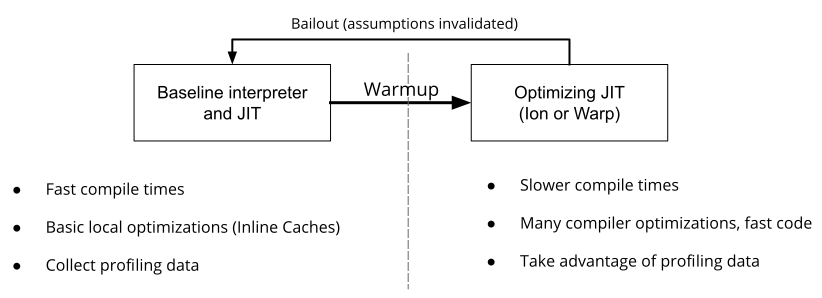
Profiling data
Our previous optimizing JIT, Ion, used two very different systems for gathering profiling information to guide JIT optimizations. The first is Type Inference (TI), which collects global information about the types of objects used in the JS code. The second is CacheIR, a simple linear bytecode format used by the Baseline Interpreter and the Baseline JIT as the fundamental optimization primitive. Ion mostly relied on TI, but occasionally used CacheIR information when TI data was unavailable.
With Warp, we’ve changed our optimizing JIT to rely solely on CacheIR data collected by the baseline tiers. Here’s what this looks like:
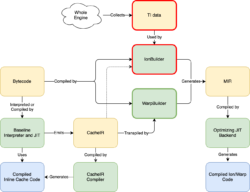
There’s a lot of information here, but the thing to note is that we’ve replaced the IonBuilder frontend (outlined in red) with the simpler WarpBuilder frontend (outlined in green). IonBuilder and WarpBuilder both produce Ion MIR, an intermediate representation used by the optimizing JIT backend.
Where IonBuilder used TI data gathered from the whole engine to generate MIR, WarpBuilder generates MIR using the same CacheIR that the Baseline Interpreter and Baseline JIT use to generate Inline Caches (ICs). As we’ll see below, the tighter integration between Warp and the lower tiers has several advantages.
How CacheIR works
Consider the following JS function:
function f(o) {
    return o.x - 1;
}
The Baseline Interpreter and Baseline JIT use two Inline Caches for this function: one for the property access (o.x), and one for the subtraction. That’s because we can’t optimize this function without knowing the types of o and o.x.
The IC for the property access, o.x, will be invoked with the value of o. It can then attach an IC stub (a small piece of machine code) to optimize this operation. In SpiderMonkey this works by first generating CacheIR (a simple linear bytecode format, you could think of it as an optimization recipe). For example, if o is an object and x is a simple data property, we generate this:
GuardToObject        inputId 0
GuardShape
Using the Mach Perftest Notebook
In my previous blog post, I discussed an ETL (Extract-Transform-Load) implementation for doing local data analysis within Mozilla in a standardized way. That work provided us with a straightforward way of consuming data from various sources and standardizing it to conform to the expected structure for pre-built analysis scripts.
Today, not only are we using this ETL (called PerftestETL) locally, but also in our CI system! There, we have a tool called Perfherder which ingests data created by our tests in CI so that we can build up visualizations and dashboards like Are We Fast Yet (AWFY). The big benefit that this new ETL system provides here is that it greatly simplifies the path to getting from raw data to a Perfherder-formatted datum. This lets developers ignore the data pre-processing stage which isn’t important to them. All of this is currently available in our new performance testing framework MozPerftest.
One thing that I omitted from the last blog post is how we use this tool locally for analyzing our data. We had two students from Bishop’s University (:axew, and :yue) work on this tool for course credits during the 2020 Winter semester. Over the summer, they continued hacking with us on this project and finalized the work needed to do local analyses using this tool through MozPerftest.
Below you can see a recording of how this all works together when you run tests locally for comparisons.
There is no audio in the video so here’s a short summary of what’s happening:
- We start off with a folder containing some historical data from past test iterations that we want to compare the current data to.
- We start the MozPerftest test using the `–notebook-compare-to` option to specify what we want to compare the new data with.
- The test runs for 10 iterations (the video is cut to show only one).
- Once the test ends, the PerftestETL runs and standardizes the data and then we start a server to serve the data to Iodide (our notebook of choice).
- A new browser window/tab opens to Iodide with some custom code already inserted into the editor (through a POST request) for a comparison view that we built.
- Iodide is run, and a table is produced in the report.
- The report then shows the difference between each historical iteration and the newest run.
With these pre-built analyses, we can help developers who are tracking metrics for a product over time, or simply checking how their changes affected performance without having to build their own scripts. This ensures that we have an organization-wide standardized approach for analyzing and viewing data locally. Otherwise, developers each start making their own report which (1) wastes their time, and more importantly, (2) requires consumers of these reports to familiarize themselves with the format.
That said, the real beauty in the MozPerftest integration is that we’ve decoupled the ETL from the notebook-specific code. This lets us expand the notebooks that we can open data in so we could add the capability for using R-Studio, Google Data Studio, or Jupyter Notebook in the future.
If you have any questions, feel free to reach out to us on Riot in #perftest.
https://blog.mozilla.org/performance/2020/11/12/using-the-mach-perftest-notebook/
The Firefox UX content team has a new name that better reflects how we work.
Co-authored with Betsy Mikel

Photo by Brando Makes Branding on Unsplash
Hello. We’re the Firefox Content Design team. We’ve actually met before, but our name then was the Firefox Content Strategy team.
Why did we change our name to Content Design, you ask? Well, for a few (good) reasons.
It better captures what we do
We are designers, and our material is content. Content can be words, but it can be other things, too, like layout, hierarchy, iconography, and illustration. Words are one of the foundational elements in our design toolkit — similar to color or typography for visual designers — but it’s not always written words, and words aren’t created in a vacuum. Our practice is informed by research and an understanding of the holistic user journey. The type of content, and how content appears, is something we also create in close partnership with UX designers and researchers.
“Then, instead of saying ‘How shall I write this?’, you say, ‘What content will best meet this need?’ The answer might be words, but it might also be other things: pictures, diagrams, charts, links, calendars, a series of questions and answers, videos, addresses, maps […] and many more besides. When your job is to decide which of those, or which combination of several of them, meets the user’s need — that’s content design.”
— Sarah Richards defined the content design practice in her seminal work, Content Design
It helps others understand how to work with us
While content strategy accurately captures the full breadth of what we do, this descriptor is better understood by those doing content strategy work or very familiar with it. And, as we know from writing product copy, accuracy is not synonymous with clarity.
Strategy can also sound like something we create on our own and then lob over a fence. In contrast, design is understood as an immersive and collaborative practice, grounded in solving user problems and business goals together.
Content design is thus a clearer descriptor for a broader audience. When we collaborate cross-functionally (with product managers, engineers, marketing), it’s important they understand what to expect from our contributions, and how and when to engage us in the process. We often get asked: “When is the right time to bring in content? And the answer is: “The same time you’d bring in a designer.”
We’re aligning with the field
Content strategy is a job title often used by the much larger field of marketing content strategy or publishing. There are website content strategists, SEO content strategists, and social media content strategists, all who do different types of content-related work. Content design is a job title specific to product and user experience.
And, making this change is in keeping with where the field is going. Organizations like Slack, Netflix, Intuit, and IBM also use content design, and practice leaders Shopify and Facebook recently made the change, articulating reasons that we share and echo here.
It distinguishes the totality of our work from copywriting
Writing interface copy is about 10% of what we do. While we do write words that appear in the product, it’s often at the end of a thoughtful design process that we participate in or lead.
We’re still doing all the same things we did as content strategists, and we are still strategic in how we work (and shouldn’t everyone be strategic in how they work, anyway?) but we are choosing a title that better captures the unseen but equally important work we do to arrive at the words.
It’s the best option for us, but there’s no ‘right’ option
Job titles are tricky, especially for an emerging field like content design. The fact that titles are up for debate and actively evolving shows just how new our profession is. While there have been people creating product content experiences for a while,
Please partake in the git-cinnabar survey.
Git-cinnabar is a git remote helper to interact with mercurial repositories. It allows to clone, pull and push from/to mercurial remote repositories, using git.
These release notes are also available on the git-cinnabar wiki.
What’s new since 0.5.5?
- Updated git to 2.29.2 for the helper.
git cinnabar git2hgandgit cinnabar hg2gitnow have a--batchflag.- Fixed a few issues with experimental support for python 3.
- Fixed compatibility issues with mercurial >= 5.5.
- Avoid downloading unsupported clonebundles.
- Provide more resilience to network problems during bundle download.
- Prebuilt helper for Apple Silicon macos now available via
git cinnabar download.
When being asked
I believe there are good career opportunities for me at Company X
what do you understand? Some people will associate this directly to climbing the hierarchy ladder of the company. I have the feeling the reality is a lot more diverse. "career opportunities" mean different things to different people.
So I asked around me (friends, family, colleague) what was their take about it, outside of going higher in the hierarchy.
-
change of titles (role recognition).
This doesn't necessary imply climbing the hierarchy ladder, it can just mean you are recognized for a certain expertise.
-
change of salary/work status (money/time).
Sometimes, people don't want to change their status but want a better compensation, or a better working schedule (aka working 4 days a week with the same salary).
-
change of responsibilities (practical work being done in the team)
Some will see this as a possibility to learn new tricks, to diversify the work they do on a daily basis.
-
change of team (working on different things inside the company)
Working on a different team because you think they do something super interesting there is appealing.
-
being mentored (inside your own company)
It's a bit similar to the two previous one, but there's a framework inside the company where you are not helping and/or bringing your skills to the project, but you go partially in another team to learn the work of this team. Think about it as a kind of internal internship.
-
change of region/country
Working in a different country or region in the same country when it's your own choice. This flexibility is a gem for me. I did it a couple of times. When working at W3C, I moved from the office on the French Riviera to working from home in Montreal (Canada). And a bit later, I moved from Montreal to the W3C office in Japan. At Mozilla too, (after moving back to Montreal for a couple of years), I moved from Montreal to Japan again. There are career opportunities because they allow you to work in a different setting with different people and communities, and this in itself makes the life a lot richer.
-
Having dedicated/planned time for Conference or Courses
Being able to follow a class on a topic which helps the individual to grow is super useful. But for this to be successful, it has to be understood that it requires time. Time to follow the courses, time to do the homework of the course.
I'm pretty sure there are other possibilities. Thanks to everyone who shared their thoughts.
Otsukare!

Photo by Amador Loureiro on Unsplash.
The small bits of copy you see sprinkled throughout apps and websites are called microcopy. As content designers, we think deeply about what each word communicates.
Microcopy is the tidiest of UI copy types. But do not let its crisp, contained presentation fool you: the process to get to those final, perfect words can be messy. Very messy. Multiple drafts messy, mired with business and technical constraints.
Here’s a secret about good writing that no one ever tells you: When you encounter clear UX content, it’s a result of editing and revision. The person who wrote those words likely had a dozen or more versions you’ll never see. They also probably had some business or technical constraints to consider, too.
If you’ve ever wondered what all goes into writing microcopy, pour yourself a micro-cup of espresso or a micro-brew and read on!
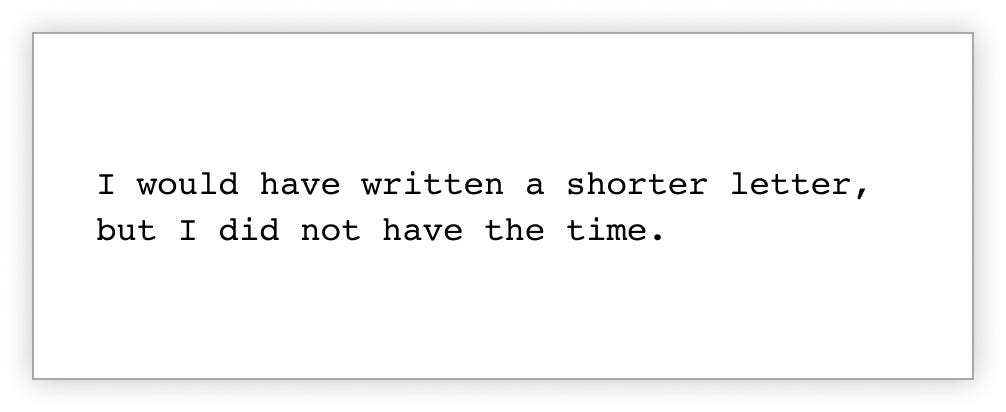
Blaise Pascal, translated from Lettres Provinciales
1. Understand the component and how it behaves.
As a content designer, you should try to consider as many cases as possible up front. Work with Design and Engineering to test the limits of the container you’re writing for. What will copy look like when it’s really short? What will it look like when it’s really long? You might be surprised what you discover.
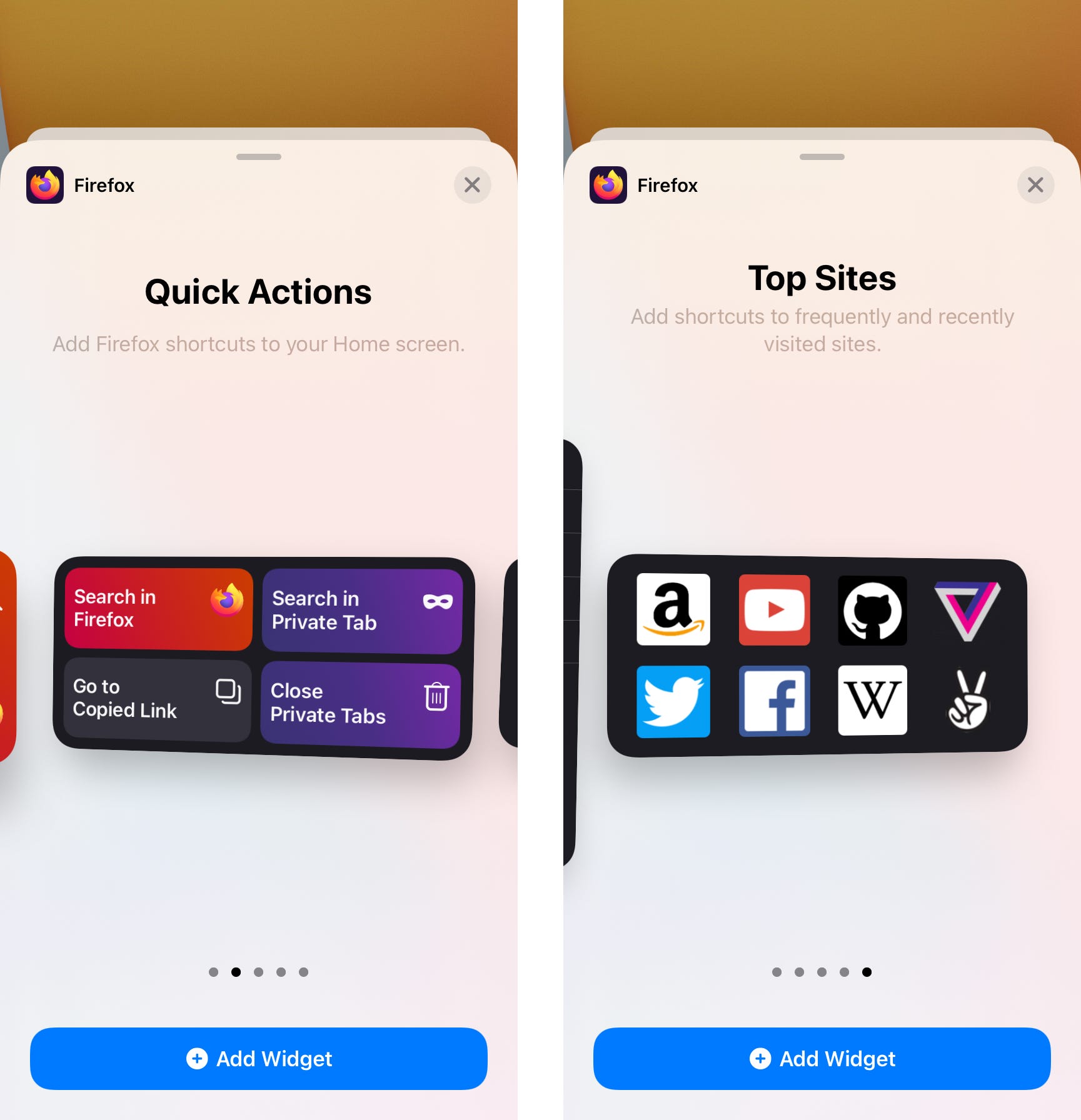
Before writing the microcopy for iOS widgets, I needed first to understand the component and how it worked.
Apple recently introduced a new component to the iOS ecosystem. You can now add widgets the Home Screen on your iPhone, iPad, or iPod touch. The Firefox widgets allow you to start a search, close your tabs, or open one of your top sites.
Before I sat down to write a single word of microcopy, I would need to know the following:
- Is there a character limit for the widget descriptions?
- What happens if the copy expands beyond that character limit? Does it truncate?
- We had three widget sizes. Would this impact the available space for microcopy?
Because these widgets didn’t yet exist in the wild for me to interact with, I asked Engineering to help answer my questions. Engineering played with variations of character length in a testing environment to see how the UI might change.
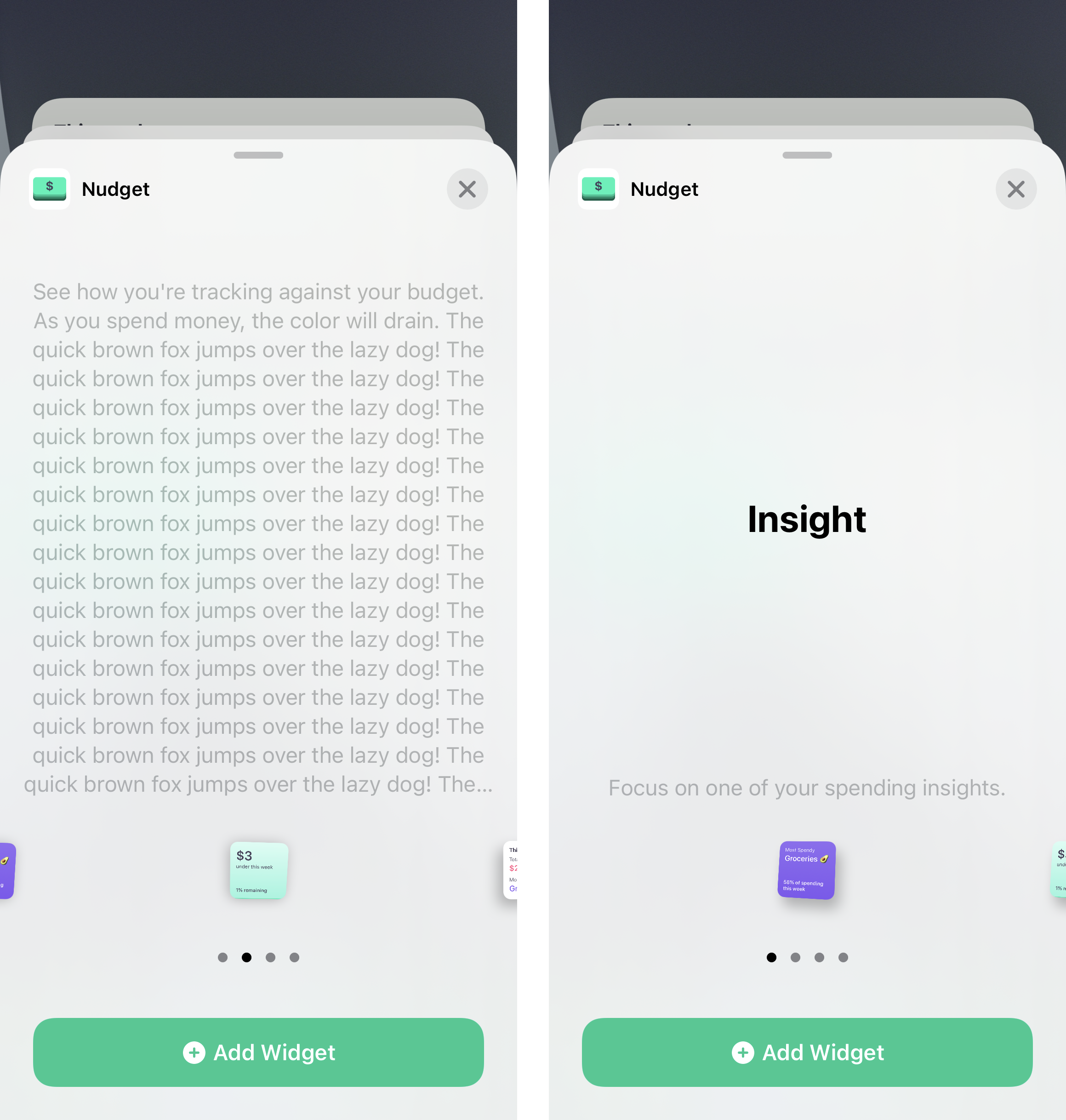
Engineering tried variations of copy length in a testing environment. This helped us understand surprising behavior in the template itself.
We learned the template behaved in a peculiar way. The widget would shrink to accommodate a longer description. Then, the template would essentially lock to that size. Even if other widgets had shorter descriptions, the widgets themselves would appear teeny. You had to strain your eyes to read any text on the widget itself. Long story short, the descriptions needed to be as concise as possible. This would accommodate for localization and keep the widgets from shrinking.
First learning how the widgets behaved was a crucial step to writing effective microcopy. Build relationships with cross-functional peers so you can ask those questions and understand the limitations of the component you need to write for.
2. Spit out your first draft. Then revise, revise, revise.
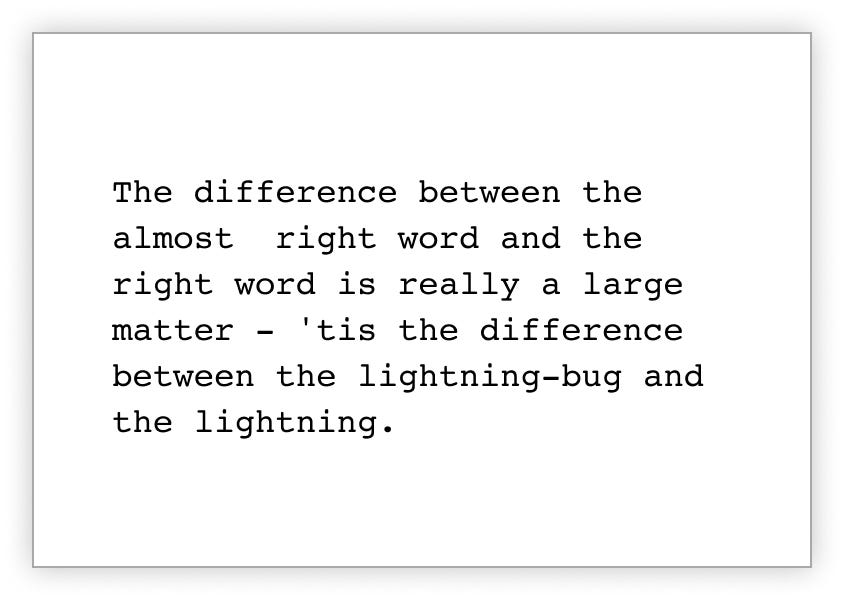
Mark Twain, The Wit and Wisdom of Mark Twain
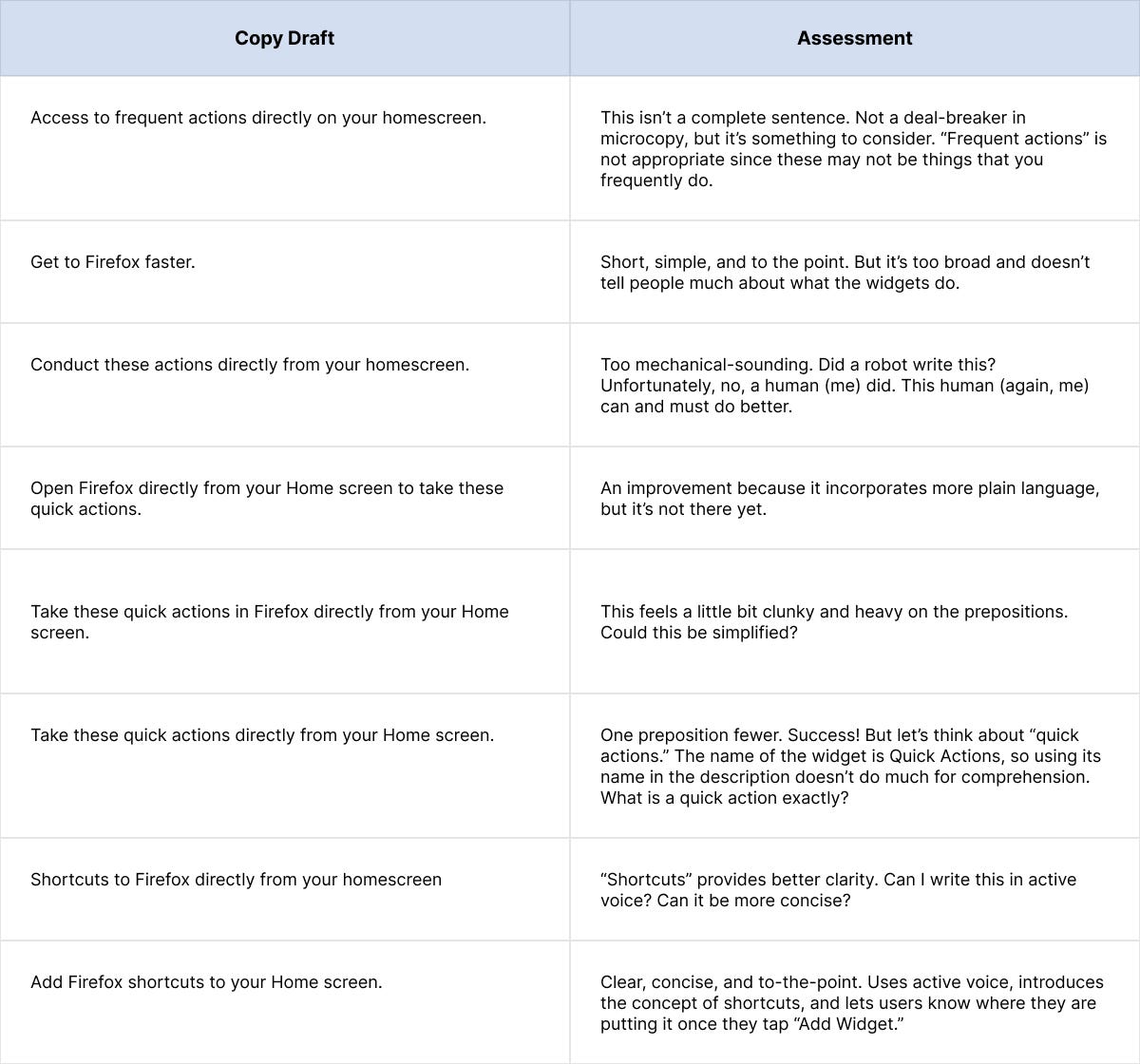
Now that I understood my constraints, I was ready to start typing. I typically work through several versions in a Google Doc, wearing out my delete key as I keep reworking until I get it ‘right.’
Hello and welcome to another issue of This Week in Rust! Rust is a systems language pursuing the trifecta: safety, concurrency, and speed. This is a weekly summary of its progress and community. Want something mentioned? Tweet us at @ThisWeekInRust or send us a pull request. Want to get involved? We love contributions.
This Week in Rust is openly developed on GitHub. If you find any errors in this week's issue, please submit a PR.
Updates from Rust Community
Official
- [Inside] Exploring PGO for the Rust compiler
Newsletters
Tooling
Observations/Thoughts
- Rust Ray Tracer, an Update (and SIMD)
- Rust emit=asm Can Be Misleading
- A survey into static analyzers configurations: Clippy for Rust, part 1
- Why Rust is the Future of Game Development
- Rust as a productive high-level language
- 40 millisecond bug
- Postfix macros in Rust
- A Quick Tour of Trade-offs Embedding Data in Rust
- Why Developers Love Rust
Rust Walkthroughs
- Make a Language - Part Nine: Function Calls
- Building a Weather Station UI
- Getting Graphical Output from our Custom RISC-V Operating System in Rust
- Build your own: GPG
- Rpi 4 meets Flutter and Rust
- AWS Lambda + Rust
- Orchestration in Rust
- Rocket Tutorial 02: Minimalist API
- Get simple IO stats using Rust (throughput, ...)
- Type-Safe Discrete Simulation in Rust
- [series] A Gemini Client in Rust
- Postfix macros in Rust
- Processing a Series of Items with Iterators in Rust
- Compilation of Active Directory Logs Using
A bit belatedly, I thought I’d write a short retrospective on Iodide: an effort to create a compelling, client-centred scientific notebook environment.
Despite not writing a ton about it (the sole exception being this brief essay about my conservative choice for the server backend) Iodide took up a very large chunk of my mental energy from late 2018 through 2019. It was also essentially my only attempt at working on something that was on its way to being an actual product while at Mozilla: while I’ve led other projects that have been interesting and/or impactful in my 9 odd-years here (mozregression and perfherder being the biggest successes), they fall firmly into the “internal tools supporting another product” category.
At this point it’s probably safe to say that the project has wound down: no one is being paid to work on Iodide and it’s essentially in extreme maintenance mode. Before it’s put to bed altogether, I’d like to write a few notes about its approach, where I think it had big advantanges, and where it seems to fall short. I’ll conclude with some areas I’d like to explore (or would like to see others explore!). I’d like to emphasize that this is my opinion only: the rest of the Iodide core team no doubt have their own thoughts. That said, let’s jump in.
What is Iodide, anyway?
One thing that’s interesting about a product like Iodide is that people tend to project their hopes and dreams onto it: if you asked any given member of the Iodide team to give a 200 word description of the project, you’d probably get a slightly different answer emphasizing different things. That said, a fair initial approximation of the project vision would be “a scientific notebook like Jupyter, but running in the browser”.
What does this mean? First, let’s talk about what Jupyter does: at heart, it’s basically a Python “kernel” (read: interpreter), fronted by a webserver. You send snipits of the code to the interpreter via a web interface and they would faithfully be run on the backend (either on your local machine in a separate process or a server in the cloud). Results are then be returned back to the web interface and then rendered by the browser in one form or another.
Iodide’s model is quite similar, with one difference: instead of running the kernel in another process or somewhere in the cloud, all the heavy lifting happens in the browser itself, using the local JavaScript and/or WebAssembly runtime. The very first version of the product that Hamilton Ulmer and Brendan Colloran came up with was definitely in this category: it had no server-side component whatsoever.
Truth be told, even applications like Jupyter do a fair amount of computation on the client side to render a user interface and the results of computations: the distinction is not as clear cut as you might think. But in general I think the premise holds: if you load an iodide notebook today (still possible on alpha.iodide.io! no account required), the only thing that comes from the server is a little bit of static JavaScript and a flat file delivered as a JSON payload. All the “magic” of whatever computation you might come up with happens on the client.
Let’s take a quick look at the default tryit iodide notebook to give an idea of what I mean:
%% fetch
// load a js library and a csv file with a fetch cell
js: https://cdnjs.cloudflare.com/ajax/libs/d3/4.10.2/d3.js
text: csvDataString = https://data.sfgov.org/api/views/5cei-gny5/rows.csv?accessType=DOWNLOAD

%% js
// parse the data using the d3 library (and show the value in the console)
parsedData = d3.csvParse(csvDataString)

%% js
// replace the text in the report element "htmlInMd"
document.getElementById('htmlInMd').innerText = parsedData[0].Address

%% py
# use python to select some of the data
from js import parsedData
[x['Address'] for x in parsedData if x['Lead Remediation'] == 'true']
The %% delimiters indicate individual cells. The fetch cell is an iodide-native cell with its own logic to load the specified resources into a JavaScript variables when evaluated. js and py cells direct the browser to interpret the code inside of them, which causes the DOM to mutate. From these building blocks (and a few others), you can build up an interactive report which can also be freely forked and edited by anyone who cares to.
In some ways, I think Iodide has more in common with services like Glitch or Codepen than with Jupyter. In effect, it’s mostly offering a way to build up a static web
This blog post is a guest blog post. We invite participants of our bug bounty program to write about bugs they’ve reported to us.
Background
In its inception, Firefox for Desktop has been using one single process for all browsing tabs. Since Firefox Quantum, released in 2017, Firefox has been able to spin off multiple “content processes”. This revised architecture allowed for advances in security and performance due to sandboxing and parallelism. Unfortunately, Firefox for Android (code-named “Fennec”) could not instantly be built upon this new technology. Legacy architecture with a completely different user interface required Fennec to remain single-process. But in the fall of 2020, a Fenix rose: The latest version of Firefox for Android is supported by Android Components, a collection of independent libraries to make browsers and browser-like apps that bring latest rendering technologies to the Android ecosystem.
For this rewrite to succeed, most work on legacy Android product (“Fennec”) was paused and put into maintenance mode except for high-severity security vulnerabilities.
It was during this time, coinciding with the general availability of the new Firefox for Android, that Chris Moberly from GitLab’s Security Red Team reported the following security bug in the almost legacy browser.
Overview
Back in August, I found a nifty little bug in the Simple Service Discovery Protocol (SSDP) engine of Firefox for Android 68.11.0 and below. Basically, a malicious SSDP server could send Android Intent URIs to anyone on a local wireless network, forcing their Firefox app to launch activities without any user interaction. It was sort of like a magical ability to click links on other peoples’ phones without them knowing.
I disclosed this directly to Mozilla as part of their bug bounty program – you can read the original submission here.
I discovered the bug around the same time Mozilla was already switching over to a completely rebuilt version of Firefox that did not contain the vulnerability. The vulnerable version remained in the Google Play store only for a couple weeks after my initial private disclosure. As you can read in the Bugzilla issue linked above, the team at Mozilla did a thorough review to confirm that the vulnerability was not hiding somewhere in the new version and took steps to ensure that it would never be re-introduced.
Disclosing bugs can be a tricky process with some companies, but the Mozilla folks were an absolute pleasure to work with. I highly recommend checking out their bug bounty program and seeing what you can find!
I did a short technical write-up that is available in the exploit repository. I’ll include those technical details here too, but I’ll also take this opportunity to talk a bit more candidly about how I came across this particular bug and what I did when I found it.
Bug Hunting
I’m lucky enough to be paid to hack things at GitLab, but after a long hard day of hacking for work I like to kick back and unwind by… hacking other things! I’d recently come to the devastating conclusion that a bug I had been chasing for the past two years either didn’t exist or was simply beyond my reach, at least for now. I’d learned a lot along the way, but it was time to focus on something new.
A friend of mine had been doing some cool things with Android, and it sparked my interest. I ordered a paperback copy of “The Android Hacker’s Handbook” and started reading. When learning new things, I often order the big fat physical book and read it in chunks away from my computer screen.
Following my departure from the MDN documentation team at Mozilla, I’ve joined the team at Amazon Web Services, documenting the AWS SDKs. Which specific SDKs I’ll be covering are still being finalized; we have some in mind but are determining who will prioritize which still, so I’ll hold off on being more specific.
Instead of going into details on my role on the AWS docs team, I thought I’d write a new post that provides a more in-depth introduction to myself than the little mini-bios strewn throughout my onboarding forms. Not that I know if anyone is interested, but just in case they are…
Personal
Now a bit about me. I was born in the Los Angeles area, but my family moved around a lot when I was a kid due to my dad’s work. By the time I left home for college at age 18, we had lived in California twice (where I began high school), Texas twice, Colorado twice, and Louisiana once (where I graduated high school). We also lived overseas once, near Pekanbaru, Riau Province on the island of Sumatra in Indonesia. It was a fun and wonderful place to live. Even though we lived in a company town called Rumbai, and were thus partially isolated from the local community, we still lived in a truly different place from the United States, and it was a great experience I cherish.
My wife, Sarah, and I have a teenage daughter, Sophie, who’s smarter than both of us combined. When she was in preschool and kindergarten, we started talking about science in pretty detailed ways. I would give her information and she would draw conclusions that were often right, thinking up things that essentially were black holes, the big bang, and so forth. It was fun and exciting to watch her little brain work. She’s in her “nothing is interesting but my 8-bit chiptunes, my game music, the games I like to play, and that’s about it” phase, and I can’t wait until she’s through that and becomes the person she will be in the long run. Nothing can bring you so much joy, pride, love, and total frustration as a teenage daughter.
Education
I got my first taste of programming on a TI-99/4 computer bought by the Caltex American School there. We all were given a little bit of programming lesson just to get a taste of it, and I was captivated from the first day, when I got it to print a poem based on “Roses are red, violets are blue” to the screen. We were allowed to book time during recesses and before and after school to use the computer, and I took every opportunity I could to do so, learning more and more and writing tons of BASIC programs on it.
This included my masterpiece: a game called “Alligator!” in which you drove an alligator sprite around with the joystick, eating frogs that bounced around the screen while trying to avoid the dangerous bug that was chasing you. When I discovered that other kids were using their computer time to play it, I was permanently hooked.
I continued to learn and expand my skills over the years, moving on to various Apple II (and clone) computers, eventually learning 6502 and 65816 assembly, Pascal, C, dBase IV, and other languages.
During my last couple years of high school, I got a job at a computer and software store (which was creatively named “Computer and Software Store”) in Mandeville, Louisiana. In addition to doing grunt work and front-of-store sales, I also spent time doing programming for contract projects the store took on. My first was a simple customer contact management program for a real estate office. My most complex completed project was a three-store cash register system for a local chain of taverns and bars in the New Orleans area. I also built most of a custom inventory, quotation, and invoicing system for the store, though this was never finished due to my departure to start college.
The project about which I was most proud: a program for tracking information and progress of special education students and students with special needs for the St. Tammany Parish School District. This was built to run on an Apple IIe computer, and I was delighted to have the chance to build a real workplace application for my favorite platform.
I attended the University of California—Santa Barbara with a major in computer science. I went through the program and reached the point where I only needed 12 more units (three classes): one general education class under the subject area “literature originating in a foreign language” and two computer science electives. When I went to register for my final quarter, I discovered that none of the computer science
Here’s the complete timeline of events. From my first denial to travel to the US until I eventually received a tourist visa. And then I can’t go anyway.
December 5-11, 2016
I spent a week on Hawaii with Mozilla – my employer at the time. This was my 12th visit to the US over a period of 19 years. I went there on ESTA, the visa waiver program Swedish citizens can use. I’ve used it many times, there was nothing special this time. The typical procedure with ESTA is that we apply online: fill in a form, pay a 14 USD fee and get a confirmation within a few days that we’re good to go.

June 26, 2017
In the early morning one day by the check-in counter at Arlanda airport in Sweden, I was refused to board my flight. Completely unexpected and out of the blue! I thought I was going to San Francisco via London with British Airways, but instead I had to turn around and go back home – slightly shocked. According to the lady behind the counter there was “something wrong with my ESTA”. I used the same ESTA and passport as I used just fine back in December 2016. They’re made to last two years and it had not expired.

People engaged by Mozilla to help us out could not figure out or get answers about what the problem was (questions and investigations were attempted both in the US and in Sweden), so we put our hopes on that it was a human mistake somewhere and decided to just try again next time.
April 3, 2018
I missed the following meeting (in December 2017) for other reasons but in the summer of 2018 another Mozilla all-hands meeting was coming up (in Texas, USA this time) so I went ahead and applied for a new ESTA in good time before the event – as I was a bit afraid there was going to be problems. I was right and I got denied ESTA very quickly. “Travel Not Authorized”.

Day 0 – April 17, 2018
Gaaah. It meant it was no mistake last year, they actually mean this. I switched approach and instead applied for a tourist visa. I paid 160 USD, filled in a ridiculous amount of information about me and my past travels over the last 15 years and I visited the US embassy for an in-person interview and fingerprinting.

This is day 0 in the visa process, 296 days after I was first stopped at Arlanda.
Day 90 – July 2018
I missed the all-hands meeting in San Francisco when I didn’t get the visa in time.
Day 240 – December 2018
I quit Mozilla, so I then had no more reasons to go to their company all-hands…
Day 365 – April 2019
A year passed. “someone is working on it” the embassy email person claimed when I asked about progress.
Day 651- January 28, 2020
I emailed the embassy to query about the process

The reply came back quickly:
Dear Sir,
All applications are processed in the most expeditious manner possible. While we understand your frustration, we are required to follow immigration law regarding visa issuances. This process cannot be expedited or circumvented. Rest assured that we will contact you as soon as the administrative processing is concluded.
Day 730 – April 2020
Another year had passed and I had given up all hope. Now it turned into a betting game and science project. How long can they actually drag out this process without saying either yes or no?
Day 871 –
If you, like me, are running your own mail server, you might have looked at OpenSMTPD. There are very compelling reasons for that, most important being the configuration simplicity. The following is a working base configuration handling both mail delivery on port 25 as well as mail submissions on port 587:
pki default cert "/etc/mail/default.pem"
pki default key "/etc/mail/default.key"

table local_domains {"example.com", "example.org"}

listen on eth0 tls pki default
listen on eth0 port 587 tls-require pki default auth

action "local" maildir
action "outbound" relay

match from any for domain  action "local"
match for local action "local"
match auth from any for any action "outbound"
match from local for any action "outbound"
You might want to add virtual user lists, aliases, SRS support, but it really doesn’t get much more complicated than this. The best practices are all there: no authentication over unencrypted connections, no relaying of mails by unauthorized parties, all of that being very obvious in the configuration. Compare that to Postfix configuration with its multitude of complicated configuration files where I was very much afraid of making a configuration mistake and inadvertently turning my mail server into an open relay.
There is no DKIM support out of the box however, you have to add filters for that. The documentation suggests using opensmtpd-filter-dkimsign that most platforms don’t have prebuilt packages for. So you have to get the source code from some Dutch web server, presumably run by the OpenBSD developer Martijn van Duren. And what you get is a very simplistic DKIM signer, not even capable of supporting multiple domains.
The documentation suggests opensmtpd-filter-rspamd as an alternative which can indeed both sign and verify DKIM signatures. It relies on rspamd however, an anti-spam solution introducing a fair deal of complexity and clearly overdimensioned in my case.
So I went for writing custom filters. With dkimpy implementing all the necessary functionality in Python, how hard could it be?
Contents
Getting the code
You can see the complete code along with installation instructions here. It consists of two filters: dkimsign.py should be applied to outgoing mail and will add a DKIM signature, dkimverify.py should be applied to incoming mail and will add an Authentication-Results header indicating whether DKIM and SPF checks were successful. SPF checks are optional and will only be performed if the pyspf module is installed. Both filters rely on the opensmtpd.py module providing a generic filter server
Every now and then I get questions on how to work with git in a smooth way when developing, bug-fixing or extending curl – or how I do it. After all, I work on open source full time which means I have very frequent interactions with git (and GitHub). Simply put, I work with git all day long. Ordinary days, I issue git commands several hundred times.
I have a very simple approach and way of working with git in curl. This is how it works.
command line
I use git almost exclusively from the command line in a terminal. To help me see which branch I’m working in, I have this little bash helper script.
brname () {
  a=$(git rev-parse --abbrev-ref HEAD 2>/dev/null)
  if [ -n "$a" ]; then
    echo " [$a]"
  else
    echo ""
  fi
}
PS1="\u@\h:\w\$(brname)$ "
That gives me a prompt that shows username, host name, the current working directory and the current checked out git branch.
In addition: I use Debian’s bash command line completion for git which is also really handy. It allows me to use tab to complete things like git commands and branch names.
git config
I of course also have my customized ~/.gitconfig file to provide me with some convenient aliases and settings. My most commonly used git aliases are:
st = status --short -uno
ci = commit
ca = commit --amend
caa = commit -a --amend
br = branch
co = checkout
df = diff
lg = log -p --pretty=fuller --abbrev-commit
lgg = log --pretty=fuller --abbrev-commit --stat
up = pull --rebase
latest = log @^{/RELEASE-NOTES:.synced}..
The ‘latest’ one is for listing all changes done to curl since the most recent RELEASE-NOTES “sync”. The others should hopefully be rather self-explanatory.
The config also sets gpgsign = true, enables mailmap and a few other things.
master is clean and working
The main curl development is done in the single curl/curl git repository (primarily hosted on GitHub). We keep the master branch the bleeding edge development tree and we work hard to always keep that working and functional. We do our releases off the master branch when that day comes (every eight weeks) and we provide “daily snapshots” from that branch, put together – yeah – daily.
When merging fixes and features into master, we avoid merge commits and use rebases and fast-forward as much as possible. This makes the branch very easy to browse, understand and work with – as it is 100% linear.
Work on a fix or feature
When I start something new, like work on a bug or trying out someone’s patch or similar, I first create a local branch off master and work in that. That is, I don’t work directly in the master branch. Branches are easy and quick to do and there’s no reason to shy away from having loads of them!
I typically name the branch prefixed with my GitHub user name, so that when I push them to the server it is noticeable who is the creator (and I can use the same branch name locally as I do remotely).
$ git checkout -b bagder/my-new-stuff-or-bugfix
Once I’ve reached somewhere, I commit to the branch. It can then end up one or more commits before I consider myself “done for now” with what I was set out to do.
I try not to leave the tree with any uncommitted changes – like if I take off for the day or even just leave for food or an extended break. This puts the repository in a state that allows me to easily switch over to another branch when I get back – should I feel the need to. Plus, it’s better to commit and explain the change before the break rather than having to recall the details again when coming back.
Never stash
“git stash” is therefore not a command I ever use. I rather create a new branch and commit the (temporary?) work in there as a potential new line of work.
Show it off and get reviews
Yes I am the lead developer of the project but I still maintain the same work flow as everyone else. All changes, except the most minuscule ones, are done as pull requests on GitHub.
When I’m happy with the functionality in my local branch. When the bug seems to be fixed or the feature seems to be doing what it’s supposed to do and the test suite runs fine locally.
I then clean up the commit series with “git rebase -i” (or if it is a single commit I can instead use just “git commit --amend“).
The commit series should be a set of logical changes that are related to this change and not any more than necessary, but kept
(( We’re overdue for another episode in this series on how Data Science is Hard. Today is a story from 2016 which I think illustrates many important things to do with data. ))
It’s story time. Gather ’round.
In July of 2016, Anthony Jones made the case that the Mozilla-built Firefox for Linux should stop supporting the ALSA backend (and also the WinXP WinMM backend) so that we could innovate on features for more modern audio backends.
(( You don’t need to know what an audio backend is to understand this story. ))
The code supporting ALSA would remain in tree for any Linux distribution who wished to maintain the backend and build it for themselves, but Mozilla would stop shipping Firefox with that code in it.
But how could we ensure the number of Firefoxen relying on this backend was small enough that we wouldn’t be removing something our users desperately needed? Luckily :padenot had just added an audio backend measurement to Telemetry. “We’ll have data soon,” he wrote.
By the end of August we’d heard from Firefox Nightly and Firefox Developer Edition that only 3.5% and 2% (respectively) of Linux subsessions with audio used ALSA. This was small enough to for the removal to move ahead.
Fast-forward to March of 2017. Seven months have passed. The removal has wound its way through Nightly, Developer Edition, Beta, and now into the stable Release channel. Linux users following this update channel update their Firefox and… suddenly the web grows silent for a large number of users.
Bugs are filed (thirteen of them). The mailing list thread with Anthony’s original proposal is revived with some very angry language. It seems as though far more than just a fraction of a fraction of users were using ALSA. There were entire Linux distributions that didn’t ship anything besides ALSA. How did Telemetry miss them?
It turns out that many of those same ALSA-only Linux distributions also turned off Telemetry when they repackaged Firefox for their users. And for any that shipped with Telemetry at all, many users disabled it themselves. Those users’ Firefoxen had no way to phone home to tell Mozilla how important ALSA was to them… and now it was too late.
Those Linux distributions started building ALSA support into their distributed Firefox builds… and hopefully began reporting Telemetry by default to prevent this from happening again. I don’t know if they did for sure (we don’t collect fine-grained information like that because we don’t need it).
But it serves as a cautionary tale: Mozilla can only support a finite number of things. Far fewer now than we did back in 2016. We prioritize what we support based on its simplicity and its reach. That first one we can see for ourselves, and for the second we rely on data collection like Telemetry to tell us.
Counting things is harder than it looks. Counting things that are invisible is damn near impossible. So if you want to be counted: turn Telemetry on (it’s in the Preferences) and leave it on.
:chutten
https://chuttenblog.wordpress.com/2020/11/05/data-science-is-hard-alsa-in-firefox/
TenFourFox Feature Parity Release 29 beta 1 is now available (downloads, hashes, release notes). Rapha"el's JavaScript toggle is back in the Tools menu but actually OlgaTPark gets most of the credit this release for some important backports from mainline Firefox, including fixes to DOM fetch which should improve a number of sites and adding a key combination (Command-Option-R in the default en-US locale) to toggle Reader View. These features require new locale strings, so expect new language packs with this release (tip of the hat to Chris T who maintains them). The usual bug and security fixes apply as well. FPR29 will come out parallel with Firefox 78.5/83 on or about November 17.
The December release may be an SPR only due to the holidays and my work schedule. More about that a little later.
http://tenfourfox.blogspot.com/2020/11/tenfourfox-fpr29b1-available.html
Good things come to those who wait?
When I created and started hosting the first websites for curl I didn’t care about the URL or domain names used for them, but after a few years I started to think that maybe it would be cool to register a curl domain for its home. By then it was too late to find an available name under a “sensible” top-level domain and since then I’ve been on the lookout for one.
Yeah, I host it
So yes, I’ve administrated every machine that has ever hosted the curl web site going all the way back to the time before we called the tool curl. I’m also doing most of the edits and polish of the web content, even though I’m crap at web stuff like CSS and design. So yeah, I consider it my job to care for the site and make sure it runs smooth and that it has a proper (domain) name.
www.fts.frontec.se
The first ever curl web page was hosted on “www.fts.frontec.se/~dast/curl” in the late 1990s (snapshot). I worked for the company with that domain name at the time and ~dast was the location for my own personal web content.
curl.haxx.nu
The curl website moved to its first “own home”, with curl.haxx.nu in August 1999 (snapshot) when we registered our first domain and the .nu top-level domain was available to us when .se wasn’t.
curl.haxx.se
We switched from curl.haxx.nu to curl.haxx.se in the summer of 2000 (when finally were allowed to register our name in the .se TLD) (snapshot).
The name “haxx” in the domain has been the reason for many discussions and occasional concerns from users and overzealous blocking-scripts over the years. I’ve kept the curl site on that domain since it is the name of one of the primary curl sponsors and partly because I want to teach the world that a particular word in a domain is not a marker for badness or something like that. And of course because we have not bought or been provided a better alternative.
Haxx is still the name of the company I co-founded back in 1997 so I’m also the admin of the domain.
curl.se
I’ve looked for and contacted owners of curl under many different TLDs over the years but most have never responded and none has been open for giving up their domains. I’ve always had an extra attention put on curl.se because it is in the Swedish TLD, the same one we have for Haxx and where I live.
The curling background
The first record on archive.org of anyone using the domain curl.se for web content is dated August 2003 when the Swedish curling team “H"arn"osands CK” used it. They used the domain and website for a few years under this name. It can be noted that it was team Anette Norberg, which subsequently won two Olympic gold medals in the sport.
In September 2007 the site was renamed, still being about the sport curling but with the name “the curling girls” in Swedish (curlingtjejerna) which remained there for just 1.5 years until it changed again. “curling team Folksam” then populated the site with contents about the sport and that team until they let the domain expire in 2012. (Out of these three different curling oriented sites, the first one is the only one that still seems to be around but now of course on another domain.)
Ads
In early August 2012 the domain was registered to a new owner. I can’t remember why, but I missed the chance to get the domain then.
August 28 2012 marks the first date when curl.se is recorded to suddenly host a bunch of links to casino, bingo and gambling sites. It seems that whoever bought the domain wanted to surf on the good name and possible incoming links built up from the previous owners. For several years this crap was what the website showed. I doubt very many users ever were charmed by the content nor clicked on many links. It was ugly and over-packed with no real content but links and ads.
The last archive.org capture of the ad-filled site was done on October 2nd 2016. Since then, there’s been no web content on the domain that I’ve found. But the domain registration kept getting renewed.
Failed to purchase
In August 2019, I noticed that the domain was about to expire, and I figured it could be a sign that the owner was not too interested in keeping it anymore.
After over twenty years, Mozilla is still going strong. But over that amount of time, there’s bound to be changes in responsibilities. This brings unique challenges with it to test maintenance when original creators leave and knowledge of the purposes, and inner workings of a test possibly disappears. This is especially true when it comes to performance testing.
Our first performance testing framework is Talos, which was built in 2007. It’s a fantastic tool that is still used today for performance testing very specific aspects of Firefox. We currently have 45 different performance tests in Talos, and all of those together produce as many as 462 metrics. Having said that, maintaining the tests themselves is a challenge because some of the people who originally built them are no longer around. In these tests, the last person who touched the code, and who is still around, usually becomes the maintainer of these tests. But with a lack of documentation on the tests themselves, this becomes a difficult task when you consider the possibility of a modification causing a change in what is being measured, and moving away from its original purpose.
Over time, we’ve built another performance testing framework called Raptor which is primarily used for page load testing (e.g. measuring first paint, and first contentful paint). This framework is much simpler to maintain and keep up with its purpose but the settings used for the tests change often enough that it becomes easy to forget how we set up the test, or what pages are being tested exactly. We have a couple other frameworks too, with the newest one (which is still in development) being MozPerftest – there might be a blog post on this in the future. With this many frameworks and tests, it’s easy to see how test maintenance over the long term can turn into a bit of a mess when it’s left unchecked.
To overcome this issue, we decided to implement a tool to dynamically document all of our existing performance tests in a single interface while also being able to prevent new tests from being added without proper documentation or, at the least, an acknowledgement of the existence of the test. We called this tool PerfDocs.
Currently, we use PerfDocs to document tests in Raptor and MozPerftest (with Talos in the plans for the future). At the moment in Raptor, we only document the tests that we have, along with the pages that are being tested. Given that Raptor is a simple framework with the main purpose being to measure page loads, this documentation gives us enough without getting overly complex. However, we do plan to add much more information to it in the future (e.g. what branches the tests run on, what are the test settings).
The PerfDocs integration with MozPerftest is far more interesting though and you can find it here. In MozPerftest, all tests have a mandatory requirement of having metadata in the test itself. For example, here’s a test we have for measuring the start-up time on our mobile browsers which describes things such as the browsers that it runs on, and even the owner of the test. This lets us force the test writer to think about maintainability as we move into the future rather than simply writing it and forgetting it. For that Android VIEW test, you can find the generated documentation here. If you look through the documented tests that we have, you’ll notice that we also don’t have a single person listed as a maintainer. Instead, we refer to the team that built it as the maintainer. Furthermore, the tests actually exist in the folders (or code) that those teams are responsible for so they don’t need to exist in the frameworks folder giving us more accountability for their maintenance. By building tests this way, with documentation in mind, we can ensure that as time goes on, we won’t lose information about what is being tested, its purpose, along with who should be responsible for maintaining it.
Lastly, as I alluded to above, outside of
HTTP Strict Transport Security (HSTS) is a standard HTTP response header for sites to tell the client that for a specified period of time into the future, that host is not to be accessed with plain HTTP but only using HTTPS. Documented in RFC 6797 from 2012.
The idea is of course to reduce the risk for man-in-the-middle attacks when the server resources might be accessible via both HTTP and HTTPS, perhaps due to legacy or just as an upgrade path. Every access to the HTTP version is then a risk that you get back tampered content.
Browsers preload
These headers have been supported by the popular browsers for years already, and they also have a system setup for preloading a set of sites. Sites that exist in their preload list then never get accessed over HTTP since they know of their HSTS state already when the browser is fired up for the first time.
The entire .dev top-level domain is even in that preload list so you can in fact never access a web site on that top-level domain over HTTP with the major browsers.
With the curl tool
Starting in curl 7.74.0, curl has experimental support for HSTS. Experimental means it isn’t enabled by default and we discourage use of it in production. (Scheduled to be released in December 2020.)
You instruct curl to understand HSTS and to load/save a cache with HSTS information using --hsts . The HSTS cache saved into that file is then updated on exit and if you do repeated invokes with the same cache file, it will effectively avoid clear text HTTP accesses for as long as the HSTS headers tell it.
I envision that users will simply use a small hsts cache file for specific use cases rather than anyone ever really want to have or use a “complete” preload list of domains such as the one the browsers use, as that’s a huge list of sites and for most use cases just completely unnecessary to load and handle.
With libcurl
Possibly, this feature is more useful and appreciated by applications that use libcurl for HTTP(S) transfers. With libcurl the application can set a file name to use for loading and saving the cache but it also gets some added options for more flexibility and powers. Here’s a quick overview:
CURLOPT_HSTS – lets you set a file name to read/write the HSTS cache from/to.
CURLOPT_HSTS_CTRL – enable HSTS functionality for this transfer
CURLOPT_HSTSREADFUNCTION – this callback gets called by libcurl when it is about to start a transfer and lets the application preload HSTS entries – as if they had been read over the wire and been added to the cache.
CURLOPT_HSTSWRITEFUNCTION – this callback gets called repeatedly when libcurl flushes its in-memory cache and allows the application to save the cache somewhere and similar things.
Feedback?
I trust you understand that I’m very very keen on getting feedback on how this works, on the API and your use cases. Both negative and positive. Whatever your thoughts are really!