California is on the move again in the consumer privacy rights space. On Election Day 2020 California voters approved Proposition 24 the California Privacy Rights Act (CPRA). CPRA – commonly called CCPA 2.0 – builds upon the less than two year old California Consumer Privacy Act (CCPA) continuing the momentum to put more control over personal data in people’s hands, additional compliance obligations for businesses and creating a new California Protection Agency for regulation and enforcement
With federal privacy legislation efforts stagnating during the last years, California continues to set the tone and expectations that lead privacy efforts in the US. Mozilla continues to support data privacy laws that empower people, including the European General Data Protection Regulation (GDPR), California Consumer Privacy Act, (CCPA) and now the California Privacy Rights Act (CPRA). And while CPRA is far from perfect it does expand privacy protections in some important ways.
Here’s what you need to know. CPRA includes requirements we foresee as truly beneficial for consumers such as additional rights to control their information, including sensitive personal information, data deletion, correcting inaccurate information, and putting resources in a centralized authority to ensure there is real enforcement of violations.
CPRA gives people more rights to opt-out of targeted advertising
We are heartened about the significant new right around “cross-context behavior advertising.” At its core, this right allows consumers to exert more control and opt-out of behavioral, targeted advertising — it will no longer matter if the publisher “sells” their data or not.
This control is one that Mozilla has been a keen and active supporter of for almost a decade; from our efforts with the Do Not Track mechanism in Firefox, to Enhanced Tracking Protection to our support of the Global Privacy Control experiment. However, this right is not exercised by default–users must take the extra step of opting in to benefit from it.
CPRA abolishes “dark patterns”
Another protection the CPRA brings is prohibiting the use of “dark patterns” or features of interface design meant to trick users into doing things that they might not want to do, but ultimately benefit the business in question. Dark patterns are used in websites and apps to give the illusion of choice, but in actuality are deliberately designed to deceive people.
For instance, how often the privacy preserving options — like opting out of tracking by companies — take multiple clicks, and navigating multiple screens to finally get to the button to opt-out, while the option to accept the tracking is one simple click. This is only one of many types of dark patterns. This behavior fosters distrust in the internet ecosystem and is patently bad for people and the web. And it needs to go. Mozilla also supports federal legislation that has been introduced focused on banning dark patterns.
CPRA introduces a new watchdog for privacy protection
The CPRA establishes a new data protection authority, the “California Privacy Protection Agency” (CPPA), the first of its kind in the US. This will improve enforcement significantly compared to what the currently responsible CA Attorney General is able to do, with limited capacity and priorities in other fields. The CPRA designates funds to the new agency that are expected to be around $100 million. How the CPRA will be interpreted and enforced will depend significantly on who makes up the five-member board of the new agency, to be created until mid-2021. Two of the board seats (including the chair) will be appointed by Gov. Newsom, one seat will be appointed by the attorney general, another by the Senate Rules Committee, and the fifth by the Speaker of the Assembly, to be filled in about 90 days.
CPRA requires companies to collect less data
CPRA requires businesses to minimize the collection of personal data (collect the least amount needed) — a principle Mozilla has
Here are our highlights of what’s coming up in the Firefox 84 release:
- You can now zoom extension panels, popups, and sidebars using Ctrl+scroll wheel (Cmd+scroll wheel on macOS).
- Under certain circumstances, search engine changes weren’t being reset when an add-on was uninstalled. This has been fixed now.
Manage Optional Permissions in Add-ons Manager
As we mentioned last time, users will be able to manage optional permissions of installed extensions from the Firefox Add-ons Manager (about:addons).
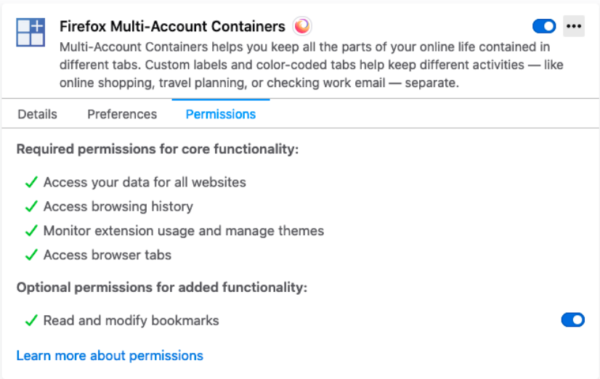
We recommend that extensions using optional permissions listen for browser.permissions.onAdded and browser.permissions.onRemoved API events. This ensures the extension is aware of the user granting or revoking optional permissions.
Thanks
We would like to thank Tom Schuster for his contributions to this release.
The post Extensions in Firefox 84 appeared first on Mozilla Add-ons Blog.
https://blog.mozilla.org/addons/2020/11/20/extensions-in-firefox-84/
When debugging graphical applications it can be helpful to see what the application had on screen at a given point in time. A while back we added this feature to Pernosco.
This is nontrivial because in most record-and-replay debuggers the state of the display (e.g., the framebuffer) is not explicitly recorded. In rr for example, a typical application displays content by sending data to an X11 server, but the X11 server is not part of the recording.
Pernosco analyzes the data sent to the X11 server and reconstructs the updates to window state. Currently it only works for simple bitmap copies, but that's enough for Firefox, Chrome and many other modern applications, because the more complicated X drawing primitives aren't suitable for those applications and they do their complex drawing internally.
Pernosco doesn't just display the screenshots, it helps you debug with them. As shown in the demo, clicking on a screenshot shows a pixel-level zoomed-in view which lets you see the exact channel values in each pixel. Clicking on two screenshots highlights the pixels in them that are different. We know where the image data came from in memory, so when you click on a pixel we can trace the dataflow leading to that pixel and show you the exact moment(s) the pixel value was computed or copied. (These image debugging tools are generic and also available for debugging Firefox test failures.) Try it yourself!
Try Pernosco on your own code today!
http://robert.ocallahan.org/2020/11/debugging-with-screenshots-in-pernosco.html
When we launched our Environmental Sustainability Programme in March 2020, we identified three strategic goals:
- Reduce and mitigate Mozilla’s organisational impact;
- Train and develop Mozilla staff to build with sustainability in mind;
- Raise awareness for sustainability, internally and externally.
Today, we are releasing our baseline Greenhouse Gas emissions (GHG) assessment for 2019, which forms the basis upon which we will build to reduce and mitigate Mozilla’s organisational impact.
GHG Inventory: Summary of Findings
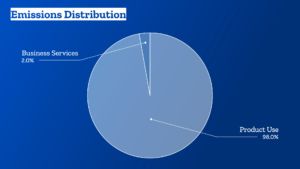
Mozilla’s overall emissions in 2019 amounted to: 799,696 mtCO2e (metric tons of carbon dioxide equivalent).
-
- Business Services and Operations: 14,222 mtCO2e
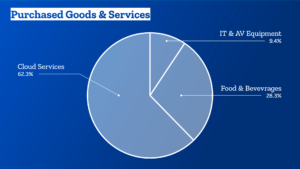
- Purchased goods and services: 8,654 mtCO2e
- Business travel: 2,657 mtCO2e
- Events: 1,199 mtCO2e
- Offices and co-locations: 1,195 mtCO2e
- Remotees: 194 mtCO2e
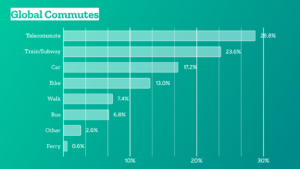
- Commute: 147 mtCO2e
- Product use: 785,474 mtCO2e
- Business Services and Operations: 14,222 mtCO2e
How to read these emissions
There are two major buckets:
- Mozilla’s impact in terms of business services and operations, which we calculated with as much primary data as possible;
- The impact of the use of our products, which makes up roughly 98% of our overall emissions.
In 2019, the use of products spanned Firefox Desktop and Mobile, Pocket, and Hubs.
Their impact is significant, and it is an approximation. We can’t yet really measure the energy required to run and use our products specifically. Instead, we are estimating how much power is required to use the devices needed to access our products for the time that we know people spent on our products. In other words, we estimate the impact of desktop computers, laptops, tablets, or phones while being online overall.
For now, this helps us get a sense of the impact the internet is having on the environment. Going forward, we need to figure out how to reduce that share while continuing to grow and make the web open and accessible to all.
The emissions related to our business services and operations cover all other categories from the GHG protocol that are applicable to Mozilla.
For 2019, this includes 10 offices and 6 co-locations, purchased goods and services, events that we either host or run, all of our commercial travel including air, rail, ground transportation, and hotels, as well as estimates of the impact of our remote workforce and the commute of our office employees, which we gathered through an internal survey.
How we look at this data
- It’s easy to lose sight of all the work we’ve got to do to reduce our business services and operations emissions, if we only look at the overarching distribution of our emissions:
- If we zoom in on our business services and operations emissions, we’ll note that our average emissions per employee are: 12 mtCO2e.
- There is no doubt plenty of room for improvement. Our biggest area for improvement will likely be the Purchased Goods and Services category. Think: more local and sustainable sourcing, switching to vendors with ambitious climate targets and implementation plans, prolonging renewal cycles, and more.
- In addition, we need to significantly increase the amount of renewable energy we procure for Mozilla spaces, which in 2019 was at: 27%.
- And while a majority of Mozillians already opt for a low-carbon commute, we’ll explore additional incentives here, too:
- We will also look at our travel and event policies to determine where we add the most value, which trip is really necessary, how we can improve virtual participation, and where we have space for more local engagement.
You can find the longform, technical report in PDF
Overview
The Domain Name System (DNS) is often referred to as the “phonebook of the Internet.” It is responsible for translating human readable domain names–such as mozilla.org–into IP addresses, which are necessary for nearly all communication on the Internet. At a high level, clients typically resolve a name by sending a query to a recursive resolver, which is responsible for answering queries on behalf of a client. The recursive resolver answers the query by traversing the DNS hierarchy, starting from a root server, a top-level domain server (e.g. for .com), and finally the authoritative server for the domain name. Once the recursive resolver receives the answer for the query, it caches the answer and sends it back to the client.
Unfortunately, DNS was not originally designed with security in mind, leaving users vulnerable to attacks. For example, previous work has shown that recursive resolvers are susceptible to cache poisoning attacks, in which on-path attackers impersonate authoritative nameservers and send incorrect answers for queries to recursive resolvers. These incorrect answers then get cached at the recursive resolver, which may cause clients that later query the same domain names to visit malicious websites. This attack is successful because the DNS protocol typically does not provide any notion of correctness for DNS responses. When a recursive resolver receives an answer for a query, it assumes that the answer is correct.
DNSSEC is able to prevent such attacks by enabling domain name owners to provide cryptographic signatures for their DNS records. It also establishes a chain of trust between servers in the DNS hierarchy, enabling clients to validate that they received the correct answer.
Unfortunately, DNSSEC deployment has been comparatively slow: measurements show, as of November 2020, only about 1.8% of .com records are signed, and about 25% of clients worldwide use DNSSEC-validating recursive resolvers. Even worse, essentially no clients validate DNSSEC themselves, which means that they have to trust their recursive resolvers.
One potential obstacle to client-side validation is network middleboxes. Measurements have shown that some middleboxes do not properly pass all DNS records. If a middlebox were to block the RRSIG records that carry DNSSEC signatures, clients would not be able to distinguish this from an attack, making DNSSEC deployment problematic. Unfortunately, these measurements were taken long ago and were not specifically targeted at DNSSEC. To get to the bottom of things, we decided to run an experiment.
Measurement Description
There are two main questions we want to answer:
- At what rate do network middleboxes between clients and recursive resolvers interfere with DNSSEC records (e.g., DNSKEY and RRSIG)?
- How does the rate of DNSSEC interference compare to interference with other relatively new record types (e.g., SMIMEA and HTTPSSVC)?
At a high level, in collaboration with Cloudflare we will first serve the above record types from domain names that we control. We will then deploy an add-on experiment to Firefox Beta desktop clients which requests each record type for our domain names. Finally, we will check whether we got the expected responses (or any response at all). As always, users who have opted out of sending telemetry or participating in studies will not receive the add-on.
To analyze the rate of network middlebox interference with DNSSEC records, we will send DNS responses to our telemetry system, rather than performing any analysis locally within the client’s browser. This will enable us to see the different ways that DNS responses are interfered with without relying on whatever analysis logic we bake into our experiment’s add-on. In order to protect user privacy, we will only send information for the domain names in the experiment that we control—not for any other domain names for which a client issues requests when browsing the web. Furthermore, we are not collecting UDP, TCP, or IP headers. We are only collecting the payload of the DNS response, for which we know the expected format. The data we are interested in should not include identifying information about a client, unless middleboxes inject such information when they interfere with DNS requests/responses.
We are launching the experiment today to 1% of
Introduction
This week the Servo project took a significant next step in bringing community-led transformative innovations to the web by announcing it will be hosted by the Linux Foundation. Mozilla is pleased to see Servo, which began as a research effort in 2012, open new doors that can lead it to ever broader benefits for users and the web. Working together, the Servo project and Linux Foundation are a natural fit for nurturing continued growth of the Servo community, encouraging investment in development, and expanding availability and adoption.
Historical Retrospective
From the outset the Servo project was about pioneering new approaches to web browsing fundamentals leveraging the extraordinary advantages of the Rust programming language, itself a companion Mozilla research effort. Rethinking the architecture and implementation of core browser operations allowed Servo to demonstrate extraordinary benefits from parallelism and direct leverage of our increasingly sophisticated computer and mobile phone hardware.
Those successes inspired the thinking behind Project Quantum, which in 2017 delivered compelling improvements in user responsiveness and performance for Firefox in large part by incorporating Servo’s parallelized styling engine (“Stylo”) along with other Rust-based components. More recently, Servo’s WebRender GPU-based rendering subsystem delivered new performance enhancements for Firefox, and Servo branched out to become an equally important component of Mozilla’s Firefox Reality virtual reality browser.
What’s Next?
All along the way, the Servo project has been an exemplary showcase for the benefits of open source based community contribution and leadership. Many other individuals and organizations contributed much of the implementation work that has found its way into Servo, Firefox, Firefox Reality, and indirectly the Rust programming language itself.
Mozilla is excited at what the future holds for Servo. Organizing and managing an effort at the scale and reach of Servo is no small thing, and the Linux Foundation is an ideal home with all the operational expertise and practical capabilities to help the project fully realize its potential. The term “graduate” somehow feels appropriate for this transition, and Mozilla could not be prouder or more enthusiastic.
For more information about the Servo project and to contribute, please visit servo.org.
The post Foundations for the Future appeared first on Mozilla Hacks - the Web developer blog.
https://hacks.mozilla.org/2020/11/foundations-for-the-future/
With the release of Firefox 83, we are pleased to welcome all the developers who’ve contributed their first code change to Firefox in this release, 18 of whom are brand new volunteers! Please join us in thanking each of these diligent and enthusiastic individuals, and take a look at their contributions:
- akshat.dixit71: 1669833
- akshay1992kalbhor: 1659264
- dhairyabahl5: 1669921
- jasleenbhambra: 1669334
- marcos: 1665252
- Alaa Emad: 1444611
- Andreu Botella: 1661075
- Daniel: 217434, 1667675
- Harnaman Kaur: 1588185
- Joaqu'in Serna: 1669044
- Jonatan Klemets: 1668249
- Mohamed H: 1617396
- Niklas Baumgardner: 1612648
- Richa Sharma: 1665568
- Solomon Chiu: 1667939
- Tanner Drake: 513180, 1642878
- Vincent Bernat: 1554850
- waverune: 1669026
https://blog.mozilla.org/community/2020/11/17/welcoming-new-contributors-firefox-83/
Did November spawn a monster this year? In truth, November has given us a few snippets of good news, far from the least of which is the launch of Firefox 83! In this release we’ve got a few nice additions, including Conical CSS gradients, overflow debugging in the Developer Tools, enabling of WebRender across more platforms, and more besides.
This blog post provides merely a set of highlights; for all the details, check out the following:
DevTools
In the HTML Pane, scrollable elements have a “scroll” badge next to them, which you can now toggle to highlight elements causing an overflow (expanding nodes as needed to make them visible):

You will also see an “overflow” badge next to the node causing the overflow.
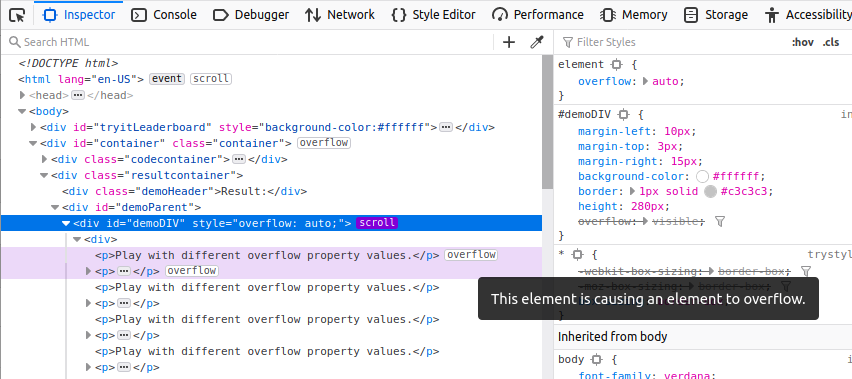
And in addition to that, if you hover over the node(s) causing the overflow, the UI will show a “ghost” of the content so you can see how far it overflows.
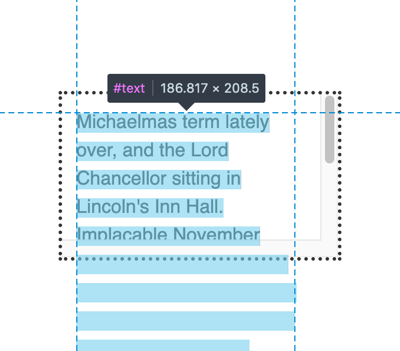
These new features are very useful for helping to debug problems related to overflow.
Web platform additions
Now let’s see what’s been added to Gecko in Firefox 83.
Conic gradients
We’ve had support for linear gradients and radial gradients in CSS images (e.g. in background-image) for a long time. Now in Firefox 83 we can finally add support for conic gradients to that list!
You can create a really simple conic gradient using two colors:
conic-gradient(red, orange);
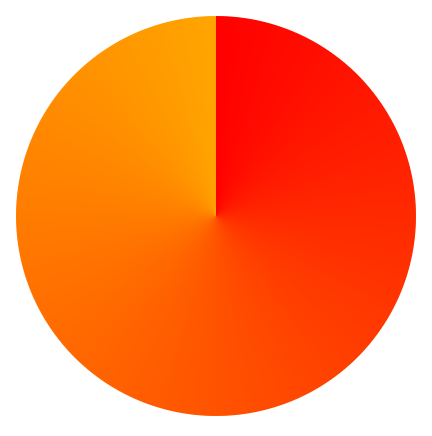
But there are many options available. A more complex syntax example could look like so:
conic-gradient(
  from 45deg /* vary starting angle */
  at 30% 40%, /* vary position of gradient center */
  red, /* include multiple color stops */
  orange,
  yellow,
  green,
  blue,
  indigo 80%, /* vary angle of individual color stops */
  violet 90%
)

And in the same manner as the other gradient types, you can create repeating conic gradients:
repeating-conic-gradient(#ccc 20deg, #666 40deg)

For more information and examples, check out our conic-gradient() reference page, and the Using CSS gradients guide.
WebRender comes to more platforms
We started work on our WebRender rendering architecture a number of years ago, with the aim of delivering the whole web at 60fps. This has already been enabled for Windows 10 users with suitable hardware, but today we bring the WebRender experience to Win7, Win8 and macOS 10.12 to 10.15 (not 10.16 beta as yet).
It’s an exciting time for Firefox performance — try it now, and let us know what you think!
Pinch to zoom on desktop
Last but
On January 26, 2021, Firefox will end support for Adobe Flash, as announced back in 2017. Adobe and other browsers will also end support for Flash in January and we are working together to ensure a smooth transition for all.
Firefox version 84 will be the final version to support Flash. On January 26, 2021 when we release Firefox version 85, it will ship without Flash support, improving our performance and security. For our users on Nightly and Beta release channels, Flash support will end on November 17, 2020 and December 14, 2020 respectively. There will be no setting to re-enable Flash support.
The Adobe Flash plugin will stop loading Flash content after January 12, 2021. See Adobe’s Flash Player End of Life information page for more details.
The post Ending Firefox support for Flash appeared first on Future Releases.
https://blog.mozilla.org/futurereleases/2020/11/17/ending-firefox-support-for-flash/
Security on the web matters. Whenever you connect to a web page and enter a password, a credit card number, or other sensitive information, you want to be sure that this information is kept secure. Whether you are writing a personal email or reading a page on a medical condition, you don’t want that information leaked to eavesdroppers on the network who have no business prying into your personal communications.
That’s why Mozilla is pleased to introduce HTTPS-Only Mode, a brand-new security feature available in Firefox 83. When you enable HTTPS-Only Mode:
- Firefox attempts to establish fully secure connections to every website, and
- Firefox asks for your permission before connecting to a website that doesn’t support secure connections.
How HTTPS-Only Mode works
The Hypertext Transfer Protocol (HTTP) is a fundamental protocol through which web browsers and websites communicate. However, data transferred by the regular HTTP protocol is unprotected and transferred in cleartext, such that attackers are able to view, steal, or even tamper with the transmitted data. HTTP over TLS (HTTPS) fixes this security shortcoming by creating a secure and encrypted connection between your browser and the website you’re visiting. You know a website is using HTTPS when you see the lock icon in the address bar:

The majority of websites already support HTTPS, and those that don’t are increasingly uncommon. Regrettably, websites often fall back to using the insecure and outdated HTTP protocol. Additionally, the web contains millions of legacy HTTP links that point to insecure versions of websites. When you click on such a link, browsers traditionally connect to the website using the insecure HTTP protocol.
In light of the very high availability of HTTPS, we believe that it is time to let our users choose to always use HTTPS. That’s why we have created HTTPS-Only Mode, which ensures that Firefox doesn’t make any insecure connections without your permission. When you enable HTTPS-Only Mode, Firefox tries to establish a fully secure connection to the website you are visiting.
Whether you click on an HTTP link, or you manually enter an HTTP address, Firefox will use HTTPS instead. Here’s what that upgrade looks like:

How to turn on HTTPS-Only Mode
If you are eager to try this new security enhancing feature, enabling HTTPS-Only Mode is simple:
- Click on Firefox’s menu button and choose “Preferences”.
- Select “Privacy & Security” and scroll down to the section “HTTPS-Only Mode”.
- Choose “Enable HTTPS-Only Mode in all windows”.

Once HTTPS-Only Mode is turned on, you can browse the web as you always do, with confidence that Firefox will upgrade web connections to be secure whenever possible, and keep you safe by default. For the small number of websites that don’t yet support HTTPS, Firefox will display an error message that explains the security risk and asks you whether or not you want to connect to the website using HTTP. Here’s what the error message looks like:

It also can happen, rarely, that a website itself is available over HTTPS but resources within the website, such as images or videos, are not available over HTTPS. Consequently, some web pages may not look right or might malfunction. In that case, you can temporarily disable HTTPS-Only Mode for that site by clicking the lock icon in the address bar:

The future of the web is HTTPS-Only
Once HTTPS becomes even more widely supported by websites than it is today, we expect it will be possible for web browsers to deprecate HTTP connections and require HTTPS for all websites. In summary, HTTPS-Only Mode is the future of web browsing!
Thank You
We are grateful to many
tldr: it’s back now!
At 00:42 in the early morning of November 16 (my time, Central European Time), I received an email saying that “someone” logged into my twitter account @bagder from a new device. The email said it was done from Stockholm, Sweden and it was “Chrome on Windows”. (I live Stockholm)
I didn’t do it. I don’t normally use Windows and I typically don’t run Chrome. I didn’t react immediately on the email however, as I was debugging curl code at the moment it arrived. Just a few moments later I was forcibly logged out from my twitter sessions (using tweetdeck in my Firefox on Linux and on my phone).
Whoa! What was that? I tried to login again in the browser tab, but Twitter claimed my password was invalid. Huh? Did I perhaps have the wrong password? I selected “restore my password” and then learned that Twitter doesn’t even know about my email anymore (in spite of having emailed me on it just minutes ago).
At 00:50 I reported the issue to Twitter. At 00:51 I replied to their confirmation email and provided them with additional information, such as my phone number I have (had?) associated with my account.
I’ve since followed up with two additional emails to Twitter with further details about this but I have yet to hear something from them. I cannot access my account.
November 17: (30 hours since it happened). The name of my account changed to Elon Musk (with a few funny unicode letters that only look similar to the Latin letters) and pushed for bitcoin scams.
Also mentioned on hacker news and reddit.
At 20:56 on November 17 I received the email with the notice the account had been restored back to my email address and ownership.
Left now are the very sad DM responses in my account from desperate and ruined people who cry out for help and mercy from the scammers after they’ve fallen for the scam and lost large sums of money.
How?
A lot of people ask me how this was done. The simple answer is that I don’t know. At. All. Maybe I will later on but right now, it all went down as described above and it does not tell how the attacker managed to perform this. Maybe I messed up somewhere? I don’t know and I refuse to speculate without having more information.
I’m convinced I had 2fa enabled on the account, but I’m starting to doubt if perhaps I am mistaking myself?
Why me?
Probably because I have a “verified” account (with a blue check-mark) with almost 24.000 followers.
Other accounts
I have not found any attacks, take-overs or breaches in any other online accounts and I have no traces of anyone attacking my local computer or other accounts of mine with value. I don’t see any reason to be alarmed to suspect that source code or github project I’m involved with should be “in danger”.
Credits
Image by Jill Wellington from Pixabay
https://daniel.haxx.se/blog/2020/11/16/i-lost-my-twitter-account/
Apple's back in the RISC camp, though I still hate the name Apple Silicon, as if Apple has some special sauce for certain inorganic elements that makes it any better than any other kind of silicon. With the release of the M1 ("merely" an A14 on steroids by all accounts) a series of benchmarks have been turning up on Geekbench, which because I'm such a big conspiracy theorist I suspect are probably being astroturfed out of Infinite Loop itself. One that particularly attracted my attention, however, is this one which shows Rosetta 2 (the x86_64-on-AARM emulator analogous to the Rosetta PPC-on-Intel emulator in 10.4-10.6) exceeding the single-core performance of Apple's other Intel machines on Intel apps. The revenge-of-the-G5 Mac Pro is conspicuously absent (for the record a cursory search on the 2019 model yields scores from around 1024 to 1116 depending on configuration), but M1 still eclipses it and even edges past the i9 in the current 27" iMac.
That's pretty stupendous, so I'd like to take a moment to once again destroy my least favourite zombie performance myth, that the original Rosetta was faster at running PowerPC apps than PowerPC Macs. This gets endlessly repeated as justification for the 2005 Intel transition and it's false.
We even have some surviving benchmarks from the time. Bare Feats did a series of comparisons of the Mac Pro 2.66, 3.0 and the Quad G5 running various Adobe pro applications, which at the time were only available as PowerPC and had to run in Rosetta. The Mac Pros were clearly faster at Universal binaries with native Intel code, but not only did the Quad G5 consistently beat the 2.66GHz Mac Pro on the tested PowerPC-only apps, it even got by the 3.0GHz at least once, and another particular shootout was even more lopsided. The situation was only marginally better for the laptop side, where, despite a 20% faster clock speed, the MacBook Pro Core Duo 2.0GHz only beat the last and fastest DLSD G4/1.67GHz in one benchmark (and couldn't beat a 2.0GHz G5 at all). Clock-for-clock, the Power Macs were still overall faster on their own apps than the first Intel Macs and it wasn't until native Intel code was available that the new generation became the obvious winner. There may have been many good reasons for Apple making the jump but this particular reason wasn't one of them.
And this mirrors the situation with early Power Macs during the 68K-PPC transition where the first iterations of the built-in 68K emulator were somewhat underwhelming, especially on the 603 which didn't have enough cache for the task until the 603e. The new Power Macs really kicked butt on native code but it took the combination of beefier chips and a better recompiling 68K emulator to comfortably exceed the '040s in 68K app performance.
If the Rosetta 2 benchmarks for the M1 are to be believed, this would be the first time Apple's new architecture indisputably exceeded its old one even on the old architecture's own turf. I don't know if that's enough to make me buy one given Apple's continued lockdown (cough) trajectory, but it's enough to at least make me watch the M1's progress closely.
http://tenfourfox.blogspot.com/2020/11/rosetta-2-this-time-its-personal.html
I was a long time user of Clippings in Thunderbird. I used it for canned responses in the support newsgroups and more. Now that the Clippings is not being updated for Thunderbird 78, it’s time to look for a replacement.
I found a great replacement, called Quicktext.
With Quicktext, I create a TXT file for each response and put them in a designated directory. Quicktext has the option to paste from a TXT file or an HTML file. When composing a message, there are two buttons to the far-right above the text area.
To paste text from a local file, click Other, then choose either Insert file as Text or Insert file as HTML.

Additionally, you can click Variable, and paste items click the sender or recipient’s name, attachment name and size, dates, and more.
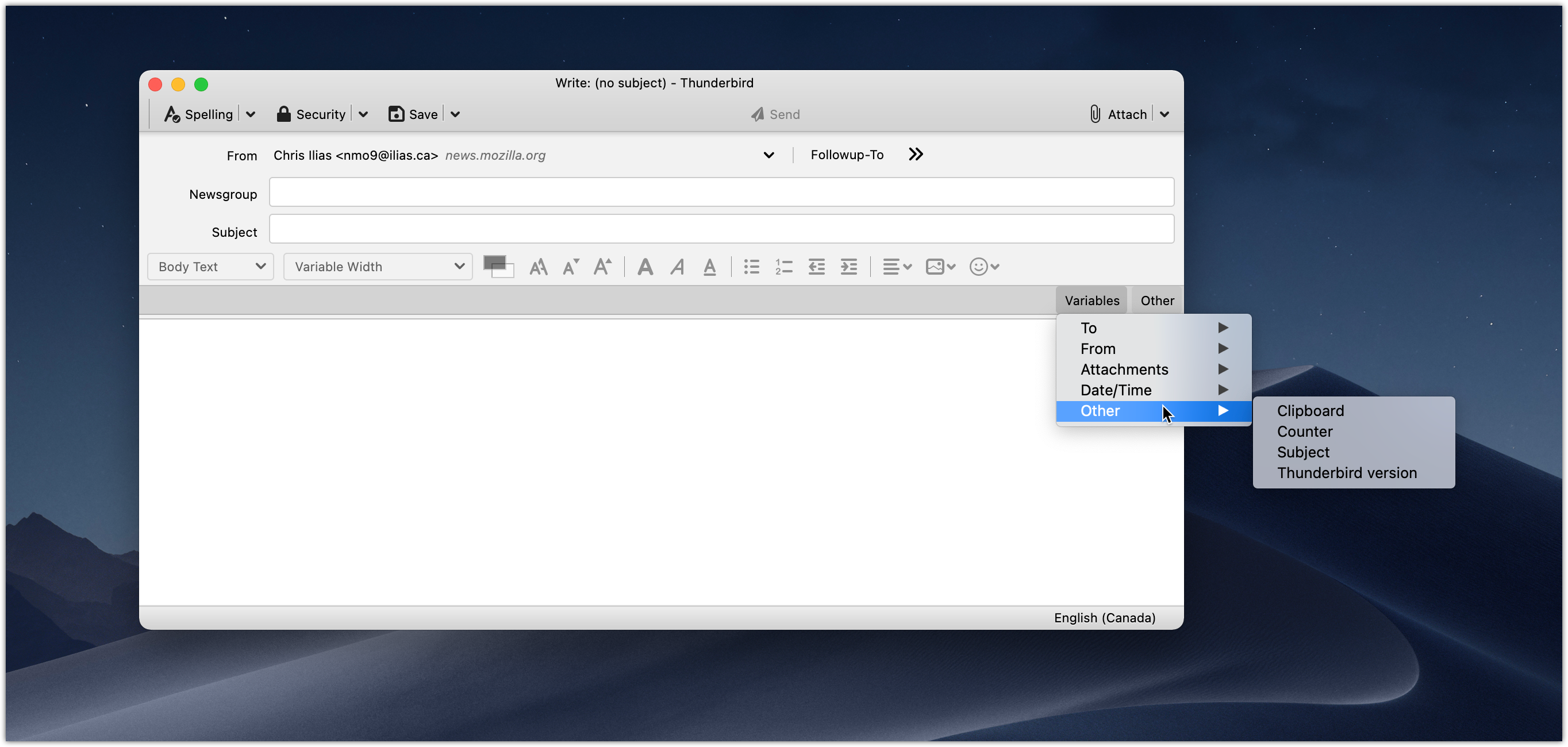
I’ve found Quicktext to be more versatile than Clippings, and have been very happy with it. You can download it from addons.thunderbird.net.
https://ilias.ca/blog/2020/11/clippings-for-thunderbird-replacement-quicktext/
TenFourFox Feature Parity Release 29 final is now available for testing (downloads, hashes, release notes). There are no additional changes from the beta except for outstanding security patches. Locale langpacks will accompany this release and should be available simultaneously on or about Monday or Tuesday (November 17 or 18) parallel to mainline Firefox.
Because of the holidays and my work schedule I'm evaluating what might land in the next release and it may be simply a routine security update only to give me some time to catch up on other things. This release would come out on or about December 15 and I would probably not have a beta unless the changes were significant. More as I make a determination.
http://tenfourfox.blogspot.com/2020/11/tenfourfox-fpr29-available.html
For a long time, rr has not been a Mozilla project in practice, so we have worked with Mozilla to move it to an independent Github organization. The repository is now at https://github.com/rr-debugger/rr. Update your git remotes!
This gives us a bit more operational flexibility for the future because we don't need Mozilla to assist in making certain kinds of Github changes.
There have been no changes in intellectual property ownership. rr contributions made by Mozilla employees and contractors remain copyrighted by Mozilla. I will always be extremely grateful for the investment Mozilla made to create rr!
For now, the owners of the rr-debugger organisation will be me (Robert O'Callahan), Kyle Huey, and Keno Fischer (of Julia fame, who has been a prolific contributor to rr).
http://robert.ocallahan.org/2020/11/rr-repository-moved-to-independent.html
Throughout 2020, Firefox users have been seeing fewer secure connection errors while browsing the Web. We’ve been improving connection errors overall for some time, and a new feature called Intermediate Certificate Authority (CA) Preloading is our latest innovation. This technique reduces connection errors that users encounter when web servers forget to properly configure their TLS security.
In essence, Firefox pre-downloads all trusted Web Public Key Infrastructure (PKI) intermediate CA certificates into Firefox via Mozilla’s Remote Settings infrastructure. This way, Firefox users avoid seeing an error page for one of the most common server configuration problems: not specifying proper intermediate CA certificates.
For Intermediate CA Preloading to work, we need to be able to enumerate every intermediate CA certificate that is part of the trusted Web PKI. As a result of Mozilla’s leadership in the CA community, each CA in Mozilla’s Root Store Policy is required to disclose these intermediate CA certificates to the multi-browser Common CA Database (CCADB). Consequently, all of the relevant intermediate CA certificates are available via the CCADB reporting mechanisms. Given this information, we periodically synthesize a list of these intermediate CA certificates and place them into Remote Settings. Currently the list contains over two thousand entries.
When Firefox receives the list for the first time (or later receives updates to the list), it enumerates the entries in batches and downloads the corresponding intermediate CA certificates in the background. The list changes slowly, so once a copy of Firefox has completed the initial downloads, it’s easy to keep it up-to-date. The list can be examined directly using your favorite JSON tooling at this URL: https://firefox.settings.services.mozilla.com/v1/buckets/security-state/collections/intermediates/records
For details on processing the records, see the Kinto Attachment plugin for Kinto, used by Firefox Remote Settings.
Certificates provided via Intermediate CA Preloading are added to a local cache and are not imbued with trust. Trust is still derived from the standard Web PKI algorithms.
Our collected telemetry confirms that enabling Intermediate CA Preloading in Firefox 68 has led to a decrease of unknown issuers errors in the TLS Handshake.
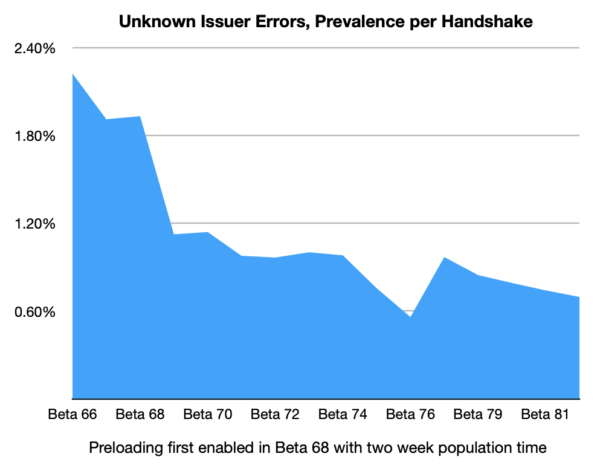
While there are other factors that affect the relative prevalence of this error, this data supports the conclusion that Intermediate CA Preloading is achieving the goal of avoiding these connection errors for Firefox users.
Intermediate CA Preloading is reducing errors today in Firefox for desktop users, and we’ll be working to roll it out to our mobile users in the future.
The post Preloading Intermediate CA Certificates into Firefox appeared first on Mozilla Security Blog.
https://blog.mozilla.org/security/2020/11/13/preloading-intermediate-ca-certificates-into-firefox/

Embroidered and put on the kitchen wall, on a mug or just as words of wisdom to bring with you in life?
https://daniel.haxx.se/blog/2020/11/13/there-is-always-a-curlopt-for-it/