Today, people have to work too hard to find what they want online, sifting through and steering clear of content, clutter and click-bait not worthy of their time. Over time, navigation on the internet has become increasingly centralized and optimized for clicks and scrolling, not for getting people to where they want to go or what they are looking for quickly.
We’d like to help change this, and we think Firefox is a good place to start.
Today we’re announcing our first step towards doing that with a new feature called Firefox Suggest.
Firefox Suggest is a new discovery feature that is built directly into the browser. Firefox Suggest acts as a trustworthy guide to the better web, surfacing relevant information and sites to help people accomplish their goals. Check it out here:
Relevant, reliable answers:
Firefox already helps people search their browsing history and tabs and use their preferred search engine directly from Firefox’s Awesome Bar.
Firefox Suggest will enhance this by including other sources of information such as Wikipedia, Pocket articles, reviews and credible content from sponsored, vetted partners and trusted organizations.
For instance, suppose someone types “Costa Rica” into the Awesome Bar, they might see a result from Wikipedia:

Firefox Suggest also contains sponsored suggestions from vetted partners. For instance, if someone types in “vans”, we might show a sponsored result for Vans shoes on eBay:

We are also developing contextual suggestions. These aim to enhance and speed up your searching experience. To deliver contextual suggestions, Firefox will need to send Mozilla new data, specifically, what you type into the search bar, city-level location data to know what’s nearby and relevant, as well as whether you click on a suggestion and which suggestion you click on.
In your control:
As always, we believe people should be in control of their web experience, so Firefox Suggest will be a customizable feature.
We’ll begin offering contextual suggestions to a percentage of people in the U.S. as an opt-in experience.

Find out more about the ways you can customize this experience here.
Unmatched privacy:
We believe online ads can work without advertisers needing to know everything about you. So when people choose to enable smarter suggestions, we will collect only the data that we need to operate, update and improve the functionality of Firefox Suggest and the overall user experience based on our Lean Data and Data Privacy Principles. We will also continue to be transparent about our data and data collection practices as we develop this new feature.
A better web.
The internet has so much to offer, and we want to help people get the best out of it faster and easier than ever before.
Firefox is the choice for people who want to experience the web as a purpose driven and independent company envisions it. We create software for people that provides real privacy, transparency and valuable help with navigating today’s internet. This is another step in our journey to build a better internet.
The post Get where you’re going faster, with Firefox Suggest appeared first on The Mozilla Blog.
Hey SUMO folks,
September is going to be the last month for Q3, so let’s see what we’ve been up to for the past quarter.
Welcome on board!
- Welcome to SUMO family for Bithiah, mokich1one, handisutrian, and Pomara'nczarz. Bithiah has been pretty active on contributing to the support forum for a while now, while Mokich1one, Handi, and Pomara'nczarz are emerging localization contributors respectively for Japanese, Bahasa Indonesia, and Polish.
Community news
- Read our post about the advanced customization in the forum and KB here and let us know if you still have any questions!
- Please join me to welcome Abby into the Customer Experience Team. Abby is our new Content Manager who will be in charge of our Knowledge Base as well as Localization effort. You can learn more about Abby soon.
- Learn more about Firefox 92 here.
- Can you imagine what’s gonna happen when we reach version 100? Learn more about the experiment we’re running in Firefox Nightly here and see how you can help!
- Are you a fan of Firefox Focus? Join our foxfooding campaign for focus that is coming. You can learn more about the campaign here.
- No Kitsune update for this month. Check out SUMO Engineering Board instead to see what the team is currently doing.
Community call
- Watch the monthly community call if you haven’t. Learn more about what’s new in August!
- Reminder: Don’t hesitate to join the call in person if you can. We try our best to provide a safe space for everyone to contribute. You’re more than welcome to lurk in the call if you don’t feel comfortable turning on your video or speaking up. If you feel shy to ask questions during the meeting, feel free to add your questions on the contributor forum in advance, or put them in our Matrix channel, so we can address them during the meeting.
Community stats
KB
KB pageviews (*)
* KB pageviews number is a total of KB pageviews for /en-US/ only
| Month | Page views | Vs previous month |
| Aug 2021 | 8,462,165 | +2.47% |
Top 5 KB contributors in the last 90 days:
KB Localization
Top 10 locale based on total page views
| Locale | Aug 2021 pageviews (*) | Localization progress (per Sep, 7)(**) |
| de | 8.57% | 99% |
| zh-CN | 6.69% | 100% |
| pt-BR | 6.62% | 63% |
| es | 5.95% | 44% |
| fr | 5.43% | 91% |
| ja | 3.93% | 57% |
| ru | 3.70% | 100% |
 The next “Cross Team Collaboration Fun Times” (CTCFT) meeting will take place next Monday, on 2021-09-20 (in your time zone)! This post covers the agenda. You’ll find the full details (along with a calendar event, zoom details, etc) on the CTCFT website.
Agenda
- Announcements
- Interest group panel discussion
We’re going to try something a bit different this time! The agenda is going to focus on Rust interest groups and domain working groups, those brave explorers who are trying to put Rust to use on all kinds of interesting domains. Rather than having fixed presentations, we’re going to have a panel discussion with representatives from a number of Rust interest groups and domain groups, led by AngelOnFira. The idea is to open a channel for communication about how to have more active communication and feedback between interest groups and the Rust teams (in both directions).
Afterwards: Social hour
After the CTCFT this week, we are going to try an experimental social hour. The hour will be coordinated in the #ctcft stream of the rust-lang Zulip. The idea is to create breakout rooms where people can gather to talk, hack together, or just chill.
http://smallcultfollowing.com/babysteps/blog/2021/09/15/ctcft-2021-09-20-agenda/
Introduction
Firefox Suggest is a new feature that displays direct links to content on the web based on what users type into the Firefox address bar. Some of the content that appears in these suggestions is provided by partners, and some of the content is sponsored.
In building Firefox Suggest, we have followed our long-standing Lean Data Practices and Data Privacy Principles. Practically, this means that we take care to limit what we collect, and to limit what we pass on to our partners. The behavior of the feature is straightforward–suggestions are shown as you type, and are directly relevant to what you type.
We take the security of the datasets needed to provide this feature very seriously. We pursue multi-layered security controls and practices, and strive to make as much of our work as possible publicly verifiable.
In this post, we wanted to give more detail about what data is needed to provide this feature, and about how we handle it.
Changes with Firefox Suggest
The address bar experience in Firefox has long been a blend of results provided by partners (such as the user’s default search provider) and information local to the client (such as recently visited pages). For the first time, Firefox Suggest augments these data sources with search completions from Mozilla.

In its current form, Firefox Suggest compares searches against a list of allowed terms that is local to the client. When the search text matches a term on the allowed list, a completion suggestion may be shown alongside the local and default search engine suggestions.
Data Collected by Mozilla
Mozilla collects the following information to power Firefox Suggest when users have opted in to contextual suggestions.
- Search queries and suggest impressions: Firefox Suggest sends Mozilla search terms and information about engagement with Firefox Suggest, some of which may be shared with partners to provide and improve the suggested content.
- Clicks on suggestions: When a user clicks on a suggestion, Mozilla receives notice that suggested links were clicked.
- Location: Mozilla collects city-level location data along with searches, in order to properly serve location-sensitive queries.
How Data is Handled and Shared
Mozilla approaches handling this data conservatively. We take care to remove data from our systems as soon as it’s no longer needed. When passing data on to our partners, we are careful to only provide the partner with the minimum information required to serve the feature.
A specific example of this principle in action is the search’s location. The location of a search is derived from the Firefox client’s IP address. However, the IP address can identify a person far more precisely than is necessary for our purposes. We therefore convert the IP address to a more general location immediately after we receive it, and we remove the IP address from all datasets and reports downstream. Access to machines and (temporary, short-lived) datasets that might include the IP address is highly restricted, and limited only to a small number of administrators. We don’t enable or allow analysis on data that includes IP addresses.
We’re excited to be bringing Firefox Suggest to you. See the product announcement to learn more!
https://blog.mozilla.org/data/2021/09/15/data-and-firefox-suggest/
Firefox 92 is out. Alongside some solid DOM and CSS improvements, the most interesting bug fix I noticed was a patch for open alerts slowing down other tabs in the same process. In the absence of a JIT we rely heavily on Firefox's multiprocessor capabilities to make the most of our multicore beasts, and this apparently benefits (among others, but in particular) the Google sites we unfortunately have to use in these less-free times. I should note for the record that on this dual-8 Talos II (64 hardware threads) I have dom.ipc.processCount modestly increased to 12 from the default of 8 to take a little more advantage of the system when idle, which also takes down fewer tabs in the rare cases when a content process bombs out. The delay in posting this was waiting for the firefox-appmenu patches, but I decided to just build it now and add those in later. The .mozconfigs and LTO-PGO patches are unchanged from Firefox 90/91.
Meanwhile, in OpenPOWER JIT progress, I'm about halfway through getting the Wasm tests to pass, though I'm currently hung up on a memory corruption bug while testing Wasm garbage collection. It's our bug; it doesn't happen with the C++ interpreter, but unfortunately like most GC bugs it requires hitting it "just right" to find the faulty code. When it all passes, we'll pull everything up to 91ESR for the MVP, and you can try building it. If you want this to happen faster, please pitch in and help.
The post Feel good when you get online with Firefox appeared first on The Mozilla Blog.
https://blog.mozilla.org/en/videos/feel-good-when-you-get-online-with-firefox/
March 2020 brought to the world a scenario we only imagined possible in dystopian novels. Once bustling cities and towns were desolate. In contrast, the highways and byways of the internet were completely congested with people grasping for human connection, and internet friends became more important than ever.
Since then, there have been countless discussions about how people have fared with keeping in touch with others during the COVID-19 pandemic — like how families have endured while being separated by continents without the option to travel, and how once solid friendships have waxed and waned without brunches and cocktail hours.
However, the internet has served more like a proverbial town square than ever before, with many having found themselves using online spaces to create and cultivate internet friends more over the last year and a half than ever before. As the country starts hesitantly opening, the looming question overall is, what will these online relationships look like when COVID-19 is no more?
For Will F. Coakley, a deputy constable from Austin, Texas, the highs of her online friend groups she made on Zoom and Marco Polo have already dissipated.
“My COVID circle is no more,” she said. “I’m 38, so people my age often have spouses and children.”
Coakley found online platforms to be a refreshing reprieve from her demanding profession that served at the frontlines of the pandemic. Just as she was getting accustomed to ‘the new normal,’ her routines once again changed, with many online friends falling out of touch as cities and towns began to experiment with opening.
Coakley has not met anyone from her COVID circle in person, and any further communication is uncertain, boding even worse than the potential dissolutions of real-life friendships reported on throughout the year.
“In a perfect world, we would hope that things opening up would mean that you could start to meet up with your online friends in person. However, many people will experience a transition in their social circle as they start allocating more of their emotional resources to in-person interactions.” said Kyler Shumway, PsyD, a clinical psychologist and author of The Friendship Formula: How to Say Goodbye to Loneliness and Discover Deeper Connection. “You may spend less time with your online people and more time with coworkers, friends, and family that are in your immediate area.”
Looking back, many social apps themselves similarly spiked during the time of the lockdown and are now seeing use fall. The invite-only, social networking app Clubhouse launched in March 2020. It quickly gained popularity amid the height of the pandemic, having amassed 600,000 registered users by December 2020 and 8.1 million downloads by mid- February 2021.
The original fervor over Clubhouse has waned as fewer people are cooped up indoors. While many people still use the platform for various professional purposes or niche hobbies, its day-to-day usership has dropped significantly.
Olivia B. Othman, 38, a Project Assistant in Wuppertal, Germany developed friendships online during the pandemic through Clubhouse as well as through a local app called Spontacts. She has been able to meet people in person as her area has begun to open and said she found the experience to be liberating.
While Othman already had experience with developing close personal relationships online, the pandemic prompted a unique perspective for her, encouraging her to invest in new devices for better communication.
Overall, she has fared well with sustaining her online friendships.
“I have dropped some [people] but also found good people among them,” Othman said.
Othman wasn’t alone in turning to apps for friendship and human connection. Facebook and Instagram were among the most downloaded apps in 2020, according to the Business of Apps. Facebook had 2.85 billion monthly active users as of the first quarter of 2021, compared to 2.60 billion during the first quarter of 2020. While Instagram went from 1 billion monthly active users in the first quarter of 2020 to 1.07 billion monthly active users as of the first quarter of 2021. And Twitter grew from 186 million users to 199 million users since the pandemic started, according to Twitter’s first quarter earnings report..
Apps such as TikTok and YouTube were popular outlets for creating online friendship in 2020; however, their potential
The Rust team is happy to announce a new version of Rust, 1.55.0. Rust is a programming language empowering everyone to build reliable and efficient software.
If you have a previous version of Rust installed via rustup, getting Rust 1.55.0 is as easy as:
rustup update stable
If you don't have it already, you can get rustup
from the appropriate page on our website, and check out the
detailed release notes for 1.55.0 on GitHub.
What's in 1.55.0 stable
Cargo deduplicates compiler errors
In past releases, when running cargo test, cargo check --all-targets, or similar commands which built the same Rust crate in multiple configurations, errors and warnings could show up duplicated as the rustc's were run in parallel and both showed the same warning.
For example, in 1.54.0, output like this was common:
$ cargo +1.54.0 check --all-targets
    Checking foo v0.1.0
warning: function is never used: `foo`
 --> src/lib.rs:9:4
  |
9 | fn foo() {}
  |    ^^^
  |
  = note: `#[warn(dead_code)]` on by default

warning: 1 warning emitted

warning: function is never used: `foo`
 --> src/lib.rs:9:4
  |
9 | fn foo() {}
  |    ^^^
  |
  = note: `#[warn(dead_code)]` on by default

warning: 1 warning emitted

    Finished dev [unoptimized + debuginfo] target(s) in 0.10s
In 1.55, this behavior has been adjusted to deduplicate and print a report at the end of compilation:
$ cargo +1.55.0 check --all-targets
    Checking foo v0.1.0
warning: function is never used: `foo`
 --> src/lib.rs:9:4
  |
9 | fn foo() {}
  |    ^^^
  |
  = note: `#[warn(dead_code)]` on by default

warning: `foo` (lib) generated 1 warning
warning: `foo` (lib test) generated 1 warning (1 duplicate)
    Finished dev [unoptimized + debuginfo] target(s) in 0.84s
Faster, more correct float parsing
The standard library's implementation of float parsing has been updated to use the Eisel-Lemire algorithm, which brings both speed improvements and improved correctness. In the past, certain edge cases failed to parse, and this has now been fixed.
You can read more details on the new implementation in the pull request description.
std::io::ErrorKind variants updated
std::io::ErrorKind is a #[non_exhaustive] enum that classifies errors into portable categories, such as NotFound or WouldBlock. Rust code that has a std::io::Error can call the kind method to obtain a std::io::ErrorKind and match on that to handle a specific error.
Not all errors are categorized into ErrorKind values; some are left uncategorized and placed in a catch-all variant. In previous versions of Rust, uncategorized errors used ErrorKind::Other; however, user-created std::io::Error values also commonly used ErrorKind::Other. In 1.55, uncategorized errors now use the internal variant ErrorKind::Uncategorized, which we intend to leave hidden and never available for stable Rust code to name explicitly; this leaves ErrorKind::Other exclusively for constructing std::io::Error values that don't come from the standard library. This enforces the #[non_exhaustive] nature of ErrorKind.
Rust code should never match ErrorKind::Other and expect any particular underlying error code; only match ErrorKind::Other if you're catching a constructed std::io::Error that uses that error kind. Rust code matching on
Release time comes around so quickly! This month we have quite a few CSS updates, along with the new Object.hasOwn() static method for JavaScript.
This blog post provides merely a set of highlights; for all the details, check out the following:
CSS Updates
A couple of CSS features have moved from behind a preference and are now available by default: accent-color and size-adjust.
accent-color
The accent-color CSS property sets the color of an element’s accent. Accents appear in elements such as a checkbox or radio input. It’s default value is auto which represents a UA-chosen color, which should match the accent color of the platform. You can also specify a color value. Read more about the accent-color property here.
size-adjust
The size-adjust descriptor for @font-face takes a percentage value which acts as a multiplier for glyph outlines and metrics. Another tool in the CSS box for controlling fonts, it can help to harmonize the designs of various fonts when rendered at the same font size. Check out some examples on the size-adjust descriptor page on MDN.
And more…
Along with both of those, the break-inside property now has support for values avoid-page and avoid-column, the font-size-adjust property accepts two values and if that wasn’t enough system-ui as a generic font family name for the font-family property is now supported.
font-size-adjust property on MDN
Object.hasOwn arrives
A nice addition to JavaScript is the Object.hasOwn() static method. This returns true if the specified property is a direct property of the object (even if that property’s value is null or undefined). false is returned if the specified property is inherited or not declared. Unlike the in operator, this method does not check for the specified property in the object’s prototype chain.
Object.hasOwn() is recommended over Object.hasOwnProperty() as it works for objects created using Object.create(null) and with objects that have overridden the inherited hasOwnProperty() method.
Read more about Object.hasOwn() on MDN
The post Time for a review of Firefox 92 appeared first on Mozilla Hacks - the Web developer blog.
https://hacks.mozilla.org/2021/09/time-for-a-review-of-firefox-92/
It's been a long while since I wrote Mozilla: 1 year review. I hit my 10-year "Moziversary" as an employee on September 6th. I was hired in a "doubling" period of Mozilla, so there are a fair number of people who are hitting 10 year anniversaries right now. It's interesting to see that even though we're all at the same company, we had different journeys here.
I started out as a Software Engineer or something like that. Then I was promoted to Senior Software Engineer and then Staff Software Engineer. Then last week, I was promoted to Senior Staff Software Engineer. My role at work over time has changed significantly. It was a weird path to get to where I am now, but that's probably a topic for another post.
I've worked on dozens of projects in a variety of capacities. Here's a handful of the ones that were interesting experiences in one way or another:
SUMO (support.mozilla.org): Mozilla's support site
Input: Mozilla's feedback site, user sentiment analysis, and Mozilla's initial experiments with Heartbeat and experiments platforms
MDN Web Docs: documentation, tutorials, and such for web standards
Mozilla Location Service: Mozilla's device location query system
Buildhub and Buildhub2: index for build information
Socorro: Mozilla's crash ingestion pipeline for collecting, processing, and analyzing crash reports for Mozilla products
Tecken: Mozilla's symbols server for uploading and downloading symbols and also symbolicating stacks
Standup: system for reporting and viewing status
FirefoxOS: Mozilla's mobile operating system
I also worked on a bunch of libraries and tools:
siggen: library for generating crash signatures using the same algorithm that Socorro uses (Python)
Everett: configuration library (Python)
Markus: metrics client library (Python)
Bleach: sanitizer for user-provided text for use in an HTML context (Python)
ElasticUtils: Elasticsearch query DSL library (Python)
mozilla-django-oidc: OIDC authentication for Django (Python)
Puente: convenience library for using gettext strings in Django (Python)
crashstats-tools: command line tools for accessing Socorro APIs (Python)
rob-bugson: Firefox addon that adds Bugzilla links to GitHub PR pages (JS)
paul-mclendahand: tool for combining GitHub PRs into a single branch (Python)
Dennis: gettext translated strings linter (Python)
I was a part of things:
Soloists
Data steward for crash data
Mozilla Open Source Support: I served on the Foundational Technology grant committee
I've given a few presentations 1:
Dennis Dubstep translation (2013)
Tecken Overview (2020)
Hello and welcome to another issue of This Week in Rust! Rust is a programming language empowering everyone to build reliable and efficient software. This is a weekly summary of its progress and community. Want something mentioned? Tweet us at @ThisWeekInRust or send us a pull request. Want to get involved? We love contributions.
This Week in Rust is openly developed on GitHub. If you find any errors in this week's issue, please submit a PR.
Updates from Rust Community
Official
- [Inside] Splitting the const generics features
- [Inside] 1.55.0 pre-release testing
Newsletters
Project/Tooling Updates
- rust-analyzer Changelog #93
- This week in Fluvio #5: the programmable streaming platform
- rustc_codegen_gcc: Progress Report #3
- This week in Datafuse #6
- Announcing Relm4 v0.1
- SixtyFPS (GUI crate) weekly report for 6th of September 2021
Observations/Thoughts
- Why Rust for offensive security
- Had a blast porting one of my serverless applications from Go to Rust - some things I learned
- Broken Encapsulation
- Faster Top Level Domain Name Extraction with Rust
- Rust programs written entirely in Rust
- Fast Rust Builds
- Virtual Machine Dispatch Experiments in Rust
- Rust Verification Tools - Retrospective
- How to avoid lifetime annotations in Rust (and write clean code)
- Using SIMD acceleration in Rust to create the world's fastest
tac - Overview of the Rust cryptography ecosystem
- Rustacean Principles
- Writing software that's reliable enough for production
- Plugins in Rust: Getting Started
- A Gopher's Foray into Rust
- Building a reliable and tRUSTworthy web service
- [audio] The Rustacean Station Podcast - Rust in cURL
Rust Walkthroughs
(“This Week in Glean” is a series of blog posts that the Glean Team at Mozilla is using to try to communicate better about our work. They could be release notes, documentation, hopes, dreams, or whatever: so long as it is inspired by Glean.) All “This Week in Glean” blog posts are listed in the TWiG index).
At Mozilla we put a lot of stock in Openness. Source? Open. Bug tracker? Open. Discussion Forums (Fora?)? Open (synchronous and asynchronous).
We also have an open process for determining if a new or expanded data collection in a Mozilla project is in line with our Privacy Principles and Policies: Data Review.
Basically, when a new piece of instrumentation is put up for code review (or before, or after), the instrumentor fills out a form and asks a volunteer Data Steward to review it. If the instrumentation (as explained in the filled-in form) is obviously in line with our privacy commitments to our users, the Data Steward gives it the go-ahead to ship.
(If it isn’t _obviously_ okay then we kick it up to our Trust Team to make the decision. They sit next to Legal, in case you need to find them.)
The Data Review Process and its forms are very generic. They’re designed to work for any instrumentation (tab count, bytes transferred, theme colour) being added to any project (Firefox Desktop, mozilla.org, Focus) and being collected by any data collection system (Firefox Telemetry, Crash Reporter, Glean). This is great for the process as it means we can use it and rely on it anywhere.
It isn’t so great for users _of_ the process. If you only ever write Data Reviews for one system, you’ll find yourself answering the same questions with the same answers every time.
And Glean makes this worse (better?) by including in its metrics definitions almost every piece of information you need in order to answer the review. So now you get to write the answers first in YAML and then in English during Data Review.
But no more! Introducing glean_parser data-review and mach data-review: command-line tools that will generate for you a Data Review Request skeleton with all the easy parts filled in. It works like this:
- Write your instrumentation, providing full information in the metrics definition.
- Call
python -m glean_parser data-review(ormach data-reviewif you’re adding the instrumentation to Firefox Desktop). - glean_parser will parse the metrics definitions files, pull out only the definitions that were added or changed in , and then output a partially-filled-out form for you.
Here’s an example. Say I’m working on bug 1664461 and add a new piece of instrumentation to Firefox Desktop:
fog.ipc:
  replay_failures:
    type: counter
    description: |
      The number of times the ipc buffer failed to be replayed in the
      parent process.
    bugs:
      - https://bugzilla.mozilla.org/show_bug.cgi?id=1664461
    data_reviews:
      - https://bugzilla.mozilla.org/show_bug.cgi?id=1664461
    data_sensitivity:
      - technical
    notification_emails:
      - chutten@mozilla.com
      - glean-team@mozilla.com
    expires: never
I’m sure to fill in the `bugs` field correctly (because that’s important on its own _and_ it’s what glean_parser data-review uses to find which data I added), and have categorized the data_sensitivity. I also included a helpful description. (The data_reviews field currently points at the bug I’ll attach the Data Review Request for. I’d better remember to come back before I land
(“This Week in Glean” is a series of blog posts that the Glean Team at Mozilla is using to try to communicate better about our work. They could be release notes, documentation, hopes, dreams, or whatever: so long as it is inspired by Glean.) All “This Week in Glean” blog posts are listed in the TWiG index).
At Mozilla we put a lot of stock in Openness. Source? Open. Bug tracker? Open. Discussion Forums (Fora?)? Open (synchronous and asynchronous).
We also have an open process for determining if a new or expanded data collection in a Mozilla project is in line with our Privacy Principles and Policies: Data Review.
Basically, when a new piece of instrumentation is put up for code review (or before, or after), the instrumentor fills out a form and asks a volunteer Data Steward to review it. If the instrumentation (as explained in the filled-in form) is obviously in line with our privacy commitments to our users, the Data Steward gives it the go-ahead to ship.
(If it isn’t _obviously_ okay then we kick it up to our Trust Team to make the decision. They sit next to Legal, in case you need to find them.)
The Data Review Process and its forms are very generic. They’re designed to work for any instrumentation (tab count, bytes transferred, theme colour) being added to any project (Firefox Desktop, mozilla.org, Focus) and being collected by any data collection system (Firefox Telemetry, Crash Reporter, Glean). This is great for the process as it means we can use it and rely on it anywhere.
It isn’t so great for users _of_ the process. If you only ever write Data Reviews for one system, you’ll find yourself answering the same questions with the same answers every time.
And Glean makes this worse (better?) by including in its metrics definitions almost every piece of information you need in order to answer the review. So now you get to write the answers first in YAML and then in English during Data Review.
But no more! Introducing glean_parser data-review and mach data-review: command-line tools that will generate for you a Data Review Request skeleton with all the easy parts filled in. It works like this:
- Write your instrumentation, providing full information in the metrics definition.
- Call
python -m glean_parser data-review(ormach data-reviewif you’re adding the instrumentation to Firefox Desktop). - glean_parser will parse the metrics definitions files, pull out only the definitions that were added or changed in , and then output a partially-filled-out form for you.
Here’s an example. Say I’m working on bug 1664461 and add a new piece of instrumentation to Firefox Desktop:
fog.ipc:
  replay_failures:
    type: counter
    description: |
      The number of times the ipc buffer failed to be replayed in the
      parent process.
    bugs:
      - https://bugzilla.mozilla.org/show_bug.cgi?id=1664461
    data_reviews:
      - https://bugzilla.mozilla.org/show_bug.cgi?id=1664461
    data_sensitivity:
      - technical
    notification_emails:
      - chutten@mozilla.com
      - glean-team@mozilla.com
    expires: never
I’m sure to fill in the `bugs` field correctly (because that’s important on its own _and_ it’s what glean_parser data-review uses to find which data I added), and have categorized the data_sensitivity. I also included a helpful description. (The data_reviews field currently points at the bug I’ll attach the Data Review Request for. I’d better remember to come
TenFourFox Feature Parity Release 32 Security Parity Release 4 "32.4" is available for testing (downloads, hashes). There are, as before, no changes to the release notes nor anything notable about the security patches in this release. Assuming no major problems, FPR32.4 will go live Monday evening Pacific time as usual. The final official build FPR32.5 remains scheduled for October 5, so we'll do a little look at your options should you wish to continue building from source after that point later this month.
http://tenfourfox.blogspot.com/2021/09/tenfourfox-fpr32-spr4-available.html
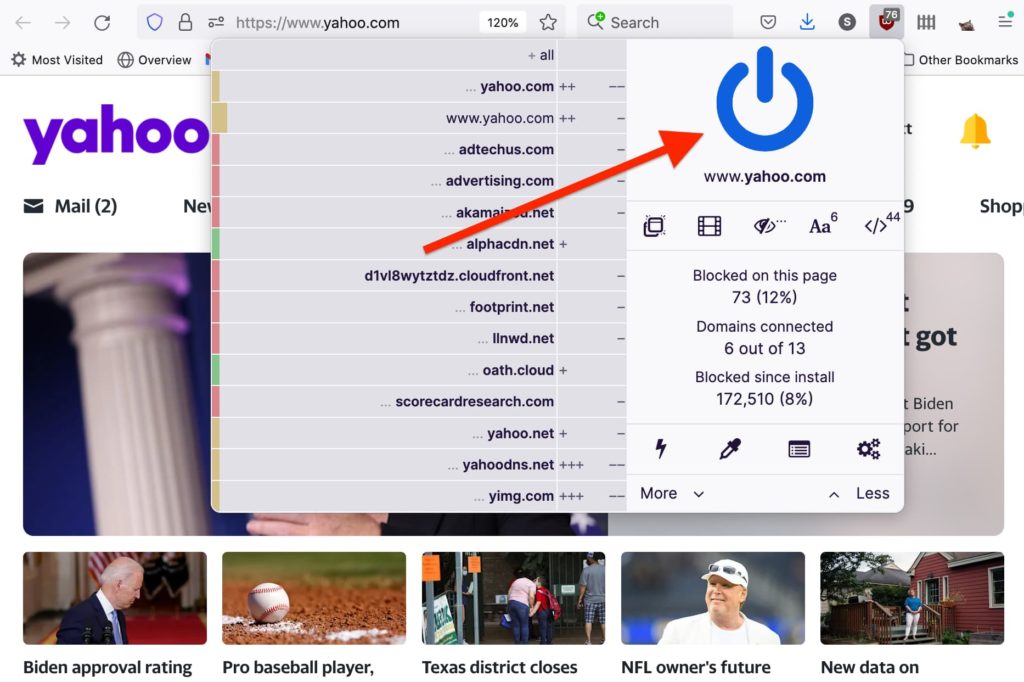
Rare is the browser extension that can satisfy both passive and power users. But that’s an essential part of uBlock Origin’s brilliance—it is an ad blocker you could recommend to your most tech forward friend as easily as you could to someone who’s just emerged from the jungle lost for the past 20 years.
If you install uBlock Origin and do nothing else, right out of the box it will block nearly all types of internet advertising—everything from big blinking banners to search ads and video pre-rolls and all the rest. However if you want extremely granular levels of content control, uBlock Origin can accommodate via advanced settings.
We’ll try to split the middle here and walk through a few of the extension’s most intriguing features and options…
Does using uBlock Origin actually speed up my web experience?
Yes. Not only do web pages load faster because the extension blocks unwanted ads from loading, but uBlock Origin utilizes a uniquely lightweight approach to content filtering so it imposes minimal impact on memory consumption. It is generally accepted that uBlock Origin offers the most performative speed boost among top ad blockers.
But don’t ad blockers also break pages?
Occasionally that can occur, where a page breaks if certain content is blocked or some websites will even detect the presence of an ad blocker and halt passage.
Fortunately this doesn’t happen as frequently with uBlock Origin as it might with other ad blockers and the extension is also extremely effective at bypassing anti-ad blockers (yes, an ongoing battle rages between ad tech and content blocking software). But if uBlock Origin does happen to break a page you want to access it’s easy to turn off content blocking for specific pages you trust or perhaps even want to see their ads.
Show us a few tips & tricks
Let’s take a look at some high level settings and what you can do with them.
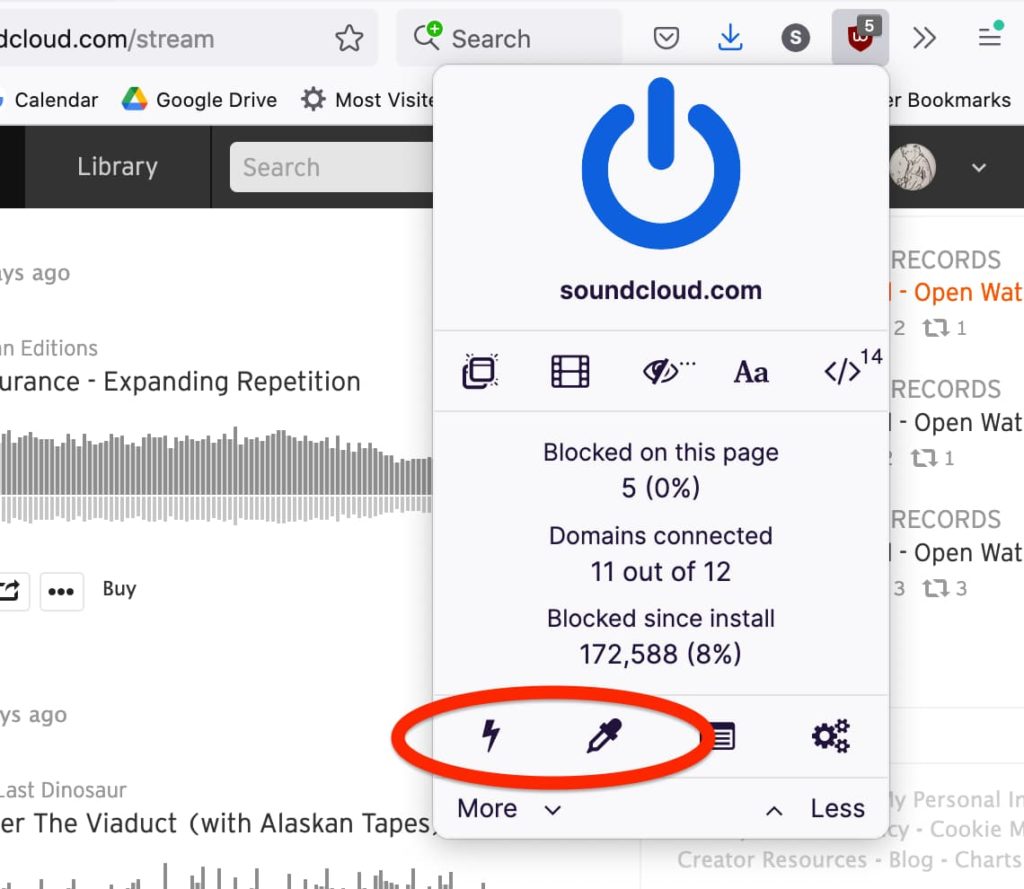
- Lightning bolt button enables Element Zapper, which lets you temporarily remove page elements by simply mousing over them and clicking. For example, this is convenient for removing embedded gifs or for hiding disturbing images you may encounter in some news articles.
- Eye dropper button enables Element Picker, which lets you permanently remove page elements. For example, if you find Facebook Stories a complete waste of time, just activate Element Picker, mouse over/click the Stories section of the page, select “Create” and presto—The End of Facebook Stories.
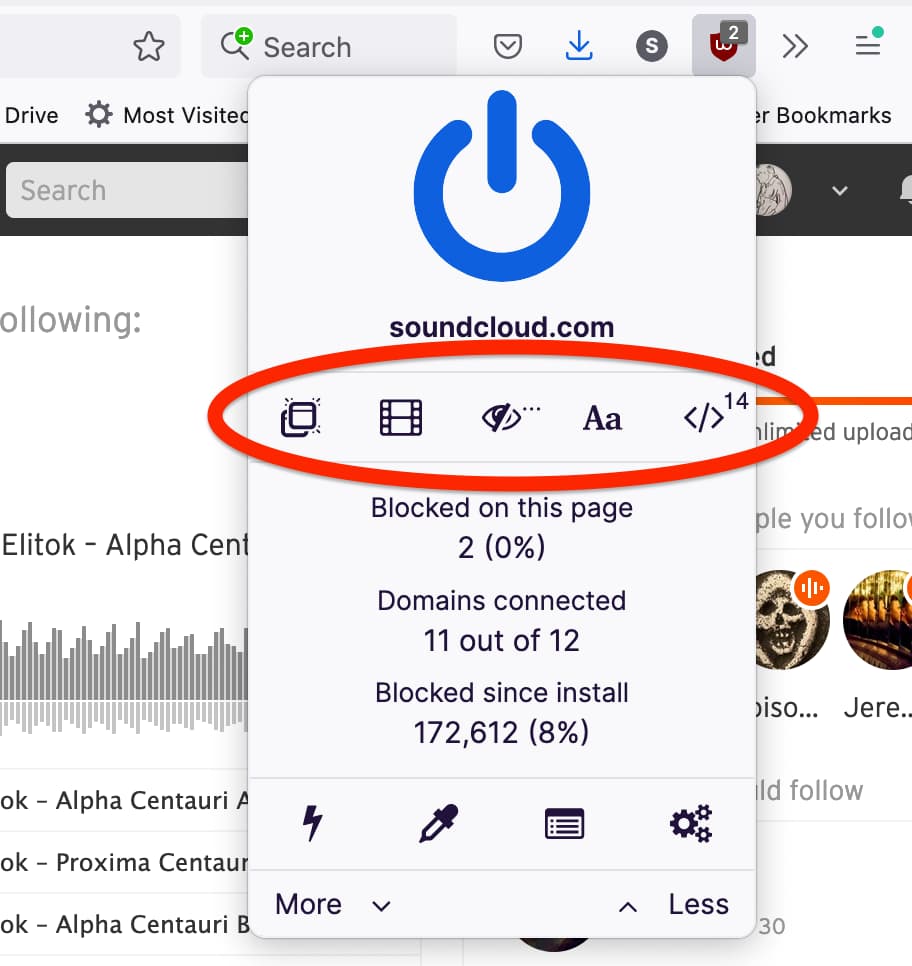
The five buttons on this row will only affect the page you’re on.
- Pop-up button blocks—you guessed it—pop-ups
- Film button blocks large media elements like embedded video, audio, or images
- Eye slash button disables cosmetic filtering, which is on by default and elegantly reformats your pages when ads are removed, but if you’d prefer to see pages laid out as they were intended (with just empty spaces instead of ads) then you have that option
- “Aa” button blocks remote fonts from loading on the page
- “>” button disables JavaScript on the page
Does uBlock Origin protect against malware?
In addition to using various advertising block lists, uBlock Origin also leverages potent lists of known malware sources, so it automatically blocks those for you as well. To be clear, there is no software that can offer 100% malware protection, but it doesn’t hurt to give yourself enhanced protections like this.
All of the content block lists are actively maintained by volunteers who believe in the mission of providing users with more choice and control over the content they see online. “uBlock Origin stands uncompromisingly for all users’ best interests, it’s not monetized, and its development and maintenance is driven only by volunteers who share the same view,” says uBlock Origin founder and developer Raymond Hill. “As long as I am the maintainer of [uBlock Origin], this will not change.”
We