I should probably note here that November 20 was my last day as a Mozilla employee. In theory, that shouldn't really change much, given the open-source nature of Mozilla. In practice, of course, it does. I did successfully set up a non-staff account and migrate things to that, so I still retain some level of access. I intend to continue contributing; however, my contributions will likely be restricted to things that don't require paging in huge chunks of code, or require large chunks of time. In other words, mostly cleanup-type stuff, or smaller bugfixes/enhancements.
I still believe that the Mozilla mission to make the Internet healthier is important, but over the course of the past year, I've come to realize that there are other problems facing society are perhaps more important and fundamental. That, combined with more companies opening up remote positions, provided me with an opportunity that I decided to take. In January, I'll be starting work on the Cash App Platform team at Square, and hopefully will be able to help them move the needle on economic empowerment.
Working at Mozilla was in many ways a dream come true. It was truly an honour to work alongside so many world-class engineers, on so many different problems. I'm going to miss it, for sure, but I am also excited to see what the future holds.
A final note: if you follow this blog via Planet Mozilla, keep in mind that only posts I tag as "mozilla" show up there, and those posts will be much fewer in number going forward (not that they were particularly numerous before...). I have an RSS feed (yes, RSS is still a thing) if you care to follow that.
There is a lot happening in 2020 even when the world we live in right now has changed dramatically in just a year. Amidst all that, I feel even more grateful that the passion in our community remains despite all the internal changes in the organization and as we take our time to rearrange the pieces back, and refocus our lenses in order to welcome 2021.
I want to take this opportunity to reflect back and celebrate what we have accomplished together in 2020:
H1: Transition to Conversocial and get the community strategy project off the ground
We begin our journey in Berlin this year for our last all hands before the world goes into the state we are right now. The discussion at that time has also helped us to shape the community strategy project which we’ve been working on since the end of 2019. We also moved our main communication to Matrix, We received a lot of positive feedback during the transition period which made us confident for the full transition. We also managed to move our Social Support platform from Buffer Reply to Conversocial in March.
We’ve done a lot of progress on the onboarding project too, as part of the community strategy project. Now we have the design and the copy ready for implementation, which still needs to be scheduled.
H2: Intoruducing Play Store Support officially and getting the base metrics agreed
In Q3, we focused our efforts to helped the mobile team to transition from Fennec to Fenix. And we use the rest of the year to work on the remaining areas from the community strategy project that we have re-evaluated. One of the most important piece is the base metrics for the community which I can’t wait to share with you the beginning of next year. On top of that, I’m also putting together a plan to leverage this page as a guidelines center for the contributors moving forward.
Recently, we’ve also managed to do an experiment on tagging on the support forum. This is a small experiment that serves as a stepping stone for the larger tagging strategy project that we will be working on as a team for the next year.
—
I want also to acknowledge how difficult 2020 was. “Difficult” is probably not even the right word. Despite the combination of uncertainty, various turmoil, frustration, that we experienced, I’m grateful that we could remain focus and accomplished all of these things together.
Thank you is barely enough to express how grateful we are for all the contributions, discussion, ideas, and feedback that we shared through the year 2020. But nevertheless, thank you for always believing and being part of Mozilla’s mission.
Let’s keep on rocking the free web through 2021 and beyond!
Kiki
https://blog.mozilla.org/sumo/2020/12/18/sumo-updates-looking-back-on-2020/
(“This Week in Glean” is a series of blog posts that the Glean Team at Mozilla is using to try to communicate better about our work. They could be release notes, documentation, hopes, dreams, or whatever: so long as it is inspired by Glean.)
All “This Week in Glean” blog posts are listed in the TWiG index (and on the Mozilla Data blog).
A year ago the Glean project was different. We had just released Glean v22.1.0 and Fenix (aka Firefox for Android aka Firefox Daylight) was not released yet, Project FOG was just an idea for the year to come.
2020 changed that, but 2020 changed a lot. What didn’t change was my main assignment: I kept working all throughout the year on the Glean SDK, fixing bugs, expanding its capabilities, enabling more platforms and integrating it into more products. Of course this was only possible because the whole team did that as well.
In September I took over the tech lead role for the SDK from Alessio. One part of this role includes thinking bigger and sketching out the future for the Glean SDK.
Let’s look at this future and what ideas we have for 2021.
(One note: right now these are ideas more than a plan. It neither includes a timeline nor does it include all the other things maintenance includes.)
The vision
The Glean SDK is a fully self-servable telemetry SDK, usable across different platforms. It enables product owners and engineers to instrument their products and rely on their data collection, while following Mozilla policies & privacy standards.
The ideas
In the past weeks I started a list of things I want the Glean SDK to do next. This is a short and incomplete list of not-yet-proposed or accepted ideas. For 2021 we will need to fit this in with the larger Glean project, including plans and ideas for the pipeline and tooling. Oh, and I need to talk with my team to actually decide on the plan and allocate who does what when.
Metric types
When we set out to revamp our telemetry system we build it with the idea of offering higher-level metric types, that give more meaning to individual data points, allowing more correct data collection and better aggregation, analysis and visualisation of this data. We’re not there yet. We currently support more than a dozen metric types across all platforms equally, with the same user-friendly APIs in all supported languages. We also know that this still does not cover all intended use cases that, for example, Firefox Desktop wants. In 2021 we will probably need to work on a few more types, better ergonomics and especially documentation on when which metric type is appropriate.
Revamped testing APIs
Engineers should instrument their code where appropriate and use the collected data to analysis behavior and performance in the wild. The Glean SDK ensures their data is reliably collected and sent to our pipeline. But we cannot ensure that the way the data is collected is correct or whether the metric even makes sense. That’s why we encourage that each metric recording is accompanied by tests to ensure data is collected under the right circumstances and that its the right data under the given test case. Only that way folks will be able to verify and analyse the incoming data later and rely on their results.
The available testing APIs in the Glean SDK provide a bare minimum. For each metric type one can check which data it currently holds. That’s probably easy to validate for simpler metrics such as strings, booleans and counters, but as soon as you have more complex one like any of the distributions or a timespan it gets a bit more complex. Additionally we offer a way to check if any errors occured during recording, which are usually also reported in the data. But here again developers need to know which errors can happen under what circumstances for which metric type.
And at last we want developers to reach for custom pings when the default pings are not sufficient. Testing these is currently near impossible.
Testing these different usages of the SDK can and should be improved. We already have the first proposals and bugs for this:
(“This Week in Glean” is a series of blog posts that the Glean Team at Mozilla is using to try to communicate better about our work. They could be release notes, documentation, hopes, dreams, or whatever: so long as it is inspired by Glean.)
All "This Week in Glean" blog posts are listed in the TWiG index (and on the Mozilla Data blog). This article is cross-posted on the Mozilla Data blog.
A year ago the Glean project was different. We had just released Glean v22.1.0 and Fenix (aka Firefox for Android aka Firefox Daylight) was not released yet, Project FOG was just an idea for the year to come.
2020 changed that, but 2020 changed a lot. What didn't change was my main assignment: I kept working all throughout the year on the Glean SDK, fixing bugs, expanding its capabilities, enabling more platforms and integrating it into more products. Of course this was only possible because the whole team did that as well.
In September I took over the tech lead role for the SDK from Alessio. One part of this role includes thinking bigger and sketching out the future for the Glean SDK.
Let's look at this future and what ideas we have for 2021.
(One note: right now these are ideas more than a plan. It neither includes a timeline nor does it include all the other things maintenance includes.)
The vision
The Glean SDK is a fully self-servable telemetry SDK, usable across different platforms. It enables product owners and engineers to instrument their products and rely on their data collection, while following Mozilla policies & privacy standards.
The ideas
In the past weeks I started a list of things I want the Glean SDK to do next. This is a short and incomplete list of not-yet-proposed or accepted ideas. For 2021 we will need to fit this in with the larger Glean project, including plans and ideas for the pipeline and tooling. Oh, and I need to talk with my team to actually decide on the plan and allocate who does what when.
Metric types
When we set out to revamp our telemetry system we build it with the idea of offering higher-level metric types, that give more meaning to individual data points, allowing more correct data collection and better aggregation, analysis and visualisation of this data. We're not there yet. We currently support more than a dozen metric types across all platforms equally, with the same user-friendly APIs in all supported languages. We also know that this still does not cover all intended use cases that, for example, Firefox Desktop wants. In 2021 we will probably need to work on a few more types, better ergonomics and especially documentation on when which metric type is appropriate.
Revamped testing APIs
Engineers should instrument their code where appropriate and use the collected data to analysis behavior and performance in the wild. The Glean SDK ensures their data is reliably collected and sent to our pipeline. But we cannot ensure that the way the data is collected is correct or whether the metric even makes sense. That's why we encourage that each metric recording is accompanied by tests to ensure data is collected under the right circumstances and that its the right data under the given test case. Only that way folks will be able to verify and analyse the incoming data later and rely on their results.
The available testing APIs in the Glean SDK provide a bare minimum. For each metric type one can check which data it currently holds. That's probably easy to validate for simpler metrics such as strings, booleans and counters, but as soon as you have more complex one like any of the distributions or a timespan it gets a bit more complex. Additionally we offer a way to check if any errors occured during recording, which are usually also reported in the data. But here again developers need to know which errors can happen under what circumstances for which metric type.
And at last we want developers to reach for custom pings when the default pings are not sufficient. Testing these is currently near impossible.
Testing these different usages of the SDK can and should be
Hey all, Jim Mathies here, the new Mozilla Graphics Team manager. We haven’t had a Graphics Newsletter since July, so there’s lots to catch up on. TL/DR – We’re shipping our Rust based WebRender backend to a very wide audience as of Firefox 84. Read on for more detail on our progress.
WebRender Current Status
The release audience for WebRender has expanded quite a bit over the last six months. As a result we expect to achieve nearly 80% desktop coverage by the end of the year and have a goal of shipping to 100% of our user base by next summer.
Operating System Support
MacOS – As of Firefox 84, we are shipping to all versions of MacOS including the latest Big Sur release.
Windows 10 – We are currently shipping to all versions of Windows 10.
Windows 8/8.1 – We are currently shipping to all versions of Windows 8.
Windows 7 – We are currently shipping to a subset of Windows 7 users. Users currently excluded are running versions of the operating system which have not received the first major platform update. Prior to this update Windows 7 lacked features WebRender relies on for painting to a window managed by a separate process. We are working on adding a fallback mechanism that moves composition into the parent browser process to work around this. We hope to ship support for this fallback mechanism in Firefox 85.
Android – We are currently shipping to devices that leverage the Mali-G chipset, Pixel devices, and a majority of Adreno 5 and 6 devices. Mali-T GPUs are our next big release target. Once we get Mali-T support out the door, we’ll have achieved 70% coverage for our mobile user base.
Linux – We have a little announcement to make here, in Firefox 84 will ship with an accelerated WebRender backend for the first time ever to a subset of Linux users. The target cohort leverages X11, Gnome, and recent Mesa library versions. We plan to expand this rollout to more desktop configurations over time, stay tuned!
Qualified Hardware
A note about qualified hardware – we have the ability to restrict who received the new pipeline based on a combination of hardware parameters – GPU manufacturer, generation, driver versions, battery power, video refresh rate, dual monitor configurations, and even screen size. We leveraged these filters heavily during our initial rollout to target specific cohorts. Thankfully most of these filters are no longer in use as our target audience has expanded greatly over the last six months.
As of Firefox 83, we are shipping to a majority of nVidia and AMD GPUs, and to all Intel GPUs newer than Generation 6. We actually shipped to Generation 6 GPUs in 83 but had to back off when some users reported rendering glitches on Reddit. The fix for this issue landed in 85 and has since been uplifted to 84 for rollout to Release, bringing WebRender support to the vast majority of modern Intel chipsets in Firefox 84.
The remaining GPUs we plan to target include older Intel Generation 4.5 and 5, a batch of mobile specific ‘LP’ Intel chipsets, and various older AMD/ATI/nVidia chipsets that represent the long tail of compatible chipsets from these manufacturers.
If you’re curious to see if your device is qualified and running with the new pipeline, visit about:support in a tab and view the Graphics section for this information.
The Long Tail
WebRender is an accelerated rendering backend. This means we leverage the power of your graphics hardware to speed getting pixels to the screen. Unfortunately there are some hardware configurations which will never be able to support this type of rendering pipeline. That’s a problem in that without 100% WebRender coverage for the Firefox user base, we’ll never be able to remove the old pipelining code these users leverage today. Our solution here involves a new fallback mechanism that performs rendering in software. Since WebRender currently supports an OpenGL based hardware backend, software fallback is essentially a software implementation of certain OpenGL ES3 features tailored for WebRender support. We’ve recently started testing software fallback in Nightly and are seeing better than expected performance. We’re not ready to ship this implementation yet but we’re getting closer. Once ready, software fallback will provide WebRender support to the ‘long tail’ of lower-end hardware, uncommon configurations, and users with specific issues
Please meet our newest Friend of Add-ons, Andrei Petcu! Andrei is a developer and a free software enthusiast. Over the last four years, he has developed several extensions and themes for Firefox, assisted users with troubleshooting browser issues, and helped improve Mozilla products by filing issues and contributing code.
Andrei made a significant contribution to the add-ons community earlier this year by expanding Firefox Color’s ability to customize the browser. He hadn’t originally planned to make changes to Firefox Color, but he became interested in themer.dev, an open-source project that lets users create custom themes for their development environments. After seeing another user ask if themer could create a custom Firefox theme, Andrei quickly investigated implementation options and set to work.
Once a user creates a Firefox theme using themer.dev, they can install it in one of two ways: they can submit the theme through addons.mozilla.org (AMO) and then install the signed .xpi file, or they can apply it as a custom theme through Firefox Color without requiring a signature.
For the latter, there was a small problem: Firefox Color could only support customizations to the most popular parts of the browser’s themeable areas, like the top bar’s background color, the search bar color, and the colors for active and inactive tabs. If a user wanted to modify unsupported areas, like the sidebar or the background color of a new tab page, they wouldn’t be able to see those modifications if they applied the theme through Firefox Color; they would need to install it via a signed .xpi file.
Andrei reached out with a question: if he submitted a patch to Firefox Color that would expand the number of themeable areas, would it be accepted? Could he go one step further and add another panel to the Firefox Color site so users could explore customizing those areas in real time?
We were enthusiastic about his proposal, and not long after, Andrei began submitting patches to gradually add support. Thanks to his contributions, Firefox Color users can now customize 29 (!) more areas of the browser. You can play with modifying these areas by navigating to the “Advanced Colors” tab of color.firefox.com (make sure you have the Firefox Color extension installed to see these changes live in your browser!).

If you’re a fan of minimalist themes, you may want to install Firefox Color to try out Andrei’s flat white or flat dark themes. He has also created examples of using
Testing web applications can be a challenge. Unlike most other kinds of software, they run across a multitude of platforms and devices. They have to be robust regardless of form factor or choice of browser.
We know this is a problem developers feel: when the MDN Developer Needs Assessment asked web developers for their top pain points, cross-browser testing was in the top five in both 2019 and 2020.
Analysis of the 2020 results revealed a subgroup, comprising 13% of respondents, for whom difficulties writing and running tests were their overall biggest pain point with the web platform.
At Mozilla, we see that as a call to action. With our commitment to building a better Internet, we want to provide web developers the tools they need to build great web experiences – including great tools for testing.
In this series of posts we will explore the current web-application testing landscape and explain what Firefox is doing today to allow developers to run more kinds of tests in Firefox.
The WebDriver Standard
Most current cross-browser test automation uses WebDriver, a W3C specification for browser automation. The protocol used by WebDriver originated in Selenium, one of the oldest and most popular browser automation tools.
To understand the features and limitations of WebDriver, let’s dive in and look at how it works under the hood.
WebDriver provides an HTTP-based synchronous command/response protocol. In this model, clients such as Selenium — called a local end in WebDriver parlance — communicate with a remote end HTTP server using a fixed set of steps:
- The local end sends an HTTP request representing a WebDriver command to the remote end.
- The remote end takes implementation-specific steps to carry out the command, following the requirements of the WebDriver specification.
- The remote end returns an HTTP response to the local end.
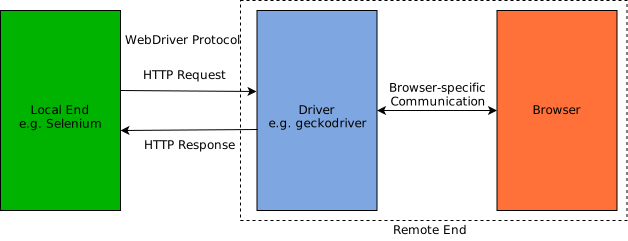
This remote end HTTP server could be built into the browser itself, but the most common setup is for all the HTTP processing to happen in a browser-specific driver binary. This accepts the WebDriver HTTP requests and converts them into an internal format for the browser to consume.
For example when automating Firefox, geckodriver converts WebDriver messages into Gecko’s custom Marionette protocol, and vice versa. ChromeDriver and SafariDriver work in a similar way, each using an internal protocol specific to their associated browser.
Example: A Simple Test Script
To understand this better, let’s take a simple example: navigating to a page, finding an element, and testing a property on that element. From the point of view of a test author, the code to implement this might look like:
browser.go("http://localhost:8000")
element = browser.querySelectorAll(".test")[0]
assert element.tag == "div"
Each line of code in this example causes a single HTTP request from the local end to the remote end, representing a single WebDriver command.
The program does not continue until the local end receives the corresponding HTTP response. In the initial browser.go call, for example, the remote end will only send its response once the browser has finished loading the requested page.
On the wire that program generates the following HTTP traffic (some unimportant details omitted for brevity):
POST /session/25bc4b8a-c96e-4e61-9f2d-19c021a6a6a4/url HTTP/1.1 Content-Length:
Not everyone understands how open source is made. I received the following email from NASA a while ago.
Subject: Curl Country of Origin and NDAA Compliance
Hello, my name is [deleted] and I am a Supply Chain Risk Management Analyst at NASA. As such, I ensure that all NASA acquisitions of Covered Articles comply with Section 208 of the Further Consolidated Appropriations Act, 2020, Public Law 116-94, enacted December 20, 2019. To do so, the Country of Origin (CoO) information must be obtained from the company that develops, produces, manufactures, or assembles the product(s). To do so, please provide an email response or a formal document (a PDF on company letterhead is preferred, but a simple statement is sufficient) specifically identifying the country, or countries, in which Curl is developed and maintained
If the country of origin is outside the United States, please provide any information you may have stating that testing is performed in the United States prior to supplying products to customers. Additionally, if available, please identify all authorized resellers of the product in question.
Lastly, please confirm that Curl is not developed by, contain components developed by, or receive substantial influence from entities prohibited by Section 889 of the 2019 NDAA. These entities include the following companies and any of their subsidiaries or affiliates:
Hytera Communications Corporation
Huawei Technologies Company
ZTE Corporation
Dahua Technology Company
Hangzhou Hikvision Digital Technology CompanyFinally, we have a time frame of 5 days for a response.
Thank you,
My answer
Okay, I first considered going with strong sarcasm in my reply due to the complete lack of understanding, and the implied threat in that last line. What would happen if I wouldn’t respond in time?
Then it struck me that this could be my chance to once and for all get a confirmation if curl is already actually used in space or not. So I went with informative and a friendly tone.
Hi [name],
I will answer to these questions below to the best of my ability, and maybe you can answer something for me?
curl (https://curl.se) is an open source project that creates two products, curl the command line tool and libcurl the library. I am the founder, lead developer and core maintainer of the project. To this date, I have done about 57% of the 26,000 changes in the source code repository. The remaining 43% have been done by 841 different volunteers and contributors from all over the world. Their names can be extracted from our git repository: https://github.com/curl/curl
You can also see that I own most, but not all, copyrights in the project.
I am a citizen of Sweden and I’ve been a citizen of Sweden during the entire time I’ve done all and any work on curl. The remaining 841 co-authors are from all over the world, but primarily from western European countries and the US. You could probably say that we live primarily “on the Internet” and not in any particular country.
We don’t have resellers. I work for an American company (wolfSSL) where we do curl support for customers world-wide.
Our testing is done universally and is not bound to any specific country or region. We test our code substantially before release.
Me knowingly, we do not have any components or code authored by people at any of the mentioned companies.
So finally my question: can you tell me anything about where or for what you use curl? Is it used in anything in space?
Regards,
Daniel
Used in space?
Of course my attempt was completely in vain and the answer back was very brief and it just said…

“We are using curl to support NASA’s mission and vision.”
Credits
Space ship image by Elias Sch. from Pixabay
The 2020 MDN Web Developer Needs Assessment (DNA) report is now available! This post takes you through what we’ve accomplished in 2020 based on the findings in the inaugural report, key takeaways of the 2020 survey, and what our next steps are as a result.
What We’ve Accomplished
In December 2019, Mozilla released the first Web Developer Needs Assessment survey report. This was a very detailed study of web developers globally and their main pain points with the web platform, designed with input from nearly 30 stakeholders representing product advisory board member organizations (and others) including browser vendors, the W3C, and industry. You can find a full list in the report itself (PDF, 1.4MB download).
We learned that while more than 3/4 of respondents are very satisfied or satisfied with the Web platform, their 4 biggest frustrations included having to support specific browsers (e.g., IE11), dealing with outdated or inaccurate documentation for frameworks and libraries, avoiding or removing a feature that doesn’t work across browsers, and testing across browsers.
Mozilla and other web industry orgs took action based on these results, for example:
- MDN prioritized documentation projects that were most needed by the industry.
- Mozilla’s engineering team incorporated the findings into future browser engineering team planning and prioritisation work.
- A cross-industry effort improved cross-browser support for Flexbox (see Closing the gap (in flexbox) for more details).
- Google used the results to help understand and prioritize the key areas of developer frustration, and used the developer satisfaction scores as a success metric going forward.
- The results provided valuable input to several standardization and pre-standardization discussions at W3C’s annual TPAC meeting.
- Microsoft used the Web DNA as one of their primary research tools when planning investments in the web platform and the surrounding ecosystem of content and tools (for example webhint.io), and it directly impacted how they now think about areas like cross-browser testing, legacy browser compatibility, best practices hinting, and more.
The 2020 Survey Results
The inaugural results were so useful that in 2020 we decided to run it again, with the same level of collaboration between browser vendors and other stakeholders.
This year we expanded the survey to include some new questions about accessibility tools and web testing, which were requested by some of the survey stakeholders as key areas of interest that should be explored more this time round. We also hired an experienced data scientist to conduct analysis and employ data science best practices.
We ran the survey from October 12 through November 2, 2020 and secured a similarly wide distribution of respondents.
Browser compatibility remains the top pain point, and it is also interesting to note that overall satisfaction with the platform hasn’t changed much, with 77.7% being very satisfied or satisfied with the Web in 2020.
New for this year are the results of our segmentation analysis of the needs which yielded seven, distinct segments. Each one has wildly different needs that surface as the most frustrating when compared to the overall mean scores:
- Documentation Disciples — Their top frustrations are outdated documentation for frameworks and libraries and outdated documentation for HTML, CSS, and JavaScript, as well as supporting specific browsers.
- Browser Beaters — Their top frustrations are clustered around issues with browser compatibility, design and layout. Like Document Disciples, they also find having to support specific browsers more frustrating than the overall mean.
- Progressive Programmers — Their top frustrations are clustered around lack of APIs, lack of support for Progressive Web Apps (PWAs), and using web technologies. For them, browser related needs were typically less frustrating than the overall mean.
- Testing Technicians — Needs statements relating to testing, whether end-to-end, front-end, or testing across browsers, caused the most frustration for this segment. Their top frustrations are clustered around issues with browser compatibility, design and layout. Like Progressive Pros, this segment also finds browser compatibility needs less frustrating than the overall mean, with the exception of testing across browsers.
- Keeping
Before we get into the updates coming to Firefox 85, I want to highlight two changes that we uplifted to Firefox 84, now on release:
- Expose HTTPS-Only preference in
privacy.network. Firefox now has a setting to enable HTTPS-Only Mode, which can conflict with extensions like HTTPS Everywhere. This change allows extensions to monitor the setting’s value. - The
webRequestandproxyAPIs will now be able to observe requests made through the View Source feature of Firefox.
Now, back to our regular programming. Here’s what’s coming in Firefox 85, which is scheduled to be released on January 26, 2021:
- It is now possible to disable a homepage and new tab override for an extension without disabling the extension. Special thanks to Erica Wright for getting this done.
- The “Undo Close Tabs” feature now does the right thing if an extension just closed multiple tabs.
- The
browsingDataAPI is now available on Firefox for Android. - Certain errors triggered when an extension changes a permission to optional during an update have been fixed.
- When the
devtoolspermission is revoked and then granted, extension pages are now automatically enabled in the toolbox.
And finally, we want to remind you about upcoming site isolation changes with Project Fission. As we previously mentioned, the drawWindow method is being deprecated as part of this work. If you use this API, we recommend that you switch to the captureTab method.
About 15% of users on Nightly currently run with Fission. If you see any bug reports that you can’t replicate, remember to test with Fission enabled. Instructions for enabling Fission can be found on the wiki.
Thanks
Big thanks to Liz Krane, Ankush Dua, and Michael Goossens for their contributions to this release!
The post Extensions in Firefox 85 appeared first on Mozilla Add-ons Blog.
https://blog.mozilla.org/addons/2020/12/16/extensions-in-firefox-85/
With the release of Firefox 84, we are pleased to welcome the developers who’ve contributed their first code change to Firefox, 10 of whom were first-time contributors to the code. Please join us in thanking each of these diligent and enthusiastic individuals, and take a look at their contributions:
- h20190017-pilani.ac.in: 1663884
- paulkrznaric: 1669832
- Andrey Bienkowski: 1673934, 1674425, 1674635, 1674841, 1674971, 1674980, 1674986, 1675094, 1675299, 1675925
- Chris GAUDRY: 1675037
- NAMAN JAIN: 1671080, 1673051
- Nerixyz: 1674577
- Seun: 1671163
- Sunita Sen: 1666340, 1669027, 1677302
- William Immendorf: 1643243
- jsal: 1662985
https://blog.mozilla.org/community/2020/12/15/the-new-faces-in-firefox-84/
The European Commission has just published its landmark Digital Services Act (DSA) and Digital Markets Act (DMA). These new draft laws have the potential to transform regulation in the tech sector and we’re happy to see the Commission take on board many of our earlier recommendations for the laws.
Reacting to the DSA and DMA publications, Raegan MacDonald, Mozilla’s Head of Public Policy, said:
Today the European Commission published the long-awaited Digital Services Act (DSA) and Digital Markets Act (DMA). We’ve been involved in the development of these laws for a number of years now, and are encouraged that many of our recommendations for how the Commission could seize a one-in-a-generation opportunity have been taken on board. While we’re still processing the details of the two draft laws, here we give our first reactions to the two groundbreaking proposals.
The DSA’s transparency requirements are a major step forward, particularly its call for disclosure of all advertisements. We’ve consistently said that to better address illegal and harmful content online we need meaningful transparency into how these problems are spreading through the online advertising ecosystem. Importantly, the Commission’s proposal follows the recommendation of us and a number of other advocates that these disclosure obligations ought to apply to all advertisements. We look forward to defining the precise operation of these disclosure mechanisms (we already have a lot of thoughts on that). The Commission’s proposal also seeks to bring more transparency to automated content curation (e.g. recommender systems like Facebook News Feed). This is again another issue we’ve long been active on, and our ongoing YouTube Regrets campaign is a case-in-point of the need for more transparency in this space.
We’re likewise encouraged to see the DSA take a progressive and thoughtful approach to content responsibility. The focus on procedural accountability – working to make firms responsible for assessing and mitigating the risks that misuse of their services may pose – aligns with our vision of a next generation EU regulatory standard that addresses the factors holding back the internet from what it could be. Again, there will be much work required to fill in the legislative detail on this procedural accountability vision, and we’re motivated to build on our recent work (see here and here) when the legislative proposal moves to the mark-up stage.
Last but not least, the Digital Markets Act (DMA). We’re still looking closely at what it means in terms of competition and innovation. However, at this early stage it appears the Commission has laid the groundwork for an ambitious new standard that could enhance consumer choice and the ability of smaller companies to thrive. A vibrant and open internet depends on interoperability, open standards, and opportunities for a diversity of market participants and we look forward to engaging with the next steps.
The post Mozilla reacts to publication of draft Digital Services Act and Digital Markets Act appeared first on Open Policy & Advocacy.
https://blog.mozilla.org/netpolicy/2020/12/15/mozilla-reacts-to-publication-of-draft-dsa-and-dma/
As December ushers in the final curtain for this rather eventful year, there is time left for one more Firefox version to be given its wings. Firefox 84 includes some interesting new features including tab order inspection, complex selector support in :not(), the PerformancePaintTiming API, and more!
This blog post provides merely a set of highlights; for all the details, check out the following:
DevTools gets tab order inspection
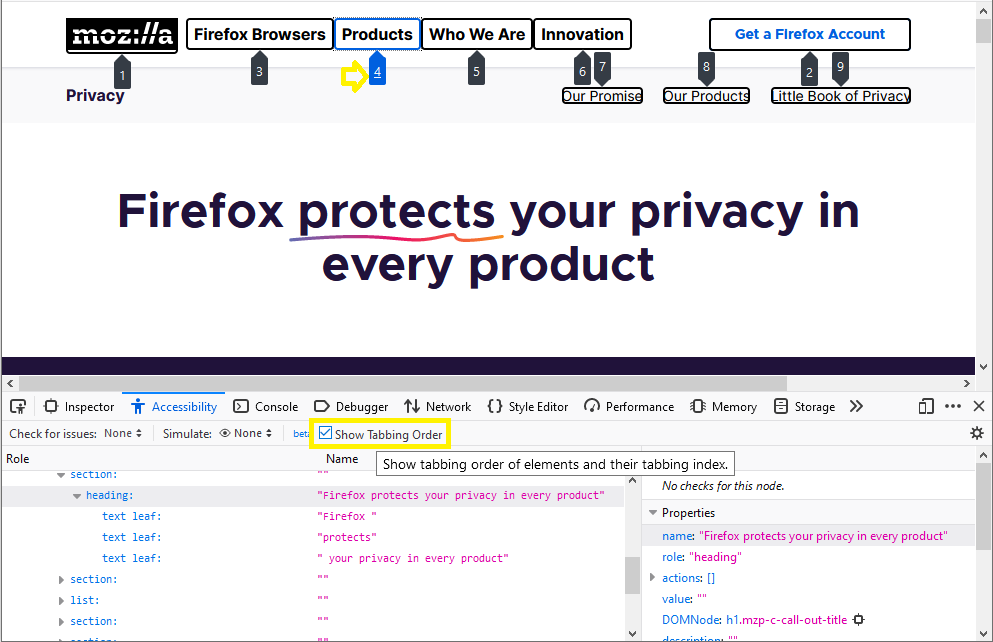
The Firefox Developer Tools have gotten a rather nice addition to the Accessibility Inspector this time around — A “Show Tabbing Order” checkbox. When checked, this toggles a visual overlay showing the tabbing order or table items on the current page. This provides a high-level overview of how the page will be navigated using the tab key, which may highlight problems more effectively than simply tabbing through the elements.
Web platform additions
Firefox 84 brings some new Gecko platform additions, the highlights of which are listed below.
Complex selector support in :not()
The :not() pseudo-class is rather useful, allowing you to apply styles to elements that don’t match one or more selectors. For example, the following applies a blue background to all elements that aren’t paragraphs:
:not(p) {
  background-color: blue;
}
However, it was of limited use until recently as it didn’t allow any kind of complex selectors to be negated. Firefox 84 adds support for this, so now you can do things like this:
:not(option:checked) {
  color: #999;
}
This would set a different text color on options that are not currently selected.
PerformancePaintTiming
The PerformancePaintTiming interface of the Paint Timing API provides timing information about “paint” (also called “render”) operations during web page construction, which is incredibly useful for developers wishing to develop their own performance tooling.
For example:
function showPaintTimings() {
  if (window.performance) {
    let performance = window.performance;
    let performanceEntries = performance.getEntriesByType('paint');
    performanceEntries.forEach( (performanceEntry, i, entries) => {
      console.log("The time to " + performanceEntry.name + " was " + performanceEntry.startTime + " milliseconds.");
    });
  } else {
    console.log('Performance timing isn't supported.');
  }
}
Would output something like this in supporting browsers:
The time to first-paint was 2785.915 milliseconds.
The time to first-contentful-paint was 2787.460 milliseconds.
AppCache removal
AppCache was an attempt to create a solution for caching web app assets offline so the site could continue to be used without network connectivity. It seemed to be a good idea because it was really simple to use and could solve this very common problem easily. However, it made many assumptions about what you were trying to do and then broke horribly when your app didn’t follow those assumptions exactly.
Browser vendors have been planning its removal for quite some time, and as of Firefox 84, we have finally gotten rid of it for good. For creating offline app solutions, you should use the Service Worker API instead.
WebExtensions
Starting with Firefox 84, users will be able to manage optional permissions for installed add-ons through the Add-ons Manager.
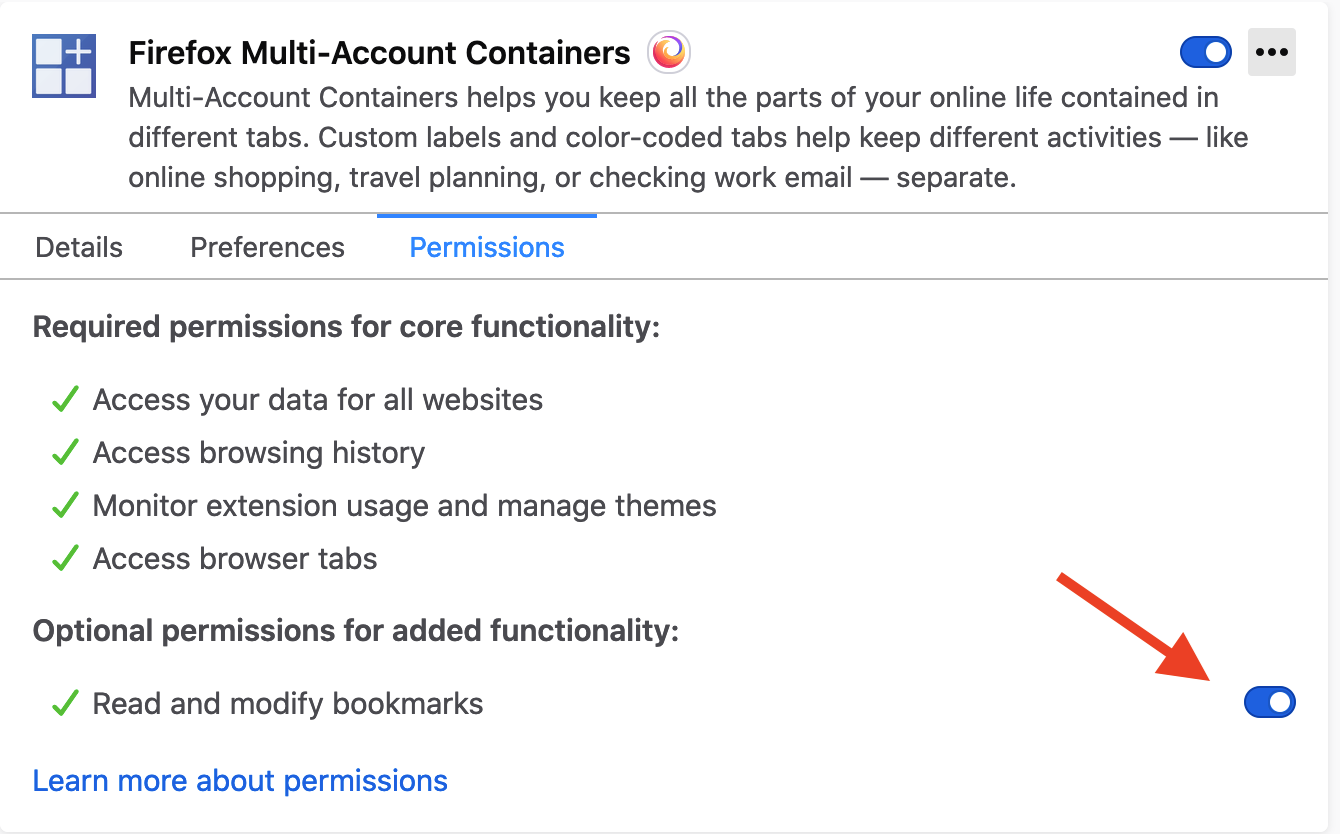
We recommend that extensions using optional permissions listen for
For the better part of two decades, Mozilla has been building browsers that are highly accessible for users with disabilities. While we’ve worked to ensure that people with a wide range of disabilities can participate on the web, much of our engineering effort has been focused on improvements for screen readers, an assistive technology that allows blind users to engage with computers through synthesized speech or a braille display.
On Windows, Firefox supports the two most popular screen readers, NVDA and JAWS. On Linux, Firefox works with the Orca screen reader. On Android, Firefox users have their pick of Google’s Talkback or Samsung’s Voice Assistant. And on iOS, Firefox users can work with the built-in VoiceOver screen reader.
That brings us to macOS. About 15 years ago, Apple introduced a built-in screen reader to macOS called VoiceOver. There were a couple of efforts to get Firefox working with VoiceOver but it never reached a usable state. Mac was the one major Firefox platform that simply wasn’t accessible to blind users.
At the beginning of 2020, we set out to fix that. Three members of the accessibility engineering team, Morgan, Eitan, and Marco, put together a one year plan to deliver solid VoiceOver screen reader support on macOS. In February, the team started work in earnest. The first steps were to build tools for reverse engineering the under-documented macOS and VoiceOver APIs. Over the next ten versions of Firefox, the team would implement VO features, fix bugs, and perform all kinds of testing to verify that features and fixes were working as expected and to document the remaining gaps.
Now here we are at Firefox 85 Beta and we’re almost done. Firefox supports all the most common VoiceOver features and with plenty of performance. Users should be able to navigate through most web content and all of the browser’s primary interface without problems. But we’re not quite done yet. The web is huge and the browser interface is wide and deep so we need more people putting Firefox and VoiceOver to the test and letting us know what’s working and not working before we can call it done.
This is where you come in. If you’re a part time or full time screen reader user on macOS, we’d love for you to update to Firefox 85 Beta and give it a spin with VoiceOver. We expect you’ll find it pretty solid but there are a few known issues, like VoiceOver search not working, and Firefox sub-menus and tree views expanded/collapsed state not being announced. And there are no doubt use cases we haven’t considered or tested so you may find additional bugs or feature gaps and we’re counting on you to tell us all about those so we can complete this work as soon as possible. Please report any bugs you find to Bugzilla and if you’d like to chat about what’s working and not working for you, you can find us on Matrix. We look forward to hearing from you.
What’s next? We’re going to watch for your feedback and address any significant issues that you surface. With your help, in a release or two we’ll be able to call VoiceOver support complete and we can move on to other features and fixes from our roadmap.
The post VoiceOver Preview for macOS Firefox appeared first on Mozilla Accessibility.
https://blog.mozilla.org/accessibility/voiceover-preview-for-macos-firefox/
This year began like any other year, with our best intentions and resolutions to carry out. Then by March, the world changed and everyone’s lives — personally and professionally — turned upside down. Despite that, we kept to our schedule to release a new Firefox every month and we were determined to keep Firefox working for you during challenging times.
We shifted our focus to work on features aimed at helping people adjust to the new way of life, and we made Firefox faster so that you could get more things done. It’s all part of fulfilling our promise to build a better internet for people. So, as we eagerly look to the end of 2020, we look back at this unprecedented year and present you with our list of top features that made 2020 a little easier.
Keeping Calm and Carrying on
How do you cope with this new way of life spent online? Here were the Firefox features we added this year, aimed at bringing some zen in your life.
- Picture-in-Picture: An employee favorite, we rolled out Picture-in-Picture to Mac and Linux, making it available on all platforms, where previously it was only available on Windows. We continued to improve Picture-in-Picture throughout the year — adding features like keyboard controls for fast forward and rewind — so that you could multitask like never before. We, too, were seeking calming videos; eyeing election results; and entertaining the little ones while trying to juggle home and work demands.
- No more annoying notifications: We all started browsing more as the web became our window into the outside world, so we replaced annoying notification request pop-ups to stop interrupting your browsing, and added a speech bubble in the address bar when you interacted with the site.
- Pocket article recommendations: We brought our delightful Pocket article recommendations to Firefox users beyond the US, to Austria, Belgium, Germany, India, Ireland, Switzerland, and the United Kingdom. For anyone wanting to take a pause on doom scrolling, simply open up a new tab in Firefox and check out the positivity in the Pocket article recommendations.
- Ease eye strain with larger screen view: We all have been staring at the screen for longer than we ever thought we should. So, we’ve improved the global level zoom setting so you can set it and forget it. Then, every website can appear larger, should you wish, to ease eye strain. We also made improvements to our high contrast mode which made text more readable for our low vision users.
Getting you faster to the places you want to visit
We also looked under the hood of Firefox to improve the speed and search experiences so you could get things done no matter what 2020 handed you.
- Speed: We made Firefox faster than ever with improved performance on both page loads and start up time. For those the technical details:
-
- Websites that use flexbox-based layouts load 20% faster than before;
- Restoring a session is 17% quicker, meaning you can more quickly pick up where you left off;
- For Windows users, opening new windows got quicker by 10%;
- Our JavaScript engine got a revamp improving page load performance by up to 15%, page responsiveness by up to 12%, and reduced memory usage by up to 8%, all the while making it more secure.
-
- Search made faster: We were searching constantly this year — what is coronavirus; do masks work; and what is the electoral college? The team spent countless hours improving the search experience in Firefox so that you could search smarter, faster — You could type less and find more with the revamped address bar, where our search suggestions got a redesign. An updated shortcut suggests search engines, tabs, and bookmarks, getting you
This year was unlike anything any of us has experienced before. The global pandemic affected how we learn, connect with others, work, play, shop, and more. It affected directly or indirectly every aspect of how we live. Consequently, a universally open and accessible Internet became more important to our daily lives. For some Firefox users, access to the Internet is not just important, it is essential.
As the Firefox team adjusted to focus on features and improvements to help our users live a more Internet-based life, the performance program redoubled our efforts to deliver on the vision of “performance for every experience.” We hoped that by speeding up key parts of Firefox and Gecko like page load, JavaScript responsiveness, and startup, and by ensuring new features performed their best, that we could make the new normal a little less painful and a little more… well, normal.
With that in mind, we’d like to share the work that we’re most proud of this year and highlight how we make each version of Firefox faster than the last. Since we’ve accomplished a lot this year, we’ve broken the accomplishments into a few sections related to how we think about our work:
- “Performance for every experience” details all the changes to Firefox itself.
- “Culture of Performance” includes all the work to develop tests, metrics, processes, and the other pieces to ensure that performance is central to everything that Firefox builds.
- Finally, “Browsing at the Speed of Right” covers the work to improve performance for the Web beyond the borders of the Mozilla ecosystem.
Performance for Every Experience
We believe that interactions with the browser and web pages should be quick and smooth. Pages load quickly. The web is responsive. And resources are used thoughtfully. This is the baseline performance we expect for all Mozilla products. In 2020, we improved all of these areas.
Page load
- Firefox 75 included support for the lazy image loading standard. This feature can improve page load performance and reduce data by loading images when needed rather than on the critical path for the initial page load.
- Firefox 80 added an optimization for Flexbox reflows. This improves page load performance by more than 20% in some cases and reduces layout shift during page load.
- Firefox 82 features speculative JavaScript parsing that allows the browser to parse external JavaScript scripts as soon as they are fetched, even if never executed. This change generally improves page load by 3-4%, but for some sites can improve page load by more than 67%.
- Firefox 83 introduces the new Warp feature in the SpiderMonkey JavaScript engine.
- Firefox 84 adds support for link preloading, which gives developers more control over resource loading and can improve page load by more than 10 percent.
- The new Firefox for Android that launched in August loads pages 20 percent faster than at the start of the year making it the fastest Firefox browser ever on Android.
Responsiveness
- Firefox 72 included a change to how Firefox manages the addon blocklist which resulted in up to a 7 percent improvement to startup and session restore times.
- Completed the first two of three planned phases for the Fast Shutdown project resulting in Firefox shutting down three times more quickly.
- Firefox 85 Nightly for Windows includes a new skeleton UI for startup that means the first sign that Firefox is starting occurs in 10 percent of the time as before. This improvement to perceived performance of Firefox is especially helpful for users on slower machines. We hope to ship this new experience by default in early 2021.
- Implemented a cache for the about:home page at startup that improved the time to when Top Sites render during startup by just over 20%.
- Lazily loading parts of the Firefox UI when they’re needed, instead of automatically, results in browser windows opening more quickly. Between Firefox 77 and Firefox 80, the
Mozilla is publishing its white paper, “Creating Trustworthy AI.”
A little over two years ago, Mozilla started an ambitious project: deciding where we should focus our efforts to grow the movement of people committed to building a healthier digital world. We landed on the idea of trustworthy AI.
When Mozilla started in 1998, the growth of the web was defining where computing was going. So Mozilla focused on web standards and building a browser. Today, computing — and the digital society that we all live in — is defined by vast troves of data, sophisticated algorithms and omnipresent sensors and devices. This is the era of AI. Asking questions today such as ‘Does the way this technology works promote human agency?’ or ‘Am I in control of what happens with my data?’ is like asking ‘How do we keep the web open and free?’ 20 years ago.
This current era of computing — and the way it shapes the consumer internet technology that more than 4 billion of us use everyday — has high stakes. AI increasingly powers smartphones, social networks, online stores, cars, home assistants and almost every other type of electronic device. Given the power and pervasiveness of these technologies, the question of whether AI helps and empowers or exploits and excludes will have a huge impact on the direction that our societies head over the coming decades.
It would be very easy for us to head in the wrong direction. As we have rushed to build data collection and automation into nearly everything, we have already seen the potential of AI to reinforce long-standing biases or to point us toward dangerous content. And there’s little transparency or accountability when an AI system spreads misinformation or misidentifies a face. Also, as people, we rarely have agency over what happens with our data or the automated decisions that it drives. If these trends continue, we’re likely to end up in a dystopian AI-driven world that deepens the gap between those with vast power and those without.
On the other hand, a significant number of people are calling attention to these dangerous trends — and saying ‘there is another way to do this!’ Much like the early days of open source, a growing movement of technologists, researchers, policy makers, lawyers and activists are working on ways to bend the future of computing towards agency and empowerment. They are developing software to detect AI bias. They are writing new data protection laws. They are inventing legal tools to put people in control of their own data. They are starting orgs that advocate for ethical and just AI. If these people — and Mozilla counts itself amongst them — are successful, we have the potential to create a world where AI broadly helps rather than harms humanity.
It was inspiring conversations with people like these that led Mozilla to focus the $20M+ that it spends each year on movement building on the topic of trustworthy AI. Over the course of 2020, we’ve been writing a paper titled “Creating Trustworthy AI” to document the challenges and ideas for action that have come up in these conversations. Today, we release the final version of this paper.
This ‘paper’ isn’t a traditional piece of research. It’s more like an action plan, laying out steps that Mozilla and other like-minded people could take to make trustworthy AI a reality. It is possible to make this kind of shift, just as we have been able to make the shift to clean water and safer automobiles in response to risks to people and society. The paper suggests the code we need to write, the projects we need to fund, the issues we need to champion, and the laws we need to pass. It’s a toolkit for technologists, for philanthropists, for activists, for lawmakers.
At the heart of the paper are eight big challenges the world is facing when it comes to the use of AI in the consumer internet technologies we all use everyday. These are things like: bias; privacy; transparency; security; and the centralization of AI power in the hands of a few big tech companies. The paper also outlines four opportunities to meet these challenges. These opportunities centre around the idea that there are developers, investors, policy makers and a broad public that want to make sure AI works differently — and to our benefit. Together, we have a chance to write code, process data, create laws and choose technologies that send us in a good direction.
Like any major Mozilla project, this paper was built using an open source approach. The draft we published in May came from 18 months of