Floodgap sites are down because someone did a mass attack on NetSol (this also attacked Perl.com and others). I'm working to resolve this. More shortly.
Update: Looks like it was a social engineering attack. I spoke with a very helpful person in their security department (Beth) and she walked me through it. On the 26th someone initiated a webchat with their account representatives and presented official-looking but fraudulent identity documents (a photo ID, a business license and a utility bill), then got control of the account and logged in and changed everything. NetSol is in the process of reversing the damage and restoring the DNS entries. They will be following up with me for a post-mortem. I do want to say I appreciate how quickly and seriously they are taking this whole issue.
If you are on Network Solutions, check your domains this morning, please. I'm just a "little" site, and I bet a lot of them were attacked in a similar fashion.
Update the second: Domains should be back up, but it may take a while for them to propagate. The servers themselves were unaffected, and I don't store any user data anyway.
http://tenfourfox.blogspot.com/2021/01/floodgapcom-down-due-to-domain-squatter.html
Today is Data Privacy Day, which is a good reminder that data privacy is a thing, and you’re in charge of it. The simple truth: your personal data is very … Read more
The post Four ways to protect your data privacy and still be online appeared first on The Firefox Frontier.
https://blog.mozilla.org/firefox/four-ways-to-protect-your-data-privacy/
Some critics think the curl project shouldn’t use GitHub. The reasons for being against GitHub hosting tend to be one or more of:
- it is an evil proprietary platform
- it is run by Microsoft and they are evil
- GitHub is American thus evil
Some have insisted on craziness like “we let GitHub hold our source code hostage”.
Why GitHub?
The curl project switched to GitHub (from Sourceforge) almost eleven years ago and it’s been a smooth ride ever since.
We’re on GitHub not only because it provides a myriad of practical features and is a stable and snappy service for hosting and managing source code. GitHub is also a developer hub for millions of developers who already have accounts and are familiar with the GitHub style of developing, the terms and the tools. By being on GitHub, we reduce friction from the contribution process and we maximize the ability for others to join in and help. We lower the bar. This is good for us.
I like GitHub.
Self-hosting is not better
Providing even close to the same uptime and snappy response times with a self-hosted service is a challenge, and it would take someone time and energy to volunteer that work – time and energy we now instead can spend of developing the project instead. As a small independent open source project, we don’t have any “infrastructure department” that would do it for us. And trust me: we already have enough infrastructure management to deal with without having to add to that pile.
… and by running our own hosted version, we would lose the “network effect” and convenience for people that already are on and know the platform. We would also lose the easy integration with cool services like the many different CI and code analyzer jobs we run.
Proprietary is not the issue
While git is open source, GitHub is a proprietary system. But the thing is that even if we would go with a competitor and get our code hosting done elsewhere, our code would still be stored on a machine somewhere in a remote server park we cannot physically access – ever. It doesn’t matter if that hosting company uses open source or proprietary code. If they decide to switch off the servers one day, or even just selectively block our project, there’s nothing we can do to get our stuff back out from there.
We have to work so that we minimize the risk for it and the effects from it if it still happens.
A proprietary software platform holds our code just as much hostage as any free or open source software platform would, simply by the fact that we let someone else host it. They run the servers our code is stored on.
If GitHub takes the ball and goes home
No matter which service we use, there’s always a risk that they will turn off the light one day and not come back – or just change the rules or licensing terms that would prevent us from staying there. We cannot avoid that risk. But we can make sure that we’re smart about it, have a contingency plan or at least an idea of what to do when that day comes.
If GitHub shuts down immediately and we get zero warning to rescue anything at all from them, what would be the result for the curl project?
Code. We would still have the entire git repository with all code, all source history and all existing branches up until that point. We’re hundreds of developers who pull that repository frequently, and many automatically, so there’s a very distributed backup all over the world.
CI. Most of our CI setup is done with yaml config files in the source repo. If we transition to another hosting platform, we could reuse them.
Issues. Bug reports and pull requests are stored on GitHub and a sudden exit would definitely make us lose some of them. We do daily “extractions” of all issues and pull-requests so a lot of meta-data could still be saved and preserved. I don’t think this would be a terribly hard blow either: we move long-standing bugs and ideas over to documents in the repository, so the currently open ones are likely possible to get resubmitted again within the nearest future.
There’s no doubt that it would be a significant speed bump for the project, but it would not be worse than that. We could bounce back on a new platform and development would go on within days.
Low risk
It’s a rare thing, that a service just suddenly with no warning and no heads up would just go black and leave projects completely stranded. In most cases, we get alerts, notifications and get a chance to transition cleanly and orderly.
There are alternatives
Sure there are alternatives. Both pure GitHub alternatives that look similar and provide similar services, and
Firefox 85 declares war on supercookies, enables link preloading and adds improved developer tools (just in time, since Google's playing games with Chromium users again). This version builds and runs so far uneventfully on this Talos II. If you want a full PGO-LTO build, which I strongly recommend if you're going to bother building it yourself, grab the shell script from Firefox 82 if you haven't already and use this updated diff to enable PGO for gcc. Either way, the optimized and debug .mozconfigs I use are also unchanged from Fx82. At some point I'll get around to writing a upstreamable patch and then we won't have to keep carrying the diff around.
(“This Week in Glean” is a series of blog posts that the Glean Team at Mozilla is using to try to communicate better about our work. They could be release notes, documentation, hopes, dreams, or whatever: so long as it is inspired by Glean. You can find an index of all TWiG posts online.)
On behalf of Mozilla’s Data group, I’m happy to announce the availability of the first milestone of the Glean Dictionary, a project to provide a comprehensive “data dictionary” of the data Mozilla collects inside its products and how it makes use of it. You can access it via this development URL:
https://dictionary.protosaur.dev/

The goal of this first milestone was to provide an equivalent to the popular “probe” dictionary for newer applications which use the Glean SDK, such as Firefox for Android. As Firefox on Glean (FoG) comes together, this will also serve as an index of what data is available for Firefox and how to access it.
Part of the vision of this project is to act as a showcase for Mozilla’s practices around lean data and data governance: you’ll note that every metric and ping in the Glean Dictionary has a data review associated with it — giving the general public a window into what we’re collecting and why.
In addition to displaying a browsable inventory of the low-level metrics which these applications collect, the Glean Dictionary also provides:
- Code search functionality (via Searchfox) to see where any given data collection is defined and used.
- Information on how this information is represented inside Mozilla’s BigQuery data store.
- Where available, links to browse / view this information using the Glean Aggregated Metrics Dashboard (GLAM).
Over the next few months, we’ll be expanding the Glean Dictionary to include derived datasets and dashboards / reports built using this data, as well as allow users to add their own annotations on metric behaviour via a GitHub-based documentation system. For more information, see the project proposal.
The Glean Dictionary is the result of the efforts of many contributors, both inside and outside Mozilla Data. Special shout-out to Linh Nguyen, who has been moving mountains inside the codebase as part of an Outreachy internship with us. We welcome your feedback and involvement! For more information, see our project repository and Matrix channel (#glean-dictionary on chat.mozilla.org).
https://blog.mozilla.org/data/2021/01/27/this-week-in-glean-the-glean-dictionary/
The COVID 19 crisis increased our reliance on technology and accelerated tech disruption and innovation, as we innovated to fight the virus and cushion the impact. Nowhere was this felt more keenly than in the African region, where the number of people with internet access continued to increase and the corresponding risks to their privacy and data protection rose in tandem. On the eve of 2021 Data Privacy Day, we take stock of the key issues that will shape data and privacy in the Africa region in the coming year.
- Data Protection: Africa is often used as a testing ground for technologies produced in other countries. As a result, people’s data is increasingly stored in hundreds of databases globally. While many in the region are still excluded from enjoying basic rights, their personal information is a valuable commodity in the global market, even when no safeguard mechanisms exist. Where safeguards exist, they are still woefully inadequate. One of the reasons Cambridge Analytica could amass large databases of personal information was the lack of data protection mechanisms in countries where they operated. This 2017 global scandal served as a wakeup call for stronger data protection for many African states. Many countries are therefore strengthening their legal provisions regarding access to personal data, with over 30 countries having enacted Data Protection legislation. Legislators have the African Union Convention on Cybersecurity and Personal Data Protection (Malabo Convention) 2014 to draw upon and we are likely to see more countries enacting privacy laws and setting up Data Protection Authorities in 2021, in a region that would otherwise have taken a decade or more to enact similar protections.
- Digital ID:The UN’s Sustainable Development Goal 16.9 aims to provide legal identity for all, including birth registration. But this goal is often conflated with and used to justify high-tech biometric ID schemes. These national level identification projects are frequently funded through development aid agencies or development loans from multilaterals and are often duplicative of existing schemes. They are set up as unique, centralised single sources of information on people and meant to replace existing sectoral databases, and guarantee access to a series of critical public and private services. However, they risk abusing privacy and amplifying patterns of discrimination and exclusion. Given the impending rollout of COVID-19 vaccination procedures, we can expect digital ID to remain a key issue across the region. It will be vital that the discrimination risks inherent within digital IDs are not amplified to deny basic health benefits.
- Behavioural Biometrics: In addition to government-issued digital IDs, our online and offline lives now require either identifying ourselves or being identified. Social login services which let us log in with Facebook, ad IDs that are used to target ads to us, or an Apple ID that connects our text messages, music preferences, app purchases, and payments to a single identifier, are all examples of private companies using identity systems to amass vast databases about us. Today’s behavioural biometrics technologies go further and use hundreds of unique parameters to analyse how someone uses their digital devices, their browsing history, how they hold their phone, and even how quickly they text, providing a mechanism to passively authenticate people without their knowledge. For example, mobile lending services are “commodifying the routine habits of Kenyans, transforming their behaviour into reputational data” to be monitored, assessed, and shared adding another worryingly sophisticated layer to identity verification leading to invasion of privacy and exclusion.
- Fintech: An estimated
The --write-out (or -w for short) curl command line option is a gem for shell script authors looking for more information from a curl transfer. Experienced users know that this option lets you extract things such as detailed timings, the response code, transfer speeds and sizes of various kinds. A while ago we even made it possible to output JSON.
Maybe the best resource to learn more about it, is the dedication section in Everything curl. You’ll like it!
Now even more versatile
In curl 7.75.0 (coming on February 3, 2021) we introduce five new variables for this option, and I’ll elaborate on some of the fun new things you can do with these!
These new variables were invented when we received a bug report that pointed out that when a user transfers many URLs in parallel and one or some of them fail – the error message isn’t identifying exactly which of the URLs that failed. We should improve the error messages to fix this!
Or wait a minute. What if we provide enough details for --write-out to let the user customize the error message completely by themselves and thus get exactly the info they want?
onerror
Using this, you can specify a message only to get written if the transfer ends in error. That is a non-zero exit code. An example could look like this:
curl -w '%{onerror}failed\n' $URL -o saved -s
…. if the transfer is OK, it says nothing. If it fails, the text on the right side of the “onerror” variable gets output. And that text can of course contain other variables!
This command line uses -s for “silent” to make it inhibit the regular built-in error message.
url
To help craft a good error message, maybe you want the URL included that was used in the transfer?
curl -w '%{onerror}%{url} failed\n' $URL
urlnum
If you get more than one URL in the command line, it might be helpful to get the index number of the used URL. This is of course especially useful if you for example work with the same URL multiple times in the same command line and just one of them fails!
curl -w '%{onerror}URL %{urlnum} failed\n' $URL $URL
exitcode
The regular built-in curl error message shows the exit code, as it helps diagnose exactly what the problem was. Include that in the error message like:
curl -w '%{onerror}%{url} got %{exitcode}\n' $URL
errormsg
This is the human readable explanation for the problem. The error message. Mimic the default curl error message like this:
curl -w '%{onerror}curl: %{exitcode} %{errormsg}\n' $URL
stderr
We already provide this “variable” from before, which allows you to make sure the output message is sent to stderr instead of stdout, which then makes it even more like a real error message:
url -w '%{onerror}%{stderr}curl: %{exitcode} %{errormsg}\n' $URL
More
These new variables work fine after %{onerror}, but they also of course work just as fine to output even when there was no error, and they work perfectly fine whether you use -Z for parallel transfers or doing them serially, one after the other.
https://daniel.haxx.se/blog/2021/01/27/curl-your-own-error-message/
(“This Week in Glean” is a series of blog posts that the Glean Team at Mozilla is using to try to communicate better about our work. They could be release notes, documentation, hopes, dreams, or whatever: so long as it is inspired by Glean. You can find an index of all TWiG posts online.)
On behalf of Mozilla’s Data group, I’m happy to announce the availability of the first milestone of the Glean Dictionary, a project to provide a comprehensive “data dictionary” of the data Mozilla collects inside its products and how it makes use of it. You can access it via this development URL:
https://dictionary.protosaur.dev/
The goal of this first milestone was to provide an equivalent to the popular “probe” dictionary for newer applications which use the Glean SDK, such as Firefox for Android. As Firefox on Glean (FoG) comes together, this will also serve as an index of what data is available for Firefox and how to access it.
Part of the vision of this project is to act as a showcase for Mozilla’s practices around lean data and data governance: you’ll note that every metric and ping in the Glean Dictionary has a data review associated with it — giving the general public a window into what we’re collecting and why.
In addition to displaying a browsable inventory of the low-level metrics which these applications collect, the Glean Dictionary also provides:
- Code search functionality (via Searchfox) to see where any given data collection is defined and used.
- Information on how this information is represented inside Mozilla’s BigQuery data store.
- Where available, links to browse / view this information using the Glean Aggregated Metrics Dashboard (GLAM).
Over the next few months, we’ll be expanding the Glean Dictionary to include derived datasets and dashboards / reports built using this data, as well as allow users to add their own annotations on metric behaviour via a GitHub-based documentation system. For more information, see the project proposal.
The Glean Dictionary is the result of the efforts of many contributors, both inside and outside Mozilla Data. Special shout-out to Linh Nguyen, who has been moving mountains inside the codebase as part of an Outreachy internship with us. We welcome your feedback and involvement! For more information, see our project repository and Matrix channel (#glean-dictionary on chat.mozilla.org).
https://wlach.github.io/blog/2021/01/the-glean-dictionary/?utm_source=Mozilla&utm_medium=RSS
The Inter-Process Communication (IPC) Layer within Firefox provides a cornerstone in Firefox’ multi-process Security Architecture. Thus, eliminating security vulnerabilities within the IPC Layer remains critical. Within this blogpost we survey and describe the different communication methods Firefox uses to perform inter-process communication which hopefully provide logical entry points to effectively fuzz the IPC Layer in Firefox.
Background on the Multi Process Security Architecture of Firefox
When starting the Firefox web browser it internally spawns one privileged process (also known as the parent process) which then launches and coordinates activities of multiple content processes. This multi process architecture allows Firefox to separate more complicated or less trustworthy code into processes, most of which have reduced access to operating system resources or user files. (Entering about:processes into the address bar shows detailed information about all of the running processes). As a consequence, less privileged code will need to ask more privileged code to perform operations which it itself cannot. That request for delegation of operations or in general any communication between content and parent process happens through the IPC Layer.
IPC – Inter Process Communication
From a security perspective the Inter-Process Communication (IPC) is of particular interest because it spans several security boundaries in Firefox. The most obvious one is the PARENT <-> CONTENT process boundary. The content (or child process), which hosts one or more tabs containing web content, is unprivileged and sandboxed and in threat modeling scenarios often considered to be compromised and running arbitrary attacker code. The parent process on the other hand has full access to the host machine. While this parent-child relationship is not the only security boundary (see e.g. this documentation on process privileges), it is the most critical one from a security perspective because any violation will result in a sandbox escape.

Firefox internally uses three main communication methods (plus an obsolete one) through which content processes can communicate with the main process. In more detail, inter process communication within processes in Firefox happen through either: (1) IPDL protocols, (2) Shared Memory, (3) JS Actors and sometimes through (4) the obsolete and outdated process communication mechanism of Message Manager. Please note that (3) and (4) internally are built on top of (1) and hence are IPDL aware.
- IPDL
The Inter-process-communication Protocol Definition Language (IPDL) is a Mozilla-specific language used to define the mechanism to pass messages between processes in C++ code.The primary protocol that governs the communication between the parent and child process in Firefox is the Content protocol. As you can see in its source named PContent.ipdl, the definition is fairly large and includes a lot of other protocols – because there are a number of sub-protocols in Content the whole protocol definition is hierarchic.Inside each protocol, there are methods for starting each sub-protocol and providing access to the methods inside the newly-started sub-protocol. For automated testing, this structure also means that there is not one flat attack surface containing all interesting methods. Instead, it might take a number of message round trips to reach a certain sub-protocol which then might surface a vulnerability.In addition to the PContent.ipdl Firefox also uses PBackground.ipdl which is not included in Content but allows for background communication and hence provides another mechanism to pass messages between processes in C++. - Shared Memory
Shmems are the main objects to share memory across processes. They are IPDL-aware and are created and managed by IPDL actors. The easiest way to find them in code is to search for uses of ‘AllocShmem/AllocUnsafeShmem’, or to search all files ending in ‘.ipdl’. As an example, PContent::InvokeDragSession uses PARENT <-> CONTENT Shmems to transfer drag/drop images, files, etc.An
With Firefox 85 fresh out of the oven, we are delighted to welcome the developers who contributed their first code change to Firefox in this release, 13 of whom are new volunteers! Please join us in thanking each of them, and take a look at their contributions:
- ankushsinghal1995: 1674611
- gero: 1674806
- manekenpix: 1664768
- Andrey Cherepanov: 1678839
- Ankush Dua: 1671579
- Arnd Issler arndissler: 1679331
- David Ward: 1679664
- Florent Viard: 1674622
- Kartik Gautam: 1677247
- Liz Krane: 1650956
- Moritz Firsching: 1588310
- Neha Kochar: 1589103
- WGH: 1680909
- ZaWertun: 1550074
https://blog.mozilla.org/community/2021/01/26/new-contributors-to-firefox-85/
With a new year comes change, and one change we’re glad to see in 2021 is new leadership at the Federal Communications Commission (FCC). On Thursday, Jan. 21, Jessica Rosenworcel, … Read more
The post Jessica Rosenworcel’s appointment is good for the internet appeared first on The Firefox Frontier.
https://blog.mozilla.org/firefox/jessica-rosenworcel-appointment-is-good-for-the-internet/
To wrap up January, we are proud to bring you the release of Firefox 85. In this version we are bringing you support for the :focus-visible pseudo-class in CSS and associated devtools, , and the complete removal of Flash support from Firefox. We’d also like to invite you to preview two exciting new JavaScript features in the current Firefox Nightly — top-level await and relative indexing via the .at() method. Have fun!
This blog post provides merely a set of highlights; for all the details, check out the following:
:focus-visible
The :focus-visible pseudo-class, previously supported in Firefox via the proprietary :-moz-focusring pseudo-class, allows the developer to apply styling to elements in cases where browsers use heuristics to determine that focus should be made evident on the element.
The most obvious case is when you use the keyboard to focus an element such as a button or link. There are often cases where designers will want to get rid of the ugly focus-ring, commonly achieved using something like :focus { outline: none }, but this causes problems for keyboard users, for whom the focus-ring is an essential accessibility aid.
:focus-visible allows you to apply a focus-ring alternative style only when the element is focused using the mouse, and not when it is clicked.
For example, this HTML:
Could be styled like this:
/* remove the default focus outline only on browsers that support :focus-visible  */
a:not(:focus-visible), button:not(:focus-visible), button:not(:focus-visible) {
  outline: none;
}

/* Add a strong indication on browsers that support :focus-visible */
a:focus-visible, button:focus-visible, input:focus-visible {
  outline: 4px dashed orange;
}
And as another nice addition, the Firefox DevTools’ Page Inspector now allows you to toggle :focus-visible styles in its Rules View. See Viewing common pseudo-classes for more details.
Preload
After a couple of false starts in previous versions, we are now proud to announce support for , which allows developers to instruct the browser to preemptively fetch and cache high-importance resources ahead of time. This ensures they are available earlier and are less likely to block page rendering, improving performance.
This done by including rel="preload" on your link element, and an as attribute containing the type of resource that is being preloaded, for example:
You can also include a type attribute containing the MIME type of the resource, so a browser can quickly see what resources are on offer, and ignore ones that it doesn’t support:
See Preloading content with rel=”preload” for more information.
The Flash is dead, long live the Flash
Firefox 85 sees the complete removal of Flash support from the browser, with no means to turn it back on. This is a coordinated effort across browsers, and as our plugin roadmap shows, it has been on the cards for a long time.
For some like myself — who have many nostalgic memories of the early days of the web, and all the creativity, innovation, and just plain fun that Flash brought us — this is a bittersweet day. It is sad to say goodbye to it, but at the same time the advantages of doing so are clear. Rest well, dear Flash.
Nightly previews
There are a couple of upcoming additions to Gecko that are currently available only in our Nightly Preview. We thought you’d like to get a chance to test them early and give us feedback, so please let us know what you think in the comments below!
Top-level await
Trackers and adtech companies have long abused browser features to follow people around the web. Since 2018, we have been dedicated to reducing the number of ways our users can be tracked. As a first line of defense, we’ve blocked cookies from known trackers and scripts from known fingerprinting companies.
In Firefox 85, we’re introducing a fundamental change in the browser’s network architecture to make all of our users safer: we now partition network connections and caches by the website being visited. Trackers can abuse caches to create supercookies and can use connection identifiers to track users. But by isolating caches and network connections to the website they were created on, we make them useless for cross-site tracking.
What are supercookies?
In short, supercookies can be used in place of ordinary cookies to store user identifiers, but they are much more difficult to delete and block. This makes it nearly impossible for users to protect their privacy as they browse the web. Over the years, trackers have been found storing user identifiers as supercookies in increasingly obscure parts of the browser, including in Flash storage, ETags, and HSTS flags.
The changes we’re making in Firefox 85 greatly reduce the effectiveness of cache-based supercookies by eliminating a tracker’s ability to use them across websites.
How does partitioning network state prevent cross-site tracking?
Like all web browsers, Firefox shares some internal resources between websites to reduce overhead. Firefox’s image cache is a good example: if the same image is embedded on multiple websites, Firefox will load the image from the network during a visit to the first website and on subsequent websites would traditionally load the image from the browser’s local image cache (rather than reloading from the network). Similarly, Firefox would reuse a single network connection when loading resources from the same party embedded on multiple websites. These techniques are intended to save a user bandwidth and time.
Unfortunately, some trackers have found ways to abuse these shared resources to follow users around the web. In the case of Firefox’s image cache, a tracker can create a supercookie by “encoding” an identifier for the user in a cached image on one website, and then “retrieving” that identifier on a different website by embedding the same image. To prevent this possibility, Firefox 85 uses a different image cache for every website a user visits. That means we still load cached images when a user revisits the same site, but we don’t share those caches across sites.
In fact, there are many different caches trackers can abuse to build supercookies. Firefox 85 partitions all of the following caches by the top-level site being visited: HTTP cache, image cache, favicon cache, HSTS cache, OCSP cache, style sheet cache, font cache, DNS cache, HTTP Authentication cache, Alt-Svc cache, and TLS certificate cache.
To further protect users from connection-based tracking, Firefox 85 also partitions pooled connections, prefetch connections, preconnect connections, speculative connections, and TLS session identifiers.
This partitioning applies to all third-party resources embedded on a website, regardless of whether Firefox considers that resource to have loaded from a tracking domain. Our metrics show a very modest impact on page load time: between a 0.09% and 0.75% increase at the 80th percentile and below, and a maximum increase of 1.32% at the 85th percentile. These impacts are similar to those reported by the Chrome team for similar cache protections they are planning to roll out.
Systematic network partitioning makes it harder for trackers to circumvent Firefox’s anti-tracking features, but we still have more work to do to continue to strengthen our protections. Stay tuned for more privacy protections in the coming
Collaborating with the community has always been at the heart of MDN Web Docs content work — individual community members constantly make small (and not so small) fixes to help incrementally improve the content, and our partner orgs regularly come on board to help with strategy and documenting web platform features that they have an interest in.
At the end of the 2020, we launched our new Yari platform, which exposes our content in a GitHub repo and therefore opens up many more valuable contribution opportunities than before.
And today, we wanted to spread the word about another fantastic event for enabling more collaboration on MDN — the launch of the Open Web Docs organization.
Open Web Docs
Open Web Docs (OWD) is an open collective, created in collaboration between several key MDN partner organizations to ensure the long-term health of open web platform documentation on de facto standard resources like MDN Web Docs, independently of any single vendor or organization. It will do this by collecting funding to finance writing staff and helping manage the communities and processes that will deliver on present and future documentation needs.
You will hear more about OWD, MDN, and opportunities to collaborate on web standards documentation very soon — a future post will outline exactly how the MDN collaborative content process will work going forward.
Until then, we are proud to join our partners in welcoming OWD into the world.
See also
The post Welcoming Open Web Docs to the MDN family appeared first on Mozilla Hacks - the Web developer blog.
https://hacks.mozilla.org/2021/01/welcoming-open-web-docs-to-the-mdn-family/

An updated look & feel for Hubs, with an all-new user interface, is now live.
Just over two years ago, we introduced a preview release of Hubs. Our hope was to bring people together to create, socialize and collaborate around the world in a new and fun way. Since then, we’ve watched our community grow and use Hubs in ways we could only imagine. We’ve seen students use Hubs to celebrate their graduations last May, educational organizations use Hubs to help educators adapt to this new world we’re in, and heck, even NASA has used Hubs to feature new ways of working. In today’s world where we’re spending more time online, Hubs has been the go-to online place to have fun and try new experiences.
Today’s update brings new features including a chat sidebar, a new streamlined design for desktop and mobile devices, and a support forum to help our community get the most out of their Hubs experience.
The New Hubs Experience
We’re excited to announce a new update to Hubs that makes it easier than ever to connect with the people you care about remotely. The update includes:
Stay in the Conversation with new Chat sidebar
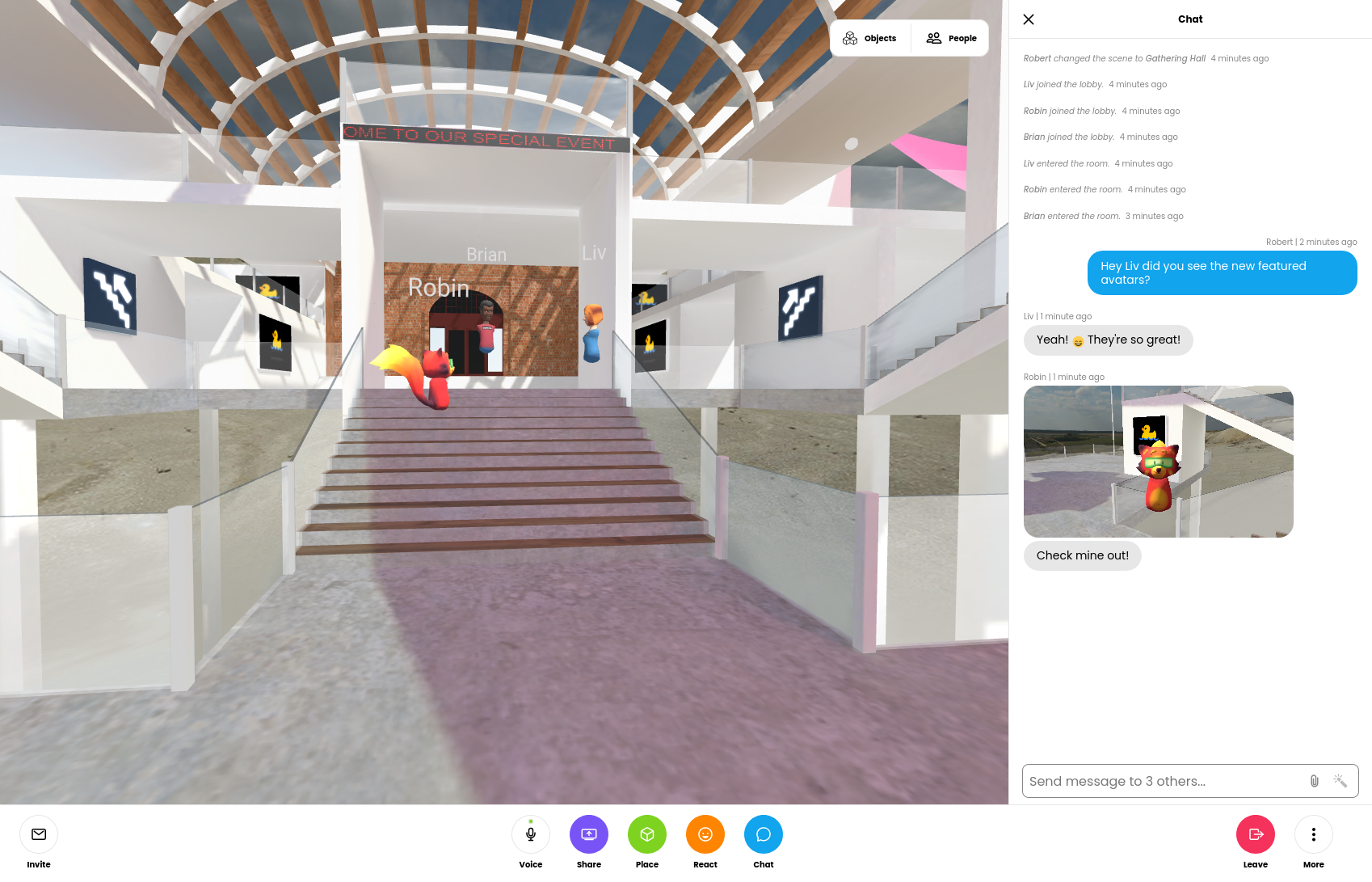
Chat scroll back has been a highly requested feature in Hubs. Before today’s update, messages sent in Hubs were ephemeral and disappeared after just a few seconds. The chat messages were also displayed drawn over the room UI, which could prevent scene content from being viewed. With the new chat sidebar, you’ll be able to see chat from the moment you join the lobby, and choose when to show or hide the panel. On desktop, if the chat panel is closed, you’ll still get the quick text notifications, which have moved from the center of the screen to the bottom-left.
Streamlined experience for desktop and mobile
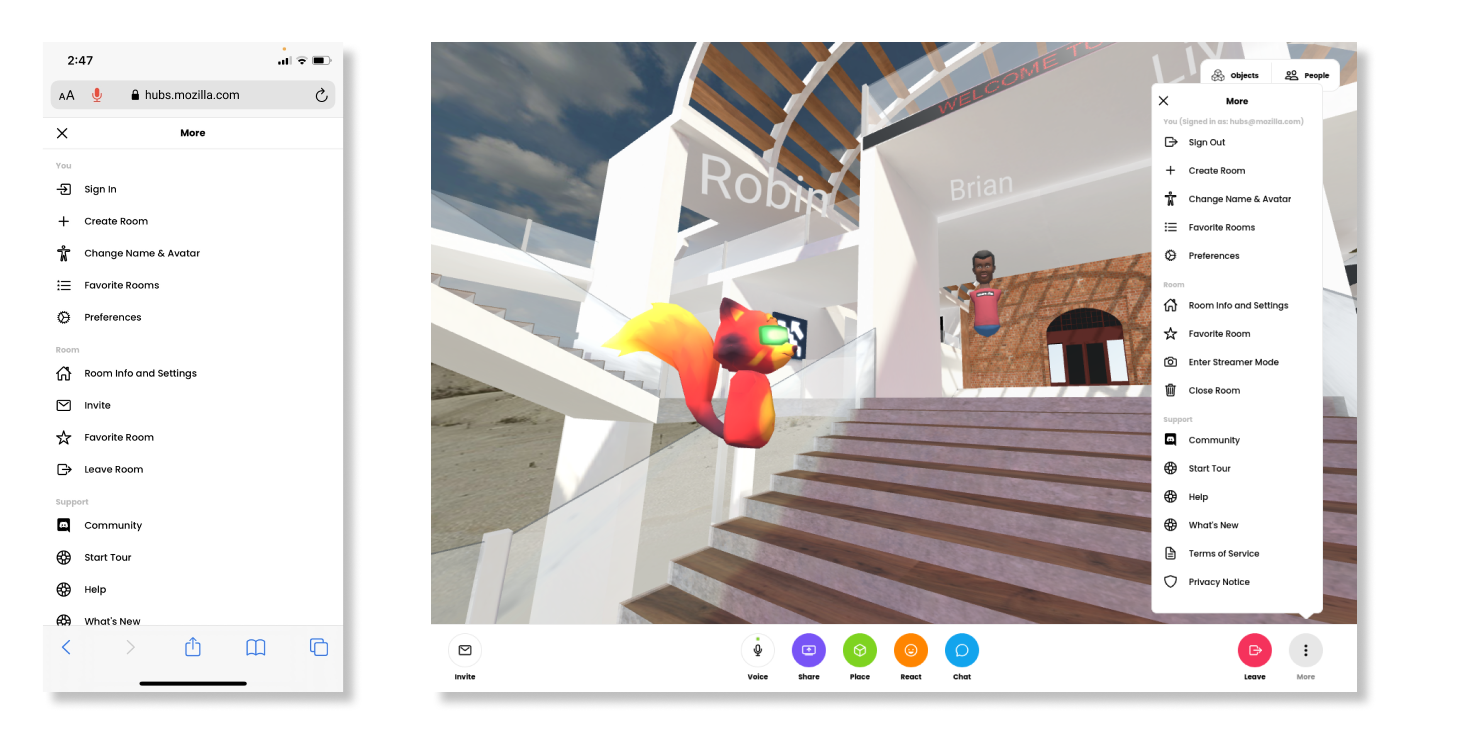
In the past, our team took a design approach that kept the desktop, mobile, and virtual reality interfaces tightly coupled. This often meant that the application’s interactions were tailored primarily to virtual reality devices, but in practice, the vast majority of Hubs users are visiting rooms on non-VR devices. This update separates the desktop and mobile interfaces to align more to industry-standard best practices, and makes the experience of being in a Hubs room more tailored to the device you’re using at any given time. We’ve improved menu navigation by making these full-screen on mobile devices, and by consolidating options and preferences for personalizing your experience.
For our Hubs Cloud customers, we’re planning to release the UI changes after March 25th, 2021. If you’re running Hubs Cloud out of the box on AWS, no manual updates will be required. If you have a custom fork, you will need to pull the changes into your client manually. We’ve created a guide here to explain what changes need to be made. For help with updates to Hubs Cloud or custom clients, you can connect with us on GitHub. We will be releasing an update to Hubs Cloud next week that does not include the UI redesign.
Helping you get the most out of your Hubs experience through our community
We’re excited to share that you can now get answers to questions about Hubs using support.mozilla.org. In addition to articles to help with basic Hubs setup and troubleshooting, the ‘Ask a Question’ forum is now available. This is a new place for the community and team to help answer questions about Hubs. If you’re an active Hubs user, you can contribute by answering questions and flagging information for the team. If you’re new to Hubs and find yourself needing some help getting up and running, pop over and let us know how we can help.
In the coming months, we’ll have additional detail to share about accessibility and localization in the new Hubs client. In the meantime, we invite you to check out the new Hubs experience on either your mobile or desktop device
With the Quad G5 now back in working order after the Floodgap Power Supply Kablooey of 2020, TenFourFox Feature Parity Release "30.1" (SPR 1) is now available for testing (downloads, hashes, release notes). As noted, this is almost entirely a security update and there are no user-facing changes except to wallpaper crashes on Apple discussion pages, another instance of the infamous issue 621 ("Assertion failure: slotInRange(slot)") which affected LinkedIn and is probably the same JavaScript library getting, uh, linked into something else. Hopefully this gives me a little more to work with debugging it. Assuming no problems, FPR30 SPR1 goes live on Monday evening or Tuesday Pacific time parallel with mainline Firefox 85.
http://tenfourfox.blogspot.com/2021/01/tenfourfox-fpr30-spr1-available.html
Sometimes, a website is broken with a webcompat issue. In the best case, the webcompat team is able to diagnose it. (You can help). The team has been keeping a regular pace for diagnosis for the last year.
But after diagnosis what should we do?

There are a couple of possibilities:
- Outreach: After finding a point of contact for the website, the webcompat team (or a contributor, you can help again) sends a message explaining the issue and asking for help to get it fixed. It's time consuming and often people on the other side, even if they have an intent to fix the issue, do not reply. Sometimes they never reply.
- Fixing Gecko: Sometimes Gecko is really broken OR implements the right thing, but the broken behavior of Blink or WebKit so popular that Mozilla has to implement the broken behavior.
- Site Interventions: These are patches which modify the website on the fly and fix the issue before the site is actually fixing it. If the site is never fixed, at least the normal users will get a better experience. Let's talk about these.
Site Interventions
We follow a strict release process tied to the release cycle of Firefox. You can discover our CSS interventions and JavaScript Interventions. The calendar for the upcoming releases is defined in advance.
Before each release cycle for site interventions, the Softvision Webcompat team (Oana and Cipri) makes sure to test the site without the patch to discover if the site intervention is still necessary. This takes time and requires a lot of manual work. Time that could be used for more introspective work.
To activate deactivate site interventions, you can play with extensions.webcompat.perform_injections in about:config.
Automated Testing Of Site Interventions
So we started to discuss again the prospect of automating the site interventions patches verification. We often discussed about it, but we often wanted it to be too perfect. Opera Software had for browser.js a very neat system. Each time a patch was not valid anymore it was sending an alert telling us that we should fix or remove it.
We should probably target something simpler by using webdriver at least for the simple bugs. By the way you should read Improving Cross-Browser Testing, Part 1: Web Application Testing Today if you want to know a bit more about the landscape of testing in browsers these days. We need to make it simple enough so that people who are checking the validity of a patch can create a simple webdriver script replicating the task done by hand. Then we could aim for a very simple solution where someone run the script and see if something is broken. It is still not fully automated but it's a good first step.
Keeping things simple even if a bit hackish at the beginning help other people in your community to grow, to engage in the process, and to evolve from there. It's an opportunity to acquire new skills.
Histography, an example
Histography is working in Firefox, but only if we fake the user agent string (The bug, the patch).
A webdriver script here would be.
- Go to http://histography.io/
- Wait for the page to be fully