We’ve spent the last couple of months finalizing our plans for 2021 and we’re ready to share them. What follows is a copy of the Firefox Accessibility Roadmap taken from the Mozilla Accessibility wiki.
Mozilla’s mission is to ensure the Internet is a global public resource, open and accessible to all. An Internet that truly puts people first, where individuals can shape their own experience and are empowered, safe and independent.
People with disabilities can experience huge benefits from technology but can also find it frustrating or worse, downright unusable. Mozilla’s Firefox accessibility team is committed to delivering products and services that are not just usable for people with disabilities, but a delight to use.
The Firefox accessibility (a11y) team will be spending much of 2021 re-building major pieces of our accessibility engine, the part of Firefox that powers screen readers and other assistive technologies.
While the current Firefox a11y engine has served us well for many years, new directions in browser architectures and operating systems coupled with the increasing complexity of the modern web means that some of Firefox’s venerable a11y engine needs a rebuild.
Browsers, including Firefox, once simple single process applications, have become complex multi-process systems that have to move lots of data between processes, which can cause performance slowdowns. In order to ensure the best performance and stability and to enable support for a growing, wider variety of accessibility tools in the future (such as Windows Narrator, Speech Recognition and Text Cursor Indicator), Firefox’s accessibility engine needs to be more robust and versatile. And where ATs used to spend significant resources ensuring a great experience across browsers, the dominance of one particular browser means less resources being committed to ensuring the ATs work well with Firefox. This changing landscape means that Firefox too must evolve significantly and that’s what we’re going to be doing in 2021.
The most important part of this rebuild of the Firefox accessibility engine is what we’re calling “cache the world”. Today, when an accessibility client wants to access web content, Firefox often has to send a request from its UI process to the web content process. Only a small amount of information is maintained in the UI process for faster response. Aside from the overhead of these requests, this can cause significant responsiveness problems, particularly if an accessibility client accesses many elements in the accessibility tree. The architecture we’re implementing this year will ameliorate these problems by sending the entire accessibility tree from the web content process to the UI process and keeping it up to date, ensuring that accessibility clients have the fastest possible response to their requests regardless of their complexity.
So that’s the biggest lift we’re planning for 2021 but that’s not all we’ll be doing. Firefox is always adding new features and adjusting existing features and the accessibility team will be spending significant effort ensuring that all of the Firefox changes are accessible. And we know we’re not perfect today so we’ll also be working through our backlog of defects, prioritizing and fixing the issues that cause the most severe problems for users with disabilities.
Firefox has a long history of providing great experiences for disabled people. To continue that legacy, we’re spending most of our resources this year on rebuilding core pieces of technology supporting those experiences. That means we won’t have the resources to tackle some issues we’d like to, but another piece of Firefox’s long history is that, through open source and open participation, you can help. This year, we can especially use your help identifying any new issues that take away from your experience as a disabled Firefox user, fixing high priority bugs that affect large numbers of disabled Firefox users, and spreading the word about the areas where Firefox excels as a browser for disabled users. Together, we can make 2021 a great year for Firefox accessibility.
The post 2021 Firefox Accessibility Roadmap Update appeared first on Mozilla Accessibility.
Fox Gate
The internet was set on fire (pun intended) this week, by what I’m calling ‘fox gate’, and chances are you might have seen a meme or two about the Firefox logo. Many people were pulling up for a battle royale because they thought we had scrubbed fox imagery from our browser.
This is definitely not happening.
The logo causing all the stir is one we created a while ago with input from our users. Back in 2019, we updated the Firefox browser logo and added the parent brand logo.
What we really learned throughout this, is that many of our users aren’t actually using the browser because then they’d know (no shade) the beloved fox icon is alive and well in Firefox on your desktop.
Shameless plug – you can download the browser here

You can read more about how all this spiralled in the mini-case study on how the ‘fox gate’ misinformation spread online here.

Long story short, the fox is here to stay and for our Firefox Nightly users out there, we’re bringing back a very special version of an older logo, as a treat.
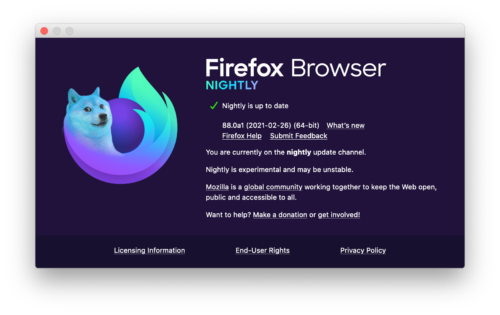
Our commitment to privacy and a safe and open web remains the same and we hope you enjoy the nightly version of the logo and take some time to read up on spotting misinformation and fake news.
The post Here’s what’s happening with the Firefox Nightly logo appeared first on Mozilla Hacks - the Web developer blog.
https://hacks.mozilla.org/heres-whats-happening-with-the-firefox-nightly-logo/
If you’ve been on the internet this week, chances are you might have seen a meme or two about the Firefox logo. And listen, that’s great news for us. Sure, … Read more
The post Remain Calm: the fox is still in the Firefox logo appeared first on The Firefox Frontier.
https://blog.mozilla.org/firefox/the-fox-is-still-in-the-firefox-logo/
django-querysetsequence 0.14 has been released with support for Django 3.2 (and Python 3.9). django-querysetsequence is a Django package for treating multiple QuerySet instances as a single QuerySet, this can be useful for treating similar models as a single model. The QuerySetSequence class supports much of the API …
https://patrick.cloke.us/posts/2021/02/26/django-querysetsequence-0-14-released/

Earlier this month, the Hubs team spent a week working on an internal hackathon. We figured that the start of a new year is a great time to get our roadmap in order, do some investigations about possible new features to explore this year, and bring in some fresh perspectives on what we could accomplish. Plus, we figured that it wouldn’t hurt to have a little fun doing it! Our first hack week was a huge success, and today we’re sharing what we worked on this month so you can get a “behind the scenes” peek at what it’s like to work on Hubs.
Try on a new look
As part of our work on Hubs, we think a lot about expression and identity. From the beginning, we've made it a priority to allow creators to develop their own avatar styles, which is why you might find yourself in a Hubs room with robots, humans, parrots, carrots, and everything in between.
We don’t make assumptions about how you want to look on a given day with a specific group of people. That's why when an artist on the team built a series of components for a modular avatar system, we built a standalone editor instead of integrating one directly into Hubs itself.
Over the past year, we’ve been delighted to see avatar editors popping up for Hubs, like Rhiannan’s editor and Ready Player Me. For hack week, we added one more to the collection for you the community to play with, tinker on, and modify to your liking!

To get started, head to the hack week avatar maker website. The avatar you see when you first arrive is made out of a random combination of kit components. Use the drop down menus on the left hand side of the screen to pick your favorite features and accessories.
To import your avatar into Hubs, click the “Export Avatar” button to save it to your local computer, and follow these steps to upload it into Hubs.
Can you see me now? Experimenting with video feeds in Hubs
Social distancing can be tough! While Hubs is built for avatar-based communication, sometimes it’s nice to see a friendly face. We’ve gotten lots of feedback from community members asking for new ways to share their webcams in Hubs. We took that feedback to heart, and set off to see what we could do.
Our team philosophy tends to fall on the side of giving people different options, so we took on two different projects: one that would explore having camera feeds as part of the 2D user interface, and one that put them onto avatars.

Avatar-based chat apps can be a lot to take in if you’re new to 3D, so we experimented with a video feed layer that would sit on top of the Hubs world. While this is still just in a prototype stage, there’s a lot of potential here. We’re looking at doing a deeper dive into this type of feature later in the year when we can devote some time to figuring out how this could tie into the spatial audio in Hubs and our upcoming explorations into navigation in general.

While we’re probably still a ways off from having true holograms, we did figure out that we could get some virtual holograms in a Hubs room using some new billboard techniques and a couple of filters. These video avatars allow you to use your webcam to represent you in a Hubs space, and shares your video with the room such that it sticks to you as you move. When you’re wearing a video avatar, a new option will appear to share your webcam onto the video texture component specified. We are extremely excited to see what the community comes up with using these avatar screens.
Our first iteration of the video avatars is shipping with the webcam as-is in the near future, but as you can see in the photo above, we’re experimenting with filters (hello, green screen!) to make video avatars even more personalized. Using filters remains in the
After more than 3 years since the original RFC for const generics was accepted, the first version of const generics is now available in the Rust beta channel! It will be available in the 1.51 release, which is expected to be released on March 25th, 2021. Const generics is one of the most highly anticipated features coming to Rust, and we're excited for people to start taking advantage of the increased power of the language following this addition.
Even if you don't know what const generics are (in which case, read on!), you've likely been benefitting from them: const generics are already employed in the Rust standard library to improve the ergonomics of arrays and diagnostics; more on that below.
With const generics hitting beta, let's take a quick look over what's actually being stabilized, what this means practically, and what's next.
What are const generics?
Const generics are generic arguments that range over constant values, rather than types or lifetimes. This allows, for instance, types to be parameterized by integers. In fact, there has been one example of const generic types since early on in Rust's development: the array types [T; N], for some type T and N: usize. However, there has previously been no way to abstract over arrays of an arbitrary size: if you wanted to implement a trait for arrays of any size, you would have to do so manually for each possible value. For a long time, even the standard library methods for arrays were limited to arrays of length at most 32 due to this problem. This restriction was finally lifted in Rust 1.47 - a change that was made possible by const generics.
Here's an example of a type and implementation making use of const generics: a type wrapping a pair of arrays of the same size.
struct ArrayPair {
    left: [T; N],
    right: [T; N],
}

impl Debug for ArrayPair {
    // ...
}
Current restrictions
The first iteration of const generics has been deliberately constrained: in other words, this version is the MVP (minimal viable product) for const generics. This decision is motivated both by the additional complexity of general const generics (the implementation for general const generics is not yet complete, but we feel const generics in 1.51 are already very useful), as well as by the desire to introduce a large feature gradually, to gain experience with any potential shortcomings and difficulties. We intend to lift these in future versions of Rust: see what's next.
Only integral types are permitted for const generics
For now, the only types that may be used as the type of a const generic argument are the types of integers (i.e. signed and unsigned integers, including isize and usize) as well as char and bool. This covers a primary use case of const, namely abstracting over arrays. In the future, this restriction will be lifted to allow more complex types, such as &str and user-defined types.
No complex generic expressions in const arguments
Currently, const parameters may only be instantiated by const arguments of the following forms:
- A standalone const parameter.
- A literal (i.e. an integer, bool, or character).
- A concrete constant expression (enclosed by
{}), involving no generic parameters.
For example:
fn foo() {}

fn bar() {
    foo::(); // ok: `M` is a const parameter
    foo::<2021>(); // ok: `2021` is a literal
    foo::<{20 * 100 + 20 * 10 + 1}>(); // ok: const expression contains no generic parameters

    foo::<{ M + 1 }>(); // error: const expression contains the generic parameter `M`
foo::<{ Project
- time
1 month
- impact
established cross organization groups as a tool for grouping people
Problem statement
Data Org architects, builds, and maintains a data ingestion system and the ecosystem of pieces around it. It covers a swath of engineering and data science disciplines and problem domains. Many of us are generalists and have expertise and interests in multiple areas. Many projects cut across disciplines, problem domains, and organizational structures. Some projects, disciplines, and problem domains benefit from participation of other stakeholders who aren't in Data Org.
In order to succeed in tackling the projects of tomorrow, we need to formalize creating, maintaining, and disbanding groups composed of interested stakeholders focusing on specific missions. Further, we need a set of best practices to help make these groups successful.
Read more… (7 min remaining to read)
https://bluesock.org/~willkg/blog/mozilla/do_working_groups.html
Firefox 86 is out, not only with multiple picture-in-picture (now have all the Weird Al videos open simultaneously!) and total cookie protection (not to be confused with other things called TCP) but also some noticeable performance improvements and finally gets rid of Backspace backing you up, a key I have never pressed to go back a page. Or, maybe those performance improvements are due to further improvements to our LTO-PGO recipe, which uses Fedora's work to get rid of the sidecar shell script. Now with this single patch, plus their change to nsTerminator.cpp to allow optimization to be unbounded by time, you can build a fully link- and profile-guided optimized version for OpenPOWER and gcc with much less work. Firefox 86 also incorporates our low-level Power-specific fix to xpconnect.
Our .mozconfigs are mostly the same except for purging a couple iffy options. Here's Optimized:
And here's Debug:
export CC=/usr/bin/gcc
export CXX=/usr/bin/g++

mk_add_options MOZ_MAKE_FLAGS="-j24"
ac_add_options --enable-application=browser
ac_add_options --enable-optimize="-O3 -mcpu=power9"
ac_add_options --enable-release
ac_add_options --enable-linker=bfd
ac_add_options --enable-lto=full
ac_add_options MOZ_PGO=1

# uncomment if you have it
#export GN=/home/censored/bin/gn
export CC=/usr/bin/gcc
export CXX=/usr/bin/g++

mk_add_options MOZ_MAKE_FLAGS="-j24"
ac_add_options --enable-application=browser
ac_add_options --enable-optimize="-Og -mcpu=power9"
ac_add_options --enable-debug
ac_add_options --enable-linker=bfd

# uncomment if you have it
#export GN=/home/censored/bin/gn
This is the fifth post in my “2018 Roundup” series. For an index of all entries, please see my blog entry for Q1.
Yes, you are reading the dates correctly: I am posting this over two years after I began this series. I am trying to get caught up on documenting my past work!
Preparing to Enable the Launcher Process by Default
CI and Developer Tooling
Given that the launcher process completely changes how our Win32 Firefox builds start, I needed to update both our CI harnesses, as well as the launcher process itself. I didn’t do much that was particularly noteworthy from a technical standpoint, but I will mention some important points:
During normal use, the launcher process usually exits immediately after the browser process is confirmed to have started. This was a deliberate design decision that I made. Having the launcher process wait for the browser process to terminate would not do any harm, however I did not want the launcher process hanging around in Task Manager and being misunderstood by users who are checking their browser’s resource usage.
On the other hand, such a design completely breaks scripts that expect to start
Firefox and be able to synchronously wait for the browser to exit before
continuing! Clearly I needed to provide an opt-in for the latter case, so I added
the --wait-for-browser command-line option. The launcher process also implicitly
enables this mode under a few other scenarios.
Secondly, there is the issue of debugging. Developers were previously used to
attaching to the first firefox.exe process they see and expecting to be debugging
the browser process. With the launcher process enabled by default, this is no
longer the case.
There are few options here:
- Visual Studio users may install the Child Process Debugging Power Tool, which enables the VS debugger to attach to child processes;
- WinDbg users may start their debugger with the
-ocommand-line flag, or use theDebug child processes alsocheckbox in the GUI; - I added support for a
MOZ_DEBUG_BROWSER_PAUSEenvironment variable, which allows developers to set a timeout (in seconds) for the browser process to print its pid tostdoutand wait for a debugger attachment.
Performance Testing
As I have alluded to in previous posts, I needed to measure the effect of adding
an additional process to the critical path of Firefox startup. Since in-process
testing will not work in this case, I needed to use something that could provide
a holistic view across both launcher and browser processes. I decided to enhance
our existing xperf suite in Talos to support my use case.
I already had prior experience with xperf; I spent a significant part of 2013
working with Joel Maher to put the xperf Talos suite into production. I also
knew that the existing code was not sufficiently generic to be able to handle my
use case.
I threw together a rudimentary analysis framework
for working with CSV-exported xperf data. Then, after Joel’s review, I vendored
it into mozilla-central and used it to construct an analysis for startup time.
[While a more thorough discussion of this framework is definitely warranted, I
also feel that it is tangential to the discussion at hand; I’ll write a dedicated
blog entry about this topic in the future. – Aaron]
In essence, the analysis considers the following facts when processing an xperf recording:
- The launcher process will be the first
firefox.exeprocess that runs; - The browser process will be started by the launcher process;
- The browser process will fire a session store window restored event.
For our analysis, we needed to do the following:
- Find the event showing the first
firefox.exeprocess being created; - Find the session store window restored event from the second process;
- Output the time interval between the two events.
This block of code demonstrates how that analysis is specified using my analyzer
(“This Week in Glean” is a series of blog posts that the Glean Team at Mozilla is using to try to communicate better about our work. They could be release notes, documentation, hopes, dreams, or whatever: so long as it is inspired by Glean.)
All “This Week in Glean” blog posts are listed in the TWiG index (and on the Mozilla Data blog).
Every Monday the Glean has its weekly Glean SDK meeting. This meeting is used for 2 main parts: First discussing the features and bugs the team is currently investigating or that were requested by outside stakeholders. And second bug triage & monitoring of data that Glean reports in the wild.
Most of the time looking at our monitoring is boring and that’s a good thing.
From the beginning the Glean SDK supported extensive error reporting on data collected by the framework inside end-user applications. Errors are produced when the application tries to record invalid values. That could be a negative value for a counter that should only ever go up or stopping a timer that was never started. Sometimes this comes down to a simple bug in the code logic and should be fixed in the implementation. But often this is due to unexpected and surprising behavior of the application the developers definitely didn’t think about. Do you know all the ways that your Android application can be started? There’s a whole lot of events that can launch it, even in the background, and you might miss instrumenting all the right parts sometimes. Of course this should then also be fixed in the implementation.
Monitoring Firefox for Android
For our weekly monitoring we look at one application in particular: Firefox for Android. Because errors are reported in the same way as other metrics we are able to query our database, aggregate the data by specific metrics and errors, generate graphs from it and create dashboards on our instance of Redash.

The above graph displays error counts for different metrics. Each line is a specific metric and error (such as Invalid Value or Invalid State). The exact numbers are not important. What we’re interested in is the general trend. Are the errors per metrics stable or are there sudden jumps? Upward jumps indicate a problem, downward jumps probably means the underlying bug got fixed and is finally rolled out in an update to users.

We have another graph that doesn’t take the raw number of errors, but averages it across the entire population. A sharp increase in error counts sometimes comes from a small number of clients, whereas the errors for others stay at the same low-level. That’s still a concern for us, but knowing that a potential bug is limited to a small number of clients may help with finding and fixing it. And sometimes it’s really just bogus client data we get and can dismiss fully.
Most of the time these graphs stay rather flat and boring and we can quickly continue with other work. Sometimes though we can catch potential issues in the first days after a rollout.

In this graph from the nightly release of Firefox for Android two metrics started reporting a number of errors that’s far above any other error we see. We can then quickly find the implementation of these metrics and report that to the responsible team (Filed bug, and the remediation PR).
But can’t that be automated?
It probably can! But it requires more work than throwing together a dashboard with graphs. It’s also not as easy to define thresholds on these changes and when to report them. There’s work underway that hopefully enables us to more quickly build up these dashboards for any product using the Glean SDK,
(“This Week in Glean” is a series of blog posts that the Glean Team at Mozilla is using to try to communicate better about our work. They could be release notes, documentation, hopes, dreams, or whatever: so long as it is inspired by Glean.)
All "This Week in Glean" blog posts are listed in the TWiG index (and on the Mozilla Data blog). This article is cross-posted on the Mozilla Data blog.
Every Monday the Glean has its weekly Glean SDK meeting. This meeting is used for 2 main parts: First discussing the features and bugs the team is currently investigating or that were requested by outside stakeholders. And second bug triage & monitoring of data that Glean reports in the wild.
Most of the time looking at our monitoring is boring and that's a good thing.
From the beginning the Glean SDK supported extensive error reporting on data collected by the framework inside end-user applications. Errors are produced when the application tries to record invalid values. That could be a negative value for a counter that should only ever go up or stopping a timer that was never started. Sometimes this comes down to a simple bug in the code logic and should be fixed in the implementation. But often this is due to unexpected and surprising behavior of the application the developers definitely didn't think about. Do you know all the ways that your Android application can be started? There's a whole lot of events that can launch it, even in the background, and you might miss instrumenting all the right parts sometimes. Of course this should then also be fixed in the implementation.
Monitoring Firefox for Android
For our weekly monitoring we look at one application in particular: Firefox for Android. Because errors are reported in the same way as other metrics we are able to query our database, aggregate the data by specific metrics and errors, generate graphs from it and create dashboards on our instance of Redash.
The above graph displays error counts for different metrics. Each line is a specific metric and error (such as Invalid Value or Invalid State).
The exact numbers are not important.
What we're interested in is the general trend.
Are the errors per metrics stable or are there sudden jumps?
Upward jumps indicate a problem, downward jumps probably means the underlying bug got fixed and is finally rolled out in an update to users.
We have another graph that doesn't take the raw number of errors, but averages it across the entire population. A sharp increase in error counts sometimes comes from a small number of clients, whereas the errors for others stay at the same low-level. That's still a concern for us, but knowing that a potential bug is limited to a small number of clients may help with finding and fixing it. And sometimes it's really just bogus client data we get and can dismiss fully.
Most of the time these graphs stay rather flat and boring and we can quickly continue with other work. Sometimes though we can catch potential issues in the first days after a rollout.
In this graph from the nightly release of Firefox for Android two metrics started reporting a number of errors that's far above any other error we see. We can then quickly find the implementation of these metrics and report that to the responsible team (Filed bug, and the remediation PR).
But can't that be automated?
It probably can! But it requires more work than throwing together a dashboard with graphs. It's also not as easy to define thresholds on these changes and when to report them. There's work underway that hopefully enables us to more quickly build up these dashboards for any product using the Glean SDK, which we can then also extend to do more reporting automated. The final goal should be that the product teams themselves are
Code Review is an essential part of the process of publishing code. We often talk about the benefits of code review for projects and for people writing the code. I want to talk about the benefits for the person actually reviewing the code.

Understanding The Project
When doing code review, we don't necessarily have a good understanding of the project, or at least the same level of understanding than the person who has written the code.
Reviewing is a good way to piece together all the parts that makes this project work.
Learning How To Better Code
A lot of the reviews I have been have involved with taught me on how to become a better developer. Nobody has full knowledge of a language, an algorithm construct, a data structure. When reviewing we learn as much as we help. For things, which seem unclear, we dive into the documentation to better understand the intent. We can put into competition the existing knowledge with the one brought by the developer.
We might bring a new solution to the table that we didn't know existed. A review is not only discovering errors or weaknesses of a code, it's how to improve the code by exchanging ideas with the developer.
Instant Gratification
There is a feel good opportunity when doing good code reviews. Specifically, when the review helped to improve both the code and the developer. Nothing better than the last comment of a developer being happy of having the code merged and the feeling of improving skills.
Otsukare!
Hi everyone,
Please join us in welcoming Fabiola Lopez (Fabi) to the team. Fabi will be helping us with support content in English and Spanish, so you’ll see her in both locales. Here’s a little more about Fabi:
Hi, everyone! I’m Fabi, and I am a content writer and a translator. I will be working with you to create content for all our users. You will surely find me writing, proofreading, editing and localizing articles. If you have any ideas to help make our content more user-friendly, please reach out to me. Thanks to your help, we make this possible.
Also, Angela’s contract was ended last week. We’d like to thank Angela for her support for the past year.
https://blog.mozilla.org/sumo/2021/02/24/introducing-fabiola-lopez/
Looking into the near distance, we can see the end of February loitering on the horizon, threatening to give way to March at any moment. To keep you engaged until then, we’d like to introduce you to Firefox 86. The new version features some interesting and fun new goodies including support for the Intl.DisplayNames object, the :autofill pseudo-class, and a much better inspection feature in DevTools.
This blog post provides merely a set of highlights; for all the details, check out the following:
Better inspection
The Firefox web console used to include a cd() helper command that enabled developers to change the DevTools’ context to inspect a specific present on the page. This helper has been removed in favor of the iframe context picker, which is much easier to use.
When inspecting a page with s present, the DevTools will show the iframe context picker button.
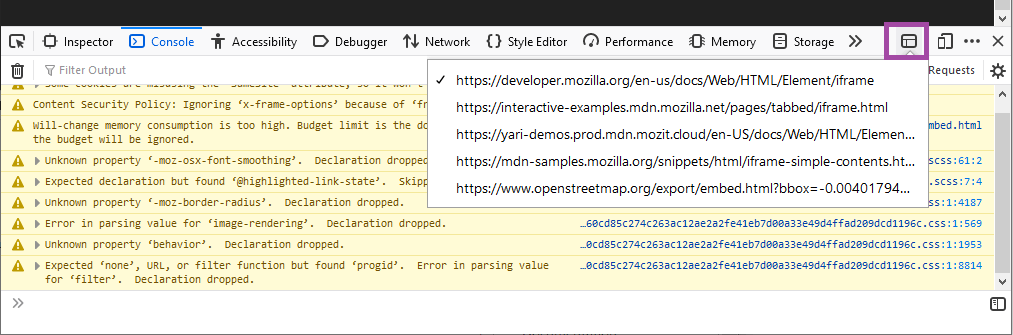
When pressed, it will display a drop-down menu listing all the URLs of content embedded in the page inside s. Choose one of these, and the inspector, console, debugger, and all other developer tools will then target that , essentially behaving as if the rest of the page does not exist.
:autofill
The :autofill CSS pseudo-class matches when an element has had its value auto-filled by the browser. The class stops matching as soon as the user edits the field.
For example:
input:-webkit-autofill {
  border: 3px solid blue;
}

input:autofill {
  border: 3px solid blue;
}
Firefox 86 supports the unprefixed version with the -webkit-prefixed version also supported as an alias. Most other browsers just support the prefixed version, so you should provide both for maximum browser support.
Intl.DisplayNames
The Intl.DisplayNames built-in object has been enabled by default in Firefox 86. This enables the consistent translation of language, region, and script display names. A simple example looks like so:
// Get English currency code display names
let currencyNames = new Intl.DisplayNames(['en'], {type: 'currency'});

// Get currency names
currencyNames.of('USD'); // "US Dollar"
currencyNames.of('EUR'); // "Euro"
Nightly preview — image-set()
The image-set() CSS function lets the browser pick the most appropriate CSS image from a provided set. This is useful for implementing responsive images in CSS, respecting the fact that resolution and bandwidth differ by device and network access.
The syntax looks like so:
background-image: image-set("cat.png" 1x,
                            "cat-2x.png" 2x,
                            "cat-print.png" 600dpi);
Given the set of options, the browser will choose the most appropriate one for the current device’s resolution — users of lower-resolution devices will appreciate not having to download a large hi-res image that they don’t need, which users of more modern devices will be happy to receive a sharper, crisper image that looks better on their device.
WebExtensions
As part of our work on Manifest V3, we have landed an experimental base content security policy (CSP) behind a preference in Firefox 86. The new CSP disallows remote code execution. This restriction only applies to extensions using manifest_version 3, which is not currently supported in Firefox (currently, only manifest_version 2 is supported).
If you would like to test the new CSP for extension pages and content scripts, you must change your extension’s manifest_version to 3 and set
“Life Happens” is an acknowledgement that there are numerous things that people experience in their actual physical lives that suddenly take higher priority than nearly anything else (like participation in volunteer-based communities), and those communities (like the IndieWeb) should acknowledge, accept, and be supportive of community members experiencing such events.
What Happens
What kind of events? Off the top of my head I came up with several that I’ve witnessed community members (including a few myself) experience, like:
- getting married — not having experienced this myself, I can only imagine that for some folks it causes a priorities reset
- having a child — from what I've seen this pretty much causes nearly everything else that isn’t essential to get dropped, acknowledging that there are many family shapes, without judgment of any
- going through a bad breakup or divorce — the trauma, depression etc. experienced can make you want to not show up for anything, sometimes not even get out of bed
- starting a new job — that takes up all your time, and/or polices what you can say online, or where you may participate
- becoming an essential caregiver — caring for an aging, sick, or critically ill parent, family member, or other person
- buying a house — often associated with a shift in focus of personal project time (hat tip: Marty McGuire)
- home repairs or renovations — similar to “new house” project time, or urgent repairs. This is one that I’ve been personally both “dealing with” and somewhat embracing since December 2019 (with maybe a few weeks off at times), due to an infrastructure failure the previous month, which turned into an inspired series of renovations
- death of a family member, friend, pet
- … more examples of how life happens on the wiki
Values, People, and Making It Explicit
When these things happen, as a community, I feel we should respond with kindness, support, and understanding when someone steps back from community participation or projects. We should not shame or guilt them in any way, and ideally act in such a way that welcomes their return whenever they are able to do so.
Many projects (especially open source software) often talk about their “bus factor” (or more positively worded “lottery factor”). However that framing focuses on the robustness of the project (or company) rather than those contributing to it. Right there in IndieWeb’s motto is an encouragement to reframe: be a “people-focused alternative to the corporate […]”.
The point of “life happens” is to decenter the corporation or project when it comes to such matters, and instead focus on the good of the people in the community. Resiliency of humanity over resiliency of any particular project or organization.
Adopting such values and practices explicitly is more robust than depending on accidental good faith or informal cultural support. Such emotional care should be the clearly written default, rather than something everyone has
TenFourFox Feature Parity Release "30.2" (SPR 2) is now available for testing (downloads, hashes, release notes). The reason this is another security-only release is because of my work schedule and also I spent a lot of time spinning my wheels on issue 621, which is the highest priority JavaScript concern because it is an outright crash. The hope was that I could recreate one of the Apple discussion pages locally and mess with it and maybe understand what is unsettling the parser, but even though I thought I had all the components, it still won't load or reproduce in a controlled environment. I've spent too much time on it and even if I could do more diagnostic analysis I still don't know if I can do anything better than "not crash" (and in SPR2 is a better "don't crash" fix, just one that doesn't restore any functionality). Still, if you are desperate to see this fixed, see if you can create a completely local Apple discussions page or clump of files that reliably crashes the browser. If you do this, either attach the archive to the Github issue or open a Tenderapp ticket and let's have a look. No promises, but if the community wants this fixed, the community will need to do some work on it.
In the meantime, I want to get back to devising a settings tab to allow the browser to automatically pick appropriate user agents and/or start reader mode by domain so that sites that are expensive or may not work with TenFourFox's older hacked-up Firefox 45 base can automatically select a fallback. Our systems are only getting slower compared to all the crap modern sites are adding, after all. I still need to do some plumbing work on it, so the fully-fledged feature is not likely to be in FPR31, but I do intend to have some more pieces of the plumbing documented so that you can at least mess with that. The user-agent selector will be based on the existing functionality that was restored in FPR17.
Assuming no major issues, FPR30 SPR2 goes live Monday evening Pacific as usual.
http://tenfourfox.blogspot.com/2021/02/tenfourfox-fpr30-spr2-available.html