If you’re looking at some Jetpack Compose code or tutorials written last year, you might see the use of onCommit, onActive, and onDispose. However, these functions are no longer present in Android’s developer documentation. They were deprecated in version 1.0.0-alpha11 in favor of SideEffect and DisposableEffect. Here’s how to use those new functions and update your code.
What do they do?
Composables should be side-effect free and not handle use cases such as connecting with a HTTP API or showing a snackbar directly. You should use the side effect APIs in Jetpack Compose to ensure that these effects are run in a predictable way, rather than writing it alongside your UI rendering code.
onCommit with just a callback
This simple use case has a simple update. Just use the new SideEffect function instead.
// Before
onCommit {
  sideEffectRunEveryComposition()
}
// After
SideEffect {
  sideEffectRunEveryComposition()
}
onCommit with keys
If you only want to run your side effect when keys are changed, then you should LaunchedEffect if you don’t call onDispose. (If you do, scroll down to the next section.)
// Before
onCommit(userId) {
  searchUser(userId)
}
// After
LaunchedEffect(userId) {
  searchUser(userId)
}
onCommit with onDispose
Effects using onDispose to clean up are now handled in a separate function called DisposableEffect.
// Before
onCommit(userId) {
  val subscription = subscribeToUser(userId)

  onDispose {
    subscription.cleanup()
  }
}
// After
DisposableEffect(userId) {
  val subscription = subscribeToUser(userId)

  onDispose {
    subscription.cleanup()
  }
}
onActive
Rather than having a separate function for running an effect only on the first composition, this use cases is now handled by passing Unit as a key to LaunchedEffect or DisposableEffect. You can pass any static value as a key, including Unit or true.
// Before
onActive {
  search()
}
// After
LaunchedEffect(Unit) {
  search()
}
onActive with onDispose
// TenFourFox Feature Parity Release 31 beta 1 is now available (downloads, hashes, release notes). I didn't get everything done here that I wanted to, though thanks to Chris T I do have a reproducing local test version of the infamous issue 621; at least I am able now to see that it's clearly a problem in the JavaScript parser generating something incorrectly, but I'm still not able to tell where the specific deficiency lies.
However, there's still new stuff in this release. Olga T Park contributed a backport from later Firefox versions to fix saving passwords in private browsing, and I also finished fully exposing support for site specific user agents. This was quietly reimplemented in FPR17 for interested users, but now that it's getting more and more necessary on more and more sites, I have made the feature a visible and supported part of the browser interface. Instead of having to enter sites and strings manually into about:config, though you still can, you can now go to the TenFourFox preference pane,


I was also planning to do a Reader View update for this release, which will need a user interface of its own, but every new UI feature requires additional locale strings and I wanted to give our localizers (led by Chris) a chance to catch up on the new strings in time for the final release on March 22. However, I do have a not-yet-exposed feature's plumbing done, which is another enhancement to Reader View: auto Reader View.
Auto Reader View is different from sticky Reader View, which has been the default since FPR27. Sticky Reader View means that when you go into Reader View, links you click on also load in Reader View, until you quit it by clicking one of the exit buttons. Auto Reader View, however, allows you to tell the browser to automatically open pages from a domain in Reader View as soon as you click on any link to that domain from any page, in Reader View or not. Since front pages may not work as well,
At the end of 2019, we announced an upcoming requirement for extension developers to enable two-factor authentication (2FA) for their Firefox Accounts, which are used to log into addons.mozilla.org (AMO). This requirement is intended to protect add-on developers and users from malicious actors if they somehow get a hold of your login credentials, and it will go into effect starting March 15, 2021.
If you are an extension developer and have not enabled 2FA by this date, you will be directed to your Firefox Account settings to turn it on the next time you log into AMO.
Instructions for enabling 2FA for your Firefox Account can be found on support.mozilla.org. Once you’ve finished the set-up process, be sure to download or print your recovery codes and keep them in a safe place. If you ever lose access to your 2FA devices and get locked out of your account, you will need to provide one of your recovery codes to regain access. Misplacing these codes can lead to permanent loss of access to your account and your add-ons on AMO. Mozilla cannot restore your account if you have lost access to it.
If you only upload using the AMO external API, you can continue using your API keys and you will not be asked to provide the second factor.
The post Two-factor authentication required for extension developers appeared first on Mozilla Add-ons Blog.
It has been a year since we were forced to stay home and recreate most of our life experiences with a screen between us. You may think you’ve reached peak … Read more
The post Firefox’s Multiple Picture-in-Picture feature is the gametime assist you need for this month’s big games appeared first on The Firefox Frontier.
WebGPU is a new standard for graphics and computing on the Web. Our team is actively involved in the design and specification process, while developing an implementation in Gecko. We’ve made a lot of progress since the last public update in Mozilla Hacks blog, and we’d like to share!

See full code in the fork.
API Tracing
Trouble-shooting graphics issues can be tough without proper tools. In WebRender, we have the capture infrastructure that allows us to save the state of the rendering pipeline at any given moment to disk, and replayed independently in a standalone environment. In WebGPU, we integrated something similar, called API tracing. Instead of slicing through the state at any given time, it records every command executed by WebGPU implementation from the start. The produced traces are ultimately portable, they can be replayed in a standalone environment on a different system. This infrastructure helps us breeze through the issues, fixing them quickly and not letting them stall the progress.
Rust Serialization
Gecko implementation of WebGPU has to talk in multiple languages: WebIDL, in which the specification is written, C++ – the main language of Gecko, IPDL – the description of inter-process communication (IPC), and Rust, in which wgpu library (the core of WebGPU) is implemented. This variety caused a lot of friction when updating the WebIDL API to latest, it was easy to introduce bugs, which were hard to find later. This architectural problem has been mostly solved by making our IPC rely on Rust serde+bincode. This allows Rust logic on the content process side to communicate with Rust logic on the GPU process side with minimal friction. It was made possible by the change to Rust structures to use Cow types aggressively, which are flexible and efficient, even though we don’t use the “write” part of the copy-on-write semantics.
API Coverage
- The W3C group has agreed on the CPU data transfers API of writeBuffer/writeTexture, as well as the new asynchronous buffer mapping semantics with mappedAtCreation flag. We implemented these in Gecko, using a bit of shared memory.
- The group introduced a new simplified way of creating pipelines, using implicit bind group layouts. We also implemented this in Gecko, while keeping some of the concerns on the table.
- There were major rewrites of the render pipeline API and bind group layouts, both of which landed in Gecko before they became available in other browsers.
- Some of the pieces of the API are still not implemented, such as queries and render bundles.
Validation
The API on the Web is required to be safe and
In a recent academic publication titled HTTPS-Only: Upgrading all connections to https in Web Browsers (to appear at MadWeb – Measurements, Attacks, and Defenses for the Web) we present a new browser connection model which paves the way to an ‘https-by-default’ web. In this blogpost, we provide technical details about HTTPS-Only Mode’s upgrading mechanism and share data around the success rate of this feature. (Note that links to source code are perma-linked to a recent revision as of this blog post. More recent changes may have changed the location of the code in question.)
Connection Model of HTTPS-Only
The fundamental security problem of the current browser practice of defaulting to use insecure http, instead of secure https, when initially connecting to a website, is that attackers can intercept the initial request to a website. Hijacking the initial request suffices for an attacker to perform a man-in-the-middle attack, which in turn allows the attacker to downgrade the connection, eavesdrop or modify data sent between client and server.
 [600x281]
Left: The current standard behavior of browsers defaulting to http with a server reachable over https; Right: HTTPS-Only behaviour defaulting to https with fallback to http when a server is not reachable over https.
Industry-wide default Connection Model: Current best practice to counter the explained man-in-the-middle security risk primarily relies on HTTP Strict-Transport-Security (HSTS). However, HSTS does not solve the problems associated with performing the initial request in plain http. As illustrated in the above Figure (left), the current browser default is to first connect to foo.com using http (see 1). If the server follows best practice and implements HSTS, then the server responds with a redirect to the secure version of the website (see 2). After the next GET request (see 3) the server adds the HSTS response header (see 4), signalling that the server prefers https connections and the browser should always perform https requests to foo.com (see 5).
HTTPS-Only Connection Model: In contrast and as illustrated in the above Figure (right), the presented HTTPS-Only approach first tries to connect to the web server using https (see 1). Given that most popular websites support https, our upgrading algorithm commonly establishes a secure connection and starts loading content. In a minority of cases, connecting to the server using https fails and the server reports an error (see 2). The proposed HTTPS-Only Mode then prompts the user, explaining the security risk, to either abandon the request or to connect using http (see 3).
Implementation Details of HTTPS-Only
We designed HTTPS-Only Mode following the principle of Secure by Default which means that by default, our approach will upgrade all outgoing connections from http to https. Following this principle allows us to provide a future-proof implementation where exceptions to the rule require explicit annotation by setting the flag HTTPS_ONLY_EXEMPT.
Our proposed security-enhancing feature internally upgrades (a) top-level document loads as well as (b) all subresource loads (images, stylesheets, scripts) within a secure website by rewriting the scheme of a URL from http to https. Internally this upgrading algorithm is realized by consulting the function nsHTTPSOnlyUtils::ShouldUpgradeRequest().
Upgrading a top-level (document) request with HTTPS-Only entails uncertainties about the response that the browser needs to handle. For example, a non-responding firewall or a misconfigured or outdated server that fails to send a response can result in long timeouts. To mitigate this degradation of a users browsing experience, HTTPS-Only first sends a top-level request for https, and after a three second delay, if no response is received, sends an additional http background request by calling the function
5 years ago today, I was declaring Iceweasel dead, and Firefox was making a come back in Debian. I hadn’t planned to make this post, and in fact, I thought it had been much longer. But coincidentally, I was binge-watching Mr. Robot recently, which prominently featured Iceweasel.
Mr. Robot is set in the year 2015, and I was surprised that Iceweasel was being used, which led me to search for that post where I announced Firefox was back… and realizing that we were close to the 5 years mark. Well, we are at the 5 years mark now.
I’d normally say time flies, but it turns out it hasn’t flown as much as I thought it did. I wonder if the interminable pandemic is to blame for that.
Sophia Keys started her ceramics business, Apricity Ceramics, five years ago. But it wasn’t until a global pandemic forced everyone to sign on at home and Screen Time Report Scaries … Read more
The post How one woman fired up her online business during the pandemic appeared first on The Firefox Frontier.
https://blog.mozilla.org/firefox/sophia-keys-apricity-ceramics-woman-owned-online-business/
I recently noticed that Amazon is promoting their Amazon Assistant extension quite aggressively. With success: while not all browsers vendors provide usable extension statistics, it would appear that this extension has beyond 10 million users across Firefox, Chrome, Opera and Edge. Reason enough to look into what this extension is doing and how.
Here I must say that the privacy expectations for shopping assistants aren’t very high to start with. Still, I was astonished to discover that Amazon built the perfect machinery to let them track any Amazon Assistant user or all of them: what they view and for how long, what they search on the web, what accounts they are logged into and more. Amazon could also mess with the web experience at will and for example hijack competitors’ web shops.
Mind you, I’m not saying that Amazon is currently doing any of this. While I’m not done analyzing the code, so far everything suggests that Amazon Assistant is only transferring domain names of the web pages you visit rather than full addresses. And all website manipulations seem in line with the extension’s purpose. But since all extension privileges are delegated to Amazon web services, it’s impossible to make sure that it always works like this. If for some Amazon Assistant users the “hoover up all data” mode is switched on, nobody will notice.
Contents
What is Amazon Assistant supposed to do?
On the first glance, Amazon Assistant is just the panel showing up when you click the extension icon. It will show you current Amazon deals, let you track your orders and manage lists of items to buy. So far very much confined to Amazon itself.
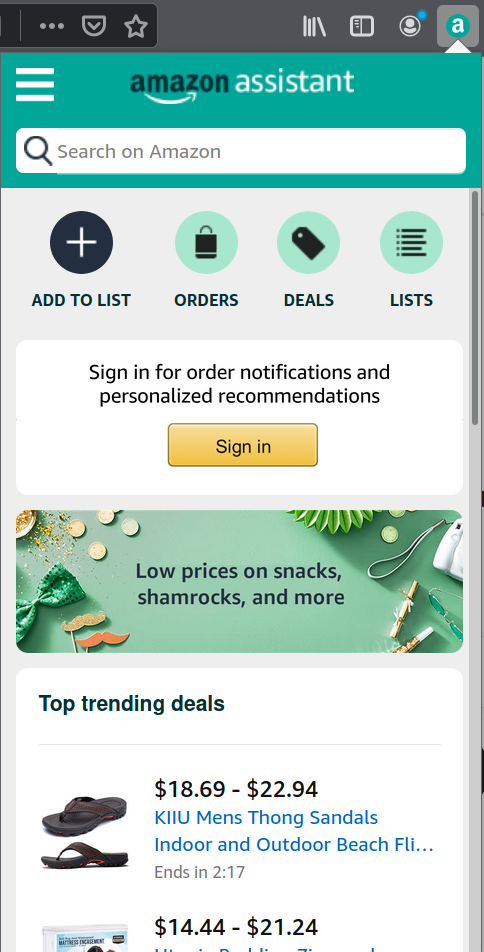
What’s not quite obvious: “Add to list” will attempt to recognize what product is displayed in the current browser tab. And that will work not only on Amazon properties. Clicking this button while on some other web shop will embed an Amazon Assistant into that web page and offer you to add this item to your Amazon wishlist.
But Amazon Assistant will become active on its own as well. Are you searching for “playstation” on Google? Amazon Assistant will show its
A year ago yesterday (2020-03-04) we hosted the last in-person Homebrew Website Club meetups in Nottingham (by Jamie Tanna in a caf'e) and San Francisco (by me at Mozilla).
Normally I go into the office on Wednesdays but I had worked from home that morning. I took the bus (#5736) inbound to work in the afternoon, the last time I rode a bus. I setup a laptop on the podium in the main community room to show demos on the displays as usual.
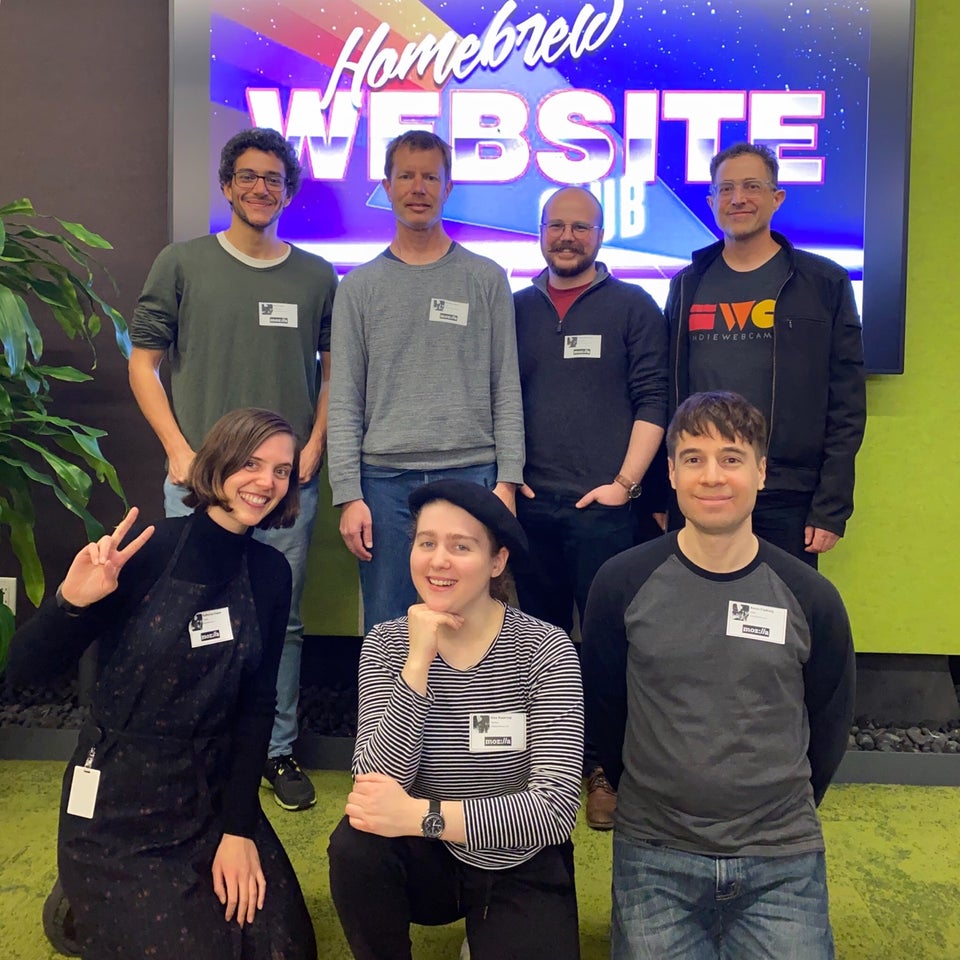
Around 17:34 we kicked off our local Homebrew Website Club meetup with four of us which grew to seven before we took a photo. As usual we took turns taking notes in IRC during the meetup as participants demonstrated their websites, something new they had gotten working, ideas being developed, or inspiring independent websites they’d found.
Can you see the joy (maybe with a little goofiness, a little seriousness) in our faces?
We wrapped up the meeting, and as usual a few (or in this case two) of us decided to grab a bite and keep chatting. I did not even consider the possibility that it would be the last time I would see my office for over a year (still haven’t been back), and left my desk upstairs in whatever condition it happened to be. I remember thinking I’d likely be back in a couple days.
We walked a few blocks to Super Duper Burgers on Mission near Spear. That would be the last time I went to that Super Duper Burgers. Glad I decided to indulge in a chocolate milkshake.

Afterwards Katherine and I went to the Embarcadero MUNI station and took the outbound MUNI N-Judah light rail. I distinctly remember noticing people were quieter than usual on the train. There was a palpable sense of increased anxiety.

Instinctually I felt compelled to put on my mask, despite only two cases of Covid having been reported in San Francisco (of course now we know that it was already spreading, especially by the asymptomatic, undetected in the community). Later that night the total reported would be 6.
Yes I was carrying a mask in March of 2020. Since the previous 2+ years of seasonal fires and subsequent unpredictable days of unbreathable smoke in the Bay Area, I’ve traveled with a compact N-95 respirator in my backpack.
Side note: the CDC had yet to recommend that people wear masks. However I had been reading and watching enough global media to know that the accepted
A great swathe of the internet is positive, a place where people come together to collaborate on ideas, discuss news and share moments of levity and sorrow, too. But there’s … Read more
The post Firefox B!tch to Boss extension takes the sting out of hostile comments directed at women online appeared first on The Firefox Frontier.
https://blog.mozilla.org/firefox/firefox-b-tch-to-boss-extension/
The FOSDEM conference in Brussels has become a bit of a ritual for me. Ever since 2002, there has only been a single year of the conference that I missed, and any time I was there, I did take part in the Mozilla devroom - most years also with a talk, as you can see on my slides page.
This year, things were a bit different as for obvious reasons the conference couldn't bring together thousands of developers in Brussels but almost a month ago, in its usual spot, the conference took place in a virtual setting instead. The team did an incredibly good job of hosting this huge conference in a setting completely run on Free and Open Source Software, backed by Matrix (as explained in a great talk by Matthew Hodgson) and Jitsi (see talk by Sa'ul Ibarra Corretg'e).
On short notice, I also added my bit to the conference - this time not talking about all the shiny new software, but diving into the past with "Mozilla History: 20+ Years And Counting". After that long a time that the project exists, I figured many people may not realize its origins and especially early history, so I tried to bring that to the audience, together with important milestones and projects on the way up to today.
The video of the talk has been available for a short time now, and if you are interested yourself in Mozilla's history, then it's surely worth a watch. Of course, my slides are online as well.
If you want to watch more videos to dig deeper into Mozilla history, I heavily recommend the Code Rush documentary from when Netscape initially open-sourced Mozilla (also an awesome time capsule of late-90s Silicon Valley) and a talk on early Mozilla history from Mitchell Baker that she gave at an all-hands in 2012.
The Firefox part of the history is also where my song "Rock Me Firefox" (demo recording on YouTube) starts off, for anyone who wants some music to go along with all this!
While my day-to-day work is in bleeding-edge Blockchain technology (like right now figuring out Ethereum Layer 2 technologies, like Optimism), it's sometimes nice to dig into the past and make sure history never forgets the name - Mozilla.
And, as I said in the talk, I hope Mozilla and its mission have at least another successful 20 years to go into the future!
https://home.kairo.at/blog/2021-03/mozilla_history_talk_fosdem
Hello and welcome to another issue of This Week in Rust! Rust is a systems language pursuing the trifecta: safety, concurrency, and speed. This is a weekly summary of its progress and community. Want something mentioned? Tweet us at @ThisWeekInRust or send us a pull request. Want to get involved? We love contributions.
This Week in Rust is openly developed on GitHub. If you find any errors in this week's issue, please submit a PR.
Updates from Rust Community
No newsletters this week.
Official
Project/Tooling Updates
- IntelliJ Rust Changelog #142
- rust-analyzer changelog #66
- Knurling-rs changelog #18
- Last Month in Flott - March 2021
- RampMaker 0.2 - Stepper Motor Acceleration Ramp Generator
Observations/Thoughts
- Why we built the core auth library in Rust (interview with CTO of Oso)
- Data Manipulation: Pandas vs Rust
- Evolution of Kube
- Temporal RDO update optimization
- Introducing The Calypso Chronicles
- Rust: Beware of Escape Sequences\n
- Introducing Rustybot (part 3 of n)
- Delete Cargo Integration Tests
Rust Walkthroughs
- C++ to Rust - or how to render your mindset
- Generic
implblocks are kinda like macros... - Make a Back-End Number Guessing Game with Rust
- Captures in closures and async blocks
- Testing a driver crate
- Using Rust for AWS Lambdas
- Always-On Benchmarking in Rust
- Building an OpenStreetMap app in Rust, Part IV
- Solving Advent of Code 2020 in under a second
- The Case for the Typestate Pattern - Introducing Algebraic Data Types
- [DE] Weniger Frust mit Rust
- [video] Learning Rust: Procedural
I first joined Mozilla as an intern in 2010 for the “Tools and Automation Team” (colloquially called the “A-Team”). I always had a bit of difficulty describing our role. We work on tests. But not the tests themselves, the the thing that runs the tests. Also we make sure the tests run when code lands. Also we have this dashboard to view results, oh and also we do a bunch of miscellaneous developer productivity kind of things. Oh and sometimes we have to do other operational type things as well, but it varies.
Over the years the team grew to a peak of around 25 people and the A-Team’s responsibilities expanded to include things like the build system, version control, review tools and more. Combined with Release Engineering (RelEng), this covered almost all of the software development pipeline. The A-Team was eventually split up into many smaller teams. Over time those smaller teams were re-org’ed, split up further, merged and renamed over and over again. Many labels were applied to the departments that tended to contain those teams. Labels like “Developer Productivity”, “Platform Operations”, “Product Integrity” and “Engineering Effectiveness”.
Interestingly, from 2010 to present, one label that has never been applied to any of these teams is “DevOps”.
If you’re working with mozilla-central on Windows and followed the official
documentation, there’s a good
chance the MozillaBuild shell is running in the default cmd.exe console. If you’ve spent any
amount of time in this console you’ve also likely noticed it leaves a bit to be desired. Standard
terminal features such as tabs, splits and themes are missing. More importantly, it doesn’t render
unicode characters (at least out of the box).
Luckily Microsoft has developed a modern terminal that can replace cmd.exe, and getting it set up with MozillaBuild shell is simple.
Last week, in a sudden move that will have disastrous consequences for the open internet, the Indian government notified a new regime for intermediary liability and digital media regulation. Intermediary liability (or “safe harbor”) protections have been fundamental to growth and innovation on the internet as an open and secure medium of communication and commerce. By expanding the “due diligence” obligations that intermediaries will have to follow to avail safe harbor, these rules will harm end to end encryption, substantially increase surveillance, promote automated filtering and prompt a fragmentation of the internet that would harm users while failing to empower Indians. While many of the most onerous provisions only apply to “significant social media intermediaries” (a new classification scheme), the ripple effects of these provisions will have a devastating impact on freedom of expression, privacy and security.
As we explain below, the current rules are not fit-for-purpose and will have a series of unintended consequences on the health of the internet as a whole:
- Traceability of Encrypted Content: Under the new rules, law enforcement agencies can demand that companies trace the ‘first originator’ of any message. Many popular services today deploy end-to-end encryption and do not store source information so as to enhance the security of their systems and the privacy they guarantee users. When the first originator is from outside India, the significant intermediary must identify the first originator within the country, making an already impossible task more difficult. This would essentially be a mandate requiring encrypted services to either store additional sensitive information or/and break end-to-end encryption which would weaken overall security, harm privacy and contradict the principles of data minimization endorsed in the Ministry of Electronic and Information Technology’s (MeitY) draft of the data protection bill.
- Harsh Content Take Down and Data Sharing Timelines: Short timelines of 36 hours for content take downs and 72 hours for the sharing of user data for all intermediaries pose significant implementation and freedom of expression challenges. Intermediaries, especially small and medium service providers, would not have sufficient time to analyze the requests or seek any further clarifications or other remedies under the current rules. This would likely create a perverse incentive to take down content and share user data without sufficient due process safeguards, with the fundamental right to privacy and freedom of expression (as we’ve said before) suffering as a result.
- User Directed Take Downs of Non-Consensual Sexually Explicit Content and Morphed/Impersonated Content: All intermediaries have to remove or disable access to information within 24 hours of being notified by users or their representatives (not necessarily government agencies or courts) when it comes to non-consensual sexually explicit content (revenge pornography, etc.) and impersonation in an electronic form (deep fakes, etc.). While it attempts to solve for a legitimate and concerning issue, this solution is overbroad and goes against the landmark Shreya Singhal judgment, by the Indian Supreme Court, which had clarified in 2015 that companies would only be expected to remove content when directed by a court order or a government agency to do so.
- Social Media User Verification: In a move that could be dangerous for the privacy and anonymity of internet users, the law contains a provision requiring significant intermediaries to provide the option for users to voluntarily verify their identities. This would likely entail users sharing phone numbers or sending photos of government issued IDs to the companies. This provision will incentivize the collection of sensitive personal data that are submitted for this verification, which can then be also used to profile and target users (the law does seem to require explicit consent to do so). This is not hypothetical conjecture – we have already seen phone numbers collected for security purposes being used for profiling.
Web compatibility is about dealing with a constantly evolving biotope where things die slowly. And even when they disappear, they have contributed to the balance of the ecosystem and modified it in a way they keep their existence.

A couple of weeks ago, I mentionned the steps which have been taken about capping the User Agent String on macOS 11 for Web compatibility issues. Since then, Mozilla and Google organized a meeting to discuss the status and the issues related to this effort. We invited Apple but probably too late to find someone who could participate to the meeting (my bad). The minutes of the meeting are publicly accessible.
Meeting Summary
- Apple and Mozilla have both shipped already the macOS 11 UA capping
- There is an intent to ship for Google and Ken Russel is double checking that they can move forward with the release that would align chrome with Firefox and Safari.
- Mozilla has not seen any obvious breakage since the change on the UA string. This is only deployed in nightly right now. Tantek: "My general philosophy is that the UA string has been abused for so long, freezing any part of it is a win."
- Mozilla and Google agreed to find a venue for a more general public plans for UA reduction/freezing
Some additional news since the meeting
- In the intent to ship for Google, some big queries on HTTP Archive are being runned to check how wide is the issue. An interesting comment from Yoav saying that "79.4% of Unity sites out there are broken in Chrome".
- We are very close to have a place for working with other browser vendors on UA reduction and freezing. More news soon (hopefully).
Archived copy of the minutes
This is to preserve a copy of the minutes in case they are being defaced or changed.
Capping UA string
====
(Minutes will be public)

Present: Mike Taylor (Google), Karl Dubost (Mozilla), Chris Peterson (Mozilla), Aaron Tagliaboschi (Mozilla), Kenneth Russell (Google), Avi Drissman (Google), Tantek Celik (Mozilla)

### Background

* Karl’s summary/history of the issue so far on
https://www.otsukare.info/2021/02/15/capping-macos-user-agent

* What Apple/Safari currently does
Safari caps the UA string to 10.15.7.

* What is Mozilla status so far
Capped UA’s macOS version at 10.15 in Firefox 87 and soon ESR 78: