% obj/dist/bin/js --baseline-eager --ion-offthread-compile=off --regexp-warmup-threshold=0 -e 'var i,j=0;for(i=0;i<100;i++){j+=j+i;}print(j)'
1.2676506002282294e+30
% obj/dist/bin/js --ion-eager --ion-offthread-compile=off --regexp-warmup-threshold=0 -e 'var i,j=0;for(i=0;i<100;i++){j+=j+i;}print(j)'
1.2676506002282294e+30
Told you it was a productive holiday weekend. Onward to conquering the test suite.
https://www.talospace.com/2022/02/brief-status-update-on-power9.html
Browser extensions make attractive attack targets. That’s not necessarily because of the data handled by the extension itself, but too often because of the privileges granted to the extension. Particularly extensions with access to all websites should better be careful and reduce the attack surface as much as possible. Today’s case study is Custom Cursor, a Chrome extension that more than 6 million users granted essentially full access to their browsing session.

The attack surface of Custom Cursor is unnecessarily large: it grants custom-cursor.com website excessive privileges while also disabling default Content Security Policy protection. The result: anybody controlling custom-cursor.com (e.g. via one of the very common cross-site scripting vulnerabilities) could take over the extension completely. As of Custom Cursor 3.0.1 this particular vulnerability has been resolved, the attack surface remains excessive however. I recommend uninstalling the extension, it isn’t worth the risk.
Contents
Integration with extension’s website
The Custom Cursor extension will let you view cursor collections on custom-cursor.com website, installing them in the extension works with one click. The seamless integration is possible thanks to the following lines in extension’s manifest.json file:
"externally_connectable": {
  "matches": [ "*://*.custom-cursor.com/*" ]
},
This means that any webpage under the custom-cursor.com domain is allowed to call chrome.runtime.sendMessage() to send a message to this extension. The message handling in the extension looks as follows:
browser.runtime.onMessageExternal.addListener(function (request, sender, sendResponse) {
  switch (request.action) {
    case "getInstalled": {
      ...
    }
    case "install_collection": {
      ...
    }
    case "get_config": {
      ...
    }
    case "set_config": {
      ...
    }
    case "set_config_sync": {
      ...
    }
    case "get_config_sync": {
      ...
    }
  }
}.bind(this));
This doesn’t merely allow the website to retrieve information about the installed icon collections and install new ones, it also provides the website with arbitrary access to extension’s configuration. This in itself already has some abuse
Way back in Linux 5.2 was a "YOLO" mode for the DAWR register required for debugging with hardware watchpoints. This register functions properly on POWER8 but has an erratum on pre-DD2.3 POWER9 steppings (what Raptor sells as "v1") where the CPU will checkstop — invariably bringing the operating system to a screeching halt — if a watchpoint is set on cache-inhibited memory like device I/O. This is rare but catastrophic enough that the option to enable DAWR anyway is hidden behind a debugfs switch.
Now that I'm stressing out gdb a lot more working on the Firefox JIT, it turns out that even if you do upgrade your CPUs to DD2.3 (as I did for my dual-8 Talos II system, or what Raptor sells as "v2"), you don't automatically get access to the DAWR even on a fixed POWER9 (Fedora 34). Although you'll no longer be YOLOing it on such a system, still remember to echo Y > /sys/kernel/debug/powerpc/dawr_enable_dangerous as root and restart your debugger to pick up hardware watchpoint support.
Incidentally, I'm about two-thirds of the way through the wasm test cases. The MVP is little-endian POWER9 Baseline Interpreter and Wasm support, so we're getting closer and closer. You can help.
https://www.talospace.com/2021/09/dawr-yolo-even-with-dd23.html
A report surfaced recently that at least some recent versions of macOS can be exploited to run arbitrary local applications using .inetloc files, which may allow a drive-by download to automatically kick off a vulnerable application and exploit it. Apple appeared to acknowledge the fault, but did not assign it a CVE; the reporter seems not to have found the putative fix satisfactory and public disclosure thus occurred two days ago.
The report claims the proof of concept works on all prior versions of macOS, but it doesn't seem to work (even with corrected path) on Tiger. Unfortunately due to packing I don't have a Leopard or Snow Leopard system running right now, so I can't test those, but the 10.4 Finder (which would launch these files) correctly complains they are malformed. As a safety measure in case there is something exploitable, the October SPR build of TenFourFox will treat both .webloc and .inetloc files that you might download as executable. (These files use similar pathways, so if one is exploitable after all, then the other probably is too.) I can't think of anyone who would depend on the prior behaviour, but in our unique userbase I'm sure someone does, so I'm publicizing this now ahead of the October 5 release. Meanwhile, if someone's able to make the exploit work on a Power Mac, I'd be interested to hear how you did it.
http://tenfourfox.blogspot.com/2021/09/questionable-rce-with-weblocinetloc.html
In real estate, the age old mantra is “location, location, location,” meaning that location drives value. That’s true even when it comes to data collection in the online world, too — your location history is valuable, authentic information. In all likelihood, you’re leaving a breadcrumb trail of location data every day, but there are a few things you can do to clean that up and keep more of your goings-on to yourself.
What is location history?
When your location is tracked and stored over time, it becomes a body of data called your location history. This is rich personal data that shows when you have been at specific locations, and can include things like frequency and duration of visits and stops along the way. Connecting all of that location history, companies can create a detailed picture and make inferences about who you are, where you live and work, your interests, habits, activities, and even some very private things you might not want to share at all.
How is location data used?
For some apps, location helps them function better, like navigating with a GPS or following a map. Location history can also be useful for retracing your steps to past places, like finding your way back to that tiny shop in Florence where you picked up beautiful stationery two years ago.
On the other hand, marketing companies use location data for marketing and advertising purposes. They can also use location to conduct “geomarketing,” which is targeting you with promotions based on where you are. Near a certain restaurant while you’re out doing errands at midday? You might see an ad for it on your phone just as you’re thinking about lunch.
Location can also be used to grant or deny access to certain content. In some parts of the world, content on the internet is “geo-blocked” or geographically-restricted based on your IP address, which is kind of like a mailing address, associated with your online activity. Geo-blocking can happen due to things like copyright restrictions, limited licensing rights or even government control.
Who can view your location data?
Any app that you grant permission to see your location has access to it. Unless you carefully read each data policy or privacy policy, you won’t know how your location data — or any personal data — collected by your apps is used.
Websites can also detect your general location through your IP address or by asking directly what your location is, and some sites will take it a step further by requesting more specifics like your zip code to show you different site content or search results based on your locale.
How to disable location request prompts
Tired of websites asking for your location? Here’s how to disable those requests:
Firefox: Type “about:preferences#privacy” in the URL bar. Go to Permissions > Location > Settings. Select “Block new requests asking to access your location”. Get more details about location sharing in Firefox.
Safari: Go to Settings > Websites > Location. Select “When visiting other websites: Deny.”
Chrome: Go to Settings > Privacy and security > Site Settings. Then click on Location and select “Don’t allow sites to see your location”
Edge: Go to Settings and more > Settings > Site permissions > Location. Select “Ask before accessing”
Limit, protect and delete your location data
Most devices have the option to turn location tracking off for the entire device or for select apps. Here’s how to view and change your location privacy settings:
- Mac: Go to your Security & Privacy settings > Location Services.
- Windows: Visit Settings > Privacy > Location.
- iPhone and iPads: How to disable location tracking and select which apps have access to your location
- Android: How to disable location on Android devices and
Great news readers, my self-imposed 6 month cooldown on writing amazing blog posts has expired.
My pal Ali just added a flag to Chromium to allow you to test sites while sending a User-Agent string that claims to be version 100 (should be in version 96+, that’s in the latest Canary if you download or update today):
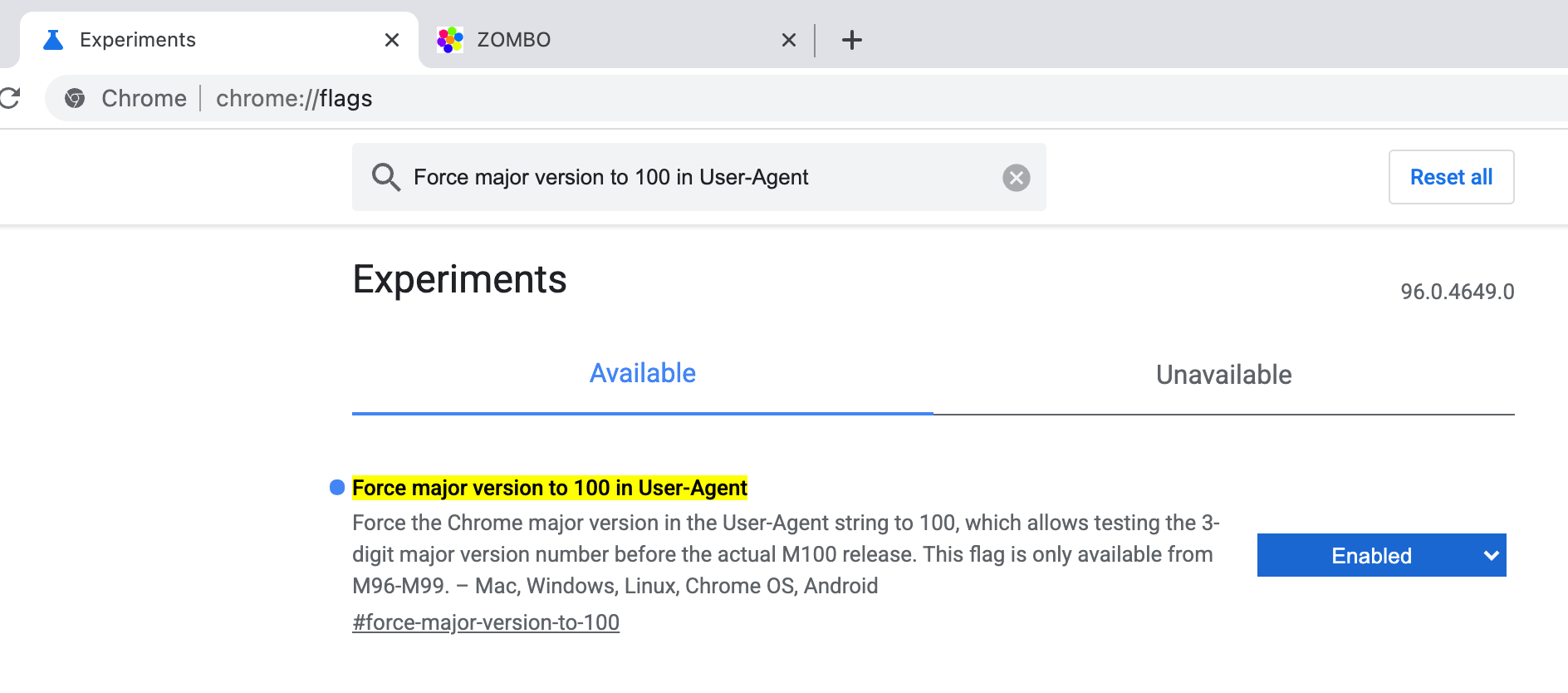
I’ll be lazy and let Karl Dubost do the explaining of the why, in his post “Get Ready For Three Digits User Agent Strings”.
So turn it on and report all kinds of bugs, either at crbug.com/new or webcompat.com/issues/new.
https://miketaylr.com/posts/2021/09/chrome-version-100-testing.html
Spyware has been in the news recently with stories like the Apple security vulnerability that allowed devices to be infected without the owner knowing it, and a former editor of The New York Observer being charged with a felony for unlawfully spying on his spouse with spyware. Spyware is a sub-category of malware that’s aimed at surveilling the behavior of human target(s) using a given device where the spyware is running. This surveillance could include but is not limited to logging keystrokes, capturing what websites you are visiting, looking at your locally stored files/passwords, and capturing audio or video within proximity to the device.
How does spyware work?
Spyware, much like any other malware, doesn’t just appear on a device. It often needs to first be installed or initiated. Depending on what type of device, this could manifest in a variety of ways, but here are a few specific examples:
- You could visit a website with your web browser and a pop-up prompts you to install a browser extension or addon.
- You could visit a website and be asked to download and install some software you weren’t there to get.
- You could visit a website that prompts you to access your camera or audio devices, even though the website doesn’t legitimately have that need.
- You could leave your laptop unlocked and unattended in a public place, and someone could install spyware on your computer.
- You could share a computer or your password with someone, and they secretly install the spyware on your computer.
- You could be prompted to install a new and unknown app on your phone.
- You install pirated software on your computer, but this software additionally contains spyware functionality.
With all the above examples, the bottom line is that there could be software running with a surveillance intent on your device. Once installed, it’s often difficult for a lay person to have 100% confidence that their device can be trusted again, but for many the hard part is first detecting that surveillance software is running on your device.
How to detect spyware on your computer and phone
As mentioned above, spyware, like any malware, can be elusive and hard to spot, especially for a layperson. However, there are some ways by which you might be able to detect spyware on your computer or phone that aren’t overly complicated to check for.
Cameras
On many types of video camera devices, you get a visual indication that the video camera is recording. These are often a hardware controlled light of some kind that indicates the device is active. If you are not actively using your camera and these camera indicator lights are on, this could be a signal that you have software on your device that is actively recording you, and it could be some form of spyware.
Here’s an example of what camera indicator lights look like on some Apple devices, but active camera indicators come in all kinds of colors and formats, so be sure to understand how your device works. A good way to test is to turn on your camera and find out exactly where these indicator lights are on your devices.

Additionally, you could make use of a webcam cover. These are small mechanical devices that allow users to manually open and shut cameras only when in use. These are generally a very cheap and low-tech way to protect snooping via cameras.
Applications
One pretty basic means to detect malicious spyware on systems is simply reviewing installed applications, and only keeping applications you actively use installed.
On Apple devices, you can review your applications folder and the app store to see what applications are installed. If you notice something is installed that you don’t recognize, you can attempt to uninstall it. For Windows computers, you’ll want to check the Apps folder in your Settings.
Web extensions
Many browsers, like Firefox or Chrome, have extensive web extension ecosystems that allow users to customize their browsing experience. However, it’s not uncommon for malware authors to utilize web extensions as a medium to conduct surveillance activities
bugbug started as a project to automatically assign a type to bugs (defect vs enhancement vs task, back when we introduced the “type” we needed a way to fill it for already existing bugs), and then evolved to be a platform to build ML models on bug reports: we now have many models, some of which are being used on Bugzilla, e.g. to assign a type, to assign a component, to close bugs detected as spam, to detect “regression” bugs, and so on.
Then, it evolved to be a platform to build ML models for generic software engineering purposes: we now no longer only have models that operate on bug reports, but also on test data, patches/commits (e.g. to choose which tests to run for a given patch and to evaluate the regression riskiness associated to a patch), and so on.
Its infrastructure also evolved over time and slowly became more complex. This post attempts to clarify its overall infrastructure, composed of multiple pipelines and multi-stage deployments.
The nice aspect of the continuous integration, deployment and production services of bugbug is that almost all of them are running completely on Taskcluster, with a common language to define tasks, resources, and so on.
In bugbug’s case, I consider a release as a code artifact (source code at a given tag in our repo) plus the ML models that were trained with that code artifact and the data that was used to train them. This is because the results of a given model are influenced by all these aspects, not just the code as in other kinds of software. Thus, in the remainder of this post, I will refer to “code artifact” or “code release” when talking about a new version of the source code, and to “release” when talking about a set of artifacts that were built with a specific snapshot (version) of the source code and with a specific snapshot of the data.
The overall infrastructure can be seen in this flowchart, where the nodes represent artifacts and the subgraphs represent the set of operations performed on them. The following sections of the blog post will then describe the components of the flowchart in more detail.

Continuous Integration and First Stage (Training Pipeline) Deployment
Every pull request and push to the repository triggers a pipeline of Taskcluster tasks to:
- run tests for the library and its linked HTTP service;
- run static analysis and linting;
- build Python packages;
- build the frontend;
- build Docker images.
Code releases are represented by tags. A push of a tag triggers additional tasks that perform:
- integration tests;
- push of Docker images to DockerHub;
- release of a new version of the Python package on PyPI;
- update of the training pipeline definition.
After a code release, the training pipeline which performs ML training is updated, but the HTTP service, the frontend and all the production pipelines that depend on the trained ML models (the actual release) are still on the previous version of the code (since they can’t be updated until the new models are trained).
Continuous Training and Second Stage (ML Model Services) Deployment
The training pipeline runs on Taskcluster as a hook that is either triggered manually or on a cron.
The training pipeline consists of many tasks that:
- retrieve data from multiple sources (version control system, bug tracking systems, Firefox CI, etc.);
- generation of intermediate artifacts that are used by later stages of the pipeline or by other pipelines or other services;
- training of ML models using the above (there are also training tasks that depend on other models to be trained and run first to generate intermediate artifacts);
- check training metrics to ensure there are no short term or long term regressions;
- run integration tests with the trained models;
- build Docker images with the trained models;
- push Docker images with the trained models;
- update the production pipelines
The are we slim yet (AWSY) benchmark measures memory usage. Recently when I made a simple change to firefox and expected it might save a bit of memory, it actually increased memory usage on the AWSY benchmark.
We have lots of tools to hunt down memory usage problems. But to see an almost "log" of when garbage collection and cycle collection occurs, the Firefox profiler is amazing.
I wanted to profile the AWSY benchmark to try and understand what was happening with GC scheduling. But it didn’t work out-of-the-box. This is one of those blog posts that I’m writing down so next time this happens, to me or anyone else, although I am selfish. And I websearch for "AWSY and Firefox Profiler" I want this to be the number 1 result and help me (or someone else) out.
The normal instructions
First you need a build with profiling enabled. Put this in your mozconfig
ac_add_options --enable-debug
ac_add_options --enable-debug-symbols
ac_add_options --enable-optimize
ac_add_options --enable-profiling
The instructions to get the profiler to run came from Ted Campbell. Thanks Ted.
Ted’s instructions disabled stack sampling, we didn’t care about that since the data we need comes from profile markers. I can also run a reduced awsy test because 10 entries is enough to create the problem.
export MOZ_PROFILER_STARTUP=1
export MOZ_PROFILER_SHUTDOWN=awsy-profile.json
export MOZ_PROFILER_STARTUP_FEATURES="nostacksampling"
./mach awsy-test --tp6 --headless --iterations 1 --entities 10
But it crashes due to Bug 1710408.
So I can’t use nostacksampling, which would have been nice to save some
memory/disk space, never mind.
So I removed that option, then I get profiles that are too short. The profiler records into a circular buffer so if that buffer is too small it’ll discard the earlier information. In this case I want the earlier information because I think something at the beginning is the problem. So I need to add this to get a bigger buffer. The default is 4 million entries (32MB).
export MOZ_PROFILER_STARTUP_ENTRIES=$((200*1024*1024))
But now the profiles are too big and Firefox shutdown times out (over 70 seconds) so the marionette test driver kills Firefox before it can write out the profile.
The solution
So we hack
testing/marionette/client/marionette_driver/marionette.py
to replace shutdown_timeout with 300 in some places.
Setting DEFAULT_SHUTDOWN_TIMEOUT and also self.shutdown_timeout to 300
will do.
There’s probably a way to pass a parameter, but I didn’t find it yet.
So after making that change and running ./mach build the invocation is now:
export MOZ_PROFILER_STARTUP=1
export MOZ_PROFILER_SHUTDOWN=awsy-profile.json
export MOZ_PROFILER_STARTUP_FEATURES=""
export MOZ_PROFILER_STARTUP_ENTRIES=$((200*1024*1024))
./mach awsy-test --tp6 --headless --iterations 1 --entities 10
And it writes a awsy-profile.json into the root directory of the project).
Hurray!
https://paul.bone.id.au/blog/2021/09/18/how-to-profile-awsy/
(“This Week in Glean” is a series of blog posts that the Glean Team at Mozilla is using to try to communicate better about our work. They could be release notes, documentation, hopes, dreams, or whatever: so long as it is inspired by Glean.) All “This Week in Glean” blog posts are listed in the TWiG index.
This is a followup post to Shipping Glean with GeckoView.
It landed!
It took us several more weeks to put everything into place, but we’re finally shipping the Rust parts of the Glean Android SDK with GeckoView and consume that in Android Components and Fenix. And it still all works, collects data and is sending pings! Additionally this results in a slightly smaller APK as well.
This unblocks further work now. Currently Gecko simply stubs out all calls to Glean when compiled for Android, but we will enable recording Glean metrics within Gecko and exposing them in pings sent from Fenix. We will also start work on moving other Rust components into mozilla-central in order for them to use the Rust API of Glean directly. Changing how we deliver the Rust code also made testing Glean changes across these different components a bit more challenging, so I want to invest some time to make that easier again.
https://blog.mozilla.org/data/2021/09/17/this-week-in-glean-glean-geckoview/
(“This Week in Glean” is a series of blog posts that the Glean Team at Mozilla is using to try to communicate better about our work. They could be release notes, documentation, hopes, dreams, or whatever: so long as it is inspired by Glean.) All "This Week in Glean" blog posts are listed in the TWiG index (and on the Mozilla Data blog). This article is cross-posted on the Mozilla Data blog.
This is a followup post to Shipping Glean with GeckoView.
It landed!
It took us several more weeks to put everything into place, but we're finally shipping the Rust parts of the Glean Android SDK with GeckoView and consume that in Android Components and Fenix. And it still all works, collects data and is sending pings! Additionally this results in a slightly smaller APK as well.
This unblocks further work now. Currently Gecko simply stubs out all calls to Glean when compiled for Android, but we will enable recording Glean metrics within Gecko and exposing them in pings sent from Fenix. We will also start work on moving other Rust components into mozilla-central in order for them to use the Rust API of Glean directly. Changing how we deliver the Rust code also made testing Glean changes across these different components a bit more challenging, so I want to invest some time to make that easier again.
If recent surveys and polls ring true, over 46% of the global workforce is considering leaving their employer this year. Despite COVID-19 causing initial turnover due to the related economic downturn, the current phenomenon coined “The Great Resignation” is attributed to the many job seekers choosing to leave their current employment voluntarily. Mass vaccinations and mask mandates have allowed offices to re-open just as job seekers are reassessing work-life balance, making bold moves to take control of where they choose to live and work.
The “New Normal”
Millions of workers have adjusted to remote-flexible work arrangements, finding success and a greater sense of work-life balance. The question is whether or not employers will permanently allow this benefit post-pandemic.
Jerry Lee, COO/Founder of the career development consultancy, Wonsulting, sees changes coming to the workplace power dynamic.
“In the future of work, employers will have to be much more employee-first beyond monetary compensation,” he said. “There is a shift of negotiating power moving from the employers to the employees, which calls for company benefits and work-life balance to improve.”
Abbie Duckham, Talent Operations Program Manager at Mozilla, believes the days of companies choosing people are long over.
“From a hiring lens, it’s no longer about companies choosing people, it’s about people choosing companies,” Duckham said. “People are choosing to work at companies that, yes, value productivity and revenue – but more-so companies that value mental health and understand that every single person on their staff has a different home life or work-life balance.”
Drop the mic and cue the job switch
So, how can recent job switchers or job seekers better prepare for their next big move? The following tips and advice from career and talent sourcing experts can help anyone perform their best while adapting to our current pandemic reality.
Take a vacation *seriously*
“When starting a new role many are keen to jump into work right away; however, it’s always important to take a mental break between your different roles before you start another onboarding process,” advises Jonathan Javier, CEO/Founder at Wonsulting. “One way to do this is to plan your vacations ahead of your switch: that trip to Hawaii you always wanted? Plan it right after you end your job. That time you wanted to spend with your significant other? Enjoy that time off.”
It also never hurts to negotiate a start date that does not prioritize your mental preparedness and well-being.
Out with the old and in with that new-new
When Duckham started at Mozilla, she made it her mission to absorb every bit of the manifesto to better understand Mozilla’s culture. “From there I looked into what we actually do as a company. Setting up a Firefox account was pretty crucial since we are all about dog-fooding here (or as we call it, foxfooding), and then downloading Firefox Nightly, the latest beta-snapshot of the browser as our developers are actively working on it.”
Duckham also implores job-switchers to rebrand themselves.
“You have a chance to take everything you wanted your last company to know about you and restart,” she said. “Take everything you had imposter syndrome about and flip the switch.”
Network early
“When you join a new company, it’s important to identify the subject matter experts for different functions of your company so you know who you can reach out to if you have any questions or need insights,” Javier said.
Javier also recommends networking with people who have also switched jobs.
“You can search for and find people who switched from non-tech roles to an in-tech role by simply searching for ‘Past Company’ at a non-tech company and then putting ‘Current Company’ at a tech company on LinkedIn,” he said.
Brain-breaks
Duckham went as far as giving her digital workspace a refreshing overhaul when she started at Mozilla.
“I cleaned off my desktop, made folders for storing files, and essentially crafted a blank working space to start fresh from my previous company – effectively tabula rasa-ing my digital
Your online privacy remains our top priority, and we know that one of the first things to secure your privacy when you go online is to get on a Virtual Private Network (VPN), an encrypted connection that serves as a tunnel between your computer and VPN server. Today, we’re launching the latest release of our Mozilla VPN, our fast and easy-to-use VPN service, with two new advanced privacy features that offer additional layers of privacy. This includes your choice of Domain Name System (DNS) servers whether it’s the default we’ve provided, our suggested ad blocking, tracker blocking or ad plus tracker blocking DNS server, or an alternative one, plus the multi-hop feature which allows you to add two different servers to give you twice the amount of encryption. Today’s Mozilla VPN release is available on Windows, Mac, Linux and Android platforms (it will soon be available on iOS later this week).
Here are today’s Mozilla VPN Features:
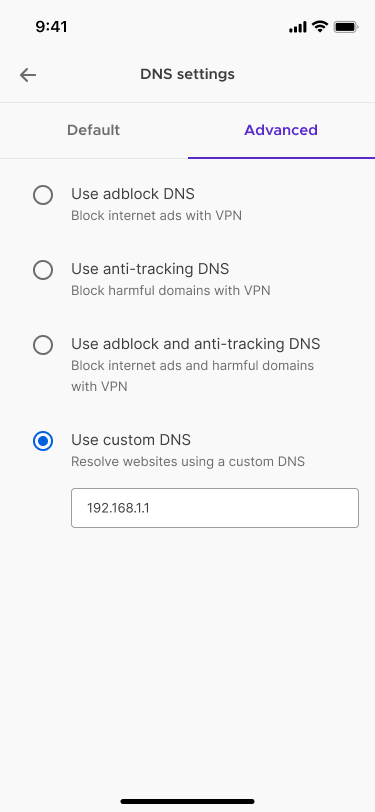
Uplevel your privacy with Mozilla VPN’s Custom DNS server feature
Traditionally when you go online your traffic is routed through your Internet Service Provider’s (ISP) DNS servers who may be keeping records of your online activities. DNS, which stands for Domain Name System, is like a phone book for domains, which are the websites that you visit. One of the advantages to using a VPN is shielding your online activity from your ISP by using your trusted VPN service provider’s DNS servers. There are a variety of DNS servers, from ones that offer additional features like tracker blocking, ad blocking or a combination of both tracker and ad blocking, or local DNS servers that have those benefits along with speed.
Now, with today’s Custom DNS server, we put you in control of choosing your DNS server that fits your needs. You can find this feature in your Network Settings under Advanced DNS Settings. From there, you can choose from the default DNS server, enter your local DNS server, or choose from the recommended list of DNS servers available to you.
Double up your VPN service with Mozilla’s VPN Multi-hop feature
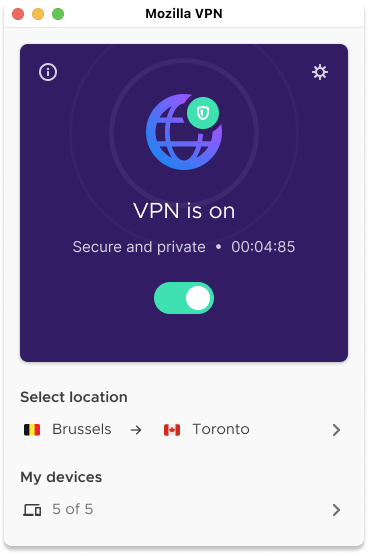
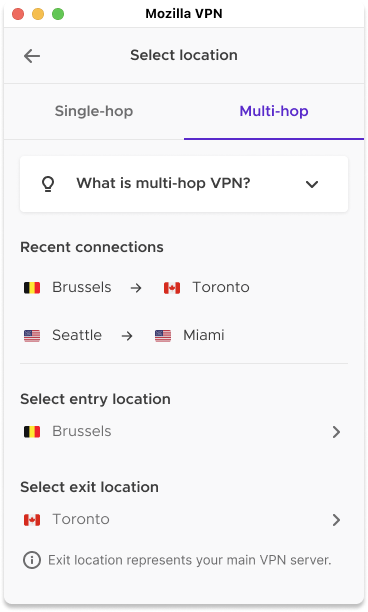
We’re introducing our Multi-hop feature which is also known as doubling up your VPN because instead of using one VPN server you can use two VPN servers. Here’s how it works, first your online activity is routed through one VPN server. Then, by selecting the Multi-Hop feature, your online activity will get routed a second time through an extra VPN server which is known as your exit server. Essentially, you will have two VPN servers which are known as the entry VPN server and exit VPN server. This new powerful privacy feature appeals to those who think twice about their privacy, like political activists, journalists writing sensitive topics, or anyone who’s using a public wi-fi and wants that added peace of mind by doubling-up their VPN servers.
To turn on this new feature, go to your Location, then choose Multi-hop. From there, you can choose your entry server location and your exit server location. The exit server location will be your main VPN server. We will also list your two recent Multi-hop connections so you can reuse them in the future.
How we innovate and build features for you with Mozilla VPN
Developed by Mozilla, a mission-driven company with a 20-year track record of fighting for online privacy and a healthier