There is a lot of confusion around mach try. People frequently ask “How do I get task X in mach
try fuzzy?” or “How can I avoid getting backed out?”. This post is not so much a tip, rather an
explanation around how mach try works and its relationship to the CI system (taskgraph). Armed
with this knowledge, I hope you’ll be able to use mach try a little more effectively.
Screen readers, an assistive technology that allows people to engage with computers through synthesized speech or a braille display, are available on all of the platforms where Firefox runs. However, until today we’ve had a gap in our support for this important technology. Firefox for Windows, Linux, Android, and iOS all work with the popular and included screen readers on those platforms, but macOS screen reader support has been absent.
For over a year the Firefox accessibility team has worked to bring high quality VoiceOver support to Firefox on macOS. Last August we delivered a developer preview of Firefox working with VoiceOver and in December we expanded that preview to all Firefox consumers. With Firefox 87, we think it’s complete enough for everyday use. Firefox 87 supports all the most common VoiceOver features and with plenty of performance. Users should be able to easily navigate through web content and all of the browser’s primary interface without problems.
If you’re a Mac user, and you rely on a screen reader, now’s the time to give Firefox another try. We think you’ll enjoy the experience and look forward to your feedback. You can learn more about Firefox 87 and download a copy at the Firefox release notes.
The post VoiceOver Support for macOS in Firefox 87 appeared first on Mozilla Accessibility.
https://blog.mozilla.org/accessibility/voiceover-support-for-macos-in-firefox-87/
Today, with the launch of Firefox 87, we are excited to introduce SmartBlock, a new intelligent tracker blocking mechanism for Firefox Private Browsing and Strict Mode. SmartBlock ensures that strong privacy protections in Firefox are accompanied by a great web browsing experience.
Privacy is hard
At Mozilla, we believe that privacy is a fundamental right and that everyone deserves to have their privacy protected while they browse the web. Since 2015, as part of the effort to provide a strong privacy option, Firefox has included the built-in Content Blocking feature that operates in Private Browsing windows and Strict Tracking Protection Mode. This feature automatically blocks third-party scripts, images, and other content from being loaded from cross-site tracking companies reported by Disconnect. By blocking these tracking components, Firefox Private Browsing windows prevent them from watching you as you browse.
In building these extra-strong privacy protections in Private Browsing windows and Strict Mode, we have been confronted with a fundamental problem: introducing a policy that outright blocks trackers on the web inevitably risks blocking components that are essential for some websites to function properly. This can result in images not appearing, features not working, poor performance, or even the entire page not loading at all.
New Feature: SmartBlock
To reduce this breakage, Firefox 87 is now introducing a new privacy feature we are calling SmartBlock. SmartBlock intelligently fixes up web pages that are broken by our tracking protections, without compromising user privacy.
SmartBlock does this by providing local stand-ins for blocked third-party tracking scripts. These stand-in scripts behave just enough like the original ones to make sure that the website works properly. They allow broken sites relying on the original scripts to load with their functionality intact.
The SmartBlock stand-ins are bundled with Firefox: no actual third-party content from the trackers are loaded at all, so there is no chance for them to track you this way. And, of course, the stand-ins themselves do not contain any code that would support tracking functionality.
In Firefox 87, SmartBlock will silently stand in for a number of common scripts classified as trackers on the Disconnect Tracking Protection List. Here’s an example of a performance improvement:

An example of SmartBlock in action. Previously (left), the website tiny.cloud had poor loading performance in Private Browsing windows in Firefox because of an incompatibility with strong Tracking Protection. With SmartBlock (right), the website loads properly again, while you are still fully protected from trackers found on the page.
We believe the SmartBlock approach provides the best of both worlds: strong protection of your privacy with a great browsing experience as well.
These new protections in Firefox 87 are just the start! Stay tuned for more SmartBlock innovations in upcoming versions of Firefox.
The team
This work was carried out in a collaboration between the Firefox webcompat and anti-tracking teams, including Thomas Wisniewski, Paul Z"uhlcke and Dimi Lee with support from many Mozillians including Johann Hofmann, Rob Wu, Wennie Leung, Mikal Lewis, Tim Huang, Ethan Tseng, Selena Deckelmann, Prangya Basu, Arturo Marmol, Tanvi Vyas, Karl Dubost, Oana Arbuzov, Sergiu Logigan, Cipriani Ciocan, Mike Taylor, Arthur Edelstein, and Steven Englehardt.
We also want to acknowledge the NoScript and uBlock Origin teams for helping to pioneer this approach.
The post Firefox 87 introduces SmartBlock for Private Browsing appeared first on Mozilla Security Blog.
https://blog.mozilla.org/security/2021/03/23/introducing-smartblock/
With the release of Firefox 87 we are delighted to introduce the contributors who’ve shipped their first code changes to Firefox in this release, all of whom were brand new volunteers! Please join us in thanking each of these diligent, committed individuals, and take a look at their contributions:
- jgoerzen: 1511151
- support.refragate: 1640153
- Addons: 1693199
- Aditi: 1685809
- Alexander Meissner: 1691712
- Andrei Petcu: 1689119
- Anurag Kalia anuragkalia: 1688504, 1689282
- Forrest: 1460299
- George White: 1688510
- Leli: 1690276
- Michael Hofmann: 1684365
- Pawan Verma: 1688503
- Pierre TALLOTTE: 1688695
- Sachin Chauhan: 1688511
- Sunday Mgbogu: 1588616, 1692349
- TANWEER ALI: 1685808, 1688502
- achmurali: 1442053
- james: 1691274
- rsjtdrjgfuzkfg: 1679723
https://blog.mozilla.org/community/2021/03/22/contributors-to-firefox-87/
tl;dr: Periodically, the whole of MDN is built, by our Node code, in a GitHub Action. A Python script bulk-publishes this to Elasticsearch. Our Django server queries the same Elasticsearch via /api/v1/search. The site-search page is a static single-page app that sends XHR requests to the /api/v1/search endpoint. Search results’ sort-order is determined by match and “popularity”.
Jamstack’ing
The challenge with “Jamstack” websites is with data that is too vast and dynamic that it doesn’t make sense to build statically. Search is one of those. For the record, as of Feb 2021, MDN consists of 11,619 documents (aka. articles) in English. Roughly another 40,000 translated documents. In English alone, there are 5.3 million words. So to build a good search experience we need to, as a static site build side-effect, index all of this in a full-text search database. And Elasticsearch is one such database and it’s good. In particular, Elasticsearch is something MDN is already quite familiar with because it’s what was used from within the Django app when MDN was a wiki.
Note: MDN gets about 20k site-searches per day from within the site.
Build
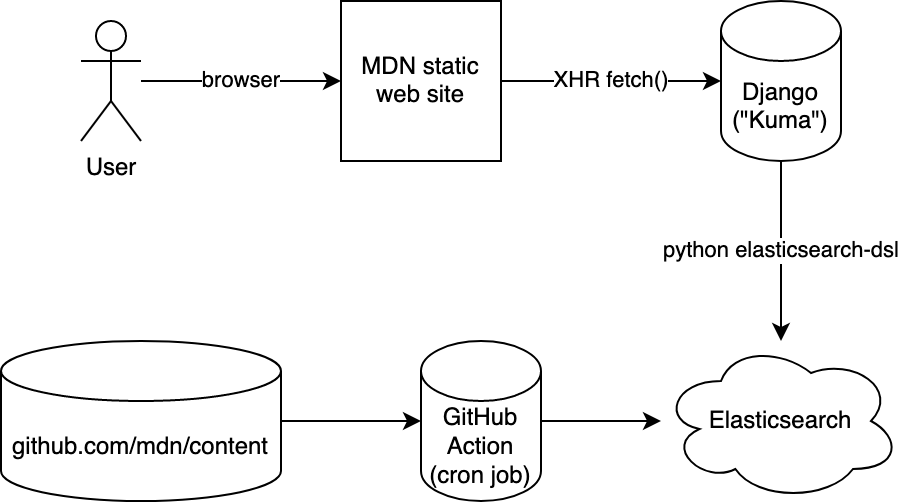
When we build the whole site, it’s a script that basically loops over all the raw content, applies macros and fixes, dumps one index.html (via React server-side rendering) and one index.json. The index.json contains all the fully rendered text (as HTML!) in blocks of “prose”. It looks something like this:
{
"doc": {
"title": "DOCUMENT TITLE",
"summary": "DOCUMENT SUMMARY",
"body": [
{
"type": "prose",
"value": {
"id": "introduction",
"title": "INTRODUCTION",
"content": "FIRST BLOCK OF TEXTS
"
}
},
...
],
"popularity": 0.12345,
...
}0
You can see one here: /en-US/docs/Web/index.json
Indexing
Next, after all the index.json files have been produced, a Python script takes over and it traverses all the index.json files and based on that structure it figures out the, title, summary, and the whole body (as HTML).
Next up, before sending this into the bulk-publisher in Elasticsearch it strips the HTML. It’s a bit more than just turning
Some cool text.
toSome cool text. because it also cleans up things like One thing worth noting is that this whole thing runs roughly every 24 hours and then it builds everything. But what if, between two runs, a certain page has been removed (or moved), how do you remove what was previously added to Elasticsearch? The solution is simple: it deletes and re-creates the index from scratch every day. The whole bulk-publish takes a while so right after the index has been deleted, the searches won’t be that great. Someone could be unlucky in that they’re searching MDN a couple of seconds after the index was deleted and now waiting for it to build up again.
It’s an unfortunate reality but it’s a risk worth taking for the sake of simplicity. Also, most people are searching for things in English and specifically the Web/ tree so the bulk-publishing is done in a way the most popular content is bulk-published first and the rest was done after. Here’s what the build output logs:
Found 50,461 (potential) documents to index
Deleting any possible existing index and creating a new one called mdn_docs
Took 3m 35s to index 50,362 documents. Approximately 234.1 docs/second
Counts per priority prefixes:
    en-us/docs/web                 9,056
    *rest*                         41,306
So, yes, for 3m 35s there’s stuff missing from the index and some unlucky few will get fewer search results than they should. But we can optimize this in the future.
Searching
The way you connect to Elasticsearch is simply by a URL it looks something like this:
https://USER:PASSWD@HASH.us-west-2.aws.found.io:9243
It’s an Elasticsearch cluster managed by Elastic running inside AWS. Our job is to make sure that we put the exact same URL in our GitHub Action (“the writer”) as we put it into our Django server (“the reader”).
In fact, we have 3 Elastic clusters: Prod, Stage, Dev.
And we have 2
In my previous article on Amazon Assistant, one sentence caused considerable irritation:
Mind you, I’m not saying that Amazon is currently doing any of this.
Yes, when I wrote that article I didn’t actually know how Amazon was using the power they’ve given themselves. The mere potential here, what they could do with a minimal and undetectable change on one of their servers, that was scary enough for me. I can see that other people might prefer something more tangible however.
So this article now analyzes what data Amazon actually collects. Not the kind of data that necessarily flows to Amazon servers to make the product work. No, we’ll look at a component dedicated exclusively to “analytics,” collecting data without providing any functionality to the user.
The logic explained here applies to Amazon Assistant browser extension for Mozilla Firefox, Google Chrome and Microsoft Edge. It is also used by Amazon Assistant for Android, to a slightly limited extent however: Amazon Assistant can only access information from the Google Chrome browser here, and it has less information available to it. Since this logic resides on an Amazon web server, I can only show what is happening for me right now. It could change any time in either direction, for all Amazon Assistant users or only a selected few.
Contents
Summary of the findings
The “TitanClient” process in Amazon Assistant is its data collection component. While it’s hard to determine which websites it is active on, it’s definitely active on Google search pages as well as shopping websites such as eBay, AliExpress, Zalando, Apple, Best Buy, Barnes & Noble. And not just the big US or international brands, German building supplies stores like Hornbach and Hagebau are on its list as well, just like the Italian book shop IBS. You can get a rough idea of Amazon’s interests here. While belonging to a different Amazon Assistant feature, this list appears to be a subset of all affected websites.
When active on a website, the TitanClient process transmits the following data for each page loaded:
- The page address (the path part is hashed but can usually be recovered)
- The referring page if any (again, the path part is hashed but can usually be recovered)
- Tab identifier, allowing to distinguish different tabs in your browsing session
- Time of the visit
- A token linked to user’s Amazon account, despite the privacy policy claiming that no connection to your account is being established
In addition, the following data is dependent on website configuration. Any or all of these data pieces can be present:
- Page type
- Canonical address
- Product
We are pleased to announce that Firefox 87 will introduce a stricter, more privacy-preserving default Referrer Policy. From now on, by default, Firefox will trim path and query string information from referrer headers to prevent sites from accidentally leaking sensitive user data.
Referrer headers and Referrer Policy
Browsers send the HTTP Referrer header (note: original specification name is ‘HTTP Referer’) to signal to a website which location “referred” the user to that website’s server. More precisely, browsers have traditionally sent the full URL of the referring document (typically the URL in the address bar) in the HTTP Referrer header with virtually every navigation or subresource (image, style, script) request. Websites can use referrer information for many fairly innocent uses, including analytics, logging, or for optimizing caching.
Unfortunately, the HTTP Referrer header often contains private user data: it can reveal which articles a user is reading on the referring website, or even include information on a user’s account on a website.
The introduction of the Referrer Policy in browsers in 2016-2018 allowed websites to gain more control over the referrer values on their site, and hence provided a mechanism to protect the privacy of their users. However, if a website does not set any kind of referrer policy, then web browsers have traditionally defaulted to using a policy of ‘no-referrer-when-downgrade’, which trims the referrer when navigating to a less secure destination (e.g., navigating from https: to http:) but otherwise sends the full URL including path, and query information of the originating document as the referrer.
A new Policy for an evolving Web
The ‘no-referrer-when-downgrade’ policy is a relic of the past web, when sensitive web browsing was thought to occur over HTTPS connections and as such should not leak information in HTTP requests. Today’s web looks much different: the web is on a path to becoming HTTPS-only, and browsers are taking steps to curtail information leakage across websites. It is time we change our default Referrer Policy in line with these new goals.

Firefox 87 new default Referrer Policy ‘strict-origin-when-cross-origin’ trimming user sensitive information like path and query string to protect privacy.
Starting with Firefox 87, we set the default Referrer Policy to ‘strict-origin-when-cross-origin’ which will trim user sensitive information accessible in the URL. As illustrated in the example above, this new stricter referrer policy will not only trim information for requests going from HTTPS to HTTP, but will also trim path and query information for all cross-origin requests. With that update Firefox will apply the new default Referrer Policy to all navigational requests, redirected requests, and subresource (image, style, script) requests, thereby providing a significantly more private browsing experience.
If you are a Firefox user, you don’t have to do anything to benefit from this change. As soon as your Firefox auto-updates to version 87, the new default policy will be in effect for every website you visit. If you aren’t a Firefox user yet, you can download it here to start taking advantage of all the ways Firefox works to improve your privacy step by step with every new release.”
The post Firefox 87 trims HTTP Referrers by default to protect user privacy appeared first on Mozilla Security Blog.
House keeping news: I’m moving this blog back to the wrla.ch domain from wlach.github.io. This domain sorta kinda worked before (I set up a netlify deploy a couple years ago), but the software used to generate this blog referenced github all over the place in its output, so it didn’t really work as you’d expect. Anyway, this will be the last entry published on wlach.github.io: my plan is to turn that domain into a set of redirects in the future.
I don’t know how many of you are out there who still use RSS, but please update your feeds. I have filed a bug to update my Planet Mozilla entry, so hopefully the change there will be seamless.
Why? Recent events have made me not want to tie my public web presence to a particular company (especially a larger one, like Microsoft). I don’t have any immediate plans to move this blog off of github, but this gives me that option in the future. For those wondering, the original rationale for moving to github is in this post. Looking back, the idea of moving away from a VPS and WordPress made sense, the move away from my own domain less so. I think it may have been harder to set up static hosting (esp. with HTTPS) at that time, though I might also have just been ignorant.
In related news, I decided to reactivate my twitter account: you can once again find me there as @wrlach (my old username got taken in my absence). I’m not totally thrilled about this (I basically stand by what I wrote a few years ago, except maybe the concession I made to Facebook being “ok”), but it seems to be where my industry peers are. As someone who doesn’t have a large organic following, I’ve come to really value forums where I can share my work. That said, I’m going to be very selective about what I engage with on that site: I appreciate your understanding.
https://wlach.github.io/blog/2021/03/blog-moving-back-to-wrla-ch/?utm_source=Mozilla&utm_medium=RSS
curl’s official birthday was March 20, 1998. That was the day the first ever tarball was made available that could build a tool named curl. I put it together and I called it curl 4.0 since I kept the version numbering from the previous names I had used for the tool. Or rather, I bumped it up from 3.12 which was the last version I used under the previous name: urlget.

Of course curl wasn’t created out of thin air exactly that day. The history can be traced back a little over a year earlier: On November 11, 1996 there was a tool named httpget released. It was developed by Rafael Sagula and this was the project I found and started contributing to. httpget 0.1 was less than 300 lines of a single C file. (The earliest code I still have source to is httpget 1.3, found here.)
I’ve said it many times before but I started poking on this project because I wanted to have a small tool to download currency rates regularly from a web site site so that I could offer them in my IRC bot’s currency exchange.
Small and quick decisions done back then, that would later make a serious impact on and shape my life. curl has been one of my main hobbies ever since – and of course also a full-time job since a few years back now.
On that exact same November day in 1996, the first Wget release shipped (1.4.0). That project also existed under another name prior to its release – and remembering back I don’t think I knew about it and I went with httpget for my task. Possibly I found it and dismissed it because of its size. The Wget 1.4.0 tarball was 171 KB.
After a short while, I took over as maintainer of httpget and expanded its functionality further. It subsequently was renamed to urlget when I added support for Gopher and FTP (driven by the fact that I found currency rates hosted on such servers as well). In the spring of 1998 I added support for FTP upload as well and the name of the tool was again misleading and I needed to rename it once more.
Naming things is really hard. I wanted a short word in classic Unix style. I didn’t spend an awful lot of time, as I thought of a fun word pretty soon. The tool works on URLs and it is an Internet client-side tool. ‘c’ for client and URL made ‘cURL’ seem pretty apt and fun. And short. Very “unixy”.
I already then wanted curl to be a citizen in the Unix tradition of using pipes and stdout etc. I wanted curl to work mostly like the cat command but for URLs so it would by default send the URL to stdout in the terminal. Just like cat does. It would then let us “see” the contents of that URL. The letter C is pronounced as see, so “see URL” also worked. In my pun-liking mind I didn’t need more. (but I still pronounce it “kurl”!)

I packaged curl 4.0 and made it available to the world on that Friday. Then at 2,200 lines of code. In the curl 4.8 release that I did a few months later, the THANKS file mentions 7 contributors who had helped out. It took us almost seven years to reach a hundred contributors. Today, that file lists over 2,300 names and we add a few hundred new entries every year. This is not a solo project!
Nothing particular happened
curl was not a massive success or hit. A few people found it and 14 days after that first release I uploaded 4.1 with a few bug-fixes and a multi-decade tradition had started: keep on shipping updates with bug-fixes. “ship early and often” is a mantra we’ve stuck with.
Later in 1998 when we had done more than 15 releases, the web page featured this excellent statement:

300 downloads!
I never had any world-conquering ideas or blue sky visions for the project and tool. I just wanted it
TenFourFox Feature Parity Release 31 final is now available for testing (downloads, hashes, release notes). There are no additional changes from the beta except for outstanding security patches. Locale langpacks will accompany this release and should be available simultaneously on or about Monday or Tuesday (March 22 or 23) parallel to mainline Firefox.
http://tenfourfox.blogspot.com/2021/03/tenfourfox-fpr31-available.html
Today, Mozilla together with other internet companies ADT, Dropbox, Eventbrite, Reddit, Vimeo, Wikimedia, sent a letter to the FCC asking the agency to reinstate net neutrality as a matter of urgency.
For almost a decade, Mozilla has defended user access to the internet, in the US and around the world. Our work to preserve net neutrality has been a critical part of that effort, including our lawsuit against the Federal Communications Commission (FCC) to keep these protections in place for users in the US.
With the recent appointment of Acting Chairwoman Jessica Rosenworcel to lead the agency, there will be a new opportunity to establish net neutrality rules at the federal level in the near future, ensuring that families and businesses across the country can enjoy these fundamental rights.
Net neutrality preserves the environment that allowed the internet to become an engine for economic growth. In a marketplace where users frequently do not have access to more than one internet service provider (ISP), these rules ensure that data is treated equally across the network by gatekeepers. More specifically, net neutrality prevents ISPs from leveraging their market power to slow, block, or prioritize content–ensuring that users can freely access ideas and services without unnecessary roadblocks. Without these rules in place, ISPs can make it more difficult for new ideas or applications to succeed, potentially stifling innovation across the internet.
The need for net neutrality protections has become even more apparent during the pandemic. In a moment where classrooms and offices have moved online by necessity, it is critically important to have rules paired with strong government oversight and enforcement to protect families and businesses from predatory practices. In California, residents will have the benefit of these fundamental safeguards as a result of a recent court decision that will allow the state to enforce its state net neutrality law. However, we believe that users nationwide deserve the same ability to control their own online experiences.
While there are many challenges that need to be resolved to fix the internet, reinstating net neutrality is a crucial down payment on the much broader internet reform that we need. Net neutrality is good for people and for personal expression. It is good for business, for innovation, for our economic recovery. It is good for the internet. It has long enjoyed bipartisan support among the American public. There is no reason to further delay its reinstatement once the FCC is in working order.
The post Reinstating net neutrality in the US appeared first on The Mozilla Blog.
https://blog.mozilla.org/blog/2021/03/19/reinstating-net-neutrality-in-the-us/
The Async Foundations Working Group believes Rust can become one of the most popular choices for building distributed systems, ranging from embedded devices to foundational cloud services. Whatever they're using it for, we want all developers to love using Async Rust. For that to happen, we need to move Async Rust beyond the "MVP" state it's in today and make it accessible to everyone.
We are launching a collaborative effort to build a shared vision document for Async Rust. Our goal is to engage the entire community in a collective act of the imagination: how can we make the end-to-end experience of using Async I/O not only a pragmatic choice, but a joyful one?
The vision document starts with the status quo...
The "vision document" starts with a cast of characters. Each character is tied to a particular Rust value (e.g., performance, productivity, etc) determined by their background; this background also informs the expectations they bring when using Rust.
Let me introduce you to one character, Grace. As an experienced C developer, Grace is used to high performance and control, but she likes the idea of using Rust to get memory safety. Here is her biography:
Grace has been writing C and C++ for a number of years. She's accustomed to hacking lots of low-level details to coax the most performance she can from her code. She's also experienced her share of epic debugging sessions resulting from memory errors in C. She's intrigued by Rust: she likes the idea of getting the same control and performance she gets from C but with the productivity benefits she gets from memory safety. She's currently experimenting with introducing Rust into some of the systems she works on, and she's considering Rust for a few greenfield projects as well.
For each character, we will write a series of "status quo" stories that describe the challenges they face as they try to achieve their goals (and typically fail in dramatic fashion!) These stories are not fiction. They are an amalgamation of the real experiences of people using Async Rust, as reported to us by interviews, blog posts, and tweets. To give you the idea, we currently have two examples: one where Grace has to debug a custom future that she wrote, and another where Alan -- a programmer coming from a GC'd language -- encounters a stack overflow and has to debug the cause.
Writing the "status quo" stories helps us to compensate for the curse of knowledge: the folks working on Async Rust tend to be experts in Async Rust. We've gotten used to the workarounds required to be productive, and we know the little tips and tricks that can get you out of a jam. The stories help us gauge the cumulative impact all the paper cuts can have on someone still learning their way around. This gives us the data we need to prioritize.
...and then tells how we will change it
The ultimate goal of the vision doc, of course, is not just to tell us where we are now, but where we are going and how we will get there. Once we've made good progress on the status quo stories, the next step will be start brainstorming stories about the "shiny future".
Shiny future stories talk about what the world of async could look like 2 or 3 years in the future. Typically, they will replay the same scenario as a "status quo" story, but with a happier ending. For
We set off to find existing standards on Ethereum contracts for grouping NFTs (ERC-721 and potentially ERC-1155 tokens) together and we found that there are a few possibilities (like EIP-998) but those ares getting complicated very fast. We wanted a collection (a stamp album) to actually be the owner of those NFTs or "assets" but at the same time being owned by an Ethereum account and able to be transferred (or traded) as an NFT by itself. So, for the former (being the owner of assets), it needs to be an Ethereum account (in this case, a contract) and for the latter (being owned and traded) be a single ERC-721 NFT as well. The Ethereum account should not be shared with other collections so ownership of an asset is as transparent as people and (distributed) apps expect. Also, we wanted to be able to give names to collections (via ENS) so it would be easier to work with them for normal users - and that also requires every collection to have a distinct Ethereum account address (which the before-mentioned EIP-998 is unable to do, for example). That said, to be NFTs themselves, the collections need to be "indexed" by what we could call a "registry of Collections".
To achieve all that, we came up with a system that we think could be a model for future similar project as well and would ideally form the basis of a future standard itself.
Now this Collection contract is the account that receives ERC-721 and ERC-1155 assets, and becomes their owner. It also does some bookkeeping so it can actually be queried for assets and has functionality so the owner of the Collection's own NFT (the actual owner of the Collection itself) and full control over those assets, including functions to safely transfer those away again or even call functions on other contracts in the name of the Collection (similar to what you would see on e.g. multisig wallets).
As the owner of the Collection's NFT in the "registry" contract ("Collections") is the one that has power over all functionality of this Collection contract (and therefore the assets it owns), just transferring ownership of that NFT via a normal ERC-721 transfer can give a different person control, and therefore a single trade can move a whole collection of assets to a new owner, just like handing a full album of stamps physically to a different person.
To go into more details, you can look up the code of our Collections contract on Etherscan. You'll find that it exposes an ERC-721 name of "Crypto stamp Collections" with a symbol of "CSC" for the NFTs. The collections are registered as NFTs in this contract, so there's also an Etherscan Token Tracker for it, and as of writing this post, over 1600 collections are listed there. The contract
Mozilla developers often need to juggle multiple build configurations in their day to day work.
Strategies to manage this sometimes include complex shell scripting built into their mozconfig, or a
topsrcdir littered with mozconfig-* files and then calls to the build system like
MOZCONFIG=mozconfig-debug ./mach build. But there’s another method (which is basically just a
variant on the latter), that might help make managing mozconfigs a teensy bit easier:
mozconfigwrapper.
In the interest of not documenting things in blog posts (and because I’m short on time this morning), I invite you to read the README file of the repo for installation and usage instructions. Please file issues and don’t hesitate to reach out if the README is not clear or you have any problems.
(“This Week in Glean” is a series of blog posts that the Glean Team at Mozilla is using to try to communicate better about our work. They could be release notes, documentation, hopes, dreams, or whatever: so long as it is inspired by Glean. You can find an index of all TWiG posts online.)
One thing that I feel less confident in myself about is the build and release process behind the software components I have been working on recently. That’s why I was excited to take on prototyping a “Better Build” in order to get a better understanding of how the build and release process works and hopefully make it a little better in the process. What is a “Better Build”? Well that’s what we have been calling the investigation into how to reduce the overall pain of releasing our Rust based components to consumers on Android, iOS, and desktop platforms.
Getting changes out the door from a Rust component like Glean all the way into Firefox for iOS is somewhat non-trivial right now and requires multiple steps in multiple repositories, each of which has its own different procedures and ownership. Glean in Firefox for iOS currently ships via the Application Services iOS megazord, mostly because that allows us to compile most of the Rust code together to make a smaller impact on the app. That means, if we need to ship a bug fix in Glean on iOS we need to:
- Create a PR that fixes the bug in the Glean repo, get it reviewed, and land it. This requires a Glean team member’s review to land.
- Cut a release of Glean with the update which requires a Glean team member’s review to accomplish.
- Open a PR in the Application Services repository, updating Glean (which is pulled in as a git submodule), get it reviewed, and land it. This requires an Application Services team member for review, so now we have another team pulled into the mix.
- Now we need a new release of the appservices megazord, which means a new release must be cut for the Application Services repo, again requiring the involvement of 1-2 members of that team.
- Not done yet, now we go to Firefox for iOS and we can finally update the dependencies on Glean to get the fix! This PR will require product team review since it is in their repo.
- Oh wait… there were other breaking changes in Application Services that we found as a side effect of shipping this update that we have to fix… *sigh*
That’s a process that can take multiple days to accomplish and requires the involvement of multiple members of multiple teams. Even then, we can run into unexpected hiccups that slow the process down, like breaking changes in the other components that we have bundled together. Getting things into Fenix isn’t much easier, especially because there is yet another repository and release process involved with Android Components in the mix.
This creates a situation where we hold back on the frequency of releases and try to bundle as many fixes and changes as possible to reduce the number of times we have to subject ourselves to the release process. This same situation makes errors and bugs harder to find, because, once they have been introduced into a component it may be days or weeks before they show up. Once the errors do show up, we hope that they register as test failures and get caught before going live, but sometimes we see the results in crash reports or in data analysis. It is then not a simple task to determine what you are looking for when there is a Glean release that’s in an Application Services release that’s in an Android Components release that’s in a Fenix release… all of which have different versions.
It might be easier if each of our components were a stand-alone dependency of the consuming application, but our Rust components want and need to call each other. So there is some interdependence between them which requires us to build them together if we want to take the best advantage of calling things in other crates in Rust. Building things together also helps to minimize the size impact of the library on consuming applications, which is especially important for mobile.
So how was I going to make any of this part of a
The Mozilla Webcompat team has always been an internationally distributed team from the start (7+ years). I have been working this way for the last 20 years with episodes of in-office life.

Priorities Of Scope
When sending messages to talk about something, always choose the most open forum first.
Why?
It's always easier to restrict a part of a message to a more private discussion. Once a discussion starts in private, making its content available to a larger sphere extends the intimacy, privacy, secrecy. It becomes increasingly harder to know if we can share it more broadly.
Everything you say, write, think might be interesting for someone out there in another Mozilla team, someone in Mozilla contributors community, someone out there in the world. I can't count the number of times I have been happy to learn through people discussing in the open, sharing what they do internally. It's inspiring. It extends your community. It solidifies the existence of your organization.
When the scope is broad, the information becomes more resilient. More people know the information. You probably had to use a publishing system involving the persistence of the information.
Information Broadly Accessible
Give it a URI, so it exists! or in the famous words of Descartes: "URI, ergo sum".
Why?
URI is this thing which starts with http or https that you are currently using to read this content. Once you gave a URI to a piece of content, you access to plenty of features:
- You can share through different medium (messages, mails, etc.)
- You make the information easily searchable
- You make the information more resilient with regards to time. Imagine someone joining your team later on. Or you have left and your email account which was cointaining all the interesting information is gone.
You may want to create a URI persistence policy at the organization level.
Messages How?
Context is everything!
This applies to basically all messaging style (chat, email, etc.)
Why?
If you send a message addressing someone, think about this:
- Who? Use the person handle in a shared chat.
- What? The topic you would like to discuss with enough context to make it possible for the person to answer. Share URIs to online documents.
- When? If there is a deadline, give it. It's a lot easier to reply at the appropriate time and remove the stress on both ends of the message.
note: I have written, a long time ago, a special guide for working with emails in French and it has been translated in English
Mozilla is a distributed community with a lot of different cultures (social, country, education, beliefs) and across all timezones. At Flickr, Heather Champ had a good reminder for the community: "Don't be a creep."
You may (will probably) do terrible blunders with regards to someone else. Address them right away when the person is making a comment about them. And if necessary, apologize in the same context, you made the mistake. When you are on the receiving part of the offensive message, address them with the person who made them right away in private. Seek for clarification and explain how it can have been hurtful. If it repeats, bring it up to the hierarchy ladder and/or follow the community guidelines.
Chat (Matrix, IRC, Slack, …)
- Prefer Public or Team channels over one to one messages.
- Choose Matrix over Slack.
- Reply in threads.
Why?
When sending messages to share things about your work at Mozilla, use matrix over slack. It will be more accessible to the community and it will allow more participation.
That said be mindful. These systems do not have built-in web archives. That's a strength and a weakness. The strength part is that it allows a more casual tone on discussing stuff without realizing
After years of brewing beer at home and honing her craft, Briana Brake turned her passion into a profession by starting Spaceway Brewing Company in Rocky Mount, North Carolina. She … Read more
The post How one business founder is brewing new ideas for her future after a rough 2020 appeared first on The Firefox Frontier.
https://blog.mozilla.org/firefox/briana-brake-spaceway-brewing-woman-owned-online-business/
A few months ago I looked into the inner workings of DuckDuckGo Privacy Essentials, a popular browser extension meant to protect the privacy of its users. I found some of the typical issues (mostly resolved since) but also two actual security vulnerabilities. First of all, the extension used insecure communication channels for some internal communication, which, quite ironically, caused some data leakage across domain boundaries. The second vulnerability gave a DuckDuckGo server way more privileges than intended: a Cross-site Scripting (XSS) vulnerability in the extension allowed this server to execute arbitrary JavaScript code on any domain.
Both issues are resolved in DuckDuckGo Privacy Essentials 2021.2.3 and above. At the time of writing, this version is only available for Google Chrome however. Two releases have been skipped for Mozilla Firefox and Microsoft Edge for some reason, so that the latest version available here only fixes the first issue (insecure internal communication). Update (2021-03-16): An extension version with the fix is now available for both Firefox and Edge.

These vulnerabilities are very typical, I’ve seen similar mistakes in other extensions many times. This isn’t merely extension developers being clueless. The extension platform introduced by Google Chrome simply doesn’t provide secure and convenient alternatives. So most extension developers are bound to get it wrong on the first try. Update (2021-03-16): Linked to respective Chromium issues.
Contents
Another case of (ab)using window.postMessage
Seeing window.postMessage() called in a browser extension’s content script is almost always a red flag. That’s because it is really hard to use this securely. Any communication will be visible to the web page, and it is impossible to distinguish legitimate messages from those sent by web pages. This doesn’t stop extensions from trying of course, simply because this API is so convenient compared to secure extension APIs.
In case of DuckDuckGo Privacy Essentials, the content script element-hiding.js used this to coordinate actions of different frames in a tab. When a new frame loaded, it sent a frameIdRequest message to the top frame. And the content script there would reply:
if (event.data.type === 'frameIdRequest') {
  document.querySelectorAll('iframe').forEach((frame) => {
    if (frame.id && !frame.className.includes('ddg-hidden') && frame.src) {
Last week my pal Karl sent me a link to web-bug 67866: which has the cool title “menu buttons don’t work in Firefox version 100”. It turns out that Mozilla’s Chris Peterson has been surfing the web with a spoofed UA string reporting version 100 to see what happens (because he knows the web can be a hot mess, and that history is bound to repeat itself).
The best part of the report, IMHO, is Chris’ comment:
I discovered Slack’s message popup menu’s buttons (such as “Add reaction” or “Reply in thread”) stop working for Firefox versions >= 100 and <= 519. They mysteriously start working again for versions >= 520.
(I like to imagine he manually bisected Firefox version numbers from 88 to 1000, because it feels like something wacky that I would try.)
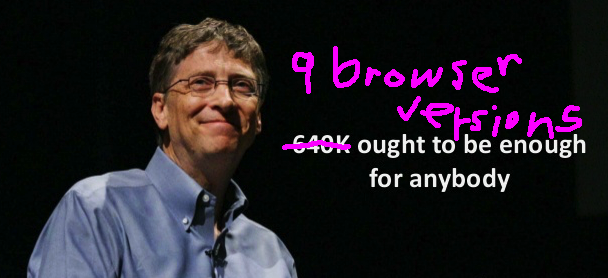
Broken website diagnosis wizard Tom Wisniewski followed a hunch that Slack was doing string comparison on version numbers, and found the following code:
  const _ = c.a.firefox && c.a.version < '52' ||
            c.a.safari && c.a.version < '11'
              ? h
              : 'button',
(We’re just going to ignore what h is, and the difference between that and button presumably solving some cross-browser interop problem; I trust it’s very clever.)
So this is totally valid JS, but someone forgot that comparison operators for strings in JS do alphanumeric comparison, comparing each character between the two strings (we’ve all been there).
So that’s how you get the following comparisons that totally work, until they totally don’t:
> "10" < "1"
false // ok

> "10" < "20"
true // sure

> "10" < "2"
true // lol, sure why not
So, how should you really be comparing stringy version numbers? Look, I don’t know, this isn’t leetcode. But maybe “search up” (as the kids say) String.prototype.localeCompare or parseInt and run with that (or don’t, I’m not in charge of