I’m happy to announce that we yet again completed a full eight week release cycle and as customary, we end it with a fresh release. Enjoy!
Release presentation
Numbers
the 198th release
6 changes
56 days (total: 8,412)
130 bug fixes (total: 6,812)
226 commits (total: 26,978)
0 new public libcurl function (total: 85)
3 new curl_easy_setopt() option (total: 288)
3 new curl command line option (total: 240)
58 contributors, 34 new (total: 2,356)
24 authors, 11 new (total: 871)
2 security fixes (total: 100)
800 USD paid in Bug Bounties (total: 5,200 USD)
Security
Automatic referer leaks
CVE-2021-22876 is the first curl CVE of 2021.
libcurl did not strip off user credentials from the URL when automatically populating the Referer: HTTP request header field in outgoing HTTP requests, and therefore risks leaking sensitive data to the server that is the target of the second HTTP request.
libcurl automatically sets the Referer: HTTP request header field in outgoing HTTP requests if the CURLOPT_AUTOREFERER option is set. With the curl tool, it is enabled with --referer ";auto".
Rewarded with 800 USD
TLS 1.3 session ticket proxy host mixup
CVE-2021-22890 is a flaw in curl’s OpenSSL backend that allows a malicious HTTPS proxy to trick curl with session tickets and subsequently allow the proxy to MITM the remote server. The problem only exists with OpenSSL and it needs to speak TLS 1.3 with the HTTPS proxy – and the client must accept the proxy’s certificate, which has to be especially crafted for the purpose.
Note that an HTTPS proxy is different than the mode comon HTTP proxy.
The reporter declined offered reward money.
Changes
We list 6 “changes” this time around. They are…
support multiple -b parameters
The command line option for setting cookies can now be used multiple times on the command line to specify multiple cookies. Either by setting cookies by name or by providing a name to a file to read cookie data from.
add –fail-with-body
The command line tool has had the --fail option for a very long time. This new option is very similar, but with a significant difference: this new option saves the response body first even if it returns an error due to HTTP response code that is 400 or larger.
add DoH options to disable TLS verification
When telling curl to use DoH to resolve host names, you can now specify that curl should ignore the TLS certificate verification for the DoH server only. Independently of how it treats other TLS servers that might be involved in the transfer.
read and store the HTTP referer header
This is done with the new CURLINFO_REFERER libcurl option and with the command line tool, --write-out '%{referer}‘.
support SCRAM-SHA-1 and SCRAM-SHA-256 for mail auth
For SASL authentication done with mail-using protocols such as IMAP and SMTP.
A rustls backend
A new optional TLS backend. This is provided via crustls, a C API for the rustls TLS library.
Some Interesting bug-fixes
Again we’ve logged over a hundred fixes in a release, so here goes some of my favorite corrections we did this time:
curl: set CURLOPT_NEW_FILE_PERMS if requested
Due to a silly mistake in the previous release, the new --create-file-mode didn’t actually work because it didn’t set the permissions with libcurl properly – but now it does.
share user’s resolve list with DOH handles
When resolving host names with DoH, the transfers done for that purpose now “inherit” the same --resolve info as used for the normal transfer, which I guess most users already just presumed it did…
bump the max HTTP request size to 1MB
Virtually all internal buffers have length restrictions for security and the maximum size we allowed for a single HTTP request was previously 128 KB. A user with a use-case sending a single 300 KB header turned up and now we allow HTTP requests to be up to 1 MB! I can’t recommend doing it, but now at least curl supports it.
allow SIZE to fail when doing (resumed) FTP
Every week brings new reports of data leaks, privacy violations, rampant misinformation, or discriminatory AIs. It’s frustrating, because we have so little insight into how major technology companies shape our online experiences. We also don’t understand the extent of data that online companies collect from us. Without meaningful transparency, we will never address the roots of these problems.
We are exploring ways to change the dynamics of who controls our data and how we understand our everyday online experiences. In the coming weeks we will launch Mozilla Rally, a participatory data science platform for the Mozilla community. Rally will invite people to put their data to work, not only for themselves, but for a better society.
Working alongside other mission-aligned partners, we’ll shine a light on the Internet’s big problems. We’ll explore ideas for new data products that tip the balance back to consumers. And we’ll do all of this out in the open, sharing and documenting every part of our journey together. You can sign up for the Rally waitlist to be notified when we launch.
Stay tuned!
https://blog.mozilla.org/data/2021/03/30/making-your-data-work-for-you-with-mozilla-rally/
It’s been less than a year since we launched Mozilla VPN, our fast and easy-to-use Virtual Private Network service brought to you by a trusted name in online consumer security and privacy services. Since then we added our Mozilla VPN service to Mac and Linux platforms, joining our VPN service offerings on Windows, Android and iOS platforms. As restrictions are slowly easing up and people are becoming more comfortable leaving their homes, one of the ways to keep your information safe when you go online is our Mozilla VPN service. Our Mozilla VPN provides encryption and device-level protection of your connection and information when you are on the Web.
Today, we’re launching two new features to give you an added layer of protection with our trusted Mozilla VPN service. Mozilla has a reputation for building products that help you keep your information safe. These new features will help users do the following:
For those who watch out for unsecure networks
If you’re someone who keeps our Mozilla VPN service off and prefers to manually turn it on yourself, this feature will help you out. We’ll notify you when you’ve joined a network that is not password protected or has weak encryptions. By just clicking on the notification you can turn the Mozilla VPN service on, giving you an added layer of protection ensuring every conversation you have is encrypted over the network. This feature is available on Windows, Linux, Mac, Android and iOS platforms.
For those at home, who want to keep all your devices connected
Occasionally, you might need to print out forms for an upcoming doctor visit or your kid’s worksheets to keep them busy. Now, we’ve added Local Area Network Access, so your devices can talk with each other without having to turn off your VPN. Just make sure that the box is checked in Network Settings when you are on your home network. This feature is available on Windows, Linux, Mac and Android platforms.
Why use our trusted Mozilla VPN service?
Since our launch last year, we’ve had thousands of people sign up to use our trusted Mozilla VPN service. Mozilla has built a reputation for building products that respect your privacy and keeps your information safe. With Mozilla VPN service you can be sure your activity is encrypted across all applications and websites, whatever device you are on.
With no long-term contracts required, the Mozilla VPN is available for just $4.99 USD per month in the United States, Canada, the United Kingdom, Singapore, Malaysia, and New Zealand. We have plans to expand to other countries this Spring.
We know that it’s more important than ever for you to feel safe, and for you to know that what you do online is your own business. Check out the Mozilla VPN and subscribe today from our website.
Following up last week’s post on some mach try fundamentals, I figured it would be worth posting some actual concrete tips and tricks. So
without further ado, here are some things you can do with ./mach try you may not have known about
in rapid fire format.
I’ve previously blogged about the possible backdoor threat to curl. This post might be a little repeat but also a refresh and renewed take on the subject several years later, in the shadow of the recent PHP backdoor commits of March 28, 2021. Nowadays, “supply chain attacks” is a hot topic.
Since you didn’t read that PHP link: an unknown project outsider managed to push a commit into the PHP master source code repository with a change (made to look as if done by two project regulars) that obviously inserted a backdoor that could execute custom code when a client tickled a modified server the right way.

The commits were apparently detected very quickly. I haven’t seen any proper analysis on exactly how they were performed, but to me that’s not the ultimate question. I rather talk and think about this threat in a curl perspective.
PHP is extremely widely used and so is curl, but where PHP is (mostly) server-side running code, curl is client-side.
How to get malicious code into curl
I’d like to think about this problem from an attacker’s point of view. There are but two things an attacker need to do to get a backdoor in and a third adjacent step that needs to happen:
- Make a backdoor change that is hard to detect and appears innocent to a casual observer, while actually still being able to do its “job”
- Get that changed landed in the master source code repository branch
- The code needs to be included in a curl release that is used by the victim/target
These are not simple steps. The third step, getting into a release, is not strictly always necessary because there are sometimes people and organizations that run code off the bleeding edge master repository (against our advice I should add).
Writing the backdoor code

As was seen in this PHP attack, it failed rather miserably at step 1, making the attack code look innocuous, although we can suspect that maybe that was done so on purpose. In 2010 there was a lengthy discussion about an alleged backdoor in OpenBSD’s IPSEC stack that presumably had been in place for years and even while that particular backdoor was never proven to be real, the idea that it can be done certainly is.
Every time we fix a security problem in curl there’s that latent nagging question in the back of our collective minds: was this flaw placed here deliberately? Historically, we’ve not seen any such attacks against curl. I can tell this with a high degree of certainty since almost all of the existing security problems detected and reported in curl was done by me…!
The best attack code would probably do something minor that would have a huge impact in a special context for which the attacker has planned to use it. I mean minor as in doing a NULL-pointer dereference or doing a use-after-free or something. This, because doing a full-fledged generic stack based buffer overflow is much harder to land undetected. Maybe going with a single-byte overwrite outside of a malloc could be the way, like it was back in 2016 when such a flaw in c-ares was used as the first step in a multi-flaw exploit sequence to execute remote code as root on ChromeOS…
Ideally, the commit should also include an actual bug-fix that would be the public facing motivation for it.
Get that code landed in the repo

Okay let’s imagine that you have produced code that actually is a useful bug-fix or feature addition but with an added evil twist, and you want that landed in curl. I can imagine several different theoretical ways to do it:
- A normal pull-request and land using the normal means
- Tricking or forcing a user with push rights to circumvent the review process
- Use a weakness somewhere and land the code directly
Hey everybody,
Please join us to welcome Daryl Alexsy to he Customer Experience team! Daryl is a Senior User Experience Designer who will be helping SUMO as well as the MDN team. Please, say hi to Daryl!
Here’s a short introduction from her:
Hi everyone! I’m Daryl, and I’ll be joining the SUMO team as a UX designer. I am looking forward to working together with you all to create a better experience for both readers and contributors of the platform, so please don’t hesitate to reach out with any observations or suggestions for how we can make that happen.
Welcome Daryl!
https://blog.mozilla.org/sumo/2021/03/30/intoducing-daryl-alexsy/

I've been mulling TenFourFox's future for awhile now in light of certain feature needs that are far bigger than a single primary developer can reasonably embark upon, and recent unexpected changes to my employment, plus other demands on my time, have unfortunately accelerated this decision.
TenFourFox FPR32 will be the last official feature parity release of TenFourFox. (A beta will come out this week, stay tuned.) However, there are still many users of TenFourFox — the update server reports about 2,000 daily checkins on average — and while nothing has ever been owed or promised I also appreciate that many people depend on it, so there will be a formal transition period. After FPR32 is released TenFourFox will drop to security parity and the TenFourFox site will become a placeholder. Security parity means that the browser will only receive security updates plus certain critical fixes (as I define them, such as crash wallpaper, basic adblock and the font blacklist). I will guarantee security and stability patches through and including Firefox 93 (scheduled for September 7) to the best of my ability, which is also the point at which Firefox 78ESR will stop support, and I will continue to produce, generate and announce builds of TenFourFox with those security updates on the regular release schedule with chemspills as required. There will be no planned beta releases after FPR32 but Tenderapp will remain available to triage bugfixes for new changes only.
After that date, for my own use I will still make security patches backported from the new Firefox 91ESR publicly available on Github and possibly add any new features I personally need, but I won't promise these on any particular timeline, I won't make or release any builds for people to download, I won't guarantee any specific feature or fix, I won't guarantee timeliness or functionality, and there will be no more user support of any kind including on Tenderapp. I'll call this "hobby mode," because the browser will be a hobby I purely maintain for myself, with no concessions, no version tags (rolling release only), no beta test period and no regular schedule. You can still use it, but if you want to do so, you will be responsible for building the browser yourself and this gives you a few months to learn how. Also, effective immediately, there will be no further updates to TenFourFoxBox, the QuickTime Enabler, the MP4 Enabler or the TenFourFox Downloader, though you will still be able to download them.
Unless you have a patch or pull request or it's something I care about, if you open an issue on Github it will be immediately closed. Similarly, any currently open issues I don't intend to address will be wound down over the next few weeks. However, this blog and the Github wiki will still remain available indefinitely, including all the articles, and all downloads on SourceForge will remain accessible as well. I'll still post here as updates are available along with my usual occasional topics of relevance to Power Mac users.
Classilla, for its part, is entering "hobby mode" today and I will do no further official public work on it. However, I am releasing the work I've already done on 9.3.4, such as it is, plus support for using Crypto Ancienne for self-hosted TLS 1.2 if you are a Power MachTen user (or running it in Classic or under Mac OS in Rhapsody). You can read more about that on Old VCR, my companion retrocomputing blog.
I'm proud of what we've accomplished. While TenFourFox was first and foremost a browser for me personally, it obviously benefited others. It kept computers largely useable that today are over fifteen years old and many of them even older. In periods of a down economy and a global pandemic this helped people make ends meet and keep using what they had an investment in. One of my favourite reports was from a missionary in Myanmar using a
Eighteen years ago Susie Daly started Renegade Craft as a way to build a community of artists through in-person events. When COVID-19 and the corresponding shutdown put a stop to … Read more
The post How one woman founder pivoted her company online while supporting small businesses appeared first on The Firefox Frontier.
https://blog.mozilla.org/firefox/renegade-craft-founder-susie-daly-interview/
Facing a complex system agency, designers (be graphics, software engineers, architects, etc.) will attempt to reduce the complexity by simplifying the interactions with the system. The percentage of interactions with the new design becomes the tool for measuring the efficacy of the new choices.

But what do we measure? Do we measure the success of the design or do we measure that we created only one way to do a task, and funnels a variety and diversity of interactions through the funnel of one way of doing things. We should be wary and careful of what we measure and the complexity of individuals in front of a system.
When we simplify a system of interactions to a certain minimalism, we often trade choices for reductionism. We maximize the simplicity to the point of dumbing everything down. But do we always help? Creativity, emergence of patterns often lie in the hackability of a system. When we reduce the options for someone to use the system in unexpected ways, we remove the possibility for people to own a craft, a skill. We make them serve the system, instead of the system serving them.
We should try to create simple interfaces that maximize the possibility for people to create (creative entropy), being empowered, being autonomous.
See Also
Comments
If you have more questions, things I may have missed, different take on them. Feel free to comment…. Be mindful.
Otsukare!
Since we last talked about MDN localization, a lot of progress has been made. In this post we’ll talk you through the unfreezing of Tier 1 locales, and the next steps in our plans to stop displaying non-active and unmaintained locales.
Tier 1 locales unfrozen!
It has been a long time coming, but we’ve finally achieved our goal of unfreezing our Tier 1 locales. the fr, ja, ru, zh-CN, and zh-TW locales can now be edited, and we have active teams working on each of these locales. We added Russian (ru) to the list very recently, after great interest from the community helped us to rapidly assemble a team to maintain those docs — we are really excited about making progress here!
If you are interested in helping out with these locales, or asking questions, you can find all the information you need at our all-new translated-content README. This includes:
- How to contribute
- The policies in place to govern the work
- Who is in the active localization teams
- How the structure is kept in sync with the en-US version.
We’d like to thank everyone who helped us get to this stage, especially the localization team members who have stepped up to help us maintain our localized content:
- Our French (fr) team:
- Our Japanese (ja) team:
- Our Russian (ru) team:
- Our Chinese (zh-CN and zh-TW) team:
Stopping the display of unmaintained locales on MDN
Previously we said that we were planning to stop the display of all locales except for en-US, and our Tier 1 locales.
We’ve revised this plan a little since then — we looked at the readership figures of each locale, as a percentage of the total MDN traffic, and decided that we should keep a few more than just the 5 we previously mentioned. Some of the viewing figures for non-active locales are quite high, so we thought it would be wise to keep them and try to encourage teams to start maintaining them.
In the end, we decided to keep the following locales:
en-USesru(already unfrozen)fr(already unfrozen)zh-CN(already unfrozen)ja(already unfrozen)pt-BRkodeplzh-TW(already unfrozen)
We are planning to stop displaying the other 21 locales. Many of them have very few pages, a high percentage of which are out-of-date or otherwise flawed, and we estimate that the total traffic we will lose by removing all these locales is less than 2%.
So what does this mean?
We are intending to stop displaying all locales outside the top ten by a certain date. The date we have chosen is April 30th.
We will remove all the source content for those locales from the translated-content repo, and put it in a new retired translated content repo, so that anyone who still wants to use this content in some way is welcome to do so. We highly
I’m pleased to announce our newest Friend of Add-ons, M'elanie Chauvel! After becoming interested in free and open source software in 2012, M'elanie started contributing code to Tab Center Redux, a Firefox extension that displays tabs vertically on the sidebar. When the developer stopped maintaining it, she forked a version and released it as Tab Center Reborn.
As she worked on Tab Center Reborn, M'elanie became thoroughly acquainted with the tabs API. After running into a number of issues where the API didn’t behave as expected, or didn’t provide the functionality her extension needed, she started filing bugs and proposing new features for the WebExtensions API.
Changing code in Firefox can be scary to new contributors because of the size and complexity of the codebase. As she started looking into her pain points, M'elanie realized that she could make some of the changes she wanted to see. “WebExtensions APIs are implemented in JavaScript and are relatively isolated from the rest of the codebase,” she says. “I saw that I could fix some of the issues that bothered me and took a stab at it.”
M'elanie added two new APIs: sidebarAction.toggle, which can toggle the visibility of the sidebar if it belongs to an extension, and tabs.warmup, which can reduce the amount of time it takes for an inactive tab to load. She also made several improvements to the tabs.duplicate API. Thanks to her contributions, new duplicated tabs are activated as soon as they are opened, extensions can choose where a duplicate tab should be opened, and duplicating a pinned tab no longer causes unexpected visual glitches.
M'elanie is also excited to see and help others contribute to open source projects. One of her most meaningful experiences at Mozilla has been filing an issue and seeing a new contributor fix it a few weeks later. “It made me happy to be part of the path of someone else contributing to important projects like Firefox. We often feel powerless in our lives, and I’m glad I was able to help others participate in something bigger than them,” M'elanie says.
These days, M'elanie is working on translating Tab Center Reborn into French and Esperanto and contributing code to other open-source projects including Mastodon, Tusky, Rust, Exa, and KDE. She also enjoys playing puzzle games, exploring vegan cooking and baking, and watching TV shows and movies with friends.
Thank you for all of your contributions, M'elanie! If you’re a fan of M'elanie’s work and wish to offer support, you can buy her a coffee or contribute on Liberapay.
If you are interested in contributing to the add-ons ecosystem, please visit our Contribution wiki.
The post Friend of Add-ons: M'elanie Chauvel appeared first on Mozilla Add-ons Blog.
https://blog.mozilla.org/addons/2021/03/25/friend-of-add-ons-melanie-chauvel/
Mailfence Encrypted Email Suite in Thunderbird
Today, the Thunderbird team is happy to announce that we have partnered with Mailfence to offer their encrypted email service in Thunderbird’s account setup. To check this out, you click on “Get a new email address…” when you are setting up an account. We are excited that those using Thunderbird will have this easily accessible option to get a new email address from a privacy-focused provider with just a few clicks.
Why partner with Mailfence?
It comes down to two important shared values: a commitment to privacy and open standards. Mailfence has built a private and secure email experience, whilst using open standards that ensure its users can use clients like Thunderbird with no extra hoops to jump through – which respects their freedom. Also, Mailfence has been doing this for longer than most providers have been around and this shows real commitment to their cause.
We’ve known we wanted to work with the Mailfence team for well over a year, and this is just the beginning of our collaboration. We’ve made it easy to get an email address from Mailfence, and their team has created many great guides on how to get the most out of their service in Thunderbird. But this is just the beginning. The goal is that, in the near future, Mailfence users will benefit from the automatic sync of their contacts and calendars – as well as their email.
Why is this important?
If we’ve learned anything about the tech landscape these last few years it’s that big tech doesn’t always have your best interests in mind. Big tech has based its business model on the harvesting and exploitation of data. Your data that the companies gobble up is used for discrimination and manipulation – not to mention the damage done when this data is sold to or stolen by really bad actors.
We wanted to give our users an alternative, and we want to continue to show our users that you can communicate online and leverage the power of the Internet without giving up your right to privacy. Mailfence is a great service that we want to share with our community and users, to show there are good options out there.
Patrick De-Schutter, Co-Founder of Mailfence, makes an excellent case for why this partnership is important:
“Thunderbird’s mission and values completely align with ours. We live in times of ever growing Internet domination by big tech companies. These have repeatedly shown a total disrespect of online privacy and oblige their users to sign away their privacy through unreadable Terms of Service. We believe this is wrong and dangerous. Privacy is a fundamental human right. With this partnership, we create a user-friendly privacy-respecting alternative to the Big Tech offerings that are centered around the commodification of personal data.”
How to try out Mailfence
If you want to give Mailfence a try right now (and are already using Thunderbird), just open Thunderbird account settings, click “Account Actions” and then “Add Mail Account”, it is there that you will see the option to “Get a new email address”. There you can select Mailfence as your provider and choose your desired username, then you will be prompted to set up your account. Once you have done this your account will be set up in Thunderbird and you will be able to start your Mailfence trial.
It is our sincere hope that our users will give Mailfence a try because using services that respect your freedom and privacy is better for you, and better for society at large. We look forward to deepening our relationship with Mailfence and working hand-in-hand with them to improve the Thunderbird experience for those using their service.
We’ll share more about our partnership with Mailfence, as well as our other efforts to promote privacy and open standards as the year progresses. We’re so grateful to get to work with great people who share our values, and to then share that work with the world.
https://blog.thunderbird.net/2021/03/mailfence-encrypted-email-suite-in-thunderbird/
In the fall of 2016, Nandini Jammi co-founded Sleeping Giants to expose for brands how their digital advertisements were showing up on websites that they didn’t intend their marketing efforts … Read more
The post How two women are taking on the digital ad industry one brand at a time appeared first on The Firefox Frontier.
https://blog.mozilla.org/firefox/nandini-jammi-claire-atkin-check-my-ads/
Every time you are on the internet, IP addresses are playing an essential role in the information exchange to help you see the sites you are requesting. Yet, there is … Read more
The post Mozilla Explains: What is an IP address? appeared first on The Firefox Frontier.
TL;DR: By the end of March, 2021, the Play Store Support program will be moving from the Respond Tool to Conversocial. If you want to keep helping Firefox for Android users by responding to their reviews in the Google Play Store, please fill out this form to request a Conversocial account. You can learn more about the program here.
In late August last year, to support the transition of Firefox for Android from the old engine (fennec) to the new one (fenix), we officially introduced a tool that we build in-house called the Respond Tool to support the Play Store Support campaign. The Respond Tool lets contributors and staff provide answers to reviews under 3-stars on the Google Play Store. That program was known as Play Store Support.
We learned a lot from the campaign and identified a number of improvements to functionality and user experience that were necessary. In the end, we decided to migrate the program from the Respond Tool to Conversocial, a third-party tool that we are already using with our community to support users on Twitter. This change will enable us to:
- Segment reviews and set priorities.
- Filter out reviews with profanity.
- See when users change their ratings.
- Track trends with a powerful reporting dashboard.
- Save costs and engineering resources.
As a consequence of this change, we’re going to decommission the Respond Tool by March 31, 2021. You’re encouraged to request an account in Conversocial if you want to keep supporting Firefox for Android users. You can read more about the decommission plan in the Contributor Forum.
We have also updated the guidelines to reflect this change that you can learn more from the following article: Getting started with Play Store Support.
This will not be possible without your help
All this will not be possible without contributors like you, who have been helping us to provide great support for Firefox for Android users through the Respond Tool. From the Play Store Support campaign last year until today, 99 contributors have helped to reply to a total of 14484 reviews on the Google Play Store.
I’d like to extend my gratitude to Paul W, Christophe V, Andrew Truong, Danny Colin, and Ankit Kumar who have been very supportive and accommodating by giving us feedback throughout the transition process.
We’re excited about this change and hope that you can help us to spread the word and share this announcement to your fellow contributors.
Let’s keep on rocking the helpful web!
On behalf of the SUMO team,
Kiki
https://blog.mozilla.org/sumo/2021/03/24/play-store-support-program-updates/
Today Mozilla released Firefox 87, introducing SmartBlock, a new feature which "intelligently fixes up web pages that are broken by our tracking protections, without compromising user privacy [...] by providing local stand-ins for blocked third-party tracking scripts. These stand-in scripts behave just enough like the original ones to make sure that the website works properly. They allow broken sites relying on the original scripts to load with their functionality intact."
As long time NoScript users may recall, this is exactly the concept behind "Script Surrogates", which I developed more than ten years ago as a NoScript "Classic" module.
In facts, in its launch post Mozilla kindly wants "to acknowledge the NoScript and uBlock Origin teams for helping to pioneer this approach.".
It's not the first time that concepts pioneered by NoScript percolate into mainstream browsers: from content blocking to XSS filters, I must admit it gets me emotional every time :)
Script Surrogates unfortunately could not be initially ported to NoScript Quantum, due to the radically different browser extensions technology it was forced into. Since then, many people using NoScript and other content blockers have been repeatedly asking for this feature to come back because it "fixed" many sites without requiring unwanted scripts (such as Google Analytics, for instance) to be enabled or ad-blocking / anti-tracking extensions to be disabled.
Script Surrogates were significantly more powerful, flexible and user-hackable than SmartBlock, and I find myself missing them in several circumstances.
I'm actually planning (i.e. trying to secure time and funds) to bring back Script Surrogates as a stand-alone extension for Firefox-based and Chromium-based browsers, both on desktop and mobile devices. This tool would complement and enhance the whole class of content blockers (including but not limited to NoScript), without requiring the specific installation of NoScript itself. Furthermore, its core functionality (on-demand script injection/replacement, native object wrapping/emulation...) would be implemented as NoScript Commons Library modules, ready to be reused by other browser extensions, like already happening with FSF's in-progress project JS-Shield.
In the meanwhile, we can all enjoy Script Surrogate's "light", mainstream young sibling, built-in in Firefox (and therefore coming soon in the Tor Browser too). Yay Mozilla!
https://hackademix.net/2021/03/23/welcome-smartblock-script-surrogates-for-the-masses/
I honestly don’t know what particular thing I did to get this, but GitHub gave me a 3D-printed steel version of my 2020 GitHub contribution “matrix”. You know that thing on your GitHub profile that normally looks something like this:

The gift package included this friendly note:
Hi @bagder,
As we welcome 2021, we want to thank and congratulate you on what you brought to 2020. Amidst the year’s challenges, you found time to continue giving back and contributing to the community.
Your hard work, care, and attention haven’t gone unnoticed.
Enclosed is your 2020 GitHub contribution graph, 3D printed in steel. You can also view it by pointing your browser to https://github.co/skyline. It tells a personal story only you can truly interpret.
Please accept this small gift as a token of appreciation on behalf of all of us here at GitHub, and everyone who benefits from your work.
Thank you and all the best for the year ahead!
With <3, from GitHub


I think I’ll put it under one of my screens here on my desk for now. The size is 145 mm x 30 mm x 30 mm. 438 grams.
Thanks GitHub!
Update: the print is done by shapeways.com
Nearing the end of March now, and we have a new version of Firefox ready to deliver some interesting new features to your door. This month, we’ve got some rather nice DevTools additions in the form of prefers-color-scheme media query emulation and toggling :target pseudo-classes, some very useful additions to editable DOM elements: the beforeinput event and getTargetRanges() method, and some nice security, privacy, and macOS screenreader support updates.
This blog post provides merely a set of highlights; for all the details, check out the following:
Developer tools
In developer tools this time around, we’ve first of all updated the Page Inspector to allow simulation of prefers-color-scheme media queries, without having to change the operating system to trigger light or dark mode.
Open the DevTools, and you’ll see a new set of buttons in the top right corner:

When pressed, these enable the light and dark preference, respectively. Selecting either button deselects the other. If neither button is selected then the simulator does not set a preference, and the browser renders using the default feature value set by the operating system.
And another nice addition to mention is that the Page Inspector’s CSS pane can now be used to toggle the :target pseudo-class for the currently selected element, in addition to a number of others that were already available (:hover, :active, etc.)
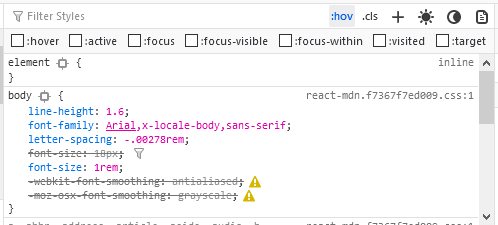
Find more out about this at Viewing common pseudo-classes.
Better control over user input: beforeinput and getTargetRanges()
The beforeinput event and getTargetRanges() method are now enabled by default. They allow web apps to override text edit behavior before the browser modifies the DOM tree, providing more control over text input to improve performance.
The global beforeinput event is sent to an element — or any element whose contenteditable attribute is set to true — immediately before the element’s value changes. The getTargetRanges() method of the InputEvent interface returns an array of static ranges that will be affected by a change to the DOM if the input event is not canceled.
As an example, say we have a simple comment system where users are able to edit their comments live using a contenteditable container, but we don’t want them to edit the commenter’s name or other valuable meta data? Some sample markup might look like so:
  Mr Bungle:
  This is my comment; isn't it good!
  -- 09/16/21, 09.24
Using beforeinput and getTargetRanges(), this is now really