
Today is a big day in the web-wolf glitter land that is my PhD. After a crazy and wonderful year of reading, discussing, traveling and (over!)thinking everything there is to think about spaces for digital making, cultural institutions, methodologies and open creative practices, I start the pilot stage of my doctoral fieldwork at the Tate Britain, situated within the ever-colourful Taylor Digital Studio as its new Researcher-in-Residence. I have consent forms ready from the University of Sussex, about a thousand web broswer windows open on the Tate’s computers, a T4 file full of community photos and about 20 pages of to-do’s - and yet, it feels no small task to get started.
As a part of the study I’m undertaking with the Tate and other cultural institutions in the UK, my aim in hanging out, messing around and geeking out at these spaces, in addition to implementing more formal qualitative methods like participant observation and interviews, is to engage with the situated knowledges and actor-network theories of Donna Haraway, Bruno Latour, Doreen Massey and other great thinkers as a user myself - not as an “objective” researcher, seemingly removed from the environments I am actually an active part of. This is because when we make things in a space like the Tate’s Digital Studio together, we all become connected - whether we happen to be a computer, a workshop participant, a gallery curator or an observer. We all help make these sites what they are. Without these interactions, a makerspace is just a conglomeration of infrastructures, plaster and walls alone, without meaning or identity.
This project’s data collection starts, perhaps fittingly, with making. From September to December, I’ll be spending my Fridays in the Studio, collaborating with other PhD and researcher groups and with the Tate’s excellent Digital Learning team members, while playing the role of both researcher and designer through a few different hands-on projects. The first intervention I’ll be working on is SPACEHACKER, an evolving artwork that I’ll be launching as part of MozEx, an exhibit curated by the Tate and the V&A as part of this year’s Mozilla Festival in London. SPACEHACKER implements critical and speculative design models by asking participants to sketch out their imaginaries of a digital space that members of their community would feel welcome at. For those interested in getting involved (I’d love collaborators on this project!), I’ll be presenting it along with a few other (mega talented!) MozEx artists in this public pop-up at the Tate on October 10th-11th.
 [450x]Community making at a workshop entitled “Wandering Ruins” in 2014.
While learning about speculative user imaginations of digital spatiality through this artwork, I’ll also be working with Tate teams as a design practitioner, building a digital mosaic website on the ever-excellent Tumblr platform that highlights the many workshops and community happenings that have occurred at the Digital Studio since it opened in November 2013. Through these hands-on methods and more traditional qualitative observation and interviews, I hope to help build a public-minded narrative of the myriad experiences of users at this site, and the groups who have helped bring them to life - while building an understanding of the politics and institutional apparatuses of access, ownership and power that may also weave themselves around these interactions. My goal with this multi-level approach is to keep the research process as open, iterative and participatory as possible - which makes blog posts like this (and the discussions they bring about) just as important to me as formal academic journal articles and conference presentations. It just wouldn’t feel right to not share this
To spread the word, to show off the logo, to share the love, to boost the brand, to allow us to fill up our own and our friend’s laptop covers I ordered a set of curl stickers to hand out to friends and fans whenever I meet any going forward. They arrived today, and I thought I’d give you a look. (You can still purchase your own set of curl stickers from unixstickers.com)
The sticker is 74 x 26 mm at its max.


https://daniel.haxx.se/blog/2016/09/16/a-sea-of-curl-stickers/
I installed Ubuntu 16.04.1 this week and decided to try out Unity, the default window manager. After I installed Nightly I assumed it would be simple to get the icon to stay in the dock, but Unity seemed confused about Nightly vs the built-in Firefox (I assume because the executables have the same name).
It took some doing to get Nightly to stick to the Dock with its own icon. I retraced my steps and wrote them down below.
My goal was to be able to run a couple versions of Firefox with several profiles. I thought the easiest way to accomplish that would be to add a new icon for each version+profile combination and a single left click on the icon would run the profile I want.
After some research, I think the Unity way is to have a single icon for each
version of Firefox, and then add Actions to it so you can right click on the
icon and launch a specific profile from there.
Installing Nightly
If you don't have Nighly yet, download Nightly (these steps should work fine with Aurora or Beta also). Open a terminal:
$ mkdir /opt/firefox
$ tar -xvjf ~/Downloads/firefox-51.0a1.en-US.linux-x86_64.tar.bz2 /opt
You may need to chown some directories to get that in /opt which is fine.
At the end of the day, make sure your regular user can write to the directory or
else you won't be able to install Nightly's updates.
Adding the icon to the dock
Then create a file in your home directory named nightly.desktop and paste this
into it:
[Desktop Entry]
Version=1.0
Name=Nightly
Comment=Browse the World Wide Web
Icon=/opt/firefox/browser/icons/mozicon128.png
Exec=/opt/firefox/firefox %u
Terminal=false
Type=Application
Categories=Network;WebBrowser;
Actions=Default;Mozilla;ProfileManager;

[Desktop Action Default]
Name=Default Profile
Exec=/opt/firefox/firefox --no-remote -P minefield-default

[Desktop Action Mozilla]
Name=Mozilla Profile
Exec=/opt/firefox/firefox --no-remote -P minefield-mozilla

[Desktop Action ProfileManager]
Name=Profile Manager
Exec=/opt/firefox/firefox --no-remote --profile-manager
Adjust anything that looks like it should change, the main callout being the
Exec line should have the names of the profiles you want to use (in the above
file mine are called minefield-default and minefield-mozilla). If you have
more profiles just make more copies of that section and name them appropriately.
If you think you've got it, run this command:
$ desktop-file-validate nightly.desktop
No output? Great -- it passed the validator. Now install it:
$ desktop-file-install --dir=.local/share/applications nightly.desktop
Two notes on this command:
- If you leave off --dir it will write to
/usr/share/applications/and affect all users of the computer. You'll probably need tosudothe command if you want that. - Something is weird with the parsing. Originally I passed in
--dir=~/.local/...and it literally made a directory named~in my home directory, so, if the menu isn't updating, double check the file is getting copied to the right spot.
Some people report having to run unity again to get the change to appear, but
it showed up for me. Now left-clicking runs Nightly and right-clicking opens a
menu asking me which profile I want to use.
Modifying the Firefox Launcher
I also wanted to launch profiles off the regular Firefox icon in the same way.
The easiest way to do that is to copy the built-in one from
/usr/share/applications/firefox.desktop and modify it to suit you.
Conveniently, Unity will override a system-wide .desktop file if you have one
with the same name in your local directory so installing it with the same
commands as you did for Nightly will work
If you’re just joining this process, you can get oriented here and here. We’re grateful that this process has sparked such interest among Mozillians, those who care about Mozilla, and the global design community—dozens of articles, hundreds of tweets, thousands of comments, and perhaps tens of thousands of words of feedback. As believers in transparency at Mozilla, we consider this a success.
Thanks to all of you who have added your voice to the conversation. Your many constructive comments and suggestions have helped us chart a path forward. Some of you will find that your favored design directions have been let go in the pursuit of something better. We hope you’ll find a design here that you feel best represents Mozilla today and tomorrow.
For many, The Impossible M was an early favorite, but we discovered that it was just too close to other design treatments already in the public domain. The Connector stayed in the running for some time, but was eventually overtaken by new ideas (and always slightly suffered from being a bit too complex).
What we resolved to do next.
Working in tandem with our London agency partner johnson banks and making the most of our time zone difference nearly around the clock, we agreed to redirect efforts toward these design goals:
- Focusing first on the core marks, particularly on their visual simplicity, before figuring out how they extend into design systems.
- Exploring the dinosaur. From the blog feedback, it was clear that we had permission to link more directly back to the former dinosaur logo. Aside from The Eye, what other paleo elements might we explore?
- Celebrating the Internet. Rather than seeking ways to render the Internet in three dimensions (as Wireframe World and Flik-Flak had bravely attempted to do), might be influenced by the random beauty of the Internet works and how people use it?
- Refining and simplifying the two routes, Protocol and Wireframe World, that showed the most promise in the first round.
The Pioneers: This is still a strong and resonant territory, and one that works well with at least one of the final four.
Taking a stand: This positioning emerged directly from our earliest discussions and is still very strong.
The maker spirit: We’ve seen from the first round, the community of Mozillians is vocal and engaged and is key to the organization going forward.
The Health of the Internet: This is a new idea that posits Mozilla is a guardian and promoter of the Internet’s overall well-being.
Comments from the first round on ‘The Eye’ route confirmed a suspicion that the typography might suggest something we didn’t intend, so first we looked at ways to make this creature more approachable.
The, we took a step back and looked again for ways to hint at a ‘zilla (whilst not being too specific), and create the basis of a wide-ranging design scheme. After weeks of experiments and simplification, Dino 2.0 emerged.
Essentially this Dino is just a red chevron and some white type – but somehow that one raised eye can watch and blink in a very unique way. And those jaws can merrily chomp when needs be.
We see this Dino as someone who can straddle two narratives – one that can stand up, be counted, shout, bark and bite when needed – yet act as a figurehead for Mozilla’s maker community across the globe. We’re developing a kind of ‘agit’ toolkit for this route, with crude hand-drawn industrial typefaces, and a suitably red, white and black colour scheme.
We’ve discovered Dino 2.0 successfully change its spots for communities and countries too.
 [1024x724] [1024x724] [1024x724] [1024x724] [1024x724] [1024x724]
This route has stemmed from two trains of thought – firstly a new narrative direction where we have been actively considering Mozilla’s role in recording and advancing the health of the Internet. Visually we’ve been investigating data-led ideas and classic internet imagery, whilst not forgetting some of the thinking of ‘Wireframe World’ from the first round.
As we looked harder at data sources we realised that five was a key number: Mozilla is collecting data around five key measurements of Internet health as we type (and you read), and there are five nodes in a capital ‘M’. So we combined the two thoughts.
This creates a very beautiful, almost fragile idea that we know has great potential in online and animated forms. It also lends itself well to a set of interlinked images for Mozilla’s many initiatives.
This is a completely new direction. Whilst rooted in the ethos of the ‘Pioneer’ thinking it also crosses over into the ‘Taking a stand’ narratives. We started to think that a flame could be a powerful symbol of Mozilla’s determination to remain the beacon for an open, accessible and equal internet for all, and something that a community gathers around for warmth.
As we started to experiment with flame symbolism, one simple design won through which simply merges an ‘M’ and a flame. After some experimentation, we think a dot/pixellated form for this idea work nicely. It animates nicely, and might even be dynamically generated with lightweight code.
Here are some key slides showing applications out to sub-brands, community designs and merchandise.
[1024x724] [1024x724] [1024x724] [1024x724] [1024x724] [1024x724]
Save
Protocol is a strong contender from the first round of ideas that we’ve continued to work on and improve. By putting the internet http:// protocol directly into the word – Moz://a – it creates a type-able word mark, and by doing so alludes to Mozilla’s role at the core of the Internet (and hence the ‘Pioneers’ positioning).
We’ve been strengthening the typography from the first round and looking at ways to expand the graphic language out across a typographic and pictogram language. We’ve also enhanced the blue to reflect the palette of the early Web. Here’s an early exploration:
We’re also experimenting with a thought that some of the characters in the mark could swap in and out, randomly, pulling fonts characters or emoticons from a local computer or the web itself. A freaky thought, but could be great.
[1024x724] [1024x724] [1024x724] [1024x724] [1024x724] [1024x724]
Hello, SUMO Nation!
We had a bit of a delay with the release of the 49th version of Firefox this week… but for good reasons! The release is coming next week – but our latest news are coming right here, right now. Dig in!
Welcome, new contributors!
If you just joined us, don’t hesitate – come over and say “hi” in the forums!
Contributors of the week
- Happy112 – one of our top contributors just after a month – thanks for being awesome!
- Philipp – for helping out with the Symantec issue – woot!
- All the forum supporters who tirelessly helped users out for the last week.
- All the writers of all languages who worked tirelessly on the KB for the last week.
- All the Social Superheroes – thank you!
We salute you!
SUMO Community meetings
- LATEST ONE: 14th of September- you can read the notes here and see the video at AirMozilla.
- NEXT ONE: happening on the 21st of September!
- If you want to add a discussion topic to the upcoming meeting agenda:
- Start a thread in the Community Forums, so that everyone in the community can see what will be discussed and voice their opinion here before Wednesday (this will make it easier to have an efficient meeting).
- Please do so as soon as you can before the meeting, so that people have time to read, think, and reply (and also add it to the agenda).
- If you can, please attend the meeting in person (or via IRC), so we can follow up on your discussion topic during the meeting with your feedback.
Community
- Final reminder: We need to be inspired by you! Share your favourite superhero with Rachel. We are looking for different heroes from all parts of the world.
- Reminder: MozFest is coming our way! London, October 28-30. Are you excited yet?
- Ongoing reminder #1: if you think you can benefit from getting a second-hand device to help you with contributing to SUMO, you know where to find us.
- Ongoing reminder #2: we are looking for more contributors to our blog.
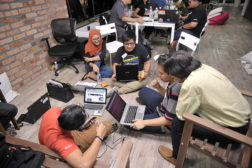
 The last weekend of August saw the largest localization hackathon event the l10n-drivers ever organized. Thirty-four community contributors representing 12 languages from 13 East and Southeast Asian countries journeyed to Kuala Lumpur, Malaysia on Friday, August 26. Jeff, Flod, Gary Kwong and I arrived in time for the welcome dinner with most of the community members. The restaurant, LOKL Coffee, was ready for a menu makeover and took the opportunity to use this Mozilla event to do just that. A professional photographer spent much of the evening with us snapping photos.
We started off Saturday morning with Spectrogram, where l10n contributors moved from one side of the room to another to illustrate whether they agreed or disagreed with a statement. Statements help us understand each community’s preferences to address localization requests. An example: There are too many translation/localization tasks for me to keep up; I want to work on 2000 strings sliced up in 1 year, twice, 6 weeks, 4 weeks, weekly, every other day, daily.
Jeff, the newly appointed localization manager, updated everyone on l10n organization change; the coming attraction of the l20n development; Pontoon as one of the centralized l10n tools; and the ultimate goal of having a single source of l10n dashboard for the communities and l10n project managers.
 Flod briefed on the end of Firefox OS and the new initiatives with Connected Device. He focused on Firefox primarily. He discussed the 6-week rapid release cycles or cadence. He also covered the five versions of Firefox: Aurora, nightly, beta, release, and ERS. He described the change to a single source of repository, allowing strings move to production sooner. Firefox for iOS and Android were also presented. It was welcome news that the localized product can be shipped through automatic signoff, without community’s involvement.
I talked about the importance of developing a style guide for each of the languages represented. This helps with onboarding new comers, consistency among all contributors and sets the style and tone for each of the Mozilla products. I also briefly touched upon the difference between brand names and product names. I suggested to take this gathering as an opportunity to work on these.
For the rest of the weekend, our communities worked through the goals they set for ourselves. Many requested to move their locales to Pontoon, causing a temporarily stall in sync. Others completed quite a few projects, making significant advances on the dashboard charts. Even more decided to tackle the style guides, referencing the template and leveraging information from established outlets. When the weekend was over, nine communities reported to have some kind of draft versions, or modified and updated an existing one. Other accomplishments included identifying roles and responsibilities; making plans for meetup for the rest of the year; tool training; improving translation quality by finding critical errors; updating glossaries; completing some high priority projects.
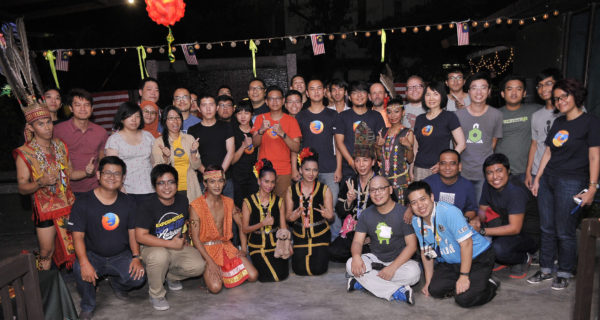 The weekend was not just all work, but filled with cultural activities. Our Saturday dinner at Songket Restaurant was followed by almost an hour of Malaysian cultural dances from across the country, showcasing the diverse cultures that made up Malaysia. Many community members were invited to the stage to participate. It was a fun evening filled with laughter. Our Sunday dinner was arranged inside Pasar Seni, or the Central Market, a market dating back to 1888. It is now filled with shops and restaurants, giving all visitors a chance to take home some souvenirs and fond memories. Many of us visited the near by Pedaling Street, sampling tropical fruits, including Durian, made in all shapes and forms.
Putting together the largest l10n hackathon ever is a big
 This is a weekly call with some of the Reps to discuss all matters about/affecting Reps and invite Reps to share their work with everyone.
Over the last months, Kohei Yoshino and myself worked on improving the discoverability of Firefox Nightly desktop builds and in particular localized builds.
Until recently, the only way to get Firefox Nightly for desktop was to download it in English from nightly.mozilla.org or, if you wanted a build in say Japanese, Arabic or French, look for the right FTP sub-folder in ftp.mozilla.org. Nightly.mozilla.org is itself a static HTML page based on a script that scraps the FTP site for builds periodically.
Of course, as a result, about 90% of our Nightly users use an en-US build. The few thousand users using a localized build are Mozilla localizers and long term contributors that knew where to search for them. We were clearly limiting ourselves to a subset of the population that could be using Firefox Nightly which is not a good thing when you want to actually grow the number of nightly users so as to get more feedback (direct and anonymous). The situation was so frustrating to some of our community members that they created their own download pages for Nightly in their language over time.
Then why didn’t we have a proper download page on www.mozilla.org as we do for all Firefox channels (release, beta, dev edition) ? Why are nightly builds available only from a separate sub-domain? One of the reasons was technical, www.mozilla.org uses data provided by the Release Management team through a public JSON API called product-details and that API didn’t provide any information about Nightly. Actually, this API was a typical legacy piece of code that had been doing the job well for a decade but was meant to be rewritten and replaced by another tool year after year. Until the switch to a new compatible API and the addition of Nightly data there, mozilla.org just didn’t know anything about Nightly.
So first we had to actually end the work on the migration from the old to the new API and mozilla.org switched to this new API in August.
Now that the data about Desktop Nightly was available to mozilla.org (and to any django-based Mozilla site that includes the django-product-details library), the front-end work could be started by Kohei so as to create a page that would list all platforms and localized builds and that would reuse as much code and existing assets as possible. And here is the result at mozilla.org/en-US/firefox/nightly/all:
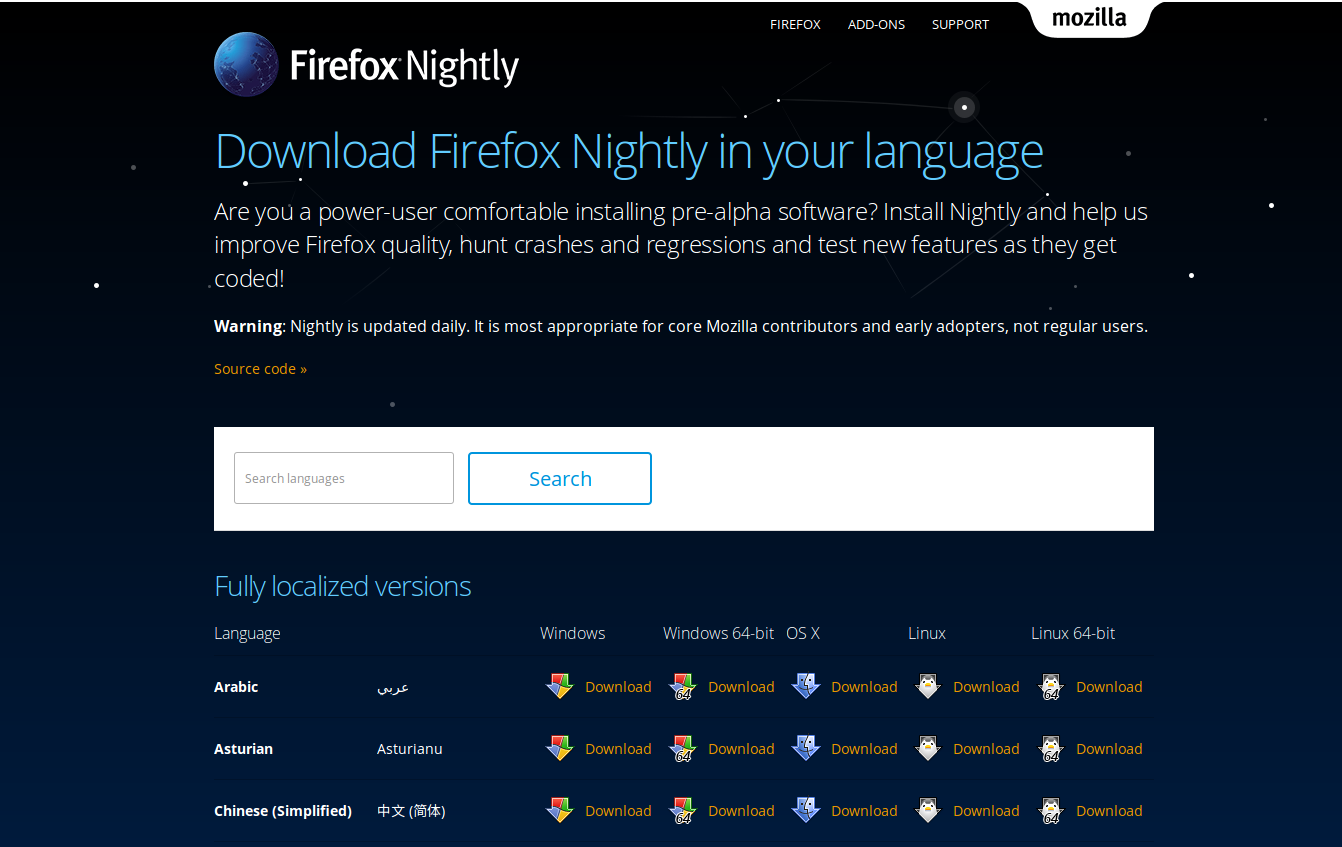
We are working on making that page linked from the nightly site in bug 1302728. That’s only a start of course, we still have a lot of work to make it easier for advanced testers to find our pre-release builds, but now when somebody will ask you for a comprehensive list of Desktop Nightly builds, you’ll know what address to share!
Many thanks to Kohei and the mozilla.org Webdev team for their help on making that happen!
https://blog.nightly.mozilla.org/2016/09/15/get-a-nightly-that-speaks-your-language/
Mike and I met with the “select dropdown” team today and discussed where they’re at and the work that they can focus on for the next week. We are discussing a possible “hack-weekend” October 1st and 2nd at Michigan State.
Freddy got XCode up and running and can debug processes at the single-process/multi-process fork. Jared and Miguel are having issues getting their debugger to work. Freddy will be helping Jared and Miguel with their setup to compare what is different, with the fallback being Jared and Miguel using LLDB as their debugger.
In the past week, the team has also been spending time working on presentations and project plans.
For C++ code, their initial plan was to fake the single-process to run through the multi-process code path by removing the checks for if the code is running in a content process and if a special e10s desktop preference is enabled.
As a quick technical dive: When a select dropdown is clicked, we determine that we’re running in a content process, and we fire an event (“mozshowdropdown”). A content script running in the content process listens for the “mozshowdropdown” event and opens the popup.
The plan to fake the single-process to run through the multi-process won’t work though, because the content script mentioned above won’t be loaded and thus there won’t be an event listener. The content-script is only loaded right now through the remote-browser.xml binding. The content-script would have to be loaded through the non-remote-browser binding (browser.xml) as well as the various message listeners and event listeners.
While working on this, it would be a good idea to move the code from select-child.js to browser-content.js, since we don’t really need a separate file for select items and browser-content.js is loaded in single-process Firefox.
As for styling changes, the students were able to use the Browser Toolbox to change web content through forms.css and see how things like input textboxes could get different default colors. To change the styling of a select dropdown, the students will play around in browser.css to tweak the styling. In the end they’ll want to make sure that the styling exists under the /themes directory, and likely within /themes/shared/.
One of the students asked if we had ideas about specific algorithms or design-patterns that the search-within-the-dropdown implementation should use. We pointed them at the Browser Console’s filtering ability and asked that the students follow the implementation there.
That wraps up our notes from this week’s meeting. We’ll be meeting regularly for the next 10-ish weeks as the students make progress on their work.
Tagged: capstone, firefox, msu, planet-mozilla
[показать] 
Here’s what’s going on in the add-ons world this month. I’m changing the cadence (down from every 3 weeks) to better align with other work and spend less time writing these.
The Review Queues
In the past month, 1,891 listed add-on submissions were reviewed:
- 1519 (80%) were reviewed in fewer than 5 days.
- 132 (7%) were reviewed between 5 and 10 days.
- 240 (13%) were reviewed after more than 10 days.
There are 159 listed add-ons awaiting review.
You can read about the improvements we’ve made in the review queues here.
If you’re an add-on developer and are looking for contribution opportunities, please consider joining us. Add-on reviewers are critical for our success, and can earn cool gear for their work. Visit our wiki page for more information.
Preliminary Review Removed
As we announced before, we simplified the review process by removing preliminary review, making an add-on review a more straightforward pass/fail decision.
All add-ons on AMO have been migrated to the new system, so add-ons that were preliminarily reviewed before are now fully reviewed, but with the experimental flag on by default. We will send a notification email after we iron out some minor bugs that came up after the migration.
Compatibility
The compatibility blog post for Firefox 50 is up, and the bulk validation will be run in a couple of weeks.
Multiprocess Firefox is now enabled for users without add-ons, and add-ons will be gradually phased in, so make sure you’ve tested your add-on and either use WebExtensions or set the multiprocess compatible flag in your add-on manifest.
As always, we recommend that you test your add-ons on Beta and Firefox Developer Edition to make sure that they continue to work correctly. End users can install the Add-on Compatibility Reporter to identify and report any add-ons that aren’t working anymore.
Recognition
We would like to thank Atique Ahmed Ziad, Surya Prashanth, weaksauce, zombie, jorgk, and Trishul Goel for their recent contributions to the add-ons world. You can read more about their work in our recognition page.
https://blog.mozilla.org/addons/2016/09/14/add-ons-update-87/
One of the main goals of Pontoon is lowering barriers to entry. Especially for end users (mainly localizers), but also for contributors to the codebase, since many of our localizers have a developer background.
I’m happy to acknowledge that in the last 30 days there has been more activity from volunteer contributors in Pontoon development than ever before! Let’s have a closer look at what have they been working on:

Last month’s Pontoon contributors
Michal Vas'icek
Michal came up with the idea to highlight matches in original and translated strings when searching in the sidebar. He created a patch, but couldn’t finish it due to his school duties. It was taken over by Jarek, who earlier played a great role in reviewing the original patch by Michal.
Being only 14 years old, Michal is the youngest Pontoon contributor!
Jarek 'Smiejczak (jotes)
Since he became an active Pontoon contributor over a year ago, Jarek has evolved from being not just a great developer but also a fantastic mentor; helping onboard new contributors and review their work. One way or another, he’s been involved with all bugs and features listed in this blog post.
Of course that doesn’t mean he stopped contributing code. On the contrary, he just completed a Firefox Accounts based authentication support which will soon replace Persona. And, he’s already busy working on bringing terminology support to Pontoon too.
Victor Bychek
A lot of our users have been complaining about their email addresses being exposed publicly in Pontoon UI and URLs, even if it complies with Commit Access Requirements. Thanks to Victor, these days are over: we no longer reveal email addresses in top contributor pages and filter by user selector, as long as you set a display name.
Victor is a pleasure to work with and is already busy with his next task, which will allow you to apply multiple filters at the same time.
Stoyan Dimitrov
As the new leader of the Bulgarian localization team, Stoyan takes his duties very professionally. He started by creating a vector version of Pontoon logo and changing the copy.
Later on he created a Firefox Add-On called Pontoon Enhanced, which can add new features to Pontoon before they are deployed or even implemented in the application. It’s basically a Test Pilot for Pontoon.
Michal Stanke
As an agile bug reporter, Michal has been one of the most valuable early adopters of Pontoon. Now he has decided to take a step further.
He set up his local Pontoon instance, fixed a few developer documentation bugs along the way and provided a patch that fixes one of the bugs he reported. It allows us to properly detect placeables of form %(thisIsVariable)s.
Get involved!
I consider myself lucky to be working with this great team. It is particularly valuable to see contributions coming from people who actually use the product. This is what the power of the open Web
The pace of Balrog development has been increasing since the beginning of 2016. We're now at a point where we push new code to production nearly every week, and I'd like to start highlighting all the great work that's being done. The past week was particularly busy, so let's get into it!
The most exciting thing to me is Meet Mangukiya's work on adding support for substituting some runtime information when showing deprecation notices. This is Meet's first contribution to Balrog, and he's done a great job! This work will allow us to send users to better pages when we've deprecated support for their platform or OS.
Njira has continued to chip away at some UI papercuts, fixing some display issues with history pages, addressing some bad word wrapping on some pages, and reworking some dialogs to make better use of space and minimize scrolling.
A few weeks ago Johan suggested that it might be time to get rid of the submodule we use for UI and integrate it with the primary repository. This week he's done so, and it's already improved the workflow for developers.
For my part, I got the final parts to my Scheduled Changes work landed - a project that has been in the works since January. With it, we can pre-schedule changes to Rules, which will help minimize the potential for human error when we ship, and make it unnecessary for RelEng to be around just to hit a button. I also fixed a regression (that I introduced) that made it impossible to grant full admin access, oops!
I also want to give a big thank you to Benson Wong for his help and expertise in getting the Balrog Agent deployed - it was a key piece in the Scheduled Changes work, and went pretty smoothly!
http://hearsum.ca/blog/whats-new-with-balrog-september-14th-2016.html
 mconley livehacks on real Firefox bugs while thinking aloud.
 This is the sumo weekly call
GeckoView is an Android library for embedding Gecko into an Android app. Mark Finkle introduced it via GeckoView: Embedding Gecko in your Android Application back in 2013, and a variety of Fennec hackers have contributed to it, including Nick Alexander, who described a Maven repository for GeckoView in 2014. It’s also been reused, at least experimentally, by Joe Bowser to implement MozillaView – GeckoView Proof of Concept.
But GeckoView development hasn’t been a priority, and parts of it have bitrotted. It has also remained intertwined with Fennec, which makes it more complicated to reuse for another Android app. And the core WebView class in Android (along with the cross-platform implementation in Crosswalk), already address a variety of web rendering use cases for Android app developers, which complicates its value proposition.
Nevertheless, it may have an advantage for the subset of native Android apps that want to provide a consistent experience across the fragmented Android install base or take advantage of the features Gecko provides, like WebRTC, WebVR, and WebAssembly. More research (and perhaps some experimentation) will be needed to determine to what extent that’s true. But if “there’s gold in them thar hills,” then I want to mine it.
So Nick recently determined what it would take to completely separate GeckoView from Fennec, and he filed a bunch of bugs on the work. I then filed meta-bug 1291362 — standalone Gradle-based GeckoView libary to track those bugs along with the rest of the work required to build and distribute a standalone Gradle-based GeckoView library reusable by other Android apps. Nick, Jim Chen, and Randall Barker have already made some progress on that project.
It’s still early days, and I’m still pursuing the project’s prioritization (say that ten times fast). So I can’t yet predict when we’ll complete that work. But I’m excited to see the work underway, and I look forward to reporting on its progress!
https://mykzilla.org/2016/09/14/the-once-and-future-geckoview/
Club guides are an important part to the Mozilla Clubs program as they provide direction and assistance for specific challenges that clubs may face during day-to-day operation. We are looking for volunteers to help us author new guides and resources that will be shared globally. By learning more about the process and structure of our guides, we hope that you’ll collaborate on a Mozilla club guide soon!
Background
In early 2015, Mozilla Clubs staff began publishing a series of guides that provide Club leaders with helpful tips and resources they need to maintain their Clubs. Soon after, community members began assisting with, collaborating on and authoring these guides alongside staff.
Guides are created in response to inquiries from Club Captains and Regional Coordinators around challenges they face within their clubs. Some challenges are common across Clubs and others are specific to one Club. In either case, the Mozilla Clubs team tries to create guides that assist in overcoming those challenges. Once a guide is published, it is listed as a resource on the Mozilla Clubs’ website.
[1392x821]Screenshot of a guide co-authored by Simeon Oriko, Carolina Tejada Alvarez, Kristina Gorr and the Mozilla Clubs team
How are club guides used around the world?
At Mozilla Clubs, there is a growing list of guides and resources that help Club participants maintain Club activity around the world. These guides are in multiple languages and cover topics related to teaching the web, sustaining communities, growing partnerships, fostering collaborations and more.
Guides should be used and adapted as needed. Club leaders are free to choose which guides they use and don’t use. The information included in each guide is drawn from experienced community leaders that are willing to share their expertise. Guides will continue to evolve and we welcome suggestions for how to improve them. The source code, template and content are free and available on Github.
Here are a few examples of how guides have been used:
- A new Club Captain is wondering how to teach their Club learners about open practices so they read the “Teaching Web Literacy in the Open” guide for facilitation tips and activity ideas.
- A librarian is interested in starting a Club in a library and uses the “Hosting a Mozilla Club in your Library” guide for tips and event ideas.
- A Club wants to a make a website, so they use the “Creating a website” guide to learn how to secure a domain, choose a web host and use a free website builder.
What is the process for creating club guides?
The process for creating guides is evolving and sometimes varies on a case-by-case basis. In general, it goes something like this:
Step 1: Club leaders make suggestions for new guides on our discussion forum.
Step 2: Mozilla Club staff respond to the suggestion and share any existing resources.
Step 3: If there are no existing resources, the suggestion is added to a list of upcoming guides.
Step 4: Staff seek experts from the community to contribute or help author the guide (in some cases this could be the person who made the suggestion).
Step 5: Once we find an expert (internal to Mozilla or a volunteer from the community) who is interested in collaborating, the guide is drafted in as little or as much time as needed.
We currently have 50+ guides and resources available and look forward to seeing that number grow. If you have ideas for guides and/or would like to contribute to them, please let us know