Note: In the time since I last posted here I have been doing a bit more hands-on web development [for example, on the View Source website]. Naturally this has led me to learn new things. I have learned a few things that may be new to others, too. I’ll drop those here when I run across them.
I have been looking for a practical way to learn about WebExtensions, the new browser add-on API in Firefox. This API is powerful for a couple reasons: It allows add-on developers to build add-ons that work across browsers, and it’s nicer to work with than the prior Firefox add-on API (for example, it watches code and reloads changes without restarting the browser).
So I found a WebExtensions add-on to hack on, which I’ll probably talk about in a later post. The add-on has a chrome component, which is to say it includes changes to the browser UI. Firefox browser chrome is just HTML/CSS/JavaScript, which is great. But it took me a little while to figure out how to debug it.
The tools for doing this are all fairly recent. The WebExtension documentation on MDN is fresh from the oven, and the capabilities shown below were missing just a few months ago.
Here’s how to get started debugging WebExtensions in the browser:
First, enable the Browser Toolbox. This is a special instance of Firefox developer tools that can inspect and debug the browser’s chrome. Cool, eh? Here’s how to make it even cooler:
- Set up a custom Firefox profile with the Toolbox enabled, so you don’t have to enable it every time you fire up your development environment. Consider just using the DevPrefs add-on, which toggles a variety of preferences (including Toolbox) to optimize the browser for add-on development.
- Once you have a profile with DevPrefs installed, you can launch it with your WebExtension like so:
./node_modules/.bin/web-ext run --source-dir=src --firefox-binary {path to firefox binary} --firefox-profile {name of custom profile}(See the WebExtensions command reference for more information.
Next, with the instance of Firefox that appears when you run the above command, go to the Tools -> Web Developer -> Browser Toolbox menu. A window should appear that looks just like a standard Firefox developer tools window. But this window is imbued with the amazing ability to debug the browser itself. Try it: Use the inspector to look at the back button!

In that window you’ll see a couple small icons near the top right. One looks like a waffle. This button makes the popup sticky — just like a good waffle. This is quite helpful, since otherwise the popup will disappear the minute you try to inspect, debug, or modify it using the Browser Toolbox.

Next to the waffle is a button with a downward arrow on it. This button lets you select which content to debug — so, for example, you could select the HTML of your popup. When you have a sticky popup selected, you can inspect and hack on its HTML and CSS just like you would any other web content.

This information is now documented in great detail on MDN. Check it out!

https://hoosteeno.com/2016/09/20/debugging-webextension-popups/
What is Standup?
Standup is a system for capturing standup-style posts from individuals making it easier to see what's going on for teams and projects. It has an associated IRC bot standups for posting messages from IRC.
Join us for a Standup v2 system test!
Paul and I did a ground-up rewrite of the Standup web-app to transition from Persona to GitHub auth, release us from the shackles of the old architecture and usher in a new era for Standup and its users.
We're done with the most minimal of minimal viable products. It's missing some features that the current Standup has mostly around team management, but otherwise it's the same-ish down to the lavish shade of purple in the header that Rehan graced the site with so long ago.
If you're a Standup user, we need your help testing Standup v2 on the -stage environment before Thursday, September 22nd, 2016!
We've thrown together a GitHub issue to (ab)use as a forum for test results and working out what needs to get fixed before we push Standup v2 to production. It's got instructions that should cover everything you need to know.
Why you would want to help:
You get to see Standup v2 before it rolls out and point out anything that's missing that affects you.
You get a chance to discover parts of Standup you may not have known about previously.
This is a chance for you to lend a hand on this community project that helps you which we're all working on in our free time.
Once we get Standup v2 up, there are a bunch of things we can do with Standup that will make it more useful. Freddy is itching to fix IRC-related issues and wants https support [1]. I want to implement user API tokens, a cli and search. Paul want's to have better weekly team reports and project pages.
There are others listed in the issue tracker and some that we never wrote down.
We need to get over the Standup v2 hurdle first.
Why you wouldn't want to help:
You're on PTO.
Stop reading--enjoy that PTO!
It's the end of the quarter and you're swamped.
Sounds like you're short on time. Spare a minute and do something in the Short on time, but want to help anyhow? section.
You're looking to stop using Standup.
I'd love to know what you're planning to switch to. If we can meet peoples' needs with some other service, that's more free time for me and Paul.
Some fourth thing I lack the imagination to think of.
If you have some other blocker to helping, toss me an email.
Hooray for the impending Standup v2!
| [1] | This is in progress--we're just waiting for a cert. |
http://bluesock.org/%7Ewillkg/blog/mozilla/standup_v2_systemtest.html
the following changes have been pushed to bugzilla.mozilla.org:
- [1275568] bottom of page ‘duplicate’ button focuses top of page duplicate field
- [1283930] Add Makefile.PL & local/lib/perl5 support to bmo/master
- [1278398] Enable “Due Date” field for all websites, web services, infrastructure(webops, netops, etc), infosec bugs (all components)
- [1213791] “suggested reviewers” menu overflows horizontally from visible area if reviewers have long name.
- [1297522] changes to legal form
- [1302835] Enable ‘Rank’ field for Tech Evangelism Product
- [1267347] Editing the Dev-Events Form to be current
- [1303659] Bug.comments (/rest/bug/
/comment) should return the count value in the results
discuss these changes on mozilla.tools.bmo.
 [показать]
https://dlawrence.wordpress.com/2016/09/20/happy-bmo-push-day-28/
Hello and welcome to another issue of This Week in Rust! Rust is a systems language pursuing the trifecta: safety, concurrency, and speed. This is a weekly summary of its progress and community. Want something mentioned? Tweet us at @ThisWeekInRust or send us a pull request. Want to get involved? We love contributions.
This Week in Rust is openly developed on GitHub. If you find any errors in this week's issue, please submit a PR.
Updates from Rust Community
News & Blog Posts
- My experience rewriting Enjarify in Rust. Enjarify is a tool (written in Python) for translating Dalvik bytecode to equivalent Java bytecode.
- The PlayRust Classifier. Synopsis of a RustConf talk on a classifier to detect posts that were intended for /r/playrust but were mistakenly posted on /r/rust.
- Why Rust's
std::collectionsis absolutely fantastic. Follow-up to - a critique of Rust'sstd::collections. - Using
and_thenandmapcombinators on the RustResultType. - GFX Programming Model. A deep dive into what makes gfx-rs complex and awesome.
- Building a scalable MySQL Proxy in Rust.
- Using unsafe tricks to examine Rust data structure layout.
- Tools for profiling Rust.
- Generating Rustdoc with a custom style.
- Understanding where clauses and trait constraints.
- Let's Build a REPL/Parser with Rust & LALRPOP.
- [video] Videos from Rust Meetup Cologne/Bonn.
RustConf Experiences
- My RustConf travelogue by Zack M. Davis.
- Rustconf 2016 – What was cool and what surprised me by Andy Grove.
- Notes from RustConf 2016 talks by Brian Pearce.
New Crates & Project Updates
- Announcing the code style RFC process and style team.
- Redox is now listed in Github's Open Source Operating Systems Showcase.
- rustcxx is a tool allowing C++ to be used from a Rust project easily. It works by allowing snippets of C++ to be included within a Rust function, and vice-versa.
- Kinder. Algebraic structure and emulation of higher kinded types for Rust.
- rdedup. Data deduplication with compression and public key encryption.
- bit_reverse. A Rust library to compute the bit reversal of primitive integers.
With the change of the season, we’ve worked hard to release a new version of Firefox that delivers the best possible experience across desktop and Android.
Expanding Multiprocess Support
Last month, we began rolling out the most significant update in our history, adding multiprocess capabilities to Firefox on desktop, which means Firefox is more responsive and less likely to freeze. In fact, our initial tests show a 400% improvement in overall responsiveness.
Our first phase of the rollout included users without add-ons. In this release, we’re expanding support for a small initial set of compatible add-ons as we move toward a multiprocess experience for all Firefox users in 2017.
Desktop Improvement to Reader Mode
This update also brings two improvements to Reader Mode. This feature strips away clutter like buttons, ads and background images, and changes the page’s text size, contrast and layout for better readability. Now we’re adding the option for the text to be read aloud, which means Reader Mode will narrate your favorite articles, allowing you to listen and browse freely without any interruptions.
We also expanded the ability to customize in Reader Mode so you can adjust the text and fonts, as well as the voice. Additionally, if you’re a night owl like some of us, you can read in the dark by changing the theme from light to dark.
Offline Page Viewing on Android
On Android, we’re now making it possible to access some previously viewed pages when you’re offline or have an unstable connection. This means you can interact with much of your previously viewed content when you don’t have a connection. The feature works with many pages, though it is dependent on your specific device specs. Give it a try by opening Firefox while your phone is in airplane mode.

We’re continuing to work on updates and new features that make your Firefox experience even better. Download the latest Firefox for desktop and Android and let us know what you think.
- Download Firefox for Windows, Mac, Linux
- Release Notes for Firefox for Windows, Mac, Linux
- Download Firefox for Android
- Release Notes for Firefox for Android
https://blog.mozilla.org/blog/2016/09/19/expanded-multi-process-desktop-android-updates/
J'ai toujours dit que la standardisation au W3C, c'est de l'h'emoglobine sur les murs dans une ambiance feutr'ee. Je ne changerai pas un iota `a cette affirmation. Mais le W3C c'est aussi l'histoire d'une industrie d`es ses premi`eres heures et des amiti'es franches construites dans l'explosion d'une nouvelle `ere. J'ai pass'e ce soir, en marge du Technical Plenary Meeting du W3C `a Lisbonne, un d^ine inoubliable avec mes vieux potes Yves et Olivier que je connais et appr'ecie depuis ohlala tellement longtemps. Un moment d'elicieux, sympa et dr^ole autour d'un repas fabuleux dans une gargote lisbo`ete de r^eve. Des 'eclats de rire, des confidences, une super-soir'ee bref un vrai moment de bonheur. Merci `a eux pour cette g'eniale soir'ee et `a Olivier pour l'adresse, en tous points extra. Je re-signe quand vous voulez, les gars, et c'est un honneur de vous avoir comme potes [показать]
http://www.glazman.org/weblog/dotclear/index.php?post/2016/09/20/W3C
Welcome back to our *cough*weekly*cough* updates!
Modernize infrastructure:
Amy and Alin decommissioned all but 20 of our OS X 10.6 test machines, and those last few will go away when we perform the next ESR release. The next ESR release corresponds to Firefox 52, and is scheduled for March next year.
Improve Release Pipeline:
Ben finally completed his work on Scheduled Changes in Balrog. With it, we can pre-schedule changes to Rules, which will help minimize the potential for human error when we ship, and make it unnecessary for RelEng to be around just to hit a button.
Lots of other good Balrog work has happened recently too, which is detailed in Ben’s blog post.
Improve CI Pipeline:
Windows TaskCluster builders were split into level-1 (try) and level-3 (m-i, m-c, etc) worker types with sccache buckets secured by level.
Windows 10 AMI generators were added to automation in preparation for Windows 10 testing on TaskCluster. We’ve been looking to switch from testing on Windows 8 to Windows 10, as Windows 8 usage continues to decline. The move to TaskCluster seems like a natural breakpoint to make that switch.
Dustin massive patch set to enable in-tree config of the various build kinds landed last week. This was no small feat. Kudos to him for the testing and review stamina it took to get that done. Those of us working to migrate nightly builds to TaskCluster are now updating – and simplifying – our task graphs to leverage his work.
Operational:
After work to fix some bugs and make it reliable, Mark re-enabled the cron job that generates our Windows 7 AWS AMIs each night.
Now that many of the Windows 7 tests are being run in AWS, Amy and Q reallocated 20 machines from Windows 7 testing to XP testing to help with the load. We are reallocating 111 additional machines from Windows 7 to XP and Windows 8 in the upcoming week.
Amy created a template for postmortems and created a folder where all of Platform Operations can consolidate their postmortem documents.
Jake and Kendall took swift action on the TCP ChallengeAck side attack vulnerability. This has been fixed with a sysctl workaround on all linux hosts and instances.
Jake pushed a new version of the mig-agent client which was deployed across all Linux and OS X platforms.
Hal implemented the new GitHub feature to require two-factor authentication for several Mozilla organizations on GitHub.
Release:
Rail has automated re-generating our SHA-1 signed Windows installers for Firefox, which are served to users on old versions of Windows (XP, Vista). This means that users on those platforms will no longer need to update through a SHA-1 signed, watershed release (we were using Firefox 43 for this) before updating to the most recent version. This will save XP/Vista users some time and bandwidth by creating a one-step update process for them to get the latest Firefox.
See you next *cough*week*cough*!
 The Monday Project Meeting
You can find my new blog on github. Still rough around the edges, but I’m planning to improve this as I go.
[показать] 
https://dutherenverseauborddelatable.wordpress.com/2016/09/19/this-blog-has-moved/
I installed Ubuntu 16.04.1 this week and decided to try out Unity, the default window manager. After I installed Nightly I assumed it would be simple to get the icon to stay in the dock, but Unity seemed confused about Nightly vs the built-in Firefox (I assume because the executables have the same name).
It took some doing to get Nightly to stick to the Dock with its own icon. I retraced my steps and wrote them down below.
My goal was to be able to run a couple versions of Firefox with several profiles. I thought the easiest way to accomplish that would be to add a new icon for each version+profile combination and a single left click on the icon would run the profile I want.
After some research, I think the Unity way is to have a single icon for each version of Firefox, and then add Actions to it so you can right click on the icon and launch a specific profile from there.
Installing Nightly
If you don’t have Nighly yet, download Nightly (these steps should work fine with Aurora or Beta also). Open a terminal:
$ mkdir /opt/firefox

$ tar -xvjf ~/Downloads/firefox-51.0a1.en-US.linux-x86_64.tar.bz2 /opt
You may need to chown some directories to get that in /opt which is fine. At the end of the day, make sure your regular user can write to the directory or else you won’t be able to install Nightly’s updates.
Adding the icon to the dock
Then create a file in your home directory named nightly.desktop and paste this into it:
[Desktop Entry]

Version=1.0

Name=Nightly

Comment=Browse the World Wide Web

Icon=/opt/firefox/browser/icons/mozicon128.png

Exec=/opt/firefox/firefox %u

Terminal=false

Type=Application

Categories=Network;WebBrowser;

Actions=Default;Mozilla;ProfileManager;
[Desktop Action Default]
Name=Default Profile
Exec=/opt/firefox/firefox --no-remote -P minefield-default[Desktop Action Mozilla]
Name=Mozilla Profile
Exec=/opt/firefox/firefox --no-remote -P minefield-mozilla
[Desktop Action ProfileManager]

Name=Profile Manager

Exec=/opt/firefox/firefox --no-remote --profile-manager
Adjust anything that looks like it should change, the main callout being the Exec line should have the names of the profiles you want to use (in the above file mine are called minefield-default and minefield-mozilla). If you have more profiles just make more copies of that section and name them appropriately.
If you think you’ve got it, run this command:
$ desktop-file-validate nightly.desktop
No output? Great — it passed the validator. Now install it:
$ desktop-file-install --dir=.local/share/applications nightly.desktop
Two notes on this command:
- If you leave off –dir it will write to /usr/share/applications/ and affect all users of the computer. You’ll probably need to sudo the command if you want that.
- Something is weird with the parsing. Originally I passed in –dir=~/.local/… and it literally made a directory named ~ in my home directory, so, if the menu isn’t updating, double check the file is getting copied to the right spot.
Some people report having to run unity again to get the change to appear, but it showed up for me. Now left-clicking runs Nightly and right-clicking opens a menu asking me which profile I want to use.
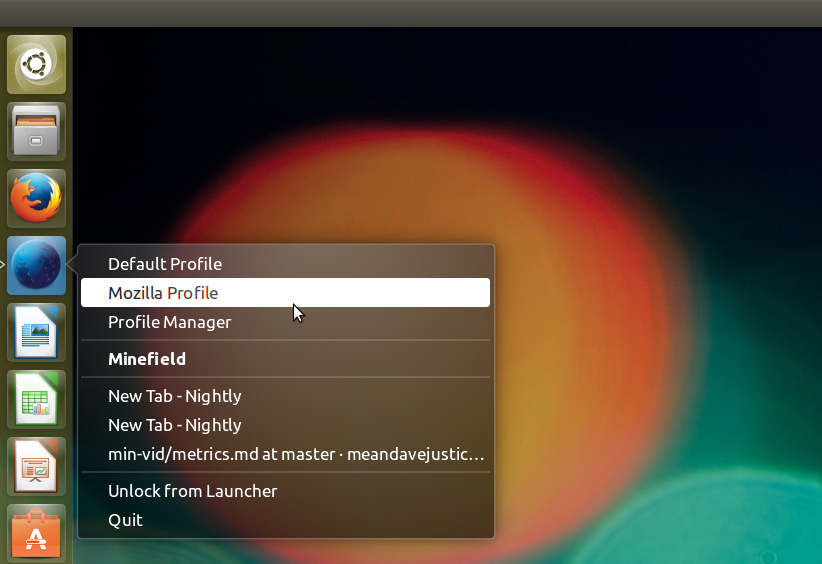
Right-click menu for Nightly in Unity’s Dock.
Modifying the Firefox Launcher
I also wanted to launch profiles off the regular Firefox icon in the same way.
The easiest way to do that is to copy the built-in one from /usr/share/applications/firefox.desktop and modify it to suit you. Conveniently, Unity will override a system-wide .desktop file if you have one with the same name in your local directory so installing it with the same commands as you did for Nightly will work fine.
Postscript
I should probably add a disclaimer that I’ve used Unity for all of two days and there may be a smoother way to do this. I saw a couple of 3rd-party programs that will generate .desktop files but I didn’t want to install more things I’d rarely use. Please leave a comment if I’m way off on these instructions!
https://blog.nightly.mozilla.org/2016/09/19/getting-firefox-nightly-to-stick-to-ubuntus-unity-dock/
Over the last weekend I was reinstalling my older MacBookPro (late 2011 model) again after replacing its hard drive with a fresh and modern SSD drive from Crucial 512GB. That change was really necessary given that simple file operations took about a minute, and every system tools claimed that the HDD was fine.
So after installing Mavericks I moved my home folder to another partition to make it easier later to reinstall OS X again. But as it turned out it is not that easy, especially not given that OS X doesn’t support mounting of other encrypted partitions beside the system partition during start-up yet. If you had a single user only, you will be busted after the home dir move and a reboot. That’s what I experienced. As fix under such a situation put back OS X into the “post install” state, and create a new administrator account via single-user mode. With this account you can at least sign-in again, and after unlocking the other encrypted partition you will have access to your original account again.
Having to first login via an account which data is still hosted on the system partition is not a workable solution for me. So I was continuing to find a solution which let me unlock the second encrypted partition during startup. After some search I finally found a tool which actually let me do this. It’s called Unlock and can be found on Github. To make it work it installs a LaunchDaemon which retrieves the encryption password via the System keychain, and unlocks the partition during start-up. To actually be on the safe side I compiled the code myself with Xcode and got it installed with some small modifications to the install script (I may want to contribute those modifications back into the repository for sure :).
In case you have similar needs, I hope this post will help you to avoid those hassles as I have experienced.
https://www.hskupin.info/2016/09/19/moving-home-folder-to-another-encrypted-volume-on-os-x/
Last week, we wrote about the shared responsibility of protecting Internet security. Today, we want to dive deeper into this issue and focus on one very important obligation governments have: proper disclosure of security vulnerabilities.
Software vulnerabilities are at the root of so much of today’s cyber insecurity. The revelations of recent attacks on the DNC, the state electoral systems, the iPhone, and more, have all stemmed from software vulnerabilities. Security vulnerabilities can be created inadvertently by the original developers, or they can be developed or discovered by third parties. Sometimes governments acquire, develop, or discover vulnerabilities and use them in hacking operations (“lawful hacking”). Either way, once governments become aware of a security vulnerability, they have a responsibility to consider how and when (not whether) to disclose the vulnerability to the affected company so that developer can fix the problem and protect their users. We need to work with governments on how they handle vulnerabilities to ensure they are responsible partners in making this a reality today.
In the U.S., the government’s process for reviewing and coordinating the disclosure of vulnerabilities that it learns about or creates is called the Vulnerabilities Equities Process (VEP). The VEP was established in 2010, but not operationalized until the Heartbleed vulnerability in 2014 that reportedly affected two thirds of the Internet. At that time, White House Cybersecurity Coordinator Michael Daniel wrote in a blog post that the Obama Administration has a presumption in favor of disclosing vulnerabilities. But, policy by blog post is not particularly binding on the government, and as Daniel even admits, “there are no hard and fast rules” to govern the VEP.
It has now been two years since Heartbleed and the U.S. government’s blog post, but we haven’t seen improvement in the way that vulnerabilities disclosure is being handled. Just one example is the alleged hack of the NSA by the Shadow Brokers, which resulted in the public release of NSA “cyberweapons”, including “zero day” vulnerabilities that the government knew about and apparently had been exploiting for years. Companies like Cisco and Fortinet whose products were affected by these zero day vulnerabilities had just that, zero days to develop fixes to protect users before the vulnerabilities were possibly exploited by hackers.
The government may have legitimate intelligence or law enforcement reasons for delaying disclosure of vulnerabilities (for example, to enable lawful hacking), but these same vulnerabilities can endanger the security of billions of people. These two interests must be balanced, and recent incidents demonstrate just how easily stockpiling vulnerabilities can go awry without proper policies and procedures in place.
Cybersecurity is a shared responsibility, and that means we all must do our part – technology companies, users, and governments. The U.S. government could go a long way in doing its part by putting transparent and accountable policies in place to ensure it is handling vulnerabilities appropriately and disclosing them to affected companies. We aren’t seeing this happen today. Still, with some reforms, the VEP can be a strong mechanism for ensuring the government is striking the right balance.
More specifically, we recommend five important reforms to the VEP:
- All security vulnerabilities should go through the VEP and there should be public timelines for reviewing decisions to delay disclosure.
- All relevant federal agencies involved in the VEP must work together to evaluate a standard set of criteria to ensure all relevant risks and interests are considered.
- Independent oversight and transparency into the processes and procedures of the VEP must be created.
- The VEP Executive Secretariat should live within the Department of Homeland Security because they have built up significant expertise, infrastructure, and trust through existing coordinated vulnerability disclosure programs (for example, US CERT).
- The VEP should be codified in law to ensure compliance and permanence.
These changes would improve the state of cybersecurity today.
We’ll dig into the details of each of these recommendations in a blog post series from the Mozilla Policy team over the coming weeks – stay tuned for that.
Today, you can watch Heather West, Mozilla Senior Policy Manager, discuss this issue at the New America Open Technology Institute event on the topic of “How Should
A couple weeks ago I started writing a game and i-can-management is the directory I made for the project so that’ll be the codename for now. I’m going to write these updates to journal the process of making this game. As I’m going through this process alone, you’ll see all aspects of the game development process as I go through them. That means some weeks may be art heavy, while others game rules, or maybe engine refactoring. I also want to give a glance how I’m feeling about the project and rules I make for myself.
Speaking of rules, those are going to be a central theme on how I actually keep this project moving forward.
- Optimize only when necessary. This seems obvious, but folks define necessary differently. 60 frames per second with 750x750 tiles on the screen is my current benchmark for whether I need to optimize. I’ll be adding numbers for load times and other aspects once they grow beyond a size that feels comfortable.
- Abstractions are expensive, use them sparingly.This is something I learned from a Jonathan Blow talk I mention in my previous post. Abstractions can increase or remove flexibility. On one hand reusing components may allow more rapid iteration. On the other hand it may take considerable effort to make systems communicate that weren’t designed to pass messages.I’m making it clear in each effort whether I’m in exploration mode so I work mostly with just 1 function, or if I’m in architect mode where I’m trying to make the next feature a little easier to implement. This may mean 1000 line functions and lots of global like use for a while until I understand how the data will be used. Or it may mean abstracting a concept like the camera to a struct because the data is always used together.
- Try the easier to implement answer before trying the better answer.I have two goals with this. First, it means I get to start trying stuff faster so I know if I want to pursue it or if I’m kinda off on the idea. Maybe this first implementation will show some other subsystem needs features first so I decide to delay the more correct answer. So in short quicker to test and expose unexpected requirements.The other goal is to explore building games in a more holistic way. Knowing a quick and dirty way to implement something may help when trying to get an idea thrown together really quick. Then knowing how to evolve that code into a better long term solution means next games or ideas that cross pollinate are faster to compose because the underlying concepts are better known.
The last couple weeks have been an exploration of OpenGL via glium the library I’m using to access OpenGL from Rust as well as abstract away the window creation. I’d only ever ran the example before this dive into building a game. From what I remember of doing this in C++ the abstraction it provides for the window creation and interaction, using the glutin library is pretty great. I was able to create a window of whatever size, hook up keyboard and mouse events, and render to the screen pretty fast after going through the tutorial in the glium book.
This brings me to one of the first frustrating points in this project. So many things are focused on 3d these days that finding resources for 2d rendering is harder. If you find them, they are for old versions of OpenGL or use libraries to handle much of the tile rendering. I was hoping to find an article like “I built a 2d tile engine that is pretty fast and these are the techniques I used!” but no such luck. OpenGL guides go immediately into 3d space after getting past basic polygons. But it just means I get to explore more which is probably a good thing.
I already had a deterministic map generator built to use as the source of the tiles on the screen. So, I copy and pasted some of the matrices from the glium book and then tweak the numbers I was using for my tiles until they show up on the screen and looked ok. From here I was pretty stoked. I mean if I have 25x40 tiles on the screen what more could someone ask for. I didn’t know how to make the triangle strips work well for the tiles to be drawn all at once, so I drew each tile to the screen separately, calculating everything on every frame.
I started to add numbers here and there to see how to adjust the camera in different directions. I didn’t understand the math I was working with yet so I was mostly treating it like a black box and I would add or multiply numbers and recompile to see if it did anything. I quickly realized I needed it to
The TFSA is a savings account for Canadians that was introduced in 2009.
As a quick check I wanted to see how much or little my TFSA had changed against what it should be. That meant a double check of how much room I had in the TFSA each year. So this is a quick cacluation the theoretical case: that you are able to invest the maximum amount each year, at the beginning of the year and get 5% return (after fees) on that.
| Year | Maximum | Total invested | Compounded |
|---|---|---|---|
| 2009 | $5,000.00 | $5,000.00 | $5,250.00 |
| 2010 | $5,000.00 | $10,000.00 | $10,762.50 |
| 2011 | $5,000.00 | $15,000.00 | $16,550.63 |
| 2012 | $5,000.00 | $20,000.00 | $22,628.16 |
| 2013 | $5,500.00 | $25,500.00 | $29,534.56 |
| 2014 | $5,500.00 | $31,000.00 | $36,786.29 |
| 2015 | $10,000.00 | $41,000.00 | $49,125.61 |
| 2016 | $5,500.00 | $46,500.00 | $57,356.89 |
Which always raises the question for me of what is a reasonable rate to calculate at these days. It always used to be 10%, but that's very hard to get these days. Since 2006 the annualized return on the S&P 500 is 5.158% for example. Perhaps 5% represents too conversative a number.
I don’t understand. CyanogenMod 13 introduced new Weather widget and lock screen support. Great! Unfortunately, the widget requires specific providers for weather services and CM does not provide any in the default installation. There exists Weather Underground provider, which works, but only other provider I found (Yahoo! Weather provider) does not work with my CM without Google Play!.
I would a way prefer OpenWeatherMap provider, but although CyanogenMod has the GitHub repository for one , but no APK anywhere (and certainly not one for F-Droid). Fortunately, I have found a blogpost which describes how simple it is build the APK from the given code. Unfortunately, author did not provide APK on his site. I am not sure, whether there is not some hook, but here is mine.
https://matej.ceplovi.cz/blog/openweathermapprovider-for-cyanogenmod-13.html
Alternate Title: How I changed my mental model to be a more effective game developer and human.
Back in February 2016, I started my journey as a professional game developer. I joined Sparkypants to work on the backend for Dropzone. This was about 7 months ago at time of writing. I didn’t enter the game development world in the standard ways. I wasn’t at one of the various schools with game dev programs, I didn’t intern at a studio, I haven’t spent much of my personal development time building my own indie games. I had on the other hand, spent years building backend services, writing dev tools, competing in AI competitions, and building a slew of half finished open source projects. In short, I was not a game developer when I started.
My stark contrast in background works to my advantage in many parts of my job. Most of our engineers haven’t worked on backend services and haven’t needed to scale that sort of infrastructure. My lead and friend Johannes has been instrumental in many of my successes so far in the company. He has background in backend development as well as game development and has often been a translator and guide to me as I learn what being a game developer means.
At first, I assumed my contrast would work itself out naturally and I’d just become a game developer by osmosis. If I am surrounded by folks doing this and I’m actively developing a game, I will become a game developer. But that presupposes success, which was only coming to me in limited amounts. The other conclusion would be leaving game development because I wasn’t compatible with it, something I’m unwilling to accept at this time.
I shared my concerns around not fitting the culture at Sparkypants with Johannes, as well as some productivity worries. I’ve learned over the years that if I’m feeling problems like this, my boss may be as well. Johannes with his typical wonderful encouraging personality reminded me that there are large aspects of my personality that fit in with the culture, just maybe my development style and conflict resolution needed work and recommended this talk by Jonathan Blow to show me the mental model that is closer to how many of the other developers operate, among some other advice.
That talk by Jonathan Blow spends a fair amount of its time on the topic of optimization. Whether it is using data oriented techniques to make data series processing faster or drawing in a specific way to make the graphics card use less memory or any number of topics, optimization comes up in nearly every game development talk or article at some point. His point though was that we often spend too much time optimizing the wrong things. If you’ve been in computer science for a bit you’ve inevitably heard at least a fragment of the following quote from Donald Knuth, if not you’re in for a treat, this is a good one:
Programmers waste enormous amounts of time thinking about, or worrying about, the speed of noncritical parts of their programs, and these attempts at efficiency actually have a strong negative impact when debugging and maintenance are considered. We should forget about small efficiencies, say about 97% of the time: premature optimization is the root of all evil. Yet we should not pass up our opportunities in that critical 3%.
The bolded text is the part most folks quote, implying the rest. I had heard this, quoted it, and used it as justification for doing or not doing things many times in the past. But, I’d also forgotten it, I’d apply it when it was convenient for me, but not generally to my software development. Blow starts with the more traditional overthinking algorithms and code in general that most bring up when they speak on premature optimization. Then he followed on with the idea that selecting data structures is a form of optimization. That follow on was a segue to point out that any time you are thinking about a problem, you should keep in mind if it is the most important or urgent problems for you to think about.
The end of the day, your job as a game developer is not to optimize for speed or correctness, but to optimize for fun. This means trying a lot of ideas and throwing many of them out. If you spent a lot of time optimizing for a million users of a feature and only some folks in the company use it before you decide to remove it, you’ve wasted a lot of effort. Maybe not completely, since you’ve probably learned during the process, but that effort could have been put into other features or parts of the system that may actually need attention. This shift in thinking has me letting go of details in more cases, spend less time on projects and
Earlier this week, security researchers published reports that Firefox and Tor Browser were vulnerable to “man-in-the-middle” (MITM) attacks under special circumstances. Firefox automatically updates installed add-ons over an HTTPS connection. As a backup protection measure against mis-issued certificates, we also “pin” Mozilla’s web site certificates, so that even if an attacker manages to get an unauthorized certificate for our update site, they will not be able to tamper with add-on updates.
Due to flaws in the process we used to update “Preloaded Public Key Pinning” in our releases, the pinning for add-on updates became ineffective for Firefox release 48 starting September 10, 2016 and ESR 45.3.0 on September 3, 2016. As of those dates, an attacker who was able to get a mis-issued certificate for a Mozilla Web site could cause any user on a network they controlled to receive malicious updates for add-ons they had installed.
Users who have not installed any add-ons are not affected. However, Tor Browser contains add-ons and therefore all Tor Browser users are potentially vulnerable. We are not presently aware of any evidence that such malicious certificates exist in the wild and obtaining one would require hacking or compelling a Certificate Authority. However, this might still be a concern for Tor users who are trying to stay safe from state-sponsored attacks. The Tor Project released a security update to their browser early on Friday; Mozilla is releasing a fix for Firefox on Tuesday, September 20.
To help users who have not updated Firefox recently, we have also enabled Public Key Pinning Extension for HTTP (HPKP) on the add-on update servers. Firefox will refresh its pins during its daily add-on update check and users will be protected from attack after that point.
https://blog.mozilla.org/security/2016/09/16/update-on-add-on-pinning-vulnerability/
 Once a month web developers across the Mozilla community get together (in person and virtually) to share what cool stuff we've been working on in...
https://air.mozilla.org/webdev-beer-and-tell-september-2016/
With Easy Passwords I develop a product which could be considered a Last Pass competitor. In this particular case however, my interest was sparked by the reports of two Last Pass security vulnerabilities (1, 2) which were published recently. It’s a fascinating case study given that Last Pass is considered security software and as such should be hardened against attacks.
I decided to dig into Last Pass 4.1.21 (latest version for Firefox at that point) in order to see what their developer team did wrong. The reported issues sounded like there might be structural problems behind them. The first surprise was the way Last Pass is made available to users however: on Addons.Mozilla.Org you only get the outdated Last Pass 3 as the stable version, the current Last Pass 4 is offered on the development channel and Last Pass actively encourages users to switch to the development channel.
My starting point were already reported vulnerabilities and the approach that Last Pass developers took in order to address those. In the process I discovered two similar vulnerabilities and a third one which had even more disastrous consequences. All issues have been reported to Last Pass and resolved as of Last Pass 4.1.26.
Password autocomplete
Having your password manager fill in passwords automatically is very convenient but not exactly secure. The awareness for the issues goes back to at least year 2006 when a report sparked a heavy discussion about the Firefox password manager. The typical attack scenario involves an (unfortunately very common) Cross-site scripting (XSS) vulnerability on the targeted website, this one allows an attacker to inject JavaScript code into the website which will create a login form and then read out the password filled in by the password manager — all that in the background and almost invisible to the user. So when the Firefox password manager requires user interaction these days (entering the first letter of the password) before filling in your password — that’s why.
Last Pass on the other hand supports filling in passwords without any user interaction whatsoever, even though that feature doesn’t seem to be enabled by default. But that’s not even the main issue, as Mathias Karlsson realized the code recognizing which website you are on is deeply flawed. So you don’t need to control a website to steal passwords for it, you can make Last Pass think that your website malicious.com is actually twitter.com and then fill in your Twitter password. This is possible because Last Pass uses a huge regular expression to parse URLs and this part of it is particularly problematic:
(?:(([^:@]*):?([^:@]*))?@)?
This is meant to match the username/password part before the hostname, but it will actually skip anything until a @ character in the URL. So if that @ character is in the path part of the URL then the regular expression will happily consider the real hostname part of the username and interpret anything following the @ character the hostname — oops. Luckily, Last Pass already recognized that issue even before Karlsson’s findings. Their solution? Add one more regular expression and replace all @ characters following the hostname by %40. Why not change the regular expressions so that it won’t match slashes? Beats me.
The bug that Karlsson found was then this band-aid code only replacing the last @ character but not any previous ones (greedy regular expression). As a response, Last Pass added more hack-foo to ensure that other @ characters are replaced as well, not by fixing the bug (using a non-greedy regular expression) but by making the code run multiple times. My bug report then pointed out that this code still wasn’t working correctly for data: URLs or URLs like http://foo@twitter.com:123@example.com/. While it’s not obvious whether the issues are still exploitable, this piece of code is just too
With the release of Firefox 49, we are pleased to welcome the 48 developers who contributed their first code change to Firefox in this release, 39 of whom were brand new volunteers! Please join us in thanking each of these diligent and enthusiastic individuals, and take a look at their contributions:
- acautin: 1256912
- gfrolov: 1198518
- gui.bgd: 1264599
- nejmeddine.douma: 1072442
- zheng.xu: 1143022
- Akshay Jain: 1266724
- Amy Chung: 1273835
- Andrew: 1270010
- Anthony Ramine: 1270036, 1270069
- B. Dahse: 1056381, 1170062, 1249936, 1258758
- Ben Hsu: 1261002
- Benoit Chabod: 1245780, 1258353, 1269757
- Bhavin Dave: 893836
- Cesar Valiente: 1272506
- Chris Frey: 1272208
- Dan Huang: 920956, 1126967
- David Walsh: 1244265, 1244268, 1255837
- Ernest Yim: 1145085, 1271003, 1276714
- Hasse: 428421
- Jacob Mortelliti: 1015318, 1273843
- Jaideep Bhoosreddy: 1256780, 1262829
- James Andreou: 1269361, 1274687, 1274690
- Juan Fernandez: 1261210
- Keith Yeung: 1273424
- Maximillian von Briesen: 1127572, 1256812, 1256819, 1256830, 1256843,