
I probed the local solar panel controller to see what ports it had active and found a Web server. Jumping over to a browser, I hit that web server and found some rudimentary data about my panels: current generation, lifetime generation, number of microinverters, number of microinverters online, software version numbers, etc. This was all on the home page of the Web server.
Since I wrote the Virtual Weather Station to demonstrate how easy it is to wrap a Web resource as a Web Thing and integrate it into my Things Gateway, I saw an opportunity. If I were to scrape this Web page, I could make a Web thing very easily. I had it running less than an hour later. It was amazingly simple.
I knew that I'd have to scrape the Web page and Python has a beautiful tool to do that: Beautiful Soup. I read up on the package, explored it a bit with some sample data and then wrote the code that would scrape the home page from the local Enphase Web server.
The Web page itself is very simple, a set of nested tables with tags around the data I wanted. To get Beautiful Soup to fetch my target data, I just had to count the number of tables and the number of
I selected current generation, lifetime generation, number of microinverters, number of microinverters online to be the properties for my Solar Panel Web Thing:
    lifetime_generation = WoTThing.wot_property(
        name='lifetime_generation',
        initial_value=0.0,
        description='Total lifetime generation in KWh',
        value_source_fn=get_enphase_data,
        units='KWh'
    )
    generating_now = WoTThing.wot_property(
        name='generating_now',
        initial_value=0.0,
        description='currently generating in KWh',
        units='KW'
    )
    microinverter_total = WoTThing.wot_property(
        name='microinverter_total',
        initial_value=0,
        description='the number of microinverters installed'
    )
    microinverters_online = WoTThing.wot_property(
        name='microinverters_online',
        initial_value=0,
        description='the number of microinverters online',
    )
    async def get_enphase_data(self):
        async with aiohttp.ClientSession() as session:
            async with async_timeout.timeout(config.seconds_for_timeout):
                async with session.get(config.target_url) as response:
                    enphase_home_page_raw = await
Please note some of the information provided in this report may be subject to change as we are sometimes sharing information about projects that are still in early stages and are not final yet.
Welcome!
New localizers
- Kumar Ritu Raj just finished localizing and testing Focus Android v5 in Angika language (which is going to launch soon!) and he is doing BCA from TP College, BNMU, Bihar, India. Welcome and congratulations!
- Common Voice: Jimi of Danish and Dimitris of Greek, thank you for taking the lead in your respective language.
Are you a locale leader and want us to include new members in our upcoming reports? Contact us!
New community/locales added
- We recently added several locales to Pontoon: Arpitan (frp), Canadian English (en-CA), Cornish (kw), Iloko (ilo). If you speak any of these languages and want to help, take a look at Pontoon or get in touch.
New content and projects
What’s new or coming up in Firefox desktop
Activity Stream
Activity Stream has become an integral part of Firefox, officially replacing the existing New Tab and soon integrating code for displaying snippets and onboarding content. For this reason, we’re working on moving translations to mozilla-central.
Currently, Activity Stream is managed as a stand-alone project in Pontoon, and store its translations in a GitHub repository. Once this meta bug is fixed, Activity Stream’s strings will be exposed as part of the Firefox project.
While this makes the relation between Activity Stream and Firefox more obvious for localizers, it will also allow to make some improvements in the future, like reducing the lag between translations landing in repositories and actually being available for testing in Firefox.
Release schedule
There are some changes in the release schedule for the Summer, with the Nightly cycle for 63 lasting 10 weeks instead of 8, and the effects of this change rippling to the end of year.
Does this impact you as a localizer? Luckily, not really, thanks to cross-channel. Just don’t forget to keep an eye on the deadlines in Pontoon for the Firefox project, and you’ll be all set.
If you’re curious, you can always check the official Release Calendar.
Fluent migrations
We were waiting for the 61 Nightly cycle to end before resuming migrations. The first bug on the schedule for 62 landed on Tuesday and migrated almost 30 strings used in Privacy related permission dialogs (camera, location, pop-ups, etc.), with a second one already in review (over 20 strings, used in JavaScript across subdialogs in Preferences).
Shield studies
Shield studies are A/B tests, deployed to a specific portion of Firefox users, designed to test features or changes and analyze their impact.
So far, these studies have been targeting only English users (with one exception), and didn’t require localization. This week we started localizing our first study: it’s an extension that will be enabled initially only for Nightly, and for a limited number of locales (4) that have a significant population on the Nightly channel. We will also expose the opt-out preference for Shield studies, together with the about:studies page, to all languages in Firefox in the coming days.
If you’re interested in Shield studies, you can find more details in this wiki page.
What’s new or coming up in mobile
There’s been quite a few things going on in mobile world recently, as you’ve probably noticed.
We’ve recently exposed strings for the upcoming release of Firefox iOS v12, that aims to launch around June 12th. The tentative deadline for localizing and testing is May 23rd. Screenshots are updated twice a week.
Firefox for Amazon Fire TV is shipping an update very soon, probably some time next week. We’ll be getting updated screenshots for testing very soon, stay tuned!
Same for Focus Android v5 that is coming up, and will feature three new locales: Angika (anp), Cornish (kw) and Pur'epecha (tsz). Congrats to the
 mconley livehacks on real Firefox bugs while thinking aloud.
 This is the SUMO weekly call
Firefox 60 is here, and the Quantum lineage continues apace. The parallel processing prowess of Quantum CSS is now available on Firefox for Android, and work continues on WebRender, which modernizes the whole idea of what it means to draw a web page. But we’re not just spreading the love on internals. Firefox 60 boasts a number of web platform and developer-facing improvements as well. Here are a few highlights:
ES Modules are Here!
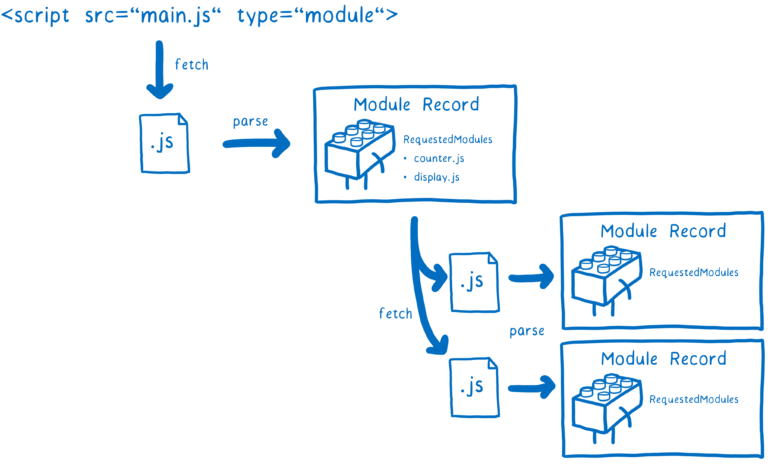
Modular code isn’t just a good idea, it’s the law it’s a great idea! Being able to separate functional units of software allows for cleaner re-use of individual modules and easier inclusion of third-party code. Many languages have support for modules, and if you’re familiar with Node.JS, they’ve been available in some form with the CommonJS require API, but a standardized syntax was created as part of ES2015 (ES6).
Although the syntax for ES modules was standardized, it was left as an exercise for browsers to understand and retrieve the modules. This took a bit of extra time, but now that the browser loading behavior is standardized, support has started rolling out, and this release brings that support to Spidermonkey, Firefox’s JavaScript engine. You can check out the docs on MDN, and of course don’t miss Lin Clark’s breakdown of ES modules either!
Keep Your Cookies to Yourself
Firefox 60 supports the Same-Site attribute when setting cookies. When set, the browser will not send cookies along with a cross-origin request to the issuing server, e.g. during fetch or loading an image. This helps mitigate against common silent forms of Cross-Origin Request Forgery. There is a “lax” mode that does the above, as well as a strict mode that, in addition to the lax behavior, will also not send cookies with an in-bound navigation. This helps prevent a malicious site deep-linking to a page where unintentional behavior could occur when cookies are included.
Read more on the Mozilla Security Blog.
Web Authentication API
It’s been known for a while now that in many contexts, a well-known username (like an email address) and a user-generated password are not sufficiently secure for authentication. This has led to the rise of Multi-Factor Authentication, usually 2-factor authentication, in which in addition to a password, users must also provide information from an additional source. Many sites will send an SMS message with a code to a mobile device, and some also accept tokens generated by a code-generator app or purpose-built hardware “key”. This whole exchange has required the user to copy numbers from a screen into a text field, or at minimum the hardware key has had to simulate key presses.
The Web Authentication API (WebAuthn for short) seeks to eliminate the clunkier aspects of this process by letting a multi-factor authentication device or app communicate directly with a requesting site. The particulars of making this work securely are a bit too complex to cover in this post, but you can learn more about WebAuthn on MDN or here on the Hacks Blog.
A Stroke of Style
The (as-of-yet non-standard) text-stroke property defines a solid fixed-width stroke centered along the path of the characters of text. It allows for effects that aren’t achievable with text-shadow alone. A wide stroke will occlude portions of the characters because by default, the stroke is drawn over top of the font glyph. This can be a bit ugly. To fix this, browsers are borrowing paint-order property from the SVG standard. When properly set, browsers will draw the stroke underneath the text glyphs. For example:
It’s super nifty- but don’t forget that it’s
Fast, lightweight, secure and easily configurable, Firefox Quantum for Enterprise should be your go-to for business browsing. Browsers are key to how everyone in your company works, but how often … Read more
The post Firefox Quantum: Fast for Business, Better for IT appeared first on The Firefox Frontier.
https://blog.mozilla.org/firefox/firefox-quantum-for-business/
Right now everybody’s talking about the right way to make the products that we love meet our individual needs AND respect our privacy.
At Mozilla, striking this balance has been our bread and butter for more than two decades. With today’s release of Firefox, we’re bringing you more features and tools that allow you to personalize your browser without sacrificing your privacy.
Here’s what’s coming out in today’s Firefox Release:
Enterprise IT pros can customize Firefox Quantum for the office
It’s not uncommon for people to use many different browsers, one they personally use at home and another at the office. Similar to how you set up your own Firefox browser with your personal preferences, Firefox Quantum for Enterprise can now be customized by your employer to optimize for performance on the job and meet the specific needs of your workplace.
Today’s release has a new feature to support IT professionals who want to customize the browser for their employees. IT professionals can now configure Firefox for their organization, either using Group Policy on Windows, or a JSON file that works across the Mac, Linux, and Windows operating systems. Here’s a look at how it works:
Easily configure Firefox with Windows Group Policy
IT professionals can choose to deploy either the standard Rapid Release (RR) of Firefox or the Extended Support Release (ESR). The standard Rapid Release auto-updates with performance improvements and new features roughly every six weeks, while the Extended Support Release usually receives these features in one big upgrade per year. Both Rapid Release and Extended Support Release receive critical security updates as soon as possible. With today’s release, the Extended Support Release of Firefox is now version 60.
IT professionals eager to use to Firefox Quantum in their organization can visit this site for access. IT professionals curious about why the new Firefox is great for for organizational use can learn more in this blog post about Firefox Quantum for Enterprise.
WebAuthn Provides Extra Layer of Security
Almost every online transaction we make, from paying bills to buying movie tickets, needs a password to access our personal online accounts securely. Today, Firefox is the first browser to support a new security standard, Web Authentication (WebAuthn).
With Firefox, WebAuthn allows people to use a single device like a YubiKey to log into their online accounts without typing a password, or as secondary authentication after entering a password. Only websites that have adopted WebAuthn will recognize your YubiKey and allow you access. Essentially, WebAuthn is a set of anti-phishing rules that uses a sophisticated level of authenticators and cryptography to protect user accounts. It supports various authenticators, such as physical security keys today, and in the future mobile phones, or biometric mechanisms such as face recognition or fingerprints. When your YubiKey is plugged in, the website will read it and automatically log you into your accounts. Web developers and product managers interested in learning more about WebAuthn can read about it on our Hacks Blog.
New Tab Experience Gets Personal Treatment, plus Pocket sponsored stories
The New Tab Experience was one of the features we rolled out with Firefox Quantum last year. We launched it as a visual snapshot of the top sites you’ve visited, recent history and bookmarks, and recommendations from Pocket. And from what we’ve heard from our users, it gets them faster to the sites they visit and check frequently.
Today, when you click on the New Tab, you’ll see a wider layout which includes Search, Top Sites, Recommendations by Pocket and Highlights. “Top Sites” is one of our most requested features so we increased the “Top Sites” menu from six to eight icons and increased the size of the “Highlights” icons.
As part of our exploration into new models that can support high quality content on the web, users in the US may now see an occasional sponsored story within Pocket’s recommendation section on New Tab. It’s part of our focus to deliver personalization, without sacrificing user privacy. What’s unique is that all the recommendations happen on your computer, meaning neither Mozilla, Pocket, nor sponsors receive a copy of your browsing history. You can learn more about how the process
Mozilla is continuing to fight for net neutrality — in the courts, alongside Americans, on Twitter and, today, by joining the Red Alert protest.
The Red Alert protest raises awareness about net neutrality’s importance, and the means for keeping it intact: In mid-May, the Senate will vote on a Congressional Review Act (CRA) resolution to overturn the FCC’s net neutrality repeal. We’re partnering with organizations like Consumer Reports, the Electronic Frontier Foundation, and Reddit to encourage Americans to call Congress in support of net neutrality.
Says Ashley Boyd, Mozilla’s VP of Advocacy:
“Policymakers need to listen to their constituents: The majority of Americans are in favor of strong net neutrality rules. Mozilla’s latest public opinion poll reveals that outside of Washington, D.C., net neutrality isn’t a partisan issue. 91% of Americans believe consumers should be able to freely and quickly access their preferred content on the internet.”
Says Denelle Dixon, Mozilla COO:
“We are proud to be a leader in the fight for net neutrality both through our legal challenge in Mozilla v. FCC and through our deep work in education and advocacy for an open, equal, accessible internet. Today, Mozilla joins many other companies and civil society organizations to take another stand for net neutrality, as we try to protect against erosion into a discriminatory internet, with ultimately a far worse experience for any users and businesses who don’t pay more for special treatment.”
“Mozilla will always fight for net neutrality because it is fundamental for free speech, competition, and innovation online. Net neutrality is a core characteristic of the internet as we know it, and crucial for the economy and everyday lives. It is imperative that all internet traffic be treated equally, without discrimination against content or type of traffic — that’s how the internet was built and what has made it one of the greatest inventions of all time.”
To get involved: Call your members of Congress and express your support for net neutrality.
Last month, Mozilla published results from a nationwide poll that reveals where Americans stand on net neutrality. The survey reinforces what grassroots action has already demonstrated: Americans support equal access.
Mozilla and Ipsos conducted this public opinion poll in February of 2018, surveying 1,007 American adults from across 50 states. Among our key findings:
- Outside of Washington, D.C., net neutrality isn’t a partisan issue. Americans from red and blue states alike agree that equal access to the internet is a right: 79% of Colorado residents, 81% of Arizona residents, and 80% of North Carolina residents
- 91% of Americans believe consumers should be able to freely and quickly access their preferred content on the internet. Only 9% of Americans think ISPs should be able to offer fast lanes with quicker load times. Support for net neutrality is growing: When Mozilla and Ipsos asked this same question in 2017, 86% of Americans believed the former.
- 78% of Americans believe equal access to the internet is a right. This opinion is most common among younger Americans (84% of adults under the age of 35).
- 76% of Americans believe internet service providers (ISPs) should treat all consumer data the same, and not speed up or slow down specific content. This opinion is most common among older Americans (80% of adults ages 55+) and Americans with a college degree (81%).
- 63% of Americans do not think that ISPs will voluntarily look out for consumers’ best interests, compared to 32% who agree with this statement. Faith in ISPs in declining: When Mozilla and Ipsos asked this same question in 2017, 37% of Americans trusted ISPs.
See the full results from our poll here.
 An introduction to finding projects, using communications channels, and working with the collaboration software GitHub at Mozilla's Global Sprint. We discuss "working open" and why...
https://air.mozilla.org/intro-to-participation-at-the-global-sprint/
The results are in for the Firefox Quantum Extensions Challenge! We were thrilled to see so many creative, helpful, and delightful submission entries.
After our judging panel selected finalists from more than 100 submitted entries, the add-ons community voted for each category winner. The winners were announced for the first time during the livestream broadcast of the Firefox Quantum Extensions Challenge Awards. A recording of the event is available on Air Mozilla.
These extensions bring great functionality and delight to Firefox, so please check them out. Congratulations to the winners!
Best Tab Manager / Tab Organizer
Winner – Session Sync
This extension can edit, save, change, and restore sessions. Sessions can be saved as bookmarks and synced using Firefox Sync.
“Well done. Manages sessions in an intuitive way. UX is polished and works extremely well.”
Runner Up – Tip Tab
by William Wng
Navigate the browser tabs with window screenshots.
Best Dynamic Theme
Winner – Envify
Have you ever wanted a quick way to tell if you are in a staging or production environment? This extension will change your Firefox theme every time you switch environments.
“Simple but practical idea, particularly for webmasters.”
Runner up – Native Dark
by spikespaz
Replace Firefox’s default themes with adaptive colorization of the title bar, tabs, and URL bar based on the accent color of your current window.
Best Extension for Games & Entertainment
Winner – Worldwide Radio
by Oleksandr
Listen to live radio stations from around the world and create custom playlists.
“This is a really cool radio add-on with radio stations from all over the world. You can favorite stations, search by country and adjust sound. Listening to Indian radio might become my new favorite hobby.”
Runner up – Web Invaders
By Yalini
Space invaders have come to the web and it’s up to you to fight them off!
The post Firefox Quantum Extensions Challenge Winners appeared first on Mozilla Add-ons Blog.
https://blog.mozilla.org/addons/2018/05/08/firefox-quantum-extensions-challenge-winners/
We know many Firefox users love web extensions, and we do, too. Today we’re announcing the winners of our Firefox Quantum Extensions Challenge. Web Extensions are the code innovations that … Read more
The post Firefox Quantum Extensions Challenge Winners Announced! appeared first on The Firefox Frontier.
 Today, we're announcing the winners of the Quantum Extension Challenge.
https://air.mozilla.org/quantum-extensions-challenge-winners-announcement/
Facebook has been in the news a lot lately. It started with the announcement that over 87 million Facebook users had their personal information shared with the private firm Cambridge Analytica without their knowledge. Since then, Facebook CEO Mark Zuckerberg has testified twice in front of the US Congress and people all around the world have been talking about Facebook’s data practices. We took this opportunity to survey people on how they felt about Facebook these days. 47,000 people responded to our survey. The data is interesting and open for your exploration.
The top takeaways? Most people (76%) say they are very concerned about the safety of their personal information online. Yet few people (24%) reported making changes to their Facebook accounts following the recent news of privacy concerns around Facebook. The majority of people who responded to our survey (65%) see themselves — rather than companies or the government — as being most responsible for protecting their personal information online. And very few people (only 12%) said they would consider paying for Facebook, even a version of Facebook that doesn’t make money by collecting and selling personal data.

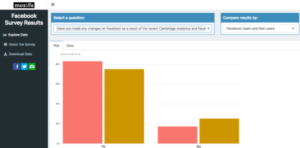 Mozilla believes in making our survey data open and accessible to everyone safely and respectfully, without sharing any personally identifying information. If you would like to go deeper into this survey data, we built this awesome interactive tool for you. Enjoy!
Methodology:
This was not a scientific poll. This was a self-selecting survey targeted mostly at people on the Mozilla Foundation email list, the Pocket newsletter email list, through the Mozilla Twitter channel, through a Medium blog post, and through users sharing with friends and family.
Mozilla makes this data available under a CC BY 4.0 license.
Enjoy this open data? Care about things like privacy, data, the Internet being awesome. Sign up here and we at Mozilla will keep you updated with the latest news and useful information.
The post We Asked People How They Feel About Facebook. Here’s What They Said. appeared first on The Mozilla Blog.
Please join us in congratulating David Ross, our Rep of the Month for April 2018!
David is a Mozillian living the UK and active in a lot of different Mozilla projects. In his day job he is building an Open Source Fitness platform. You might have seen him at the past few MozFests in London. Last year he did a great job wrangling the Privacy&Security space.

In the past few months David has organized several MozCoffees in London as well as online meetings for the London community. This is part of an effort to re-activate the UK
community he took on. David likes to plan ahead and he already has 7 upcoming activities he is going to participate at, including an event in summer of 2019 (that’s not a typo)! Last but not least he was a nominee for the recent Council election.
Thanks David, keep rocking the Open Web!
https://blog.mozilla.org/mozillareps/2018/05/08/rep-of-the-month-april-2018/
Question: which country’s name translates literally as “In the Navel of the Moon”?
I recently came across this fascinating map which gives the literal translation of every country name. Some are very pedestrian, but some are fascinating. (I’m not sure why it’s on a site dedicated to comparing credit cards, but other places I’ve found it give them the credit. If this is an SEO thing, I’m happy to reward them for producing decent content…) Most appropriately, Canada apparently means “The Village”…
http://feedproxy.google.com/~r/HackingForChrist/~3/kSHcDXNhLyI/
Firefox 61 will block subresource loads that rely on the insecure FTP protocol unless the document itself is an FTP document. For example, Firefox will block FTP subresource loads within HTTP(S) pages.
The File Transfer Protocol (FTP) enables file exchange between computers on a network. While this standard protocol is supported by all major browsers and allows convenient file sharing within a network, it’s one of the oldest protocols in use today and has a number of security issues.
The fundamental underlying problem with FTP is that any data transferred will be unencrypted and hence sent across networks in plain text, allowing attackers to steal, spoof and even modify the data transmitted. To date, many malware distribution campaigns rely on compromising FTP servers, downloading malware on an end users device using the FTP protocol. Further, FTP makes HSTS protection somewhat useless, because the automated upgrading from an unencrypted to an encrypted connection that HSTS promises does not apply to FTP.
Following through to our intent to deprecate non-secure HTTP and aligning with Mozilla’s effort to improve adoption of HTTPS Firefox will block subresource loads, like images, scripts and iframes, relying on the insecure FTP protocol. Starting with Firefox 61, loading an FTP subresource within a non-FTP document will be blocked and the following message will be logged to the console:

For the Mozilla Security Team:
Tom Schuster and Christoph Kerschbaumer
The post Blocking FTP subresource loads within non-FTP documents in Firefox 61 appeared first on Mozilla Security Blog.
Today, I'm going to talk about the Python 3 code that I used to create the Virtual Weather Station in my previous post.

webthing-python
The webthing Python 3 package is an implementation of the Things Framework. When creating the code for a physical or virtual device to speak the Web Thing API, this module supplies the required classes and functions. Like all the webthing libraries in various languages, it creates a server called WebThingServer. It's really a container for two other servers. It employs an instance of tornado, an asynchronous Web server, as well as a zeroconf, a multi-thread hot Multicast DNS discovery service.The tornado Web server is the window to the wider world for a device. It allows the device to report state to the Things Gateway. The Things Gateway can also manipulate the state of the device through this interface.
The zeroconf server allows the Things Gateway to discover the device's tornado Web server on the local network by announcing its existence via Multicast DNS. This means that you don't have to know the IP address of the things that you have on your network, the Things Gateway can find them on its own.
When writing an application with WoTServer class, a collection of Thing objects are passed to the WoTServer. The WoTServer iterates through the collection and creates the URL-to-handler-method associations required by the tornado Web server. It accomplishes this with the use of the Thing and Property public classes in cooperation with a set of not-as-public helper classes. The Thing and Property classes implement the GET and PUT equivalents that the Web Server needs to implement its services. Therefore, the Thing and Property classes are tightly bound to the Web Server and HTTP.
You may notice that several examples of Things Framework code also refer to Action and Event classes. The Things Gateway doesn’t currently provide a way to use actions or display events, but those are in the works. To simplify my examples, I'm going to omit the use of these classes until they are supported within the Things Gateway.
Writing Code with webthing
The webthing-python code tracks a reference implementation written in Javascript. As such, webthing Python package carries some baggage that is not particularly Pythonic. It's quite functional, but just doesn't quite fit the idioms and style of Python. There are some particular standouts:- Instances of Property are added at initialization time rather than at class load time. This means they are difficult to represent using Python's property descriptor system, which seems like it should be a natural fit.
- The "read/write" versus "read only" aspect of a Property is not specified in the Property but, instead, by the presence or absence of a method passed into the constructor of an entirely different class, Value.
- The arguments list for the Property constructor have a final catch-all parameter called metadata as a free-form dict instance. Python already has a native method of handling this situation with
 The Monday Project Meeting
I’m excited to announce that Chris Lin is joining us today as our new Vice President of IT.
Chris will work closely with me to scale our impact and optimize operational efficiency. He will be responsible for the strategy, execution and operations of Mozilla’s business technology, information security, data management, network and infrastructure services.
“I am honored to join Mozilla at such an exciting juncture and work with the IT team to support the organization as we develop and grow our business and technical expertise,” said Chris Lin, Mozilla VP of IT. “Mozilla is a truly mission-driven organization with great products and technologies while also promoting internet health including privacy, security, openness, decentralization, digital inclusion, and web literacy. It’s wonderful to be part of Mozilla and contribute to our mission.”
Chris Lin joins Mozilla with a vast wealth of experience in IT, infrastructure, product management and cloud services. Chris was most recently at Facebook where he was Director of Enterprise Platform Infrastructure overseeing software-centric platform engineering, infrastructure services, applications operations, and data operations for Facebook business. Chris previously held other leadership roles in the industry including Vice President of Infrastructure AutoDesk, VP of Engineering & Infrastructure Operations at Symantec, and Principal of Architecture Services at VeriSign. Chris is also the founder and former President and CEO of iDini Corporation, a provider of scalable network computing for carrier-grade cloud services serving mobile devices.
Join me in welcoming Chris to Mozilla!
Denelle
The post Welcome Chris Lin, our new Vice President of IT appeared first on The Mozilla Blog.
https://blog.mozilla.org/blog/2018/05/07/welcome-chris-lin-our-new-vice-president-of-it/
Mozilla’s fifth-annual Global Sprint is May 10 and 11. Open-source engineers and activists around the globe will swap code and ideas to make the internet a healthier place
A decentralized alternative to today’s social media platforms. A community-built air quality monitor to thwart pollution in Buenos Aires. An open-source investigative tool for journalists in Hungary.
These are just three of nearly 150 projects from 24 countries participating in the 2018 Global Sprint, Mozilla’s fifth-annual distributed hackathon. Each year, coders, scientists, artists and activists gather online and in person for 48 hours to collaborate on open-source projects. This year’s Global Sprint is happening Thursday, May 10 and Friday, May 11.
“The Global Sprint is a way for the open-source community to swap code and ideas and energize their latest projects,” says Zannah Marsh, Mozilla’s Learning Strategist who helps lead the hackathon. “But the Sprint has a bigger mission, too. It introduces more people to the value of open-source approaches. And so many of the people and projects participating address the biggest issues online today — erosion of privacy, centralization of power, disenfranchisement. In the Sprint’s 48 hours, solutions to these issues take a big step forward.”
Here’s a snapshot of some of the projects, people, and places participating:

In Accra, Ghana, Yannick-No"el Aka is rallying coders from Nigeria, Kenya, South Africa and Cote d’Ivoire to participate. Learn more»

In Portland, OR, neuroscientists and civic hackers are working shoulder-to-shoulder on issues like disaster resilience and open protocols. Learn more»

Parliamentary Debates Open is seeking coders and designers to further expand the tool, a resource for investigative journalists in Hungary. Learn more»

The Commons Platform is seeking feedback on its model, a decentralized and cooperatively-owned social media destination. Learn more»
Want to participate in the Global Sprint? View all projects, and browse all sites. See you there!
The post Mozilla’s 48-Hour Hackathon for a Better Internet appeared first on The Mozilla Blog.
https://blog.mozilla.org/blog/2018/05/07/mozillas-48-hour-hackathon-for-a-better-internet/