I skipped a newsletter again (I’m trying to put publish one every two weeks or so), sorry! As usual a lot of fixes and a few performance improvement, and sometimes both the same time. For example the changes around image and gradient repetition were primarily motivated by bugs we were encountering when dealing with repeated backgrounds containing very large amounts of repetitions, and we decided to solve these issues by moving all images to the “brush” infrastructure (bringing better batching, faster fragment shader and the ability to move more pixels out of the alpha pass), and optimize the common cases by letting the CPU generate a single primitive that is repeated in the shader. I don’t always properly highlight fixes that benefit performance but they are here.
The most exciting (in my humble opinion) advancement lately is Kats’ work on integrating of asynchronous panning and zooming (which we refer to as APZ) with WebRender’s asynchronous scene building infrastructure. This lets us perform some potentially expensive operations (such as scene building) asynchronously and allow the critical path to prioritize scrolling, animations and video playback. It is a lot more complicated than it might sound (in part due to how it works on the Gecko side) and I am very impressed with how quickly it is taking shape.
Enough with my ramblings, let’s have a look at the highlight of the last two weeks month.
Notable WebRender changes
- Kats integrated APZ with async scene building (spread over many pull requests).
- Nical implemented and enabled repeating images and gradients directly in the shader when there is no tile spacing.
- Nical implemented decomposing repeated linear and radial gradients during frame building when it can’t be done in the shader.
- Nical and Jeff implemented decomposing tiled images during frame building when it can’t be done in the shader.
- Nical implemented baking repeated image spacing into a texture to allow repeating them in the shader in more cases.
- Gankro fixed serialization of gradient stops for the frame capture tool.
- Kvark implemented clipping against the near plane for bounds calculus (fixes a few correctness bugs and improves performance in some cases).
- Jeff fixed blob images incorrectly marked as opaque.
- Martin implemented scrolling using the hit tester.
- fschutt fixed some build issues with pathfinder, and some other build issues.
- Martin prevented unnecessary clipping computations in some cases.
- Jeff simplified the way we clip blob image tiles.
- Gankro fixed an infinite loop.
- Martin fixed another infinite loop.
- Martin made the border image API more general.
- Kvark reduced the size of the aColorTexCoord shader vertex attribute.
- Kvark implemented taking the clip chains clip rect into account for local_rect computation.
- Glenn added the initial implementation for brush border primitives.
- Kvark gracefully handled invalid gradient stops.
- Glenn implemented sub-pixel aa with specified background color in off-screen targets.
- Martin fixed an issue with optimized away clip segments.
- Gankro
A little over six years since I got the fiber connection installed to my house. Back then, on a direct question to my provider, they could only offer 100/100 mbit/sec so that's what I went with. Using my Telia "Oppen Fiber and Tyfon (subsequently bought by Bahnhof) as internet provider.
In the spring of 2017 I bumped the speed to 250/100 mbit/sec to see if I would notice and actually take advantage of the extra speed. Lo and behold, I actually feel and experience the difference - frequently. When I upgrade my Linux machines or download larger images over the Internet, I frequently do that at higher speeds than 10MB/sec now and thus my higher speed saves me time and offers improved convenience.
However, ""Oppen Fiber" is a relatively expensive provider for little gain for me. The "openness" that allows me to switch between providers isn't really something that gives much benefit once you've picked a provider you like, it's then mostly a way for a middle man to get an extra cut. 250mbit/sec from Bahnhof cost me 459 SEK/month (55 USD) there.
Switching to Bahnhof to handle both the fiber and the Internet connection is a much better deal for me, price wise. I get an upgraded connection to a 1000/1000 mbit/sec for a lower monthly fee. I'll now end up paying 399/month (48 USD) (299 SEK/month the first 24 months). So slightly cheaper for much more speed!
My household typically consists of the following devices that are used for accessing the web regularly:
- 4 smart phones
- 1 iPad
- 4 laptops
- 3 desktop computers
- 1 TV computer
Our family of 4 consumes around 120GB average weeks. Out of this, Youtube is the single biggest hogger with almost 30% of our total bandwidth. I suppose this says something about the habits of my kids...
Out of these 13 most frequently used devices in our local network only 5 are RJ45-connected, the rest are WiFi.
Switch-over
I was told the switch-over day was May 15th, and at 08:28 in the morning my existing connection went away. I took that as the start signal. I had already gotten a box from Bahnhof with the new media converter to use.

I went downstairs and started off my taking a photo of the existing installation...

So I unscrewed that old big thing from the wall and now my installation instead looks like

You can also see the Ethernet cable already jacked in.
Once connected, I got a link at once and then I spent another few minutes to try to "register" with my user name and password until I figured out that my router has 1.1.1.1 hardcoded as DNS server and once I cleared that, the login-thing worked as it should and I could tell Bahnhof that I'm a legitimate user and woof, my mosh session magically reconnected again etc.
All in all, I was offline for shorter than 30 minutes.
Speeds and round-trips
These days a short round-trip is all the rage and is often more important than high bandwidth when browsing the web. I'm apparently pretty close to the Stockholm hub for many major services and I was a bit curious how my new operator would compare.
To my amazement, it's notably faster. google.com went from 2.3ms to 1.3ms ping time, 1.1.1.1 is at 1.3ms, facebook.com is 1.0ms away. My own server is 1.2ms away and amusingly even if I'm this close to the main server hosting the curl web site, the fastly CDN still outperforms it so curl.haxx.se is an average 1.0ms from me.
So, the ping times were notably reduced. The bandwidth is truly at gigabit speeds in both directions according to bredbandskollen.se, which is probably the most suitable speed check site in Sweden.
A rather smooth change so far. Let's hope it stays this way.
Arguably it hasn't been a good idea for awhile, but the EFAIL hack now makes it possible to decrypt even previous encrypted messages as well as current ones. All known mail clients for PowerPC OS X that can render HTML are vulnerable, including Apple Mail, Thunderbird and Tenfourbird. Earlier clients that lack this functionality are not vulnerable to this specific exploit, but their encryption capabilities are likely insufficient or not otherwise current, so they should not be considered secure either.
The EFAIL vulnerability is not as severe as it might sound because a key requirement is that an attacker already have access to the encrypted messages. If you used the tips in our security recommendations for PowerPC OS X to improve the security of your computer and your network connection, the odds of this occurring are not zero because the attacker may have already collected them in the past through other means, but are likely to be fairly low with the holes that remain. The risk can be mitigated further by disabling HTML rendering of E-mail (that means all E-mail, however, which might be a dealbreaker), and/or disabling automatic decryption of such messages (for example, I already cut and paste encrypted messages I receive into GPG directly in a Terminal window; my E-mail client never decrypts them automatically). A tool like Little Snitch could also be employed to block unexpected accesses to external servers, though this requires you to know what kinds of access would be unexpected for such messages.
Even with these recommendations, however, there may be other potential edge cases such that until someone(tm) updates Thunderbird or another mailer on Power Macs, secure encrypted mail on our systems should be handled with extreme caution and treated as if it were potentially exposed. If you require this kind of security from your E-mail and you must use a Power Mac, you're probably better off finding a webmail service with appropriate security and using TenFourFox (the webmail service then handles this), or building and using an E-mail client on some other system that is more up to date that you can access remotely and securely (which is what I do myself).
http://tenfourfox.blogspot.com/2018/05/secure-mail-on-power-macs-is-not-good.html
Three years ago today, the Rust community released Rust 1.0 to the world, with our initial vision of fearless systems programming. As per tradition, we’ll celebrate Rust’s birthday by taking stock of the people and the product, and especially of what’s happened in the last year.
The People
Rust is a people-centric, consensus-driven project. Some of the most exciting developments over the last year have to do with how the project itself has grown, and how its processes have scaled.
The official teams that oversee the project doubled in size in the last year; there are now over a hundred individuals associated with one or more of the teams. To accommodate this scale, the team structure itself has evolved. We have top-level teams covering the language, library ecosystem, developer tooling, documentation, community, and project operations. Nested within these are dozens of subteams and working groups focused on specific topics.
Rust is now used in a huge variety of companies, including both newcomers and big names like Google, Facebook, Twitter, Dropbox, Microsoft, Red Hat, npm and, of course, Mozilla; it’s also in the top 15 languages this year on GitHub. As a byproduct, more and more developers are being paid to contribute back to Rust, many of them full time. As of today, Mozilla employees make up only 11% of the official Rust teams, and just under half of the total number of people paid to work on Rust. (You can read detailed whitepapers about putting Rust into production here.)

Finally, the Rust community continues to work on inclusivity, through outreach programs like Rust Reach and RustBridge, as well as structured mentoring and investments in documentation to ease contribution. For 2018, a major goal is to connect and empower Rust’s global community, which we’re doing both through conference launches in multiple new continents, as well as work toward internationalization throughout the project.
The Product
If you spend much time reading this blog, you’ll know that the major theme of our work over the past year has been productivity. As we said in last year’s roadmap:
From tooling to libraries to documentation to the core language, we want to make it easier to get things done with Rust.
This work will culminate in a major release later this year: Rust 2018 Edition. The release will bring together improvements in every area of the project, polished into a new “edition” that bundles the changes together with updated documentation and onboarding. The roadmap has some details about what to expect.
The components that make up Rust 2018 will be shipped as they become ready on the stable compiler. Recent releases include:
- On-by-default incremental compilation
- A rewritten official book
- Several of the planned language improvements, including
impl Traitandmatchimprovements
The next couple of releases will
include stable SIMD support,
procedural macros, custom allocators, and more. The final big features
— lifetime system improvements
and async/await — should both
reach feature complete status on nightly within weeks. Vital tools like the RLS and
rustfmt are also being polished for the new edition, including RFCs for finalizing
the
 Laurie Segall presents the 22nd Annual Webby Lifetime Achievement Award to Mitchell Baker
https://air.mozilla.org/webby-lifetime-achievement-award-to-mitchell-baker/
For the last two years, the Firefox Sync team has been hard at work improving bookmarks on all our platforms. Last year, we added support for uploading bookmarks to Firefox for iOS, and made change tracking more durable on Android. Today, we’d like to tell you about our latest project to overhaul bookmark sync in Firefox for Desktop.

Firefox bookmark. Image credit: Lonnie Jacobsen
Historically, bookmark sync has been plagued by problems that were difficult to isolate and fix.
- Bookmarks would be duplicated, lost, or reordered, temporarily or permanently.
- Folders with different contents would smush together.
- New bookmarks wouldn’t make their way to all devices, causing them to gradually fall out of sync.
- Moves would be partially or completely undone.
At the root of all these issues was an approach to syncing that didn’t consider the unique challenges of bookmarks. In this post, we’ll dive into an overview of how Sync works, why bookmarks are special, and the advantages of the new design. Whether you’re a new or long-time Sync user, we invite you to flip the pref, try the new bookmarks engine out, and send us your feedback!
TL;DR: How do I opt-in?
The new bookmarks engine is currently behind a pref in Beta 61 and Nightly 62, but you can turn it on easily. First, we recommend you make a backup of your bookmarks, just in case:
- Go to Bookmarks > Show All Bookmarks to open the Library.
- In the Library toolbar, click the “Import and backup your bookmarks” button to bring up the menu.
- Click “Backup…” to export your bookmarks in JSON form.
Now, you can enable the new engine:
- Open
about:config. - Search for
services.sync.engine.bookmarks.buffer. - If it’s
true, congrats, you’re already using the new engine! If it’sfalse, double-click the row to toggle the pref totrue.
That’s it! Keep an eye on your bookmarks: do you notice any issues when you sync? Try adding, deleting, and moving bookmarks around on all your devices, and see if your changes sync everywhere. If you’ve been using Sync for a while, there’s a good chance you have some inconsistencies on the server already. After you turn the new engine on for the first time, Sync will download all your bookmarks from the server, and run a full merge. This is a good time to notice if any of your bookmarks are deleted or rearranged.
If you start seeing problems:
- Install the About Sync add-on.
- Go to Tools > About Sync, or open
about:sync. - In the “Log Files” section at the top, set “Level of messages written by Sync engines” and “Level of messages written to about:sync-logs log files” to “Debug”.
- Make sure “Create log files even on success?” is checked.
- Trigger a sync to reproduce the problem.
- Download the logs as a zip file.
- Scroll down to the “Data provider options” section at the bottom.
- Select “Load local sync data”, and make sure “Anonymize data” is checked.
- Click “Export to file” to generate an export of your validation data, with all titles, URLs, tags, and other identifying fields obscured.
- File a bug in “Firefox :: Sync” on Bugzilla, with the logs and anonymized validation export as attachments. Please be sure to include in your report which devices are attached to your account: other Desktops, Android, and iOS.
You don’t need to understand how bookmark sync works under the hood to use new bookmark sync, but read on if you’re curious!
Anatomy of a Synced Data Type
Sync is a complicated beast—30 files and 25k lines of JavaScript, written over ten years—but the core ideas are
The crowdfunding campaign has so far raised enough money to buy a small lead-acid battery but hopefully with another four days to go before OSCAL we can reach the target of an AGM battery. In the interest of transparency, I will shortly publish a summary of the donations.
The campaign has been a great opportunity to publish some information that will hopefully help other people too. In particular, a lot of what I've written about power sources isn't just applicable for ham radio, it can be used for any demo or exhibit involving electronics or electrical parts like motors.
People have also asked various questions and so I've prepared some more details about PowerPoles today to help answer them.
OSCAL organizer urgently looking for an Apple MacBook PSU
In an unfortunate twist of fate while I've been blogging about power sources, one of the OSCAL organizers has a MacBook and the Apple-patented PSU conveniently failed just a few days before OSCAL. It is the 85W MagSafe 2 PSU and it is not easily found in Albania. If anybody can get one to me while I'm in Berlin at Kamailio World then I can take it to Tirana on Wednesday night. If you live near one of the other OSCAL speakers you could also send it with them.
If only Apple used PowerPole...
Why batteries?
The first question many people asked is why use batteries and not a power supply. There are two answers for this: portability and availability. Many hams like to operate their radios away from their home sometimes. At an event, you don't always know in advance whether you will be close to a mains power socket. Taking a battery eliminates that worry. Batteries also provide better availability in times of crisis: whenever there is a natural disaster, ham radio is often the first mode of communication to be re-established. Radio hams can operate their stations independently of the power grid.
Note that while the battery looks a lot like a car battery, it is actually a deep cycle battery, sometimes referred to as a leisure battery. This type of battery is often promoted for use in caravans and boats.
Why PowerPole?
Many amateur radio groups have already standardized on the use of PowerPole in recent years. The reason for having a standard is that people can share power sources or swap equipment around easily, especially in emergencies. The same logic applies when setting up a demo at an event where multiple volunteers might mix and match equipment at a booth.
WICEN, ARES / RACES and RAYNET-UK are some of the well known groups in the world of emergency communications and they all recommend PowerPole.
Sites like eBay and Amazon have many bulk packs of PowerPoles. Some are genuine, some are copies. In the UK, I've previously purchased PowerPole packs and accessories from sites like Torberry and Sotabeams.
The pen is mightier than the sword, but what about the crimper?
The PowerPole plugs for 15A, 30A and 45A are all interchangeable and they can all be crimped with a single tool. The official tool is quite expensive but there are many after-market alternatives like this one. It takes less than a minute to insert the terminal, insert the wire, crimp and make a secure connection.

Here are some packets of PowerPoles in every size:
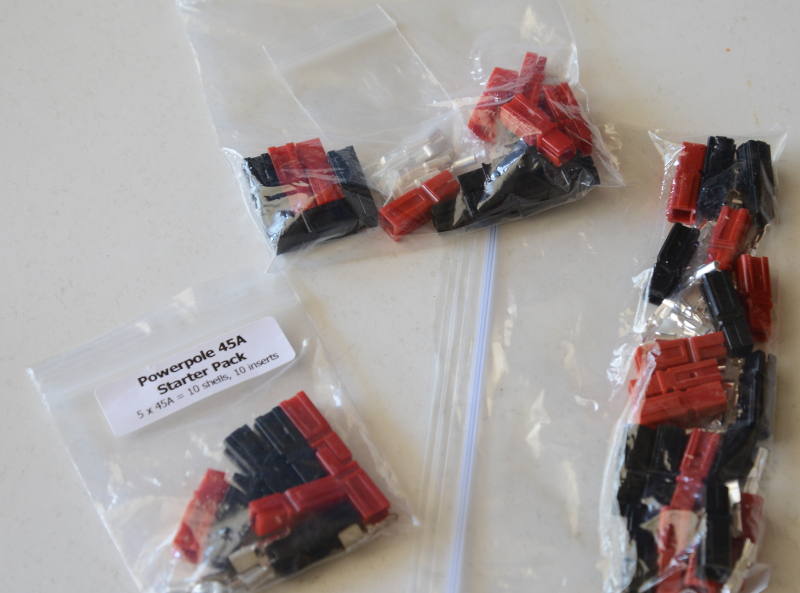
Example cables
It is easy to make your own cables or to take any existing cables, cut the plugs off one end and put PowerPoles on them.
Here is a cable with banana plugs on one end and PowerPole on the other end. You can buy cables like this or if you already have cables with banana plugs on both ends, you can cut them in half and put PowerPoles on them. This can be a useful patch cable for connecting a desktop power supply to a PowerPole PDU:
 The Monday Project Meeting
Hello Mozillians,
We are happy to let you know that Friday, May 18th, we are organizing Firefox 61 Beta 6 Testday. We’ll be focusing our testing on: Accessibility Inspector: Developer Tools, Audio Context using sampleRate and Web Compatibility.
Check out the detailed instructions via this etherpad.
No previous testing experience is required, so feel free to join us on #qa IRC channel where our moderators will offer you guidance and answer your questions.
Join us and help us make Firefox better!
See you on Friday!
https://quality.mozilla.org/2018/05/firefox-61-beta-6-testday-may-18th/
rr's chaos mode introduces nondeterminism while recording application execution, to try to make intermittent bugs more reproducible. I'm always interested in hearing about bugs that cannot be reproduced under chaos mode, especially if those bugs have been diagnosed. If we can figure out why a bug was not reproducible under chaos mode, we can often extend chaos mode to make it reproducible, and this improves chaos mode for everyone. If you encounter such a bug, please file an rr issue about it.
I just landed one such improvement. To trigger a specific Spidermonkey JS engine bug, some thread X had to do a FUTEX_WAKE to wake up thread Y, then immediately yield to let thread Y run for a while without X running any further. rr chaos mode assigns random priorities to threads and strictly adheres to them, so in some runs it would assign X a low priority and Y a high priority and schedule Y whenever both were runnable. However, rr's syscall buffering optimization means the rr supervisor process is not notified after the FUTEX_WAKE and has no opportunity to interrupt X and schedule Y instead, so we keep running the lower-priority X thread, violating our scheduling policy. (Chaos mode randomizes scheduling intervals so it was possible for X to yield at the right point, but very unlikely because the "window of vulnerability" is very small.) The fix is quite easy: in chaos mode, FUTEX_WAKE should not use the syscall buffering optimization. This adds some overhead, but hopefully not all that much, because every FUTEX_WAKE is normally paired with a FUTEX_WAIT (futex-using code should not issue a FUTEX_WAKE if there are no waiters), and a FUTEX_WAIT yields, which is already an expensive operation.
The same sorts of issues exist for other system calls that can make another higher-priority thread runnable, and I've added some slightly more elaborate fixes for those.
One day I should do a proper evaluation of these techniques and publish them...
http://robert.ocallahan.org/2018/05/rr-chaos-mode-improvements.html

The team and community continue to add new features, fix bugs, and respond to early user and developer feedback to deliver a solid experience across Firefox Reality, Hubs and the content related projects.
Next week, the team will be in Chicago for a workweek. Come see us at a Chicago VR & AR meetup on Thursday, May 17th if you are in the area!
Browsers
We are continuing to build towards a MVP:
- Firefox Reality (FxR) is now working on more devices! Expect to see substantial design changes in coming weeks after early developer and user testing.
- Added Oculus Go support.
- Added Daydream Lenovo Mirage 6DoF headset support.
- KeyboardView integrated in the Firefox Reality plugin ecosystem and can show/hide and position a keyboard in the 3D space.
- Implemented keyboard mode switching between lowercase, uppercase and symbol letter layouts. There is an additional symbol layout in order to support the most used symbols.
Here is a video of the new keyboard!
In addition to Gecko, we also now have the experimental Servo engine running inside of Firefox Reality!
Social
Since the announcement of Hubs by Mozilla preview release, we are putting our efforts on a variety of post-launch tasks:
- Coordinating a large number of PRs to land into upstream 3rd party A-Frame components, full list here. Overall task list here.
- Oculus Go device support and Send to Device PR entry flow lands this week, which will make it easy to enter a room in Hubs on your Oculus Go. Additional optimization work going on to ensure we hit frame rate on the Go.
- Fixing up entry flow issues and bugs for Cardboard devices, including adding Cardboard support for iOS.
- Janus SFU stability fixes have landed which should eliminate issues with certain browsers causing server restarts.
Join our public WebVR Slack #social channel to participate in on the discussion!
Content ecosystem
We’re focusing on showing navigation between Unity experiences and adding more content examples to the Unity WebVR Exporter.
We'd like to invite Unity game designers and developers to try it out and reach out to us on the public WebVR Slack #unity channel to participate in on the discussion!
Blair released a new article on extending our WebXR iOS Viewer application with more computer vision features. As the W3C Immersive Web Community group settles on a more stable WebXR API this summer, we expect to begin adding WebXR support to our browsers. Now that Google is also starting to add experimental WebXR support to Chrome mobile, it will be great to collaborate more with them on future Augmented Reality and Computer Vision experiments!
We’re really excited to share our journey of building our products, week after week. Check out what we’re shipping next, next week!
 Reuni'on bi-semanal para hablar sobre el estado de Mozilla, la comunidad y sus proyectos. Bi-weekly meeting to talk (in Spanish) about Mozilla status, community and...
When Firefox Quantum was first released in November of 2017, it temporarily regressed users of the JAWS screen reader. I’m happy to report that both Firefox and JAWS once again deliver a first class browsing experience together!
What happened?
When Mozilla released Firefox Quantum, starting with version 57, in November of 2017, it introduced a number of technical changes that improve the browsing experience for our users. Tabs run in separate processes now, so that if one tab crashes, it does not bring the whole browser down with it. This is also better for security on multiple levels. Web sites load faster due to a much improved and modernized rendering engine. And a lot of other new features which you’ve probably read all about by now.
However, due to these massive technical changes under the hood, we unfortunately temporarily regressed screen reader users. And while we quickly regained much of the lost performance with Firefox 58 for NVDA users, for JAWS these improvements helped only slightly.
A very fruitful collaboration
Therefore, a collaboration was started to bring both JAWS and Firefox back to a state together where the experience can be considered a first-class browsing experience. Over the past few months, accessibility engineers from Mozilla and VFO have identified and worked on performance and other usability issues together to improve both products to make that happen. This involved mutual understanding of what answers were required by JAWS from Firefox when it asked certain questions, particularly those that had not been dealt with in the work for Firefox 58 and 59. There were also some more architectural changes required on the Firefox side to handle very Windows-specific mechanisms. And while we were at it, we found and fixed some big memory leaks that had been bothering us since the release of Firefox 57, and which NVDA users will also have noticed improving in Firefox 59.
We’re happy to report that the combination of Firefox 60, released on May 9, 2018, and JAWS 2018, starting with the April 2018 update, are the result of this collaboration. With the combination of these versions or later, users of the JAWS screen reading software can again use the latest and greatest version of Firefox and be confident that they can browse the web in a speedy manner.
What does this mean for you as a JAWS user?
First, if you’re on JAWS 2018, make sure to get the latest update from the Check for updates item in the JAWS Help menu. The version you should be using with Firefox 60 is at least 2018.1804.26. If it says anything older, like 2018.1803.xx or less, please update.
Second, go ahead and download Firefox 60 (opens in new tab) from the Mozilla download pages. Please use the regular version, not the ESR, if you’re not required to do so by your employer. The regular version will get more frequent updates than ESRs, and you’ll always get the latest features and enhancements when you update the browser to a new version every few weeks.
Third, uninstall the version 52 ESR from Programs And Features.
Fourth, install the downloaded version 60 of Firefox. Your profile and settings should be retained, and you should still have all your bookmarks and history present. To be safe, you can also use Firefox Sync to save your bookmarks, history, login information, and settings to a secure Mozilla cloud so even if something does go wrong with your profile at some point, you can restore from sync and be back to your usual browser in minutes.
I do not have JAWS 2018 yet, what should I do?
Unfortunately, due to the big technnical changes, it was not possible to retain compatibility with versions of JAWS older than 2018. More information can also be found in this knowledge base article.
What’s next?
As with all software, enhancements and improvements are continuously being added. In the case of Firefox 60 and JAWS, a number of issues have already been identified, in part thanks to community members who tested the JAWS April 2018 update with Firefox 60 when it was in beta. The below is a list of fixes provided to us by Freedom Scientific
2018-05-10
Welcome to the 4th issue of these weeks in dev-tools! We've re-organised the
teams a little bit and have been working hard towards the 2018 edition release.
These Weeks in Dev-Tools will keep you up to date with all the exciting dev
tools news. We plan to have a new issue every few weeks. If you have any news
you'd like us to report, please comment on the tracking issue.
If you're interested in Rust's developer tools and want to contribute or ask
questions, come chat to us on Gitter.
News
- Dev tools in 2018 (roadmap and team reogranisation).
- Announcing cargo src - a semantic code browser.
- Announcing mutagen - a mutation testing framework.
- Report from the Rust all-hands.
- Work on Rustfix is ramping up in preparation for the edition release; call for contribution coming soon.
- The Clippy working group have performed a lint audit; blog post coming soon.
- @Xanewok added support for nested diagnostics to the RLS with VSCode, that means proper support for the details in Rust error messages.
- The mulitple crate versions lint has been added to Clippy.
- Rustfmt is getting a new CLI and API.
Releases
- IntelliJ Rust, announcement
- Rustfmt 0.6.0, change log
- vscode Rust 0.4.2: changelog
- Atom IDE - 0.13 - 0.16.2
RFCs
- 2282 - Cargo custom profiles (merged)
- 2436 - Rust formatting guidelines (style guide)
- 2437 - Rustfmt stability
Thanks!
- David Alber has been doing awesome work on Rust's highfive, including loads of tests. He now has commit access.
- Racer is getting new maintainers - Yuji Kanagawa has stepped up already and more will be coming. Thanks to @jwilm for awesome work on Racer over the past few years.
Meetings
Find all meeting notes here, some highlights:
http://www.ncameron.org/blog/these-weeks-in-dev-tools-issue-4/
Continuing our past work, Firefox 60 brings further important improvements to security sandboxing on Linux, making it harder for attackers that find security bugs in the browser to escalate those into attacks against the rest of the system.
The most important change is that content processes — which render Web pages and execute JavaScript — are no longer allowed to directly connect to the Internet, or connect to most local services accessed with Unix-domain sockets (for example, PulseAudio).
This means that content processes have to follow any network access restrictions Firefox imposes — for example, if the browser has been set up to use a proxy server, connecting directly to the internet is no longer possible. But more important are the restrictions on connections to local services: they often assume that anything connecting to them has the full authority of the user running it, and either allow it to ask for arbitrary code to run, or aren't careful about preventing that. Normally that's not a security problem because the client could just run that code itself, but if it's a sandboxed Firefox process, that could have meant a sandbox escape.
In case you encounter problems that turn out to be associated with this feature, the `security.sandbox.content.level` setting described previously can be used for troubleshooting; the network/socket isolation is controlled by level 4. Obviously we'd love to hear from you on Bugzilla too.
Additionally, System V IPC is now blocked. This is a relatively old way of communicating between processes on Unix systems, which modern software mostly avoids. It's not needed in content processes, and it can grant access to resources they shouldn't have, so we now block it. (There are exceptions: ATI's legacy `fglrx` graphics drivers and VirtualGL require it, so if either of those is in use, we grant an exception. This does not affect newer AMD drivers, who can run with these restrictions in place.)
These changes also allow something else useful: because content processes no longer need any direct access to the network or filesystem (they can still ask the main process for some whitelisted subset they are allowed to read), we can ask the kernel to take it away.
Specifically, we use Linux namespaces and chroot. This is similar to how containers like Docker work, and complements the existing sandbox: in addition to blocking specific system calls like `open` and `connect`, we can prevent filesystem/network access no matter how it is requested. This is part of our defense in depth: if a clever attacker manages to bypass one layer of protection, that still won't be enough to compromise the system.
The kernel feature we use for this is called “unprivileged user namespaces”. Although it has been in Linux for a while, some distributions don't support it because they rely on older kernels, or they disable it because of security concerns. Although we don't want to take a position on the latter, obviously if the feature is available, Firefox might as well make use of it to make itself more secure. The Sandbox section of about:support will tell you whether it is supported on your distribution or not. If it isn't, you are still secure, just missing one of the extra hardening layers.
The one exception to the network policy, for now, is the X11 protocol which is used to display graphics and receive keyboard/mouse input. Content processes don't need most of its functionality, but they still have some dependencies on it. Hardening work on X11 is ongoing and will be addressed in future releases.
Developer information about Unprivileged User Namespaces:
User namespaces allow a process to behave as if it were root in a restricted subset of the system by granting it extra capabilities. Firefox uses the CAP_SYS_CHROOT capability to chroot() the content processes into an empty directory, thereby blocking their view of the real filesystem. Using user namespaces avoids the need to install a setuid root binary to achieve this.
Unprivileged user namespaces had some security bugs in their initial Linux implementation, and some Linux distribution maintainers are still wary of keeping them enabled. The problem is that although the process behaves as if it were root in its own namespace, at many levels in the kernel
We plan on switching completely to JSON update manifests on Firefox and AMO. If you self-distribute your add-on please read ahead for details.
AMO handles automatic updates for all add-ons listed on the site. For self-hosted add-ons, developers need to set an update URL and manage the update manifest file it returns. Today, AMO returns an RDF file, a common legacy add-on feature. A JSON equivalent of this file is now supported in Firefox. JSON files are smaller and easier to read. This also brings us closer to removing complex RDF parsing from Firefox code.
Firefox 62, set to release September 5, 2018, will stop supporting the RDF variant of the update manifest. Firefox ESR users can continue using RDF manifests until the release of Firefox 68 in 2019. Nevertheless, all developers relying on RDF for their updates should read the documentation and switch soon. Firefox 45 introduced this feature, so all current versions of Firefox support it.
Developers of add-ons hosted on AMO don’t need to take any action. AMO will switch to JSON updates in the coming weeks. You don’t need to make any changes for add-ons hosted on AMO to update normally. Users on versions of Firefox older than 45 will no longer receive automatic updates. However, that should be a very small number of users. It’s also a very small number of active add-ons, since Firefox 45 predates the move to WebExtensions.
If you have any questions about this, please post a comment on the Discourse thread.
The post Switching to JSON for update manifests appeared first on Mozilla Add-ons Blog.
https://blog.mozilla.org/addons/2018/05/10/switching-json-update-manifests/
Today we’re mashing up two very different applications to make a cool personal dashboard for investigating all our internet-connected things, and their behavior over time. We can use one of the Web Thing API’s superpowers: its flexibility. Like Elastigirl or Mr. Fantastic, it can bend and stretch to fit into any situation.
This adaptability allows us to create a bridge between the Project Things gateway and Cloud Native Computing Foundation’s Prometheus.
Prometheus is a time-series database originally intended for supervising large clusters of servers. However, it’s easy to teach all of our internet-connected devices to pretend to be part of a fancy server farm.
We do this by squishing data from the Web Thing API into a series of raw data points stored in Prometheus. We’ll be getting all of this done using only free and open-source software without any data leaving our local network.
Installing the Translator
First, let’s set up the translation layer. This small utility will take data from the Web of Things API and translate it into values for Prometheus to consume and turn into pretty graphs. It starts off with a call to the gateway’s /things path to get a list of Thing Descriptions.
Next, it reads from the property resources of each described Thing to get the initial property values to send to Prometheus. The Translator then opens a WebSocket connection on each Thing to get future updates to properties. Finally, it makes all the property values available to Prometheus as a specially-formatted web page.
You can download this utility from GitHub. If you’re running the gateway on a Raspberry Pi you can log in and use the following commands to get the translator installed.
cd ~/mozilla-iot
git clone https://github.com/hobinjk/gateway-prometheus-translator/
cd gateway-prometheus-translator
npm install
Next, it’s time to make sure the translation layer knows where your gateway is. In my case, this is https://hobinjk.mozilla-iot.org, but if you’re just trying it out the gateway locally it might be http://localhost:8080 or http://gateway.local.
As long as you can visit the URL and see the main Things page of the gateway you’ve filled it out correctly. Save this URL for later, when we run the translator.
Now that the translator knows where it should get its data, we need to give it the proper identification to talk to our gateway securely. We can authorize the translator by issuing it an “identification card” from the gateway’s Local Token Service.
To start off, enter the “Settings” section of your Gateway by clicking on the menu button then on the settings tab.

Next, enter the Authorization section and create a new local authorization.


Allow the authorization request and copy the local token issued by the Local Token Service. This is the identification card the translator will present to the gateway to confirm its identity.


Our translator is fully kitted out and ready to embark on its expedition to harvest the secrets of
The Rust team is happy to announce a new version of Rust, 1.26.0. Rust is a systems programming language focused on safety, speed, and concurrency.
If you have a previous version of Rust installed via rustup, getting Rust 1.26.0 is as easy as:
$ rustup update stable
If you don’t have it already, you can get rustup from the
appropriate page on our website, and check out the detailed release notes for
1.26.0 on GitHub.
What’s in 1.26.0 stable
The past few releases have had a steady stream of relatively minor additions. We’ve been working on a lot of stuff, however, and it’s all starting to land in stable. 1.26 is possibly the most feature-packed release since Rust 1.0. Let’s dig in!
“The Rust Programming Language” Second Edition
For almost 18 months, Carol, Steve, and others have been working on a complete re-write of “The Rust Programming Language.” We’ve learned a lot about how people learn Rust since the first book was written, and this version is an improvement in every way.
We’ve shipped the draft of the second edition on the website for a while now,
but with a disclaimer that it was a work in progress. At this point, the book
is undergoing some final, minor copy-edits, and being prepared for print. As
such, with this release, we are recommending the second edition over the
first. You can read it on
doc.rust-lang.org or
locally via rustup doc --book.
Speaking of print, you can pre-order a dead tree version of the book from NoStarch Press. The contents are identical, but you get a nice physical book to put on a shelf, or a beautifully typeset PDF. Proceeds are going to charity.
impl Trait
At long last, impl Trait is here! This feature has been highly desired for
quite a while, and provides a feature known as “existential types.” It’s
simpler than that sounds, however. The core of it is this idea:
fn foo() -> impl Trait {
    // ...
}
This type signature says “foo is a function that takes no arguments but
returns a type that implements the Trait trait.” That is, we’re not
going to tell you what the return type of foo actually is, only that
it implements a particular trait. You may wonder how this differs from
a trait object:
fn foo() -> Box<Trait> {
    // ...
}
While it’s true that you could have written this code today, it’s not
ideal in all situations. Let’s say we have a Trait trait that
is implemented for both i32 and f32:
trait Trait {
    fn method(&self);
}

impl Trait for i32 {
    // implementation goes here
}

impl Trait for f32 {
    // implementation goes here
}
Consider this function:
fn foo() -> ? {
    5
}
We want to fill in the return type with something. Previously, only the trait object version was possible:
fn foo() -> Box<Trait> {
    Box::new(5) as Box<Trait>
}
But this introduces a Box, which means allocation. We’re not actually
returning some kind of dynamic data here either, so the dynamic dispatch of
the trait object hurts too. So instead, as of Rust 1.26, you can write this:
fn foo() -> impl Trait {
Firefox 60 was released today with support for enterprise policies, including Windows Group Policy. If you’ve followed me or my blog for any length of time, you know that advocating for Firefox in the enterprise has been something that I’ve been doing a very long time.
The first version of the CCK Wizard was released on May 11, 2006 and was for Firefox 1.5
So, to say that I’m happy about this particular release would be an understatement. I’m absolutely ecstatic that Mozilla decided that adding support for enterprise features was important.
But I have to admit something; over the years in my zeal to get enterprise support into Firefox, I’ve encouraged just about every method possible to get customizations into Firefox. As a result, I know there are many installations of Firefox that use methods that are definitely not recommended anymore, especially now that we have real policy support. So, I want to take a moment to encourage everyone:
Please investigate using the new policy manager to replace any method you’ve used in the past, including the distribution directory, AutoConfig and CCK2. If you find things that you are not able to do with the policy engine, please let us know. There’s a possibility that some of these methods might not work in the future, so we’d like to find out now what we need to do to make things working.
If you find bugs or have feature requests, please report them on Github or in Bugzilla.
A couple other notes that might be useful:
- Updates to the policy code and additional policies are being allowed on the ESR. You will not be stuck with the existing implementation until the next major ESR. As we implement policies, they will be uplifted into the next minor ESR update.
- We are continuing to update the policy code to bring it as close as we can to CCK2 functionality.
- We are working on better support for macOS and Linux. We are investigating Managed Preferences on macOS and we are looking into reading the policies.json file from a different location on Linux (etc/opt/firefox).
- MSI is on our radar, but we’re not making any commitments at this time.
So now, let’s address the elephant in the room – CCK2.
First off, to support Firefox 60, I released a new version of the CCK2 yesterday. It’s not perfect, but it fixes some of the major issues (bookmarks and error popups). You should get automatically updated to this release. You’ll need repackage your configurations to get these fixes.
But what about the future?
CCK2 uses AutoConfig as the underlying technology to customize Firefox. We currently have plans to sandbox AutoConfig on Rapid Release starting with Firefox 62. This will mean the CCK2 will definitely not work with Rapid Release starting with Firefox 62.
On the ESR, I plan to keep CCK2 working, but I will not be implementing any new features except as they relate to making it easier to migrate to the policy manager. One example of that is providing the ability to remove all bookmarks added by CCK2. Once Firefox 52 is out of support, I will probably migrate CCK2 to use the policy manager internally. To enable that, we are investigating allow policies to be specified via AutoConfig as JSON files.
I always knew there would come a time when the CCK2 would not work anymore. My biggest concern was that there wouldn’t be a replacement. But I’m confident with the policy management support that we’ve implemented that we can make things even better.
I appreciate the support and encouragement folks have given me over the years with regards to the CCK2. I’m glad that the work that I’ve done will live on in the new policy manager on Firefox.
One final note. You will start to see a lot of my older blog posts disappear. This because I don’t want to recommend people use those methods anymore. The official place to get documentation and support is support.mozilla.org.