The Taskcluster team’s work on redeployability means switching from a hosted service to a shipped application.
A hosted service is one where the authors of the software are also running the main instance of that software. Examples include Github, Facebook, and Mozillians. By contrast, a shipped application is deployed multiple times by people unrelated to the software’s authors. Examples of shipped applications include Gitlab, Joomla, and the Rust toolchain. And, of course, Firefox!
Hosted Services
Operating a hosted service can be liberating. Blog posts describe the joys of continuous deployment – even deploying the service multiple times per day. Bugs can be fixed quickly, either by rolling back to a previous deployment or by deploying a fix.
Deploying new features on a hosted service is pretty easy, too. Even a complex change can be broken down into phases and accomplished without downtime. For example, changing the backend storage for a service can be accomplished by modifying the service to write to both old and new backends, mirroring existing data from old to new, switching reads to the new backend, and finally removing the code to write to the old backend. Each phase is deployed separately, with careful monitoring. If anything goes wrong, rollback to the old backend is quick and easy.
Hosted service developers are often involved with operation of the service, and operational issues can frequently be diagnosed or even corrected with modifications to the software. For example, if a service is experiencing performance issues due to particular kinds of queries, a quick deployment to identify and reject those queries can keep the service up, followed by a patch to add caching or some other approach to improve performance.
Shipped Applications
A shipped application is sent out into the world to be used by other people. Those users may or may not use the latest version, and certainly will not update several times per day (the heroes running Firefox Nightly being a notable exception). So, many versions of the application will be running simultaneously. Some applications support automatic updates, but many users want to control when – and if – they update. For example, upgrading a website built with a CMS like Joomla is a risky operation, especially if the website has been heavily customized.
Upgrades are important both for new features and for bugfixes, including for security bugs. An instance of an application like Gitlab might require an immediate upgrade when a security issue is discovered. However, especially if the deployment is several versions old, that critical upgrade may carry a great deal of risk. Producers of shipped software sometimes provide backported fixes for just this purpose, at least for long term support (LTS) or extended support release (ESR) versions, but this has a substantial cost for the application developers.
Upgrading services like Gitlab or Joomla is made more difficult because there is lots of user data that must remain accessible after the upgrade. For major upgrades, that often requires some kind of migration as data formats and schemas change. In cases where the upgrade spans several major versions, it may be necessary to apply several migrations in order. Tools like Alembic help with this by maintaining and applying step-by-step database migrations.
Taskcluster
Today, Taskcluster is very much a hosted application. There is only one “instance” of Taskcluster in the world, at taskcluster.net. The Taskcluster team is responsible for both development and operation of the service, and also works closely with the Firefox build team as a user of the service.
We want to make Taskcluster a shipped application. As the descriptions above suggest, this is not a simple process. The following sections highlight some of the challenges we are facing.
Releases and Deployment
We currently deploy Taskcluster microservices independently. That is, when we make a change to a service like taskcluster-hooks, we deploy an upgrade to that service without modifying the other services. We often sequence these changes carefully to ensure continued compatibility: we expect only specific combinations of services to run together.
This is a far more intricate process than we can expect users to follow. Instead, we will ship Taskcluster releases comprised of a set of built Docker images and a spec file identifying those images and how they should be deployed. We will test that this particular combination of versions works well together.
Deploying a release involves combining
In the paper, The Fundamental Law of Road Congestion: Evidence from US cities, Turner and Duranton decipher this rule:
New roads will create new drivers, resulting in the intensity of traffic staying the same.
Basically adding more roads or more lanes usually does not improve the state of traffic into a city. By making it easy to reach the city, we just increase the capacity to clutter more the city.
And it's exactly what is happening with our Web pages. Browsers become more performant. So developers instead of using this extra performance to make the page extra-blazingly fast, we use it to pack more DOM nodes, CSS animations and JavaScript driven user experiences.
Why? Because we can. That's the sad part of it.
Otsukare!
http://www.otsukare.info/2018/05/21/more-roads-faster-browsers
The Tech Museum of Innovation in San Jose was filled on Thursday with visitors experiencing new takes on the issue of fake news by artists using mixed reality, card games and even scratch and sniff cards. These installations were the results of Mozilla’ Reality Redrawn challenge. We launched the competition last December to make the power of misinformation and its potential impacts visible and visceral. Winners were announced in February.
One contributor, Australian artist Sutu was previously commissioned by Marvel and Google to create Tilt Brush Virtual Reality paintings and was the feature subject of the 2014 ABC documentary, ‘Cyber Dreaming’. For Breaking News at the Tech, he used AR animation to show the reconstruction of an article in real time and illustrate the thought process behind creating a fake news story. Using the AR app EyeJack, you can see the front page of the New York Times come to life with animation and sound as the stories are deconstructed and multiple viewpoints are presented simultaneously:

Breaking News, by Sutu
(Photography by Nick Leoni)
Visitors on opening night of this limited run exhibition also enjoyed conversation on stage around the topic from Marketplace Tech Host Molly Wood, Wired Contributing Editor Fred Vogelstein, BBC North America Technology Correspondent Dave Lee and our own Fellow on Media, Misinformation and Trust, Ren'ee DiResta. There was a powerful message by video from the Miami Herald’s reporter Alex Harris. She found herself the target of a misinformation campaign while reporting on the tragedy at Marjory Stoneman Douglas High School in Parkland, Florida.
Reality Redrawn is open until June 2 at the Tech and admission is included with entry to the museum. Follow the link to find out more about ticket prices for the Tech.”>link to find out more about ticket prices for the Tech. If you’re visiting the Bay Area soon I hope you’ll make time to see how it’s possible to make some sense of the strange journeys our minds take when attacked by fake news and other misinformation.
The post Reality Redrawn Opens At The Tech appeared first on The Mozilla Blog.
https://blog.mozilla.org/blog/2018/05/19/reality-redrawn-opens-at-the-tech/
Git-cinnabar is a git remote helper to interact with mercurial repositories. It allows to clone, pull and push from/to mercurial remote repositories, using git.
These release notes are also available on the git-cinnabar wiki.
What’s new since 0.5.0 beta 2?
- Fixed incompatibilities with Mercurial >= 4.4.
- Miscellaneous metadata format changes.
- Move more operations to the helper, hopefully making things faster.
- Updated git to 2.17.0 for the helper.
- Properly handle clones with bundles when the repository doesn’t contain anything newer than the bundle.
- Fixed tag cache, which could lead to missing tags.
I've been a big fan of Tangerine for a while, it's a bank that doesn't charge fees and does what I need to do. They used to have a great app and website and then it all went a bit wrong.
It's now a HTML app for Desktop and mobile. This isn't the fault of the tools used, but there's some terrible choices in the app across both.
Notifications
On my phone I get the notification number on my app screen. So, I open up the app and I get this little message:

But, you can't click on it. It's not a link, to find your notifications you have to go to Profile & Settings, scroll down to Inbox and then you can access the notifications. If notifications that are that important, how about you put a way to access them somewhere obvious.
Here's a notification:
Space
When you open the app, a full 1/3 of the screen is an advert:
Let's dismiss that:
Oh come on Tangerine. I'm not logging into my phone to get "Insights", otherwise known as "Advertising". Stop taking up space with this crap.
Cancelling
Pop quiz. You are cancelling this transaction. What does the Cancel button do?
The Cancel button cancels the cancelling. The highlighted option Confirm actually continues the cancelling. You know what would be clearer? Yes or No.
Cluttered
Supposing I wanted to see my transactions on an account. There's about one half of the screen to scroll down. The black text Posted Transactions doesn't actually do anything. The transaction list is an infinite scroll. So instead they've put everything at the top of the page, such as Search, Transaction Breakdown and so on.
Then there's another title Transactions. Do you get the idea that in those 5 boxes saying Transactions, this might be about...
Overall
The overall feel of the app is that its full of spinners, far too cluttered and just to confusing. Hey not everything I've built is perfect, but even I can spot some real problems with this app. I pretty sure Tangerine can do better than this.
And yes, I'm writing this while drinking a beer I recently bought, as shown on my transaction page.
I'd still recommend Tangerine and their credit card. If you want to open an account, use my key: 20790922S1 to give get yourself a bonus.
I attended PyCon US in Cleveland over the last week. Here’s a quick summary of the conference.
Aside from my usual “you should go to PyCon” admonition, I’d like to suggest writing a summary like this every time you visit a conference. It’s a nice way to share what you found valuable with others, and also to evaluate the utility of attending the conference.
I barely write a lick of Python anymore, so I mostly attend PyCon for the people and for the ideas. ome themes are common to PyCon: data science, machine learning, education, and core language. Of course, there’s always a smattering of other topics, too.
During the poster session, I saw a poster on the Python Developers Survey 2017 from JetBrains. One statistic that surprised me: 50% of respondents use Python primarily for data analysis.
Talks
There were a lot of good talks this year, although few that will be remembered forever. Here are a few highlights from the talks I attended. Sadly, PyVideo does not have the videos up yet, but I’m sure they will soon be available at http://pyvideo.org/events/pycon-us-2018.html.
I’m trying to get more comfortable with the ideas around machine learning, without actually doing any of the work myself.
-
Deconstructing the US Patent Database - some technical issues cut the talk short, but Van went into lots of interesting details about analysis of the US patent database, both the language and the attached images. It seems the project was leading toward a way to find prior art quickly. On particularly neat tool was a concept unique identifier - CUI - that replaces technical terms with an arbitrary identifier. It comes from the medical field, and allows disambiguating similar terms and combining multiple terms for the same concept.
-
Birding with Python and Machine Learning was a much lighter approach to ML. Kirk set up a webcam in his backyard and used ML to identify the presence of birds in-frame, and then to try to identify the type of bird.
-
Listen, Attend, and Walk was a more research-focused talk about interpreting natural-language navigational instructions. Padmaja talked in detail about the configuration of a RNN to parse simple English sentences and use them to navigate a DOOM-like environment. While the result wasn’t exactly magical, I appreciaed the deep, but math-light explanation of the design of the system.
On the core language, I listened to Dataclasses: The code generator to end all code generators and Get your resources faster, with importlib.resources.
Maybe quantum computing is the next big thing? I sat in on Python for the quantum computing age, where Ravi gave a nice overview of what quantum computing is. He also gave some examples of controlling (real, cloud-based) quantum computers using Python. Quantum computers still have 10-20 gates, so they can’t exactly “run Python”, but you can build a basic quantum logic circuit with Python and execute it to get the result.
Sometimes the best talks are those that tell a great story. Don’t Look Back in Anger was one of those - Lilly told the story of Edward Orange Wildman Whitehouse and the failure of the first trans-Atlantic telegraph cable. Besides being funny and an interesting piece of history, she compared the experience to modern “go-live” events and helped illustrate the need for care and planning. Reinventing the Parser Generator was also a fun story. Dave described, using his typical live-coding style, what a parser generator is, how PLY worked back in the 90’s, and how SLY uses new Python magic to do similarly expressive, cool things. Dave is a fantastic teacher, from whom I have learned a great deal, and it’s worth noting you can take private classes with him. They are well worth your time.
Yi Ling gave a great keynote on web application vulnerabilities, told in the style of a children’s book. I found the content
 This is a weekly call with some of the Reps to discuss all matters about/affecting Reps and invite Reps to share their work with everyone.
Firefox 60 is now in the Release channel, which means that Firefox 61 has moved from Nightly to the Beta channel. As usual, Mozilla engineers and volunteer contributors have been hard at work, landing a number of new and improved WebExtensions API in this Beta release.
Before getting to the details, though, I’d like to note that the Firefox Quantum Extensions Challenge has come to an end. The contest was a huge success and the judges (myself included) were overwhelmed with both the creativity and quality of the entrants. A huge thank you to everyone who submitted an extension to the contest and congratulations to the winners.
The Case of the Vanishing Tabs
In November of 2017, we made a commitment to enriching the WebExtensions API with additional tab management features, with tab hiding being a top priority. Since that time, several new and enhanced tab-related API have been added and today, with the release of Firefox 61 to the Beta channel, tab hiding is officially a WebExtensions API.
The usage of the tabs.hide() API was covered in the post on Extensions in Firefox 59. The main change now is that it is no longer necessary to set the extensions.webextensions.tabhide.enabled preference to true; tab hiding can be used by extensions without setting that preference. In fact, that preference will soon be going away in an upcoming release.
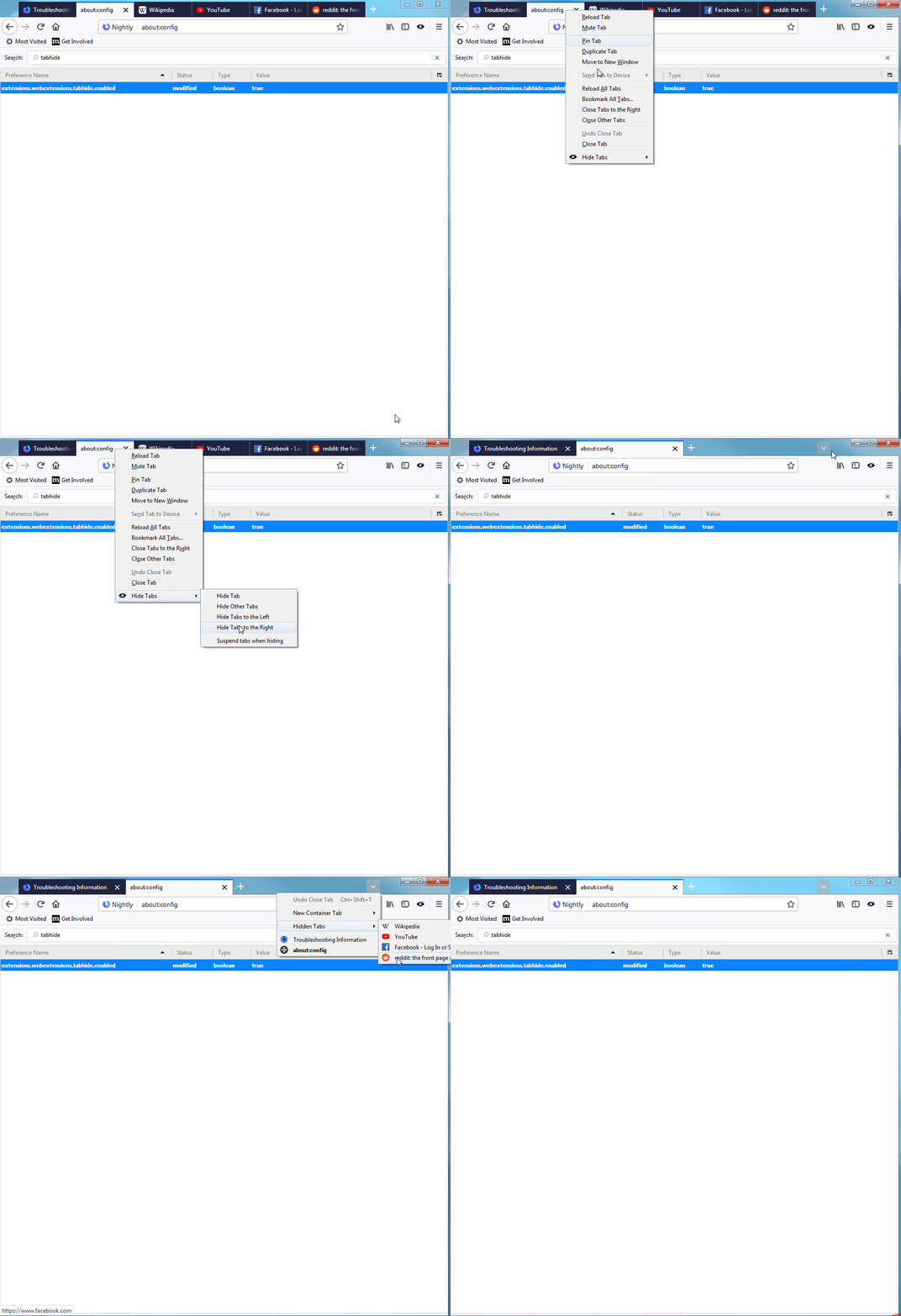
In the user interface, when tabs are hidden, a down-arrow is added to the end of the tab strip. When clicked, this icon shows all of your tabs, hidden and visible, and provides a quick and easy way to keep from losing things (see animation below, and thanks to Afnan Khan for the great Hide Tabs extension).
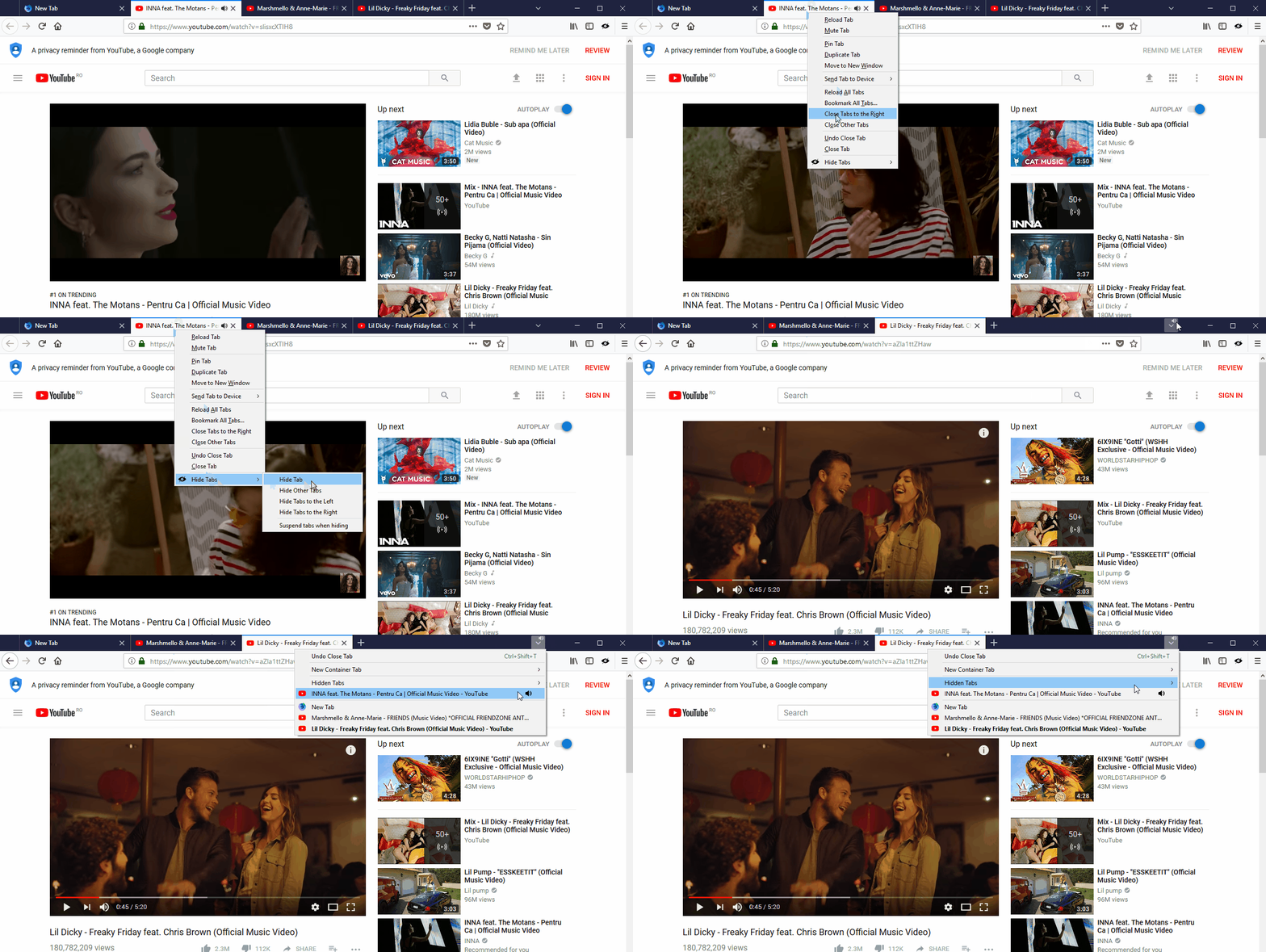
In addition, if a hidden tab is playing audio, the audio icon is shown on top of the down-arrow icon. If you click on the down-arrow, the hidden tab with audio is pulled out so that it is easier to find (see animation below).
You can expect to see this user interface get a small update in Firefox 62. In particular, it will be modified so that it conforms to the Firefox Photon Design System.
Making Hidden Tabs Visible
As noted above, when an extension hides a tab, Firefox will display a down-arrow in the tab strip that gives users access to all of their tabs, both visible and hidden. This is a simple and easy way to manage hidden tabs, but it is also subtle. To make sure users are completely aware of hidden tabs, and to discourage malicious and deceitful use of them, Firefox will always show a door hanger when the first tab is hidden.
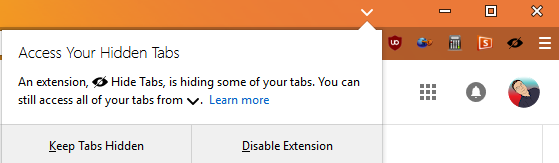
The door hanger informs the user that one or more tabs was hidden by an extension, explains the down-arrow on the tab strip (pointing to it), and gives the user the option to disable the extension.
Even More Tab Stuff
While tab hiding is the biggest feature to land in Firefox 61, a few other highly requested tab features also made it into this release.
A new browserSettings API, openUrlbarResultsInNewTabs, allows extensions to specify if search results from the URL bar should open in the current tab or a new tab. This complements the existing browserSettings.openBookmarksInNewTabs and browserSettings.openSearchResultsInNewTabs settings.
Also, fine grain control of the opening position for new tabs is now provided via the browserSettings.newTabPosition API. This new API can take three different values:
- afterCurrent – open
TL;DR: The Rust compiler has gotten 1.06x–4x faster over the past month.
As changes are made to the Rust compiler, a suite of benchmarks measuring compile time is run regularly on the development version. The data is viewable at http://perf.rust-lang.org. The default view is graphical, showing data from the past month.
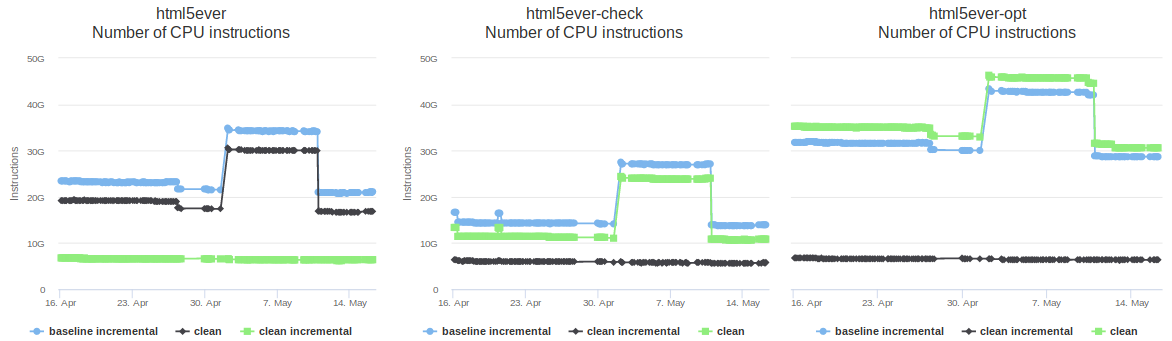
The screenshot above shows the graphs for a single benchmark called “html5ever”, which consists of an old version of the project of the same name. Each one shows measurements for a different kind of build: a debug build, a “check” build (which detect errors but don’t generate code), and an optimized build. Within each graph there are the following three data series.
- Clean: a normal build.
- Baseline incremental: an incremental build with no prior incremental runs. Such a build is a little slower than a normal build, because it does normal compilation and also gathers information to guide subsequent incremental builds.
- Clean incremental: an incremental build run immediately after a baseline incremental build. This is the best-case scenario for incremental compilation in which the minimal amount of work is done.
If you visit the site yourself you’ll see that most of the benchmarks have more than three data series, including ones for incremental builds done after small code changes (a more realistic use case), and one for builds with non-lexical lifetimes enabled.
The x-axis shows time and the y-axis shows instruction counts. Other units of measurements are available, including cycles, time, and memory usage. Instruction counts are shown as the default; this isn’t ideal because it’s only a proxy for the measurement that really matters (time)… but it’s a pretty good proxy, and it has a lot lower variation than the time measurements, which is important when detecting changes.
This graphical view is particularly useful for detecting major changes. For example, you can see that in early May there was a major regression for “clean” and “baseline incremental” builds, which Alex Crichton fixed a few days later.
As well as the graphical view, the site also provides a textual “compare” view, which can be reached via the link at the top left of each page. This view compares measurements from two revisions of the compiler; by default it compares the most recently measured revision with one from a month ago. (It can also be used locally, which is very useful to evaluate changes that speed up the compiler.)
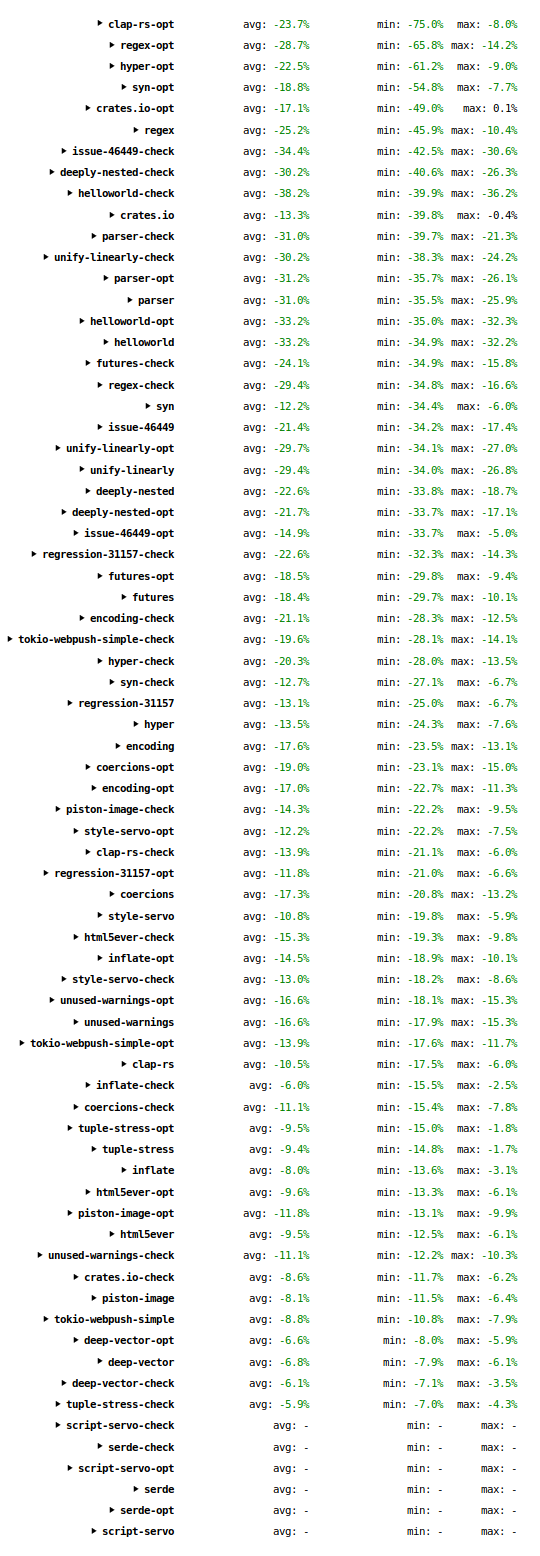
The screenshot above is of the “compare” view at the time of writing. Each line corresponds to a single graph from the graphical view. (If you visit the site and click on an individual entry it will expand and show all of the measurements. The resemblance between those measurements and this screenshot will of course diminish over time.) The “avg” column shows the average change across all the data series. The “min” and “max” columns show the minimum and maximum changes for any of the data series. The “serde” and “script-servo” lines are empty because those benchmarks were added to the suite less than a month ago, so no comparison can be made.
The table has many numbers, but the thing to take away is that they are almost all significantly negative, meaning that compile time has reduced. The “avg” numbers range from 6% to 38%; the “min” numbers (i.e. best result) go as high as 75%; the “max” numbers (i.e. worst result) go as high as 36%.
In conclusion: the Rust compiler has gotten significantly faster in the past month. Across a wide range of programs, and a wide range of build configurations, compile times have
I haven't had as much time to work on getting QEMU and Firefox functional/useable on the Talos II over the last few days because of work complications (I'll be reporting on that in a few weeks), but Raptor has heard those of you who are still suffering sticker PTSD from the Talos II and announced the Talos II Lite.
Yes, think of it as the Mac mini G4 to the Talos II's Quad G5. This comparison is not completely inappropriate because the T2L has only one CPU socket (the T2 has two) and thus only 24 PCIe lanes, split amongst an x16 and an x8 (the T2 fully loaded has two x8s and three x16s), and "only" 8 DDR4 slots (the T2 has 16). You can still cram one of the 22-core demons into one of those, though. Starting price is "just" $1399.99, though as with the Talos II the CPU is extra ($375 for 4-core to $2575 for 22-core), the RAM is extra ($255 for 16GB to $2950 for 128GB), and the storage is extra (Microsemi SAS starts at $300 plus drives, or a Samsung 960 EVO NVMe 500GB for $350, or a four-port SATA controller for $50 plus drives). You can also add the same Radeon WX 7100 workstation card that's in the big T2 ($800), too, or just use the same onboard VGA controller that comes with the T2 (built-in). It has USB 3.0 and dual Gig Ethernet, just like the big fella, though it doesn't seem to come with a BD-ROM.
However, the mini:Quad analogy falls down when you look at the actual size of the Lite. It, too, is an EATX behemoth, despite the leaner spec. Personally I would have hoped for something a little more manageably dimensioned. Raptor is taking about offering a smaller board but that would require a redesign and this was probably an artifact of getting it launched cheap(er)ly.
So would I have saved money with my T2 going Lite? Let's price it out: $1400 for the system (includes 500W PSU and EATX case), $595 for the octocore POWER9 (my T2 has two 4-core chips), $535 for 32GB ECC DDR4 RAM, $350 for the SAS card, $800 for the AMD Radeon WX 7100, $50 for the 4-port SATA card (this came installed "free" in my T2) and $350 for the 500GB Samsung NVMe SSD. Sticker price for that configuration is $4080 plus applicable tax and shipping; I repriced the same configuration for the Talos II and got a sticker cost of $7360, about $250 more than what I paid personally (the benefit of being an early adopter), so let's say a cost difference of $3300. That's substantial and a whole lot more palatable. $4080 is actually within Quad G5 range -- I paid not much less than that for my Quad G5 back in the day with the 7800GT and 8GB of RAM. A cheap SATA DVD-RW or something wouldn't add much more to the price if you want an optical drive.
There's a small problem here though: the Lite can't actually accommodate that loadout because there's not enough PCIe slots to get it all in there. In fact, I've got another 1GB NVMe drive to install in my T2, and I'm probably going to pull the now unused Sonnet FireWire/USB PCIe card (I prefer FireWire hubs) from the G5 to install in it too, which may mean temporarily pulling the SAS card until I'm ready to populate the front bays. Also, the Talos II out of the box doesn't support PCIe bifurcation, so I really do need both those slots for my SSDs. Per Raptor it can: with changes to the machine XML definition it could be made to "trifurcate" the x16 endpoint on slot 3 (CPU 2, PHB2) into an x8 and two x4, but that would mean that the available 4-way M.2 NVMe multicards would only have at most three slots available, and the system doesn't ship that way anyhow. Besides, even if you did get bifurcation working on the Lite, you'd only have the remaining x8 for anything else which couldn't be used for an x16 workstation video card.
But let's say you're not a maniac like me and you want a basic "budget" config. Let's drop the workstation card and the SAS card, and drop to a 4-core with 16GB, and we have a $2430 system. Wow! Not bad! You've still got the NVMe card and storage expansion over SATA, and you've still got USB ports for audio and the onboard VGA. But you've used up all your PCIe slots, so let's hope you don't need anything else to go internal (let alone 3D acceleration). If you really want that x16 slot back, drop the NVMe card and add some SATA drives ($2080 + devices), but now you're starting to strip this system down more than you might like to, and it doesn't get much cheaper that way.
Overall, that $3300 really does translate into greatly improved expandability in addition to the beefier power supplies, and thus it was never really an option for my needs personally. Maybe my mini:Quad analogy wasn't so off base. But if you want to join the POWER9 revolution on a budget and give Chipzilla the finger, as all right-thinking nerds should, you've now got an option that only requires passing a kidneystone of just half the size or less. It ships starting in July.
Today, the U.S. Senate passed a Congressional Review Act (CRA) resolution to save net neutrality and overturn the FCC’s disastrous order to end net neutrality protections.
We’re pleased this resolution passed – it’s a huge step, but the battle to protect net neutrality and reinstate the 2015 rules isn’t over. The next step is for the motion to go to the House of Representatives for a vote before the order is supposed to go into effect on June 11. Unfortunately, the rules in the House will make passage much harder than in the Senate; at this point, it’s not clear when, or if, there will be a vote there.
We will continue to fight for net neutrality in every way possible as we try to protect against erosion into a discriminatory internet, with ultimately a far worse experience for any users and businesses who don’t pay more for special treatment.
We are leading the legal battle in Mozilla v. FCC, working closely with policymakers, and educating consumers through advocacy for an open, equal, accessible internet.
And, we’re not alone – last week we partnered with organizations like Consumer Reports and the Electronic Frontier Foundation in the Red Alert protest to encourage Americans to call Congress in support of net neutrality. Consumers also share their support for the net neutrality fight- we recently conducted a poll that shows 91% of Americans believe consumers should be able to freely and quickly access their preferred content on the internet.
As I said in December– The FCC decision to obliterate the 2015 net neutrality protections is the result of broken processes, broken politics, and broken policies. The end of net neutrality would only benefit Internet Service Providers (ISPs) and it would end the internet as we know it, harming every day users and small businesses, eroding free speech, competition, innovation and user choice in the process.
Net neutrality is a core characteristic of the internet, and crucial for the economy and everyday lives. It is imperative that all internet traffic be treated equally, without discrimination against content or type of traffic — that’s how the internet was built and what has made it one of the greatest inventions of all time.
We’ll keep fighting for the open internet, and so we ask you to call your members of Congress to make sure that politicians decide to protect their constituents rather than increase the power of ISPs.
The post Update on Fight for Net Neutrality in U.S. – Senate votes to save net neutrality, now it’s up to the House appeared first on The Mozilla Blog.
 mconley livehacks on real Firefox bugs while thinking aloud.
One of the central themes of my time at Mozilla has been my pursuit of making it easier to contribute to and hack on Firefox.
I vividly remember my first day at Mozilla in 2011 when I went to build Firefox for the first time. I thought the entire experience - from obtaining the source code, installing build dependencies, building, running tests, submitting patches for review, etc was quite... lacking. When I asked others if they thought this was an issue, many rightfully identified problems (like the build system being slow). But there was a significant population who seemed to be naive and/or apathetic to the breadth of the user experience shortcomings. This is totally understandable: the scope of the problem is immense and various people don't have the perspective, are blinded/biased by personal experience, and/or don't have the product design or UX experience necessary to comprehend the problem.
When it comes to contributing to Firefox, I think the problems have as much to do with user experience (UX) as they do with technical matters. As I wrote in 2012, user experience matters and developers are people too. You can have a technically superior product, but if the UX is bad, you will have a hard time attracting and retaining new users. And existing users won't be as happy. These are the kinds of problems that a product manager or designer deals with. A difference is that in the case of Firefox development, the target audience is a very narrow and highly technically-minded subset of the larger population - much smaller than what your typical product targets. The total addressable population is (realistically) in the thousands instead of millions. But this doesn't mean you ignore the principles of good product design when designing developer tooling. When it comes to developer tooling and workflows, I think it is important to have a product manager mindset and treat it not as a collection of tools for technically-minded individuals, but as a product having an overall experience. You only have to look as far as the Firefox Developer Tools to see this approach applied and the positive results it has achieved.
Historically, Mozilla has lacked a formal team with the domain expertise
and mandate to treat Firefox contribution as a product. We didn't have
anything close to this until a few years ago. Before we had such a team,
I took on some of these problems individually. In 2012, I wrote mach - a
generic CLI command dispatch tool - to provide a central, convenient,
and easy-to-use command to discover development actions and to run them.
(Read the announcement blog post for
some historical context.) I also
introduced
a one-line bootstrap tool (now mach bootstrap) to make it easier to
configure your machine for building Firefox. A few months later, I
was responsible for
introducing moz.build files,
which paved the way for countless optimizations and for rearchitecting
the Firefox build system to use modern tools - a project that is still
ongoing (digging out from ~two decades of technical debt is a massive
effort). And a few months after that, I started going down the version
control rabbit hole and improving matters there. And I was also heavily
involved with MozReview for improving the code review experience.
Looking back, I was responsible for and participated in a ton of foundational changes to how Firefox is developed. Of course, dozens of others have contributed to getting us to where we are today and I can't and won't take credit for the hard work of others. Nor will I claim I was the only person coming up with good ideas or transforming them into reality. I can name several projects (like Taskcluster and Treeherder) that have been just as or more transformational than the changes I can take credit for. It would be vain and naive of me to elevate my contributions on a taller pedestal and I hope nobody reads this and thinks I'm doing that.
(On a personal note, numerous people have told me that things like mach
and the bootstrap tool have transformed the Firefox contribution experience
for the better. I've also had very senior people tell me that they don't
understand why these tools are important and/or are skeptical of the need
for investments in this space. I've found this dichotomy perplexing and
troubling. Because some of the detractors (for lack of a better word) are
highly influential and respected, their apparent skepticism sews
 This is the SUMO weekly call
Firefox 61: Developer Edition is available now, and contains a ton of great new features and under-the-hood improvements.
A Darker Dark Theme
Taking inspiration from Spinal Tap, Developer Edition’s dark theme now darkens more parts of the browser, including the new tab page.

Searchable websites can now be added to Firefox via the “Add Search Engine” item inside the Page Action menu. The sites must describe their search APIs using OpenSearch metadata.

And yes, the Page Action menu is also dark, if you’re using a dark theme.
More Powerful Developer Tools
More than just source maps, Firefox 61 understands how tools like Babel and Webpack work, making it possible to seamlessly inspect and interact with your original code right within the Debugger, as if it had never been bundled and minified in the first place. We’re also working to add native support for inspecting components and scopes in modern frameworks like React.
To learn more, see our separate, in-depth blog post: Debugging Modern Web Applications.
Nicer Developer Tools
The Developer Tools have seen numerous quality-of-life improvements.
You can now rearrange tools to suit your individual workflow, and any tabs that don’t fit in the current window remain readily accessible in an overflow menu.

The Network panel also gained prominent drop-down menus for controlling network throttling and importing/exporting HTTP Archive (“HAR”) files.

We’ve also sped up the DevTools across the board, and are measuring and tracking performance as an explicit goal for the team. Even more improvements are on the way.
In Firefox Quantum, we re-implemented many of the DevTools using basic web technologies: HTML, JavaScript, and CSS. We’re even using React inside the DevTools themselves! This means that if you know how to build for the web, you know how to hack on the DevTools. If you’d like to get involved, we have a great getting started guide with pointers to good first bugs to tackle.
The Accessibility Inspector
There’s also an entirely new tool available, the Accessibility Inspector, which reveals the logical structure of your page, as it might appear to a screen reader or other assistive software.

This is a low-level tool meant to help you understand how Firefox and screen readers “see” your content. To learn more, including how to enable and use this new tool, check out Marco Zehe’s article Introducing the Accessibility Inspector. If you’re looking for more opinionated tools to help audit and improve your site’s accessibility, consider add-ons like the aXe Developer Tools or
Building and debugging modern JavaScript applications in Firefox DevTools just took a quantum leap forward. In collaboration with Logan Smyth, Tech Lead for Babel, we leveled up the debugger’s source map support to let you inspect the code that you actually wrote. Combined with the ongoing initiative to offer first-class JS framework support across all our devtools, this will boost productivity for modern web app developers.
Modern JS frameworks and build tools play a critical role today. Frameworks like React, Angular, and Ember let developers build declarative user interfaces with JSX, directives, and templates. Tools like Webpack, Babel, and PostCSS let developers use new JS and CSS features before they are supported by browser vendors. These tools help developers write simpler code, but generate more complicated code to debug.
In the example below, we use Webpack and Babel to compile ES Modules and async functions into vanilla JS, which can run in any browser. The original code on the left is pretty simple. The generated, browser-compatible code on the right is much more complicated.

Figure 1. Original file on the left, generated file on the right.
When the debugger pauses, it uses source maps to navigate from line 13 in the generated code to line 4 in the original code. Unfortunately, because pausing actually happens on line 13, it can be difficult for the user to figure out what the value of dancer is at that time. Moving the mouse over the variable dancer returns undefined and the only way to find the scope of dancer is to open all six of the available scopes in the Scopes pane followed by expanding the _emojis object! This complicated and frustrating process is why many people opt to disable source maps.

Figure 2. Value of dancer is undefined, six separate scopes in the Scopes pane.
To address this problem we teamed up with Logan Smyth to see if it was possible to make the interaction feel more natural, as if you were debugging your original code. The result is a new engine that maps source maps data with Babel’s syntax tree to show the variables you expect to see the way you want to see them.

Figure 3. Correct value of dancer is displayed, Scopes pane shows one scope.
These improvements were first implemented for Babel and Webpack, and we’re currently adding support for TypeScript, Angular, Vue, Ember, and many others. If your project already generates source maps there is a good chance this feature will work for you out of the box.
To try it out, just head over and download Firefox Developer Edition. You can help us by testing this against your own project and reporting any issues. If you want to follow along, say hello, or contribute, you can also find us on the devtools channel Github or Mozilla Discourse or in the devtools Slack!
Our 2018 goal is to improve the lives of web developers who are building modern apps using the latest frameworks, build tools and best practices. Fixing variables is just the
A research report from Mozilla and Open Tech Strategies provides new perspectives on framing open source strategy. The report builds on Mozilla’s “Open by Design” strategy, which aims to increase the intent and impact of collaborative technology projects.
Mozilla is a radically open and participatory project. As part of the research we compiled into turning openness into a consistent competitive advantage, we identified that the application of open practices should always be paired with well-researched strategic intent. Without clarity of purpose, organizations will not (and nor should they) maintain long-term commitment to working with community. Indeed, we were not the first to observe this.
Mozilla benefits from many open practices, but open sourcing software is the foundation on which we build. Open source takes many forms at Mozilla. We enjoy a great diversity among the community structures of different Mozilla-driven open source projects, from Rust to Coral to Firefox (there are actually multiple distinct Firefox communities) and to others.
The basic freedoms offered by Mozilla’s open source projects — the famous “Four Freedoms” originally defined by the FSF — are unambiguous. But they only define the rights conveyed by the software’s license. People often have expectations that go well beyond that strict definition: expectations about development models, business models, community structure, even tool chains. It is even not uncommon for open source projects to be criticised for failing to comply with those unspoken expectations.
We recognise that there is no one true model. As Mozilla evolves more and more into a multi-product organization, there will be different models that suit different products and different environments. Structure, governance, and licensing policies should all be explicit choices based on the strategic goals of an open source project. A challenge for any organisation is how to articulate these choices, or to put it simply, how do you answer the question, “what kind of open source project is this?”.
To answer the question, we wanted to develop a set of basic models — “archetypes” — that projects could aim for, modifying them as needed, but providing a shared vocabulary for discussing how to think about any given project. We were delighted to be able to partner with one of the leading authorities in open source, Open Tech Strategies, in defining these archetypes. Their depth of knowledge and fresh perspective has created something we believe offers unique value.
The resulting framework consists of 10 common archetypes, covering things from business objectives to licensing, community standards, component coupling and project governance. It also contains some practical advice on how to use the framework and on how to set up your project.
20 years after the Open Source Initiative was founded, open source is widespread (and has inspired methods of peer production beyond the realm of software). Although this report was tailored to advance open source strategies and project design within Mozilla, and with the organizations and communities we work with, we also believe that this challenge is not unique to us. We suspect there will be many other organizations, both commercial and non-commercial, who will benefit from the model.
https://medium.com/media/9faa99d9c6b435593f9f6f5d21029b44/hrefYou can download the report here. Like so many things, it will never be “done”. After more hands-on-use with Mozilla projects, we intend to work with Open Tech Strategies on a version that expands its sights beyond Mozilla’s borders.
If you’re interested in collaborating, you can get in touch here:
The curl user survey 2018 is up. If you ever use curl or libcurl, please donate some of your precious time and provide your answers!
The curl user survey is an annual tradition since 2014 and it is one of our primary ways to get direct feedback from a larger audience about what's good, what's bad and what to focus on next in the curl project. Your input really helps us!
The survey will be up and available to fill in during 14 days, from May 15th until the end of May 28th. Please help us share this and ask your curl using friends to join in as well.
If you submitted data last year, make sure you didn't miss the analysis of the 2017 survey.
https://daniel.haxx.se/blog/2018/05/15/curl-user-survey-2018/