Since this is the end of the first half-year, I think it is a good time to reflect and show some work I've been doing over the last few months, apart from the regular batch of random issues, security bugs, reviews and the fixing of 24 bugs found by our …
https://blog.benj.me/2018/07/04/mozilla-2018-faster-calls-and-anyref/
The Team
Project Dark Theme Darkening was part of Michigan State University’s Computer Science capstone experience. Twenty-four groups of five students were each assigned an industry sponsor based on preference and skill set. We had the privilege of working with Mozilla on Firefox Quantum’s Theming API. Our project increases a user’s ability to customize the appearance of the Firefox browser.

(left to right)
Vivek Dhingra: MSU Student Contributor
Zhengyi Lian: MSU Student Contributor
Connor Masani: MSU Student Contributor
Dylan Stokes: MSU Student Contributor
Bogdan Pozderca: MSU Student Contributor
Jared Wein: Mozilla Staff
Mike Conley: Mozilla Staff
Tim Nguyen: Volunteer Contributor
The Project
Our goal was to expand upon the existing “lightweight” Theming API in Quantum to allow for more areas of customization. Themes had the ability to alter the appearance of the default toolbars, but did not have the ability to style menus, or customize auto-complete popups. Our team also worked on adding a more fluid transition when dynamic themes changed to allow for a smoother user experience.
Project Video
This video showcases a majority of the improvements we added to the Theming API and gives a good explanation of what our project was about. Enjoy — and then read on for the rest of the details:
Experience
Prior to this project, none of us had experience with Firefox development. After downloading the mozilla-central repository and exploring through the 40+ million lines of source, it was a bit daunting for all of us. Our mentors: Jared, Mike, Tim, and the Mozilla community on IRC all helped us through squashing our first bug.
Through the project, we learned to ask questions sooner rather than later. Being programmers, we were stubborn and wanted to figure out our issues ourselves but could have solved them a lot faster if we just simply asked in the Mozilla IRC. Everyone on there is extremely helpful and friendly!
All code written was in JavaScript and CSS. It was neat to see that the UI of Firefox is made in much the same way as other web pages. We got a great introduction to Mercurial by the end of the project and used some sweet tools to help our development process such as searchfox.org for indexed searching of mozilla-central, and janitor for web-based development.
Auto-complete Popups
We added the ability to customize the URL auto-complete popups. With this addition, we had to take in account the text color of the ac-url and ac-action tips associated with each result. For example, if the background of the auto-complete popup was dark, the text color of the tips are set to a light color so they can be seen.
We did this by calculating the luminance and comparing it to a threshold. The lwthemetextcolor attribute is set to either dark or bright based on this luminance threshold:
["--lwt-text-color", {
     lwtProperty: "textcolor",
     processColor(rgbaChannels, element) {
          if (!rgbaChannels) {
               element.removeAttribute("lwthemetextcolor");
               element.removeAttribute("lwtheme");
               return null;
          }
          const {r, g, b, a} = rgbaChannels;
          const luminance = 0.2125 * r + 0.7154 * g + 0.0721 * b;
          element.setAttribute("lwthemetextcolor", luminance <= 110 ? "dark" : "bright");
          element.setAttribute("lwtheme", "true");
          return `rgba(${r}, ${g}, ${b}, ${a})` || "black";
     }
}]
Towards the end of last year, I got a new laptop: the Purism Librem 13. It replaced the Lenovo ThinkPad X250 that I was using previously, which maxed out at 8 GB RAM and was beginning to be unusable for Firefox builds.
This is my first professional laptop that isn’t a ThinkPad; as I’ve now been using it for over half a year, I thought I’d write some brief notes on what my experience with it has been like.
Why Purism?
My main requirement from a work point of view was having at least 16 GB RAM while staying in the same weight category as the X250. There were options meeting those criteria in the ThinkPad line (like the X270 or newer generations of X1 Carbon), so why did I choose Purism?
Purism is a social benefit corporation that aims to make laptops that respect your privacy and freedom — at the hardware and firmware levels in addition to software — while remaining competitive with other productivity laptops in terms of price and specifications.
The freedom-respecting features of the Librem 13 that you don’t typically find in other laptops include:
- Hardware kill switches for WiFi/Bluetooth and the microphone/camera
- A open-source bootloader (coreboot)
- A disabled Intel Management Engine, a component of Intel CPUs that runs proprietary software at (very) elevated privilege levels, which Intel makes very hard to disable or replace
- An attempt to ship hardware components with open-source firmware, though this is very much a work in progress
- Tamper evidence via Heads, though this is a newer feature and was not available at the time I purchased my Librem 13.
These are features I’ve long wanted in my computing devices, and it was exciting to see someone producing competitively priced laptops with all the relevant configuration, sourcing of parts, compatibility testing etc. done for you.
Hardware
Material
The Librem’s aluminum chassis looks nicer and feels sturdier than the X250’s plastic one.
Screen
At 13.3'', the Librem’s screen size is a small but noticeable and welcome improvement over the X250’s 12.5''.
The X250 traded off screen size for battery life. It’s the same weight as the 14'' ThinkPad X1 Carbon; the weight savings from a smaller screen size go into extra thickness, which allows for a second battery. I was pleased to see that the Librem, which is the same thickness as the X1 Carbon and only has one battery, has comparable battery life to the X250 (5-6 hours on an average workload).
The Librem’s screen is not a touchscreen. I noticed this because I used the X250’s touchscreen to test touch event support in Firefox, but I don’t think the average user has much use of a touchscreen in a conventional laptop (it’s more useful in 2-in-1 laptops, which Purism also offers, and that does have a touchscreen), so I don’t hold this against Purism.
The maximum swivel angle between the Librem’s keyboard and its screen is 130 degrees, compared to the X250’s almost 180 degrees. I did occasionally use the X250’s greater swivel angle (e.g. when lying on a couch), but I didn’t find its absence in the Librem to be a significant issue.
Touchpad
The one feature of ThinkPad laptops that I miss the most in the Librem, is the TrackPoint, the red button in the middle of the keyboard that allows you to move the cursor without having to move your hand down to the touchpad. I didn’t realize how much I relied on this until I didn’t have it, though I’ve been getting by without it. (I view it as additional motivation for me to use the keyboard more and the cursor less.)
Also missing in the Librem are the buttons above the touchpad for left-, right-, and middle-clicking; you instead have to click by tapping
Today, I found this email from Google in my inbox:
We routinely review items in the Chrome Web Store for compliance with our Program policies to ensure a safe and trusted experience for our users. We recently found that your item, “Google search link fix,” with ID: cekfddagaicikmgoheekchngpadahmlf, did not comply with our Developer Program Policies. Your item did not comply with the following section of our policy:
We may remove your item if it has a blank description field, or missing icons or screenshots, and appears to be suspicious. Your item is still published, but is at risk of being removed from the Web Store.
Please make the above changes within 7 days in order to avoid removal.
Not sure why Google chose the wrong email address to contact me about this (the account is associated with another email address) but luckily this email found me. I opened the extension listing and the description is there, as is the icon. What’s missing is a screenshot, simply because creating one for an extension without a user interface isn’t trivial. No problem, spent a bit of time making something that will do to illustrate the principle.
And then I got another mail from Google, exactly 2 hours 30 minutes after the first one:
We have not received an update from you on your Google Chrome item, “Google search link fix,” with ID: cekfddagaicikmgoheekchngpadahmlf, item before the expiry of the warning period specified in our earlier email. Because your item continues to not comply with our policies stated in the previous email, it has now been removed from the Google Chrome Web Store.
I guess, Mountain View must be moving at extreme speeds, which is why time goes by way faster over there — relativity theory in action. Unfortunately, communication at near-light speeds is also problematic, which is likely why there is no way to ask questions about their reasoning. The only option is resubmitting, but:
Important Note: Repeated or egregious policy violations in the Chrome Web Store may result in your developer account being suspended or could lead to a ban from using the Chrome Web Store platform.
In other words: if I don’t understand what’s wrong with my extension, then I better stay away from the resubmission button. Or maybe my update with the new screenshot simply didn’t reach them yet and all I have to do is wait?
Anyway, dear users of my Google search link fix extension. If you happen to use Google Chrome, I sincerely recommend switching to Mozilla Firefox. No, not only because of this simple extension of course. But Addons.Mozilla.Org policies happen to be enforced in a transparent way, and appealing is always possible. Mozilla also has a good track record of keeping out malicious extensions, something that cannot be said about Chrome Web Store (a recent example).
Update (2018-07-04): The Hacker News thread lists a bunch of other cases where extensions were removed for unclear reasons without a possibility to appeal. It seems that having a contact within Google is the only way of resolving this.
Update 2 (2018-07-04): The extension is back, albeit without the screenshot I added (it’s visible in the Developer Dashboard but not on the public extension page). Given that I didn’t get any notification whatsoever, I don’t know who to thank for this and whether it’s a permanent state or whether the extension is still due for removal in a week.
Update 3 (2018-07-04): Now I got an email from somebody at Google, thanks to a Google employee seeing my blog post here. So supposedly this was an internal miscommunication, which resulted in my screenshot update being rejected. All should be good again now and all I have to do is resubmit that screenshot.
https://palant.de/2018/07/03/google-to-developers-we-take-down-your-extension-because-we-can
Late last week we quietly landed a Nightly-only addon that spoofs the Chrome Mobile user agent string for Google Search (well, Facebook too, but that's another blog post).
Why?
Bug 975444 is one of the most-duped web compat bugs, which documents the fact that the version of Google Search that Firefox for Android users receive is a less rich version than the one served to Chrome Mobile. And people notice (hence all the dupes).
In order to turn this situation around, we've been working on a number of platform interop bugs (in collaboration with some friendly members of the Blink team) and have hopes in making progress towards receiving Tier 1 search by default.
Part of the plan is to sniff out bugs we don't know about (or new bugs, as the site changes very quickly) by exposing the Nightly population to the spoofed Tier 1 version for 4 weeks (which should be July 27, 2018). If things get too bad, we can back out the addon earlier.
If you've found a bug, please report it at https://webcompat.com/issues/new.
And in the meantime, if the bugs are too annoying to deal with, you can disable it by going to about:config and setting extensions.gws-and-facebook-chrome-spoof.enabled to false (just search for gws).
Note: don't hit reset; instead, tap the true/false value and then hit toggle when that appears.
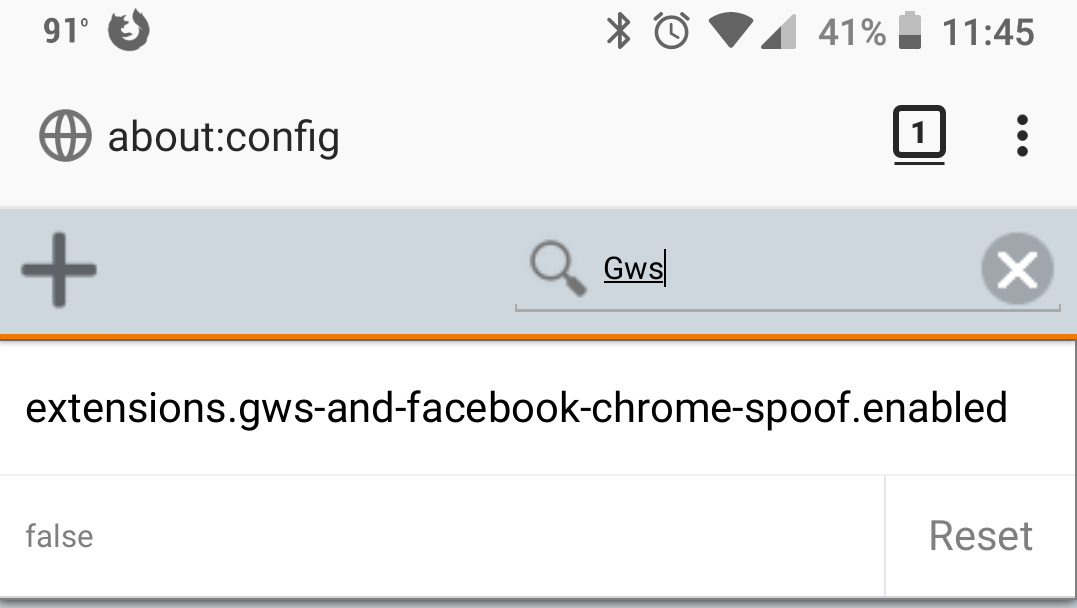
(yeah, yeah, I'll go charge my phone now.)
https://miketaylr.com/posts/2018/07/google-search-in-firefox-for-android-nightly.html
OSenado Brasileiro poder'a votar esta semana o Projeto de Lei de Protec~ao de Dados Pessoais (PLC 53/2018), aprovado pela C^amara dos Deputados em 29 de maio, ap'os quase uma d'ecada de debate em torno de v'arias proposic~oes sobre o tema. Embora alguns aspectos do Projeto ainda sejam pass'iveis de aprimoramentos, a Mozilla acredita que o texto representa uma estrutura b'asica de protec~ao de dados para o Brasil e instamos os reguladores brasileiros `a sua urgente aprovac~ao.
Especificamente, o PLC 53/2018:
- 'E o resultado de um processo de consultas inclusivo e aberto `a sociedade brasileira, seguindo o exemplo do Marco Civil da Internet (Lei n. 12.965/2014). O processo de discuss~ao do PLC 53/2018 envolveu v'arias partes interessadas do governo, setor privado, sociedade civil e academia. O projeto tamb'em recebeu apoio p'ublico de v'arias organizac~oes do setor privado e da sociedade civil.
- N~ao faz distinc~oes entre o setor privado e ao governo e aplica suas disposic~oes isonomicamente. A criac~ao de excec~oes amplas para o Poder P'ublico, conforme disposto em outros Projetos de Lei alternativos acabaria por diluir a efic'acia da lei com relac~ao `a salvaguarda dos direitos do usu'ario. O Governo Federal 'e, indiscutivelmente, o maior coletor de dados pessoais no Brasil e a coleta de dados 'e requisito obrigat'orio para o acesso aos servicos. A proximidade das eleic~oes de 2018 e a aus^encia de uma lei de protec~ao de dados despertam preocupac~oes relativas `a eventual utilizac~ao de dados pessoais para influenciar o processo eleitoral. Esse ponto faz-se especialmente importante a luz dos recentes debates e revelac~oes em torno da Cambridge Analytica.
- Introduz uma entidade reguladora nacional auto-suficiente, independente e robusta. A efic'acia de um marco legal de protec~ao de dados pessoais reside na exist^encia de mecanismos de garantia das obrigac~oes e direitos, indispensavelmente. Isso inclui um alto grau de independ^encia do governo, uma vez que o regulador deve ter jurisdic~ao sobre as atividades de protec~ao de dados do Governo tamb'em. Parabenizamos tamb'em a introduc~ao de um 'org~ao participativo e multissetorial respons'avel por emitir diretrizes, garantir a transpar^encia e avaliar a implementac~ao da lei.
- Institui um conjunto de direitos para os indiv'iduos robusto, ressaltando a import^ancia da obtenc~ao de consentimento do usu'ario e exigindo que os respons'aveis por atividades de tratamento de dados respeitem os princ'ipios de minimizac~ao de dados, limitac~ao das atividades de uso e coleta de dados, bem como seguranca de bases de dados. Ao qualificar o consentimento como livre, informado e inequ'ivoco o PLC 53/2018 n~ao s'o estipula um alto padr~ao de consentimento como coloca os usu'arios no controle de seus dados e experi^encias on-line. Por fim, o projeto tamb'em reforca os mecanismos de responsabilizac~ao, ao passo que (a) coloca sobre o agente o ^onus para demonstrar a adoc~ao e efic'acia das medidas de protec~ao de dados, e (b) permite aos usu'arios a possibilidade de acessar e retificar dados sobre si mesmos, bem como a possibilidade de oposic~ao ao tratamento de dados.
- Define categorias de dados pessoais sens'iveis; a respeito deste ponto, 'e bom ver dados biom'etricos inclu'idos nesta lista. Acreditamos que um regime mais rigoroso dados sens'iveis 'e 'util para sinalizar aos respons'aveis pelo tratamento de dados que um n'ivel mais alto de protec~ao e seguranca ser'a necess'ario ante a sensibilidade das informac~oes.
A falta de uma lei abrangente de protec~ao de dados exp~oe os cidad~aos brasileiros a riscos decorrentes do uso indevido de seus dados pessoais tanto pelo Governo quanto pelos servicos privados. Este 'e um momento oportuno e hist'orico, onde o Brasil tem a oportunidade de finalmente aprovar uma lei geral de protec~ao de dados que ir'a salvaguardar os direitos dos brasileiros por gerac~oes a vir.
Este post foi publicado originalmente em ingl^es.
The post `A frente da votac~ao no Senado Federal, Mozilla endossa a aprovac~ao de Lei Brasileira de Protec~ao de Dados (PLC 53/ 2018) appeared first on Open Policy & Advocacy.
On July 2, 2013, I was hired by Mozilla on the Web Compatibility team. It has been 5 years. I didn't count the emails, the commits, the bugs opened and resolved. We do not necessary strive by what we accomplished, specifically when expressed in raw numbers. But there was a couple of transformations and skills that I have acquired during these last five years which are little gems for taking the next step.
Working is also a lot of failures, drawbacks, painful learning experiences. A working space is humanity. The material we work with (at least in computing) is mostly ideas conveyed by humans. Not the right word at the right moment, a wrong mood, a desire for a different outcome, we do fail. Then we try to rebuild, to protect ourselves. This delicate balance is though a risk worth taking on the long term.
I'm looking forward the next step, I really mean the next footstep. The one in the path, the one of the hikers, just the next one, which brings you closer from the next flower, the next grass, which transforms the landscape in an undetectable way. Breathing, discovering, learning, with t^ete-`a-t^ete or alone.
Thanks to Mozilla and its community to allow me to share some of my values with some of yours. I'm very much looking forward the next day to continue this journey with you.
Otsukare!
As soon as this week, the Brazilian Senate may vote on Brazilian Data Protection Bill (PLC 53/2018), which was approved by the Chamber of Deputies on May 29th following nearly a decade of debate on various draft bills. While aspects of the bill will no doubt need to be refined and evolve with time, overall, Mozilla believes this bill represents a strong baseline data protection framework for Brazil, and we urge Brazilian policymakers to pass it quickly.
Specifically, this bill:
- Is the outcome of an inclusive and open consultation process, following the example of the landmark Brazilian Civil Rights Framework for the Internet (‘Marco Civil’). The consultation has involved multiple stakeholders from government, private sector, civil society, and academia. The bill has also received public support from various organizations in the private sector and civil society.
- Applies with equal strength to private sector and the government. Creating broad exceptions for government use of data, as proposed in alternative bills, would dilute the effectiveness of the data protection law to safeguard user rights. The government is arguably the largest data collector in Brazil, and government data collection is often mandatory for access to services. As the Brazilian general election approaches, some are concerned that in the absence of a data protection law, personal data could be used to influence the election. This is especially salient given the recent debates and revelations around Cambridge Analytica.
- Introduces a well-resourced, independent, and empowered national regulator. A strong enforcement mechanism is critical for any data protection framework to be effective. This includes a high degree of independence from the government, since the regulator should have jurisdiction over claims against the government as well. We also welcome the introduction of a participatory multi-stakeholder body to issue guidelines, ensure transparency, and evaluate the implementation of the law.
- Puts in place a robust framework of user rights with meaningful user consent at its core, requiring data controllers and processors to abide by the principles of data minimisation, purpose limitation, collection limitation, and data security. In particular, it includes a high standard of free, informed, and unequivocal consent, putting users in control of their data and online experiences. It also emphasizes mechanisms for accountability, putting the onus on the agent to demonstrate both the adoption and effectiveness of data protection measures, and allows for the user to access and rectify data about themselves as well as withdraw consent for any reason.
- Defines categories of sensitive personal data; in particular, it’s good to see biometric data included in this list. A stricter regime for certain categories of sensitive data is useful in order to signal to data controllers that a higher level of protection and security will be required given the sensitivity of the information.
The lack of a comprehensive data protection law exposes Brazilian citizens to risks of misuse of their personal data by both government and private services. This is a timely and historic moment where Brazil has the opportunity to finally pass a baseline data protection law that will safeguard the rights of Brazilians for generations to come.
Click here for a Portuguese translation of this post.
The post Ahead of Senate vote, Mozilla endorses Brazilian Data Protection Bill (PLC 53/2018) appeared first on Open Policy & Advocacy.
https://blog.mozilla.org/netpolicy/2018/07/02/brazilian-data-protection-bill/

Pick of the Month: Midnight Lizard
by Pavel Agarkov
More than just dark mode, Midnight Lizard lets you customize the readability of the web in granular detail—adjust everything from color schemes to lighting contrast.
“This has got to be the best dark mode add-on out there, how is this not more popular? 10/10”
Featured: Black Menu for Google
by Carlos Jeurissen
Enjoy easy access to Google services like Search, Translate, Google+, and more without leaving the webpage you’re on.
“Awesome! Makes doing quick tasks with any Google app faster and simpler!”
Featured: Authenticator
by mymindstorm
Add an extra layer of security by generating two-step verification codes in Firefox.
“Thank you so much for making this. I would not be able to use many websites without it now days, literally, since I don’t use a smartphone. Thank you thank you thank you. Works wonderfully.”
Featured: Turbo Download Manager
by InBasic
A download manager with multi-threading support.
“One of the best.”
Featured: IP Address and Domain Information
by webdev7
Know the web you travel! See detailed information about every IP address, domain, and provider you encounter in the digital wild.
“The site provides valuable information and is a tool well worth having.”
If you’d like to nominate an extension for featuring, please send it to amo-featured [at] mozilla [dot] org for the board’s consideration. We welcome you to submit your own add-on!
The post July’s Featured Extensions appeared first on Mozilla Add-ons Blog.
https://blog.mozilla.org/addons/2018/07/02/julys-featured-extensions-2/
Last week, we pushed an update that enables add-on developers to use larger image sizes on their add-on listings.
We hadn’t updated our size limits for many years, so the images on listing pages are fairly small. The image viewer on the new website design scales the screenshots to fit the viewport, which makes these limitations even more obvious.
For example, look at this old listing of mine.
The image view on the new site. Everything in this screenshot is old.
The image below better reflects how the magnified screenshot looks like on my browser tab.
Ugh
After this fix, developers can upload images as large as they prefer. The maximum image display size on the site is 1280x800 pixels, which is what we recommend they upload. For other image sizes we recommend using the 1.6:1 ratio. If you want to update your listings to take advantage of larger image sizes, you might want to consider using these tips to give your listing a makeover to attract more users.
We look forward to beautiful, crisper images on add-on listing pages.
The post Larger image support on addons.mozilla.org appeared first on Mozilla Add-ons Blog.
https://blog.mozilla.org/addons/2018/07/02/larger-image-support/
After several months of discussion on the mozilla.dev.security.policy mailing list, our Root Store Policy governing Certification Authorities (CAs) that are trusted in Mozilla products has been updated. Version 2.6 has an effective date of July 1st, 2018.
More than one dozen issues were addressed in this update, including the following changes:
- Section 2.2 “Validation Practices” now requires CAs with the email trust bit to clearly disclose their email address validation methods in their CP/CPS.
- The use of IP Address validation methods defined by the CA has been banned in certain circumstances.
- Methods used for IP Address validation must now be clearly specified in the CA’s CP/CPS.
- Section 3.1 “Audits” increases the WebTrust EV minimum version to 1.6.0 and removes ETSI TS 102 042 and 101 456 from the list of acceptable audit schemes in favor of EN 319 411.
- Section 3.1.4 “Public Audit Information” formalizes the requirement for an English language version of the audit statement supplied by the Auditor.
- Section 5.2 “Forbidden and Required Practices” moves the existing ban on CA key pair generation for SSL certificates into our policy.
- After January 1, 2019, CAs will be required to create separate intermediate certificates for issuing SSL and S/MIME certificates. Newly issued Intermediate certificates will need to be restricted with an EKU extension that doesn’t contain anyPolicy, or both serverAuth and emailProtection. Intermediate certificates issued prior to 2019 that do not comply with this requirement may continue to be used to issue new end-entity certificates.
- Section 5.3.2 “Publicly Disclosed and Audited” clarifies that Mozilla expects newly issued intermediate certificates to be included on the CA’s next periodic audit report. As long as the CA has current audits, no special audit is required when issuing a new intermediate. This matches the requirements in the CA/Browser Forum’s Baseline Requirements (BR) section 8.1.
- Section 7.1 “Inclusions” adds a requirement that roots being added to Mozilla’s program must have complied with Mozilla’s Root Store Policy from the time that they were created. This effectively means that roots in existence prior to 2014 that did not receive BR audits after 2013 are not eligible for inclusion in Mozilla’s program. Roots with documented BR violations may also be excluded from Mozilla’s root store under this policy.
- Section 8 “CA Operational Changes” now requires notification when an intermediate CA certificate is transferred to a third party.
A comparison of all the policy changes is available here.
The post Root Store Policy Updated appeared first on Mozilla Security Blog.
https://blog.mozilla.org/security/2018/07/02/root-store-policy-updated/
I guess I just really like graphs that step downwards:

Earlier this week :mreid noticed that our Nightly population suddenly started sending us, on average, 150 fewer kilobytes (uncompressed) of data per ping. And they started doing this in the middle of the previous week.
Step 1 was to panic that we were missing information. However, no one had complained yet and we can usually count on things that break to break loudly, so we cautiously-optimistically put our panic away.
Step 2 was to see if the number of pings changed. It could be we were being flooded with twice as many pings at half the size, for the same volume. This was not the case:

Step 3 was to do some code archaeology to try and determine the “culprit” change that was checked into Firefox and resulted in us sending so much less data. We quickly hit upon the removal of BrowserUITelemetry and that was that.
…except… when I went to thank :Standard8 for removing BrowserUITelemetry and saving us and our users so much bandwidth, he was confused. To the best of his knowledge, BrowserUITelemetry was already not being sent. And then I remembered that, indeed, back in March :janerik had been responsible for stopping many things like BrowserUITelemetry from being sent (since they were unmaintained and unused).
So I fired up an analysis notebook and started poking to see if I could find out what parts of the payload had suddenly decreased in size. Eventually, I generated a plot that showed quite clearly that it was the keyedHistograms section that had decreased so radically.

Around the same time :janerik found the culprit in the list of changes that went into the build: we are no longer sending a couple of incredibly-verbose keyed histograms because their information is now much more readily available in profiles.
The power of cleaning up old code: removing 150kb from the average “main” ping sent multiple times per day by each and every Firefox Nightly user.
Very satisfying.
:chutten
https://chuttenblog.wordpress.com/2018/06/29/some-more-very-satisfying-graphs/
It may be the wrong day to slam the local newspapers, but this was what greeted me trying to click through to a linked newspaper article this morning on Firefox Android. The link I was sent was from the Riverside Press-Enterprise, but this appears to be throughout the entire network of the P-E's owners, the Southern California News Group (which includes the Orange County Register, San Bernardino Sun and Los Angeles Daily News):

That's obnoxious. SCNG is particularly notorious for not being very selective about ads and they tend to be colossally heavy and sometimes invasive; there's no way on this periodically green earth that I'm turning the adblocker off. I click "no thanks." The popover disappears, but what it was covering was this:

That's not me greeking the article so you can't see what article I was reading. The ad-blocker-blocker did it so that a clever user or add-on can't just set the ad-blocker-blocker's popover to display:none or something. The article is now incomprehensible text.
My first reaction is that any possibility I had of actually paying $1 for the 4 week subscription to any SCNG paper just went up in the flames of my great furious wrath (after all, this is a blog s**tpost). The funny part is that TenFourFox's basic adblock actually isn't defeated by this, probably because we're selective about what actually gets blocked and so the ad-blocker-blocker thinks ads are getting through. But our old systems are precisely those that need adblockers because of all the JavaScript (particularly) that modern ad systems lard their impressions up with. Anyway, to read the article I actually ended up looking at it on the G5. There was no way I was going to pay them for engaging in this kind of behaviour.
The second thought I had was, how do you handle this? I'm certainly sympathetic to the view that we need stronger local papers for better local governance, but print ads are a much different beast than the dreck that online ads are. (Yes, this blog has ads. I don't care if you block them or not.) Sure, I could have subscriptions to all the regional papers, or at least the ones that haven't p*ssed me off yet, but then I have to juggle all the memberships and multiple charges and that won't help me read papers not normally in my catchment area. I just want to click and read the news, just like I can anonymously pick up a paper and read it at the bar.
One way to solve this might be to have revenue sharing arrangements between ISPs and papers. It could be a mom-and-pop ISP and the local paper, if any of those or those still exist, or it could be a large ISP and a major national media group. Users on that ISP get free access (as a benefit of membership even), the paper gets a piece. Everyone else can subscribe if they want. This kind of thing already exists on Apple TV devices, after all: if I buy the Spectrum cable plan, I get those channels free on Apple TV over my Spectrum Internet access, or I pay if I don't. Why couldn't newspapers work this way?
Does net neutrality prohibit this?
http://tenfourfox.blogspot.com/2018/06/ad-blocker-blockers-hit-new-low-whats.html

This week, we're making great strides in adding new features and making a wide range of improvements and our new contributors are also helping us fix bugs.
Browsers
We are churning out new features and continuing to make UI changes to deliver the best possible experience on Firefox Reality by implementing the following:
- Focus mode with the new design
- Full screen mode and widget resizing
- Reusable quad node which adds supports different scale modes
- World Fade Out/In API and blitter
- Back handler API
- WidgetResizer utility node
- Settings panel
- A single window UI design with a browser window and bar below
Here is a sneek peak of Firefox Reality with focus mode, full screen mode and widget resizing with the new UX/UI:
Firefox Reality Focus mode, full screen mode and widget resizing from Imanol Fern'andez Gorostizaga on Vimeo.
Social
We are working towards a content creator and content import updates on Hubs by Mozilla and added some new features:
- Continued work on image and model spawning: animated GIFs, object deletion, proxy integration
- Editor filesystem management feature complete, GLTF scene saving/loading, property editing
- Migration to Maya GLTF exporter for architecture kit
- Proof of concept of 3d spline generation and rendering for drawing tool
- Media proxy (farspark) operationalized and deployed
Join our public WebVR Slack #social channel to participate in on the discussion!
Content ecosystem
This week, we launched v1.4.0, this includes, adding a new example scene and for handling Unity code for swapping scenes for navigation on the Unity WebVR project.
Shout out to Kyle Reczek for contributing his patch to fixing the state of the VR camera and manager since the state was not correct when exiting VR for switching scenes.
Found a critical bug? File it in our public GitHub repo or let us know on the public WebVR Slack #unity channel and as always, join us in our discussion!
Stay tuned for new features and improvements across our three areas!
I’m excited to announce that you can now run the Python unit tests for packages in the Firefox source code against Python 3! This will allow us to gradually build support for Python 3, whilst ensuring that we don’t later regress. Any tests not currently passing in Python 3 are skipped with the condition skip-if = python == 3 in the manifest files, so if you’d like to see how they fail (and maybe provide a patch to fix some!) then you will need to remove that condition locally. Once you’ve done this, use the mach python-test command with the new optional argument --python. This will accept a version number of Python or a path to the binary. You will need to make sure you have the appropriate version of Python installed.
Once you’re ready to enable tests to run in TaskCluster, you can simply update the python-version value in taskcluster/ci/source-test/python.yml to include the major version numbers of Python to execute the tests against. At the current time our build machines have Python 2.7 and Python 3.5 available.
To summarise:
- Remove
skip-if = python == 3from manifest files. These are typically namedmanifest.iniorpython.ini, and are usually found in thetestsdirectory for the package. - Run
mach python-test --python=3with your target path or subsuite. - Fix the package(s) to support Python 3 and ensure the tests are passing
- Add Python 3 to the
python-versionfor the appropriate job intaskcluster/ci/source-test/python.yml.
At the time of writing, the pythonclock.org tells me that we have just over 18 months before Python 2.7 will be retired. What this actually means is still somewhat unknown, but it would be a good idea to check if your code is compatible with Python 3, and if it’s not, to do something about it. The Firefox build system at Mozilla uses Python, and it’s still some way from supporting Python 3. We have a lot of code, it’s going to be a long journey, and we could do with a bit of help!
Whilst we do plan to support Python 3 in the Firefox build system (see bug 1388447), my initial concern and focus has been the Python packages we distribute on the Python Package Index (PyPI). These are available to use outside of Mozilla’s build system, and therefore a lack of Python 3 support will prevent any users from adopting Python 3 in their projects. One such example is Treeherder, which uses mozlog for parsing log files. Treeherder is a django project, which recently dropped support for Python 2 (unless you’re using their long term support release, which will support Python 2 until 2020).
Updating these packages to support Python 3 isn’t necessary that hard to do, especially with tools such as six, which provides utilities for handling the differences between Python 2 and Python 3. The problem has been that we had no way to run the tests against Python 3 in TaskCluster. This is no longer the case, and Python unit tests can now be run against Python 3!
So far I have enabled Python 3 jobs for our mozbase unit tests (this includes the aforementioned mozlog), and our mozterm unit tests. There are still many tests in mozbase that are not passing in Python 3, so as mentioned above, these have been conditionally skipped in the manifest files. This will allow us to enable these tests as support is added, and this condition could even be used in the future if we have a package that doesn’t have full compatibility with Python 2.
Now that running the tests against multiple versions of Python is relatively easy, it’s a great time for me to encourage our community to help us with supporting Python 3. If you’d like to help, we have a tracking bug for all of our mozbase packages. Find a package you’d like to work on, read the comments to understand what you need and how to get set up, and let me know if you get stuck!
So often these days the debate is framed as "drivers vs cyclists" or "drivers vs pedestrians". Basically drivers vs everyone. Because if there's one thing we've learnt is that drivers think all the roads, parking spaces and infrastructure is all for them and absolutely no-one else.
But you need to walk to get into a car. You need to get out of a car to walk when you get to your destination. Everyone becomes a pedestrian at some point. In fact everyone in a car gets out of a car, eventually.
So you can have a world where people go into their garages at their houses, drive to work and go into their garages there ... and no-one ever interacts with anything other than cars in the real world. Or perhaps you can treat pedestrians with respect. And people on bicycles. And just about everyone else.
happy bmo push day! Huge shout out to @BugzillaUX for all the UX enhancements in this release!
the following changes have been pushed to bugzilla.mozilla.org:
- [1467297] variable masks earlier declaration in Feed.pm in Phabbugz extension
- [1467271] When making a revision public, make the revision editable only by the bmo-editbugs-team project (editbugs)
- [1456877] Add a wrapper around libcmark_gfm to Bugzilla
- [1468818] Re-introduce is_markdown to the longdescs table (schema-only)
- [


For those just joining us….
AV1 is a new general-purpose video codec developed by the Alliance for Open Media. The alliance began development of the new codec using Google’s VPX codecs, Cisco’s Thor codec, and Mozilla’s/Xiph.Org’s Daala codec as a starting point. AV1 leapfrogs the performance of VP9 and HEVC, making it a next-next-generation codec . The AV1 format is and will always be royalty-free with a permissive FOSS license.
This post was written originally as the second in an in-depth series of posts exploring AV1 and the underlying new technologies deployed for the first time in a production codec. An earlier post on the Xiph.org website looked at the Chroma from Luma prediction feature. Today we cover the Constrained Directional Enhancement Filter. If you’ve always wondered what goes into writing a codec, buckle your seat-belts, and prepare to be educated!
Filtering in AV1
Virtually all video codecs use enhancement filters to improve subjective output quality.
By ‘enhancement filters’ I mean techniques that do not necessarily encode image information or improve objective coding efficiency, but make the output look better in some way. Enhancement filters must be used carefully because they tend to lose some information, and for that reason they’re occasionally dismissed as a deceptive cheat used to make the output quality look better than it really is.
But that’s not fair. Enhancement filters are designed to mitigate or eliminate specific artifacts to which objective metrics are blind, but are obvious to the human eye. And even if filtering is a form of cheating, a good video codec needs all the practical, effective cheats it can deploy.
Filters are divided into multiple categories. First, filters can be normative or non-normative. A normative filter is a required part of the codec; it’s not possible to decode the video correctly without it. A non-normative filter is optional.
Second, filters are divided according to where they’re applied. There are preprocessing filters, applied to the input before coding begins, postprocessing filters applied to the output after decoding is complete, and in-loop or just loop filters that are an integrated part of the encoding process in the encoding loop. Preprocessing and postprocessing filters are usually non-normative and external to a codec. Loop filters are normative almost by definition and part of the codec itself; they’re used in the coding optimization process, and applied to the reference frames stored or inter-frame coding.
 AV1 uses three normative enhancement filters in the coding loop. The first, the deblocking filter, does what it says; it removes obvious bordering artifacts at the edges of coded blocks. Although the DCT is relatively well suited to compacting energy in natural images, it still tends to concentrate error at block edges. Remember that eliminating this blocking tendency was a major reason Daala used a lapped transform, however AV1 is a more traditional codec with hard block edges. As a result, it needs a traditional deblocking filter to smooth the block edge artifacts away.

An example of blocking artifacts in a traditional DCT block-based codec. Errors at the edges of blocks are particularly noticeable as they form hard edges. Worse, the DCT (and other transforms in the DCT family) tend to concentrate error at block edges, compounding the problem.
The last of the three filters is the Loop Restoration filter. It consists of two configurable and switchable filters, a Wiener filter and a Self-Guided filter. Both are convolving filters that try to build a
No, I didn’t put Mozilla out with the garbage.

I only put my Mozilla stickers out on the garbage, so I can more easily recognize my trash bin when recollecting it after dark…
