When Firefox Quantum (version 57) launched in November 2017, it exclusively supported add-ons built using WebExtensions APIs. addons.mozilla.org (AMO) has followed a parallel development path to Firefox and will soon only support WebExtensions-based add-ons.
As Thunderbird and SeaMonkey do not plan to fully switch over to the WebExtensions API in the near future, the Thunderbird Council has agreed to host and manage a new site for Thunderbird and SeaMonkey add-ons. This new site, addons.thunderbird.net, will go live in July 2018.
Starting on July 12th, all add-ons that support Thunderbird and SeaMonkey will be automatically ported to addons.thunderbird.net. The update URLs of these add-ons will be redirected from AMO to the new site and all users will continue to receive automatic updates. Developer accounts will also be ported and developers will be able to log in and manage their listings on the new site.
Thunderbird or SeaMonkey add-ons that also support Firefox or Firefox for Android will remain listed on AMO.
If you come across any issues or need support during the migration, please post to this thread in our community forum.
The post New Site for Thunderbird and SeaMonkey Add-ons appeared first on Mozilla Add-ons Blog.
https://blog.mozilla.org/addons/2018/07/10/new-site-for-thunderbird-and-seamonkey-add-ons/
This is the last post in a three-part series on A Vision for Engineering Workflow at Mozilla. The first post in this series provided some background, while the second introduced the first four points of our nine-point vision.
The Engineering Workflow Vision (continued)
5. Reviews are straightforward and streamlined
The Engineering Workflow team has spent a lot of time over the last few years on review tools, starting with Splinter, moving into MozReview, and now onto Phabricator. In particular, MozReview was a grand experiment; its time may be over, but we learned a lot from the project and are incorporating these lessons not just into our new tools but also into how we work.
There are a lot of aspects to the code-review process. First and foremost is, of course, the tool that is used to actually leave reviews. One important meta-aspect of review-tool choice is that there should only be one. Mozilla has suffered from the problems caused by multiple review tools for quite a long time. Even before MozReview, users had the choice of raw diffs versus Splinter. Admittedly, the difference there is fairly minimal, but if you look at reviews conducted with Splinter, you will see the effect of having two systems: initial reviews are done in Splinter, but follow ups are almost always done as comments left directly in the bug. The Splinter UI rarely shows any sort of conversation. We didn’t even use this simple tool entirely effectively.
Preferences for features and look and feel in review tools vary widely. One of the sole characteristics that is uncontroversial is that it should be fast—but of course even this is a trade off, as nothing is faster than commenting directly on a diff and pasting it as a comment into Bugzilla. However, at a minimum the chosen tool should not feel slow and cumbersome, regardless of features.
Other aspects that are more difficult but nice to have include
- Differentiating between intentional changes made by the patch author versus those from the patch being rebased
- Clear and effective interdiff support
- Good VCS integration
For the record, while not perfect, we believe Phabricator, our chosen review tool for the foreseeable future, fares pretty well against all of these requirements, while also being relatively intuitive and visually pleasing.
There are other parts of code review that can be automated to ease the whole process. Given that they are fairly specific to the way Mozilla works, they will likely need to be custom solutions, but the work and maintenance involved should easily be paid off in terms of efficiency gains. These include
- Automated reviews to catch all errors that don’t require human judgement, e.g., linting. Even better would be the tool fixing such errors automatically, which would eliminate an extra review cycle. This feedback should ideally be available both locally and after review submission.
- Reviewers are intelligently suggested. At the minimum, our module system should be reflected in the tool, but we can do better by calculating metrics based on file history, reviewer load and velocity, and other such markers.
- Similarly, code owners should be clearly identified and enforced; it should be made clear if the appropriate reviewers have not signed off on a change, and landing should be prevented.
This last point segues into the next item in the vision.
6. Code is landed automatically
Mozilla has had an autoland feature as part of MozReview for about 2.5 years now, and we recently launched Lando as our new automatic-landing tool integrated with Phabricator. Lando has incorporated some of the lessons we learned from MozReview (not the least of which is “don’t build your custom tools directly into your third-party tools”), but there is much we can do past our simple click-to-land system.
One feature that will unlock a lot of improvements is purely automatic landings, that is, landings that are initiated automatically after the necessary reviews are granted. This relies on the system understanding which reviews are necessary (see above), but beyond that it needs just a simple checkbox to signal the author’s intent to land (so we avoid accidentally landing patches that are works in progress). Further, as opposed to Try runs for testing, developers don’t
Today we are releasing Test Pilot Notes on Android. This new app allows you to access all your notes from the Firefox sidebar on your Android device.
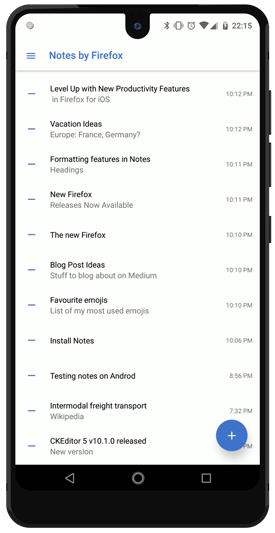

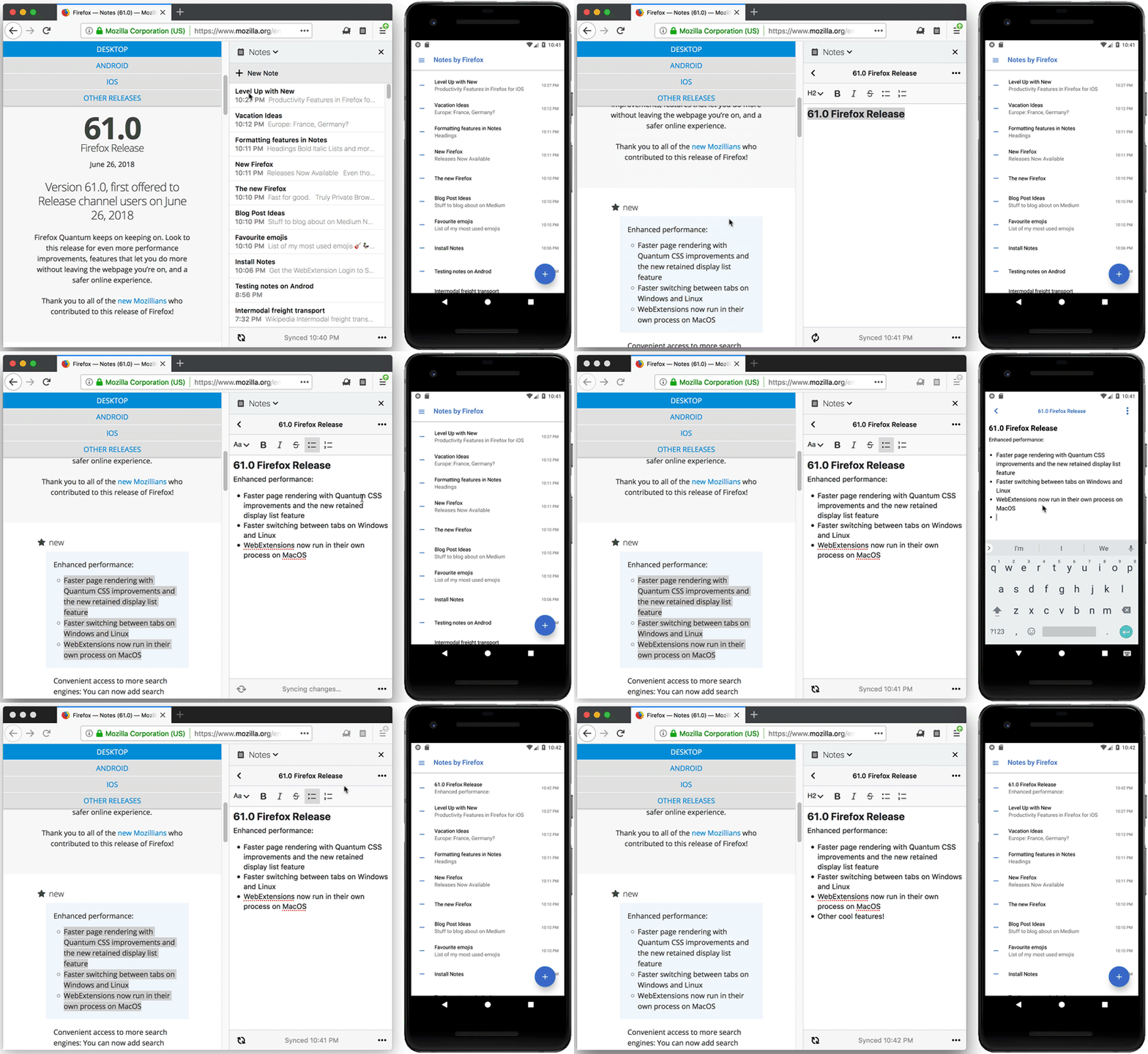
The mobile companion application supports the same multi-note and end-to-end encryption features as the WebExtension. After you sign in into the app, it will sync all your existing notes from Firefox desktop, so you can access them on the go. You can also use the app standalone, but we suggest you pair it with the WebExtension for maximum efficiency.
Please provide any feedback and share your experience using the “Feedback” button in the app drawer. This is one of the first mobile Test Pilot experiments and we would like to hear from you and understand your expectations for future Test Pilot mobile applications.
Updated WebExtension
We have also released a new update to WebExtension version of Notes.
The editor has been updated to the latest CKEditor 5 release. This brings improvements to Chinese, Japanese and Korean inputs into Notes. Other important fixes include:
- Improved line break support, pasted plain text now supports line breaks.
- Better font size display features.
- Updated toolbar icons.
Big thanks to CKEditor development team and our SoftVision QA team for making these releases happen! We would also like to extend our gratitude to our language localisation contributors, release manager Sylvestre Ledru, and open source contributors - S'ebastien Barbier and R'emy Hubscher.
Notes is available on Android was originally published in Firefox Test Pilot on Medium, where people are continuing the conversation by highlighting and responding to this story.
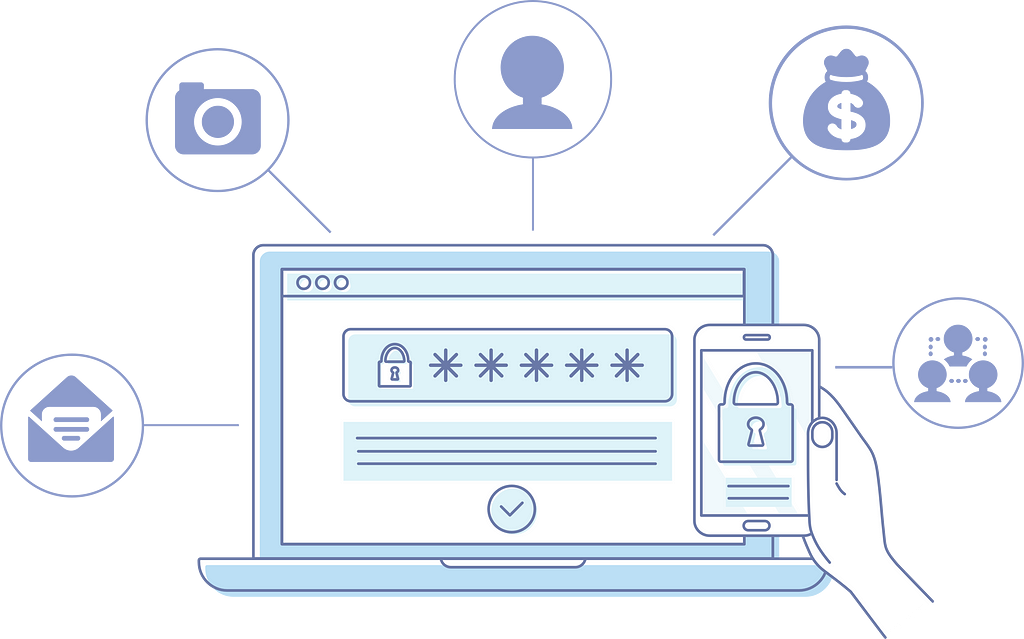
Firefox users, you can now easily access the passwords you save in the browser in a lightweight iOS app!
Download Firefox Lockbox from the App Store. Sign in with your Firefox Account, and your saved usernames and passwords will securely sync to your device using 256-bit encryption, giving you convenient access to your apps and websites, wherever you are. Find out more about the experiment on Firefox Test Pilot.
We have so many online accounts, and it’s hard to keep track of them all. The browser can save them, but they’re not always easy to find or access later, especially when trying to get into the same account on mobile. The Firefox Lockbox iOS app is our first experiment to help you find and use your passwords everywhere.
Take back control of your digital life with Firefox Lockbox.
Take your passwords everywhere with Firefox Lockbox was originally published in Firefox Test Pilot on Medium, where people are continuing the conversation by highlighting and responding to this story.
This summer, the Test Pilot team has been heads down working on experiments for our Firefox users. On the heels of our most recent and successful desktop Test Pilot experiments, Firefox Color and Side View, it was inevitable that the Test Pilot Program would expand to mobile.
Today, we’re excited to announce the first Test Pilot experiments for your mobile devices. With these two experiences, we are pushing beyond the boundaries of the desktop browser and into mobile apps. We’re taking the first steps toward bringing Mozilla’s mission of privacy, security and control to mobile apps beyond the browser.
What Are the New Mobile Test Pilot Experiments?
Firefox Lockbox for iOS – Take your passwords everywhere
Are you having a tough time keeping track of all the different passwords you’ve made for your online accounts? How many times have you had to reset a password you forgot? What do you do when you’ve saved a password on your desktop but have no way to access that online account on your mobile device? Look no further, we’ve created a simple app to take your passwords anywhere you go.
With Firefox Lockbox, iOS users will be able to seamlessly access Firefox saved passwords. This means you can use any password you’ve saved in the browser to log into any online account like your Twitter or Instagram app. No need to open a web page. It’s that seamless and simple. Plus, you can also use Face ID and Fingerprint touch to unlock the app, so you can safely access your accounts.
Notes by Firefox for Android – Simple, secure, note-taking anywhere
Jotting down quick notes is something many of us do everyday to keep track of our busy lives. Whether you’re on your desktop at home or at the office, or on the go with your mobile device, we want to make sure you’re able to access those notes wherever you are.
Notes by Firefox is a simple, secure place to take and store notes across your devices – desktop AND mobile. Now Firefox account users have the option to sync notes from any Firefox browser on any Android smartphone or tablet. Plus, your files are encrypted from end-to-end,, which means that only you can read them.
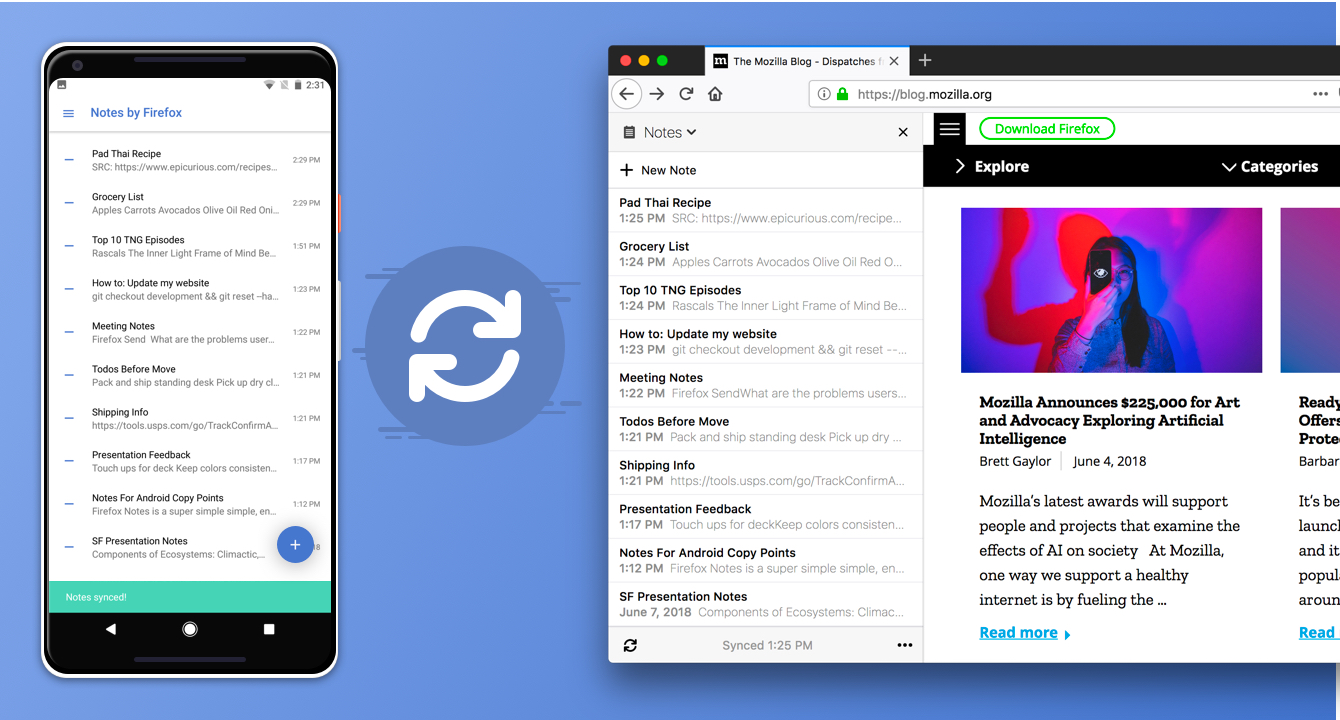
Sync notes from any Firefox browser on any Android smartphone or tablet
How do I get started?
The Test Pilot program is open to all Firefox users and helps us test and evaluate a variety of potential Firefox features. To activate the new Lockbox and Notes extensions, you must have a Firefox Account and Firefox Sync for full functionality.
If you’re familiar with Test Pilot then you know all our projects are experimental, so we’ve made it easy to give us feedback or disable features at any time from testpilot.firefox.com.
We’re committed to making your web browsing experience more efficient, and are excited for the even bigger mobile experiments still ahead.
Check out the new Firefox Lockbox and Notes by Firefox extensions and help us decide which new features to build into future versions of Firefox.
The post Introducing Firefox’s First Mobile Test Pilot Experiments: Lockbox and Notes appeared first on The Mozilla Blog.
Recent question about futures markets on software bugs: what's the business model?
As far as I can tell, there are several available models, just as there are multiple kinds of companies that can participate in any securities or commodities market.

Oracle operator: Read bug tracker state, write futures contract state, profit. This business would take an agreed-upon share of any contract in exchange for acting as a referee. The market won't work without the oracle operator, which is needed in order to assign the correct resolution to each contract, but it's possible that a single market could trade contracts resolved by multiple oracles.
Actively managed fund: Invest in many bug futures in order to incentivize a high-level outcome, such as support for a particular use case, platform, or performance target.
Bot fund: An actively managed fund that trades automatically, using open source metrics and other metadata.
Analytics provider: Report to clients on the quality of software projects, and the market-predicted likelihood that the projects will meet the client's maintenance and improvement requirements in the future.
Stake provider: A developer participant in a bug futures market must invest to acquire a position on the fixed side of a contract. The stake provider enables low-budget developers to profit from larger contracts, by lending or by investing alongside them.
Arbitrageur: Helps to re-focus development efforts by buying the fixed side of one contract and the unfixed side of another. For example, an arbitrageur might buy the fixed side of several user-facing contracts and the unfixed side of the contract on a deeper issue whose resolution will result in a fix for them.
Arbitrageurs could also connect bug futures to other kinds of markets, such as subscriptions, token systems, or bug bounties.
Previous items in the bug futures series:
Smart futures contracts on software issues talk, and bullshit walks?
Some ways that bug futures markets differ from prediction markets
Some ways that bug futures markets differ from open source bounties
Bugmark paper
A trading market to incentivize secure software: Malvika Rao, Georg Link, Don Marti, Andy Leak & Rich Bodo (PDF) (presented at WEIS 2018)
Bonus link
Corporate Prediction Markets: Evidence from Google, Ford, and Firm X (PDF) by Bo Cowgill and Eric Zitzewitz.
Despite theoretically adverse conditions, we find these markets are relatively efficient, and improve upon the forecasts of experts at all three firms by as much as a 25% reduction in mean squared error.
(This paper covers a related market type, not bug futures. However some of the material about interactions of market data and corporate management could also turn out to be relevant to bug
I recently migrated a bunch of stuff (including this website) to Amazon EC2, running on a FEMP (FreeBSD, nginx, MySQL, PHP) stack. I had to fiddle with a few things to get it running smoothly, and wanted to document the steps in case anybody else is trying to do this (or I need to do it again later). This assumes you have an Amazon AWS account and some familiarity with how to use it.
Before you start
Ensure you know what region and instance type you want. I used the Canada (Central) region but it should work the same in any other region. And I used a t2.micro instance type because I have a bunch of stuff running on the instance, but presumably you could use a t2.nano type if you wanted to go even lighter. Also, I'm using Amazon Route53 to handle the DNS, but if you have DNS managed separately that's fine too.
Upload your SSH public key
In the EC2 dashboard, select "Key Pairs" under the "Network and Security" section in the left pane. Click on "Import Key pair" and provide the public half of your SSH keypair. This will get installed into the instance so that you can SSH in to the instance when it boots up.
Create the instance
Select "Instances" in the EC2 dashboard, and start the launch wizard by clicking "Launch Instance". You'll find the FreeBSD images under "Community AMIs" if you search for FreeBSD using the search. Generally you want to grab the most recent FreeBSD release you can find (note: the search results are not sorted by recency). If you want to make sure you're getting an official image, head over to the freebsd-announce mailing list, and look for the most recent release announcement email. As of this writing it is 11.2-RELEASE. The email should contain AMI identifiers for all the different EC2 regions; for example the Canada AMI for 11.2-RELEASE is ami-a2f97bc6. Searching for that in the launch wizard finds it easily.
Next step is to select the instance type. Select one that's appropriate for your needs (I'm using t2.micro). The next step is to configure instance details. Unless you have specific changes you want to make here you can leave this with the default settings. Next you have to choose the root volume size. With my instances I like using a 10 GB root volume for the system and swap, and using a separate EBS volume for the "user data" (home folders and whatnot). For reference my 10G root volume is currently 54% full with the base system, extra packages, and a 2G swap file.
After that you can add tags if you want, change the security groups, and finally review everything. I just go with the defaults for the security groups, since it allows external SSH access and you can always change it later. Finally, time to launch! In the launch dialog you select the keypair from the previous step and you're off to the races.
Logging in
Once the instance is up, the EC2 console should display the public IP address. You'll need to log in with the user ec2-user at that IP address, using the keypair you selected previously. If you're paranoid about security (and you should be), you can verify the host key that SSH shows you by selecting the instance in the EC2 console, going to Actions -- Instance Settings -- Get Instance Screenshot. The screenshot should display the host keys as shown on the instance itself, and you can compare it to what SSH is showing to ensure you're not getting MITM'd.
Initial housekeeping
This part is sort of optional, but I like having a reasonable hostname and shell installed before I get to work. I'm going to use jasken.example.com as the hostname and I like using bash as my default shell. To do this, run the following commands:
su                                  # switch to root shell
sysrc hostname="jasken.example.com" # this modifies /etc/rc.conf
pkg update                          # update package manager
pkg install -y vim bash             # install useful packages
chsh -s /usr/local/bin/bash root    # change shell to bash for root and ec2-user
chsh -s /usr/local/bin/bash ec2-user
At this point I also like to reboot the machine (pretty much the only time I ever have to) because I've found that not everything picks up the hostname change if you change it via the hostname command while the instance is running. So run reboot and log back in once the instance is back up. The rest of the steps need root access so go ahead and su to root once you're back in.
IPv6 configuration
While you're rebooting, you can also set up IPv6 support. FreeBSD has everything built-in, you just need
Now that I'm alternating between two daily drivers (my Quad G5 and my Talos II), the Quad G5 sleeps fairly reliably with the Sonnet USB-FireWire combo card out once I move the KVM focus off it. If I don't do that, the KVM detects the G5 has slept and moves the focus automatically away from it, which the G5 detects as USB activity, and exits sleep. The solution is a little AppleScript that waits a few seconds for me to switch the KVM and then tells the Finder to snooze. The Talos II doesn't sleep yet but I'll be interested to see if later firmware updates support that.
But sleeping the G5 has unquestionably been a good thing. Not only does it prolong its life by reducing heat (another plus in summer) as well as saving a substantial amount of energy (around 20W sleeping versus 200-250W running), but sleeping also can speed up TenFourFox. If you have lots of tabs open and those tabs are refreshing their data or otherwise running active content, then this contributes to a greater need for garbage collection and this will slow down your user experience as this overhead accumulates. (This is why running TenFourFox from a "fresh" start is much faster than when it's been chugging away for awhile.) It's possible to "pause" TenFourFox to a certain extent but the browser really isn't tested this way and may not behave properly when this is done. Sleeping the Power Mac pauses everything, so the cruft in memory that garbage collection has to clean out doesn't pile up while you're not using the machine, and everything comes back up in sync.
A whole lot of stuff has landed for TenFourFox FPR9. More about that when the beta is out, which I'm hoping to do by the middle-end of July.
http://tenfourfox.blogspot.com/2018/07/pro-tip-sleeps-good-for-your-power-mac.html
I’m thrilled to welcome Sunil Abraham as Mozilla Foundation’s new VP, Leadership Programs. Sunil joins us from The Centre for Internet and Society, the most recent chapter in a 20 year career of developing free and open source software and an open internet agenda.
During our search we stated a goal of finding someone with “deep experience working on some aspect of internet health; and a proven track record building high impact organizations and teams.” In Sunil we have managed to find just that. An engineer by training, much of Sunil’s research and policy work has deep technical grounding. For example one of his current projects is doing a human rights review of various Internet Engineering Task Force (IETF) standards with Article 19. He has also founded and run two organizations: Mahiti, a non-profit software development shop; and The Centre for Internet and Society, a policy and technology think tank in Bangalore. Sunil is truly ‘of the movement’ and is perfectly positioned to help us build a strong cadre of internet health leaders all around the world.
Our global community is the linchpin in our strategy to grow a movement to create a healthier digital world. In this role, Sunil will head up the programs that bring people from around the world into our work — the Internet Health Report, MozFest, our fellowships and awards — with the aim of supporting people who want to take a leadership role in this community. In addition to a great passion for Mozilla’s mission and issues, Sunil also brings a tremendous amount of experience working on this kind of leadership development. He’s worked closely with Ashoka and the Open Society Foundation in developing leaders for many years. And, notably, the Centre for Internet and Society has been a home for many of the key players in India’s open internet space.
Sunil is starting out immediately as an advisor to Mozilla’s executive team and directors, working a few hours per week. He will move to Berlin and start full time in his new role in January 2019. We will be planning a community town hall to welcome Sunil to our community and give everyone a chance to connect with him. Look for more in September.
The post Welcoming Sunil Abraham – Mozilla Foundation’s New VP, Leadership Programs appeared first on The Mozilla Blog.
Firefox 61 has a great new feature on macOS, and I don’t think it’s getting enough attention. Maybe it’s not a big deal for most other users, but it is for me!
Firefox now supports the macOS share menu. This means you can send the current page you are viewing to another application. For instance, you can add a link to your Things 3 or Omnifocus inbox, add a page to Apple Notes, send a link to Evernote, send a link to someone using messages, or share a link to a social network.
To share a page in Firefox, open the Page Actions menu (aka. the three dots), and go to the Share menu.

http://ilias.ca/blog/2018/07/firefox-now-supports-the-macos-share-menu/
Greetings Mozillians!
We are happy to let you know that Friday, July 13th, we are organizing Firefox 62 Beta 8 Testday. We’ll be focusing our testing on 3-Pane Inspector and React animation inspector features.
Check out the detailed instructions via this etherpad.
No previous testing experience is required, so feel free to join us on #qa IRC channel where our moderators will offer you guidance and answer your questions.
Join us and help us make Firefox better!
See you on Friday!
https://quality.mozilla.org/2018/07/firefox-62-beta-8-testday-july-13th/
Disclaimer: I created PfP: Pain-free Passwords as a hobby, it could be considered a LastPass competitor in the widest sense. I am genuinely interested in the security of password managers which is the reason both for my own password manager and for this blog post on LastPass shortcomings.
TL;DR: LastPass fanboys often claim that a breach of the LastPass server isn’t a big deal because all data is encrypted. As I show below, that’s not actually the case and somebody able to compromise the LastPass server will likely gain access to the decrypted data as well.
A while back I stated in an analysis of the LastPass security architecture:
So much for the general architecture, it has its weak spots but all in all it is pretty solid and your passwords are unlikely to be compromised at this level.
That was really stupid of me, I couldn’t have been more wrong. Turned out, I relied too much on the wishful thinking dominating LastPass documentation. January this year I took a closer look at the LastPass client/server interaction and found a number of unpleasant surprises. Some of the issues went very deep and it took LastPass a while to get them fixed, which is why I am writing about this only now. A bunch of less critical issues remain unresolved as of this writing, so that I cannot disclose their details yet.
Cracking the encryption
In 2015, LastPass suffered a security breach. The attackers were able to extract some data from the server yet LastPass was confident:
We are confident that our encryption measures are sufficient to protect the vast majority of users. LastPass strengthens the authentication hash with a random salt and 100,000 rounds of server-side PBKDF2-SHA256, in addition to the rounds performed client-side. This additional strengthening makes it difficult to attack the stolen hashes with any significant speed.
What this means: anybody who gets access to your LastPass data on the server will have to guess your master password. The master password isn’t merely necessary to authenticate against your LastPass account, it also allows encrypting your data locally before sending it to the server. The encryption key here is derived from the master password, and neither is known to the LastPass server. So attackers who managed to compromise this server will have to guess your master password. And LastPass uses PBKDF2 algorithm with a high number of iterations (LastPass prefers calling them “rounds”) to slow down verifying guesses. For each guess one has to derive the local encryption key with 5,000 PBKDF2 iterations, hash it, then apply another 100,000 PBKDF2 iterations which are normally added by the LastPass server. Only then can the result be compared to the authentication hash stored on the server.
So far all good: 100,000 PBKDF2 iterations should be ok, and it is in fact the number used by the competitor 1Password. But that protection only works if the attackers are stupid enough to verify their master password guesses via the authentication hash. As mentioned above, the local encryption key is derived from your master password with merely 5,000 PBKDF2 iterations. And it is used to encrypt various pieces of data: passwords, private RSA keys, OTPs etc. The LastPass server stores these encrypted pieces of data without any additional protection. So a clever attacker would guess your master password by deriving the local encryption key from a guess and trying to decrypt some data. Worked? Great, the guess is correct. Didn’t work? Try another guess. This approach speeds up guessing master passwords by factor 21.
So, what kind of protection do 5,000 PBKDF2 iterations offer? Judging by these numbers, a single GeForce GTX 1080 Ti graphics card (cost factor: less than $1000) can be used to test 346,000 guesses per second. That’s enough to go through the database with over a billion passwords known from various website leaks in barely more than one hour. And even if you don’t use any of the common passwords, it is estimated that the average password strength is around 40 bits. So on average an attacker would need to try out half of 240 passwords before hitting the right one, this can be achieved in roughly 18 days. Depending on who you are, spending that much time (or adding more graphics cards) might be worth it.

Each word in the dictionary has a frequency associated with it, for example, the top words in the English dictionary are:
WordFrequency
the 222
of 214
and 212
in 210
a 208
to 208
Last week Firefox 62 moved into the Beta channel. This version has fewer additions and changes to the WebExtensions API than the last several releases. Part of that is due to the maturing nature of the API as we get farther away from the WebExtension API cutover back in release 57, now over seven months ago. Part of it was a focus on cleaning up some internal features — code changes that increase the maintainability of Firefox but are not visible to external developers. And, let’s be honest, part of it is the arrival of summer in the Northern hemisphere, resulting in happy people taking time to enjoy life outside of browser development.
User Interface Improvements
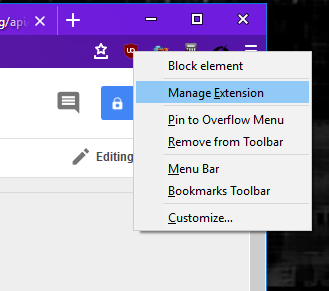
Extensions with a toolbar button (browser action) can now be managed directly from the context menu of the button. This is very similar to the behavior with page actions – simply right click on the toolbar button for an extension and select Manage Extension from the context menu. This will take you to the extension’s page in about:addons.
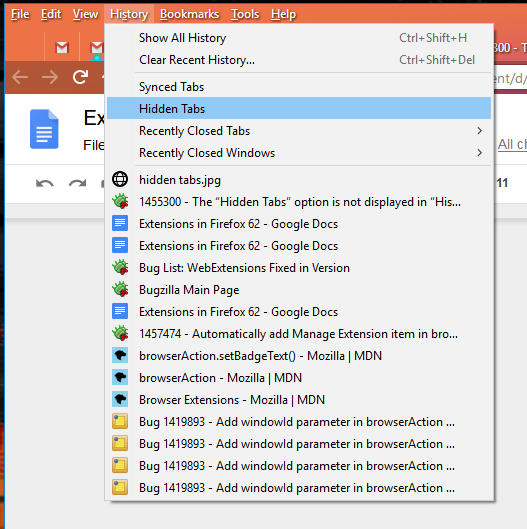
You can now manage hidden tabs, introduced in Firefox 61, via a down-arrow that is added to the end of the tab strip. When clicked, this icon will show all of your tabs, hidden and visible. Firefox 62 introduces a new way get to that same menu via the History item on the menu bar. If you have hidden tabs and select the History menu, it will display a submenu item called “Hidden Tabs.” Selecting that will take you to the normal hidden tabs menu panel.
API Improvements
A few enhancements to the WebExtensions API are now available in Firefox 62, including:
- An optional keyword, open_at_install, was added to sidebar actions. Extensions can now opt out of having the sidebar automatically shown when the extension is installed. If omitted, this parameter defaults to true to preserve existing behavior.
- Extensions can now get details about a TLS channel and certificates with the webRequest API. This enhancement provides a lot more information to security and privacy extensions.
- Browser action items such as the title, badge text, icon, background color and popup can now be specified on a per-window basis.
Theme Improvements
A couple of changes to the WebExtensions theme API landed in this release:
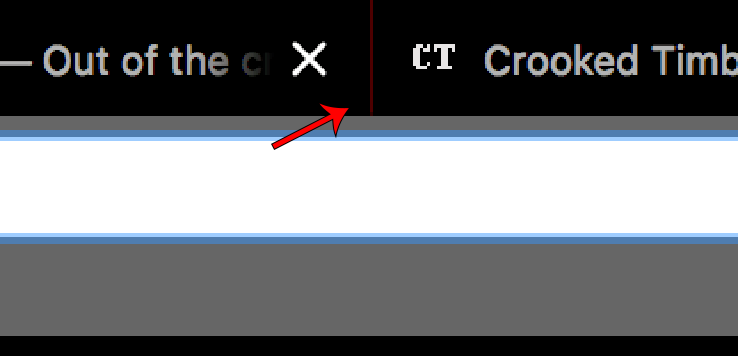
- Themes can now set tab_background_separator to specify the color of the separator between tabs.
- Usage of theme.getCurrent() no longer requires the `theme` permission. This means extensions that use the API to style themselves to match the current theme need fewer permissions. Extensions that set the theme, however, using theme.update() still require the theme permission.
Bug Fixes
A few noticeable bug fixes landed in Firefox release 62, including:
- Extensions that send a message to a background script at document_start now work correctly during browser startup.
- A number of bugs involving moving tabs between windows were fixed.
- The menus.onShown event now works properly in popups.
- A rare but extremely annoying painting issue with browser action popups was finally tracked down and fixed.
- browser.cookies.getall() was fixed for cases where the domain argument is set and firstPartyDomain is null.
- If you don’t include
In my last post I touched on the history and mission of the Engineering Workflow team, and I went into some of the challenges the team faces, which informed the creation of the team’s vision. In this post I’ll go into the vision itself.
First, a bit of a preamble to set context and expectations.
About the Vision
Members of the Engineering Workflow team have had many conversations with Firefox engineers, managers, and leaders across many years. The results of these conversations have led to various product decisions, but generally without a well-defined overarching direction. Over the last year we took a step back to get a more comprehensive understanding of the needs and inefficiencies in Firefox engineering. This enables us to lay out a map of where Engineering Workflow could go over the course of years, rather than our previous short-term approaches.
As I mentioned earlier, I couldn’t find much in the way of examples of tooling strategies to work from. However, there are many projects out there that have developed tooling and automation ecosystems that can provide ideas for us to incorporate into our vision. A notable example is the Chromium project, the open-source core of the Chrome browser. Aspects of their engineering processes and systems have made their way into what follows.
It is very important to understand that this vision, if not vision statements in general, is aspirational. I deliberately crafted it such that it could take many engineer-years to achieve even a large part of it. It should be something we can reference to guide our work for the foreseeable future. To ensure it was as comprehensive as possible, it was constructed without attention given to feasibility nor, therefore, the priority of its individual pieces. A road map for how to best approach the implementation of the vision for the most impact is a necessary next step.
The resulting vision is nine points laying out the ideal world from an Engineering Workflow standpoint. I’ll go through them one by one up to point four in this post, with the remaining five to follow.
The Engineering Workflow Vision
1. Checking out the full mozilla-central source is fast
The repository necessary for building and testing Firefox, mozilla-central, is massive. Cloning and updating the repo takes quite a while even for engineers located close by the central hg.mozilla.org servers; the experience for more distant contributors can be much worse. Furthermore, this affects our CI systems, which are constantly cloning the source to execute builds and tests. Thus there is a big benefit to making cloning and updating the Firefox source as fast as possible.
There are various ways to tackle this problem. We are currently working on geo-distributed mirrors of the source code that are at least read-only to minimize the distance the data has to travel to get onto your local machine. There is also work we can do to reduce the amount of data that needs to be fetched, by determining what data is actually required for a given task and using that to allow shallow and/or narrow clones.
There are other issues in the VCS space that hamper the productivity of both product and tooling engineers. One is our approach to branching. The various train, feature, and testing branches are in fact separate repositories altogether, stemming from the early days of the switch to Mercurial. This nonstandard approach is both confusing and inefficient. There are also multiple integration “branches”, in particular autoland and mozilla-inbound, which require regular merging which in turn complicates history.
Supporting multiple VCSes also has a cost. Although Mercurial is the core VCS for Firefox development, the rise of Git led to the development of git-cinnabar as an alternate avenue to interacting with Firefox source. If not a completely de juror solution, it has enough users to warrant support from our tools, which means extra work. Furthermore, it is still sufficiently different from Git, in terms of installation at least, to trip some contributors up. Ideally, we would have a single VCS in use throughout Firefox engineering, or at least a well-defined pipeline for contributions that allows smooth use of vanilla Git even if the core is still kept in Mercurial.
2. Source code and history is easily navigable
To continue from the previous point, the vast size of the Firefox codebase means that it can be quite tricky for even experienced engineers, let alone new contributors, to find
And another one gone, and another one gone (capitalization sic):
As Herwig Bauernfeind from Bitwise Works made clear in his presentation he gave at Warpstock 2018 Toronto, Firefox for OS/2 is on its way out for OS/2 after version 52 ESR. The primary reason is because Firefox is switching to RUST. Rust is a general purpose programming language sponsored by Mozilla Research. It is unlikely that RUST will ever be ported to OS/2.
Rust was the primary reason we dropped source parity for TenFourFox also (though there were plenty of other reasons such as changes to the graphics stack, the hard requirement for Skia, Electrolysis and changes to ICU; all of this could have been worked around, but with substantial difficulty, and likely with severe compromises). Now that Firefox 52ESR, the last ESR to not require Rust support, is on its last legs, this marks the final end of "Warpzilla" and Firefox on OS/2. SPARC (and apparently Solaris in general) doesn't have rustc or cargo support either, so this is likely the end of Firefox on any version of Solaris as well. Yes, I use Firefox on my Sun Ultra-3 laptop with Solaris 10. There are probably other minor platforms just hanging on that will wink out and disappear which I haven't yet discovered.
Every platform that dies is a loss to the technical diversity of the Mozilla community, no matter how you choose to put a happy face on it.
If you were trying to get a web browser up on a new platform these days, much as it makes me sick to say it, you'd probably be better off with WebKit rather than wrestle with Rust. Or NetSurf, despite its significant limitations, though I love the fact the project even exists. At least there's Rust for the various forms of PowerPC on Linux, including 64-bit and little-endian, so the Talos II can still run Firefox.
With FPR9 TenFourFox will switch to backporting security updates from Firefox 60ESR, though any last-minute chemspills to 52ESR will of course be reviewed promptly.
UPDATE 7/5: Someone in the discussion on Hacker News found that at least $12,650 was raised by the OS/2 community, and they're going to port a Qt based browser, which means ... WebKit. I told you so.
http://tenfourfox.blogspot.com/2018/07/another-one-bites-rust.html
 Event Telemetry is the means by which we can send ordered interaction data from Firefox users back to Mozilla where we can use it to make product decisions.
For example, we know from a histogram that the most popular way of opening the Developer Tools in Firefox Beta 62 is by the shortcut key (Ctrl+Shift+I). And it’s nice to see that the number of times the Javascript Debugger was opened was roughly 1/10th of the number of times the shortcut key was used.
…but are these connected? If so, how?
And the Javascript Profiler is opened only half as often as the Debugger. Why? Isn’t it easy to find that panel from the Debugger? Are users going there directly from the DOM view or is it easier to find from the Debugger?
To determine what parts of Firefox our users are having trouble finding or using, we often need to know the order things happen. That’s where Event Telemetry comes into play: we timestamp things that happen all over the browser so we can see what happens and in what order (and a little bit of how long it took to happen).
Event Telemetry isn’t new: it’s been around for about 2 years now. And for those two years it has been piggy-backing on the workhorse of the Firefox Telemetry system: the “main” ping.
The “main” ping carries a lot of information and is usually sent once per time you close your Firefox (or once per day, whichever is shorter). As such, Event Telemetry was constrained in how it was able to report this ordered data. It takes two whole days to get 95% of it (because that’s how long it takes us to get “main” pings), and it isn’t allowed to send more than one thousand events per process (lest it balloon the size of the “main” ping, causing problems).
This makes the data slow, and possibly incomplete.
With the landing of bug 1460595 in Firefox Nightly 63 last week, Event Telemetry now has its own ping: the “event” ping.
The “event” ping maintains the same 1000-events-per-process-per-ping limit as the “main” ping, but can send pings as frequently as one ping every ten minutes. Typically, though, it waits the full hour before sending as there isn’t any rush. A maximum delay of an hour still makes for low-latency data, and a minimum delay of ten minutes is unlikely to be overrun by event recordings which means we should get all of the events.
This means it takes less time to receive data that is more likely to be complete. This in turn means we can use less of it to get our answers. And it means more efficiency in our decision-making process, which is important when you’re competing against giants.
If you use Event Telemetry to answer your questions with data, now you can look forward to being able to do so faster and with less worry about losing data along the way.
And if you don’t use Event Telemetry to answer your questions, maybe now would be a good time to start.
The “event” ping landed in Firefox Nightly 63 (build id 20180627100027) and I hope to have it uplifted to Firefox Beta 62 in the coming days.
Thanks to :sunahsuh for her excellent work reviewing the proposal and in getting the data into the derived datasets so they can be easily queried, and further thanks to the Data Team for their support.
:chutten
https://chuttenblog.wordpress.com/2018/07/04/faster-event-telemetry-with-event-pings/
Hello, present and future Mozillians!
Last time we had a closer look at a metrics-based report analysis from the Analysen & Tal agency that took a deep dive into support.mozilla.org’s historical data.
Today, we are going to continue sharing external insights into our community and support model with a summary of the comparative study conducted for us by a team of the Copenhagen Institute of Interaction Design from Denmark. While we were not exactly looking for the essence of hygge, we found quite a few interesting nuggets of wisdom and inspiration that we’d like to share with you below. You can find the presentation here.
(Please note: this content has already been shared with the Support contributors on our forums, but now we are making it more public through this post).
The study’s goals were to help the Support team and community understand how Mozilla’s approach to helping users compares to other similar organizations, and what possible future approaches could help meeting the increasing demand for high quality help.
The methodology for the study was a mix of a series of interviews, case studies, and design explorations. The people interviewed came from external organizations and groups, as well as from Mozilla’s support community. The three entities chosen for the comparative study were the user communities around WordPress.org, Arduino, and Kaggle.
WordPress.org
In general, when compared to our Support community, WordPress.org’s is more centralized and controlled, even if on average among the three case studies it resembles our own structures the most.
The contribution forums and Slack channels are used to discuss and escalate important issues. Similarly to /r/firefox, there is also an active subreddit for WordPress that’s self-moderated and open to non-support content, if necessary. Slack seems to be a place for fruitful conversations, so we may be exploring this idea in the near future for more engaged contributors.
Another interesting aspect is that the support site, apart from community-owned-and-driven support, offers full time employees of Automattic/Wordpress.com a chance to do rotations in the open source community. This, while tried by us in the past, has not been something we have considered as a long-standing project, but it could drive more engagement and knowledge share on all levels.
The primary incentives for contribution seem to be status and connecting with others, which we understand to be also present in our own community. However, we still need to get better at identifying the incentives for joining and staying as a long-term Support contributors to continue delivering community-driven support at scale.
Arduino
Arduino’s support community, focusing on a plethora of open source software and hardware uses “in the wild”, is definitely way more decentralized and ad hoc in its practices than Mozilla’s Support.
The nature of the environment in which the community operates makes a concentrated and concerted support effort much harder, but the main activity happens across the official community forum, a StackExchange Q&A forum, and Arduino’s main Project Hub.
At the time of the study, the community forum show little conscious effort in organization from Arduino’s staff, serving a more social function with its open nature. On the other hand, the StackExchange based support forum has a well developed peer-driven reputation system, with the community moderators being voted in and gaining access and privileges based on their long-standing contributions. The StackExchange model is by far more successful and useful for support in Arduino’s case.
Finally, the Project Hub is a content creation and maintenance space that centers support-related content (for example documentation and instructables) around specific projects. Quality content is encouraged by official contests and rewards for contributors. Additionally, language and interactions presented on the site encourage a positive and inclusive community approach. As a result and thanks to the self-learning and guided aspect of using Arduino products, quality content is easier to find and produce.
Kaggle
Kaggle’s community model is an unusual hybrid of competitiveness and collaboration,