Git-cinnabar is a git remote helper to interact with mercurial repositories. It allows to clone, pull and push from/to mercurial remote repositories, using git.
These release notes are also available on the git-cinnabar wiki.
What’s new since 0.5.0 beta 3?
- Fixed incompatibility with Mercurial 3.4.
- Performance and memory consumption improvements.
- Work around networking issues while downloading clone bundles from Mozilla CDN with range requests to continue past failure.
- Miscellaneous metadata format changes.
- The prebuilt helper for Linux now works across more distributions (as long as libcurl.so.4 is present, it should work)
- Updated git to 2.18.0 for the helper.
- Properly support the
pack.packsizelimitsetting. - Experimental support for initial clone from a git repository containing git-cinnabar metadata.
- Changed the default make rule to only build the helper.
- Now can successfully clone the pypy and GNU octave mercurial repositories.
- More user-friendly errors.
The web is a gamer’s dream. It works on any device, can connect players across the globe, and can run a ton of games—from classic arcade games to old-school computer … Read more
The post Get your game on, in the browser appeared first on The Firefox Frontier.
https://blog.mozilla.org/firefox/get-your-game-on-in-the-browser/
As I mentioned previously, the Mixed Reality "virus" has caught me recently and I spend a good portion of my Mozilla contribution time with presenting and writing demos for WebVR/XR nowadays.
The prime driver for writing my first such demo was that I wanted to do something meaningful with A-Frame. Previously, I had only played around with the Hello WebVR example and some small alterations around the basic elements seen in that one, which is also pretty much what I taught to others in the WebVR workshops I held in Vienna last year. Now, it was time to go beyond that, and as I had recently bought a HTC Vive, I wanted something where the controllers could be used - but still something that would fall back nicely and be usable in 2D mode on a desktop browser or even mobile screens.
While I was thinking about what I could work on in that area, another long-standing thought crossed my mind: How feasible is it to render OpenStreetMap (OSM) data in 3D using WebVR and A-Frame? I decided to try and find out.
First, I built on my knowledge from Lantea Maps and the fact that I had a tile cache server set up for that, and created a layer of a certain set of tiles on the ground to for the base. That brought me to a number of issue to think about and make decisions on: First, should I respect the curvature of the earth, possibly put the tiles and the viewer on a certain place on a virtual globe? Should I respect the terrain, especially the elevation of different points on the map? Also, as the VR scene relates to real-world sizes of objects, how large is a map tile actually in reality? After a lot of thinking, I decided that this would be a simple demo so I would assume the earth is flat - both in terms of curvature or "the globe" and terrain, and the viewer would start off at coordinates 0/0/0 with x and z coordinates being horizontal and y the vertical component, as usual in A-Frame scenes. For the tile size, I found that with OpenStreetMap using Mercator projection, the tiles always stayed squares, with different sizes based on the latitude (and zoom level, but I always use the same high zoom there). In this respect, I still had to take account of the real world being a globe.
Once I had those tiles rendering on the ground, I could think about navigation and I added teleport controls, later also movement controls to fly through the scene. With W/A/S/D keys on the desktop (and later the fly controls), it was possible to "fly" underneath the ground, which was awkward, so I wrote a very simple "position-limit" A-Frame control later on, which prohibits that and also is a very nice example for how to build a component, because it's short and easy to understand.
All this isn't using OSM data per se, but just the pre-rendered tiles, so it was time to go one step further and dig into the Overpass API, which allows to query and retrieve raw geo data from OSM. With Overpass Turbo I could try out and adjust the queries I wanted to use ad then move those into my code. I decided the first exercise would be to get something that is a point on the map, a single "node" in OSM speak, and when looking at rendered maps, I found that trees seemed to fit that requirement very well. An Overpass query for "node[natural=tree]" later and some massaging the result into a format that JavaScript can nicely work with, I was able to place three-dimensional A-Frame entities in the places where the tiles had the symbols for trees! I started with simple brown cylinders for the trunks, then placed a sphere on top of them as the crown, later got fancy by evaluating various "tags" in the data to render accurate height, crown diameter, trunk circumference and even a different base model for needle-leaved trees, using a cone for the crown.
But to make the demo really look like a map, it of course needed buildings to be
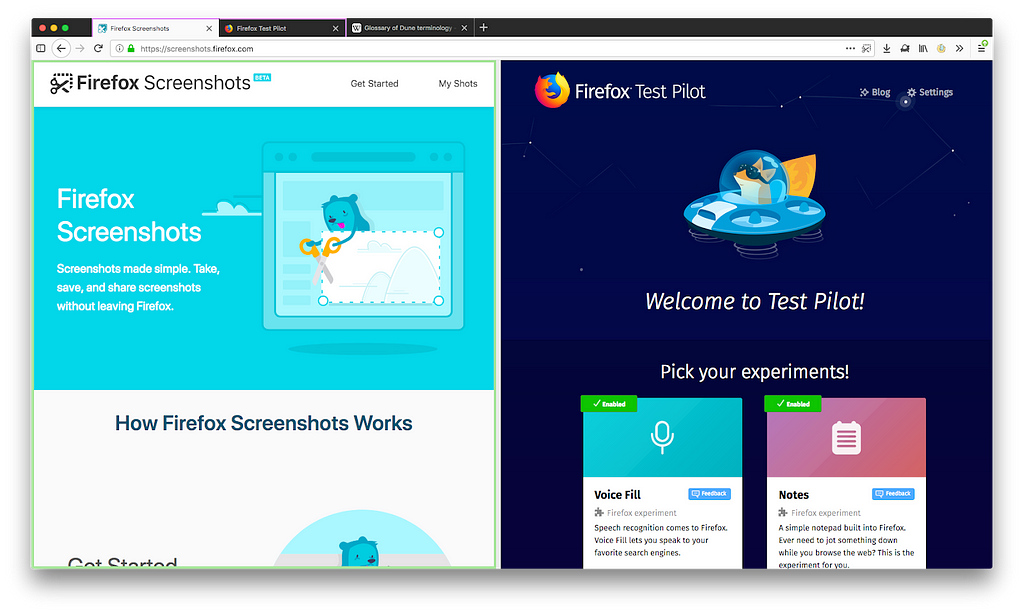
Side View is a new Firefox Test Pilot experiment which allows you to send any webpage to the Firefox sidebar, giving you an easy way to view two webpages side-by-side. It was released June 5 through the Test Pilot program, and we thought we would share with you some of the different approaches we tried while implementing this idea.
Beginnings — Tab Split
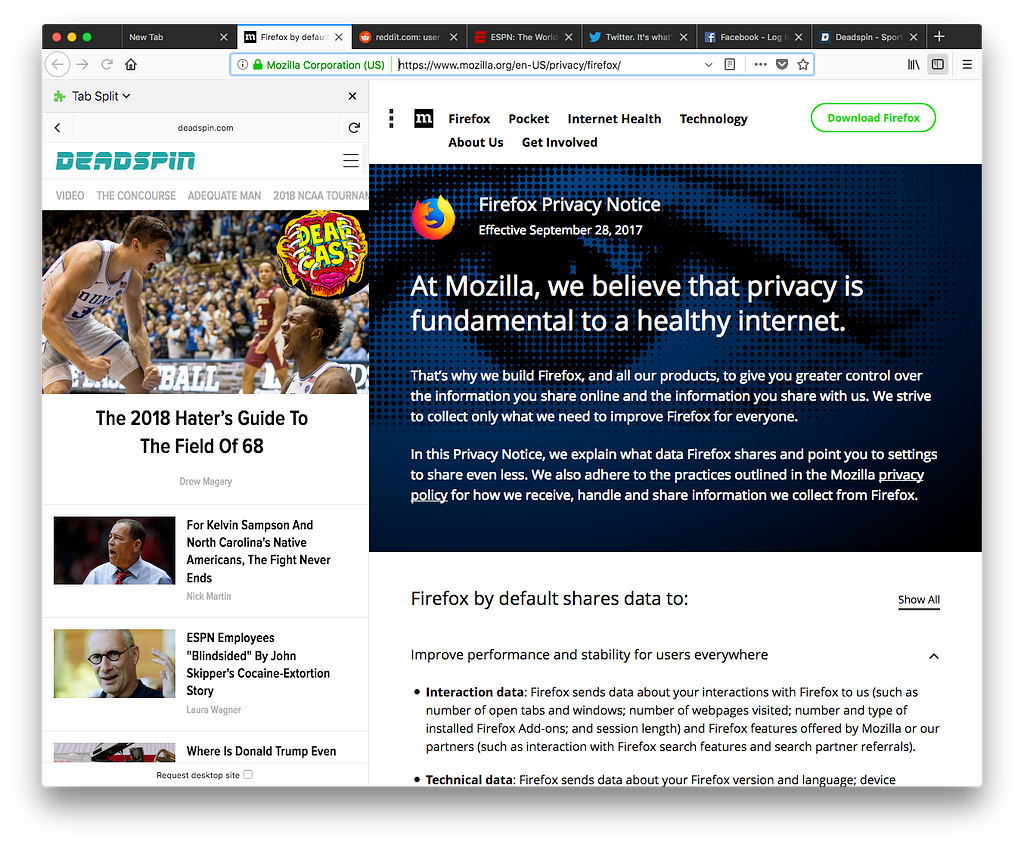
The history of Side View implementations goes back to the end of 2017, when a prototype implementation was completed as an old style XPCOM add-on. It was originally called Tab Split and the spec called for being able to split any tab into two, with full control over the URL bar and history for each side of the split. Clicking on either the left side or the right side of the split would focus that side, causing the URL bar, back button, and other controls to apply to that half of the split. The spec also originally mentioned being able to split the window either horizontally or vertically, but this feature may have made it difficult to understand which page the URL bar was referring to, so we decided to focus on only allowing viewing pages side-by-side.
Firefox Quantum
With the release of Firefox Quantum, XPCOM add-ons are no longer supported. We therefore needed to rewrite our prototype as a WebExtension. The implementation was simply an Embedded WebExtension API Experiment containing the entire previous XPCOM implementation. Our WebExtension wrapper handled the click on the browser action by calling a function exposed by the API Experiment which then called into the old XPCOM implementation. In this way, we quickly had a working WebExtension implementation that had all the capabilities of the old version. However, we encountered a bug in Firefox which broke all of the webExtension APIs if an embedded web extension experiment was loaded. This bug was eventually fixed, but we decided to see how far we could get with a pure WebExtension implementation since this entire implementation seemed prone to failure.
Tab Split 2: WebExtension Sidebar
WebExtension APIs are new standardized APIs which can be used to write web browser add-ons in a cross-browser way. They are supported by Chrome, Opera, Firefox, and Edge, although there are some APIs that are only available on specific browsers. Add-ons written using WebExtension APIs do not have as much freedom to modify the browser as XPCOM add-ons used to have. Therefore, we were not able to implement the user interface we had previously used where any number of tabs could be split into side by side pairs, with the focused side having control over the navigation bar user interface. However, WebExtensions are allowed to display a pane in the sidebar. We decided that we could show a web page in the sidebar with some of our user interface around it to allow the user to change the page that was being shown in the sidebar, since the sidebar webpage would not be able to use the browser’s navigation bar user interface as a normal webpage would. This limited the usefulness of navigating in the web page that was being shown in the sidebar, so any links that were clicked in the sidebar web page would be opened in a new tab instead of navigating the sidebar.
IFRAME troubles
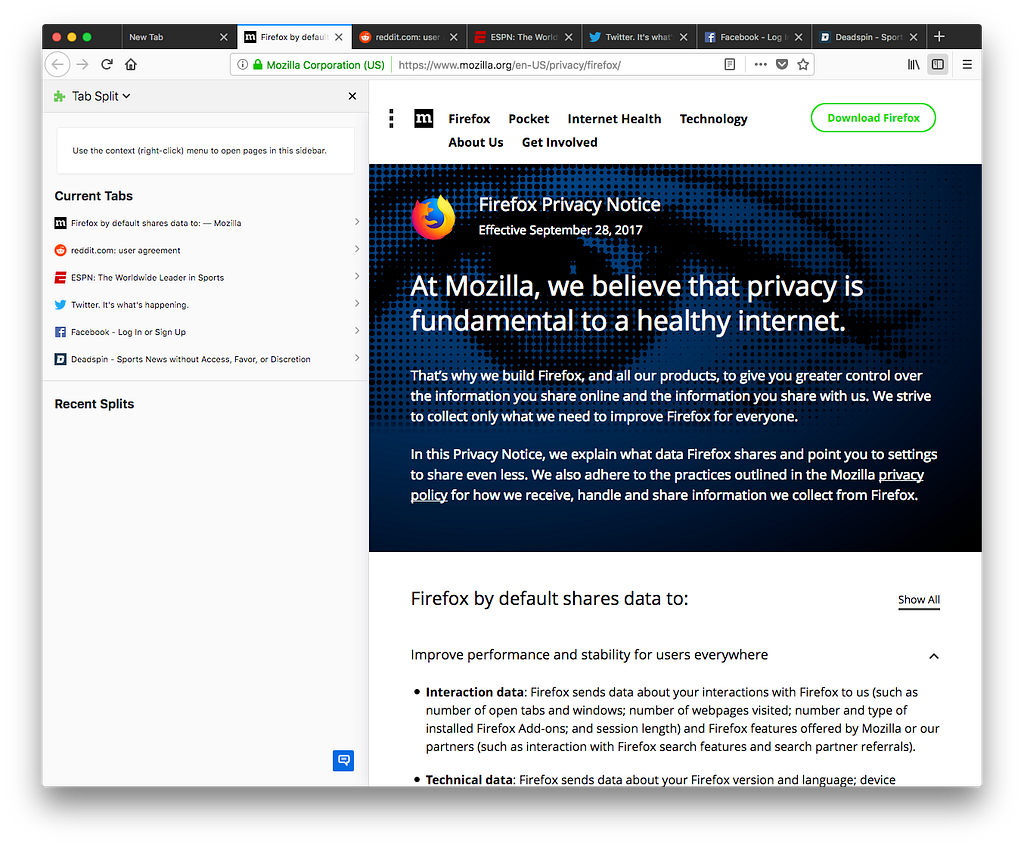
The WebExtension APIs allow a web extension to set the sidebar to a particular webpage. We needed some user interface in the sidebar, so the webpage we set it to was an HTML page inside our add-on which had a bar at the top showing the URL of the page currently being viewed with a back button, the actual webpage embedded using an iframe, and a bottom bar which contained some miscellaneous UI. We also had a Tab Split homepage which would appear when you first pressed the button. This home page showed you a list of all your current tabs and a list of tabs that you had recently sent to the sidebar, allowing you to choose one of them to be loaded in the sidebar.
However, the fact that our implementation required the sidebar webpage to be embedded in an iframe caused a large number of problems. Many webpages use frame busting techniques to detect if they are being embedded in a frame and attempt to prevent it. The original technique for frame busting involves checking whether window.top is equal to
the following changes have been pushed to bugzilla.mozilla.org:
- [1473726] WebExtensions bugs missing crash reports when viewed
- [1469911] Make user autocompletion faster
- [1328659] Add support for utf8=utf8mb4 (switches to dynamic/compressed row format, and changes charset to utf8mb4)
- [1472896] Update to Gear Store inventory dropdown
discuss these changes on mozilla.tools.bmo.

This week we landed a bunch of core features: in the browsers space, we landed WebVR support and immersive controllers; in the social area, added media tools to Hubs; and in the content ecosystem, we now have WebGL2 support on the WebGLRenderer in three.js.
Browsers
This week has been super exciting for the Firefox Reality team. We spent the last few weeks working on immersive WebVR support and it's finally here!
- Completed prototypes of immersive mode for WebVR support
- Implemented private browsing on the new UI
- Added mini tray
- Immersive mode for presentation is now implemented across the supported standalone headsets
- New controller models landed
- Support for asynchronous loading of models and textures
- Mapped out client side error pages for text only (DNS error, SSL certificate error, etc)
Here are two sneek peaks of Firefox Reality. First is support for entering and existing WebVR:
Quick enter and exit WebVR test in Firefox Reality from Imanol Fern'andez Gorostizaga on Vimeo.
The second is controller support:
Firefox Reality WebVR controllers from Imanol Fern'andez Gorostizaga on Vimeo.
Servo's Android support is receiving some care and attention. Not only can developers now build a real Android app locally that embeds Servo alongside a URL bar and other fundamental UI controls, but we can now support regression tests that verify that the Android port won't crash on startup. These important steps will allow us to work on more complicated Android embedding strategies with greater confidence in the future.
Social
We are making great progress towards adding new features on Hubs by Mozilla:
- Making improvements on the following: scene management and nested scenes, references, GLTF export, breadcrumb UI/UX, many bug fixes
- Demoed media tools (paste a URL: get an image, video, or model in the space) at Friday’s meetup. Finishing up polish and bugfixing on that and adding support for more content types.
- More progress on drawing tools, better geometry generation and networking implementation in place.
this right here, this is some good Internet pic.twitter.com/YBthWL5QAw
— Greg Fodor (@gfodor) July 6, 2018
Interested in joining our public Friday stand ups? For more details, join our public WebVR Slack #social channel to participate in on the discussion!
Content ecosystem
This week, we landed initial WebGL2 support to the WebGLRenderer in three.js!
Found a critical bug on the Unity WebVR exporter? File it in our public GitHub repo or let us know on the public WebVR Slack #unity channel and as always, join us in our discussion!
Stay tuned for new features and improvements across our three areas!
India is now one step away from having some of the strongest net neutrality regulations in the world. This week, the Indian Telecom Commission’s approved the Telecom Regulatory Authority of India’s (TRAI) recommendations to introduce net neutrality conditions into all Telecom Service Provider (TSP) licenses. This means that any net neutrality violation could cause a TSP to lose its license, a uniquely powerful deterrent. Mozilla commends this vital action by the Telecom Commission, and we urge the Government of India to move swiftly to implement these additions to the license terms.
Eight months ago,TRAI recommended a series of net neutrality conditions to be introduced in TSP licenses, which we applauded at the time. Some highlights of these regulations:
- Prohibit Telecom Service Providers from engaging in “any form of discrimination or interference” in the treatment of online content.
- Any deviance from net neutrality, including for traffic management practices, must be “proportionate, transient and transparent in nature.”
- Specialized services cannot be “usable or offered as a replacement for Internet Access Services;” and “the provision of the Specialised Services is not detrimental to the availability and overall quality of Internet Access Service.”
- The creation of a multistakeholder body to collaborate and assist TRAI in the monitoring and enforcement of net neutrality. While we must be vigilant that this body not become subject to industry capture, there are good international examples of various kinds of multi-stakeholder bodies working collaboratively with regulators, including the Brazilian Internet Steering Committee (CGI.br) and the Broadband Internet Technical Advisory Group (BITAG).
The Telecom Commissions’ approval is a critical step to finish this process and ensure that not just differential pricing (prohibited through regulations in 2016) but other forms of differential treatment are also restricted by law. Mozilla has engaged at each step of the two and half years of consultations and discussions on this topic (see our filings here), and we applaud the Commission for taking this action to protect the open internet.
The post India advances globally leading net neutrality regulations appeared first on Open Policy & Advocacy.
https://blog.mozilla.org/netpolicy/2018/07/12/india-advances-net-neutrality/
Theming capabilities on addons.mozilla.org (AMO) will undergo significant changes in the coming weeks. We will be switching to a new theme technology that will give designers more flexibility to create their themes. It includes support for multiple background images, and styling of toolbars and tabs. We will migrate all existing themes to this new format, and their users should not notice any changes.
As part of this upgrade, we need to remove the theme preview feature on AMO. This feature allowed you to hover over the theme image and see it applied on your browser toolbar. It doesn’t work very reliably because image sizes and network speed can make it slow and unpredictable.
Given that the new themes are potentially more complex, the user experience is likely to worsen. Thus, we decided to drop this in favor of a simpler install and uninstall experience (which is also coming soon). The preview feature will be disabled starting today.
It’s only a matter of weeks before we release the new theme format on AMO. Keep following this blog for that announcement.
The post Upcoming changes for themes appeared first on Mozilla Add-ons Blog.
https://blog.mozilla.org/addons/2018/07/12/upcoming-changes-for-themes/
OverbiteNX, a successor to OverbiteFF which allows Firefox to continue to access legacy resources in Gopher in the
Because WebExtensions still doesn't have a TCP sockets API, nor a spec, OverbiteNX uses its bespoke Onyx native component to do network operations. Onyx is written in open-source portable C with no dependencies and is available in pre-built binaries for macOS 10.12+ and Windows (or get the repo and build it yourself on almost any POSIX system).
To try OverbiteNX, install Onyx from the links above, and then install the extension from Mozilla Add-ons. If you use(d) OverbiteWX, which is the proxy-based strict WebExtensions add-on, please disable it as it may conflict. Copious debugging output is emitted to the browser console for this test version. If you file an issue (or better still a pull request) on Github, please include the output so that we can see the execution trace.
http://tenfourfox.blogspot.com/2018/07/overbitenx-is-now-available-from.html
TL;DR: Is there research bringing together Software Analysis and Machine Translation to yield Machine Localization of Software?
I’m Telling You, There Is No Word For ‘Yes’ Or ‘No’ In Irish
from Brendan Caldwell
The art of localizing a piece of software with a Yes button is to know what that button will do. This is an example of software UI that makes assumptions on language that hold for English, but might not for other languages. A more frequent example in both UI and languages that are affecting is piecing together text and UI controls:

In the localization tool, you’ll find each of those entries as individual strings. The localizer will recognize that they’re part of one flow, and will move fragments from the shared string to the drop-down as they need. Merely translating the individual segments is not going to be a proper localization of that piece of UI.
If we were to build a rule-based machine localization system, we’d find rules like
gaelic-yes:
If the title of your dialog contains a verb, localize Yes by translating the found verb.pieced-ui:
For each variant,- Piece together the fragments of English to a single sentence
- Translate the sentences into the target language
- Find shared content in matching positions to the original layout
- Split each translated fragment, and adjust the casing and spacing
- Map the subfragments to the localization of the English individual fragments
Map the shared fragment to the localization of the English shared fragment
Now that’s rule-based, and it’d be tedious to maintain these rules. Neural Machine Translation (NMT) has all the buzz now, and Machine Learning in general. There is plenty of research that improves how NMT systems learn about the context of the sentence they’re translating. But that’s all text.
It’d be awesome if we could bring Software Analysis into the mix, and train NMT to localize software instead of translating fragments.
For Firefox, could one train on English and localized DOM? For Android’s XML layout, a similar approach could work? For projects with automated screenshots, could one train on those? Is there enough software out there to successfully train a neural network?
Do you know of existing research in this direction?
https://blog.mozilla.org/axel/2018/07/12/localization-translation-and-machines/
Since the launch of Firefox Focus as a content blocker for iOS in December 2015, we’ve continuously improved the now standalone browser for Apple and Android while always being mindful of users’ requests and suggestions. We analyze app store reviews and evaluate regularly which new features make our privacy browser even more user-friendly, efficient and secure. Today’s update for iOS and Android adds functionality to further simplify accessing information on the web. And we are happy to make Focus for Android available to a new group: BlackBerry Key2 users.
On point: find keywords easily with “Find in page” feature for all websites
Desktop browsing without the “search page” feature? Unthinkable! On mobile, it is now also super simple to find the content you’re looking for on a website: Open the Focus menu, select “Find in page” and enter your search term. Firefox Focus will immediately highlight any mention of your keyword or phrase on the site, including the count of instances. You can then use the handy arrow buttons to jump between the instances.
“Find in page” applies to all kinds of websites, no matter if they’re optimized for mobile browsing or not. Why are we pointing this out? Many users are still not completely comfortable browsing the web on their mobile devices because mobile, non-responsive versions of their favorite websites may not have the full range of features, are confusing or simply less appealing simplified versions of the desktop page, reduced to fit the smaller screen. As of today, Firefox Focus enables users to display the desktop page in such cases. Simply choose “request desktop page” in the browser menu to browse the more familiar desktop version of your favorite website.
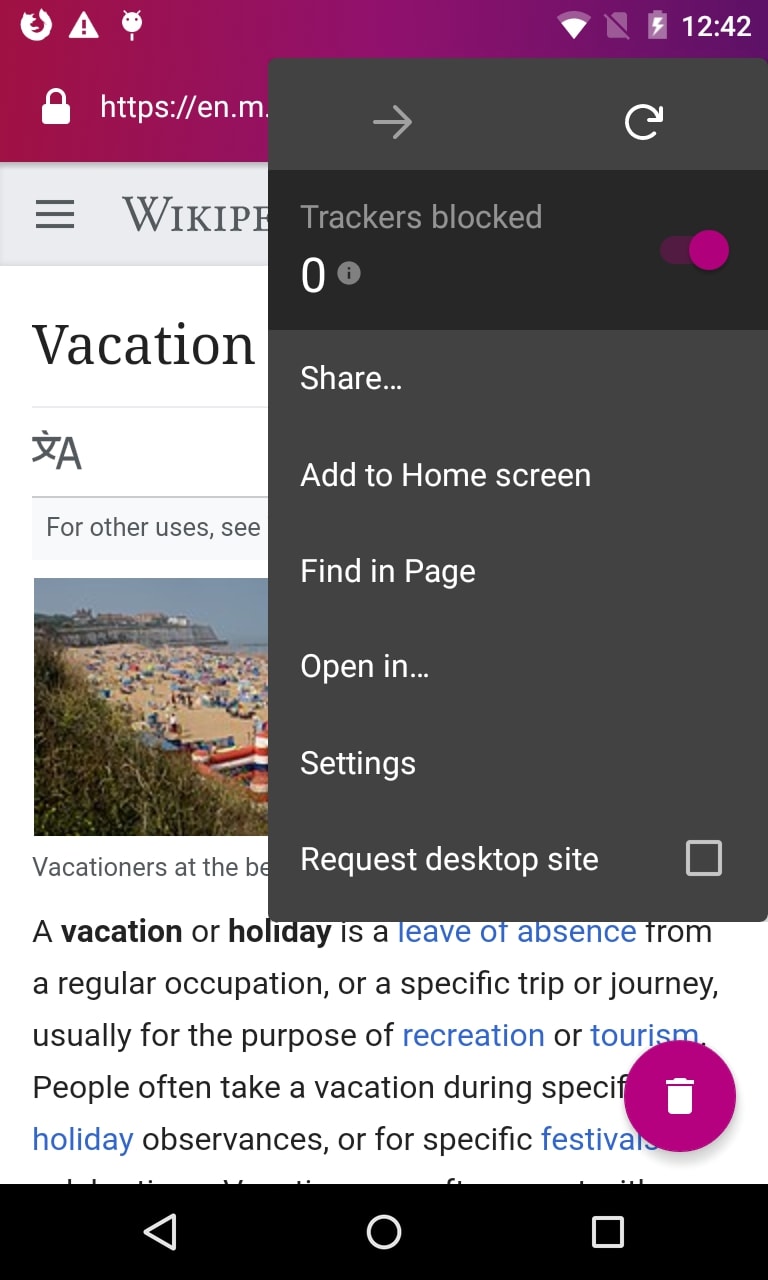
Find your search terms easily on mobile and desktop versions of your favorite websites
Make Focus your own — with Custom Tabs and biometric access features
Our intent with Firefox Focus is to give users the most comfortable browsing experience — by making them feel safe and protected, enabling them to enjoy intuitive navigation as well as an appealing design. A great example for how we ensure that is our support and continuous improvement of Custom Tabs. When opening links from some third-party apps, such as Twitter or Yelp, and when Focus is set as default browser on the respective device, Firefox Focus will display the corresponding page in the familiar look and feel of the original app, including menu colors and options. Now you can share this experience even faster with your friends. Just long press the URL to copy it to the clipboard for sharing or pasting elsewhere. Currently, this feature is available only to Android users.
iOS users will enjoy even more personalization with today’s version of Focus because they can now set Focus up to lock whenever it is backgrounded, and unlock only with a successful Face or Touch ID verification. This feature is common in banking apps, and provides another layer of security for browsing privacy by only allowing you, and no unauthorized user, to access your version of Focus.
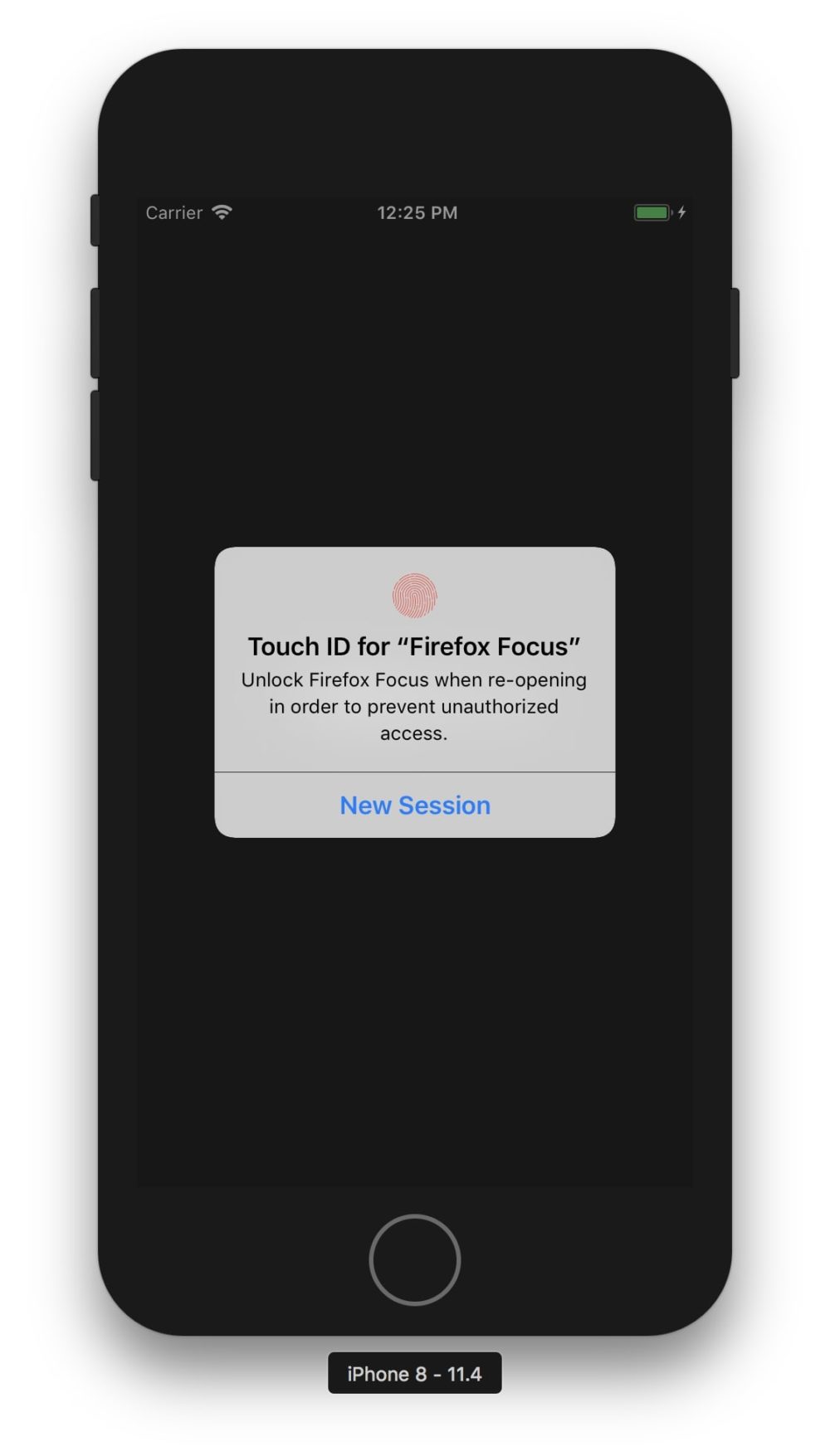
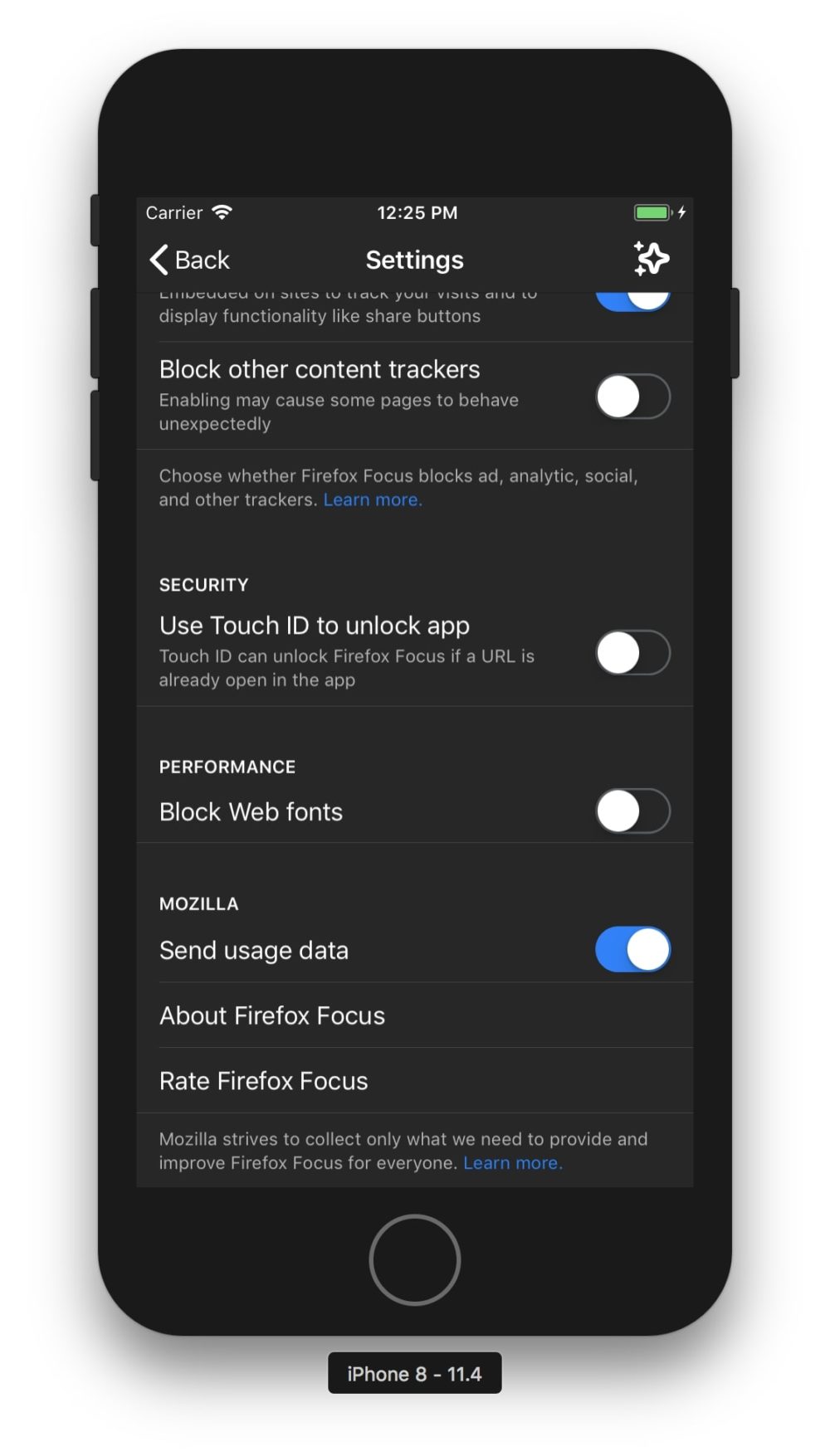
Unlock Firefox Focus via Touch or Face ID to add another layer of security to your private browsing experience.
A shout out to BlackBerry users
Recently, the BlackBerry KEY2 – manufactured by TCL Communication – was introduced, representing the most advanced Blackberry ever. Bringing Firefox’s features, functionality and choice to our users no matter how they browse is important to us. So we’re proud to announce that Firefox Focus is pre-installed as part of the Locker application found on the BlackBerry KEY2.
This data protection application, integrated into the KEY2 user experience, can only be opened by fingerprint or password, which makes it the ideal solution for securely storing sensitive
Mark C^ot'e has published a "vision for engineering workflow at Mozilla": part 2, part 3. It sounds really good. These are its points:
- Checking out the full mozilla-central source is fast
- Source code and history is easily navigable
- Installing a development environment is fast and easy
- Building is fast
- Reviews are straightforward and streamlined
- Code is landed automatically
- Bug handling is easy, fast, and friendly
- Metrics are comprehensive, discoverable, and understandable
- Information on “code flow” is clear and discoverable
Consider also Gitlab's advertised features:
- Regardless of your process, GitLab provides powerful planning tools to keep everyone synchronized.
- Create, view, and manage code and project data through powerful branching tools.
- Keep strict quality standards for production code with automatic testing and reporting.
- Deploy quickly at massive scale with integrated Docker Container Registry.
- GitLab's integrated CI/CD allows you to ship code quickly, be it on one - or one thousand servers.
- Configure your applications and infrastructure.
- Automatically monitor metrics so you know how any change in code impacts your production environment.
- Security capabilities, integrated into your development lifecycle.
One thing developers spend a lot of time on is completely absent from both of these lists: debugging! Gitlab doesn't even list anything debugging-related in its missing features. Why isn't debugging treated as worthy of attention? I genuinely don't know — I'd like to hear your theories!
One of my theories is that debugging is ignored because people working on these systems aren't aware of anything they could do to improve it. "If there's no solution, there's no problem." With Pernosco we need to raise awareness that progress is possible and therefore debugging does demand investment. Not only is progress possible, but debugging solutions can deeply integrate into the increasingly cloud-based development workflows described above.
Another of my theories is that many developers have abandoned interactive debuggers because they're a very poor fit for many debugging problems (e.g. multiprocess, time-sensitive and remote workloads — especially cloud and mobile applications). Record-and-replay debugging solves most of those problems, but perhaps people who have stopped using a class of tools altogether stop looking for better tools in the class. Perhaps people equate "debugging" with "using an interactive debugger", so when trapped in "add logging, build, deploy, analyze logs" cycles they look for ways to improve those steps, but not for tools to short-circuit the process. Update This HN comment is a great example of the attitude that if you're not using a debugger, you're not debugging.
http://robert.ocallahan.org/2018/07/why-isnt-debugging-treated-as-first.html
After nearly a decade of debate, the Brazilian Congress has just passed the Brazilian Data Protection Bill (PLC 53/2018). The following statement can be attributed to Mozilla COO Denelle Dixon:
“As a company that has fought for strong data protection around the world, Mozilla congratulates Brazilian lawmakers on their action to protect the rights of Brazilian users. At a time when privacy is at risk like never before, this law contains critical safeguards and will act as a powerful check on both companies and the government. We believe that individual security and privacy is fundamental and cannot be treated as optional, and this is a welcome and important step toward that goal.”
Mozilla’s previous statement supporting the Brazilian Data Protection Bill can be found here. The bill will now go to Brazilian President Michel Temer for his signature.
The post Mozilla applauds passage of Brazilian data protection law appeared first on Open Policy & Advocacy.
https://blog.mozilla.org/netpolicy/2018/07/11/mozilla-applauds-brazilian-data-protection-law/
Ever since a close encounter with burning out (thankfully, I didn't quite get there) forced me to leave my job with Mozilla more than two years ago, I have been looking for a place and role that feels good for me in the Mozilla community. I immediately signed up to join Tech Speakers as I always loved talking about Mozilla tech topics and after all breaking down complicated content and communicating it to different groups is probably my biggest strength - but finding the topics I want to present at conferences and other events has been a somewhat harder journey.
I knew I had to keep my distance to crash stats, despite knowing the area in and out and having developed some passion for it, but staying in the same area as a volunteer than in a job that almost burned me out was just not a good idea, from multiple points of view. I thought about building up some talks about working with data but it still was a bit too close to that past and not what I presently do a lot (I work in blockchain technology mostly today), so that didn't go far (but maybe it will happen at some point).
On the other hand, I got more and more interested in some things the Open Innovation group at Mozilla was doing, and even more in what the Emerging Technologies teams bring into the Mozilla and web sphere. My talk (slides) at this year's local "Linuxwochen Wien" conference was a very quick run-through of what's going on there and it's a whole stack of awesomeness, from Mixed Reality via codecs, Rust, Voice and whatnot to IoT. I would love to dig a bit into the latter but I didn't yet find the time.
What I did find some time for is digging into WebVR (now WebXR, where "XR" means "Mixed Reality") and the A-Frame library that Mozilla has created to make it dead simple to create your own VR/XR experiences. Last year I did two workshops in Vienna on that area, another one this year and I'm planning more of them. It's great how people with just some HTML knowledge can build something easily there as well as people who are more into JS programming, who can dig even deeper. And the immersiveness of VR with a real headset blows people away again and again in any case, so a good thing to show off.
While last year I only had cardboards with some left-over Sony Z3C phones (thanks to Mozilla) to show some basic 3DoF (rotation only) VR with low resolution, this proved to be interesting already to people I presented to or made workshops with. Now, this year I decided to buy a HTC Vive, seeing its price go down somewhat before the next generation of headsets would be shipped. (As a side note, I chose the Vive over the Rift because of Linux drivers being available and because I don't want to give money to Facebook.) Along with a new laptop with a high-end GPU that can drive the VR headset, I got into fully immersive 6DoF VR and, I have to say, got somewhat addicted to the experience.
I ran a demo booth with A-Painter at "Linuxwochen Wien" in May, and people were both awed at the VR experience and that this was all running in plain Firefox! Spreading the word about new web technologies can be really fun and rewarding with experiences like that! Next to showing demos and using VR myself, I also got into building WebVR/XR demos myself (I'm more the person to do demos and prototypes and spread the word, rather than building long-lasting products) - but I'll leave that to another blog post that will be upcoming very soon!
So, for the moment, I have found a place I feel very comfortable with in the community, doing demos and presentations about WebVR or "Mixed Reality" (still need to dig into AR but I don't have fitting hardware for that yet) as well as
We are very happy to announce the results of the 2018H1 Mozilla Research Grants. This was an extremely competitive process, with over 115 applicants. We selected a total of eight proposals, ranging from tools to fight online harassment to systems for generating speech. All these projects support Mozilla’s mission to make the Internet safer, more empowering, and more accessible.
The Mozilla Research Grants program is part of Mozilla’s Emerging Technologies commitment to being a world-class example of inclusive innovation and impact culture-and reflects Mozilla’s commitment to open innovation, continuously exploring new possibilities with and for diverse communities. We will open the 2018H2 round in Fall of 2018: see our Research Grant webpage for more details and to sign up to be notified when applications open.
| Principal Investigator | Institution | Department | Title |
| Jeff Huang | Texas A&M University | Department of Computer Science and Engineering | Predictively Detecting and Debugging Multi-threaded Use-After-Free Vulnerabilities in Firefox
|
| Eduardo Vicente Goncalves | Open Knowledge Foundation, Brazil | Data Science for Civic Innovation Programme | A Brazilian bot to read government gazettes and bills: Using NLP to empower citizens and civic movements
|
| Leah Findlater | University of Washington | Human Centered Design and Engineering | Task-Appropriate Synthesized Speech
|
| Laura James | University of Cambridge | Trustworthy Technologies Initiative | Trust and Technology: building shared understanding around trust and distrust
|
| Libby Hemphill | University of Michigan | School of Information and Institute for Social Research | Learning and Automating De-escalation Strategies in Online Discussions
|
| Pamela Wisniewski | University of Central Florida | Department of Computer Science | A Community-based Approach to Co-Managing Privacy and Security for Mozilla’s Web of Things
|
| Munmun De Choudhury | Georgia Institute of Technology | School of Interactive Computing | Combating Professional Harassment Online via Participatory Algorithmic and Data-Driven Research
|
| David Joyner | Georgia Institute of Technology | College of Computing | Virtual Reality for Classrooms-at-a-Distance in Online Education
|
Many thanks to all our applicants in this very competitive and high-quality round.
The post Mozilla Funds Top Research Projects appeared first on The Mozilla Blog.
https://blog.mozilla.org/blog/2018/07/11/mozilla-funds-top-research-projects/
Here’s a surprising fact: It costs money to watch video online, even on free sites like YouTube. That’s because about 4 in 5 videos on the web today rely on a patented technology called the H.264 video codec.
A codec is a piece of software that lets engineers shrink large media files and transmit them quickly over the internet. In browsers, codecs decode video files so we can play them on our phones, tablets, computers, and TVs. As web users, we take this performance for granted. But the truth is, companies pay millions of dollars in licensing fees to bring us free video.
It took years for companies to put this complex, global set of legal and business agreements in place, so H.264 web video works everywhere. Now, as the industry shifts to using more efficient video codecs, those businesses are picking and choosing which next-generation technologies they will support. The fragmentation in the market is raising concerns about whether our favorite web past-time, watching videos, will continue to be accessible and affordable to all.
A drive to create royalty-free codecs
Mozilla is driven by a mission to make the web platform more capable, safe, and performant for all users. With that in mind, the company has been supporting work at the Xiph.org Foundation to create royalty-free codecs that anyone can use to compress and decode media files in hardware, software, and web pages.
But when it comes to video codecs, Xiph.org Foundation isn’t the only game in town.
Over the last decade, several companies started building viable alternatives to patented video codecs. Mozilla worked on the Daala Project, Google released VP9, and Cisco created Thor for low-complexity videoconferencing. All these efforts had the same goal: to create a next-generation video compression technology that would make sharing high-quality video over the internet faster, more reliable, and less expensive.
In 2015, Mozilla, Google, Cisco, and others joined with Amazon and Netflix and hardware vendors AMD, ARM, Intel, and NVIDIA to form AOMedia. As AOMedia grew, efforts to create an open video format coalesced around a new codec: AV1. AV1 is based largely on Google’s VP9 code and incorporates tools and technologies from Daala, Thor, and VP10.
Why Mozilla loves AV1
Mozilla loves AV1 for two reasons: AV1 is royalty-free, so anyone can use it free of charge. Software companies can use it to build video streaming into their applications. Web developers can build their own video players for their sites. It can open up business opportunities, and remove barriers to entry for entrepreneurs, artists, and regular people. Most importantly, a royalty-free codec can help keep high-quality video affordable for everyone.
Source: Graphics & Media Lab Video Group, Moscow State University
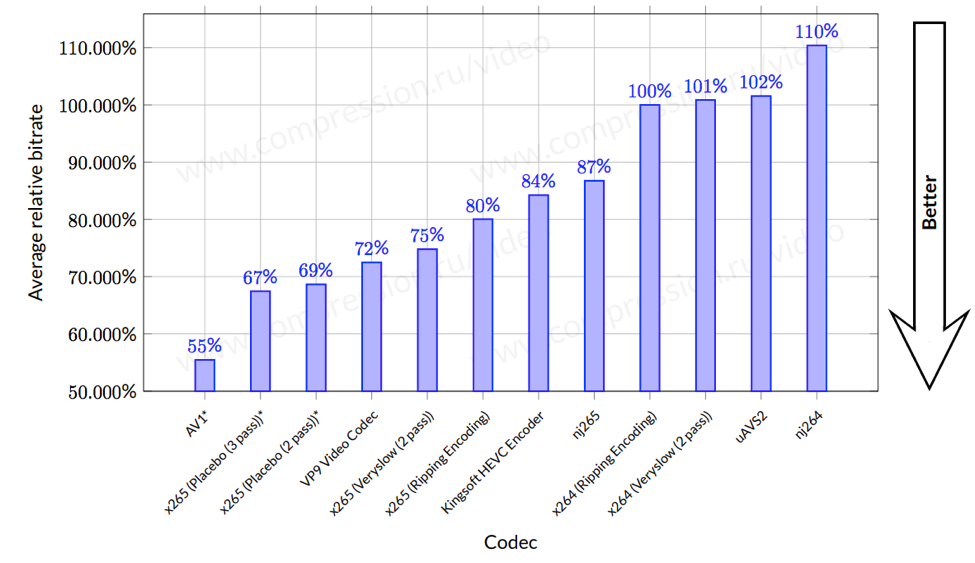
The second reason we love AV1 is that it delivers better compression technology than even high-efficiency codecs – about 30% better, according to a Moscow State University study. For companies, that translates to smaller video files that are faster and cheaper to transmit and take up less storage space in their data centers. For the rest of us, we’ll have access to gorgeous, high-definition video through the sites and services we already know and love.

Open source, all the way down
AV1 is well on its way to becoming a viable alternative to patented video codecs. As of June 2018, the AV1 1.0
Emails aren’t private, so much should be known by now. When you communicate via email, the contents are not only visible to yours and the other side’s email providers, but potentially also to numerous others like the NSA who intercepted your email on the network. Encrypting emails is possible via PGP or S/MIME, but neither is particularly easy to deploy and use. Worse yet, both standard were found to have security deficits recently. So it is not surprising that people and especially companies look for better alternatives.
It appears that the German company FTAPI gained a good standing in this market, at least in Germany, Austria and Switzerland. Their website continues to stress how simple and secure their solution is. And the list of references is impressive, featuring a number of known names that should have a very high standard when it comes to data security: Bavarian tax authorities, a bank, lawyers etc. A few years ago they even developed a “Secure E-Mail” service for Vodafone customers.
I now had a glimpse at their product. My conclusion: while it definitely offers advantages in some scenarios, it also fails to deliver the promised security.
Quick overview of the FTAPI approach
The primary goal of the FTAPI product is easily exchanging (potentially very large) files. They solve it by giving up on decentralization: data is always stored on a server and both sender and recipient have to be registered with that server. This offers clear security benefits: there is no data transfer between servers to protect, and offering the web interface via HTTPS makes sure that data upload and download are private.
But FTAPI goes beyond that: they claim to follow the Zero Knowledge approach, meaning that data transfers are end-to-end encrypted and not even the server can see the contents. For that, each user defines their “SecuPass” upon registration which is a password unknown to the server and used to encrypt data transfers.
Why bother doing crypto in a web application?
The first issue is already shining through here: your data is being encrypted by a web application in order to protect it from a server that delivers that web application to you. But the server can easily give you a slightly modified web application, one that will steal your encryption key for example! With several megabytes of JavaScript code executing here, there is no way you will notice a difference. So the server administrator can read your emails, e.g. because of being ordered by the company management, the whole encryption voodoo didn’t change that fact. Malicious actors who somehow gained access to the server will have even less scruples of course. Worse yet, malicious actors don’t need full control of the server. A single Cross-site scripting vulnerability is sufficient to compromise the web application.
Of course, FTAPI also offers a desktop client as well as an Outlook Add-in. While I haven’t looked at either, it is likely that no such drawbacks exist there. The only trouble: FTAPI fails to communicate that encryption is only secure outside of the browser. The standalone clients are being promoted as improvements to convenience, not as security enhancements.
Another case of weak key derivation function
According to the FTAPI website, there is a whitepaper describing their SecuTransfer 4.0 approach. Too bad that this whitepaper isn’t public, and requesting at least in my case didn’t yield any response whatsoever. Then again, figuring out the building blocks of SecuTransfer took merely a few minutes.
Your SecuPass is used as input to PBKDF2 algorithm in order to derive an encryption key. That encryption key can be used to decrypt your private RSA key as stored on the server. And the private RSA key in turn can be used to recover the encryption key for incoming files. So somebody able to decrypt your private RSA key will be able to read all your encrypted data stored on the server.
If somebody in control of the server wants to read your data, how do they decrypt your RSA key? Why, by guessing your SecuPass of course. While the advise is to choose a long password here, humans are very bad at choosing good passwords. In my
As we’ve previously blogged, lawmakers in the European Union are reflecting intensively on the problem of illegal and harmful content on the internet, and whether the mechanisms that exist to tackle those phenomena are working well. In that context, we’ve just filed comment with the European Commission, where we address some of the key issues around how to efficiently tackle illegal content online within a rights and ecosystem-protective framework.
Our filing builds upon our response to the recent European Commission Inception Impact Assessment on illegal content online, and has four key messages:
- There is no one-size-fits-all approach to illegal content regulation. While some solutions can be generalised, each category of online content has nuances that must be appreciated.
- Automated control solutions such as content filtering are not a panacea. Such solutions are of little value when context is required to assess the illegality and harm of a given piece of content (e.g. copyright infringement, ‘hate speech’).
- Trusted flaggers – non-governmental actors which have dedicated training in understanding and identifying potentially illegal or harmful content – offer some promise as a mechanism for enhancing the speed and quality of content removal. However, such entities must never replace courts and judges as authoritative assessors of the legality of content, and as such, their role should be limited to ‘fast-track’ notice procedures.
- Fundamental rights safeguards must be included in illegal content removal frameworks by design, and should not simply be patched on at the end. Transparency and due process should be at the heart of such mechanisms.
Illegal content is symptomatic of an unhealthy internet ecosystem, and addressing it is something that we care deeply about. To combat an online environment in which harmful content and activity continue to persist, we recently adopted an addendum to our Manifesto, where we affirmed our commitment to an internet that promotes civil discourse, human dignity, and individual expression. The issue is also at the heart of our recently published Internet Health Report, though its dedicated section on digital inclusion.
As a mission-driven not-for-profit and the steward of a community of internet builders, we can bring a unique perspective into this debate. Indeed, our filing seeks to firmly root the fight against illegal content online within a framework that is both rights-protective and attune with the technical realities of the internet ecosystem.
This is a really challenging policy space, to which we are committed to advancing progressive and sustainable policy solutions.
Read more:
- Mozilla response to European Commission public consultation on illegal content online
- Accompanying annex to Mozilla response to European Commission public consultation on illegal content online
The post Searching for sustainable and progressive policy solutions for illegal content in Europe appeared first on Open Policy & Advocacy.
https://blog.mozilla.org/netpolicy/2018/07/11/sustainable-policy-solutions-for-illegal-content/
Yet again we say hello to a new curl release that has been uploaded to the servers and sent off into the world. Version 7.61.0 (full changelog). It has been exactly eight weeks since 7.60.0 shipped.
Numbers
the 175th release
7 changes
56 days (total: 7,419)
88 bug fixes (total: 4,538)
158 commits (total: 23,288)
3 new curl_easy_setopt() options (total: 258)
4 new curl command line option (total: 218)
55 contributors, 25 new (total: 1,766)
42 authors, 18 new (total: 596)
1 security fix (total: 81)
Security fixes
SMTP send heap buffer overflow (CVE-2018-0500)A stupid heap buffer overflow that can be triggered when the application asks curl to use a smaller download buffer than default and then sends a larger file - over SMTP. Details.
New features
The trailing dot zero in the version number reveals that we added some news this time around - again.
More microsecond timersOver several recent releases we've introduced ways to extract timer information from libcurl that uses integers to return time information with microsecond resolution, as a complement to the ones we already offer using doubles. This gives a better precision and avoids forcing applications to use floating point math.
Bold headersThe curl tool now outputs header names using a bold typeface!
Bearer tokensThe auth support now allows applications to set the specific bearer tokens to pass on.
TLS 1.3 cipher suitesAs TLS 1.3 has a different set of suites, using different names, than previous TLS versions, an application that doesn't know if the server supports TLS 1.2 or TLS 1.3 can't set the ciphers in the single existing option since that would use names for 1.2 and not work for 1.3 . The new option for libcurl is called CURLOPT_TLS13_CIPHERS.
Disallow user name in URLThere's now a new option that can tell curl to not acknowledge and support user names in the URL. User names in URLs can brings some security issues since they're often sent or stored in plain text, plus if .netrc support is enabled a script accepting externally set URLs could risk getting exposing the privately set password.
Awesome bug-fixes this time
Some of my favorites include...
Resolver local host names fasterWhen curl is built to use the threaded resolver, which is the default choice, it will now resolve locally available host names faster. Locally as present in /etc/hosts or in the OS cache etc.
Use latest PSL and refresh it periodicallycurl can now be built to use an external PSL (Public Suffix List) file so that it can get updated independently of the curl executable and thus better keep in sync with the list and the reality of the Internet.
Rumors say there are Linux distros that might start providing and updating the PSL file in separate package, much like they provide CA certificates already.
fnmatch: use the system one if availableThe somewhat rare FTP wildcard matching feature always had its own internal fnmatch implementation, but now we've finally ditched that in favour of the system fnmatch() function for platforms that have such a one. It shrinks footprint and removes an attack surface - we've had a fair share of tiresome fuzzing issues in the custom fnmatch code.
axTLS: not considered fit for useIn an effort to slowly increase our requirement on third party code that we might tell users to build curl to use, we've made curl fail to build if asked to use the axTLS backend. This since we have serious doubts about the quality and commitment of the code and that project. This is just step one. If no one yells and fights for axTLS' future in curl going forward, we will remove all traces of axTLS support from curl exactly six months after step one was merged. There are plenty of other and better TLS backends to use!
Detailed in our new DEPRECATE document.
TLS 1.3 used by defaultWhen negotiating TLS version in the TLS handshake, curl will now allow TLS 1.3 by default. Previously you needed to explicitly allow that. TLS 1.3 support is not yet present everywhere so it will depend on the TLS library and its version